A new article has been published at prMac.
Radiologik radio automation brings voice work management - Published on 06/06/18
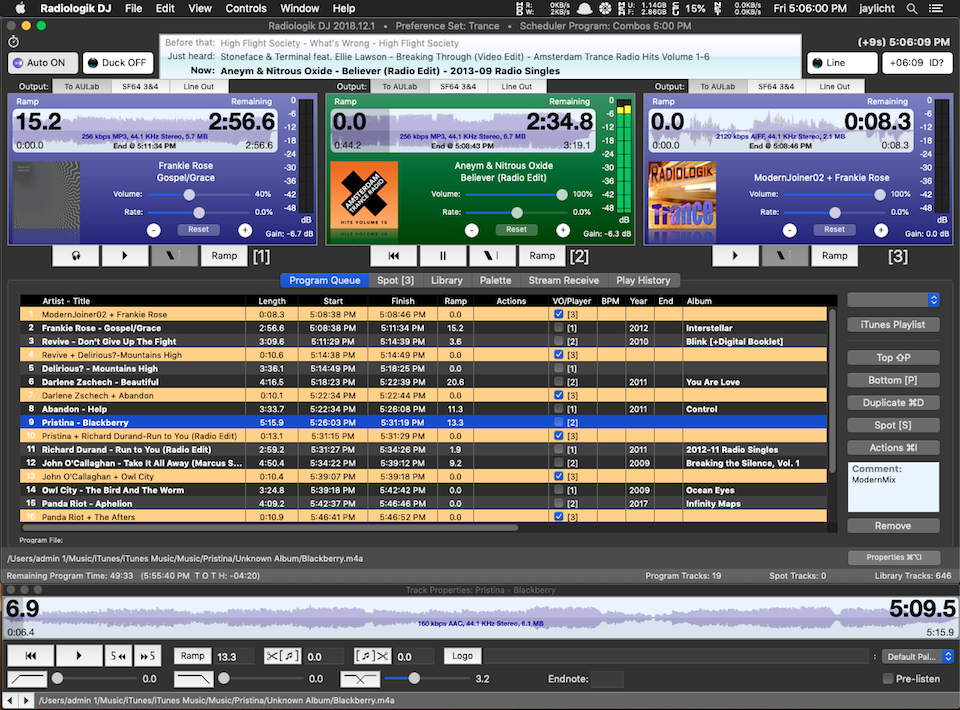
MacinMind Software, Inc. today releases Radiologik Scheduler 2018.5.1, an important update to their comprehensive radio performance and automation suite for macOS. A favorite for LPFM, college and internet broadcasters, Radiologik Scheduler 2018.5.1 introduces Intros and Outros, a tool to create, manage and test your voice work before it airs. Up to 10 varieties of intros or outros can be created per song, per artist or other criteria to give your station seemingly live DJ presence.
Antioch, Illinois - The most comprehensive radio performance and automation suite on the Mac keeps getting better. Radiologik Scheduler 2018.5.1 introduces Intros and Outros, a tool to create, manage and test your voice work before it airs. Up to 10 varieties of intros or outros can be created per song, per artist or other criteria to give your station seemingly live DJ presence. This new tools allows users to survey and create and test their voice work to be able to make hundreds or thousands of song-specific voice work additions to their station quickly and confidently.
In the past year, Radiologik has brought many new features such as the ability to schedule and play streams, independently schedules tasks, detect and act on silence with the new silence sensor, and handle the latest affordable mixers from D&R such as the Airlite and the Webstation, and work with the more sophisticated RBDS systems.
Radiologik has been time tested as a reliable fully autonomous or semi-automatic radio playout system for over 10 years. There's no need to do daily or weekly maintenance. It is well suited for the radio broadcasters who want a sophisticated schedule and sound while remaining affordable making it a favorite for LPFM, college and internet broadcasters.
As always, Radiologik DJ supports many outputs for audio, on and off-air previewing, several configurable metadata output methods, automatically logoing longer tracks with your station brand with the palette. Radiologik Scheduler Advanced gives you precise to-the-second control with support for scheduling advertising, matching dates, time announcements, multiple DJ voice support for different dayparts, and what many radio pros have called the best automatic tool for audio transitions, Track Prep.
Extensive training videos allow new and veteran users to learn how to get the most out of Radiologik. Free trials are available. The latest versions of Radiologik require Yosemite 10.10 or higher while legacy versions for 10.7 and higher are also available for those who wan to repurpose their old Mac as a station.
Radiologik Scheduler 2018.5.1: http://macinmind.com/?area=app&app=radiologik&pg=info
Download Scheduler: http://macinmind.com/?area=app&app=radiologik&pg=download
Purchase Scheduler: http://macinmind.com/?area=app&app=radiologik&pg=purchase
Training Videos: http://radiologik.com
Screenshot: http://macinmind.com/screenshots/RLMain.png
MacinMind Software has produced radio automation software for the Mac with personal support in the U.S. for over 10 years. Copyright (C) 2018 MacinMind Software, Inc. All Rights Reserved. Apple, the Apple logo and macOS are registered trademarks of Apple Inc. in the U.S. and/or other countries. Other trademarks and registered trademarks may be the property of their respective owners.
*******
Link To Article: https://prmac.com/release-id-82750.htm
*******
---------------------------------------------------------------------------------
Note that you can alter delivered distributions at any time.
Login to your account on prMac to alter your channel selection, or to opt-out at any time.

Packing Pro 13.0 Summer Update Adds Great Editing Options to Travel App
A new article has been published at prMac.
Packing Pro 13.0 Summer Update Adds Great Editing Options to Travel App - Published on 06/06/18
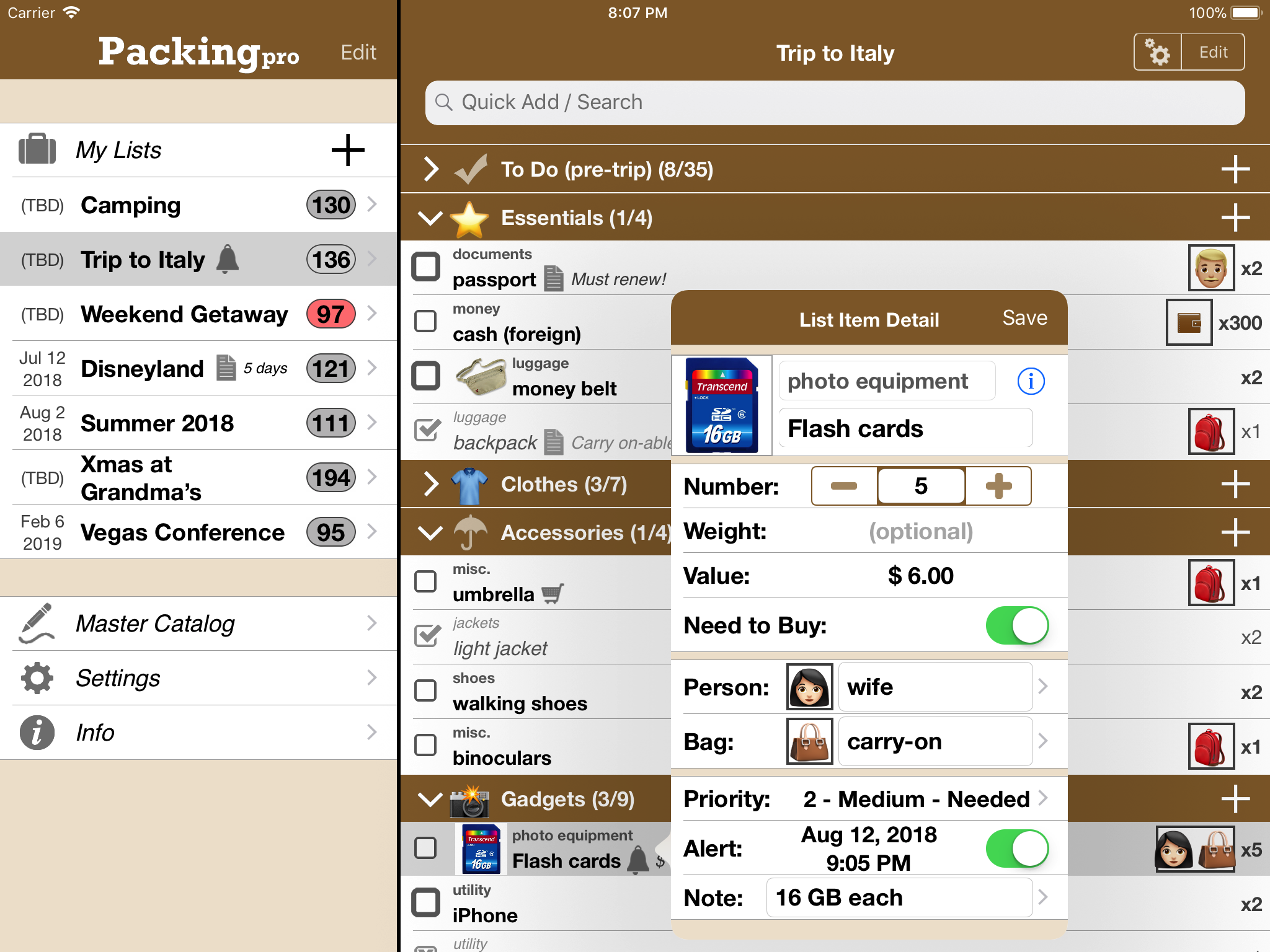
QuinnScape announces the release of Packing Pro 13.0, a big summer update that supports automatic sorting by date for packing lists and new options to move and copy list items between lists. Just in time for the busy summer travel season, Packing Pro is a mobile travel packing list app that features unlimited, 100% customizable packing lists, an extensive, yet flexible, catalog, handy sample lists, iCloud auto-sync and various list sharing options.
Taipei, Taiwan - QuinnScape announces the release of Packing Pro 13.0, a big summer update that supports automatic sorting by date for packing lists and new options to move and copy list items between lists. In addition, icons and emojis can now also be added to catalog types, in addition to the existing catalog categories. Date-sorted lists, and the ability to expand or collapse the current/future/past groupings, will greatly help to reduce the clutter for users with dozens of lists. Cross-list editing can also speed up the process of leveraging older lists to create and refine newer ones.
During the nine years that Packing Pro has been on Apple's App Store, it has been highlighted several times. Currently, it can be found in the "Travel Survival Kit" and "Travel Expenses" promotions. It has also ranked at #1 for iPads and #2 for iPhones in the U.S. App Store's Travel section. Besides Apple, Packing Pro has also been recognized by CNN, WSJ, BBC, The New York Times, Expedia and Budget Travel, and has earned glowing reviews on major tech and app blogs (Gizmodo, Mashable, Macworld, CNET and iPhone Life, among others).
Packing Pro is a mobile travel packing list app that features unlimited, 100% customizable packing lists, an extensive, yet flexible, catalog, handy sample lists, iCloud auto-sync and various list sharing options. A host of special functions include:
* Multi-item selection from catalog for speedy list building
* Multi-item editing for easy list & catalog management
* Collapsable categories with floating headers & running item tallies
* List sorting & filtering by packing status, priority, need to buy, bag and/or person
* Item, weight and value totals & subtotals
* Item images to eliminate any confusion - never again pack the wrong item
* Item & list alerts for user-set reminders
* Email export for file sharing
* Wireless printing
* Fully customized device support for all sizes of iPhone, iPod touch & iPad
* Full multi-lingual support for English, Spanish, French, German, Italian, Portuguese, Russian, Polish, Japanese & Chinese
Besides the core features listed above (which are also present in the basic Packing (+TO DO!) app), Packing Pro also gives its users the following Pro-level features:
* iCloud auto-syncing support
* Expert packing list wizard that can "automagically" create a list
* Email, iTunes, AirDrop, Dropbox & Box file sharing, backup & out-of-app editing support
* Customized design (themes, layout, fonts, colors, textures)
* Double-sized Master Catalog with over 800 items and to-do tasks
* Twice as many sample lists
* Smart Search (lists & catalog)
Packing Pro version 13.0 is an important update with great new sorting and editing features, just in time for the busy summer travel season. Check it out today, and happy travels!
Pricing and Availability:
Packing Pro is a universal app that is available for purchase worldwide on the iPhone & iPad App Store for $2.99 (USD), or the equivalent in local currency. The basic Packing (+TO DO!) sells for $0.99.
QuinnScape: http://www.quinnscape.com/
Packing Pro 13.0: http://www.quinnscape.com/PackingPro.asp
Purchase and Download: https://geo.itunes.apple.com/us/app/packing-pro/id312266675?mt=8&at=1l3v8Yv&pt=55410&ct=prmac
Video Demos: http://www.quinnscape.com/PackingPro-videodemo.asp
Screenshot: http://www.quinnscape.com/media/images/PackingPro-iPad-v12.4.png
App Icon: http://www.quinnscape.com/media/images/PackingPro-Icon-250x250.png
Since its founding in October 2008, QuinnScape has been managed by Quinn Genzel. Quinn is best known for his popular, top-ranking travel packing apps: Packing (+TO DO!) and Packing Pro. Packing Pro has been recognized by Apple, CNN, WSJ, BBC, National Geographic, Budget Travel, Fodor's, CNET, Macworld and a host of others as one of their top apps for traveling. Other app created by Quinn include a grocery shopping list app (Shopping Pro), nature appreciation apps (iLove Nature and iLove Birds), 3D VR action games (R.I.P and Ghost Buddy) and high-quality puzzles (the aQ's Pro Slider Puzzle series). Copyright (C) 2008-2018 QuinnScape. All Rights Reserved. Apple, the Apple logo, iPhone, iPod and iPad are registered trademarks of Apple Inc. in the U.S. and/or other countries.
*******
Link To Article: https://prmac.com/release-id-82749.htm
*******
---------------------------------------------------------------------------------
Note that you can alter delivered distributions at any time.
Login to your account on prMac to alter your channel selection, or to opt-out at any time.
Packing Pro 13.0 Summer Update Adds Great Editing Options to Travel App - Published on 06/06/18
QuinnScape announces the release of Packing Pro 13.0, a big summer update that supports automatic sorting by date for packing lists and new options to move and copy list items between lists. Just in time for the busy summer travel season, Packing Pro is a mobile travel packing list app that features unlimited, 100% customizable packing lists, an extensive, yet flexible, catalog, handy sample lists, iCloud auto-sync and various list sharing options.
Taipei, Taiwan - QuinnScape announces the release of Packing Pro 13.0, a big summer update that supports automatic sorting by date for packing lists and new options to move and copy list items between lists. In addition, icons and emojis can now also be added to catalog types, in addition to the existing catalog categories. Date-sorted lists, and the ability to expand or collapse the current/future/past groupings, will greatly help to reduce the clutter for users with dozens of lists. Cross-list editing can also speed up the process of leveraging older lists to create and refine newer ones.
During the nine years that Packing Pro has been on Apple's App Store, it has been highlighted several times. Currently, it can be found in the "Travel Survival Kit" and "Travel Expenses" promotions. It has also ranked at #1 for iPads and #2 for iPhones in the U.S. App Store's Travel section. Besides Apple, Packing Pro has also been recognized by CNN, WSJ, BBC, The New York Times, Expedia and Budget Travel, and has earned glowing reviews on major tech and app blogs (Gizmodo, Mashable, Macworld, CNET and iPhone Life, among others).
Packing Pro is a mobile travel packing list app that features unlimited, 100% customizable packing lists, an extensive, yet flexible, catalog, handy sample lists, iCloud auto-sync and various list sharing options. A host of special functions include:
* Multi-item selection from catalog for speedy list building
* Multi-item editing for easy list & catalog management
* Collapsable categories with floating headers & running item tallies
* List sorting & filtering by packing status, priority, need to buy, bag and/or person
* Item, weight and value totals & subtotals
* Item images to eliminate any confusion - never again pack the wrong item
* Item & list alerts for user-set reminders
* Email export for file sharing
* Wireless printing
* Fully customized device support for all sizes of iPhone, iPod touch & iPad
* Full multi-lingual support for English, Spanish, French, German, Italian, Portuguese, Russian, Polish, Japanese & Chinese
Besides the core features listed above (which are also present in the basic Packing (+TO DO!) app), Packing Pro also gives its users the following Pro-level features:
* iCloud auto-syncing support
* Expert packing list wizard that can "automagically" create a list
* Email, iTunes, AirDrop, Dropbox & Box file sharing, backup & out-of-app editing support
* Customized design (themes, layout, fonts, colors, textures)
* Double-sized Master Catalog with over 800 items and to-do tasks
* Twice as many sample lists
* Smart Search (lists & catalog)
Packing Pro version 13.0 is an important update with great new sorting and editing features, just in time for the busy summer travel season. Check it out today, and happy travels!
Pricing and Availability:
Packing Pro is a universal app that is available for purchase worldwide on the iPhone & iPad App Store for $2.99 (USD), or the equivalent in local currency. The basic Packing (+TO DO!) sells for $0.99.
QuinnScape: http://www.quinnscape.com/
Packing Pro 13.0: http://www.quinnscape.com/PackingPro.asp
Purchase and Download: https://geo.itunes.apple.com/us/app/packing-pro/id312266675?mt=8&at=1l3v8Yv&pt=55410&ct=prmac
Video Demos: http://www.quinnscape.com/PackingPro-videodemo.asp
Screenshot: http://www.quinnscape.com/media/images/PackingPro-iPad-v12.4.png
App Icon: http://www.quinnscape.com/media/images/PackingPro-Icon-250x250.png

Since its founding in October 2008, QuinnScape has been managed by Quinn Genzel. Quinn is best known for his popular, top-ranking travel packing apps: Packing (+TO DO!) and Packing Pro. Packing Pro has been recognized by Apple, CNN, WSJ, BBC, National Geographic, Budget Travel, Fodor's, CNET, Macworld and a host of others as one of their top apps for traveling. Other app created by Quinn include a grocery shopping list app (Shopping Pro), nature appreciation apps (iLove Nature and iLove Birds), 3D VR action games (R.I.P and Ghost Buddy) and high-quality puzzles (the aQ's Pro Slider Puzzle series). Copyright (C) 2008-2018 QuinnScape. All Rights Reserved. Apple, the Apple logo, iPhone, iPod and iPad are registered trademarks of Apple Inc. in the U.S. and/or other countries.
*******
Link To Article: https://prmac.com/release-id-82749.htm
*******
---------------------------------------------------------------------------------
Note that you can alter delivered distributions at any time.
Login to your account on prMac to alter your channel selection, or to opt-out at any time.
24U releases 24U SimpleTalk Plug-In 2.0 for the FileMaker 17 Platform
A new article has been published at prMac.
24U releases 24U SimpleTalk Plug-In 2.0 for the FileMaker 17 Platform - Published on 06/05/18
24U releases 24U SimpleTalk Plug-In 2.0 for the FileMaker 17 Platform. 24U SimpleTalk Plug-In allows FileMaker to use the TCP/IP Protocol for communicating with other TCP/IP capable applications. Customers can make their FileMaker Pro act like a server or a client. The server waits for a TCP/IP connection, and then performs custom commands and more. Version 2.0 now works on both 32-bit and 64-bit architectures, making it fully compatible with all flavors of FileMaker Pro 15, 16 and 17 Advanced.
Zvole, Czech Republic - 24U Software releases 24U SimpleTalk Plug-In 2.0. This plug-in now works on both 32-bit and 64-bit architectures, making it compatible with all flavors of FileMaker Pro 15, 16 an 17 Advanced.
What's new in this version:
* Added support for 64-bit architecture
* No delay after closing a server
* Function STalk_set visible in FM calculation dialogs
* Improved parsing parameters passed to STalk_Connect
* Improved license registration interface
About 24U SimpleTalk Plug-In:
24U SimpleTalk Plug-In allows FileMaker to use the TCP/IP protocol for communicating with other TCP/IP capable applications.
* Communicate through TCP/IP
* Act as a server/client
* Connect to your FileMaker custom app via Telnet
With 24U SimpleTalk Plug-In, customers can make their FileMaker Pro to act like a server or a client. The server waits for a TCP/IP connection, and then performs custom commands or calculations sent from the client.
Recommended configuration:
* Mac: Any Intel Mac with 4 GB RAM running macOS High Sierra 10.13 and FileMaker Pro 16 or newer
* Windows: 1.6 GHz processor, 4 GB RAM, Windows 8.1 or newer, FileMaker Pro 16 or newer
Minimum requirements:
* Mac: Mac with 2 GB RAM running Mac OS X 10.8 Mountain Lion and FileMaker Pro 12
* Windows: 1 GHz processor, 1 GB RAM, Windows Vista, FileMaker Pro 12
Pricing and Availability:
24U SimpleTalk Plug-In 2.0 is immediately available for download free of charge as a fully functional 14-days trial version, which can be activated after purchasing a license. Licenses for 24U SimpleTalk Plug-In start at $79 (USD) per user, volume discounts are available for 5 or more users. Existing customers can upgrade to the new version at 50 % off the regular prices if placing order within 14 days upon release, and 30 % off if buying later.
24U Software: http://www.24usoftware.com/
24U SimpleTalk Plug-In 2.0: https://www.24usoftware.com/SimpleTalk/
Download 24U SimpleTalk Plug-In: http://www.24uSoftware.com/SimpleTalk#download
Purchase: http://www.24uSoftware.com/SimpleTalk#buy
Media Assets: http://www.24usoftware.com/pr/
With a team of full-time testers, web, plug-in, Mac, Windows, Linux, iOS, and Android native app developers, and FileMaker certi ed developers, led by the FileMaker DevCon 2015 Developer Cup champion, 24U excels in taking care of existing FileMaker solutions, optimizing their performance, identifying and resolving potential issues and liabilities, improving reliability, stability and scalability, integrating them with other systems including various hardware devices, and extending them beyond expectation. As a platinum member of the FileMaker Business Alliance, we help global businesses around the world to maintain sustainable growth by working with their in-house developers or completely taking care of the maintenance and development of their (C) 2018 24U s.r.o. All rights reserved. 24U and 24U Softwareh are trademarks of 24U s.r.o. FileMaker is a trademark of FileMaker, Inc., registered in the U.S. and other countries. All other trademarks are the property of their respective
owners. Pricing and availability of services and products are subject to change without notice.
*******
Link To Article: https://prmac.com/release-id-82748.htm
*******
---------------------------------------------------------------------------------
Note that you can alter delivered distributions at any time.
Login to your account on prMac to alter your channel selection, or to opt-out at any time.
24U releases 24U SimpleTalk Plug-In 2.0 for the FileMaker 17 Platform - Published on 06/05/18
24U releases 24U SimpleTalk Plug-In 2.0 for the FileMaker 17 Platform. 24U SimpleTalk Plug-In allows FileMaker to use the TCP/IP Protocol for communicating with other TCP/IP capable applications. Customers can make their FileMaker Pro act like a server or a client. The server waits for a TCP/IP connection, and then performs custom commands and more. Version 2.0 now works on both 32-bit and 64-bit architectures, making it fully compatible with all flavors of FileMaker Pro 15, 16 and 17 Advanced.
Zvole, Czech Republic - 24U Software releases 24U SimpleTalk Plug-In 2.0. This plug-in now works on both 32-bit and 64-bit architectures, making it compatible with all flavors of FileMaker Pro 15, 16 an 17 Advanced.
What's new in this version:
* Added support for 64-bit architecture
* No delay after closing a server
* Function STalk_set visible in FM calculation dialogs
* Improved parsing parameters passed to STalk_Connect
* Improved license registration interface
About 24U SimpleTalk Plug-In:
24U SimpleTalk Plug-In allows FileMaker to use the TCP/IP protocol for communicating with other TCP/IP capable applications.
* Communicate through TCP/IP
* Act as a server/client
* Connect to your FileMaker custom app via Telnet
With 24U SimpleTalk Plug-In, customers can make their FileMaker Pro to act like a server or a client. The server waits for a TCP/IP connection, and then performs custom commands or calculations sent from the client.
Recommended configuration:
* Mac: Any Intel Mac with 4 GB RAM running macOS High Sierra 10.13 and FileMaker Pro 16 or newer
* Windows: 1.6 GHz processor, 4 GB RAM, Windows 8.1 or newer, FileMaker Pro 16 or newer
Minimum requirements:
* Mac: Mac with 2 GB RAM running Mac OS X 10.8 Mountain Lion and FileMaker Pro 12
* Windows: 1 GHz processor, 1 GB RAM, Windows Vista, FileMaker Pro 12
Pricing and Availability:
24U SimpleTalk Plug-In 2.0 is immediately available for download free of charge as a fully functional 14-days trial version, which can be activated after purchasing a license. Licenses for 24U SimpleTalk Plug-In start at $79 (USD) per user, volume discounts are available for 5 or more users. Existing customers can upgrade to the new version at 50 % off the regular prices if placing order within 14 days upon release, and 30 % off if buying later.
24U Software: http://www.24usoftware.com/
24U SimpleTalk Plug-In 2.0: https://www.24usoftware.com/SimpleTalk/
Download 24U SimpleTalk Plug-In: http://www.24uSoftware.com/SimpleTalk#download
Purchase: http://www.24uSoftware.com/SimpleTalk#buy
Media Assets: http://www.24usoftware.com/pr/
With a team of full-time testers, web, plug-in, Mac, Windows, Linux, iOS, and Android native app developers, and FileMaker certi ed developers, led by the FileMaker DevCon 2015 Developer Cup champion, 24U excels in taking care of existing FileMaker solutions, optimizing their performance, identifying and resolving potential issues and liabilities, improving reliability, stability and scalability, integrating them with other systems including various hardware devices, and extending them beyond expectation. As a platinum member of the FileMaker Business Alliance, we help global businesses around the world to maintain sustainable growth by working with their in-house developers or completely taking care of the maintenance and development of their (C) 2018 24U s.r.o. All rights reserved. 24U and 24U Softwareh are trademarks of 24U s.r.o. FileMaker is a trademark of FileMaker, Inc., registered in the U.S. and other countries. All other trademarks are the property of their respective
owners. Pricing and availability of services and products are subject to change without notice.
*******
Link To Article: https://prmac.com/release-id-82748.htm
*******
---------------------------------------------------------------------------------
Note that you can alter delivered distributions at any time.
Login to your account on prMac to alter your channel selection, or to opt-out at any time.
24U releases 24U SimpleDialog Plug-In 6.0 for the FileMaker 17 Platform
A new article has been published at prMac.
24U releases 24U SimpleDialog Plug-In 6.0 for the FileMaker 17 Platform - Published on 06/05/18
24U releases 24U SimpleDialog Plug-In 6.0 for the FileMaker 17 Platform. 24U SimpleDialog Plug-In allows FileMaker solutions to interact with users via professional looking dialogs to provide excellent user experience with minimum development effort. The plug-in has grown to a feature rich user interaction addition for FileMaker solutions, while still retaining its ease-of-use and offering syntax that's as simple as the dialog it is supposed to display. Version 6.0 now supports Native iOS apps.
Zvole, Czech Republic - 24U releases 24U SimpleDialog Plug-In 6.0 for the FileMaker 17 Platform. With 24U SimpleDialog Plug-In 6, 24U improved the input dialogs with the possibility of adding Pause/Resume and Cancel buttons and adds support for native iOS apps built with the FileMaker(R) iOS App SDK.
What's new in this version:
* Added support for Native applications built with the FileMaker iOS App SDK
* Input dialogs with buttons
* Fixed minor bugs
* Behaviour of parameter "minlines" documented
* SDialog_SetCalculation example added
About 24U SimpleDialog Plug-In:
24U SimpleDialog Plug-In allows FileMaker solutions to interact with users via professionally looking dialogs to provide excellent user experience with minimum development effort. Since its first release back in 2001 the plug-in has grown to a feature rich user interaction addition for FileMaker solutions, while still retaining its ease of use and offering syntax that's as simple as the dialog it is supposed to display.
Most customers use 24U SimpleDialog primarily to save development time and provide better user experience in their solutions: Vincenzo Menanno, director of FileMaker development at Beezwax, said at FileMaker DevCon 2014: "The biggest value that we get with SimpleDialog is creating solutions that look professional, keep the user informed, and provide us with a great solution for our clients. SimpleDialog is very easy to use and once we use it we use it over and over."
Paul de Halle, CEO of Linear Blue says: "One of the reasons we really like the 24U SimpleDialog Plug-In is not just it's ease of use but its added value to the solutions that we develop for our clients. It allows us to put a le
Recommended configuration:
* Mac: Any Intel Mac, 4 GB RAM, macOS High Sierra 10.13, FileMaker Pro 16 Advanced.
* Windows: 1.6 GHz processor, 4 GB RAM, Windows 10 or newer, FileMaker Pro 16 Advanced.
Minimum Requirements:
* Mac: Any Intel Mac, 2 GB RAM, Mac OS X 10.10 Yosemite, FileMaker Pro 14 or newer.
Windows: 1 GHz processor, 1 GB RAM, Windows 7 or newer, FileMaker Pro 14 or newer.
* macOS 10.12
* FileMaker Pro or Pro Advanced (for creating FileMaker solutions)
* Xcode 8 (Swift 3.0)
* iOS 10.0
* developer.apple.com account (for testing and deployment on device)
* FileMaker iOSAppSDK
Pricing and Availability:
24U SimpleDialog Plug-In 6.0 is immediately available for download free of charge as a fully functional 14-days trial version, which can be activated after purchasing a license. Licenses for 24U SimpleDialog Plug-In start at $49 (USD) per user, volume discounts are available for 5 or more users. There is also new license for mobile application. It costs $499 (USD) for 1 app. Existing customers can upgrade to the new version at 50 % off the regular prices if placing order within 14 days upon release, and 30 % off if buying later.
24U Software: http://www.24usoftware.com/
24U SimpleDialog Plug-In: https://www.24usoftware.com/SimpleDialog/
Download 24U SimpleDialog Plug-In: http://www.24uSoftware.com/SimpleDialog#download
Purchase a License: http://www.24uSoftware.com/SimpleDialog#buy
Media Assets: http://www.24usoftware.com/pr/
With a team of full-time testers, web, plug-in, Mac, Windows, Linux, iOS, and Android native app developers, and FileMaker certi ed developers, led by the FileMaker DevCon 2015 Developer Cup champion, 24U excels in taking care of existing FileMaker solutions, optimizing their performance, identifying and resolving potential issues and liabilities, improving reliability, stability and scalability, integrating them with other systems including various hardware devices, and extending them beyond expectation. As a platinum member of the FileMaker Business Alliance, we help global businesses around the world to maintain sustainable growth by working with their in-house developers or completely taking care of the maintenance and development of their (C) 2018 24U s.r.o. All rights reserved. 24U and 24U Softwareh are trademarks of 24U s.r.o. FileMaker is a trademark of FileMaker, Inc., registered in the U.S. and other countries. All other trademarks are the property of their respective
owners. Pricing and availability of services and products are subject to change without notice.
*******
Link To Article: https://prmac.com/release-id-82747.htm
*******
---------------------------------------------------------------------------------
Note that you can alter delivered distributions at any time.
Login to your account on prMac to alter your channel selection, or to opt-out at any time.
24U releases 24U SimpleDialog Plug-In 6.0 for the FileMaker 17 Platform - Published on 06/05/18
24U releases 24U SimpleDialog Plug-In 6.0 for the FileMaker 17 Platform. 24U SimpleDialog Plug-In allows FileMaker solutions to interact with users via professional looking dialogs to provide excellent user experience with minimum development effort. The plug-in has grown to a feature rich user interaction addition for FileMaker solutions, while still retaining its ease-of-use and offering syntax that's as simple as the dialog it is supposed to display. Version 6.0 now supports Native iOS apps.
Zvole, Czech Republic - 24U releases 24U SimpleDialog Plug-In 6.0 for the FileMaker 17 Platform. With 24U SimpleDialog Plug-In 6, 24U improved the input dialogs with the possibility of adding Pause/Resume and Cancel buttons and adds support for native iOS apps built with the FileMaker(R) iOS App SDK.
What's new in this version:
* Added support for Native applications built with the FileMaker iOS App SDK
* Input dialogs with buttons
* Fixed minor bugs
* Behaviour of parameter "minlines" documented
* SDialog_SetCalculation example added
About 24U SimpleDialog Plug-In:
24U SimpleDialog Plug-In allows FileMaker solutions to interact with users via professionally looking dialogs to provide excellent user experience with minimum development effort. Since its first release back in 2001 the plug-in has grown to a feature rich user interaction addition for FileMaker solutions, while still retaining its ease of use and offering syntax that's as simple as the dialog it is supposed to display.
Most customers use 24U SimpleDialog primarily to save development time and provide better user experience in their solutions: Vincenzo Menanno, director of FileMaker development at Beezwax, said at FileMaker DevCon 2014: "The biggest value that we get with SimpleDialog is creating solutions that look professional, keep the user informed, and provide us with a great solution for our clients. SimpleDialog is very easy to use and once we use it we use it over and over."
Paul de Halle, CEO of Linear Blue says: "One of the reasons we really like the 24U SimpleDialog Plug-In is not just it's ease of use but its added value to the solutions that we develop for our clients. It allows us to put a le
Recommended configuration:
* Mac: Any Intel Mac, 4 GB RAM, macOS High Sierra 10.13, FileMaker Pro 16 Advanced.
* Windows: 1.6 GHz processor, 4 GB RAM, Windows 10 or newer, FileMaker Pro 16 Advanced.
Minimum Requirements:
* Mac: Any Intel Mac, 2 GB RAM, Mac OS X 10.10 Yosemite, FileMaker Pro 14 or newer.
Windows: 1 GHz processor, 1 GB RAM, Windows 7 or newer, FileMaker Pro 14 or newer.
* macOS 10.12
* FileMaker Pro or Pro Advanced (for creating FileMaker solutions)
* Xcode 8 (Swift 3.0)
* iOS 10.0
* developer.apple.com account (for testing and deployment on device)
* FileMaker iOSAppSDK
Pricing and Availability:
24U SimpleDialog Plug-In 6.0 is immediately available for download free of charge as a fully functional 14-days trial version, which can be activated after purchasing a license. Licenses for 24U SimpleDialog Plug-In start at $49 (USD) per user, volume discounts are available for 5 or more users. There is also new license for mobile application. It costs $499 (USD) for 1 app. Existing customers can upgrade to the new version at 50 % off the regular prices if placing order within 14 days upon release, and 30 % off if buying later.
24U Software: http://www.24usoftware.com/
24U SimpleDialog Plug-In: https://www.24usoftware.com/SimpleDialog/
Download 24U SimpleDialog Plug-In: http://www.24uSoftware.com/SimpleDialog#download
Purchase a License: http://www.24uSoftware.com/SimpleDialog#buy
Media Assets: http://www.24usoftware.com/pr/
With a team of full-time testers, web, plug-in, Mac, Windows, Linux, iOS, and Android native app developers, and FileMaker certi ed developers, led by the FileMaker DevCon 2015 Developer Cup champion, 24U excels in taking care of existing FileMaker solutions, optimizing their performance, identifying and resolving potential issues and liabilities, improving reliability, stability and scalability, integrating them with other systems including various hardware devices, and extending them beyond expectation. As a platinum member of the FileMaker Business Alliance, we help global businesses around the world to maintain sustainable growth by working with their in-house developers or completely taking care of the maintenance and development of their (C) 2018 24U s.r.o. All rights reserved. 24U and 24U Softwareh are trademarks of 24U s.r.o. FileMaker is a trademark of FileMaker, Inc., registered in the U.S. and other countries. All other trademarks are the property of their respective
owners. Pricing and availability of services and products are subject to change without notice.
*******
Link To Article: https://prmac.com/release-id-82747.htm
*******
---------------------------------------------------------------------------------
Note that you can alter delivered distributions at any time.
Login to your account on prMac to alter your channel selection, or to opt-out at any time.
WidsMob Panorama Stitches Photos into Stunning Panoramic Photographs
A new article has been published at prMac.
WidsMob Panorama Stitches Photos into Stunning Panoramic Photographs - Published on 06/04/18
WidsMob announces a major update to optimize photo-stitching algorithm of WidsMob Panorama for macOS, which is able to stitch photos into stunning panoramaic photographs for images from camcorders and smartphones. Stitch images into panoramas with vertical, horizontal, tile and 360 degree 4 different modes. WidsMob Panorama is able to auto stitch and make panoramic photographs automatically without any technology background for both JPEG and RAW files.
Hongkong, China - WidsMob Technology Ltd. (WidsMob) today announces a major update to optimize the photo-stitching algorithm of WidsMob Panorama for macOS. Make panoramic photographs in different stitching modes with advanced technology. In the update, WidsMob Panorama adds 15 language versions, including French, German, Japanese, Traditional Chinese, Arabic, Danish, Greek, Italian, Japanese, Swedish, Portuguese, Russian, Spanish, Swedish, Turkish and more.
In order to make panoramic photographs with ease, whether taken with smartphone or camcorder, WidsMob Panorama can auto stitch photos in one click. It aligns images without manually messing around moving photos, automatic exposure leveling and lens shading correction. What is more, the program automatic crops the extras to present the best panorama photography.
Stitch images into panoramas with vertical, horizontal, tile and 360 degree 4 different modes. Simply choose the same series of photos for panorama, WidsMob Panorama is able to auto stitch and make panoramic photographs automatically without any technology background for both JPEG and RAW files.
Adjust the Align Points to correct the stitching angles of different images. It also composites images in tile, adjust the align points to make a perfect panorama, or even remove the ghost parts by adjusting the blend to make a panoramic photography. Further edit the panoramas with different parameters, such as Saturation, Contrast, Brightness, Temperature, Tint and more. It should the simplest and most powerful panorama creator to stitching photos in excellent result within few clicks.
Highlight features in the latest update:
* Auto stitch photos into panorama for both JPEG and RAW photos.
* Different photo stitching modes to make stunning panoramic photographs.
Supported file format:
* WidsMob Panorama supports .jpg, .erf, .cr2, .nef, .raf, .dcs, .orf, .arw and other 50 RAW formats.
Pricing and Availability:
WidsMob Panorama is $19.99 USD (or an equivalent amount in other currencies) and is available at the WidsMob website.
WidsMob: https://www.widsmob.com/
WidsMob Panorama: https://www.widsmob.com/panorama
Download WidsMob Panorama: http://download.widsmob.com/pro/widsmob_panorama.dmg
Purchase WidsMob Panorama: https://www.widsmob.com/product/widsmob-panorama
Screenshot: https://www.widsmob.com/wp-content/uploads/2018/01/adjust-stitch-point.jpg
Application Icon: https://www.widsmob.com/wp-content/uploads/2018/04/panorama-icon-120.png
WidsMob is a professional application software developer located in Hong Kong with users from all over the world. WidsMob is dedicated in bringing people great software to make life smarter and simpler. Our goal makes us more focus on bringing value to our users and developing more useful software and apps with our great development team and digital partners. Accompany with the fast growth, we dedicate to offering our customers a good support to solve their problem in using our products and also accepting ideas from them to help us improve our products' quality and upgrading more functions. All Material and Software (C) Copyright 2018 WidsMob. All Rights Reserved. Apple, the Apple logo, Macintosh Mac OS X and macOS are registered trademarks of Apple Inc. in the U.S. and/or other countries. Other trademarks and registered trademarks may be the property of their respective owners.
*******
Link To Article: https://prmac.com/release-id-82746.htm
*******
---------------------------------------------------------------------------------
Note that you can alter delivered distributions at any time.
Login to your account on prMac to alter your channel selection, or to opt-out at any time.
WidsMob Panorama Stitches Photos into Stunning Panoramic Photographs - Published on 06/04/18
WidsMob announces a major update to optimize photo-stitching algorithm of WidsMob Panorama for macOS, which is able to stitch photos into stunning panoramaic photographs for images from camcorders and smartphones. Stitch images into panoramas with vertical, horizontal, tile and 360 degree 4 different modes. WidsMob Panorama is able to auto stitch and make panoramic photographs automatically without any technology background for both JPEG and RAW files.
Hongkong, China - WidsMob Technology Ltd. (WidsMob) today announces a major update to optimize the photo-stitching algorithm of WidsMob Panorama for macOS. Make panoramic photographs in different stitching modes with advanced technology. In the update, WidsMob Panorama adds 15 language versions, including French, German, Japanese, Traditional Chinese, Arabic, Danish, Greek, Italian, Japanese, Swedish, Portuguese, Russian, Spanish, Swedish, Turkish and more.
In order to make panoramic photographs with ease, whether taken with smartphone or camcorder, WidsMob Panorama can auto stitch photos in one click. It aligns images without manually messing around moving photos, automatic exposure leveling and lens shading correction. What is more, the program automatic crops the extras to present the best panorama photography.
Stitch images into panoramas with vertical, horizontal, tile and 360 degree 4 different modes. Simply choose the same series of photos for panorama, WidsMob Panorama is able to auto stitch and make panoramic photographs automatically without any technology background for both JPEG and RAW files.
Adjust the Align Points to correct the stitching angles of different images. It also composites images in tile, adjust the align points to make a perfect panorama, or even remove the ghost parts by adjusting the blend to make a panoramic photography. Further edit the panoramas with different parameters, such as Saturation, Contrast, Brightness, Temperature, Tint and more. It should the simplest and most powerful panorama creator to stitching photos in excellent result within few clicks.
Highlight features in the latest update:
* Auto stitch photos into panorama for both JPEG and RAW photos.
* Different photo stitching modes to make stunning panoramic photographs.
Supported file format:
* WidsMob Panorama supports .jpg, .erf, .cr2, .nef, .raf, .dcs, .orf, .arw and other 50 RAW formats.
Pricing and Availability:
WidsMob Panorama is $19.99 USD (or an equivalent amount in other currencies) and is available at the WidsMob website.
WidsMob: https://www.widsmob.com/
WidsMob Panorama: https://www.widsmob.com/panorama
Download WidsMob Panorama: http://download.widsmob.com/pro/widsmob_panorama.dmg
Purchase WidsMob Panorama: https://www.widsmob.com/product/widsmob-panorama
Screenshot: https://www.widsmob.com/wp-content/uploads/2018/01/adjust-stitch-point.jpg

Application Icon: https://www.widsmob.com/wp-content/uploads/2018/04/panorama-icon-120.png

WidsMob is a professional application software developer located in Hong Kong with users from all over the world. WidsMob is dedicated in bringing people great software to make life smarter and simpler. Our goal makes us more focus on bringing value to our users and developing more useful software and apps with our great development team and digital partners. Accompany with the fast growth, we dedicate to offering our customers a good support to solve their problem in using our products and also accepting ideas from them to help us improve our products' quality and upgrading more functions. All Material and Software (C) Copyright 2018 WidsMob. All Rights Reserved. Apple, the Apple logo, Macintosh Mac OS X and macOS are registered trademarks of Apple Inc. in the U.S. and/or other countries. Other trademarks and registered trademarks may be the property of their respective owners.
*******
Link To Article: https://prmac.com/release-id-82746.htm
*******
---------------------------------------------------------------------------------
Note that you can alter delivered distributions at any time.
Login to your account on prMac to alter your channel selection, or to opt-out at any time.
Black and White - A Fast Paced Reflex Game Based on Colour Recognition
A new article has been published at prMac.
Black and White - A Fast Paced Reflex Game Based on Colour Recognition - Published on 06/04/18
Developer Dhanush Gowda announces Black and White: Reflex game 2.0 his new game for iOS devices. Black and White is an addictive and challenging game. A simple game play to understand but requires an attention throughout to make the score. This game is based on the three factors i.e. Unique, Challenging and Pace. One needs to be very much attentive and ready to face a challenge of color reorganization (recognition).
Bangalore. India - Developer Dhanush Gowda is proud to announce the release of Black and White: Reflex game 2.0 his new game for iPhone, iPad, and iPod touch devices. The aim of building mobile games is to provide more and more fun to the player. The technological world is full of various kinds of games which belong's to different categories. Some of the mobile games requires good attention and can't be played without that. So playing the those game is all about attention. To offer this Black and White game is for you.
This game is based on the three factors i.e. Unique, Challenging and Pace. One needs to be very much attentive and ready to face a challenge of color reorganization (recognition). It's a simple game that requires a bit of attention.
"Life is more fun if you play games"
There are lots of games having different game play. Some users love to play games that have an engaging gameplay that requires their attention throughout. This is what Black and White game is offering. The game play revolves around player's attention towards colour recognition.
How to play?
As already mentioned it's a fast paced game, so players are always engaged throughout. There will be 4 columns in alternate black and white color. Objects of black and white clour flow from top to bottom. Tap on that object of the same color as of column i.e. if the color of the object and column is white just tap that to make points. Don't tap on the object which is different in color as of column. There are pop up's before each level explaining what coloured objects to tap. Just tap accordingly to gain points. For example in the initial level Tap on Same Coloured Objects as the column to gain points.
When the cummlative score is 10000 or above, you will be able to play the game in Blue, Red, Orange, and Yellow & Green. So use your tapping skills to reach high scores to unlock higher level.
Features:
* Sound and music option
* Vibration mode (Silent Mode)
* Different multi color levels ( Unlock Different Coloured Version)
* Leaderboard to check the high score
* Option to buy a premium version without ads.
Device Requirements:
* iPhone, iPad, and iPod touch
* Requires iOS 7.0 or later
* Universal Application
* 79.4 MB
Pricing and Availability:
Black and White: Reflex game 2.0 is free and is available worldwide through the App Store in the Games category.
Black and White: Reflex game 2.0: http://www.blackandwhitegame.in/
Download from App Store: https://itunes.apple.com/app/black-and-white-the-game/id1350403102
We are Bangalore based app publishing company that looks at developing unique apps and games. We are dedicated to developing unique apps that users are looking for. This is our second app after the camera app Selfie On Tilt, available on iOS store. Black and White game is a unique game especially for those who love to simple and challenging game play. All Material and Software (C) Copyright 2018 Dhanush Gowda. All Rights Reserved. Apple, the Apple logo, iPhone, iPod and iPad are registered trademarks of Apple Inc. in the U.S. and/or other countries. Other trademarks and registered trademarks may be the property of their respective owners.
*******
Link To Article: https://prmac.com/release-id-82745.htm
*******
---------------------------------------------------------------------------------
Note that you can alter delivered distributions at any time.
Login to your account on prMac to alter your channel selection, or to opt-out at any time.
Black and White - A Fast Paced Reflex Game Based on Colour Recognition - Published on 06/04/18
Developer Dhanush Gowda announces Black and White: Reflex game 2.0 his new game for iOS devices. Black and White is an addictive and challenging game. A simple game play to understand but requires an attention throughout to make the score. This game is based on the three factors i.e. Unique, Challenging and Pace. One needs to be very much attentive and ready to face a challenge of color reorganization (recognition).
Bangalore. India - Developer Dhanush Gowda is proud to announce the release of Black and White: Reflex game 2.0 his new game for iPhone, iPad, and iPod touch devices. The aim of building mobile games is to provide more and more fun to the player. The technological world is full of various kinds of games which belong's to different categories. Some of the mobile games requires good attention and can't be played without that. So playing the those game is all about attention. To offer this Black and White game is for you.
This game is based on the three factors i.e. Unique, Challenging and Pace. One needs to be very much attentive and ready to face a challenge of color reorganization (recognition). It's a simple game that requires a bit of attention.
"Life is more fun if you play games"
There are lots of games having different game play. Some users love to play games that have an engaging gameplay that requires their attention throughout. This is what Black and White game is offering. The game play revolves around player's attention towards colour recognition.
How to play?
As already mentioned it's a fast paced game, so players are always engaged throughout. There will be 4 columns in alternate black and white color. Objects of black and white clour flow from top to bottom. Tap on that object of the same color as of column i.e. if the color of the object and column is white just tap that to make points. Don't tap on the object which is different in color as of column. There are pop up's before each level explaining what coloured objects to tap. Just tap accordingly to gain points. For example in the initial level Tap on Same Coloured Objects as the column to gain points.
When the cummlative score is 10000 or above, you will be able to play the game in Blue, Red, Orange, and Yellow & Green. So use your tapping skills to reach high scores to unlock higher level.
Features:
* Sound and music option
* Vibration mode (Silent Mode)
* Different multi color levels ( Unlock Different Coloured Version)
* Leaderboard to check the high score
* Option to buy a premium version without ads.
Device Requirements:
* iPhone, iPad, and iPod touch
* Requires iOS 7.0 or later
* Universal Application
* 79.4 MB
Pricing and Availability:
Black and White: Reflex game 2.0 is free and is available worldwide through the App Store in the Games category.
Black and White: Reflex game 2.0: http://www.blackandwhitegame.in/
Download from App Store: https://itunes.apple.com/app/black-and-white-the-game/id1350403102
We are Bangalore based app publishing company that looks at developing unique apps and games. We are dedicated to developing unique apps that users are looking for. This is our second app after the camera app Selfie On Tilt, available on iOS store. Black and White game is a unique game especially for those who love to simple and challenging game play. All Material and Software (C) Copyright 2018 Dhanush Gowda. All Rights Reserved. Apple, the Apple logo, iPhone, iPod and iPad are registered trademarks of Apple Inc. in the U.S. and/or other countries. Other trademarks and registered trademarks may be the property of their respective owners.
*******
Link To Article: https://prmac.com/release-id-82745.htm
*******
---------------------------------------------------------------------------------
Note that you can alter delivered distributions at any time.
Login to your account on prMac to alter your channel selection, or to opt-out at any time.
Use Precise Screenshot 2.0 to Take Screenshots on macOS
A new article has been published at prMac.
Use Precise Screenshot 2.0 to Take Screenshots on macOS - Published on 06/02/18
Tension Software announces Precise Screenshot 2.0 for macOS, their new generation tool to take screenshots from the screen now at release 2 with more features and more tools for a precise job. Precise Screenshot can select a resizable portion of the screen with the usual drag method or it can use pre-fixed size area from a customizable popup menu (also with pre-saved sizes the user needs often) or also use the full screen area.
Milano, Italy - Tension Software is proud to announce the release of Precise Screenshot 2.0 for macOS, their new generation tool to take screenshots from the screen now at release 2 with more features and more tools for a precise job.
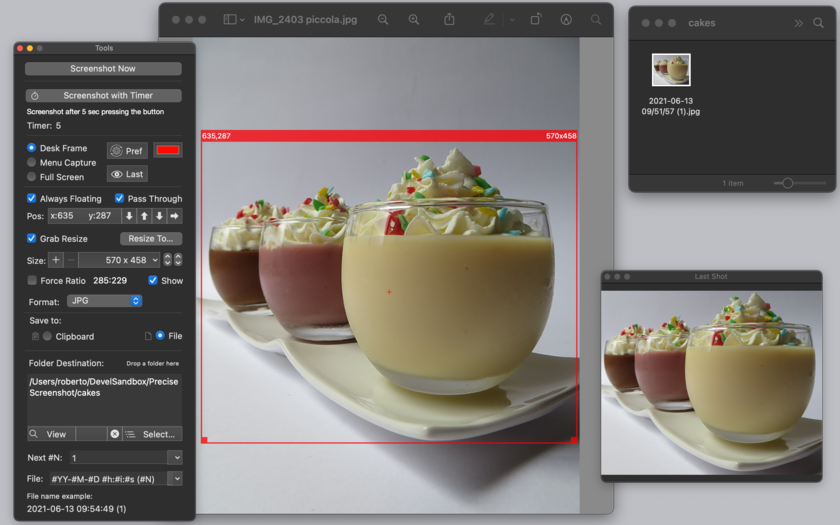
Precise Screenshot can select a resizable portion of the screen with the usual drag method or it can use pre-fixed size area from a customizable popup menu (also with pre-saved sizes the user needs often) or also use the full screen area.
It allows working in:
* 'Desk Frame' mode, selecting any portion of the work area
* 'Include Menu' mode, magnetically attached to the menu and always including the above portion of the menu bar area on your screen
* 'Full Screen' mode, taking the full screen
It allows to have a screenshot frame capturer optionally always floating or not and have it with pass through click or not (letting you click and interact directly with other applications under the capture area)
Precise screenshot offers a series of commands to make tedious tasks easy to do. Specify a new specific screen size to take screenshot with high precision is just a matter of selecting it from the custom popup (or resizing and dragging it in the traditional way) The screenshot frame area shows it's size and position in the upper side border. The screenshot can be moved and resized with precision 1 pixel by 1 pixel.
Precise Screenshot can take shot immediately or using a timer selectable from 0 to 10 seconds (showing a count down) It can works even when in background using a status menu on the right part of the menu bar to take screenshot when other apps are in foreground and in active status.
It offers also a useful tool palette with all the setting controls.
More Features:
* Save to the clipboard (with the picture immediately available for use) or to disk in selectable custom places.
* Save to disk in JPG, PNG, TIFF format.
* Save with/without alpha channel (for transparency)
* Can force any size ratio for the capture area and resize it in accordance.
* Optionally alway float all over the other applications with the Shot Selection area.
* Provides a contextual menu for 1-click commands over the Shot Selection area
* Provides visual and sound feedback of screenshot with selection of sound to play.
* Can use a custom file name using meta-tags, with serial number (automatically increased) and or using date elements (Year, Month, Day, Hour, Minute, Second)
* Custom color for the capture frame
The user can modify any setting at any time, also in the middle of the work as required by different situations. Precise Screenshot offers also a preview of the latest screenshot in a floating palette.
Optimized for macOS 10.13 (High Sierra), it is fully sandboxed offering the maximum protection level combined with the maximum flexibility. It's small, fast and full featured, it has all you need for a precise and perfect work Embedded PDF User Guide included accessible via the Help menu.
System Requirements:
* macOS Version 10.10 (Yosemite) or higher
* Optimized for macOS 10.13 (High Sierra)
* 14.4 MB
Pricing and Availability:
Precise Screenshot 2.0 is $5.99 USD (or an equivalent amount in other currencies) and is available worldwide exclusively through the Mac App Store in the Productivity category.
Tension Software: http://www.tensionsoftware.com
Precise Screenshot 2: http://www.tensionsoftware.com/osx/precisescreenshot/
Purchase and Download from Mac App Store: https://itunes.apple.com/app/precise-screenshot-2/id1347164068
Screenshot: http://www.tensionsoftware.com/static/tensionsoftware/images/app/precisescreenshot/screenshots/mac/1.png
Application Icon: http://www.tensionsoftware.com/static/tensionsoftware/images/app/precisescreenshot/icons/512.png
Tension Software develops software for macOS and iOS using the latest Apple technologies.
Other brands and products referenced herein are the trademarks or registered trademarks of their respective holders. All Material and Software (C) Copyright 2018 MaBaSoft. All Rights Reserved. Apple, the Apple logo, Macintosh Mac OS X and macOS are registered trademarks of Apple Inc. in the U.S. and/or other countries. Other trademarks and registered trademarks may be the property of their respective owners.
*******
Link To Article: https://prmac.com/release-id-82744.htm
*******
---------------------------------------------------------------------------------
Note that you can alter delivered distributions at any time.
Login to your account on prMac to alter your channel selection, or to opt-out at any time.
Use Precise Screenshot 2.0 to Take Screenshots on macOS - Published on 06/02/18
Tension Software announces Precise Screenshot 2.0 for macOS, their new generation tool to take screenshots from the screen now at release 2 with more features and more tools for a precise job. Precise Screenshot can select a resizable portion of the screen with the usual drag method or it can use pre-fixed size area from a customizable popup menu (also with pre-saved sizes the user needs often) or also use the full screen area.
Milano, Italy - Tension Software is proud to announce the release of Precise Screenshot 2.0 for macOS, their new generation tool to take screenshots from the screen now at release 2 with more features and more tools for a precise job.
Precise Screenshot can select a resizable portion of the screen with the usual drag method or it can use pre-fixed size area from a customizable popup menu (also with pre-saved sizes the user needs often) or also use the full screen area.
It allows working in:
* 'Desk Frame' mode, selecting any portion of the work area
* 'Include Menu' mode, magnetically attached to the menu and always including the above portion of the menu bar area on your screen
* 'Full Screen' mode, taking the full screen
It allows to have a screenshot frame capturer optionally always floating or not and have it with pass through click or not (letting you click and interact directly with other applications under the capture area)
Precise screenshot offers a series of commands to make tedious tasks easy to do. Specify a new specific screen size to take screenshot with high precision is just a matter of selecting it from the custom popup (or resizing and dragging it in the traditional way) The screenshot frame area shows it's size and position in the upper side border. The screenshot can be moved and resized with precision 1 pixel by 1 pixel.
Precise Screenshot can take shot immediately or using a timer selectable from 0 to 10 seconds (showing a count down) It can works even when in background using a status menu on the right part of the menu bar to take screenshot when other apps are in foreground and in active status.
It offers also a useful tool palette with all the setting controls.
More Features:
* Save to the clipboard (with the picture immediately available for use) or to disk in selectable custom places.
* Save to disk in JPG, PNG, TIFF format.
* Save with/without alpha channel (for transparency)
* Can force any size ratio for the capture area and resize it in accordance.
* Optionally alway float all over the other applications with the Shot Selection area.
* Provides a contextual menu for 1-click commands over the Shot Selection area
* Provides visual and sound feedback of screenshot with selection of sound to play.
* Can use a custom file name using meta-tags, with serial number (automatically increased) and or using date elements (Year, Month, Day, Hour, Minute, Second)
* Custom color for the capture frame
The user can modify any setting at any time, also in the middle of the work as required by different situations. Precise Screenshot offers also a preview of the latest screenshot in a floating palette.
Optimized for macOS 10.13 (High Sierra), it is fully sandboxed offering the maximum protection level combined with the maximum flexibility. It's small, fast and full featured, it has all you need for a precise and perfect work Embedded PDF User Guide included accessible via the Help menu.
System Requirements:
* macOS Version 10.10 (Yosemite) or higher
* Optimized for macOS 10.13 (High Sierra)
* 14.4 MB
Pricing and Availability:
Precise Screenshot 2.0 is $5.99 USD (or an equivalent amount in other currencies) and is available worldwide exclusively through the Mac App Store in the Productivity category.
Tension Software: http://www.tensionsoftware.com
Precise Screenshot 2: http://www.tensionsoftware.com/osx/precisescreenshot/
Purchase and Download from Mac App Store: https://itunes.apple.com/app/precise-screenshot-2/id1347164068
Screenshot: http://www.tensionsoftware.com/static/tensionsoftware/images/app/precisescreenshot/screenshots/mac/1.png
Application Icon: http://www.tensionsoftware.com/static/tensionsoftware/images/app/precisescreenshot/icons/512.png
Tension Software develops software for macOS and iOS using the latest Apple technologies.
Other brands and products referenced herein are the trademarks or registered trademarks of their respective holders. All Material and Software (C) Copyright 2018 MaBaSoft. All Rights Reserved. Apple, the Apple logo, Macintosh Mac OS X and macOS are registered trademarks of Apple Inc. in the U.S. and/or other countries. Other trademarks and registered trademarks may be the property of their respective owners.
*******
Link To Article: https://prmac.com/release-id-82744.htm
*******
---------------------------------------------------------------------------------
Note that you can alter delivered distributions at any time.
Login to your account on prMac to alter your channel selection, or to opt-out at any time.
Subscribe to:
Posts (Atom)