A new article has been published at prMac.
Creolabs announces Creo - The new way to build native mobile apps - Published on 06/13/18
Creolabs today introduces Creo, their next generation mobile app development for macOS. Traditional mobile app creation process is split between the design process and the development process; Creo merges the two separated steps into a single tool which enables you to focus on what makes your app unique. Creo offers drag-and-drop controls, classes, and objects that can be easily configured. Complex app navigation hierarchies and windows can be easily created with just few mouse clicks.
Parma, Italy - Creolabs is proud to announce the launching of Creo, their next generation mobile app development for MacOS. Creo combines the Design and Development process into a single easy to use application. Traditional mobile app creation process is split between the design process and the development process, Creo merges the two separated steps into a single tool which enables you to focus on what makes your app unique instead of wasting time building a nonfunctional prototype or writing the same code to perform the most common operations.
Creo offers drag-and-drop controls, classes, and objects that can be configured using a very intuitive interface. Complex app navigation hierarchies and windows can be easily created with just few mouse clicks. While building the app's interface, the user is also effectively building a native app. Creo uses Creolabs CreoKIT Objective-C/Swift native framework that enables Creo to execute any iOS code, (Android coming soon) directly on MacOS. This powerful technology offers a way to preview your running code directly in the Creo app.
While Creo offers an easy way to preview mobile application code on the Mac, it also offers a native iOS app that can run the Creo code developed on the Mac, so developers can get a true feel for how their code will look on the target device. Testing Creo apps directly on a mobile device is as simple as making sure both the mobile device and the Mac are on the same network, running the Creo player app on the mobile device, and pressing the "Send" key on the Mac app. The app transfers to the device, and runs as any native mobile app normally would.
"Designing and developing mobile apps with traditional tools has always been an involved and time consuming process" says Marco Bambini, founder of Creolabs. "With Creo, we have created a better development tool that streamlines the app development process. By allowing users to combine the design and code process into one workflow, we are enhancing their app development methodology."
Creo developed the CreoKit framework to allow the execution of iOS and Android code on a MacOS without making any major changes. The framework allows developers to design and develop their apps, and then immediately test them directly on their Mac. The CreoKit framework is also available for licensing as a standalone product for developers, offering a way for them to easily port their mobile apps to the MacOS in just a few minutes.
"We didn't want to reinvent the wheel, but we knew we needed a way for the Creo development tool to execute mobile code on the MacOS," adds Marco. "We knew we needed to come up with a way to merge design with code to give developers the ability to preview the app directly on their Mac, that's when CreoKit was born."
Pricing and Availability:
Creo 1.0 is just $99 USD (or an equivalent amount in other currencies) and is available worldwide exclusively through the Creolabs website.
Creolabs: https://creolabs.com/
Creo 1.0: https://creolabs.com/creo
Download Creo: https://creolabs.com/download
CreoPlayer for iOS: https://itunes.apple.com/app/creoplayer/id1167513325
Creolabs was founded by developers who love building awesome apps so much that they decided to band together to create tools that enable other users to develop their apps in faster, easier, and more efficient ways. Creolabs continues to work to improve the development process for all. All Material and Software (C) Copyright 2018 Creolabs Inc. All Rights Reserved. Apple, the Apple logo, Macintosh and Mac OS X are registered trademarks of Apple Inc. in the U.S. and/or other countries. Other trademarks and registered trademarks may be the property of their respective owners.
*******
Link To Article: https://prmac.com/release-id-82775.htm
*******
---------------------------------------------------------------------------------
Note that you can alter delivered distributions at any time.
Login to your account on prMac to alter your channel selection, or to opt-out at any time.

MacUpdater Automatically Identifies Mac Apps in Need of Updates
A new article has been published at prMac.
MacUpdater Automatically Identifies Mac Apps in Need of Updates - Published on 06/13/18
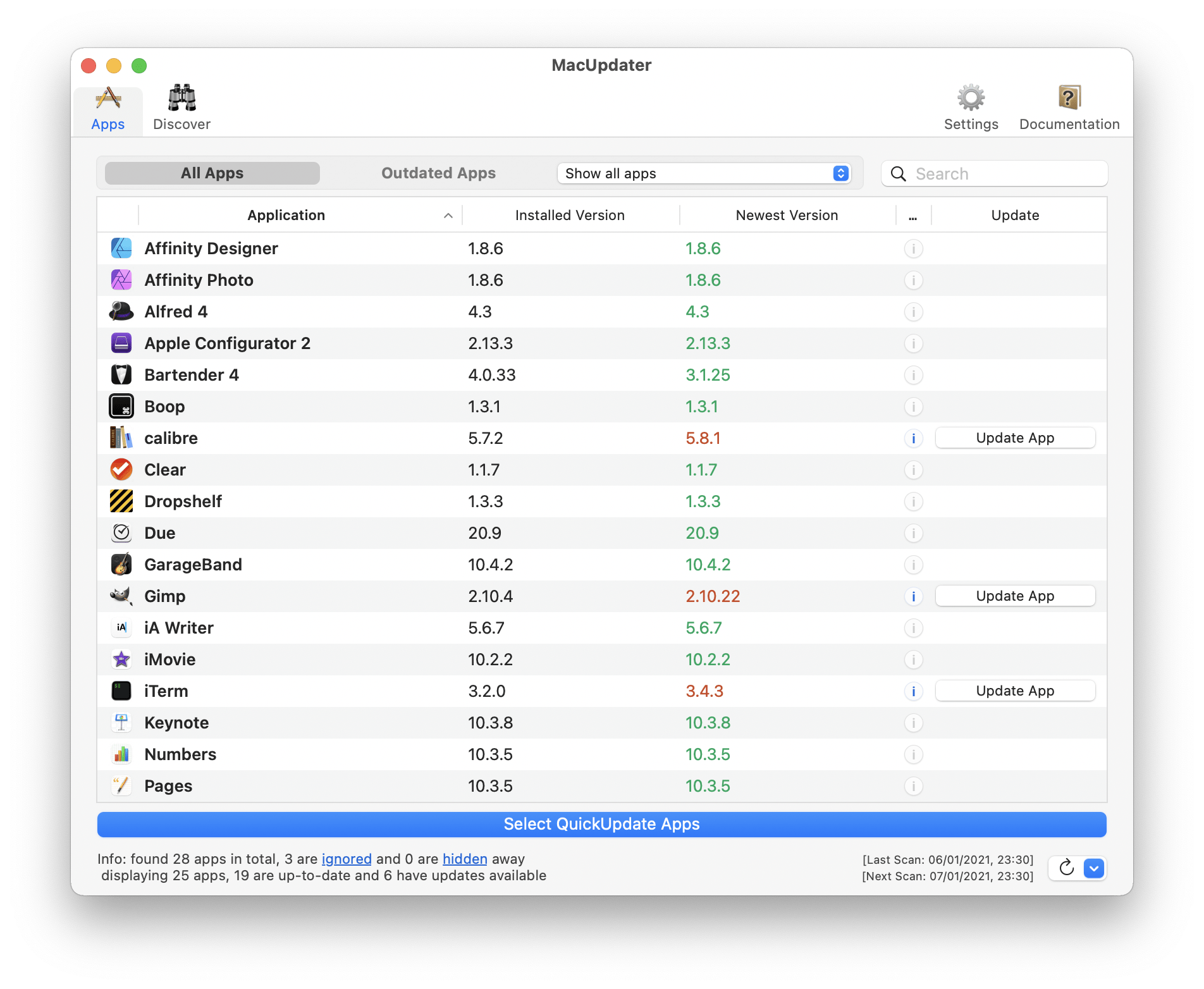
Malta-based indie development team, CoreCode today announces MacUpdater 1.2.7, their new app updating utility for macOS. The handy utility scans a Mac's Applications folder to identify applications that have updates available. Once identified, out-of-date applications can be updated with just a few clicks of the mouse. MacUpdater runs silently in the background, notifying users when an update is available. No registration is required, and app usage isn't tracked in any way.
St. Julians, Malta - Independent development team, CoreCode today is proud to announce the release and immediate availability of MacUpdater 1.2.7, their new app updating utility for macOS. MacUpdater scans any Mac's Application folder, quickly identifying installed applications that have updates available. Apps can then be updated with just a few clicks of the mouse.
In addition to its speedy manual scanning abilities, MacUpdater can be set to run automatically at startup, placing itself in the Menu Bar, where it runs quietly in the background. The app periodically checks installed apps for any available updates, notifying users when a new update is available. A handy numbered icon indicator keeps a tally of how many apps need updating, and the update process can be started by clicking the Menu Bar icon.
"While the Mac App Store does a good job of updating apps that are purchased in the Mac App Store, there isn't a reliable way to know when the apps you've downloaded and installed from other sources require an update," says CoreCode marketing manager Brigitte Zmoelnig. "MacUpdater gets rid of the drudgery of manually checking your apps one-by-one for updates, making it convenient to let the app take care of things."
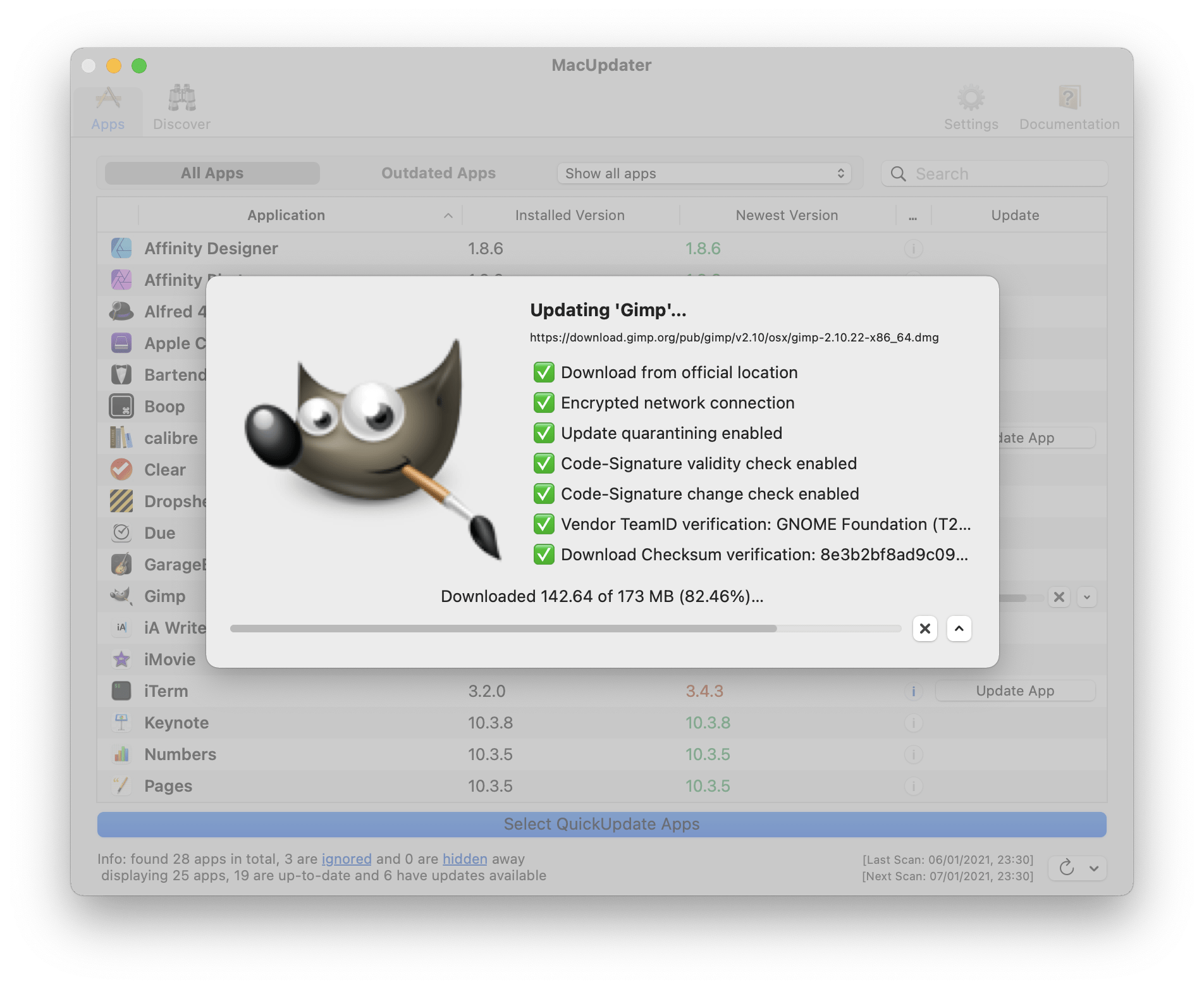
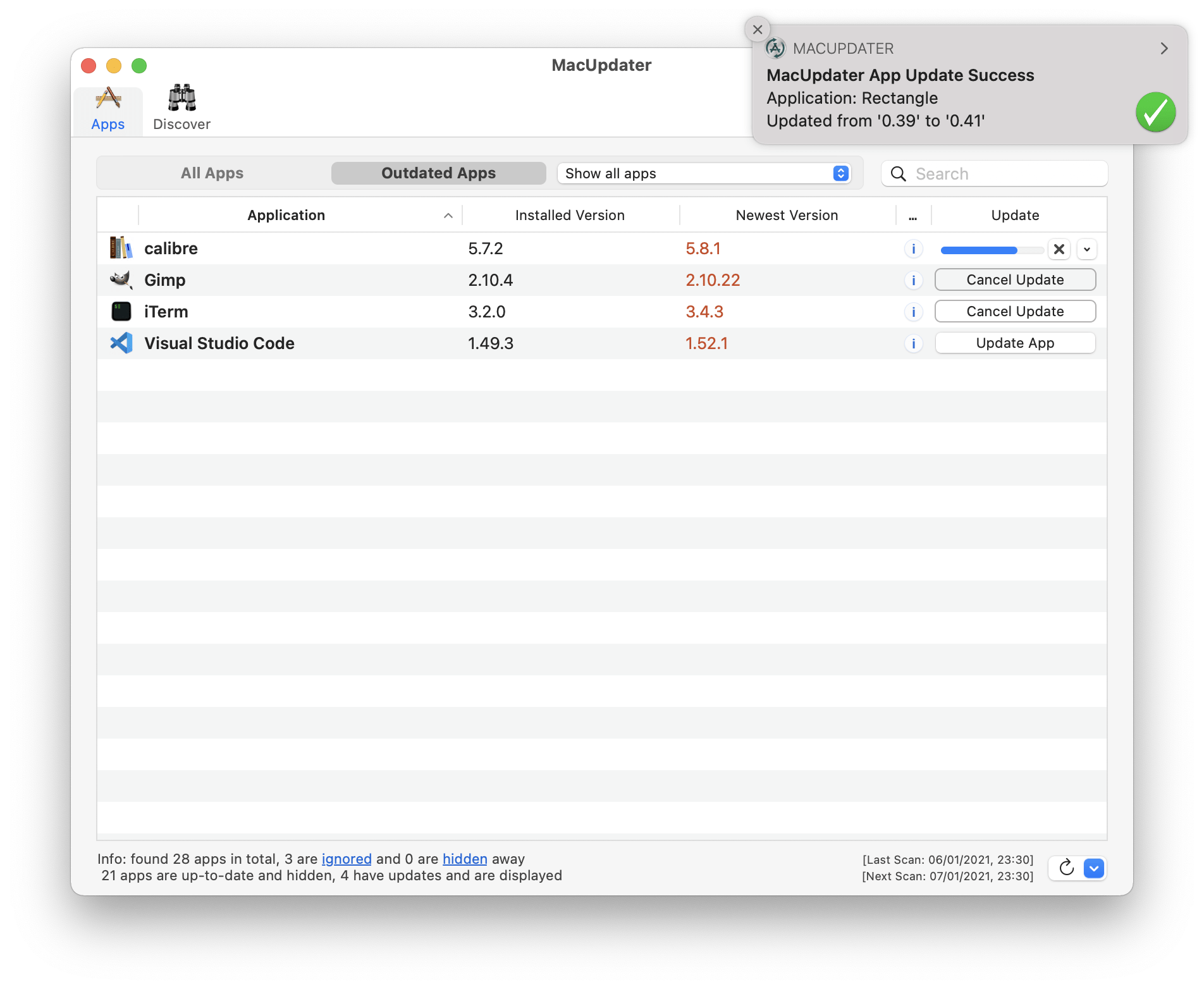
MacUpdater not only checks for available app updates, in most cases the utility can also download and install the update for you. When MacUpdater can't automatically update an app, it can launch the app's updater for you. The app even detects when Mac App Store apps need an update. While MacUpdater can't update those apps, it can open the Mac App Store, so users can update the app there.
Features include:
* Automatically tracks the latest updates available for installed Mac apps
* Finds the latest version that's compatible with the installed macOS version
* Apps with updates listed in red for easy detection
* Provides one-click update for many apps, just click the "Update" button for any app
* Loads at startup, runs quietly in the background
* Low impact on system resources
* Notifies users when updates are available
* Filter Bar: Show all apps, or just apps that are not up-to-date
* Menu Bar icon indicates how many app updates are available
* Optionally makes backups of app before updating them
* Use concurrently on up to 5 Macs
* Free trial download allows updating 10 apps
* Total Privacy: No registration needed
* Pay just once, no subscription required
MacUpdater can detect available updates for over 30,000 apps, and the list is growing every day. The app can auto-update around 3,500 popular apps with the click of a button, and that list also continues to grow. While some application vendors, such as Microsoft and Adobe, don't as yet allow updates outside of their closed systems, the CordCode team is working on it. The team is also working on the ability to queue multiple app updates, as well as the ability to view release notes for updates before updating.
"MacUpdater ensures your Mac's installed apps stay up to date. Never again do Mac users have to miss out on important updates that bring new features and eliminate frustrating bugs," says product manager Jamie Stevenson. "Our users tell us that they love the app, and they've been offering some terrific feedback that we're using to make the app even better."
Device Requirements:
* macOS 10.11 or later
* Compatible with macOS High Sierra
* 64-bit Processor
* 10.8 MB
Pricing and Availability:
MacUpdater 1.2.7 is a free download and is available worldwide exclusively through the CoreCode website. Users can scan for updates for free and update up to 10 apps for free. Users can pay $9.99 USD (or an equivalent amount in other currencies) to unlock the ability to update additional apps. Review copies are available upon request.
CoreCode: https://www.corecode.io/index.html
MacUpdater 1.2.7: https://www.corecode.io/macupdater/index.html
Download MacUpdater: https://www.corecode.io/downloads/macupdater_latest.zip
Screenshot 1: https://www.corecode.io/macupdater/screenshot_1.png
Screenshot 2: https://www.corecode.io/macupdater/screenshot_2.png
Screenshot 3: https://www.corecode.io/macupdater/screenshot_3.png
Headquartered in St. Julians, Malta, CoreCode has been developing Mac software since 1998. The development team specializes in building awesome apps for macOS and iOS. The company offers a variety of free and commercial applications, with over a dozen commercial apps offer for sale and over two-dozen open source apps released to Mac users. All Material and Software (C) Copyright 2018 CoreCode. All Rights Reserved. Apple, the Apple logo, Macintosh Mac OS X and macOS are registered trademarks of Apple Inc. in the U.S. and/or other countries. Other trademarks and registered trademarks may be the property of their respective owners.
*******
Link To Article: https://prmac.com/release-id-82774.htm
*******
---------------------------------------------------------------------------------
Note that you can alter delivered distributions at any time.
Login to your account on prMac to alter your channel selection, or to opt-out at any time.
MacUpdater Automatically Identifies Mac Apps in Need of Updates - Published on 06/13/18
Malta-based indie development team, CoreCode today announces MacUpdater 1.2.7, their new app updating utility for macOS. The handy utility scans a Mac's Applications folder to identify applications that have updates available. Once identified, out-of-date applications can be updated with just a few clicks of the mouse. MacUpdater runs silently in the background, notifying users when an update is available. No registration is required, and app usage isn't tracked in any way.
St. Julians, Malta - Independent development team, CoreCode today is proud to announce the release and immediate availability of MacUpdater 1.2.7, their new app updating utility for macOS. MacUpdater scans any Mac's Application folder, quickly identifying installed applications that have updates available. Apps can then be updated with just a few clicks of the mouse.
In addition to its speedy manual scanning abilities, MacUpdater can be set to run automatically at startup, placing itself in the Menu Bar, where it runs quietly in the background. The app periodically checks installed apps for any available updates, notifying users when a new update is available. A handy numbered icon indicator keeps a tally of how many apps need updating, and the update process can be started by clicking the Menu Bar icon.
"While the Mac App Store does a good job of updating apps that are purchased in the Mac App Store, there isn't a reliable way to know when the apps you've downloaded and installed from other sources require an update," says CoreCode marketing manager Brigitte Zmoelnig. "MacUpdater gets rid of the drudgery of manually checking your apps one-by-one for updates, making it convenient to let the app take care of things."
MacUpdater not only checks for available app updates, in most cases the utility can also download and install the update for you. When MacUpdater can't automatically update an app, it can launch the app's updater for you. The app even detects when Mac App Store apps need an update. While MacUpdater can't update those apps, it can open the Mac App Store, so users can update the app there.
Features include:
* Automatically tracks the latest updates available for installed Mac apps
* Finds the latest version that's compatible with the installed macOS version
* Apps with updates listed in red for easy detection
* Provides one-click update for many apps, just click the "Update" button for any app
* Loads at startup, runs quietly in the background
* Low impact on system resources
* Notifies users when updates are available
* Filter Bar: Show all apps, or just apps that are not up-to-date
* Menu Bar icon indicates how many app updates are available
* Optionally makes backups of app before updating them
* Use concurrently on up to 5 Macs
* Free trial download allows updating 10 apps
* Total Privacy: No registration needed
* Pay just once, no subscription required
MacUpdater can detect available updates for over 30,000 apps, and the list is growing every day. The app can auto-update around 3,500 popular apps with the click of a button, and that list also continues to grow. While some application vendors, such as Microsoft and Adobe, don't as yet allow updates outside of their closed systems, the CordCode team is working on it. The team is also working on the ability to queue multiple app updates, as well as the ability to view release notes for updates before updating.
"MacUpdater ensures your Mac's installed apps stay up to date. Never again do Mac users have to miss out on important updates that bring new features and eliminate frustrating bugs," says product manager Jamie Stevenson. "Our users tell us that they love the app, and they've been offering some terrific feedback that we're using to make the app even better."
Device Requirements:
* macOS 10.11 or later
* Compatible with macOS High Sierra
* 64-bit Processor
* 10.8 MB
Pricing and Availability:
MacUpdater 1.2.7 is a free download and is available worldwide exclusively through the CoreCode website. Users can scan for updates for free and update up to 10 apps for free. Users can pay $9.99 USD (or an equivalent amount in other currencies) to unlock the ability to update additional apps. Review copies are available upon request.
CoreCode: https://www.corecode.io/index.html
MacUpdater 1.2.7: https://www.corecode.io/macupdater/index.html
Download MacUpdater: https://www.corecode.io/downloads/macupdater_latest.zip
Screenshot 1: https://www.corecode.io/macupdater/screenshot_1.png
Screenshot 2: https://www.corecode.io/macupdater/screenshot_2.png
Screenshot 3: https://www.corecode.io/macupdater/screenshot_3.png
Headquartered in St. Julians, Malta, CoreCode has been developing Mac software since 1998. The development team specializes in building awesome apps for macOS and iOS. The company offers a variety of free and commercial applications, with over a dozen commercial apps offer for sale and over two-dozen open source apps released to Mac users. All Material and Software (C) Copyright 2018 CoreCode. All Rights Reserved. Apple, the Apple logo, Macintosh Mac OS X and macOS are registered trademarks of Apple Inc. in the U.S. and/or other countries. Other trademarks and registered trademarks may be the property of their respective owners.
*******
Link To Article: https://prmac.com/release-id-82774.htm
*******
---------------------------------------------------------------------------------
Note that you can alter delivered distributions at any time.
Login to your account on prMac to alter your channel selection, or to opt-out at any time.
ChronoSync Improves Cloud Compatibility
A new article has been published at prMac.
ChronoSync Improves Cloud Compatibility - Published on 06/13/18
Florida based Econ Technologies today announces ChronoSync, an important update to their multipurpose app for local and cloud backup, bootable clones and folder synchronizing under macOS. This update makes connecting to cloud providers offering lower-cost S3 compatible object storage solutions easier than ever. We have customers now using our ChronoSync S3 Connection support to sync and backup files with Caringo Swarm, Oracle Cloud, Wasabi and even setting up Minio to run private cloud storage.
Casselberry, Florida - ChronoSync offers greater compatibility with a variety of S3-compatible cloud services by implementing path-style URLs alongside the existing virtual-hosted-style URLs. This update makes connecting to cloud providers offering lower-cost S3 compatible object storage solutions easier than ever. We have customers now using our ChronoSync S3 Connection support to sync and backup files with Caringo Swarm, Oracle Cloud, Wasabi and even setting up Minio to run private cloud storage!
These changes along with ongoing bug fixes, tweaks and incremental improvements in performance and responsiveness demonstrates Econ Technologies' commitment to keeping ChronoSync the professional choice for reliable Mac Backup, Bootable Backup and Folder Synchronization.
Owners of ChronoSync can install the update immediately for free! If you don't already own ChronoSync, download today and start the 15-day free trial to learn how easy cloud backup can be!
ChronoSync, the multipurpose Mac App for local and cloud backup, bootable backup, and folder synchronizing, is designed to work on macOS version 10.10 and newer. Full working trial licenses are available or purchase ChronoSync for $49.99. ChronoSync's companion app, ChronoAgent, allows any Mac to accept direct, secure connections from any ChronoSync Mac or any InterConneX iOS device to access or transfer data! Full working trial licenses are available or purchase ChronoAgent for $14.99. ChronoMonitor is an iPhone app that monitorsMacs running ChronoSync or ChronoAgent. ChronoMonitor is available in the Apple App Store for $3.99 (USD).
ChronoSync: https://www.econtechnologies.com/chronosync/overview.html
Change Notes: https://www.econtechnologies.com/chronosync/notes.html
Download ChronoSync: https://www.econtechnologies.com/downloads/downloads.html
ChronoAgent: https://www.econtechnologies.com/chronoagent/overview.html
InterConneX: https://www.econtechnologies.com/interconnex/overview.html
ChronoMonitor: https://www.econtechnologies.com/chronomonitor/overview.html
Econ has produced software that runs on Apple products for over 20 years. Econ Technologies, Inc. was established in Central Florida in 1991. It is named after the Econlockhatchee River, which flows past the site of our original office where all of this began. On October 31, 2001 we introduced our first app, Portraits & Prints, that was developed specifically for macOS. We followed that up with ChronoSync which was first released February 15, 2002. Since that time ChronoSync has gone through numerous updates and we have never charged for a single update. On July 29, 2013 we launched InterConneX for the iPad followed by InterConneX for the iPhone in September. All Material and Software (C) Copyright 2018 Econ Technologies. All Rights Reserved. Apple, the Apple logo, Macintosh and macOS are registered trademarks of Apple Inc. in the U.S. and/or other countries. Other trademarks and registered trademarks may be the property of their respective owners.
*******
Link To Article: https://prmac.com/release-id-82773.htm
*******
---------------------------------------------------------------------------------
Note that you can alter delivered distributions at any time.
Login to your account on prMac to alter your channel selection, or to opt-out at any time.
ChronoSync Improves Cloud Compatibility - Published on 06/13/18
Florida based Econ Technologies today announces ChronoSync, an important update to their multipurpose app for local and cloud backup, bootable clones and folder synchronizing under macOS. This update makes connecting to cloud providers offering lower-cost S3 compatible object storage solutions easier than ever. We have customers now using our ChronoSync S3 Connection support to sync and backup files with Caringo Swarm, Oracle Cloud, Wasabi and even setting up Minio to run private cloud storage.
Casselberry, Florida - ChronoSync offers greater compatibility with a variety of S3-compatible cloud services by implementing path-style URLs alongside the existing virtual-hosted-style URLs. This update makes connecting to cloud providers offering lower-cost S3 compatible object storage solutions easier than ever. We have customers now using our ChronoSync S3 Connection support to sync and backup files with Caringo Swarm, Oracle Cloud, Wasabi and even setting up Minio to run private cloud storage!
These changes along with ongoing bug fixes, tweaks and incremental improvements in performance and responsiveness demonstrates Econ Technologies' commitment to keeping ChronoSync the professional choice for reliable Mac Backup, Bootable Backup and Folder Synchronization.
Owners of ChronoSync can install the update immediately for free! If you don't already own ChronoSync, download today and start the 15-day free trial to learn how easy cloud backup can be!
ChronoSync, the multipurpose Mac App for local and cloud backup, bootable backup, and folder synchronizing, is designed to work on macOS version 10.10 and newer. Full working trial licenses are available or purchase ChronoSync for $49.99. ChronoSync's companion app, ChronoAgent, allows any Mac to accept direct, secure connections from any ChronoSync Mac or any InterConneX iOS device to access or transfer data! Full working trial licenses are available or purchase ChronoAgent for $14.99. ChronoMonitor is an iPhone app that monitorsMacs running ChronoSync or ChronoAgent. ChronoMonitor is available in the Apple App Store for $3.99 (USD).
ChronoSync: https://www.econtechnologies.com/chronosync/overview.html
Change Notes: https://www.econtechnologies.com/chronosync/notes.html
Download ChronoSync: https://www.econtechnologies.com/downloads/downloads.html
ChronoAgent: https://www.econtechnologies.com/chronoagent/overview.html
InterConneX: https://www.econtechnologies.com/interconnex/overview.html
ChronoMonitor: https://www.econtechnologies.com/chronomonitor/overview.html
Econ has produced software that runs on Apple products for over 20 years. Econ Technologies, Inc. was established in Central Florida in 1991. It is named after the Econlockhatchee River, which flows past the site of our original office where all of this began. On October 31, 2001 we introduced our first app, Portraits & Prints, that was developed specifically for macOS. We followed that up with ChronoSync which was first released February 15, 2002. Since that time ChronoSync has gone through numerous updates and we have never charged for a single update. On July 29, 2013 we launched InterConneX for the iPad followed by InterConneX for the iPhone in September. All Material and Software (C) Copyright 2018 Econ Technologies. All Rights Reserved. Apple, the Apple logo, Macintosh and macOS are registered trademarks of Apple Inc. in the U.S. and/or other countries. Other trademarks and registered trademarks may be the property of their respective owners.
*******
Link To Article: https://prmac.com/release-id-82773.htm
*******
---------------------------------------------------------------------------------
Note that you can alter delivered distributions at any time.
Login to your account on prMac to alter your channel selection, or to opt-out at any time.
SpeakerCue Confidence Monitoring for the Professional Speaking Community
A new article has been published at prMac.
SpeakerCue Confidence Monitoring for the Professional Speaking Community - Published on 06/12/18
CampSoftware releases SpeakerCue, a confidence monitor for professional producers and presenters. Featuring a customizable clock with a variety of color and display options, SpeakerCue is designed for those on both sides of the podium, including the person who is speaking, an assistant during a live presentation, or a producer of speaking engagements. CampSoftware's SpeakerCue is an invaluable, discrete, communication tool to display pertinent information such as time and messages in real time.
Orlando, Florida - CampSoftware is excited to announce the release of SpeakerCue, a confidence monitor for professional producers and presenters. This handy communications tool is a simple, streamlined way for a presenter or speaker to monitor their time and for an assistant or producer to provide them with invaluable information. SpeakerCue requirements are simple; a Mac or PC for the person who is controlling the time and messaging, and an external display within view of the speaker to receive those messages.
"SpeakerCue is the only full-featured program countdown clock that integrates the ability to easily communicate with your speaker or moderator while they're on stage," said Bill Chapman, Executive Director/Producer at The Richmond Forum, America's largest non-profit public lecture series. "We've used SpeakerCue for speeches by President Barack Obama, actress Glenn Close, former U.S. Ambassador to the United Nations Samantha Power, and others. Now, I would never consider producing a program without it."
The most important feature of SpeakerCue is that it provides a configurable clock, customizable in a variety of color and display options. The clock can be configured in hour/minutes or hour/minutes/seconds mode in the current time or as a countdown clock. Based on preference, it can also be set to flash or change color at a pre-set time to inform the speaker to start wrapping up their presentation or at other prearranged times.
SpeakerCue also features a one-way message transmitter that will allow an advisor to give speakers of all skill levels the instructions they need to make their presentations better in real time. SpeakerCue is an excellent way for a teacher to send basic instructions to a beginner speaker such as "Speak louder," "Slow down," "Look up," or "Smile." Seasoned professional producers can send their speaker more advanced cues such as, "Expand on that point," "Last question," or "Introduce the next speaker."
Computer Requirements:
* Mac running OS 10.9.5 (Mavericks) or later
* Windows running Windows 7, SP1 Platform Update (64-bit versions only) or later
* Also runs on Linux and Raspberry Pi
Visit SpeakerCue online to download a free demo. In demo mode, SpeakerCue will auto-quit after 10 minutes, but it can be relaunched as often as you would like. For more information, please contact Ardith Gumbert.
CampSoftware: http://campsoftware.com/
SpeakerCue: http://speakercue.com
More Information: http://campsoftware.com/blog/
YouTube Video: https://www.youtube.com/watch?v=7jbavCGN8Xc
Screenshot: https://campsoftware.com/products/speakercue_files/stacks-image-395b704.png
Image (In Use at The Richmond Forum): https://campsoftware.com/products/speakercue_files/stacks-image-fcd8881-1200x900@2x.jpg
CampSoftware was incorporated in 2002 and specializes in custom database-driven app development for small and mid-sized businesses. Prior to this release, CampSoftware has released multiple other stand-alone products including several FileMaker utilities, applications and tools. All Material and Software (C) Copyright 2018 CampSoftware. All Rights Reserved. Apple, the Apple logo and macOS are registered trademarks of Apple Inc. in the U.S. and/or other countries. Other trademarks and registered trademarks may be the property of their respective owners.
*******
Link To Article: https://prmac.com/release-id-82772.htm
*******
---------------------------------------------------------------------------------
Note that you can alter delivered distributions at any time.
Login to your account on prMac to alter your channel selection, or to opt-out at any time.
SpeakerCue Confidence Monitoring for the Professional Speaking Community - Published on 06/12/18
CampSoftware releases SpeakerCue, a confidence monitor for professional producers and presenters. Featuring a customizable clock with a variety of color and display options, SpeakerCue is designed for those on both sides of the podium, including the person who is speaking, an assistant during a live presentation, or a producer of speaking engagements. CampSoftware's SpeakerCue is an invaluable, discrete, communication tool to display pertinent information such as time and messages in real time.
Orlando, Florida - CampSoftware is excited to announce the release of SpeakerCue, a confidence monitor for professional producers and presenters. This handy communications tool is a simple, streamlined way for a presenter or speaker to monitor their time and for an assistant or producer to provide them with invaluable information. SpeakerCue requirements are simple; a Mac or PC for the person who is controlling the time and messaging, and an external display within view of the speaker to receive those messages.
"SpeakerCue is the only full-featured program countdown clock that integrates the ability to easily communicate with your speaker or moderator while they're on stage," said Bill Chapman, Executive Director/Producer at The Richmond Forum, America's largest non-profit public lecture series. "We've used SpeakerCue for speeches by President Barack Obama, actress Glenn Close, former U.S. Ambassador to the United Nations Samantha Power, and others. Now, I would never consider producing a program without it."
The most important feature of SpeakerCue is that it provides a configurable clock, customizable in a variety of color and display options. The clock can be configured in hour/minutes or hour/minutes/seconds mode in the current time or as a countdown clock. Based on preference, it can also be set to flash or change color at a pre-set time to inform the speaker to start wrapping up their presentation or at other prearranged times.
SpeakerCue also features a one-way message transmitter that will allow an advisor to give speakers of all skill levels the instructions they need to make their presentations better in real time. SpeakerCue is an excellent way for a teacher to send basic instructions to a beginner speaker such as "Speak louder," "Slow down," "Look up," or "Smile." Seasoned professional producers can send their speaker more advanced cues such as, "Expand on that point," "Last question," or "Introduce the next speaker."
Computer Requirements:
* Mac running OS 10.9.5 (Mavericks) or later
* Windows running Windows 7, SP1 Platform Update (64-bit versions only) or later
* Also runs on Linux and Raspberry Pi
Visit SpeakerCue online to download a free demo. In demo mode, SpeakerCue will auto-quit after 10 minutes, but it can be relaunched as often as you would like. For more information, please contact Ardith Gumbert.
CampSoftware: http://campsoftware.com/
SpeakerCue: http://speakercue.com
More Information: http://campsoftware.com/blog/
YouTube Video: https://www.youtube.com/watch?v=7jbavCGN8Xc
Screenshot: https://campsoftware.com/products/speakercue_files/stacks-image-395b704.png
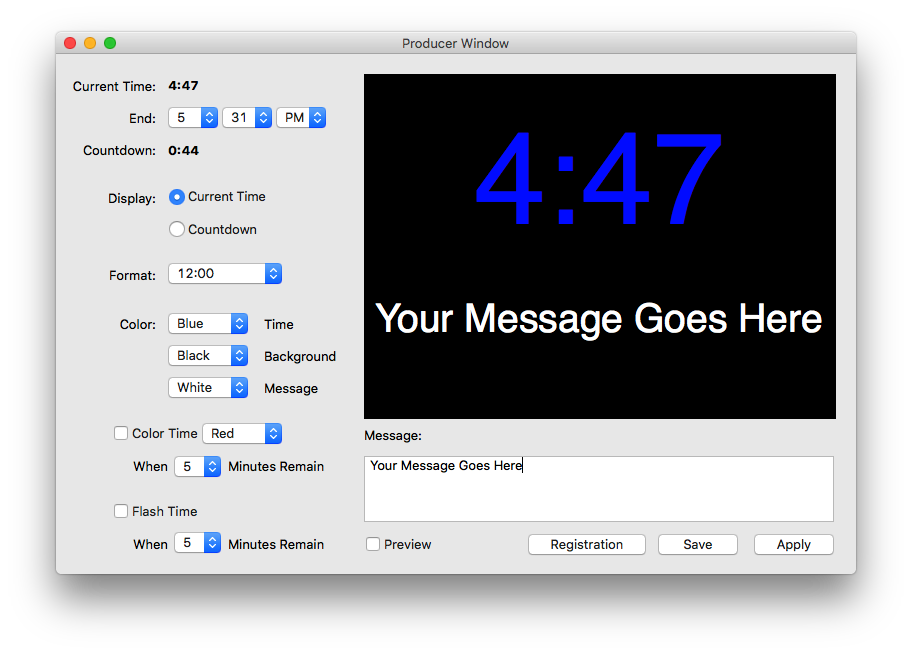
Image (In Use at The Richmond Forum): https://campsoftware.com/products/speakercue_files/stacks-image-fcd8881-1200x900@2x.jpg

CampSoftware was incorporated in 2002 and specializes in custom database-driven app development for small and mid-sized businesses. Prior to this release, CampSoftware has released multiple other stand-alone products including several FileMaker utilities, applications and tools. All Material and Software (C) Copyright 2018 CampSoftware. All Rights Reserved. Apple, the Apple logo and macOS are registered trademarks of Apple Inc. in the U.S. and/or other countries. Other trademarks and registered trademarks may be the property of their respective owners.
*******
Link To Article: https://prmac.com/release-id-82772.htm
*******
---------------------------------------------------------------------------------
Note that you can alter delivered distributions at any time.
Login to your account on prMac to alter your channel selection, or to opt-out at any time.
Xwavesoft announces 60% Summer Sale of All Products
A new article has been published at prMac.
Xwavesoft announces 60% Summer Sale of All Products - Published on 06/12/18
XwaveSoft today announces a 60% Summer Sale on their entire range of productivity apps for iOS and macOS. From Tuesday, June 12 through Friday, June 15, all their productivity tools will be offered at 60% discount. This includes Be Focused, Cloud Outliner, Focus Matrix, Daily Habits, Chrono Plus and others. These apps aim to increase personal productivity by helping to focus on things that really matter; naturally organizing plans, projects and ideas.
Odessa, Ukraine - Xwavesoft follows the established Summer Sale tradition and offers a 60% discount on its well known and highly rated products, such as Be Focused, Cloud Outliner, Focus Matrix, Daily Habits. From Tuesday, June 12 through Friday, June 15, all Xwavesoft's productivity applications will be offered at 60% discount on both iOS and Mac App Stores.
Since everyone has a tight schedule and always pressed for time, Xwavesoft team are delighted to introduce applications where the latest productivity principles and techniques are incorporated to keep people more efficient. These apps increase personal productivity and helps to focus on things that really matter naturally organizing plans, projects and ideas in a clear way for faster goal achievement and better results.
Pricing and Availability:
* Be Focused Pro (iOS) - $1.99 (USD) - now $0.99 (USD)
* Be Focused Pro (Mac) - $4.99 (USD) - now $1.99 (USD)
* Cloud Outliner (iOS) - $2.99(USD) - now $0.99 (USD)
* Cloud Outliner (Mac) - $9.99 (USD) - now $3.99 (USD)
* Focus Matrix (iOS) - $2.99 (USD) - now $0.99 (USD)
* Focus Matrix (Mac) - $4.99 (USD) - now $1.99(USD)
* Daily Habits (iOS) - $2.99 (USD) - now $0.99(USD)
* Chrono Plus (iOS) - $1.99 (USD) - now $0.99 (USD)
* Chrono Plus (Mac) - $4.99 (USD) - now $1.99 (USD)
* Guest List Organizer (iOS) - $2.99 (USD) - now $0.99 (USD)
* Guest List Organizer (Mac) - $9.99 (USD) - now $3.99 (USD)
* eXtra Voice Recorder (iOS) - $1.99 (USD) - now $0.99 (USD)
* eXtra Voice Recorder (Mac) - $4.99 (USD) - now $1.99 (USD)
* Magic Cutter (Mac) - $9.99 (USD) - now $3.99 (USD)
The discount in the Mac App Store and iOS App Store is valid from Tuesday, June 12 through Friday, June 15.
Xwavesoft 60% Summer Sale: https://xwavesoft.com/summer-sale-2018.html
Based in Odessa, Ukraine, XwaveSoft is a privately owned software development company founded in 2009 by Denys Yevenko. XwaveSoft is focused on developing high-quality iOS and macOS applications. Long-term experience and professional expertise of the company's management and personnel guarantee the high quality of its products. Copyright (C) 2009-2018 XwaveSoft. All Rights Reserved. Apple, the Apple logo, iPhone, and iPod are registered trademarks of Apple Inc. in the U.S. and/or other countries. Other trademarks and registered trademarks may be the property of their respective owners.
*******
Link To Article: https://prmac.com/release-id-82769.htm
*******
---------------------------------------------------------------------------------
Note that you can alter delivered distributions at any time.
Login to your account on prMac to alter your channel selection, or to opt-out at any time.
Xwavesoft announces 60% Summer Sale of All Products - Published on 06/12/18
XwaveSoft today announces a 60% Summer Sale on their entire range of productivity apps for iOS and macOS. From Tuesday, June 12 through Friday, June 15, all their productivity tools will be offered at 60% discount. This includes Be Focused, Cloud Outliner, Focus Matrix, Daily Habits, Chrono Plus and others. These apps aim to increase personal productivity by helping to focus on things that really matter; naturally organizing plans, projects and ideas.
Odessa, Ukraine - Xwavesoft follows the established Summer Sale tradition and offers a 60% discount on its well known and highly rated products, such as Be Focused, Cloud Outliner, Focus Matrix, Daily Habits. From Tuesday, June 12 through Friday, June 15, all Xwavesoft's productivity applications will be offered at 60% discount on both iOS and Mac App Stores.
Since everyone has a tight schedule and always pressed for time, Xwavesoft team are delighted to introduce applications where the latest productivity principles and techniques are incorporated to keep people more efficient. These apps increase personal productivity and helps to focus on things that really matter naturally organizing plans, projects and ideas in a clear way for faster goal achievement and better results.
Pricing and Availability:
* Be Focused Pro (iOS) - $1.99 (USD) - now $0.99 (USD)
* Be Focused Pro (Mac) - $4.99 (USD) - now $1.99 (USD)
* Cloud Outliner (iOS) - $2.99(USD) - now $0.99 (USD)
* Cloud Outliner (Mac) - $9.99 (USD) - now $3.99 (USD)
* Focus Matrix (iOS) - $2.99 (USD) - now $0.99 (USD)
* Focus Matrix (Mac) - $4.99 (USD) - now $1.99(USD)
* Daily Habits (iOS) - $2.99 (USD) - now $0.99(USD)
* Chrono Plus (iOS) - $1.99 (USD) - now $0.99 (USD)
* Chrono Plus (Mac) - $4.99 (USD) - now $1.99 (USD)
* Guest List Organizer (iOS) - $2.99 (USD) - now $0.99 (USD)
* Guest List Organizer (Mac) - $9.99 (USD) - now $3.99 (USD)
* eXtra Voice Recorder (iOS) - $1.99 (USD) - now $0.99 (USD)
* eXtra Voice Recorder (Mac) - $4.99 (USD) - now $1.99 (USD)
* Magic Cutter (Mac) - $9.99 (USD) - now $3.99 (USD)
The discount in the Mac App Store and iOS App Store is valid from Tuesday, June 12 through Friday, June 15.
Xwavesoft 60% Summer Sale: https://xwavesoft.com/summer-sale-2018.html
Based in Odessa, Ukraine, XwaveSoft is a privately owned software development company founded in 2009 by Denys Yevenko. XwaveSoft is focused on developing high-quality iOS and macOS applications. Long-term experience and professional expertise of the company's management and personnel guarantee the high quality of its products. Copyright (C) 2009-2018 XwaveSoft. All Rights Reserved. Apple, the Apple logo, iPhone, and iPod are registered trademarks of Apple Inc. in the U.S. and/or other countries. Other trademarks and registered trademarks may be the property of their respective owners.
*******
Link To Article: https://prmac.com/release-id-82769.htm
*******
---------------------------------------------------------------------------------
Note that you can alter delivered distributions at any time.
Login to your account on prMac to alter your channel selection, or to opt-out at any time.
Xwavesoft announces 60% Summer Sale of All Products
A new article has been published at prMac.
Xwavesoft announces 60% Summer Sale of All Products - Published on 06/12/18
XwaveSoft today announces a 60% Summer Sale on their entire range of productivity apps for iOS and macOS. From Tuesday, June 12 through Friday, June 15, all their productivity tools will be offered at 60% discount. This includes Be Focused, Cloud Outliner, Focus Matrix, Daily Habits, Chrono Plus and others. These apps aim to increase personal productivity by helping to focus on things that really matter; naturally organizing plans, projects and ideas.
Odessa, Ukraine - Xwavesoft follows the established Summer Sale tradition and offers a 60% discount on its well known and highly rated products, such as Be Focused, Cloud Outliner, Focus Matrix, Daily Habits. From Tuesday, June 12 through Friday, June 15, all Xwavesoft's productivity applications will be offered at 60% discount on both iOS and Mac App Stores.
Since everyone has a tight schedule and always pressed for time, Xwavesoft team are delighted to introduce applications where the latest productivity principles and techniques are incorporated to keep people more efficient. These apps increase personal productivity and helps to focus on things that really matter naturally organizing plans, projects and ideas in a clear way for faster goal achievement and better results.
Pricing and Availability:
* Be Focused Pro (iOS) - $1.99 (USD) - now $0.99 (USD)
* Be Focused Pro (Mac) - $4.99 (USD) - now $1.99 (USD)
* Cloud Outliner (iOS) - $2.99(USD) - now $0.99 (USD)
* Cloud Outliner (Mac) - $9.99 (USD) - now $3.99 (USD)
* Focus Matrix (iOS) - $2.99 (USD) - now $0.99 (USD)
* Focus Matrix (Mac) - $4.99 (USD) - now $1.99(USD)
* Daily Habits (iOS) - $2.99 (USD) - now $0.99(USD)
* Chrono Plus (iOS) - $1.99 (USD) - now $0.99 (USD)
* Chrono Plus (Mac) - $4.99 (USD) - now $1.99 (USD)
* Guest List Organizer (iOS) - $2.99 (USD) - now $0.99 (USD)
* Guest List Organizer (Mac) - $9.99 (USD) - now $3.99 (USD)
* eXtra Voice Recorder (iOS) - $1.99 (USD) - now $0.99 (USD)
* eXtra Voice Recorder (Mac) - $4.99 (USD) - now $1.99 (USD)
* Magic Cutter (Mac) - $9.99 (USD) - now $3.99 (USD)
The discount in the Mac App Store and iOS App Store is valid from Tuesday, June 12 through Friday, June 15.
Xwavesoft 60% Summer Sale: https://xwavesoft.com/summer-sale-2018.html
Based in Odessa, Ukraine, XwaveSoft is a privately owned software development company founded in 2009 by Denys Yevenko. XwaveSoft is focused on developing high-quality iOS and macOS applications. Long-term experience and professional expertise of the company's management and personnel guarantee the high quality of its products. Copyright (C) 2009-2018 XwaveSoft. All Rights Reserved. Apple, the Apple logo, iPhone, and iPod are registered trademarks of Apple Inc. in the U.S. and/or other countries. Other trademarks and registered trademarks may be the property of their respective owners.
*******
Link To Article: https://prmac.com/release-id-82770.htm
*******
---------------------------------------------------------------------------------
Note that you can alter delivered distributions at any time.
Login to your account on prMac to alter your channel selection, or to opt-out at any time.
Xwavesoft announces 60% Summer Sale of All Products - Published on 06/12/18
XwaveSoft today announces a 60% Summer Sale on their entire range of productivity apps for iOS and macOS. From Tuesday, June 12 through Friday, June 15, all their productivity tools will be offered at 60% discount. This includes Be Focused, Cloud Outliner, Focus Matrix, Daily Habits, Chrono Plus and others. These apps aim to increase personal productivity by helping to focus on things that really matter; naturally organizing plans, projects and ideas.
Odessa, Ukraine - Xwavesoft follows the established Summer Sale tradition and offers a 60% discount on its well known and highly rated products, such as Be Focused, Cloud Outliner, Focus Matrix, Daily Habits. From Tuesday, June 12 through Friday, June 15, all Xwavesoft's productivity applications will be offered at 60% discount on both iOS and Mac App Stores.
Since everyone has a tight schedule and always pressed for time, Xwavesoft team are delighted to introduce applications where the latest productivity principles and techniques are incorporated to keep people more efficient. These apps increase personal productivity and helps to focus on things that really matter naturally organizing plans, projects and ideas in a clear way for faster goal achievement and better results.
Pricing and Availability:
* Be Focused Pro (iOS) - $1.99 (USD) - now $0.99 (USD)
* Be Focused Pro (Mac) - $4.99 (USD) - now $1.99 (USD)
* Cloud Outliner (iOS) - $2.99(USD) - now $0.99 (USD)
* Cloud Outliner (Mac) - $9.99 (USD) - now $3.99 (USD)
* Focus Matrix (iOS) - $2.99 (USD) - now $0.99 (USD)
* Focus Matrix (Mac) - $4.99 (USD) - now $1.99(USD)
* Daily Habits (iOS) - $2.99 (USD) - now $0.99(USD)
* Chrono Plus (iOS) - $1.99 (USD) - now $0.99 (USD)
* Chrono Plus (Mac) - $4.99 (USD) - now $1.99 (USD)
* Guest List Organizer (iOS) - $2.99 (USD) - now $0.99 (USD)
* Guest List Organizer (Mac) - $9.99 (USD) - now $3.99 (USD)
* eXtra Voice Recorder (iOS) - $1.99 (USD) - now $0.99 (USD)
* eXtra Voice Recorder (Mac) - $4.99 (USD) - now $1.99 (USD)
* Magic Cutter (Mac) - $9.99 (USD) - now $3.99 (USD)
The discount in the Mac App Store and iOS App Store is valid from Tuesday, June 12 through Friday, June 15.
Xwavesoft 60% Summer Sale: https://xwavesoft.com/summer-sale-2018.html
Based in Odessa, Ukraine, XwaveSoft is a privately owned software development company founded in 2009 by Denys Yevenko. XwaveSoft is focused on developing high-quality iOS and macOS applications. Long-term experience and professional expertise of the company's management and personnel guarantee the high quality of its products. Copyright (C) 2009-2018 XwaveSoft. All Rights Reserved. Apple, the Apple logo, iPhone, and iPod are registered trademarks of Apple Inc. in the U.S. and/or other countries. Other trademarks and registered trademarks may be the property of their respective owners.
*******
Link To Article: https://prmac.com/release-id-82770.htm
*******
---------------------------------------------------------------------------------
Note that you can alter delivered distributions at any time.
Login to your account on prMac to alter your channel selection, or to opt-out at any time.
Typinator 7.6 is preparing for Mojave and offers UI enhancements
A new article has been published at prMac.
Typinator 7.6 is preparing for Mojave and offers UI enhancements - Published on 06/12/18
Ergonis Software today announced Typinator 7.6, a new version of their highly acclaimed text expander for macOS. Typinator is a powerful, yet elegantly simple solution that automates the process of inserting frequently used text and auto-correcting typing errors. Preparing the way for compatibility with Mojave, version 7.6 offers many new usability, stability, and compatibility improvements. It is a highly recommended upgrade for every Typinator user.
Perg, Austria - Ergonis Software today announced Typinator 7.6, a great new release of their highly acclaimed text expander. Since day one, Ergonis Software has been committed to provide high-quality macOS products that "just work." To achieve this goal, Ergonis Software puts a lot of effort into their products behind the scenes to make them do their job flawlessly, fast, and unobtrusively. It is therefore no surprise that Ergonis already released an updated version of Typinator that is preparing for compatibility with Mojave - only a few days after Mojave was officially announced by Apple at WWDC18. While there are still some months to come before Mojave will be finally released by Apple, Ergonis is already busy updating their entire product line to offer compatible versions of all their macOS products when the official release of Mojave arrives.
In particular, Typinator contains built-in helper applications that have now been updated to 64-bit, which is required on Mojave. Furthermore, Typinator 7.6 allows to suppress update checks in full-screen mode, which prevents update messages that kick in during presentations with Keynote, PowerPoint, etc. With many further usability, stability, and compatibility improvements, Typinator 7.6 is a highly recommended upgrade for every Typinator user. Visit Ergonis Software's website to learn more about the changes in this release and to download and try the new version.
Typinator is a powerful, yet elegantly simple solution that boosts your productivity by automating the process of inserting frequently used text and auto-correcting typing errors. Across all applications, it detects specific sequences of typed characters and automatically replaces them with text snippets, graphics, URLs, dates and special characters.
System Requirements:
* Requires Mac OS X 10.6 or newer
Availability and Ordering:
Typinator can be purchased securely on the Ergonis Software website. The upgrade to Typinator 7.6 is free for Typinator 7 license owners and for anyone who purchased a license for Typinator 6 in or after January 2016. Upgrade paths are available for owners of older licenses. For information about purchases, including enterprise licenses, volume discounts, and upgrade pricing offers, see the company's web site.
Ergonis Software: http://www.ergonis.com/
Typinator 7.6: http://www.ergonis.com/products/typinator
The Power of Typinator Forms: http://www.ergonis.com/products/typinator/using/powertips/the-power-of-forms.html
Download Typinator: http://www.ergonis.com/downloads/typinator-install.dmg
Purchase Typinator: https://store.ergonis.com/products/typinator
Screenshot (Main Screen): http://www.ergonis.com/images/products/typi/external/typinator-screen.png
Headquartered in Perg, Austria, Ergonis Software Gmbh is a privately held software development company founded in 2002. With a focus on innovation, Ergonis develops ergonomic and intuitive software that boosts the productivity of Mac and PC users alike. Copyright 2002-2018 Ergonis Software Gmbh. All Rights Reserved. Ergonis products are either registered trademarks or trademarks of Ergonis Software GmbH. Other company and product names may be trademarks of their respective owners.
*******
Link To Article: https://prmac.com/release-id-82771.htm
*******
---------------------------------------------------------------------------------
Note that you can alter delivered distributions at any time.
Login to your account on prMac to alter your channel selection, or to opt-out at any time.
Typinator 7.6 is preparing for Mojave and offers UI enhancements - Published on 06/12/18
Ergonis Software today announced Typinator 7.6, a new version of their highly acclaimed text expander for macOS. Typinator is a powerful, yet elegantly simple solution that automates the process of inserting frequently used text and auto-correcting typing errors. Preparing the way for compatibility with Mojave, version 7.6 offers many new usability, stability, and compatibility improvements. It is a highly recommended upgrade for every Typinator user.
Perg, Austria - Ergonis Software today announced Typinator 7.6, a great new release of their highly acclaimed text expander. Since day one, Ergonis Software has been committed to provide high-quality macOS products that "just work." To achieve this goal, Ergonis Software puts a lot of effort into their products behind the scenes to make them do their job flawlessly, fast, and unobtrusively. It is therefore no surprise that Ergonis already released an updated version of Typinator that is preparing for compatibility with Mojave - only a few days after Mojave was officially announced by Apple at WWDC18. While there are still some months to come before Mojave will be finally released by Apple, Ergonis is already busy updating their entire product line to offer compatible versions of all their macOS products when the official release of Mojave arrives.
In particular, Typinator contains built-in helper applications that have now been updated to 64-bit, which is required on Mojave. Furthermore, Typinator 7.6 allows to suppress update checks in full-screen mode, which prevents update messages that kick in during presentations with Keynote, PowerPoint, etc. With many further usability, stability, and compatibility improvements, Typinator 7.6 is a highly recommended upgrade for every Typinator user. Visit Ergonis Software's website to learn more about the changes in this release and to download and try the new version.
Typinator is a powerful, yet elegantly simple solution that boosts your productivity by automating the process of inserting frequently used text and auto-correcting typing errors. Across all applications, it detects specific sequences of typed characters and automatically replaces them with text snippets, graphics, URLs, dates and special characters.
System Requirements:
* Requires Mac OS X 10.6 or newer
Availability and Ordering:
Typinator can be purchased securely on the Ergonis Software website. The upgrade to Typinator 7.6 is free for Typinator 7 license owners and for anyone who purchased a license for Typinator 6 in or after January 2016. Upgrade paths are available for owners of older licenses. For information about purchases, including enterprise licenses, volume discounts, and upgrade pricing offers, see the company's web site.
Ergonis Software: http://www.ergonis.com/
Typinator 7.6: http://www.ergonis.com/products/typinator
The Power of Typinator Forms: http://www.ergonis.com/products/typinator/using/powertips/the-power-of-forms.html
Download Typinator: http://www.ergonis.com/downloads/typinator-install.dmg
Purchase Typinator: https://store.ergonis.com/products/typinator
Screenshot (Main Screen): http://www.ergonis.com/images/products/typi/external/typinator-screen.png

Headquartered in Perg, Austria, Ergonis Software Gmbh is a privately held software development company founded in 2002. With a focus on innovation, Ergonis develops ergonomic and intuitive software that boosts the productivity of Mac and PC users alike. Copyright 2002-2018 Ergonis Software Gmbh. All Rights Reserved. Ergonis products are either registered trademarks or trademarks of Ergonis Software GmbH. Other company and product names may be trademarks of their respective owners.
*******
Link To Article: https://prmac.com/release-id-82771.htm
*******
---------------------------------------------------------------------------------
Note that you can alter delivered distributions at any time.
Login to your account on prMac to alter your channel selection, or to opt-out at any time.
Subscribe to:
Posts (Atom)