A new article has been published at prMac.
Password Creator for macOS Creates Long Lists of Password in a Click - Published on 06/14/18
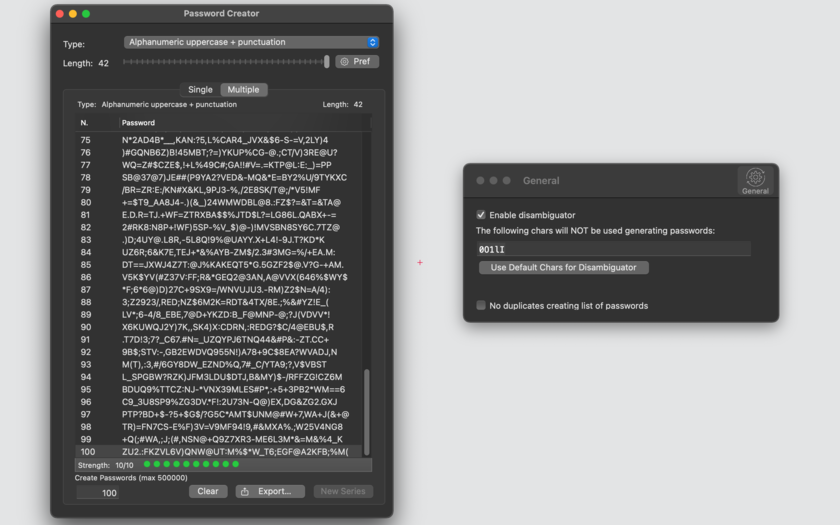
Tension Software announces Password Creator 1.4.1 for macOS. Password Creator allows to create a single password or a long list of random unique passwords (up to 500,000), inside an internal table, ready to be saved on disk in plain text format for reuse, all in a single click. Users can select the length of the password and it is created live while the user selects the options.
Milano, Italy - Tension Software is proud to announce the release and immediate availability of Password Creator 1.4.1 for macOS. Password Creator allows to create a single password or a long list of random unique passwords (up to 500000), inside an internal table, ready to be saved on disk in plain text format for reuse, all in a single click.
It allows users to create different kind of passwords:
* Alpha only lowercase
* Alpha only uppercase
* Alpha only any-case
* Alphanumeric only lowercase
* Alphanumeric only uppercase
* Alphanumeric only any-case
* Numeric only
* Hexadecimal (to be used in WEP encrypted wireless modem)
* Alphanumeric lowercase with punctuation
* Alphanumeric uppercase with punctuation
* Alphanumeric any-case with punctuation
* Readable lowercase password
* Readable uppercase password
The user can select the length of the password and it is created live while the user selects the options
Strength of the created password is visualized in a graphic way. Single password can be shown or maintained hidden inside the window. Password Creator includes a PDF embedded user guide.
Features:
* You can generate not only just one password in one shot, or up to 500000 (half million) unique passwords with a single click, and save them on disk in a text file.
* Password Creator can be used as a random data generator, with output importable by any other software that can read text data from disk
* Optionally avoids use of ambiguous chars similar to others
* When creating a list of password, optional 'avoid duplicates' to create only unique passwords
* Password browse inside an internal table
* Password sort
* Save on disk in text format, alphabetically or by creation
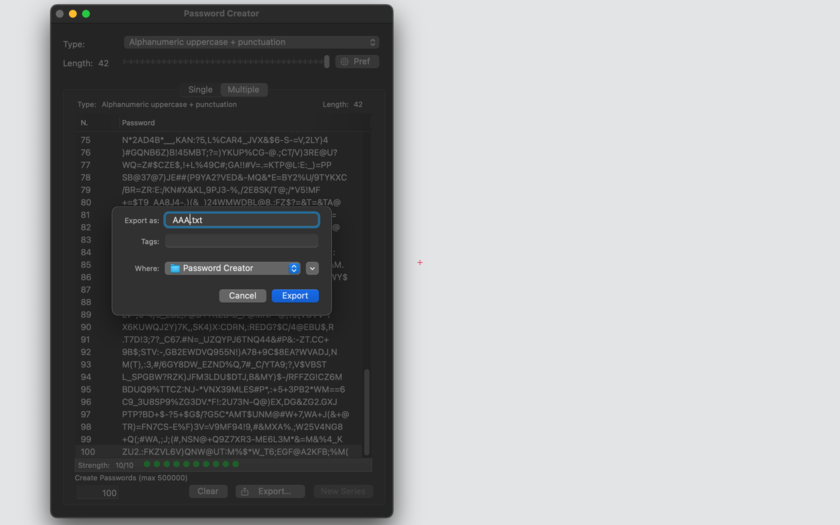
* Can export to disk data to be imported by any app
* Embedded PDF guide included
What's new:
* Bug fixes
* Better algorithm
* Optimized for macOS 10.13 High Sierra
Minimum Requirements:
* macOS Version 10.10 Yosemite or higher
* 1.9 MB
Pricing and Availability:
Password Creator 1.4.1 is just $4.99 USD (or an equivalent amount in other currencies) and is available worldwide through the Mac App Store.
Tension Software: http://www.tensionsoftware.com
Password Creator 1.4.1: http://www.tensionsoftware.com/osx/passwordcreator/
Purchase and Download from Mac App Store: http://itunes.apple.com/app/password-creator/id417046773
Screenshot 1: http://www.tensionsoftware.com/static/tensionsoftware/images/app/passwordcreator/screenshots/mac/1.png
Screenshot 2: http://www.tensionsoftware.com/static/tensionsoftware/images/app/passwordcreator/screenshots/mac/2.png
Application Icon: http://www.tensionsoftware.com/static/tensionsoftware/images/app/passwordcreator/icons/512.png
Tension Software develops software for macOS and iOS using the latest Apple technologies.
Other brands and products referenced herein are the trademarks or registered trademarks of their respective holders. All Material and Software (C) Copyright 2018 Tension Software. All Rights Reserved. Apple, the Apple logo, Macintosh Mac OS X and macOS are registered trademarks of Apple Inc. in the U.S. and/or other countries. Other trademarks and registered trademarks may be the property of their respective owners.
*******
Link To Article: https://prmac.com/release-id-82784.htm
*******
---------------------------------------------------------------------------------
Note that you can alter delivered distributions at any time.
Login to your account on prMac to alter your channel selection, or to opt-out at any time.


MacXDVD Rolls Out 2018 FIFA World Cup Giveaway - 1000 Copies a Day
A new article has been published at prMac.
MacXDVD Rolls Out 2018 FIFA World Cup Giveaway - 1000 Copies a Day - Published on 06/15/18
MacXDVD rides the wave of 2018 FIFA World Cup by giving away the significantly improved MacX Video Converter Pro. MacX DVD Ripper Pro is able to rip protected/homemade DVDs to any format fast and efficiently. The latest version offers full support for 64-bit macOS 10.14 Mojave and later. It supports all types of videos at a resolution of up to 4K/5K/8K. This event opens to all global soccer fans, starting from June 13 all the way to the final of the tournament on July 15, 2018.
Chengdu, China - 2018 FIFA World Cup is around the corner. MacXDVD Software is going all-out in celebration of the biggest tournament with a global-oriented giveaway campaign, culminating with the final in Moscow on July 15. The giveaway gift falls on the ace product MacX Video Converter Pro V6.3.0, a newly updated version that has just reached the highest level-3 hardware acceleration, engineered for faster 4K/HD video processing, encoding and compressing. Additionally, by taking part in the giveaway extravaganza, football fans from all around the world will get access to all 64 games, the most skillful goals, the greatest football players, highlights, upbeat theme songs, and more, all updated throughout the whole tournament.
The persistent focus on bringing the most enjoyable viewing experience is at the core of MacXDVD's values. Understanding soccer fans are inevitably bound to daily chores, time zone differences and the absence of internet access, the software company donates MacX Video Converter Pro as the gift, a move slated to expand the FIFA match viewing options from cable TV and internet streaming to offline enjoyment on phones, tablets, gaming systems, and more without missing out any match or highlight. Both giveaway license and 1-year full upgrade license of it are being given away during the 2018 World Cup.
Prize 1: Giveaway License:
Entrants can go to the official 2018 FIFA giveaway page, and click "Get Giveaway License for Free" button to get a zip file of MacX Video Converter Pro, along with its license code. 1000 free copies are donated each day, with no free upgrade support.
Prize 2: 1 Year License:
To claim 1-year upgrade license of MacX Video Converter Pro (worth $45.95), participants are encouraged to guess who will win the Russia 2018 FIFA World Cup and share on Facebook. 10 lucky winners will be picked randomly each day.
To get the gift and watch 4K/HD matches offline, please go to 2018 FIFA giveaway page.
MacX Video Converter Pro has just undergone a ground-breaking update with the highest yet unique level-3 hardware acceleration, which 99% software of the same kind is still out of reach. By using Intel QSV, Nvidia CUDA/NVENC or AMD app to the utmost, 4K/HD video processing, encoding, and decoding is accelerated to a new level, with conversion frequency reaching up to 300fps.
It supports all types of videos at a resolution of up to 4K/5K/8K and makes them playable, shareable and editable. Download any videos, including highlights, World Cup anthems and songs, etc from 300 online sites; resize and compress large 4K/HD videos by up to 90% for easier sharing and more storage; encode videos to HEVC, H.264, MP4, MOV, MKV, etc for flawless playback on iPhone, iPad, Android, Apple TV, etc. Edit video, make slideshow and record on-screen activities without a hassle.
Eligibility:
The giveaway sponsored by MacXDVD begins on June 13 and ends on July 15. It targets to customers from all over the world, without strings attached.
MacXDVD 2018 FIFA Giveaway: https://www.macxdvd.com/youtube-download-video/world-cup-songs-highlights-matches-videos.htm
MacX Video Converter Pro: https://www.macxdvd.com/mac-video-converter-pro/
MacXDVD Software is a division of Digiarty Software Company, owns a professional multimedia software development team, providing a range of products for Macintosh Computer users, including MacX Video Converter, MacX DVD Ripper, DVD Author, DVD backup tools, etc, series of apps for Apple video player, and iPhone, iPad 2D and 3D video games. Copyright (C) 2018 MacXDVD Software. All Rights Reserved. Apple, the Apple logo and Macintosh are registered trademarks of Apple Inc. in the U.S. and/or other countries.
*******
Link To Article: https://prmac.com/release-id-82781.htm
*******
---------------------------------------------------------------------------------
Note that you can alter delivered distributions at any time.
Login to your account on prMac to alter your channel selection, or to opt-out at any time.
MacXDVD Rolls Out 2018 FIFA World Cup Giveaway - 1000 Copies a Day - Published on 06/15/18
MacXDVD rides the wave of 2018 FIFA World Cup by giving away the significantly improved MacX Video Converter Pro. MacX DVD Ripper Pro is able to rip protected/homemade DVDs to any format fast and efficiently. The latest version offers full support for 64-bit macOS 10.14 Mojave and later. It supports all types of videos at a resolution of up to 4K/5K/8K. This event opens to all global soccer fans, starting from June 13 all the way to the final of the tournament on July 15, 2018.
Chengdu, China - 2018 FIFA World Cup is around the corner. MacXDVD Software is going all-out in celebration of the biggest tournament with a global-oriented giveaway campaign, culminating with the final in Moscow on July 15. The giveaway gift falls on the ace product MacX Video Converter Pro V6.3.0, a newly updated version that has just reached the highest level-3 hardware acceleration, engineered for faster 4K/HD video processing, encoding and compressing. Additionally, by taking part in the giveaway extravaganza, football fans from all around the world will get access to all 64 games, the most skillful goals, the greatest football players, highlights, upbeat theme songs, and more, all updated throughout the whole tournament.
The persistent focus on bringing the most enjoyable viewing experience is at the core of MacXDVD's values. Understanding soccer fans are inevitably bound to daily chores, time zone differences and the absence of internet access, the software company donates MacX Video Converter Pro as the gift, a move slated to expand the FIFA match viewing options from cable TV and internet streaming to offline enjoyment on phones, tablets, gaming systems, and more without missing out any match or highlight. Both giveaway license and 1-year full upgrade license of it are being given away during the 2018 World Cup.
Prize 1: Giveaway License:
Entrants can go to the official 2018 FIFA giveaway page, and click "Get Giveaway License for Free" button to get a zip file of MacX Video Converter Pro, along with its license code. 1000 free copies are donated each day, with no free upgrade support.
Prize 2: 1 Year License:
To claim 1-year upgrade license of MacX Video Converter Pro (worth $45.95), participants are encouraged to guess who will win the Russia 2018 FIFA World Cup and share on Facebook. 10 lucky winners will be picked randomly each day.
To get the gift and watch 4K/HD matches offline, please go to 2018 FIFA giveaway page.
MacX Video Converter Pro has just undergone a ground-breaking update with the highest yet unique level-3 hardware acceleration, which 99% software of the same kind is still out of reach. By using Intel QSV, Nvidia CUDA/NVENC or AMD app to the utmost, 4K/HD video processing, encoding, and decoding is accelerated to a new level, with conversion frequency reaching up to 300fps.
It supports all types of videos at a resolution of up to 4K/5K/8K and makes them playable, shareable and editable. Download any videos, including highlights, World Cup anthems and songs, etc from 300 online sites; resize and compress large 4K/HD videos by up to 90% for easier sharing and more storage; encode videos to HEVC, H.264, MP4, MOV, MKV, etc for flawless playback on iPhone, iPad, Android, Apple TV, etc. Edit video, make slideshow and record on-screen activities without a hassle.
Eligibility:
The giveaway sponsored by MacXDVD begins on June 13 and ends on July 15. It targets to customers from all over the world, without strings attached.
MacXDVD 2018 FIFA Giveaway: https://www.macxdvd.com/youtube-download-video/world-cup-songs-highlights-matches-videos.htm
MacX Video Converter Pro: https://www.macxdvd.com/mac-video-converter-pro/
MacXDVD Software is a division of Digiarty Software Company, owns a professional multimedia software development team, providing a range of products for Macintosh Computer users, including MacX Video Converter, MacX DVD Ripper, DVD Author, DVD backup tools, etc, series of apps for Apple video player, and iPhone, iPad 2D and 3D video games. Copyright (C) 2018 MacXDVD Software. All Rights Reserved. Apple, the Apple logo and Macintosh are registered trademarks of Apple Inc. in the U.S. and/or other countries.
*******
Link To Article: https://prmac.com/release-id-82781.htm
*******
---------------------------------------------------------------------------------
Note that you can alter delivered distributions at any time.
Login to your account on prMac to alter your channel selection, or to opt-out at any time.
LastThink releases Catchit Road - Speed Control for iOS
A new article has been published at prMac.
LastThink releases Catchit Road - Speed Control for iOS - Published on 06/14/18
LastThink announces Catchit Road - Speed Control 1.0, their new travel app designed for iOS devices. Helping to make your driving far easier and safer than ever, Catchit Road is a perfect tool for drivers. This GPS Mapquest based road app will help you get rid of any road rage you may have while driving, as it will notify you about anything happening on the road. You can type the way you are going and the app app will detect the place and take you wherever you want.
Yerevan, Armenia - LastThink is proud to announce the release of Catchit Road - Speed Control 1.0, their new travel app designed for iOS devices. Catchit Road is a perfect tool for drivers. It can make your driving far easier and safer than ever. This GPS Mapquest based road app will help you get rid of any road rage you may have while driving, as it will notify you about anything happening on the road.
Features:
* There is a Radar Range section by selecting which you can get informed about a danger such as cameras, accidents, etc.
* The driver can set the Speed Limit function which will inform you if you exceed the limited speed.
* Battery Save - you can set this function in case your phone battery is low and it will limit some settings or the GPS will turn off automatically.
* Danger Type - you can turn off some signs, which can be shown neither on the app nor they can inform you anything (e.g. if you don't want to get informed if there are any road works you can turn that section off).
* The driver can choose the distance at which the navigator will inform you about any feature concerning the road.
* It is possible to turn off some functions, if you don't want to use them (e.g. if you don't want to get notified whether there are cameras, you can turn off that function).
* The app gives the opportunity to set the voice of the GPS, so you can choose the voice as well. The app also gives the opportunity of not being notified during calls.
* With this app the driver have the opportunity to record a video of your route in the section of My Trips, so that later you can have the story of your trip.
* Mirror Speed - It is quite comfortable to use this app, as it gives the opportunity of reflecting the GPS image on the windscreen. So, it is possible to concentrate on the road and use the navigator at the same time, without looking elsewhere. (You can drive and look at your windscreen, getting all info that the app shows without distracting you attention)
* The driver can add your preferable sign onto the app if you see that isn't there.
* The driver can take a video of your driving and save it on your phone.
* Your videos, journeys and violations are saved on separate window where you can see the details.
* The driver can change the Map Style.
* The driver can use the app in three languages; Armenian, Russian, English.
Device Requirements:
* iPhone, iPad, and iPod touch
* Optimized for iPhone 5, iPhone 6, and iPhone 6 Plus
* Requires iOS 10 or later
* Universal Application
* 144.4 MB
Pricing and Availability:
Catchit Road - Speed Control 1.0 is free (With In-App Purchases) and is available worldwide exclusively through the App Store in the Travel category.
LastThink: http://lastthink.com/
Catchit Road - Speed Control 1.0: https://itunes.apple.com/app/catchit-road-speed-control/id1352994866
Screenshot: https://is5-ssl.mzstatic.com/image/thumb/Purple125/v4/f9/77/8a/f9778a1b-9629-2a4c-9ce8-6c6ef2c9f1e9/pr_source.png/300x0w.jpg
App Icon: https://is4-ssl.mzstatic.com/image/thumb/Purple125/v4/00/af/a7/00afa749-aa7e-2818-5b98-171072b119d9/AppIcon-1x_U007emarketing-0-0-GLES2_U002c0-512MB-sRGB-0-0-0-85-220-0-0-0-6.png/217x0w.jpg
LastThink is an IT company with a focus on mobile development. It has extended its list of services since 2012 to offer high-end business process management, system integration, as well as up-to-date communication solutions. LastThink's mission is to deliver maximum business value to its customers by designing, developing, implementing and maintaining efficient and high quality software solutions aligned with their most essential business needs. Their team will always do its best to meet client expectations. All Material and Software Copyright (C) 2018 LastThink LLC. All Rights Reserved. Apple, the Apple logo, iPhone, iPad and iPod are registered trademarks of Apple Inc. in the U.S. and/or other countries.
*******
Link To Article: https://prmac.com/release-id-82783.htm
*******
---------------------------------------------------------------------------------
Note that you can alter delivered distributions at any time.
Login to your account on prMac to alter your channel selection, or to opt-out at any time.
LastThink releases Catchit Road - Speed Control for iOS - Published on 06/14/18
LastThink announces Catchit Road - Speed Control 1.0, their new travel app designed for iOS devices. Helping to make your driving far easier and safer than ever, Catchit Road is a perfect tool for drivers. This GPS Mapquest based road app will help you get rid of any road rage you may have while driving, as it will notify you about anything happening on the road. You can type the way you are going and the app app will detect the place and take you wherever you want.
Yerevan, Armenia - LastThink is proud to announce the release of Catchit Road - Speed Control 1.0, their new travel app designed for iOS devices. Catchit Road is a perfect tool for drivers. It can make your driving far easier and safer than ever. This GPS Mapquest based road app will help you get rid of any road rage you may have while driving, as it will notify you about anything happening on the road.
Features:
* There is a Radar Range section by selecting which you can get informed about a danger such as cameras, accidents, etc.
* The driver can set the Speed Limit function which will inform you if you exceed the limited speed.
* Battery Save - you can set this function in case your phone battery is low and it will limit some settings or the GPS will turn off automatically.
* Danger Type - you can turn off some signs, which can be shown neither on the app nor they can inform you anything (e.g. if you don't want to get informed if there are any road works you can turn that section off).
* The driver can choose the distance at which the navigator will inform you about any feature concerning the road.
* It is possible to turn off some functions, if you don't want to use them (e.g. if you don't want to get notified whether there are cameras, you can turn off that function).
* The app gives the opportunity to set the voice of the GPS, so you can choose the voice as well. The app also gives the opportunity of not being notified during calls.
* With this app the driver have the opportunity to record a video of your route in the section of My Trips, so that later you can have the story of your trip.
* Mirror Speed - It is quite comfortable to use this app, as it gives the opportunity of reflecting the GPS image on the windscreen. So, it is possible to concentrate on the road and use the navigator at the same time, without looking elsewhere. (You can drive and look at your windscreen, getting all info that the app shows without distracting you attention)
* The driver can add your preferable sign onto the app if you see that isn't there.
* The driver can take a video of your driving and save it on your phone.
* Your videos, journeys and violations are saved on separate window where you can see the details.
* The driver can change the Map Style.
* The driver can use the app in three languages; Armenian, Russian, English.
Device Requirements:
* iPhone, iPad, and iPod touch
* Optimized for iPhone 5, iPhone 6, and iPhone 6 Plus
* Requires iOS 10 or later
* Universal Application
* 144.4 MB
Pricing and Availability:
Catchit Road - Speed Control 1.0 is free (With In-App Purchases) and is available worldwide exclusively through the App Store in the Travel category.
LastThink: http://lastthink.com/
Catchit Road - Speed Control 1.0: https://itunes.apple.com/app/catchit-road-speed-control/id1352994866
Screenshot: https://is5-ssl.mzstatic.com/image/thumb/Purple125/v4/f9/77/8a/f9778a1b-9629-2a4c-9ce8-6c6ef2c9f1e9/pr_source.png/300x0w.jpg

App Icon: https://is4-ssl.mzstatic.com/image/thumb/Purple125/v4/00/af/a7/00afa749-aa7e-2818-5b98-171072b119d9/AppIcon-1x_U007emarketing-0-0-GLES2_U002c0-512MB-sRGB-0-0-0-85-220-0-0-0-6.png/217x0w.jpg

LastThink is an IT company with a focus on mobile development. It has extended its list of services since 2012 to offer high-end business process management, system integration, as well as up-to-date communication solutions. LastThink's mission is to deliver maximum business value to its customers by designing, developing, implementing and maintaining efficient and high quality software solutions aligned with their most essential business needs. Their team will always do its best to meet client expectations. All Material and Software Copyright (C) 2018 LastThink LLC. All Rights Reserved. Apple, the Apple logo, iPhone, iPad and iPod are registered trademarks of Apple Inc. in the U.S. and/or other countries.
*******
Link To Article: https://prmac.com/release-id-82783.htm
*******
---------------------------------------------------------------------------------
Note that you can alter delivered distributions at any time.
Login to your account on prMac to alter your channel selection, or to opt-out at any time.
Merlin Project 5 is here
A new article has been published at prMac.
Merlin Project 5 is here - Published on 06/14/18
ProjectWizards today announces Merlin Project 5, the fifth generation update to their market-leading project-management software for macOS. At the intersection of traditional and agile project management, Merlin is intuitive, easy-to-use and offers a variety of options to help you plan, take control, collaborate and complete your project successfully. The latest version features a new Kanban Board, Resource Pool, Groupings, a new style editor and revised user interface.
Melle, Germany - ProjectWizards has released Merlin Project 5, the fifth generation of its professional project management software for productive use and sales after a successful test phase. Merlin is intuitive, easy-to-use and offers a variety of options to help you plan, take control, collaborate and complete your project successfully.
New in Merlin Project 5 is:
* The Kanban board
* The resource pool
* The groupings
* The Style Editor
* The Design
With the update of the software the website was also revised. Besides a discreet new design there are many new contents; for example a special page for Kanban, a revised training concept with new trainers and many new questions & answers - including a new search.
Pricing and Availability:
To allow more users an easy entry into professional project management, Merlin Project 5 is available as a subscription at a reduced price. Customers subscribe directly in the app for just USD 149 (149 EUR) per year, including all future updates. For Merlin Project 4 customers, there is an attractive offer: If the user takes out a subscription by December 31, 2018, he pays only USD 99 (99 EUR) per year on a permanent basis. Merlin Project 4 users who have recently purchased the software can use the new version for free for up to 18 months, depending on the date of purchase. A 30 day trial version of Merlin Project 5 can be downloaded from ProjectWizards online.
Merlin Project 5: https://www.projectwizards.net
What;s New: https://www.projectwizards.net/products/merlin-project/whats-new
Download Merlin Project: https://www.projectwizards.net/products/merlin-project/download
Purchase Merlin Project: https://www.projectwizards.net/en/products/merlin-project/buy
Screenshot: https://www.projectwizards.net/en/products/merlin-project/whats-new/kanban_en.jpg
Application Icon: https://www.projectwizards.net/assets/images/merlinproject-logo@2x.png
In addition to their extremely successful Mac project management application, Merlin, ProjectWizards also offers professional project management and related services. ProjectWizards was founded in 2001/2002 by Frank Blome, whose professional project management experience spans more than 15 years and companies of all sizes, from small IT shops to worldwide groups such as Bertelsman. The current ProjectWizards team encompasses professional project managers, software experts, Macintosh enthusiasts, trainers and partners in both Europe and North America. ProjectWizards' global network means that professional and responsive project management solutions can be provided to help any project succeed. Copyright (C) 2018 ProjectWizards. All Rights Reserved. Apple, the Apple logo, Mac OS X, and Macintosh are registered trademarks of Apple Inc. in the U.S. and/or other countries.
*******
Link To Article: https://prmac.com/release-id-82782.htm
*******
---------------------------------------------------------------------------------
Note that you can alter delivered distributions at any time.
Login to your account on prMac to alter your channel selection, or to opt-out at any time.
Merlin Project 5 is here - Published on 06/14/18
ProjectWizards today announces Merlin Project 5, the fifth generation update to their market-leading project-management software for macOS. At the intersection of traditional and agile project management, Merlin is intuitive, easy-to-use and offers a variety of options to help you plan, take control, collaborate and complete your project successfully. The latest version features a new Kanban Board, Resource Pool, Groupings, a new style editor and revised user interface.
Melle, Germany - ProjectWizards has released Merlin Project 5, the fifth generation of its professional project management software for productive use and sales after a successful test phase. Merlin is intuitive, easy-to-use and offers a variety of options to help you plan, take control, collaborate and complete your project successfully.
New in Merlin Project 5 is:
* The Kanban board
* The resource pool
* The groupings
* The Style Editor
* The Design
With the update of the software the website was also revised. Besides a discreet new design there are many new contents; for example a special page for Kanban, a revised training concept with new trainers and many new questions & answers - including a new search.
Pricing and Availability:
To allow more users an easy entry into professional project management, Merlin Project 5 is available as a subscription at a reduced price. Customers subscribe directly in the app for just USD 149 (149 EUR) per year, including all future updates. For Merlin Project 4 customers, there is an attractive offer: If the user takes out a subscription by December 31, 2018, he pays only USD 99 (99 EUR) per year on a permanent basis. Merlin Project 4 users who have recently purchased the software can use the new version for free for up to 18 months, depending on the date of purchase. A 30 day trial version of Merlin Project 5 can be downloaded from ProjectWizards online.
Merlin Project 5: https://www.projectwizards.net
What;s New: https://www.projectwizards.net/products/merlin-project/whats-new
Download Merlin Project: https://www.projectwizards.net/products/merlin-project/download
Purchase Merlin Project: https://www.projectwizards.net/en/products/merlin-project/buy
Screenshot: https://www.projectwizards.net/en/products/merlin-project/whats-new/kanban_en.jpg

Application Icon: https://www.projectwizards.net/assets/images/merlinproject-logo@2x.png

In addition to their extremely successful Mac project management application, Merlin, ProjectWizards also offers professional project management and related services. ProjectWizards was founded in 2001/2002 by Frank Blome, whose professional project management experience spans more than 15 years and companies of all sizes, from small IT shops to worldwide groups such as Bertelsman. The current ProjectWizards team encompasses professional project managers, software experts, Macintosh enthusiasts, trainers and partners in both Europe and North America. ProjectWizards' global network means that professional and responsive project management solutions can be provided to help any project succeed. Copyright (C) 2018 ProjectWizards. All Rights Reserved. Apple, the Apple logo, Mac OS X, and Macintosh are registered trademarks of Apple Inc. in the U.S. and/or other countries.
*******
Link To Article: https://prmac.com/release-id-82782.htm
*******
---------------------------------------------------------------------------------
Note that you can alter delivered distributions at any time.
Login to your account on prMac to alter your channel selection, or to opt-out at any time.
Sound Siphon 3 brings powerful and easy audio capture to the Mac
A new article has been published at prMac.
Sound Siphon 3 brings powerful and easy audio capture to the Mac - Published on 06/14/18
Static Z Software today releases Sound Siphon 3, a feature update to their popular audio capture application for macOS. Sound Siphon makes it easy to capture your Mac's audio. Use it to create virtual input audio devices that send audio from one app to another or, record right in the Sound Siphon app. Version 3 adds a new, easy to use interface, fully configurable channel mapping and a live mixer, making Sound Siphon the most flexible and capable audio capture product available for the Mac.
Rochester, New York - Static Z Software is proud to announce the release of Sound Siphon 3 which expands on Sound Siphon's ability to capture any audio on the Mac. Sound Siphon makes it easy to capture your Mac's audio. Use it to create virtual input audio devices that send audio from one app to another or, record right in the Sound Siphon app.
Sound Siphon has a brand new, easy to use interface that makes it easier than ever to create virtual input devices that capture the Mac's audio. Use Sound Siphon to send audio between your favorite applications or easily record directly in the Sound Siphon application. Sound Siphon excels at recording Skype conversations, broadcasting game audio, recording podcasts, and much more.
New in Sound Siphon 3 are configurable channel mapping as well as a live mixer. Users have complete control over the final mix of audio enabling them to get their captured audio just right.
Features:
* Easy to use interface
* Capture system audio
* Capture specific application audio
* Include microphones and other audio inputs
* Live mixer
* Built-in recording
System Requirements:
* macOS Version 10.11 - 10.13
Sound Siphon 3 has a free 14 day trial and can be purchased for $49 (USD), half the price of similar products. Special upgrade pricing is available for those that have purchased previous versions of Sound Siphon.
Static Z Software: http://staticz.com
Sound Siphon 3: http://staticz.com/soundsiphon
Media Assets: http://staticz.com/sound-siphon-media-pack
Located in Rochester, NY, Static Z Software was founded in 2013 by Dominic Feira. Static Z Software specializes in Mac and iOS software. With over a decade of experience developing award winning Mac software, Static Z Software strives to create unique software that is useful as well as enjoyable. Copyright (C) 2018 Static Z Software. All Rights Reserved. Apple, the Apple logo and Mac OS X are trademarks of Apple Inc. in the U.S. and/or other countries.
*******
Link To Article: https://prmac.com/release-id-82780.htm
*******
---------------------------------------------------------------------------------
Note that you can alter delivered distributions at any time.
Login to your account on prMac to alter your channel selection, or to opt-out at any time.
Sound Siphon 3 brings powerful and easy audio capture to the Mac - Published on 06/14/18
Static Z Software today releases Sound Siphon 3, a feature update to their popular audio capture application for macOS. Sound Siphon makes it easy to capture your Mac's audio. Use it to create virtual input audio devices that send audio from one app to another or, record right in the Sound Siphon app. Version 3 adds a new, easy to use interface, fully configurable channel mapping and a live mixer, making Sound Siphon the most flexible and capable audio capture product available for the Mac.
Rochester, New York - Static Z Software is proud to announce the release of Sound Siphon 3 which expands on Sound Siphon's ability to capture any audio on the Mac. Sound Siphon makes it easy to capture your Mac's audio. Use it to create virtual input audio devices that send audio from one app to another or, record right in the Sound Siphon app.
Sound Siphon has a brand new, easy to use interface that makes it easier than ever to create virtual input devices that capture the Mac's audio. Use Sound Siphon to send audio between your favorite applications or easily record directly in the Sound Siphon application. Sound Siphon excels at recording Skype conversations, broadcasting game audio, recording podcasts, and much more.
New in Sound Siphon 3 are configurable channel mapping as well as a live mixer. Users have complete control over the final mix of audio enabling them to get their captured audio just right.
Features:
* Easy to use interface
* Capture system audio
* Capture specific application audio
* Include microphones and other audio inputs
* Live mixer
* Built-in recording
System Requirements:
* macOS Version 10.11 - 10.13
Sound Siphon 3 has a free 14 day trial and can be purchased for $49 (USD), half the price of similar products. Special upgrade pricing is available for those that have purchased previous versions of Sound Siphon.
Static Z Software: http://staticz.com
Sound Siphon 3: http://staticz.com/soundsiphon
Media Assets: http://staticz.com/sound-siphon-media-pack
Located in Rochester, NY, Static Z Software was founded in 2013 by Dominic Feira. Static Z Software specializes in Mac and iOS software. With over a decade of experience developing award winning Mac software, Static Z Software strives to create unique software that is useful as well as enjoyable. Copyright (C) 2018 Static Z Software. All Rights Reserved. Apple, the Apple logo and Mac OS X are trademarks of Apple Inc. in the U.S. and/or other countries.
*******
Link To Article: https://prmac.com/release-id-82780.htm
*******
---------------------------------------------------------------------------------
Note that you can alter delivered distributions at any time.
Login to your account on prMac to alter your channel selection, or to opt-out at any time.
Popular Image Utility GraphicConverter 10.6.1 Adds New Batch Features
A new article has been published at prMac.
Popular Image Utility GraphicConverter 10.6.1 Adds New Batch Features - Published on 06/14/18
German indie development team Lemke Software GmbH today announces GraphicConverter 10.6.1, an important update to their award-winning image editing utility for macOS. The app offers users the ability to convert nearly any graphic file format into any of nearly 80 graphic formats. Version 10.6.1 bring many new conversion and modification features, a new graduated filter, and the ability to create many different variants of each processed file in a batch operation.
Peine, Germany - Lemke Software GmbH today is proud to announce the release and immediate availability of GraphicConverter 10.6.1, an important update to their popular image editing utility for macOS. The popular app, known as the "Swiss Army Knife" of image editing applications, allows users to convert any of over 200 graphic file formats into any of almost 80 graphic formats.
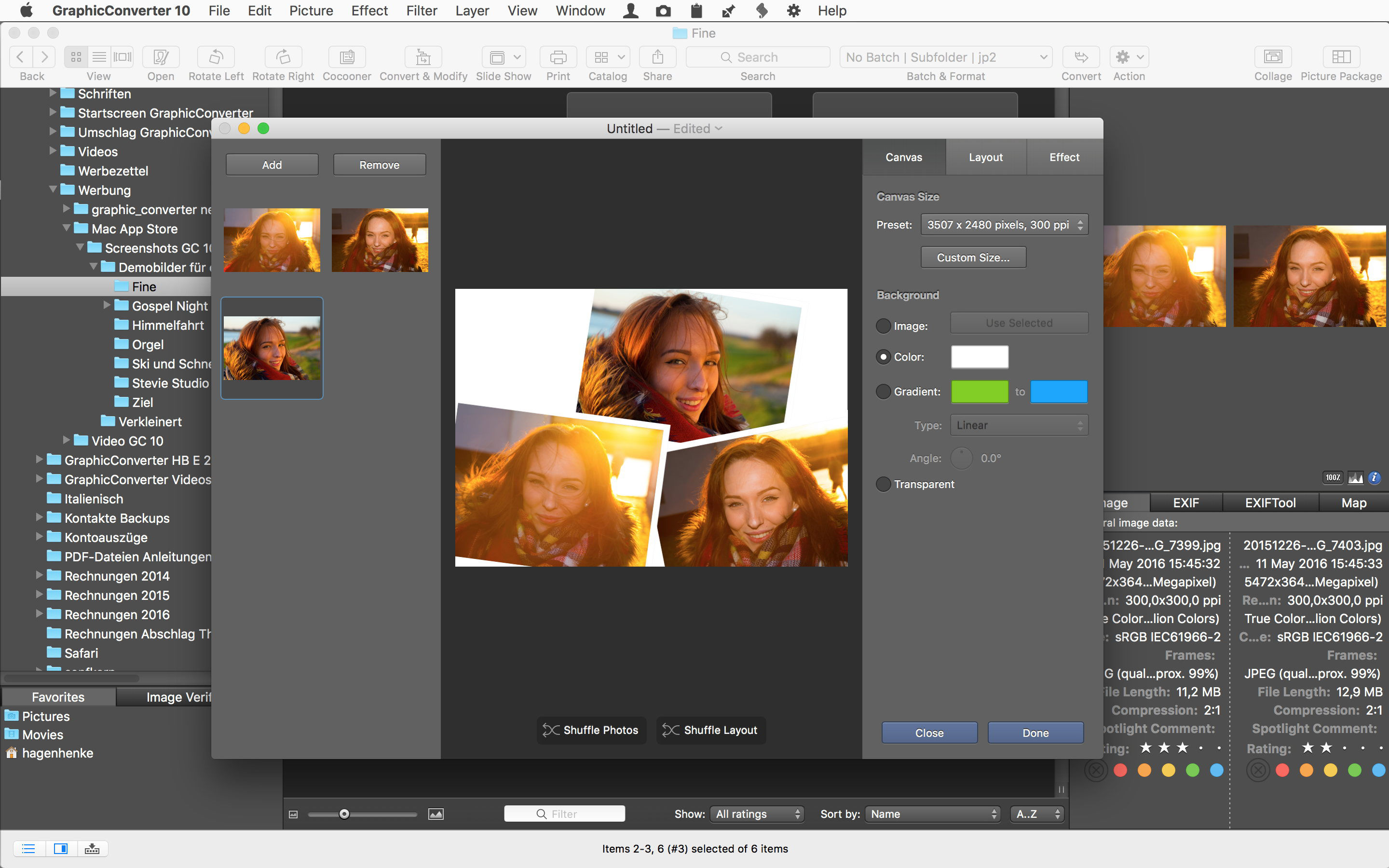
GraphicConverter has over 1.5 million loyal users worldwide. Users range from amateur photographers to professional designers. The new version of the app brings the ability to create numerous variants of each file being processed in one batch. Also new in the update is a new graduated filter, and new convert and modify features.
"GraphicConverter is one of the most popular professional programs on the market. Our users are some of the most loyal of any graphics utility on the macOS platform," says Thorsten Lemke, founder of Lemke Software GmbH. "The new features included in version 10.6.1 bring the app to another level, improving an already great application."
The update brings a large number of new features, including the ability to create complex batch actions with multiply save operations, new convert and modify operations, and much more.
New Features Include:
* Browser: Edit name kind toolbar item - change file name editing to iptc/xmp title editing
* Browser/convert & modify: Create complex batch actions with multiply save operations
* Browser/convert & modify: Reload action added
* Browser/convert & modify: Subfolder action added
* Browser/convert & modify: Anonymize faces action added
* Browser context menu: Added option to edit tags directly
* Menu effect: Graduated filter
* Browser/image window: Added icon to show/hide toolbar (OS X Yosemite 10.10 or later)
Version 10.6.1 of GraphicConverter is just the latest in a long history of updates that have made it one of the best macOS image processing utilities available today. The improvements in the app aren't limited to new features, as there are also several significant updates to existing features in the app.
Updated Features Include:
* Added GPS detection in RW2 files
* Updated localizations
* Browser/convert & modify: Change format action - added options
* Position palette: Displays line length and angle during drawing a line
* Prefs save/resource: Added option for icon size
* Reduced file access in browser for files without GPS location
* Image toolbar: Added print icon
* Import from digital camera: Added predefined folder option
The app continues to offer the best way to capture, import, convert, and export images on the Mac. GraphicConverter's powerful image editing functions offer the ability to work with local copies of images, or images stored on popular cloud storage services.
Features of the App Include:
* Opens files in 200 graphics formats
* Exports images in nearly 80 different formats
* Imports images directly from cameras, even in the RAW format and sidecar files like xmp, live picture
* Generates web, print & picture catalogs
* TWAIN and image capture interface for scanners
* Directly supports the Google, Flickr, and locr photo services
* Graphical file and picture browser
* Slide show functionality
* Powerful batch processing features
* Supports Applescript
* Express picture enhancement function
* Powerful photo editing functions
* Advanced effects and filters
* Flexible plug-in architecture
* Color management with ColorSync and ICC profiles
* 3D image support
* Supports for latest technologies built-in to the various versions of macOS
* Multilingual Support (12 available languages)
* Image verifier
* Browse local copies on cloud services like Dropbox, SkyDrive, AWS Cloud, and Google Drive
"Photographers and designers of all skill levels appreciate the features, quality, and ease-of-use of GraphicConverter," continues Thorsten. "We've made the app available for free trial use, and we've placed very few restrictions on the trial download. This provides to users a chance to get to know the utility, and appreciate its powerful, yet easy-to-use collection of image editing features."
Language Support:
English, Germany, French, Japanese, Chinese (simplified and traditional), Portuguese, Spanish, Danish, Swedish and Italian
System Requirements:
* Requires OS X 10.9 or higher
* 64-bit processor
* 145 MB
Pricing/Availability:
GraphicConverter 10.6.1 is only $39.95 USD (or an equivalent amount in other currencies) and is available worldwide through the Mac App Store in the Photography category. It can also be directly purchased online from the Lemkesoft website. GraphicConverter 10.6.1 is a free update for all customers of version 10.x. Upgrades from older versions of the app are available for $25.95 USD.
Lemke Software: https://www.lemkesoft.de/en/image-editing-slideshow-browser-batch-conversion-metadata-and-more-on-your-mac/
GraphicConverter 10.6.1: https://www.lemkesoft.de/en/products/graphicconverter/
Download GraphicConverter: https://www.lemkesoft.de/en/products/graphicconverter/download/
Purchase GraphicConverter: https://www.lemkesoft.de/en/order/
Purchase and Download (MAS): https://itunes.apple.com/app/graphicconverter-10/id1090470302
Screenshot: https://www.lemkesoft.info/prmac/screenshot.jpg
Based in Peine, Germany, Lemke Software GmbH is a developer and publisher of Macintosh software. Founded by Thorsten Lemke in 2002, the main focus and passion of Lemke Software is centered on the maintenance and further development of GraphicConverter. Lemke Software also develops individual solutions for special customer requirements. All Material and Software (C) Copyright 2018 Lemke Software GmbH. All Rights Reserved. Apple, the Apple logo, Macintosh Mac OS X, and macOS are registered trademarks of Apple Inc. in the U.S. and/or other countries. Other trademarks and registered trademarks may be the property of their respective owners.
*******
Link To Article: https://prmac.com/release-id-82777.htm
*******
---------------------------------------------------------------------------------
Note that you can alter delivered distributions at any time.
Login to your account on prMac to alter your channel selection, or to opt-out at any time.
Popular Image Utility GraphicConverter 10.6.1 Adds New Batch Features - Published on 06/14/18
German indie development team Lemke Software GmbH today announces GraphicConverter 10.6.1, an important update to their award-winning image editing utility for macOS. The app offers users the ability to convert nearly any graphic file format into any of nearly 80 graphic formats. Version 10.6.1 bring many new conversion and modification features, a new graduated filter, and the ability to create many different variants of each processed file in a batch operation.
Peine, Germany - Lemke Software GmbH today is proud to announce the release and immediate availability of GraphicConverter 10.6.1, an important update to their popular image editing utility for macOS. The popular app, known as the "Swiss Army Knife" of image editing applications, allows users to convert any of over 200 graphic file formats into any of almost 80 graphic formats.
GraphicConverter has over 1.5 million loyal users worldwide. Users range from amateur photographers to professional designers. The new version of the app brings the ability to create numerous variants of each file being processed in one batch. Also new in the update is a new graduated filter, and new convert and modify features.
"GraphicConverter is one of the most popular professional programs on the market. Our users are some of the most loyal of any graphics utility on the macOS platform," says Thorsten Lemke, founder of Lemke Software GmbH. "The new features included in version 10.6.1 bring the app to another level, improving an already great application."
The update brings a large number of new features, including the ability to create complex batch actions with multiply save operations, new convert and modify operations, and much more.
New Features Include:
* Browser: Edit name kind toolbar item - change file name editing to iptc/xmp title editing
* Browser/convert & modify: Create complex batch actions with multiply save operations
* Browser/convert & modify: Reload action added
* Browser/convert & modify: Subfolder action added
* Browser/convert & modify: Anonymize faces action added
* Browser context menu: Added option to edit tags directly
* Menu effect: Graduated filter
* Browser/image window: Added icon to show/hide toolbar (OS X Yosemite 10.10 or later)
Version 10.6.1 of GraphicConverter is just the latest in a long history of updates that have made it one of the best macOS image processing utilities available today. The improvements in the app aren't limited to new features, as there are also several significant updates to existing features in the app.
Updated Features Include:
* Added GPS detection in RW2 files
* Updated localizations
* Browser/convert & modify: Change format action - added options
* Position palette: Displays line length and angle during drawing a line
* Prefs save/resource: Added option for icon size
* Reduced file access in browser for files without GPS location
* Image toolbar: Added print icon
* Import from digital camera: Added predefined folder option
The app continues to offer the best way to capture, import, convert, and export images on the Mac. GraphicConverter's powerful image editing functions offer the ability to work with local copies of images, or images stored on popular cloud storage services.
Features of the App Include:
* Opens files in 200 graphics formats
* Exports images in nearly 80 different formats
* Imports images directly from cameras, even in the RAW format and sidecar files like xmp, live picture
* Generates web, print & picture catalogs
* TWAIN and image capture interface for scanners
* Directly supports the Google, Flickr, and locr photo services
* Graphical file and picture browser
* Slide show functionality
* Powerful batch processing features
* Supports Applescript
* Express picture enhancement function
* Powerful photo editing functions
* Advanced effects and filters
* Flexible plug-in architecture
* Color management with ColorSync and ICC profiles
* 3D image support
* Supports for latest technologies built-in to the various versions of macOS
* Multilingual Support (12 available languages)
* Image verifier
* Browse local copies on cloud services like Dropbox, SkyDrive, AWS Cloud, and Google Drive
"Photographers and designers of all skill levels appreciate the features, quality, and ease-of-use of GraphicConverter," continues Thorsten. "We've made the app available for free trial use, and we've placed very few restrictions on the trial download. This provides to users a chance to get to know the utility, and appreciate its powerful, yet easy-to-use collection of image editing features."
Language Support:
English, Germany, French, Japanese, Chinese (simplified and traditional), Portuguese, Spanish, Danish, Swedish and Italian
System Requirements:
* Requires OS X 10.9 or higher
* 64-bit processor
* 145 MB
Pricing/Availability:
GraphicConverter 10.6.1 is only $39.95 USD (or an equivalent amount in other currencies) and is available worldwide through the Mac App Store in the Photography category. It can also be directly purchased online from the Lemkesoft website. GraphicConverter 10.6.1 is a free update for all customers of version 10.x. Upgrades from older versions of the app are available for $25.95 USD.
Lemke Software: https://www.lemkesoft.de/en/image-editing-slideshow-browser-batch-conversion-metadata-and-more-on-your-mac/
GraphicConverter 10.6.1: https://www.lemkesoft.de/en/products/graphicconverter/
Download GraphicConverter: https://www.lemkesoft.de/en/products/graphicconverter/download/
Purchase GraphicConverter: https://www.lemkesoft.de/en/order/
Purchase and Download (MAS): https://itunes.apple.com/app/graphicconverter-10/id1090470302
Screenshot: https://www.lemkesoft.info/prmac/screenshot.jpg
Based in Peine, Germany, Lemke Software GmbH is a developer and publisher of Macintosh software. Founded by Thorsten Lemke in 2002, the main focus and passion of Lemke Software is centered on the maintenance and further development of GraphicConverter. Lemke Software also develops individual solutions for special customer requirements. All Material and Software (C) Copyright 2018 Lemke Software GmbH. All Rights Reserved. Apple, the Apple logo, Macintosh Mac OS X, and macOS are registered trademarks of Apple Inc. in the U.S. and/or other countries. Other trademarks and registered trademarks may be the property of their respective owners.
*******
Link To Article: https://prmac.com/release-id-82777.htm
*******
---------------------------------------------------------------------------------
Note that you can alter delivered distributions at any time.
Login to your account on prMac to alter your channel selection, or to opt-out at any time.
Maintain Releases Cocktail 11.6 (High Sierra Edition)
A new article has been published at prMac.
Maintain Releases Cocktail 11.6 (High Sierra Edition) - Published on 06/13/18
Maintain today announces Cocktail 11.6 (High Sierra Edition), the latest maintenance update for users running macOS High Sierra. Cocktail is a general purpose utility for macOS that lets users clean, repair and optimize their Macs. This version adds ability to enforce critical (XProtect and Gatekeeper) security updates. It also adds compatibility with macOS High Sierra 10.13.5 and contains many under-the-hood optimizations for faster and more reliable performance as well as other improvements.
Ekero, Sweden - Maintain today is proud to announce the release of Cocktail 11.6 (High Sierra Edition), the latest maintenance update for users running macOS High Sierra 10.13. The update is highly recommended for all users of Cocktail (High Sierra Edition).
What's New:
* Added ability to enforce critical (XProtect and Gatekeeper) security updates
* Added compatibility with macOS High Sierra 10.13.5
* Improvements on the "Perform essential system maintenance" procedure
* Improvements on the "Clear Internet caches" procedure
* Various improvements to Pilot
* New "Enforce Critical Security Updates" Automator action
* Other small enhancements
Cocktail is a general purpose utility for macOS that lets you clean, repair and optimize your Mac. The application serves up a perfect mix of maintenance tools and tweaks, all accessible through a clean and easy to use interface. Cocktail's features are arranged into five categories that helps you manage various aspects of your computer. It also comes with an automatic Pilot mode that allows you to simply press a button and relax, knowing that Cocktail will take care of the rest.
Disk:
* Automatically check S.M.A.R.T. status of disks
* Enable or disable journaling
* Set disk sleep (spindown) time
* Modify standby delay
* Change other disk sleep settings
* Force eject CD/DVD
System:
* Run periodic maintenance scripts
* Purge inactive memory and optimize virtual memory usage
* Manage Spotlight indexing
* Erase Spotlight indexes
* Modify Time Machine settings
* Rebuild Launch Services and Help databases
* Rebuild Mail's Envelope Index
* Update locate and whatis databases
* Force empty the Trash
* Change startup mode or set startup delay
* Disable startup sound
* Disable Gatekeeper
* Disable Notification Center and App Nap
Files:
* Clear system caches
* Clear user caches
* Clear font caches
* Clear virtual memory swap files
* Clear temporary files
* Clear Internet caches
* Clear cookies, download lists, form values and history files
* Clear Adobe Flash Player caches and cookies
* Clear applications caches
* Search for corrupted preference files
* Delete unnecessary localization (language resources) files
* Clear and manage (view, print and save) log files
* Delete invisible DS Store files
* Delete locked or inaccessible items
Network:
* Change speed, duplex and MTU of network cards
* Easily optimize network settings for common connection types
* Modify IP configuration parameters
* Configure File Sharing settings
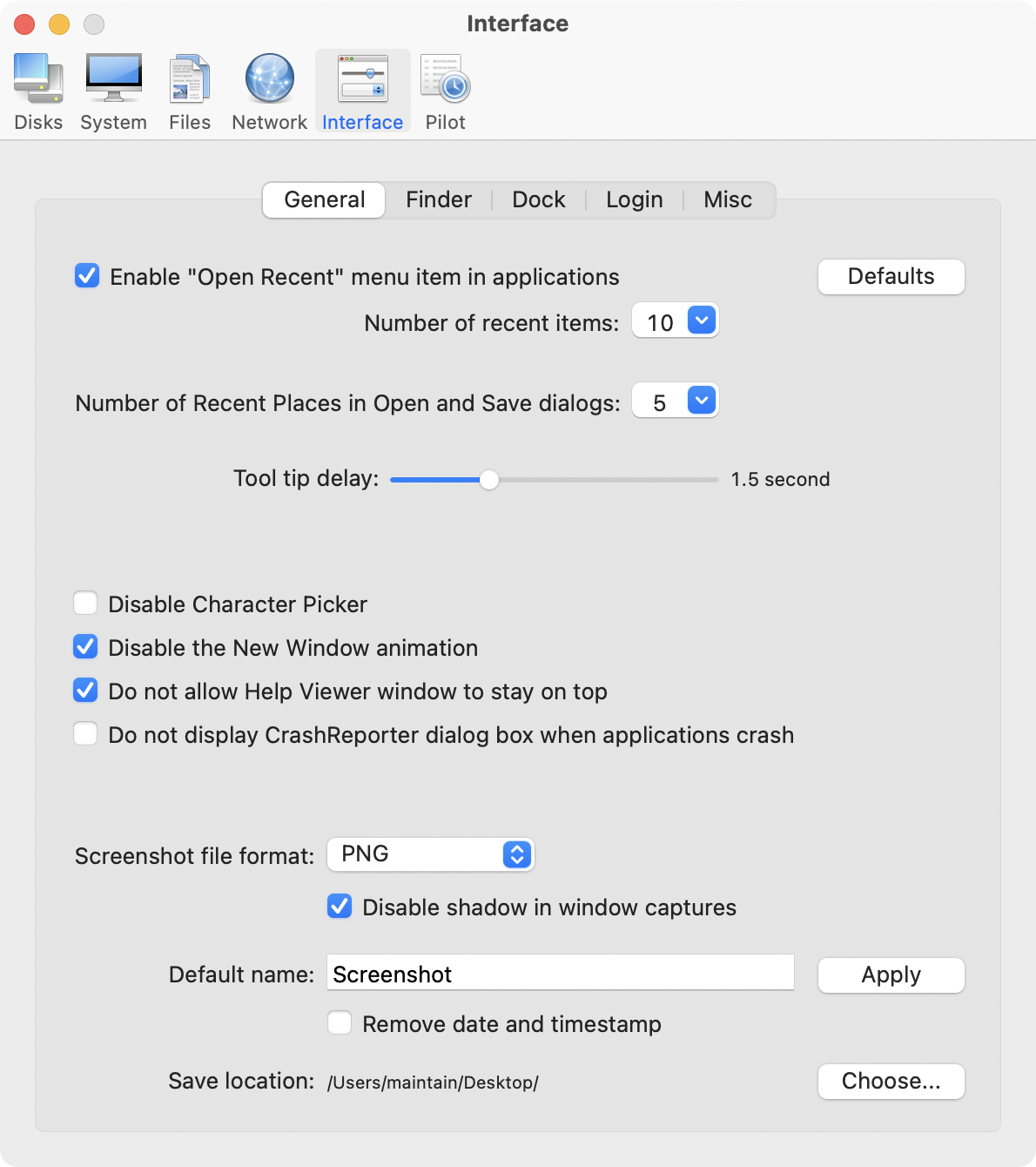
Interface:
* Customize look and features of Finder, Dock, login window and other system services
* Modify hidden settings of Safari, iTunes and Launchpad
System Requirements:
Cocktail (High Sierra Edition) requires macOS High Sierra 10.13 to run. Cocktail (Sierra Edition) for macOS 10.12, Cocktail (El Capitan Edition) for OS X 10.11, Cocktail (Yosemite Edition) for OS X 10.10 and Cocktail (Mavericks Edition) for OS X 10.9 are available for download from Maintain website.
Pricing and Availability:
Cocktail is $19.00 (USD) for a single user license and available for purchase from the Maintain website. When unregistered, Cocktail runs in demo mode and will expire after the tenth launch.
Cocktail 11.6 (High Sierra Edition): http://www.maintain.se/cocktail
Download Cocktail 11.6 (High Sierra Edition): http://usa.maintain.se/Cocktail11HSE.dmg
Vimeo Video: https://vimeo.com/109816714
Screenshot 1: http://www.maintain.se/downloads/screenshots/screenshot1.png
Screenshot 2: http://www.maintain.se/downloads/screenshots/screenshot3.png
Application Icon: http://www.maintain.se/downloads/screenshots/icon.png
Maintain develops tailored applications for Mac users. We work towards creating technical solutions which maintain your computer and make it as efficient and easy to use as possible. In addition, we offer comprehensive consultancy and support services which cover everything from operation of existing systems to purchase and implementation of new technical solutions. Among our clients are: Major League Baseball, Puma, The New York Times, Sony Pictures, Ericsson, Fortum, The City Of Calgary, Peak Performance, Loreal, Harvard University, Los Angeles Times, Swedish Film Institute, Weber, ESPN, Business Week, Swedish National Police Board, Norwegian Broadcasting Corporation, Getty Images, University of Texas, South Park Studios, CompUSA, bwin, Lockheed Martin, Defense Intelligence Agency, University of Michigan and hundred of thousands of Mac users around the world. Copyright (C) 2018 Maintain. All Rights Reserved. Apple, the Apple logo and Mac are registered trademarks of Apple Inc. in
the U.S. and/or other countries.
*******
Link To Article: https://prmac.com/release-id-82779.htm
*******
---------------------------------------------------------------------------------
Note that you can alter delivered distributions at any time.
Login to your account on prMac to alter your channel selection, or to opt-out at any time.
Maintain Releases Cocktail 11.6 (High Sierra Edition) - Published on 06/13/18
Maintain today announces Cocktail 11.6 (High Sierra Edition), the latest maintenance update for users running macOS High Sierra. Cocktail is a general purpose utility for macOS that lets users clean, repair and optimize their Macs. This version adds ability to enforce critical (XProtect and Gatekeeper) security updates. It also adds compatibility with macOS High Sierra 10.13.5 and contains many under-the-hood optimizations for faster and more reliable performance as well as other improvements.
Ekero, Sweden - Maintain today is proud to announce the release of Cocktail 11.6 (High Sierra Edition), the latest maintenance update for users running macOS High Sierra 10.13. The update is highly recommended for all users of Cocktail (High Sierra Edition).
What's New:
* Added ability to enforce critical (XProtect and Gatekeeper) security updates
* Added compatibility with macOS High Sierra 10.13.5
* Improvements on the "Perform essential system maintenance" procedure
* Improvements on the "Clear Internet caches" procedure
* Various improvements to Pilot
* New "Enforce Critical Security Updates" Automator action
* Other small enhancements
Cocktail is a general purpose utility for macOS that lets you clean, repair and optimize your Mac. The application serves up a perfect mix of maintenance tools and tweaks, all accessible through a clean and easy to use interface. Cocktail's features are arranged into five categories that helps you manage various aspects of your computer. It also comes with an automatic Pilot mode that allows you to simply press a button and relax, knowing that Cocktail will take care of the rest.
Disk:
* Automatically check S.M.A.R.T. status of disks
* Enable or disable journaling
* Set disk sleep (spindown) time
* Modify standby delay
* Change other disk sleep settings
* Force eject CD/DVD
System:
* Run periodic maintenance scripts
* Purge inactive memory and optimize virtual memory usage
* Manage Spotlight indexing
* Erase Spotlight indexes
* Modify Time Machine settings
* Rebuild Launch Services and Help databases
* Rebuild Mail's Envelope Index
* Update locate and whatis databases
* Force empty the Trash
* Change startup mode or set startup delay
* Disable startup sound
* Disable Gatekeeper
* Disable Notification Center and App Nap
Files:
* Clear system caches
* Clear user caches
* Clear font caches
* Clear virtual memory swap files
* Clear temporary files
* Clear Internet caches
* Clear cookies, download lists, form values and history files
* Clear Adobe Flash Player caches and cookies
* Clear applications caches
* Search for corrupted preference files
* Delete unnecessary localization (language resources) files
* Clear and manage (view, print and save) log files
* Delete invisible DS Store files
* Delete locked or inaccessible items
Network:
* Change speed, duplex and MTU of network cards
* Easily optimize network settings for common connection types
* Modify IP configuration parameters
* Configure File Sharing settings
Interface:
* Customize look and features of Finder, Dock, login window and other system services
* Modify hidden settings of Safari, iTunes and Launchpad
System Requirements:
Cocktail (High Sierra Edition) requires macOS High Sierra 10.13 to run. Cocktail (Sierra Edition) for macOS 10.12, Cocktail (El Capitan Edition) for OS X 10.11, Cocktail (Yosemite Edition) for OS X 10.10 and Cocktail (Mavericks Edition) for OS X 10.9 are available for download from Maintain website.
Pricing and Availability:
Cocktail is $19.00 (USD) for a single user license and available for purchase from the Maintain website. When unregistered, Cocktail runs in demo mode and will expire after the tenth launch.
Cocktail 11.6 (High Sierra Edition): http://www.maintain.se/cocktail
Download Cocktail 11.6 (High Sierra Edition): http://usa.maintain.se/Cocktail11HSE.dmg
Vimeo Video: https://vimeo.com/109816714
Screenshot 1: http://www.maintain.se/downloads/screenshots/screenshot1.png
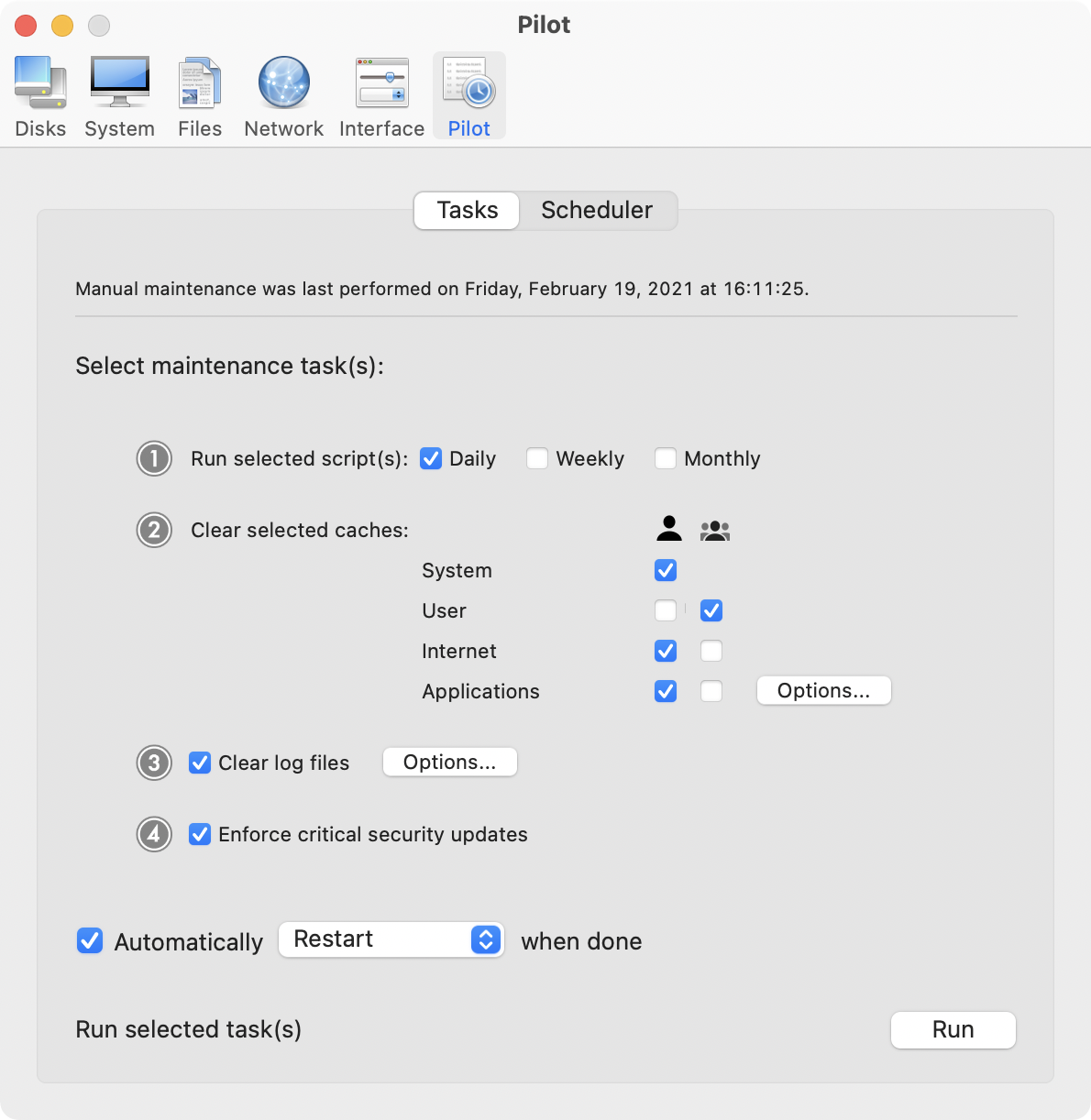
Screenshot 2: http://www.maintain.se/downloads/screenshots/screenshot3.png
Application Icon: http://www.maintain.se/downloads/screenshots/icon.png

Maintain develops tailored applications for Mac users. We work towards creating technical solutions which maintain your computer and make it as efficient and easy to use as possible. In addition, we offer comprehensive consultancy and support services which cover everything from operation of existing systems to purchase and implementation of new technical solutions. Among our clients are: Major League Baseball, Puma, The New York Times, Sony Pictures, Ericsson, Fortum, The City Of Calgary, Peak Performance, Loreal, Harvard University, Los Angeles Times, Swedish Film Institute, Weber, ESPN, Business Week, Swedish National Police Board, Norwegian Broadcasting Corporation, Getty Images, University of Texas, South Park Studios, CompUSA, bwin, Lockheed Martin, Defense Intelligence Agency, University of Michigan and hundred of thousands of Mac users around the world. Copyright (C) 2018 Maintain. All Rights Reserved. Apple, the Apple logo and Mac are registered trademarks of Apple Inc. in
the U.S. and/or other countries.
*******
Link To Article: https://prmac.com/release-id-82779.htm
*******
---------------------------------------------------------------------------------
Note that you can alter delivered distributions at any time.
Login to your account on prMac to alter your channel selection, or to opt-out at any time.
Subscribe to:
Posts (Atom)