A new article has been published at prMac.
Emulsio 3.0 Brings 4K Video Stabilization to iPhone/iPad - Published on 06/19/18
Creaceed releases Emulsio version 3.0, a major upgrade to their video stabilization app for iPhone and iPad. Emulsio stabilizes videos recorded with iPhone or iPad, or even GoPro cameras, automatically removing unpleasant camera shake. Version 3.0 adds support for 4K videos as well as a better rolling shutter distortion correction including third-party sensors, including drones, GoPro and more. This release also features an updated user interface with improved support for modern iOS features.
Mons, Belgium - Creaceed today is proud to announce the release and immediate availability of Emulsio version 3.0, a major upgrade to their video stabilization app for iPhone and iPad. Emulsio 3.0 adds support for 4K videos as well as a better rolling shutter distortion correction including third-party sensors (drones, GoPro (TM), etc.). This release also features an updated user interface with improved support for modern iOS features.
Emulsio 3.0 lets users stabilize videos using specific image analysis technology, providing full control over the process. This makes it a great companion app to video content creators (YouTube, etc.), even when using third-party cameras or drones, which are fully supported. Emulsio stabilizes 4K videos, which are typically not processed even on latest devices. And for videos recorded with OIS (Optical Image Stabilization), Emulsio's processing adds up to produce even smoother motion. The video can also be edited within the app; parts of it can be deleted or trimmed before final export. The user can compensate horizontal, vertical, rotational camera motion as well as rolling shutter distortion (wobble) which has been improved in version 3.0 with the possibility of adjusting the amplitude of correction depending on sensor. Emulsio comes with built-in preview to fine-tune results prior to final video export.
New features in 3.0:
* More accurate stabilization for 4K videos shot on device or from a third-party camera. 4K videos typically are not stabilized, but Emulsio lets you process them anyway.
* Rolling shutter distortion correction enhancement: amplitude of correction can be adjusted depending on sensor. Apple camera sensor values are provided, and third-party camera sensors can be calibrated within the app. Emulsio can now process videos from drones or GoPro(TM) cameras, including rolling shutter artifact correction.
* User interface has been refined to make stabilization settings easier to understand. Modern iOS features have been added or improved: Peek & Pop to preview videos from the import list (3D Touch on iPhone, long press on iPad), HEVC file handling (input / output), iPhone X, Drag & Drop and iPad multitasking.
Other features include:
* Non-destructive time editing
* Adjustable stabilization strength and motion intent (standard or cinematic)
* Stabilizer data reporting
* Black border handling
* Discontinuity handling in video stream
* iOS Photos extension to process videos directly in the Photos app.
* Live previewing & split-screen comparison of stabilized video vs. original one
* Frame by frame visualization of motion compensation and associated limits
* Optimized for 120 and 240 FPS videos
* Optimized for 64-bit devices
* Fast, GPU-optimized image processing to handle the video in a fraction of its duration
Pricing and Availability:
Emulsio 3.0 requires an iPhone or iPad running iOS 9.0 or later. It can be freely downloaded on the App Store, and is localized in 14 languages. The stabilization can be tried out as well as video editing features. Pro Pack 2 offers support for 4K videos, improved correction of rolling shutter distortion including third-party sensor calibration, and removal of the watermark. It can be purchased within the app for $7.99/8,99Euro. A special upgrade price of $3.99/4,49Euro is available for users who previously purchased Pro Pack 1. Pro Pack 1 users otherwise keep the features they already had (standard stabilization and watermark removal).
Emulsio 3.0: https://creaceed.com/emulsio
App Store Link: https://itunes.apple.com/app/id397583851?mt=8&pt=11162&at=1l3vojn&ct=prmac
Screenshot: https://is4-ssl.mzstatic.com/image/thumb/Purple125/v4/d1/8c/d9/d18cd9dd-9b1e-56f7-db80-30bef0958558/mzl.zbbcctsw.png/643x0w.jpg
App Icon: https://is3-ssl.mzstatic.com/image/thumb/Purple115/v4/12/21/71/12217104-4fd5-55b8-10f0-6d9986bee8d7/AppIcon-1x_U007emarketing-85-220-3.png/246x0w.jpg
Creaceed is a Belgian company that has been making apps for 10 years, focusing on image processing technologies in the fields of document scanning & vision aid, note taking, photo and video processing. Other apps like Hydra, Carbo, Prizmo and Prizmo Go have been awarded & featured by Apple on multiple occasions. Copyright 2008-2018 Creaceed. All Rights Reserved. Apple, the Apple logo, Macintosh, iOS, macOS, iPhone, iPad are registered trademarks of Apple Computer in the U.S. and/or other countries.
*******
Link To Article: https://prmac.com/release-id-82801.htm
*******
---------------------------------------------------------------------------------
Note that you can alter delivered distributions at any time.
Login to your account on prMac to alter your channel selection, or to opt-out at any time.



New E-Book Cognitive Productivity with macOS
A new article has been published at prMac.
New E-Book Cognitive Productivity with macOS - Published on 06/19/18
Announcing a new CogZest e-book by Luc P. Beaudoin: Cognitive Productivity with macOS 7 Principles for Getting Smarter with Knowledge. This is the Mac-focused, practical sequel to Beaudoin's ground-breaking e-book, Cognitive Productivity: Using Knowledge to Become Profoundly Effective. Cognitive Productivity books are designed to help you thrive in the sea of knowledge. Luc Beaudoin is a cognitive scientist, author and entrepreneur who specializes in cognitive productivity and well-being.
Vancouver, British Columbia - CogZest is pleased to announce the availability of Dr. Luc P. Beaudoin's new e-book, Cognitive Productivity with macOS(R): 7 Principles for Getting Smarter with Knowledge. In today's competitive economy, Mac users need to deal with unprecedented amounts of information and technology options under intense time pressure. Beaudoin's new, screencast-rich e-book demonstrates pro-active strategies for assessing, organizing, selecting, processing and mastering information.
Cognitive Productivity with macOS is the Mac-focused, practical sequel to Beaudoin's ground-breaking e-book, Cognitive Productivity: Using Knowledge to Become Profoundly Effective. When it comes to learning, not every app is created equal. Common ways of processing information actually interfere with learning. Using the right apps and the right strategies can enormously boost your ability to learn and think effectively. This is what Cognitive Productivity books are all about. Cognitive Productivity books are designed to help you "thrive in the sea of knowledge".
Luc Beaudoin is a cognitive scientist, author and entrepreneur who specializes in cognitive productivity and well-being. His work has been featured in Forbes Magazine, The New York Times, Lifehacker, Popular Science Magazine, Cool Tools, The Guardian, The International Business Times of London, etc. He is co-founder of CogSci Apps, inventor of mySleepButton(R), founder of CogZest, and Adjunct Professor of Cognitive Science and of Education at Simon Fraser University.
Cognitive Productivity books are themselves prequels to CogSci Apps' upcoming, first-of-its-kind, cognitive productivity app. Cognitive Productivity with macOS book is available today on Leanpub and imminently on iBookStore and Amazon Kindle Store.
CogZest: http://cogzest.com/
Cognitive Productivity with macOS: https://leanpub.com/cognitive-productivity-macos
More Information: https://cogzest.com/2018/05/post-truth-book-launch/
Screenshot: https://s3.amazonaws.com/titlepages.leanpub.com/cognitive-productivity-macos/hero?1518078398
Profound personal, organizational and societal achievements are based on knowledge. We use cognitive science to build products that improve your cognitive productivity. That is your effectiveness and efficiency at using knowledge to solve problems, develop products and develop yourself. Our products are designed for the human mind. We are here to help you "thrive in the sea of knowledge." We've identified several important problems people have that can be solved by extending and applying cognitive science. Cognitive science is the modern science of the human mind. We develop simple, beautiful, effective products based on this understanding. CogSci Apps help you use technology to act in accordance with knowledge. All Material and Software (C) Copyright 2018 CogZest. All Rights Reserved. Apple, the Apple logo and macOS are registered trademarks of Apple Inc. in the U.S. and/or other countries. Other trademarks and registered trademarks may be the property of their respective owners.
*******
Link To Article: https://prmac.com/release-id-82799.htm
*******
---------------------------------------------------------------------------------
Note that you can alter delivered distributions at any time.
Login to your account on prMac to alter your channel selection, or to opt-out at any time.
New E-Book Cognitive Productivity with macOS - Published on 06/19/18
Announcing a new CogZest e-book by Luc P. Beaudoin: Cognitive Productivity with macOS 7 Principles for Getting Smarter with Knowledge. This is the Mac-focused, practical sequel to Beaudoin's ground-breaking e-book, Cognitive Productivity: Using Knowledge to Become Profoundly Effective. Cognitive Productivity books are designed to help you thrive in the sea of knowledge. Luc Beaudoin is a cognitive scientist, author and entrepreneur who specializes in cognitive productivity and well-being.
Vancouver, British Columbia - CogZest is pleased to announce the availability of Dr. Luc P. Beaudoin's new e-book, Cognitive Productivity with macOS(R): 7 Principles for Getting Smarter with Knowledge. In today's competitive economy, Mac users need to deal with unprecedented amounts of information and technology options under intense time pressure. Beaudoin's new, screencast-rich e-book demonstrates pro-active strategies for assessing, organizing, selecting, processing and mastering information.
Cognitive Productivity with macOS is the Mac-focused, practical sequel to Beaudoin's ground-breaking e-book, Cognitive Productivity: Using Knowledge to Become Profoundly Effective. When it comes to learning, not every app is created equal. Common ways of processing information actually interfere with learning. Using the right apps and the right strategies can enormously boost your ability to learn and think effectively. This is what Cognitive Productivity books are all about. Cognitive Productivity books are designed to help you "thrive in the sea of knowledge".
Luc Beaudoin is a cognitive scientist, author and entrepreneur who specializes in cognitive productivity and well-being. His work has been featured in Forbes Magazine, The New York Times, Lifehacker, Popular Science Magazine, Cool Tools, The Guardian, The International Business Times of London, etc. He is co-founder of CogSci Apps, inventor of mySleepButton(R), founder of CogZest, and Adjunct Professor of Cognitive Science and of Education at Simon Fraser University.
Cognitive Productivity books are themselves prequels to CogSci Apps' upcoming, first-of-its-kind, cognitive productivity app. Cognitive Productivity with macOS book is available today on Leanpub and imminently on iBookStore and Amazon Kindle Store.
CogZest: http://cogzest.com/
Cognitive Productivity with macOS: https://leanpub.com/cognitive-productivity-macos
More Information: https://cogzest.com/2018/05/post-truth-book-launch/
Screenshot: https://s3.amazonaws.com/titlepages.leanpub.com/cognitive-productivity-macos/hero?1518078398
Profound personal, organizational and societal achievements are based on knowledge. We use cognitive science to build products that improve your cognitive productivity. That is your effectiveness and efficiency at using knowledge to solve problems, develop products and develop yourself. Our products are designed for the human mind. We are here to help you "thrive in the sea of knowledge." We've identified several important problems people have that can be solved by extending and applying cognitive science. Cognitive science is the modern science of the human mind. We develop simple, beautiful, effective products based on this understanding. CogSci Apps help you use technology to act in accordance with knowledge. All Material and Software (C) Copyright 2018 CogZest. All Rights Reserved. Apple, the Apple logo and macOS are registered trademarks of Apple Inc. in the U.S. and/or other countries. Other trademarks and registered trademarks may be the property of their respective owners.
*******
Link To Article: https://prmac.com/release-id-82799.htm
*******
---------------------------------------------------------------------------------
Note that you can alter delivered distributions at any time.
Login to your account on prMac to alter your channel selection, or to opt-out at any time.
Data Extractor 1.6 Can Extract Data From Files and Emails
A new article has been published at prMac.
Data Extractor 1.6 Can Extract Data From Files and Emails - Published on 06/18/18
Tension Software announces Data Extractor 1.6 for macOS. Data Extractor allows users to extract data in a sparse format contained inside files and emails and collect them in an internal structured table. Collected data can be exported at any time in various format (CSV, TSV, HTML, Custom). Data extractor can parse thousands and thousands of file in few seconds and collect all the raw data inside.
Milano, Italy - Tension Software is proud to announce the release of Data Extractor 1.6 for macOS. Data Extractor 1.6 can extract data from files and emails and collect them in exportable database tables. Data Extractor 1.6 allows users to extract data in a sparse format contained inside files and emails and collect them in an internal structured table Collected data can be exported at any time in various format (CSV, TSV, HTML, Custom).
Data extractor can parse thousands and thousands of file in few seconds and collect all the raw data inside. It uses simple instructions about how to recognize data, how to extract them and where to put these data inside a structured table, ready to be exported.
When the data you want to extract are recognizable inside a text by a start label and the end of data by another label or a newline or return or a tab, Data Extractor can extract it and do in few seconds ,the job you would requires weeks or months or even years to do by hand.
Data Extractor provides all the knowledge to accomplish these specific tasks in a fast and smart way inside a beautiful and elegant, Mac only, native application.
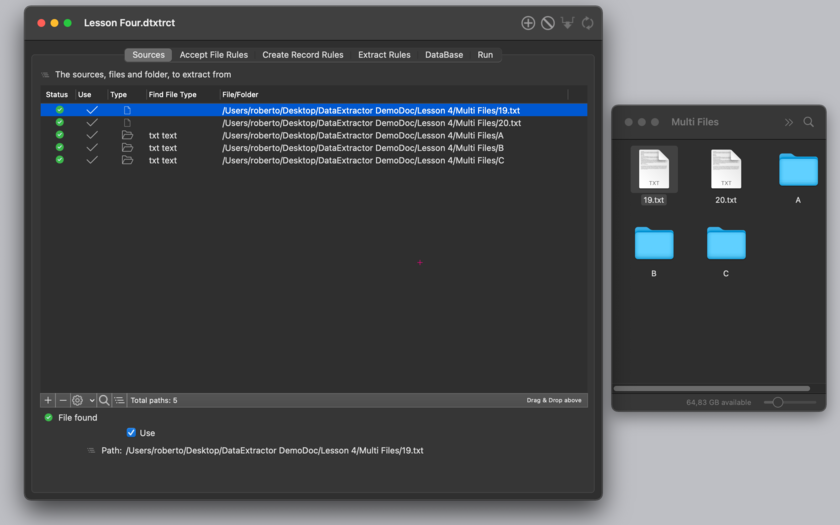
Data Extractor provides an internal database table, where the user can create how many columns she/he likes, where data can be collected. Data are always available for export on disk in CVS (comma separated value), TSV (tab separated value) or html table format. Name of custom fields can be used as first record during exportation (for successive smart importing).
Data Extractor is document based and any document can be customized for fast batch processing of large amount of data with specific sources, rules of extractions and custom destination fields. Creating many documents the user can create as many custom 'extraction set' he needs to extract from different files and with different extraction rules.
The application includes a PDF user guide with also 4 practical lessons with demo documents (on our site) on how to extract data from text files and put them inside a custom, user created table. Due to the complexity of the operations we know that it is a lot easier to show to the user some examples of usage, before explaining from a general point of view how the app works.
Features:
* Transform order or data in general you receive via email in a database records (Data Extractor can parse directly emails pointing at your mailbox on your Hard Disk)
* Collect order received as server output when not directly inserted inside a database
* Extract data from files one by one, also dragging them via Drag & Drop
* Can process folders extracting from all the files inside nested to any level
* Convert data provided in one format to another when the first format uses a recognizable patter with labels to identify data fields
* Adjustable data columns positions
* Extract data from files where data are written all in one file with record separated just by a distinctive string
* Extract data from files where records are separated by newline with fields all in one line identified just by labels
* Extract data from text document with non unique, ambiguous tags , using special tags usable to instruct Data Extractor where to really start collect data
* Parse files only if they respond to certain characteristics
* Extract data only if they respond to certain characteristics
* Extract data also when it is specified by more then one label (it can put different extraction in the same destination field)
* Can use 'Case Sensitive' option for data tags
New in this release:
* New improved layout of the 'Run' zone offering a better view of the elaboration flow
* More data offered inside the 'Run' zone about file processed, skipped and accepted and rejected and record and fields inserted in the internal database
* Various bug fixes
* Code optimizations
System Requirements:
* macOS 10.10 Yosemite
* Optimized for macOS 10.13 High Sierra
* 6.6 MB
Pricing and Availability:
Data Extractor 1.6 just $49.99 USD (or an equivalent amount in other currencies) and is available worldwide through the Mac App Store.
Tension Software: http://www.tensionsoftware.com
Data Extractor 1.6: http://www.tensionsoftware.com/osx/dataextractor/
Direct Download Link: http://sec.tensionsoftware.com/osx/dataextractor/dataextractor.dmg
App Store: http://itunes.apple.com/app/data-extractor/id503891749
Screenshot: http://www.tensionsoftware.com/static/tensionsoftware/images/app/dataextractor/screenshots/mac/1.png
Application Icon: http://www.tensionsoftware.com/static/tensionsoftware/images/app/dataextractor/icons/512.png
Tension Software develops software for macOS and iOS using the latest Apple technologies.
Other brands and products referenced herein are the trademarks or registered trademarks of their respective holders. All Material and Software (C) Copyright 2018 Tension Software. All Rights Reserved. Apple, the Apple logo, Macintosh Mac OS X and macOS are registered trademarks of Apple Inc. in the U.S. and/or other countries. Other trademarks and registered trademarks may be the property of their respective owners.
*******
Link To Article: https://prmac.com/release-id-82800.htm
*******
---------------------------------------------------------------------------------
Note that you can alter delivered distributions at any time.
Login to your account on prMac to alter your channel selection, or to opt-out at any time.
Data Extractor 1.6 Can Extract Data From Files and Emails - Published on 06/18/18
Tension Software announces Data Extractor 1.6 for macOS. Data Extractor allows users to extract data in a sparse format contained inside files and emails and collect them in an internal structured table. Collected data can be exported at any time in various format (CSV, TSV, HTML, Custom). Data extractor can parse thousands and thousands of file in few seconds and collect all the raw data inside.
Milano, Italy - Tension Software is proud to announce the release of Data Extractor 1.6 for macOS. Data Extractor 1.6 can extract data from files and emails and collect them in exportable database tables. Data Extractor 1.6 allows users to extract data in a sparse format contained inside files and emails and collect them in an internal structured table Collected data can be exported at any time in various format (CSV, TSV, HTML, Custom).
Data extractor can parse thousands and thousands of file in few seconds and collect all the raw data inside. It uses simple instructions about how to recognize data, how to extract them and where to put these data inside a structured table, ready to be exported.
When the data you want to extract are recognizable inside a text by a start label and the end of data by another label or a newline or return or a tab, Data Extractor can extract it and do in few seconds ,the job you would requires weeks or months or even years to do by hand.
Data Extractor provides all the knowledge to accomplish these specific tasks in a fast and smart way inside a beautiful and elegant, Mac only, native application.
Data Extractor provides an internal database table, where the user can create how many columns she/he likes, where data can be collected. Data are always available for export on disk in CVS (comma separated value), TSV (tab separated value) or html table format. Name of custom fields can be used as first record during exportation (for successive smart importing).
Data Extractor is document based and any document can be customized for fast batch processing of large amount of data with specific sources, rules of extractions and custom destination fields. Creating many documents the user can create as many custom 'extraction set' he needs to extract from different files and with different extraction rules.
The application includes a PDF user guide with also 4 practical lessons with demo documents (on our site) on how to extract data from text files and put them inside a custom, user created table. Due to the complexity of the operations we know that it is a lot easier to show to the user some examples of usage, before explaining from a general point of view how the app works.
Features:
* Transform order or data in general you receive via email in a database records (Data Extractor can parse directly emails pointing at your mailbox on your Hard Disk)
* Collect order received as server output when not directly inserted inside a database
* Extract data from files one by one, also dragging them via Drag & Drop
* Can process folders extracting from all the files inside nested to any level
* Convert data provided in one format to another when the first format uses a recognizable patter with labels to identify data fields
* Adjustable data columns positions
* Extract data from files where data are written all in one file with record separated just by a distinctive string
* Extract data from files where records are separated by newline with fields all in one line identified just by labels
* Extract data from text document with non unique, ambiguous tags , using special tags usable to instruct Data Extractor where to really start collect data
* Parse files only if they respond to certain characteristics
* Extract data only if they respond to certain characteristics
* Extract data also when it is specified by more then one label (it can put different extraction in the same destination field)
* Can use 'Case Sensitive' option for data tags
New in this release:
* New improved layout of the 'Run' zone offering a better view of the elaboration flow
* More data offered inside the 'Run' zone about file processed, skipped and accepted and rejected and record and fields inserted in the internal database
* Various bug fixes
* Code optimizations
System Requirements:
* macOS 10.10 Yosemite
* Optimized for macOS 10.13 High Sierra
* 6.6 MB
Pricing and Availability:
Data Extractor 1.6 just $49.99 USD (or an equivalent amount in other currencies) and is available worldwide through the Mac App Store.
Tension Software: http://www.tensionsoftware.com
Data Extractor 1.6: http://www.tensionsoftware.com/osx/dataextractor/
Direct Download Link: http://sec.tensionsoftware.com/osx/dataextractor/dataextractor.dmg
App Store: http://itunes.apple.com/app/data-extractor/id503891749
Screenshot: http://www.tensionsoftware.com/static/tensionsoftware/images/app/dataextractor/screenshots/mac/1.png
Application Icon: http://www.tensionsoftware.com/static/tensionsoftware/images/app/dataextractor/icons/512.png

Tension Software develops software for macOS and iOS using the latest Apple technologies.
Other brands and products referenced herein are the trademarks or registered trademarks of their respective holders. All Material and Software (C) Copyright 2018 Tension Software. All Rights Reserved. Apple, the Apple logo, Macintosh Mac OS X and macOS are registered trademarks of Apple Inc. in the U.S. and/or other countries. Other trademarks and registered trademarks may be the property of their respective owners.
*******
Link To Article: https://prmac.com/release-id-82800.htm
*******
---------------------------------------------------------------------------------
Note that you can alter delivered distributions at any time.
Login to your account on prMac to alter your channel selection, or to opt-out at any time.
Default Folder X 5.2.5 supports Mojave, adds options
A new article has been published at prMac.
Default Folder X 5.2.5 supports Mojave, adds options - Published on 06/18/18
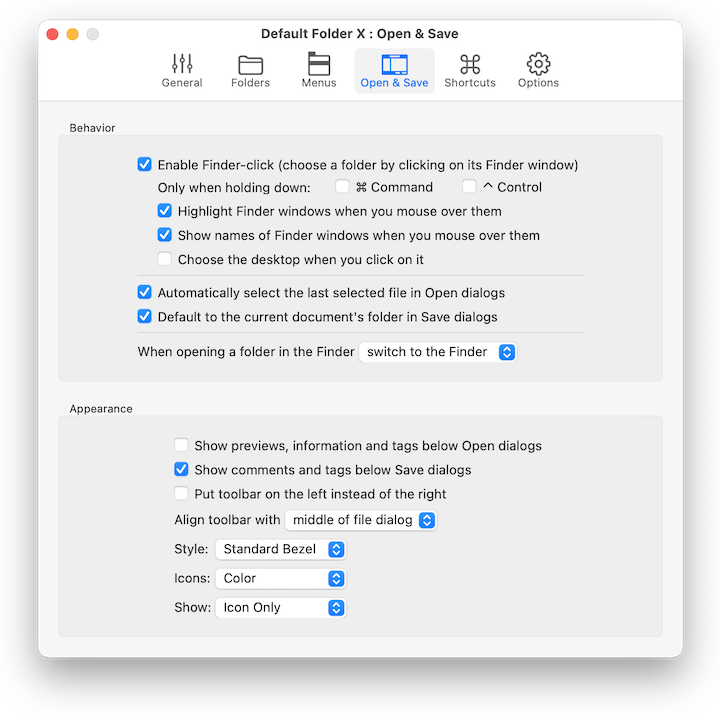
St. Clair Software releases Default Folder X 5.2.5 today, an update to their award-winning utility for Mac OS X. Default Folder X enhances the file dialogs of all Mac OS X applications. It provides fast navigation to files, convenient previews, integrated Spotlight tagging and more. Default Folder X's custom keyboard shortcuts put favorite and recent folders at your fingertips. Version 5.2.5 delivers preliminary support for Mojave, folder sorting options and manual access to default folders.
Denver, Colorado - St. Clair Software is happy to release version 5.2.5 of Default Folder X today. This update of its award-winning utility for enhancing Open and Save dialogs adds preliminary support for Apple's next release of macOS, code named 'Mojave'. Default Folder X's controls are available in Mojave file dialogs, but Dark Mode support is still to come. This version also provides an option to sort all folders in Default Folder X's menus by date, adds default folders that can be triggered manually from its Favorites menu, and corrects bugs and user-reported issues.
Default Folder X's custom keyboard shortcuts put your favorite and recent folders at your fingertips. Pop-up menus let you quickly navigate your folders and open Finder windows. Previews, file information, Spotlight tagging and comments are there when you need them. Open, save, and get back to work: Default Folder X speeds your workflow by making file management fast and efficient.
The changes in Default Folder X 5.2.5 include:
* Support for Open and Save dialogs in Mojave
* An option to sort all subfolders in Default Folder X's hierarchical menus by date
* You can specify a default folder for an application that is only used when manually selected from the Favorites menu
* Fixed a number of user interface inconsistencies, bugs and crashes
* Support for the Oxygen XML Editor
For a complete change history, visit the URL listed below.
System Requirements:
* macOS 10.10 through 10.14 beta
Pricing and Availability:
Default Folder X 5.2.5 is a free update for existing version 5 users. New licenses are $34.95 (USD) and upgrades from version 4 and prior are $14.95. Please see the St. Clair Software web site for screenshots, a full change log, and additional feature information. St. Clair Software strongly recommends that anyone using Default Folder X install this update.
Default Folder X 5.2.5: http://www.stclairsoft.com/DefaultFolderX/index.html
Detailed Change History: http://www.stclairsoft.com/DefaultFolderX/release.html
Download Default Folder X: http://www.stclairsoft.com/cgi-bin/dl.cgi?DX
Purchase Default Folder X: http://www.stclairsoft.com/store/
Screenshot: http://www.stclairsoft.com/DefaultFolderX/images/PrefsOpenSave.png
Based in Denver, Colorado, St. Clair Software is a privately held company that has been specializing in utilities and custom software solutions for the Macintosh since 1988. St. Clair Software can be contacted at: St. Clair Software, 271 S. Emerson Street, Denver, CO, USA 80209. Copyright (C) 1988-2018 St. Clair Software. All Rights Reserved. Apple, Macintosh, macOS and Finder are registered trademarks of Apple Inc. in the U.S. and/or other countries.
*******
Link To Article: https://prmac.com/release-id-82797.htm
*******
---------------------------------------------------------------------------------
Note that you can alter delivered distributions at any time.
Login to your account on prMac to alter your channel selection, or to opt-out at any time.
Default Folder X 5.2.5 supports Mojave, adds options - Published on 06/18/18
St. Clair Software releases Default Folder X 5.2.5 today, an update to their award-winning utility for Mac OS X. Default Folder X enhances the file dialogs of all Mac OS X applications. It provides fast navigation to files, convenient previews, integrated Spotlight tagging and more. Default Folder X's custom keyboard shortcuts put favorite and recent folders at your fingertips. Version 5.2.5 delivers preliminary support for Mojave, folder sorting options and manual access to default folders.
Denver, Colorado - St. Clair Software is happy to release version 5.2.5 of Default Folder X today. This update of its award-winning utility for enhancing Open and Save dialogs adds preliminary support for Apple's next release of macOS, code named 'Mojave'. Default Folder X's controls are available in Mojave file dialogs, but Dark Mode support is still to come. This version also provides an option to sort all folders in Default Folder X's menus by date, adds default folders that can be triggered manually from its Favorites menu, and corrects bugs and user-reported issues.
Default Folder X's custom keyboard shortcuts put your favorite and recent folders at your fingertips. Pop-up menus let you quickly navigate your folders and open Finder windows. Previews, file information, Spotlight tagging and comments are there when you need them. Open, save, and get back to work: Default Folder X speeds your workflow by making file management fast and efficient.
The changes in Default Folder X 5.2.5 include:
* Support for Open and Save dialogs in Mojave
* An option to sort all subfolders in Default Folder X's hierarchical menus by date
* You can specify a default folder for an application that is only used when manually selected from the Favorites menu
* Fixed a number of user interface inconsistencies, bugs and crashes
* Support for the Oxygen XML Editor
For a complete change history, visit the URL listed below.
System Requirements:
* macOS 10.10 through 10.14 beta
Pricing and Availability:
Default Folder X 5.2.5 is a free update for existing version 5 users. New licenses are $34.95 (USD) and upgrades from version 4 and prior are $14.95. Please see the St. Clair Software web site for screenshots, a full change log, and additional feature information. St. Clair Software strongly recommends that anyone using Default Folder X install this update.
Default Folder X 5.2.5: http://www.stclairsoft.com/DefaultFolderX/index.html
Detailed Change History: http://www.stclairsoft.com/DefaultFolderX/release.html
Download Default Folder X: http://www.stclairsoft.com/cgi-bin/dl.cgi?DX
Purchase Default Folder X: http://www.stclairsoft.com/store/
Screenshot: http://www.stclairsoft.com/DefaultFolderX/images/PrefsOpenSave.png
Based in Denver, Colorado, St. Clair Software is a privately held company that has been specializing in utilities and custom software solutions for the Macintosh since 1988. St. Clair Software can be contacted at: St. Clair Software, 271 S. Emerson Street, Denver, CO, USA 80209. Copyright (C) 1988-2018 St. Clair Software. All Rights Reserved. Apple, Macintosh, macOS and Finder are registered trademarks of Apple Inc. in the U.S. and/or other countries.
*******
Link To Article: https://prmac.com/release-id-82797.htm
*******
---------------------------------------------------------------------------------
Note that you can alter delivered distributions at any time.
Login to your account on prMac to alter your channel selection, or to opt-out at any time.
Project Planning Pro Brings AI-Enabled Chatbot iVA to iOS App
A new article has been published at prMac.
Project Planning Pro Brings AI-Enabled Chatbot iVA to iOS App - Published on 06/18/18
Connecticut-based indie development team, i2e Consulting today announces Project Planning Pro 3.4.3, an important update to their project and task management app for iOS devices. Project Planning Pro allows users to quickly create a project plan by quickly entering tasks, duration, and start dates. The app allows teams to communicate, collaborate, and manage their tasks. Version 3.4.3 debuts the AI-enabled chatbot, iVA, that offers information from existing projects.
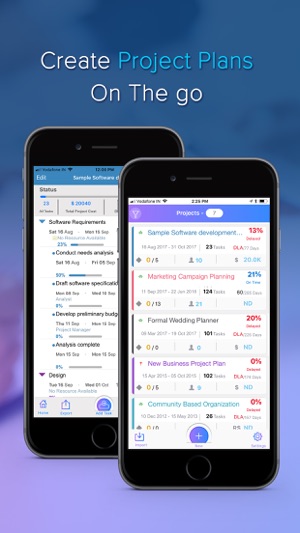
Groton, Connecticut - Independent development team i2e Consulting today is proud to announce the release and immediate availability of Project Planning Pro 3.4.3, an important update to their project and task management app for iPhone, iPad, and iPod touch devices. The app allows anyone to quickly create a new project plan by entering tasks, their durations, and their start dates. Users can use simple touch-based gestures to edit and update tasks via the app's interactive Gantt chart.
Project Planning Pro helps teams increase productivity by allowing them to manage their tasks, communicate and collaborate, and avoid missing their all-important project deadlines. Anyone can make use of the award-nominated app to plan and manage any size or type of project, directly from their iPhone or iPad. The app's flexibility allows users to manage apps anywhere, in or out of the office.
"Project Planning Pro allows users to perform the same project planning and management functions that were previously restricted to the desktop," says Jay Vyas, Head of Digital Marketing for I2E Consulting. "And now, with our latest app release, users can take advantage of the power of 'iVA.' our AI-enabled chatbot that can assist them in managing their projects!"
iVA allows iOS device users to ask the chatbot for information about their projects, helping them to gain insight into the projects, allowing them to make better informed decisions. Currently, the feature is in a beta "iOS-only" version, but the company has plans to roll the chatbot out to other platforms in the near future.
Users can ask iVA questions about the overall project, specific tasks, or about specific resources:
* Are any projects due this week?
* What is the total cost of the project?
* Which projects are delayed?
* What are the milestones in the project?
* Which tasks should I be working on today?
* Show me all delayed tasks.
* Who is assigned to a particular task?
* List all delayed tasks.
* And many others
By answering important questions about projects and their associated tasks and resources, iVA makes project management easier. iVA helps users decide the best way to manage their work, providing the critical information managers need to make the right project management decisions.
Currently, iVA only offers information from existing projects. However, iVA will soon be able to create new projects, streamlining project management, something no other project management app currently has the capability to do.
Project Planning Pro still offers the ability to quickly and easily share project information with customers and coworkers in PDF, CSV, or XML file format, offering efficient compatibility with nearly any project management application available for both desktop and mobile devices. i2e Consulting also offers Mac, Windows, and Android versions of the app, making it easy to share projects with across various device platforms.
Features:
* Create or Import Project Plans/Schedule
* Task links types include: finish-to-start, start-to-start, finish-to-finish and start-to-finish
* Interactive Gantt: Tap or pinch the Gantt bar to change dates and durations
* Gantt view, Calendar view and Critical path view to analyze and review your plans
* Build team and assign resources
* Reorder Tasks
* Bird's-eye view of Gantt for easy navigation
* Slider bar to increase viewing area for Gantt or Table view
* Filter tasks by task name, duration, %complete, start date, finish date and resource
* Export plans to Microsoft Project (XML File)
* Cost Calculation - Resource, Task and Project
* Backup and Restore plans
* Create plan templates and export to Dropbox, BOX or Email
* Import and view project risk from Risk Register+ (.prr)
* Import plans via email, Dropbox, BOX or iCloud
* Share plans as PDF, CSV or XML file
Project Planning Pro has been nominated for numerous awards, including the BestApp Ever Awards 2014 "Best Business App" Award (third nomination in a row), the 2014 Tabby Award, and the Appsters Award 2014, just to name a few.
Project Planning Pro allows iPhone and iPad users to manage any type of project, no matter the size. It's an ideal tool for project managers on the go, especially with the new iVA chatbot feature that offers better insight into current projects.
"Our app has been developed based on the valuable feedback we receive from the project management community," continues Jay. "Their feedback, comments, ideas, and app reviews have helped us to continue to improve Project Planning Pro. We're looking forward to continued feedback from our users, especially after they've had a few conversations with iVA!"
Device Requirements:
* iPhone, iPad, or iPod touch
* Requires iOS 10.0 or later
* Universal Application
* 75.1 MB
Pricing and Availability:
Project Planning Pro 3.4.3 is free and is available worldwide exclusively through the App Store in the Business category. The free version allows users to create one project. A convenient $24.99 in-app purchase offers the ability to create unlimited projects and removes all ads. The app is also available for the Mac, Windows, and Android platforms. Review copies are available upon request.
Project Planning Pro 3.4.3: https://www.planningproapp.com/
Download from iTunes: https://itunes.apple.com/app/project-planning-pro/id509886186
Introducing iVA: https://www.planningproapp.com/chatbot.php
Screenshot 1: https://is4-ssl.mzstatic.com/image/thumb/Purple125/v4/4b/23/2c/4b232ca2-55f3-8fae-3cc1-ac41b66059c0/mzl.ckoayypk.jpg/300x0w.jpg
Screenshot 2: https://is2-ssl.mzstatic.com/image/thumb/Purple125/v4/d6/dc/48/d6dc4898-78d5-aebe-d474-7a731ff58cdc/pr_source.jpg/300x0w.jpg
App Icon: https://is1-ssl.mzstatic.com/image/thumb/Purple115/v4/ee/ca/d6/eecad6d8-dd61-17de-33f6-ca77b80f13d0/AppIcon-1x_U007emarketing-0-0-GLES2_U002c0-512MB-sRGB-0-0-0-85-220-0-0-0-6.png/246x0w.jpg
i2e Consulting LLC is a global software services company providing innovative Portfolio Data Visualization and advanced reporting solutions. They engage with their clients to deliver superior information management solutions that empower organizations to make more agile business decisions. The company's enterprise solutions improve collaboration, knowledge sharing and process management. All Material and Software Copyright (C) 2018 i2e Consulting LLC. All Rights Reserved. Apple, the Apple logo, iPhone and iPod are registered trademarks of Apple Inc. in the U.S. and/or other countries.
*******
Link To Article: https://prmac.com/release-id-82795.htm
*******
---------------------------------------------------------------------------------
Note that you can alter delivered distributions at any time.
Login to your account on prMac to alter your channel selection, or to opt-out at any time.
Project Planning Pro Brings AI-Enabled Chatbot iVA to iOS App - Published on 06/18/18
Connecticut-based indie development team, i2e Consulting today announces Project Planning Pro 3.4.3, an important update to their project and task management app for iOS devices. Project Planning Pro allows users to quickly create a project plan by quickly entering tasks, duration, and start dates. The app allows teams to communicate, collaborate, and manage their tasks. Version 3.4.3 debuts the AI-enabled chatbot, iVA, that offers information from existing projects.
Groton, Connecticut - Independent development team i2e Consulting today is proud to announce the release and immediate availability of Project Planning Pro 3.4.3, an important update to their project and task management app for iPhone, iPad, and iPod touch devices. The app allows anyone to quickly create a new project plan by entering tasks, their durations, and their start dates. Users can use simple touch-based gestures to edit and update tasks via the app's interactive Gantt chart.
Project Planning Pro helps teams increase productivity by allowing them to manage their tasks, communicate and collaborate, and avoid missing their all-important project deadlines. Anyone can make use of the award-nominated app to plan and manage any size or type of project, directly from their iPhone or iPad. The app's flexibility allows users to manage apps anywhere, in or out of the office.
"Project Planning Pro allows users to perform the same project planning and management functions that were previously restricted to the desktop," says Jay Vyas, Head of Digital Marketing for I2E Consulting. "And now, with our latest app release, users can take advantage of the power of 'iVA.' our AI-enabled chatbot that can assist them in managing their projects!"
iVA allows iOS device users to ask the chatbot for information about their projects, helping them to gain insight into the projects, allowing them to make better informed decisions. Currently, the feature is in a beta "iOS-only" version, but the company has plans to roll the chatbot out to other platforms in the near future.
Users can ask iVA questions about the overall project, specific tasks, or about specific resources:
* Are any projects due this week?
* What is the total cost of the project?
* Which projects are delayed?
* What are the milestones in the project?
* Which tasks should I be working on today?
* Show me all delayed tasks.
* Who is assigned to a particular task?
* List all delayed tasks.
* And many others
By answering important questions about projects and their associated tasks and resources, iVA makes project management easier. iVA helps users decide the best way to manage their work, providing the critical information managers need to make the right project management decisions.
Currently, iVA only offers information from existing projects. However, iVA will soon be able to create new projects, streamlining project management, something no other project management app currently has the capability to do.
Project Planning Pro still offers the ability to quickly and easily share project information with customers and coworkers in PDF, CSV, or XML file format, offering efficient compatibility with nearly any project management application available for both desktop and mobile devices. i2e Consulting also offers Mac, Windows, and Android versions of the app, making it easy to share projects with across various device platforms.
Features:
* Create or Import Project Plans/Schedule
* Task links types include: finish-to-start, start-to-start, finish-to-finish and start-to-finish
* Interactive Gantt: Tap or pinch the Gantt bar to change dates and durations
* Gantt view, Calendar view and Critical path view to analyze and review your plans
* Build team and assign resources
* Reorder Tasks
* Bird's-eye view of Gantt for easy navigation
* Slider bar to increase viewing area for Gantt or Table view
* Filter tasks by task name, duration, %complete, start date, finish date and resource
* Export plans to Microsoft Project (XML File)
* Cost Calculation - Resource, Task and Project
* Backup and Restore plans
* Create plan templates and export to Dropbox, BOX or Email
* Import and view project risk from Risk Register+ (.prr)
* Import plans via email, Dropbox, BOX or iCloud
* Share plans as PDF, CSV or XML file
Project Planning Pro has been nominated for numerous awards, including the BestApp Ever Awards 2014 "Best Business App" Award (third nomination in a row), the 2014 Tabby Award, and the Appsters Award 2014, just to name a few.
Project Planning Pro allows iPhone and iPad users to manage any type of project, no matter the size. It's an ideal tool for project managers on the go, especially with the new iVA chatbot feature that offers better insight into current projects.
"Our app has been developed based on the valuable feedback we receive from the project management community," continues Jay. "Their feedback, comments, ideas, and app reviews have helped us to continue to improve Project Planning Pro. We're looking forward to continued feedback from our users, especially after they've had a few conversations with iVA!"
Device Requirements:
* iPhone, iPad, or iPod touch
* Requires iOS 10.0 or later
* Universal Application
* 75.1 MB
Pricing and Availability:
Project Planning Pro 3.4.3 is free and is available worldwide exclusively through the App Store in the Business category. The free version allows users to create one project. A convenient $24.99 in-app purchase offers the ability to create unlimited projects and removes all ads. The app is also available for the Mac, Windows, and Android platforms. Review copies are available upon request.
Project Planning Pro 3.4.3: https://www.planningproapp.com/
Download from iTunes: https://itunes.apple.com/app/project-planning-pro/id509886186
Introducing iVA: https://www.planningproapp.com/chatbot.php
Screenshot 1: https://is4-ssl.mzstatic.com/image/thumb/Purple125/v4/4b/23/2c/4b232ca2-55f3-8fae-3cc1-ac41b66059c0/mzl.ckoayypk.jpg/300x0w.jpg
Screenshot 2: https://is2-ssl.mzstatic.com/image/thumb/Purple125/v4/d6/dc/48/d6dc4898-78d5-aebe-d474-7a731ff58cdc/pr_source.jpg/300x0w.jpg

App Icon: https://is1-ssl.mzstatic.com/image/thumb/Purple115/v4/ee/ca/d6/eecad6d8-dd61-17de-33f6-ca77b80f13d0/AppIcon-1x_U007emarketing-0-0-GLES2_U002c0-512MB-sRGB-0-0-0-85-220-0-0-0-6.png/246x0w.jpg

i2e Consulting LLC is a global software services company providing innovative Portfolio Data Visualization and advanced reporting solutions. They engage with their clients to deliver superior information management solutions that empower organizations to make more agile business decisions. The company's enterprise solutions improve collaboration, knowledge sharing and process management. All Material and Software Copyright (C) 2018 i2e Consulting LLC. All Rights Reserved. Apple, the Apple logo, iPhone and iPod are registered trademarks of Apple Inc. in the U.S. and/or other countries.
*******
Link To Article: https://prmac.com/release-id-82795.htm
*******
---------------------------------------------------------------------------------
Note that you can alter delivered distributions at any time.
Login to your account on prMac to alter your channel selection, or to opt-out at any time.
Output Factory for InDesign Now Can Save Page Groups as Single PDF Files
A new article has been published at prMac.
Output Factory for InDesign Now Can Save Page Groups as Single PDF Files - Published on 06/18/18
Zevrix Solutions announces Output Factory 2.3, a feature update to company's output automation solution for Adobe InDesign. Output Factory helps users automate printing and exporting from InDesign through batch processing, single page export, layer versioning, custom scripts integration and more. Built-in preflighting helps printers eliminate costly output errors. The new version lets users export specific InDesign page sequences as single PDF files. (for example, every 2 pages, 3 pages etc.)
Toronto (ON), Canada - Zevrix Solutions today announces the release of Output Factory 2.3, a feature update to company's output automation plug-in for Adobe InDesign. Awarded 5 stars by InDesign Magazine, Output Factory automates and simplifies workflows of printers, ad agencies, and publishing houses worldwide. The software helps eliminate repetitive tasks through batch processing with time-saving output options.
The new version adds the ability to export every n pages of InDesign document (every 2 pages, 3 pages etc.) as single PDF files. The specified groups of pages can also be exported as spreads if the Spreads option is checked in the selected PDF export preset. This feature was in high demand by InDesign users and Output Factory is now the only tool on the market that provides the users with multi-page sequential export to single PDF files.
"I want to say how valuable and useful Output Factory has been for our company," says Ed Saye, studio manager at Blue Sky Agency in Atlanta, Georgia. "The folks that use it are delighted to have a way to automate so much repetitive work in a consistent and organized way."
Output Factory supports printing as well as exporting to PDF, PostScript, EPS, Flash, IDML, EPUB and several image formats. It offers the following key features:
* Batch processing of InDesign files
* Output groups of pages as a single documents
* Output files to multiple formats with one click
* Variable output file names
* Layer versioning: output layer combinations as single files
* Preflight InDesign documents on the fly
* Split InDesign files into single pages
* Preflight final PDF files
Pricing and Availability:
Output Factory can be purchased from Zevrix website for $169.95 USD (Lite version $119.95), as well as from authorized resellers and Adobe Exchange. Trial is also available for download. The update is free for the users of Output Factory 2.x, and $84.97 to upgrade from Output Factory 1.x and BatchOutput. Output Factory requires macOS 10.7-10.13 and Adobe InDesign CS3-CC 2018.
Zevrix Solutions: http://zevrix.com
Output Factory 2.3: http://zevrix.com/OutputFactory.php
Download Output Factory: http://zevrix.com/OutputFactory.dmg
Purchase Output Factory: http://zevrix.com/store.php
Screenshot: http://zevrix.com/screenshots/of2/of2-pdf.jpg
Located in Toronto, Canada, Zevrix Solutions provides automation and productivity solutions for Adobe Creative Cloud and Creative Suite software, PDF workflows, graphic file diagnostics and Microsoft Office output on Mac OS. Zevrix is dedicated to help professionals increase their profits through automating everyday tasks, producing error-free documents, saving disk space and cutting production costs. For more information, visit their website. Copyright (C) 2018 Zevrix Solutions. All Rights Reserved. Other trademarks and registered trademarks may be the property of their respective owners.
*******
Link To Article: https://prmac.com/release-id-82796.htm
*******
---------------------------------------------------------------------------------
Note that you can alter delivered distributions at any time.
Login to your account on prMac to alter your channel selection, or to opt-out at any time.
Output Factory for InDesign Now Can Save Page Groups as Single PDF Files - Published on 06/18/18
Zevrix Solutions announces Output Factory 2.3, a feature update to company's output automation solution for Adobe InDesign. Output Factory helps users automate printing and exporting from InDesign through batch processing, single page export, layer versioning, custom scripts integration and more. Built-in preflighting helps printers eliminate costly output errors. The new version lets users export specific InDesign page sequences as single PDF files. (for example, every 2 pages, 3 pages etc.)
Toronto (ON), Canada - Zevrix Solutions today announces the release of Output Factory 2.3, a feature update to company's output automation plug-in for Adobe InDesign. Awarded 5 stars by InDesign Magazine, Output Factory automates and simplifies workflows of printers, ad agencies, and publishing houses worldwide. The software helps eliminate repetitive tasks through batch processing with time-saving output options.
The new version adds the ability to export every n pages of InDesign document (every 2 pages, 3 pages etc.) as single PDF files. The specified groups of pages can also be exported as spreads if the Spreads option is checked in the selected PDF export preset. This feature was in high demand by InDesign users and Output Factory is now the only tool on the market that provides the users with multi-page sequential export to single PDF files.
"I want to say how valuable and useful Output Factory has been for our company," says Ed Saye, studio manager at Blue Sky Agency in Atlanta, Georgia. "The folks that use it are delighted to have a way to automate so much repetitive work in a consistent and organized way."
Output Factory supports printing as well as exporting to PDF, PostScript, EPS, Flash, IDML, EPUB and several image formats. It offers the following key features:
* Batch processing of InDesign files
* Output groups of pages as a single documents
* Output files to multiple formats with one click
* Variable output file names
* Layer versioning: output layer combinations as single files
* Preflight InDesign documents on the fly
* Split InDesign files into single pages
* Preflight final PDF files
Pricing and Availability:
Output Factory can be purchased from Zevrix website for $169.95 USD (Lite version $119.95), as well as from authorized resellers and Adobe Exchange. Trial is also available for download. The update is free for the users of Output Factory 2.x, and $84.97 to upgrade from Output Factory 1.x and BatchOutput. Output Factory requires macOS 10.7-10.13 and Adobe InDesign CS3-CC 2018.
Zevrix Solutions: http://zevrix.com
Output Factory 2.3: http://zevrix.com/OutputFactory.php
Download Output Factory: http://zevrix.com/OutputFactory.dmg
Purchase Output Factory: http://zevrix.com/store.php
Screenshot: http://zevrix.com/screenshots/of2/of2-pdf.jpg

Located in Toronto, Canada, Zevrix Solutions provides automation and productivity solutions for Adobe Creative Cloud and Creative Suite software, PDF workflows, graphic file diagnostics and Microsoft Office output on Mac OS. Zevrix is dedicated to help professionals increase their profits through automating everyday tasks, producing error-free documents, saving disk space and cutting production costs. For more information, visit their website. Copyright (C) 2018 Zevrix Solutions. All Rights Reserved. Other trademarks and registered trademarks may be the property of their respective owners.
*******
Link To Article: https://prmac.com/release-id-82796.htm
*******
---------------------------------------------------------------------------------
Note that you can alter delivered distributions at any time.
Login to your account on prMac to alter your channel selection, or to opt-out at any time.
Tension Software Announces String Replacer 1.5
A new article has been published at prMac.
Tension Software Announces String Replacer 1.5 - Published on 06/17/18
String Replacer 1.5 for macOS allows to find and replace a list of strings inside files and folders directly or in batch mode. It allows users to operate on multiple files using a multiple string couple replacement list. It works with just a single click or using drag and drop, also in batch mode replacing inside thousands of files thousand of find/replace couples of string. String Replacer can replace strings inside any text files.
Milano, Italy - Tension Software announces String Replacer 1.5. String Replacer 1.5 for macOS allows to find and replace a list of strings inside files and folders directly or in batch mode. It allows to operate on multiple files using a multiple string couple replacement list. It works with just a single click or using drag and drop, also in batch mode replacing inside thousands of files thousand of find/replace couples of string.
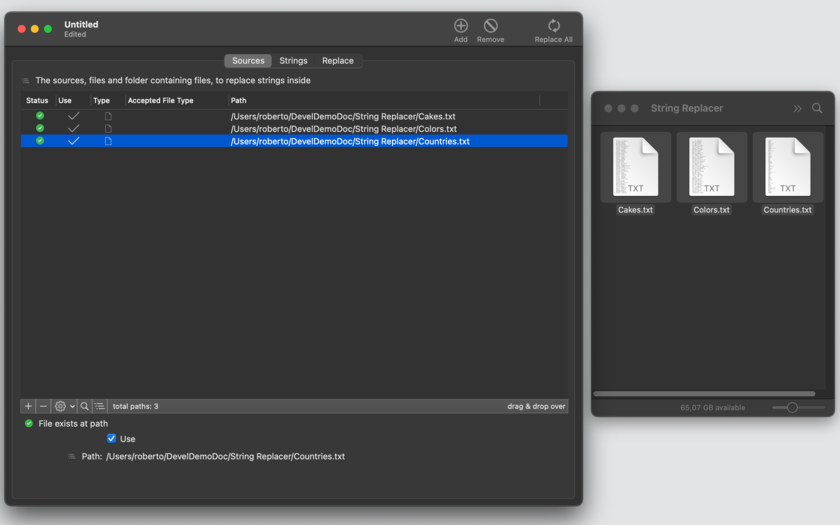
String Replacer can replace strings inside any text files (text, htm, html, tsv, csv and any other file that can be opened as a text file). It can replace in a single pass an unlimited number of strings with other strings, and parsing one or more file from a list of files and folder content (including all the files nested inside folders at any nested level).
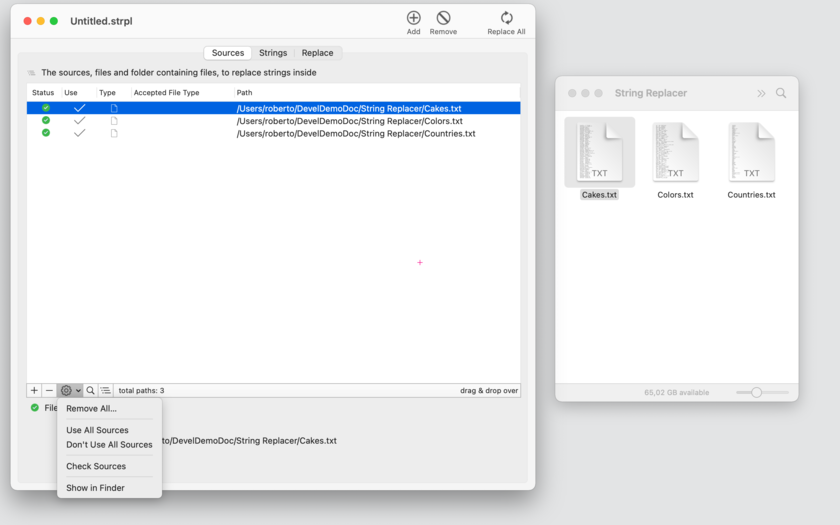
String Replacer is document based to offer the advantage to save all the settings, the list of files and folder to precess and list of string to replace, inside the document and to have all this data ready to be used again for reuse opening the document and executing the replacing operation in batch mode, just clicking a button.
String replacer can work also on files and folder (with nested contents) via Drag and Drop. You just need to drop a file or a folder on the dedicated area of a target document and the dropped file (or all the files inside the dropped folder) will be processed and string replaced as specified inside the target document.
String Replacer use a simple Master/Details interface to edit all the strings you need to use.
In addition strings used for Find/Replace can be imported/exported from/to text files in various format for maximum flexibility in all the operations.
Features:
* Can replaces strings on an unlimited number of selected files and files inside folders at any nested levels
* Can specify for folders, extension of files to work on (skipping the others)
* Can use an unlimited list of strings to find and replace
* Can use plain text replacement or complex grep functions
* Can easily detect matching at start, end, inside and whole words, it has maximum flexibility in a click (no coding required)
* Works in batch mode, replacing on an unlimited number of files with a single click
* Import of Find/Replace strings with automatic encoding recognition, data preview, field selections, destination selections
* Export of Find/Replace strings with selection of fields and various format available: TSV, CSV, CSV-S, HTML and even a custom format
* Order of execution of Find/Replace can be now modified moving rows in the strings substitution list
* Document based can specify a base sources on disk to work on and use it at successive relaunch of the document without further input
* Works also in drag and drop mode, it's enough to drop a file on the document to have it processed
* PDF User Guide included with the application and accessible via the help menu.
* Fully sandboxed, ready and optimized for the latest OS X release
What's new:
* Added the filter option to replace when matching only 'end of word'
* Bug fixes
* Various optimizations
System Requirements:
* macOS Version 10.10 (Yosemite) or higher
* Optimized for macOS 10.13 High Sierra
* 4.4 MB
Pricing and Availability:
String Replacer 1.5.1 is just $14.99 USD (or an equivalent amount in other currencies) and is available worldwide through the Mac App Store in the Productivity category.
Tension Software: http://www.tensionsoftware.com
String Replacer 1.5.1: http://www.tensionsoftware.com/osx/stringreplacer/
Purchase and Download from Mac App Store: http://itunes.apple.com/app/string-replacer/id520774149
Screenshot 1: http://www.tensionsoftware.com/static/tensionsoftware/images/app/stringreplacer/screenshots/mac/1.png
Screenshot 2: http://www.tensionsoftware.com/static/tensionsoftware/images/app/stringreplacer/screenshots/mac/2.png
Application Icon: http://www.tensionsoftware.com/static/tensionsoftware/images/app/stringreplacer/icons/512.png
Tension Software develops software for macOS and iOS using the latest Apple technologies.
Other brands and products referenced herein are the trademarks or registered trademarks of their respective holders. All Material and Software (C) Copyright 2018 Tension Software. All Rights Reserved. Apple, the Apple logo, Macintosh Mac OS X and macOS are registered trademarks of Apple Inc. in the U.S. and/or other countries. Other trademarks and registered trademarks may be the property of their respective owners.
*******
Link To Article: https://prmac.com/release-id-82794.htm
*******
---------------------------------------------------------------------------------
Note that you can alter delivered distributions at any time.
Login to your account on prMac to alter your channel selection, or to opt-out at any time.
Tension Software Announces String Replacer 1.5 - Published on 06/17/18
String Replacer 1.5 for macOS allows to find and replace a list of strings inside files and folders directly or in batch mode. It allows users to operate on multiple files using a multiple string couple replacement list. It works with just a single click or using drag and drop, also in batch mode replacing inside thousands of files thousand of find/replace couples of string. String Replacer can replace strings inside any text files.
Milano, Italy - Tension Software announces String Replacer 1.5. String Replacer 1.5 for macOS allows to find and replace a list of strings inside files and folders directly or in batch mode. It allows to operate on multiple files using a multiple string couple replacement list. It works with just a single click or using drag and drop, also in batch mode replacing inside thousands of files thousand of find/replace couples of string.
String Replacer can replace strings inside any text files (text, htm, html, tsv, csv and any other file that can be opened as a text file). It can replace in a single pass an unlimited number of strings with other strings, and parsing one or more file from a list of files and folder content (including all the files nested inside folders at any nested level).
String Replacer is document based to offer the advantage to save all the settings, the list of files and folder to precess and list of string to replace, inside the document and to have all this data ready to be used again for reuse opening the document and executing the replacing operation in batch mode, just clicking a button.
String replacer can work also on files and folder (with nested contents) via Drag and Drop. You just need to drop a file or a folder on the dedicated area of a target document and the dropped file (or all the files inside the dropped folder) will be processed and string replaced as specified inside the target document.
String Replacer use a simple Master/Details interface to edit all the strings you need to use.
In addition strings used for Find/Replace can be imported/exported from/to text files in various format for maximum flexibility in all the operations.
Features:
* Can replaces strings on an unlimited number of selected files and files inside folders at any nested levels
* Can specify for folders, extension of files to work on (skipping the others)
* Can use an unlimited list of strings to find and replace
* Can use plain text replacement or complex grep functions
* Can easily detect matching at start, end, inside and whole words, it has maximum flexibility in a click (no coding required)
* Works in batch mode, replacing on an unlimited number of files with a single click
* Import of Find/Replace strings with automatic encoding recognition, data preview, field selections, destination selections
* Export of Find/Replace strings with selection of fields and various format available: TSV, CSV, CSV-S, HTML and even a custom format
* Order of execution of Find/Replace can be now modified moving rows in the strings substitution list
* Document based can specify a base sources on disk to work on and use it at successive relaunch of the document without further input
* Works also in drag and drop mode, it's enough to drop a file on the document to have it processed
* PDF User Guide included with the application and accessible via the help menu.
* Fully sandboxed, ready and optimized for the latest OS X release
What's new:
* Added the filter option to replace when matching only 'end of word'
* Bug fixes
* Various optimizations
System Requirements:
* macOS Version 10.10 (Yosemite) or higher
* Optimized for macOS 10.13 High Sierra
* 4.4 MB
Pricing and Availability:
String Replacer 1.5.1 is just $14.99 USD (or an equivalent amount in other currencies) and is available worldwide through the Mac App Store in the Productivity category.
Tension Software: http://www.tensionsoftware.com
String Replacer 1.5.1: http://www.tensionsoftware.com/osx/stringreplacer/
Purchase and Download from Mac App Store: http://itunes.apple.com/app/string-replacer/id520774149
Screenshot 1: http://www.tensionsoftware.com/static/tensionsoftware/images/app/stringreplacer/screenshots/mac/1.png
Screenshot 2: http://www.tensionsoftware.com/static/tensionsoftware/images/app/stringreplacer/screenshots/mac/2.png
Application Icon: http://www.tensionsoftware.com/static/tensionsoftware/images/app/stringreplacer/icons/512.png

Tension Software develops software for macOS and iOS using the latest Apple technologies.
Other brands and products referenced herein are the trademarks or registered trademarks of their respective holders. All Material and Software (C) Copyright 2018 Tension Software. All Rights Reserved. Apple, the Apple logo, Macintosh Mac OS X and macOS are registered trademarks of Apple Inc. in the U.S. and/or other countries. Other trademarks and registered trademarks may be the property of their respective owners.
*******
Link To Article: https://prmac.com/release-id-82794.htm
*******
---------------------------------------------------------------------------------
Note that you can alter delivered distributions at any time.
Login to your account on prMac to alter your channel selection, or to opt-out at any time.
Subscribe to:
Posts (Atom)