A new article has been published at prMac.
Keep It 1.4 adds Markdown editing, encrypted items, and more - Published on 06/22/18
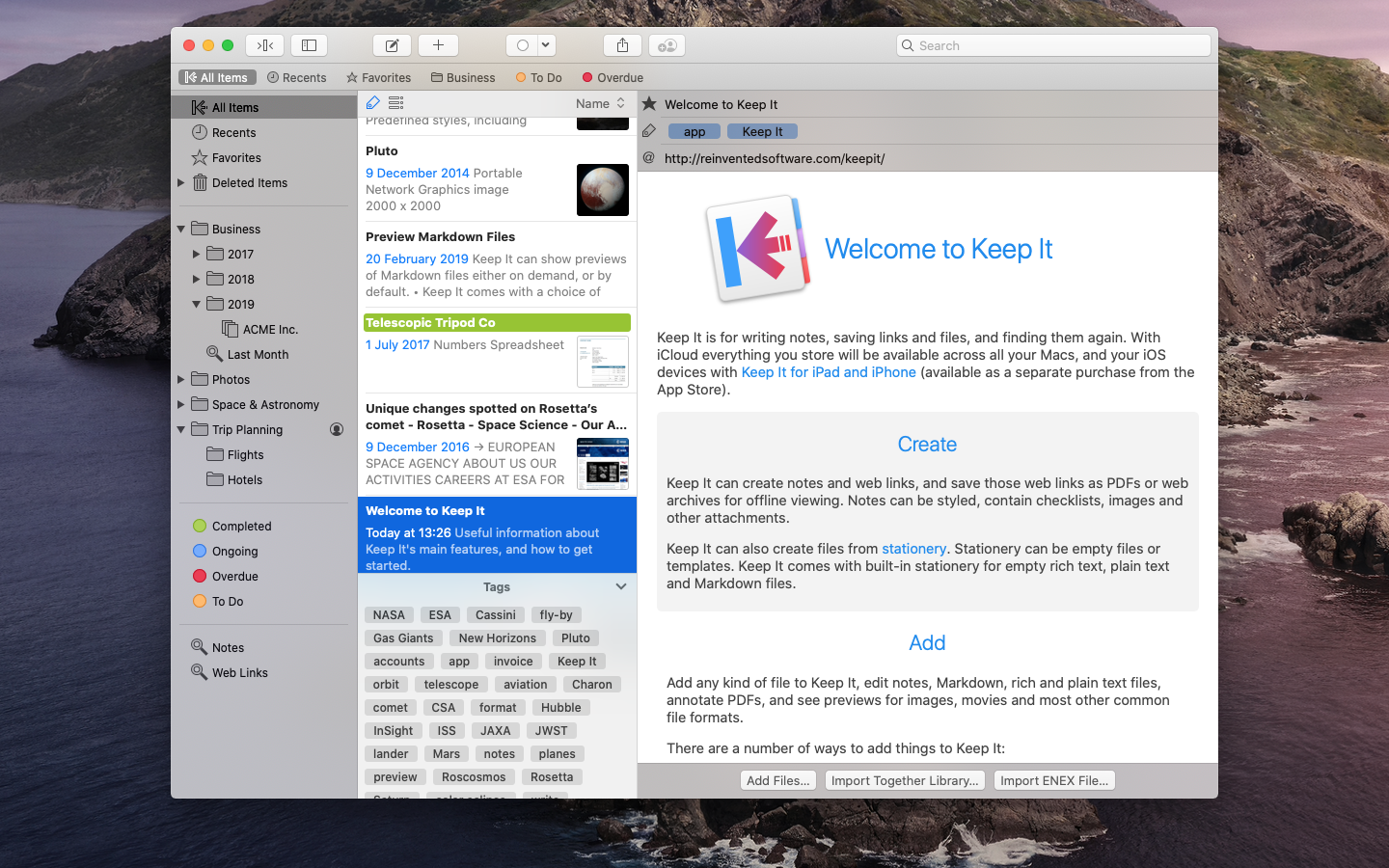
UK based Reinvented Software releases Keep It 1.4, an update to their popular notebook, scrapbook and organizer for macOS. Keep It is ideal for writing notes, saving web links, organizing documents, and finding them again. Version 1.4 adds Markdown editing and previewing, encrypted items, word counts for notes and other editable text documents. The Mac version also gains the ability to open anything in a window, show margins for any editable text document opened in its own window, and more.
Swansea, United Kingdom - Reinvented Software is pleased to announce Keep It 1.4 is available today. This version adds Markdown editing and previewing, encrypted items, and word counts for notes and other editable text documents. The Mac version also gains the ability to open anything in a window, show margins for any editable text document opened in its own window, and navigate the history of viewed items.
Keep It is a notebook, scrapbook and organizer, ideal for writing notes, saving web links, organizing documents, and finding them again. Available on Mac, iPad and iPhone, Keep It is the destination for all those things you want to put somewhere, confident you will find them again later. Keep It is the successor to Together, a brand new app that preserves the very best of its predecessor, but recast for today and the future.
Keep It 1.4 has a dedicated Markdown editor on both Mac and iOS. This includes syntax highlighting, editing assistance for things such as headings, emphasis, links, images and lists, and a choice of styles for both editor and preview.
Individual items can now be encrypted with a password, and temporarily viewed with that password, Face ID or Touch ID (including on MacBook Pro with Touch Bar). Encrypted files in Keep It are Zip files that use AES-256 encryption and can also be opened in apps that support that format.
In Keep It 1.4 for Mac anything can now be opened in its own window (or tab), and for editable text documents opened in their own windows, Keep It can now show margins to constrain the width of the text to aid readability. Keep It can also show a word count and other statistics such as the number of characters, sentences and paragraphs in notes and rich text files in the format bar on Mac (needs High Sierra or later), or below the text on iPad and iPhone.
Keep It 1.4 also includes navigation history to move back and forth between viewed items on Mac, improved previews for video and audio files, improvements when importing mail messages, the ability to copy clickable links to lists, and many other improvements.
About Keep It:
Pretty much anything can be added to Keep It, including notes, web links, Markdown, rich and plain text documents, PDFs, images, or any other kind of file, using drag and drop, its share extension, the Services menu, or a browser bookmarklet. Keep It can also create new files of any type from stationery, and uses iCloud to make everything available across your devices and to share folders and items with others.
Keep It has all the organization tools you could need, including folders, tags, colored labels, and bundles. Keep It stores everything you add as files in folders that you can access in the Finder on Mac or the Files app on iOS 11, and open in other apps for editing. Saving files to these folders will automatically add them.
Building on Together, just about everything in Keep It has been improved or streamlined to work consistently across Mac and iOS, while taking advantage of each platform's unique strengths. Keep It's innovative tag filter that can drill down through combinations of related tags, and works in conjunction with search, which offers suggestions and makes it easy to combine terms. Keep It for Mac's Compact Mode reduces the app to a single column, ideal for using as a floating window, or alongside another full screen app in split view, as you would on iPad.
Pricing and Availability:
Keep It for Mac 1.4 requires macOS 10.12 Sierra or later, and is available as a free 15-day trial. A license for Keep It for Mac costs $49.99 (USD), and will include all Keep It Version 1.x updates. Together 3 users can purchase a $24.99 upgrade, or get a free copy if Together 3 was purchased during its final 6 months on sale. Keep It is also available on the Mac App Store, also with a free trial, and a choice of one-time purchases to buy Keep It, upgrade from Together, along with monthly ($2.49) or yearly ($19.99) subscriptions. Keep It for iPad and iPhone is available separately with either monthly ($1.49) or yearly ($9.99) subscriptions.
Keep It 1.4: http://reinventedsoftware.com/keepit/
Download (Free Trial): http://reinventedsoftware.com/keepIt/downloads/KeepIt.dmg
Mac App Store: http://reinventedsoftware.com/keepit/appstore/
Keep It for iPad and iPhone: http://reinventedsoftware.com/keepit/ios/
Screenshot: http://reinventedsoftware.com/keepit/screenshots/screenshot.png
Application Icon (512px): http://reinventedsoftware.com/keepit/images/KeepIt512.png
Reinvented Software was founded in August 2004 by long-time Mac developer Steve Harris who, having wasted 10 years working for other people, decided to dedicate his life to making the best software in the world - software for the Mac. Copyright (C) 2004-2018 Reinvented Software. All Rights Reserved. Apple, the Apple logo, Mac OS X, iPhone, iPad, iPod, and Macintosh are registered trademarks of Apple Inc. in the U.S. and/or other countries.
*******
Link To Article: https://prmac.com/release-id-82808.htm
*******
---------------------------------------------------------------------------------
Note that you can alter delivered distributions at any time.
Login to your account on prMac to alter your channel selection, or to opt-out at any time.


Code Obsession releases Observatory 1.3 for macOS
A new article has been published at prMac.
Code Obsession releases Observatory 1.3 for macOS - Published on 06/22/18
Organize your astronomical images with Observatory. Plate solve, automatically tag and overlay millions of galaxies, variable stars, confirmed exoplanets, and other objects. Nondestructive calibrate, register, stack and process. Observatory includes Quick Look & Spotlight plugins for FITS, XISF (PixInsight) and SBIG images, supports these and many other image formats and lets you search and download images directly from professional astronomical image archives. Now with SkySafari integration.
Bethesda, Maryland - Code Obsession is proud to announce the release of Observatory 1.3, a large update to the only image management application that is specifically designed for astronomy. The update adds SkySafari integration, overlays and automatic tagging for variable stars, double stars, confirmed exoplanets, and much more.
Organize your astronomical images with Observatory. Plate solve, automatically tag and overlay millions of galaxies, variable stars, confirmed exoplanets, and other objects. Nondestructive calibrate, register, stack and process. Observatory includes Quick Look & Spotlight plugins for FITS, XISF (PixInsight) and SBIG images, supports these and many other image formats and lets you search and download images directly from professional astronomical image archives. Observatory is a Virtual Observatory. Easily search 10+ professional archives simultaneously and download research images from:
* European Southern Observatory
* W. M. Keck Observatory
* Gemini Observatory
* Hubble Space Telescope
* Spitzer Space Telescope
* WISE Space Telescope
* Palomar Transient Factory
* SkyMapper Southern Sky Survey
* Two Micron All Sky Survey
* Sloan Digital Sky Survey
* Digitized Sky Survey
Features:
* Display thumbnails, previews and metadata of FITS, XISF and SBIG images in Finder and other applications. Find images by exposure time, focal length, detector temperature, right ascension, declination and more using Spotlight.
* Relate image pixels to actual sky coordinates with Observatory's plate solver or its interface to the astrometry.net blind plate solver. Plate solved images are automatically tagged, so you can find them back later by object identifier and category.
* Discover what's in your images by overlaying millions of stars, galaxies, planetary nebulae, confirmed exoplanets and other objects of the Messier, NGC/IC, Tycho-2, CGPN, GCVS, WDS and PGC catalogs, or add the UCAC4 and USNO-A2.0 catalogs for an additional 500 million stars.
* Create multiple libraries and keep your images organized without copying, moving or altering them. Edit metadata, ratings, color codes, notes and attachments for individual images or multiple images at once.
* Aperture photometry with subpixel accuracy and error estimates, astrometry, image blinking, image statistics, and more.
* A nondestructive preprocessing workflow without the hassle of intermediate files. Calibration; cosmetic correction; binning; debayering; background neutralization; color balance; flatten background; chromatic align; register; normalize and stack.
* Open FITS, XISF and SBIG images at full bit depth in Acorn with help of our Acorn plugin.
* Observatory supports FITS, XISF, SBIG, DNG, NEF, CR2, TIFF, and many more image formats
System Requirements:
* macOS 10.11 or later
* 64-bit processor
Pricing and Availability:
Observatory is $79.99 (USD) and available worldwide exclusively through the Mac App Store in the Photography category. For more information, please visit Code Obsession online.
Observatory 1.3: https://codeobsession.com/observatory/
Purchase and Download (MAS): https://itunes.apple.com/app/observatory/id1037215068
Videos: https://codeobsession.com/video/
Screenshot (library): https://codeobsession.com/img/observatory/press/screenshot1.png
Screenshot (welcome): https://codeobsession.com/img/observatory/press/welcome.png
Code Obsession, LLC is an independent Mac software development company based in Bethesda, Maryland, devoted to developing delightful astronomy software for the Mac. All Material and Software (C) Copyright 2018 Code Obsession, LLC. All Rights Reserved. Apple, the Apple logo and macOS are registered trademarks of Apple Inc. in the U.S. and/or other countries. Other trademarks and registered trademarks may be the property of their respective owners.
*******
Link To Article: https://prmac.com/release-id-82807.htm
*******
---------------------------------------------------------------------------------
Note that you can alter delivered distributions at any time.
Login to your account on prMac to alter your channel selection, or to opt-out at any time.
Code Obsession releases Observatory 1.3 for macOS - Published on 06/22/18
Organize your astronomical images with Observatory. Plate solve, automatically tag and overlay millions of galaxies, variable stars, confirmed exoplanets, and other objects. Nondestructive calibrate, register, stack and process. Observatory includes Quick Look & Spotlight plugins for FITS, XISF (PixInsight) and SBIG images, supports these and many other image formats and lets you search and download images directly from professional astronomical image archives. Now with SkySafari integration.
Bethesda, Maryland - Code Obsession is proud to announce the release of Observatory 1.3, a large update to the only image management application that is specifically designed for astronomy. The update adds SkySafari integration, overlays and automatic tagging for variable stars, double stars, confirmed exoplanets, and much more.
Organize your astronomical images with Observatory. Plate solve, automatically tag and overlay millions of galaxies, variable stars, confirmed exoplanets, and other objects. Nondestructive calibrate, register, stack and process. Observatory includes Quick Look & Spotlight plugins for FITS, XISF (PixInsight) and SBIG images, supports these and many other image formats and lets you search and download images directly from professional astronomical image archives. Observatory is a Virtual Observatory. Easily search 10+ professional archives simultaneously and download research images from:
* European Southern Observatory
* W. M. Keck Observatory
* Gemini Observatory
* Hubble Space Telescope
* Spitzer Space Telescope
* WISE Space Telescope
* Palomar Transient Factory
* SkyMapper Southern Sky Survey
* Two Micron All Sky Survey
* Sloan Digital Sky Survey
* Digitized Sky Survey
Features:
* Display thumbnails, previews and metadata of FITS, XISF and SBIG images in Finder and other applications. Find images by exposure time, focal length, detector temperature, right ascension, declination and more using Spotlight.
* Relate image pixels to actual sky coordinates with Observatory's plate solver or its interface to the astrometry.net blind plate solver. Plate solved images are automatically tagged, so you can find them back later by object identifier and category.
* Discover what's in your images by overlaying millions of stars, galaxies, planetary nebulae, confirmed exoplanets and other objects of the Messier, NGC/IC, Tycho-2, CGPN, GCVS, WDS and PGC catalogs, or add the UCAC4 and USNO-A2.0 catalogs for an additional 500 million stars.
* Create multiple libraries and keep your images organized without copying, moving or altering them. Edit metadata, ratings, color codes, notes and attachments for individual images or multiple images at once.
* Aperture photometry with subpixel accuracy and error estimates, astrometry, image blinking, image statistics, and more.
* A nondestructive preprocessing workflow without the hassle of intermediate files. Calibration; cosmetic correction; binning; debayering; background neutralization; color balance; flatten background; chromatic align; register; normalize and stack.
* Open FITS, XISF and SBIG images at full bit depth in Acorn with help of our Acorn plugin.
* Observatory supports FITS, XISF, SBIG, DNG, NEF, CR2, TIFF, and many more image formats
System Requirements:
* macOS 10.11 or later
* 64-bit processor
Pricing and Availability:
Observatory is $79.99 (USD) and available worldwide exclusively through the Mac App Store in the Photography category. For more information, please visit Code Obsession online.
Observatory 1.3: https://codeobsession.com/observatory/
Purchase and Download (MAS): https://itunes.apple.com/app/observatory/id1037215068
Videos: https://codeobsession.com/video/
Screenshot (library): https://codeobsession.com/img/observatory/press/screenshot1.png
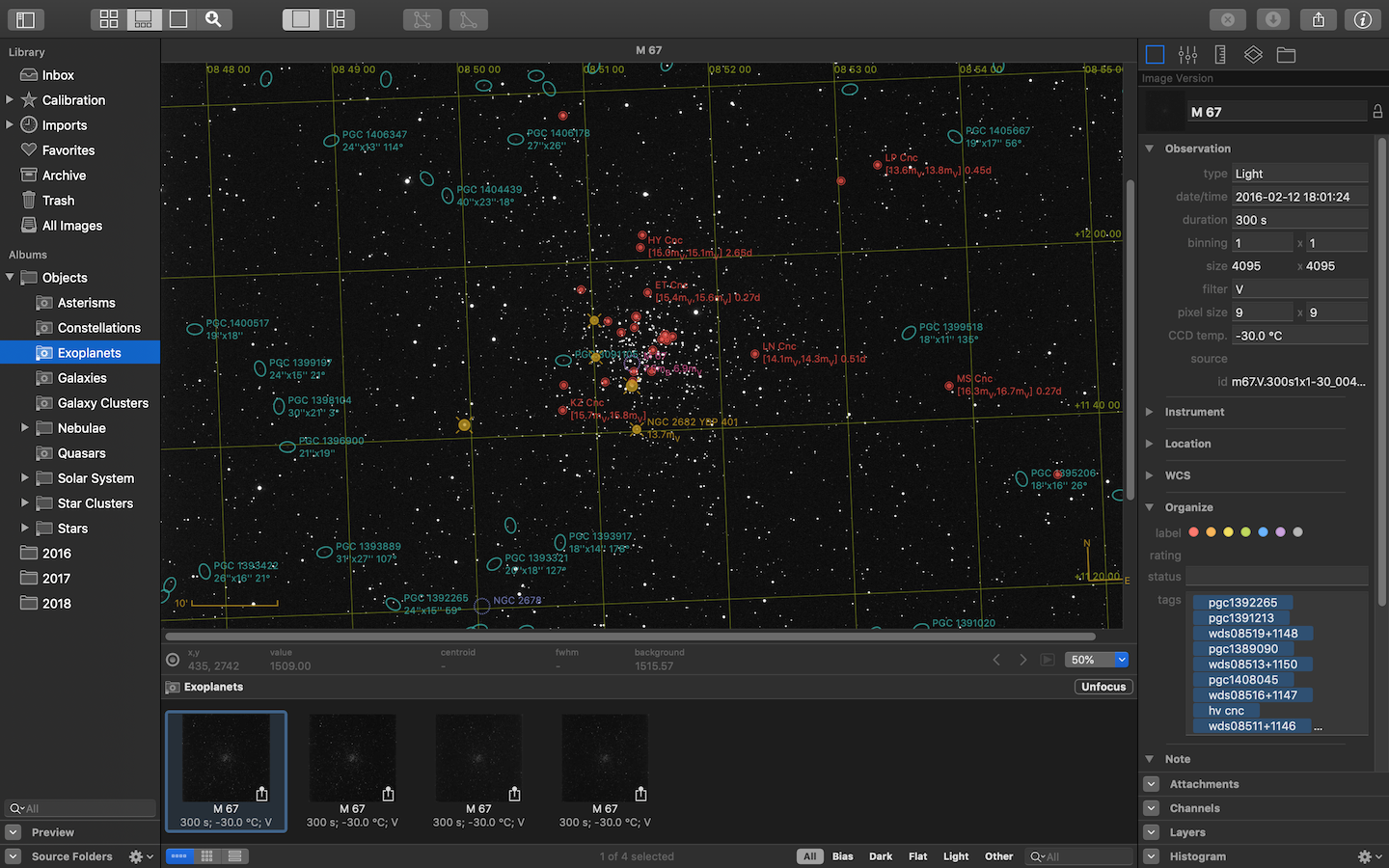
Screenshot (welcome): https://codeobsession.com/img/observatory/press/welcome.png
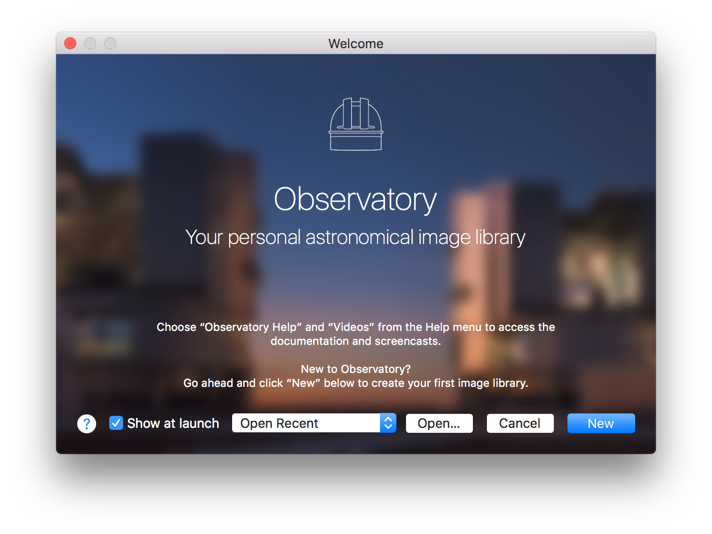
Code Obsession, LLC is an independent Mac software development company based in Bethesda, Maryland, devoted to developing delightful astronomy software for the Mac. All Material and Software (C) Copyright 2018 Code Obsession, LLC. All Rights Reserved. Apple, the Apple logo and macOS are registered trademarks of Apple Inc. in the U.S. and/or other countries. Other trademarks and registered trademarks may be the property of their respective owners.
*******
Link To Article: https://prmac.com/release-id-82807.htm
*******
---------------------------------------------------------------------------------
Note that you can alter delivered distributions at any time.
Login to your account on prMac to alter your channel selection, or to opt-out at any time.
Recosoft ships IR2Office - Convert Illustrator to PowerPoint & Keynote
A new article has been published at prMac.
Recosoft ships IR2Office - Convert Illustrator to PowerPoint & Keynote - Published on 06/22/18
Recosoft Corporation today releases IR2Office 2018, a new plug-in for Adobe Illustrator which converts Illustrator files to Microsoft PowerPoint and Apple Keynote formats while maintaining layout accuracy. IR2Office converts the text, associated fonts, vector graphics, images along with the corresponding property information to the equivalent Microsoft PowerPoint or Apple Keynote data and property; converting every artboard to an equivalent slide in the final PowerPoint or Keynote document type.
Osaka, Japan - Recosoft Corporation, the creators of PDF conversion software and workflow automation plug-ins for Adobe(R) InDesign(R), has shipped IR2Office 2018. IR2Office is a new plug-in for Adobe Illustrator which converts Illustrator (.ai) files to the Microsoft PowerPoint and Apple Keynote formats while maintaining layout accuracy.
IR2Office converts the text, associated fonts, vector graphics, images along with the corresponding property information to the equivalent Microsoft PowerPoint or Apple Keynote data and property; converting every artboard to an equivalent slide in the final PowerPoint or Keynote document type.
"IR2Office solves the difficult issue of getting Adobe Illustrator content into Microsoft PowerPoint and Apple Keynote formats while ensuring the data remain editable. IR2Office is the latest addition to our tools of workflow automation solutions for Adobe Creative Cloud" - Paramjit Chadha, MD, Recosoft Corporation"
IR2Office saves you valuable time in recreating Illustrator content in PowerPoint and Keynote as the Illustrator data and layout structure are maintained. IR2Office has been designed to provide seamless integration with Adobe Illustrator eliminating the necessity to acquire and install additional tools; resulting in enhanced workflow automation and providing huge cost savings in both time and expense.
Features:
* Support for Adobe Illustrator CC - IR2Office operates as a plug-in for Adobe Illustrator enabling you to directly convert Illustrator CC 2015 or higher documents to the target format.
* Save to Office formats - IR2Office converts the Illustrator file to the Microsoft PowerPoint or Apple Keynote type.
* Accurate Conversion - IR2Office maintains the layout of the document when converted to the PowerPoint or Keynote type. Text, Vector Graphics, Images, Gradients and other object property information are converted appropriately.
* Simple interface - Simply open up the Illustrator file to export to PowerPoint or Keynote type and choose the Export to Keynote or Export to PowerPoint command.
* Exports all artboards - IR2Office converts all artboards in the Illustrator file to a corresponding slide in the resulting PowerPoint or Keynote file type.
System Requirements:
* macOS 10.11.6 or higher
* Intel based Mac
* Adobe Illustrator CC 2015, CC 2017 or CC 2018
Pricing and Availability
IR2Office 2018 is available immediately in the following configuration from the Recosoft web store (per license): ID2Office 2018 Annual subscription (macOS) $99.99 (USD).
Recosoft Corporation: https://www.recosoft.com
IR2Office 2018: http://www.recosoft.com/products/ir2office
Screenshot (Illustrator Plug-in): http://www.recosoftcorporation.com/ftpenglish2/convert-illustrator-to-powerpoint.png
Recosoft Corporation has pioneered PDF2Office(R), the de-facto PDF-to-Excel, PDF-to-Word, PDF-to-PowerPoint, PDF-to-OmniGraffle conversion utility; PDF2Office(R) for iWork, the PDF-to-Keynote, PDF-to-Numbers and PDF-to-Pages conversion application; ID2Office, the InDesign-to-Word, InDesign-to-PowerPoint converter; and PDF2ID(R) the de-facto PDF-to-InDesign conversion tool. The company is a leader in designing and delivering PDF converters and InDesign software solutions enhancing workflow automation and productivity. IR2Office, ID2Office, PDF2Office, PDF2ID, PDFtoID are trademarks or registered trademarks of Recosoft Corporation in the US and/or other countries. Microsoft, Excel, PowerPoint, Word and the Office logo are trademarks or registered trademarks of Microsoft Corporation in the US and/or other countries. Adobe, Illustrator, InDesign and Creative Cloud are either registered trademarks or trademarks of Adobe System Incorporated in the US and/or other countries. Apple,
Macintosh, macOS, Mac, Numbers, Keynote, Pages, iWork, iPod, iPhone, iOS, iPAD are either trademarks or registered trademarks of Apple, Inc. in the US and or other countries. All other trademarks are recognized and are the property of their respective owners.
*******
Link To Article: https://prmac.com/release-id-82806.htm
*******
---------------------------------------------------------------------------------
Note that you can alter delivered distributions at any time.
Login to your account on prMac to alter your channel selection, or to opt-out at any time.
Recosoft ships IR2Office - Convert Illustrator to PowerPoint & Keynote - Published on 06/22/18
Recosoft Corporation today releases IR2Office 2018, a new plug-in for Adobe Illustrator which converts Illustrator files to Microsoft PowerPoint and Apple Keynote formats while maintaining layout accuracy. IR2Office converts the text, associated fonts, vector graphics, images along with the corresponding property information to the equivalent Microsoft PowerPoint or Apple Keynote data and property; converting every artboard to an equivalent slide in the final PowerPoint or Keynote document type.
Osaka, Japan - Recosoft Corporation, the creators of PDF conversion software and workflow automation plug-ins for Adobe(R) InDesign(R), has shipped IR2Office 2018. IR2Office is a new plug-in for Adobe Illustrator which converts Illustrator (.ai) files to the Microsoft PowerPoint and Apple Keynote formats while maintaining layout accuracy.
IR2Office converts the text, associated fonts, vector graphics, images along with the corresponding property information to the equivalent Microsoft PowerPoint or Apple Keynote data and property; converting every artboard to an equivalent slide in the final PowerPoint or Keynote document type.
"IR2Office solves the difficult issue of getting Adobe Illustrator content into Microsoft PowerPoint and Apple Keynote formats while ensuring the data remain editable. IR2Office is the latest addition to our tools of workflow automation solutions for Adobe Creative Cloud" - Paramjit Chadha, MD, Recosoft Corporation"
IR2Office saves you valuable time in recreating Illustrator content in PowerPoint and Keynote as the Illustrator data and layout structure are maintained. IR2Office has been designed to provide seamless integration with Adobe Illustrator eliminating the necessity to acquire and install additional tools; resulting in enhanced workflow automation and providing huge cost savings in both time and expense.
Features:
* Support for Adobe Illustrator CC - IR2Office operates as a plug-in for Adobe Illustrator enabling you to directly convert Illustrator CC 2015 or higher documents to the target format.
* Save to Office formats - IR2Office converts the Illustrator file to the Microsoft PowerPoint or Apple Keynote type.
* Accurate Conversion - IR2Office maintains the layout of the document when converted to the PowerPoint or Keynote type. Text, Vector Graphics, Images, Gradients and other object property information are converted appropriately.
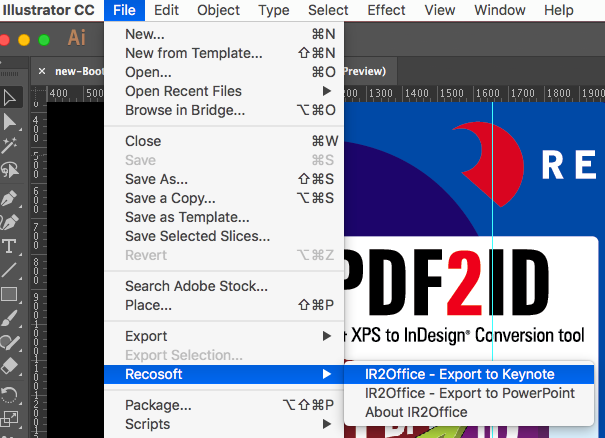
* Simple interface - Simply open up the Illustrator file to export to PowerPoint or Keynote type and choose the Export to Keynote or Export to PowerPoint command.
* Exports all artboards - IR2Office converts all artboards in the Illustrator file to a corresponding slide in the resulting PowerPoint or Keynote file type.
System Requirements:
* macOS 10.11.6 or higher
* Intel based Mac
* Adobe Illustrator CC 2015, CC 2017 or CC 2018
Pricing and Availability
IR2Office 2018 is available immediately in the following configuration from the Recosoft web store (per license): ID2Office 2018 Annual subscription (macOS) $99.99 (USD).
Recosoft Corporation: https://www.recosoft.com
IR2Office 2018: http://www.recosoft.com/products/ir2office
Screenshot (Illustrator Plug-in): http://www.recosoftcorporation.com/ftpenglish2/convert-illustrator-to-powerpoint.png
Recosoft Corporation has pioneered PDF2Office(R), the de-facto PDF-to-Excel, PDF-to-Word, PDF-to-PowerPoint, PDF-to-OmniGraffle conversion utility; PDF2Office(R) for iWork, the PDF-to-Keynote, PDF-to-Numbers and PDF-to-Pages conversion application; ID2Office, the InDesign-to-Word, InDesign-to-PowerPoint converter; and PDF2ID(R) the de-facto PDF-to-InDesign conversion tool. The company is a leader in designing and delivering PDF converters and InDesign software solutions enhancing workflow automation and productivity. IR2Office, ID2Office, PDF2Office, PDF2ID, PDFtoID are trademarks or registered trademarks of Recosoft Corporation in the US and/or other countries. Microsoft, Excel, PowerPoint, Word and the Office logo are trademarks or registered trademarks of Microsoft Corporation in the US and/or other countries. Adobe, Illustrator, InDesign and Creative Cloud are either registered trademarks or trademarks of Adobe System Incorporated in the US and/or other countries. Apple,
Macintosh, macOS, Mac, Numbers, Keynote, Pages, iWork, iPod, iPhone, iOS, iPAD are either trademarks or registered trademarks of Apple, Inc. in the US and or other countries. All other trademarks are recognized and are the property of their respective owners.
*******
Link To Article: https://prmac.com/release-id-82806.htm
*******
---------------------------------------------------------------------------------
Note that you can alter delivered distributions at any time.
Login to your account on prMac to alter your channel selection, or to opt-out at any time.
Peter Rabbit hops onto mobile in Peter Rabbit: Let's Go!
A new article has been published at prMac.
Peter Rabbit hops onto mobile in Peter Rabbit: Let's Go! - Published on 06/20/18
Indie game developer, No Yetis Allowed today releases Peter Rabbit: Let's Go!, its charming adventure game game for iOS and Android devices. Based on the popular Peter Rabbit global animated TV series, Peter Rabbit: Let's Go! brings the Beatrix Potter favourite and his friends to life using vibrant 3D graphics. Packed with features, the game enables parents and children to spend time together exploring and interacting with the magical world of Peter Rabbit and his friends.
London, United Kingdom - Independent game developer, No Yetis Allowed today announced that its new mobile game Peter Rabbit: Let's Go! is now available for download on The App Store. Based on the popular Peter Rabbit global animated TV series, Peter Rabbit: Let's Go! brings the Beatrix Potter favourite and his friends to life using vibrant 3D graphics and will surprise and delight young fans of the TV series. Packed with features, the game enables parents and children to spend time together exploring and interacting with the magical world of Peter Rabbit and his friends. Developer No Yetis Allowed also developed smash hit Pocket Shrek that had over 6.5 million downloads.
The app has been developed in association with Penguin Ventures (part of Penguin Random House), brand owners for Peter Rabbit and brokered by Silvergate Media, licensing agent for Peter Rabbit animation on behalf of Penguin Ventures.
Thomas Merrington, Creative Director for Penguin Ventures (part of Penguin Random House) said "In Peter Rabbit: Let's Go! No Yetis Allowed have enabled fans of Peter Rabbit and his friends to engage with these much-loved characters in an entirely new way. We're thrilled with the innovation and incredible 3D graphics which combined, will offer our young audience a brilliantly immersive experience."
In the game, children join Peter and his friends Benjamin and Lily in their search for the pages of Peter's dad's lost journal. Along the way, children can explore a multitude of iconic landmarks and locations including Mr McGregor's Garden, Mr Tod's house, and Peter Rabbit's home. Interactive activities include fun spelling games, music tasks, number challenges and creative picture colouring for hours of endless entertainment. Games include:
* Vegetable raids in Mr McGregor's garden
* Pinecone bowling at the Squirrel Camp
* Ladybird hunting (watch out for the bees!)
* Strawberry raids at Mr Tod's house
* Shape-matching games outside Peter Rabbit's home
* Jeremy Fisher's musical game
* Lift, bounce and throw blocks around Peter Rabbit's home
* Balloon bouncing and bursting fun up in the secret treehouse
* Have fun with a toy train in Peter Rabbit's bedroom
Peter Rabbit: Let's Go! aims to give fans of the Peter Rabbit TV series the most authentic experience possible. This includes the use of lifelike animations and stunning high-quality 3D graphics that mirror the art style of the hit TV show, as well as the use of the original voice talent, bringing the personality of each character to life. Players can also tap and swipe characters to trigger dialogue options and animations or tickle them just for fun!
Peter Rabbit: Let's Go! features no in-app purchases or adverts, meaning parents can let their child play without the fear of additional payments. Plenty of additional content is planned post-launch, including mini-games such as Mr Bouncer's target practice and more.
No Yetis Allowed: http://noyetisallowed.com/
Peter Rabbit: Let's Go! 1.1: http://noyetisallowed.com/games-2/
Purchase and Download: https://itunes.apple.com/app/peter-rabbit-lets-go/id1340340619
YouTube Video (Trailer): https://www.youtube.com/watch?v=89E7bD_WADk
Media Assets: https://drive.google.com/drive/folders/13SRVGvzTKX_jxSDvQhNxdEAnKtjvcp3j?usp=sharing
No Yetis Allowed was formed in 2013 by Mark Hardisty and Tom Weston with a view to bringing a console-quality mentality to the mobile space, using high-profile and much-loved character licenses. All Material and Software (C) Copyright 2018 No Yetis Allowed. All Rights Reserved. Apple, the Apple logo, iPhone, iPod and iPad are registered trademarks of Apple Inc. in the U.S. and/or other countries. Other trademarks and registered trademarks may be the property of their respective owners.
*******
Link To Article: https://prmac.com/release-id-82805.htm
*******
---------------------------------------------------------------------------------
Note that you can alter delivered distributions at any time.
Login to your account on prMac to alter your channel selection, or to opt-out at any time.
Peter Rabbit hops onto mobile in Peter Rabbit: Let's Go! - Published on 06/20/18
Indie game developer, No Yetis Allowed today releases Peter Rabbit: Let's Go!, its charming adventure game game for iOS and Android devices. Based on the popular Peter Rabbit global animated TV series, Peter Rabbit: Let's Go! brings the Beatrix Potter favourite and his friends to life using vibrant 3D graphics. Packed with features, the game enables parents and children to spend time together exploring and interacting with the magical world of Peter Rabbit and his friends.
London, United Kingdom - Independent game developer, No Yetis Allowed today announced that its new mobile game Peter Rabbit: Let's Go! is now available for download on The App Store. Based on the popular Peter Rabbit global animated TV series, Peter Rabbit: Let's Go! brings the Beatrix Potter favourite and his friends to life using vibrant 3D graphics and will surprise and delight young fans of the TV series. Packed with features, the game enables parents and children to spend time together exploring and interacting with the magical world of Peter Rabbit and his friends. Developer No Yetis Allowed also developed smash hit Pocket Shrek that had over 6.5 million downloads.
The app has been developed in association with Penguin Ventures (part of Penguin Random House), brand owners for Peter Rabbit and brokered by Silvergate Media, licensing agent for Peter Rabbit animation on behalf of Penguin Ventures.
Thomas Merrington, Creative Director for Penguin Ventures (part of Penguin Random House) said "In Peter Rabbit: Let's Go! No Yetis Allowed have enabled fans of Peter Rabbit and his friends to engage with these much-loved characters in an entirely new way. We're thrilled with the innovation and incredible 3D graphics which combined, will offer our young audience a brilliantly immersive experience."
In the game, children join Peter and his friends Benjamin and Lily in their search for the pages of Peter's dad's lost journal. Along the way, children can explore a multitude of iconic landmarks and locations including Mr McGregor's Garden, Mr Tod's house, and Peter Rabbit's home. Interactive activities include fun spelling games, music tasks, number challenges and creative picture colouring for hours of endless entertainment. Games include:
* Vegetable raids in Mr McGregor's garden
* Pinecone bowling at the Squirrel Camp
* Ladybird hunting (watch out for the bees!)
* Strawberry raids at Mr Tod's house
* Shape-matching games outside Peter Rabbit's home
* Jeremy Fisher's musical game
* Lift, bounce and throw blocks around Peter Rabbit's home
* Balloon bouncing and bursting fun up in the secret treehouse
* Have fun with a toy train in Peter Rabbit's bedroom
Peter Rabbit: Let's Go! aims to give fans of the Peter Rabbit TV series the most authentic experience possible. This includes the use of lifelike animations and stunning high-quality 3D graphics that mirror the art style of the hit TV show, as well as the use of the original voice talent, bringing the personality of each character to life. Players can also tap and swipe characters to trigger dialogue options and animations or tickle them just for fun!
Peter Rabbit: Let's Go! features no in-app purchases or adverts, meaning parents can let their child play without the fear of additional payments. Plenty of additional content is planned post-launch, including mini-games such as Mr Bouncer's target practice and more.
No Yetis Allowed: http://noyetisallowed.com/
Peter Rabbit: Let's Go! 1.1: http://noyetisallowed.com/games-2/
Purchase and Download: https://itunes.apple.com/app/peter-rabbit-lets-go/id1340340619
YouTube Video (Trailer): https://www.youtube.com/watch?v=89E7bD_WADk
Media Assets: https://drive.google.com/drive/folders/13SRVGvzTKX_jxSDvQhNxdEAnKtjvcp3j?usp=sharing
No Yetis Allowed was formed in 2013 by Mark Hardisty and Tom Weston with a view to bringing a console-quality mentality to the mobile space, using high-profile and much-loved character licenses. All Material and Software (C) Copyright 2018 No Yetis Allowed. All Rights Reserved. Apple, the Apple logo, iPhone, iPod and iPad are registered trademarks of Apple Inc. in the U.S. and/or other countries. Other trademarks and registered trademarks may be the property of their respective owners.
*******
Link To Article: https://prmac.com/release-id-82805.htm
*******
---------------------------------------------------------------------------------
Note that you can alter delivered distributions at any time.
Login to your account on prMac to alter your channel selection, or to opt-out at any time.
24U Software releases fmRESTor for FileMaker Data API
A new article has been published at prMac.
24U Software releases fmRESTor for FileMaker Data API - Published on 06/20/18
Prague based 24U Software today announces fmRESTor, an object-based PHP library developed to interact with databases and custom apps hosted on a FileMaker Server via the new FileMaker Data API from within PHP code. With fmRESTor, PHP developers can create a new object, passing it necessary parameters to connect to the database, and use fmRESTor's easy to understand methods to access or modify their data. fmRESTor will take care of authentication, exceptions, logging, sessions and more.
Prague, Czech Republic - 24U Software today is proud to announce the release of fmRESTor for FileMaker(R) Data API. fmRESTor is an object-based PHP library developed to interact with databases and custom apps hosted on a FileMaker(R) Server via the new FileMaker Data API from within PHP code.
With fmRESTor, PHP developers don't have to learn FileMaker Data API in detail, they can just create a new object, passing it necessary parameters to connect to the database, and use fmRESTor's easy to understand methods to access or modify their data. fmRESTor will take care of authentication, exceptions, logging, and even session preservation in order for the PHP code to be a well-behaving client for the FileMaker Data API without the developer having to worry about these technical details.
Features of fmRESTor:
* One object class conveniently handles everything
* Automatically generates authentication token
* Re-uses existing token to avoid unnecessary additional connections
* Automatically re-generates expired token
* Handles exceptions and provides meaningful error results
* Can handle raw form data for easier container uploads
* Provides customizable debug logging
24U believes that the whole FileMaker developers community will benefit from the FileMaker Platform not only having new powerful RESTful API, but also developers using the API nicely and efficiently, therefore they decided to make this library available as Open Source.
System Requirements:
* PHP 5.5 or greater
* cURL
* FileMaker database hosted on FileMaker Server 17 or FileMaker Cloud 1.17
Pricing and Availability:
fmRESTor is available as open source, licensed under the "GNU LGPLv3" License. 24U greatly appreciates contributions, but cannot provide free support for the library. Developers may hire 24U to help them with their projects, either by purchasing developer-level support or by utilizing 24U's custom development services.
24U Software: http://www.24usoftware.com/
fmRESTor: https://github.com/24u/fmRESTor
Media Assets: http://www.24usoftware.com/pr/
With a team of full-time testers, web, plug-in, Mac, Windows, Linux, iOS, and Android native app developers, and FileMaker certified developers, led by the FileMaker DevCon 2015 Developer Cup champion, 24U excels in taking care of existing FileMaker solutions, optimizing their performance, identifying and resolving potential issues and liabilities, improving reliability, stability and scalability, integrating them with other systems including various hardware devices, and extending them beyond expectation. As a platinum member of the FileMaker Business Alliance, we help global businesses around the world to maintain sustainable growth by working with their in-house developers or completely taking care of the maintenance and development of their business solutions. (c) 2018 24U s.r.o. All rights reserved. 24U, 24U Software, and FM Bench are trademarks of 24U s.r.o. FileMaker is a trademark of FileMaker, Inc., registered in the U.S. and other countries. All other trademarks are the
property of their respective owners. Pricing and availability are subject to change without notice.
*******
Link To Article: https://prmac.com/release-id-82804.htm
*******
---------------------------------------------------------------------------------
Note that you can alter delivered distributions at any time.
Login to your account on prMac to alter your channel selection, or to opt-out at any time.
24U Software releases fmRESTor for FileMaker Data API - Published on 06/20/18
Prague based 24U Software today announces fmRESTor, an object-based PHP library developed to interact with databases and custom apps hosted on a FileMaker Server via the new FileMaker Data API from within PHP code. With fmRESTor, PHP developers can create a new object, passing it necessary parameters to connect to the database, and use fmRESTor's easy to understand methods to access or modify their data. fmRESTor will take care of authentication, exceptions, logging, sessions and more.
Prague, Czech Republic - 24U Software today is proud to announce the release of fmRESTor for FileMaker(R) Data API. fmRESTor is an object-based PHP library developed to interact with databases and custom apps hosted on a FileMaker(R) Server via the new FileMaker Data API from within PHP code.
With fmRESTor, PHP developers don't have to learn FileMaker Data API in detail, they can just create a new object, passing it necessary parameters to connect to the database, and use fmRESTor's easy to understand methods to access or modify their data. fmRESTor will take care of authentication, exceptions, logging, and even session preservation in order for the PHP code to be a well-behaving client for the FileMaker Data API without the developer having to worry about these technical details.
Features of fmRESTor:
* One object class conveniently handles everything
* Automatically generates authentication token
* Re-uses existing token to avoid unnecessary additional connections
* Automatically re-generates expired token
* Handles exceptions and provides meaningful error results
* Can handle raw form data for easier container uploads
* Provides customizable debug logging
24U believes that the whole FileMaker developers community will benefit from the FileMaker Platform not only having new powerful RESTful API, but also developers using the API nicely and efficiently, therefore they decided to make this library available as Open Source.
System Requirements:
* PHP 5.5 or greater
* cURL
* FileMaker database hosted on FileMaker Server 17 or FileMaker Cloud 1.17
Pricing and Availability:
fmRESTor is available as open source, licensed under the "GNU LGPLv3" License. 24U greatly appreciates contributions, but cannot provide free support for the library. Developers may hire 24U to help them with their projects, either by purchasing developer-level support or by utilizing 24U's custom development services.
24U Software: http://www.24usoftware.com/
fmRESTor: https://github.com/24u/fmRESTor
Media Assets: http://www.24usoftware.com/pr/
With a team of full-time testers, web, plug-in, Mac, Windows, Linux, iOS, and Android native app developers, and FileMaker certified developers, led by the FileMaker DevCon 2015 Developer Cup champion, 24U excels in taking care of existing FileMaker solutions, optimizing their performance, identifying and resolving potential issues and liabilities, improving reliability, stability and scalability, integrating them with other systems including various hardware devices, and extending them beyond expectation. As a platinum member of the FileMaker Business Alliance, we help global businesses around the world to maintain sustainable growth by working with their in-house developers or completely taking care of the maintenance and development of their business solutions. (c) 2018 24U s.r.o. All rights reserved. 24U, 24U Software, and FM Bench are trademarks of 24U s.r.o. FileMaker is a trademark of FileMaker, Inc., registered in the U.S. and other countries. All other trademarks are the
property of their respective owners. Pricing and availability are subject to change without notice.
*******
Link To Article: https://prmac.com/release-id-82804.htm
*******
---------------------------------------------------------------------------------
Note that you can alter delivered distributions at any time.
Login to your account on prMac to alter your channel selection, or to opt-out at any time.
24U Software launches new Xgode Online Service
A new article has been published at prMac.
24U Software launches new Xgode Online Service - Published on 06/20/18
24U Software today launches Xgode, a new online service lets FileMaker developers easily build a native app for iPhone & iPad from a FileMaker Go app in less than 15 minutes. With this simple service it is possible to turn a custom app based on the FileMaker Platform into a native app without having to learn or use any development tools other than FileMaker Pro Advanced. The only things that are needed are a valid Apple Developer account, a custom FileMaker app, and graphics for the app's icon.
Prague, Czech Republic - 24U Software is proud to announce their launch of Xgode, a new online service lets FileMaker developers easily build a native app for iPhone and iPad from a FileMaker Go(R) app in less than 15 minutes. With this simple service it is possible to turn a custom app based on the FileMaker Platform into a native app without having to learn or use any development tools other than FileMaker Pro Advanced. The only things that are needed are a valid Apple Developer account, a custom FileMaker app, and graphics for the app's icon.
What this service does:
* Turns a custom FileMaker Go app to a native app for iPhone and iPad
* Does not require to download, learn, and use any developer tools
* Does not require the developer to own a Mac
* Lets the developer use plug-ins in the owner's app
* Generates a secure web installation page for an in-house distribution
System Requirements:
All that is needed to create native apps with this service is a copy of FileMaker Pro Advanced and an Apple Developer Program membership. Xgode can be tried free of charge in demo mode. Apps built in the demo mode will display a splash screen informing users they were built by demo version of Xgode.
Pricing and Availability:
Xgode is available for $9 (USD) for an individual build, $19 for monthly subscription, and $199 for an annual subscription. Subscriptions allow for unlimited number of builds during the subscription period. A simple Tic Tac Toe game app created with FileMaker Pro Advanced is available as a free download for those who want to try this service out and do not have their own app ready yet.
24U Software: http://www.24usoftware.com/
24U Xgode: https://www.24usoftware.com/Xgode/
Purchase: http://www.24uSoftware.com/Xgode#buy
Media Assets: http://www.24usoftware.com/pr/
With a team of full-time testers, web, plug-in, Mac, Windows, Linux, iOS, and Android native app developers, and FileMaker certified developers, led by the FileMaker DevCon 2015 Developer Cup champion, 24U excels in taking care of existing FileMaker solutions, optimizing their performance, identifying and resolving potential issues and liabilities, improving reliability, stability and scalability, integrating them with other systems including various hardware devices, and extending them beyond expectation. As a platinum member of the FileMaker Business Alliance, we help global businesses around the world to maintain sustainable growth by working with their in-house developers or completely taking care of the maintenance and development of their business solutions. (c) 2018 24U s.r.o. All rights reserved. 24U, 24U Software, and FM Bench are trademarks of 24U s.r.o. FileMaker is a trademark of FileMaker, Inc., registered in the U.S. and other countries. All other trademarks are the
property of their respective owners. Pricing and availability are subject to change without notice.
*******
Link To Article: https://prmac.com/release-id-82802.htm
*******
---------------------------------------------------------------------------------
Note that you can alter delivered distributions at any time.
Login to your account on prMac to alter your channel selection, or to opt-out at any time.
24U Software launches new Xgode Online Service - Published on 06/20/18
24U Software today launches Xgode, a new online service lets FileMaker developers easily build a native app for iPhone & iPad from a FileMaker Go app in less than 15 minutes. With this simple service it is possible to turn a custom app based on the FileMaker Platform into a native app without having to learn or use any development tools other than FileMaker Pro Advanced. The only things that are needed are a valid Apple Developer account, a custom FileMaker app, and graphics for the app's icon.
Prague, Czech Republic - 24U Software is proud to announce their launch of Xgode, a new online service lets FileMaker developers easily build a native app for iPhone and iPad from a FileMaker Go(R) app in less than 15 minutes. With this simple service it is possible to turn a custom app based on the FileMaker Platform into a native app without having to learn or use any development tools other than FileMaker Pro Advanced. The only things that are needed are a valid Apple Developer account, a custom FileMaker app, and graphics for the app's icon.
What this service does:
* Turns a custom FileMaker Go app to a native app for iPhone and iPad
* Does not require to download, learn, and use any developer tools
* Does not require the developer to own a Mac
* Lets the developer use plug-ins in the owner's app
* Generates a secure web installation page for an in-house distribution
System Requirements:
All that is needed to create native apps with this service is a copy of FileMaker Pro Advanced and an Apple Developer Program membership. Xgode can be tried free of charge in demo mode. Apps built in the demo mode will display a splash screen informing users they were built by demo version of Xgode.
Pricing and Availability:
Xgode is available for $9 (USD) for an individual build, $19 for monthly subscription, and $199 for an annual subscription. Subscriptions allow for unlimited number of builds during the subscription period. A simple Tic Tac Toe game app created with FileMaker Pro Advanced is available as a free download for those who want to try this service out and do not have their own app ready yet.
24U Software: http://www.24usoftware.com/
24U Xgode: https://www.24usoftware.com/Xgode/
Purchase: http://www.24uSoftware.com/Xgode#buy
Media Assets: http://www.24usoftware.com/pr/
With a team of full-time testers, web, plug-in, Mac, Windows, Linux, iOS, and Android native app developers, and FileMaker certified developers, led by the FileMaker DevCon 2015 Developer Cup champion, 24U excels in taking care of existing FileMaker solutions, optimizing their performance, identifying and resolving potential issues and liabilities, improving reliability, stability and scalability, integrating them with other systems including various hardware devices, and extending them beyond expectation. As a platinum member of the FileMaker Business Alliance, we help global businesses around the world to maintain sustainable growth by working with their in-house developers or completely taking care of the maintenance and development of their business solutions. (c) 2018 24U s.r.o. All rights reserved. 24U, 24U Software, and FM Bench are trademarks of 24U s.r.o. FileMaker is a trademark of FileMaker, Inc., registered in the U.S. and other countries. All other trademarks are the
property of their respective owners. Pricing and availability are subject to change without notice.
*******
Link To Article: https://prmac.com/release-id-82802.htm
*******
---------------------------------------------------------------------------------
Note that you can alter delivered distributions at any time.
Login to your account on prMac to alter your channel selection, or to opt-out at any time.
Moth Software announces Mail Archiver X 4.2
A new article has been published at prMac.
Moth Software announces Mail Archiver X 4.2 - Published on 06/20/18
Moth Software today announces Mail Archiver X 4.2 for Mac OS X, an important feature update to their app designed as a companion to the user's email application. Particularly valuable for businesses and individuals alike, Mail Archiver X allows consolidation, archiving, and permanent storage of emails. Emails may be saved in the application's native database format, or in Evernote, Filemaker, PDF, mbox, or Text. Version 4.2 adds support for directly archiving to PDF and allows filtering.
Heidesheim, Germany - Moth Software is proud to announce the release of Mail Archiver X 4.2 for Mac OS X, an update to their app that serves as a companion to the user's current email application/client, allowing consolidation, archiving, and permanent storage of emails. Emails may be saved in the application's native database format, or in Evernote, Filemaker, PDF, mbox, or Text formats. Archiving emails from a variety of email applications into a single database, the app prevents accidental deletions, facilitates quick searches, and eliminates the storage size limits imposed by many email apps and companies. By saving emails in a single, standardized format, users are ensured that they can read all their emails, even those from legacy applications, from which they have subsequently migrated.
Following the archiving process, users may browse or search from the Mail Archiver X viewer.
You can now archive directly to PDF which makes your archive available on all platforms. "Filtering emails has been a feature that has been requested often. Finally, it's available." says Moth Software spokesperson, Beatrix Willius.
New Features for Mail Archiver X 4.2 are:
* The list of mails is now fast again. Everything from loading to selecting and adjusting the column widths is very fast.
* The diagnosis after archival runs faster.
* Duplicate checking is now a bit faster for Outlook and Mail. For Imap this is more than 10 times faster.
Mail Archiver 4.2 still is 32bit! The upcoming version 4.3 will be 64bit and already runs fine on Mojave. 4.3 will be a free update to version 4.2.
Feature Highlights of Mail Archiver X are:
* An ideal email management and archive solution
* Protect and save all emails in a single archive folder
* Archives emails from the following formats: Entourage, Mail, Outlook, Postbox, Powermail, Thunderbird, and standard mbox
* Exports emails to the following formats: Valentina (native), Evernote, Filemaker, PDF, mbox, or Text
* Built-in email database browser
* Exchange is supported for Apple Mail, and Microsoft Entourage and Outlook
* Filemaker support, when using the Filemaker Version 12 browser
Compatible Email clients:
* Microsoft Entourage: 12
* Apple Mail: any version
* Postbox: 1.0 or higher
* Microsoft Outlook: 14.0 or higher
* CTM Development Powermail: 5.1 or higher
* Mozilla Thunderbird: 3.0 or higher
Pricing and Availability:
Mail Archiver X 4.2 is $39.95 (USD) and available directly from Moth Software. A free, fully-functional, 12-day trial version can be downloaded. Mail Archiver X 4.2 comes with a 30-day, money back guarantee. Review copies are available upon request.
Mail Archiver X 4.2: https://www.mothsoftware.com
What's New: https://www.mothsoftware.com/content/whats-new/
Screenshot: https://www.mothsoftware.com/content/whats-new/index_files/archive_pdf.png
Located in Heidesheim, Germany, the Moth Software team is a small independent software company founded by Beatrix Willius in 2004. Beatrix is an experienced project leader and developer with several years experience in Realbasic, Microsoft Access, Visual Basic, SQL, AppleScript and Filemaker. Copyright (C) 2004-2018 Moth Software. All Rights Reserved. Apple, the Apple logo, and Mac OS X are registered trademarks of Apple Inc. in the U.S. and/or other countries. All other trademarks and registered trademarks may be the property of their respective owners.
*******
Link To Article: https://prmac.com/release-id-82803.htm
*******
---------------------------------------------------------------------------------
Note that you can alter delivered distributions at any time.
Login to your account on prMac to alter your channel selection, or to opt-out at any time.
Moth Software announces Mail Archiver X 4.2 - Published on 06/20/18
Moth Software today announces Mail Archiver X 4.2 for Mac OS X, an important feature update to their app designed as a companion to the user's email application. Particularly valuable for businesses and individuals alike, Mail Archiver X allows consolidation, archiving, and permanent storage of emails. Emails may be saved in the application's native database format, or in Evernote, Filemaker, PDF, mbox, or Text. Version 4.2 adds support for directly archiving to PDF and allows filtering.
Heidesheim, Germany - Moth Software is proud to announce the release of Mail Archiver X 4.2 for Mac OS X, an update to their app that serves as a companion to the user's current email application/client, allowing consolidation, archiving, and permanent storage of emails. Emails may be saved in the application's native database format, or in Evernote, Filemaker, PDF, mbox, or Text formats. Archiving emails from a variety of email applications into a single database, the app prevents accidental deletions, facilitates quick searches, and eliminates the storage size limits imposed by many email apps and companies. By saving emails in a single, standardized format, users are ensured that they can read all their emails, even those from legacy applications, from which they have subsequently migrated.
Following the archiving process, users may browse or search from the Mail Archiver X viewer.
You can now archive directly to PDF which makes your archive available on all platforms. "Filtering emails has been a feature that has been requested often. Finally, it's available." says Moth Software spokesperson, Beatrix Willius.
New Features for Mail Archiver X 4.2 are:
* The list of mails is now fast again. Everything from loading to selecting and adjusting the column widths is very fast.
* The diagnosis after archival runs faster.
* Duplicate checking is now a bit faster for Outlook and Mail. For Imap this is more than 10 times faster.
Mail Archiver 4.2 still is 32bit! The upcoming version 4.3 will be 64bit and already runs fine on Mojave. 4.3 will be a free update to version 4.2.
Feature Highlights of Mail Archiver X are:
* An ideal email management and archive solution
* Protect and save all emails in a single archive folder
* Archives emails from the following formats: Entourage, Mail, Outlook, Postbox, Powermail, Thunderbird, and standard mbox
* Exports emails to the following formats: Valentina (native), Evernote, Filemaker, PDF, mbox, or Text
* Built-in email database browser
* Exchange is supported for Apple Mail, and Microsoft Entourage and Outlook
* Filemaker support, when using the Filemaker Version 12 browser
Compatible Email clients:
* Microsoft Entourage: 12
* Apple Mail: any version
* Postbox: 1.0 or higher
* Microsoft Outlook: 14.0 or higher
* CTM Development Powermail: 5.1 or higher
* Mozilla Thunderbird: 3.0 or higher
Pricing and Availability:
Mail Archiver X 4.2 is $39.95 (USD) and available directly from Moth Software. A free, fully-functional, 12-day trial version can be downloaded. Mail Archiver X 4.2 comes with a 30-day, money back guarantee. Review copies are available upon request.
Mail Archiver X 4.2: https://www.mothsoftware.com
What's New: https://www.mothsoftware.com/content/whats-new/
Screenshot: https://www.mothsoftware.com/content/whats-new/index_files/archive_pdf.png

Located in Heidesheim, Germany, the Moth Software team is a small independent software company founded by Beatrix Willius in 2004. Beatrix is an experienced project leader and developer with several years experience in Realbasic, Microsoft Access, Visual Basic, SQL, AppleScript and Filemaker. Copyright (C) 2004-2018 Moth Software. All Rights Reserved. Apple, the Apple logo, and Mac OS X are registered trademarks of Apple Inc. in the U.S. and/or other countries. All other trademarks and registered trademarks may be the property of their respective owners.
*******
Link To Article: https://prmac.com/release-id-82803.htm
*******
---------------------------------------------------------------------------------
Note that you can alter delivered distributions at any time.
Login to your account on prMac to alter your channel selection, or to opt-out at any time.
Subscribe to:
Posts (Atom)