A new article has been published at prMac.
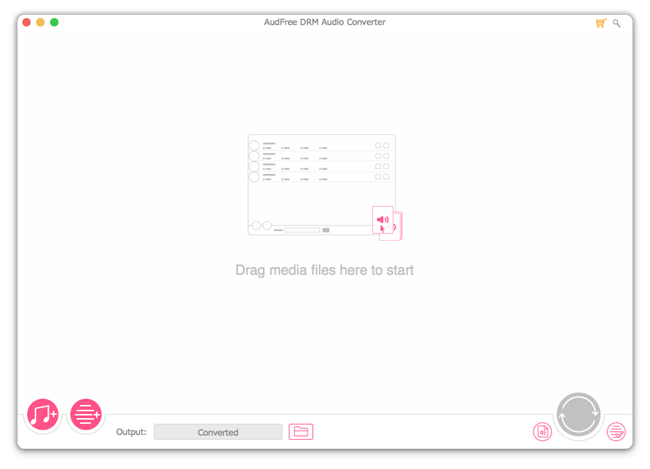
AudFree Launched Audio Converter to Remove DRM from Apple Music, Audible - Published on 06/29/18
AudFree officially introduced its new flagship software, DRM Audio Converter for Mac, aiming to help Apple Music, iTunes and Audible users regain full ownership on the digital audios they legally purchased online. With this smart tool, anyone can easily convert Apple Music, iTunes songs, Audible audiobooks and other audio tracks to MP3, AAC, WAV, and more for offline playing on any device and player. Easily change the audio quality by customizing the parameters.
Shenzhen, Guangdong - AudFree Software, as a top leader in multimedia developing field, has been working audio solutions to free all music addicts from any audio annoyance. In order to help online streaming music users of Apple Music, iTunes, Audible or other services, it recently launched a new product called AudFree DRM Audio Converter, a one-stop streaming audio solution to convert DRM-ed audios, including Apple Music songs, iTunes & Audible audiobooks, as well as non-DRM audio files to MP3, WAV, FLAC, AAC for playing on any popular media playing device.
Due to DRM, it's impossible to play Apple Music and iTunes/Audible audiobooks on common MP3 players or non-authorized devices. Therefore, a dedicated decrypting tool is highly required to break the limit from those specific audios. As a most comprehensive audio conversion tool, AudFree Audio Converter for Mac works as a perfect DRM remover for Apple Music, iTunes songs, audiobooks and Audible AA, AAX files. By using this software, you can easily convert the protected Apple Music M4P songs and Audible AA/AAX audiobooks to unprotected MP3, M4A, AAC, WAV, FLAC and M4B.
In addition to an exclusive DRM removal solution, AudFree Audio Converter also serves as an all-in-one toolkit for non-DRM audios. It converts between all popular audio file formats without losing any quality.
No matter what types of audios you are converting, encrypted or non-encrypted, AudFree DRM Audio Converter is able to keep the original ID3 tags and metadata info in output files, including the audio title, cover, album, artist, chapters, and so forth. And users are allowed to change the audio quality flexibly by customizing the parameters like audio codec, bit rate, sample rate, and more.
Better still, when converting Audible AA and AAX audiobooks with AudFree, it can preserve the 100% lossless quality of the original files. And thanks to the built-in audio splitter, you can easily cut the large audiobook file into small segments by chapters or fixed time frames.
Pricing and Availability:
AudFree DRM Audio Converter is available on its official online store now with $39.95 single user license and $54.95 (USD) family pack. It's provided with both Mac and Windows versions. The very first version is fully compatible with the latest iTunes version on most OS.
AudFree: https://www.audfree.com
AudFree DRM Audio Converter for Mac: https://www.audfree.com/drm-audio-converter-mac/
Purchase: https://www.audfree.com/buy/drm-audio-converter-mac.html
Screenshot: https://www.audfree.com/images/drm-audio-converter/main-mac.png
As an innovation-driven multimedia studio, AudFree is focused on developing and providing industry-leading DRM removal solutions for streaming music addicts, such as users of Apple Music, Spotify songs, Audible audioboks, iTunes music and more. With a passionate team full of dedicated individuals, AudFree is aiming to make your digital life much easier and bring more fun to you when enjoying music. All Material and Software (C) Copyright 2018 AudFree. All Rights Reserved. Apple, the Apple logo, macOS, iTunes, iPhone, iPod and iPad are registered trademarks of Apple Inc. in the U.S. and/or other countries. Other trademarks and registered trademarks may be the property of their respective owners.
*******
Link To Article: https://prmac.com/release-id-82825.htm
*******
---------------------------------------------------------------------------------
Note that you can alter delivered distributions at any time.
Login to your account on prMac to alter your channel selection, or to opt-out at any time.

24U Software releases 24U SimpleFile Plug-In 3.0.3
A new article has been published at prMac.
24U Software releases 24U SimpleFile Plug-In 3.0.3 - Published on 06/29/18
24U Software today releases 24U SimpleFile Plug-In 3.0.3, an important update to their plug-In for managing files and folders directly from FileMaker Pro or FileMaker Server. With 24U SimpleFile Plug-In your solution can easily create, delete, copy, move, and rename files and folders anywhere on your hard disk, on the FileMaker Server's hard disk, or any other network connected shared folder. Version 3.0.3 fixes an issue causing a crash on macOS 10.13 High Sierra.
Prague, Czech Republic - 24U Software is proud to announce the release of 24U SimpleFile Plug-In 3.0.3. 24U SimpleFile Plug-In lets your FileMaker solutions easily access files stored anywhere on your hard drive, server, or network, allowing users to keep their files and documents organized without ever leaving the solution's user interface.
With 24U SimpleFile Plug-In your solution can easily create, delete, copy, move, and rename files and folders anywhere on your hard disk, on the FileMaker Server's hard disk, or any other network connected shared folder. You don't even have to care about converting between different file path notations as the plug-in understands them and can easily convert between them.
This update addresses an issue when Plug-ins randomly crashed on macOS while calling the Plug-in functions and is recommended to all users of version 10.13 High Sierra.
What is new in version 3:
* Better stability and full compatibility with FileMaker(R) Server 12, 13, 14, 15 and 16
* Full compatibility with FileMaker Pro 16 in both 32-bit and 64-bit architectures
* More options in file/folder selection dialogs
* Interaction with OS X Finder, Windows Explorer, and other apps
* ZIP compressing files and folders
What is possible with 24U SimpleFile Plug-In:
* Creating, deleting, copying, moving, and renaming files and folders
* Checking kinds and sizes of files and folders
* Checking and setting creation and modification date & time, privileges
* Choosing file, folder and new file name via system dialog
* Reading folders (list of items)
* Reading and writing files (whole contents or part, append, modify)
* Support for full and relative paths (cross-platform)
* Automated recognition of different path formats
* Support for explicitly specified text encodings
* Reading and writing binary files as hexadecimal dump
* 100% Unicode
Software Requirements and Compatibility:
* For Mac OS X 24U SimpleFile Plug-In 3.0.3 requires any Intel Mac, 4 GB RAM, Mac OS X 10.10, FileMaker Pro 13 Advanced or newer or FileMaker Server 13 or newer. Minimum requirements for Mac OS X are Macintosh, 2 GB RAM, Mac OS X 10.7 Lion, FileMaker Pro 11 or newer or FileMaker Server 12 or newer.
* For Windows it requires 1.6 GHz processor, 4 GB RAM, Windows 7 or newer, FileMaker Pro 13 Advanced or newer or FileMaker Server 13 or newer. Minimum requirements for Windows are 1 GHz processor, 1 GB RAM, Windows XP SP3, FileMaker Pro 11 or newer or FileMaker Server 12 or newer.
FileMaker Pro Compatibility:
* Fully compatible with FileMaker Pro 11, 12, 13, 14, 15, 16 and 17
* Older versions with limited functionality are available for FileMaker Pro 4-10
FileMaker Server Compatibility
* Fully compatible with FileMaker Server 12, 13, 14, 15, 16 and 17
Pricing and Availability:
24U SimpleFile Plug-In is available as a shareware. User can install 24U SimpleFile Plug-In, and try it out for the period of 14 days free of charge. After this period, 24U SimpleFile Plug-In can stop working and require a registration code. User will get this code after he pays for a license. Licenses for 24U SimpleFile Plug-In start at $49 (USD) per user, volume discounts are available for 5 or more users. Server licenses start at $499, discounted when buying for 2 or more servers. This version 3.0.3 is free for customers of version 3.0.
24U Software: http://www.24usoftware.com/
24U SimpleFile Plug-In 3.0.3: https://www.24usoftware.com/simplefile/
Download: https://www.24uSoftware.com/SimpleFile#download
Purchase: http://www.24uSoftware.com/SimpleFile#buy
PDF version of this press release: http://www.24usoftware.com/pr/
With a team of full-time testers, web, plug-in, Mac, Windows, Linux, iOS, and Android native app developers, and FileMaker certified developers, led by the FileMaker DevCon 2015 Developer Cup champion, 24U excels in taking care of existing FileMaker solutions, optimizing their performance, identifying and resolving potential issues and liabilities, improving reliability, stability and scalability, integrating them with other systems including various hardware devices, and extending them beyond expectation. As a platinum member of the FileMaker Business Alliance, we help global businesses around the world to maintain sustainable growth by working with their in-house developers or completely taking care of the maintenance and development of their business solutions. (c) 2018 24U s.r.o. All rights reserved. 24U, 24U Software, and FM Bench are trademarks of 24U s.r.o. FileMaker is a trademark of FileMaker, Inc., registered in the U.S. and other countries. All other trademarks are the
property of their respective owners. Pricing and availability are subject to change without notice.
*******
Link To Article: https://prmac.com/release-id-82824.htm
*******
---------------------------------------------------------------------------------
Note that you can alter delivered distributions at any time.
Login to your account on prMac to alter your channel selection, or to opt-out at any time.
24U Software releases 24U SimpleFile Plug-In 3.0.3 - Published on 06/29/18
24U Software today releases 24U SimpleFile Plug-In 3.0.3, an important update to their plug-In for managing files and folders directly from FileMaker Pro or FileMaker Server. With 24U SimpleFile Plug-In your solution can easily create, delete, copy, move, and rename files and folders anywhere on your hard disk, on the FileMaker Server's hard disk, or any other network connected shared folder. Version 3.0.3 fixes an issue causing a crash on macOS 10.13 High Sierra.
Prague, Czech Republic - 24U Software is proud to announce the release of 24U SimpleFile Plug-In 3.0.3. 24U SimpleFile Plug-In lets your FileMaker solutions easily access files stored anywhere on your hard drive, server, or network, allowing users to keep their files and documents organized without ever leaving the solution's user interface.
With 24U SimpleFile Plug-In your solution can easily create, delete, copy, move, and rename files and folders anywhere on your hard disk, on the FileMaker Server's hard disk, or any other network connected shared folder. You don't even have to care about converting between different file path notations as the plug-in understands them and can easily convert between them.
This update addresses an issue when Plug-ins randomly crashed on macOS while calling the Plug-in functions and is recommended to all users of version 10.13 High Sierra.
What is new in version 3:
* Better stability and full compatibility with FileMaker(R) Server 12, 13, 14, 15 and 16
* Full compatibility with FileMaker Pro 16 in both 32-bit and 64-bit architectures
* More options in file/folder selection dialogs
* Interaction with OS X Finder, Windows Explorer, and other apps
* ZIP compressing files and folders
What is possible with 24U SimpleFile Plug-In:
* Creating, deleting, copying, moving, and renaming files and folders
* Checking kinds and sizes of files and folders
* Checking and setting creation and modification date & time, privileges
* Choosing file, folder and new file name via system dialog
* Reading folders (list of items)
* Reading and writing files (whole contents or part, append, modify)
* Support for full and relative paths (cross-platform)
* Automated recognition of different path formats
* Support for explicitly specified text encodings
* Reading and writing binary files as hexadecimal dump
* 100% Unicode
Software Requirements and Compatibility:
* For Mac OS X 24U SimpleFile Plug-In 3.0.3 requires any Intel Mac, 4 GB RAM, Mac OS X 10.10, FileMaker Pro 13 Advanced or newer or FileMaker Server 13 or newer. Minimum requirements for Mac OS X are Macintosh, 2 GB RAM, Mac OS X 10.7 Lion, FileMaker Pro 11 or newer or FileMaker Server 12 or newer.
* For Windows it requires 1.6 GHz processor, 4 GB RAM, Windows 7 or newer, FileMaker Pro 13 Advanced or newer or FileMaker Server 13 or newer. Minimum requirements for Windows are 1 GHz processor, 1 GB RAM, Windows XP SP3, FileMaker Pro 11 or newer or FileMaker Server 12 or newer.
FileMaker Pro Compatibility:
* Fully compatible with FileMaker Pro 11, 12, 13, 14, 15, 16 and 17
* Older versions with limited functionality are available for FileMaker Pro 4-10
FileMaker Server Compatibility
* Fully compatible with FileMaker Server 12, 13, 14, 15, 16 and 17
Pricing and Availability:
24U SimpleFile Plug-In is available as a shareware. User can install 24U SimpleFile Plug-In, and try it out for the period of 14 days free of charge. After this period, 24U SimpleFile Plug-In can stop working and require a registration code. User will get this code after he pays for a license. Licenses for 24U SimpleFile Plug-In start at $49 (USD) per user, volume discounts are available for 5 or more users. Server licenses start at $499, discounted when buying for 2 or more servers. This version 3.0.3 is free for customers of version 3.0.
24U Software: http://www.24usoftware.com/
24U SimpleFile Plug-In 3.0.3: https://www.24usoftware.com/simplefile/
Download: https://www.24uSoftware.com/SimpleFile#download
Purchase: http://www.24uSoftware.com/SimpleFile#buy
PDF version of this press release: http://www.24usoftware.com/pr/
With a team of full-time testers, web, plug-in, Mac, Windows, Linux, iOS, and Android native app developers, and FileMaker certified developers, led by the FileMaker DevCon 2015 Developer Cup champion, 24U excels in taking care of existing FileMaker solutions, optimizing their performance, identifying and resolving potential issues and liabilities, improving reliability, stability and scalability, integrating them with other systems including various hardware devices, and extending them beyond expectation. As a platinum member of the FileMaker Business Alliance, we help global businesses around the world to maintain sustainable growth by working with their in-house developers or completely taking care of the maintenance and development of their business solutions. (c) 2018 24U s.r.o. All rights reserved. 24U, 24U Software, and FM Bench are trademarks of 24U s.r.o. FileMaker is a trademark of FileMaker, Inc., registered in the U.S. and other countries. All other trademarks are the
property of their respective owners. Pricing and availability are subject to change without notice.
*******
Link To Article: https://prmac.com/release-id-82824.htm
*******
---------------------------------------------------------------------------------
Note that you can alter delivered distributions at any time.
Login to your account on prMac to alter your channel selection, or to opt-out at any time.
Product Manager to Manage Company Products on Mac
A new article has been published at prMac.
Product Manager to Manage Company Products on Mac - Published on 06/28/18
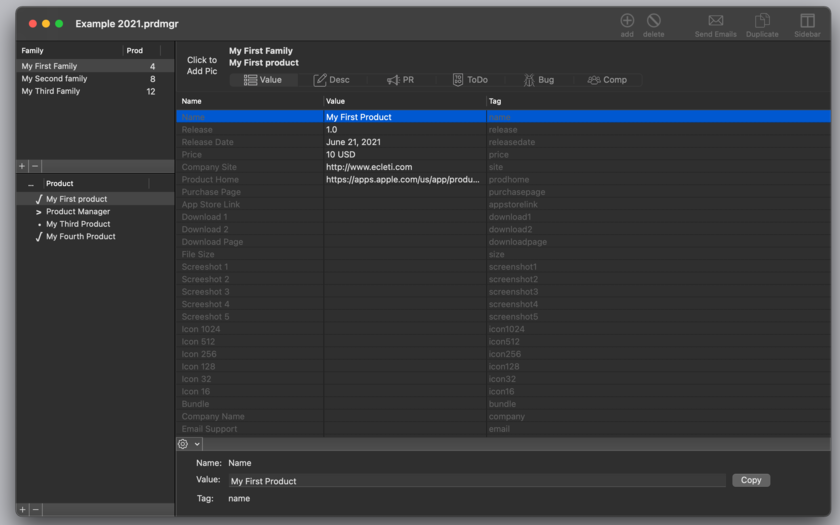
Tension Software announces Product Manager 2.3. Product Manager is a macOS application to manage company products from different standpoints. It's document based and can manage an unlimited number of documents each with an unlimited number of products, subdivided in families. Product Manager can be used also for a different typology of products (not only software) to manage the activities associated to the improvements, distributions and marketing of the product.
Milano, Italy - Tension Software is proud to announce the release of Product Manager 2.3 for macOS to manage company products on Mac from different standpoints. Product Manager is a macOS application to manage company products from different standpoints. It's document based and can manage an unlimited number of documents each with an unlimited number of products, subdivided in families.
Product Manager can be used also for a different typology of products (not only software) to manage the activities associated to the improvements, distributions and marketing of the product. The application is customizable with the labels the user needs to better describe the specific managed products. Product Manager can be the general repository for all the data used for the technical management of your products from a various point of views.
Product Manager allows to:
* Organize products in a logical subdivision in families of products and products owned by a family
* Define a custom layout of data values (fields) used by any documents with custom name and data tags (names, values, url and so on)
* Specify for any product custom values associated to the data tags layout
* Create Press Release (for any product release) using templates where the data values associated with any specific product are created automatically merging press release including data tags with assigned custom value for any product
* Manage descriptions for the products, with various kind and keeping track of them for any different release
* Keeping track of the ToDo associated for the product and keeping track of work. Create reports for items done and not done yet.
* Keeping track of the Bugs. Create reports for items done and not done yet.
* Keeping track of the competitor products
For every product the user can store Main data with generic data fields that can be automatically recalled to generate updated press release, releases notes, press releases, bug list, ToDo list and competitive product list.
The application provides also storage for further data: Media Points for press release and Text snippets for internal use. Product manager can provide press release automatic sending controlling mail.app on the user's Macintosh, all this with just a single click.
Features:
* Easy to use interface
* No learning period required
* Products stored in a hierarchical view by families
* Totally customizable layout of values associated to products to be used in Press Release creation and for reference
* Customizable labels adaptable to different products type
* Descriptions of the product for the release of the product over time
* Press release of the product, for the different release, and create dynamically merging text templates with custom data (using text data tags to insert data values)
* ToDo list of activities relate dot the product
* Bug or problems product related to solve
* List of competitors for the product
* Can manage an unlimited families and products
* Automatic email preparing and sending to an address list controlling mail.app from inside Product Manager via Scripting Bridge
* Text template ready to be inserted inside text view
New in this release:
* Better layout (improved efficiency for small screen)
* Improved interface for ToDo and Bug panels
* Bug fixes
* Various optimizations
System Requirements:
* macOS Version 10.10 Yosemite or higher
* Optimized for macOS 10.13 High Sierra
* 5.2 MB
Pricing and Availability:
Product Manager 2.3 is $19.99 USD (or an equivalent amount in other currencies) ans is available worldwide through the Mac App Store in the Developer Tools category. It is also available through the Tension Software website.
Tension Software: http://www.tensionsoftware.com
Product Manager 2.3: http://www.tensionsoftware.com/osx/productmanager/
Direct Download Link: http://sec.tensionsoftware.com/osx/productmanager/productmanager.dmg
Purchase and Download from Mac App Store: https://itunes.apple.com/app/product-manager-2/id849802862
Screenshot: http://www.tensionsoftware.com/static/tensionsoftware/images/app/productmanager/screenshots/mac/1.png
Application Icon: http://www.tensionsoftware.com/static/tensionsoftware/images/app/productmanager/icons/512.png
Tension Software develops software for macOS and iOS using the latest Apple technologies. Other brands and products referenced herein are the trademarks or registered trademarks of their respective holders. All Material and Software (C) Copyright 2018 Tension Software. All Rights Reserved. Apple, the Apple logo, Macintosh Mac OS X and macOS are registered trademarks of Apple Inc. in the U.S. and/or other countries. Other trademarks and registered trademarks may be the property of their respective owners.
*******
Link To Article: https://prmac.com/release-id-82823.htm
*******
---------------------------------------------------------------------------------
Note that you can alter delivered distributions at any time.
Login to your account on prMac to alter your channel selection, or to opt-out at any time.
Product Manager to Manage Company Products on Mac - Published on 06/28/18
Tension Software announces Product Manager 2.3. Product Manager is a macOS application to manage company products from different standpoints. It's document based and can manage an unlimited number of documents each with an unlimited number of products, subdivided in families. Product Manager can be used also for a different typology of products (not only software) to manage the activities associated to the improvements, distributions and marketing of the product.
Milano, Italy - Tension Software is proud to announce the release of Product Manager 2.3 for macOS to manage company products on Mac from different standpoints. Product Manager is a macOS application to manage company products from different standpoints. It's document based and can manage an unlimited number of documents each with an unlimited number of products, subdivided in families.
Product Manager can be used also for a different typology of products (not only software) to manage the activities associated to the improvements, distributions and marketing of the product. The application is customizable with the labels the user needs to better describe the specific managed products. Product Manager can be the general repository for all the data used for the technical management of your products from a various point of views.
Product Manager allows to:
* Organize products in a logical subdivision in families of products and products owned by a family
* Define a custom layout of data values (fields) used by any documents with custom name and data tags (names, values, url and so on)
* Specify for any product custom values associated to the data tags layout
* Create Press Release (for any product release) using templates where the data values associated with any specific product are created automatically merging press release including data tags with assigned custom value for any product
* Manage descriptions for the products, with various kind and keeping track of them for any different release
* Keeping track of the ToDo associated for the product and keeping track of work. Create reports for items done and not done yet.
* Keeping track of the Bugs. Create reports for items done and not done yet.
* Keeping track of the competitor products
For every product the user can store Main data with generic data fields that can be automatically recalled to generate updated press release, releases notes, press releases, bug list, ToDo list and competitive product list.
The application provides also storage for further data: Media Points for press release and Text snippets for internal use. Product manager can provide press release automatic sending controlling mail.app on the user's Macintosh, all this with just a single click.
Features:
* Easy to use interface
* No learning period required
* Products stored in a hierarchical view by families
* Totally customizable layout of values associated to products to be used in Press Release creation and for reference
* Customizable labels adaptable to different products type
* Descriptions of the product for the release of the product over time
* Press release of the product, for the different release, and create dynamically merging text templates with custom data (using text data tags to insert data values)
* ToDo list of activities relate dot the product
* Bug or problems product related to solve
* List of competitors for the product
* Can manage an unlimited families and products
* Automatic email preparing and sending to an address list controlling mail.app from inside Product Manager via Scripting Bridge
* Text template ready to be inserted inside text view
New in this release:
* Better layout (improved efficiency for small screen)
* Improved interface for ToDo and Bug panels
* Bug fixes
* Various optimizations
System Requirements:
* macOS Version 10.10 Yosemite or higher
* Optimized for macOS 10.13 High Sierra
* 5.2 MB
Pricing and Availability:
Product Manager 2.3 is $19.99 USD (or an equivalent amount in other currencies) ans is available worldwide through the Mac App Store in the Developer Tools category. It is also available through the Tension Software website.
Tension Software: http://www.tensionsoftware.com
Product Manager 2.3: http://www.tensionsoftware.com/osx/productmanager/
Direct Download Link: http://sec.tensionsoftware.com/osx/productmanager/productmanager.dmg
Purchase and Download from Mac App Store: https://itunes.apple.com/app/product-manager-2/id849802862
Screenshot: http://www.tensionsoftware.com/static/tensionsoftware/images/app/productmanager/screenshots/mac/1.png
Application Icon: http://www.tensionsoftware.com/static/tensionsoftware/images/app/productmanager/icons/512.png

Tension Software develops software for macOS and iOS using the latest Apple technologies. Other brands and products referenced herein are the trademarks or registered trademarks of their respective holders. All Material and Software (C) Copyright 2018 Tension Software. All Rights Reserved. Apple, the Apple logo, Macintosh Mac OS X and macOS are registered trademarks of Apple Inc. in the U.S. and/or other countries. Other trademarks and registered trademarks may be the property of their respective owners.
*******
Link To Article: https://prmac.com/release-id-82823.htm
*******
---------------------------------------------------------------------------------
Note that you can alter delivered distributions at any time.
Login to your account on prMac to alter your channel selection, or to opt-out at any time.
AirBeamTV launches Mirror to Mac for screen mirroring from iPhone to Mac
A new article has been published at prMac.
AirBeamTV launches Mirror to Mac for screen mirroring from iPhone to Mac - Published on 06/28/18
AirBeamTV today introduces Mirror to Mac, a new iPhone and iPad application for screen mirroring from iOS devices to Mac. It is the first app to allow for wireless screen mirroring, without the need to install an additional receiver application on the Mac. After enabling Screen Recording in Control Center, users can connect to the Chrome Browser on their Mac. Then slide up Control Center from within any app, firmly press and hold the screen recording button and start mirroring.
Naarden, Netherlands - Mirror to Mac, a new iPhone and iPad application for screen mirroring from iOS devices to Mac is available today. The Mirror to Mac app, sold on the iTunes App Store, is the first app to allow for wireless screen mirroring, without the need to install an additional receiver application on the Mac.
According to Jan van Ottele, co-founder and CEO of AirBeamTV, there are many interesting use cases for screen mirroring from iPhone or iPad to Apple Macs: "Mirror to Mac is perfect for anyone who needs to share mobile device content with a large group of people. Consumer can use it to share family photos and videos at a social gathering. Some people actually have Mac Minis connected to large screen TVs, for them, this app is perfect. Also businesses can use it to display presentations or specific iPhone and iPad apps during a meeting."
To start screen mirroring, customers need to download the Mirror for Mac app from the App Store. Before using the app, Screen Recording should be enabled in the iPhone or iPad Control Centre. The Company provides a video tutorial and a step-by-step guide on how to do this. After enabling Screen Recording in Control Centre, users can use the app to connect to the Chrome Browser on their Mac. After connecting to the Mac, a user can slide up Control Centre from within any app, firmly press and hold the screen recording button and start mirroring.
Pricing and Availability:
Mirror for Mac ($4.99 USD) runs on every iPhone or iPad that uses iOS 11 or newer. It works on any Mac, as long as the Google Chrome browser (which can be downloaded for free) is installed.
AirBeamTV: https://www.airbeam.tv
Mirror to Mac: https://www.airbeam.tv/iphoneipad/buy/mirror-ios-mac/
Purchase and Download: https://itunes.apple.com/app/mirror-to-mac/id1350438765
Screenshots: https://drive.google.com/open?id=1NgWN4VYEOBf9VyjOAsLVoRdK2YyR1ADM
Screenshot/App Icon: https://drive.google.com/open?id=17topiRMSgsJznwurZWCw8bgR4OzSt1Qs
AirBeamTV was founded in 2014 to develop applications for wireless screen mirroring to Smart TVs, network streamers and other devices. It is based in Naarden, The Netherlands. Prior to launching the Mirror to Mac app, the Company released a range of successful screen mirroring applications for Mac, iPhone and iPad. All Material and Software (C) Copyright 2014-2018 AirBeamTV. All Rights Reserved. Apple, the Apple logo, macOS, iPhone, iPad, iPod and Macintosh are registered trademarks of Apple Inc. in the U.S. and/or other countries. Other trademarks and registered trademarks may be the property of their respective owners.
*******
Link To Article: https://prmac.com/release-id-82822.htm
*******
---------------------------------------------------------------------------------
Note that you can alter delivered distributions at any time.
Login to your account on prMac to alter your channel selection, or to opt-out at any time.
AirBeamTV launches Mirror to Mac for screen mirroring from iPhone to Mac - Published on 06/28/18
AirBeamTV today introduces Mirror to Mac, a new iPhone and iPad application for screen mirroring from iOS devices to Mac. It is the first app to allow for wireless screen mirroring, without the need to install an additional receiver application on the Mac. After enabling Screen Recording in Control Center, users can connect to the Chrome Browser on their Mac. Then slide up Control Center from within any app, firmly press and hold the screen recording button and start mirroring.
Naarden, Netherlands - Mirror to Mac, a new iPhone and iPad application for screen mirroring from iOS devices to Mac is available today. The Mirror to Mac app, sold on the iTunes App Store, is the first app to allow for wireless screen mirroring, without the need to install an additional receiver application on the Mac.
According to Jan van Ottele, co-founder and CEO of AirBeamTV, there are many interesting use cases for screen mirroring from iPhone or iPad to Apple Macs: "Mirror to Mac is perfect for anyone who needs to share mobile device content with a large group of people. Consumer can use it to share family photos and videos at a social gathering. Some people actually have Mac Minis connected to large screen TVs, for them, this app is perfect. Also businesses can use it to display presentations or specific iPhone and iPad apps during a meeting."
To start screen mirroring, customers need to download the Mirror for Mac app from the App Store. Before using the app, Screen Recording should be enabled in the iPhone or iPad Control Centre. The Company provides a video tutorial and a step-by-step guide on how to do this. After enabling Screen Recording in Control Centre, users can use the app to connect to the Chrome Browser on their Mac. After connecting to the Mac, a user can slide up Control Centre from within any app, firmly press and hold the screen recording button and start mirroring.
Pricing and Availability:
Mirror for Mac ($4.99 USD) runs on every iPhone or iPad that uses iOS 11 or newer. It works on any Mac, as long as the Google Chrome browser (which can be downloaded for free) is installed.
AirBeamTV: https://www.airbeam.tv
Mirror to Mac: https://www.airbeam.tv/iphoneipad/buy/mirror-ios-mac/
Purchase and Download: https://itunes.apple.com/app/mirror-to-mac/id1350438765
Screenshots: https://drive.google.com/open?id=1NgWN4VYEOBf9VyjOAsLVoRdK2YyR1ADM
Screenshot/App Icon: https://drive.google.com/open?id=17topiRMSgsJznwurZWCw8bgR4OzSt1Qs
AirBeamTV was founded in 2014 to develop applications for wireless screen mirroring to Smart TVs, network streamers and other devices. It is based in Naarden, The Netherlands. Prior to launching the Mirror to Mac app, the Company released a range of successful screen mirroring applications for Mac, iPhone and iPad. All Material and Software (C) Copyright 2014-2018 AirBeamTV. All Rights Reserved. Apple, the Apple logo, macOS, iPhone, iPad, iPod and Macintosh are registered trademarks of Apple Inc. in the U.S. and/or other countries. Other trademarks and registered trademarks may be the property of their respective owners.
*******
Link To Article: https://prmac.com/release-id-82822.htm
*******
---------------------------------------------------------------------------------
Note that you can alter delivered distributions at any time.
Login to your account on prMac to alter your channel selection, or to opt-out at any time.
AudFree Unveiled Spotify Downlaoder to Download Spotify Songs as MP3
A new article has been published at prMac.
AudFree Unveiled Spotify Downlaoder to Download Spotify Songs as MP3 - Published on 06/27/18
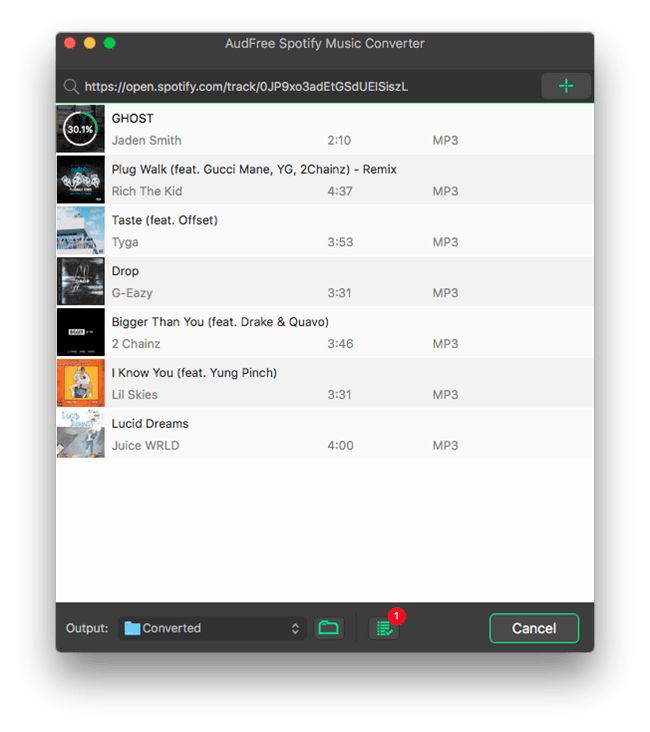
AudFree Software today officially unveiled Spotify Music Converter for Mac, its DRM removal product for Spotify. With Spotify Music Converter, users can easily download any Spotify song/playlist to MP3 for offline listening on any device and player. This intelligent Spotify music downloader can not only download Spotify music offline, but can also convert the protected Spotify songs from OGG Vorbis to MP3, AAC, FLAC, WAV and other common audio formats.
Shenzhen, China - AudFree, an innovative multimedia studio, officially launched its online store with one of the most popular music solutions for Spotify, namely AudFree Spotify Music Converter, which was specially designed to free Spotify music addicts from any audio annoyance by helping them unlocking DRM protection from Spotify songs as well as extracting the tracks to unprotected MP3 so that they can freely enjoy any Spotify song and playlist on all widely used devices even in offline mode.
AudFree Spotify Music Converter - Download Spotify Songs/Playlists as MP3 without Premium
As Spotify songs are locked by DRM, it's impossible for free users to download the music streams offline. Even paid users who can save Spotify songs offline are only allowed to listen to the downloads on selected devices due to DRM. That's why AudFree Spotify Music Converter comes out, aiming to solving this annoyance for both free and premium subscribers once and for all.
Now with AudFree Spotify Music Converter, even free users of Spotify are able to freely download and extract any track, album and playlist from Spotify for offline playing in just one click. This intelligent Spotify music downloader can not only download Spotify music offline, but can also convert the protected Spotify songs from OGG Vorbis to MP3, AAC, FLAC, WAV and other common audio formats. In addition, it's able to retain the lossless music quality and ID3 tags, including track number, title, artist, album, composer, cover, etc. while converting. To achieve better output quality, it also lets you customize the audio parameters, like audio codec, channel, bit rate, sample rate, etc. according to your own needs. Once downloaded, you are able to play the offline Spotify songs on any MP3 player, such as Apple iPod, iPad, Zune, Sony Walkman, iRiver, Creative Zen and more.
"This music downloader for Spotify is standing out of competitors mainly because of the better performance it presents. Only in one click, you can drag any track from Spotify and convert it to any other format without losing any quality, while most other similar tools take a complicated process to complete the downloading." said James, the R&D director of AudFree Software.
Pricing and Availability:
Now this simple-to-use Spotify Music Converter is available for both Mac and Windows OS with free trial versions provided. The full version is sold at $19.95 for single license and $39.95 (USD) for family license. Users can navigate to the official online store of AudFree to find more details about this product.
AudFree: https://www.audfree.com
AudFree Spotify Music Converter for Mac: https://www.audfree.com/spotify-music-converter-mac/
Download: https://www.audfree.com/download/SpotifyMusicConverter.dmg
Screenshot: https://www.audfree.com/images/spotify-music-converter/download-spotify-mac.png
As an innovation-driven multimedia studio, AudFree is focused on developing and providing industry-leading DRM removal solutions for streaming music addicts, such as users of Apple Music, Spotify songs, Audible audioboks, iTunes music and more. With a passionate team full of dedicated individuals, AudFree is aiming to make your digital life much easier and bring more fun to you when enjoying music. All Material and Software (C) Copyright 2018 AudFree. All Rights Reserved. Apple, the Apple logo, macOS, iTunes, iPhone, iPod and iPad are registered trademarks of Apple Inc. in the U.S. and/or other countries. Other trademarks and registered trademarks may be the property of their respective owners.
*******
Link To Article: https://prmac.com/release-id-82821.htm
*******
---------------------------------------------------------------------------------
Note that you can alter delivered distributions at any time.
Login to your account on prMac to alter your channel selection, or to opt-out at any time.
AudFree Unveiled Spotify Downlaoder to Download Spotify Songs as MP3 - Published on 06/27/18
AudFree Software today officially unveiled Spotify Music Converter for Mac, its DRM removal product for Spotify. With Spotify Music Converter, users can easily download any Spotify song/playlist to MP3 for offline listening on any device and player. This intelligent Spotify music downloader can not only download Spotify music offline, but can also convert the protected Spotify songs from OGG Vorbis to MP3, AAC, FLAC, WAV and other common audio formats.
Shenzhen, China - AudFree, an innovative multimedia studio, officially launched its online store with one of the most popular music solutions for Spotify, namely AudFree Spotify Music Converter, which was specially designed to free Spotify music addicts from any audio annoyance by helping them unlocking DRM protection from Spotify songs as well as extracting the tracks to unprotected MP3 so that they can freely enjoy any Spotify song and playlist on all widely used devices even in offline mode.
AudFree Spotify Music Converter - Download Spotify Songs/Playlists as MP3 without Premium
As Spotify songs are locked by DRM, it's impossible for free users to download the music streams offline. Even paid users who can save Spotify songs offline are only allowed to listen to the downloads on selected devices due to DRM. That's why AudFree Spotify Music Converter comes out, aiming to solving this annoyance for both free and premium subscribers once and for all.
Now with AudFree Spotify Music Converter, even free users of Spotify are able to freely download and extract any track, album and playlist from Spotify for offline playing in just one click. This intelligent Spotify music downloader can not only download Spotify music offline, but can also convert the protected Spotify songs from OGG Vorbis to MP3, AAC, FLAC, WAV and other common audio formats. In addition, it's able to retain the lossless music quality and ID3 tags, including track number, title, artist, album, composer, cover, etc. while converting. To achieve better output quality, it also lets you customize the audio parameters, like audio codec, channel, bit rate, sample rate, etc. according to your own needs. Once downloaded, you are able to play the offline Spotify songs on any MP3 player, such as Apple iPod, iPad, Zune, Sony Walkman, iRiver, Creative Zen and more.
"This music downloader for Spotify is standing out of competitors mainly because of the better performance it presents. Only in one click, you can drag any track from Spotify and convert it to any other format without losing any quality, while most other similar tools take a complicated process to complete the downloading." said James, the R&D director of AudFree Software.
Pricing and Availability:
Now this simple-to-use Spotify Music Converter is available for both Mac and Windows OS with free trial versions provided. The full version is sold at $19.95 for single license and $39.95 (USD) for family license. Users can navigate to the official online store of AudFree to find more details about this product.
AudFree: https://www.audfree.com
AudFree Spotify Music Converter for Mac: https://www.audfree.com/spotify-music-converter-mac/
Download: https://www.audfree.com/download/SpotifyMusicConverter.dmg
Screenshot: https://www.audfree.com/images/spotify-music-converter/download-spotify-mac.png
As an innovation-driven multimedia studio, AudFree is focused on developing and providing industry-leading DRM removal solutions for streaming music addicts, such as users of Apple Music, Spotify songs, Audible audioboks, iTunes music and more. With a passionate team full of dedicated individuals, AudFree is aiming to make your digital life much easier and bring more fun to you when enjoying music. All Material and Software (C) Copyright 2018 AudFree. All Rights Reserved. Apple, the Apple logo, macOS, iTunes, iPhone, iPod and iPad are registered trademarks of Apple Inc. in the U.S. and/or other countries. Other trademarks and registered trademarks may be the property of their respective owners.
*******
Link To Article: https://prmac.com/release-id-82821.htm
*******
---------------------------------------------------------------------------------
Note that you can alter delivered distributions at any time.
Login to your account on prMac to alter your channel selection, or to opt-out at any time.
Tension Software Announces My IP 2.3 for macOS
A new article has been published at prMac.
Tension Software Announces My IP 2.3 for macOS - Published on 06/27/18
Tension Software announces My IP 2.3 for macOS, a utility app to see with which public IP address users are connected with to the net (different from your IP address inside your LAN). It can work also in background and can optionally show the current IP in the menu bar. My IP offers users a simple and intuitive interface and the option to work with 4 different servers to show a user's public IP address.
Milano, Italy - Tension Software is pleased to announce the release of My IP 2.3 for macOS, a utility app to see with which public IP address you are connected to the net (different from your IP address inside your LAN). It can work also in background and can optionally show the current IP in the menu bar.
The public IP is the IP address you use to connect to the global net, the address the rest of the world see you at. The public IP address sometime can be static (always the same), sometime dynamic (changed by the internet provider over time at any connection).
Obtaining the IP value of your connection could be not easy, particularly if you are behind a modem router. In the case you are using a modem router, using normal system utilities, your IP address will be indicated as equal to your LAN (Local Area Network) IP address, with is really just your address inside your local network, totally different form your true external public IP address on internet.
Your internal IP address has no value outside your local area network.
My IP works instead indicating always your true internet IP address, the one the world can see you at, detecting the IP address your modem router uses to connect with the rest of the world, with is the address the rest of the world identify you and can use to connect to you.
Knowing your true public IP address is mandatory in many situation where you have to specify, specially for external use, at which address you are and can be reached by servers or desktops outside of your LAN.
My IP offers a simple and intuitive interface, a fast use and the option to work with 4 different servers to show your public IP address. It can optionally display the IP in the menu bar also when in background and log the IP changes on disk. Log can be rewetted at any time.
Features:
* Fast and easy to use
* Useful to know your public IP address behind a modem router with a shared IP
* Able to show your public IP where usually system utility fails showing just your LAN IP
* Instant result available at launch
* Can use 4 different servers to calculate your public IP
* Can log the IP and its changes on a log on disk
* Can optionally display in the menu bar the current Ip also when in background
* Copy the IP from within other applications from the menu bar.
* Includes embedded PDF User Guide
* Has a similar native version for the iPhone , 'My Public IP' available on iTunes
New in this release:
* Layout and Interface Update
* Possibility to use a shorter check IP interval (from 5 seconds to 59:59)
* Bug fixes
* Various Optimization
System Requirements:
* macOS
* 1.6 MB
Pricing and Availability:
My IP 2.3 is just $2.99 USD (or an equivalent amount in other currencies) and is available worldwide through the Mac App Store in the Utilities category.
Tension Software: http://www.tensionsoftware.com
My IP 2.3: http://www.tensionsoftware.com/osx/myip/
Purchase and Download from Mac App Store: https://itunes.apple.com/app/my-ip-2/id779564001
Tension Software develops software for macOS and iOS using the latest Apple technologies. Other brands and products referenced herein are the trademarks or registered trademarks of their respective holders. All Material and Software (C) Copyright 2018 Tension Software. All Rights Reserved. Apple, the Apple logo, Macintosh Mac OS X and macOS are registered trademarks of Apple Inc. in the U.S. and/or other countries. Other trademarks and registered trademarks may be the property of their respective owners.
*******
Link To Article: https://prmac.com/release-id-82819.htm
*******
---------------------------------------------------------------------------------
Note that you can alter delivered distributions at any time.
Login to your account on prMac to alter your channel selection, or to opt-out at any time.
Tension Software Announces My IP 2.3 for macOS - Published on 06/27/18
Tension Software announces My IP 2.3 for macOS, a utility app to see with which public IP address users are connected with to the net (different from your IP address inside your LAN). It can work also in background and can optionally show the current IP in the menu bar. My IP offers users a simple and intuitive interface and the option to work with 4 different servers to show a user's public IP address.
Milano, Italy - Tension Software is pleased to announce the release of My IP 2.3 for macOS, a utility app to see with which public IP address you are connected to the net (different from your IP address inside your LAN). It can work also in background and can optionally show the current IP in the menu bar.
The public IP is the IP address you use to connect to the global net, the address the rest of the world see you at. The public IP address sometime can be static (always the same), sometime dynamic (changed by the internet provider over time at any connection).
Obtaining the IP value of your connection could be not easy, particularly if you are behind a modem router. In the case you are using a modem router, using normal system utilities, your IP address will be indicated as equal to your LAN (Local Area Network) IP address, with is really just your address inside your local network, totally different form your true external public IP address on internet.
Your internal IP address has no value outside your local area network.
My IP works instead indicating always your true internet IP address, the one the world can see you at, detecting the IP address your modem router uses to connect with the rest of the world, with is the address the rest of the world identify you and can use to connect to you.
Knowing your true public IP address is mandatory in many situation where you have to specify, specially for external use, at which address you are and can be reached by servers or desktops outside of your LAN.
My IP offers a simple and intuitive interface, a fast use and the option to work with 4 different servers to show your public IP address. It can optionally display the IP in the menu bar also when in background and log the IP changes on disk. Log can be rewetted at any time.
Features:
* Fast and easy to use
* Useful to know your public IP address behind a modem router with a shared IP
* Able to show your public IP where usually system utility fails showing just your LAN IP
* Instant result available at launch
* Can use 4 different servers to calculate your public IP
* Can log the IP and its changes on a log on disk
* Can optionally display in the menu bar the current Ip also when in background
* Copy the IP from within other applications from the menu bar.
* Includes embedded PDF User Guide
* Has a similar native version for the iPhone , 'My Public IP' available on iTunes
New in this release:
* Layout and Interface Update
* Possibility to use a shorter check IP interval (from 5 seconds to 59:59)
* Bug fixes
* Various Optimization
System Requirements:
* macOS
* 1.6 MB
Pricing and Availability:
My IP 2.3 is just $2.99 USD (or an equivalent amount in other currencies) and is available worldwide through the Mac App Store in the Utilities category.
Tension Software: http://www.tensionsoftware.com
My IP 2.3: http://www.tensionsoftware.com/osx/myip/
Purchase and Download from Mac App Store: https://itunes.apple.com/app/my-ip-2/id779564001
Tension Software develops software for macOS and iOS using the latest Apple technologies. Other brands and products referenced herein are the trademarks or registered trademarks of their respective holders. All Material and Software (C) Copyright 2018 Tension Software. All Rights Reserved. Apple, the Apple logo, Macintosh Mac OS X and macOS are registered trademarks of Apple Inc. in the U.S. and/or other countries. Other trademarks and registered trademarks may be the property of their respective owners.
*******
Link To Article: https://prmac.com/release-id-82819.htm
*******
---------------------------------------------------------------------------------
Note that you can alter delivered distributions at any time.
Login to your account on prMac to alter your channel selection, or to opt-out at any time.
Menu Calendar 1.3 to Make Date Calculation Directly in the Menu Bar
A new article has been published at prMac.
Menu Calendar 1.3 to Make Date Calculation Directly in the Menu Bar - Published on 06/26/18
Tension Software announces Menu Calendar 1.3 for macOS. Menu Calendar makes available under the menu bar, in any application you are running, a small calendar usable also for date calculation. Clicking it's icon under the menu bar not only shows a small standard calendar that you can use to navigate inside any month, it also makes available a small area under the calendar for date calculation.
Milano, Italy - Tension Software is pleased to announce the release of Menu Calendar 1.3 for macOS. Menu Calendar 1.3 the utility to make date calculation directly in the menu bar. Menu Calendar makes available under the menu bar, in any application you are running , a small calendar usable also for date calculation.
Clicking it's icon under the menu bar not only shows a small standard calendar that you can use to navigate inside any month, it also makes available a small area under the calendar for date calculation.
You can add (or subtract) days, months, years and Menu Calendar will instantly show the resulting day.
You can also optionally select from the menu to have Menu Calendar launched any time you login inside your Mac.
If you often need to make date calculations inside other applications or simply need a menu calendar that can popup from the menubar at any time and instantly, Menu Calendar is for you.
Simplicity and effectiveness are the primary features of Menu Calendar.
* You can have it always on your menu bar. Simply and effective
* It's fast, it pops up in a fractions of seconds
* Runs and is available with any application you run
* You can make date calculation in a single click (no typing required)
* Doesn't take precious screen space
* Sandboxed and Gatekeeper signed respecting all the Apple rules for first class macOS apps
* Optimized for macOS 10.13 High Sierra
New in this release:
* New improved layout
* New buttons to add days in a click
* Bug fixes
* Various optimizations
System Requirements:
* Requires macOS 10.10 or Higher
* Optimized for macOS 10.13 High Sierra
Pricing and Availability:
Menu Calendar is just $1.99 USD (or an equivalent amount in other currencies) and is available worldwide through the Mac App Store in the Utilities category.
Tension Software: http://www.tensionsoftware.com
Menu Calendar 1.3: http://www.tensionsoftware.com/osx/menucalendar/
Purchase and Download from Mac App Store: https://itunes.apple.com/app/menu-calendar/id1118922137
Tension Software develops software for macOS and iOS using the latest Apple technologies. Other brands and products referenced herein are the trademarks or registered trademarks of their respective holders. All Material and Software (C) Copyright 2018 Tension Software. All Rights Reserved. Apple, the Apple logo, Macintosh Mac OS X and macOS are registered trademarks of Apple Inc. in the U.S. and/or other countries. Other trademarks and registered trademarks may be the property of their respective owners.
*******
Link To Article: https://prmac.com/release-id-82818.htm
*******
---------------------------------------------------------------------------------
Note that you can alter delivered distributions at any time.
Login to your account on prMac to alter your channel selection, or to opt-out at any time.
Menu Calendar 1.3 to Make Date Calculation Directly in the Menu Bar - Published on 06/26/18
Tension Software announces Menu Calendar 1.3 for macOS. Menu Calendar makes available under the menu bar, in any application you are running, a small calendar usable also for date calculation. Clicking it's icon under the menu bar not only shows a small standard calendar that you can use to navigate inside any month, it also makes available a small area under the calendar for date calculation.
Milano, Italy - Tension Software is pleased to announce the release of Menu Calendar 1.3 for macOS. Menu Calendar 1.3 the utility to make date calculation directly in the menu bar. Menu Calendar makes available under the menu bar, in any application you are running , a small calendar usable also for date calculation.
Clicking it's icon under the menu bar not only shows a small standard calendar that you can use to navigate inside any month, it also makes available a small area under the calendar for date calculation.
You can add (or subtract) days, months, years and Menu Calendar will instantly show the resulting day.
You can also optionally select from the menu to have Menu Calendar launched any time you login inside your Mac.
If you often need to make date calculations inside other applications or simply need a menu calendar that can popup from the menubar at any time and instantly, Menu Calendar is for you.
Simplicity and effectiveness are the primary features of Menu Calendar.
* You can have it always on your menu bar. Simply and effective
* It's fast, it pops up in a fractions of seconds
* Runs and is available with any application you run
* You can make date calculation in a single click (no typing required)
* Doesn't take precious screen space
* Sandboxed and Gatekeeper signed respecting all the Apple rules for first class macOS apps
* Optimized for macOS 10.13 High Sierra
New in this release:
* New improved layout
* New buttons to add days in a click
* Bug fixes
* Various optimizations
System Requirements:
* Requires macOS 10.10 or Higher
* Optimized for macOS 10.13 High Sierra
Pricing and Availability:
Menu Calendar is just $1.99 USD (or an equivalent amount in other currencies) and is available worldwide through the Mac App Store in the Utilities category.
Tension Software: http://www.tensionsoftware.com
Menu Calendar 1.3: http://www.tensionsoftware.com/osx/menucalendar/
Purchase and Download from Mac App Store: https://itunes.apple.com/app/menu-calendar/id1118922137
Tension Software develops software for macOS and iOS using the latest Apple technologies. Other brands and products referenced herein are the trademarks or registered trademarks of their respective holders. All Material and Software (C) Copyright 2018 Tension Software. All Rights Reserved. Apple, the Apple logo, Macintosh Mac OS X and macOS are registered trademarks of Apple Inc. in the U.S. and/or other countries. Other trademarks and registered trademarks may be the property of their respective owners.
*******
Link To Article: https://prmac.com/release-id-82818.htm
*******
---------------------------------------------------------------------------------
Note that you can alter delivered distributions at any time.
Login to your account on prMac to alter your channel selection, or to opt-out at any time.
Subscribe to:
Posts (Atom)