A new article has been published at prMac.
CS Odessa Has Updated Floor Plans Solution for ConceptDraw PRO - Published on 06/30/18
CS Odessa has updated its popular Floor Plans solution that extends ConceptDraw PRO diagramming and vector drawing software with easy-to-use building elements. The new version of Floor Plans in ConceptDraw Solutions offers improved vector libraries and samples for designing and laying out floor plans. The solution contains samples and libraries for designing house plans, apartment, and office layout plans.
Odessa, Ukraine - CS Odessa has updated its popular Floor Plans solution that extends ConceptDraw PRO diagramming and vector drawing software with easy-to-use building elements. The materials added to the ConceptDraw Solutions make short work of drawing floor plans and layouts.
The Floor Plans add-on for ConceptDraw PRO includes collections of samples and libraries of vector stencils and icons that support the drawing of floor plans and premises layouts. The solution contains samples and libraries for designing house plans, apartment, and office layout plans.
Floor Plans solution was updated by adding 10 new sample documents, redesigning previous samples and improving the associated vector object libraries.
Floor Plans is a $25 USD paid solution for ConceptDraw PRO and is available in ConceptDraw STORE.
ConceptDraw PRO is a powerful business graphics and diagramming tool that is recognized for its ability to exchange documents with Microsoft Visio - the de facto standard in business graphics documents. It is supported by the powerful ever-growing collection of Business Solutions. ConceptDraw PRO is compatible with macOS and Windows and retails for only $199 USD per end user license. It is included in ConceptDraw Office v4 which retails for $499 USD.
ConceptDraw Office v4 is the fourth generation suite of ConceptDraw products that uses InGyre4 integration technology to share data between its applications, allowing you to switch gears for different tasks more quickly. It can be purchased directly from CS Odessa or their resellers. The ConceptDraw Office suite is designed for knowledge workers, project managers, managers, and academics.
Operating Systems Supported:
* macOS 10.12 and 10.13
* Windows 7, 8.1, and 10 (64-bit certified)
ConceptDraw Productivity Line:
* Floor Plans - design floor plans easily.
Floor Plans - Design Floor Plans Easily: http://www.conceptdraw.com/solution-park/floor-plans
ConceptDraw PRO v11 - Business Graphics and Diagramming Product (Compatible With MS Visio): http://www.conceptdraw.com/products/drawing-tool
ConceptDraw MINDMAP v9 - Brainstorming, Planning, and Mind Mapping Software: http://www.conceptdraw.com/products/mind-map
ConceptDraw PROJECT v8 - Project and Resource Management Tool (Compatible With MS Project): http://www.conceptdraw.com/products/project-management-software
ConceptDraw Office v4 - Business Suite That Contains the Entire Conceptdraw Desktop Product Line: http://www.conceptdraw.com/products/office
Solution Park - An Online Collection of Visual Solutions: http://www.conceptdraw.com/solution-park
Founded in 1993, Computer Systems Odessa supplies cross-platform productivity tools and graphic technologies to professional and corporate users around the world. With headquarters in Odessa, Ukraine, and a U.S. office in San Jose, California, CS Odessa sells products internationally through resellers in over 150 countries, both directly and through resellers. The ConceptDraw line of products has won numerous awards and is used by hundreds of thousands, including Fortune 500 companies, U.S. Federal Government agencies, small and medium businesses, and students and educators around the globe. ConceptDraw is a registered trademark, and ConceptDraw Office, ConceptDraw Solution Park, ConceptDraw PRO, ConceptDraw MINDMAP, ConceptDraw PROJECT, and ConceptDraw STORE are trademarks of CS Odessa. All other trademarks and registered trademarks are the properties of their respective owners.
*******
Link To Article: https://prmac.com/release-id-82833.htm
*******
---------------------------------------------------------------------------------
Note that you can alter delivered distributions at any time.
Login to your account on prMac to alter your channel selection, or to opt-out at any time.

Copy Fast Lets Users Copy Large Files From a Menu Bar Utility
A new article has been published at prMac.
Copy Fast Lets Users Copy Large Files From a Menu Bar Utility - Published on 06/30/18
Tension Software announces Copy Fast 1.2 for macOS. Copy Fast is a simple and powerful application which let users copy instantly content of files ready to be used. It resides always in the right part of the menu bar as a status menu icon, ready to be used also when other applications are active. After launch it stays always in background. Its only presence will be in the status menu.
Milano, Italy - Tension Software is proud to announce the release and availability of Copy Fast 1.2 for macOs. Copy Fast 1.2 allows users to have in the menu bar an handy utility to copy in a click text from a list of files Copy Fast is a simple and powerful application which let you copy instantly content of files ready to be used.
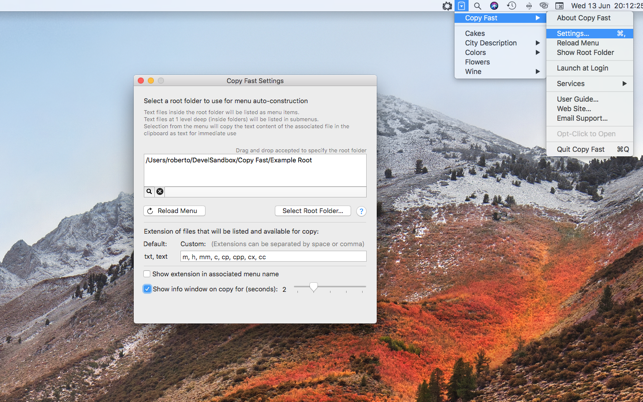
It resides always in the right part of the menu bar as a status menu icon, ready to be used also when other applications are active. After launch it stays always in background. It's only presence will be in the status menu. At startup you need to select, from the Copy Fast settings, a folder on your hard disk as 'root folder' for Copy Fast.
After that, Copy Fast will create in it's menu, a list of items matching the files found inside the 'root folder' you specified, up to 1 level deep (files inside folders will be listed as submenus) Selecting anytime an item in the copy Fast menu, will put the entire text content of the associated files, in the clipboard, ready to be pasted in any application (also for large files)
So as example, if you selected 'Rosa.txt' from the menu, the content of the file 'Rosa.txt' inside your root folder, will be copied, ready to be pasted for your use, inside the clipboard. In this simple way Copy Fast bring an extended list of contents available to be copied pasted inside any application you may use now and in future.
Copy Paste is fast and powerful. It will rebuild it's menu in a snap if you change the root folder or it's content. Copy Fast doesn't cache the content of any file, so it will always paste the latest version of your file's content. Defining the 'root folder' is quick too because it can be selected via a standard open dialog or also simply dragging and dropping any folder on the Copy Fast settings dialog.
Copy the content of files you often need to access with Copy fast is a joy if compared to the usual procedure to locate the file, open it, select all, copy, close the file, go back to the previous application and paste. As an added function, if you select the menu item pressing down the option key, Copy fast will open the associated file with your default editor, as if you double clicked it in the finder.
You can also specify, in addition to the standard 'text' and 'txt' extensions for files, which file (by extension) to automatically include inside the Copy Fast menu (when parsing the files inside the root folder you specify) You can also specify to do not show extensions in the created menu items.
Copy Fast is the ideal tool for anyone in need of copying and pasting from a set of contents in various place: editors, developers, bloggers, journalist, scientists and so on.
Copy fast is the ideal tool also when you have different application and the only way to import data is via a 2 steps copy and paste. In that case Copy fast is your weapon to increase you productivity of more then one order of magnitude.
What's new:
* New info window giving a fast and immediate visual feedback of what was copied
* Setting to adjust info window
* Improved Menu layout
* Bug fixes
* Optimizations
System Requirements:
* Requires macOS 10.10 or Higher
* Optimized for macOS 10.13 High Sierra
* 4.5 MB
Pricing and Availability:
Copy Fast 1.2 is just $2.99 USD (or an equivalent amount in other currencies) and is available worldwide through the Mac App Store in the Productivity category.
Tension Software: http://www.tensionsoftware.com
Copy Fast 1.2: http://www.tensionsoftware.com/osx/copyfast/
Purchase and Download from Mac App Store: https://itunes.apple.com/app/copy-fast/id1111286895
Screenshot: https://is5-ssl.mzstatic.com/image/thumb/Purple125/v4/b9/33/db/b933db2d-ff3d-c901-d3d8-b2acc5df3ded/pr_source.png/643x0w.png
Application Icon: https://is5-ssl.mzstatic.com/image/thumb/Purple125/v4/57/46/b4/5746b47c-23ac-fa98-15bb-f8d4d81c3798/app.png/246x0w.png
Tension Software develops software for macOS and iOS using the latest Apple technologies. Other brands and products referenced herein are the trademarks or registered trademarks of their respective holders. All Material and Software (C) Copyright 2018 Tension Software. All Rights Reserved. Apple, the Apple logo, Macintosh Mac OS X and macOS are registered trademarks of Apple Inc. in the U.S. and/or other countries. Other trademarks and registered trademarks may be the property of their respective owners.
*******
Link To Article: https://prmac.com/release-id-82832.htm
*******
---------------------------------------------------------------------------------
Note that you can alter delivered distributions at any time.
Login to your account on prMac to alter your channel selection, or to opt-out at any time.
Copy Fast Lets Users Copy Large Files From a Menu Bar Utility - Published on 06/30/18
Tension Software announces Copy Fast 1.2 for macOS. Copy Fast is a simple and powerful application which let users copy instantly content of files ready to be used. It resides always in the right part of the menu bar as a status menu icon, ready to be used also when other applications are active. After launch it stays always in background. Its only presence will be in the status menu.
Milano, Italy - Tension Software is proud to announce the release and availability of Copy Fast 1.2 for macOs. Copy Fast 1.2 allows users to have in the menu bar an handy utility to copy in a click text from a list of files Copy Fast is a simple and powerful application which let you copy instantly content of files ready to be used.
It resides always in the right part of the menu bar as a status menu icon, ready to be used also when other applications are active. After launch it stays always in background. It's only presence will be in the status menu. At startup you need to select, from the Copy Fast settings, a folder on your hard disk as 'root folder' for Copy Fast.
After that, Copy Fast will create in it's menu, a list of items matching the files found inside the 'root folder' you specified, up to 1 level deep (files inside folders will be listed as submenus) Selecting anytime an item in the copy Fast menu, will put the entire text content of the associated files, in the clipboard, ready to be pasted in any application (also for large files)
So as example, if you selected 'Rosa.txt' from the menu, the content of the file 'Rosa.txt' inside your root folder, will be copied, ready to be pasted for your use, inside the clipboard. In this simple way Copy Fast bring an extended list of contents available to be copied pasted inside any application you may use now and in future.
Copy Paste is fast and powerful. It will rebuild it's menu in a snap if you change the root folder or it's content. Copy Fast doesn't cache the content of any file, so it will always paste the latest version of your file's content. Defining the 'root folder' is quick too because it can be selected via a standard open dialog or also simply dragging and dropping any folder on the Copy Fast settings dialog.
Copy the content of files you often need to access with Copy fast is a joy if compared to the usual procedure to locate the file, open it, select all, copy, close the file, go back to the previous application and paste. As an added function, if you select the menu item pressing down the option key, Copy fast will open the associated file with your default editor, as if you double clicked it in the finder.
You can also specify, in addition to the standard 'text' and 'txt' extensions for files, which file (by extension) to automatically include inside the Copy Fast menu (when parsing the files inside the root folder you specify) You can also specify to do not show extensions in the created menu items.
Copy Fast is the ideal tool for anyone in need of copying and pasting from a set of contents in various place: editors, developers, bloggers, journalist, scientists and so on.
Copy fast is the ideal tool also when you have different application and the only way to import data is via a 2 steps copy and paste. In that case Copy fast is your weapon to increase you productivity of more then one order of magnitude.
What's new:
* New info window giving a fast and immediate visual feedback of what was copied
* Setting to adjust info window
* Improved Menu layout
* Bug fixes
* Optimizations
System Requirements:
* Requires macOS 10.10 or Higher
* Optimized for macOS 10.13 High Sierra
* 4.5 MB
Pricing and Availability:
Copy Fast 1.2 is just $2.99 USD (or an equivalent amount in other currencies) and is available worldwide through the Mac App Store in the Productivity category.
Tension Software: http://www.tensionsoftware.com
Copy Fast 1.2: http://www.tensionsoftware.com/osx/copyfast/
Purchase and Download from Mac App Store: https://itunes.apple.com/app/copy-fast/id1111286895
Screenshot: https://is5-ssl.mzstatic.com/image/thumb/Purple125/v4/b9/33/db/b933db2d-ff3d-c901-d3d8-b2acc5df3ded/pr_source.png/643x0w.png
Application Icon: https://is5-ssl.mzstatic.com/image/thumb/Purple125/v4/57/46/b4/5746b47c-23ac-fa98-15bb-f8d4d81c3798/app.png/246x0w.png

Tension Software develops software for macOS and iOS using the latest Apple technologies. Other brands and products referenced herein are the trademarks or registered trademarks of their respective holders. All Material and Software (C) Copyright 2018 Tension Software. All Rights Reserved. Apple, the Apple logo, Macintosh Mac OS X and macOS are registered trademarks of Apple Inc. in the U.S. and/or other countries. Other trademarks and registered trademarks may be the property of their respective owners.
*******
Link To Article: https://prmac.com/release-id-82832.htm
*******
---------------------------------------------------------------------------------
Note that you can alter delivered distributions at any time.
Login to your account on prMac to alter your channel selection, or to opt-out at any time.
Aperio Lux Announces 50% Summer Sale
A new article has been published at prMac.
Aperio Lux Announces 50% Summer Sale - Published on 06/30/18
Aperio Lux today announces a 50% Summer Sale on some of its popular applications for Mac. The discount will last from July 1 to July 4 inclusive. In this period the IconFly, uDesktop NEXT, and RSS Follower (Unlimited package) applications will be offered at 50% discount. All apps are available worldwide on the Mac App Store.
Kiev, Ukraine - The Aperio Lux Team is pleased to inform about a 50% discount on their well-known and popular products, such as the IconFly, uDesktop NEXT, and RSS Follower (Unlimited package) applications.
The full list of applications with a special Summer Sale price is below.
RSS Follower (Unlimited Package) $4.99 (USD) - now $1.99 (USD)
A modern application for reading news designed especially for Mac. RSS Follower makes reading and sharing news more comfortable than ever before.
uDesktop NEXT $4.99 (USD) - $1.99 (USD)
The next generation of powerful wallpapers application which gets access to many tens of thousands of amazing unique dramatic wallpapers for any taste. Wallpapers are available in different resolution for everything from iPhone and iPad to the MacBook Pro with Retina display, even for iMac with 5K Retina display and more.
IconFly $4.99 (USD) - now $1.99 (USD)
The powerful tool for creating icons. IconFly allows users to create all the required icon types for Mac, iPhone, iPad and Apple Watch applications. All icons are compatible with all the requirements and the latest devices and OS, created by Apple. Beside, IconFly allows customers to create icons for Android applications as well as Web clip icons and favicon.
The discount will last from July 1 to July 4 inclusive. All apps are available worldwide on the Mac App Store.
Aperio Lux Best Sales: https://sales.aperio-lux.com
IconFly page: https://iconfly.aperio-lux.com/
RSS Follower page: https://rssfollower.aperio-lux.com/
uDesktop NEXT page: https://aperio-lux.com/uDesktop-NEXT/
Aperio Lux is an independent team of enthusiasts and innovators from Ukraine. The Aperio Lux team develops ergonomic and user-friendly software for macOS. Copyright (C) 2011-2018 Alexey Nikitin and Alexandr Bondar. All Rights Reserved. Apple, the Apple logo, iPad, iPad Pro, iPhone, Mac, MacBook Pro, Apple Watch, macOS, WatchOS, and Xcode are trademarks of Apple Inc., registered in the U.S. and other countries. Retina is a trademark of Apple Inc. Mac App Store is a service mark of Apple Inc. Android is a trademark of Google Inc.
*******
Link To Article: https://prmac.com/release-id-82831.htm
*******
---------------------------------------------------------------------------------
Note that you can alter delivered distributions at any time.
Login to your account on prMac to alter your channel selection, or to opt-out at any time.
Aperio Lux Announces 50% Summer Sale - Published on 06/30/18
Aperio Lux today announces a 50% Summer Sale on some of its popular applications for Mac. The discount will last from July 1 to July 4 inclusive. In this period the IconFly, uDesktop NEXT, and RSS Follower (Unlimited package) applications will be offered at 50% discount. All apps are available worldwide on the Mac App Store.
Kiev, Ukraine - The Aperio Lux Team is pleased to inform about a 50% discount on their well-known and popular products, such as the IconFly, uDesktop NEXT, and RSS Follower (Unlimited package) applications.
The full list of applications with a special Summer Sale price is below.
RSS Follower (Unlimited Package) $4.99 (USD) - now $1.99 (USD)
A modern application for reading news designed especially for Mac. RSS Follower makes reading and sharing news more comfortable than ever before.
uDesktop NEXT $4.99 (USD) - $1.99 (USD)
The next generation of powerful wallpapers application which gets access to many tens of thousands of amazing unique dramatic wallpapers for any taste. Wallpapers are available in different resolution for everything from iPhone and iPad to the MacBook Pro with Retina display, even for iMac with 5K Retina display and more.
IconFly $4.99 (USD) - now $1.99 (USD)
The powerful tool for creating icons. IconFly allows users to create all the required icon types for Mac, iPhone, iPad and Apple Watch applications. All icons are compatible with all the requirements and the latest devices and OS, created by Apple. Beside, IconFly allows customers to create icons for Android applications as well as Web clip icons and favicon.
The discount will last from July 1 to July 4 inclusive. All apps are available worldwide on the Mac App Store.
Aperio Lux Best Sales: https://sales.aperio-lux.com
IconFly page: https://iconfly.aperio-lux.com/
RSS Follower page: https://rssfollower.aperio-lux.com/
uDesktop NEXT page: https://aperio-lux.com/uDesktop-NEXT/
Aperio Lux is an independent team of enthusiasts and innovators from Ukraine. The Aperio Lux team develops ergonomic and user-friendly software for macOS. Copyright (C) 2011-2018 Alexey Nikitin and Alexandr Bondar. All Rights Reserved. Apple, the Apple logo, iPad, iPad Pro, iPhone, Mac, MacBook Pro, Apple Watch, macOS, WatchOS, and Xcode are trademarks of Apple Inc., registered in the U.S. and other countries. Retina is a trademark of Apple Inc. Mac App Store is a service mark of Apple Inc. Android is a trademark of Google Inc.
*******
Link To Article: https://prmac.com/release-id-82831.htm
*******
---------------------------------------------------------------------------------
Note that you can alter delivered distributions at any time.
Login to your account on prMac to alter your channel selection, or to opt-out at any time.
Tension Software Announces Geo WPS 1.1.3
A new article has been published at prMac.
Tension Software Announces Geo WPS 1.1.3 - Published on 06/29/18
Tension Software announces Geo WPS 1.1.3 for macOS, using an alternative source to Apple Map database
In Geo WPS you can see on Mac the world as mapped by (OpenLayer Maps). Geo WPS allows to track your geographic position on these maps using macOS Wi-Fi geo-tracking and other available hardware inside and connected to your Mac to detect your coordinate in the best precise way via Apple core location.
Milano, Italy - Tension Software is proud to announce the release of Geo WPS 1.1.3 for macOS, using an alternative source to Apple Map database. In Geo WPS you can see on Mac the world as mapped by (OpenLayer Maps). Geo WPS allows to track your geographic position on these maps using macOS wi-fi geo-tracking and other available hardware inside and connected to your Mac to detect your coordinate in the best precise way via Apple core location.
Geo WPS shows your position over a zoomable a map. The map is updated live from the internet (almost all the world is mapped to a very high level) with possibility to zoom up to 18 levels.
It can work with any Mac with wi-fi turned on (to detect correct location) and an available internet connection (using any kind of connection, not necessarily via wi-fi, which is required to be ON just to detect the presence of wi-fi stations around, just the presence, it does NOT connect to them)
In some way Geo WPS reassemble GPS features without a GPS (it can works only in area with mapped wi-fi signals, typically urban areas ) even when the sky is not visible (in GPS system visibility of sky is mandatory). It works perfectly in closed environments if it detects mapped wi-fi stations around.
The map can be shown with the zoom level you prefer and maintaining this zoom level during position upgrade. The map can scroll maintaining your position at the window center when you are moving (providing you are net connected, to calculate your position and show the current location map). The map is interactive and user can drag scroll and drag zoom.
Features:
* Uses the standard Apple core location library
* Alternative to the Apple map database to visualize maps (it uses OpenLayer Map)
* Continuously updates your position showing it on a map
* Doesn't requires an established wi-fi connection, just airport turned ON to detects wi-fi around
* It can work using your wireless modem (usb key or bluetooth modem) to query for your position via internet
* Zoomable map of the world with your position
* Show any place in an interactive movable graphical map
* Works also in closed environments
* Based on a open map format
* PDF Manual embedded in the app included
New in this release:
* Minor bug fixes
* Optimized for macOS 10.13 High Sierra
System Requirements:
* Requires macOS 10.10 Yosemite or Higher
* Optimized for macOS 10.13 High Sierra
* 3.1 MB
Pricing and Availability:
Geo WPS 1.1.3 is just $3.99 USD (or an equivalent amount on other currencies) and is available worldwide through the Mac App Store in the Travel category.
Tension Software: http://www.tensionsoftware.com
Geo WPS 1.1.3: http://www.tensionsoftware.com/osx/geowps/
Purchase and Download from Mac App Store: http://itunes.apple.com/app/geo-wps/id416758904
Tension Software develops software for macOS and iOS using the latest Apple technologies. Other brands and products referenced herein are the trademarks or registered trademarks of their respective holders. All Material and Software (C) Copyright 2018 Tension Software. All Rights Reserved. Apple, the Apple logo, Macintosh Mac OS X and macOS are registered trademarks of Apple Inc. in the U.S. and/or other countries. Other trademarks and registered trademarks may be the property of their respective owners.
*******
Link To Article: https://prmac.com/release-id-82829.htm
*******
---------------------------------------------------------------------------------
Note that you can alter delivered distributions at any time.
Login to your account on prMac to alter your channel selection, or to opt-out at any time.
Tension Software Announces Geo WPS 1.1.3 - Published on 06/29/18
Tension Software announces Geo WPS 1.1.3 for macOS, using an alternative source to Apple Map database
In Geo WPS you can see on Mac the world as mapped by (OpenLayer Maps). Geo WPS allows to track your geographic position on these maps using macOS Wi-Fi geo-tracking and other available hardware inside and connected to your Mac to detect your coordinate in the best precise way via Apple core location.
Milano, Italy - Tension Software is proud to announce the release of Geo WPS 1.1.3 for macOS, using an alternative source to Apple Map database. In Geo WPS you can see on Mac the world as mapped by (OpenLayer Maps). Geo WPS allows to track your geographic position on these maps using macOS wi-fi geo-tracking and other available hardware inside and connected to your Mac to detect your coordinate in the best precise way via Apple core location.
Geo WPS shows your position over a zoomable a map. The map is updated live from the internet (almost all the world is mapped to a very high level) with possibility to zoom up to 18 levels.
It can work with any Mac with wi-fi turned on (to detect correct location) and an available internet connection (using any kind of connection, not necessarily via wi-fi, which is required to be ON just to detect the presence of wi-fi stations around, just the presence, it does NOT connect to them)
In some way Geo WPS reassemble GPS features without a GPS (it can works only in area with mapped wi-fi signals, typically urban areas ) even when the sky is not visible (in GPS system visibility of sky is mandatory). It works perfectly in closed environments if it detects mapped wi-fi stations around.
The map can be shown with the zoom level you prefer and maintaining this zoom level during position upgrade. The map can scroll maintaining your position at the window center when you are moving (providing you are net connected, to calculate your position and show the current location map). The map is interactive and user can drag scroll and drag zoom.
Features:
* Uses the standard Apple core location library
* Alternative to the Apple map database to visualize maps (it uses OpenLayer Map)
* Continuously updates your position showing it on a map
* Doesn't requires an established wi-fi connection, just airport turned ON to detects wi-fi around
* It can work using your wireless modem (usb key or bluetooth modem) to query for your position via internet
* Zoomable map of the world with your position
* Show any place in an interactive movable graphical map
* Works also in closed environments
* Based on a open map format
* PDF Manual embedded in the app included
New in this release:
* Minor bug fixes
* Optimized for macOS 10.13 High Sierra
System Requirements:
* Requires macOS 10.10 Yosemite or Higher
* Optimized for macOS 10.13 High Sierra
* 3.1 MB
Pricing and Availability:
Geo WPS 1.1.3 is just $3.99 USD (or an equivalent amount on other currencies) and is available worldwide through the Mac App Store in the Travel category.
Tension Software: http://www.tensionsoftware.com
Geo WPS 1.1.3: http://www.tensionsoftware.com/osx/geowps/
Purchase and Download from Mac App Store: http://itunes.apple.com/app/geo-wps/id416758904
Tension Software develops software for macOS and iOS using the latest Apple technologies. Other brands and products referenced herein are the trademarks or registered trademarks of their respective holders. All Material and Software (C) Copyright 2018 Tension Software. All Rights Reserved. Apple, the Apple logo, Macintosh Mac OS X and macOS are registered trademarks of Apple Inc. in the U.S. and/or other countries. Other trademarks and registered trademarks may be the property of their respective owners.
*******
Link To Article: https://prmac.com/release-id-82829.htm
*******
---------------------------------------------------------------------------------
Note that you can alter delivered distributions at any time.
Login to your account on prMac to alter your channel selection, or to opt-out at any time.
iGetter v2.9.6 for macOS Released
A new article has been published at prMac.
iGetter v2.9.6 for macOS Released - Published on 06/29/18
Bulgaria (EU) based Presenta Ltd. announces iGetter 2.9.6 optimized for Firefox v60 or later. iGetter is a powerful, full featured download manager and accelerator. It can greatly improve the speed of your downloads using segmented downloading. It allows auto resume on broken downloads, queue filtering by various criteria, site explorer, history list, scheduling downloads for low traffic periods, auto shut down on completion, and much more.
Dobrich, Bulgaria - Presenta Ltd. is pleased to announce the new release of iGetter version 2.9.6 for macOS. iGetter is a powerful, full featured download manager and accelerator.
New in version 2.9.6:
* Optimized for Firefox v60 .
* Added support for TLS 1.1 and 1.2 when performing SSL communications, which is a requirement for most sites now. Integrated the SSL support into iGetter, so it won't be dependable on macOS and third party libraries.
* Added new extension for Firefox v57 , that supports the new WebExtension API. The new add-on is similar by functionality to the iGetter Chrome extension. The legacy XUL add-on will be used only with Firefox v56 or earlier.
* Renewed the digital signing certificate.
* Added a link at the SHA1 field in the History Info panel, that opens VirusTotal recent report for selected file's SHA1 checksum.
* Added new connection types for 50Mb Fibernet, 2Gb Fibernet and 10Gb Ethernet, optimized for best performance at the chosen speed.
* Added support for relative redirection locations, incl. the protocol part, as per RFC7231.
* Added new User Agent for the Microsoft Edge browser.
* Updated User Agents of Safari, Firefox and Chrome for macOS, as well as Firefox for Windows with recent versions.
* Added new command "Only files larger than 5MB" in the Chrome extension, that would allow transferring to iGetter only downloads larger than 5MB. The smaller files would be downloaded directly by Chrome.
* The "Disable Integration" command state in Chrome extension is now saved through the browser restarts.
* Implemented a workaround for an issue on macOS 10.13 High Sierra, which could lead to completed downloads still opened in iGetter, when double-clicked, etc.
* Fixed an issue with some button icons (as transfer details and speed limiter on the main window, etc.) not appearing properly on macOS 10.13 High Sierra.
* Solved an issue with the "URL" field of the "New URL" dialog not allowing more than 1000 characters, by extending the limit to 10000 characters.
* Fixed an issue with the OS, choosing to use the discrete GPU instead of the integrated one, when displaying iGetter.
* Fixed an issue on OS X 10.9 or later, that caused an error message about iGetterCMPlugin in the console log.
The International version of iGetter includes: English, French, German, Spanish, Italian, Turkish, Japanese, Russian, Hungarian, Simplified Chinese, Traditional Chinese, Polish and Portuguese (Brazil) localizations.
System Requirements:
* Requires macOS 10.6.x - 10.13.x
Pricing and Availability:
iGetter 2.9.6 is shareware. iGetter can be evaluated for as long as it's needed to decide if it suits the user's needs. A licensed copy is available for $25.00 (USD). All registered users will get free support by email and free upgrades in the major 2.x versions.
Presenta Ltd.: http://www.presenta.net/
iGetter 2.9.6: http://www.presenta.net/iGetter.html
Direct Download Link: https://www.igetter.net/search/downloads/iGetter2.9.6.dmg
Purchase Link: http://igetter.net/store/
Screenshot: http://www.presenta.net/images/iGetterLion.gif
App Icon: http://www.presenta.net/images/iGetter128x128.jpg
Presenta Ltd. was founded in March 1993 in Bulgaria (Europe). We are a computer company, which deals with software development. Since 1993 the company has been a basic software developer of networking and accounting systems for Apple Macintosh computers. All Material and Software (C) Copyright 2018 Presenta Ltd. All Rights Reserved. Apple, the Apple logo, Macintosh Mac OS X and macOS are registered trademarks of Apple Inc. in the U.S. and/or other countries. Other trademarks and registered trademarks may be the property of their respective owners.
*******
Link To Article: https://prmac.com/release-id-82830.htm
*******
---------------------------------------------------------------------------------
Note that you can alter delivered distributions at any time.
Login to your account on prMac to alter your channel selection, or to opt-out at any time.
iGetter v2.9.6 for macOS Released - Published on 06/29/18
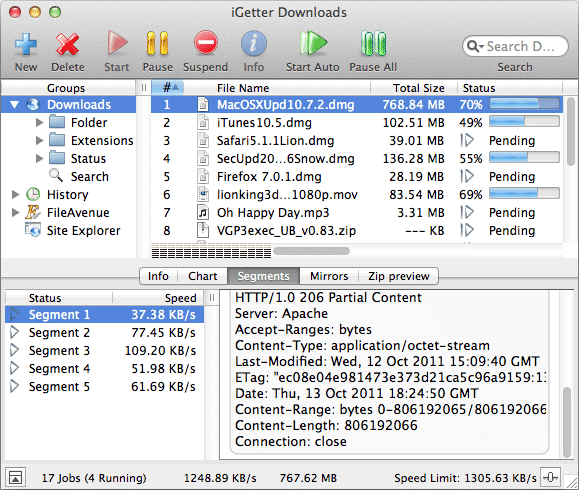
Bulgaria (EU) based Presenta Ltd. announces iGetter 2.9.6 optimized for Firefox v60 or later. iGetter is a powerful, full featured download manager and accelerator. It can greatly improve the speed of your downloads using segmented downloading. It allows auto resume on broken downloads, queue filtering by various criteria, site explorer, history list, scheduling downloads for low traffic periods, auto shut down on completion, and much more.
Dobrich, Bulgaria - Presenta Ltd. is pleased to announce the new release of iGetter version 2.9.6 for macOS. iGetter is a powerful, full featured download manager and accelerator.
New in version 2.9.6:
* Optimized for Firefox v60 .
* Added support for TLS 1.1 and 1.2 when performing SSL communications, which is a requirement for most sites now. Integrated the SSL support into iGetter, so it won't be dependable on macOS and third party libraries.
* Added new extension for Firefox v57 , that supports the new WebExtension API. The new add-on is similar by functionality to the iGetter Chrome extension. The legacy XUL add-on will be used only with Firefox v56 or earlier.
* Renewed the digital signing certificate.
* Added a link at the SHA1 field in the History Info panel, that opens VirusTotal recent report for selected file's SHA1 checksum.
* Added new connection types for 50Mb Fibernet, 2Gb Fibernet and 10Gb Ethernet, optimized for best performance at the chosen speed.
* Added support for relative redirection locations, incl. the protocol part, as per RFC7231.
* Added new User Agent for the Microsoft Edge browser.
* Updated User Agents of Safari, Firefox and Chrome for macOS, as well as Firefox for Windows with recent versions.
* Added new command "Only files larger than 5MB" in the Chrome extension, that would allow transferring to iGetter only downloads larger than 5MB. The smaller files would be downloaded directly by Chrome.
* The "Disable Integration" command state in Chrome extension is now saved through the browser restarts.
* Implemented a workaround for an issue on macOS 10.13 High Sierra, which could lead to completed downloads still opened in iGetter, when double-clicked, etc.
* Fixed an issue with some button icons (as transfer details and speed limiter on the main window, etc.) not appearing properly on macOS 10.13 High Sierra.
* Solved an issue with the "URL" field of the "New URL" dialog not allowing more than 1000 characters, by extending the limit to 10000 characters.
* Fixed an issue with the OS, choosing to use the discrete GPU instead of the integrated one, when displaying iGetter.
* Fixed an issue on OS X 10.9 or later, that caused an error message about iGetterCMPlugin in the console log.
The International version of iGetter includes: English, French, German, Spanish, Italian, Turkish, Japanese, Russian, Hungarian, Simplified Chinese, Traditional Chinese, Polish and Portuguese (Brazil) localizations.
System Requirements:
* Requires macOS 10.6.x - 10.13.x
Pricing and Availability:
iGetter 2.9.6 is shareware. iGetter can be evaluated for as long as it's needed to decide if it suits the user's needs. A licensed copy is available for $25.00 (USD). All registered users will get free support by email and free upgrades in the major 2.x versions.
Presenta Ltd.: http://www.presenta.net/
iGetter 2.9.6: http://www.presenta.net/iGetter.html
Direct Download Link: https://www.igetter.net/search/downloads/iGetter2.9.6.dmg
Purchase Link: http://igetter.net/store/
Screenshot: http://www.presenta.net/images/iGetterLion.gif
App Icon: http://www.presenta.net/images/iGetter128x128.jpg

Presenta Ltd. was founded in March 1993 in Bulgaria (Europe). We are a computer company, which deals with software development. Since 1993 the company has been a basic software developer of networking and accounting systems for Apple Macintosh computers. All Material and Software (C) Copyright 2018 Presenta Ltd. All Rights Reserved. Apple, the Apple logo, Macintosh Mac OS X and macOS are registered trademarks of Apple Inc. in the U.S. and/or other countries. Other trademarks and registered trademarks may be the property of their respective owners.
*******
Link To Article: https://prmac.com/release-id-82830.htm
*******
---------------------------------------------------------------------------------
Note that you can alter delivered distributions at any time.
Login to your account on prMac to alter your channel selection, or to opt-out at any time.
Radiant One Announcement - A Story of Awakening
A new article has been published at prMac.
Radiant One Announcement - A Story of Awakening - Published on 06/28/18
Fntastic Studio announces the upcoming release of Radiant One, their exciting game for iPhone, iPad, and Apple TV devices. Radiant One is a story of awakening. Radiant One is an illusory, story-driven adventure with mystical elements. Radiant One is an illusory, story-driven adventure with mystical elements.
Yakutsk, Russia - Fntastic Studio is proud to announce the upcoming release of Radiant One, their exciting game for iPhone, iPad, and Apple TV devices. Radiant One is a story of awakening. Radiant One is an illusory, story-driven adventure with mystical elements.
Trying to escape from boring life and social media, one day Daniel found a mysterious book about lucid dreams. Very quickly he was able to do incredible things, create amazing worlds and fly during sleep until one day his dreams fell under the power of something inexplicable, something terrible conceived by the Universe itself... Help Daniel survive, pass the test and get enlightenment.
Radiant One inspired by minimalist 3D design, is a unique, hand-crafted world of Daniel to explore. It's designed to be easy for everyone to pick up, enjoy and complete.
Radiant One will be available on iPhone, iPad, Apple TV device in July. The prices will be only $2.99, with no ads or in-app purchases.
For more information about the game, visit the Radiant One website.
Fntastic: http://fntastic.com
Radiant One: http://radiantonegame.com
Screenshots: https://www.dropbox.com/sh/fyqnjqdtv6h1mjl/AABXmSDzHonREYewT07OAAaJa?dl=0
Fntastic is an independent game studio founded in Yakutsk, the coldest city in the world.
With our success, we want to inspire young people around the world, wherever they are born, whoever they are. In 2017 we released our debut title The Wild Eight, which became popular on Steam. All Material and Software (C) Copyright 2018 Fntastic. All Rights Reserved. Apple, the Apple logo, iPhone, iPod and iPad are registered trademarks of Apple Inc. in the U.S. and/or other countries. Other trademarks and registered trademarks may be the property of their respective owners.
*******
Link To Article: https://prmac.com/release-id-82827.htm
*******
---------------------------------------------------------------------------------
Note that you can alter delivered distributions at any time.
Login to your account on prMac to alter your channel selection, or to opt-out at any time.
Radiant One Announcement - A Story of Awakening - Published on 06/28/18
Fntastic Studio announces the upcoming release of Radiant One, their exciting game for iPhone, iPad, and Apple TV devices. Radiant One is a story of awakening. Radiant One is an illusory, story-driven adventure with mystical elements. Radiant One is an illusory, story-driven adventure with mystical elements.
Yakutsk, Russia - Fntastic Studio is proud to announce the upcoming release of Radiant One, their exciting game for iPhone, iPad, and Apple TV devices. Radiant One is a story of awakening. Radiant One is an illusory, story-driven adventure with mystical elements.
Trying to escape from boring life and social media, one day Daniel found a mysterious book about lucid dreams. Very quickly he was able to do incredible things, create amazing worlds and fly during sleep until one day his dreams fell under the power of something inexplicable, something terrible conceived by the Universe itself... Help Daniel survive, pass the test and get enlightenment.
Radiant One inspired by minimalist 3D design, is a unique, hand-crafted world of Daniel to explore. It's designed to be easy for everyone to pick up, enjoy and complete.
Radiant One will be available on iPhone, iPad, Apple TV device in July. The prices will be only $2.99, with no ads or in-app purchases.
For more information about the game, visit the Radiant One website.
Fntastic: http://fntastic.com
Radiant One: http://radiantonegame.com
Screenshots: https://www.dropbox.com/sh/fyqnjqdtv6h1mjl/AABXmSDzHonREYewT07OAAaJa?dl=0
Fntastic is an independent game studio founded in Yakutsk, the coldest city in the world.
With our success, we want to inspire young people around the world, wherever they are born, whoever they are. In 2017 we released our debut title The Wild Eight, which became popular on Steam. All Material and Software (C) Copyright 2018 Fntastic. All Rights Reserved. Apple, the Apple logo, iPhone, iPod and iPad are registered trademarks of Apple Inc. in the U.S. and/or other countries. Other trademarks and registered trademarks may be the property of their respective owners.
*******
Link To Article: https://prmac.com/release-id-82827.htm
*******
---------------------------------------------------------------------------------
Note that you can alter delivered distributions at any time.
Login to your account on prMac to alter your channel selection, or to opt-out at any time.
Symphony Solution Listed as Top Philadelphia App Development Company
A new article has been published at prMac.
Symphony Solution Listed as Top Philadelphia App Development Company - Published on 06/29/18
Since 2011, Symphony Solution Inc. has been dedicated to providing custom based software solutions to any and all of our clients. Recognizing our strong clientele and mobile app development work, we have been featured as a top Philadelphia app development company by Clutch.co.
Fanwood, New Jersey - Since 2011, Symphony Solution Inc. has been dedicated to providing custom based software solutions to any and all of our clients. We listen to each individual problem or task a company has, and then use our highly experienced team to solve it in the most efficient manner possible. We pride ourselves on our ability to adapt to any situation we are faced with. The flexibility of our services is what sets us apart from our competitors.
Our CEO, Anish Desai, said: "Being ranked as a top mobile app development company in Philadelphia by Clutch makes particularly happy because it is a well reputed community of industry experts that recognize well performing app development corporations. With a healthy clientele and firm market presence we now aim to integrate latest technology in app development!"
Because of our continued hard work throughout the years, we have been featured as a top Philadelphia app development company in 2018 by Clutch.co! Clutch is a ratings and reviews firm in Washington D.C. that provides rankings to firms all around the world. How do they accomplish this, you may ask? Part of their methodology includes conducting interviews with clients and using an objective scoring system that's based on factors such as industry recognition and market presence.
We are honored by this award and will strive to move forward and become an even more reliable and successful company. Interested readers can check our listing on Clutch.
Symphony Solution Inc: https://www.symphony-solution.com/
Clutch - Top Philadelphia App Developers: https://clutch.co/app-developers/philadelphia
Symphony Solution Inc. is one of the leading Mobile App development firm based out of New Jersey. Our experts will help you to turn your ideas into beautifully designed and smartly coded Apps. With over 6 Years of experience, we developed around 300+ Apps, 200+ clients served. We helped startups to large enterprises to successfully launch their Apps in the market from Idea to Execution. All Material and Software (C) Copyright 2018 Symphony Solution Inc. All Rights Reserved. Apple, the Apple logo, iPhone, iPod and iPad are registered trademarks of Apple Inc. in the U.S. and/or other countries. Other trademarks and registered trademarks may be the property of their respective owners.
*******
Link To Article: https://prmac.com/release-id-82828.htm
*******
---------------------------------------------------------------------------------
Note that you can alter delivered distributions at any time.
Login to your account on prMac to alter your channel selection, or to opt-out at any time.
Symphony Solution Listed as Top Philadelphia App Development Company - Published on 06/29/18
Since 2011, Symphony Solution Inc. has been dedicated to providing custom based software solutions to any and all of our clients. Recognizing our strong clientele and mobile app development work, we have been featured as a top Philadelphia app development company by Clutch.co.
Fanwood, New Jersey - Since 2011, Symphony Solution Inc. has been dedicated to providing custom based software solutions to any and all of our clients. We listen to each individual problem or task a company has, and then use our highly experienced team to solve it in the most efficient manner possible. We pride ourselves on our ability to adapt to any situation we are faced with. The flexibility of our services is what sets us apart from our competitors.
Our CEO, Anish Desai, said: "Being ranked as a top mobile app development company in Philadelphia by Clutch makes particularly happy because it is a well reputed community of industry experts that recognize well performing app development corporations. With a healthy clientele and firm market presence we now aim to integrate latest technology in app development!"
Because of our continued hard work throughout the years, we have been featured as a top Philadelphia app development company in 2018 by Clutch.co! Clutch is a ratings and reviews firm in Washington D.C. that provides rankings to firms all around the world. How do they accomplish this, you may ask? Part of their methodology includes conducting interviews with clients and using an objective scoring system that's based on factors such as industry recognition and market presence.
We are honored by this award and will strive to move forward and become an even more reliable and successful company. Interested readers can check our listing on Clutch.
Symphony Solution Inc: https://www.symphony-solution.com/
Clutch - Top Philadelphia App Developers: https://clutch.co/app-developers/philadelphia
Symphony Solution Inc. is one of the leading Mobile App development firm based out of New Jersey. Our experts will help you to turn your ideas into beautifully designed and smartly coded Apps. With over 6 Years of experience, we developed around 300+ Apps, 200+ clients served. We helped startups to large enterprises to successfully launch their Apps in the market from Idea to Execution. All Material and Software (C) Copyright 2018 Symphony Solution Inc. All Rights Reserved. Apple, the Apple logo, iPhone, iPod and iPad are registered trademarks of Apple Inc. in the U.S. and/or other countries. Other trademarks and registered trademarks may be the property of their respective owners.
*******
Link To Article: https://prmac.com/release-id-82828.htm
*******
---------------------------------------------------------------------------------
Note that you can alter delivered distributions at any time.
Login to your account on prMac to alter your channel selection, or to opt-out at any time.
Subscribe to:
Posts (Atom)