A new article has been published at prMac.
iOS 12 Guidebook - eBook guide for iOS 12 on iPhone and iPad released - Published on 07/06/18
UK based Tap Guides today introduces iOS 12 Guidebook, a brand new book available in the Apple iBookstore that reveals everything you need to know about iOS 12 for iPhone and iPad. Priced at just $2.99, iOS 12 Guidebook is concise and jargon-free, enabling readers to become proficient with exclusive iOS 12 features such as Memojis, Screen Time, and AR technologies in next to no time. It's also packed with large color images that help to visually explain tips and tutorials.
Poole, United Kingdom - Tap Guides is today delighted to announce its latest book: iOS 12 Guidebook. Brought to you by the expert team at Tap Guides, and written by best-selling technology author Thomas Anthony, iOS 12 Guidebook reveals everything you need to know about the world's most advanced mobile operating system.
iOS 12 is designed to make your iPhone and iPad even faster, more responsive, and more delightful to use. It features new apps, such as Measure, or Stocks on iPad, while introducing new additions to your most loved apps, such as Memojis in Messages. It's also more secure, more friendly to use, and better than ever before.
iOS 12 Guidebook examines all the major changes in detail, reveals a wealth of minor changes, and takes a look at the visual differences on both iPhone and iPad. It also includes detailed tutorials and tips for all the major apps and settings.
Inside you'll discover:
* How to install iOS 12 on your device
* Major new features and apps
* Visual differences
* The basics of using iOS
* Detailed app tutorials
* Essential Settings and configurations
* & much more
Device Requirements:
* Available on iPhone, iPad, iPod touch, Mac & Kindle Devices
* Print Length: 476 Pages
Pricing and Availability:
iPhone X Pro Guide is $2.99 USD (or equivalent amount in other currencies) and available worldwide exclusively through the iBookstore in the Computers and Reference categories.
Tap Guides: http://www.tapguides.co.uk
iOS 12 Guidebook: http://itunes.apple.com/book/id1407294776
Cover: http://www.tapguides.co.uk/wp-content/uploads/2018/07/ios-12-guidebook-cover.jpg
Press Kit (zip): http://www.tapguides.co.uk/wp-content/uploads/2018/07/ios-12-guidebook-presskit.zip
Launched in 2015, Tap Guides Ltd publishes eBooks and interactive apps that teach users how to use their iOS devices. Tap Guides most notable book to date is the iPad Pro Guidebook. Copyright (C) 2018 Tap Guides Ltd. All Rights Reserved. Apple, the Apple logo, iPhone, iPod and iPad are registered trademarks of Apple Inc. in the U.S. and/or other countries. Other trademarks and registered trademarks may be the property of their respective owners.
*******
Link To Article: https://prmac.com/release-id-82843.htm
*******
---------------------------------------------------------------------------------
Note that you can alter delivered distributions at any time.
Login to your account on prMac to alter your channel selection, or to opt-out at any time.


iMac Guidebook - eBook for iMac & High Sierra released
A new article has been published at prMac.
iMac Guidebook - eBook for iMac & High Sierra released - Published on 07/04/18
UK based Tap Guides today introduces iMac Guidebook, a brand new book available in the iBooks Store that reveals everything you need to know about iMac and macOS High Sierra. iMac Guidebook is concise and jargon-free, enabling readers to become proficient with features such as macOS, built-in apps and the iMac hardware in next to no time. It's also packed with large color images that help to visually explain tips and tutorials.
Poole, United Kingdom - Tap Guides is today delighted to announce its latest book: iMac Guidebook. Brought to you by the expert team at Tap Guides, and written by best-selling technology author Thomas Anthony, iMac Guidebook is packed with top tips and in-depth tutorials. You'll learn about exciting iMac features such as its massive 27-inch Retina display, discover how to use macOS High Sierra and its built-in apps, plus much more. Available in eBook format, exclusively through the iBooks Store.
If you're looking for a desktop Mac, then the iMac is pretty much the best choice you can make. It has a massive, 27-inch, 5K LED display, it's fast, it's beautiful, and it also works with macOS High Sierra: the best desktop operating system available. iMac Guidebook is the perfect companion for your new Mac. By the time you've finished reading, you'll be an expert in nearly everything iMac and macOS related.
Inside you'll discover:
* Everything you need to know about the iMa & High Sierra
* How to set up your Mac
* How to use the Magic Mouse and TrackPad
* Detailed app tutorials
* How to edit photos
* Essential settings and configurations
* Troubleshooting tips
Device Requirements:
* Available on iPhone, iPad, iPod touch, Mac, Windows, & Kindle Devices
* eBook Pages: 378 Pages
Pricing and Availability:
iMac Guidebook is $3.99 USD (or equivalent amount in other currencies), and available worldwide exclusively through the iBooks Store in the Computers and References categories.
Tap Guides: http://www.tapguides.co.uk/
iMac Guidebook: https://itunes.apple.com/us/book/id1399618981
Cover: http://www.tapguides.co.uk/wp-content/uploads/2018/07/imac-guidebook-cover.jpg
Press Kit (zip): http://www.tapguides.co.uk/wp-content/uploads/2018/07/imac-guidebook-press.zip
Launched in 2015, Tap Guides Ltd publishes eBooks and interactive apps that teach users how to use their iOS devices. Tap Guides most notable book to date is the iPad Pro Guidebook. Copyright (C) 2018 Tap Guides Ltd. All Rights Reserved. Apple, the Apple logo, iPhone, iPod and iPad are registered trademarks of Apple Inc. in the U.S. and/or other countries. Other trademarks and registered trademarks may be the property of their respective owners.
*******
Link To Article: https://prmac.com/release-id-82842.htm
*******
---------------------------------------------------------------------------------
Note that you can alter delivered distributions at any time.
Login to your account on prMac to alter your channel selection, or to opt-out at any time.
iMac Guidebook - eBook for iMac & High Sierra released - Published on 07/04/18
UK based Tap Guides today introduces iMac Guidebook, a brand new book available in the iBooks Store that reveals everything you need to know about iMac and macOS High Sierra. iMac Guidebook is concise and jargon-free, enabling readers to become proficient with features such as macOS, built-in apps and the iMac hardware in next to no time. It's also packed with large color images that help to visually explain tips and tutorials.
Poole, United Kingdom - Tap Guides is today delighted to announce its latest book: iMac Guidebook. Brought to you by the expert team at Tap Guides, and written by best-selling technology author Thomas Anthony, iMac Guidebook is packed with top tips and in-depth tutorials. You'll learn about exciting iMac features such as its massive 27-inch Retina display, discover how to use macOS High Sierra and its built-in apps, plus much more. Available in eBook format, exclusively through the iBooks Store.
If you're looking for a desktop Mac, then the iMac is pretty much the best choice you can make. It has a massive, 27-inch, 5K LED display, it's fast, it's beautiful, and it also works with macOS High Sierra: the best desktop operating system available. iMac Guidebook is the perfect companion for your new Mac. By the time you've finished reading, you'll be an expert in nearly everything iMac and macOS related.
Inside you'll discover:
* Everything you need to know about the iMa & High Sierra
* How to set up your Mac
* How to use the Magic Mouse and TrackPad
* Detailed app tutorials
* How to edit photos
* Essential settings and configurations
* Troubleshooting tips
Device Requirements:
* Available on iPhone, iPad, iPod touch, Mac, Windows, & Kindle Devices
* eBook Pages: 378 Pages
Pricing and Availability:
iMac Guidebook is $3.99 USD (or equivalent amount in other currencies), and available worldwide exclusively through the iBooks Store in the Computers and References categories.
Tap Guides: http://www.tapguides.co.uk/
iMac Guidebook: https://itunes.apple.com/us/book/id1399618981
Cover: http://www.tapguides.co.uk/wp-content/uploads/2018/07/imac-guidebook-cover.jpg

Press Kit (zip): http://www.tapguides.co.uk/wp-content/uploads/2018/07/imac-guidebook-press.zip
Launched in 2015, Tap Guides Ltd publishes eBooks and interactive apps that teach users how to use their iOS devices. Tap Guides most notable book to date is the iPad Pro Guidebook. Copyright (C) 2018 Tap Guides Ltd. All Rights Reserved. Apple, the Apple logo, iPhone, iPod and iPad are registered trademarks of Apple Inc. in the U.S. and/or other countries. Other trademarks and registered trademarks may be the property of their respective owners.
*******
Link To Article: https://prmac.com/release-id-82842.htm
*******
---------------------------------------------------------------------------------
Note that you can alter delivered distributions at any time.
Login to your account on prMac to alter your channel selection, or to opt-out at any time.
AudFree Audio Capture Lets You Record Any Sound on Mac Losslessly
A new article has been published at prMac.
AudFree Audio Capture Lets You Record Any Sound on Mac Losslessly - Published on 07/03/18
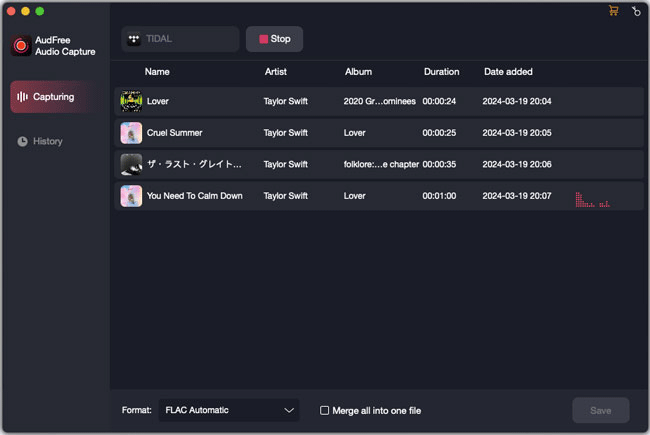
AudFree Software introduces Audio Capture for Mac, with the aim to make it easier for music addicts to record any sound plays through any app on Mac without losing any quality. No matter what kinds of music you are playing on Mac, including streaming music, online radios or local songs, games, movies playing via Safari, Chrome, iTunes, QT, YouTube, Spotify or Pandora, AudFree Audio Capture will easily grab all the audio tracks while preserving the original sound quality with only a few clicks.
Shenzhen, Guangdong - As one of the top leaders in providing audio solutions, AudFree officially launched its new audio software called AudFree Audio Capture for Mac to customers worldwide, aiming to help them easily recording all types of audios from any source on macOS.
No matter what kinds of music you are playing on Mac, including streaming music, online radios or local songs, games, movies playing via Safari, Chrome, iTunes, QT, YouTube, Spotify, Pandora, AudFree Audio Capture will easily grab all the audio tracks while reserving the original sound quality with only a few clicks.
Thanks to its advanced recording core, AudFree Audio Capture is made a multi-track audio recording tool which can grab multiple audio tracks simultaneously in same or different formats. Besides, it's able to intelligently detect the gaps between all individual songs while recording different tracks. In other words, you don't need to worry about the whole recordings will mix together. You just need to start the recording and then leave all the tasks to the app itself.
In addition to that, AudFree Audio Capture also provides the options for users to flexibly trim and merge the recorded audio tracks. You can either split the large recording into small segments or mix multiple audio recordings into a whole track. And with a built-in ID3 tags editor, this smart Mac music recorder can also keep and fix the ID tags intelligently. You are also allowed to edit the missing tags, such as title, artist, album, year, genre, cover if you like.
Once recorded, AudFree Audio Capture enables users to save the audio records into popular formats, like MP3, WAV, AAC, FLAC, M4A, and M4B for diverse use on most media players, including Apple iPod, iPad, iPhone, Sony Walkman, iRiver, Creative Zen and so forth.
Other features of AudFree Audio Capture for Mac like customizing output audio quality, easy-to-use interface, professional music manager, make it outstanding from other competitive tools in the market.
Pricing and Availability:
Apart from Mac, AudFree Audio Recorder is also available for Windows OS. Currently it's sold from $19.95 to $39.95 (USD), from single user license to family license. Users can download the trial version of this software to test before buying.
AudFree: https://www.audfree.com
AudFree Audio Capture for Mac: https://www.audfree.com/audio-capture-mac/
Download Audio Capture for Mac: https://www.audfree.com/download/AudioCapture.dmg
Purchase: https://www.audfree.com/buy/audio-capture-mac.html
Screenshot: https://www.audfree.com/images/audio-capture/capturing-mac.png
As an innovation-driven multimedia studio, AudFree is focused on developing and providing industry-leading DRM removal solutions for streaming music addicts, such as users of Apple Music, Spotify songs, Audible audioboks, iTunes music and more. With a passionate team full of dedicated individuals, AudFree is aiming to make your digital life much easier and bring more fun to you when enjoying music. All Material and Software (C) Copyright 2018 AudFree. All Rights Reserved. Apple, the Apple logo, macOS, iTunes, iPhone, iPod and iPad are registered trademarks of Apple Inc. in the U.S. and/or other countries. Other trademarks and registered trademarks may be the property of their respective owners.
*******
Link To Article: https://prmac.com/release-id-82840.htm
*******
---------------------------------------------------------------------------------
Note that you can alter delivered distributions at any time.
Login to your account on prMac to alter your channel selection, or to opt-out at any time.
AudFree Audio Capture Lets You Record Any Sound on Mac Losslessly - Published on 07/03/18
AudFree Software introduces Audio Capture for Mac, with the aim to make it easier for music addicts to record any sound plays through any app on Mac without losing any quality. No matter what kinds of music you are playing on Mac, including streaming music, online radios or local songs, games, movies playing via Safari, Chrome, iTunes, QT, YouTube, Spotify or Pandora, AudFree Audio Capture will easily grab all the audio tracks while preserving the original sound quality with only a few clicks.
Shenzhen, Guangdong - As one of the top leaders in providing audio solutions, AudFree officially launched its new audio software called AudFree Audio Capture for Mac to customers worldwide, aiming to help them easily recording all types of audios from any source on macOS.
No matter what kinds of music you are playing on Mac, including streaming music, online radios or local songs, games, movies playing via Safari, Chrome, iTunes, QT, YouTube, Spotify, Pandora, AudFree Audio Capture will easily grab all the audio tracks while reserving the original sound quality with only a few clicks.
Thanks to its advanced recording core, AudFree Audio Capture is made a multi-track audio recording tool which can grab multiple audio tracks simultaneously in same or different formats. Besides, it's able to intelligently detect the gaps between all individual songs while recording different tracks. In other words, you don't need to worry about the whole recordings will mix together. You just need to start the recording and then leave all the tasks to the app itself.
In addition to that, AudFree Audio Capture also provides the options for users to flexibly trim and merge the recorded audio tracks. You can either split the large recording into small segments or mix multiple audio recordings into a whole track. And with a built-in ID3 tags editor, this smart Mac music recorder can also keep and fix the ID tags intelligently. You are also allowed to edit the missing tags, such as title, artist, album, year, genre, cover if you like.
Once recorded, AudFree Audio Capture enables users to save the audio records into popular formats, like MP3, WAV, AAC, FLAC, M4A, and M4B for diverse use on most media players, including Apple iPod, iPad, iPhone, Sony Walkman, iRiver, Creative Zen and so forth.
Other features of AudFree Audio Capture for Mac like customizing output audio quality, easy-to-use interface, professional music manager, make it outstanding from other competitive tools in the market.
Pricing and Availability:
Apart from Mac, AudFree Audio Recorder is also available for Windows OS. Currently it's sold from $19.95 to $39.95 (USD), from single user license to family license. Users can download the trial version of this software to test before buying.
AudFree: https://www.audfree.com
AudFree Audio Capture for Mac: https://www.audfree.com/audio-capture-mac/
Download Audio Capture for Mac: https://www.audfree.com/download/AudioCapture.dmg
Purchase: https://www.audfree.com/buy/audio-capture-mac.html
Screenshot: https://www.audfree.com/images/audio-capture/capturing-mac.png
As an innovation-driven multimedia studio, AudFree is focused on developing and providing industry-leading DRM removal solutions for streaming music addicts, such as users of Apple Music, Spotify songs, Audible audioboks, iTunes music and more. With a passionate team full of dedicated individuals, AudFree is aiming to make your digital life much easier and bring more fun to you when enjoying music. All Material and Software (C) Copyright 2018 AudFree. All Rights Reserved. Apple, the Apple logo, macOS, iTunes, iPhone, iPod and iPad are registered trademarks of Apple Inc. in the U.S. and/or other countries. Other trademarks and registered trademarks may be the property of their respective owners.
*******
Link To Article: https://prmac.com/release-id-82840.htm
*******
---------------------------------------------------------------------------------
Note that you can alter delivered distributions at any time.
Login to your account on prMac to alter your channel selection, or to opt-out at any time.
WaterField Launches 5th Crowdsourced Design Project for New Gear Cases
A new article has been published at prMac.
WaterField Launches 5th Crowdsourced Design Project for New Gear Cases - Published on 07/03/18
California-based WaterField Designs, continuing its practice of collaborating with customers to develop customized bags and cases, is seeking participation in its latest idea-to-product, crowdsourced design project: the next-generation of Gear Cases. WaterField's rapid prototyping process of these customer-ideated products results in highly functional gear that addresses customer needs directly. WaterField's initial survey runs now through July 10, 2018.
San Francisco, California - San Francisco's WaterField Designs, an innovative leader in custom laptop sleeves, bags and device-specific cases, announces its fifth crowdsourced design project to create the next generation of Gear Cases. Company owner, Gary Waterfield invites customer participation through a personalized video and a one-minute survey.
As the company compiles feedback and begins prototyping, WaterField keeps customer design-team members abreast of progress with updates and continued invitations to submit feedback. The "rapid prototyping" process of these customer-ideated products results in highly functional gear that addresses customer needs directly. This attention to detail, coupled with a stylish aesthetic, differentiates WaterField products from competitors.
"We currently offer Gear Pouches and Cases for various needs, from general organizational to device-specific - like our iPad Pro Gear Case and our iPhone Camera Bag. Even so, good customers continually tell us, "'What you really need is...,'" explained company owner Gary Waterfield. "Over the last twenty years, many of our best ideas originated from customers. Given the success of our past four community-design projects, we're again asking customers for inspiration - this time for new and improved gear cases."
This next-generation Gear Case community-sourced design project is the fifth time WaterField has formally engaged with customers to solicit input for product design. Although it has always listened to customers for product ideas, WaterField initially formalized the process using the Kickstarter platform with the design of a highly-organized travel wallet.
When Nintendo launched the Switch gaming console, WaterField fine-tuned its crowdsourcing design process to more directly communicate with users and developed a collection of cases specific to the needs of the Switch gamers. High customer and company satisfaction with the process led WaterField to again engage customers in developing the innovative Air Porter Carry-on for frequent travelers, the iPhone Camera Bag for iPhoneographers, and most recently, the Pro Executive Backpack for professional work environments.
WaterField's initial survey runs now through July 10, 2018, when the first update with survey results and design progress will be made available to participants.
WaterField Designs: https://www.sfbags.com/
Next-generation Gear Case Survey: https://www.sfbags.com/pages/next-generation-gear-case
Owner Gary Waterfield's Video Invitation to Participate: https://www.youtube.com/watch?v=Cqh5Y3_5_iQ
WaterField Designs is an innovative San Francisco designer and manufacturer of bags and cases for tech-savvy consumers who want to stylishly and responsibly transport their technology. WaterField manufactures custom-fitted, high-quality cases and bags for a full-range of laptop computers, smartphones, tablets, gaming devices, and other digital gear. All products are manufactured to exacting standards entirely in San Francisco. More information at "Our Story". WaterField Designs, SFBags and and Air Porter Carry-on and Pro Executive Backpack are trademarks of WaterField Designs. Other company and product names may be trademarks of their respective owners. Copyright (C)2018. All Rights Reserved.
*******
Link To Article: https://prmac.com/release-id-82837.htm
*******
---------------------------------------------------------------------------------
Note that you can alter delivered distributions at any time.
Login to your account on prMac to alter your channel selection, or to opt-out at any time.
WaterField Launches 5th Crowdsourced Design Project for New Gear Cases - Published on 07/03/18
California-based WaterField Designs, continuing its practice of collaborating with customers to develop customized bags and cases, is seeking participation in its latest idea-to-product, crowdsourced design project: the next-generation of Gear Cases. WaterField's rapid prototyping process of these customer-ideated products results in highly functional gear that addresses customer needs directly. WaterField's initial survey runs now through July 10, 2018.
San Francisco, California - San Francisco's WaterField Designs, an innovative leader in custom laptop sleeves, bags and device-specific cases, announces its fifth crowdsourced design project to create the next generation of Gear Cases. Company owner, Gary Waterfield invites customer participation through a personalized video and a one-minute survey.
As the company compiles feedback and begins prototyping, WaterField keeps customer design-team members abreast of progress with updates and continued invitations to submit feedback. The "rapid prototyping" process of these customer-ideated products results in highly functional gear that addresses customer needs directly. This attention to detail, coupled with a stylish aesthetic, differentiates WaterField products from competitors.
"We currently offer Gear Pouches and Cases for various needs, from general organizational to device-specific - like our iPad Pro Gear Case and our iPhone Camera Bag. Even so, good customers continually tell us, "'What you really need is...,'" explained company owner Gary Waterfield. "Over the last twenty years, many of our best ideas originated from customers. Given the success of our past four community-design projects, we're again asking customers for inspiration - this time for new and improved gear cases."
This next-generation Gear Case community-sourced design project is the fifth time WaterField has formally engaged with customers to solicit input for product design. Although it has always listened to customers for product ideas, WaterField initially formalized the process using the Kickstarter platform with the design of a highly-organized travel wallet.
When Nintendo launched the Switch gaming console, WaterField fine-tuned its crowdsourcing design process to more directly communicate with users and developed a collection of cases specific to the needs of the Switch gamers. High customer and company satisfaction with the process led WaterField to again engage customers in developing the innovative Air Porter Carry-on for frequent travelers, the iPhone Camera Bag for iPhoneographers, and most recently, the Pro Executive Backpack for professional work environments.
WaterField's initial survey runs now through July 10, 2018, when the first update with survey results and design progress will be made available to participants.
WaterField Designs: https://www.sfbags.com/
Next-generation Gear Case Survey: https://www.sfbags.com/pages/next-generation-gear-case
Owner Gary Waterfield's Video Invitation to Participate: https://www.youtube.com/watch?v=Cqh5Y3_5_iQ
WaterField Designs is an innovative San Francisco designer and manufacturer of bags and cases for tech-savvy consumers who want to stylishly and responsibly transport their technology. WaterField manufactures custom-fitted, high-quality cases and bags for a full-range of laptop computers, smartphones, tablets, gaming devices, and other digital gear. All products are manufactured to exacting standards entirely in San Francisco. More information at "Our Story". WaterField Designs, SFBags and and Air Porter Carry-on and Pro Executive Backpack are trademarks of WaterField Designs. Other company and product names may be trademarks of their respective owners. Copyright (C)2018. All Rights Reserved.
*******
Link To Article: https://prmac.com/release-id-82837.htm
*******
---------------------------------------------------------------------------------
Note that you can alter delivered distributions at any time.
Login to your account on prMac to alter your channel selection, or to opt-out at any time.
AutoCrypt, Encryption/Decryption App With a Document Based Approach
A new article has been published at prMac.
AutoCrypt, Encryption/Decryption App With a Document Based Approach - Published on 07/02/18
Tension Software announces AutoCrypt 2.3.1 for macOS. AutoCrypt, is an encryption/decryption app with a document based approach. Using a document, AutoCrypt lets the user save in a document all the settings used to encrypt or decrypt collections of files using a powerful AES-256 algorithm. Using these documents, AutoCrypt can be used for encryption and decryption batch process of large quantity of files in a single click.
Milano, Italy - Tension Software is proud to announce the release of AutoCrypt 2.3.1 for macOS. AutoCrypt is an encryption/decryption app with a document based approach. Using a document, AutoCrypt lets the user save in a document all the settings used to encrypt or decrypt collections of files using a powerful AES-256 algorithm
Using these documents, AutoCrypt can be used for encryption and decryption batch process of large quantity of files in a single click. With AutoCrypt, a single command is enough to encrypt hundred of files to a destination place. It can also work unattended launching it in the night via launch utilities such as Cronette.
Thanks to the powerful AES-256 algorithm used by AutoCrypt, all the encrypted files will be totally unreadable by anyone without the correct password. The obtained encrypted files can be transmitted or stored in unsafe places (as example internet servers) without any security problem.
All the setting used to encrypt the original files, are saved inside an AutoCrypt document that can encrypt and decrypt an unlimited group of files. In few words an AutoCrypt document is a collection of setting used to encrypt or decrypt a collection of files. Copying a document and giving it to another user, allow to exchange with that user encrypted files in a safe way over the internet without the need to even input the password used to encrypt files.
In case the files to encrypt or to decrypt are updated with frequencies, an AutoCrypt document, listing this files, provides a one click method to frequently encrypt them storing the updated files in a standard place, even using unattended operation. The user can also launch AutoCrypt in the night using a document with the 'Autorun' option turned on.
AutoCrypt works basing its actions on simplicity and is the ideal solution to be used as a batch mode encryptor and decryptor, but can also be used as a standard user attended tool. AutoCrypt uses the latest technology with asynchronous tasks to perform fast and fluid encryption and decryption. All the details of the job AutoCrypt has to perform is stored inside AutoCrypt documents (.AutoCrypt).
When AutoCrypt performs its job, it processes a list of files, one by one, reads each one, encrypts it and saves it in another location appending a .acrypt or .acrypx or .acrypz to the name. AutoCrypt can also automatize the reversed process, decrypting files to plain files and saving them in another place removing the .acrypt , .acripx, .acrypz at the end of the name.
AutoCrypt uses the latest Apple technology:
Features:
* Can work as a desktop tool or as a batch utility
* Save inside documents all the setting used to encrypt and decrypt group of files
* Encrypt and save in a custom place with one click or even unattended
* Can encrypt and decrypt list of files using the same document
* Accept input via drag and drops for an immediate and easy input
* Powerful features to manipulate list of files
* Uses latest technology with asynchronous tasks to perform fast and fluid encryption and decryption
* Can use also Blowfish decryption for previous compatibility
* Provides an embedded PDF manual
Minimum Requirements:
* macOS Version 10.10 or higher
* macOS 10.13 High Sierra
* 3.6 MB
Pricing and Availability:
AutoCrypt 2.3.1 is just $5.99 USD (or an equivalent amount in other currencies) and is available worldwide through the Mac App Store in the Productivity category.
Tension Software: http://www.tensionsoftware.com
AutoCrypt 2.3.1: http://www.tensionsoftware.com/osx/autocrypt/
Download: http://dwn.tensionsoftware.com/osx/autocrypt/autocrypt.dmg
Purchase and Download from Mac App Store: http://itunes.apple.com/app/autocrypt/id416301697
Tension Software develops software for macOS and iOS using the latest Apple technologies. Other brands and products referenced herein are the trademarks or registered trademarks of their respective holders. All Material and Software (C) Copyright 2018 Tension Software. All Rights Reserved. Apple, the Apple logo, Macintosh Mac OS X and macOS are registered trademarks of Apple Inc. in the U.S. and/or other countries. Other trademarks and registered trademarks may be the property of their respective owners.
*******
Link To Article: https://prmac.com/release-id-82839.htm
*******
---------------------------------------------------------------------------------
Note that you can alter delivered distributions at any time.
Login to your account on prMac to alter your channel selection, or to opt-out at any time.
AutoCrypt, Encryption/Decryption App With a Document Based Approach - Published on 07/02/18
Tension Software announces AutoCrypt 2.3.1 for macOS. AutoCrypt, is an encryption/decryption app with a document based approach. Using a document, AutoCrypt lets the user save in a document all the settings used to encrypt or decrypt collections of files using a powerful AES-256 algorithm. Using these documents, AutoCrypt can be used for encryption and decryption batch process of large quantity of files in a single click.
Milano, Italy - Tension Software is proud to announce the release of AutoCrypt 2.3.1 for macOS. AutoCrypt is an encryption/decryption app with a document based approach. Using a document, AutoCrypt lets the user save in a document all the settings used to encrypt or decrypt collections of files using a powerful AES-256 algorithm
Using these documents, AutoCrypt can be used for encryption and decryption batch process of large quantity of files in a single click. With AutoCrypt, a single command is enough to encrypt hundred of files to a destination place. It can also work unattended launching it in the night via launch utilities such as Cronette.
Thanks to the powerful AES-256 algorithm used by AutoCrypt, all the encrypted files will be totally unreadable by anyone without the correct password. The obtained encrypted files can be transmitted or stored in unsafe places (as example internet servers) without any security problem.
All the setting used to encrypt the original files, are saved inside an AutoCrypt document that can encrypt and decrypt an unlimited group of files. In few words an AutoCrypt document is a collection of setting used to encrypt or decrypt a collection of files. Copying a document and giving it to another user, allow to exchange with that user encrypted files in a safe way over the internet without the need to even input the password used to encrypt files.
In case the files to encrypt or to decrypt are updated with frequencies, an AutoCrypt document, listing this files, provides a one click method to frequently encrypt them storing the updated files in a standard place, even using unattended operation. The user can also launch AutoCrypt in the night using a document with the 'Autorun' option turned on.
AutoCrypt works basing its actions on simplicity and is the ideal solution to be used as a batch mode encryptor and decryptor, but can also be used as a standard user attended tool. AutoCrypt uses the latest technology with asynchronous tasks to perform fast and fluid encryption and decryption. All the details of the job AutoCrypt has to perform is stored inside AutoCrypt documents (.AutoCrypt).
When AutoCrypt performs its job, it processes a list of files, one by one, reads each one, encrypts it and saves it in another location appending a .acrypt or .acrypx or .acrypz to the name. AutoCrypt can also automatize the reversed process, decrypting files to plain files and saving them in another place removing the .acrypt , .acripx, .acrypz at the end of the name.
AutoCrypt uses the latest Apple technology:
Features:
* Can work as a desktop tool or as a batch utility
* Save inside documents all the setting used to encrypt and decrypt group of files
* Encrypt and save in a custom place with one click or even unattended
* Can encrypt and decrypt list of files using the same document
* Accept input via drag and drops for an immediate and easy input
* Powerful features to manipulate list of files
* Uses latest technology with asynchronous tasks to perform fast and fluid encryption and decryption
* Can use also Blowfish decryption for previous compatibility
* Provides an embedded PDF manual
Minimum Requirements:
* macOS Version 10.10 or higher
* macOS 10.13 High Sierra
* 3.6 MB
Pricing and Availability:
AutoCrypt 2.3.1 is just $5.99 USD (or an equivalent amount in other currencies) and is available worldwide through the Mac App Store in the Productivity category.
Tension Software: http://www.tensionsoftware.com
AutoCrypt 2.3.1: http://www.tensionsoftware.com/osx/autocrypt/
Download: http://dwn.tensionsoftware.com/osx/autocrypt/autocrypt.dmg
Purchase and Download from Mac App Store: http://itunes.apple.com/app/autocrypt/id416301697
Tension Software develops software for macOS and iOS using the latest Apple technologies. Other brands and products referenced herein are the trademarks or registered trademarks of their respective holders. All Material and Software (C) Copyright 2018 Tension Software. All Rights Reserved. Apple, the Apple logo, Macintosh Mac OS X and macOS are registered trademarks of Apple Inc. in the U.S. and/or other countries. Other trademarks and registered trademarks may be the property of their respective owners.
*******
Link To Article: https://prmac.com/release-id-82839.htm
*******
---------------------------------------------------------------------------------
Note that you can alter delivered distributions at any time.
Login to your account on prMac to alter your channel selection, or to opt-out at any time.
AlphaDigits Top Rated Apps June 2018
A new article has been published at prMac.
AlphaDigits Top Rated Apps June 2018 - Published on 07/02/18
Mobile app review publisher AlphaDigits has named the top rated applications for June 2018. FileCalendar serves as an add on to your device's calendar app. Stoned teases your brain in the most unusual of ways. Rise of Civilization is not just a shooter game; it's got some solid content worth noting. KeepSolid Sign is a solid electronic signature app. MacX DVD Ripper Pro converts them into various video formats.
New York - Mobile app review publisher AlphaDigits has named top rated applications for June 2018. AlphaDigits names five top class mobile apps every month based on the reviews published in the website during the particular month. This website has now released the names of top rated mobile apps for the month of June.
FileCalendar (10/10): It's an iOS app that serves as an add on to your device's calendar app. It lets you attach files to each event. Files can be documents, agendas, shopping lists, notes, photos, videos and more. Not only is it a great tool for work, it's beneficial for any project or time management needs you have. From planning board room meetings to planning birthday parties, FileCalendar keeps your stuff in one place, so you can focus on the meeting or event, not on searching for information.
Stoned (9.5/10): This quirky app promises to tease your brain in the most unusual of ways. At face value, it can easily be mistaken for child's play given its simple looking layout. It's certainly not rocket science no, but it is a portal into a world of next level problem solving like you would not even believe. Only for the brave.
Rise of Civilization (9/10): The game covers two sets of civilizations: East and West. In the East, there is China, Japan, Korea and India. All venerable by nature. In the West, there is Britain, Rome, Egypt and Islamic. Each region is probably well known to people who come from those areas; but no region is better or worse than the other in the game. They are all equally enticing and unique in their strengths. It's not just a shooter game, it's got some solid content worth noting.
KeepSolid Sign (8.5/10): If you need is a solid electronic signature app that lets you complete documents, sign them quickly and send them on their way" so you get the deal first. The app that lets you do this best is KeepSolid Sign. The app is free to download and use for 14 days. After that, you can sign up for one of three auto-renewing subscriptions.
MacX DVD Ripper Pro (8/10): It takes as input almost all types of DVDs and converts them into various video formats that are viewable on iPhones, iPads and even Androids and works its magic to find the fastest way to copy its contents and save them for easy viewing on your Mac. The magic behind MacXDVD Ripper Pro is the 3-Level GPU hardware technology it leverages to read, convert and create the final content, maintaining the high level of quality found in the original file.
Joe Ellen, an Editor at AlphaDigits said, "Our notification bar campaign can generate downloads for your iOS and Android applications." Developers can also contact AlphaDigits through the onsite form, mail or the contact form to get their apps reviewed.
AlphaDigits: http://alphadigits.com
Submit App for Review: http://alphadigits.com/submit-app-for-review/
AlphaDigits is a review site run by a few app marketers. Enjoying the support from a handy amount of regular visitors, AlphaDigits provides reviews for iPhone, iPad and Android apps. Copyright (C) 2018 AlphaDigits. All Rights Reserved. Apple, the Apple logo, iPhone, iPod and iPad are registered trademarks of Apple Inc. in the U.S. and/or other countries.
*******
Link To Article: https://prmac.com/release-id-82838.htm
*******
---------------------------------------------------------------------------------
Note that you can alter delivered distributions at any time.
Login to your account on prMac to alter your channel selection, or to opt-out at any time.
AlphaDigits Top Rated Apps June 2018 - Published on 07/02/18
Mobile app review publisher AlphaDigits has named the top rated applications for June 2018. FileCalendar serves as an add on to your device's calendar app. Stoned teases your brain in the most unusual of ways. Rise of Civilization is not just a shooter game; it's got some solid content worth noting. KeepSolid Sign is a solid electronic signature app. MacX DVD Ripper Pro converts them into various video formats.
New York - Mobile app review publisher AlphaDigits has named top rated applications for June 2018. AlphaDigits names five top class mobile apps every month based on the reviews published in the website during the particular month. This website has now released the names of top rated mobile apps for the month of June.
FileCalendar (10/10): It's an iOS app that serves as an add on to your device's calendar app. It lets you attach files to each event. Files can be documents, agendas, shopping lists, notes, photos, videos and more. Not only is it a great tool for work, it's beneficial for any project or time management needs you have. From planning board room meetings to planning birthday parties, FileCalendar keeps your stuff in one place, so you can focus on the meeting or event, not on searching for information.
Stoned (9.5/10): This quirky app promises to tease your brain in the most unusual of ways. At face value, it can easily be mistaken for child's play given its simple looking layout. It's certainly not rocket science no, but it is a portal into a world of next level problem solving like you would not even believe. Only for the brave.
Rise of Civilization (9/10): The game covers two sets of civilizations: East and West. In the East, there is China, Japan, Korea and India. All venerable by nature. In the West, there is Britain, Rome, Egypt and Islamic. Each region is probably well known to people who come from those areas; but no region is better or worse than the other in the game. They are all equally enticing and unique in their strengths. It's not just a shooter game, it's got some solid content worth noting.
KeepSolid Sign (8.5/10): If you need is a solid electronic signature app that lets you complete documents, sign them quickly and send them on their way" so you get the deal first. The app that lets you do this best is KeepSolid Sign. The app is free to download and use for 14 days. After that, you can sign up for one of three auto-renewing subscriptions.
MacX DVD Ripper Pro (8/10): It takes as input almost all types of DVDs and converts them into various video formats that are viewable on iPhones, iPads and even Androids and works its magic to find the fastest way to copy its contents and save them for easy viewing on your Mac. The magic behind MacXDVD Ripper Pro is the 3-Level GPU hardware technology it leverages to read, convert and create the final content, maintaining the high level of quality found in the original file.
Joe Ellen, an Editor at AlphaDigits said, "Our notification bar campaign can generate downloads for your iOS and Android applications." Developers can also contact AlphaDigits through the onsite form, mail or the contact form to get their apps reviewed.
AlphaDigits: http://alphadigits.com
Submit App for Review: http://alphadigits.com/submit-app-for-review/
AlphaDigits is a review site run by a few app marketers. Enjoying the support from a handy amount of regular visitors, AlphaDigits provides reviews for iPhone, iPad and Android apps. Copyright (C) 2018 AlphaDigits. All Rights Reserved. Apple, the Apple logo, iPhone, iPod and iPad are registered trademarks of Apple Inc. in the U.S. and/or other countries.
*******
Link To Article: https://prmac.com/release-id-82838.htm
*******
---------------------------------------------------------------------------------
Note that you can alter delivered distributions at any time.
Login to your account on prMac to alter your channel selection, or to opt-out at any time.
Graphic Node hit on infographic with the new Infographics Prime Mac app
A new article has been published at prMac.
Graphic Node hit on infographic with the new Infographics Prime Mac app - Published on 07/02/18
Graphic Node today introduces Infographics Prime for macOS, a new universal infographics powerhouse designed for use with various productivity and image editing applications. Divided into 6 categories, Infographics prime offers over 1000 unique infographics templates for use with leading productivity and image editing apps, including Apple Keynote, Apple Pages, Microsoft PowerPoint, Microsoft Word. Adobe Photoshop, Adobe Illustrator, Google Slides and much more.
Sakiai, Lithuania - Graphic Node, developers of popular Mac productivity assistant applications, have launched a brand-new product today. Infographics Prime is the new universal infographics powerhouse, designed for use with various productivity and image editing applications. Infographics prime offers over 1000 unique infographics templates for use with the following productivity and image editing apps:
* Apple Keynote
* Apple Pages
* Microsoft PowerPoint
* Microsoft Word
* Adobe Photoshop
* Adobe Illustrator
* Google Slides
This is the widest range of supported application from any products of the kind on the Mac App Store. Content is currently divided into 6 categories:
* Country Maps
* Elements
* Timelines
* Diagrams
* Text & Tables
* Charts
"We have noticed a significant increase in requests for infographics themes and templates in some of our other products recently. Our design team spent countless hours developing new items and adapting them for use with a large range of software" - said Arunas Puodziukas, general manager of Graphic Node. "We have developed over 400 original designs and brought them into one convenient application, where they are sorted by software and category. Of course, we will not stop there, and in true Graphic Node fashion, we will keep adding content to the app over time. We are sure it will become an indispensable infographics tool for many!"
Pricing and Availability:
Infographics Prime 1.0.1 is available now on the Mac App Store for $19.99 (USD). Apple Keynote, Apple Pages, Microsoft PowerPoint, Microsoft Word, Adobe Photoshop, Adobe Illustrator, Google Slides apps are not included and should be obtained from their respective developers.
Graphic Node: http://graphicnode.com/
Infographics Prime 1.0.1: https://itunes.apple.com/app/infographics-prime-templates/id1400317513
Screenshot 1: https://download.graphicnode.com/Temporary/infographic_01.jpg
Screenshot 2: https://download.graphicnode.com/Temporary/infographic_02.jpg
Screenshot 3: https://download.graphicnode.com/Temporary/infographic_03.jpg
App Icon: https://download.graphicnode.com/Temporary/infographic_icon_256x256.png
Graphic Node is a graphic design company based in Lithuania and committed to creating exceptional templates and themes for the Mac OS X community. The company defines its work through careful attention to rich visuals, ease of use and wide adaptability. Graphic Node's products are designed to save users time and help them achieve the best results. Copyright (C) 2018 Graphic Node. All Rights Reserved. Apple, the Apple logo, Mac OS X, and Macintosh are registered trademarks of Apple Inc. in the U.S. and/or other countries.
*******
Link To Article: https://prmac.com/release-id-82836.htm
*******
---------------------------------------------------------------------------------
Note that you can alter delivered distributions at any time.
Login to your account on prMac to alter your channel selection, or to opt-out at any time.
Graphic Node hit on infographic with the new Infographics Prime Mac app - Published on 07/02/18
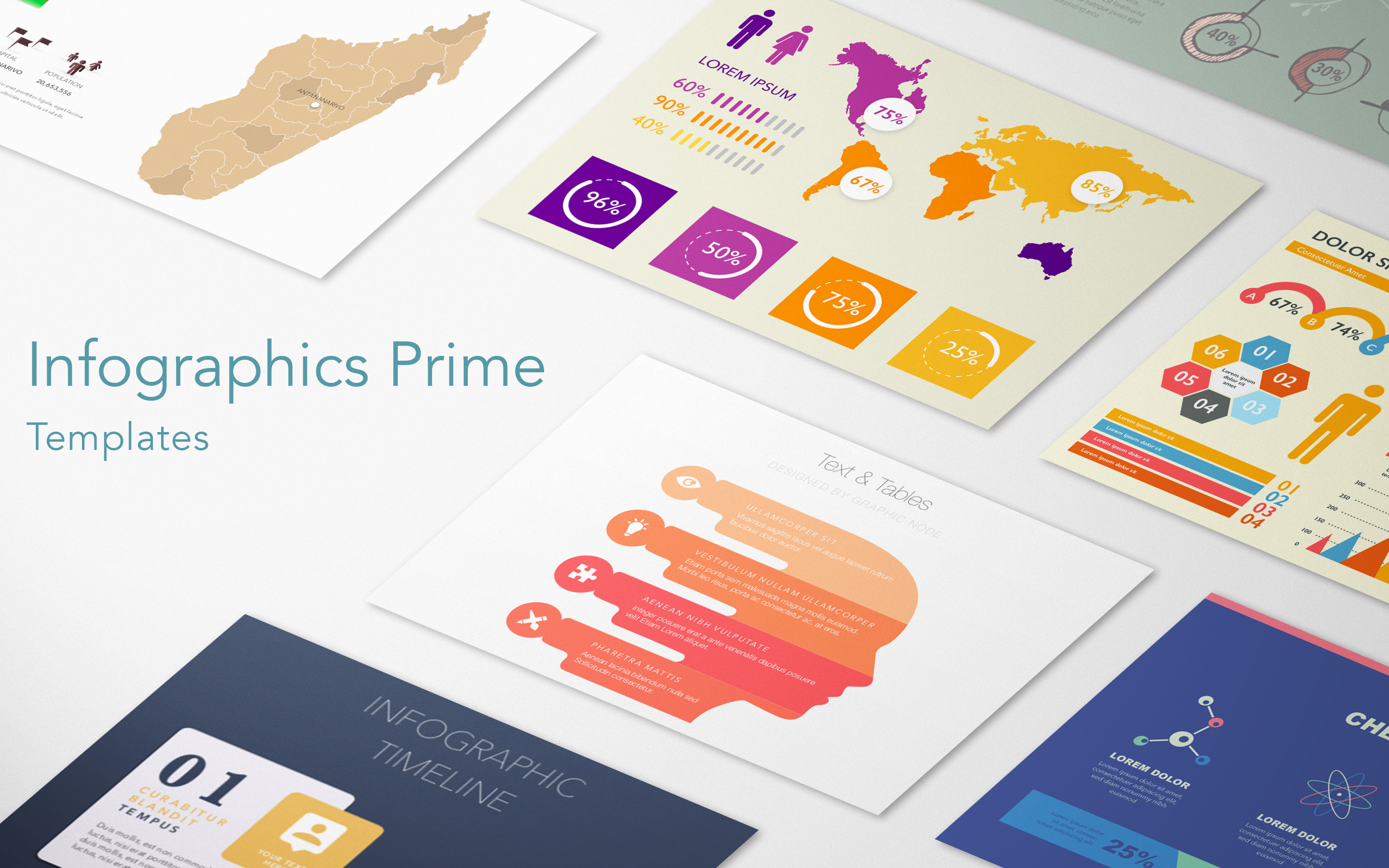
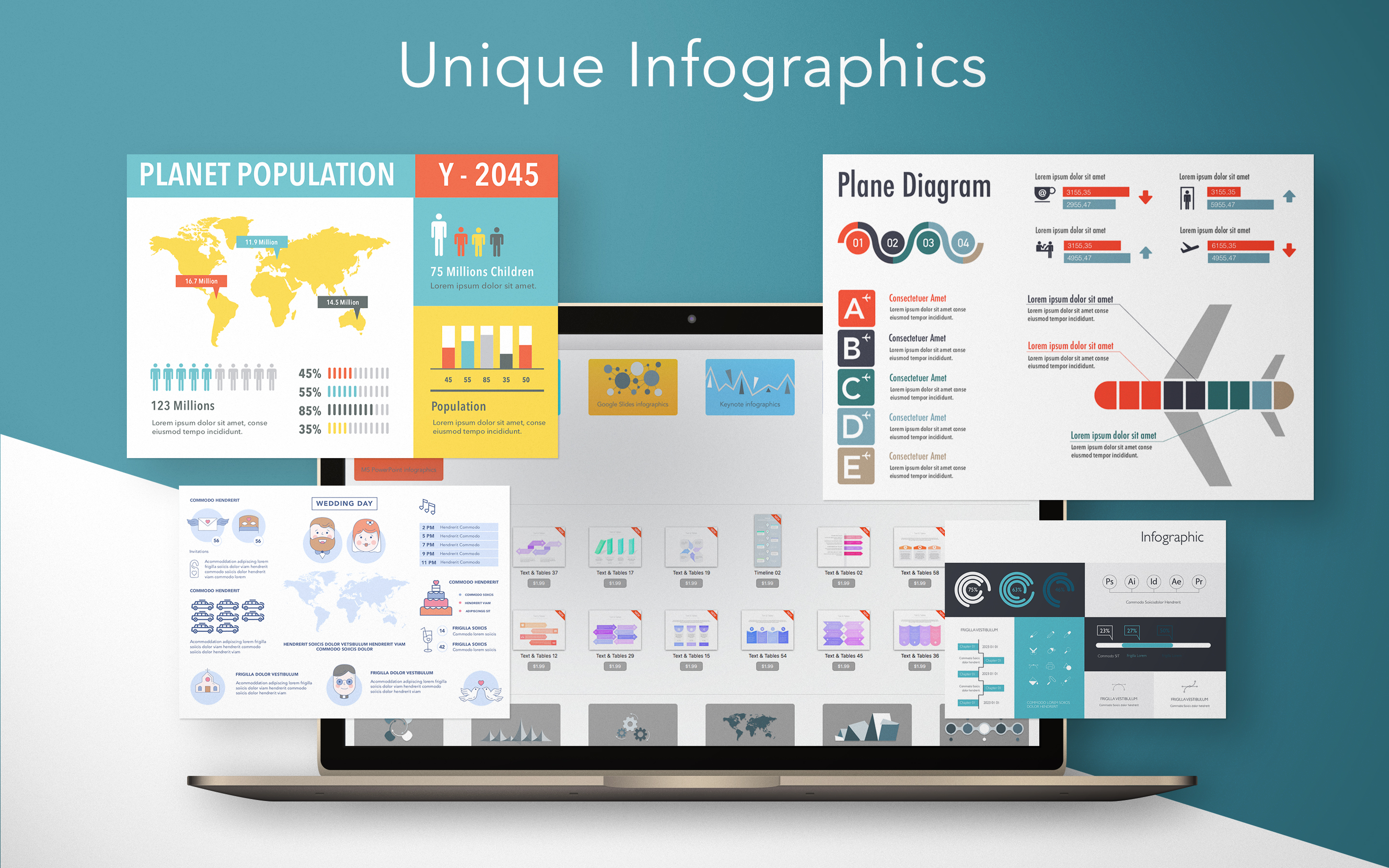
Graphic Node today introduces Infographics Prime for macOS, a new universal infographics powerhouse designed for use with various productivity and image editing applications. Divided into 6 categories, Infographics prime offers over 1000 unique infographics templates for use with leading productivity and image editing apps, including Apple Keynote, Apple Pages, Microsoft PowerPoint, Microsoft Word. Adobe Photoshop, Adobe Illustrator, Google Slides and much more.
Sakiai, Lithuania - Graphic Node, developers of popular Mac productivity assistant applications, have launched a brand-new product today. Infographics Prime is the new universal infographics powerhouse, designed for use with various productivity and image editing applications. Infographics prime offers over 1000 unique infographics templates for use with the following productivity and image editing apps:
* Apple Keynote
* Apple Pages
* Microsoft PowerPoint
* Microsoft Word
* Adobe Photoshop
* Adobe Illustrator
* Google Slides
This is the widest range of supported application from any products of the kind on the Mac App Store. Content is currently divided into 6 categories:
* Country Maps
* Elements
* Timelines
* Diagrams
* Text & Tables
* Charts
"We have noticed a significant increase in requests for infographics themes and templates in some of our other products recently. Our design team spent countless hours developing new items and adapting them for use with a large range of software" - said Arunas Puodziukas, general manager of Graphic Node. "We have developed over 400 original designs and brought them into one convenient application, where they are sorted by software and category. Of course, we will not stop there, and in true Graphic Node fashion, we will keep adding content to the app over time. We are sure it will become an indispensable infographics tool for many!"
Pricing and Availability:
Infographics Prime 1.0.1 is available now on the Mac App Store for $19.99 (USD). Apple Keynote, Apple Pages, Microsoft PowerPoint, Microsoft Word, Adobe Photoshop, Adobe Illustrator, Google Slides apps are not included and should be obtained from their respective developers.
Graphic Node: http://graphicnode.com/
Infographics Prime 1.0.1: https://itunes.apple.com/app/infographics-prime-templates/id1400317513
Screenshot 1: https://download.graphicnode.com/Temporary/infographic_01.jpg
Screenshot 2: https://download.graphicnode.com/Temporary/infographic_02.jpg

Screenshot 3: https://download.graphicnode.com/Temporary/infographic_03.jpg
App Icon: https://download.graphicnode.com/Temporary/infographic_icon_256x256.png

Graphic Node is a graphic design company based in Lithuania and committed to creating exceptional templates and themes for the Mac OS X community. The company defines its work through careful attention to rich visuals, ease of use and wide adaptability. Graphic Node's products are designed to save users time and help them achieve the best results. Copyright (C) 2018 Graphic Node. All Rights Reserved. Apple, the Apple logo, Mac OS X, and Macintosh are registered trademarks of Apple Inc. in the U.S. and/or other countries.
*******
Link To Article: https://prmac.com/release-id-82836.htm
*******
---------------------------------------------------------------------------------
Note that you can alter delivered distributions at any time.
Login to your account on prMac to alter your channel selection, or to opt-out at any time.
Subscribe to:
Posts (Atom)