A new article has been published at prMac.
App Tamer 2.4 can hide idle apps and its own CPU graph - Published on 07/18/18
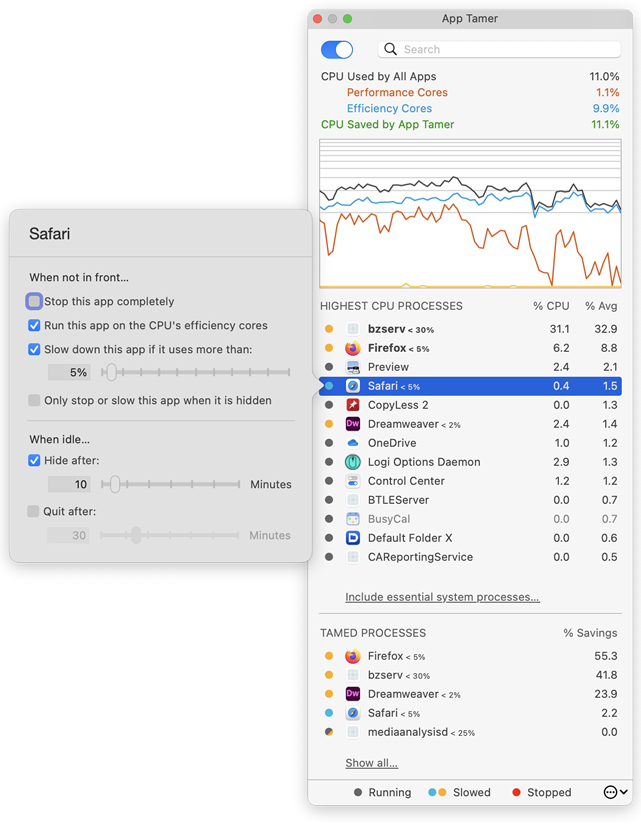
St. Clair Software delivers an update today for App Tamer, its Macintosh utility that manages applications to yield more efficient CPU usage, increased battery life and quieter operation. App Tamer's unique AutoStop capability automatically slows down or pauses applications when you switch away from them, and then restarts them when you click back to them. Version 2.4 offers a new option to hide idle applications, offers more customization of its interface, and addresses bugs and issues.
Denver, Colorado - St. Clair Software is happy to announce the availability of a free update to its App Tamer utility for macOS. App Tamer 2.4 features a new option to quit idle applications, allows its CPU usage graph to be hidden, and offers several bug fixes and other improvements.
The changes in version 2.4 include:
* The CPU usage graph in App Tamer's window can now be turned off
* App Tamer can be set to hide an application after a certain amount of idle time
* Scroll wheel use is recognized as activity in an application even if the app is in the background
* A bug has been fixed that caused incorrect process throttling if the "Do not slow or stop apps if power is plugged in" option was turned on
* User interface issues have been corrected
More about App Tamer:
Some Mac applications, especially web browsers, continue running tasks or animations even when they're supposed to be idle in the background. This can consume valuable processing power, reducing battery life and producing heat that increases fan noise. App Tamer's unique AutoStop capability automatically slows down or pauses these applications when you switch away from them, and then restarts them when you click back to them. This frees your CPU and reduces power consumption.
App Tamer comes pre-configured to automatically manage Safari, Firefox, Chrome, Spotlight, Time Machine, Word and many other apps when they're in the background. And customizing it for other applications is just a mouse click away.
Pricing and Availability:
App Tamer will operate on any Macintosh running macOS 10.8 or higher, and is free to try for 15 days. A license to continue using it after the trial period is $14.95 (USD). This update is free for users who purchased App Tamer 2.x or bought App Tamer 1.x after July 1, 2013. For those that purchased a license before that date, the upgrade is $7.95 (USD).
St. Clair Software: http://www.stclairsoft.com/
App Tamer 2.4: http://www.stclairsoft.com/AppTamer/
Download App Tamer: http://www.stclairsoft.com/cgi-bin/dl.cgi?AT
Purchase: http://stclairsoft.com/store
Screenshot: http://www.stclairsoft.com/AppTamer/images/MainPanelWithSettingsTall.png
Application Icon: http://www.stclairsoft.com/AppTamer/images/AppTamerIcon.png
Based in Denver, Colorado, St. Clair Software is a privately held company that has been specializing in utilities and custom software solutions for the Macintosh since 1988. St. Clair Software can be contacted at: St. Clair Software, 271 S. Emerson Street, Denver, CO, USA 80209. Copyright (C) 1988-2018 St. Clair Software. All Rights Reserved. Apple, the Apple logo, and Macintosh are registered trademarks of Apple Inc. in the U.S. and/or other countries.
*******
Link To Article: https://prmac.com/release-id-82874.htm
*******
---------------------------------------------------------------------------------
Note that you can alter delivered distributions at any time.
Login to your account on prMac to alter your channel selection, or to opt-out at any time.


Kids make awesome burgers with the top children's app Bamba Burger 2
A new article has been published at prMac.
Kids make awesome burgers with the top children's app Bamba Burger 2 - Published on 07/18/18
The long awaited follow-up to the super popular Bamba Burger is here. This sequel to the best children's burger making app has gotten bigger and better! Like the first app, Bamba Burger 2 is an interactive toy for children to imagine they are running a burger restaurant. In Bamba Burger 2, kids can slice burger buns, cook all sorts of fun ingredients, stack the tallest, craziest burgers, make crispy french fries, pour soda, build a 5-tier ice-cream soft serve and finally, eat it all.
Singapore - Mezmedia is proud to announce the long-awaited sequel to their most popular app - Bamba Burger 2. With over 4 million downloads for Bamba Burger, the success of this burger restaurant game for kids has led to calls for a sequel. The Singapore-based game studio has obliged with the release of Bamba Burger 2 on the App Store and on Google Play.
In Bamba Burger 2, kids pretend to play cook and customer in a burger restaurant. There are a lot of cooking activities for the kids to do. First, the player chooses the type of bun, which range from the standard fare (burger bun) to the weird (brick burger anyone?). Next up, the player cooks the ingredients on a frying pan, tossing them about. Then comes the fun part where they start building the burger with over 20 wacky ingredients to choose from, such as Radioactive Goo, or a Pirate Hat! And that is not all, the player can make side dishes like mashed potatoes, crinkle cut fries, soda and ice-cream.
The player 'pays' for the meal by dropping coins into a cash register. Then comes the best part - eating what they've made! With every meal completed, there's a mystery gift with a surprise toy inside. The screenshot button allows players to save pictures of the fantastic burger they've made.
Learning through play is what Bamba Burger 2 is about. Here, kids learn about different ingredients, objects, how things are made and how to count. There are plenty of educational opportunities with Bamba Burger 2.
The development studio encourages parents to play with their children to promote family bonding and improve learning. Parents can play the customer and order a cheeseburger, for example, while the child plays the restaurant chef and tries to assemble it in Bamba Burger 2. Real world props like a chef's hat and apron are recommended to make the experience more enriching and fun.
Bamba Burger 2 is language free. There is no text within the game so players are not restricted to learning a particular language. It is up to the parent to teach in his or her language of choice. It is an excellent tool for learning new words.
Bamba apps are all about being wacky and gross. So kids can find special ingredients like the Dirty Shoe, the Slimy Tentacle or the Mouldy Bun, along with 'standard' fare like a Burger Patty, Cheese and Ketchup.
"Which kid doesn't love fast food? Fries and burgers are a favorite with my 3-year old, but they can't always have it, so that's where the idea for Bamba Burger came about. With this sequel, we've taken feedback from our users and made it much better, with longer engagement periods, more activity points and more learning opportunities", said John Ng, co-founder of Mezmedia, the studio behind the Bamba series of education apps for kids.
Supported Languages
* Bamba Burger 2 is designed to be language free
Device Requirements:
* iPhone and iPad
* Android devices
* Requires iOS 10.0 or later, Android 6.0 or later
Pricing and Availability:
Bamba Burger 2 is Free (With In-App Purchases) and available worldwide through the App Store and Google Play in the Education category. For more information, please contact John Ng.
Bamba Burger 2: http://bambatown.com
Download from iTunes: https://itunes.apple.com/app/bamba-burger-2/id1387372144
Download from Google Play: https://play.google.com/store/apps/details?id=com.mezmedia.bambaburgerkitchen
YouTube Video (Gameplay Trailer): https://www.youtube.com/watch?v=TIfov0Yka-Q
App Icon: http://www.bambatown.com/wp-content/uploads/2018/07/bamba_burger_2_icon_iOS.png
Press Kit (zip): http://www.bambatown.com/wp-content/uploads/2018/07/screenshots_burgertwo_5.5_eng.zip
Mezmedia is an interactive studio based in Singapore. Under the Bamba brand, we create fun interactive toys for kids. It is our belief that interactive toys offer a new and exciting way to educate young children, learning through play. Our apps are designed to stimulate a child's imagination and creativity. Copyright (C) 2018 Mezmedia Pte Ltd. All Rights Reserved. Apple, the Apple logo, iPhone, iPod and iPad are registered trademarks of Apple Inc. in the U.S. and/or other countries.
*******
Link To Article: https://prmac.com/release-id-82875.htm
*******
---------------------------------------------------------------------------------
Note that you can alter delivered distributions at any time.
Login to your account on prMac to alter your channel selection, or to opt-out at any time.
Kids make awesome burgers with the top children's app Bamba Burger 2 - Published on 07/18/18
The long awaited follow-up to the super popular Bamba Burger is here. This sequel to the best children's burger making app has gotten bigger and better! Like the first app, Bamba Burger 2 is an interactive toy for children to imagine they are running a burger restaurant. In Bamba Burger 2, kids can slice burger buns, cook all sorts of fun ingredients, stack the tallest, craziest burgers, make crispy french fries, pour soda, build a 5-tier ice-cream soft serve and finally, eat it all.
Singapore - Mezmedia is proud to announce the long-awaited sequel to their most popular app - Bamba Burger 2. With over 4 million downloads for Bamba Burger, the success of this burger restaurant game for kids has led to calls for a sequel. The Singapore-based game studio has obliged with the release of Bamba Burger 2 on the App Store and on Google Play.
In Bamba Burger 2, kids pretend to play cook and customer in a burger restaurant. There are a lot of cooking activities for the kids to do. First, the player chooses the type of bun, which range from the standard fare (burger bun) to the weird (brick burger anyone?). Next up, the player cooks the ingredients on a frying pan, tossing them about. Then comes the fun part where they start building the burger with over 20 wacky ingredients to choose from, such as Radioactive Goo, or a Pirate Hat! And that is not all, the player can make side dishes like mashed potatoes, crinkle cut fries, soda and ice-cream.
The player 'pays' for the meal by dropping coins into a cash register. Then comes the best part - eating what they've made! With every meal completed, there's a mystery gift with a surprise toy inside. The screenshot button allows players to save pictures of the fantastic burger they've made.
Learning through play is what Bamba Burger 2 is about. Here, kids learn about different ingredients, objects, how things are made and how to count. There are plenty of educational opportunities with Bamba Burger 2.
The development studio encourages parents to play with their children to promote family bonding and improve learning. Parents can play the customer and order a cheeseburger, for example, while the child plays the restaurant chef and tries to assemble it in Bamba Burger 2. Real world props like a chef's hat and apron are recommended to make the experience more enriching and fun.
Bamba Burger 2 is language free. There is no text within the game so players are not restricted to learning a particular language. It is up to the parent to teach in his or her language of choice. It is an excellent tool for learning new words.
Bamba apps are all about being wacky and gross. So kids can find special ingredients like the Dirty Shoe, the Slimy Tentacle or the Mouldy Bun, along with 'standard' fare like a Burger Patty, Cheese and Ketchup.
"Which kid doesn't love fast food? Fries and burgers are a favorite with my 3-year old, but they can't always have it, so that's where the idea for Bamba Burger came about. With this sequel, we've taken feedback from our users and made it much better, with longer engagement periods, more activity points and more learning opportunities", said John Ng, co-founder of Mezmedia, the studio behind the Bamba series of education apps for kids.
Supported Languages
* Bamba Burger 2 is designed to be language free
Device Requirements:
* iPhone and iPad
* Android devices
* Requires iOS 10.0 or later, Android 6.0 or later
Pricing and Availability:
Bamba Burger 2 is Free (With In-App Purchases) and available worldwide through the App Store and Google Play in the Education category. For more information, please contact John Ng.
Bamba Burger 2: http://bambatown.com
Download from iTunes: https://itunes.apple.com/app/bamba-burger-2/id1387372144
Download from Google Play: https://play.google.com/store/apps/details?id=com.mezmedia.bambaburgerkitchen
YouTube Video (Gameplay Trailer): https://www.youtube.com/watch?v=TIfov0Yka-Q
App Icon: http://www.bambatown.com/wp-content/uploads/2018/07/bamba_burger_2_icon_iOS.png

Press Kit (zip): http://www.bambatown.com/wp-content/uploads/2018/07/screenshots_burgertwo_5.5_eng.zip
Mezmedia is an interactive studio based in Singapore. Under the Bamba brand, we create fun interactive toys for kids. It is our belief that interactive toys offer a new and exciting way to educate young children, learning through play. Our apps are designed to stimulate a child's imagination and creativity. Copyright (C) 2018 Mezmedia Pte Ltd. All Rights Reserved. Apple, the Apple logo, iPhone, iPod and iPad are registered trademarks of Apple Inc. in the U.S. and/or other countries.
*******
Link To Article: https://prmac.com/release-id-82875.htm
*******
---------------------------------------------------------------------------------
Note that you can alter delivered distributions at any time.
Login to your account on prMac to alter your channel selection, or to opt-out at any time.
Logo Pop Adds 250 New Editable Graphics To Make Logo Design Even Easier
A new article has been published at prMac.
Logo Pop Adds 250 New Editable Graphics To Make Logo Design Even Easier - Published on 07/17/18
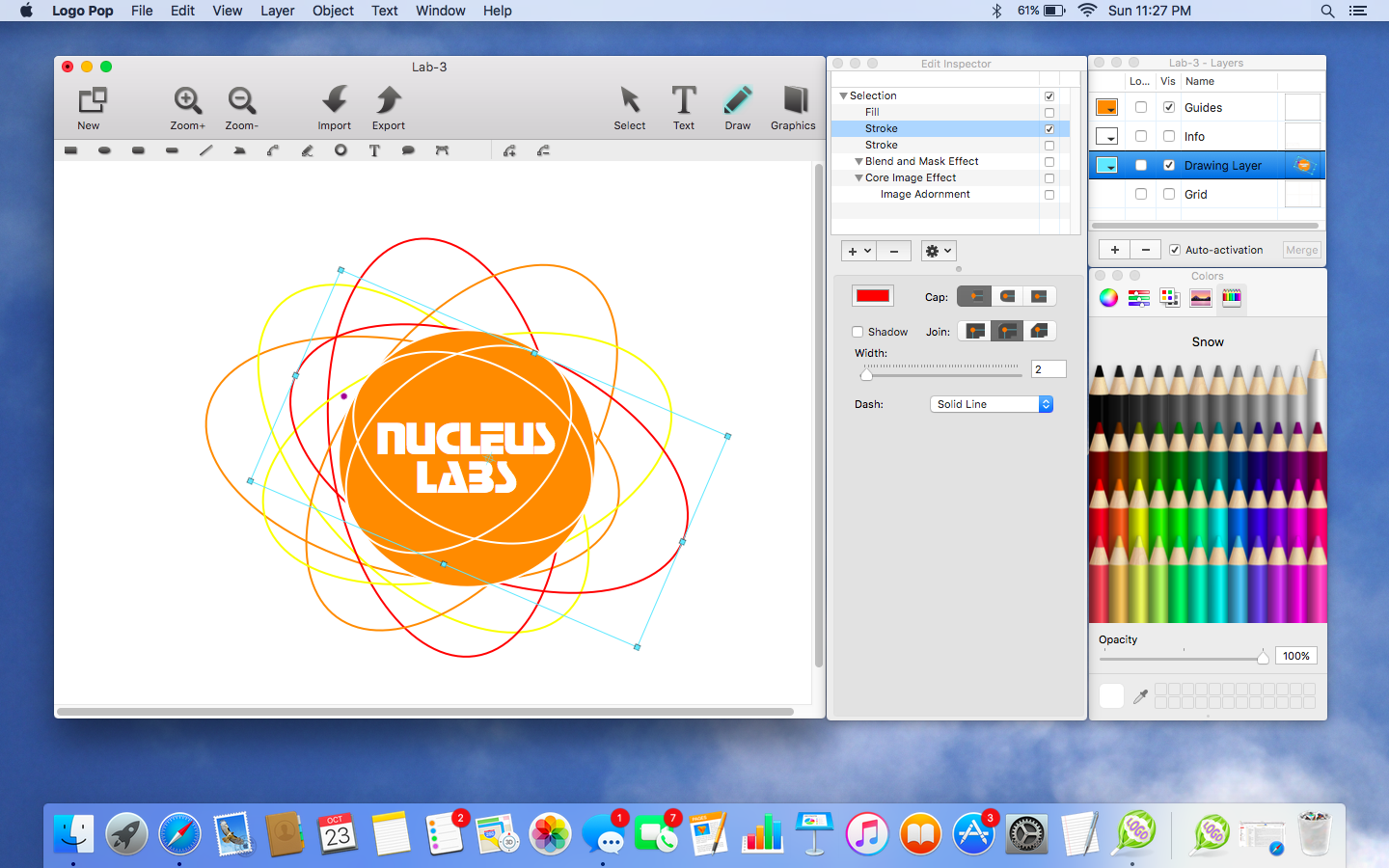
MacAppware, a division of 128bit Technologies, announced today it has added 250 new editable graphics to its popular Logo Pop, the powerful logo design app for Mac. Easily create a professional looking vector based logo, and then use it online or in print with support for all popular image formats including transparent PNGs, and vector PDF and SVG formats. Logo Pop also includes a library of pre-designed logo templates and editable graphics to get you started.
San Francisco, California - 128bit Technologies announced Logo Pop version 1.1 today, a vector based logo design app available on the MacAppware website and the Mac App Store. To celebrate the new version, you can grab this easy logo creator for a limited time price of $19.99 (50% off). The powerful logo design app adds 250 new editable logo graphics to give users a quick start to creating the right look for their business or organization.
Logo Pop comes packed with a large library of pre-designed logo templates and logo graphics in SVG format (scalable vector graphic) you can use royalty free. From concept to design to using your logo in print or online, Logo Pop is a quick way to create a professional looking logo!
Not sure where to start? No problem! Quickly open and edit any of the 150 pre-designed logo templates with your own text, change colors, add shapes or drawings, and even browse through more than 750 included logo graphics to create the look that's right for you.
Save time and money by becoming your own logo creator. Stay away from overpriced design firms and cookie cutter online logo services that don't always understand what you want and charge extra for more concepts. Use Logo Pop to quickly add shapes and text, draw unique illustrations, adjust colors, add strokes, and more in order to make your identity stand out. Then save and export your logo to use on websites, business cards, letterhead, merchandise, social media, product packaging, banners, advertisements, profile pictures, and any other branding or marketing piece.
Logo Pop highlights:
* Includes 750 editable vector logo graphics to use royalty free
* Includes 150 pre-designed logo templates to quickly edit and make your own
* Create unlimited concepts and designs
* Perfect for any industry or interest
* Vector-based drawing tools and graphics keep your design sharp at any size
* You can even sell your logo designs to others because everything in Logo Pop is royalty free
* Draw your own illustrations and graphics
* Draw tools include Rectangle, Oval, Round Rectangle, Round End Rectangle, Line, Polygon, Path, Freehand, Ring, Speech Balloon, and Arc
* Use what you design royalty free
* Convert text to a shape, path, or even a shape group to easily rearrange the characters
* Adjust freehand drawing to create smooth looking paths
* Add strokes (regular, arrowed, rough, zig-zag)
* Add fills (solid, gradient, pattern, zig-zag, hatch)
* Add text on a path
* Create curved and wavy text
* Create Outline text
* Add an image to text
* Boolean operation support to combine shapes
* Blend and mask effects
* Over 130 filters and effects
* Enhance pictures
* Full layer support
* Easily align multiple items on your canvas
* Rulers and guides make it easy to place items in the right location
* Snap to grid, snap to guides, or snap to other objects
* Zoom in or out to get every detail pixel perfect
* Export in fully editable SVG and vector PDF
* Export as an image (JPEG, TIFF, PNG, BMP, GIF)
* Supports transparent backgrounds
* Extensive help file explains Logo Pop's tools in detail
* Video tutorials available on the MacAppware website
* And more
No one knows your business better than you! From concept, to design, to using your logo in print or online, you will not find a better logo design app!
System Requirements:
* macOS 10.7 or newer (including Mojave)
* 64-bit processor
* 20 MB
Pricing and Availability:
Logo Pop 1.1 is available on the MacAppware website, and through the Mac App Store in the Graphics & Design category for the limited time price of $19.99 (USD), a savings of 50% off the normal price of $39.99.
MacAppware: https://macappware.com
Logo Pop 1.1: https://macappware.com/software/logo-pop
Purchase and Download (MAS): https://itunes.apple.com/app/logo-pop-logo-design-made-easy/id1167995641
Free Logo Fonts: https://macappware.com/software/free-fonts/
Screenshot: https://macappware.com/images/logo/Logo-Pop-mac-logo-design-1.png
Application Icon: https://macappware.com/images/logo/Logo-Pop-app-icon-256.png
MacAppware is a division of 128bit Technologies and a dedicated Mac software developer currently offering graphic design, image editing and disk utility applications; unique commercial use font collections; and a carefully curated rotation of bundles and deals. Copyright (C) 2018 128bit Technologies. All Rights Reserved. Apple, the Apple logo, Mac OS X, and Macintosh are registered trademarks of Apple Inc. in the U.S. and/or other countries. All other trademarks are the property of their respective owners.
*******
Link To Article: https://prmac.com/release-id-82872.htm
*******
---------------------------------------------------------------------------------
Note that you can alter delivered distributions at any time.
Login to your account on prMac to alter your channel selection, or to opt-out at any time.
Logo Pop Adds 250 New Editable Graphics To Make Logo Design Even Easier - Published on 07/17/18
MacAppware, a division of 128bit Technologies, announced today it has added 250 new editable graphics to its popular Logo Pop, the powerful logo design app for Mac. Easily create a professional looking vector based logo, and then use it online or in print with support for all popular image formats including transparent PNGs, and vector PDF and SVG formats. Logo Pop also includes a library of pre-designed logo templates and editable graphics to get you started.
San Francisco, California - 128bit Technologies announced Logo Pop version 1.1 today, a vector based logo design app available on the MacAppware website and the Mac App Store. To celebrate the new version, you can grab this easy logo creator for a limited time price of $19.99 (50% off). The powerful logo design app adds 250 new editable logo graphics to give users a quick start to creating the right look for their business or organization.
Logo Pop comes packed with a large library of pre-designed logo templates and logo graphics in SVG format (scalable vector graphic) you can use royalty free. From concept to design to using your logo in print or online, Logo Pop is a quick way to create a professional looking logo!
Not sure where to start? No problem! Quickly open and edit any of the 150 pre-designed logo templates with your own text, change colors, add shapes or drawings, and even browse through more than 750 included logo graphics to create the look that's right for you.
Save time and money by becoming your own logo creator. Stay away from overpriced design firms and cookie cutter online logo services that don't always understand what you want and charge extra for more concepts. Use Logo Pop to quickly add shapes and text, draw unique illustrations, adjust colors, add strokes, and more in order to make your identity stand out. Then save and export your logo to use on websites, business cards, letterhead, merchandise, social media, product packaging, banners, advertisements, profile pictures, and any other branding or marketing piece.
Logo Pop highlights:
* Includes 750 editable vector logo graphics to use royalty free
* Includes 150 pre-designed logo templates to quickly edit and make your own
* Create unlimited concepts and designs
* Perfect for any industry or interest
* Vector-based drawing tools and graphics keep your design sharp at any size
* You can even sell your logo designs to others because everything in Logo Pop is royalty free
* Draw your own illustrations and graphics
* Draw tools include Rectangle, Oval, Round Rectangle, Round End Rectangle, Line, Polygon, Path, Freehand, Ring, Speech Balloon, and Arc
* Use what you design royalty free
* Convert text to a shape, path, or even a shape group to easily rearrange the characters
* Adjust freehand drawing to create smooth looking paths
* Add strokes (regular, arrowed, rough, zig-zag)
* Add fills (solid, gradient, pattern, zig-zag, hatch)
* Add text on a path
* Create curved and wavy text
* Create Outline text
* Add an image to text
* Boolean operation support to combine shapes
* Blend and mask effects
* Over 130 filters and effects
* Enhance pictures
* Full layer support
* Easily align multiple items on your canvas
* Rulers and guides make it easy to place items in the right location
* Snap to grid, snap to guides, or snap to other objects
* Zoom in or out to get every detail pixel perfect
* Export in fully editable SVG and vector PDF
* Export as an image (JPEG, TIFF, PNG, BMP, GIF)
* Supports transparent backgrounds
* Extensive help file explains Logo Pop's tools in detail
* Video tutorials available on the MacAppware website
* And more
No one knows your business better than you! From concept, to design, to using your logo in print or online, you will not find a better logo design app!
System Requirements:
* macOS 10.7 or newer (including Mojave)
* 64-bit processor
* 20 MB
Pricing and Availability:
Logo Pop 1.1 is available on the MacAppware website, and through the Mac App Store in the Graphics & Design category for the limited time price of $19.99 (USD), a savings of 50% off the normal price of $39.99.
MacAppware: https://macappware.com
Logo Pop 1.1: https://macappware.com/software/logo-pop
Purchase and Download (MAS): https://itunes.apple.com/app/logo-pop-logo-design-made-easy/id1167995641
Free Logo Fonts: https://macappware.com/software/free-fonts/
Screenshot: https://macappware.com/images/logo/Logo-Pop-mac-logo-design-1.png
Application Icon: https://macappware.com/images/logo/Logo-Pop-app-icon-256.png

MacAppware is a division of 128bit Technologies and a dedicated Mac software developer currently offering graphic design, image editing and disk utility applications; unique commercial use font collections; and a carefully curated rotation of bundles and deals. Copyright (C) 2018 128bit Technologies. All Rights Reserved. Apple, the Apple logo, Mac OS X, and Macintosh are registered trademarks of Apple Inc. in the U.S. and/or other countries. All other trademarks are the property of their respective owners.
*******
Link To Article: https://prmac.com/release-id-82872.htm
*******
---------------------------------------------------------------------------------
Note that you can alter delivered distributions at any time.
Login to your account on prMac to alter your channel selection, or to opt-out at any time.
On World Emoji Day, KeyCue 9 reinvents emoji typing - save 25% today
A new article has been published at prMac.
On World Emoji Day, KeyCue 9 reinvents emoji typing - save 25% today - Published on 07/17/18
Did you know that July 17th is World Emoji Day? As it happens, this is also the release date of KeyCue 9, which revolutionizes input of emoji characters. While the online community loves emojis, people become more and more frustrated about the confusing multitude of slightly different emojis, which makes it tedious to choose and type the right one. This is where KeyCue 9 comes to help. KeyCue 9 shows a table of all available emoji characters and lets you insert any emoji with a click.
Perg, Austria - Did you know that July 17th is World Emoji Day? As it happens, this is also the release date of KeyCue 9, which revolutionizes input of emoji characters. Today, KeyCue 9 reinvents emoji typing. While the online community loves emojis, people become more and more frustrated about the confusing multitude of slightly different emojis, which makes it tedious to choose and type the right one. This is where KeyCue 9 comes to help.
KeyCue 9 shows a table of all available emoji characters and lets you insert any emoji with a click. To find out more about a certain emoji, move the mouse pointer over it to see an enlarged view and a description of the emoji's meaning. You can also enter a search term in KeyCue's find field to focus on the matching emoji characters, or choose from the list of recently used emojis. Finding and typing the right emoji has never been easier.
World Emoji Day is great, but Ergonis made it even better, proclaiming World Emoji WEEK. During the seven days from July 17th to July 23rd, you can purchase a license for KeyCue 9 - the ultimate emoji picker - for only EUR 14.99, which is 25% off the regular price. Enter coupon code "WorldEmojiWeek18PE" during checkout (does not apply to upgrade orders).
Typing emoji characters is only one new feature of KeyCue 9. KeyCue's originally designated use case is to help you to use your macOS applications more efficiently by making best use of keyboard shortcuts. The productivity paradox of keyboard shortcuts is that shortcuts were designed to increase productivity. However, productivity actually decreases when applications provide large numbers of shortcuts, in particular when the shortcuts are defined inconsistently across applications. KeyCue's elegantly simple solution is to display an instant overview of currently available keyboard shortcuts, application-specific menu shortcuts as well as system-wide hotkeys, and user-defined shortcut descriptions. Over time, KeyCue users will automatically remember frequently used shortcuts and start working more efficiently.
Visit Ergonis Software's website to see how KeyCue can help you to type emoji and to download a free trial version. KeyCue has already received many awards, including a 4.5-Mice award from MacWorld magazine.
System Requirements:
KeyCue 9.0 requires Mac OS X 10.7 or newer and has been tested successfully with current preview versions of macOS Mojave (10.14).
Availability and Ordering:
The upgrade to KeyCue 9.0 is free for anyone who purchased a license for KeyCue 8 on or after October 1st 2017. Upgrade paths are available for owners of older licenses. All KeyCue 9 purchases (new and upgrades alike) include all subsequent 9.x upgrades at no additional cost. For information about purchases, including enterprise licenses, volume discounts, and upgrade pricing offers, see the company's web site.
Celebrating World Emoji Day/Week, get 25 % off the regular price if you place your order for KeyCue 9 before July 24th by entering coupon code "WorldEmojiWeek18PE" during checkout (does not apply to upgrade orders).
Ergonis Software: http://www.ergonis.com
KeyCue 9.0: http://www.ergonis.com/products/keycue
Download KeyCue: http://www.ergonis.com/downloads/keycue-install.dmg
Purchase: https://store.ergonis.com/products/keycue
Image (KeyCue 9 is the ultimate emoji picker on macOS): http://www.ergonis.com/press/2018/20180717/keycue-emoji-picker.png
Media Assets: http://www.ergonis.com/press
Headquartered in Perg, Austria, Ergonis Software Gmbh is a privately held software development company founded in 2002. With a focus on innovation, Ergonis develops ergonomic and intuitive software that boosts the productivity of Mac and PC users alike. Copyright 2002-2018 Ergonis Software Gmbh. All Rights Reserved. Ergonis products are either registered trademarks or trademarks of Ergonis Software GmbH. Other company and product names may be trademarks of their respective owners.
*******
Link To Article: https://prmac.com/release-id-82871.htm
*******
---------------------------------------------------------------------------------
Note that you can alter delivered distributions at any time.
Login to your account on prMac to alter your channel selection, or to opt-out at any time.
On World Emoji Day, KeyCue 9 reinvents emoji typing - save 25% today - Published on 07/17/18
Did you know that July 17th is World Emoji Day? As it happens, this is also the release date of KeyCue 9, which revolutionizes input of emoji characters. While the online community loves emojis, people become more and more frustrated about the confusing multitude of slightly different emojis, which makes it tedious to choose and type the right one. This is where KeyCue 9 comes to help. KeyCue 9 shows a table of all available emoji characters and lets you insert any emoji with a click.
Perg, Austria - Did you know that July 17th is World Emoji Day? As it happens, this is also the release date of KeyCue 9, which revolutionizes input of emoji characters. Today, KeyCue 9 reinvents emoji typing. While the online community loves emojis, people become more and more frustrated about the confusing multitude of slightly different emojis, which makes it tedious to choose and type the right one. This is where KeyCue 9 comes to help.
KeyCue 9 shows a table of all available emoji characters and lets you insert any emoji with a click. To find out more about a certain emoji, move the mouse pointer over it to see an enlarged view and a description of the emoji's meaning. You can also enter a search term in KeyCue's find field to focus on the matching emoji characters, or choose from the list of recently used emojis. Finding and typing the right emoji has never been easier.
World Emoji Day is great, but Ergonis made it even better, proclaiming World Emoji WEEK. During the seven days from July 17th to July 23rd, you can purchase a license for KeyCue 9 - the ultimate emoji picker - for only EUR 14.99, which is 25% off the regular price. Enter coupon code "WorldEmojiWeek18PE" during checkout (does not apply to upgrade orders).
Typing emoji characters is only one new feature of KeyCue 9. KeyCue's originally designated use case is to help you to use your macOS applications more efficiently by making best use of keyboard shortcuts. The productivity paradox of keyboard shortcuts is that shortcuts were designed to increase productivity. However, productivity actually decreases when applications provide large numbers of shortcuts, in particular when the shortcuts are defined inconsistently across applications. KeyCue's elegantly simple solution is to display an instant overview of currently available keyboard shortcuts, application-specific menu shortcuts as well as system-wide hotkeys, and user-defined shortcut descriptions. Over time, KeyCue users will automatically remember frequently used shortcuts and start working more efficiently.
Visit Ergonis Software's website to see how KeyCue can help you to type emoji and to download a free trial version. KeyCue has already received many awards, including a 4.5-Mice award from MacWorld magazine.
System Requirements:
KeyCue 9.0 requires Mac OS X 10.7 or newer and has been tested successfully with current preview versions of macOS Mojave (10.14).
Availability and Ordering:
The upgrade to KeyCue 9.0 is free for anyone who purchased a license for KeyCue 8 on or after October 1st 2017. Upgrade paths are available for owners of older licenses. All KeyCue 9 purchases (new and upgrades alike) include all subsequent 9.x upgrades at no additional cost. For information about purchases, including enterprise licenses, volume discounts, and upgrade pricing offers, see the company's web site.
Celebrating World Emoji Day/Week, get 25 % off the regular price if you place your order for KeyCue 9 before July 24th by entering coupon code "WorldEmojiWeek18PE" during checkout (does not apply to upgrade orders).
Ergonis Software: http://www.ergonis.com
KeyCue 9.0: http://www.ergonis.com/products/keycue
Download KeyCue: http://www.ergonis.com/downloads/keycue-install.dmg
Purchase: https://store.ergonis.com/products/keycue
Image (KeyCue 9 is the ultimate emoji picker on macOS): http://www.ergonis.com/press/2018/20180717/keycue-emoji-picker.png

Media Assets: http://www.ergonis.com/press
Headquartered in Perg, Austria, Ergonis Software Gmbh is a privately held software development company founded in 2002. With a focus on innovation, Ergonis develops ergonomic and intuitive software that boosts the productivity of Mac and PC users alike. Copyright 2002-2018 Ergonis Software Gmbh. All Rights Reserved. Ergonis products are either registered trademarks or trademarks of Ergonis Software GmbH. Other company and product names may be trademarks of their respective owners.
*******
Link To Article: https://prmac.com/release-id-82871.htm
*******
---------------------------------------------------------------------------------
Note that you can alter delivered distributions at any time.
Login to your account on prMac to alter your channel selection, or to opt-out at any time.
KeyCue 9 reinvents emoji typing - save 25% on World Emoji Day
A new article has been published at prMac.
KeyCue 9 reinvents emoji typing - save 25% on World Emoji Day - Published on 07/17/18
Ergonis Software today released KeyCue 9.0, a brand new major version of the company's highly acclaimed keyboard shortcut learning tool, which now includes a slick emoji picker and more. KeyCue has been helping Mac users to learn and use keyboard shortcuts for almost 15 years now. Today, with the new major version 9, KeyCue goes a step further and adds great new features for exploring and typing emojis, quickly accessing folder contents, and many other enhancements.
Perg, Austria - Ergonis Software today released KeyCue 9.0, a brand new major version of the company's highly acclaimed keyboard shortcut learning tool, which now includes a slick emoji picker and more. KeyCue has been helping Mac users to learn and use keyboard shortcuts for almost 15 years now. Today, with the new major version 9, KeyCue goes a step further and adds great new features for exploring and typing emojis, quickly accessing folder contents, and many other enhancements.
Let's start with emoji: Today, July 17th, is World Emoji Day, and therefore the perfect date to announce the new Emoji feature in KeyCue 9. While the online community loves emojis, people become more and more frustrated about the confusing multitude of slightly different emojis, which makes it tedious to choose and type the right one. This is where KeyCue 9 comes to help.
KeyCue 9 shows a table of all available emoji characters and lets you insert any emoji with a click. To find out more about a certain emoji, move the mouse pointer over it to see an enlarged view and a description of the emoji's meaning. You can also enter a search term in KeyCue's find field to focus on the matching emoji characters, or choose from the list of recently used emojis. Finding and typing the right emoji has never been easier.
Coming back to World Emoji Day, Ergonis is delighted to announce that it extends World Emoji Day to World Emoji WEEK. During the seven days from July 17th to July 23rd, you can purchase KeyCue 9 licenses for 25 % off. Enter coupon code "WorldEmojiWeek18PK" during checkout (does not apply to upgrade orders).
Another new view in KeyCue 9 is the folder view, which displays the contents of a particular folder and enables you to explore the folder contents and quickly launch items in this folder. You can use this feature to open documents that you work on (such as those that belong to your current project), launch applications, open help documents, and more - all from one central place.
Besides that, KeyCue 9 delivers a really cool innovation in its originally designated use case - the learning of keyboard shortcuts. KeyCue 9 has the ability to automatically omit shortcuts that you already know. You don't need to tell KeyCue which shortcuts these are, as KeyCue monitors which shortcuts you type without help from KeyCue. If you often use a certain shortcut without looking it up in KeyCue first, KeyCue no longer displays that shortcut. As a result, the shortcut table becomes smaller over time and lets you concentrate on the unknown shortcuts that you still need to learn.
In addition to these highlights, KeyCue 9 contains many further improvements and enhancements, fixes and workarounds for known issues, and improved compatibility for third-party applications and the next macOS version Mojave, which is expected to be released later this year.
Visit Ergonis Software's website to learn more about the changes in this release and to download and try the new version.
The productivity paradox of keyboard shortcuts is that shortcuts were designed to increase productivity. However, productivity actually decreases when applications provide large numbers of shortcuts, in particular when the shortcuts are defined inconsistently across applications. KeyCue's elegantly simple solution is to display an instant overview of currently available keyboard shortcuts, application-specific menu shortcuts as well as system-wide hotkeys, and user-defined shortcut descriptions.
Over time, KeyCue users will automatically remember frequently used shortcuts and start working more efficiently. Besides learning shortcuts, KeyCue helps you to access other items on your Mac by means of just a click: from frequently used URLs over folder contents to emoji characters. KeyCue has already received many awards, including a 4.5-Mice award from MacWorld magazine.
System Requirements:
KeyCue 9.0 requires Mac OS X 10.7 or newer and has been tested successfully with current preview versions of macOS Mojave (10.14).
Availability and Ordering:
The upgrade to KeyCue 9.0 is free for anyone who purchased a license for KeyCue 8 on or after October 1st 2017. Upgrade paths are available for owners of older licenses. All KeyCue 9 purchases (new and upgrades alike) include all subsequent 9.x upgrades at no additional cost. For information about purchases, including enterprise licenses, volume discounts, and upgrade pricing offers, see the company's web site.
Celebrating World Emoji Day, get 25% off the regular price if you place your order for KeyCue 9 before July 24th by entering coupon code "WorldEmojiWeek18PK" during checkout (does not apply to upgrade orders).
Ergonis Software: http://www.ergonis.com
KeyCue 9.0: http://www.ergonis.com/products/keycue
Download KeyCue: http://www.ergonis.com/downloads/keycue-install.dmg
Purchase: https://store.ergonis.com/products/keycue
Image (KeyCue 9 is the ultimate emoji picker): http://www.ergonis.com/press/2018/20180717/keycue-emoji-picker.png
Media Assets: http://www.ergonis.com/press
Headquartered in Perg, Austria, Ergonis Software Gmbh is a privately held software development company founded in 2002. With a focus on innovation, Ergonis develops ergonomic and intuitive software that boosts the productivity of Mac and PC users alike. Copyright 2002-2018 Ergonis Software Gmbh. All Rights Reserved. Ergonis products are either registered trademarks or trademarks of Ergonis Software GmbH. Other company and product names may be trademarks of their respective owners.
*******
Link To Article: https://prmac.com/release-id-82869.htm
*******
---------------------------------------------------------------------------------
Note that you can alter delivered distributions at any time.
Login to your account on prMac to alter your channel selection, or to opt-out at any time.
KeyCue 9 reinvents emoji typing - save 25% on World Emoji Day - Published on 07/17/18
Ergonis Software today released KeyCue 9.0, a brand new major version of the company's highly acclaimed keyboard shortcut learning tool, which now includes a slick emoji picker and more. KeyCue has been helping Mac users to learn and use keyboard shortcuts for almost 15 years now. Today, with the new major version 9, KeyCue goes a step further and adds great new features for exploring and typing emojis, quickly accessing folder contents, and many other enhancements.
Perg, Austria - Ergonis Software today released KeyCue 9.0, a brand new major version of the company's highly acclaimed keyboard shortcut learning tool, which now includes a slick emoji picker and more. KeyCue has been helping Mac users to learn and use keyboard shortcuts for almost 15 years now. Today, with the new major version 9, KeyCue goes a step further and adds great new features for exploring and typing emojis, quickly accessing folder contents, and many other enhancements.
Let's start with emoji: Today, July 17th, is World Emoji Day, and therefore the perfect date to announce the new Emoji feature in KeyCue 9. While the online community loves emojis, people become more and more frustrated about the confusing multitude of slightly different emojis, which makes it tedious to choose and type the right one. This is where KeyCue 9 comes to help.
KeyCue 9 shows a table of all available emoji characters and lets you insert any emoji with a click. To find out more about a certain emoji, move the mouse pointer over it to see an enlarged view and a description of the emoji's meaning. You can also enter a search term in KeyCue's find field to focus on the matching emoji characters, or choose from the list of recently used emojis. Finding and typing the right emoji has never been easier.
Coming back to World Emoji Day, Ergonis is delighted to announce that it extends World Emoji Day to World Emoji WEEK. During the seven days from July 17th to July 23rd, you can purchase KeyCue 9 licenses for 25 % off. Enter coupon code "WorldEmojiWeek18PK" during checkout (does not apply to upgrade orders).
Another new view in KeyCue 9 is the folder view, which displays the contents of a particular folder and enables you to explore the folder contents and quickly launch items in this folder. You can use this feature to open documents that you work on (such as those that belong to your current project), launch applications, open help documents, and more - all from one central place.
Besides that, KeyCue 9 delivers a really cool innovation in its originally designated use case - the learning of keyboard shortcuts. KeyCue 9 has the ability to automatically omit shortcuts that you already know. You don't need to tell KeyCue which shortcuts these are, as KeyCue monitors which shortcuts you type without help from KeyCue. If you often use a certain shortcut without looking it up in KeyCue first, KeyCue no longer displays that shortcut. As a result, the shortcut table becomes smaller over time and lets you concentrate on the unknown shortcuts that you still need to learn.
In addition to these highlights, KeyCue 9 contains many further improvements and enhancements, fixes and workarounds for known issues, and improved compatibility for third-party applications and the next macOS version Mojave, which is expected to be released later this year.
Visit Ergonis Software's website to learn more about the changes in this release and to download and try the new version.
The productivity paradox of keyboard shortcuts is that shortcuts were designed to increase productivity. However, productivity actually decreases when applications provide large numbers of shortcuts, in particular when the shortcuts are defined inconsistently across applications. KeyCue's elegantly simple solution is to display an instant overview of currently available keyboard shortcuts, application-specific menu shortcuts as well as system-wide hotkeys, and user-defined shortcut descriptions.
Over time, KeyCue users will automatically remember frequently used shortcuts and start working more efficiently. Besides learning shortcuts, KeyCue helps you to access other items on your Mac by means of just a click: from frequently used URLs over folder contents to emoji characters. KeyCue has already received many awards, including a 4.5-Mice award from MacWorld magazine.
System Requirements:
KeyCue 9.0 requires Mac OS X 10.7 or newer and has been tested successfully with current preview versions of macOS Mojave (10.14).
Availability and Ordering:
The upgrade to KeyCue 9.0 is free for anyone who purchased a license for KeyCue 8 on or after October 1st 2017. Upgrade paths are available for owners of older licenses. All KeyCue 9 purchases (new and upgrades alike) include all subsequent 9.x upgrades at no additional cost. For information about purchases, including enterprise licenses, volume discounts, and upgrade pricing offers, see the company's web site.
Celebrating World Emoji Day, get 25% off the regular price if you place your order for KeyCue 9 before July 24th by entering coupon code "WorldEmojiWeek18PK" during checkout (does not apply to upgrade orders).
Ergonis Software: http://www.ergonis.com
KeyCue 9.0: http://www.ergonis.com/products/keycue
Download KeyCue: http://www.ergonis.com/downloads/keycue-install.dmg
Purchase: https://store.ergonis.com/products/keycue
Image (KeyCue 9 is the ultimate emoji picker): http://www.ergonis.com/press/2018/20180717/keycue-emoji-picker.png
Media Assets: http://www.ergonis.com/press
Headquartered in Perg, Austria, Ergonis Software Gmbh is a privately held software development company founded in 2002. With a focus on innovation, Ergonis develops ergonomic and intuitive software that boosts the productivity of Mac and PC users alike. Copyright 2002-2018 Ergonis Software Gmbh. All Rights Reserved. Ergonis products are either registered trademarks or trademarks of Ergonis Software GmbH. Other company and product names may be trademarks of their respective owners.
*******
Link To Article: https://prmac.com/release-id-82869.htm
*******
---------------------------------------------------------------------------------
Note that you can alter delivered distributions at any time.
Login to your account on prMac to alter your channel selection, or to opt-out at any time.
AirBeamTV launches Mirror to Windows PC for iPhone and iPad
A new article has been published at prMac.
AirBeamTV launches Mirror to Windows PC for iPhone and iPad - Published on 07/17/18
AirBeamTV today introduces Mirror to Windows PC, a new iPhone and iPad application for screen mirroring from iOS devices to Microsoft PCs. The Mirror to PC app is the first app to allow for wireless screen mirroring, without the need to install an additional receiver application on the PC. Mirror to Windows PC is perfect for those who want to share family photos and videos with friends and for those presenting mobile content at a larger screen during a business meeting.
Naarden, The Netherlands - AirBeamTV today is proud to announce the release and immediate availability of Mirror to Windows PC, a new iPhone and iPad application for screen mirroring from iOS devices to Microsoft PCs. The Mirror to PC app is the first app to allow for wireless screen mirroring, without the need to install an additional receiver application on the PC. This is great news for those owning an iPhone or iPad and willing to share their content on a PC.
According to Roeland van der Spek, co-founder and Director of Special Projects at AirBeamTV: "Developing this app was a challenge that has paid off. It has so many use cases. Mirror to Windows PC is perfect for those who want to share family photos and videos with friends and for those presenting mobile content at a larger screen during a business meeting."
To start the screen mirroring process, customers need to download the Mirror to Windows PC app from the App Store. Before using the app, Screen Recording should be enabled in the iPhone or iPad Control Centre. AirBeamTV provides a video tutorial and a step-by-step guide on how to do this. After enabling Screen Recording in the Control Centre, users should open the Mirror to Windows PC app and use the Chrome browser on their PC to go to start.airbeam.tv and connect to the PC. After connecting, consumers can slide up Control Centre from within any app, firmly press and hold the Screen Recording button and start mirroring. Mirroring includes video as well as audio.
Pricing and Availability:
Mirror to PC ($4.99) runs on every iPhone or iPad that uses iOS 11 or newer and available worldwide exclusively through the App Store in the Photo & Video category. It works on any PC, as long as the Google Chrome browser (which can be downloaded for free) is installed. Promo codes are available to members of the press. For more information, please contact Jan Van Ottele.
AirBeamTV: https://www.airbeam.tv/
Mirror to Windows PC (v1.0): https://www.airbeam.tv/iphoneipad/buy/mirror-ios-windows-pc/
Purchase and Download: https://itunes.apple.com/app/mirror-to-windows-pc/id1350663974
Screenshots: https://drive.google.com/drive/folders/1MRptTKzvhZ5ZEgc-XwBilHdLT82kFI5n?usp=sharing
App Icon: https://drive.google.com/open?id=194yWeQILPhD5LVSNoMUel12v0YKiE9Rf
AirBeamTV was founded in 2014 to develop applications for wireless screen mirroring to Smart TVs, network streamers and other devices. It is based in Naarden, The Netherlands. Prior to launching the Mirror to Mac app, the Company released a range of successful screen mirroring applications for Mac, iPhone and iPad. All Material and Software (C) Copyright 2014-2018 AirBeamTV. All Rights Reserved. Apple, the Apple logo, macOS, iPhone, iPad, iPod and Macintosh are registered trademarks of Apple Inc. in the U.S. and/or other countries. Other trademarks and registered trademarks may be the property of their respective owners.
*******
Link To Article: https://prmac.com/release-id-82870.htm
*******
---------------------------------------------------------------------------------
Note that you can alter delivered distributions at any time.
Login to your account on prMac to alter your channel selection, or to opt-out at any time.
AirBeamTV launches Mirror to Windows PC for iPhone and iPad - Published on 07/17/18
AirBeamTV today introduces Mirror to Windows PC, a new iPhone and iPad application for screen mirroring from iOS devices to Microsoft PCs. The Mirror to PC app is the first app to allow for wireless screen mirroring, without the need to install an additional receiver application on the PC. Mirror to Windows PC is perfect for those who want to share family photos and videos with friends and for those presenting mobile content at a larger screen during a business meeting.
Naarden, The Netherlands - AirBeamTV today is proud to announce the release and immediate availability of Mirror to Windows PC, a new iPhone and iPad application for screen mirroring from iOS devices to Microsoft PCs. The Mirror to PC app is the first app to allow for wireless screen mirroring, without the need to install an additional receiver application on the PC. This is great news for those owning an iPhone or iPad and willing to share their content on a PC.
According to Roeland van der Spek, co-founder and Director of Special Projects at AirBeamTV: "Developing this app was a challenge that has paid off. It has so many use cases. Mirror to Windows PC is perfect for those who want to share family photos and videos with friends and for those presenting mobile content at a larger screen during a business meeting."
To start the screen mirroring process, customers need to download the Mirror to Windows PC app from the App Store. Before using the app, Screen Recording should be enabled in the iPhone or iPad Control Centre. AirBeamTV provides a video tutorial and a step-by-step guide on how to do this. After enabling Screen Recording in the Control Centre, users should open the Mirror to Windows PC app and use the Chrome browser on their PC to go to start.airbeam.tv and connect to the PC. After connecting, consumers can slide up Control Centre from within any app, firmly press and hold the Screen Recording button and start mirroring. Mirroring includes video as well as audio.
Pricing and Availability:
Mirror to PC ($4.99) runs on every iPhone or iPad that uses iOS 11 or newer and available worldwide exclusively through the App Store in the Photo & Video category. It works on any PC, as long as the Google Chrome browser (which can be downloaded for free) is installed. Promo codes are available to members of the press. For more information, please contact Jan Van Ottele.
AirBeamTV: https://www.airbeam.tv/
Mirror to Windows PC (v1.0): https://www.airbeam.tv/iphoneipad/buy/mirror-ios-windows-pc/
Purchase and Download: https://itunes.apple.com/app/mirror-to-windows-pc/id1350663974
Screenshots: https://drive.google.com/drive/folders/1MRptTKzvhZ5ZEgc-XwBilHdLT82kFI5n?usp=sharing
App Icon: https://drive.google.com/open?id=194yWeQILPhD5LVSNoMUel12v0YKiE9Rf
AirBeamTV was founded in 2014 to develop applications for wireless screen mirroring to Smart TVs, network streamers and other devices. It is based in Naarden, The Netherlands. Prior to launching the Mirror to Mac app, the Company released a range of successful screen mirroring applications for Mac, iPhone and iPad. All Material and Software (C) Copyright 2014-2018 AirBeamTV. All Rights Reserved. Apple, the Apple logo, macOS, iPhone, iPad, iPod and Macintosh are registered trademarks of Apple Inc. in the U.S. and/or other countries. Other trademarks and registered trademarks may be the property of their respective owners.
*******
Link To Article: https://prmac.com/release-id-82870.htm
*******
---------------------------------------------------------------------------------
Note that you can alter delivered distributions at any time.
Login to your account on prMac to alter your channel selection, or to opt-out at any time.
ArtOptimizer for Illustrator Is Now Available on the New Adobe Exchange
A new article has been published at prMac.
ArtOptimizer for Illustrator Is Now Available on the New Adobe Exchange - Published on 07/17/18
Zevrix Solutions announces that ArtOptimizer, the company's workflow automation solution for Adobe Illustrator, is now available on Adobe Exchange, a new and improved Creative Cloud marketplace. Adobe Exchange makes it easier for customers to discover and install third party plug-ins for Creative Cloud. ArtOptimizer can automatically reduce the size of Illustrator links and performs essential image adjustments thus helping users save disk space, speed up file output and cut production costs.
Toronto (ON), Canada - Zevrix Solutions today announces that ArtOptimizer, the company's image workflow automation solution for Adobe Illustrator, is now available on the new and improved Adobe Exchange. The only tool of its kind on the market, ArtOptimizer eliminates the excess image data of Illustrator links and performs essential image adjustments thus helping users save disk space, accelerate document output and cut overall production costs.
Adobe Exchange provides a new way to search, discover, and install plug-ins, extensions, and other content for Creative Cloud products.. As a unified destination that brings third-party integrations with Creative Cloud, Document Cloud & Experience Cloud under a single umbrella, Adobe Exchange will make it easier for customers to discover and install integrations that expand and enhance what they can achieve on Adobe's Clouds.
ArtOptimizer works with Photoshop to helps users reduce Illustrator link size according the image dimensions in Illustrator document at a specific target resolution. The app also performs essential image adjustments such as color conversion and sharpening. For example, with just a click of a button users can:
* Scale images in Photoshop to match their dimensions in Illustrator
* Change their resolution to 300 dpi
* Convert all RGB images to CMYK
* Merge layers or delete hidden ones
* Run a Photoshop Action on each image
In the end of the processing ArtOptimizer reimports images to Illustrator at 100% in their precise position. As a result users can save gigabytes of disk space and countless hours of optimizing images manually, accelerate document output, reduce job turnaround and cut costs through faster processing.
Pricing and Availability:
ArtOptimizer can be purchased from Adobe Exchange for $119.95 (USD), as well as from Zevrix website and authorized resellers. Trial is also available for download. ArtOptimizer requires macOS 10.5-10.132 and Adobe Illustrator/Photoshop CS3-CC 2018.
Zevrix Solutions: http://zevrix.com
ArtOptimizer: https://www.adobeexchange.com/creativecloud.details.1674.html
Download ArtOptimizer: http://zevrix.com/ArtOptimizer.dmg
Screenshot: http://zevrix.com/screenshots/ao2/ao-main-elcap.jpg
Located in Toronto, Canada, Zevrix Solutions provides automation and productivity solutions for Adobe Creative Cloud and Creative Suite software, PDF workflows, graphic file diagnostics and Microsoft Office output on Mac OS. Zevrix is dedicated to help professionals increase their profits through automating everyday tasks, producing error-free documents, saving disk space and cutting production costs. For more information, visit their website. Copyright (C) 2018 Zevrix Solutions. All Rights Reserved. Other trademarks and registered trademarks may be the property of their respective owners.
*******
Link To Article: https://prmac.com/release-id-82868.htm
*******
---------------------------------------------------------------------------------
Note that you can alter delivered distributions at any time.
Login to your account on prMac to alter your channel selection, or to opt-out at any time.
ArtOptimizer for Illustrator Is Now Available on the New Adobe Exchange - Published on 07/17/18
Zevrix Solutions announces that ArtOptimizer, the company's workflow automation solution for Adobe Illustrator, is now available on Adobe Exchange, a new and improved Creative Cloud marketplace. Adobe Exchange makes it easier for customers to discover and install third party plug-ins for Creative Cloud. ArtOptimizer can automatically reduce the size of Illustrator links and performs essential image adjustments thus helping users save disk space, speed up file output and cut production costs.
Toronto (ON), Canada - Zevrix Solutions today announces that ArtOptimizer, the company's image workflow automation solution for Adobe Illustrator, is now available on the new and improved Adobe Exchange. The only tool of its kind on the market, ArtOptimizer eliminates the excess image data of Illustrator links and performs essential image adjustments thus helping users save disk space, accelerate document output and cut overall production costs.
Adobe Exchange provides a new way to search, discover, and install plug-ins, extensions, and other content for Creative Cloud products.. As a unified destination that brings third-party integrations with Creative Cloud, Document Cloud & Experience Cloud under a single umbrella, Adobe Exchange will make it easier for customers to discover and install integrations that expand and enhance what they can achieve on Adobe's Clouds.
ArtOptimizer works with Photoshop to helps users reduce Illustrator link size according the image dimensions in Illustrator document at a specific target resolution. The app also performs essential image adjustments such as color conversion and sharpening. For example, with just a click of a button users can:
* Scale images in Photoshop to match their dimensions in Illustrator
* Change their resolution to 300 dpi
* Convert all RGB images to CMYK
* Merge layers or delete hidden ones
* Run a Photoshop Action on each image
In the end of the processing ArtOptimizer reimports images to Illustrator at 100% in their precise position. As a result users can save gigabytes of disk space and countless hours of optimizing images manually, accelerate document output, reduce job turnaround and cut costs through faster processing.
Pricing and Availability:
ArtOptimizer can be purchased from Adobe Exchange for $119.95 (USD), as well as from Zevrix website and authorized resellers. Trial is also available for download. ArtOptimizer requires macOS 10.5-10.132 and Adobe Illustrator/Photoshop CS3-CC 2018.
Zevrix Solutions: http://zevrix.com
ArtOptimizer: https://www.adobeexchange.com/creativecloud.details.1674.html
Download ArtOptimizer: http://zevrix.com/ArtOptimizer.dmg
Screenshot: http://zevrix.com/screenshots/ao2/ao-main-elcap.jpg

Located in Toronto, Canada, Zevrix Solutions provides automation and productivity solutions for Adobe Creative Cloud and Creative Suite software, PDF workflows, graphic file diagnostics and Microsoft Office output on Mac OS. Zevrix is dedicated to help professionals increase their profits through automating everyday tasks, producing error-free documents, saving disk space and cutting production costs. For more information, visit their website. Copyright (C) 2018 Zevrix Solutions. All Rights Reserved. Other trademarks and registered trademarks may be the property of their respective owners.
*******
Link To Article: https://prmac.com/release-id-82868.htm
*******
---------------------------------------------------------------------------------
Note that you can alter delivered distributions at any time.
Login to your account on prMac to alter your channel selection, or to opt-out at any time.
Subscribe to:
Posts (Atom)