A new article has been published at prMac.
Get 70% Off Coupon from Joyoshare iPhone Data Recovery Pre-Sale Now - Published on 07/24/18
Joyoshare Studio just launched a special pre-sale offer for iPhone Data Recovery, a new product for Mac to help iOS users easily restore lost or deleted data on any model of iPhone, iPad and iPod touch. As an ultimate iOS recovery solution, Joyoshare iPhone Data Recovery promises the ability to recover more than 20 types of lost data, including SMS, iMessages, contacts, call logs, photos, videos, voicemail, attachments, notes, calendar, WhatsApp/Viber/KiKi chats and attachments, and many more.
Hong Kong - Joyoshare Studio, a professional multimedia software developer, recently launched a special pre-sale offer for its new product - iPhone Data Recovery at up to 70% off. Meaning you'll get the first-class iPhone data recovery software at the lowest price you never imagined. Getting this big discount is very easy. You only need to share this campaign to your Facebook or Twitter, and then submit your email address to acquire it. Once the software is officially unveiled, you'll get a notice to buy the product with the exclusive 70% off coupon code.
Joyoshare iPhone Data Recovery Key Features:
* Recover 20+ types of lost/deleted data on iPhone/iPad/iPod touch
* Rescue lost data from different scenarios
* Restore missing files from iOS devices, iTunes backups and iCloud backups
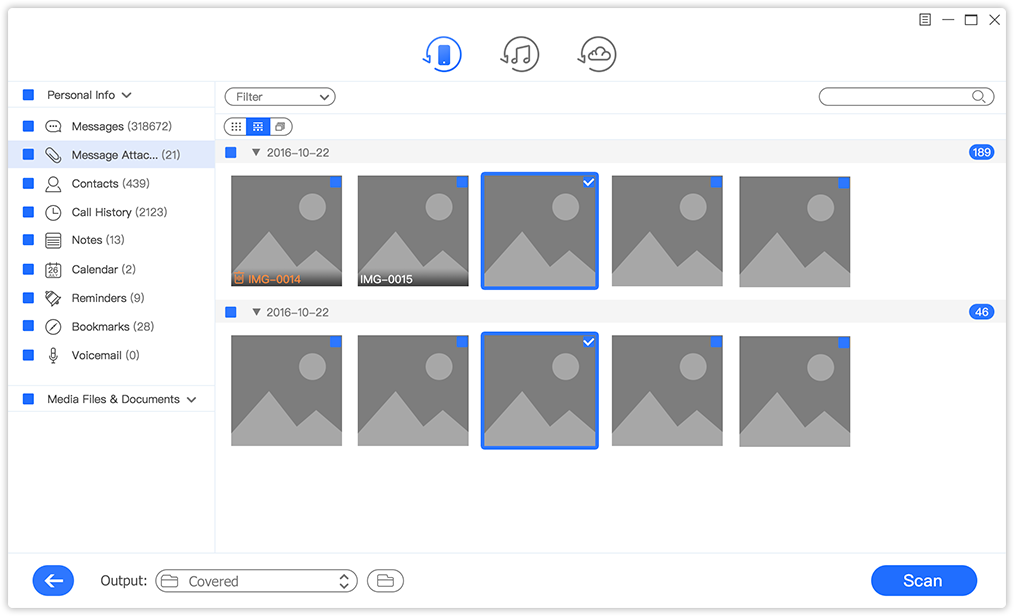
* Preview and retrieve each file in real-time
* Fully compatible with latest iOS11 and all models of iDevices
Joyoshare iPhone Data Recovery is the most reliable data recovery tool that can help all iOS users to retrieve any lost file from iPhone, iPad and iPod touch in just seconds. With this smart app, you can get back missing data in any kind of situations, no matter whether it's deleted by accident, get lost when upgrading iOS or because of system crash, virus attack, jailbreak failure, device broken, etc.
As an ultimate iOS recovery solution, Joyoshare iPhone Data Recovery has strong ability to recover more than 20 types of lost data, including SMS, iMessages, contacts, call logs, photos, videos, voicemail, attachments, notes, calendar, WhatsApp/Viber/KiKi chats and attachments, and many more. Thanks to the advanced technologies adopted by Joyoshare iPhone Data Recovery, it's able to recover even encrypted backups, making it the best iPhone data recovery tool with highest recovery rate in the market.
It offers three recovery modes for you to restore the lost/deleted data to the utmost extent. You can recover lost data directly from the devices, or from iTunes or iCloud backup files. You can choose proper data recovery mode based on how you lost the data. For example, even if your iOS devices are missing or get stolen, your data can still be easily retrieved as long as you have backups on iTunes or iCloud.
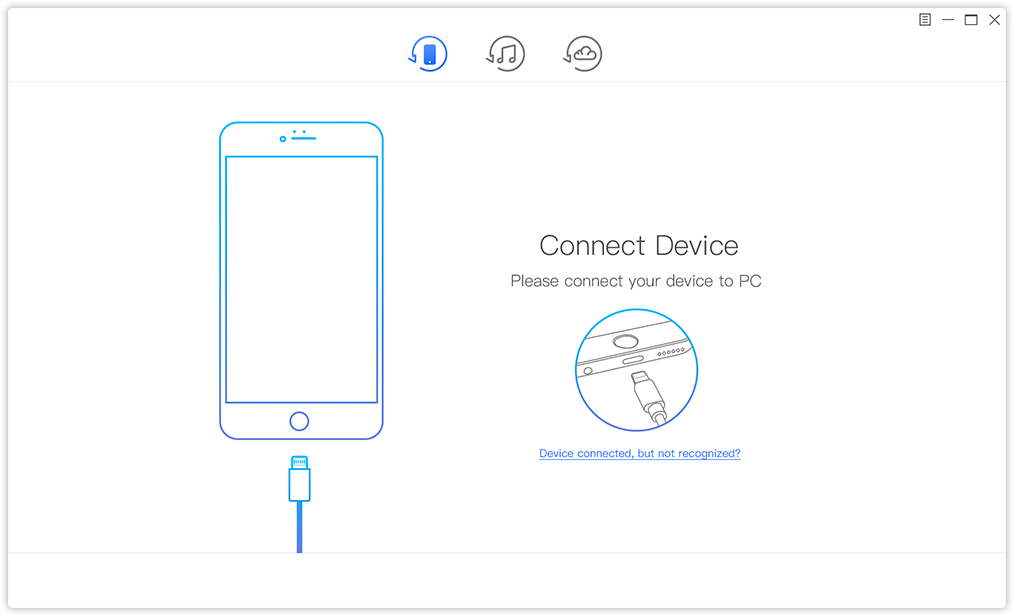
Recovering missing files on iPhone/iPad/iPod touch is extremely simple with Joyoshare iPhone Data Recovery. The whole recovery process takes 3 simple steps only: connect your iDevice to the computer, choose recovery mode, then scan and recover the selective data you need to revert back to your iOS device. That's all.
Besides, Joyoshare iPhone Data Recovery ensures 100% safe and trustworthy recovery process, during which only you can access your private account. Plus, while you are restoring the lost or deleted data from iPhone, iPad or iPod touch, the existing data on your device will never be overwritten.
"The most outstanding feature of Joyoshare iPhone Data Recovery compared with other similar programs is its ability to retrieve the recovered files one by one in real time. Specifically speaking, you'll preview each lost file in original form and get it back immediately while the recovery is still in progress. That makes Joyoshare is the unique and fastest iPhone Data Recovery since currently other competitive products can only recover the files after the whole scanning finishes, which takes a really long time if you have a large backup of data on iPhone." said Robert, the R&D director of Joyoshare.
According to the last testing, Joyoshare iPhone Data Recovery is fully compatible with all the models of iOS devices running latest iOS 11 or lower, ranging from the oldest iPhone 4 to the newest iPhone X as well as all kinds of iPad and iPod touch. It will be available on both Windows and Mac OS.
More about Joyoshare iPhone Data Recovery Pre-sale:
The special promo is a time limited event which will last around 2 weeks, starting from July 24th to August 5th. It's a one-time offer from Joyoshare for this powerful iPhone data recovery software. Once you got the 70% coupon code, you are expected to buy the official release with only $15 or less. That's really an attractive price for such kind of program that's commonly sold around $50 or more normally.
To join the pre-sale, simply visit the promotion page. Then share the event to your friends on Facebook or Twitter with the sharing buttons on the page. Once done, input your email address to acquire the 70% off coupon. Keep that special code and get back when you received notification email from Joyoshare so that you can buy the official version with the exclusive discount. Now, grab the one and only chance to pre-order Joyoshare iPhone Data Recovery with the biggest discount from the official promotion page.
Official Release Date and Notes:
Currently Joyoshare iPhone Data Recovery is still in beta version. The public version will come soon after the pre-sale. Once it rolls out, all subscribed users would receive a notification from Joyoshare. So you don't need to worry about you'll miss anything. One thing you need to keep in mind is that the 70% off coupon code would be valid only within the first month when Joyoshare iPhone Data Recovery is released. It will expire after 30 days since the official release of Joyoshare iPhone Data Recovery.
Joyoshare: https://www.joyoshare.com
Joyoshare Pre-Sale Offer: https://www.joyoshare.com/special/2018-special-event/index.html
Screenshot 1: https://www.joyoshare.com/special/2018-special-event/images/connect-ios.png
Screenshot 2: https://www.joyoshare.com/special/2018-special-event/images/recover-image.png
Joyoshare is a world-leading multimedia software developer and provider specialized in video field for years. With advanced technologies and professional R&D team, Joyoshare is dedicated in developing the best video and audio solutions, including video converter, audio converter, video editor, media cutter, HEIC converter, screen recorder, iOS solutions, etc. to customers all around the world. With professional and high quality service, Joyoshare has won high reputation from millions of registered users over the past years. All Material and Software (C) Copyright 2018 Joyoshare Studio. All Rights Reserved. Apple, the Apple logo, OS X, macOS and Macintosh are registered trademarks of Apple Inc. in the U.S. and/or other countries. Other trademarks and registered trademarks may be the property of their respective owners.
*******
Link To Article: https://prmac.com/release-id-82885.htm
*******
---------------------------------------------------------------------------------
Note that you can alter delivered distributions at any time.
Login to your account on prMac to alter your channel selection, or to opt-out at any time.

LinkOptimizer for Adobe InDesign Addresses Photoshop Unicode Related Bug
A new article has been published at prMac.
LinkOptimizer for Adobe InDesign Addresses Photoshop Unicode Related Bug - Published on 07/24/18
Zevrix Solutions announces LinkOptimizer 5.2.6, a maintenance update to company's workflow automation solution for Adobe InDesign. LinkOptimizer lets users automatically scale and crop linked images to their InDesign dimensions at specified target resolution, convert image formats and colors, apply sharpening, and more. The new version addressed a Photoshop bug that prevents third party tools from opening images whose names contain URL encoded characters in Unicode percent escape format.
Toronto (ON), Canada - Zevrix Solutions today announces LinkOptimizer 5.2.6, a maintenance update to its image processing automation plug-in for Adobe InDesign. Awarded 4 out of 5 stars by Computer Arts magazine, LinkOptimizer automates complex image manipulation tasks and helps users reduce the size of InDesign links, save prepress costs, and easily repurpose InDesign documents for web and mobile devices.
The new version addresses a Photoshop bug that prevents AppleScript from opening files with URL encoded names. As a result, LinkOptimizer cannot process images whose names contain UTF encoded characters in the so called Unicode percent escape format. With the new update LinkOptimizer will identify the issue during processing and inform theuser of the exact nature of the problem rather than only displaying a generic error message from Photoshop. The user will be advised to remove the Unicode codes from the file name in order to process the affected images.
"LinkOptimizer has changed my life and saved me days and days of work as a retoucher for an international quarterly magazine," says Steve Krason of Chicago based SK Design Group. "It's a lifesaver".
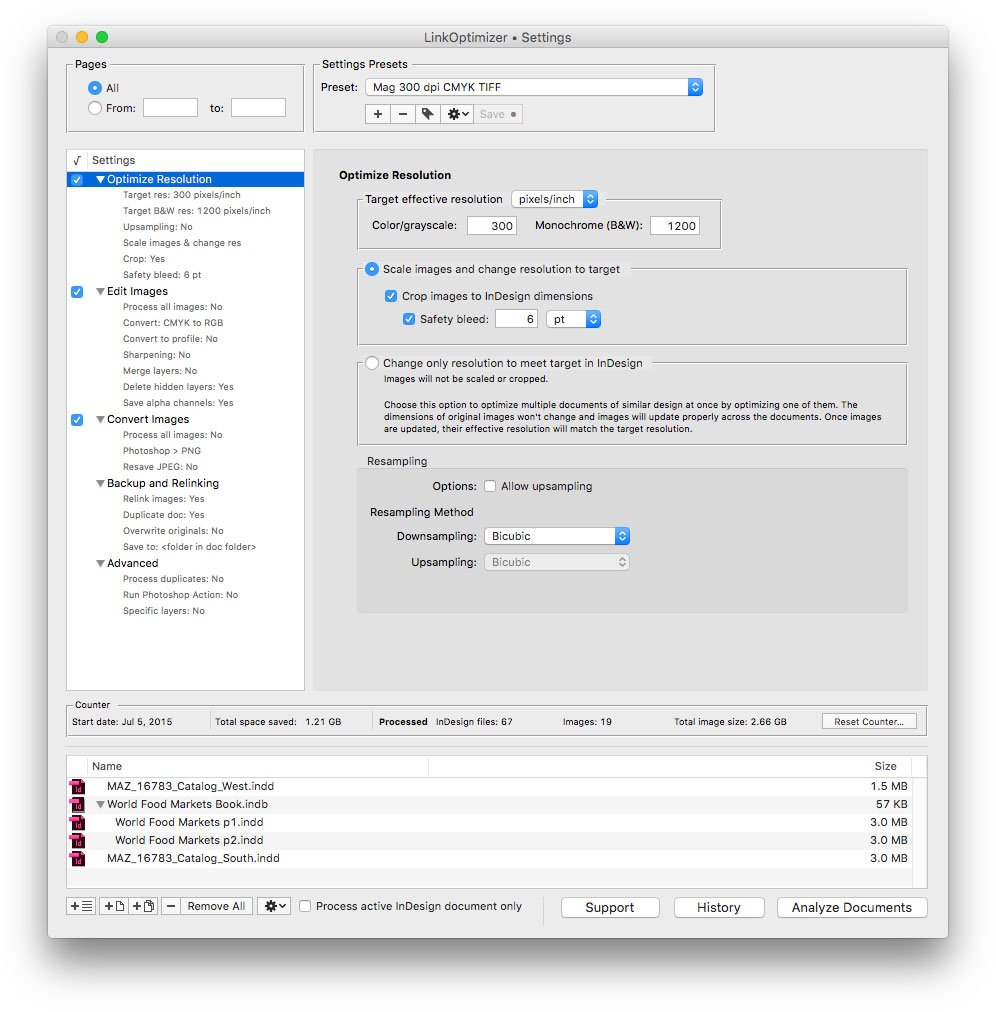
LinkOptimizer works automatically with Photoshop to eliminate the excess image data of InDesign links, perform essential image adjustments and convert image formats. For example, with just a click of a button users can:
* Optimize dozens of InDesign files
* Scale and crop images to match their dimensions in InDesign
* Change their resolution to 300 dpi
* Convert RGB images to CMYK
* Resave JPEGs as TIFF
* Run a Photoshop action on each image
As a result users can save gigabytes of disk space and countless hours of optimizing images manually, accelerate document output, reduce job turnaround and cut costs through faster processing.
Pricing and Availability:
LinkOptimizer can be purchased from Zevrix website for $259.95 USD (Lite version: $179.95) as well as from Adobe Exchange and authorized resellers. Trial is also available for download. The update is free for LinkOptimizer 5.x users and $130 to upgrade from previous versions. LinkOptimizer requires macOS 10.7-10.13 and Adobe InDesign / Photoshop CS5-CC 2018.
Zevrix Solutions: http://zevrix.com
LinkOptimizer 5.2.6: http://zevrix.com/LinkOptimizer.php
Download LinkOptimizer: http://zevrix.com/LinkOptimizer.dmg
Purchase: http://zevrix.com/store.php
Screenshot: http://zevrix.com/screenshots/lo5/res-win.jpg
Located in Toronto, Canada, Zevrix Solutions provides automation and productivity solutions for Adobe Creative Cloud and Creative Suite software, PDF workflows, graphic file diagnostics and Microsoft Office output on Mac OS. Zevrix is dedicated to help professionals increase their profits through automating everyday tasks, producing error-free documents, saving disk space and cutting production costs. For more information, visit their website. Copyright (C) 2018 Zevrix Solutions. All Rights Reserved. Other trademarks and registered trademarks may be the property of their respective owners.
*******
Link To Article: https://prmac.com/release-id-82884.htm
*******
---------------------------------------------------------------------------------
Note that you can alter delivered distributions at any time.
Login to your account on prMac to alter your channel selection, or to opt-out at any time.
LinkOptimizer for Adobe InDesign Addresses Photoshop Unicode Related Bug - Published on 07/24/18
Zevrix Solutions announces LinkOptimizer 5.2.6, a maintenance update to company's workflow automation solution for Adobe InDesign. LinkOptimizer lets users automatically scale and crop linked images to their InDesign dimensions at specified target resolution, convert image formats and colors, apply sharpening, and more. The new version addressed a Photoshop bug that prevents third party tools from opening images whose names contain URL encoded characters in Unicode percent escape format.
Toronto (ON), Canada - Zevrix Solutions today announces LinkOptimizer 5.2.6, a maintenance update to its image processing automation plug-in for Adobe InDesign. Awarded 4 out of 5 stars by Computer Arts magazine, LinkOptimizer automates complex image manipulation tasks and helps users reduce the size of InDesign links, save prepress costs, and easily repurpose InDesign documents for web and mobile devices.
The new version addresses a Photoshop bug that prevents AppleScript from opening files with URL encoded names. As a result, LinkOptimizer cannot process images whose names contain UTF encoded characters in the so called Unicode percent escape format. With the new update LinkOptimizer will identify the issue during processing and inform theuser of the exact nature of the problem rather than only displaying a generic error message from Photoshop. The user will be advised to remove the Unicode codes from the file name in order to process the affected images.
"LinkOptimizer has changed my life and saved me days and days of work as a retoucher for an international quarterly magazine," says Steve Krason of Chicago based SK Design Group. "It's a lifesaver".
LinkOptimizer works automatically with Photoshop to eliminate the excess image data of InDesign links, perform essential image adjustments and convert image formats. For example, with just a click of a button users can:
* Optimize dozens of InDesign files
* Scale and crop images to match their dimensions in InDesign
* Change their resolution to 300 dpi
* Convert RGB images to CMYK
* Resave JPEGs as TIFF
* Run a Photoshop action on each image
As a result users can save gigabytes of disk space and countless hours of optimizing images manually, accelerate document output, reduce job turnaround and cut costs through faster processing.
Pricing and Availability:
LinkOptimizer can be purchased from Zevrix website for $259.95 USD (Lite version: $179.95) as well as from Adobe Exchange and authorized resellers. Trial is also available for download. The update is free for LinkOptimizer 5.x users and $130 to upgrade from previous versions. LinkOptimizer requires macOS 10.7-10.13 and Adobe InDesign / Photoshop CS5-CC 2018.
Zevrix Solutions: http://zevrix.com
LinkOptimizer 5.2.6: http://zevrix.com/LinkOptimizer.php
Download LinkOptimizer: http://zevrix.com/LinkOptimizer.dmg
Purchase: http://zevrix.com/store.php
Screenshot: http://zevrix.com/screenshots/lo5/res-win.jpg
Located in Toronto, Canada, Zevrix Solutions provides automation and productivity solutions for Adobe Creative Cloud and Creative Suite software, PDF workflows, graphic file diagnostics and Microsoft Office output on Mac OS. Zevrix is dedicated to help professionals increase their profits through automating everyday tasks, producing error-free documents, saving disk space and cutting production costs. For more information, visit their website. Copyright (C) 2018 Zevrix Solutions. All Rights Reserved. Other trademarks and registered trademarks may be the property of their respective owners.
*******
Link To Article: https://prmac.com/release-id-82884.htm
*******
---------------------------------------------------------------------------------
Note that you can alter delivered distributions at any time.
Login to your account on prMac to alter your channel selection, or to opt-out at any time.
12star-apps Unveils Back-2-School Essentials for iPad, iPhone, and Mac
A new article has been published at prMac.
12star-apps Unveils Back-2-School Essentials for iPad, iPhone, and Mac - Published on 07/23/18
12star-apps is back with its first edition of 2018 starting July 23rd at 9:00 (GMT 2) for one week, featuring productivity apps for students and teachers with discount of up to 65%. This new 12star-apps roundup hopes to overcome language and market size challenges by bringing together 18 apps made by passionate European indie developers from 8 different countries. Apps are sold either through Apple's App Store/Mac App Store or directly from developers' website.
Mons, Belgium - 12star-apps is back with its first edition of 2018 starting July 23rd at 9:00 (GMT 2) for one week, featuring productivity apps for students and teachers with discount of up to 65%. This new 12star-apps roundup hopes to overcome language and market size challenges by bringing together 18 apps made by passionate European indie developers from 8 different countries:
iOS apps:
* Mindnode by IdeasOnCanvas GmbH (AUT): now 10,99Euro/$9.99 (30% OFF)
* Notebooks by Alfons Schmid (AUT): now 4,49Euro/$3.99 (40% OFF)
* Inko by Creaceed SPRL (BEL): now 14,99Euro/$13.99 (30% OFF)
* Prizmo Go by Creaceed SPRL (BEL): now 3,49Euro/$2.99 (40% OFF)
* Grafio by Ten Touch Ltd. (BGR): now 8,99Euro/$7.99 (20% OFF)
* PocketCAS by Daniel Alm (DEU): now 4,99Euro/$3.99 (50% OFF)
* Money by Jumsoft (LTU): now 1,09Euro/$0.99 (65% OFF on Standard IAP)
Mac apps:
* Mindnode by IdeasOnCanvas GmbH (AUT): now 29,99Euro/$26.99 (30% OFF)
* Notebooks by Alfons Schmid (AUT): now 9,99Euro/$8.99 (50% OFF)
* Prizmo by Creaceed SPRL (BEL): now 38,99Euro/$34.99 (30% OFF)
* Remote Buddy by IOSPIRIT GmbH (DEU): now 19,99Euro/$17.99 (20% OFF)
* PocketCAS by Daniel Alm (DEU): now 9,99Euro/$8.99 (50% OFF)
* Findings by Findings Software SAS (FRA): now 32,99Euro/$29.99 (40% OFF)
* PDF Watermarker by seense (FRA): now 8,99Euro/$7.99 (60% OFF)
* Money by Jumsoft (LTU): now 16,99Euro/$14.99 (40% OFF on Standard IAP)
* Studies by The Mental Faculty B.V. (NLD): now 21,99Euro/$19.99 (30% OFF)
* Workspaces by Apptorium (POL): now 6,99Euro/$5.99 (35% OFF)
* FiveNotes by Apptorium (POL): now 3,49Euro/$2.99 (40% OFF)
Availability:
App listing is available on the 12star-apps website: www.12starapps.eu. Apps are sold either through Apple's App Store/Mac App Store or directly from developers' website (Mac apps only). The 2018 Back2School featuring takes place from Monday, July 23rd to Monday, July 30th (ending at 23:59 GMT 2). Apps are offered for an ephemeral special pricing, with discount of up to 65%. All the apps featured on the website can be purchased individually.
Additional Information:
12star-apps is a collaborative project that brings together a number of European developers behind some of the finest and most popular apps on iOS and Mac.
12star-apps: http://www.12starapps.eu
Newsletter Sign-up: http://www.12starapps.eu/newsletter
12star-apps is a collaborative project that brings together a number of European developers behind some of the finest and most popular apps on iOS and Mac. An initiative of Creaceed SPRL, Belgium. Apple, the Apple logo, macOS, iPhone, iPod and iPad are registered trademarks of Apple Inc. in the U.S. and/or other countries. Other trademarks and registered trademarks may be the property of their respective owners.
*******
Link To Article: https://prmac.com/release-id-82882.htm
*******
---------------------------------------------------------------------------------
Note that you can alter delivered distributions at any time.
Login to your account on prMac to alter your channel selection, or to opt-out at any time.
12star-apps Unveils Back-2-School Essentials for iPad, iPhone, and Mac - Published on 07/23/18
12star-apps is back with its first edition of 2018 starting July 23rd at 9:00 (GMT 2) for one week, featuring productivity apps for students and teachers with discount of up to 65%. This new 12star-apps roundup hopes to overcome language and market size challenges by bringing together 18 apps made by passionate European indie developers from 8 different countries. Apps are sold either through Apple's App Store/Mac App Store or directly from developers' website.
Mons, Belgium - 12star-apps is back with its first edition of 2018 starting July 23rd at 9:00 (GMT 2) for one week, featuring productivity apps for students and teachers with discount of up to 65%. This new 12star-apps roundup hopes to overcome language and market size challenges by bringing together 18 apps made by passionate European indie developers from 8 different countries:
iOS apps:
* Mindnode by IdeasOnCanvas GmbH (AUT): now 10,99Euro/$9.99 (30% OFF)
* Notebooks by Alfons Schmid (AUT): now 4,49Euro/$3.99 (40% OFF)
* Inko by Creaceed SPRL (BEL): now 14,99Euro/$13.99 (30% OFF)
* Prizmo Go by Creaceed SPRL (BEL): now 3,49Euro/$2.99 (40% OFF)
* Grafio by Ten Touch Ltd. (BGR): now 8,99Euro/$7.99 (20% OFF)
* PocketCAS by Daniel Alm (DEU): now 4,99Euro/$3.99 (50% OFF)
* Money by Jumsoft (LTU): now 1,09Euro/$0.99 (65% OFF on Standard IAP)
Mac apps:
* Mindnode by IdeasOnCanvas GmbH (AUT): now 29,99Euro/$26.99 (30% OFF)
* Notebooks by Alfons Schmid (AUT): now 9,99Euro/$8.99 (50% OFF)
* Prizmo by Creaceed SPRL (BEL): now 38,99Euro/$34.99 (30% OFF)
* Remote Buddy by IOSPIRIT GmbH (DEU): now 19,99Euro/$17.99 (20% OFF)
* PocketCAS by Daniel Alm (DEU): now 9,99Euro/$8.99 (50% OFF)
* Findings by Findings Software SAS (FRA): now 32,99Euro/$29.99 (40% OFF)
* PDF Watermarker by seense (FRA): now 8,99Euro/$7.99 (60% OFF)
* Money by Jumsoft (LTU): now 16,99Euro/$14.99 (40% OFF on Standard IAP)
* Studies by The Mental Faculty B.V. (NLD): now 21,99Euro/$19.99 (30% OFF)
* Workspaces by Apptorium (POL): now 6,99Euro/$5.99 (35% OFF)
* FiveNotes by Apptorium (POL): now 3,49Euro/$2.99 (40% OFF)
Availability:
App listing is available on the 12star-apps website: www.12starapps.eu. Apps are sold either through Apple's App Store/Mac App Store or directly from developers' website (Mac apps only). The 2018 Back2School featuring takes place from Monday, July 23rd to Monday, July 30th (ending at 23:59 GMT 2). Apps are offered for an ephemeral special pricing, with discount of up to 65%. All the apps featured on the website can be purchased individually.
Additional Information:
12star-apps is a collaborative project that brings together a number of European developers behind some of the finest and most popular apps on iOS and Mac.
12star-apps: http://www.12starapps.eu
Newsletter Sign-up: http://www.12starapps.eu/newsletter
12star-apps is a collaborative project that brings together a number of European developers behind some of the finest and most popular apps on iOS and Mac. An initiative of Creaceed SPRL, Belgium. Apple, the Apple logo, macOS, iPhone, iPod and iPad are registered trademarks of Apple Inc. in the U.S. and/or other countries. Other trademarks and registered trademarks may be the property of their respective owners.
*******
Link To Article: https://prmac.com/release-id-82882.htm
*******
---------------------------------------------------------------------------------
Note that you can alter delivered distributions at any time.
Login to your account on prMac to alter your channel selection, or to opt-out at any time.
Discover new people with Avec app for iOS
A new article has been published at prMac.
Discover new people with Avec app for iOS - Published on 07/23/18
Silver App has announced the recent update of Avec: Experiential Dating app for iOS devices. This revolutionizing app is a perfect solution for people to find their dates based on common interests. App users can invite their dates to restaurants, musicals, movies, sporting events and everything in-between. Offering more than other apps of its kind, Avec is perfect for finding a local date or for forming friendships with anyone in your area. Avec app is Free for download on the Apple App Store.
New York, New York - Silver App Development LLC, an established mobile app developer, has announced the recent update of Avec: Experiential Dating app for the iPhone, iPad and iPod devices running on iOS 9.2 or later. This revolutionizing app is a perfect solution for people to find their dates based on common interests. Users of the app can invite their dates to restaurants, musicals, theatre, movies, sporting events and everything in-between. Offering more than other apps of its kind, Avec is a perfect tool for finding a local date or for forming friendships with anyone in your area. Avec: Experiential Dating boasts flexible dating options, location discovery engine & more. Avec: Experiential Dating app is currently available for download on the App Store for Free in the Social Networking category.
Developed with ease of use in mind Avec: Experiential Dating app boasts flexible text messenger & calendar options, a social discovery engine, and other useful features. Featuring a beautiful and intuitive interface, the app was recently updated to optimize its overall user experience as well as HEIC and HEIF image file support was added.
Once you're in the app you can register in the app using your email and set a password or just log in with your Facebook account. Users can set their gender, age, zip code, upload photos and once your profile has been completed you can start discovering new people around you. Being a mix of dating app, social discovery solution, and fling finder, Avec: Experiential Dating app gives users the tools to find specific people with the same interests as you.
Avec is based on a quite simple idea that people should choose dates based on common interests, not selfies so you can go to events you care about with people you're curious about. Developed on the strength of its multiple interactive features, Avec lets users offer various dates categories, describe venues, add photos and events information. All app features are perfectly suited to let users find dates and friends in the neighbourhood and start a one-on-one conversation. Avec was created to inspire people to connect, find friends or dates, or simply chat with interesting users within a diverse global community. There's no reason to wait, let's get a new conversation started.
Avec: Experiential Dating 1.7: https://avec-app.com/
More Information: https://avec-app.com/presspage/
Download from iTunes: https://itunes.apple.com/app/avec.-experiential-dating/id1173938907
Screenshot: https://avec-app.com/wp-content/uploads/2016/10/Avec_HomeScreen_218.jpg
App Icon: https://avec-app.com/wp-content/uploads/2016/02/Avec-C-2-Color-150x150.png
Located in New York, Silver App Development LLC is an innovative new mobile development company focused on creating unique new ways for modern smartphone and tablet consumers to interact with their technology, world, and the tech savvy community around them. Avec is an experiential dating app that introduces people on the simple premise of common interests. Derived from Middle French 'avecques' meaning 'with,' users can go to events they care about with people they are curious about, simply by searching available events on a specific date. With Avec, you'll never need to go out alone again. All Material and Software (C) Copyright 2018 Silver App Development LLC. All Rights Reserved. Apple, the Apple logo, iPhone, iPod and iPad are registered trademarks of Apple Inc. in the U.S. and/or other countries. Other trademarks and registered trademarks may be the property of their respective owners.
*******
Link To Article: https://prmac.com/release-id-82881.htm
*******
---------------------------------------------------------------------------------
Note that you can alter delivered distributions at any time.
Login to your account on prMac to alter your channel selection, or to opt-out at any time.
Discover new people with Avec app for iOS - Published on 07/23/18
Silver App has announced the recent update of Avec: Experiential Dating app for iOS devices. This revolutionizing app is a perfect solution for people to find their dates based on common interests. App users can invite their dates to restaurants, musicals, movies, sporting events and everything in-between. Offering more than other apps of its kind, Avec is perfect for finding a local date or for forming friendships with anyone in your area. Avec app is Free for download on the Apple App Store.
New York, New York - Silver App Development LLC, an established mobile app developer, has announced the recent update of Avec: Experiential Dating app for the iPhone, iPad and iPod devices running on iOS 9.2 or later. This revolutionizing app is a perfect solution for people to find their dates based on common interests. Users of the app can invite their dates to restaurants, musicals, theatre, movies, sporting events and everything in-between. Offering more than other apps of its kind, Avec is a perfect tool for finding a local date or for forming friendships with anyone in your area. Avec: Experiential Dating boasts flexible dating options, location discovery engine & more. Avec: Experiential Dating app is currently available for download on the App Store for Free in the Social Networking category.
Developed with ease of use in mind Avec: Experiential Dating app boasts flexible text messenger & calendar options, a social discovery engine, and other useful features. Featuring a beautiful and intuitive interface, the app was recently updated to optimize its overall user experience as well as HEIC and HEIF image file support was added.
Once you're in the app you can register in the app using your email and set a password or just log in with your Facebook account. Users can set their gender, age, zip code, upload photos and once your profile has been completed you can start discovering new people around you. Being a mix of dating app, social discovery solution, and fling finder, Avec: Experiential Dating app gives users the tools to find specific people with the same interests as you.
Avec is based on a quite simple idea that people should choose dates based on common interests, not selfies so you can go to events you care about with people you're curious about. Developed on the strength of its multiple interactive features, Avec lets users offer various dates categories, describe venues, add photos and events information. All app features are perfectly suited to let users find dates and friends in the neighbourhood and start a one-on-one conversation. Avec was created to inspire people to connect, find friends or dates, or simply chat with interesting users within a diverse global community. There's no reason to wait, let's get a new conversation started.
Avec: Experiential Dating 1.7: https://avec-app.com/
More Information: https://avec-app.com/presspage/
Download from iTunes: https://itunes.apple.com/app/avec.-experiential-dating/id1173938907
Screenshot: https://avec-app.com/wp-content/uploads/2016/10/Avec_HomeScreen_218.jpg

App Icon: https://avec-app.com/wp-content/uploads/2016/02/Avec-C-2-Color-150x150.png

Located in New York, Silver App Development LLC is an innovative new mobile development company focused on creating unique new ways for modern smartphone and tablet consumers to interact with their technology, world, and the tech savvy community around them. Avec is an experiential dating app that introduces people on the simple premise of common interests. Derived from Middle French 'avecques' meaning 'with,' users can go to events they care about with people they are curious about, simply by searching available events on a specific date. With Avec, you'll never need to go out alone again. All Material and Software (C) Copyright 2018 Silver App Development LLC. All Rights Reserved. Apple, the Apple logo, iPhone, iPod and iPad are registered trademarks of Apple Inc. in the U.S. and/or other countries. Other trademarks and registered trademarks may be the property of their respective owners.
*******
Link To Article: https://prmac.com/release-id-82881.htm
*******
---------------------------------------------------------------------------------
Note that you can alter delivered distributions at any time.
Login to your account on prMac to alter your channel selection, or to opt-out at any time.
Mac Shutdown is the Modern macOS Application to Shutdown Your Mac
A new article has been published at prMac.
Mac Shutdown is the Modern macOS Application to Shutdown Your Mac - Published on 07/21/18
Tension Software announces Mac Shutdown for macOS, which is able to use 'Soft Shutdown' and 'Hard Shutdown' to shutdown your Mac. The 'Soft Shutdown' is issued at finder level and ask to all the running app to quit before shut down the Mac. The 'Hard shutdown' is issued at system level and offer a very low level of probability of having the shut down interrupted by an app refusing to quit.
Milano, Italy - Tension Software is proud to announce the release and immediate availability of Mac Shutdown 4.1, the modern macOS application to shutdown the Mac when unattended under different conditions.
Mac Shutdown is able to use 'Soft Shutdown' and 'Hard Shutdown' to shutdown your Mac. The 'Soft Shutdown' is issued at finder level and ask to all the running app to quit before shut down the Mac. The 'Hard shutdown' is issued at system level and offer a very low level of probability of having the shut down interrupted by an app refusing to quit.
The 'Hard Shutdown' feature from release 4 of Mac Shutdown, uses the latest Apple XPC technology (the recommended way now by Apple, secure and digitally signed, to escalate admin privileges) to provide admin right actions. It allows to shutdown your Mac in a secure way, just providing admin right one time only at installation.
From version 4 Mac Shutdown can now work also as a status menu only application, always available from the menu also when in background and without showing any window to just silently waiting in the background.
Mac Shutdown can provide what others tools can't. Just an example: it can help a user start a download of big files over the net in the night and have the Mac automatically turned off when the download is finished.
Mac Shutdown is customizable using an easy to use setting setup panel (no coding or editing of script required). It's small, fast, simple and reliable and now more stable then ever and fully complaint with the latest OS X 10.10 Yosemite and is fully optimized for use with OS X 10.13 High Sierra.
Mac Shutdown is fully customizable. The user can choose to shutdown the Mac:
* On a scheduled plan
* On a specific date and time
* When a generic file is removed or moved on your Hard Disk
* When a download is finished: using Safari using Firefox or Camino or Netscape using Speed Download
* At launch time to use it via Apple iCal
* When a keyword is found inside a continuously checked web wage
* Using the scheduled plan the user can set any repetitive interval, selecting a time and a day of the week or any day or any weekday and so on. With the 'On date' option the user can specify the preferred date and time.
The user can select to have the settings always enabled or to disable them after a shutdown ... and more.
New in this release:
* Improved management of the Status Menu only functionality
* More commands in the status menu
* Improved layout
* Various optimization
* Various bug fix
System Requirements:
* macOS Version 10.10 (Yosemite) or higher
* Optimized for macOS 10.13 High Sierra
Pricing and Availability:
Mac Shutdown 4.1 is just $12.00 USD (or an equivalent amount in other currencies) and is available worldwide exclusively from the Tension Software website.
Tension Software: http://www.tensionsoftware.com
Mac Shutdown 4.1: http://www.tensionsoftware.com/osx/macshutdown/
Direct Download Link: http://dwn.tensionsoftware.com/osx/macshutdown/macshutdown.dmg
Tension Software develops software for macOS and iOS using the latest Apple technologies. Other brands and products referenced herein are the trademarks or registered trademarks of their respective holders. All Material and Software (C) Copyright 2018 Tension Software. All Rights Reserved. Apple, the Apple logo, Macintosh Mac OS X and macOS are registered trademarks of Apple Inc. in the U.S. and/or other countries. Other trademarks and registered trademarks may be the property of their respective owners.
*******
Link To Article: https://prmac.com/release-id-82880.htm
*******
---------------------------------------------------------------------------------
Note that you can alter delivered distributions at any time.
Login to your account on prMac to alter your channel selection, or to opt-out at any time.
Mac Shutdown is the Modern macOS Application to Shutdown Your Mac - Published on 07/21/18
Tension Software announces Mac Shutdown for macOS, which is able to use 'Soft Shutdown' and 'Hard Shutdown' to shutdown your Mac. The 'Soft Shutdown' is issued at finder level and ask to all the running app to quit before shut down the Mac. The 'Hard shutdown' is issued at system level and offer a very low level of probability of having the shut down interrupted by an app refusing to quit.
Milano, Italy - Tension Software is proud to announce the release and immediate availability of Mac Shutdown 4.1, the modern macOS application to shutdown the Mac when unattended under different conditions.
Mac Shutdown is able to use 'Soft Shutdown' and 'Hard Shutdown' to shutdown your Mac. The 'Soft Shutdown' is issued at finder level and ask to all the running app to quit before shut down the Mac. The 'Hard shutdown' is issued at system level and offer a very low level of probability of having the shut down interrupted by an app refusing to quit.
The 'Hard Shutdown' feature from release 4 of Mac Shutdown, uses the latest Apple XPC technology (the recommended way now by Apple, secure and digitally signed, to escalate admin privileges) to provide admin right actions. It allows to shutdown your Mac in a secure way, just providing admin right one time only at installation.
From version 4 Mac Shutdown can now work also as a status menu only application, always available from the menu also when in background and without showing any window to just silently waiting in the background.
Mac Shutdown can provide what others tools can't. Just an example: it can help a user start a download of big files over the net in the night and have the Mac automatically turned off when the download is finished.
Mac Shutdown is customizable using an easy to use setting setup panel (no coding or editing of script required). It's small, fast, simple and reliable and now more stable then ever and fully complaint with the latest OS X 10.10 Yosemite and is fully optimized for use with OS X 10.13 High Sierra.
Mac Shutdown is fully customizable. The user can choose to shutdown the Mac:
* On a scheduled plan
* On a specific date and time
* When a generic file is removed or moved on your Hard Disk
* When a download is finished: using Safari using Firefox or Camino or Netscape using Speed Download
* At launch time to use it via Apple iCal
* When a keyword is found inside a continuously checked web wage
* Using the scheduled plan the user can set any repetitive interval, selecting a time and a day of the week or any day or any weekday and so on. With the 'On date' option the user can specify the preferred date and time.
The user can select to have the settings always enabled or to disable them after a shutdown ... and more.
New in this release:
* Improved management of the Status Menu only functionality
* More commands in the status menu
* Improved layout
* Various optimization
* Various bug fix
System Requirements:
* macOS Version 10.10 (Yosemite) or higher
* Optimized for macOS 10.13 High Sierra
Pricing and Availability:
Mac Shutdown 4.1 is just $12.00 USD (or an equivalent amount in other currencies) and is available worldwide exclusively from the Tension Software website.
Tension Software: http://www.tensionsoftware.com
Mac Shutdown 4.1: http://www.tensionsoftware.com/osx/macshutdown/
Direct Download Link: http://dwn.tensionsoftware.com/osx/macshutdown/macshutdown.dmg
Tension Software develops software for macOS and iOS using the latest Apple technologies. Other brands and products referenced herein are the trademarks or registered trademarks of their respective holders. All Material and Software (C) Copyright 2018 Tension Software. All Rights Reserved. Apple, the Apple logo, Macintosh Mac OS X and macOS are registered trademarks of Apple Inc. in the U.S. and/or other countries. Other trademarks and registered trademarks may be the property of their respective owners.
*******
Link To Article: https://prmac.com/release-id-82880.htm
*******
---------------------------------------------------------------------------------
Note that you can alter delivered distributions at any time.
Login to your account on prMac to alter your channel selection, or to opt-out at any time.
AutoMailer to Send Serialised Emails on macOS
A new article has been published at prMac.
AutoMailer to Send Serialised Emails on macOS - Published on 07/20/18
Tension Software announces AutoMailer 2.6 for macOS, which allows users to prepare and send personalized emails to multiple unlimited addresses, in text or web format, each merged with data from an internal database. All in a single click, each with custom contents depending of each recipient. AutoMailer is document based and allows to use as many documents you need to manage all the different list and required emails.
Milano, Italy - AutoMailer 2.6 for macOS allows to prepare and send personalised emails to multiple unlimited addresses, in text or web format, each merged with data from an internal database. All in a single click, each with custom contents depending of each recipient.
Emails sent by AutoMailer are standard emails. People receiving the emails will not notice any difference compared to standard emails and they will be able to reply to them as usually.
AutoMailer is document based and allows to use as many documents you need to manage all the different list and required emails. AutoMailer is a flexible tools to manage your mailing list directly from your Mac.
AutoMailer is able to import from external sources in a smart and simply way. The user can import addresses and any kind of data from any database able to export in text format, both CSV (comma separated value),TSV (Tab separated value), CSV-S (Char separated Value using semicolon). The application is able to automatically detect during imports, the data type and the file encode method to provide imports of data without any problems
Data imported into any AutoMailer document are managed in an easy to use, table. Data can be modified, updated and enlarged with new additional data at any time. Various commands provide manipulation of internal records in a fast and intuitive way.
You can also maintain for each document an 'Except' list of address, that will never be used to send, to be sure to never send to those 'black listed people' also if they are addend in the recipient list.
The template email used to merge the email with data, can be written both in text or in html to send emails in text or web format (also including pictures linked from a support server hosting them, to create truly professional results).
AutoMailer provides for html emails, at any time, a live preview or the email the user is composing. Emails can be previewed also for any address the user want to send to, with all the data merged for any of those users, simply selecting it from a list.
All the emails can be prepared or sent with a single command, with the capability to send them via an email server, one by one, specifying an interval time between each sending. The application can prepare all the emails using the Mail.app installed on any Mac and then manually send them or sending directly all them with a single command (as a standard email client) via an email server you have access to.
* AutoMailer can auto-prepare via Mail.app and you have to manually press the send button inside Mail.app.
* The app can auto-send accessing directly your Mail server, without the use of Apple Mail.app
* It can send via standard BSDM/Linux mail server (example: sendmail or postfix)
* It can send via your gMail account
AutoMailer has a renewed improved mail server connect function (PLAIN, STARTTLS, TLS) and can test your connection (without sending) to better set it up. You can save an unlimited number of connection settings and use more then one pre-defined server.
Settings, data and email templates are saved inside documents, ready to be reused at later time reopening the documents. The user can prepare email templates inserting content of the database table using a simple syntax (a popup offers all the available field tags to access tabled data, without having to type them).
Any table is searchable using a search field at the top of them.
AutoMailer provides a lot of additional functionalities to help the user do his job in the best way, they are too much to list all. Further, one of the goal of AutoMailer is to be easy of use. Anyone with a minimum of familiarity with the Mac will be able to use AutoMailer at best efficiency using all the potentiality of the app in a very intuitive way.
* You can use the download version at our site to check if it can work with your smtp mail server
Features:
* Document based, allows to save data and setting and have them ready for successive uses
* Can create and send both text or web (html) emails
* Possibility to manage an infinite number of data and letter template thanks to the document based approach with maximum flexibility of use.
* Big emphases on simplicity and easy of use.
* Elimination of duplicated and invalid emails.
* Extreme easy to import, create and manipulate data to use for merge with letter template
* Imports form various encoding format from Unix, mac, Windows
* Import from Tab separated values, Comma separated values, semicolon separated values
* Table view with possibility to add, delete rows (records) and columns (fields) at any time and to edit in place inside the table
* Easy import with automatic detection of format and with selection of data source elements and destination (data fields) and browsing of source data in advance (before importing)
* Very simple creation of email templates with keywords insertion to put database data inside the emails for any email recipient
* Automatically updated popup to insert data tags inside the email template
* Emails with attachments
* Live preview for any email to send with updated data (you see the email as the recipient will see it) both for text and html emails
* Can send a single email, a subset or all the emails
* Can just prepare the email, to send them at later time manually from inside Mail.app
* Can use and send directly via an external mail server
* Can manage an unlimited number of server
* Store your server passwords encrypted
* Log monitoring of email preparation and sending
* Any area benefits of search features on the contained data
* PDF user guide inside the app.
What's new:
* Improved information about emails sending, sent and remaining to send emails, estimation time to finish.
* Live update of data also during sending, modifying the interval to send.
* Various bug fixes
* Minor improvements
System Requirements:
* macOS
* 8.9 MB
Pricing and Availability:
AutoMailer 2.6 is only $49.99 and is available worldwide through the Mac App Store in the Productivity category.
Tension Software: http://www.tensionsoftware.com
AutoMailer 2 Version 2.6: http://www.tensionsoftware.com/osx/automailer/
Download Link: http://sec.tensionsoftware.com/osx/automailer/automailer.dmg
Purchase and Download from Mac App Store: https://itunes.apple.com/app/automailer-2/id731968271
Tension Software develops software for macOS and iOS using the latest Apple technologies. Other brands and products referenced herein are the trademarks or registered trademarks of their respective holders. All Material and Software (C) Copyright 2018 Tension Software. All Rights Reserved. Apple, the Apple logo, Macintosh Mac OS X and macOS are registered trademarks of Apple Inc. in the U.S. and/or other countries. Other trademarks and registered trademarks may be the property of their respective owners.
*******
Link To Article: https://prmac.com/release-id-82879.htm
*******
---------------------------------------------------------------------------------
Note that you can alter delivered distributions at any time.
Login to your account on prMac to alter your channel selection, or to opt-out at any time.
AutoMailer to Send Serialised Emails on macOS - Published on 07/20/18
Tension Software announces AutoMailer 2.6 for macOS, which allows users to prepare and send personalized emails to multiple unlimited addresses, in text or web format, each merged with data from an internal database. All in a single click, each with custom contents depending of each recipient. AutoMailer is document based and allows to use as many documents you need to manage all the different list and required emails.
Milano, Italy - AutoMailer 2.6 for macOS allows to prepare and send personalised emails to multiple unlimited addresses, in text or web format, each merged with data from an internal database. All in a single click, each with custom contents depending of each recipient.
Emails sent by AutoMailer are standard emails. People receiving the emails will not notice any difference compared to standard emails and they will be able to reply to them as usually.
AutoMailer is document based and allows to use as many documents you need to manage all the different list and required emails. AutoMailer is a flexible tools to manage your mailing list directly from your Mac.
AutoMailer is able to import from external sources in a smart and simply way. The user can import addresses and any kind of data from any database able to export in text format, both CSV (comma separated value),TSV (Tab separated value), CSV-S (Char separated Value using semicolon). The application is able to automatically detect during imports, the data type and the file encode method to provide imports of data without any problems
Data imported into any AutoMailer document are managed in an easy to use, table. Data can be modified, updated and enlarged with new additional data at any time. Various commands provide manipulation of internal records in a fast and intuitive way.
You can also maintain for each document an 'Except' list of address, that will never be used to send, to be sure to never send to those 'black listed people' also if they are addend in the recipient list.
The template email used to merge the email with data, can be written both in text or in html to send emails in text or web format (also including pictures linked from a support server hosting them, to create truly professional results).
AutoMailer provides for html emails, at any time, a live preview or the email the user is composing. Emails can be previewed also for any address the user want to send to, with all the data merged for any of those users, simply selecting it from a list.
All the emails can be prepared or sent with a single command, with the capability to send them via an email server, one by one, specifying an interval time between each sending. The application can prepare all the emails using the Mail.app installed on any Mac and then manually send them or sending directly all them with a single command (as a standard email client) via an email server you have access to.
* AutoMailer can auto-prepare via Mail.app and you have to manually press the send button inside Mail.app.
* The app can auto-send accessing directly your Mail server, without the use of Apple Mail.app
* It can send via standard BSDM/Linux mail server (example: sendmail or postfix)
* It can send via your gMail account
AutoMailer has a renewed improved mail server connect function (PLAIN, STARTTLS, TLS) and can test your connection (without sending) to better set it up. You can save an unlimited number of connection settings and use more then one pre-defined server.
Settings, data and email templates are saved inside documents, ready to be reused at later time reopening the documents. The user can prepare email templates inserting content of the database table using a simple syntax (a popup offers all the available field tags to access tabled data, without having to type them).
Any table is searchable using a search field at the top of them.
AutoMailer provides a lot of additional functionalities to help the user do his job in the best way, they are too much to list all. Further, one of the goal of AutoMailer is to be easy of use. Anyone with a minimum of familiarity with the Mac will be able to use AutoMailer at best efficiency using all the potentiality of the app in a very intuitive way.
* You can use the download version at our site to check if it can work with your smtp mail server
Features:
* Document based, allows to save data and setting and have them ready for successive uses
* Can create and send both text or web (html) emails
* Possibility to manage an infinite number of data and letter template thanks to the document based approach with maximum flexibility of use.
* Big emphases on simplicity and easy of use.
* Elimination of duplicated and invalid emails.
* Extreme easy to import, create and manipulate data to use for merge with letter template
* Imports form various encoding format from Unix, mac, Windows
* Import from Tab separated values, Comma separated values, semicolon separated values
* Table view with possibility to add, delete rows (records) and columns (fields) at any time and to edit in place inside the table
* Easy import with automatic detection of format and with selection of data source elements and destination (data fields) and browsing of source data in advance (before importing)
* Very simple creation of email templates with keywords insertion to put database data inside the emails for any email recipient
* Automatically updated popup to insert data tags inside the email template
* Emails with attachments
* Live preview for any email to send with updated data (you see the email as the recipient will see it) both for text and html emails
* Can send a single email, a subset or all the emails
* Can just prepare the email, to send them at later time manually from inside Mail.app
* Can use and send directly via an external mail server
* Can manage an unlimited number of server
* Store your server passwords encrypted
* Log monitoring of email preparation and sending
* Any area benefits of search features on the contained data
* PDF user guide inside the app.
What's new:
* Improved information about emails sending, sent and remaining to send emails, estimation time to finish.
* Live update of data also during sending, modifying the interval to send.
* Various bug fixes
* Minor improvements
System Requirements:
* macOS
* 8.9 MB
Pricing and Availability:
AutoMailer 2.6 is only $49.99 and is available worldwide through the Mac App Store in the Productivity category.
Tension Software: http://www.tensionsoftware.com
AutoMailer 2 Version 2.6: http://www.tensionsoftware.com/osx/automailer/
Download Link: http://sec.tensionsoftware.com/osx/automailer/automailer.dmg
Purchase and Download from Mac App Store: https://itunes.apple.com/app/automailer-2/id731968271
Tension Software develops software for macOS and iOS using the latest Apple technologies. Other brands and products referenced herein are the trademarks or registered trademarks of their respective holders. All Material and Software (C) Copyright 2018 Tension Software. All Rights Reserved. Apple, the Apple logo, Macintosh Mac OS X and macOS are registered trademarks of Apple Inc. in the U.S. and/or other countries. Other trademarks and registered trademarks may be the property of their respective owners.
*******
Link To Article: https://prmac.com/release-id-82879.htm
*******
---------------------------------------------------------------------------------
Note that you can alter delivered distributions at any time.
Login to your account on prMac to alter your channel selection, or to opt-out at any time.
Tropical Software contributes copies of TopXNotes to Macstock attendees
A new article has been published at prMac.
Tropical Software contributes copies of TopXNotes to Macstock attendees - Published on 07/20/18
Florida based Tropical Software today announces copies of TopXnotes, their award-winning, full-featured personal information manager for macOS to attendees of the midwest Macworld replacement meeting Macstock.. Use TopXNotes to import all your notes and organize them in one place with the option to password protect and encrypt sensitive information. We encourage you to attend the Macstock meeting this weekend.
Atlantic Beach, Florida - Florida based Tropical Software today announces copies of TopXnotes, their award-winning, full-featured personal information manager for macOS to attendees of the midwest Macworld replacement meeting Macstock.
We miss Macworld and wanted to help the new midwest Macworld replacement meeting Macstock succeed. So we are offering free copies of our award-winning, full-featured personal information manager for macOS to attendees of the midwest Macworld replacement meeting Macstock. We encourage you to attend the Macstock meeting this weekend and support the the midwest Macworld replacement meeting.
Get Organized with TopXNotes:
Tired of all those loose bits of information spread all over your hard drive in multiple documents requiring opening multiple apps to see them? Opening many apps sucks up your valuable Mac memory and slows it down. Are you tired of trying to remember which note was written in which application and where you put it? Use TopXNotes to import all your notes and organize them in one place with the option to password protect and encrypt sensitive information.
TopXNotes - Reviews:
TopXNotes was awarded 4 out of 5 mice by Macworld magazine in their "Summer of Mac Gems" series of reviews, by Macworld Australia, and later by Macworld UK. TopXNotes was rated "9 of 10" by Macsimum News (now part of MacTech), and highly rated by the Macintosh Guild, Macworld, Macworld UK and Mac360. Dennis Sellers rated it 10 of 10 for Apple Daily Report. TopXNotes has been critically reviewed with high marks on many occasions and you can find links to all the reviews on our website.
TopXNotes - Macworld Review:
Macworld praised the TopXNotes "clean, single window interface that puts controls for highlighting and marking up your text right at your fingertips," as well as for its "killer" QuickNotes feature.
TopXNotes - Mac User Group Review:
Sue Beal, president of the Upper Keys (Florida) Macintosh Users Group called TopXNotes "Inexpensive, unobtrusive, and just plain handy."
TopXNotes - Mac360:
Ron Mc Elfresh, of Mac360 stated: "I'm a notes freak. I have notes on everything. From to-do items to code snippets to tasks and projects to article ideas. Here's an understated, unloved, deceptively powerful notes app worthy of some Mac love...it's loaded with user features that set it apart from other note taking apps. TopXNotes is deceptively powerful and flexible, probably because the interface is immediately familiar."
Pricing and Availability:
Try Tropical's reliable TopXNotes 1.8.5 to "get organized" today! TopXNotes 1.8.5 is available for $39.95 (USD) from the Tropical Software web site, the Apple Mac App store, Amazon, and other select Macintosh software resellers. TopXNotes 1.8.5 is a free update to customers who have already purchased version 1.5 or later. Existing customers with an older version (previous to 1.5) can upgrade to version 1.8.5 for only $19.95 from the company's web site.
TopXNotes: http://www.tropic4.com/topxnotes.html
Macstock: https://macstockconferenceandexpo.com
Download Free Trial (zip): http://www.tropic4.com/download/TopXNotes.zip
Purchase: http://sites.fastspring.com/tropic4/product/TopXNotes
TopXNotes Reviews: http://www.tropic4.com/products/topxnotes/reviews.html
Application Icon: http://www.tropic4.com/images/GetOrganizedNoReflect.png
Tropical Software makes the award-winning TopXNotes, a modern personal note manager with state of the art proprietary encryption technology for the ultimate in securing personal information. Located in Atlantic Beach, Florida, Tropical Software is owned and operated by former Apple employee James Lee, and is dedicated to improving the lives of its customers by offering easy to use productivity software for Macs and Apple touch devices including iPhone, iPod touch and iPad. Copyright (C) 2018 Tropical Software. All Rights Reserved. Apple, the Apple logo, iPhone, iPod, iPad and Macintosh are registered trademarks of Apple Inc. in the U.S. and/or other countries.
*******
Link To Article: https://prmac.com/release-id-82878.htm
*******
---------------------------------------------------------------------------------
Note that you can alter delivered distributions at any time.
Login to your account on prMac to alter your channel selection, or to opt-out at any time.
Tropical Software contributes copies of TopXNotes to Macstock attendees - Published on 07/20/18
Florida based Tropical Software today announces copies of TopXnotes, their award-winning, full-featured personal information manager for macOS to attendees of the midwest Macworld replacement meeting Macstock.. Use TopXNotes to import all your notes and organize them in one place with the option to password protect and encrypt sensitive information. We encourage you to attend the Macstock meeting this weekend.
Atlantic Beach, Florida - Florida based Tropical Software today announces copies of TopXnotes, their award-winning, full-featured personal information manager for macOS to attendees of the midwest Macworld replacement meeting Macstock.
We miss Macworld and wanted to help the new midwest Macworld replacement meeting Macstock succeed. So we are offering free copies of our award-winning, full-featured personal information manager for macOS to attendees of the midwest Macworld replacement meeting Macstock. We encourage you to attend the Macstock meeting this weekend and support the the midwest Macworld replacement meeting.
Get Organized with TopXNotes:
Tired of all those loose bits of information spread all over your hard drive in multiple documents requiring opening multiple apps to see them? Opening many apps sucks up your valuable Mac memory and slows it down. Are you tired of trying to remember which note was written in which application and where you put it? Use TopXNotes to import all your notes and organize them in one place with the option to password protect and encrypt sensitive information.
TopXNotes - Reviews:
TopXNotes was awarded 4 out of 5 mice by Macworld magazine in their "Summer of Mac Gems" series of reviews, by Macworld Australia, and later by Macworld UK. TopXNotes was rated "9 of 10" by Macsimum News (now part of MacTech), and highly rated by the Macintosh Guild, Macworld, Macworld UK and Mac360. Dennis Sellers rated it 10 of 10 for Apple Daily Report. TopXNotes has been critically reviewed with high marks on many occasions and you can find links to all the reviews on our website.
TopXNotes - Macworld Review:
Macworld praised the TopXNotes "clean, single window interface that puts controls for highlighting and marking up your text right at your fingertips," as well as for its "killer" QuickNotes feature.
TopXNotes - Mac User Group Review:
Sue Beal, president of the Upper Keys (Florida) Macintosh Users Group called TopXNotes "Inexpensive, unobtrusive, and just plain handy."
TopXNotes - Mac360:
Ron Mc Elfresh, of Mac360 stated: "I'm a notes freak. I have notes on everything. From to-do items to code snippets to tasks and projects to article ideas. Here's an understated, unloved, deceptively powerful notes app worthy of some Mac love...it's loaded with user features that set it apart from other note taking apps. TopXNotes is deceptively powerful and flexible, probably because the interface is immediately familiar."
Pricing and Availability:
Try Tropical's reliable TopXNotes 1.8.5 to "get organized" today! TopXNotes 1.8.5 is available for $39.95 (USD) from the Tropical Software web site, the Apple Mac App store, Amazon, and other select Macintosh software resellers. TopXNotes 1.8.5 is a free update to customers who have already purchased version 1.5 or later. Existing customers with an older version (previous to 1.5) can upgrade to version 1.8.5 for only $19.95 from the company's web site.
TopXNotes: http://www.tropic4.com/topxnotes.html
Macstock: https://macstockconferenceandexpo.com
Download Free Trial (zip): http://www.tropic4.com/download/TopXNotes.zip
Purchase: http://sites.fastspring.com/tropic4/product/TopXNotes
TopXNotes Reviews: http://www.tropic4.com/products/topxnotes/reviews.html
Application Icon: http://www.tropic4.com/images/GetOrganizedNoReflect.png

Tropical Software makes the award-winning TopXNotes, a modern personal note manager with state of the art proprietary encryption technology for the ultimate in securing personal information. Located in Atlantic Beach, Florida, Tropical Software is owned and operated by former Apple employee James Lee, and is dedicated to improving the lives of its customers by offering easy to use productivity software for Macs and Apple touch devices including iPhone, iPod touch and iPad. Copyright (C) 2018 Tropical Software. All Rights Reserved. Apple, the Apple logo, iPhone, iPod, iPad and Macintosh are registered trademarks of Apple Inc. in the U.S. and/or other countries.
*******
Link To Article: https://prmac.com/release-id-82878.htm
*******
---------------------------------------------------------------------------------
Note that you can alter delivered distributions at any time.
Login to your account on prMac to alter your channel selection, or to opt-out at any time.
Subscribe to:
Posts (Atom)