A new article has been published at prMac.
Open Map bring over 60 types of OpenStreet maps on Mac - Published on 07/28/18
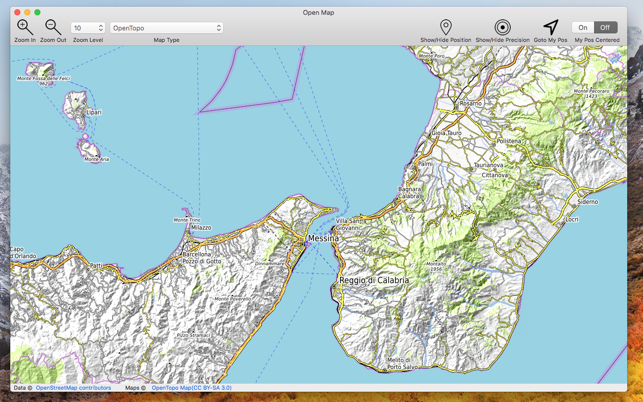
Tension Software announces the release of Open Map for macOS. Open Map bring over 60 types of OpenStreet maps on Mac with 28 zoom levels and save on disk as PDF and other formats. More then 60 map types of the world with different style graphic and also data, always up to date, available with 1 click with a resolution level ranging from 0 to 28. The application can natively export at any time any visualised map as PDF, PNG, TIFF,JPEG using any scale and area.
Milano, Italy - Tension Software is proud to announce the release of Open Map for macOS. Open Map bring over 60 types of OpenStreet maps on Mac with 28 zoom levels and save on disk as PDF and other formats. More then 60 map types of the world with different style graphic and also data, always up to date, available with 1 click with a resolution level ranging from 0 to 28.
Open Map covers all the world exactly as other well know proprietary formats. Application can natively export at any time any visualised map as PDF, PNG, TIFF,JPEG using any scale and area. Some of the available maps:
* Wikimedia
* Humanitarian
* Black & White
* OpenTopo
* Hike & Bike
* Hydda
* Toner
* Terrain
* Watercolour
* Positron
* Dark Matter
* Flat Blue
* Roads
* Hybrid
* Contour
* Grayscale
* Street
* Topo
* Imagery
* Shaded Relief
* LightGray
* NatGeo
* Delorme
* Ocean
* OpenCycle
* transport
* Landscape
* Pioner
* Atlas
* Outdoor
* Satellite
* Lyzidiamond
* Street Satellite
* and many others
* and more to be added in the next releases
Open Map can also visualize your position and precision range via geo wi-fi
Note:
Geographic data are served via internet by various servers. To visualize maps and associated data, an internet connection always on is required.
System Requirements:
* macOS Version 10.10 and later
Pricing and Availability:
Open Map is $5.99 USD (or equivalent amount in other currencies) and available worldwide exclusively through the Mac App Store in the Lifestyle category.
Tension Software: http://www.tensionsoftware.com
Open Map: http://www.tensionsoftware.com/osx/openmap/
Purchase and Download (MAS): https://itunes.apple.com/app/open-map/id1415277789
Screenshot: https://is3-ssl.mzstatic.com/image/thumb/Purple128/v4/bf/cb/f9/bfcbf962-4d6f-84b7-fdb4-3e212d1eb7a3/pr_source.png/643x0w.png
Application Icon: https://is5-ssl.mzstatic.com/image/thumb/Purple118/v4/07/4f/23/074f23f9-f9e9-c11a-67ae-9faf056f49af/app-85-220-4-2x.png/246x0w.png
Tension Software develops software for macOS and iOS using the latest Apple technologies. Other brands and products referenced herein are the trademarks or registered trademarks of their respective holders. Copyright (C) 2018 Tension Software. All Rights Reserved. Apple, the Apple logo, iPhone, iPod and iPad are registered trademarks of Apple Inc. in the U.S. and/or other countries.
*******
Link To Article: https://prmac.com/release-id-82895.htm
*******
---------------------------------------------------------------------------------
Note that you can alter delivered distributions at any time.
Login to your account on prMac to alter your channel selection, or to opt-out at any time.


24U releases 24U Phidgets Plug-In 3.0 for FileMaker Pro 14-17
A new article has been published at prMac.
24U releases 24U Phidgets Plug-In 3.0 for FileMaker Pro 14-17 - Published on 07/30/18
24U Software today releases 24U Phidgets Plug-In 3.0 for FileMaker Pro 14 through 17. 24U Phidgets Plug-In allows FileMaker Pro to interact with various Phidgets boards to let your solution control physical devices and physical devices to control your solution. The popular plug-in for integrating FileMaker solutions with hardware devices, such as relays, envrionmental sensors, RFID, and more, now adds support for the smart VINT interface announced by Phidgets Inc. in August 2017.
Zvole, Czech Republic - 24U has released 24U Phidgets Plug-In 3.0 for FileMaker Pro 14 through 17. The popular plug-in for integrating FileMaker solutions with hardware devices, such as relays, envrionmental sensors, RFID, and more, now adds support for the smart VINT interface announced by Phidgets Inc. in August 2017. 24U Phidgets Plug-In allows FileMaker Pro to interact with various Phidgets boards to let your solution control physical devices and physical devices to control your solution.
24U Phidgets Plug-In allows FileMaker Pro users to:
* Read and write RFID tags to track goods, assets and people
* Capture sensor data to collect environmental data such as temperature or force
* Control servo motors to automate moving parts of robots and machines
* Read digital and analog inputs to control your solution by physical controls
* Set digital outputs to switch lights and other electrical devices
* Display text on an LCD display to create custom user interface such as cashbox
* Set analog outputs to control electronic equipment
About VINT:
VINT stands for Versatile Interface, and it's the system that all modern Phidgets use to communicate. The main advantages of VINT are versatility, modularity, connectivity and stability. A VINT Hub Port is a versatile interface that combines the functionality of analog inputs, digital inputs, and digital outputs. The mode of each port can be selected in software by creating a new object and opening it on the desired port. Many VINT devices also come built-in with data and power isolation to prevent power fluctuations from entering the system.
Sample uses of 24U Phidgets Plug-In:
Existing customers use 24U Phidgets Plug-in in a wide range of different industries, including compliance testing of electrical equipment, sorting sheep, opening door to gym for customers identified by RFID loyalty card, or robotics prototyping.
"We had a hospital client and we used the 24U Phidgets Plug-In together with an RFID reader for tracking patient charts. The results were quite amazing. Prior to installing this the hospital lost charts on daily basis. When a chart was misplaced it was very difficult to find. The introduction of the chart tracking system meant that everyone knew the location of the chart by looking at the patient screen," said Joe Byrne, CEO of Glanmire Electronics
For Owen Caldwell, technology manager at Cal Poly Pomona Foundation, Inc., 24U Phidgets Plug-In makes it possible to prepare useful projects for electrical engineering major students. At FileMaker DevCon 2014 Owen said: "With Phidgets we've been able to create projects that are not only pertinent to their field but also beneficial to the workplace. We are looking at wiring up the offices to do 3D temperature mapping. With this I am hoping to be able to determine what effect the occupancy of the office has on the overall environment."
What's new in 24U Phidgets Plug-In 3.0:
* Compatibility with VINT lets you use the modern versatile Phidgets devices
* Support for Stepper Controller
* Support for SBC 4
Recommended configuration:
* Mac OS X: Any Intel Mac, 4096 MB RAM, macOS High Sierra 10.13, FileMaker Pro 17 Advanced
* Windows: Dual Core 1.6 GHz processor, 4096 MB RAM, Windows 10, FileMaker Pro 17 Advanced
Minimum requirements:
* Mac OS X: Any Intel Mac since 2008, 2048 MB RAM, Mac OS X 10.10 Yosemite, FileMaker Pro 14
* Windows: 1 GHz processor, 2048 MB RAM, Windows 7, FileMaker Pro 14
FileMaker Pro Compatibility:
* Fully compatible with FileMaker Pro 12, 13, 14, 15, 16 and 17
* Compatible with FileMaker Pro 17 in both 32-bit and 64-bit modes
* Compatible with both 32-bit and 64-bit versions of FileMaker Pro 17 on Windows
* Older versions with limited functionality are available for FileMaker Pro 8 thru 11
Pricing and Availability:
24U Phidgets Plug-In 3.0 is immediately available for download free of charge as a fully functional 14-days trial version, which can be activated after purchasing a license code. Licenses for 24U Phidgets Plug-In start at US$79 per user and device or $249 per user with unlimited devices. Existing customers can upgrade to the new version at 30 % off the regular prices. Until 15 August 2018 customers can upgrade at 50 % off the regular prices! Optional Premium Support and Implementation service are available with the purchase of 24U Phidgets Plug-In 3.0.
24U Software: http://www.24usoftware.com/
24U Phidgets Plug-In 3.0: https://www.24usoftware.com/Phidgets/
Download for Mac: http://24usoftware.com/download/24uPhidgetsPlugIn30.dmg
Download for Windows: http://24usoftware.com/download/24uPhidgetsPlugIn30.zip
Purchase a license: https://www.24uSoftware.com/Phidgets#buy
Media Assets: http://www.24usoftware.com/pr/
With a team of full-time testers, web, plug-in, Mac, Windows, Linux, iOS, and Android native app developers, and FileMaker certi ed developers, led by the FileMaker DevCon 2015 Developer Cup champion, 24U excels in taking care of existing FileMaker solutions, optimizing their performance, identifying and resolving potential issues and liabilities, improving reliability, stability and scalability, integrating them with other systems including various hardware devices, and extending them beyond expectation. As a platinum member of the FileMaker Business Alliance, we help global businesses around the world to maintain sustainable growth by working with their in-house developers or completely taking care of the maintenance and development of their business solutions. (c) 2018 24U s.r.o. All rights reserved. 24U, 24U Software, and FM Bench are trademarks of 24U s.r.o. FileMaker is a trademark of FileMaker, Inc., registered in the U.S. and other countries. All other trademarks are the
property of their respective owners. Pricing and availability are subject to change without notice.
*******
Link To Article: https://prmac.com/release-id-82893.htm
*******
---------------------------------------------------------------------------------
Note that you can alter delivered distributions at any time.
Login to your account on prMac to alter your channel selection, or to opt-out at any time.
24U releases 24U Phidgets Plug-In 3.0 for FileMaker Pro 14-17 - Published on 07/30/18
24U Software today releases 24U Phidgets Plug-In 3.0 for FileMaker Pro 14 through 17. 24U Phidgets Plug-In allows FileMaker Pro to interact with various Phidgets boards to let your solution control physical devices and physical devices to control your solution. The popular plug-in for integrating FileMaker solutions with hardware devices, such as relays, envrionmental sensors, RFID, and more, now adds support for the smart VINT interface announced by Phidgets Inc. in August 2017.
Zvole, Czech Republic - 24U has released 24U Phidgets Plug-In 3.0 for FileMaker Pro 14 through 17. The popular plug-in for integrating FileMaker solutions with hardware devices, such as relays, envrionmental sensors, RFID, and more, now adds support for the smart VINT interface announced by Phidgets Inc. in August 2017. 24U Phidgets Plug-In allows FileMaker Pro to interact with various Phidgets boards to let your solution control physical devices and physical devices to control your solution.
24U Phidgets Plug-In allows FileMaker Pro users to:
* Read and write RFID tags to track goods, assets and people
* Capture sensor data to collect environmental data such as temperature or force
* Control servo motors to automate moving parts of robots and machines
* Read digital and analog inputs to control your solution by physical controls
* Set digital outputs to switch lights and other electrical devices
* Display text on an LCD display to create custom user interface such as cashbox
* Set analog outputs to control electronic equipment
About VINT:
VINT stands for Versatile Interface, and it's the system that all modern Phidgets use to communicate. The main advantages of VINT are versatility, modularity, connectivity and stability. A VINT Hub Port is a versatile interface that combines the functionality of analog inputs, digital inputs, and digital outputs. The mode of each port can be selected in software by creating a new object and opening it on the desired port. Many VINT devices also come built-in with data and power isolation to prevent power fluctuations from entering the system.
Sample uses of 24U Phidgets Plug-In:
Existing customers use 24U Phidgets Plug-in in a wide range of different industries, including compliance testing of electrical equipment, sorting sheep, opening door to gym for customers identified by RFID loyalty card, or robotics prototyping.
"We had a hospital client and we used the 24U Phidgets Plug-In together with an RFID reader for tracking patient charts. The results were quite amazing. Prior to installing this the hospital lost charts on daily basis. When a chart was misplaced it was very difficult to find. The introduction of the chart tracking system meant that everyone knew the location of the chart by looking at the patient screen," said Joe Byrne, CEO of Glanmire Electronics
For Owen Caldwell, technology manager at Cal Poly Pomona Foundation, Inc., 24U Phidgets Plug-In makes it possible to prepare useful projects for electrical engineering major students. At FileMaker DevCon 2014 Owen said: "With Phidgets we've been able to create projects that are not only pertinent to their field but also beneficial to the workplace. We are looking at wiring up the offices to do 3D temperature mapping. With this I am hoping to be able to determine what effect the occupancy of the office has on the overall environment."
What's new in 24U Phidgets Plug-In 3.0:
* Compatibility with VINT lets you use the modern versatile Phidgets devices
* Support for Stepper Controller
* Support for SBC 4
Recommended configuration:
* Mac OS X: Any Intel Mac, 4096 MB RAM, macOS High Sierra 10.13, FileMaker Pro 17 Advanced
* Windows: Dual Core 1.6 GHz processor, 4096 MB RAM, Windows 10, FileMaker Pro 17 Advanced
Minimum requirements:
* Mac OS X: Any Intel Mac since 2008, 2048 MB RAM, Mac OS X 10.10 Yosemite, FileMaker Pro 14
* Windows: 1 GHz processor, 2048 MB RAM, Windows 7, FileMaker Pro 14
FileMaker Pro Compatibility:
* Fully compatible with FileMaker Pro 12, 13, 14, 15, 16 and 17
* Compatible with FileMaker Pro 17 in both 32-bit and 64-bit modes
* Compatible with both 32-bit and 64-bit versions of FileMaker Pro 17 on Windows
* Older versions with limited functionality are available for FileMaker Pro 8 thru 11
Pricing and Availability:
24U Phidgets Plug-In 3.0 is immediately available for download free of charge as a fully functional 14-days trial version, which can be activated after purchasing a license code. Licenses for 24U Phidgets Plug-In start at US$79 per user and device or $249 per user with unlimited devices. Existing customers can upgrade to the new version at 30 % off the regular prices. Until 15 August 2018 customers can upgrade at 50 % off the regular prices! Optional Premium Support and Implementation service are available with the purchase of 24U Phidgets Plug-In 3.0.
24U Software: http://www.24usoftware.com/
24U Phidgets Plug-In 3.0: https://www.24usoftware.com/Phidgets/
Download for Mac: http://24usoftware.com/download/24uPhidgetsPlugIn30.dmg
Download for Windows: http://24usoftware.com/download/24uPhidgetsPlugIn30.zip
Purchase a license: https://www.24uSoftware.com/Phidgets#buy
Media Assets: http://www.24usoftware.com/pr/
With a team of full-time testers, web, plug-in, Mac, Windows, Linux, iOS, and Android native app developers, and FileMaker certi ed developers, led by the FileMaker DevCon 2015 Developer Cup champion, 24U excels in taking care of existing FileMaker solutions, optimizing their performance, identifying and resolving potential issues and liabilities, improving reliability, stability and scalability, integrating them with other systems including various hardware devices, and extending them beyond expectation. As a platinum member of the FileMaker Business Alliance, we help global businesses around the world to maintain sustainable growth by working with their in-house developers or completely taking care of the maintenance and development of their business solutions. (c) 2018 24U s.r.o. All rights reserved. 24U, 24U Software, and FM Bench are trademarks of 24U s.r.o. FileMaker is a trademark of FileMaker, Inc., registered in the U.S. and other countries. All other trademarks are the
property of their respective owners. Pricing and availability are subject to change without notice.
*******
Link To Article: https://prmac.com/release-id-82893.htm
*******
---------------------------------------------------------------------------------
Note that you can alter delivered distributions at any time.
Login to your account on prMac to alter your channel selection, or to opt-out at any time.
24U Software releases Gonector for custom mobile FileMaker apps
A new article has been published at prMac.
24U Software releases Gonector for custom mobile FileMaker apps - Published on 07/30/18
Longtime Czech-based developer, 24U Software today releases Gonector, a FileMaker plug-in that allows a native application for iPhone or iPad, built using the FileMaker iOS App SDK, to communicate directly with mobile hardware devices. Being able to interact with professional mobile devices enables developers to use the FileMaker platform to create POS, Inventory and lots of other heavy-duty mobile business apps with friendly, fast, and reliable user interface.
Zvole, Czech Republic - 24U Software today releases Gonector, a FileMaker plug-in that allows a native application for iPhone or iPad, built using the FileMaker iOS App SDK, to communicate directly with mobile hardware devices. Being able to interact with professional mobile devices enables developers to use the FileMaker platform to create POS, Inventory and lots of other heavy-duty mobile business apps with friendly, fast, and reliable user interface.
Gonector Features:
* qID mini UHF RFID reader enables custom mobile apps to read UHF RFID tags
* Support for reading NFC tags on iPhone 7 or later lets a custom mobile FileMaker app read NFC without additional hardware
* Linea Pro and Infinea support enables custom apps to read and write RFID/NFC tags, and read barcodes, 2D codes, and magnetic stripe cards
* Reading data from digital scales allows custom FileMaker apps to capture weight data directly from the scale without interfering with the user interface
* Support for BlueTooth mobile receipt printers allows for printing professionally looking receipts directly from a mobile FileMaker app
Recommended configuration for development:
* Mac: Any Intel Mac, 4 GB RAM, macOS 10.12, FileMaker Pro 16 Advanced.
* Windows: CPU: 1 GHz or faster x86- or x64-bit processor RAM: 2 GB or more, Windows 10 Pro Edition, FileMaker Pro 16 Advanced.
Minimum requirements for development:
* Mac: Any Intel Mac, 4 GB RAM, macOS 10.12, FileMaker Pro 16 Advanced
* Windows: CPU: 1 GHz or faster x86- or x64-bit processor RAM: 1 GB, Windows 7 SP1 Professional Edition, FileMaker Pro 16 Advanced
Minimum requirements for building and deployment:
* macOS 10.13 and Xcode 9.2/Swift 3.2 (or build online at 24uSoftware)
* iOS 11.3
* Apple Connect account (for testing and deployment on device)
* FileMaker iOSAppSDK 16.0.1 or newer
* Gonector is fully supported by Xgode, 24U's online service for building iOS apps
Warning:
According to the FileMaker iOS App SDK, "FileMaker, Inc. does not recommend or support using the App Store to distribute apps created with iOS App SDK. FileMaker, Inc. recommends using the Apple Developer Enterprise Program to distribute your iOS apps. You can also use the Volume Purchase Program (VPP) to distribute your iOS apps through the VPP store."
Pricing and Availability:
Gonector is immediately available for download free of charge. Incuded a placeholder desktop plug-in for development can be used without limitation. iOS version of the plug-in works with one bundle ID for one hour, and can be activated after purchasing a license. Gonector license costs $499 (USD) per application (bundle ID).
24U Software: http://www.24usoftware.com/
Gonector: http://www.24usoftware.com/Gonector
Download for Mac: http://24usoftware.com/download/Gonector11.zip
Download for Windows: http://24usoftware.com/download/Gonector11.zip
Purchase a license: https://www.24uSoftware.com/Gonector#buy
Media Assets: http://www.24usoftware.com/pr/
With a team of full-time testers, web, plug-in, Mac, Windows, Linux, iOS, and Android native app developers, and FileMaker certi ed developers, led by the FileMaker DevCon 2015 Developer Cup champion, 24U excels in taking care of existing FileMaker solutions, optimizing their performance, identifying and resolving potential issues and liabilities, improving reliability, stability and scalability, integrating them with other systems including various hardware devices, and extending them beyond expectation. As a platinum member of the FileMaker Business Alliance, we help global businesses around the world to maintain sustainable growth by working with their in-house developers or completely taking care of the maintenance and development of their business solutions. (c) 2018 24U s.r.o. All rights reserved. 24U, 24U Software, and FM Bench are trademarks of 24U s.r.o. FileMaker is a trademark of FileMaker, Inc., registered in the U.S. and other countries. All other trademarks are the
property of their respective owners. Pricing and availability are subject to change without notice.
*******
Link To Article: https://prmac.com/release-id-82894.htm
*******
---------------------------------------------------------------------------------
Note that you can alter delivered distributions at any time.
Login to your account on prMac to alter your channel selection, or to opt-out at any time.
24U Software releases Gonector for custom mobile FileMaker apps - Published on 07/30/18
Longtime Czech-based developer, 24U Software today releases Gonector, a FileMaker plug-in that allows a native application for iPhone or iPad, built using the FileMaker iOS App SDK, to communicate directly with mobile hardware devices. Being able to interact with professional mobile devices enables developers to use the FileMaker platform to create POS, Inventory and lots of other heavy-duty mobile business apps with friendly, fast, and reliable user interface.
Zvole, Czech Republic - 24U Software today releases Gonector, a FileMaker plug-in that allows a native application for iPhone or iPad, built using the FileMaker iOS App SDK, to communicate directly with mobile hardware devices. Being able to interact with professional mobile devices enables developers to use the FileMaker platform to create POS, Inventory and lots of other heavy-duty mobile business apps with friendly, fast, and reliable user interface.
Gonector Features:
* qID mini UHF RFID reader enables custom mobile apps to read UHF RFID tags
* Support for reading NFC tags on iPhone 7 or later lets a custom mobile FileMaker app read NFC without additional hardware
* Linea Pro and Infinea support enables custom apps to read and write RFID/NFC tags, and read barcodes, 2D codes, and magnetic stripe cards
* Reading data from digital scales allows custom FileMaker apps to capture weight data directly from the scale without interfering with the user interface
* Support for BlueTooth mobile receipt printers allows for printing professionally looking receipts directly from a mobile FileMaker app
Recommended configuration for development:
* Mac: Any Intel Mac, 4 GB RAM, macOS 10.12, FileMaker Pro 16 Advanced.
* Windows: CPU: 1 GHz or faster x86- or x64-bit processor RAM: 2 GB or more, Windows 10 Pro Edition, FileMaker Pro 16 Advanced.
Minimum requirements for development:
* Mac: Any Intel Mac, 4 GB RAM, macOS 10.12, FileMaker Pro 16 Advanced
* Windows: CPU: 1 GHz or faster x86- or x64-bit processor RAM: 1 GB, Windows 7 SP1 Professional Edition, FileMaker Pro 16 Advanced
Minimum requirements for building and deployment:
* macOS 10.13 and Xcode 9.2/Swift 3.2 (or build online at 24uSoftware)
* iOS 11.3
* Apple Connect account (for testing and deployment on device)
* FileMaker iOSAppSDK 16.0.1 or newer
* Gonector is fully supported by Xgode, 24U's online service for building iOS apps
Warning:
According to the FileMaker iOS App SDK, "FileMaker, Inc. does not recommend or support using the App Store to distribute apps created with iOS App SDK. FileMaker, Inc. recommends using the Apple Developer Enterprise Program to distribute your iOS apps. You can also use the Volume Purchase Program (VPP) to distribute your iOS apps through the VPP store."
Pricing and Availability:
Gonector is immediately available for download free of charge. Incuded a placeholder desktop plug-in for development can be used without limitation. iOS version of the plug-in works with one bundle ID for one hour, and can be activated after purchasing a license. Gonector license costs $499 (USD) per application (bundle ID).
24U Software: http://www.24usoftware.com/
Gonector: http://www.24usoftware.com/Gonector
Download for Mac: http://24usoftware.com/download/Gonector11.zip
Download for Windows: http://24usoftware.com/download/Gonector11.zip
Purchase a license: https://www.24uSoftware.com/Gonector#buy
Media Assets: http://www.24usoftware.com/pr/
With a team of full-time testers, web, plug-in, Mac, Windows, Linux, iOS, and Android native app developers, and FileMaker certi ed developers, led by the FileMaker DevCon 2015 Developer Cup champion, 24U excels in taking care of existing FileMaker solutions, optimizing their performance, identifying and resolving potential issues and liabilities, improving reliability, stability and scalability, integrating them with other systems including various hardware devices, and extending them beyond expectation. As a platinum member of the FileMaker Business Alliance, we help global businesses around the world to maintain sustainable growth by working with their in-house developers or completely taking care of the maintenance and development of their business solutions. (c) 2018 24U s.r.o. All rights reserved. 24U, 24U Software, and FM Bench are trademarks of 24U s.r.o. FileMaker is a trademark of FileMaker, Inc., registered in the U.S. and other countries. All other trademarks are the
property of their respective owners. Pricing and availability are subject to change without notice.
*******
Link To Article: https://prmac.com/release-id-82894.htm
*******
---------------------------------------------------------------------------------
Note that you can alter delivered distributions at any time.
Login to your account on prMac to alter your channel selection, or to opt-out at any time.
Texas Wildcatter Experience for iOS, Android, Apple TV, Win10 PC & Xbox
A new article has been published at prMac.
Texas Wildcatter Experience for iOS, Android, Apple TV, Win10 PC & Xbox - Published on 07/30/18
Texas based developer, Magnin & Associates today introduces Texas Wildcatter Experience 1.1, their new game for iOS, Android, Apple TV, Windows PC and Xbox. Texas Wildcatter Experience simulates the thrill of prospecting for oil right on your phone, TV, or game console. When you hit oil, your drill rig will be replaced with a pump. You can then move the drill rig to a new location. Should you give up or hit a dry well, you can move the drill rig or shutdown.
Farmers Branch, Texas - Magnin & Associates today introduces Texas Wildcatter Experience 1.1, their new game for iOS, Android, Apple TV, Windows PC, and Xbox. Texas Wildcatter Experience lets you enjoy the thrill of prospecting or oil right on your phone, TV or game console.
Choose where to setup your first drilling rig. Press Play button to start, and x1, x2 or x3 to speed up the time. When a problem occurs randomly an onscreen message will explain the problem and if possible the cost is to fix it,.
When you hit oil, your drill rig will be replaced with a pump. You can then move the drill rig to a new location. Should you give up or hit a dry well, you can move the drill rig or shutdown, which will let you use it again later on.
You start with one drill rig, later you can rent additional drill rigs.
Each "day" you are accumulating drill rig rentals and crew labor costs. If you realize you have a dry well, consider moving the drill rig or shutting it down, which will stop the equipment rental and crew charges.
Five progressively more difficult levels should challenge all ages. Oil locations are randomly generated, so it's a different game each time you play.
When you try to place a drill in a new area, it will let you decide whether your want to acquire a lease to drill in that new area.
You can also decide whether to pay for a geological survey with a map showing the most likely spots to find oil. You can return to view the map at any time.
Optionally shares your accomplishments with social media, email, or instant messaging.
Universal App - supports iPhone, iPod touch, and iPad, including standard, Retina, and iPhone X displays.
The game was produced by Ed Magnin, programmed and level design by Willie Johnson, Jr, art and 3d models by Ryan Thomas, playtested by David Hayes. Matt Campana created the music and audio effects. According to Ed Magnin, "Since Texas is known for oil and is, in fact, the world's third largest oil producing region, we thought it was only natural for a Texas-based company to create a game to let you try your hand at oil prospecting."
Device Requirements (iOS):
* Compatible with iPhone, iPad, and iPod touch
* Requires iOS 8.0 or later
* Universal App - supports iPhone, iPod touch, and iPad, including standard, Retina, and iPhone X displays. Apple TV version also available.
* 77.3 MB
* Rated 4 +
Pricing and Availability:
Texas Wildcatter Experience 1.1 is $2.99 USD (or equivalent amount in other currencies) and available worldwide through the App Store in the Games category for iPhone, iPad, and Apple TV. An Android version is available worldwide from both Google Play and Amazon AppStore. Windows 10 PC and Xbox versions will be available any day from the Windows Store. For more information, please contact Ed Magnin.
Magnin & Associates: http://MagninGames.com
Texas Wildcatter Experience 1.1: http://MagninGames.com/oil
YouTube Video: https://youtu.be/6Qfo1po7uWA
Image (Title Screen): http://magningames.com/iphone/oil/images/Title.png
App Icon: http://MagninGames.com/iphone/oil/images/Icon_144.png
Game Credits: https://www.pinterest.com/pin/477733472967326136/
Ed Magnin has been actively involved in the game industry since 1979. Earlier in his career he worked for some of the top game developers of their day - MicroProse, Cinemaware, Virgin Games, and Park Place Productions. In 1993, he founded Magnin & Associates and has focused on handheld games ever since. They have created over 27 games for iOS (with over a million App Store downloads). Most are also available for Android, Windows 10 PC and Xbox. All Material and Software (C) Copyright 2018 Magnin & Associates. All Rights Reserved. Apple, the Apple logo, iPhone, iPod and iPad are registered trademarks of Apple Inc. in the U.S. and/or other countries. Other trademarks and registered trademarks may be the property of their respective owners.
*******
Link To Article: https://prmac.com/release-id-82892.htm
*******
---------------------------------------------------------------------------------
Note that you can alter delivered distributions at any time.
Login to your account on prMac to alter your channel selection, or to opt-out at any time.
Texas Wildcatter Experience for iOS, Android, Apple TV, Win10 PC & Xbox - Published on 07/30/18
Texas based developer, Magnin & Associates today introduces Texas Wildcatter Experience 1.1, their new game for iOS, Android, Apple TV, Windows PC and Xbox. Texas Wildcatter Experience simulates the thrill of prospecting for oil right on your phone, TV, or game console. When you hit oil, your drill rig will be replaced with a pump. You can then move the drill rig to a new location. Should you give up or hit a dry well, you can move the drill rig or shutdown.
Farmers Branch, Texas - Magnin & Associates today introduces Texas Wildcatter Experience 1.1, their new game for iOS, Android, Apple TV, Windows PC, and Xbox. Texas Wildcatter Experience lets you enjoy the thrill of prospecting or oil right on your phone, TV or game console.
Choose where to setup your first drilling rig. Press Play button to start, and x1, x2 or x3 to speed up the time. When a problem occurs randomly an onscreen message will explain the problem and if possible the cost is to fix it,.
When you hit oil, your drill rig will be replaced with a pump. You can then move the drill rig to a new location. Should you give up or hit a dry well, you can move the drill rig or shutdown, which will let you use it again later on.
You start with one drill rig, later you can rent additional drill rigs.
Each "day" you are accumulating drill rig rentals and crew labor costs. If you realize you have a dry well, consider moving the drill rig or shutting it down, which will stop the equipment rental and crew charges.
Five progressively more difficult levels should challenge all ages. Oil locations are randomly generated, so it's a different game each time you play.
When you try to place a drill in a new area, it will let you decide whether your want to acquire a lease to drill in that new area.
You can also decide whether to pay for a geological survey with a map showing the most likely spots to find oil. You can return to view the map at any time.
Optionally shares your accomplishments with social media, email, or instant messaging.
Universal App - supports iPhone, iPod touch, and iPad, including standard, Retina, and iPhone X displays.
The game was produced by Ed Magnin, programmed and level design by Willie Johnson, Jr, art and 3d models by Ryan Thomas, playtested by David Hayes. Matt Campana created the music and audio effects. According to Ed Magnin, "Since Texas is known for oil and is, in fact, the world's third largest oil producing region, we thought it was only natural for a Texas-based company to create a game to let you try your hand at oil prospecting."
Device Requirements (iOS):
* Compatible with iPhone, iPad, and iPod touch
* Requires iOS 8.0 or later
* Universal App - supports iPhone, iPod touch, and iPad, including standard, Retina, and iPhone X displays. Apple TV version also available.
* 77.3 MB
* Rated 4 +
Pricing and Availability:
Texas Wildcatter Experience 1.1 is $2.99 USD (or equivalent amount in other currencies) and available worldwide through the App Store in the Games category for iPhone, iPad, and Apple TV. An Android version is available worldwide from both Google Play and Amazon AppStore. Windows 10 PC and Xbox versions will be available any day from the Windows Store. For more information, please contact Ed Magnin.
Magnin & Associates: http://MagninGames.com
Texas Wildcatter Experience 1.1: http://MagninGames.com/oil
YouTube Video: https://youtu.be/6Qfo1po7uWA
Image (Title Screen): http://magningames.com/iphone/oil/images/Title.png

App Icon: http://MagninGames.com/iphone/oil/images/Icon_144.png

Game Credits: https://www.pinterest.com/pin/477733472967326136/
Ed Magnin has been actively involved in the game industry since 1979. Earlier in his career he worked for some of the top game developers of their day - MicroProse, Cinemaware, Virgin Games, and Park Place Productions. In 1993, he founded Magnin & Associates and has focused on handheld games ever since. They have created over 27 games for iOS (with over a million App Store downloads). Most are also available for Android, Windows 10 PC and Xbox. All Material and Software (C) Copyright 2018 Magnin & Associates. All Rights Reserved. Apple, the Apple logo, iPhone, iPod and iPad are registered trademarks of Apple Inc. in the U.S. and/or other countries. Other trademarks and registered trademarks may be the property of their respective owners.
*******
Link To Article: https://prmac.com/release-id-82892.htm
*******
---------------------------------------------------------------------------------
Note that you can alter delivered distributions at any time.
Login to your account on prMac to alter your channel selection, or to opt-out at any time.
LinkOptimizer for InDesign Now Can Update Modified Links Automatically
A new article has been published at prMac.
LinkOptimizer for InDesign Now Can Update Modified Links Automatically - Published on 07/30/18
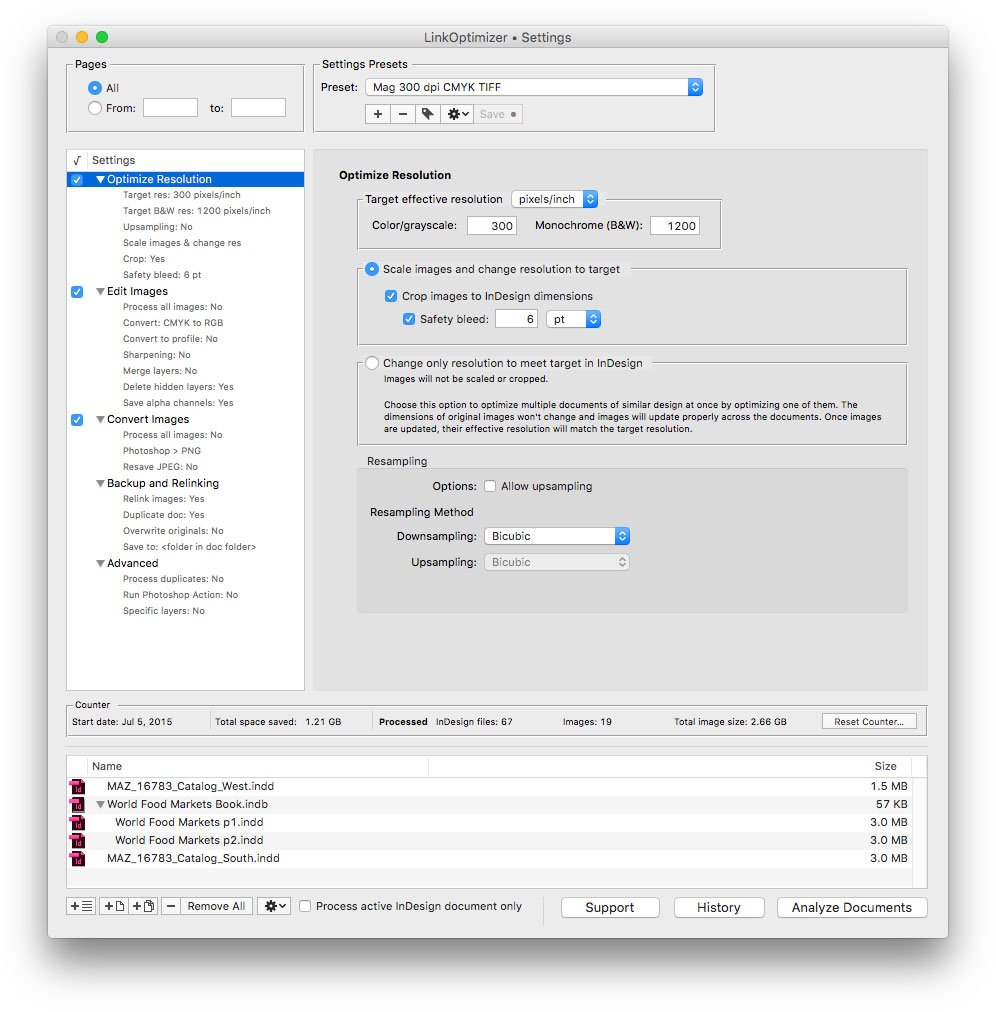
Zevrix Solutions announces LinkOptimizer 5.2.7, a feature update to company's workflow automation solution for Adobe InDesign. LinkOptimizer lets users automatically scale and crop images to their InDesign dimensions at specified target resolution, convert image formats, adjust colors, run Photoshop actions and more. The new version adds an option to update modified InDesign links automatically before processing, which helps users save time and eliminate unnecessary workflow interruptions.
Toronto (ON), Canada - Zevrix Solutions today announces LinkOptimizer 5.2.7, a feature update to its image processing automation plug-in for Adobe InDesign. Awarded 4 out of 5 stars by Computer Arts magazine, LinkOptimizer automates complex image manipulation tasks and helps users reduce the size of InDesign links, save prepress costs, and easily repurpose InDesign documents for web and mobile devices.
The new version adds an option to update modified links automatically before analyzing InDesign documents, which helps users save time and eliminate unnecessary workflow interruptions. This new feature is especially useful for hassle free batch processing of InDesign files. The new option can be found in the Advanced settings tab of LinkOptimizer.
"Today LinkOptimizer batched a huge book project and another magazine project in minutes vs. hours. Now I can take the afternoon off and drink beer," says Brian Donahue, owner of Bedesign studio in Minneapolis, Minnesota. "Thanks for freeing up my afternoon, rather than doing production work."
LinkOptimizer works automatically with Photoshop to eliminate the excess image data of InDesign links, perform essential image adjustments and convert image formats. For example, with just a click of a button users can:
* Optimize dozens of InDesign files
* Scale and crop images to match their dimensions in InDesign
* Change their resolution to 300 dpi
* Convert RGB images to CMYK
* Resave JPEGs as TIFF
* Run a Photoshop action on each image
As a result users can save gigabytes of disk space and countless hours of optimizing images manually, accelerate document output, reduce job turnaround and cut costs through faster processing.
Pricing and Availability:
LinkOptimizer can be purchased from Zevrix website for $259.95 USD (Lite version: $179.95) as well as from Adobe Exchange and authorized resellers. Trial is also available for download. The update is free for LinkOptimizer 5.x users and $130 to upgrade from previous versions. LinkOptimizer requires macOS 10.7-10.13 and Adobe InDesign / Photoshop CS5-CC 2018.
Zevrix Solutions: http://zevrix.com
LinkOptimizer 5.2.7: http://zevrix.com/LinkOptimizer.php
Download LinkOptimizer: http://zevrix.com/LinkOptimizer.dmg
Purchase: http://zevrix.com/store.php
Screenshot: http://zevrix.com/screenshots/lo5/res-win.jpg
Located in Toronto, Canada, Zevrix Solutions provides automation and productivity solutions for Adobe Creative Cloud and Creative Suite software, PDF workflows, graphic file diagnostics and Microsoft Office output on Mac OS. Zevrix is dedicated to help professionals increase their profits through automating everyday tasks, producing error-free documents, saving disk space and cutting production costs. For more information, visit their website. Copyright (C) 2018 Zevrix Solutions. All Rights Reserved. Other trademarks and registered trademarks may be the property of their respective owners.
*******
Link To Article: https://prmac.com/release-id-82891.htm
*******
---------------------------------------------------------------------------------
Note that you can alter delivered distributions at any time.
Login to your account on prMac to alter your channel selection, or to opt-out at any time.
LinkOptimizer for InDesign Now Can Update Modified Links Automatically - Published on 07/30/18
Zevrix Solutions announces LinkOptimizer 5.2.7, a feature update to company's workflow automation solution for Adobe InDesign. LinkOptimizer lets users automatically scale and crop images to their InDesign dimensions at specified target resolution, convert image formats, adjust colors, run Photoshop actions and more. The new version adds an option to update modified InDesign links automatically before processing, which helps users save time and eliminate unnecessary workflow interruptions.
Toronto (ON), Canada - Zevrix Solutions today announces LinkOptimizer 5.2.7, a feature update to its image processing automation plug-in for Adobe InDesign. Awarded 4 out of 5 stars by Computer Arts magazine, LinkOptimizer automates complex image manipulation tasks and helps users reduce the size of InDesign links, save prepress costs, and easily repurpose InDesign documents for web and mobile devices.
The new version adds an option to update modified links automatically before analyzing InDesign documents, which helps users save time and eliminate unnecessary workflow interruptions. This new feature is especially useful for hassle free batch processing of InDesign files. The new option can be found in the Advanced settings tab of LinkOptimizer.
"Today LinkOptimizer batched a huge book project and another magazine project in minutes vs. hours. Now I can take the afternoon off and drink beer," says Brian Donahue, owner of Bedesign studio in Minneapolis, Minnesota. "Thanks for freeing up my afternoon, rather than doing production work."
LinkOptimizer works automatically with Photoshop to eliminate the excess image data of InDesign links, perform essential image adjustments and convert image formats. For example, with just a click of a button users can:
* Optimize dozens of InDesign files
* Scale and crop images to match their dimensions in InDesign
* Change their resolution to 300 dpi
* Convert RGB images to CMYK
* Resave JPEGs as TIFF
* Run a Photoshop action on each image
As a result users can save gigabytes of disk space and countless hours of optimizing images manually, accelerate document output, reduce job turnaround and cut costs through faster processing.
Pricing and Availability:
LinkOptimizer can be purchased from Zevrix website for $259.95 USD (Lite version: $179.95) as well as from Adobe Exchange and authorized resellers. Trial is also available for download. The update is free for LinkOptimizer 5.x users and $130 to upgrade from previous versions. LinkOptimizer requires macOS 10.7-10.13 and Adobe InDesign / Photoshop CS5-CC 2018.
Zevrix Solutions: http://zevrix.com
LinkOptimizer 5.2.7: http://zevrix.com/LinkOptimizer.php
Download LinkOptimizer: http://zevrix.com/LinkOptimizer.dmg
Purchase: http://zevrix.com/store.php
Screenshot: http://zevrix.com/screenshots/lo5/res-win.jpg
Located in Toronto, Canada, Zevrix Solutions provides automation and productivity solutions for Adobe Creative Cloud and Creative Suite software, PDF workflows, graphic file diagnostics and Microsoft Office output on Mac OS. Zevrix is dedicated to help professionals increase their profits through automating everyday tasks, producing error-free documents, saving disk space and cutting production costs. For more information, visit their website. Copyright (C) 2018 Zevrix Solutions. All Rights Reserved. Other trademarks and registered trademarks may be the property of their respective owners.
*******
Link To Article: https://prmac.com/release-id-82891.htm
*******
---------------------------------------------------------------------------------
Note that you can alter delivered distributions at any time.
Login to your account on prMac to alter your channel selection, or to opt-out at any time.
CS Odessa updates Azure Architecture Solution for ConceptDraw PRO
A new article has been published at prMac.
CS Odessa updates Azure Architecture Solution for ConceptDraw PRO - Published on 07/28/18
California based CS Odessa today announces the new Azure Architecture Solution plugin for ConceptDraw PRO v11, now available in ConceptDraw Solution Park. The new version of solution updates the previous release with new libraries, templates, and samples. This collection of scalable vector library objects and templates for ConceptDraw PRO makes short work of describing any cloud configuration based on Windows Azure Platform and Azure Cloud Architecture with an updated set of graphic elements.
Odessa, Ukraine - CS Odessa is pleased to announce the new edition of Azure Architecture Solution for ConceptDraw PRO. The new version of solution updates the previous release with new libraries, templates, and samples. This collection of scalable vector library objects and templates for ConceptDraw PRO makes short work of describing any cloud configuration based on Windows Azure Platform and Azure Cloud Architecture with an updated set of graphic elements.
Azure Architecture Solution offers a great variety of standard graphic icons and sample architectures schemes depicting Microsoft Azure Cloud Computing Platform & Services, that are must-have for major architectural diagrams.
The updated solution is extended with 12 new libraries containing 497 vector objects and a set of new samples and templates. Network architects, system designers, and other IT professionals will find out here the extensive collection of graphic objects that will help them build great Azure architecture diagrams.
ConceptDraw PRO, supported by the ever-growing collection of business solutions is compatible with macOS and Windows. It is well-known for the ability to exchange documents with Microsoft Visio - the de facto standard in business graphics documents. ConceptDraw PRO can open and save documents that can be used by Visio (VSD, VDX and VSDX documents) users.
Pricing and Availability:
The Azure Architecture solution is available at no charge to users of ConceptDraw PRO v11 and ConceptDraw Office v4, via STORE. ConceptDraw PRO v11 retails separately for $199 (USD) per end user license and is includes in ConceptDraw Office v4 which retails for $499.
Solution Park: http://www.conceptdraw.com/solution-park
ConceptDraw Office v4: http://www.conceptdraw.com/products/office
Azure Architecture Solution: http://www.conceptdraw.com/solution-park/computer-networks-azure-architecture
ConceptDraw PRO v11: http://www.conceptdraw.com/products/drawing-tool
Founded in 1993, Computer Systems Odessa supplies cross-platform productivity tools and graphic technologies to professional and corporate users around the world. With headquarter in Odessa, Ukraine, CS Odessa sells products internationally through resellers in over 150 countries, both directly and through resellers. The ConceptDraw line of products has won numerous awards and is used by hundreds of thousands, including Fortune 500 companies, U.S. Federal Government agencies, small and medium businesses, and students and educators around the globe. ConceptDraw is a registered trademark, and ConceptDraw Office, ConceptDraw Solution Park, ConceptDraw PRO, ConceptDraw MINDMAP, ConceptDraw PROJECT, and ConceptDraw STORE are trademarks of CS Odessa. All other trademarks and registered trademarks are the properties of their respective owners.
*******
Link To Article: https://prmac.com/release-id-82890.htm
*******
---------------------------------------------------------------------------------
Note that you can alter delivered distributions at any time.
Login to your account on prMac to alter your channel selection, or to opt-out at any time.
CS Odessa updates Azure Architecture Solution for ConceptDraw PRO - Published on 07/28/18
California based CS Odessa today announces the new Azure Architecture Solution plugin for ConceptDraw PRO v11, now available in ConceptDraw Solution Park. The new version of solution updates the previous release with new libraries, templates, and samples. This collection of scalable vector library objects and templates for ConceptDraw PRO makes short work of describing any cloud configuration based on Windows Azure Platform and Azure Cloud Architecture with an updated set of graphic elements.
Odessa, Ukraine - CS Odessa is pleased to announce the new edition of Azure Architecture Solution for ConceptDraw PRO. The new version of solution updates the previous release with new libraries, templates, and samples. This collection of scalable vector library objects and templates for ConceptDraw PRO makes short work of describing any cloud configuration based on Windows Azure Platform and Azure Cloud Architecture with an updated set of graphic elements.
Azure Architecture Solution offers a great variety of standard graphic icons and sample architectures schemes depicting Microsoft Azure Cloud Computing Platform & Services, that are must-have for major architectural diagrams.
The updated solution is extended with 12 new libraries containing 497 vector objects and a set of new samples and templates. Network architects, system designers, and other IT professionals will find out here the extensive collection of graphic objects that will help them build great Azure architecture diagrams.
ConceptDraw PRO, supported by the ever-growing collection of business solutions is compatible with macOS and Windows. It is well-known for the ability to exchange documents with Microsoft Visio - the de facto standard in business graphics documents. ConceptDraw PRO can open and save documents that can be used by Visio (VSD, VDX and VSDX documents) users.
Pricing and Availability:
The Azure Architecture solution is available at no charge to users of ConceptDraw PRO v11 and ConceptDraw Office v4, via STORE. ConceptDraw PRO v11 retails separately for $199 (USD) per end user license and is includes in ConceptDraw Office v4 which retails for $499.
Solution Park: http://www.conceptdraw.com/solution-park
ConceptDraw Office v4: http://www.conceptdraw.com/products/office
Azure Architecture Solution: http://www.conceptdraw.com/solution-park/computer-networks-azure-architecture
ConceptDraw PRO v11: http://www.conceptdraw.com/products/drawing-tool
Founded in 1993, Computer Systems Odessa supplies cross-platform productivity tools and graphic technologies to professional and corporate users around the world. With headquarter in Odessa, Ukraine, CS Odessa sells products internationally through resellers in over 150 countries, both directly and through resellers. The ConceptDraw line of products has won numerous awards and is used by hundreds of thousands, including Fortune 500 companies, U.S. Federal Government agencies, small and medium businesses, and students and educators around the globe. ConceptDraw is a registered trademark, and ConceptDraw Office, ConceptDraw Solution Park, ConceptDraw PRO, ConceptDraw MINDMAP, ConceptDraw PROJECT, and ConceptDraw STORE are trademarks of CS Odessa. All other trademarks and registered trademarks are the properties of their respective owners.
*******
Link To Article: https://prmac.com/release-id-82890.htm
*******
---------------------------------------------------------------------------------
Note that you can alter delivered distributions at any time.
Login to your account on prMac to alter your channel selection, or to opt-out at any time.
Skater - Let's Skate, A Challenging Racing Game, Now Available
A new article has been published at prMac.
Skater - Let's Skate, A Challenging Racing Game, Now Available - Published on 07/25/18
Global mobile game publisher ZPLAY announces their fun and challenging racing game, Skater - Let's Skate, is now available on iOS and Android devices all over the world. Skater - Let's Skate, is a picturesque parkour game with easy control while requires challenging skills. Fabulous scenery and rich levels are just enough to immerse yourself in. The goal is to step on a skateboard, going through various obstacles and ravines, as well as not falling or hitting the ground.
Beijing, China - Global mobile game publisher ZPLAY is glad to announce that a fun and challenging racing game, Skater - Let's Skate, is now available on iPhone, uPad, iPod touch, and Android devices all over the world.
Skater - Let's Skate, is a picturesque parkour game with easy control while requires challenging skills. Fabulous scenery and rich levels are just enough to immerse yourself in.
Your goal is to step on your skateboard, going through various obstacles and ravines, as well as not falling or hitting the ground. Complete your World Tour!
Features:
* One-hand control, smoothly refreshing experience
* Different worlds with well-designed levels
* A variety of costumes and equipment, collecting your favorite ones
* Challenge with more stunt actions
Device Requirements:
* iPhone, iPad, and iPod touch
* Requires iOS 8.0 or later
* Universal Application
* 216.1 MB
Pricing and Availability:
Skater - Let's Skate is free and is available worldwide through the App Store in the Games category. An Android version is also available through Google Play.
ZPLAY: http://zplay.com/
Download on App Store: https://itunes.apple.com/app/id1395884891
Download on Google Play: https://play.google.com/store/apps/details?id=com.zplay.skaterman
Press Kit: https://drive.google.com/drive/folders/11XQwf5DRvn26OHwPSRXWHKvsjhUvSf-5?usp=sharing
YouTube Trailer: https://www.youtube.com/watch?v=IeDwH_6bpm0
Founded in 2010, ZPLAY is a fast growing, global, mobile games publisher, having the solid strength of both experience and industry success. To date, ZPLAY has attracted close to half a billion users, and its products cover more than 100 countries and regions. ZPLAY, along with its developer partners, has enjoyed top 10 rankings in all major markets, including Europe, America, Asia, and the Middle East. All Material and Software (C) Copyright 2018 ZPLAY. All Rights Reserved. Apple, the Apple logo, iPhone, iPod and iPad are registered trademarks of Apple Inc. in the U.S. and/or other countries. Other trademarks and registered trademarks may be the property of their respective owners.
*******
Link To Article: https://prmac.com/release-id-82888.htm
*******
---------------------------------------------------------------------------------
Note that you can alter delivered distributions at any time.
Login to your account on prMac to alter your channel selection, or to opt-out at any time.
Skater - Let's Skate, A Challenging Racing Game, Now Available - Published on 07/25/18
Global mobile game publisher ZPLAY announces their fun and challenging racing game, Skater - Let's Skate, is now available on iOS and Android devices all over the world. Skater - Let's Skate, is a picturesque parkour game with easy control while requires challenging skills. Fabulous scenery and rich levels are just enough to immerse yourself in. The goal is to step on a skateboard, going through various obstacles and ravines, as well as not falling or hitting the ground.
Beijing, China - Global mobile game publisher ZPLAY is glad to announce that a fun and challenging racing game, Skater - Let's Skate, is now available on iPhone, uPad, iPod touch, and Android devices all over the world.
Skater - Let's Skate, is a picturesque parkour game with easy control while requires challenging skills. Fabulous scenery and rich levels are just enough to immerse yourself in.
Your goal is to step on your skateboard, going through various obstacles and ravines, as well as not falling or hitting the ground. Complete your World Tour!
Features:
* One-hand control, smoothly refreshing experience
* Different worlds with well-designed levels
* A variety of costumes and equipment, collecting your favorite ones
* Challenge with more stunt actions
Device Requirements:
* iPhone, iPad, and iPod touch
* Requires iOS 8.0 or later
* Universal Application
* 216.1 MB
Pricing and Availability:
Skater - Let's Skate is free and is available worldwide through the App Store in the Games category. An Android version is also available through Google Play.
ZPLAY: http://zplay.com/
Download on App Store: https://itunes.apple.com/app/id1395884891
Download on Google Play: https://play.google.com/store/apps/details?id=com.zplay.skaterman
Press Kit: https://drive.google.com/drive/folders/11XQwf5DRvn26OHwPSRXWHKvsjhUvSf-5?usp=sharing
YouTube Trailer: https://www.youtube.com/watch?v=IeDwH_6bpm0
Founded in 2010, ZPLAY is a fast growing, global, mobile games publisher, having the solid strength of both experience and industry success. To date, ZPLAY has attracted close to half a billion users, and its products cover more than 100 countries and regions. ZPLAY, along with its developer partners, has enjoyed top 10 rankings in all major markets, including Europe, America, Asia, and the Middle East. All Material and Software (C) Copyright 2018 ZPLAY. All Rights Reserved. Apple, the Apple logo, iPhone, iPod and iPad are registered trademarks of Apple Inc. in the U.S. and/or other countries. Other trademarks and registered trademarks may be the property of their respective owners.
*******
Link To Article: https://prmac.com/release-id-82888.htm
*******
---------------------------------------------------------------------------------
Note that you can alter delivered distributions at any time.
Login to your account on prMac to alter your channel selection, or to opt-out at any time.
Subscribe to:
Posts (Atom)