A new article has been published at prMac.
Output Factory Server for InDesign Now Can Split Files into Page Groups - Published on 08/13/18
Zevrix Solutions announces Output Factory Server 2.1.2, a feature update to company's output automation solution for Adobe InDesign. Output Factory Server automates printing and exporting from InDesign by processing files from hot folders. The software offers layer versioning, preflighting, PDF security presets, FTP file delivery, unlimited users and much more. The new version lets users split InDesign files into consecutive groups of several pages (for example, every 2 pages, 3 pages etc.)
Toronto (ON), Canada - Zevrix Solutions today announces the release of Output Factory Server 2.1.2, a feature update to company's output automation tool for Adobe InDesign. Output Factory Server automates InDesign production workflow by processing files from watched hot folders. The app offloads printing and exporting from InDesign to a central system leaving operator workstations free from the output process.
The new version adds the ability to split InDesign files into consecutive groups of several pages using the new "Save as n pages" option. For example, users can split a 20-page document into five InDesign files of 4 pages each, or ten double-page files and so on. In addition, the new update improves export of non-consecutive groups of pages to single PDF files and fixes a file naming issue during output to IDML format.
Output Factory Server is intended to run on a dedicated machine and serve unlimited users on a network via watched hot folders. Users can create hot folders for different output targets such as hi-res PDF, large format printing, Flash files and so on. The app offers the following key features:
* Output InDesign files automatically from hot folders
* Supports print, PDF, PostScript, TIFF, EPUB and other formats
* Output to multiple formats from a single hot folder
* Automatic email notifications on errors and other events
* Layer versioning: output layer combinations as separate files
* Variable output file names
* Automatic preflighting
* PDF security presets for different workflows
Pricing and Availability:
Output Factory Server can be purchased from Zevrix web site for $699.95 (USD), as well as from authorized resellers. Trial is also available for download. The upgrade to version 2 is $350 for the licensed users of Output Factory Server 1.x and BatchOutput Server. Output Factory Server requires macOS 10.7-10.13 and Adobe InDesign CS5-CC 2018.
Zevrix Solutions: http://zevrix.com
Output Factory Server 2.1.2: http://zevrix.com/OutputFactoryServer.php
Download Output Factory Server: http://zevrix.com/OutputFactoryServer.dmg
Purchase: http://zevrix.com/store.php
Screenshot: http://zevrix.com/screenshots/ofs2/ofs-main-pdf.jpg
Located in Toronto, Canada, Zevrix Solutions provides automation and productivity solutions for Adobe Creative Cloud and Creative Suite software, PDF workflows, graphic file diagnostics and Microsoft Office output on Mac OS. Zevrix is dedicated to help professionals increase their profits through automating everyday tasks, producing error-free documents, saving disk space and cutting production costs. For more information, visit their website. Copyright (C) 2018 Zevrix Solutions. All Rights Reserved. Other trademarks and registered trademarks may be the property of their respective owners.
*******
Link To Article: https://prmac.com/release-id-82914.htm
*******
---------------------------------------------------------------------------------
Note that you can alter delivered distributions at any time.
Login to your account on prMac to alter your channel selection, or to opt-out at any time.


Cisdem Data Recovery 5.0.0 Brings Enhanced Recovery Accuracy up to 96.8%
A new article has been published at prMac.
Cisdem Data Recovery 5.0.0 Brings Enhanced Recovery Accuracy up to 96.8% - Published on 08/10/18
Mac software developer Cisdem released Cisdem Data Recovery for Mac 5.0.0 which brings an improved recovery accuracy of up to 96.8%, enhanced scanning speed and a brand new interface. This Mac data recovery software tool can fast and safely recover lost, deleted or formatted files from Mac's hard drives, external hard drive, SD card, USB flash drive and other external devices.
Madelia, Minnesota - Cisdem, a long-established developer of productivity and business software for Mac, today announced the release of Cisdem Data Recovery for Mac version 5.0.0. The new version comes with improved scanning speed, enhanced recovery accuracy, new added features and a brand new interface.
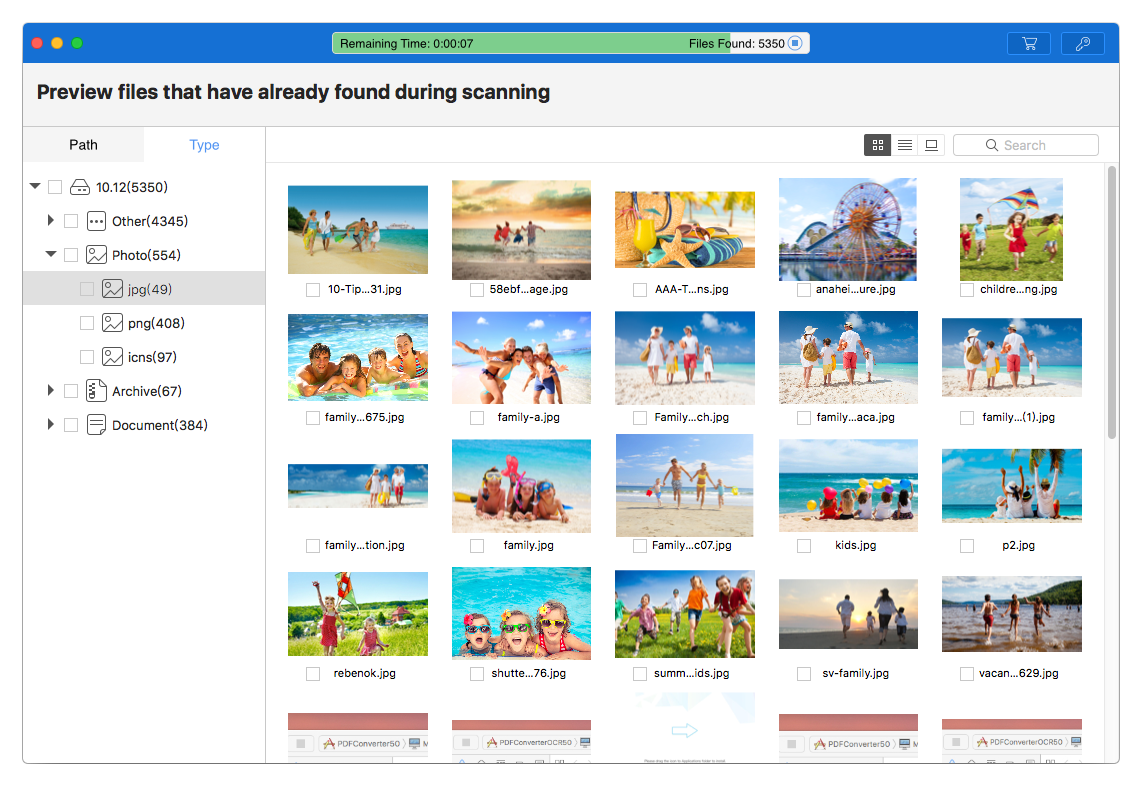
"Upgrading to the new version means faster and better data recovery," said Edward L. Riley, Cisdem's project manager. "We optimized the recovery algorithm, aiming to lift the recovery accuracy to a even higher level. After running multiple tests, we found that, on average, the recovery accuracy of Cisdem Data Recovery 5.0.0 is up to 96.8%. There is a 4.57% increase when compared to the last version (Ver4.2.3). In addition to enhanced efficiency and accuracy, there are also improvements in usability. Users are now able to preview files while the scan is going on. The new interface will bring a different optimized experience."
What's New in Version 5.0.0:
* Brand new interface: Optimize the UI interface and make the operation easier.
* Speed up the time of data scanning.
* Improved recovery accuracy and quality of the recoverable data.
* Support preview files in the process of scanning.
Main Features of Cisdem Data Recovery for Mac:
* Recover documents, images, music and more
Support a wide variety of file formats and all major file types including photos, videos, audios, documents, archives, emails, etc.
* A wide support for different file systems
Recover lost, deleted and formatted data from common file systems including APFS, HFS , FAT16, FAT32, exFAT, etc.
* Recover data regardless of device
Recover data from any internal or external storage devices, such as Mac hard drive, SSD, memory card, USB flash drive, digital camera, iPod, MP3 player, MP4 player, etc.
* Work for all data loss situations
Recovery data regardless of data loss causes, such as accidental deletion, device formation, virus damage, factory reset, macOS upgrade, etc.
* Customized data recovery solutions
Provide 5 data recovery solutions for different data loss scenarios
* Automatic classification by file type for format
After the scan, lost files will be listed in tree-view, classified by file type and format, for users to preview and select.
* Multiple preview modes
Users can preview files during and after scanning. There are three different modes allowing users to conveniently preview files and check out file information.
* Flexible filtering
Users can filter files by name, size, format, path, etc. to find target files quickly and effectively.
Price and Availability:
Cisdem Data Recovery for Mac 5.0.0 is available on Cisdem's official website. You can get a lifetime license with $49.99 now (reg. price: $69.99) with lifetime free upgrades. Free trial is provided and available for download. To get more information about Cisdem Data Recovery for Mac, please visit its product page on Cisdem official website.
Cisdem: https://www.cisdem.com/
Cisdem Data Recovery for Mac: https://www.cisdem.com/data-recovery-mac.html
Download Free Trial: https://www.cisdem.com/downloads/cisdem-datarecovery-10.dmg
Purchase: https://www.cisdem.com/data-recovery-mac/buy.html
Screenshot: https://www.cisdem.com/images/screens/datarecovery-scr-preview-l.png
Application Icon: https://www.cisdem.com/images/appicon/datarecovery-icon100.png
Cisdem provides productivity and business software that helps Mac users to get their job done faster. Cisdem products include top rated software centered on PDF Conversion, PDF Management, Data Recovery, and File Management. The company is dedicated in building highly efficient Mac software that make life easier and processes simpler. All Material and Software (C) Copyright 2018 Cisdem. All Rights Reserved. Apple, the Apple logo, Mac OS X and Macintosh are registered trademarks of Apple Inc. in the U.S. and/or other countries. Other trademarks and registered trademarks may be the property of their respective owners.
*******
Link To Article: https://prmac.com/release-id-82912.htm
*******
---------------------------------------------------------------------------------
Note that you can alter delivered distributions at any time.
Login to your account on prMac to alter your channel selection, or to opt-out at any time.
Cisdem Data Recovery 5.0.0 Brings Enhanced Recovery Accuracy up to 96.8% - Published on 08/10/18
Mac software developer Cisdem released Cisdem Data Recovery for Mac 5.0.0 which brings an improved recovery accuracy of up to 96.8%, enhanced scanning speed and a brand new interface. This Mac data recovery software tool can fast and safely recover lost, deleted or formatted files from Mac's hard drives, external hard drive, SD card, USB flash drive and other external devices.
Madelia, Minnesota - Cisdem, a long-established developer of productivity and business software for Mac, today announced the release of Cisdem Data Recovery for Mac version 5.0.0. The new version comes with improved scanning speed, enhanced recovery accuracy, new added features and a brand new interface.
"Upgrading to the new version means faster and better data recovery," said Edward L. Riley, Cisdem's project manager. "We optimized the recovery algorithm, aiming to lift the recovery accuracy to a even higher level. After running multiple tests, we found that, on average, the recovery accuracy of Cisdem Data Recovery 5.0.0 is up to 96.8%. There is a 4.57% increase when compared to the last version (Ver4.2.3). In addition to enhanced efficiency and accuracy, there are also improvements in usability. Users are now able to preview files while the scan is going on. The new interface will bring a different optimized experience."
What's New in Version 5.0.0:
* Brand new interface: Optimize the UI interface and make the operation easier.
* Speed up the time of data scanning.
* Improved recovery accuracy and quality of the recoverable data.
* Support preview files in the process of scanning.
Main Features of Cisdem Data Recovery for Mac:
* Recover documents, images, music and more
Support a wide variety of file formats and all major file types including photos, videos, audios, documents, archives, emails, etc.
* A wide support for different file systems
Recover lost, deleted and formatted data from common file systems including APFS, HFS , FAT16, FAT32, exFAT, etc.
* Recover data regardless of device
Recover data from any internal or external storage devices, such as Mac hard drive, SSD, memory card, USB flash drive, digital camera, iPod, MP3 player, MP4 player, etc.
* Work for all data loss situations
Recovery data regardless of data loss causes, such as accidental deletion, device formation, virus damage, factory reset, macOS upgrade, etc.
* Customized data recovery solutions
Provide 5 data recovery solutions for different data loss scenarios
* Automatic classification by file type for format
After the scan, lost files will be listed in tree-view, classified by file type and format, for users to preview and select.
* Multiple preview modes
Users can preview files during and after scanning. There are three different modes allowing users to conveniently preview files and check out file information.
* Flexible filtering
Users can filter files by name, size, format, path, etc. to find target files quickly and effectively.
Price and Availability:
Cisdem Data Recovery for Mac 5.0.0 is available on Cisdem's official website. You can get a lifetime license with $49.99 now (reg. price: $69.99) with lifetime free upgrades. Free trial is provided and available for download. To get more information about Cisdem Data Recovery for Mac, please visit its product page on Cisdem official website.
Cisdem: https://www.cisdem.com/
Cisdem Data Recovery for Mac: https://www.cisdem.com/data-recovery-mac.html
Download Free Trial: https://www.cisdem.com/downloads/cisdem-datarecovery-10.dmg
Purchase: https://www.cisdem.com/data-recovery-mac/buy.html
Screenshot: https://www.cisdem.com/images/screens/datarecovery-scr-preview-l.png
Application Icon: https://www.cisdem.com/images/appicon/datarecovery-icon100.png

Cisdem provides productivity and business software that helps Mac users to get their job done faster. Cisdem products include top rated software centered on PDF Conversion, PDF Management, Data Recovery, and File Management. The company is dedicated in building highly efficient Mac software that make life easier and processes simpler. All Material and Software (C) Copyright 2018 Cisdem. All Rights Reserved. Apple, the Apple logo, Mac OS X and Macintosh are registered trademarks of Apple Inc. in the U.S. and/or other countries. Other trademarks and registered trademarks may be the property of their respective owners.
*******
Link To Article: https://prmac.com/release-id-82912.htm
*******
---------------------------------------------------------------------------------
Note that you can alter delivered distributions at any time.
Login to your account on prMac to alter your channel selection, or to opt-out at any time.
ProVUE Development Releases Panorama X 10.1 RAM based database for Mac
A new article has been published at prMac.
ProVUE Development Releases Panorama X 10.1 RAM based database for Mac - Published on 08/08/18
ProVUE Development announces Panorama X 10.1, the latest version of their high performance general purpose database system for Macintosh. Panorama X includes a powerful 64-bit RAM based database engine, universal multi-level Undo, and much more. Version 10.1 introduces powerful new visualization and analytics tools that take advantage of Panorama's RAM based speed to enable transformation of raw data into actionable intelligence, and enable rapid, interactive exploration of any data space.
Huntington Beach, California - ProVUE Development announces the release of Panorama X 10.1, the latest version of their high performance general purpose database system for Macintosh computers. This version introduces powerful new visualization and analytics tools that take advantage of Panorama's RAM based speed to enable transformation of raw data into actionable intelligence, and enable rapid, interactive exploration of any data space. Notable new features of Panorama X 10.1 include:
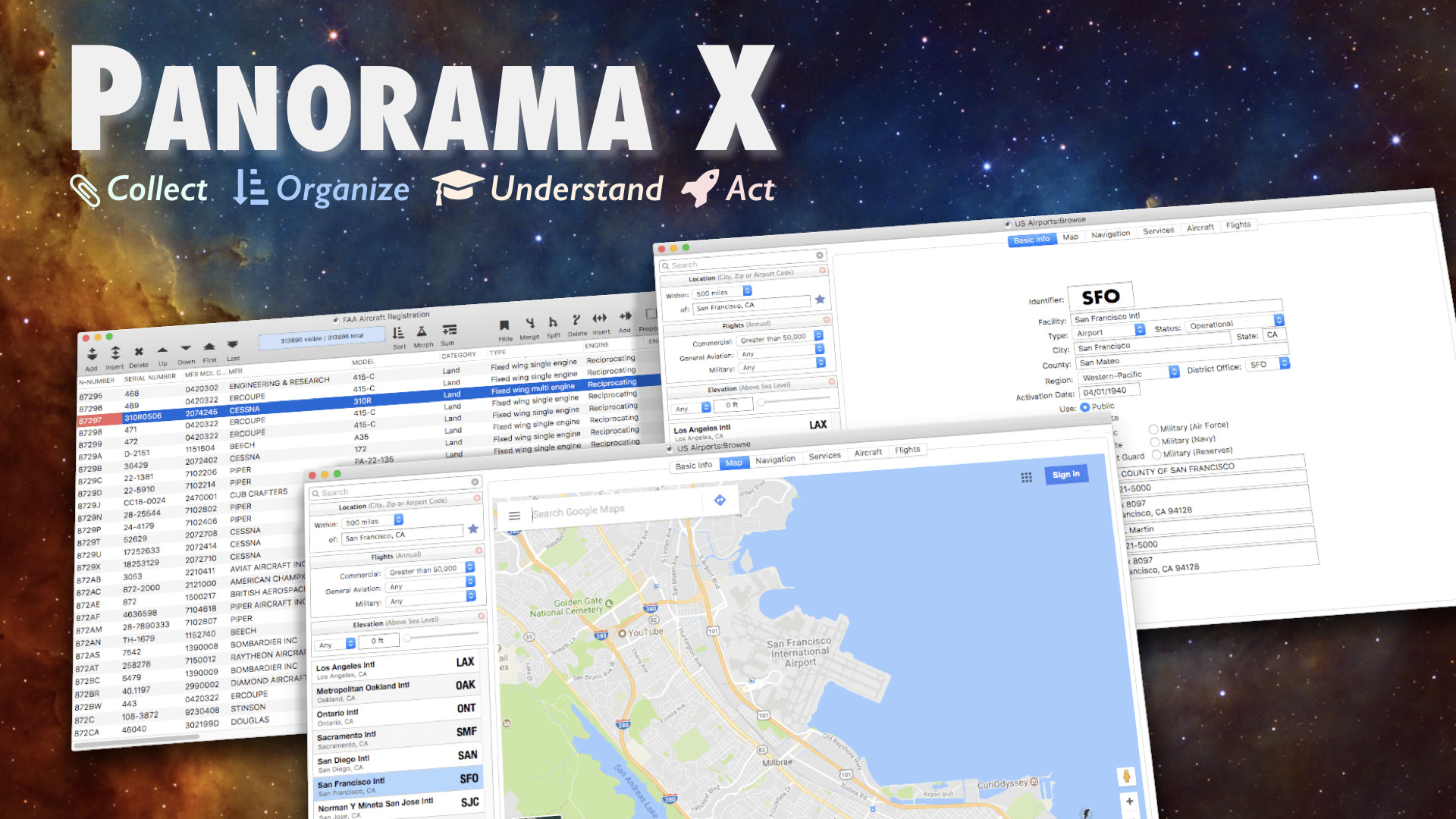
* Analytic Tables: Summary Tables transform unorganized data into concise tabular analysis, including computations of subtotals, averages, standard deviation and more. Crosstab Tables display a two dimensional grid summarizing and analyzing two database fields against each other, for example Spending vs. Month or Income vs. Age. Analytic tables can be displayed side-by-side with the original data, and remain bound to the data, allowing the user to instantly drill into and audit the backing detail behind any summarized value.
* Charts & Graphs: Integrated chart options include bar, stacked bar, line, area, stacked area and pie charts. Charts are interactive, displaying data values when hovering over chart elements, as well as zooming and enabling/disabling individual chart elements.
* Applescript: Panorama X code can now be invoked from AppleScript, allowing Panorama to be automated from external applications (Panorama X 10.0 already provided AppleScript support in the other direction, allowing Panorama to automate external applications).
* Automatic Report Construction: The new report constructor dialog automatically generates a custom form for printing a tabular report (with rows and columns of data) to your specifications. This report can be used "as-is" or tweaked with Panorama's graphical layout tools. Using this dialog can save dozens of minutes over manually generating a custom report form, and makes it easier to produce a pixel perfect report.
* Variable Height Report Rows: Custom reports can now include records of different height, to accommodate fluctuating text or image sizes, for example when printing a catalog.
* Printing Multiple Page Records: Can now print an individual data record across up to 9 pages, for example an invoice, packing slip and envelope address.
* Clickable Data Sheet Buttons: Individual fields in the Data Sheet can now be configured as clickable buttons (checkbox or pop-up menu) for faster data entry.
* Dynamic Tab Order: When the tab key is pressed, custom code can now direct Panorama to automatically skip to different fields depending on what data has been entered.
Panorama X 10.1 also includes performance enhancements, additional documentation and training videos, and numerous bug fixes.
System Requirements:
* macOS 10.9 or later (including macOS 10.14 Mojave)
Media Guide:
Additional information, including links to ready-to-use artwork (screenshots and icons) are available in the ProVUE Development Media Guide online.
Pricing and Availability:
Panorama X introduces a revolutionary new flexible approach to software subscriptions. Unlike a traditional subscription, a user only pays for months when he or she actually uses the software. If they don't use it every month, they don't pay every month. The initial expense can be as low as $15, and ongoing usage can be as low as $5 per month.
Subscriptions are purchased from within the application. A user can install Panorama X on as many computers as he or she likes. As long as they use it on only one computer at a time, they pay nothing extra. Organizations pay for each computer in use during a month, but without any serial numbers or activation hassles. An organization can scale up or down the number of computers in use at any time - it's all taken care of automatically within the app itself.
Upgrade Pricing:
All Panorama X upgrades, including 10.1, are included in the standard pricing. There is no additional charge for the Panorama 10.1 upgrade.
Free Trial:
Panorama X can be downloaded directly from the ProVUE Development web site. When Panorama X is first installed, the user is offered a 7 day free trial. Trial days don't have to be consecutive, they can be spread out over an extended time period. When the trial is complete, the user can simply purchase their subscription from within the application.
Panorama X 10.1: http://www.provue.com
Change Log: http://www.provue.com/panoramax/help/Release_10_1.html
Purchase: http://www.provue.com/#pricing
Vimeo Video (Data Visualization & Analytics): https://www.vimeo.com/282083300
Screenshot: http://www.provue.com/images/airporthero.jpg
App Icon: http://www.provue.com/cdn/icon_512x512.png
ProVUE Development Corporation, based in Southern California, has been developing interactive productivity tools for four decades. From the beginning, ProVUE products have been known for their innovation and performance. Since 1978 over 100,000 customers have used ProVUE products on the CP/M, Alpha Micro, PC, and Macintosh platforms. ProVUE, a privately held corporation, was one of the first commercial developers of Macintosh software, shipping its first Mac program, OverVUE, in August of 1984. Our primary product today is Panorama, which was first introduced on the Macintosh in 1988 and has been in continuous use and development since, and includes a 64-bit RAM based database engine, universal multi-level Undo, and a completely modernized user interface with both a basic tabular interface and the ability for the user to create custom layouts to any specification. All Material and Software (C) Copyright 2018 ProVUE Development Corporation. All Rights Reserved. Apple, the Apple logo,
macOS, and Macintosh are registered trademarks of Apple Inc. in the U.S. and/or other countries. Other trademarks and registered trademarks may be the property of their respective owners.
*******
Link To Article: https://prmac.com/release-id-82911.htm
*******
---------------------------------------------------------------------------------
Note that you can alter delivered distributions at any time.
Login to your account on prMac to alter your channel selection, or to opt-out at any time.
ProVUE Development Releases Panorama X 10.1 RAM based database for Mac - Published on 08/08/18
ProVUE Development announces Panorama X 10.1, the latest version of their high performance general purpose database system for Macintosh. Panorama X includes a powerful 64-bit RAM based database engine, universal multi-level Undo, and much more. Version 10.1 introduces powerful new visualization and analytics tools that take advantage of Panorama's RAM based speed to enable transformation of raw data into actionable intelligence, and enable rapid, interactive exploration of any data space.
Huntington Beach, California - ProVUE Development announces the release of Panorama X 10.1, the latest version of their high performance general purpose database system for Macintosh computers. This version introduces powerful new visualization and analytics tools that take advantage of Panorama's RAM based speed to enable transformation of raw data into actionable intelligence, and enable rapid, interactive exploration of any data space. Notable new features of Panorama X 10.1 include:
* Analytic Tables: Summary Tables transform unorganized data into concise tabular analysis, including computations of subtotals, averages, standard deviation and more. Crosstab Tables display a two dimensional grid summarizing and analyzing two database fields against each other, for example Spending vs. Month or Income vs. Age. Analytic tables can be displayed side-by-side with the original data, and remain bound to the data, allowing the user to instantly drill into and audit the backing detail behind any summarized value.
* Charts & Graphs: Integrated chart options include bar, stacked bar, line, area, stacked area and pie charts. Charts are interactive, displaying data values when hovering over chart elements, as well as zooming and enabling/disabling individual chart elements.
* Applescript: Panorama X code can now be invoked from AppleScript, allowing Panorama to be automated from external applications (Panorama X 10.0 already provided AppleScript support in the other direction, allowing Panorama to automate external applications).
* Automatic Report Construction: The new report constructor dialog automatically generates a custom form for printing a tabular report (with rows and columns of data) to your specifications. This report can be used "as-is" or tweaked with Panorama's graphical layout tools. Using this dialog can save dozens of minutes over manually generating a custom report form, and makes it easier to produce a pixel perfect report.
* Variable Height Report Rows: Custom reports can now include records of different height, to accommodate fluctuating text or image sizes, for example when printing a catalog.
* Printing Multiple Page Records: Can now print an individual data record across up to 9 pages, for example an invoice, packing slip and envelope address.
* Clickable Data Sheet Buttons: Individual fields in the Data Sheet can now be configured as clickable buttons (checkbox or pop-up menu) for faster data entry.
* Dynamic Tab Order: When the tab key is pressed, custom code can now direct Panorama to automatically skip to different fields depending on what data has been entered.
Panorama X 10.1 also includes performance enhancements, additional documentation and training videos, and numerous bug fixes.
System Requirements:
* macOS 10.9 or later (including macOS 10.14 Mojave)
Media Guide:
Additional information, including links to ready-to-use artwork (screenshots and icons) are available in the ProVUE Development Media Guide online.
Pricing and Availability:
Panorama X introduces a revolutionary new flexible approach to software subscriptions. Unlike a traditional subscription, a user only pays for months when he or she actually uses the software. If they don't use it every month, they don't pay every month. The initial expense can be as low as $15, and ongoing usage can be as low as $5 per month.
Subscriptions are purchased from within the application. A user can install Panorama X on as many computers as he or she likes. As long as they use it on only one computer at a time, they pay nothing extra. Organizations pay for each computer in use during a month, but without any serial numbers or activation hassles. An organization can scale up or down the number of computers in use at any time - it's all taken care of automatically within the app itself.
Upgrade Pricing:
All Panorama X upgrades, including 10.1, are included in the standard pricing. There is no additional charge for the Panorama 10.1 upgrade.
Free Trial:
Panorama X can be downloaded directly from the ProVUE Development web site. When Panorama X is first installed, the user is offered a 7 day free trial. Trial days don't have to be consecutive, they can be spread out over an extended time period. When the trial is complete, the user can simply purchase their subscription from within the application.
Panorama X 10.1: http://www.provue.com
Change Log: http://www.provue.com/panoramax/help/Release_10_1.html
Purchase: http://www.provue.com/#pricing
Vimeo Video (Data Visualization & Analytics): https://www.vimeo.com/282083300
Screenshot: http://www.provue.com/images/airporthero.jpg
App Icon: http://www.provue.com/cdn/icon_512x512.png

ProVUE Development Corporation, based in Southern California, has been developing interactive productivity tools for four decades. From the beginning, ProVUE products have been known for their innovation and performance. Since 1978 over 100,000 customers have used ProVUE products on the CP/M, Alpha Micro, PC, and Macintosh platforms. ProVUE, a privately held corporation, was one of the first commercial developers of Macintosh software, shipping its first Mac program, OverVUE, in August of 1984. Our primary product today is Panorama, which was first introduced on the Macintosh in 1988 and has been in continuous use and development since, and includes a 64-bit RAM based database engine, universal multi-level Undo, and a completely modernized user interface with both a basic tabular interface and the ability for the user to create custom layouts to any specification. All Material and Software (C) Copyright 2018 ProVUE Development Corporation. All Rights Reserved. Apple, the Apple logo,
macOS, and Macintosh are registered trademarks of Apple Inc. in the U.S. and/or other countries. Other trademarks and registered trademarks may be the property of their respective owners.
*******
Link To Article: https://prmac.com/release-id-82911.htm
*******
---------------------------------------------------------------------------------
Note that you can alter delivered distributions at any time.
Login to your account on prMac to alter your channel selection, or to opt-out at any time.
Tear down this wall! - The Berlin Wall in Augmented Reality for iOS
A new article has been published at prMac.
Tear down this wall! - The Berlin Wall in Augmented Reality for iOS - Published on 08/08/18
Munich based Flauchers Finest announces Tear down this wall!, its up-and-coming new immersive Augmented Reality app. Feel the atmosphere of divided Germany during the Cold War. See the Berlin Wall in your world, the symbol of the Iron Curtain that separated Western Europe and the Eastern Bloc. Start your time travel in 1961 and continue through the 70s and 80s until 1989. Tear down this wall! will be released on the App Store on August 13th, 2018.
Munich, Germany - App developer Flauchers Finest is pleased to announce its up-and-coming new immersive Augmented Reality app Tear down this wall!. It will be released on the App Store on August 13th, 2018, the same day the construction of the Berlin Wall began 57 years ago.
Feel the atmosphere of divided Germany during the Cold War. See the Berlin Wall in your world, the symbol of the "Iron Curtain" that separated Western Europe and the Eastern Bloc. Start your time travel in 1961 and continue through the 70s and 80s until 1989. Watchtowers, graffitis and subtle image effects immerse you in an augmented reality environment. Apple's ARKit with precise tracking and light detection makes this experience more realistic.
1. Place the Berlin Wall
2. Travel through Time
3. Take a Picture
4. Add a Message
5. Share the Image
Features:
* High-quality 3D Models
* Hand-painted Textures
* Real-size Berlin Wall models and graffiti
* Real-world tracking with ARKit
* Scalable AR experience
* Watchtowers BT 9 and BT 11
* Moveable wall-pecker hole
Device Requirements:
* iOS 11 and ARKit enabled devices
* iPhone X, Phone 8, iPhone 8 Plus, iPhone 7, iPhone 7 Plus, iPhone 6s, iPhone 6s Plus, iPhone SE
* iPad Pro, iPad (5th generation)
Pricing and Availability:
Tear down this wall! 1.0 will be available for $0.99 in the Education and Entertainment categories on the AppStore from August 13th, 2018.
Tear down this wall!: http://www.flauchersfinest.de/teardownthiswall/
Screenshots (ZIP): http://www.flauchersfinest.de/teardownthiswall/tdtw_screenshots.zip
App Icon: http://www.flauchersfinest.de/teardownthiswall/tdtw_icon_1k.jpg
Flauchers Finest is an app and game developer based in Munich, Germany which was founded in 2012 by Frank Groh. Before starting a game company he was responsible for the design and realization of virtual worlds for driving simulators and entertainment systems, e.g. Volkswagen Virtual Testdrive and MAN Truckrace. Releases: Kesselberg Legendary Racing, Troopers VR - Join Up Now!, Moon Race, Highway Run and others. All Material and Software (C) Copyright 2018 Flauchers Finest. All Rights Reserved. Apple, the Apple logo, iPhone, iPod and iPad are registered trademarks of Apple Inc. in the U.S. and/or other countries. Other trademarks and registered trademarks may be the property of their respective owners.
*******
Link To Article: https://prmac.com/release-id-82910.htm
*******
---------------------------------------------------------------------------------
Note that you can alter delivered distributions at any time.
Login to your account on prMac to alter your channel selection, or to opt-out at any time.
Tear down this wall! - The Berlin Wall in Augmented Reality for iOS - Published on 08/08/18
Munich based Flauchers Finest announces Tear down this wall!, its up-and-coming new immersive Augmented Reality app. Feel the atmosphere of divided Germany during the Cold War. See the Berlin Wall in your world, the symbol of the Iron Curtain that separated Western Europe and the Eastern Bloc. Start your time travel in 1961 and continue through the 70s and 80s until 1989. Tear down this wall! will be released on the App Store on August 13th, 2018.
Munich, Germany - App developer Flauchers Finest is pleased to announce its up-and-coming new immersive Augmented Reality app Tear down this wall!. It will be released on the App Store on August 13th, 2018, the same day the construction of the Berlin Wall began 57 years ago.
Feel the atmosphere of divided Germany during the Cold War. See the Berlin Wall in your world, the symbol of the "Iron Curtain" that separated Western Europe and the Eastern Bloc. Start your time travel in 1961 and continue through the 70s and 80s until 1989. Watchtowers, graffitis and subtle image effects immerse you in an augmented reality environment. Apple's ARKit with precise tracking and light detection makes this experience more realistic.
1. Place the Berlin Wall
2. Travel through Time
3. Take a Picture
4. Add a Message
5. Share the Image
Features:
* High-quality 3D Models
* Hand-painted Textures
* Real-size Berlin Wall models and graffiti
* Real-world tracking with ARKit
* Scalable AR experience
* Watchtowers BT 9 and BT 11
* Moveable wall-pecker hole
Device Requirements:
* iOS 11 and ARKit enabled devices
* iPhone X, Phone 8, iPhone 8 Plus, iPhone 7, iPhone 7 Plus, iPhone 6s, iPhone 6s Plus, iPhone SE
* iPad Pro, iPad (5th generation)
Pricing and Availability:
Tear down this wall! 1.0 will be available for $0.99 in the Education and Entertainment categories on the AppStore from August 13th, 2018.
Tear down this wall!: http://www.flauchersfinest.de/teardownthiswall/
Screenshots (ZIP): http://www.flauchersfinest.de/teardownthiswall/tdtw_screenshots.zip
App Icon: http://www.flauchersfinest.de/teardownthiswall/tdtw_icon_1k.jpg

Flauchers Finest is an app and game developer based in Munich, Germany which was founded in 2012 by Frank Groh. Before starting a game company he was responsible for the design and realization of virtual worlds for driving simulators and entertainment systems, e.g. Volkswagen Virtual Testdrive and MAN Truckrace. Releases: Kesselberg Legendary Racing, Troopers VR - Join Up Now!, Moon Race, Highway Run and others. All Material and Software (C) Copyright 2018 Flauchers Finest. All Rights Reserved. Apple, the Apple logo, iPhone, iPod and iPad are registered trademarks of Apple Inc. in the U.S. and/or other countries. Other trademarks and registered trademarks may be the property of their respective owners.
*******
Link To Article: https://prmac.com/release-id-82910.htm
*******
---------------------------------------------------------------------------------
Note that you can alter delivered distributions at any time.
Login to your account on prMac to alter your channel selection, or to opt-out at any time.
WaterField Introduces Crowdsourced Tech Folio for iPad and Accessories
A new article has been published at prMac.
WaterField Introduces Crowdsourced Tech Folio for iPad and Accessories - Published on 08/08/18
San Francisco manufacturer WaterField Designs unveils the Tech Folio, a thoughtfully-designed, professional-looking case for storing and organizing electronic gear and an iPad. Featured as part of the company's Gear Case Month, the Tech Folio is the first of three new designs born out of WaterField's pioneering crowdsourced design process. Black ballistic nylon with black, full-grain leather; or tan waxed canvas with distressed, chocolate, full-grain leather. Shipping begins August 24.
San Francisco, California - San Francisco's WaterField Designs, an innovative leader in custom laptop sleeves, bags, and device-specific cases, introduces the Tech Folio, a premium case to organize electronic accessories and a 10.5-inch iPad or similarly-sized tablet. The Tech Folio's unique pocket storage system holds cables, cords, bulky and slim items, tech gear and personal items, all in a see-at-a-glance fashion. Developed as part of WaterField's fifth collaborative, community-design project, the new Folio gear case looks as stylish in the boardroom as it does at the local cafe.
"When designing the Tech Folio, we focused on organization, quick-access, and flexibility," said company owner Gary Waterfield. "I'm often in a hurry and don't have time to coil my cords carefully and then place them under an elastic band. After much testing, we realized it is easier to keep cables organized, visible and untangled using a combination of mesh and padded pockets. With pockets, you can bunch cords up and zip them in quickly."
The Tech Folio is designed for people who take electronic gadgets wherever they go and need a convenient way to store accessories and cords. It unzips to open like a book, revealing a combination of mesh and padded pockets. Stretch-mesh pockets allow users to easily spot items like a power supply, USB cords, dongles, earbuds, and other necessities. These pockets are sized so that cords can be bunched easily and inserted into the case without having to coil and recoil them with each use. Two soft, flexible pockets hold and protect a hard drive and auxiliary mouse or similarly bulky items. Behind one panel of pockets is a padded tablet compartment that cushions a 10.5-inch iPad or similarly-sized device.
Underneath a leather front flap, easy-access pockets hold an iPhone, the Apple Pencil or Surface Pen, ballpoints, additional cords, and accessories. Available in rugged waxed canvas and chocolate full-grain leather for a sporty look, or black ballistic nylon and black full-grain leather for a more classic look, the Tech Folio can be used on its own as a small satchel or inserted into a larger bag.
WaterField designed this new gear organizer using its unique customer-collaboration process that results in highly-functional products specifically tailored to address customer needs. After analyzing survey data gathered from hundreds of customers, the company identified the need for three unique cases. It then began to design prototypes, while continuing to gather feedback and to provide project participants with design updates. The resulting Tech Folio incorporates details that reflect how people interact with the product on a daily basis. WaterField will announce two additional gear cases in upcoming weeks as part of its August Gear Case Month.
Although the company has always used customer feedback as inspiration for product ideas, it initially formalized the process through the Kickstarter platform with the design of a highly-organized travel wallet. When Nintendo launched the Switch gaming console, WaterField fine-tuned its crowdsourced design method and developed a collection of Nintendo Switch cases. In response to strong customer and company satisfaction with its collaboration practice, WaterField once again engaged its customers to create the innovative Air Porter Carry-on for frequent travelers, the iPhone Camera Bag for iPhonographers, and most recently, the Pro Executive Backpack for professionals. The Tech Folio is part of WaterField's fifth crowdsourced design project.
* Colors and materials: Black ballistic nylon with black, full-grain leather; or tan waxed canvas with distressed, chocolate, full-grain leather
* Dimensions: 10.5 x 8 x 2 inches
* Weight: 0.95 lbs.
Pricing and Availability:
The Tech Folio is priced at $119 (USD). Pre-order now. Shipping begins August 24. For more information, please contact Heidi Marzke.
WaterField Designs: http://www.sfbags.com/
The Tech Folio: https://www.sfbags.com/products/tech-folio-gear-case
Video Demo of Tech Folio features: https://www.youtube.com/watch?v=GaWNA7ftv-8
Screenshot: https://cdn.shopify.com/s/files/1/0281/2796/products/Gadgetter-stacked-colors_1024x1024.jpg?v=1533620224
WaterField Designs is an innovative San Francisco designer and manufacturer of bags and cases for tech-savvy consumers who want to stylishly and responsibly transport their technology. WaterField manufactures custom-fitted, high-quality cases and bags for a full range of laptop computers, smartphones, tablets, gaming devices, and other digital gear. All products are manufactured to exacting standards entirely in San Francisco. More information at "Our Story". WaterField Designs and SFBags are trademarks of WaterField Designs. Other company and product names may be trademarks of their respective owners. Copyright (C) 2018. All Rights Reserved.
*******
Link To Article: https://prmac.com/release-id-82909.htm
*******
---------------------------------------------------------------------------------
Note that you can alter delivered distributions at any time.
Login to your account on prMac to alter your channel selection, or to opt-out at any time.
WaterField Introduces Crowdsourced Tech Folio for iPad and Accessories - Published on 08/08/18
San Francisco manufacturer WaterField Designs unveils the Tech Folio, a thoughtfully-designed, professional-looking case for storing and organizing electronic gear and an iPad. Featured as part of the company's Gear Case Month, the Tech Folio is the first of three new designs born out of WaterField's pioneering crowdsourced design process. Black ballistic nylon with black, full-grain leather; or tan waxed canvas with distressed, chocolate, full-grain leather. Shipping begins August 24.
San Francisco, California - San Francisco's WaterField Designs, an innovative leader in custom laptop sleeves, bags, and device-specific cases, introduces the Tech Folio, a premium case to organize electronic accessories and a 10.5-inch iPad or similarly-sized tablet. The Tech Folio's unique pocket storage system holds cables, cords, bulky and slim items, tech gear and personal items, all in a see-at-a-glance fashion. Developed as part of WaterField's fifth collaborative, community-design project, the new Folio gear case looks as stylish in the boardroom as it does at the local cafe.
"When designing the Tech Folio, we focused on organization, quick-access, and flexibility," said company owner Gary Waterfield. "I'm often in a hurry and don't have time to coil my cords carefully and then place them under an elastic band. After much testing, we realized it is easier to keep cables organized, visible and untangled using a combination of mesh and padded pockets. With pockets, you can bunch cords up and zip them in quickly."
The Tech Folio is designed for people who take electronic gadgets wherever they go and need a convenient way to store accessories and cords. It unzips to open like a book, revealing a combination of mesh and padded pockets. Stretch-mesh pockets allow users to easily spot items like a power supply, USB cords, dongles, earbuds, and other necessities. These pockets are sized so that cords can be bunched easily and inserted into the case without having to coil and recoil them with each use. Two soft, flexible pockets hold and protect a hard drive and auxiliary mouse or similarly bulky items. Behind one panel of pockets is a padded tablet compartment that cushions a 10.5-inch iPad or similarly-sized device.
Underneath a leather front flap, easy-access pockets hold an iPhone, the Apple Pencil or Surface Pen, ballpoints, additional cords, and accessories. Available in rugged waxed canvas and chocolate full-grain leather for a sporty look, or black ballistic nylon and black full-grain leather for a more classic look, the Tech Folio can be used on its own as a small satchel or inserted into a larger bag.
WaterField designed this new gear organizer using its unique customer-collaboration process that results in highly-functional products specifically tailored to address customer needs. After analyzing survey data gathered from hundreds of customers, the company identified the need for three unique cases. It then began to design prototypes, while continuing to gather feedback and to provide project participants with design updates. The resulting Tech Folio incorporates details that reflect how people interact with the product on a daily basis. WaterField will announce two additional gear cases in upcoming weeks as part of its August Gear Case Month.
Although the company has always used customer feedback as inspiration for product ideas, it initially formalized the process through the Kickstarter platform with the design of a highly-organized travel wallet. When Nintendo launched the Switch gaming console, WaterField fine-tuned its crowdsourced design method and developed a collection of Nintendo Switch cases. In response to strong customer and company satisfaction with its collaboration practice, WaterField once again engaged its customers to create the innovative Air Porter Carry-on for frequent travelers, the iPhone Camera Bag for iPhonographers, and most recently, the Pro Executive Backpack for professionals. The Tech Folio is part of WaterField's fifth crowdsourced design project.
* Colors and materials: Black ballistic nylon with black, full-grain leather; or tan waxed canvas with distressed, chocolate, full-grain leather
* Dimensions: 10.5 x 8 x 2 inches
* Weight: 0.95 lbs.
Pricing and Availability:
The Tech Folio is priced at $119 (USD). Pre-order now. Shipping begins August 24. For more information, please contact Heidi Marzke.
WaterField Designs: http://www.sfbags.com/
The Tech Folio: https://www.sfbags.com/products/tech-folio-gear-case
Video Demo of Tech Folio features: https://www.youtube.com/watch?v=GaWNA7ftv-8
Screenshot: https://cdn.shopify.com/s/files/1/0281/2796/products/Gadgetter-stacked-colors_1024x1024.jpg?v=1533620224

WaterField Designs is an innovative San Francisco designer and manufacturer of bags and cases for tech-savvy consumers who want to stylishly and responsibly transport their technology. WaterField manufactures custom-fitted, high-quality cases and bags for a full range of laptop computers, smartphones, tablets, gaming devices, and other digital gear. All products are manufactured to exacting standards entirely in San Francisco. More information at "Our Story". WaterField Designs and SFBags are trademarks of WaterField Designs. Other company and product names may be trademarks of their respective owners. Copyright (C) 2018. All Rights Reserved.
*******
Link To Article: https://prmac.com/release-id-82909.htm
*******
---------------------------------------------------------------------------------
Note that you can alter delivered distributions at any time.
Login to your account on prMac to alter your channel selection, or to opt-out at any time.
Output Factory Now Can Split Adobe InDesign Files Into Groups of Pages
A new article has been published at prMac.
Output Factory Now Can Split Adobe InDesign Files Into Groups of Pages - Published on 08/07/18
Zevrix Solutions announces Output Factory 2.3.6, a feature update to company's output automation solution for Adobe InDesign. Output Factory helps users automate printing and exporting from InDesign through batch processing, single page export, layer versioning, custom scripts integration and more. Built-in preflighting helps printers eliminate costly output errors. The new version lets users split InDesign files into consecutive groups of several pages (for example, every 2 pages, 3 pages etc.)
Toronto (ON), Canada - Zevrix Solutions today announces the release of Output Factory 2.3.6, a feature update to company's output automation plug-in for Adobe InDesign. Awarded 5 stars by InDesign Magazine, Output Factory automates and simplifies workflows of printers, ad agencies, and publishing houses worldwide. The software helps eliminate repetitive tasks through batch processing with time-saving output options.
The new version adds the ability to split InDesign files into consecutive groups of several pages using the new "Save as n pages" option. For example, users can split a 30-page document into ten InDesign files of 3 pages each, or fifteen double-page files and so on. In addition, the new update improves export of non-consecutive groups of pages to single PDF files, fixes a file naming issue during IDML output, and addresses a backward compatibility bug with older versions of Output Factory.
"With Output Factory, I've got our magazine production down to six minutes from three hours," says Jeff Middleton, a Toronto, Canada based graphic designer. "Once I set up all my presets, it was insane how fast it was. I load all my InDesign docs into Output Factory, press play, go grab a coffee and come back to my entire magazine."
Output Factory supports printing as well as exporting to PDF, PostScript, EPS, Flash, IDML, EPUB and several image formats. It offers the following key features:
* Batch processing of InDesign files
* Output groups of pages as a single documents
* Output files to multiple formats with one click
* Variable output file names
* Layer versioning: output layer combinations as single files
* Preflight InDesign documents on the fly
* Split InDesign files into single pages
* Preflight final PDF files
Pricing and Availability:
Output Factory can be purchased from Zevrix website for $169.95 USD (Lite version $119.95), as well as from authorized resellers and Adobe Exchange. Trial is also available for download. The update is free for the users of Output Factory 2.x, and $84.97 to upgrade from Output Factory 1.x and BatchOutput. Output Factory requires macOS 10.7-10.13 and Adobe InDesign CS3-CC 2018.
Zevrix Solutions: http://zevrix.com
Output Factory 2.3.6: http://zevrix.com/OutputFactory.php
Download Output Factory: http://zevrix.com/OutputFactory.dmg
Purchase: http://zevrix.com/store.php
Screenshot: http://zevrix.com/screenshots/of2/of2-pdf.jpg
Located in Toronto, Canada, Zevrix Solutions provides automation and productivity solutions for Adobe Creative Cloud and Creative Suite software, PDF workflows, graphic file diagnostics and Microsoft Office output on Mac OS. Zevrix is dedicated to help professionals increase their profits through automating everyday tasks, producing error-free documents, saving disk space and cutting production costs. For more information, visit their website. Copyright (C) 2018 Zevrix Solutions. All Rights Reserved. Other trademarks and registered trademarks may be the property of their respective owners.
*******
Link To Article: https://prmac.com/release-id-82908.htm
*******
---------------------------------------------------------------------------------
Note that you can alter delivered distributions at any time.
Login to your account on prMac to alter your channel selection, or to opt-out at any time.
Output Factory Now Can Split Adobe InDesign Files Into Groups of Pages - Published on 08/07/18
Zevrix Solutions announces Output Factory 2.3.6, a feature update to company's output automation solution for Adobe InDesign. Output Factory helps users automate printing and exporting from InDesign through batch processing, single page export, layer versioning, custom scripts integration and more. Built-in preflighting helps printers eliminate costly output errors. The new version lets users split InDesign files into consecutive groups of several pages (for example, every 2 pages, 3 pages etc.)
Toronto (ON), Canada - Zevrix Solutions today announces the release of Output Factory 2.3.6, a feature update to company's output automation plug-in for Adobe InDesign. Awarded 5 stars by InDesign Magazine, Output Factory automates and simplifies workflows of printers, ad agencies, and publishing houses worldwide. The software helps eliminate repetitive tasks through batch processing with time-saving output options.
The new version adds the ability to split InDesign files into consecutive groups of several pages using the new "Save as n pages" option. For example, users can split a 30-page document into ten InDesign files of 3 pages each, or fifteen double-page files and so on. In addition, the new update improves export of non-consecutive groups of pages to single PDF files, fixes a file naming issue during IDML output, and addresses a backward compatibility bug with older versions of Output Factory.
"With Output Factory, I've got our magazine production down to six minutes from three hours," says Jeff Middleton, a Toronto, Canada based graphic designer. "Once I set up all my presets, it was insane how fast it was. I load all my InDesign docs into Output Factory, press play, go grab a coffee and come back to my entire magazine."
Output Factory supports printing as well as exporting to PDF, PostScript, EPS, Flash, IDML, EPUB and several image formats. It offers the following key features:
* Batch processing of InDesign files
* Output groups of pages as a single documents
* Output files to multiple formats with one click
* Variable output file names
* Layer versioning: output layer combinations as single files
* Preflight InDesign documents on the fly
* Split InDesign files into single pages
* Preflight final PDF files
Pricing and Availability:
Output Factory can be purchased from Zevrix website for $169.95 USD (Lite version $119.95), as well as from authorized resellers and Adobe Exchange. Trial is also available for download. The update is free for the users of Output Factory 2.x, and $84.97 to upgrade from Output Factory 1.x and BatchOutput. Output Factory requires macOS 10.7-10.13 and Adobe InDesign CS3-CC 2018.
Zevrix Solutions: http://zevrix.com
Output Factory 2.3.6: http://zevrix.com/OutputFactory.php
Download Output Factory: http://zevrix.com/OutputFactory.dmg
Purchase: http://zevrix.com/store.php
Screenshot: http://zevrix.com/screenshots/of2/of2-pdf.jpg

Located in Toronto, Canada, Zevrix Solutions provides automation and productivity solutions for Adobe Creative Cloud and Creative Suite software, PDF workflows, graphic file diagnostics and Microsoft Office output on Mac OS. Zevrix is dedicated to help professionals increase their profits through automating everyday tasks, producing error-free documents, saving disk space and cutting production costs. For more information, visit their website. Copyright (C) 2018 Zevrix Solutions. All Rights Reserved. Other trademarks and registered trademarks may be the property of their respective owners.
*******
Link To Article: https://prmac.com/release-id-82908.htm
*******
---------------------------------------------------------------------------------
Note that you can alter delivered distributions at any time.
Login to your account on prMac to alter your channel selection, or to opt-out at any time.
LCFM Native Brings Android Within Reach for FileMaker Developers
A new article has been published at prMac.
LCFM Native Brings Android Within Reach for FileMaker Developers - Published on 08/06/18
LiveCode Ltd today shipped the beta version of a major new piece of technology for FileMaker users. LCFM Native takes an existing FileMaker layout and converts it to a native app, faithfully preserving the layout, on any LiveCode supported platform, while still using the FileMaker database. Users can now extend their reach to the other 86% of the mobile market. Supported platforms include Android and Mac initially, iOS, Windows and Linux will follow in future releases.
Edinburgh, Scotland - LiveCode Ltd today shipped the beta version of a major new piece of technology for FileMaker users. LCFM Native takes an existing FileMaker layout and converts it to a native app, faithfully preserving the layout, on any LiveCode supported platform, while still using the FileMaker database. Supported platforms include Android and Mac initially, iOS, Windows and Linux will follow in future releases.
This technology means that FileMaker users can now extend their reach to the other 86% of the mobile market. Traditionally FileMaker apps do not run on Android. The LCFM compiler allows you to drag and drop your FileMaker solution onto it, and output a faithful representation of that solution for Android. Other benefits will include perfect online and offline syncing within and between platforms, ensuring the users data is always the latest available on the server. A FileMaker solution can now run on multiple platforms simultaneously and remain in sync. Because the app is now using LiveCode technology, it can also incorporate additional features not usually available to FileMaker solutions.
* Drag and drop conversion
* Run on Android platforms
* Sync on and offline
* Add new features
* Expand the reach of the FileMaker platform
* Huge potential savings on device costs
Harry Catharell of Majic Solutions, a FileMaker Partner, said: "We are under starter's orders! MaJic is on the cusp of releasing an app for our client which will run on iOS & Android and is capable of managing both online & offline data. This is all thanks to LCFM-Native converting our FileMaker solution, perfectly, to native apps on those platforms. We've loved working with the brilliant developers at LiveCode during the alpha & beta phases to help bring the tool to this point. The future is bright, the future is LCFM-Native!"
Kevin Miller, CEO LiveCode Ltd, said: "After 6 months of dedicated work by our talented team, I'm hugely excited to be opening doors for the FileMaker community. LCFM Native is incredibly easy to use, and enables new markets for FileMaker solutions."
To learn more visit LiveCode online or contact Steven Crighton.
LiveCode: https://livecode.com/
LCFM Native: https://filemaker.livecode.com/native
Screenshot: https://livecode.com/wp-content/uploads/2017/10/filemaker-for-livecode-2.png
LiveCode Ltd, based in Edinburgh, Scotland, has a vision to create a productive coding platform for building powerful applications that are accessible to everyone. They make the dual licensed LiveCode platform for building native mobile, desktop and server applications, either as Open Source GPL licensed or using a Commercial license to protect source code. The visual workflow allows the user to develop apps live while the natural language syntax is powerful and uniquely accessible. The company is committed to promoting digital literacy. Commercial successes include both SMEs and Fortune 500 companies. LiveCode apps have grossed over US $100 million and include #1 best sellers, enterprise business systems, games, and productivity tools. All Material and Software (C) Copyright 2018 LiveCode Ltd. All Rights Reserved. LiveCode is a trademark of LiveCode Ltd., registered in the EU and other countries. FileMaker is a trademark of FileMaker, Inc., registered in the U.S. and other
countries. Apple and HyperCard are trademarks of Apple Computer, Inc., registered in the U.S. and other countries. Other trademarks and registered trademarks may be the property of their respective owners.
*******
Link To Article: https://prmac.com/release-id-82905.htm
*******
---------------------------------------------------------------------------------
Note that you can alter delivered distributions at any time.
Login to your account on prMac to alter your channel selection, or to opt-out at any time.
LCFM Native Brings Android Within Reach for FileMaker Developers - Published on 08/06/18
LiveCode Ltd today shipped the beta version of a major new piece of technology for FileMaker users. LCFM Native takes an existing FileMaker layout and converts it to a native app, faithfully preserving the layout, on any LiveCode supported platform, while still using the FileMaker database. Users can now extend their reach to the other 86% of the mobile market. Supported platforms include Android and Mac initially, iOS, Windows and Linux will follow in future releases.
Edinburgh, Scotland - LiveCode Ltd today shipped the beta version of a major new piece of technology for FileMaker users. LCFM Native takes an existing FileMaker layout and converts it to a native app, faithfully preserving the layout, on any LiveCode supported platform, while still using the FileMaker database. Supported platforms include Android and Mac initially, iOS, Windows and Linux will follow in future releases.
This technology means that FileMaker users can now extend their reach to the other 86% of the mobile market. Traditionally FileMaker apps do not run on Android. The LCFM compiler allows you to drag and drop your FileMaker solution onto it, and output a faithful representation of that solution for Android. Other benefits will include perfect online and offline syncing within and between platforms, ensuring the users data is always the latest available on the server. A FileMaker solution can now run on multiple platforms simultaneously and remain in sync. Because the app is now using LiveCode technology, it can also incorporate additional features not usually available to FileMaker solutions.
* Drag and drop conversion
* Run on Android platforms
* Sync on and offline
* Add new features
* Expand the reach of the FileMaker platform
* Huge potential savings on device costs
Harry Catharell of Majic Solutions, a FileMaker Partner, said: "We are under starter's orders! MaJic is on the cusp of releasing an app for our client which will run on iOS & Android and is capable of managing both online & offline data. This is all thanks to LCFM-Native converting our FileMaker solution, perfectly, to native apps on those platforms. We've loved working with the brilliant developers at LiveCode during the alpha & beta phases to help bring the tool to this point. The future is bright, the future is LCFM-Native!"
Kevin Miller, CEO LiveCode Ltd, said: "After 6 months of dedicated work by our talented team, I'm hugely excited to be opening doors for the FileMaker community. LCFM Native is incredibly easy to use, and enables new markets for FileMaker solutions."
To learn more visit LiveCode online or contact Steven Crighton.
LiveCode: https://livecode.com/
LCFM Native: https://filemaker.livecode.com/native
Screenshot: https://livecode.com/wp-content/uploads/2017/10/filemaker-for-livecode-2.png
LiveCode Ltd, based in Edinburgh, Scotland, has a vision to create a productive coding platform for building powerful applications that are accessible to everyone. They make the dual licensed LiveCode platform for building native mobile, desktop and server applications, either as Open Source GPL licensed or using a Commercial license to protect source code. The visual workflow allows the user to develop apps live while the natural language syntax is powerful and uniquely accessible. The company is committed to promoting digital literacy. Commercial successes include both SMEs and Fortune 500 companies. LiveCode apps have grossed over US $100 million and include #1 best sellers, enterprise business systems, games, and productivity tools. All Material and Software (C) Copyright 2018 LiveCode Ltd. All Rights Reserved. LiveCode is a trademark of LiveCode Ltd., registered in the EU and other countries. FileMaker is a trademark of FileMaker, Inc., registered in the U.S. and other
countries. Apple and HyperCard are trademarks of Apple Computer, Inc., registered in the U.S. and other countries. Other trademarks and registered trademarks may be the property of their respective owners.
*******
Link To Article: https://prmac.com/release-id-82905.htm
*******
---------------------------------------------------------------------------------
Note that you can alter delivered distributions at any time.
Login to your account on prMac to alter your channel selection, or to opt-out at any time.
Subscribe to:
Posts (Atom)