A new article has been published at prMac.
Introducing Finer Focus - Dim away Distractions and Enhance your Focus - Published on 08/22/18
California based SpriTec Software today introduces Finer Focus, the company's new utility for macOS. Finer Focus melts away distractions by dimming, blurring and fading the desktop elements that are all around the frontmost app window. These elements include the Dock, the Menu bar, Desktop icons and background windows. This results in the front window remaining bright and sharp, while the surrounding elements simply melt away.
San Diego, California - SpriTec Software, the maker of the award-winning "SuperTab for Mac," is proud to announce its latest Mac App: Finer Focus. Finer Focus is the ultimate Desktop enhancer that can greatly reduce - even eliminate - all desktop visual distractions. And without distractions, it is easier to be creative, easier to focus, easier to get things done. Plus, the cinematic atmosphere that Finer Focus creates simply makes the Mac more inviting to use.
Finer Focus melts away distractions by dimming, blurring and fading the desktop elements that are all around the frontmost app window. These elements include the Dock, the Menu bar, Desktop icons and background windows. This results in the front window remaining bright and sharp, while the surrounding elements simply melt away.
Users can try the sixteen built-in Finer Focus themes. Each theme has its own characteristics, such as color and varying amounts of dimming, blurring and fading.
For example:
* The "Night Time" theme simply dims the everything around the frontmost window with a simple, transparent black.
* The "Ethereal" theme makes the Menu bar, Desktop icons and background windows transparent, creating a clear contrast that greatly highlights the front window.
* The "Pure Zen" theme completely fades away the user's entire desktop - the Menu bar, the Dock, the Desktop icons and all background windows - leaving *only* the frontmost window. Yet mouse over these items and they fade instantly back in and are ready for use.
Each theme can also be fully customized by the user. Users can choose any color they wish. And they can independently specify how much to:
* Dim the Desktop
* Dim the Menu bar
* Dim the Dock
* Fade Desktop Icons
* Fade the Menu bar
* Blur the Desktop and its Icons
* Blur the Menu bar
* Blue the Dock
Users can also configure Finer Focus itself. They can control the speed at which Finer Focus reacts to their actions as well as choose from various ways to temporarily hide all Finer Focus effects should they wish to do so, giving them complete control over Finer Focus and their desktop environment. And all of Finer Focus is accessible at any time via its Menu bar icon.
System Requirements:
* "High Sierra" (10.13)
* "Sierra" (10.12)
* "El Capitan" (10.11)
Pricing and Availability
Finer Focus is free to download and comes with a 15-day free trial. Users can purchase Finer Focus for $4.99 (USD).
Finer Focus: http://www.coolmactools.com
Download Finer Focus: http://www.coolmactools.com/Download.html
Purchase: http://www.coolmactools.com/Purchase.html
Screenshots: http://www.coolmactools.com/Themes.html
Located in San Diego, California, SpriTec Software creates apps for the macOS platform, including Finer Focus, the award-winning SuperTab for Mac and ZipTite for Mac. SpriTec Software is helmed by Ando Sonenblick, an Apple/GoPro/Adobe/DivX veteran with over 30 years of development experience. All Material and Software Copyright (C) 2018 SpriTec Software. All Rights Reserved. Apple, the Apple logo, Mac OS X, macOS, and Macintosh are registered trademarks of Apple Inc. in the U.S. and/or other countries. All other trademarks and trade names are the property of their respective owners.
*******
Link To Article: https://prmac.com/release-id-82928.htm
*******
---------------------------------------------------------------------------------
Note that you can alter delivered distributions at any time.
Login to your account on prMac to alter your channel selection, or to opt-out at any time.

WaterField Unveils the Tech Folio Plus, an Extensive Tech Accessory Case
A new article has been published at prMac.
WaterField Unveils the Tech Folio Plus, an Extensive Tech Accessory Case - Published on 08/22/18
San Francisco's WaterField Designs today introduces the Tech Folio Plus, a premium gear organizer aimed to protect an iPad and electronic accessories that IT consultants and specialists in their field carry with them every day. The Folio Plus opens like a book via smooth-gliding waterproof zippers. Inside, a multitude of stretch mesh pockets allows users to quickly and easily spot USB cords, dongles, adapters, Air Pods, SD cards, flash drives, a headset, a power supply, and more.
San Francisco, California - WaterField Designs, an innovative leader in custom laptop sleeves, bags, and device-specific cases, introduces the Tech Folio Plus, a premium gear organizer aimed to protect an iPad and electronic accessories that IT consultants and specialists in their field carry with them every day. The Plus opens like a book, and its unique pocket storage system holds both bulky and slim items in an efficient, easy-to-spot fashion. Developed through its pioneering crowdsourced design method, the Tech Folio Plus is the third and most extensive of three gear cases WaterField has announced this month.
"After reading every single survey response submitted from our 'customer design team,' we identified three distinct needs. The Tech Folio Plus, our third new case born out of this latest crowdsourced project, is designed for IT consultants and other experts who need a professional way to organize and protect significant amounts of gear on a daily basis. It is organized, flexible, and handsome, it allows people quick access to all their gear, and it fits beautifully into any professional environment."
The Folio Plus opens like a book via smooth-gliding waterproof zippers. Inside, a multitude of stretch mesh pockets allows users to quickly and easily spot USB cords, dongles, adapters, Air Pods, SD cards, flash drives, a headset, a power supply, and more. Cords can be bunched and easily inserted into the pockets - a significant time saver as there is no need to perfectly coil and strap them in. Two soft, open-topped pockets hold and protect a hard drive and external mouse or other bulkier items including small foldable headphones. Behind one panel of pockets is a padded tablet compartment that fits up to a 12.9-inch iPad.
The front of this new gear organizer sports a premium, full-grain leather flap that lends it a professional look. Rounded waterproof zippers around the flap open to reveal quick-access pockets for an iPhone, the Apple Pencil, ballpoints, and other frequently-used items. Inside, WaterField's distinctive gold liner brightens the interior, making items easy to spot. A carry handle and D-rings to attach to an optional shoulder strap allow the case to be used on its own as a small satchel or inserted into the WaterField Bolt backpack or another bag. The Plus is available in sturdy waxed canvas and chocolate full-grain leather for a sporty look, or black ballistic nylon and black full-grain leather for a more classic look.
WaterField designed the Tech Folio Plus using its unique customer-collaboration process that results in highly-functional products specifically tailored to address customer needs. After analyzing survey data gathered from hundreds of customers, the company identified the need for three unique cases. It then began to design prototypes, while continuing to gather feedback and to provide project participants with design updates. The resulting Tech Folio Plus, WaterField's third gear case unveiled this month, incorporates details that reflect how people interact with the product on a daily basis.
Colors and Materials:
* Black ballistic nylon with black, full-grain leather; or tan waxed canvas with distressed, chocolate, full-grain leather.
* Dimensions: 13 x 10 x 2 inches
* Weight: 1.3 oz lb.
Pricing and Availability:
The Tech Folio Plus is priced at only $149 (USD). Pre-order now. Shipping begins August 31, 2018.
WaterField Designs: http://www.sfbags.com/
The Tech Folio Plus: https://www.sfbags.com/products/tech-folio-gear-case
YouTube Video (Demo): https://www.youtube.com/watch?v=wFl8rzRpxHY
WaterField Designs is an innovative San Francisco designer and manufacturer of bags and cases for tech-savvy consumers who want to stylishly and responsibly transport their technology. WaterField manufactures custom-fitted, high-quality cases and bags for a full range of laptop computers, smartphones, tablets, gaming devices, and other digital gear. All products are manufactured to exacting standards entirely in San Francisco. More information at "Our Story." WaterField Designs, SFBags, and Tech Folio Plus are trademarks of WaterField Designs. Other company and product names may be trademarks of their respective owners. Copyright (C)2018. All Rights Reserved.
*******
Link To Article: https://prmac.com/release-id-82929.htm
*******
---------------------------------------------------------------------------------
Note that you can alter delivered distributions at any time.
Login to your account on prMac to alter your channel selection, or to opt-out at any time.
WaterField Unveils the Tech Folio Plus, an Extensive Tech Accessory Case - Published on 08/22/18
San Francisco's WaterField Designs today introduces the Tech Folio Plus, a premium gear organizer aimed to protect an iPad and electronic accessories that IT consultants and specialists in their field carry with them every day. The Folio Plus opens like a book via smooth-gliding waterproof zippers. Inside, a multitude of stretch mesh pockets allows users to quickly and easily spot USB cords, dongles, adapters, Air Pods, SD cards, flash drives, a headset, a power supply, and more.
San Francisco, California - WaterField Designs, an innovative leader in custom laptop sleeves, bags, and device-specific cases, introduces the Tech Folio Plus, a premium gear organizer aimed to protect an iPad and electronic accessories that IT consultants and specialists in their field carry with them every day. The Plus opens like a book, and its unique pocket storage system holds both bulky and slim items in an efficient, easy-to-spot fashion. Developed through its pioneering crowdsourced design method, the Tech Folio Plus is the third and most extensive of three gear cases WaterField has announced this month.
"After reading every single survey response submitted from our 'customer design team,' we identified three distinct needs. The Tech Folio Plus, our third new case born out of this latest crowdsourced project, is designed for IT consultants and other experts who need a professional way to organize and protect significant amounts of gear on a daily basis. It is organized, flexible, and handsome, it allows people quick access to all their gear, and it fits beautifully into any professional environment."
The Folio Plus opens like a book via smooth-gliding waterproof zippers. Inside, a multitude of stretch mesh pockets allows users to quickly and easily spot USB cords, dongles, adapters, Air Pods, SD cards, flash drives, a headset, a power supply, and more. Cords can be bunched and easily inserted into the pockets - a significant time saver as there is no need to perfectly coil and strap them in. Two soft, open-topped pockets hold and protect a hard drive and external mouse or other bulkier items including small foldable headphones. Behind one panel of pockets is a padded tablet compartment that fits up to a 12.9-inch iPad.
The front of this new gear organizer sports a premium, full-grain leather flap that lends it a professional look. Rounded waterproof zippers around the flap open to reveal quick-access pockets for an iPhone, the Apple Pencil, ballpoints, and other frequently-used items. Inside, WaterField's distinctive gold liner brightens the interior, making items easy to spot. A carry handle and D-rings to attach to an optional shoulder strap allow the case to be used on its own as a small satchel or inserted into the WaterField Bolt backpack or another bag. The Plus is available in sturdy waxed canvas and chocolate full-grain leather for a sporty look, or black ballistic nylon and black full-grain leather for a more classic look.
WaterField designed the Tech Folio Plus using its unique customer-collaboration process that results in highly-functional products specifically tailored to address customer needs. After analyzing survey data gathered from hundreds of customers, the company identified the need for three unique cases. It then began to design prototypes, while continuing to gather feedback and to provide project participants with design updates. The resulting Tech Folio Plus, WaterField's third gear case unveiled this month, incorporates details that reflect how people interact with the product on a daily basis.
Colors and Materials:
* Black ballistic nylon with black, full-grain leather; or tan waxed canvas with distressed, chocolate, full-grain leather.
* Dimensions: 13 x 10 x 2 inches
* Weight: 1.3 oz lb.
Pricing and Availability:
The Tech Folio Plus is priced at only $149 (USD). Pre-order now. Shipping begins August 31, 2018.
WaterField Designs: http://www.sfbags.com/
The Tech Folio Plus: https://www.sfbags.com/products/tech-folio-gear-case
YouTube Video (Demo): https://www.youtube.com/watch?v=wFl8rzRpxHY
WaterField Designs is an innovative San Francisco designer and manufacturer of bags and cases for tech-savvy consumers who want to stylishly and responsibly transport their technology. WaterField manufactures custom-fitted, high-quality cases and bags for a full range of laptop computers, smartphones, tablets, gaming devices, and other digital gear. All products are manufactured to exacting standards entirely in San Francisco. More information at "Our Story." WaterField Designs, SFBags, and Tech Folio Plus are trademarks of WaterField Designs. Other company and product names may be trademarks of their respective owners. Copyright (C)2018. All Rights Reserved.
*******
Link To Article: https://prmac.com/release-id-82929.htm
*******
---------------------------------------------------------------------------------
Note that you can alter delivered distributions at any time.
Login to your account on prMac to alter your channel selection, or to opt-out at any time.
CS Odessa Introduces ConceptDraw OFFICE v5 for Mac and PC
A new article has been published at prMac.
CS Odessa Introduces ConceptDraw OFFICE v5 for Mac and PC - Published on 08/21/18
CS Odessa Brings a New Level of Business Processes Visualization with ConceptDraw OFFICE v5. ConceptDraw OFFICE v5 provides knowledge workers, managers, consultants, and project managers with a major update to the ConceptDraw suite that extends each of the product's capabilities. ConceptDraw PRO is renamed as ConceptDraw DIAGRAM. The new name reflects the application's role in the ConceptDraw OFFICE v5 suite as a powerful business diagramming tool and more.
Odessa, Ukraine - CS Odessa - a market leading developer of business visualization solutions for macOS and Windows announces today the general availability of its new ConceptDraw OFFICE v5. The latest edition of this popular business productivity software suite reflects CS Odessa's collective expertise in developing innovative business software, data visualization technologies and project management tools.
The experienced development team consistently updates ConceptDraw products to stay relevant with business users around the globe. The latest release of ConceptDraw OFFICE v5 contains many improvements and feature enhancements. Each of the products that comprise ConceptDraw OFFICE v5 has been updated and improved with new features.
"With the time and other resource constraints that face business processes management today, it is important that the tools business managers use closely fit the tasks at hand", states Gregory Zhukov, Chief Executive Officer of CS Odessa, "We consider CS Odessa a customer-oriented company that strives to enable our customers to move their business forward. Based on market trends and user feedbacks, we are constantly developing innovating comprehensive software tools used to design business visuals for enhanced productivity and clearer communications."
ConceptDraw PRO is renamed as ConceptDraw DIAGRAM. The new name reflects the application's role in the ConceptDraw OFFICE v5 suite as a powerful business diagramming tool and a valuable assistant in the visual conveyance of information and data. DIAGRAM v12 is featured with an improved import of MS Visio 2007-2016 files (VSD, VSS, VSDX, VSSX). The new Style feature delivers pre-designed color schemes and formatting to a drawing with one click. The updated Solutions panel displays content of not installed solution add-ons so that user could quickly find the necessary ones and install them using the STORE.
ConceptDraw MINDMAP v10 is focused on the integration of mind mapping and task management to get things done efficiently for any-type projects, workflows, and goals. It contains a set of new business-oriented features. Among them are a reminder, a pin tool, and boundaries. Using the Remind Tools user can track any mind map schedule keeping it always up-to-date. The Pin button lets to keep mind map elements in a place. Grouping mind map elements with boundaries are especially valuable when dealing with big complex mind maps, containing a lot of information.
ConceptDraw PROJECT v9 provides a set of improvements that help professionals visualize, maintain, and communicate projects even more effective. The new 64-bit version is dramatically faster, and it can address more memory. New Solutions panel provides an access to a number of project management solutions that extend reporting capabilities with numerous resource, schedule, and task reports. Interface enhancements provide a one-click path to apply integration capabilities between PROJECT, MINDMAP, and DIAGRAM. Thus, a user can easily communicate project data and project documentation in visual formats.
Pricing and Availability:
ConceptDraw OFFICE v5 is compatible with macOS and Windows. ConceptDraw OFFICE v5 retails for $499 (USD). It includes ConceptDraw MINDMAP v10, ConceptDraw PROJECT v9 and ConceptDraw DIAGRAM v12 that are each available individually.
ConceptDraw OFFICE v5: https://www.conceptdraw.com/products/office
ConceptDraw DIAGRAM v12: https://www.conceptdraw.com/products/drawing-tool
ConceptDraw MINDMAP v10: https://www.conceptdraw.com/products/mind-map
ConceptDraw PROJECT v8: https://www.conceptdraw.com/products/project-management-software
Solutions Park: https://www.conceptdraw.com/solution-park
Founded in 1993, Computer Systems Odessa supplies cross-platform productivity tools and graphic technologies to professional and corporate users around the world. With headquarter in Odessa, Ukraine, CS Odessa sells products internationally through resellers in over 150 countries, both directly and through resellers. The ConceptDraw line of products has won numerous awards and is used by hundreds of thousands, including Fortune 500 companies, U.S. Federal Government agencies, small and medium businesses, and students and educators around the globe. ConceptDraw is a registered trademark, and ConceptDraw Office, ConceptDraw Solution Park, ConceptDraw PRO, ConceptDraw MINDMAP, ConceptDraw PROJECT, and ConceptDraw STORE are trademarks of CS Odessa. All other trademarks and registered trademarks are the properties of their respective owners.
*******
Link To Article: https://prmac.com/release-id-82927.htm
*******
---------------------------------------------------------------------------------
Note that you can alter delivered distributions at any time.
Login to your account on prMac to alter your channel selection, or to opt-out at any time.
CS Odessa Introduces ConceptDraw OFFICE v5 for Mac and PC - Published on 08/21/18
CS Odessa Brings a New Level of Business Processes Visualization with ConceptDraw OFFICE v5. ConceptDraw OFFICE v5 provides knowledge workers, managers, consultants, and project managers with a major update to the ConceptDraw suite that extends each of the product's capabilities. ConceptDraw PRO is renamed as ConceptDraw DIAGRAM. The new name reflects the application's role in the ConceptDraw OFFICE v5 suite as a powerful business diagramming tool and more.
Odessa, Ukraine - CS Odessa - a market leading developer of business visualization solutions for macOS and Windows announces today the general availability of its new ConceptDraw OFFICE v5. The latest edition of this popular business productivity software suite reflects CS Odessa's collective expertise in developing innovative business software, data visualization technologies and project management tools.
The experienced development team consistently updates ConceptDraw products to stay relevant with business users around the globe. The latest release of ConceptDraw OFFICE v5 contains many improvements and feature enhancements. Each of the products that comprise ConceptDraw OFFICE v5 has been updated and improved with new features.
"With the time and other resource constraints that face business processes management today, it is important that the tools business managers use closely fit the tasks at hand", states Gregory Zhukov, Chief Executive Officer of CS Odessa, "We consider CS Odessa a customer-oriented company that strives to enable our customers to move their business forward. Based on market trends and user feedbacks, we are constantly developing innovating comprehensive software tools used to design business visuals for enhanced productivity and clearer communications."
ConceptDraw PRO is renamed as ConceptDraw DIAGRAM. The new name reflects the application's role in the ConceptDraw OFFICE v5 suite as a powerful business diagramming tool and a valuable assistant in the visual conveyance of information and data. DIAGRAM v12 is featured with an improved import of MS Visio 2007-2016 files (VSD, VSS, VSDX, VSSX). The new Style feature delivers pre-designed color schemes and formatting to a drawing with one click. The updated Solutions panel displays content of not installed solution add-ons so that user could quickly find the necessary ones and install them using the STORE.
ConceptDraw MINDMAP v10 is focused on the integration of mind mapping and task management to get things done efficiently for any-type projects, workflows, and goals. It contains a set of new business-oriented features. Among them are a reminder, a pin tool, and boundaries. Using the Remind Tools user can track any mind map schedule keeping it always up-to-date. The Pin button lets to keep mind map elements in a place. Grouping mind map elements with boundaries are especially valuable when dealing with big complex mind maps, containing a lot of information.
ConceptDraw PROJECT v9 provides a set of improvements that help professionals visualize, maintain, and communicate projects even more effective. The new 64-bit version is dramatically faster, and it can address more memory. New Solutions panel provides an access to a number of project management solutions that extend reporting capabilities with numerous resource, schedule, and task reports. Interface enhancements provide a one-click path to apply integration capabilities between PROJECT, MINDMAP, and DIAGRAM. Thus, a user can easily communicate project data and project documentation in visual formats.
Pricing and Availability:
ConceptDraw OFFICE v5 is compatible with macOS and Windows. ConceptDraw OFFICE v5 retails for $499 (USD). It includes ConceptDraw MINDMAP v10, ConceptDraw PROJECT v9 and ConceptDraw DIAGRAM v12 that are each available individually.
ConceptDraw OFFICE v5: https://www.conceptdraw.com/products/office
ConceptDraw DIAGRAM v12: https://www.conceptdraw.com/products/drawing-tool
ConceptDraw MINDMAP v10: https://www.conceptdraw.com/products/mind-map
ConceptDraw PROJECT v8: https://www.conceptdraw.com/products/project-management-software
Solutions Park: https://www.conceptdraw.com/solution-park
Founded in 1993, Computer Systems Odessa supplies cross-platform productivity tools and graphic technologies to professional and corporate users around the world. With headquarter in Odessa, Ukraine, CS Odessa sells products internationally through resellers in over 150 countries, both directly and through resellers. The ConceptDraw line of products has won numerous awards and is used by hundreds of thousands, including Fortune 500 companies, U.S. Federal Government agencies, small and medium businesses, and students and educators around the globe. ConceptDraw is a registered trademark, and ConceptDraw Office, ConceptDraw Solution Park, ConceptDraw PRO, ConceptDraw MINDMAP, ConceptDraw PROJECT, and ConceptDraw STORE are trademarks of CS Odessa. All other trademarks and registered trademarks are the properties of their respective owners.
*******
Link To Article: https://prmac.com/release-id-82927.htm
*******
---------------------------------------------------------------------------------
Note that you can alter delivered distributions at any time.
Login to your account on prMac to alter your channel selection, or to opt-out at any time.
Joyoshare officially launches iPhone Data Recovery to Recover Lost Data
A new article has been published at prMac.
Joyoshare officially launches iPhone Data Recovery to Recover Lost Data - Published on 08/21/18
Joyoshare Studio today releases iPhone Data Recovery 1.0 for macOS. Joyoshare iPhone Data Recovery was developed specifically to help restore over 20 kinds of lost data instantly on various iOS devices from the device itself, iTunes backup and iCloud backup. The app provides three smart recovery methods to restore all your data. Users can directly scan their device and recover deleted data, or even extract iTunes or iCloud backup to recover selected files.
Hong Kong - Joyoshare Studio, an innovative multimedia software developer, officially announced the release of its new iOS solution named Joyoshare iPhone Data Recovery, aiming to help you easily restore 20+ kinds of lost data instantly on various iOS devices from the device itself, iTunes backup and iCloud backup.
The lost data in any scenario such as accidental deletion, forgotten password, system crash, virus attack, damaged device, factory reset, jailbreak, and device stuck, etc. can be perfectly retrieved. Joyoshare iPhone Data Recovery provides three smart recovery methods to restore all your data. You can directly scan your device and recover deleted data, or extract your iTunes or iCloud backup to recover selected files. So even if your devices are missing or stolen, you can still get the data back from iTunes or iCloud backup.
Joyoshare iPhone Data Recovery is capable of recovering more than 20 types of data files, including contacts, messages, call logs, photos, camera roll, notes, calendar, voice memos, WhatsApp/Viber/Kik messages and attachments, and many more. With the advanced technologies adopted in Joyoshare iPhone Data Recovery, you can get all these data previewed and restored at a very faster speed. You can even retrieve those encrypted files successfully by using this smart tool.
As one of the best iPhone recovery programs in the current market, Joyoshare iPhone Data Recovery is available for both Windows and Mac. Unlike other similar data recovery software, Joyoshare iPhone Data Recovery not only helps users to recover iPhone data, but also supports recovering missing data from iPad and iPod touch fast with 100% original quality retained.
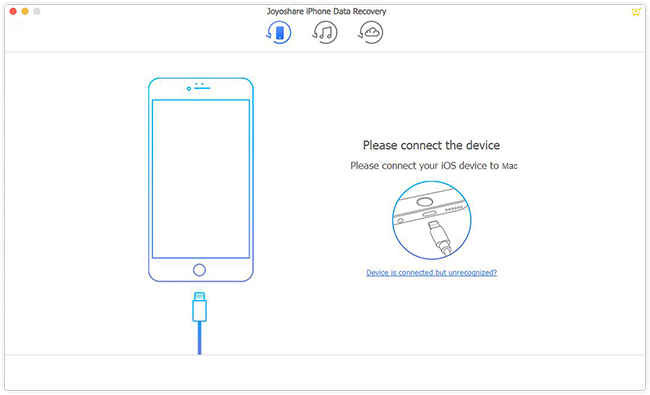
Thanks to its intuitive and simple interface, recover data using Joyoshare iPhone Data Recovery is incredibly easily. You only need to connect the device to the computer, choose one recovery mode, scan and preview all the data files and select all or some of them to restore according to your needs.
Pricing and Availability:
Joyoshare iPhone Data Recovery 1.0 is normally priced at $49.95 (USD) for a single license copy with lifetime free support and update. There are also other license types available, including $79.95 for up to 10 iDevices with lifetime free update and support, and $359.95 for unlimited use. Currently, Joyoshare iPhone Data Recovery is offered with desktop-based one compatible with all Windows and Mac OS.
Joyoshare: https://www.joyoshare.com
Joyoshare iPhone Data Recovery 1.0: https://www.joyoshare.com/iphone-data-recovery-mac/
Download: https://www.joyoshare.com/download/iPhoneDataRecovery.dmg
Purchase: https://www.joyoshare.com/purchase/buy-iphone-data-recovery-for-mac.html
Screenshot: https://www.joyoshare.com/images/guide/connect-ios-device-mac.jpg
Joyoshare is a world-leading multimedia software developer and provider specialized in video field for years. With advanced technologies and professional R&D team, Joyoshare is dedicated in developing the best video and audio solutions, including video converter, audio converter, video editor, media cutter, HEIC converter, screen recorder, iOS solutions, etc. to customers all around the world. With professional and high quality service, Joyoshare has won high reputation from millions of registered users over the past years. All Material and Software (C) Copyright 2018 Joyoshare Studio. All Rights Reserved. Apple, the Apple logo, OS X, macOS and Macintosh are registered trademarks of Apple Inc. in the U.S. and/or other countries. Other trademarks and registered trademarks may be the property of their respective owners.
*******
Link To Article: https://prmac.com/release-id-82925.htm
*******
---------------------------------------------------------------------------------
Note that you can alter delivered distributions at any time.
Login to your account on prMac to alter your channel selection, or to opt-out at any time.
Joyoshare officially launches iPhone Data Recovery to Recover Lost Data - Published on 08/21/18
Joyoshare Studio today releases iPhone Data Recovery 1.0 for macOS. Joyoshare iPhone Data Recovery was developed specifically to help restore over 20 kinds of lost data instantly on various iOS devices from the device itself, iTunes backup and iCloud backup. The app provides three smart recovery methods to restore all your data. Users can directly scan their device and recover deleted data, or even extract iTunes or iCloud backup to recover selected files.
Hong Kong - Joyoshare Studio, an innovative multimedia software developer, officially announced the release of its new iOS solution named Joyoshare iPhone Data Recovery, aiming to help you easily restore 20+ kinds of lost data instantly on various iOS devices from the device itself, iTunes backup and iCloud backup.
The lost data in any scenario such as accidental deletion, forgotten password, system crash, virus attack, damaged device, factory reset, jailbreak, and device stuck, etc. can be perfectly retrieved. Joyoshare iPhone Data Recovery provides three smart recovery methods to restore all your data. You can directly scan your device and recover deleted data, or extract your iTunes or iCloud backup to recover selected files. So even if your devices are missing or stolen, you can still get the data back from iTunes or iCloud backup.
Joyoshare iPhone Data Recovery is capable of recovering more than 20 types of data files, including contacts, messages, call logs, photos, camera roll, notes, calendar, voice memos, WhatsApp/Viber/Kik messages and attachments, and many more. With the advanced technologies adopted in Joyoshare iPhone Data Recovery, you can get all these data previewed and restored at a very faster speed. You can even retrieve those encrypted files successfully by using this smart tool.
As one of the best iPhone recovery programs in the current market, Joyoshare iPhone Data Recovery is available for both Windows and Mac. Unlike other similar data recovery software, Joyoshare iPhone Data Recovery not only helps users to recover iPhone data, but also supports recovering missing data from iPad and iPod touch fast with 100% original quality retained.
Thanks to its intuitive and simple interface, recover data using Joyoshare iPhone Data Recovery is incredibly easily. You only need to connect the device to the computer, choose one recovery mode, scan and preview all the data files and select all or some of them to restore according to your needs.
Pricing and Availability:
Joyoshare iPhone Data Recovery 1.0 is normally priced at $49.95 (USD) for a single license copy with lifetime free support and update. There are also other license types available, including $79.95 for up to 10 iDevices with lifetime free update and support, and $359.95 for unlimited use. Currently, Joyoshare iPhone Data Recovery is offered with desktop-based one compatible with all Windows and Mac OS.
Joyoshare: https://www.joyoshare.com
Joyoshare iPhone Data Recovery 1.0: https://www.joyoshare.com/iphone-data-recovery-mac/
Download: https://www.joyoshare.com/download/iPhoneDataRecovery.dmg
Purchase: https://www.joyoshare.com/purchase/buy-iphone-data-recovery-for-mac.html
Screenshot: https://www.joyoshare.com/images/guide/connect-ios-device-mac.jpg
Joyoshare is a world-leading multimedia software developer and provider specialized in video field for years. With advanced technologies and professional R&D team, Joyoshare is dedicated in developing the best video and audio solutions, including video converter, audio converter, video editor, media cutter, HEIC converter, screen recorder, iOS solutions, etc. to customers all around the world. With professional and high quality service, Joyoshare has won high reputation from millions of registered users over the past years. All Material and Software (C) Copyright 2018 Joyoshare Studio. All Rights Reserved. Apple, the Apple logo, OS X, macOS and Macintosh are registered trademarks of Apple Inc. in the U.S. and/or other countries. Other trademarks and registered trademarks may be the property of their respective owners.
*******
Link To Article: https://prmac.com/release-id-82925.htm
*******
---------------------------------------------------------------------------------
Note that you can alter delivered distributions at any time.
Login to your account on prMac to alter your channel selection, or to opt-out at any time.
Zevrix Solutions announces Package Central 1.11.1, a maintenance update
A new article has been published at prMac.
Zevrix Solutions announces Package Central 1.11.1, a maintenance update - Published on 08/20/18
Zevrix Solutions announces Package Central 1.11.1, a maintenance update to company's file packaging automation solution for Adobe InDesign. The software automatically collects InDesign documents with their fonts and links from watched hot folders. Package Central can serve unlimited users on a network and offers email alerts, variable job names, PDF export, and more. The new version addresses an issue in which the app could stall when enqueuing a large number of InDesign jobs in its hot folders.
Toronto (ON), Canada - Zevrix Solutions today announces Package Central 1.11, a maintenance update to its document packaging automation solution for Adobe InDesign. Originally developed for a major publisher in the United States, the software automates InDesign packaging by processing files from watched hot folders. Package Central offloads file packaging to a central system leaving operator workstations free from the document collection process.
The new version addresses an issue in which Package Central could stall when enqueuing a large number of InDesign jobs in the app's hot folders. The issue was caused by a macOS limitation on the total number of files than can be aggregated for certain operations during threaded processing. Package Central now breaks such long queues into smaller segments, giving users the complete freedom to accumulate unlimited number of jobs in the hot folders.
Under Package Central workflow, production artists, prepress operators and designers simply submit files to watched hot folders that reside on a network. The software automatically collects InDesign files along with their fonts and links freeing user's time for important tasks such as design and layout. Operator workstations will never again be tied up by the packaging process.
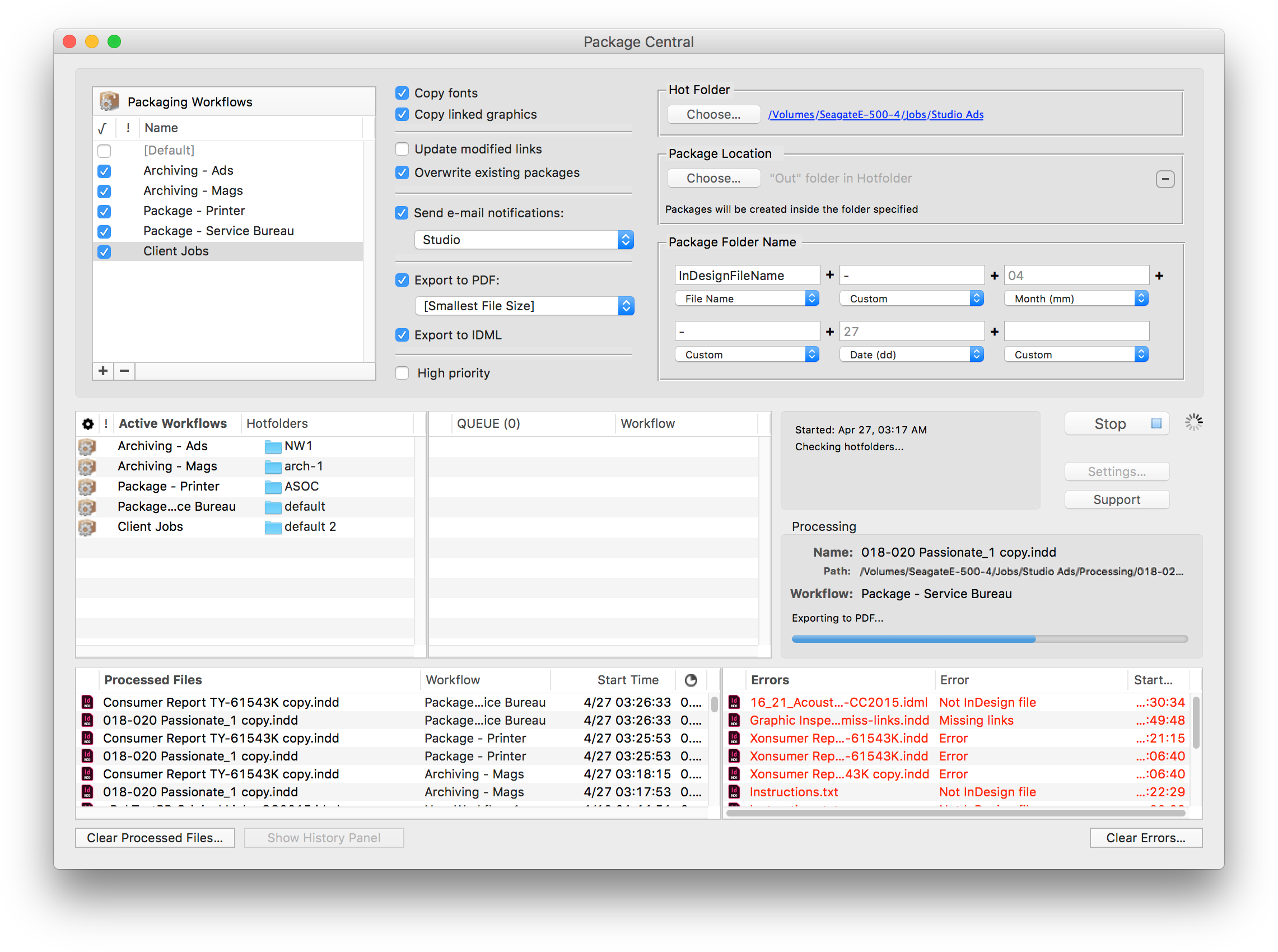
Package Central runs on a dedicated Mac station and watches hot folders for incoming InDesign files. The software performs all its tasks automatically and can run absolutely unattended. It offers the following key features and benefits:
* Automatically collect InDesign files from hot folders
* Automatic email notifications of process stages and errors
* Update modified links automatically
* Create PDF and IDML files on the fly
* Compose variable folder names
* Serves unlimited users on a network
* Detailed processing history
Pricing and Availability:
Package Central can be purchased for $149.95 (USD) from Zevrix website as well as from authorized resellers. Trial is also available for download. The update is free for registered users. Package Central requires macOS 10.7-10.13 and Adobe InDesign CS5-CC 2018.
Zevrix Solutions: http://zevrix.com
Package Central 1.11: http://zevrix.com/PackageCentral.php
Download Package Central: http://zevrix.com/PackageCentral.dmg
Purchase: http://zevrix.com/store.php
Screenshot: http://zevrix.com/screenshots/pac/pac-main.png
Located in Toronto, Canada, Zevrix Solutions provides automation and productivity solutions for Adobe Creative Cloud and Creative Suite software, PDF workflows, graphic file diagnostics and Microsoft Office output on Mac OS. Zevrix is dedicated to help professionals increase their profits through automating everyday tasks, producing error-free documents, saving disk space and cutting production costs. For more information, visit their website. Copyright (C) 2018 Zevrix Solutions. All Rights Reserved. Other trademarks and registered trademarks may be the property of their respective owners.
*******
Link To Article: https://prmac.com/release-id-82924.htm
*******
---------------------------------------------------------------------------------
Note that you can alter delivered distributions at any time.
Login to your account on prMac to alter your channel selection, or to opt-out at any time.
Zevrix Solutions announces Package Central 1.11.1, a maintenance update - Published on 08/20/18
Zevrix Solutions announces Package Central 1.11.1, a maintenance update to company's file packaging automation solution for Adobe InDesign. The software automatically collects InDesign documents with their fonts and links from watched hot folders. Package Central can serve unlimited users on a network and offers email alerts, variable job names, PDF export, and more. The new version addresses an issue in which the app could stall when enqueuing a large number of InDesign jobs in its hot folders.
Toronto (ON), Canada - Zevrix Solutions today announces Package Central 1.11, a maintenance update to its document packaging automation solution for Adobe InDesign. Originally developed for a major publisher in the United States, the software automates InDesign packaging by processing files from watched hot folders. Package Central offloads file packaging to a central system leaving operator workstations free from the document collection process.
The new version addresses an issue in which Package Central could stall when enqueuing a large number of InDesign jobs in the app's hot folders. The issue was caused by a macOS limitation on the total number of files than can be aggregated for certain operations during threaded processing. Package Central now breaks such long queues into smaller segments, giving users the complete freedom to accumulate unlimited number of jobs in the hot folders.
Under Package Central workflow, production artists, prepress operators and designers simply submit files to watched hot folders that reside on a network. The software automatically collects InDesign files along with their fonts and links freeing user's time for important tasks such as design and layout. Operator workstations will never again be tied up by the packaging process.
Package Central runs on a dedicated Mac station and watches hot folders for incoming InDesign files. The software performs all its tasks automatically and can run absolutely unattended. It offers the following key features and benefits:
* Automatically collect InDesign files from hot folders
* Automatic email notifications of process stages and errors
* Update modified links automatically
* Create PDF and IDML files on the fly
* Compose variable folder names
* Serves unlimited users on a network
* Detailed processing history
Pricing and Availability:
Package Central can be purchased for $149.95 (USD) from Zevrix website as well as from authorized resellers. Trial is also available for download. The update is free for registered users. Package Central requires macOS 10.7-10.13 and Adobe InDesign CS5-CC 2018.
Zevrix Solutions: http://zevrix.com
Package Central 1.11: http://zevrix.com/PackageCentral.php
Download Package Central: http://zevrix.com/PackageCentral.dmg
Purchase: http://zevrix.com/store.php
Screenshot: http://zevrix.com/screenshots/pac/pac-main.png
Located in Toronto, Canada, Zevrix Solutions provides automation and productivity solutions for Adobe Creative Cloud and Creative Suite software, PDF workflows, graphic file diagnostics and Microsoft Office output on Mac OS. Zevrix is dedicated to help professionals increase their profits through automating everyday tasks, producing error-free documents, saving disk space and cutting production costs. For more information, visit their website. Copyright (C) 2018 Zevrix Solutions. All Rights Reserved. Other trademarks and registered trademarks may be the property of their respective owners.
*******
Link To Article: https://prmac.com/release-id-82924.htm
*******
---------------------------------------------------------------------------------
Note that you can alter delivered distributions at any time.
Login to your account on prMac to alter your channel selection, or to opt-out at any time.
Tropical Software Releases Discounted TopXNotes 1.8.6
A new article has been published at prMac.
Tropical Software Releases Discounted TopXNotes 1.8.6 - Published on 08/18/18
Florida based Tropical Software today announces TopXNotes 1.8.6, an update to their award-winning, full-featured personal information manager for macOS. Create, view, organize, and instantly access your Mac notes with TopXNotes. Version 1.8.6, our most stable, easiest-to-use version of TopXNotes, with a few new features, performance enhancements and bug fixes is being offered at a huge discount as a Back-to-School special.
Atlantic Beach, Florida - Tropical Software today is happy to announce that TopXNotes for Mac, an app that helps you to create a note by typing, dragging, or importing, has been updated to version 1.8.6 and is being offered at a huge discount as a "Back to School" special. The upgrade provides performance enhancements, a few new features, and bug fixes. TopXNotes 1.8.6 keeps your notes synchronized between TopXNotes for Mac and TopXNotes for iOS.
Get Organized with TopXNotes:
Tired of all those loose bits of information spread all over your hard drive in multiple documents requiring opening multiple apps to see them? Opening many apps sucks up your valuable Mac memory and slows it down. Are you tired of trying to remember which note was written in which application and where you put it? Use TopXNotes to import all your notes and organize them in one place with the option to password protect and encrypt sensitive information.
TopXNotes - Your Personal Information Organizer:
Use TopXNotes advanced drag and drop to create notes from any other text application, or to drag to import text and/or RTF documents. Or copy/cut and paste from other applications. Once the information is created, use TopXNotes' category system to create categories that meet your needs, or file in folder-like groups. Have one for home, one for office, and one for school, or a car project, or recipes, or anything at all.
TopXNotes - Your Personal Information Organizer:
As a Mac user, the Mac's desktop Finder is familiar to you, so you will find our NoteOrganizer highly intuitive. To improve that experience, we have moved beyond the Finder to allow you to build your own Categories (with names, icons and colors) to customize the experience for your needs. You will use the TopXNotes NoteOrganizer to organize your notes and quickly find things. TopXNotes NoteOrganizer lets you filter your notes by name, note page number, date created, date modified or category. You can also rapidly reverse sort or instantly switch between multiple NoteOrganizer display layouts.
TopXNotes - MultiView Convenience:
Use TopXNotes' unique MultiView feature to view more than one note at once in adjacent views. Think of it like opening a book to multiple pages at a time.
TopXNotes - MultiView Editing:
Using MultiView speeds up note editing by simplifying comparing notes, rearranging information from one note to another, combining notes, separating a long note into 2 or more notes, and other tasks. While you work, TopXNotes sliding Text toolbar automatically hovers right above where you are typing.
TopXNotes - MultiViewing:
In addition to helping edit your notes, TopXNotes MultiView allows you to show multiple notes on a theme at once. For instance, you might have a shopping list, budget and websites in adjacent notes for shopping. Alternatively, you might organize your day by having a list of calls, a list of errands, a project outline, and today's To-Do list side by side by side by side. There is no end to the combinations you will find useful.
TopXNotes - QuickNotes at your fingertips:
Once you have your notes organized, prioritize them with TopXNotes QuickNotes feature. Just click to check the QuickNotes category for your most critical information. Now you will be able to instantly access that note from the QuickNotes menu. Whether you have many windows open or the TopXNotes main window minimized, your QuickNotes are always instantly accessible from the desktop or from the TopXNotes Dock menu for your convenience.
TopXNotes - Security & Dual-Encryption:
Once you have your notes organized be sure to use our password protection to encrypt those notes with sensitive information, or you can set a password to shield all your notes from prying eyes, or you can do both (our unique "Dual-Encryption"). In this fashion, you have easy access to all your information, including the sensitive items.
TopXNotes Sync - Notes "On the Go":
Use TopXNotes Mac and its mobile partner, TopXNotes for iOS (for iPhone, iPad and iPod touch) to take those notes with you that you want while you are away including shopping lists, to-do lists, directions, or anything you want.
TopXNotes - Reviews:
TopXNotes was awarded 4 out of 5 mice by Macworld magazine in their "Summer of Mac Gems" series of reviews, by Macworld Australia, and later by Macworld UK. TopXNotes was rated "9 of 10" by Macsimum News (now part of MacTech), and highly rated by the Macintosh Guild, Macworld, Macworld UK and Mac360. Dennis Sellers rated it 10 of 10 for Apple Daily Report. TopXNotes has been critically reviewed with high marks on many occasions and you can find links to all the reviews on our website.
TopXNotes - Macworld Review:
Macworld praised the TopXNotes "clean, single window interface that puts controls for highlighting and marking up your text right at your fingertips," as well as for its "killer" QuickNotes feature.
TopXNotes - Mac User Group Review:
Sue Beal, president of the Upper Keys (Florida) Macintosh Users Group called TopXNotes "Inexpensive, unobtrusive, and just plain handy."
TopXNotes - Mac360:
Ron Mc Elfresh, of Mac360 stated: "I'm a notes freak. I have notes on everything. From to-do items to code snippets to tasks and projects to article ideas. Here's an understated, unloved, deceptively powerful notes app worthy of some Mac love...it's loaded with user features that set it apart from other note taking apps. TopXNotes is deceptively powerful and flexible, probably because the interface is immediately familiar."
Release Specific Information
TopXNotes 1.8.6 has the following changes:
New Features:
* Mac OS X 10.14 (Mohave) Ready
* The Tropical Store version of the app now requires a minimum MacOS version of 10.6.
* Added a new menu option that gives the user the ability to delete a note by page number.
Changed Features:
* Automatically Sync note deletions across devices.
Fixed:
* Insure TopXNotes is registered before enabling Sync command.
* Style slippage occurring at end of style change for some entirely selected lines that were followed by a blank line.
Pricing and Availability:
Try Tropical's reliable TopXNotes 1.8.6 to "get organized" today! TopXNotes 1.8.6 is available for $9.95 (USD) from the Tropical Software web site, Amazon, and other select Macintosh software resellers. TopXNotes 1.8.6 is a free update to customers who have already purchased version 1.5 or later. Existing customers with an older version (previous to 1.5) can upgrade to version 1.8.6 for only $9.95 from the company's web site.
TopXNotes 1.8.6: http://www.tropic4.com/topxnotes.html
TopXNotes Anatomy: http://www.tropic4.com/anatomy.html
Download Free Trial (zip): http://www.tropic4.com/download/TopXNotes.zip
Purchase at Steep Discount: http://sites.fastspring.com/tropic4/product/TopXNotes
Macworld and Other Reviews: http://www.tropic4.com/products/topxnotes/reviews.html
App Icon: http://www.tropic4.com/images/GetOrganizedNoReflect.png
Tropical Software makes the award-winning TopXNotes, a modern personal note manager with state of the art proprietary encryption technology for the ultimate in securing personal information. Located in Atlantic Beach, Florida, Tropical Software is owned and operated by former Apple employee James Lee, and is dedicated to improving the lives of its customers by offering easy to use productivity software for Macs and Apple touch devices including iPhone, iPod touch and iPad. Copyright (C) 2018 Tropical Software. All Rights Reserved. Apple, the Apple logo, iPhone, iPod, iPad and Macintosh are registered trademarks of Apple Inc. in the U.S. and/or other countries.
*******
Link To Article: https://prmac.com/release-id-82923.htm
*******
---------------------------------------------------------------------------------
Note that you can alter delivered distributions at any time.
Login to your account on prMac to alter your channel selection, or to opt-out at any time.
Tropical Software Releases Discounted TopXNotes 1.8.6 - Published on 08/18/18
Florida based Tropical Software today announces TopXNotes 1.8.6, an update to their award-winning, full-featured personal information manager for macOS. Create, view, organize, and instantly access your Mac notes with TopXNotes. Version 1.8.6, our most stable, easiest-to-use version of TopXNotes, with a few new features, performance enhancements and bug fixes is being offered at a huge discount as a Back-to-School special.
Atlantic Beach, Florida - Tropical Software today is happy to announce that TopXNotes for Mac, an app that helps you to create a note by typing, dragging, or importing, has been updated to version 1.8.6 and is being offered at a huge discount as a "Back to School" special. The upgrade provides performance enhancements, a few new features, and bug fixes. TopXNotes 1.8.6 keeps your notes synchronized between TopXNotes for Mac and TopXNotes for iOS.
Get Organized with TopXNotes:
Tired of all those loose bits of information spread all over your hard drive in multiple documents requiring opening multiple apps to see them? Opening many apps sucks up your valuable Mac memory and slows it down. Are you tired of trying to remember which note was written in which application and where you put it? Use TopXNotes to import all your notes and organize them in one place with the option to password protect and encrypt sensitive information.
TopXNotes - Your Personal Information Organizer:
Use TopXNotes advanced drag and drop to create notes from any other text application, or to drag to import text and/or RTF documents. Or copy/cut and paste from other applications. Once the information is created, use TopXNotes' category system to create categories that meet your needs, or file in folder-like groups. Have one for home, one for office, and one for school, or a car project, or recipes, or anything at all.
TopXNotes - Your Personal Information Organizer:
As a Mac user, the Mac's desktop Finder is familiar to you, so you will find our NoteOrganizer highly intuitive. To improve that experience, we have moved beyond the Finder to allow you to build your own Categories (with names, icons and colors) to customize the experience for your needs. You will use the TopXNotes NoteOrganizer to organize your notes and quickly find things. TopXNotes NoteOrganizer lets you filter your notes by name, note page number, date created, date modified or category. You can also rapidly reverse sort or instantly switch between multiple NoteOrganizer display layouts.
TopXNotes - MultiView Convenience:
Use TopXNotes' unique MultiView feature to view more than one note at once in adjacent views. Think of it like opening a book to multiple pages at a time.
TopXNotes - MultiView Editing:
Using MultiView speeds up note editing by simplifying comparing notes, rearranging information from one note to another, combining notes, separating a long note into 2 or more notes, and other tasks. While you work, TopXNotes sliding Text toolbar automatically hovers right above where you are typing.
TopXNotes - MultiViewing:
In addition to helping edit your notes, TopXNotes MultiView allows you to show multiple notes on a theme at once. For instance, you might have a shopping list, budget and websites in adjacent notes for shopping. Alternatively, you might organize your day by having a list of calls, a list of errands, a project outline, and today's To-Do list side by side by side by side. There is no end to the combinations you will find useful.
TopXNotes - QuickNotes at your fingertips:
Once you have your notes organized, prioritize them with TopXNotes QuickNotes feature. Just click to check the QuickNotes category for your most critical information. Now you will be able to instantly access that note from the QuickNotes menu. Whether you have many windows open or the TopXNotes main window minimized, your QuickNotes are always instantly accessible from the desktop or from the TopXNotes Dock menu for your convenience.
TopXNotes - Security & Dual-Encryption:
Once you have your notes organized be sure to use our password protection to encrypt those notes with sensitive information, or you can set a password to shield all your notes from prying eyes, or you can do both (our unique "Dual-Encryption"). In this fashion, you have easy access to all your information, including the sensitive items.
TopXNotes Sync - Notes "On the Go":
Use TopXNotes Mac and its mobile partner, TopXNotes for iOS (for iPhone, iPad and iPod touch) to take those notes with you that you want while you are away including shopping lists, to-do lists, directions, or anything you want.
TopXNotes - Reviews:
TopXNotes was awarded 4 out of 5 mice by Macworld magazine in their "Summer of Mac Gems" series of reviews, by Macworld Australia, and later by Macworld UK. TopXNotes was rated "9 of 10" by Macsimum News (now part of MacTech), and highly rated by the Macintosh Guild, Macworld, Macworld UK and Mac360. Dennis Sellers rated it 10 of 10 for Apple Daily Report. TopXNotes has been critically reviewed with high marks on many occasions and you can find links to all the reviews on our website.
TopXNotes - Macworld Review:
Macworld praised the TopXNotes "clean, single window interface that puts controls for highlighting and marking up your text right at your fingertips," as well as for its "killer" QuickNotes feature.
TopXNotes - Mac User Group Review:
Sue Beal, president of the Upper Keys (Florida) Macintosh Users Group called TopXNotes "Inexpensive, unobtrusive, and just plain handy."
TopXNotes - Mac360:
Ron Mc Elfresh, of Mac360 stated: "I'm a notes freak. I have notes on everything. From to-do items to code snippets to tasks and projects to article ideas. Here's an understated, unloved, deceptively powerful notes app worthy of some Mac love...it's loaded with user features that set it apart from other note taking apps. TopXNotes is deceptively powerful and flexible, probably because the interface is immediately familiar."
Release Specific Information
TopXNotes 1.8.6 has the following changes:
New Features:
* Mac OS X 10.14 (Mohave) Ready
* The Tropical Store version of the app now requires a minimum MacOS version of 10.6.
* Added a new menu option that gives the user the ability to delete a note by page number.
Changed Features:
* Automatically Sync note deletions across devices.
Fixed:
* Insure TopXNotes is registered before enabling Sync command.
* Style slippage occurring at end of style change for some entirely selected lines that were followed by a blank line.
Pricing and Availability:
Try Tropical's reliable TopXNotes 1.8.6 to "get organized" today! TopXNotes 1.8.6 is available for $9.95 (USD) from the Tropical Software web site, Amazon, and other select Macintosh software resellers. TopXNotes 1.8.6 is a free update to customers who have already purchased version 1.5 or later. Existing customers with an older version (previous to 1.5) can upgrade to version 1.8.6 for only $9.95 from the company's web site.
TopXNotes 1.8.6: http://www.tropic4.com/topxnotes.html
TopXNotes Anatomy: http://www.tropic4.com/anatomy.html
Download Free Trial (zip): http://www.tropic4.com/download/TopXNotes.zip
Purchase at Steep Discount: http://sites.fastspring.com/tropic4/product/TopXNotes
Macworld and Other Reviews: http://www.tropic4.com/products/topxnotes/reviews.html
App Icon: http://www.tropic4.com/images/GetOrganizedNoReflect.png

Tropical Software makes the award-winning TopXNotes, a modern personal note manager with state of the art proprietary encryption technology for the ultimate in securing personal information. Located in Atlantic Beach, Florida, Tropical Software is owned and operated by former Apple employee James Lee, and is dedicated to improving the lives of its customers by offering easy to use productivity software for Macs and Apple touch devices including iPhone, iPod touch and iPad. Copyright (C) 2018 Tropical Software. All Rights Reserved. Apple, the Apple logo, iPhone, iPod, iPad and Macintosh are registered trademarks of Apple Inc. in the U.S. and/or other countries.
*******
Link To Article: https://prmac.com/release-id-82923.htm
*******
---------------------------------------------------------------------------------
Note that you can alter delivered distributions at any time.
Login to your account on prMac to alter your channel selection, or to opt-out at any time.
LinkOptimizer for InDesign Improves Access to Variable Name Tokens
A new article has been published at prMac.
LinkOptimizer for InDesign Improves Access to Variable Name Tokens - Published on 08/16/18
Zevrix Solutions announces LinkOptimizer 5.2.8, a feature update to company's workflow automation solution for Adobe InDesign. LinkOptimizer can automatically resize InDesign links to their final dimensions at specific target resolution, convert image formats, adjust colors, reduce linked image size and more. The new version introduces new user interface for the variable name tokens feature. Users utilize the tokens to interactively compose variable names of optimized images and backup folders.
Toronto (ON), Canada - Zevrix Solutions today announces LinkOptimizer 5.2.8, a feature update to its image processing automation plug-in for Adobe InDesign. LinkOptimizer automates complex image manipulation tasks and helps users reduce the size of InDesign links, save prepress costs, and easily repurpose InDesign documents for web and mobile devices.
The new version introduces new user interface for the variable name tokens feature. Users utilize the tokens to interactively compose variable names of optimized images, backup folders and InDesign files. The tokens are now located in the popover windows attached to variable name fields rather than in popup menus. This new UI makes it much easier for the users to access the tokens and insert them directly into the desired location of the target variable name field. LinkOptimizer offers variable tokens for day, time, image color, page number and more.
"LinkOptimizer is the one product no creative studio can live without," says Wayne Guy from Edge Graphics studio in Lake Balboa, California. "It saves hours of time, tediously replacing linked images, resizing, batch processing... If you're a designer or production artist, you need this."
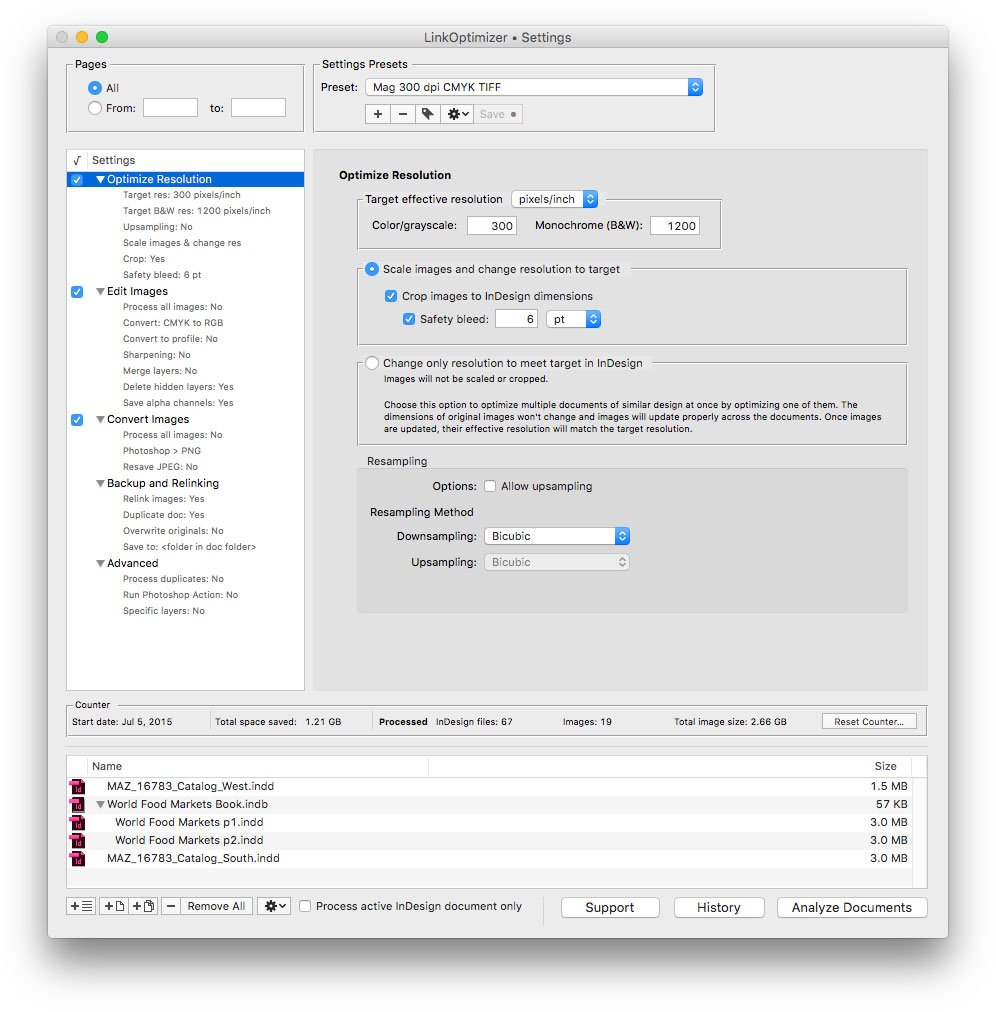
LinkOptimizer works automatically with Photoshop to eliminate the excess image data of InDesign links, perform essential image adjustments and convert image formats. For example, with just a click of a button users can:
* Optimize multiple InDesign files
* Scale and crop images to their InDesign dimensions
* Change image resolution to 300 dpi
* Convert RGB images to CMYK profile
* Resave PNGs as TIFF
* Run a Photoshop action on each image
As a result users can save gigabytes of disk space and countless hours of optimizing images manually, accelerate document output, reduce job turnaround and cut costs through faster processing.
Pricing and Availability:
LinkOptimizer can be purchased from Zevrix website for $259.95 USD (Lite version: $179.95) as well as from Adobe Exchange and authorized resellers. Trial is also available for download. The update is free for LinkOptimizer 5.x users and $130 to upgrade from previous versions. LinkOptimizer requires macOS 10.7-10.13 and Adobe InDesign / Photoshop CS5-CC 2018.
Zevrix Solutions: http://zevrix.com
LinkOptimizer 5.2.8: http://zevrix.com/LinkOptimizer.php
Download LinkOptimizer: http://zevrix.com/LinkOptimizer.dmg
Purchase: http://zevrix.com/store.php
Screenshot: http://zevrix.com/screenshots/lo5/res-win.jpg
Located in Toronto, Canada, Zevrix Solutions provides automation and productivity solutions for Adobe Creative Cloud and Creative Suite software, PDF workflows, graphic file diagnostics and Microsoft Office output on Mac OS. Zevrix is dedicated to help professionals increase their profits through automating everyday tasks, producing error-free documents, saving disk space and cutting production costs. For more information, visit their website. Copyright (C) 2018 Zevrix Solutions. All Rights Reserved. Other trademarks and registered trademarks may be the property of their respective owners.
*******
Link To Article: https://prmac.com/release-id-82922.htm
*******
---------------------------------------------------------------------------------
Note that you can alter delivered distributions at any time.
Login to your account on prMac to alter your channel selection, or to opt-out at any time.
LinkOptimizer for InDesign Improves Access to Variable Name Tokens - Published on 08/16/18
Zevrix Solutions announces LinkOptimizer 5.2.8, a feature update to company's workflow automation solution for Adobe InDesign. LinkOptimizer can automatically resize InDesign links to their final dimensions at specific target resolution, convert image formats, adjust colors, reduce linked image size and more. The new version introduces new user interface for the variable name tokens feature. Users utilize the tokens to interactively compose variable names of optimized images and backup folders.
Toronto (ON), Canada - Zevrix Solutions today announces LinkOptimizer 5.2.8, a feature update to its image processing automation plug-in for Adobe InDesign. LinkOptimizer automates complex image manipulation tasks and helps users reduce the size of InDesign links, save prepress costs, and easily repurpose InDesign documents for web and mobile devices.
The new version introduces new user interface for the variable name tokens feature. Users utilize the tokens to interactively compose variable names of optimized images, backup folders and InDesign files. The tokens are now located in the popover windows attached to variable name fields rather than in popup menus. This new UI makes it much easier for the users to access the tokens and insert them directly into the desired location of the target variable name field. LinkOptimizer offers variable tokens for day, time, image color, page number and more.
"LinkOptimizer is the one product no creative studio can live without," says Wayne Guy from Edge Graphics studio in Lake Balboa, California. "It saves hours of time, tediously replacing linked images, resizing, batch processing... If you're a designer or production artist, you need this."
LinkOptimizer works automatically with Photoshop to eliminate the excess image data of InDesign links, perform essential image adjustments and convert image formats. For example, with just a click of a button users can:
* Optimize multiple InDesign files
* Scale and crop images to their InDesign dimensions
* Change image resolution to 300 dpi
* Convert RGB images to CMYK profile
* Resave PNGs as TIFF
* Run a Photoshop action on each image
As a result users can save gigabytes of disk space and countless hours of optimizing images manually, accelerate document output, reduce job turnaround and cut costs through faster processing.
Pricing and Availability:
LinkOptimizer can be purchased from Zevrix website for $259.95 USD (Lite version: $179.95) as well as from Adobe Exchange and authorized resellers. Trial is also available for download. The update is free for LinkOptimizer 5.x users and $130 to upgrade from previous versions. LinkOptimizer requires macOS 10.7-10.13 and Adobe InDesign / Photoshop CS5-CC 2018.
Zevrix Solutions: http://zevrix.com
LinkOptimizer 5.2.8: http://zevrix.com/LinkOptimizer.php
Download LinkOptimizer: http://zevrix.com/LinkOptimizer.dmg
Purchase: http://zevrix.com/store.php
Screenshot: http://zevrix.com/screenshots/lo5/res-win.jpg
Located in Toronto, Canada, Zevrix Solutions provides automation and productivity solutions for Adobe Creative Cloud and Creative Suite software, PDF workflows, graphic file diagnostics and Microsoft Office output on Mac OS. Zevrix is dedicated to help professionals increase their profits through automating everyday tasks, producing error-free documents, saving disk space and cutting production costs. For more information, visit their website. Copyright (C) 2018 Zevrix Solutions. All Rights Reserved. Other trademarks and registered trademarks may be the property of their respective owners.
*******
Link To Article: https://prmac.com/release-id-82922.htm
*******
---------------------------------------------------------------------------------
Note that you can alter delivered distributions at any time.
Login to your account on prMac to alter your channel selection, or to opt-out at any time.
Subscribe to:
Posts (Atom)