A new article has been published at prMac.
Basil Salad Software releases BiggerPicture 1.0 for macOS - Published on 08/27/18
Basil Salad Software today is proud to announce the release of BiggerPicture 1.0 for macOS. BiggerPicture uses machine-learning to increase the resolution of photos and line-art images without causing pixelation or blurs. The tool enables users to create retina-display images from normal-resolution versions, create printable logos sourced from web graphics, or preprocess vintage cameraphone photographs in preparation for photo-printing. All processing is done within the user's machine.
Singapore - Basil Salad Software today is proud to announce the release of BiggerPicture for macOS. BiggerPicture uses machine-learning to increase the resolution of photos and line-art images without causing pixelation or blurs. The tool enables users to create retina-display images from normal-resolution versions, create printable logos sourced from web graphics, or preprocess vintage cameraphone photographs in preparation for photo-printing.
Unlike traditional graphic packages that uses bicubic interpolation or Lanzcos resampling, BiggerPicture's neural network recognizes shapes and textures enabling it to hallucinate new pixels based on its training data. BiggerPicture takes advantage of Apple's Core ML libraries fully utilize the user's machine capabilities.
Features:
* Deep learning super-resolution - enlarge images by 2 through 8 yet retain its quality.
* Eliminate noise from JPEG compression artifacts.
* Process multiple files as a batch.
* High-quality printing as the app will pre-process images to match the printer's resolution.
* Photos editing extension to enlarge images without leaving the Photos app.
Benefits:
* Create high-resolution life-size prints from web graphics.
* Upgrade older website images to look great in today's retina displays.
* Make glossy framed prints from last century's cameraphone snapshot collections.
Advantages:
* BiggerPicture uses super-resolution *machine learning* techniques that imagines pixels to fill gaps created during upscaling. This creates blur-free upscaled images.
* All processing is done within the user's machine. There is no cloud-based processing, unlike the approach by some competitors. This makes BiggerPicture suitable for processing confidential or sensitive images.
System Requirements:
* macOS 10.13.2
* 39.5 MB
Pricing and Availability:
BiggerPicture 1.0 is Free and available worldwide exclusively through the Mac App Store in the Graphics & Design category.
Basil Salad Software: http://basilsalad.com
BiggerPicture 1.0: https://BiggerPicture.app
Download from Mac App Store: https://itunes.apple.com/app/bigger-picture/id1406088493?mt=12&at=10lvzo&ct=pr180704&ls=1
Media Assets: https://biggerpicture.app/press/
Basil Salad Software is an independent operations with the vision of creating delicious software for everyday use. We believe that good software should be simple, fun, and easy to use. We are offer software for iOS, OS X, and Android. Copyright (C) Basil Salad Software. All Rights Reserved. Apple, the Apple logo, iPhone, iPod, iPad, and Mac OS X are registered trademarks of Apple Inc. in the U.S. and/or other countries.
*******
Link To Article: https://prmac.com/release-id-82934.htm
*******
---------------------------------------------------------------------------------
Note that you can alter delivered distributions at any time.
Login to your account on prMac to alter your channel selection, or to opt-out at any time.

ProFind - The most advanced File Search App for macOS
A new article has been published at prMac.
ProFind - The most advanced File Search App for macOS - Published on 08/27/18
Sydney based Zeroonetwenty today announced the availability of ProFind 1.0, their new search app for macOS. Under its elegant user interface, ProFind combines both metadata searches or file system searches into one, providing fast and complete searches. ProFind provides a slew of advanced features, including natural language search queries, application discovery, quick folders, multi-line path view with differences, word highlighting, searching inside invisible folders and packages, and more.
Sydney, NSW, Australia - Zeroonetwenty today announced the availability of ProFind, the most advanced file search app for macOS. In the past, file search apps have performed either metadata searches or file system searches. Under its elegant user interface, ProFind combines both these technologies into one, providing fast and complete searches. Along with this, ProFind provides a slew of advanced features including:
* Natural language search queries
* Application Discovery
* Large icon view
* Quick Folders
* Multi line path view with differences
* Highlighting of found words
* Searching inside invisible folders and packages
Natural language queries are just one of ProFinds many innovative features. Instead of users needing to navigate clumsy interfaces, users can simply type the search options they need. For example: "files bigger than 500mb" or "is video modified today." The natural language search supports searching by: date, file extensions, tags, parent folder, kind and metadata.
It's essential that a modern search app provides support for application discovery, so ProFind has support for auto completion of application names and almost instant find performance for applications installed on the users Mac.
"File search apps for macOS seem to have been long neglected. It was a real thrill to see how a new app with new approaches could advance the user experience." said Ross Tulloch, developer of ProFind.
Being a search application for Pro users means going the extra mile in terms of features. So ProFind has support for custom UNIX shell scripts and Apple Scripts. Users can simply drag scripts into the Scripts folder and then these scripts can run on found items. ProFind's Quick Folders feature allows users to quickly access the contents of commonly used folders.
ProFind has support for QuickLook, Sharing, the ability to open, show found items in the Finder, show file information and move to trash.
ProFind features a global hot key as well as a system wide menubar icon for instant access to ProFind.
Pricing and Availability:
ProFind 1.0 is available now at a cost of $7.95 (USD) and can be trialed free of charge for 21 days. ProFind 1.0 requires macOS 10.13 or later.
Zeroonetwenty: https://www.zeroonetwenty.com/
ProFind 1.0: https://www.zeroonetwenty.com/profind/
Download ProFind: https://www.zeroonetwenty.com/profind/downloads/ProFind100.dmg
Purchase: https://sites.fastspring.com/zeroonetwenty/instant/profind
Screenshot: http://www.zeroonetwenty.com/profind/shots/SearchWindow.png
Application Icon: http://www.zeroonetwenty.com/profind/prart/binoculars_512.png
Based in Sydney, Australia, Zeroonetwenty was founded by independent macOS and iOS developer Ross Tulloch. Ross has been a professional developer for more than 20 years. Zeroonetwenty is the maker of popular macOS utility software including BlueHarvest. Copyright (C) 2018 Zeroonetwenty. All Rights Reserved. Apple, the Apple logo, and OS X are registered trademarks of Apple Inc. in the U.S. and/or other countries.
*******
Link To Article: https://prmac.com/release-id-82932.htm
*******
---------------------------------------------------------------------------------
Note that you can alter delivered distributions at any time.
Login to your account on prMac to alter your channel selection, or to opt-out at any time.
ProFind - The most advanced File Search App for macOS - Published on 08/27/18
Sydney based Zeroonetwenty today announced the availability of ProFind 1.0, their new search app for macOS. Under its elegant user interface, ProFind combines both metadata searches or file system searches into one, providing fast and complete searches. ProFind provides a slew of advanced features, including natural language search queries, application discovery, quick folders, multi-line path view with differences, word highlighting, searching inside invisible folders and packages, and more.
Sydney, NSW, Australia - Zeroonetwenty today announced the availability of ProFind, the most advanced file search app for macOS. In the past, file search apps have performed either metadata searches or file system searches. Under its elegant user interface, ProFind combines both these technologies into one, providing fast and complete searches. Along with this, ProFind provides a slew of advanced features including:
* Natural language search queries
* Application Discovery
* Large icon view
* Quick Folders
* Multi line path view with differences
* Highlighting of found words
* Searching inside invisible folders and packages
Natural language queries are just one of ProFinds many innovative features. Instead of users needing to navigate clumsy interfaces, users can simply type the search options they need. For example: "files bigger than 500mb" or "is video modified today." The natural language search supports searching by: date, file extensions, tags, parent folder, kind and metadata.
It's essential that a modern search app provides support for application discovery, so ProFind has support for auto completion of application names and almost instant find performance for applications installed on the users Mac.
"File search apps for macOS seem to have been long neglected. It was a real thrill to see how a new app with new approaches could advance the user experience." said Ross Tulloch, developer of ProFind.
Being a search application for Pro users means going the extra mile in terms of features. So ProFind has support for custom UNIX shell scripts and Apple Scripts. Users can simply drag scripts into the Scripts folder and then these scripts can run on found items. ProFind's Quick Folders feature allows users to quickly access the contents of commonly used folders.
ProFind has support for QuickLook, Sharing, the ability to open, show found items in the Finder, show file information and move to trash.
ProFind features a global hot key as well as a system wide menubar icon for instant access to ProFind.
Pricing and Availability:
ProFind 1.0 is available now at a cost of $7.95 (USD) and can be trialed free of charge for 21 days. ProFind 1.0 requires macOS 10.13 or later.
Zeroonetwenty: https://www.zeroonetwenty.com/
ProFind 1.0: https://www.zeroonetwenty.com/profind/
Download ProFind: https://www.zeroonetwenty.com/profind/downloads/ProFind100.dmg
Purchase: https://sites.fastspring.com/zeroonetwenty/instant/profind
Screenshot: http://www.zeroonetwenty.com/profind/shots/SearchWindow.png

Application Icon: http://www.zeroonetwenty.com/profind/prart/binoculars_512.png

Based in Sydney, Australia, Zeroonetwenty was founded by independent macOS and iOS developer Ross Tulloch. Ross has been a professional developer for more than 20 years. Zeroonetwenty is the maker of popular macOS utility software including BlueHarvest. Copyright (C) 2018 Zeroonetwenty. All Rights Reserved. Apple, the Apple logo, and OS X are registered trademarks of Apple Inc. in the U.S. and/or other countries.
*******
Link To Article: https://prmac.com/release-id-82932.htm
*******
---------------------------------------------------------------------------------
Note that you can alter delivered distributions at any time.
Login to your account on prMac to alter your channel selection, or to opt-out at any time.
Protect & Code-Sign 32 and 64-bit Mac and Windows Apps With AppProtect
A new article has been published at prMac.
Protect & Code-Sign 32 and 64-bit Mac and Windows Apps With AppProtect - Published on 08/22/18
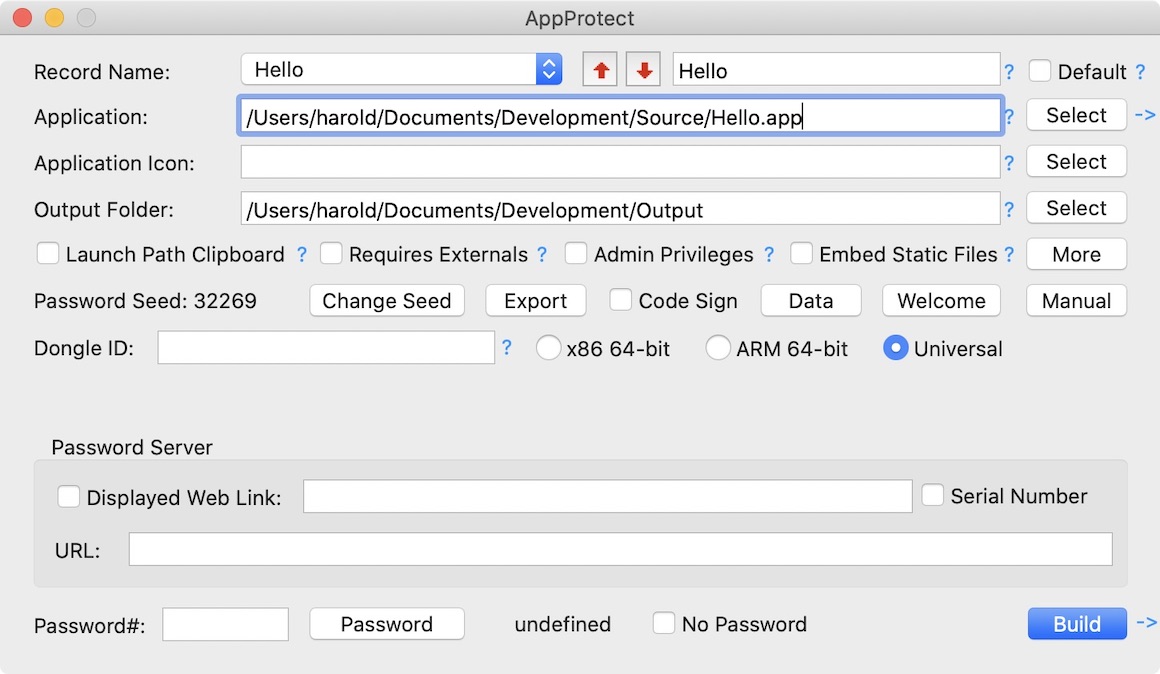
Excel Software announces AppProtect 5.0 to protect Mac or Windows software. AppProtect 5 generates a 32-bit or 64-bit protected App for a MAX music application, Unity game, Excel spreadsheet or any compiled Mac or Windows app. Users Code Sign the app during the build process. AppProtect applies protection with an offline or automated online activation process to a compiled application in minutes without programming.
Henderson, Nevada - Excel Software is proud to announce AppProtect 5.0 to protect Mac or Windows software. AppProtect applies protection with an offline or automated online activation process to a compiled application in minutes without programming. It supports most application runtime environments including MAX MSP, Unity3D, Xojo, Java, Delphi, C++, C#, Objective-C and Swift.
AppProtect works with OfficeProtect to generate a protected EXE (Windows) or APP (macOS) from an Excel workbook. Once activated to a computer, the workbook runs within Excel 2007 or later on Windows or Excel 2011 or 2016 on Mac. Excel features work the same except users cannot save out the unprotected workbook.
AppProtect 5 adds the ability to generate 64-bit executables for Mac and Windows in addition to the previous 32-bit executables. AppProtect adds the ability to Code Sign protected applications during the wrapping process. AppProtect MacOSX is now a 64-bit application delivered with a 64-bit, Code-Signed installer to satisfy recent macOS security requirements.
AppProtect wraps a Mac or Windows application with an activation process that requires a computer unique password or Serial Number on first launch. The software vendor can generate passwords from AppProtect or automate the process with an online activation server. Excel Software offers vendor accounts on the Safe Activation service to automate the Serial Number activation process, manage licenses or automate the payment and delivery process for online orders.
A vendor can self-host an activation server on their website with the Desktop License Server or WebActivation products. In addition to manual or online software activation, AppProtect can generate dongle enabled applications. Desktop applications can require that a USB dongle be present in the computer to run. Developers can create their own USB dongles with the MakeDongle product.
AppProtect can embed static data files into the executable. For an application constructed from an interpreted language or that requires external data files, the unprotected files are no longer visible to the user. This process protects the source code, allows a secure license to be applied and simplifies the user experience since the entire application is distributed as one file with a custom icon.
AppProtect can be used to protect a standard Mac OS X application (.app), Windows executable (.exe) or Microsoft Excel spreadsheet (.xlsm). A Single User license is $350 on either Windows (7, 8, 8.1 or 10) or macOS 10.9 or later. The product includes royalty-free distribution rights for any number of protected products or licenses. AppProtect includes a new User Guide and help screens that allow anyone to protect and license an application without programming skills or access to source code.
AppProtect is part of an integrated family of software protection, license management and automated order processing tools and services. Visit the Excel Software web site for demonstration videos, product information and secure online ordering.
Excel Software: http://www.excelsoftware.com
AppProtect 5.0: http://www.excelsoftware.com/appprotect
Purchase Link: http://www.excelsoftware.com/priceandordering
Screenshot: http://www.excelsoftware.com/image/appprotect.jpg
Application Icon: http://www.excelsoftware.com/image/appprotecticon.gif
Established in 1985, Excel Software provides Windows and Mac OS X software products to thousands of users worldwide. Capabilities include system modeling & simulation, requirements management, software design, code generation, reengineering, bug tracking, help authoring, software license management, document protection and internet marketing automation. All Material and Software (C) Copyright 2018 Excel Software. All Rights Reserved. Apple, the Apple logo, Macintosh Mac OS X and macOS are registered trademarks of Apple Inc. in the U.S. and/or other countries. Other trademarks and registered trademarks may be the property of their respective owners.
*******
Link To Article: https://prmac.com/release-id-82933.htm
*******
---------------------------------------------------------------------------------
Note that you can alter delivered distributions at any time.
Login to your account on prMac to alter your channel selection, or to opt-out at any time.
Protect & Code-Sign 32 and 64-bit Mac and Windows Apps With AppProtect - Published on 08/22/18
Excel Software announces AppProtect 5.0 to protect Mac or Windows software. AppProtect 5 generates a 32-bit or 64-bit protected App for a MAX music application, Unity game, Excel spreadsheet or any compiled Mac or Windows app. Users Code Sign the app during the build process. AppProtect applies protection with an offline or automated online activation process to a compiled application in minutes without programming.
Henderson, Nevada - Excel Software is proud to announce AppProtect 5.0 to protect Mac or Windows software. AppProtect applies protection with an offline or automated online activation process to a compiled application in minutes without programming. It supports most application runtime environments including MAX MSP, Unity3D, Xojo, Java, Delphi, C++, C#, Objective-C and Swift.
AppProtect works with OfficeProtect to generate a protected EXE (Windows) or APP (macOS) from an Excel workbook. Once activated to a computer, the workbook runs within Excel 2007 or later on Windows or Excel 2011 or 2016 on Mac. Excel features work the same except users cannot save out the unprotected workbook.
AppProtect 5 adds the ability to generate 64-bit executables for Mac and Windows in addition to the previous 32-bit executables. AppProtect adds the ability to Code Sign protected applications during the wrapping process. AppProtect MacOSX is now a 64-bit application delivered with a 64-bit, Code-Signed installer to satisfy recent macOS security requirements.
AppProtect wraps a Mac or Windows application with an activation process that requires a computer unique password or Serial Number on first launch. The software vendor can generate passwords from AppProtect or automate the process with an online activation server. Excel Software offers vendor accounts on the Safe Activation service to automate the Serial Number activation process, manage licenses or automate the payment and delivery process for online orders.
A vendor can self-host an activation server on their website with the Desktop License Server or WebActivation products. In addition to manual or online software activation, AppProtect can generate dongle enabled applications. Desktop applications can require that a USB dongle be present in the computer to run. Developers can create their own USB dongles with the MakeDongle product.
AppProtect can embed static data files into the executable. For an application constructed from an interpreted language or that requires external data files, the unprotected files are no longer visible to the user. This process protects the source code, allows a secure license to be applied and simplifies the user experience since the entire application is distributed as one file with a custom icon.
AppProtect can be used to protect a standard Mac OS X application (.app), Windows executable (.exe) or Microsoft Excel spreadsheet (.xlsm). A Single User license is $350 on either Windows (7, 8, 8.1 or 10) or macOS 10.9 or later. The product includes royalty-free distribution rights for any number of protected products or licenses. AppProtect includes a new User Guide and help screens that allow anyone to protect and license an application without programming skills or access to source code.
AppProtect is part of an integrated family of software protection, license management and automated order processing tools and services. Visit the Excel Software web site for demonstration videos, product information and secure online ordering.
Excel Software: http://www.excelsoftware.com
AppProtect 5.0: http://www.excelsoftware.com/appprotect
Purchase Link: http://www.excelsoftware.com/priceandordering
Screenshot: http://www.excelsoftware.com/image/appprotect.jpg
Application Icon: http://www.excelsoftware.com/image/appprotecticon.gif

Established in 1985, Excel Software provides Windows and Mac OS X software products to thousands of users worldwide. Capabilities include system modeling & simulation, requirements management, software design, code generation, reengineering, bug tracking, help authoring, software license management, document protection and internet marketing automation. All Material and Software (C) Copyright 2018 Excel Software. All Rights Reserved. Apple, the Apple logo, Macintosh Mac OS X and macOS are registered trademarks of Apple Inc. in the U.S. and/or other countries. Other trademarks and registered trademarks may be the property of their respective owners.
*******
Link To Article: https://prmac.com/release-id-82933.htm
*******
---------------------------------------------------------------------------------
Note that you can alter delivered distributions at any time.
Login to your account on prMac to alter your channel selection, or to opt-out at any time.
Image Utility GraphicConverter 10.6.3 Adds New Import & Filter Options
A new article has been published at prMac.
Image Utility GraphicConverter 10.6.3 Adds New Import & Filter Options - Published on 08/24/18
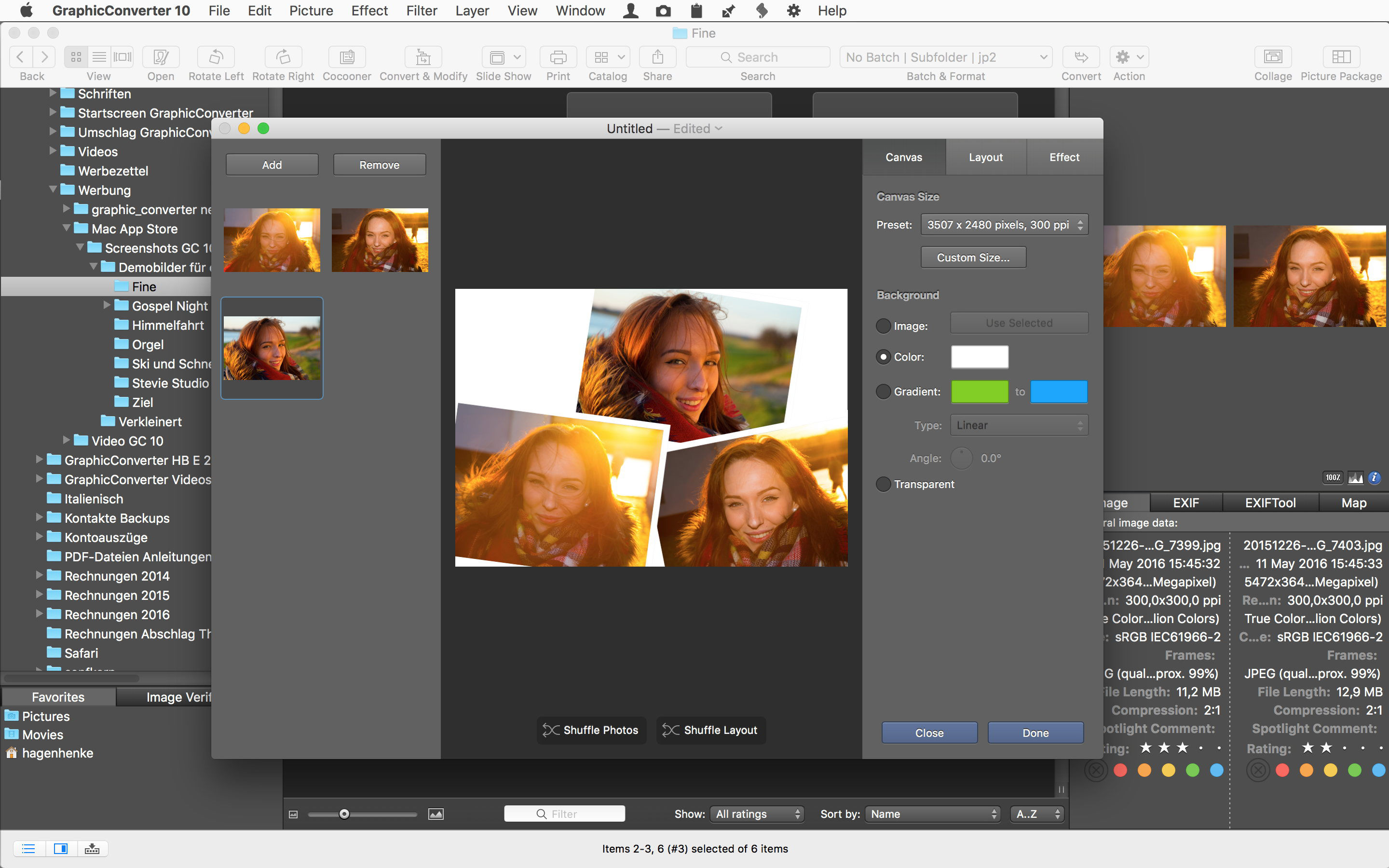
German indie development team Lemke Software GmbH today announces GraphicConverter 10.6.3, an important update to their award-winning "Swiss Army Knife" image editing utility for macOS. The handy utility provides users with the ability to convert most graphic file formats into any of nearly 80 other graphic formats. Version 10.6.3 brings the removal of Exif image description tag during import from digital camera, a new "kuwahara" smoothing filter, and much more.
Peine, Germany - Lemke Software GmbH today is proud to announce the release and immediate availability of GraphicConverter 10.6.3, an important update to their popular image editing utility for macOS. GraphicConverter, which has become known as the "Swiss Army Knife" of imaged editing applications, allows users to convert any of over 200 graphic file formats into any of almost 80 other graphic formats.
Over 1.5 million loyal users worldwide have found GraphicConverter to be the best way to capture, import, convert, and export images on the Mac. GraphicConverter's powerful image editing functions offer the ability to work with local copies of images, or those stored on popular cloud storage services.
"Over the years, our loyal user base has found GraphicConverter to be one of the most professional graphics applications available for the Mac," says Thorsten Lemke, founder of Lemke Software GmbH. "And the latest version of the app brings even more great features, taking it to a new level of capability."
Features of the App Include:
* Opens files in 200 graphics formats
* Exports images in nearly 80 different formats
* Imports images directly from cameras, even in the RAW format and sidecar files like xmp, live picture
* Generates web, print & picture catalogs
* TWAIN and image capture interface for scanners
* Directly supports the Google, Flickr, and locr photo services
* Graphical file and picture browser
* Slide show functionality
* Powerful batch processing features
* Supports Applescript
* Express picture enhancement function
* Powerful photo editing functions
* Advanced effects and filters
* Flexible plug-in architecture
* Color management with ColorSync and ICC profiles
* 3D image support
* Supports for latest technologies built-in to the various versions of macOS
* Multilingual Support (12 available languages)
* Image verifier
* Browse local copies on cloud services like Dropbox, SkyDrive, AWS Cloud, and Google Drive
Version 10.6.3 also brings a great number of new features to the app, including the removal of Exif image description tag during import from digital camera, a new kuwahara smoothing filter, CNG import, and more.
New Features Include:
* Import from digital cameras, with the option to remove Exif image description tags
* New browser context menu item: Append Caption
* New action: Set alpha with image
* CNG import
* New kuwahara smoothing filter
Version 10.6.3 of GraphicConverter continues a long history of updates that continue to make it one of the most capable and easy to use macOS image processing utilities on the market today. In addition to new features, the updated version offers several significant updates.
Updated features Include:
* Localizations
* Direct text fields added to the color balance dialog
* ExifTool 10.10
* Sparkle updated framework
* Added even/odd number in filename to if batch action
* Cocooner changes will now be applied to complete selection of files
* Improved crop to ratio action
* Improved browser - Set Exif date dialog
* Rename has added an option to add folder name one or two levels up
* Added an alpha channel support to the Import fpx function
Lemke Software also continues to work to make GraphicConverter as bug free as possible. Version 10.6.3 offers a large number of bug fixes.
Bug Fixes Include:
* Fixed possible flicker upon playing a movie in the slideshow
* Fixed possible issue during browsing XPS files
* Fixed bug during saving uncompressed TIFF or PNG with more than 2GB data
* Fixed flip issue with Mosaic Flip transition during slideshow
* Fixed disabled movie options in browser
* Fixed possible crash upon update check due bug in older Sparkle framework
* Fixed possible issue in find and replace iptc data
* Fixed an Exif date editing issue under Swedish localization
* Fixed possible autoconvert issue with some network drives
"GraphicConverter offers everything users need and expect from a professional image editing program on the Mac, providing ease of use, an excellent range of features, stability and reliability," continues Thorsten. "And the best part is that users can try our award-winning software with few restrictions and at their leisure until they decide to purchase it."
Language Support:
English, Germany, French, Japanese, Chinese (simplified and traditional), Portuguese, Spanish, Danish, Swedish and Italian
System Requirements:
* Requires OS X 10.9 or higher
* 64-bit processor
* 286.2 MB
Pricing/Availability:
GraphicConverter 10.6.3 is only $39.95 USD (or an equivalent amount in other currencies) and is available worldwide through the Mac App Store in the Photography category. It can also be directly purchased online from the Lemkesoft website. GraphicConverter 10.6.3 is a free update for all customers of version 10.x. Upgrades from older versions of the app are available for $25.95 USD.
Lemke Software: https://www.lemkesoft.de/en/image-editing-slideshow-browser-batch-conversion-metadata-and-more-on-your-mac/
GraphicConverter 10.6.3: https://www.lemkesoft.de/en/products/graphicconverter/
Download GraphicConverter: https://www.lemkesoft.de/en/products/graphicconverter/download/
Purchase GraphicConverter: https://www.lemkesoft.de/en/order/
Purchase and Download (MAS): https://itunes.apple.com/app/graphicconverter-10/id1090470302
Screenshot: https://www.lemkesoft.info/prmac/screenshot.jpg
Based in Peine, Germany, Lemke Software GmbH is a developer and publisher of Macintosh software. Founded by Thorsten Lemke in 2002, the main focus and passion of Lemke Software is centered on the maintenance and further development of GraphicConverter. Lemke Software also develops individual solutions for special customer requirements. All Material and Software (C) Copyright 2018 Lemke Software GmbH. All Rights Reserved. Apple, the Apple logo, Macintosh Mac OS X, and macOS are registered trademarks of Apple Inc. in the U.S. and/or other countries. Other trademarks and registered trademarks may be the property of their respective owners.
*******
Link To Article: https://prmac.com/release-id-82926.htm
*******
---------------------------------------------------------------------------------
Note that you can alter delivered distributions at any time.
Login to your account on prMac to alter your channel selection, or to opt-out at any time.
Image Utility GraphicConverter 10.6.3 Adds New Import & Filter Options - Published on 08/24/18
German indie development team Lemke Software GmbH today announces GraphicConverter 10.6.3, an important update to their award-winning "Swiss Army Knife" image editing utility for macOS. The handy utility provides users with the ability to convert most graphic file formats into any of nearly 80 other graphic formats. Version 10.6.3 brings the removal of Exif image description tag during import from digital camera, a new "kuwahara" smoothing filter, and much more.
Peine, Germany - Lemke Software GmbH today is proud to announce the release and immediate availability of GraphicConverter 10.6.3, an important update to their popular image editing utility for macOS. GraphicConverter, which has become known as the "Swiss Army Knife" of imaged editing applications, allows users to convert any of over 200 graphic file formats into any of almost 80 other graphic formats.
Over 1.5 million loyal users worldwide have found GraphicConverter to be the best way to capture, import, convert, and export images on the Mac. GraphicConverter's powerful image editing functions offer the ability to work with local copies of images, or those stored on popular cloud storage services.
"Over the years, our loyal user base has found GraphicConverter to be one of the most professional graphics applications available for the Mac," says Thorsten Lemke, founder of Lemke Software GmbH. "And the latest version of the app brings even more great features, taking it to a new level of capability."
Features of the App Include:
* Opens files in 200 graphics formats
* Exports images in nearly 80 different formats
* Imports images directly from cameras, even in the RAW format and sidecar files like xmp, live picture
* Generates web, print & picture catalogs
* TWAIN and image capture interface for scanners
* Directly supports the Google, Flickr, and locr photo services
* Graphical file and picture browser
* Slide show functionality
* Powerful batch processing features
* Supports Applescript
* Express picture enhancement function
* Powerful photo editing functions
* Advanced effects and filters
* Flexible plug-in architecture
* Color management with ColorSync and ICC profiles
* 3D image support
* Supports for latest technologies built-in to the various versions of macOS
* Multilingual Support (12 available languages)
* Image verifier
* Browse local copies on cloud services like Dropbox, SkyDrive, AWS Cloud, and Google Drive
Version 10.6.3 also brings a great number of new features to the app, including the removal of Exif image description tag during import from digital camera, a new kuwahara smoothing filter, CNG import, and more.
New Features Include:
* Import from digital cameras, with the option to remove Exif image description tags
* New browser context menu item: Append Caption
* New action: Set alpha with image
* CNG import
* New kuwahara smoothing filter
Version 10.6.3 of GraphicConverter continues a long history of updates that continue to make it one of the most capable and easy to use macOS image processing utilities on the market today. In addition to new features, the updated version offers several significant updates.
Updated features Include:
* Localizations
* Direct text fields added to the color balance dialog
* ExifTool 10.10
* Sparkle updated framework
* Added even/odd number in filename to if batch action
* Cocooner changes will now be applied to complete selection of files
* Improved crop to ratio action
* Improved browser - Set Exif date dialog
* Rename has added an option to add folder name one or two levels up
* Added an alpha channel support to the Import fpx function
Lemke Software also continues to work to make GraphicConverter as bug free as possible. Version 10.6.3 offers a large number of bug fixes.
Bug Fixes Include:
* Fixed possible flicker upon playing a movie in the slideshow
* Fixed possible issue during browsing XPS files
* Fixed bug during saving uncompressed TIFF or PNG with more than 2GB data
* Fixed flip issue with Mosaic Flip transition during slideshow
* Fixed disabled movie options in browser
* Fixed possible crash upon update check due bug in older Sparkle framework
* Fixed possible issue in find and replace iptc data
* Fixed an Exif date editing issue under Swedish localization
* Fixed possible autoconvert issue with some network drives
"GraphicConverter offers everything users need and expect from a professional image editing program on the Mac, providing ease of use, an excellent range of features, stability and reliability," continues Thorsten. "And the best part is that users can try our award-winning software with few restrictions and at their leisure until they decide to purchase it."
Language Support:
English, Germany, French, Japanese, Chinese (simplified and traditional), Portuguese, Spanish, Danish, Swedish and Italian
System Requirements:
* Requires OS X 10.9 or higher
* 64-bit processor
* 286.2 MB
Pricing/Availability:
GraphicConverter 10.6.3 is only $39.95 USD (or an equivalent amount in other currencies) and is available worldwide through the Mac App Store in the Photography category. It can also be directly purchased online from the Lemkesoft website. GraphicConverter 10.6.3 is a free update for all customers of version 10.x. Upgrades from older versions of the app are available for $25.95 USD.
Lemke Software: https://www.lemkesoft.de/en/image-editing-slideshow-browser-batch-conversion-metadata-and-more-on-your-mac/
GraphicConverter 10.6.3: https://www.lemkesoft.de/en/products/graphicconverter/
Download GraphicConverter: https://www.lemkesoft.de/en/products/graphicconverter/download/
Purchase GraphicConverter: https://www.lemkesoft.de/en/order/
Purchase and Download (MAS): https://itunes.apple.com/app/graphicconverter-10/id1090470302
Screenshot: https://www.lemkesoft.info/prmac/screenshot.jpg
Based in Peine, Germany, Lemke Software GmbH is a developer and publisher of Macintosh software. Founded by Thorsten Lemke in 2002, the main focus and passion of Lemke Software is centered on the maintenance and further development of GraphicConverter. Lemke Software also develops individual solutions for special customer requirements. All Material and Software (C) Copyright 2018 Lemke Software GmbH. All Rights Reserved. Apple, the Apple logo, Macintosh Mac OS X, and macOS are registered trademarks of Apple Inc. in the U.S. and/or other countries. Other trademarks and registered trademarks may be the property of their respective owners.
*******
Link To Article: https://prmac.com/release-id-82926.htm
*******
---------------------------------------------------------------------------------
Note that you can alter delivered distributions at any time.
Login to your account on prMac to alter your channel selection, or to opt-out at any time.
Free Imposition Software Now Available for Adobe InDesign Users
A new article has been published at prMac.
Free Imposition Software Now Available for Adobe InDesign Users - Published on 08/23/18
Meadows Publishing Solutions has released a new version of their Meadows Productivity Suite, a completely free set of software utilities for Adobe InDesign. With complete control over content placement and fitting, the MPS Pro Suite includes an advanced multi-up imposition utility, allowing users to quickly create multi-up imposition layouts of graphics, PDF files, or InDesign documents. The new version is now compatible with Adobe InDesign CC 2018 for both Macintosh and Windows.
Schaumburg, Illinois - Meadows Publishing Solutions today announced a new release of their Meadows Productivity Suite software, a completely Free set of software tools for Adobe InDesign that have been designed to streamline multi-up impositions, and other publishing tasks. The new release is now compatible with all Adobe InDesign CC 2018 systems.
About the Free Productivity Suite:
The MPS Pro Suite currently includes an advanced multi-up imposition utility, allowing users to quickly create multi-up imposition layouts of graphics, PDF files, or InDesign documents. The process is driven by a user interface that allows for the specification of trim size, bleed, spacing, and rotation of the imposed elements.
As the imposed elements are placed, crop and bleed marks can also be added automatically, and assigned to InDesign layers as they are created. For two-page impositions, the user can choose from one of several duplex modes, which ensures the imposed content will back up properly when printed. Control over content placement and fitting is also provided via a set of preference options.
The MPS Pro Suite comes with a comprehensive set of documentation, including a set of tutorial graphic files. In addition, online help for the software is being made available via the Meadows support ticketing system.
To receive a free copy of the MPS Pro Suite, users simply visit the Meadows web site and fill in the short registration form. A confirmation email is then sent with all of the download and installation details. Please visit our online press center for logos, images, and product information. For more information, please contact John Kriho, President, Meadows Publishing Solutions.
Meadows Publishing Solutions: http://www.meadowsps.com
MPS Pro Suite: http://www.meadowsps.com/mpsprosupport
More Information: http://www.meadowsps.com/site/marketing/productinfo/company_info.htm
Register for Free: http://www.meadowsps.com/mpspro
Screenshot: http://www.meadowsps.com/site/marketing/pressreleases/graphics/mps-pro-suite-screen-shot.jpg
Media Assets: http://www.meadowsps.com/press
Meadows Publishing Solutions is a software development and integration company specializing in commercial and custom plug-in modules for Adobe InDesign and Adobe Acrobat as well as other extensible technologies. Meadows has developed a number of popular software packages for the database publishing and variable data printing markets, including their award-winning products AutoPrice and DesignMerge. Founded in 1991, Meadows is based just outside of Chicago in Schaumburg, Illinois. All Material and Software (C) Copyright 2018 Meadows Publishing Solutions. All Rights Reserved. Apple, the Apple logo, macOS and Macintosh are registered trademarks of Apple Inc. in the U.S. and/or other countries. Other trademarks and registered trademarks may be the property of their respective owners.
*******
Link To Article: https://prmac.com/release-id-82930.htm
*******
---------------------------------------------------------------------------------
Note that you can alter delivered distributions at any time.
Login to your account on prMac to alter your channel selection, or to opt-out at any time.
Free Imposition Software Now Available for Adobe InDesign Users - Published on 08/23/18
Meadows Publishing Solutions has released a new version of their Meadows Productivity Suite, a completely free set of software utilities for Adobe InDesign. With complete control over content placement and fitting, the MPS Pro Suite includes an advanced multi-up imposition utility, allowing users to quickly create multi-up imposition layouts of graphics, PDF files, or InDesign documents. The new version is now compatible with Adobe InDesign CC 2018 for both Macintosh and Windows.
Schaumburg, Illinois - Meadows Publishing Solutions today announced a new release of their Meadows Productivity Suite software, a completely Free set of software tools for Adobe InDesign that have been designed to streamline multi-up impositions, and other publishing tasks. The new release is now compatible with all Adobe InDesign CC 2018 systems.
About the Free Productivity Suite:
The MPS Pro Suite currently includes an advanced multi-up imposition utility, allowing users to quickly create multi-up imposition layouts of graphics, PDF files, or InDesign documents. The process is driven by a user interface that allows for the specification of trim size, bleed, spacing, and rotation of the imposed elements.
As the imposed elements are placed, crop and bleed marks can also be added automatically, and assigned to InDesign layers as they are created. For two-page impositions, the user can choose from one of several duplex modes, which ensures the imposed content will back up properly when printed. Control over content placement and fitting is also provided via a set of preference options.
The MPS Pro Suite comes with a comprehensive set of documentation, including a set of tutorial graphic files. In addition, online help for the software is being made available via the Meadows support ticketing system.
To receive a free copy of the MPS Pro Suite, users simply visit the Meadows web site and fill in the short registration form. A confirmation email is then sent with all of the download and installation details. Please visit our online press center for logos, images, and product information. For more information, please contact John Kriho, President, Meadows Publishing Solutions.
Meadows Publishing Solutions: http://www.meadowsps.com
MPS Pro Suite: http://www.meadowsps.com/mpsprosupport
More Information: http://www.meadowsps.com/site/marketing/productinfo/company_info.htm
Register for Free: http://www.meadowsps.com/mpspro
Screenshot: http://www.meadowsps.com/site/marketing/pressreleases/graphics/mps-pro-suite-screen-shot.jpg

Media Assets: http://www.meadowsps.com/press
Meadows Publishing Solutions is a software development and integration company specializing in commercial and custom plug-in modules for Adobe InDesign and Adobe Acrobat as well as other extensible technologies. Meadows has developed a number of popular software packages for the database publishing and variable data printing markets, including their award-winning products AutoPrice and DesignMerge. Founded in 1991, Meadows is based just outside of Chicago in Schaumburg, Illinois. All Material and Software (C) Copyright 2018 Meadows Publishing Solutions. All Rights Reserved. Apple, the Apple logo, macOS and Macintosh are registered trademarks of Apple Inc. in the U.S. and/or other countries. Other trademarks and registered trademarks may be the property of their respective owners.
*******
Link To Article: https://prmac.com/release-id-82930.htm
*******
---------------------------------------------------------------------------------
Note that you can alter delivered distributions at any time.
Login to your account on prMac to alter your channel selection, or to opt-out at any time.
Hydra 1.5 Adds Support for Front and Telephoto Cameras on iPhone
A new article has been published at prMac.
Hydra 1.5 Adds Support for Front and Telephoto Cameras on iPhone - Published on 08/23/18
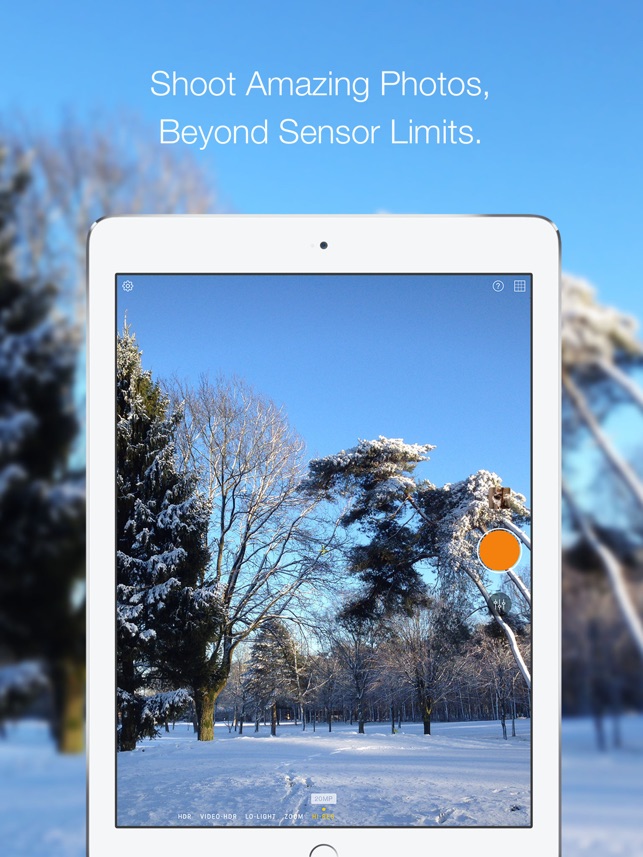
Belgium based developer, Creaceed SPRL today releases Hydra 1.5, a significant update to their HDR photography app for iPhone and iPad. Hydra lets users take beautiful pictures even in the most difficult lighting conditions using a variety of capture modes including HDR, Hi-Res, Lo-Light and Zoom. This is achieved by combining up to 60 frames to create a single high-quality picture. Version 1.5 now features support for the telephoto and front cameras respectively in Zoom and Lo-Light/HDR modes.
Mons, Belgium - Creaceed today releases Hydra version 1.5, a significant update to their HDR photography app for iPhone and iPad. Hydra 1.5 now features support for the telephoto and front cameras respectively in Zoom and Lo-Light/HDR modes. Hydra lets users take beautiful pictures even in the most difficult lighting conditions using a variety of capture modes including HDR, Hi-Res, Lo-Light and Zoom. This is achieved by combining up to 60 frames to create a single high-quality picture.
With Hydra version 1.5, users' feedback has been taken into account. Indeed, shooting with the telephoto lens in Zoom mode and with the front camera for selfies in HDR/Lo-Light modes were two of the most popular requests from users.
"The front camera sensor typically is less capable than the rear camera one, and enabling multi-image fusion with Lo-Light and HDR modes allows selfie capture in situations where this would otherwise not be possible", says Raphael Sebbe, Creaceed's founder. Similarly, Hydra can now take advantage of the telephoto lens on compatible iPhone when shooting in Zoom mode (super resolution), enabling higher quality 2x and 4x, plus adding a new 8x zoom level.
New Features in 1.5
* Front camera handling to take selfies in Lo-Light and HDR modes.
* Telephoto camera usage on compatible devices in Zoom mode to achieve pictures with finer details, now with up to 8x scaling factor.
* Improved app localization.
Other Features
* HDR mode that captures and merges up to 20 images to preserve details both in bright and dark areas.
* Video-HDR mode which uses single-image tone mapping and device-specific sensor mode to create stunning videos.
* Lo-Light mode to remove sensor noise by merging together multiple images and amplifying light by a factor of 10 to provide a better image quality.
* Zoom mode which uses real-time, super-resolution technique to recreate missing pixels from hand motion.
* Hi-Res mode produces up to 32MP images from the built-in 8MP or 12MP camera sensor, providing finer details in captured images.
* Modern iOS features like Peek and Pop to quickly preview a picture and add it to favorites.
* iPhone X-optimized user interface.
* Apple Watch app to trigger remote shooting on the iPhone, including mode changing & live streaming preview.
About Hydra:
Hydra launched in 2015, pioneering the new category of computational photography apps for iPhone, by introducing 32 megapixel images shot with an 8-megapixel sensor and HDR photos with a wider dynamic range by merging up to 60 images together. These features made it a great companion to the built-in camera app for iPhone photography enthusiasts.
Hydra has been positively received by its users worldwide and got great reviews on Cult of Mac, Engadget, CNET, iMore, Beautiful Pixels, MacGeneration, and many more. It has also been recognized by App Store Editors, including recent appearances in the new App Store's Today Tab stories.
Pricing and Availability
Hydra 1.5 requires an iPhone or iPad running iOS 10.0 or later. Hydra is available on the App Store worldwide in the photo/video category at $4.99 / 5,49 Euro. Version 1.5 is a free update for existing users. Hydra is localized in 15 languages.
Hydra 1.5: https://creaceed.com/ihydra
Purchase and Download (iOS): https://itunes.apple.com/app/id947824428?mt=8&pt=11162&at=1l3vojn&ct=prmac
Screenshot: https://is3-ssl.mzstatic.com/image/thumb/Purple118/v4/3a/3a/00/3a3a00bb-3090-9493-a558-945e46f503f8/pr_source.png/643x0w.jpg
App Icon: https://is5-ssl.mzstatic.com/image/thumb/Purple118/v4/bc/07/ad/bc07ad10-becf-f214-cb99-fb8f37704f37/AppIcon-1x_U007emarketing-0-0-GLES2_U002c0-512MB-sRGB-0-0-0-85-220-0-0-0-6.png/246x0w.jpg
Creaceed is a Belgian company that has been making apps for 10 years, focusing on image processing technologies in the fields of document scanning, note taking, drawing, photo and video processing. Other apps like Carbo, Emulsio, Inko, and Prizmo have been awarded by the press and featured by Apple on multiple occasions. Copyright 2018 Creaceed. All Rights Reserved. Apple, the Apple logo, iPhone and iPad are registered trademarks of Apple Computer in the U.S. and/or other countries.
*******
Link To Article: https://prmac.com/release-id-82931.htm
*******
---------------------------------------------------------------------------------
Note that you can alter delivered distributions at any time.
Login to your account on prMac to alter your channel selection, or to opt-out at any time.
Hydra 1.5 Adds Support for Front and Telephoto Cameras on iPhone - Published on 08/23/18
Belgium based developer, Creaceed SPRL today releases Hydra 1.5, a significant update to their HDR photography app for iPhone and iPad. Hydra lets users take beautiful pictures even in the most difficult lighting conditions using a variety of capture modes including HDR, Hi-Res, Lo-Light and Zoom. This is achieved by combining up to 60 frames to create a single high-quality picture. Version 1.5 now features support for the telephoto and front cameras respectively in Zoom and Lo-Light/HDR modes.
Mons, Belgium - Creaceed today releases Hydra version 1.5, a significant update to their HDR photography app for iPhone and iPad. Hydra 1.5 now features support for the telephoto and front cameras respectively in Zoom and Lo-Light/HDR modes. Hydra lets users take beautiful pictures even in the most difficult lighting conditions using a variety of capture modes including HDR, Hi-Res, Lo-Light and Zoom. This is achieved by combining up to 60 frames to create a single high-quality picture.
With Hydra version 1.5, users' feedback has been taken into account. Indeed, shooting with the telephoto lens in Zoom mode and with the front camera for selfies in HDR/Lo-Light modes were two of the most popular requests from users.
"The front camera sensor typically is less capable than the rear camera one, and enabling multi-image fusion with Lo-Light and HDR modes allows selfie capture in situations where this would otherwise not be possible", says Raphael Sebbe, Creaceed's founder. Similarly, Hydra can now take advantage of the telephoto lens on compatible iPhone when shooting in Zoom mode (super resolution), enabling higher quality 2x and 4x, plus adding a new 8x zoom level.
New Features in 1.5
* Front camera handling to take selfies in Lo-Light and HDR modes.
* Telephoto camera usage on compatible devices in Zoom mode to achieve pictures with finer details, now with up to 8x scaling factor.
* Improved app localization.
Other Features
* HDR mode that captures and merges up to 20 images to preserve details both in bright and dark areas.
* Video-HDR mode which uses single-image tone mapping and device-specific sensor mode to create stunning videos.
* Lo-Light mode to remove sensor noise by merging together multiple images and amplifying light by a factor of 10 to provide a better image quality.
* Zoom mode which uses real-time, super-resolution technique to recreate missing pixels from hand motion.
* Hi-Res mode produces up to 32MP images from the built-in 8MP or 12MP camera sensor, providing finer details in captured images.
* Modern iOS features like Peek and Pop to quickly preview a picture and add it to favorites.
* iPhone X-optimized user interface.
* Apple Watch app to trigger remote shooting on the iPhone, including mode changing & live streaming preview.
About Hydra:
Hydra launched in 2015, pioneering the new category of computational photography apps for iPhone, by introducing 32 megapixel images shot with an 8-megapixel sensor and HDR photos with a wider dynamic range by merging up to 60 images together. These features made it a great companion to the built-in camera app for iPhone photography enthusiasts.
Hydra has been positively received by its users worldwide and got great reviews on Cult of Mac, Engadget, CNET, iMore, Beautiful Pixels, MacGeneration, and many more. It has also been recognized by App Store Editors, including recent appearances in the new App Store's Today Tab stories.
Pricing and Availability
Hydra 1.5 requires an iPhone or iPad running iOS 10.0 or later. Hydra is available on the App Store worldwide in the photo/video category at $4.99 / 5,49 Euro. Version 1.5 is a free update for existing users. Hydra is localized in 15 languages.
Hydra 1.5: https://creaceed.com/ihydra
Purchase and Download (iOS): https://itunes.apple.com/app/id947824428?mt=8&pt=11162&at=1l3vojn&ct=prmac
Screenshot: https://is3-ssl.mzstatic.com/image/thumb/Purple118/v4/3a/3a/00/3a3a00bb-3090-9493-a558-945e46f503f8/pr_source.png/643x0w.jpg
App Icon: https://is5-ssl.mzstatic.com/image/thumb/Purple118/v4/bc/07/ad/bc07ad10-becf-f214-cb99-fb8f37704f37/AppIcon-1x_U007emarketing-0-0-GLES2_U002c0-512MB-sRGB-0-0-0-85-220-0-0-0-6.png/246x0w.jpg
Creaceed is a Belgian company that has been making apps for 10 years, focusing on image processing technologies in the fields of document scanning, note taking, drawing, photo and video processing. Other apps like Carbo, Emulsio, Inko, and Prizmo have been awarded by the press and featured by Apple on multiple occasions. Copyright 2018 Creaceed. All Rights Reserved. Apple, the Apple logo, iPhone and iPad are registered trademarks of Apple Computer in the U.S. and/or other countries.
*******
Link To Article: https://prmac.com/release-id-82931.htm
*******
---------------------------------------------------------------------------------
Note that you can alter delivered distributions at any time.
Login to your account on prMac to alter your channel selection, or to opt-out at any time.
Introducing Finer Focus - Dim away Distractions and Enhance your Focus
A new article has been published at prMac.
Introducing Finer Focus - Dim away Distractions and Enhance your Focus - Published on 08/22/18
California based SpriTec Software today introduces Finer Focus, the company's new utility for macOS. Finer Focus melts away distractions by dimming, blurring and fading the desktop elements that are all around the frontmost app window. These elements include the Dock, the Menu bar, Desktop icons and background windows. This results in the front window remaining bright and sharp, while the surrounding elements simply melt away.
San Diego, California - SpriTec Software, the maker of the award-winning "SuperTab for Mac," is proud to announce its latest Mac App: Finer Focus. Finer Focus is the ultimate Desktop enhancer that can greatly reduce - even eliminate - all desktop visual distractions. And without distractions, it is easier to be creative, easier to focus, easier to get things done. Plus, the cinematic atmosphere that Finer Focus creates simply makes the Mac more inviting to use.
Finer Focus melts away distractions by dimming, blurring and fading the desktop elements that are all around the frontmost app window. These elements include the Dock, the Menu bar, Desktop icons and background windows. This results in the front window remaining bright and sharp, while the surrounding elements simply melt away.
Users can try the sixteen built-in Finer Focus themes. Each theme has its own characteristics, such as color and varying amounts of dimming, blurring and fading.
For example:
* The "Night Time" theme simply dims the everything around the frontmost window with a simple, transparent black.
* The "Ethereal" theme makes the Menu bar, Desktop icons and background windows transparent, creating a clear contrast that greatly highlights the front window.
* The "Pure Zen" theme completely fades away the user's entire desktop - the Menu bar, the Dock, the Desktop icons and all background windows - leaving *only* the frontmost window. Yet mouse over these items and they fade instantly back in and are ready for use.
Each theme can also be fully customized by the user. Users can choose any color they wish. And they can independently specify how much to:
* Dim the Desktop
* Dim the Menu bar
* Dim the Dock
* Fade Desktop Icons
* Fade the Menu bar
* Blur the Desktop and its Icons
* Blur the Menu bar
* Blue the Dock
Users can also configure Finer Focus itself. They can control the speed at which Finer Focus reacts to their actions as well as choose from various ways to temporarily hide all Finer Focus effects should they wish to do so, giving them complete control over Finer Focus and their desktop environment. And all of Finer Focus is accessible at any time via its Menu bar icon.
System Requirements:
* "High Sierra" (10.13)
* "Sierra" (10.12)
* "El Capitan" (10.11)
Pricing and Availability
Finer Focus is free to download and comes with a 15-day free trial. Users can purchase Finer Focus for $4.99 (USD).
Finer Focus: http://www.coolmactools.com
Download Finer Focus: http://www.coolmactools.com/Download.html
Purchase: http://www.coolmactools.com/Purchase.html
Screenshots: http://www.coolmactools.com/Themes.html
Located in San Diego, California, SpriTec Software creates apps for the macOS platform, including Finer Focus, the award-winning SuperTab for Mac and ZipTite for Mac. SpriTec Software is helmed by Ando Sonenblick, an Apple/GoPro/Adobe/DivX veteran with over 30 years of development experience. All Material and Software Copyright (C) 2018 SpriTec Software. All Rights Reserved. Apple, the Apple logo, Mac OS X, macOS, and Macintosh are registered trademarks of Apple Inc. in the U.S. and/or other countries. All other trademarks and trade names are the property of their respective owners.
*******
Link To Article: https://prmac.com/release-id-82928.htm
*******
---------------------------------------------------------------------------------
Note that you can alter delivered distributions at any time.
Login to your account on prMac to alter your channel selection, or to opt-out at any time.
Introducing Finer Focus - Dim away Distractions and Enhance your Focus - Published on 08/22/18
California based SpriTec Software today introduces Finer Focus, the company's new utility for macOS. Finer Focus melts away distractions by dimming, blurring and fading the desktop elements that are all around the frontmost app window. These elements include the Dock, the Menu bar, Desktop icons and background windows. This results in the front window remaining bright and sharp, while the surrounding elements simply melt away.
San Diego, California - SpriTec Software, the maker of the award-winning "SuperTab for Mac," is proud to announce its latest Mac App: Finer Focus. Finer Focus is the ultimate Desktop enhancer that can greatly reduce - even eliminate - all desktop visual distractions. And without distractions, it is easier to be creative, easier to focus, easier to get things done. Plus, the cinematic atmosphere that Finer Focus creates simply makes the Mac more inviting to use.
Finer Focus melts away distractions by dimming, blurring and fading the desktop elements that are all around the frontmost app window. These elements include the Dock, the Menu bar, Desktop icons and background windows. This results in the front window remaining bright and sharp, while the surrounding elements simply melt away.
Users can try the sixteen built-in Finer Focus themes. Each theme has its own characteristics, such as color and varying amounts of dimming, blurring and fading.
For example:
* The "Night Time" theme simply dims the everything around the frontmost window with a simple, transparent black.
* The "Ethereal" theme makes the Menu bar, Desktop icons and background windows transparent, creating a clear contrast that greatly highlights the front window.
* The "Pure Zen" theme completely fades away the user's entire desktop - the Menu bar, the Dock, the Desktop icons and all background windows - leaving *only* the frontmost window. Yet mouse over these items and they fade instantly back in and are ready for use.
Each theme can also be fully customized by the user. Users can choose any color they wish. And they can independently specify how much to:
* Dim the Desktop
* Dim the Menu bar
* Dim the Dock
* Fade Desktop Icons
* Fade the Menu bar
* Blur the Desktop and its Icons
* Blur the Menu bar
* Blue the Dock
Users can also configure Finer Focus itself. They can control the speed at which Finer Focus reacts to their actions as well as choose from various ways to temporarily hide all Finer Focus effects should they wish to do so, giving them complete control over Finer Focus and their desktop environment. And all of Finer Focus is accessible at any time via its Menu bar icon.
System Requirements:
* "High Sierra" (10.13)
* "Sierra" (10.12)
* "El Capitan" (10.11)
Pricing and Availability
Finer Focus is free to download and comes with a 15-day free trial. Users can purchase Finer Focus for $4.99 (USD).
Finer Focus: http://www.coolmactools.com
Download Finer Focus: http://www.coolmactools.com/Download.html
Purchase: http://www.coolmactools.com/Purchase.html
Screenshots: http://www.coolmactools.com/Themes.html
Located in San Diego, California, SpriTec Software creates apps for the macOS platform, including Finer Focus, the award-winning SuperTab for Mac and ZipTite for Mac. SpriTec Software is helmed by Ando Sonenblick, an Apple/GoPro/Adobe/DivX veteran with over 30 years of development experience. All Material and Software Copyright (C) 2018 SpriTec Software. All Rights Reserved. Apple, the Apple logo, Mac OS X, macOS, and Macintosh are registered trademarks of Apple Inc. in the U.S. and/or other countries. All other trademarks and trade names are the property of their respective owners.
*******
Link To Article: https://prmac.com/release-id-82928.htm
*******
---------------------------------------------------------------------------------
Note that you can alter delivered distributions at any time.
Login to your account on prMac to alter your channel selection, or to opt-out at any time.
Subscribe to:
Posts (Atom)