A new article has been published at prMac.
Secure Erasure and Wiping of iPhone and iPad with iShredder iOS 3 - Published on 09/13/18
ProtectStar Inc. today announces the new update 3.2 of iShredder iOS, their data deletion solution for iOS devices. By simply connecting their iPhone or iPad device to any Mac or Windows computer and running iShredder iOS, anyone can securely erase all used space on their device, ensuring all personal data, including passwords, videos, photos, and more can never be recovered. The app is perfect for use before donating or selling a used iPhone, iPad, iPod touch or even Apple TV.
Miami, Florida - ProtectStar today is proud to announce the release and immediate availability of new update iShredder iOS 3.2, their data shredding utility that easily deletes and shreds data on any iPhone, iPad, or iPod touch. Anyone can simply connect their iOS device to their Mac or Windows computer, and efficiently delete, clean or overwrite all data from the device.
iShredder iOS uses data shredding techniques that go beyond international standards set by state and military organizations for secure data deletion. iShredder's data erasing algorithms have been analyzed by government authorities and independent security organizations to ensure the app does exactly as advertised, destroy all personal data on the device beyond any hope of recovery.
"When a user deletes personal files such as photos from their device, they may think they're gone for good. The truth is, they can be recovered using any one of a number of forensic utilities. Those files aren't really gone until that storage space is overwritten using secure deletion algorithms," says Chris Bohn, CEO of ProtectStar. "However, in just some simple steps, iShredder iOS can securely wipe the memory space using patented security standards, making it impossible to recover any deleted data."
The integrated secure cleaning module with its innovative search algorithm was designed specifically to detect and effectively clean up useless temporary junk data, caches, log files and more. It not only brings back valuable storage space to the mobile device, it also ensures a performance tuning just like having a new device. Even the new secure cleaning module does not simply remove temporary data, it is able to safely wipe those files by using the ISM 6.2.92 deletion procedure certified by the Australian Ministry of Defense.
Detailed erasure reports provide users an evidence of deletion and cleaned data.
iShredder iOS 3 is available in two versions, the Professional edition offers 11 different data shredding methods, completely wiping all free space and overwriting the storage area, to completely shred all of the stored data. iShredder iOS Military edition offers 18 erasing methods in total, while also offering an integrated file explorer.
iShredder iOS Professional uses certified deletion algorithms, including: DoD 5220.22-M ECE, Peter Gutmann, DoD 5220.22-M, HMG Infosec No.5, German BSI-2011-VS, US Army AR380-19 and more. iShredder iOS Military uses those same algorithms, plus makes use of enhanced military deletion methods like NATO standard, US Navy NAVSO P-5239-26 (MFM & RLL), USAF AFSSI-5020, German BSI TL-03423 and CSEC ITSG-06.
iShredder iOS Professional includes:
* Compatibility with all iPhone, iPad and iPod touch models
* Compatible with all iOS versions
* Securely wipes all free space
* Completely erases all data on the device
* Secure deletion of temporary junk data
* Includes the new 4-cycles ProtectStar Advanced Secure Deletion Algorithm (2017)
* Includes 1 year of technical support and free upgrades
* Erasure Report
* 24/7 technical support via e-Mail
iShredder iOS Military includes the above features, plus:
* Offers the ability to wipe data from Apple TV units
* Additional military level erasure algorithms
* An integrated secure file explorer
"Your iOS device contains all the information about your personal life," continues Chris Bohn. "Data containing notes, passwords, address book, photos, videos, calendars and so much more. By using iShredder iOS, anyone can ensure their personal information remains completely inaccessible. The few moments it takes to securely erase all of the personal information left on your device can pay off in piece of mind, simply by knowing your data is not available to prying eyes."
For enterprise users, the iShredder Mobile Enterprise solution was made to fit the needs and security policies of every recycling company (iShredder complies with the Responsible Recycling R2 (R2:2013) Standard for Electronics Recyclers and International Requirements for E-waste Trade and Recycling), mobile hardware reseller, leasing company, lost-property office, large enterprise or organization, and completely wipe multiple iPhone, iPad, and iPod touch at a time. An erasing module to securely delete also Android devices will be available in Q4, 2018.
System Requirements:
* Mac OS X 10.11 or later
* Microsoft Windows 7 or later
* Internet connection for activation and updates
* 40MB Hard Drive space
Pricing and Availability:
iShredder iOS 3 Professional is just $29.90 USD (or an equivalent amount in other currencies) and is available through the ProtectStar Online Shop. iShredder iOS 3 Military is just $49.90 USD.
ProtectStar: https://www.protectstar.com
iShredder iOS 3.2: https://www.protectstar.com/en/products/ishredder-ios
iShredder iOS Secure Cleaning: https://www.protectstar.com/en/products/ishredder-ios/secure-cleaner
Shop iShredder iOS Professional: https://www.protectstar.com/en/shop-data-shredder-ios-professional
Shop iShredder iOS Military: https://www.protectstar.com/en/shop-data-shredder-ios-military
Definition iShredder: https://www.protectstar.com/en/ishredder-definition
Founded in 2004 by Chris Bohn, Miami, Florida-based ProtectStar Inc. was established with the single intent of offering innovative security solutions for individuals and corporations alike. The company offers a number of security-enhancing solutions for Mac, iOS, Android, and Windows users. The company currently serves over 1,000,000 satisfied customers worldwide. All Material and Software (C) Copyright 2018 ProtectStar Inc. All Rights Reserved. Apple, the Apple logo, Macintosh, Mac OS X, and macOS are registered trademarks of Apple Inc. in the U.S. and/or other countries. Other trademarks and registered trademarks may be the property of their respective owners.
*******
Link To Article: https://prmac.com/release-id-82972.htm
*******
---------------------------------------------------------------------------------
Note that you can alter delivered distributions at any time.
Login to your account on prMac to alter your channel selection, or to opt-out at any time.

Scandy Pro for iOS announces update with in-app measurement tools
A new article has been published at prMac.
Scandy Pro for iOS announces update with in-app measurement tools - Published on 09/12/18
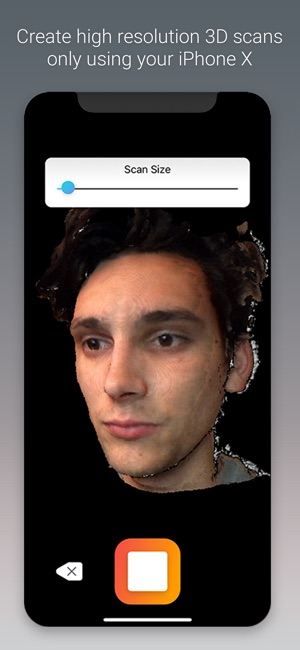
Scandy LLC today announces Scandy Pro 1.4.8, an important update to their popular 3D scanning and editing platform for iOS. Scandy Pro allows users to create 3D content with their iPhone X. After capturing a 3D scan with the front-facing TrueDepth sensor, Scandy Pro users can save their mesh, edit the file with crop, decimate and smooth tools, measure their files in Augmented Reality space, and upload their 3D content directly to Sketchfab. Version 1.4.8 offers new in-app measurement tools.
New Orleans, Louisiana - Scandy LLC today is pleased to announce the release of version 1.4.8 of Scandy Pro for iOS. This latest release offers measurement tools, so that users can take linear measurements of scans by dropping points directly onto the mesh.
"We are excited to bring these additional tools to Scandy Pro for iOS," said CEO and co-founder Cole Wiley. "As depth sensors are added to more mobile phones, we think users will find more ways to create and interact with 3D content on their devices. Scandy Pro for iOS continues to be the most feature-rich 3D scanning app for mobile devices."
Scandy Pro for iOS is a 3D scanning and editing platform that allows users to create 3D content with their iPhone X. After capturing a 3D scan with the front-facing TrueDepth sensor, Scandy Pro users can save their mesh, edit the file with crop, decimate and smooth tools, measure their files in Augmented Reality space, and upload their 3D content directly to Sketchfab.
Features:
* Full color 3D scanning with on-device meshing - no uploading or cloud processing required
* Mesh inspection with user-controlled lighting tools
* In-app editing tools including plane crop, decimate, and smooth
* Ability to drop points on a mesh and measure distances between them
* Upload 3D content directly from the app to a Sketchfab account
* Export files in .PLY, .OBJ or .STL formats
Device Requirements:
* iOS v11 or higher
* iPhone X or higher
* 27.4 MB
Scandy Pro 1.4.7 for iOS is free to download. Users can capture 3D scans and inspect the mesh with viewing tools before deciding whether to save the file. Every user is given a free scan save per week. Users may opt to purchase additional scans for $0.99 per scan. Scandy also offers unlimited saves with subscriptions: Weekly Unlimited for $2.99, Monthly Unlimited for $7.99, and Yearly Unlimited for $59.99 (USD). Scandy's mission is to make 3D content creation on mobile devices an easy and fun experience for every user.
Scandy: https://scandy.co
Scandy Pro 1.4.8: https://www.scandy.co/scandy-pro-ios
Download from iTunes: https://itunes.apple.com/app/scandy-pro/id1388028223
Screenshot: https://is1-ssl.mzstatic.com/image/thumb/Purple118/v4/3b/62/6a/3b626ab0-c483-fe39-4c3a-d5d44e40cf80/mzl.biqooyow.png/300x0w.jpg
App Icon: https://is5-ssl.mzstatic.com/image/thumb/Purple118/v4/85/02/22/8502222f-79d6-5ef0-d4c4-683b4f232144/AppIcon-1x_U007emarketing-0-0-GLES2_U002c0-512MB-sRGB-0-0-0-85-220-0-0-0-9.png/246x0w.jpg
Located in New Orleans, LA, Scandy was founded in 2014 by Cole Wiley and Charles Carriere. Scandy is a custom software development company specializing in enabling computer vision and 3D scanning in mobile applications. All Material and Software (C) 2014-2018 Scandy LLC / All Rights Reserved. Apple, the Apple logo, iPhone, iPod and iPad are registered trademarks of Apple Inc. in the U.S. and/or other countries. Other trademarks and registered trademarks may be the property of their respective owners.
*******
Link To Article: https://prmac.com/release-id-82969.htm
*******
---------------------------------------------------------------------------------
Note that you can alter delivered distributions at any time.
Login to your account on prMac to alter your channel selection, or to opt-out at any time.
Scandy Pro for iOS announces update with in-app measurement tools - Published on 09/12/18
Scandy LLC today announces Scandy Pro 1.4.8, an important update to their popular 3D scanning and editing platform for iOS. Scandy Pro allows users to create 3D content with their iPhone X. After capturing a 3D scan with the front-facing TrueDepth sensor, Scandy Pro users can save their mesh, edit the file with crop, decimate and smooth tools, measure their files in Augmented Reality space, and upload their 3D content directly to Sketchfab. Version 1.4.8 offers new in-app measurement tools.
New Orleans, Louisiana - Scandy LLC today is pleased to announce the release of version 1.4.8 of Scandy Pro for iOS. This latest release offers measurement tools, so that users can take linear measurements of scans by dropping points directly onto the mesh.
"We are excited to bring these additional tools to Scandy Pro for iOS," said CEO and co-founder Cole Wiley. "As depth sensors are added to more mobile phones, we think users will find more ways to create and interact with 3D content on their devices. Scandy Pro for iOS continues to be the most feature-rich 3D scanning app for mobile devices."
Scandy Pro for iOS is a 3D scanning and editing platform that allows users to create 3D content with their iPhone X. After capturing a 3D scan with the front-facing TrueDepth sensor, Scandy Pro users can save their mesh, edit the file with crop, decimate and smooth tools, measure their files in Augmented Reality space, and upload their 3D content directly to Sketchfab.
Features:
* Full color 3D scanning with on-device meshing - no uploading or cloud processing required
* Mesh inspection with user-controlled lighting tools
* In-app editing tools including plane crop, decimate, and smooth
* Ability to drop points on a mesh and measure distances between them
* Upload 3D content directly from the app to a Sketchfab account
* Export files in .PLY, .OBJ or .STL formats
Device Requirements:
* iOS v11 or higher
* iPhone X or higher
* 27.4 MB
Scandy Pro 1.4.7 for iOS is free to download. Users can capture 3D scans and inspect the mesh with viewing tools before deciding whether to save the file. Every user is given a free scan save per week. Users may opt to purchase additional scans for $0.99 per scan. Scandy also offers unlimited saves with subscriptions: Weekly Unlimited for $2.99, Monthly Unlimited for $7.99, and Yearly Unlimited for $59.99 (USD). Scandy's mission is to make 3D content creation on mobile devices an easy and fun experience for every user.
Scandy: https://scandy.co
Scandy Pro 1.4.8: https://www.scandy.co/scandy-pro-ios
Download from iTunes: https://itunes.apple.com/app/scandy-pro/id1388028223
Screenshot: https://is1-ssl.mzstatic.com/image/thumb/Purple118/v4/3b/62/6a/3b626ab0-c483-fe39-4c3a-d5d44e40cf80/mzl.biqooyow.png/300x0w.jpg
App Icon: https://is5-ssl.mzstatic.com/image/thumb/Purple118/v4/85/02/22/8502222f-79d6-5ef0-d4c4-683b4f232144/AppIcon-1x_U007emarketing-0-0-GLES2_U002c0-512MB-sRGB-0-0-0-85-220-0-0-0-9.png/246x0w.jpg

Located in New Orleans, LA, Scandy was founded in 2014 by Cole Wiley and Charles Carriere. Scandy is a custom software development company specializing in enabling computer vision and 3D scanning in mobile applications. All Material and Software (C) 2014-2018 Scandy LLC / All Rights Reserved. Apple, the Apple logo, iPhone, iPod and iPad are registered trademarks of Apple Inc. in the U.S. and/or other countries. Other trademarks and registered trademarks may be the property of their respective owners.
*******
Link To Article: https://prmac.com/release-id-82969.htm
*******
---------------------------------------------------------------------------------
Note that you can alter delivered distributions at any time.
Login to your account on prMac to alter your channel selection, or to opt-out at any time.
Spoiler Alert! Food Safety - Labeling and Tracking for the Food Industry
A new article has been published at prMac.
Spoiler Alert! Food Safety - Labeling and Tracking for the Food Industry - Published on 09/11/18
Ohio based Complete System Solutions, Inc. today announces Spoiler Alert Food Safety 1.5.1, an update to their popular mobile application. Spoiler Alert was specifically designed to change the way the food service industry labels, tracks and monitors the age of food product from fresh to finished. Easily configured for your products, built-in alerts take the guesswork out of what stage your product is in allowing owners and managers to monitor, even over multiple locations.
North Ridgeville, Ohio - Complete System Solutions, Inc. is pleased to announce the release of Spoiler Alert Food Safety 1.5.1, an update to their popular mobile application. Spoiler Alert was specifically designed to change the way the food service industry labels, tracks and monitors the age of food product from fresh to finished. Easily configured for your products, built-in alerts take the guesswork out of what stage your product is in allowing owners and managers to monitor, even over multiple locations.
With this powerful tool you can eliminate waste and maintain compliance with food safety regulations "preventing" Spoiler Alert features a unique label printing system, equipped with eco-friendly "wash-away" labels that adhere to any container, and dissolve completely under running water (in just seconds). Easily print legible labels allowing employees to see at-a-glance: the item, prep date/time and expiration date/time.
QR code scanning tells the system when product is sold or wasted for quick processing. Spoiler Alert is an open system solution that allows for import of product and employee information and export of label activity for long term archive or analysis. With the information provided by Spoiler Alert, owners and managers can make better decisions on product reorder points and prevent waste by acting before product goes out of date.
Easy to setup, easy to integrate and easy to use, this invaluable app and labeling system will more than pay for itself in food cost, time and waste savings. Spoiler Alert! This is the food safety app you've been waiting for.
* Labels, tracks and monitors the age of products from fresh to finished
* Easily configured and customizable
* Alerts on your iPhone, iPad and Apple Watch
* Free to share with staff
* Maintain compliance with food safety regulations
* No more illegible handwritten labels and paper log sheets
* QR code scanning for efficient product tracking
* Export of label activity for long term archive or analysis
* Eco-friendly "wash-away" labels (in just seconds)
Hardware Requirements
1) Brother WiFi capable QL- series printer such as the QL-810W or QL-820NWB (Available on our website).
2) Compatible label stock as sold on our website or any DK-4205, DK-2205 compatible labels (Dissolvable label stock available on our website).
Device Requirements:
* iPhone 5s or later and and iPod touch
* 5th generation iPad or later and iPad mini
* Requires iOS 10.3 or later
* 26.9 MB
Pricing and Availability:
Spoiler Alert Food Safety 1.5.1 is Free (with In-App Purchases) and available worldwide exclusively through the App Store in the Business category. For more information please contact Robert Balog.
Spoiler Alert Food Safety 1.5.1: https://www.spoileralertfoodsafety.com
Download from iTunes: https://itunes.apple.com/us/app/spoiler-alert-food-safety/id1230529808
YouTube Playlist: https://www.youtube.com/playlist?list=PLZj2R-4AdXY93rTXeT18Wt8SPUipqC72_
Screenshot: https://is3-ssl.mzstatic.com/image/thumb/Purple128/v4/99/81/0c/99810c49-b9a7-1275-5d43-d4059f7266ba/pr_source.jpg/643x0w.jpg
App Icon: https://www.dropbox.com/sh/l8f3uxeensu9303/AAA94kMM6zD-rKvl-x_KPo8-a?dl=0
Complete System Solutions, Inc. (CSS) has been developing software for over 25 years. Starting with large minicomputer systems used by major corporations. Since the introduction of iOS, CSS has been using that knowledge and applying it to iOS development. At CSS we specialize in seeing a need and making a solution to handle that need. All Material and Software (C) Copyright 2018 Complete System Solutions, Inc. All Rights Reserved. Apple, the Apple logo, iPhone, iPod and iPad are registered trademarks of Apple Inc. in the U.S. and/or other countries. Other trademarks and registered trademarks may be the property of their respective owners.
*******
Link To Article: https://prmac.com/release-id-82967.htm
*******
---------------------------------------------------------------------------------
Note that you can alter delivered distributions at any time.
Login to your account on prMac to alter your channel selection, or to opt-out at any time.
Spoiler Alert! Food Safety - Labeling and Tracking for the Food Industry - Published on 09/11/18
Ohio based Complete System Solutions, Inc. today announces Spoiler Alert Food Safety 1.5.1, an update to their popular mobile application. Spoiler Alert was specifically designed to change the way the food service industry labels, tracks and monitors the age of food product from fresh to finished. Easily configured for your products, built-in alerts take the guesswork out of what stage your product is in allowing owners and managers to monitor, even over multiple locations.
North Ridgeville, Ohio - Complete System Solutions, Inc. is pleased to announce the release of Spoiler Alert Food Safety 1.5.1, an update to their popular mobile application. Spoiler Alert was specifically designed to change the way the food service industry labels, tracks and monitors the age of food product from fresh to finished. Easily configured for your products, built-in alerts take the guesswork out of what stage your product is in allowing owners and managers to monitor, even over multiple locations.
With this powerful tool you can eliminate waste and maintain compliance with food safety regulations "preventing" Spoiler Alert features a unique label printing system, equipped with eco-friendly "wash-away" labels that adhere to any container, and dissolve completely under running water (in just seconds). Easily print legible labels allowing employees to see at-a-glance: the item, prep date/time and expiration date/time.
QR code scanning tells the system when product is sold or wasted for quick processing. Spoiler Alert is an open system solution that allows for import of product and employee information and export of label activity for long term archive or analysis. With the information provided by Spoiler Alert, owners and managers can make better decisions on product reorder points and prevent waste by acting before product goes out of date.
Easy to setup, easy to integrate and easy to use, this invaluable app and labeling system will more than pay for itself in food cost, time and waste savings. Spoiler Alert! This is the food safety app you've been waiting for.
* Labels, tracks and monitors the age of products from fresh to finished
* Easily configured and customizable
* Alerts on your iPhone, iPad and Apple Watch
* Free to share with staff
* Maintain compliance with food safety regulations
* No more illegible handwritten labels and paper log sheets
* QR code scanning for efficient product tracking
* Export of label activity for long term archive or analysis
* Eco-friendly "wash-away" labels (in just seconds)
Hardware Requirements
1) Brother WiFi capable QL- series printer such as the QL-810W or QL-820NWB (Available on our website).
2) Compatible label stock as sold on our website or any DK-4205, DK-2205 compatible labels (Dissolvable label stock available on our website).
Device Requirements:
* iPhone 5s or later and and iPod touch
* 5th generation iPad or later and iPad mini
* Requires iOS 10.3 or later
* 26.9 MB
Pricing and Availability:
Spoiler Alert Food Safety 1.5.1 is Free (with In-App Purchases) and available worldwide exclusively through the App Store in the Business category. For more information please contact Robert Balog.
Spoiler Alert Food Safety 1.5.1: https://www.spoileralertfoodsafety.com
Download from iTunes: https://itunes.apple.com/us/app/spoiler-alert-food-safety/id1230529808
YouTube Playlist: https://www.youtube.com/playlist?list=PLZj2R-4AdXY93rTXeT18Wt8SPUipqC72_
Screenshot: https://is3-ssl.mzstatic.com/image/thumb/Purple128/v4/99/81/0c/99810c49-b9a7-1275-5d43-d4059f7266ba/pr_source.jpg/643x0w.jpg

App Icon: https://www.dropbox.com/sh/l8f3uxeensu9303/AAA94kMM6zD-rKvl-x_KPo8-a?dl=0
Complete System Solutions, Inc. (CSS) has been developing software for over 25 years. Starting with large minicomputer systems used by major corporations. Since the introduction of iOS, CSS has been using that knowledge and applying it to iOS development. At CSS we specialize in seeing a need and making a solution to handle that need. All Material and Software (C) Copyright 2018 Complete System Solutions, Inc. All Rights Reserved. Apple, the Apple logo, iPhone, iPod and iPad are registered trademarks of Apple Inc. in the U.S. and/or other countries. Other trademarks and registered trademarks may be the property of their respective owners.
*******
Link To Article: https://prmac.com/release-id-82967.htm
*******
---------------------------------------------------------------------------------
Note that you can alter delivered distributions at any time.
Login to your account on prMac to alter your channel selection, or to opt-out at any time.
AnyTrans Now Allows iOS Users to Manage Ringtone & Apps without iTunes
A new article has been published at prMac.
AnyTrans Now Allows iOS Users to Manage Ringtone & Apps without iTunes - Published on 09/11/18
iMobie Inc. today announces its flagship product AnyTrans 7.0.0 for Mac and Windows. AnyTrans excels in mobile content management with bi-directional transfer across multiple devices. Now, users able to manage iPhone ringtones and apps without iTunes. Users have full freedom to select a favorite song from multiple resources like iPhone, iTunes Library, computer, or YouTube, to cut any part of the song as a ringtone in a straightforward way.
Chengdu, China - iMobie Inc. today announces its flagship product AnyTrans 7.0.0 for Mac and Windows, is able to manage iPhone ringtones and apps without iTunes. Nows, users have full freedom to select a favorite song from multiple resources like iPhone, iTunes Library, computer, or YouTube, to cut any part of the song as a ringtone in a straightforward way.
AnyTrans also brings users the ability to manage iOS apps, including download, backup, update, even reinstall and downgrade the needed app without worrying it be removed from App Store. Updated with Home Screen Manager, it's also the world's ONLY solution to rearrange apps via simple drag & drop. So all scattered apps will be kept organized like a breeze.
"Apple users always complaint about iTunes due to its restrictions of ringtone and apps management since iTunes 12.7, and many of them are still seeking for an alternative to iTunes," said Frank Kong, CEO of iMobie Inc. "Consequently, we strive to make a major update for AnyTrans with Ringtone Manager, App Downloader and Home Screen Manager, which not only enable users to customize ringtones easier, but also download and backup iPhone apps, even rearrange scattered apps by category or color."
Updated Features of AnyTrans:
Customize Ringtones from Multiple Media Resources:
AnyTrans is revamped to bring a more flexible and intuitive ringtone manager. Now, users can select their favorite music from iPhone, computer, iTunes library, even from YouTube, and cut any part of it as a ringtone by dragging and dropping. It also enables users to preview the tone in advance - making sure it's just what users want, simple and straightforward.
Take Full Control Over All iPhone iPad Apps at One Go:
Apart from making ringtones, AnyTrans also allows users to master all iPhone apps at one go - download any official app, or save copies of each version for backup. Just select the apps to update, install, uninstall, and all of them will go by one click, even downgrade, re-install them directly to another iDevice. Now, users never worry about apps are removed from App Store.
Get Apps Well-organized with Simple Drag & Drop:
AnyTrans is the world's ONLY solution that helps users organize iPhone apps smartly. Just 1 click, all scatted apps can be organized into folders by category or color in an automatic way. Users can also back up various iPhone screen layouts and restore any of them to iDevices freely. Better still, it helps clean up damaged icons without hassles.
Pricing and Availability:
AnyTrans is available for Windows and Mac: Personal License ($39.99) and Family License ($59.99). Users can purchase license from iMobie online store.
AnyTrans 7.0.0: https://www.imobie.com/anytrans/iphone-manager.htm
Download AnyTrans: https://www.imobie.com/anytrans/download.htm
iMobie Inc. was established at the end of 2011, and located in Tianfu Software Park, one of the biggest software engineering zones in China. The brand name iMobie is from I'M Optimistic, Brave, Independent and Efficient, which represents the main characters of their teammates. On the early stage of iMobie, they focus on developing iPhone, iPod, iPad transfer, manager and maintenance software for making users' Mobile Digital Life easier. All Material and Software (C) Copyright 2018 iMobie Inc. All Rights Reserved. Apple, the Apple logo, Mac OS X, iPhone, iPod, iPad and Macintosh are registered trademarks of Apple Inc. in the U.S. and/or other countries. Other trademarks and registered trademarks may be the property of their respective owners.
*******
Link To Article: https://prmac.com/release-id-82968.htm
*******
---------------------------------------------------------------------------------
Note that you can alter delivered distributions at any time.
Login to your account on prMac to alter your channel selection, or to opt-out at any time.
AnyTrans Now Allows iOS Users to Manage Ringtone & Apps without iTunes - Published on 09/11/18
iMobie Inc. today announces its flagship product AnyTrans 7.0.0 for Mac and Windows. AnyTrans excels in mobile content management with bi-directional transfer across multiple devices. Now, users able to manage iPhone ringtones and apps without iTunes. Users have full freedom to select a favorite song from multiple resources like iPhone, iTunes Library, computer, or YouTube, to cut any part of the song as a ringtone in a straightforward way.
Chengdu, China - iMobie Inc. today announces its flagship product AnyTrans 7.0.0 for Mac and Windows, is able to manage iPhone ringtones and apps without iTunes. Nows, users have full freedom to select a favorite song from multiple resources like iPhone, iTunes Library, computer, or YouTube, to cut any part of the song as a ringtone in a straightforward way.
AnyTrans also brings users the ability to manage iOS apps, including download, backup, update, even reinstall and downgrade the needed app without worrying it be removed from App Store. Updated with Home Screen Manager, it's also the world's ONLY solution to rearrange apps via simple drag & drop. So all scattered apps will be kept organized like a breeze.
"Apple users always complaint about iTunes due to its restrictions of ringtone and apps management since iTunes 12.7, and many of them are still seeking for an alternative to iTunes," said Frank Kong, CEO of iMobie Inc. "Consequently, we strive to make a major update for AnyTrans with Ringtone Manager, App Downloader and Home Screen Manager, which not only enable users to customize ringtones easier, but also download and backup iPhone apps, even rearrange scattered apps by category or color."
Updated Features of AnyTrans:
Customize Ringtones from Multiple Media Resources:
AnyTrans is revamped to bring a more flexible and intuitive ringtone manager. Now, users can select their favorite music from iPhone, computer, iTunes library, even from YouTube, and cut any part of it as a ringtone by dragging and dropping. It also enables users to preview the tone in advance - making sure it's just what users want, simple and straightforward.
Take Full Control Over All iPhone iPad Apps at One Go:
Apart from making ringtones, AnyTrans also allows users to master all iPhone apps at one go - download any official app, or save copies of each version for backup. Just select the apps to update, install, uninstall, and all of them will go by one click, even downgrade, re-install them directly to another iDevice. Now, users never worry about apps are removed from App Store.
Get Apps Well-organized with Simple Drag & Drop:
AnyTrans is the world's ONLY solution that helps users organize iPhone apps smartly. Just 1 click, all scatted apps can be organized into folders by category or color in an automatic way. Users can also back up various iPhone screen layouts and restore any of them to iDevices freely. Better still, it helps clean up damaged icons without hassles.
Pricing and Availability:
AnyTrans is available for Windows and Mac: Personal License ($39.99) and Family License ($59.99). Users can purchase license from iMobie online store.
AnyTrans 7.0.0: https://www.imobie.com/anytrans/iphone-manager.htm
Download AnyTrans: https://www.imobie.com/anytrans/download.htm
iMobie Inc. was established at the end of 2011, and located in Tianfu Software Park, one of the biggest software engineering zones in China. The brand name iMobie is from I'M Optimistic, Brave, Independent and Efficient, which represents the main characters of their teammates. On the early stage of iMobie, they focus on developing iPhone, iPod, iPad transfer, manager and maintenance software for making users' Mobile Digital Life easier. All Material and Software (C) Copyright 2018 iMobie Inc. All Rights Reserved. Apple, the Apple logo, Mac OS X, iPhone, iPod, iPad and Macintosh are registered trademarks of Apple Inc. in the U.S. and/or other countries. Other trademarks and registered trademarks may be the property of their respective owners.
*******
Link To Article: https://prmac.com/release-id-82968.htm
*******
---------------------------------------------------------------------------------
Note that you can alter delivered distributions at any time.
Login to your account on prMac to alter your channel selection, or to opt-out at any time.
QuickerTek Announces New 60W USB/USB-C Dual Port Charging Adapter
A new article has been published at prMac.
QuickerTek Announces New 60W USB/USB-C Dual Port Charging Adapter - Published on 09/10/18
Wichita based QuickerTek, Inc. introduces its new USB-C Power Adapter, an innovative, high-performance 60W USB/USB-C dual port charging adapter. Equipped with advanced circuit protection to prevent over charging, this new adaptor offers one of the fastest and most efficient charging experiences for the newest smart phones, all 12-inch MacBook's with USB-C, 2016-2018 13-inch and 15-inch MacBook Pro's, and other USB laptops and notebooks alike.
Wichita, Kansas - QuickerTek introduces its newest product, an innovative, high-performance 60W USB/USB-C dual port charging adapter allowing for one of the fastest and most efficient charging experiences for the newest smart phones, all 12-inch MacBook's with USB-C, 2016-2018 13-inch and 15-inch MacBook Pro's, and other USB laptops and notebooks alike.
It includes both a USB-C port enabling up to 45W of power delivery and a USB-A QC 3.0 port enabling up to 18W of charging power. It is also compatible with QuickerTek's Most Powerful Battery, giving our batteries the capability to work with both MagSafe 1 and 2 as well as any Mac charged through USB-C.
Specifications:
* Dimensions: 2" x 2" x .75"
* Input: 16 Vdc to 28 Vdc
* Output: 20 Vdc at 5A (USB-C) / 5.2 Vdc at 2A
* USB-C Port
* USB-A QC 3.0 port
* Built-in PD Chipset
The built-in PD Chipset dynamically detects devices to deliver optimum power level for maximum battery life and performance. It is equipped with the advanced circuit protections to prevent over charging. This product features an input of 16 Vdc to 28 Vdc and an output of 20 Vdc at 5A (USB-C) / 5.2 Vdc at 2A.
Pricing and Availability:
The USB-C Power Adapter is available at $49.95 (USD) from QuickerTek. Members of the press please contact Rick Estes.
QuickerTek: http://www.quickertek.com/
USB-C Power Adapter: http://quickertek.com/product/dual-port-usb-usb-c-battery-adapter/
Screenshot: https://i2.wp.com/quickertek.com/wp-content/uploads/2018/08/usb-c.jpg?fit=1500%2C1125
QuickerTek has been a recognized leading innovator of power/solar products, 802.11ac wireless products and USB-C power products for the Apple community. QuickerTek products can be purchased online and from authorized resellers. Copyright (C) 2009-2018 QuickerTek. All Rights Reserved. Apple, and the Apple logo, and MacBook Pro are registered trademarks of Apple Computer Inc. in the U.S. and/or other countries.
*******
Link To Article: https://prmac.com/release-id-82965.htm
*******
---------------------------------------------------------------------------------
Note that you can alter delivered distributions at any time.
Login to your account on prMac to alter your channel selection, or to opt-out at any time.
QuickerTek Announces New 60W USB/USB-C Dual Port Charging Adapter - Published on 09/10/18
Wichita based QuickerTek, Inc. introduces its new USB-C Power Adapter, an innovative, high-performance 60W USB/USB-C dual port charging adapter. Equipped with advanced circuit protection to prevent over charging, this new adaptor offers one of the fastest and most efficient charging experiences for the newest smart phones, all 12-inch MacBook's with USB-C, 2016-2018 13-inch and 15-inch MacBook Pro's, and other USB laptops and notebooks alike.
Wichita, Kansas - QuickerTek introduces its newest product, an innovative, high-performance 60W USB/USB-C dual port charging adapter allowing for one of the fastest and most efficient charging experiences for the newest smart phones, all 12-inch MacBook's with USB-C, 2016-2018 13-inch and 15-inch MacBook Pro's, and other USB laptops and notebooks alike.
It includes both a USB-C port enabling up to 45W of power delivery and a USB-A QC 3.0 port enabling up to 18W of charging power. It is also compatible with QuickerTek's Most Powerful Battery, giving our batteries the capability to work with both MagSafe 1 and 2 as well as any Mac charged through USB-C.
Specifications:
* Dimensions: 2" x 2" x .75"
* Input: 16 Vdc to 28 Vdc
* Output: 20 Vdc at 5A (USB-C) / 5.2 Vdc at 2A
* USB-C Port
* USB-A QC 3.0 port
* Built-in PD Chipset
The built-in PD Chipset dynamically detects devices to deliver optimum power level for maximum battery life and performance. It is equipped with the advanced circuit protections to prevent over charging. This product features an input of 16 Vdc to 28 Vdc and an output of 20 Vdc at 5A (USB-C) / 5.2 Vdc at 2A.
Pricing and Availability:
The USB-C Power Adapter is available at $49.95 (USD) from QuickerTek. Members of the press please contact Rick Estes.
QuickerTek: http://www.quickertek.com/
USB-C Power Adapter: http://quickertek.com/product/dual-port-usb-usb-c-battery-adapter/
Screenshot: https://i2.wp.com/quickertek.com/wp-content/uploads/2018/08/usb-c.jpg?fit=1500%2C1125

QuickerTek has been a recognized leading innovator of power/solar products, 802.11ac wireless products and USB-C power products for the Apple community. QuickerTek products can be purchased online and from authorized resellers. Copyright (C) 2009-2018 QuickerTek. All Rights Reserved. Apple, and the Apple logo, and MacBook Pro are registered trademarks of Apple Computer Inc. in the U.S. and/or other countries.
*******
Link To Article: https://prmac.com/release-id-82965.htm
*******
---------------------------------------------------------------------------------
Note that you can alter delivered distributions at any time.
Login to your account on prMac to alter your channel selection, or to opt-out at any time.
Output Factory for InDesign Now Can Use Contents of Anchored Text Frames
A new article has been published at prMac.
Output Factory for InDesign Now Can Use Contents of Anchored Text Frames - Published on 09/10/18
Zevrix Solutions announces Output Factory 2.3.9, a feature update to company's output automation solution for Adobe InDesign. Output Factory helps users automate printing and exporting from InDesign by offering batch processing, single page export, layer versioning, variable file names, custom scripts and more. The new version lets users insert the contents of anchored text frames into the variable names of output files by assigning a script label to the text boxes in InDesign document.
Toronto, Canada - Toronto (ON), Canada - September 10, 2018 - Zevrix Solutions today announces the release of Output Factory 2.3.9, a feature update to company's output automation plug-in for Adobe InDesign. Awarded 5 stars by InDesign Magazine, Output Factory automates and simplifies workflows of printers, ad agencies, publishers, and prepress houses worldwide. The software helps eliminate repetitive tasks and costly errors through batch processing with time-saving output options.
The new version extends the functionality of the script label feature which gives users an easy way to insert text from specific frames in InDesign document directly into variable output file names. The update enables users to harness the contents of so called anchored text frames which are anchored to an insertion point in the text flow. In previous versions only regular text boxes were supported.
"Using Output Factory is straightforward. You determine your settings and sit back while Output Factory does all the heavy lifting. The time savings are huge," writes Jamie McKee in a 5-star review in InDesign Magazine. "If you find yourself repeatedly exporting InDesign files in various formats, you owe it to yourself to install the free trial and see just how much time you'll save using Output Factory."
Output Factory supports printing as well as exporting to PDF, PostScript, EPS, Flash, IDML, EPUB and several image formats. It offers the following key features:
Output Factory supports printing as well as exporting to PDF, PostScript, EPS, Flash, IDML, EPUB and several image formats. It offers the following key features:
-Batch output of InDesign files
-Export every n pages as a single PDF file
-Output files to multiple formats with one click
-Variable output file names
-Layer versioning: output layer combinations as single files
-Eliminate errors with automatic preflight
-Create PDF security presets
Pricing and Availability:
Output Factory can be purchased from Zevrix website for US$169.95 (Lite version $119.95), as well as from authorized resellers and Adobe Exchange. Trial is also available for download. The update is free for the users of Output Factory 2.x, and $84.97 to upgrade from Output Factory 1.x and BatchOutput. Output Factory requires macOS 10.7-10.13 and Adobe InDesign CS3-CC 2018.
Zevrix Solutions: http://zevrix.com
Output Factory 2.3.9: http://zevrix.com/OutputFactory.php
Download Output Factory: http://zevrix.com/OutputFactory.dmg
Purchase: http://zevrix.com/store.php
Screenshot: http://zevrix.com/screenshots/of2/of2-pdf.jpg
Located in Toronto, Canada, Zevrix Solutions provides automation and productivity solutions for Adobe Creative Cloud and Creative Suite software, PDF workflows, graphic file diagnostics and Microsoft Office output on Mac OS. Zevrix is dedicated to help professionals increase their profits through automating everyday tasks, producing error-free documents, saving disk space and cutting production costs. For more information, visit their website. Copyright (C) 2018 Zevrix Solutions. All Rights Reserved. Other trademarks and registered trademarks may be the property of their respective owners.
*******
Link To Article: https://prmac.com/release-id-82963.htm
*******
---------------------------------------------------------------------------------
Note that you can alter delivered distributions at any time.
Login to your account on prMac to alter your channel selection, or to opt-out at any time.
Output Factory for InDesign Now Can Use Contents of Anchored Text Frames - Published on 09/10/18
Zevrix Solutions announces Output Factory 2.3.9, a feature update to company's output automation solution for Adobe InDesign. Output Factory helps users automate printing and exporting from InDesign by offering batch processing, single page export, layer versioning, variable file names, custom scripts and more. The new version lets users insert the contents of anchored text frames into the variable names of output files by assigning a script label to the text boxes in InDesign document.
Toronto, Canada - Toronto (ON), Canada - September 10, 2018 - Zevrix Solutions today announces the release of Output Factory 2.3.9, a feature update to company's output automation plug-in for Adobe InDesign. Awarded 5 stars by InDesign Magazine, Output Factory automates and simplifies workflows of printers, ad agencies, publishers, and prepress houses worldwide. The software helps eliminate repetitive tasks and costly errors through batch processing with time-saving output options.
The new version extends the functionality of the script label feature which gives users an easy way to insert text from specific frames in InDesign document directly into variable output file names. The update enables users to harness the contents of so called anchored text frames which are anchored to an insertion point in the text flow. In previous versions only regular text boxes were supported.
"Using Output Factory is straightforward. You determine your settings and sit back while Output Factory does all the heavy lifting. The time savings are huge," writes Jamie McKee in a 5-star review in InDesign Magazine. "If you find yourself repeatedly exporting InDesign files in various formats, you owe it to yourself to install the free trial and see just how much time you'll save using Output Factory."
Output Factory supports printing as well as exporting to PDF, PostScript, EPS, Flash, IDML, EPUB and several image formats. It offers the following key features:
Output Factory supports printing as well as exporting to PDF, PostScript, EPS, Flash, IDML, EPUB and several image formats. It offers the following key features:
-Batch output of InDesign files
-Export every n pages as a single PDF file
-Output files to multiple formats with one click
-Variable output file names
-Layer versioning: output layer combinations as single files
-Eliminate errors with automatic preflight
-Create PDF security presets
Pricing and Availability:
Output Factory can be purchased from Zevrix website for US$169.95 (Lite version $119.95), as well as from authorized resellers and Adobe Exchange. Trial is also available for download. The update is free for the users of Output Factory 2.x, and $84.97 to upgrade from Output Factory 1.x and BatchOutput. Output Factory requires macOS 10.7-10.13 and Adobe InDesign CS3-CC 2018.
Zevrix Solutions: http://zevrix.com
Output Factory 2.3.9: http://zevrix.com/OutputFactory.php
Download Output Factory: http://zevrix.com/OutputFactory.dmg
Purchase: http://zevrix.com/store.php
Screenshot: http://zevrix.com/screenshots/of2/of2-pdf.jpg

Located in Toronto, Canada, Zevrix Solutions provides automation and productivity solutions for Adobe Creative Cloud and Creative Suite software, PDF workflows, graphic file diagnostics and Microsoft Office output on Mac OS. Zevrix is dedicated to help professionals increase their profits through automating everyday tasks, producing error-free documents, saving disk space and cutting production costs. For more information, visit their website. Copyright (C) 2018 Zevrix Solutions. All Rights Reserved. Other trademarks and registered trademarks may be the property of their respective owners.
*******
Link To Article: https://prmac.com/release-id-82963.htm
*******
---------------------------------------------------------------------------------
Note that you can alter delivered distributions at any time.
Login to your account on prMac to alter your channel selection, or to opt-out at any time.
Cisdem Video Player 4.0 Released With Enhanced Playback and Conversion
A new article has been published at prMac.
Cisdem Video Player 4.0 Released With Enhanced Playback and Conversion - Published on 09/09/18
Cisdem Video Player for Mac has just been upgraded to version 4.0.0 with improved HD video playback and a faster better video conversion solution. The conversion speed increased more than 100%, with more supported devices and output formats. Meanwhile, because of the increased support for HD video codecs and hardware accelerated codecs, this Mac video player is more efficient at decoding and playing videos in 5K, 4K, 1080p, etc.
Madelia, Minnesota - Today, Cisdem released Video Player for Mac 4.0.0, which brings enhanced HD video experience and a more powerful video conversion solution, among other improvements.
Cisdem Video Player for Mac is a totally free media player with full support for videos (and audios) of almost all formats in any resolution including 5K, 4K UHD, 1080p HD, etc. Another major feature of this app is to help users convert videos to compatible formats for different devices and media players.
"The video conversion feature is one of the things that make Cisdem Video Player different," said William Smith, the manager of Cisdem's multimedia department. "And we want to make this feature more powerful. With this upgrade, the conversion speed is greatly improved. And there are more supported output formats and devices. At the same time, the improved HD video playback will make the viewing of HD videos and movies more enjoyable."
What's new in version 4.0.0:
1. Better HD video playback
Due to the increased support for HD video codecs and hardware accelerated codecs, Cisdem Video Player will be more efficient at decoding and playing videos of different formats in all resolutions including 5K, 4K Ultra HD, 1080p Full HD, etc.
2. Increased video conversion speed
The conversion speed increases more than 100% compared to the previous version.
3. More supported devices
Now users are able to convert videos in one click for more devices including iPhone X, iPhone 8/8 Plus, Samsung Galaxy Note 9/S9/S9 , Samsung Galaxy A9 Star/A9 Star Lite, etc.
4. More output formats
This Mac video player supports a wide various of conversion output formats including MP4, (the newly added) MP4 HEVC, M4V, MKV, MOV, MP3, M4A, AVI and more.
5. Auto Fit added as a new output resolution option
From video conversion settings, if one selects Auto Fit as the output resolution option, Cisdem Video Player will automatically use the most suitable resolution for the device on which one wants to play the video.
Main features of Cisdem Video Player for Mac:
* Allow users to play videos and audios totally for FREE
* Play video and audio files of almost all formats with no codec packs needed
* Smoothly play videos in 5K, 4K, 1080p and other resolutions without lagging, crashing or being choppy
* Enable users to easily add subtitle files, and automatically detect and display subtitles
* Allow users to effectively convert videos to compatible formats for iPhone, Android phones and other devices with optional in-app purchase
* Provide 3 free video conversions
For more information about Cisdem Video Player for Mac, please visit the Cisdem Video Player for Mac website.
Price and Availability:
Cisdem Video Player for Mac 4.0.0 is available on Cisdem's official website. Users can download and use it to play video and audio files totally free of charge. The video conversion feature is available with in-app purchase. Users can get a lifetime license for one Mac at $9.99, with lifetime free upgrades. Three free video conversions are offered.
Cisdem: https://www.cisdem.com/
Cisdem Video Player for Mac: https://www.cisdem.com/video-player-mac.html
Download Free Trial: https://www.cisdem.com/downloads/cisdem-videoplayer-45.dmg
Purchase: https://www.cisdem.com/video-player-mac/buy.html
Screenshot: https://www.cisdem.com/images/features/videoplayer/play.jpg
Application Icon: https://www.cisdem.com/images/appicon/videoplayer-icon100.png
Cisdem provides productivity and business software that helps Mac users to get their job done faster. Cisdem products include top rated software centered on PDF Conversion, PDF Management, Data Recovery, Multimedia, and File Management. The company is dedicated in building highly efficient Mac software that make life easier and processes simpler. All Material and Software (C) Copyright 2018 Cisdem. All Rights Reserved. Apple, the Apple logo, macOS and Macintosh are registered trademarks of Apple Inc. in the U.S. and/or other countries. Other trademarks and registered trademarks may be the property of their respective owners.
*******
Link To Article: https://prmac.com/release-id-82962.htm
*******
---------------------------------------------------------------------------------
Note that you can alter delivered distributions at any time.
Login to your account on prMac to alter your channel selection, or to opt-out at any time.
Cisdem Video Player 4.0 Released With Enhanced Playback and Conversion - Published on 09/09/18
Cisdem Video Player for Mac has just been upgraded to version 4.0.0 with improved HD video playback and a faster better video conversion solution. The conversion speed increased more than 100%, with more supported devices and output formats. Meanwhile, because of the increased support for HD video codecs and hardware accelerated codecs, this Mac video player is more efficient at decoding and playing videos in 5K, 4K, 1080p, etc.
Madelia, Minnesota - Today, Cisdem released Video Player for Mac 4.0.0, which brings enhanced HD video experience and a more powerful video conversion solution, among other improvements.
Cisdem Video Player for Mac is a totally free media player with full support for videos (and audios) of almost all formats in any resolution including 5K, 4K UHD, 1080p HD, etc. Another major feature of this app is to help users convert videos to compatible formats for different devices and media players.
"The video conversion feature is one of the things that make Cisdem Video Player different," said William Smith, the manager of Cisdem's multimedia department. "And we want to make this feature more powerful. With this upgrade, the conversion speed is greatly improved. And there are more supported output formats and devices. At the same time, the improved HD video playback will make the viewing of HD videos and movies more enjoyable."
What's new in version 4.0.0:
1. Better HD video playback
Due to the increased support for HD video codecs and hardware accelerated codecs, Cisdem Video Player will be more efficient at decoding and playing videos of different formats in all resolutions including 5K, 4K Ultra HD, 1080p Full HD, etc.
2. Increased video conversion speed
The conversion speed increases more than 100% compared to the previous version.
3. More supported devices
Now users are able to convert videos in one click for more devices including iPhone X, iPhone 8/8 Plus, Samsung Galaxy Note 9/S9/S9 , Samsung Galaxy A9 Star/A9 Star Lite, etc.
4. More output formats
This Mac video player supports a wide various of conversion output formats including MP4, (the newly added) MP4 HEVC, M4V, MKV, MOV, MP3, M4A, AVI and more.
5. Auto Fit added as a new output resolution option
From video conversion settings, if one selects Auto Fit as the output resolution option, Cisdem Video Player will automatically use the most suitable resolution for the device on which one wants to play the video.
Main features of Cisdem Video Player for Mac:
* Allow users to play videos and audios totally for FREE
* Play video and audio files of almost all formats with no codec packs needed
* Smoothly play videos in 5K, 4K, 1080p and other resolutions without lagging, crashing or being choppy
* Enable users to easily add subtitle files, and automatically detect and display subtitles
* Allow users to effectively convert videos to compatible formats for iPhone, Android phones and other devices with optional in-app purchase
* Provide 3 free video conversions
For more information about Cisdem Video Player for Mac, please visit the Cisdem Video Player for Mac website.
Price and Availability:
Cisdem Video Player for Mac 4.0.0 is available on Cisdem's official website. Users can download and use it to play video and audio files totally free of charge. The video conversion feature is available with in-app purchase. Users can get a lifetime license for one Mac at $9.99, with lifetime free upgrades. Three free video conversions are offered.
Cisdem: https://www.cisdem.com/
Cisdem Video Player for Mac: https://www.cisdem.com/video-player-mac.html
Download Free Trial: https://www.cisdem.com/downloads/cisdem-videoplayer-45.dmg
Purchase: https://www.cisdem.com/video-player-mac/buy.html
Screenshot: https://www.cisdem.com/images/features/videoplayer/play.jpg

Application Icon: https://www.cisdem.com/images/appicon/videoplayer-icon100.png

Cisdem provides productivity and business software that helps Mac users to get their job done faster. Cisdem products include top rated software centered on PDF Conversion, PDF Management, Data Recovery, Multimedia, and File Management. The company is dedicated in building highly efficient Mac software that make life easier and processes simpler. All Material and Software (C) Copyright 2018 Cisdem. All Rights Reserved. Apple, the Apple logo, macOS and Macintosh are registered trademarks of Apple Inc. in the U.S. and/or other countries. Other trademarks and registered trademarks may be the property of their respective owners.
*******
Link To Article: https://prmac.com/release-id-82962.htm
*******
---------------------------------------------------------------------------------
Note that you can alter delivered distributions at any time.
Login to your account on prMac to alter your channel selection, or to opt-out at any time.
Subscribe to:
Posts (Atom)