A new article has been published at prMac.
Default Folder X 5.3 supports Mojave, enhances tracking of recent files - Published on 09/19/18
Denver-based St. Clair Software releases Default Folder X 5.3 today, an update to their award-winning utility for macOS. Default Folder X enhances the file dialogs in all macOS applications. It provides fast navigation to your files, convenient previews, integrated Spotlight tagging, and more. Default Folder X's custom keyboard shortcuts put your favorite and recent folders at your fingertips. Version 5.3 fully supports Mojave and enhances how it tracks recently used files.
Denver, Colorado - St. Clair Software has updated Default Folder X to version 5.3 today. This release of its award-winning utility for enhancing Open and Save dialogs delivers full support for macOS 10.14 Mojave and and tracks recently-used files more comprehensively. It also adds a number of user interface improvements, including the option to add separators to its Favorites menu.
Default Folder X's custom keyboard shortcuts put your favorite and recent folders at your fingertips. Pop-up menus let you quickly navigate your folders and open Finder windows. Previews, file information, Spotlight tagging and comments are there when you need them. Open, save, and get back to work: Default Folder X speeds your workflow by making file management fast and efficient.
The changes in Default Folder X 5.3 include:
* Support for macOS 10.14 Mojave.
* You can now add separators to your Favorites menu to visually organize it.
* Default Folder X tracks recently-opened files more intelligently, recognizing files that the macOS Recent Items list doesn't see.
* The user interface for Default Folder X's drag-and-drop drawer under Finder windows has been improved.
* A number of compatibility issues and bugs have been fixed.
* iBooks, Books and Newtek LightWave are now supported.
For a complete change history, visit the URL listed below.
System Requirements:
* macOS 10.10 through 10.14
Pricing and Availability:
Default Folder X 5.3 is a free update for existing version 5 users. New licenses are $34.95 (USD) and upgrades from version 4 and prior are $14.95. Please see the St. Clair Software web site for screencasts, screenshots, a full change log, and additional feature information. St. Clair Software strongly recommends that anyone using Default Folder X install this update.
Default Folder X 5.3: http://www.stclairsoft.com/DefaultFolderX/index.html
Detailed Change History: http://www.stclairsoft.com/DefaultFolderX/release.html
Download Default Folder X: http://www.stclairsoft.com/cgi-bin/dl.cgi?DX
Purchase Default Folder X: http://www.stclairsoft.com/store/
Based in Denver, Colorado, St. Clair Software is a privately held company that has been specializing in utilities and custom software solutions for the Macintosh since 1988. St. Clair Software can be contacted at: St. Clair Software, 271 S. Emerson Street, Denver, CO, USA 80209. Copyright (C) 1988-2018 St. Clair Software. All Rights Reserved. Apple, Macintosh, macOS and Finder are registered trademarks of Apple Inc. in the U.S. and/or other countries.
*******
Link To Article: https://prmac.com/release-id-82986.htm
*******
---------------------------------------------------------------------------------
Note that you can alter delivered distributions at any time.
Login to your account on prMac to alter your channel selection, or to opt-out at any time.

iNutrients: Imagine the Entire USDA Nutrient Database on Your iOS Device
A new article has been published at prMac.
iNutrients: Imagine the Entire USDA Nutrient Database on Your iOS Device - Published on 09/18/18
Version 3.1.1 of the iNutrients (no connection required) app by independent developer James Hollender contains the entire USDA National Nutrient Database for: Calories, Carbohydrates, Dietary Cholesterol, Fiber, Potassium, Proteins, Saturated Fat, Sodium, Sugars and Vitamin K. The database now includes 8,789 different foods and 15,438 food servings. Even with this large quantity it may still not be enough so users can add their own Custom Foods.
Revere, Massachusetts - Version 3.1.1 of the iNutrients (no connection required) app by independent developer James Hollender contains the entire USDA National Nutrient Database for: Calories, Carbohydrates, Dietary Cholesterol, Fiber, Potassium, Proteins, Saturated Fat, Sodium, Sugars and Vitamin K (K1, K1D & K2) . The database now includes 8,789 different foods and 15,438 food servings. The database is the latest version available from USDA, SR28.
Despite the enormous number of foods and food servings in the USDA National Nutrient Database, there are still many which aren't included, especially most name brands. Having the capability of defining Custom Foods that are missing fills this gap, which then makes keeping track of daily nutritional intake more complete.
It's extremely slick to be able to input the information from a packaged food's nutrition label and moments later see color codings for all ten nutrients indicating the ranking of their concentration. As an example the developer talks about a popular brand name frozen dinner. Once the data from the nutrition label is input and saved, the color rankings show up for the Custom Food indicating Carbohydrates are Extremely High (Black); Sodium is Very High (Dark Red); Calories are High (Red); Potassium, Saturated Fat & Sugars are Moderately High (Orange); Proteins are Moderate (Yellow); Cholesterol & Fiber are Moderately Low (Light Green); and Vitamin K is Unknown (Gray) because data wasn't available. This immediately points out that maybe this small meal, eaten frequently, isn't as nutritionally good as originally thought.
Each Custom Food Definition has one main Serving Size and an allowance to add up to three additional ones. Nutrient data is extrapolated for each of the additional Serving Sizes based on their weight compared to the main Serving Size. There is nothing that prevents the user from collecting nutritional information for a complete meal and then creating a single Custom Food for that meal. This provides the capability to speed input of the same meal eaten frequently.
All Custom Food Definitions are automatically included in searches of the entire USDA database.
If for some reason the user doesn't agree with the developer's default Color Scales for the ten nutrients covered, each individual scale can be customized. Making a change will be reflected for all previously recorded data when next presented.
The iNutrients app provides information based on the USDA National Nutrient Database for Standard Reference concerning ten key nutrients:
* Calories - Great for anyone concerned about weight management
* Carbohydrates - Used to make glucose which is the fuel that gives you energy; very helpful to diabetics needing to restrict their carbohydrate intake
* Cholesterol - Dietary Cholesterol - Aids in the production of Vitamin D
* Fiber - Essential for cardiovascular health; prevents constipation; improves control of diabetes
* Potassium - Helps with anxiety and stress; blood pressure; brain function; cramps, and more
* Proteins - Important for Bodybuilders, Vegetarians or Vegans
* Saturated Fat - Eat only moderate amounts to keep healthy; helpful to those with heart conditions on restricted diets
* Sodium - Would you believe there's sodium in water
* Sugars - Help keep your sugar intake under control
* Vitamin K - Vitamins K1, K1D & K2 - Extremely important for anyone taking blood thinning medications like Coumadin or Warfarin
These nutrients are listed and presented throughout the app in alphabetical order. Icons used to help easily identify the nutrients are from other apps by the developer, each covering a single nutrient corresponding to the nutrients in this app are used throughout.
iNutrients utilizes information taken from 100% of the USDA National Nutrient Database for each of these ten nutrients, unlike the developer's other individual apps which only cover less than 10% of what's available. Users will find the Search functionality lightning fast as all needed infromation from the USDA database is local to the app - no internet connectivity is required.
From the Search functionality the user can save information for the foods they eat each day. They are able to pick a serving size and then either record a multiple of 0.1 - 9.9 servings; or optionally create a custom serving size from 1 to 500 grams. As they change the serving size they can graphically see the the effect on the various nutrients via color coding ranging from white to black:
* Black - Extremely High
* Dark Red - Very High
* Red - High
* Orange - Moderately High
* Yellow - Moderate
* Light Green - Moderately Low
* Green - Low
* Light Blue - Very Low
* White - Extremely Low
* Gray - data not available
The My Data section of the app allows users to access up to a full year's worth of Food Serving Intake Items stored in their Personal iNutrients Database. Select any Intake Item to get the complete information available. From the display users can tap the Action button in the upper right corner to:
* Delete - Delete the current Food Serving
* Change Number of Servings - Change the number of Servings for the current Food Intake Item
* Change the Intake Date - Move the current Food Serving to another day. - This is extremely useful if the user wasn't able to enter what they've eaten on the day it occurred; just simply enter it and then use this function to change to the date needed
* Copy the Intake Item to Today - This allows the user to copy an individual Food Intake Item from any day, making a copy for the current day
Also available is an allowance to copy all the Food Intake Items from a single day to the current day. This is extremely handy for people who eat the same foods on a regular basis. The Customize section provides a means for users to create their own Custom Color Scale for each nutrient if desired in addition to the new feature of creating or updating Custom Food Definitions.
This universal app shows rotating images occasionally on the right, when run on an iPad, that are representative of the 25 different Food Groups designated by the USDA. Versions of these images will typically be seen whenever a food group is identified on iPad, iPhone or iPod touch. More features are planned for upcoming future releases, especially in the areas of customization and reporting.
James Hollender is also the creator of the Life Inventory apps which allow users to discover more about themselves than they ever thought possible, and at just a small fraction the cost of a single visit to a therapist. There are Life Inventory App Bundles available that include the iNutrients app to give you extra savings.
Device Requirements:
* iPhone, iPad or iPod touch
* iOS 6.0 or later
* Universal Application
* 43 MB
Pricing and Availability:
iNutrients 3.1.1 is $7.99 (USD) and available worldwide exclusively through the iTunes App Store in the Health & Fitness and Medical categories. For a little more than the price of 2 individual iNutrient apps, users can get all 10 nutrients in a single app. Review copies are available on request to qualified organizations.
iNutrients 3.1.1: http://www.hollender.com/iNutrients.html
Purchase and Download: https://itunes.apple.com/app/id580660547
YouTube Video (Promo): http://www.youtube.com/watch?v=iHpa9hmy8IA
Life Inventory for iPad + iNutrients App Bundle: https://itunes.apple.com/us/app-bundle/life-inventory-for-ipad-plus/id917511236
Life Inventory (for iPhone) + iNutrients App Bundle: https://itunes.apple.com/us/app-bundle/life-inventory-+-inutrients/id917511270
App Icon: http://www.hollender.com/images/iNutrients256.png
Based in Revere, Massachusetts, Indie developer James Hollender is a well seasoned Information Technology professional who has been familiar with Apple products since the days of the first Macintosh computer and has been involved with object oriented programming since the introduction of Java, culminating most recently in writing apps in Objective C for the iPhone, iPod touch and iPad. His innovative ideas have resulted in numerous suggestions and other awards including a commendation from a previous President of the United States. James Hollender has been involved writing iPad apps with Foliage, Kronos, Olympus, Agero and Valmarc. Copyright (C) 2010-2018 James Hollender. All Rights Reserved. Apple, the Apple logo, iPhone, and iPod are registered trademarks of Apple Inc. in the U.S. and/or other countries. Other trademarks and registered trademarks may be the property of their respective owners.
*******
Link To Article: https://prmac.com/release-id-82985.htm
*******
---------------------------------------------------------------------------------
Note that you can alter delivered distributions at any time.
Login to your account on prMac to alter your channel selection, or to opt-out at any time.
iNutrients: Imagine the Entire USDA Nutrient Database on Your iOS Device - Published on 09/18/18
Version 3.1.1 of the iNutrients (no connection required) app by independent developer James Hollender contains the entire USDA National Nutrient Database for: Calories, Carbohydrates, Dietary Cholesterol, Fiber, Potassium, Proteins, Saturated Fat, Sodium, Sugars and Vitamin K. The database now includes 8,789 different foods and 15,438 food servings. Even with this large quantity it may still not be enough so users can add their own Custom Foods.
Revere, Massachusetts - Version 3.1.1 of the iNutrients (no connection required) app by independent developer James Hollender contains the entire USDA National Nutrient Database for: Calories, Carbohydrates, Dietary Cholesterol, Fiber, Potassium, Proteins, Saturated Fat, Sodium, Sugars and Vitamin K (K1, K1D & K2) . The database now includes 8,789 different foods and 15,438 food servings. The database is the latest version available from USDA, SR28.
Despite the enormous number of foods and food servings in the USDA National Nutrient Database, there are still many which aren't included, especially most name brands. Having the capability of defining Custom Foods that are missing fills this gap, which then makes keeping track of daily nutritional intake more complete.
It's extremely slick to be able to input the information from a packaged food's nutrition label and moments later see color codings for all ten nutrients indicating the ranking of their concentration. As an example the developer talks about a popular brand name frozen dinner. Once the data from the nutrition label is input and saved, the color rankings show up for the Custom Food indicating Carbohydrates are Extremely High (Black); Sodium is Very High (Dark Red); Calories are High (Red); Potassium, Saturated Fat & Sugars are Moderately High (Orange); Proteins are Moderate (Yellow); Cholesterol & Fiber are Moderately Low (Light Green); and Vitamin K is Unknown (Gray) because data wasn't available. This immediately points out that maybe this small meal, eaten frequently, isn't as nutritionally good as originally thought.
Each Custom Food Definition has one main Serving Size and an allowance to add up to three additional ones. Nutrient data is extrapolated for each of the additional Serving Sizes based on their weight compared to the main Serving Size. There is nothing that prevents the user from collecting nutritional information for a complete meal and then creating a single Custom Food for that meal. This provides the capability to speed input of the same meal eaten frequently.
All Custom Food Definitions are automatically included in searches of the entire USDA database.
If for some reason the user doesn't agree with the developer's default Color Scales for the ten nutrients covered, each individual scale can be customized. Making a change will be reflected for all previously recorded data when next presented.
The iNutrients app provides information based on the USDA National Nutrient Database for Standard Reference concerning ten key nutrients:
* Calories - Great for anyone concerned about weight management
* Carbohydrates - Used to make glucose which is the fuel that gives you energy; very helpful to diabetics needing to restrict their carbohydrate intake
* Cholesterol - Dietary Cholesterol - Aids in the production of Vitamin D
* Fiber - Essential for cardiovascular health; prevents constipation; improves control of diabetes
* Potassium - Helps with anxiety and stress; blood pressure; brain function; cramps, and more
* Proteins - Important for Bodybuilders, Vegetarians or Vegans
* Saturated Fat - Eat only moderate amounts to keep healthy; helpful to those with heart conditions on restricted diets
* Sodium - Would you believe there's sodium in water
* Sugars - Help keep your sugar intake under control
* Vitamin K - Vitamins K1, K1D & K2 - Extremely important for anyone taking blood thinning medications like Coumadin or Warfarin
These nutrients are listed and presented throughout the app in alphabetical order. Icons used to help easily identify the nutrients are from other apps by the developer, each covering a single nutrient corresponding to the nutrients in this app are used throughout.
iNutrients utilizes information taken from 100% of the USDA National Nutrient Database for each of these ten nutrients, unlike the developer's other individual apps which only cover less than 10% of what's available. Users will find the Search functionality lightning fast as all needed infromation from the USDA database is local to the app - no internet connectivity is required.
From the Search functionality the user can save information for the foods they eat each day. They are able to pick a serving size and then either record a multiple of 0.1 - 9.9 servings; or optionally create a custom serving size from 1 to 500 grams. As they change the serving size they can graphically see the the effect on the various nutrients via color coding ranging from white to black:
* Black - Extremely High
* Dark Red - Very High
* Red - High
* Orange - Moderately High
* Yellow - Moderate
* Light Green - Moderately Low
* Green - Low
* Light Blue - Very Low
* White - Extremely Low
* Gray - data not available
The My Data section of the app allows users to access up to a full year's worth of Food Serving Intake Items stored in their Personal iNutrients Database. Select any Intake Item to get the complete information available. From the display users can tap the Action button in the upper right corner to:
* Delete - Delete the current Food Serving
* Change Number of Servings - Change the number of Servings for the current Food Intake Item
* Change the Intake Date - Move the current Food Serving to another day. - This is extremely useful if the user wasn't able to enter what they've eaten on the day it occurred; just simply enter it and then use this function to change to the date needed
* Copy the Intake Item to Today - This allows the user to copy an individual Food Intake Item from any day, making a copy for the current day
Also available is an allowance to copy all the Food Intake Items from a single day to the current day. This is extremely handy for people who eat the same foods on a regular basis. The Customize section provides a means for users to create their own Custom Color Scale for each nutrient if desired in addition to the new feature of creating or updating Custom Food Definitions.
This universal app shows rotating images occasionally on the right, when run on an iPad, that are representative of the 25 different Food Groups designated by the USDA. Versions of these images will typically be seen whenever a food group is identified on iPad, iPhone or iPod touch. More features are planned for upcoming future releases, especially in the areas of customization and reporting.
James Hollender is also the creator of the Life Inventory apps which allow users to discover more about themselves than they ever thought possible, and at just a small fraction the cost of a single visit to a therapist. There are Life Inventory App Bundles available that include the iNutrients app to give you extra savings.
Device Requirements:
* iPhone, iPad or iPod touch
* iOS 6.0 or later
* Universal Application
* 43 MB
Pricing and Availability:
iNutrients 3.1.1 is $7.99 (USD) and available worldwide exclusively through the iTunes App Store in the Health & Fitness and Medical categories. For a little more than the price of 2 individual iNutrient apps, users can get all 10 nutrients in a single app. Review copies are available on request to qualified organizations.
iNutrients 3.1.1: http://www.hollender.com/iNutrients.html
Purchase and Download: https://itunes.apple.com/app/id580660547
YouTube Video (Promo): http://www.youtube.com/watch?v=iHpa9hmy8IA
Life Inventory for iPad + iNutrients App Bundle: https://itunes.apple.com/us/app-bundle/life-inventory-for-ipad-plus/id917511236
Life Inventory (for iPhone) + iNutrients App Bundle: https://itunes.apple.com/us/app-bundle/life-inventory-+-inutrients/id917511270
App Icon: http://www.hollender.com/images/iNutrients256.png

Based in Revere, Massachusetts, Indie developer James Hollender is a well seasoned Information Technology professional who has been familiar with Apple products since the days of the first Macintosh computer and has been involved with object oriented programming since the introduction of Java, culminating most recently in writing apps in Objective C for the iPhone, iPod touch and iPad. His innovative ideas have resulted in numerous suggestions and other awards including a commendation from a previous President of the United States. James Hollender has been involved writing iPad apps with Foliage, Kronos, Olympus, Agero and Valmarc. Copyright (C) 2010-2018 James Hollender. All Rights Reserved. Apple, the Apple logo, iPhone, and iPod are registered trademarks of Apple Inc. in the U.S. and/or other countries. Other trademarks and registered trademarks may be the property of their respective owners.
*******
Link To Article: https://prmac.com/release-id-82985.htm
*******
---------------------------------------------------------------------------------
Note that you can alter delivered distributions at any time.
Login to your account on prMac to alter your channel selection, or to opt-out at any time.
Output Factory Server for InDesign Now Can Use Text In Anchored Frames
A new article has been published at prMac.
Output Factory Server for InDesign Now Can Use Text In Anchored Frames - Published on 09/18/18
Zevrix Solutions announces Output Factory Server 2.1.4, a feature update to company's output automation solution for Adobe InDesign. The software automates printing and exporting from InDesign by processing files from hot folders. Output Factory Server offers layer versioning, preflighting, email notifications and more. The new version lets users insert the contents of anchored text frames into the variable names of output files by assigning a script label to the text boxes in InDesign document.
Toronto (ON), Canada - Zevrix Solutions today announces the release of Output Factory Server 2.1.4, a feature update to company's output automation tool for Adobe InDesign. Output Factory Server automates InDesign production workflow by processing files from watched hot folders. The app offloads printing and exporting from InDesign to a central system leaving operator workstations free from the output process.
The new version extends the functionality of the script label feature which allows users to insert text from specific frames in InDesign document directly into variable output file names. The update enables users to harness the contents of so called anchored text frames which are anchored to an insertion point in the text flow. In previous versions only regular text boxes were supported.
"Output Factory Server is an extremely useful utility for a busy production facility or advertising agency", writes David Creamer in Layers magazine. "The setup process is simple and users experience is very straightforward. It can save lots of time - which equates to money."
Output Factory Server is intended to run on a dedicated Mac station and serve unlimited users on a network via watched hot folders. Users can create hot folders for different output targets such as hi-res PDF, large format printing, Flash files and so on. The app offers the following key features:
* Output InDesign files automatically from hot folders
* Supports print, PDF, PostScript, TIFF, EPUB and other formats
* Output to multiple formats from a single hot folder
* Automatic email notifications
* Layer versioning
* Run custom scripts
* Variable output file names
* Automatic preflighting
Pricing and Availability:
Output Factory Server can be purchased from Zevrix web site for $699.95 (USD), as well as from authorized resellers. Trial is also available for download. The upgrade to version 2 is $350 for the licensed users of Output Factory Server 1.x and BatchOutput Server. Output Factory Server requires macOS 10.7-10.13 and Adobe InDesign CS5-CC 2018.
Zevrix Solutions: http://zevrix.com
Output Factory Server 2.1.4: http://zevrix.com/OutputFactoryServer.php
Download Output Factory Server: http://zevrix.com/OutputFactoryServer.dmg
Purchase: http://zevrix.com/store.php
Screenshot: http://zevrix.com/screenshots/ofs2/ofs-main-pdf.jpg
Located in Toronto, Canada, Zevrix Solutions provides automation and productivity solutions for Adobe Creative Cloud and Creative Suite software, PDF workflows, graphic file diagnostics and Microsoft Office output on Mac OS. Zevrix is dedicated to help professionals increase their profits through automating everyday tasks, producing error-free documents, saving disk space and cutting production costs. For more information, visit their website. Copyright (C) 2018 Zevrix Solutions. All Rights Reserved. Other trademarks and registered trademarks may be the property of their respective owners.
*******
Link To Article: https://prmac.com/release-id-82984.htm
*******
---------------------------------------------------------------------------------
Note that you can alter delivered distributions at any time.
Login to your account on prMac to alter your channel selection, or to opt-out at any time.
Output Factory Server for InDesign Now Can Use Text In Anchored Frames - Published on 09/18/18
Zevrix Solutions announces Output Factory Server 2.1.4, a feature update to company's output automation solution for Adobe InDesign. The software automates printing and exporting from InDesign by processing files from hot folders. Output Factory Server offers layer versioning, preflighting, email notifications and more. The new version lets users insert the contents of anchored text frames into the variable names of output files by assigning a script label to the text boxes in InDesign document.
Toronto (ON), Canada - Zevrix Solutions today announces the release of Output Factory Server 2.1.4, a feature update to company's output automation tool for Adobe InDesign. Output Factory Server automates InDesign production workflow by processing files from watched hot folders. The app offloads printing and exporting from InDesign to a central system leaving operator workstations free from the output process.
The new version extends the functionality of the script label feature which allows users to insert text from specific frames in InDesign document directly into variable output file names. The update enables users to harness the contents of so called anchored text frames which are anchored to an insertion point in the text flow. In previous versions only regular text boxes were supported.
"Output Factory Server is an extremely useful utility for a busy production facility or advertising agency", writes David Creamer in Layers magazine. "The setup process is simple and users experience is very straightforward. It can save lots of time - which equates to money."
Output Factory Server is intended to run on a dedicated Mac station and serve unlimited users on a network via watched hot folders. Users can create hot folders for different output targets such as hi-res PDF, large format printing, Flash files and so on. The app offers the following key features:
* Output InDesign files automatically from hot folders
* Supports print, PDF, PostScript, TIFF, EPUB and other formats
* Output to multiple formats from a single hot folder
* Automatic email notifications
* Layer versioning
* Run custom scripts
* Variable output file names
* Automatic preflighting
Pricing and Availability:
Output Factory Server can be purchased from Zevrix web site for $699.95 (USD), as well as from authorized resellers. Trial is also available for download. The upgrade to version 2 is $350 for the licensed users of Output Factory Server 1.x and BatchOutput Server. Output Factory Server requires macOS 10.7-10.13 and Adobe InDesign CS5-CC 2018.
Zevrix Solutions: http://zevrix.com
Output Factory Server 2.1.4: http://zevrix.com/OutputFactoryServer.php
Download Output Factory Server: http://zevrix.com/OutputFactoryServer.dmg
Purchase: http://zevrix.com/store.php
Screenshot: http://zevrix.com/screenshots/ofs2/ofs-main-pdf.jpg

Located in Toronto, Canada, Zevrix Solutions provides automation and productivity solutions for Adobe Creative Cloud and Creative Suite software, PDF workflows, graphic file diagnostics and Microsoft Office output on Mac OS. Zevrix is dedicated to help professionals increase their profits through automating everyday tasks, producing error-free documents, saving disk space and cutting production costs. For more information, visit their website. Copyright (C) 2018 Zevrix Solutions. All Rights Reserved. Other trademarks and registered trademarks may be the property of their respective owners.
*******
Link To Article: https://prmac.com/release-id-82984.htm
*******
---------------------------------------------------------------------------------
Note that you can alter delivered distributions at any time.
Login to your account on prMac to alter your channel selection, or to opt-out at any time.
Pictar One Plus camera grip supports New iPhone Xs, Xs Max and XR
A new article has been published at prMac.
Pictar One Plus camera grip supports New iPhone Xs, Xs Max and XR - Published on 09/17/18
miggo announced today its versatile Pictar One PLUS DSLR-style smartphone camera grip is fully ready today to support the new iPhone models Xs, Xs Max and XR. The Pictar One offers DSLR-like ergonomics for iPhones, powerful camera-like controls along with a shutter button and four other control wheels for adjusting settings such as exposure and zoom. It addresses mobile photographers of all levels who wish to get more from their smartphone camera.
Jerusalem, Israel - miggo announced today its versatile Pictar One PLUS DSLR-style smartphone camera grip is fully ready today to support the new iPhone models Xs, Xs Max and XR and is one of the first photo accessories to immediately fit the new iPhones.
Pictar One is an add-on camera accessory grip that offers DSLR-like ergonomics for iPhones, powerful camera-like controls along with a shutter button and four other control wheels for adjusting settings such as exposure and zoom. It addresses mobile photographers of all levels who wish to get more from their smartphone camera and want that good feeling of firmly holding and easily controlling a traditional camera.
Pictar One gives more powerful control of the iPhone camera that's not possible directly with the iPhone. Unique features only possible with the Pictar One include an ergonomic body with expandable iPhone attachment system - future proofed to fit current and future iPhones; Anti-slip grip preventing the phone from slipping out of the hand and falling - even taking a picture with gloves; and one-handed grip to securely shoot vertically or horizontally.
One-handed quick access to all Camera features through five external control buttons. These five external buttons on the Pictar One grip paired with the user-friendly Pictar App provide turbo-charged access to all of the juicy camera features at your finger tips with a simple click or swipe. These features provide tremendous time savings and convenience for quickly and efficiently grabbing the shots wanted at the right moment versus taking precious time and effort to click through the camera menus and finding the right features and settings.
Pictar One also comes with a connecting hook for a strap and designated wrist strap for easy carrying and keep the precious iPhone from falling, along with a padded carrying case and metal carabiner for secure attachment to a bag or belt loop.
Pictar One retails for $109.99 (USD) and is available at miggo online, and retailers including BH, Adoroma and Amazon. miggo is also offering 10 percent discount on any Pictar until September 30, 2018. The coupon code for enjoying the discount is "IPHONE10%OFF"
miggo: http://mymiggo.com
Pictar One Plus: https://mymiggo.com/product/pictar-one-plus/
Purchase: https://mymiggo.com/product/pictar-one-plus/
Media Assets: https://www.dropbox.com/sh/drji5jdr7i97o7k/AAD-ny8sZjX9zfyrvpr_2lV_a?dl=0
miggo was established five years ago to bring photography lovers innovative and fun products that make the photography experience more enjoyable and successful. With decades of experience in product development in the field of photography, miggo develops and markets breakthrough products for smartphones, DSLR cameras, drones and action cameras. The company headquarters are located in Israel and its development center is located in the UK. All Material and Software (C) Copyright 2018 My Miggo Group LTD. All Rights Reserved. Apple, the Apple logo, iPhone, iPod and iPad are registered trademarks of Apple Inc. in the U.S. and/or other countries. Other trademarks and registered trademarks may be the property of their respective owners.
*******
Link To Article: https://prmac.com/release-id-82983.htm
*******
---------------------------------------------------------------------------------
Note that you can alter delivered distributions at any time.
Login to your account on prMac to alter your channel selection, or to opt-out at any time.
Pictar One Plus camera grip supports New iPhone Xs, Xs Max and XR - Published on 09/17/18
miggo announced today its versatile Pictar One PLUS DSLR-style smartphone camera grip is fully ready today to support the new iPhone models Xs, Xs Max and XR. The Pictar One offers DSLR-like ergonomics for iPhones, powerful camera-like controls along with a shutter button and four other control wheels for adjusting settings such as exposure and zoom. It addresses mobile photographers of all levels who wish to get more from their smartphone camera.
Jerusalem, Israel - miggo announced today its versatile Pictar One PLUS DSLR-style smartphone camera grip is fully ready today to support the new iPhone models Xs, Xs Max and XR and is one of the first photo accessories to immediately fit the new iPhones.
Pictar One is an add-on camera accessory grip that offers DSLR-like ergonomics for iPhones, powerful camera-like controls along with a shutter button and four other control wheels for adjusting settings such as exposure and zoom. It addresses mobile photographers of all levels who wish to get more from their smartphone camera and want that good feeling of firmly holding and easily controlling a traditional camera.
Pictar One gives more powerful control of the iPhone camera that's not possible directly with the iPhone. Unique features only possible with the Pictar One include an ergonomic body with expandable iPhone attachment system - future proofed to fit current and future iPhones; Anti-slip grip preventing the phone from slipping out of the hand and falling - even taking a picture with gloves; and one-handed grip to securely shoot vertically or horizontally.
One-handed quick access to all Camera features through five external control buttons. These five external buttons on the Pictar One grip paired with the user-friendly Pictar App provide turbo-charged access to all of the juicy camera features at your finger tips with a simple click or swipe. These features provide tremendous time savings and convenience for quickly and efficiently grabbing the shots wanted at the right moment versus taking precious time and effort to click through the camera menus and finding the right features and settings.
Pictar One also comes with a connecting hook for a strap and designated wrist strap for easy carrying and keep the precious iPhone from falling, along with a padded carrying case and metal carabiner for secure attachment to a bag or belt loop.
Pictar One retails for $109.99 (USD) and is available at miggo online, and retailers including BH, Adoroma and Amazon. miggo is also offering 10 percent discount on any Pictar until September 30, 2018. The coupon code for enjoying the discount is "IPHONE10%OFF"
miggo: http://mymiggo.com
Pictar One Plus: https://mymiggo.com/product/pictar-one-plus/
Purchase: https://mymiggo.com/product/pictar-one-plus/
Media Assets: https://www.dropbox.com/sh/drji5jdr7i97o7k/AAD-ny8sZjX9zfyrvpr_2lV_a?dl=0
miggo was established five years ago to bring photography lovers innovative and fun products that make the photography experience more enjoyable and successful. With decades of experience in product development in the field of photography, miggo develops and markets breakthrough products for smartphones, DSLR cameras, drones and action cameras. The company headquarters are located in Israel and its development center is located in the UK. All Material and Software (C) Copyright 2018 My Miggo Group LTD. All Rights Reserved. Apple, the Apple logo, iPhone, iPod and iPad are registered trademarks of Apple Inc. in the U.S. and/or other countries. Other trademarks and registered trademarks may be the property of their respective owners.
*******
Link To Article: https://prmac.com/release-id-82983.htm
*******
---------------------------------------------------------------------------------
Note that you can alter delivered distributions at any time.
Login to your account on prMac to alter your channel selection, or to opt-out at any time.
Boris FX Shows New 2019 Versions of Industry's Most Popular VFX at IBC
A new article has been published at prMac.
Boris FX Shows New 2019 Versions of Industry's Most Popular VFX at IBC - Published on 09/15/18
The post-production industry's leading visual effects plug-in developer, Boris FX, will preview major new 2019 versions of flagship products Sapphire, Continuum, and Mocha Pro, at IBC in Amsterdam, Netherlands (RAI, Booth 7.A65), September 14-18, 2018. The 2019 lineup marks a significant development commitment to a yearly release cycle across all products to deliver the tools professional editors, artists, and motion graphic designers demand.
Boston, Massachusetts - The post-production industry's leading visual effects plug-in developer, Boris FX(TM), will preview major new 2019 versions of flagship products Sapphire, Continuum, and Mocha Pro, at IBC in Amsterdam, Netherlands (RAI, Booth 7.A65), September 14-18, 2018. The 2019 lineup marks a significant development commitment to a yearly release cycle across all products to deliver the tools professional editors, artists, and motion graphic designers demand.
"We cannot wait to show the European broadcast and film community the powerful new features found in our upcoming 2019 releases. Both existing users and next generation artists will appreciate the increased efficiencies and creative options when paired with Adobe, Avid, Autodesk, Blackmagic Design, and Foundry workflows," says Boris Yamnitsky, Boris FX, Founder & President. "Fans of Particle Illusion, now part of Continuum 2019, will love creating stunning motion graphics elements with an easy-to-learn interface and blazing GPU acceleration. The legendary Lens Flare inside Sapphire 2019 has been improved with a new streamlined designer UI and professional presets allowing for faster creation of Hollywood's favorite lens flares, and Mocha Pro 2019's new essentials workspace and magnetic spline tools deliver significant advances in motion tracking and roto-masking. We're also releasing a new Boris FX App Manager that will make activating and deactivating Sapphire, Continuum, and Mocha
Pro licenses a breeze."
Mocha Pro 2019 will be released in late September 2018. Continuum 2019 and Sapphire 2019 will be available later this year.
2019 Product Releases
Mocha Pro 2019
Mocha Pro adds a new streamlined user interface to master planar tracking quickly; GPU-accelerated object removal for dramatic time-savings; new magnetic and freehand spline tools for faster masking and rotoscoping; and Mocha Pro and Mocha VR are now available together as one plug-in. Mocha Pro 2019 delivers the world's most powerful and versatile planar tracking solution for traditional and 360 VFX artists, compositors, and editors.
"I've used Mocha time and time again to see if seemingly impossible tasks are possible. The new Mocha Pro 2019 release improves on core functionality, usability, and speed which translates into VFX artists getting home earlier!" - Jake Morrison, VFX Supervisor, Thor: Ragnarok and Ant-Man
Particle Illusion
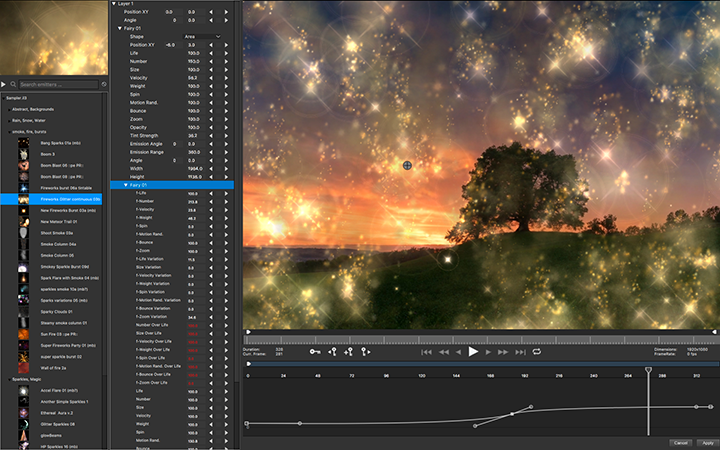
Particle Illusion is a major new addition to the Continuum package. The completely redesigned high-end motion graphics generator (sparkles, smoke, fireworks) features a speedy GPU-accelerated engine in a simple, easy-to-use interface. The new Particle Illusion plug-in will be released later in 2018 as part of Continuum 2019 and the Continuum Particle Unit.
"I'm so excited to see Particle Illusion up and running again, in a modern UI, and also available for new host applications like Media Composer and Resolve. Even though it was created almost 20 years ago, the complexity and beauty of some of its effects are still unmatched." - Alan Lorence, Product Manager, Boris FX (former Wondertouch founder and GenArts product manager)
Continuum 2019
In addition to Particle Illusion, Continuum's Title Studio adds the ability to apply GPU-accelerated effects (Image Processing Shaders) directly inside its interface along with 150 new professionally designed templates; broadcast monitor support (Blackmagic only in initial release) for external applications like Particle Illusion and Title Studio; and the new Mocha Essentials interface featuring the new Magnetic Spline Tool.
"Boris FX is continually adding tools to Continuum to not only fix common editorial and VFX issues but also give us awesome effects to take our work to the next level. The inclusion of Particle Illusion in Continuum 2019 adds a new layer of realism. It looks great, previews lightning quick, and comes with a ton of presets to get you going in the right direction. This, plus the addition of Title Studio's real-time Image Processing Shaders (Glows, Blurs, Light Sweeps, Light Rays, etc.), gives us so many more creative options when working on text looks!" - Kevin P. McAuliffe, Senior Editor, Extreme Reach Toronto
Sapphire 2019
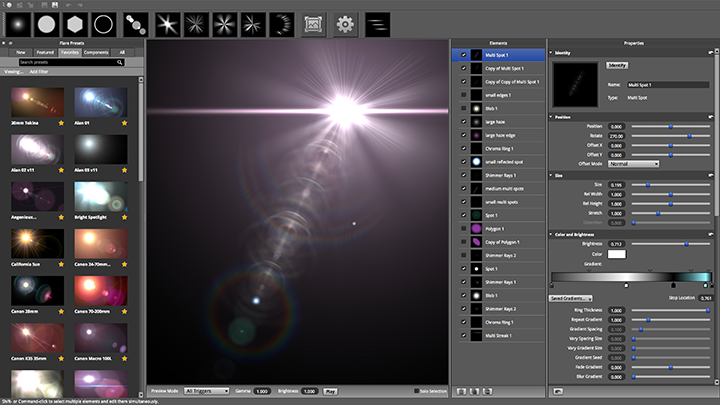
Sapphire features an improved and redesigned Lens Flare tool, complete with new flare components for creating stunning modern Lens Flares, additional professionally made and curated presets, and a new customizable user interface; new and original stylized effects and transitions like Pixel Sort and WhipPan; an improved shape tool inside Sapphire Builder to more easily create animating matte effects; broadcast monitor support (Blackmagic only in initial release) for all external applications such as Sapphire Builder and Sapphire Flare Designer; a streamlined Mocha Essentials user interface for quicker tracking and masking; and increased speed and performance through improved GPU acceleration.
"Sapphire 2019 is a great new addition to my toolset. The new Lens Flare tool allows me to produce some truly stunning photo-realistic flares in my work." - Damien LeVeck, Owner/ Editor, Skubalon, Inc.
Boris FX App Manager
The new Boris FX App Manager gives users a unified and easy-to-use interface for activating, deactivating, and reviewing licensing of any installed Boris FX application (including Sapphire, Continuum, and Mocha Pro) on their systems. The App Manager also automatically alerts users to new releases and updates for all installed Boris FX applications and allows product installers to be directly downloaded from within the App. The App Manager is yet another example of how Boris FX is dedicated to providing post-production teams with the most efficient workflows.
To schedule a press appointment or personal demonstration of Boris FX products at IBC (Booth 7.A65), please contact Jessie Electa Petrov, Director of Marketing.
Boris FX: https://borisfx.com/
Product Lineup Image: https://borisfx-com-res.cloudinary.com/v1536329173/boris-fx-2019-product-lineup-720.png
Mocha Pro 2019 Image: https://borisfx-com-res.cloudinary.com/v1536329173/boris-fx-2019-product-lineup-720.png
Continuum 2019 Image: https://borisfx-com-res.cloudinary.com/v1536330252/continuum-2019-title-studio-720.png
Particle Illusion Image: https://borisfx-com-res.cloudinary.com/v1536330452/continuum-2019-particle-illusion-720.png
Sapphire 2019 Image: https://borisfx-com-res.cloudinary.com/v1536329756/sapphire-2019-lens-flare-720.png
Founded in 1995, Boris FX is the leading developer of integrated graphics and effects technology, delivering 3D compositing and vector graphic products for broadcast, post-production, film, and multimedia. Boris products have grown to serve millions of artists worldwide. The company's success lies in its ability to integrate and leverage technologies through strong partnerships with industry-leading developers such as Adobe, Apple, Autodesk, Avid, Grass Valley, and Sony. All Material and Software (C) Copyright 2018 Boris FX. All Rights Reserved. Apple, the Apple logo, Macintosh Mac OS X and macOS are registered trademarks of Apple Inc. in the U.S. and/or other countries. Other trademarks and registered trademarks may be the property of their respective owners.
*******
Link To Article: https://prmac.com/release-id-82981.htm
*******
---------------------------------------------------------------------------------
Note that you can alter delivered distributions at any time.
Login to your account on prMac to alter your channel selection, or to opt-out at any time.
Boris FX Shows New 2019 Versions of Industry's Most Popular VFX at IBC - Published on 09/15/18
The post-production industry's leading visual effects plug-in developer, Boris FX, will preview major new 2019 versions of flagship products Sapphire, Continuum, and Mocha Pro, at IBC in Amsterdam, Netherlands (RAI, Booth 7.A65), September 14-18, 2018. The 2019 lineup marks a significant development commitment to a yearly release cycle across all products to deliver the tools professional editors, artists, and motion graphic designers demand.
Boston, Massachusetts - The post-production industry's leading visual effects plug-in developer, Boris FX(TM), will preview major new 2019 versions of flagship products Sapphire, Continuum, and Mocha Pro, at IBC in Amsterdam, Netherlands (RAI, Booth 7.A65), September 14-18, 2018. The 2019 lineup marks a significant development commitment to a yearly release cycle across all products to deliver the tools professional editors, artists, and motion graphic designers demand.
"We cannot wait to show the European broadcast and film community the powerful new features found in our upcoming 2019 releases. Both existing users and next generation artists will appreciate the increased efficiencies and creative options when paired with Adobe, Avid, Autodesk, Blackmagic Design, and Foundry workflows," says Boris Yamnitsky, Boris FX, Founder & President. "Fans of Particle Illusion, now part of Continuum 2019, will love creating stunning motion graphics elements with an easy-to-learn interface and blazing GPU acceleration. The legendary Lens Flare inside Sapphire 2019 has been improved with a new streamlined designer UI and professional presets allowing for faster creation of Hollywood's favorite lens flares, and Mocha Pro 2019's new essentials workspace and magnetic spline tools deliver significant advances in motion tracking and roto-masking. We're also releasing a new Boris FX App Manager that will make activating and deactivating Sapphire, Continuum, and Mocha
Pro licenses a breeze."
Mocha Pro 2019 will be released in late September 2018. Continuum 2019 and Sapphire 2019 will be available later this year.
2019 Product Releases
Mocha Pro 2019
Mocha Pro adds a new streamlined user interface to master planar tracking quickly; GPU-accelerated object removal for dramatic time-savings; new magnetic and freehand spline tools for faster masking and rotoscoping; and Mocha Pro and Mocha VR are now available together as one plug-in. Mocha Pro 2019 delivers the world's most powerful and versatile planar tracking solution for traditional and 360 VFX artists, compositors, and editors.
"I've used Mocha time and time again to see if seemingly impossible tasks are possible. The new Mocha Pro 2019 release improves on core functionality, usability, and speed which translates into VFX artists getting home earlier!" - Jake Morrison, VFX Supervisor, Thor: Ragnarok and Ant-Man
Particle Illusion
Particle Illusion is a major new addition to the Continuum package. The completely redesigned high-end motion graphics generator (sparkles, smoke, fireworks) features a speedy GPU-accelerated engine in a simple, easy-to-use interface. The new Particle Illusion plug-in will be released later in 2018 as part of Continuum 2019 and the Continuum Particle Unit.
"I'm so excited to see Particle Illusion up and running again, in a modern UI, and also available for new host applications like Media Composer and Resolve. Even though it was created almost 20 years ago, the complexity and beauty of some of its effects are still unmatched." - Alan Lorence, Product Manager, Boris FX (former Wondertouch founder and GenArts product manager)
Continuum 2019
In addition to Particle Illusion, Continuum's Title Studio adds the ability to apply GPU-accelerated effects (Image Processing Shaders) directly inside its interface along with 150 new professionally designed templates; broadcast monitor support (Blackmagic only in initial release) for external applications like Particle Illusion and Title Studio; and the new Mocha Essentials interface featuring the new Magnetic Spline Tool.
"Boris FX is continually adding tools to Continuum to not only fix common editorial and VFX issues but also give us awesome effects to take our work to the next level. The inclusion of Particle Illusion in Continuum 2019 adds a new layer of realism. It looks great, previews lightning quick, and comes with a ton of presets to get you going in the right direction. This, plus the addition of Title Studio's real-time Image Processing Shaders (Glows, Blurs, Light Sweeps, Light Rays, etc.), gives us so many more creative options when working on text looks!" - Kevin P. McAuliffe, Senior Editor, Extreme Reach Toronto
Sapphire 2019
Sapphire features an improved and redesigned Lens Flare tool, complete with new flare components for creating stunning modern Lens Flares, additional professionally made and curated presets, and a new customizable user interface; new and original stylized effects and transitions like Pixel Sort and WhipPan; an improved shape tool inside Sapphire Builder to more easily create animating matte effects; broadcast monitor support (Blackmagic only in initial release) for all external applications such as Sapphire Builder and Sapphire Flare Designer; a streamlined Mocha Essentials user interface for quicker tracking and masking; and increased speed and performance through improved GPU acceleration.
"Sapphire 2019 is a great new addition to my toolset. The new Lens Flare tool allows me to produce some truly stunning photo-realistic flares in my work." - Damien LeVeck, Owner/ Editor, Skubalon, Inc.
Boris FX App Manager
The new Boris FX App Manager gives users a unified and easy-to-use interface for activating, deactivating, and reviewing licensing of any installed Boris FX application (including Sapphire, Continuum, and Mocha Pro) on their systems. The App Manager also automatically alerts users to new releases and updates for all installed Boris FX applications and allows product installers to be directly downloaded from within the App. The App Manager is yet another example of how Boris FX is dedicated to providing post-production teams with the most efficient workflows.
To schedule a press appointment or personal demonstration of Boris FX products at IBC (Booth 7.A65), please contact Jessie Electa Petrov, Director of Marketing.
Boris FX: https://borisfx.com/
Product Lineup Image: https://borisfx-com-res.cloudinary.com/v1536329173/boris-fx-2019-product-lineup-720.png
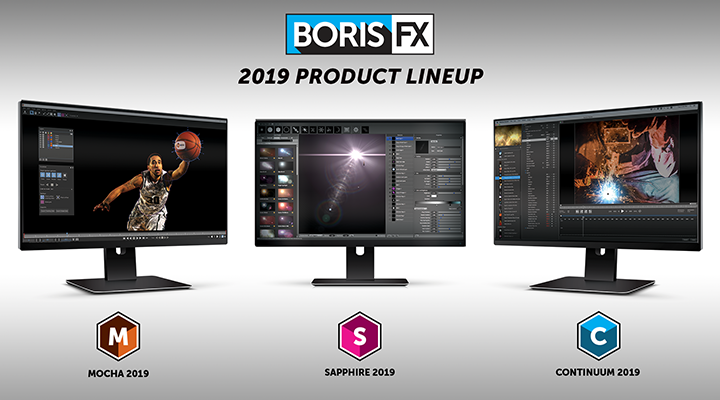
Mocha Pro 2019 Image: https://borisfx-com-res.cloudinary.com/v1536329173/boris-fx-2019-product-lineup-720.png
Continuum 2019 Image: https://borisfx-com-res.cloudinary.com/v1536330252/continuum-2019-title-studio-720.png

Particle Illusion Image: https://borisfx-com-res.cloudinary.com/v1536330452/continuum-2019-particle-illusion-720.png
Sapphire 2019 Image: https://borisfx-com-res.cloudinary.com/v1536329756/sapphire-2019-lens-flare-720.png
Founded in 1995, Boris FX is the leading developer of integrated graphics and effects technology, delivering 3D compositing and vector graphic products for broadcast, post-production, film, and multimedia. Boris products have grown to serve millions of artists worldwide. The company's success lies in its ability to integrate and leverage technologies through strong partnerships with industry-leading developers such as Adobe, Apple, Autodesk, Avid, Grass Valley, and Sony. All Material and Software (C) Copyright 2018 Boris FX. All Rights Reserved. Apple, the Apple logo, Macintosh Mac OS X and macOS are registered trademarks of Apple Inc. in the U.S. and/or other countries. Other trademarks and registered trademarks may be the property of their respective owners.
*******
Link To Article: https://prmac.com/release-id-82981.htm
*******
---------------------------------------------------------------------------------
Note that you can alter delivered distributions at any time.
Login to your account on prMac to alter your channel selection, or to opt-out at any time.
loveit coverit to Offer Comprehensive Insurance for All 3 New iPhones
A new article has been published at prMac.
loveit coverit to Offer Comprehensive Insurance for All 3 New iPhones - Published on 09/16/18
For the last few years Apple has stuck to a schedule with the annual release of new iPhone models. 2017 was an anomaly year, in which they announced two new devices: the iPhone X and the iPhone 8. This year, however, Apple have gone one better and will reportedly be announcing the release of three models at their September conference; an upgrade to the X, a larger version of the 8, and a brand-new, mid-range model.
Southend, Essex - To meet the demand that will inevitably follow the release of Apple's new iPhones, mobile phone insurance company, loveit coverit, have announced that they will be offering comprehensive insurance on all of the models. Their Premium insurance policies will include cover against theft, accidental damage, cracked screens, and loss - one of the few mobile phone and gadget insurers in the UK to offer this as standard.
All insurance policies for new iPhone devices will be available at affordable, competitive prices, helping customers to ensure that their new purchase is well protected. To coincide with the launch, loveit coverit will be offering reduced prices on normal excess costs, up to 20% during this promotional period.
Regarding the imminent launch of the three new iPhone models, loveit coverit CEO, Toby Stubbington, said,"We're very excited to be able to offer customers insurance for the latest iPhone models as and when they're released. At loveit coverit we understand how important a brand-new device can be to people, especially when it's as big an investment as a new iPhone, which is why we're doing as much as possible to ensure that mobile phone users can get comprehensive and affordable cover that works for them."
Authorized and regulated by the Financial Conduct Authority, loveit coverit is a trading name of Pier Insurance Managed Services. Providing mobile phone and gadget insurance for almost 30 years, the company has insured over 950,000 devices to-date and all claims are handled by their UK based, in-house team.
loveit coverit: https://www.loveitcoverit.com/
iPhone Insurance : https://www.loveitcoverit.com/iphone-insurance/
loveit coverit are one of the largest specialist mobile phone and gadget insurers in the market, providing cover for almost 30 years. All Material and Software (C) Copyright 2018 loveit coverit. All Rights Reserved. Apple, the Apple logo, iPhone, iPod and iPad are registered trademarks of Apple Inc. in the U.S. and/or other countries. Other trademarks and registered trademarks may be the property of their respective owners.
*******
Link To Article: https://prmac.com/release-id-82982.htm
*******
---------------------------------------------------------------------------------
Note that you can alter delivered distributions at any time.
Login to your account on prMac to alter your channel selection, or to opt-out at any time.
loveit coverit to Offer Comprehensive Insurance for All 3 New iPhones - Published on 09/16/18
For the last few years Apple has stuck to a schedule with the annual release of new iPhone models. 2017 was an anomaly year, in which they announced two new devices: the iPhone X and the iPhone 8. This year, however, Apple have gone one better and will reportedly be announcing the release of three models at their September conference; an upgrade to the X, a larger version of the 8, and a brand-new, mid-range model.
Southend, Essex - To meet the demand that will inevitably follow the release of Apple's new iPhones, mobile phone insurance company, loveit coverit, have announced that they will be offering comprehensive insurance on all of the models. Their Premium insurance policies will include cover against theft, accidental damage, cracked screens, and loss - one of the few mobile phone and gadget insurers in the UK to offer this as standard.
All insurance policies for new iPhone devices will be available at affordable, competitive prices, helping customers to ensure that their new purchase is well protected. To coincide with the launch, loveit coverit will be offering reduced prices on normal excess costs, up to 20% during this promotional period.
Regarding the imminent launch of the three new iPhone models, loveit coverit CEO, Toby Stubbington, said,"We're very excited to be able to offer customers insurance for the latest iPhone models as and when they're released. At loveit coverit we understand how important a brand-new device can be to people, especially when it's as big an investment as a new iPhone, which is why we're doing as much as possible to ensure that mobile phone users can get comprehensive and affordable cover that works for them."
Authorized and regulated by the Financial Conduct Authority, loveit coverit is a trading name of Pier Insurance Managed Services. Providing mobile phone and gadget insurance for almost 30 years, the company has insured over 950,000 devices to-date and all claims are handled by their UK based, in-house team.
loveit coverit: https://www.loveitcoverit.com/
iPhone Insurance : https://www.loveitcoverit.com/iphone-insurance/
loveit coverit are one of the largest specialist mobile phone and gadget insurers in the market, providing cover for almost 30 years. All Material and Software (C) Copyright 2018 loveit coverit. All Rights Reserved. Apple, the Apple logo, iPhone, iPod and iPad are registered trademarks of Apple Inc. in the U.S. and/or other countries. Other trademarks and registered trademarks may be the property of their respective owners.
*******
Link To Article: https://prmac.com/release-id-82982.htm
*******
---------------------------------------------------------------------------------
Note that you can alter delivered distributions at any time.
Login to your account on prMac to alter your channel selection, or to opt-out at any time.
Satirical Mobile Game 'Where's Najib?' Released By Glassfire Games
A new article has been published at prMac.
Satirical Mobile Game 'Where's Najib?' Released By Glassfire Games - Published on 09/14/18
Singapore-based indie mobile game studio Glassfire Games has released a satirical mobile game called 'Where's Najib?', currently available on Apple's App Store. The free mobile game features the foibles of the scandal-hit ex-prime minister of Malaysia, and uses the lens of satire to view the allegations surrounding Najib Razak.
Singapore-based indie mobile game studio Glassfire Games is proud to announce the release of their satirical mobile game called "Where's Najib?," version 1.1.2 for iPhone, iPad, and iPod touch device, which is currently available on Apple's App Store, and which will be available on the Google Play Store in Q4 2018.
The free mobile game features the foibles of the scandal-hit ex-prime minister of Malaysia, and uses the lens of satire to view the allegations surrounding Najib Razak.
In "Where's Najib?," players have ten seconds to score 100 points in a whack-a-mole style minigame featuring an escaping Najib. If the player scores enough points in time, they unlock an answer to the question "Where Is Najib?." "Where's Najib?" features 101 answers for players to unlock, including tongue-in-cheek locations such as:
"You found Najib! He's telling a pineapple tart how he really feels about being probed."
"You found Najib! He's hiding the paper trail ... by throwing away all his paperclips."
"You found Najib! He's googling 'how to delete your computer'."
Keeping their focus closer to home for the time being, Glassfire Games has started work on their next game, Legend of the White Horse. In this story-based simulation game, players step into the shoes of a young politician, Boh Huat, as he climbs the ranks of the National Anyhowly Party (NAP) in a country that's uncannily similar to Singapore.
Device Requirements:
* iPhone, iPad, and iPod touch
* Requires iOS 8.0 or later
* Universal Application
* 86.5 MB
Pricing and Availability:
Where's Najib? 1.1.2 is free and is available worldwide through the App Store in the Games category.
Glassfire Games: http://https://glassfiregames.com/
Download from App Store: https://itunes.apple.com/us/app/wheres-najib/id1434512248
Press Kit Download Link: https://itunes.apple.com/us/app/wheres-najib/id1434512248
Gameplay Video: https://drive.google.com/file/d/1KmLsYMXVky6PNwkQSyBjMxWpILzdE9pu/view?usp=sharing
Screenshot 1: https://drive.google.com/file/d/17oO9aat3H4vYkQ0EMW44eqvqbrUSXoyf/view?usp=sharing
Screenshot 2: https://drive.google.com/file/d/1xkyzwj-VFfSD0OHHHm5mS8anZ-2ikYLu/view?usp=sharing
Glassfire Games is an indie mobile game studio based in Singapore that creates games centred on narrative; from the all-too-real narratives around us to story-based games which meld one's physical reality with imagined worlds. All Material and Software (C) Copyright 2018 Glassfire Games. All Rights Reserved. Apple, the Apple logo, iPhone, iPod and iPad are registered trademarks of Apple Inc. in the U.S. and/or other countries. Other trademarks and registered trademarks may be the property of their respective owners.
*******
Link To Article: https://prmac.com/release-id-82980.htm
*******
---------------------------------------------------------------------------------
Note that you can alter delivered distributions at any time.
Login to your account on prMac to alter your channel selection, or to opt-out at any time.
Satirical Mobile Game 'Where's Najib?' Released By Glassfire Games - Published on 09/14/18
Singapore-based indie mobile game studio Glassfire Games has released a satirical mobile game called 'Where's Najib?', currently available on Apple's App Store. The free mobile game features the foibles of the scandal-hit ex-prime minister of Malaysia, and uses the lens of satire to view the allegations surrounding Najib Razak.
Singapore-based indie mobile game studio Glassfire Games is proud to announce the release of their satirical mobile game called "Where's Najib?," version 1.1.2 for iPhone, iPad, and iPod touch device, which is currently available on Apple's App Store, and which will be available on the Google Play Store in Q4 2018.
The free mobile game features the foibles of the scandal-hit ex-prime minister of Malaysia, and uses the lens of satire to view the allegations surrounding Najib Razak.
In "Where's Najib?," players have ten seconds to score 100 points in a whack-a-mole style minigame featuring an escaping Najib. If the player scores enough points in time, they unlock an answer to the question "Where Is Najib?." "Where's Najib?" features 101 answers for players to unlock, including tongue-in-cheek locations such as:
"You found Najib! He's telling a pineapple tart how he really feels about being probed."
"You found Najib! He's hiding the paper trail ... by throwing away all his paperclips."
"You found Najib! He's googling 'how to delete your computer'."
Keeping their focus closer to home for the time being, Glassfire Games has started work on their next game, Legend of the White Horse. In this story-based simulation game, players step into the shoes of a young politician, Boh Huat, as he climbs the ranks of the National Anyhowly Party (NAP) in a country that's uncannily similar to Singapore.
Device Requirements:
* iPhone, iPad, and iPod touch
* Requires iOS 8.0 or later
* Universal Application
* 86.5 MB
Pricing and Availability:
Where's Najib? 1.1.2 is free and is available worldwide through the App Store in the Games category.
Glassfire Games: http://https://glassfiregames.com/
Download from App Store: https://itunes.apple.com/us/app/wheres-najib/id1434512248
Press Kit Download Link: https://itunes.apple.com/us/app/wheres-najib/id1434512248
Gameplay Video: https://drive.google.com/file/d/1KmLsYMXVky6PNwkQSyBjMxWpILzdE9pu/view?usp=sharing
Screenshot 1: https://drive.google.com/file/d/17oO9aat3H4vYkQ0EMW44eqvqbrUSXoyf/view?usp=sharing
Screenshot 2: https://drive.google.com/file/d/1xkyzwj-VFfSD0OHHHm5mS8anZ-2ikYLu/view?usp=sharing
Glassfire Games is an indie mobile game studio based in Singapore that creates games centred on narrative; from the all-too-real narratives around us to story-based games which meld one's physical reality with imagined worlds. All Material and Software (C) Copyright 2018 Glassfire Games. All Rights Reserved. Apple, the Apple logo, iPhone, iPod and iPad are registered trademarks of Apple Inc. in the U.S. and/or other countries. Other trademarks and registered trademarks may be the property of their respective owners.
*******
Link To Article: https://prmac.com/release-id-82980.htm
*******
---------------------------------------------------------------------------------
Note that you can alter delivered distributions at any time.
Login to your account on prMac to alter your channel selection, or to opt-out at any time.
Subscribe to:
Posts (Atom)