A new article has been published at prMac.
Remote Control for Mac updated with highly requested features - Published on 09/24/18
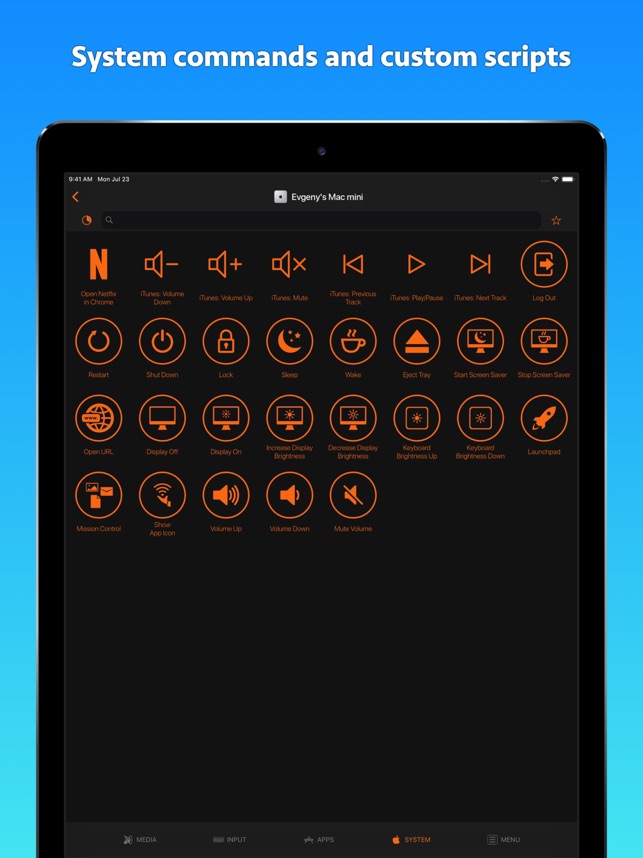
Indie developer, Evgeny Cherpak today announces Remote Control for Mac 8.8.4, an important update to his popular remote control app for iOS and watchOS devices. The app allows iOS device users to remotely control their Mac, using their iPhone or iPad as a keyboard and trackpad. Anyone can also launch any app on the Mac from anywhere in their home. The app can also put the Mac to sleep, wake it up, and even control volume, playback, and AirPlay mirroring on the computer.
Netanya, Israel - Independent developer, Evgeny Cherpak today is proud to announce the release and immediate availability of Remote Control for Mac 8.8.4, an important update to his remote control app for iPhone, iPad, iPod touch, and Apple Watch devices. The best remote control with over 6000 positive ratings worldwide gets even better. Remote Control for Mac gets a major update with highly requested features:
* AirPlay controls for audio (and display) to control airplay output of your Mac
* Creation of custom controls for any app on your Mac or website
Now you can control your Mac audio output and stream music from it to your Apple TV or HomePod from your iPhone or iPad. And you can create your own custom control panel for any app on your Mac or any streaming service, in addition to already bundled panels for most popular media apps and streaming services like:
* iTunes
* Netflix
* YouTube
* Amazon Prime Video
* Spotify
* Tidal
* Deezer
* SoundCloud
* Plex
* Kodi
* VLC
* IINA
Turn your iPhone or iPad into the ultimate remote control for your Mac. Take full control over your Mac; use your iOS device as a trackpad and keyboard or launch any app from anywhere within your home.
Tired of sitting on the couch, having to handle keyboard and mouse on your lap to control your media center Mac? Use Remote Control on your iPhone as a trackpad and keyboard to comfortably browse on the big screen TV. Using AirPlay Mirroring and an Apple TV, your Mac could be located anywhere in your home. Simply select your Apple TV from the list of available AirPlay devices and control your Mac from the comfort of your couch or bed.
You can even start any app on your Mac, send your Mac to sleep, wake it up and perform many more useful actions to control your Mac remotely. All you need to do is download the Mac Helper application and connect your Mac and iOS device to the same WiFi. Remote Control will guide you through the simple setup process.
Supported Languages:
Remote Control for Mac supports English, Dutch, French, German, Italian, Japanese, Korean, Portuguese, Russian, Simplified Chinese, Spanish, Swedish and Traditional Chinese languages.
Device Requirements:
* iPhone, iPad, and iPod touch (supports Apple Watch)
* Requires iOS 10.0 or later
* 30.3 MB
Pricing and Availability:
Remote Control for Mac 8.8.4 is $9.99 USD (or equivalent amount in other currencies) and available worldwide exclusively through the App Store in the Utilities category. Promo codes are available to members of the press. For more information, please contact Evgeny Cherpak.
Evgeny Cherpak: https://www.cherpake.com
Remote Control for Mac 8.8.4: https://geo.itunes.apple.com/us/app/id884153085?mt=8&at=1000loWa&ct=prmac
Screenshot: https://is3-ssl.mzstatic.com/image/thumb/Purple118/v4/c1/a7/bc/c1a7bc1b-2100-61bf-fc14-0b2296c1a04a/mzl.hmzalvuv.jpg/643x0w.jpg
App Icon: https://is4-ssl.mzstatic.com/image/thumb/Purple118/v4/f0/08/37/f0083777-236d-1a22-e26f-f5e34425e12d/AppIcon-1x_U007emarketing-0-0-GLES2_U002c0-512MB-sRGB-0-0-0-85-220-0-0-0-9.png/246x0w.jpg
Located in Netanya, Israel, Evgeny Cherpak is an independent developer. His mission is to fill the gaps in the Apple eco-system integration. Evgeny's apps are designed to offer iOS and macOS users the ability to use the devices to improve their productivity, streamline tasks, and offer more time to enjoy life. All Material and Software (C) Copyright 2018 Evgeny Cherpak. All Rights Reserved. Apple, the Apple logo, iPhone, iPod and iPad are registered trademarks of Apple Inc. in the U.S. and/or other countries. Other trademarks and registered trademarks may be the property of their respective owners.
*******
Link To Article: https://prmac.com/release-id-82998.htm
*******
---------------------------------------------------------------------------------
Note that you can alter delivered distributions at any time.
Login to your account on prMac to alter your channel selection, or to opt-out at any time.


Popular Mac Scripting Web Community Changes Hands
A new article has been published at prMac.
Popular Mac Scripting Web Community Changes Hands - Published on 09/24/18
Dallas-based Mac evangelist Ray Barber today announces that MacScripter, his popular AppleScripting website and social networking community for scripting enthusiasts, has been acquired by Late Night Software. The site will continue to be a community where Mac users can discuss topics related to macOS automation in a technology and product agnostic environment. MacScripter was founded in 1999, and is a well-respected resource for Mac users of all experience levels.
Lake Dallas, Texas - Long time Mac evangelist Ray Barber today is pleased to announce that MacScripter, the popular AppleScripting community for scripting enthusiasts, has been acquired by Late Night Software. The website will continue to serve as a community for Mac users to discuss all topics related to macOS automation.
MacScripter was founded in 1999 and is a well-respected resource for Mac users of all experience levels. The site has long served as a popular way for Mac users who use AppleScript and other scripting languages to share their knowledge.
"I'm proud that MacScripter has long served as a familiar place for Mac users to find information concerning macOS automation, including AppleScript, Automator, and JavaScript for Automation," says MacScripter founder Ray Barber. "The community is populated by a friendly group of scripters who are always willing to share their knowledge with others."
The MacScripter forum has steadily grown over the years, and today boasts nearly 30,000 members and a post archive tallying 175,000 posts and growing. Links to MacScripter can be found in almost any article that discusses macOS automation.
"Users will be in great hands. Mark plans to keep MacScripter more or less as it is," continues Ray. "The site will continue to be a place to discuss topics related to macOS automation in a technology and product agnostic environment. Thanks to everyone and happy scripting!"
MacScripter Highlights Include:
* Register and post questions absolutely free
* Easily find and sort posts to commonly asked questions
* Direct support for the Applescript Protocol Link
* An excellent community of top-notch scripters; ready to help
* unScripted: An excellent library of tutorials about scripting
* AppleScript Sourcebook: A historical perspective on AppleScripting, and frequently asked questions
Late Night Software owner Mark Alldritt assures MacScripter the resource will remain an independent resource for the Mac scripting community. In addition to continuing Ray Barber's original vision of providing resources to Mac users, Alldritt plans on offering support for iOS 12 now that Apple's venerable mobile operating system offers automation via the new Shortcuts app.
The automation of Apple products is currently seeing a resurgence. Alldritt believes the release of Shortcuts in iOS 12 suggests that Apple has become serious about automation on its mobile devices. He feels the change will spur users to look for ways to automate their Macs as well, representing a great opportunity for MacScripter to grow and become relevant to a new audience.
MacScripter has long been known for its treasure chest full of resources, including Code Exchange, unScripted, the AppleScript Sourcebook, and much more. Going forward, key long-time contributors - chief among them Shane Stanley and Nigel Garvey - will remain with the site, continuing to help it serve the Mac scripting community.
"This is all a testament to Ray's vision in creating MacScripter.net, and to his support of the site over the years," says Mark. "MacScripter will remain more or less as it is. It will continue to be a place to discuss topics related to macOS automation in a technology and product agnostic environment. MacScripter is a key piece of the macOS automation landscape and it needs to be preserved. I would suggest MacScripter is second only to Apple's own AppleScript-Users mailing list."
Pricing and Availability:
MacScripter is completely free and open to all. The resource is advertiser driven and donations are graciously accepted.
MacScripter: https://macscripter.net
Headquartered in Lake Dallas Texas, MacScripter was a property of GeekSuit LLC, a leading evangelist for the Mac platform since 1999. Established in January 1999, GeekSuit strives to provide innovative, affordable solutions that enhance the Mac experience in some unique way. prMac, MacDeveloper, iBetaTest and Client Folder Maker are also owned and founded by GeekSuit LLC. All Material and Software (C) Copyright 2018 GeekSuit LLC. All Rights Reserved. Apple, the Apple logo, OS X, iOS and Macintosh are registered trademarks of Apple Inc. in the U.S. and/or other countries. Other trademarks and registered trademarks may be the property of their respective owners.
*******
Link To Article: https://prmac.com/release-id-82999.htm
*******
---------------------------------------------------------------------------------
Note that you can alter delivered distributions at any time.
Login to your account on prMac to alter your channel selection, or to opt-out at any time.
Popular Mac Scripting Web Community Changes Hands - Published on 09/24/18
Dallas-based Mac evangelist Ray Barber today announces that MacScripter, his popular AppleScripting website and social networking community for scripting enthusiasts, has been acquired by Late Night Software. The site will continue to be a community where Mac users can discuss topics related to macOS automation in a technology and product agnostic environment. MacScripter was founded in 1999, and is a well-respected resource for Mac users of all experience levels.
Lake Dallas, Texas - Long time Mac evangelist Ray Barber today is pleased to announce that MacScripter, the popular AppleScripting community for scripting enthusiasts, has been acquired by Late Night Software. The website will continue to serve as a community for Mac users to discuss all topics related to macOS automation.
MacScripter was founded in 1999 and is a well-respected resource for Mac users of all experience levels. The site has long served as a popular way for Mac users who use AppleScript and other scripting languages to share their knowledge.
"I'm proud that MacScripter has long served as a familiar place for Mac users to find information concerning macOS automation, including AppleScript, Automator, and JavaScript for Automation," says MacScripter founder Ray Barber. "The community is populated by a friendly group of scripters who are always willing to share their knowledge with others."
The MacScripter forum has steadily grown over the years, and today boasts nearly 30,000 members and a post archive tallying 175,000 posts and growing. Links to MacScripter can be found in almost any article that discusses macOS automation.
"Users will be in great hands. Mark plans to keep MacScripter more or less as it is," continues Ray. "The site will continue to be a place to discuss topics related to macOS automation in a technology and product agnostic environment. Thanks to everyone and happy scripting!"
MacScripter Highlights Include:
* Register and post questions absolutely free
* Easily find and sort posts to commonly asked questions
* Direct support for the Applescript Protocol Link
* An excellent community of top-notch scripters; ready to help
* unScripted: An excellent library of tutorials about scripting
* AppleScript Sourcebook: A historical perspective on AppleScripting, and frequently asked questions
Late Night Software owner Mark Alldritt assures MacScripter the resource will remain an independent resource for the Mac scripting community. In addition to continuing Ray Barber's original vision of providing resources to Mac users, Alldritt plans on offering support for iOS 12 now that Apple's venerable mobile operating system offers automation via the new Shortcuts app.
The automation of Apple products is currently seeing a resurgence. Alldritt believes the release of Shortcuts in iOS 12 suggests that Apple has become serious about automation on its mobile devices. He feels the change will spur users to look for ways to automate their Macs as well, representing a great opportunity for MacScripter to grow and become relevant to a new audience.
MacScripter has long been known for its treasure chest full of resources, including Code Exchange, unScripted, the AppleScript Sourcebook, and much more. Going forward, key long-time contributors - chief among them Shane Stanley and Nigel Garvey - will remain with the site, continuing to help it serve the Mac scripting community.
"This is all a testament to Ray's vision in creating MacScripter.net, and to his support of the site over the years," says Mark. "MacScripter will remain more or less as it is. It will continue to be a place to discuss topics related to macOS automation in a technology and product agnostic environment. MacScripter is a key piece of the macOS automation landscape and it needs to be preserved. I would suggest MacScripter is second only to Apple's own AppleScript-Users mailing list."
Pricing and Availability:
MacScripter is completely free and open to all. The resource is advertiser driven and donations are graciously accepted.
MacScripter: https://macscripter.net
Headquartered in Lake Dallas Texas, MacScripter was a property of GeekSuit LLC, a leading evangelist for the Mac platform since 1999. Established in January 1999, GeekSuit strives to provide innovative, affordable solutions that enhance the Mac experience in some unique way. prMac, MacDeveloper, iBetaTest and Client Folder Maker are also owned and founded by GeekSuit LLC. All Material and Software (C) Copyright 2018 GeekSuit LLC. All Rights Reserved. Apple, the Apple logo, OS X, iOS and Macintosh are registered trademarks of Apple Inc. in the U.S. and/or other countries. Other trademarks and registered trademarks may be the property of their respective owners.
*******
Link To Article: https://prmac.com/release-id-82999.htm
*******
---------------------------------------------------------------------------------
Note that you can alter delivered distributions at any time.
Login to your account on prMac to alter your channel selection, or to opt-out at any time.
National Child Protection Week Stranger Danger Online App
A new article has been published at prMac.
National Child Protection Week Stranger Danger Online App - Published on 09/23/18
Kerry's COmputer Company announces Stranger Danger Online 1.3 for iOS and Android devices. Stranger Danger Online breaks down the steps predators are using to groom people online. As users move through the data center they encounter various people mining data and discussing the training information. Players will also encounter ways in which they can protect themselves online. This is a great way to have fun while getting educated.
Brisbane, QLD - For National Child Protection Week, Kerry's Computer Company has launched a new game aimed at educating children in the dangers of chatting online. Stranger Danger Online 1.3 is available for iPhone, iPad, iPod touch, and Android devices. The app is a journey through a data center where young people can discover the steps predators use online to groom and manipulate people online.
Ensuring the safety of children and young people online is one of the most significant issues facing parents, carers and educators today. Predators are sophisticated and utilize whatever means at their disposal to gain the trust of vulnerable children and young people and lure them to various harms. In order to combat this, it is essential to be aware of the hidden dangers of being online.
Young people are currently being targeted for sexual exploitation, radicalization, bullying, money laundering, drug running, scams, terrorist activities, activism and many more illegal and harmful activities.
The tactics used by some predators can be broken down into steps to assist in identifying how people are targeted. This app identifies the steps predators often use to manipulate and lure young people into a trap.
There are 10 training videos to find and complete. This includes:
Predatory Behaviors:
* How predators trap and manipulate people online.
* 6 x videos of the steps predators use to trap people.
* 2 x examples of predators targeting and trapping people. (1 example has 3 parts)
Also included are notes on the steps predators use and discussion questions to assist parents and educators.
"Supporting and protecting children online can be a daunting task these days and i understand parents need as much support as possible. I decided the best way to assist would be to create an app that really breaks down what is happening online. i have incorporated all the big issues that we hear about in the media, such as predatory behavior, data retention and bullying," Kerry said.
Device Requirements:
* iPhone, iPad, and iPod touch
* Requires iOS 8.0 or later
* Universal Application
* 366.1 MB
Pricing and Availability:
Stranger Danger Online 1.3 is just $3.99 is available worldwide through the App Store in the Education category. An Android version is also available.
Kerry's Computer Company: http://www.kcomputerco.com.au
Stranger Danger Online 1.2: http://www.kcomputerco.com.au/apps
Purchase and Download from App Store: https://itunes.apple.com/us/app/stranger-danger-online/id1432327761?ls=1&mt=8
Screenshot: https://www.kcomputerco.com.au/wp-content/uploads/2018/09/small.png
App Icon: https://www.kcomputerco.com.au/wp-content/uploads/2018/08/Icon-72.png
Kerry's Computer Company grew from a passion to support and educate people in using technology to the fullest. Since 2003, the company has provided computer services ranging from repairs to one-on-one and group-training and is currently exploring the possibilities of 3D printing. Kerry Hurst has a Bachelor of Information Technology majoring in Ecommerce and is a strong advocate for Child Safety Online. For over 10 years, Kerry has actively raised awareness about the threats young people face on the internet and assisted many parents to effectively manage child safety online. Staying up-to-date with technology is an ongoing challenge for parents. Some find it overwhelming to understand, integrate and address the increasing online threats to their children's safety. Kerry provides up-to-date information on technology protection to address security threats. Her personable, no-nonsense style guides people across the bridge from confusing technical jargon to a genuine understanding of
technology and staying safe online. All Material and Software (C) Copyright 2018 Kerry Hurst. All Rights Reserved. Apple, the Apple logo, iPhone, iPod and iPad are registered trademarks of Apple Inc. in the U.S. and/or other countries. Other trademarks and registered trademarks may be the property of their respective owners.
*******
Link To Article: https://prmac.com/release-id-83002.htm
*******
---------------------------------------------------------------------------------
Note that you can alter delivered distributions at any time.
Login to your account on prMac to alter your channel selection, or to opt-out at any time.
National Child Protection Week Stranger Danger Online App - Published on 09/23/18
Kerry's COmputer Company announces Stranger Danger Online 1.3 for iOS and Android devices. Stranger Danger Online breaks down the steps predators are using to groom people online. As users move through the data center they encounter various people mining data and discussing the training information. Players will also encounter ways in which they can protect themselves online. This is a great way to have fun while getting educated.
Brisbane, QLD - For National Child Protection Week, Kerry's Computer Company has launched a new game aimed at educating children in the dangers of chatting online. Stranger Danger Online 1.3 is available for iPhone, iPad, iPod touch, and Android devices. The app is a journey through a data center where young people can discover the steps predators use online to groom and manipulate people online.
Ensuring the safety of children and young people online is one of the most significant issues facing parents, carers and educators today. Predators are sophisticated and utilize whatever means at their disposal to gain the trust of vulnerable children and young people and lure them to various harms. In order to combat this, it is essential to be aware of the hidden dangers of being online.
Young people are currently being targeted for sexual exploitation, radicalization, bullying, money laundering, drug running, scams, terrorist activities, activism and many more illegal and harmful activities.
The tactics used by some predators can be broken down into steps to assist in identifying how people are targeted. This app identifies the steps predators often use to manipulate and lure young people into a trap.
There are 10 training videos to find and complete. This includes:
Predatory Behaviors:
* How predators trap and manipulate people online.
* 6 x videos of the steps predators use to trap people.
* 2 x examples of predators targeting and trapping people. (1 example has 3 parts)
Also included are notes on the steps predators use and discussion questions to assist parents and educators.
"Supporting and protecting children online can be a daunting task these days and i understand parents need as much support as possible. I decided the best way to assist would be to create an app that really breaks down what is happening online. i have incorporated all the big issues that we hear about in the media, such as predatory behavior, data retention and bullying," Kerry said.
Device Requirements:
* iPhone, iPad, and iPod touch
* Requires iOS 8.0 or later
* Universal Application
* 366.1 MB
Pricing and Availability:
Stranger Danger Online 1.3 is just $3.99 is available worldwide through the App Store in the Education category. An Android version is also available.
Kerry's Computer Company: http://www.kcomputerco.com.au
Stranger Danger Online 1.2: http://www.kcomputerco.com.au/apps
Purchase and Download from App Store: https://itunes.apple.com/us/app/stranger-danger-online/id1432327761?ls=1&mt=8
Screenshot: https://www.kcomputerco.com.au/wp-content/uploads/2018/09/small.png

App Icon: https://www.kcomputerco.com.au/wp-content/uploads/2018/08/Icon-72.png

Kerry's Computer Company grew from a passion to support and educate people in using technology to the fullest. Since 2003, the company has provided computer services ranging from repairs to one-on-one and group-training and is currently exploring the possibilities of 3D printing. Kerry Hurst has a Bachelor of Information Technology majoring in Ecommerce and is a strong advocate for Child Safety Online. For over 10 years, Kerry has actively raised awareness about the threats young people face on the internet and assisted many parents to effectively manage child safety online. Staying up-to-date with technology is an ongoing challenge for parents. Some find it overwhelming to understand, integrate and address the increasing online threats to their children's safety. Kerry provides up-to-date information on technology protection to address security threats. Her personable, no-nonsense style guides people across the bridge from confusing technical jargon to a genuine understanding of
technology and staying safe online. All Material and Software (C) Copyright 2018 Kerry Hurst. All Rights Reserved. Apple, the Apple logo, iPhone, iPod and iPad are registered trademarks of Apple Inc. in the U.S. and/or other countries. Other trademarks and registered trademarks may be the property of their respective owners.
*******
Link To Article: https://prmac.com/release-id-83002.htm
*******
---------------------------------------------------------------------------------
Note that you can alter delivered distributions at any time.
Login to your account on prMac to alter your channel selection, or to opt-out at any time.
JSplash Apps Releases Bass Tuner BT1 for iOS
A new article has been published at prMac.
JSplash Apps Releases Bass Tuner BT1 for iOS - Published on 09/21/18
JSplash Apps announces Bass Tuner BT1 1.0.1, an extremely accurate chromatic tuner for tuning bass instruments for iOS devices. With a top-class pitch recognition algorithm, the application shows the precise pitch frequency and deviation from the target frequency for any note, allowing players to perform high-quality tuning of bass instruments.
Bangalore, India - JSplash Apps is proud to announce the release of Bass Tuner BT1 1.0.1, an extremely accurate chromatic tuner for tuning bass instruments for iPhone, iPad, and iPod touch devices.
Bass Tuner BT1 is a specialized instrument tuner optimized for tuning low-frequency musical instruments. With Bass Tuner BT1, you can tune any bass instrument (bass guitar, double bass, bassoon, bass clarinet, bass trombone, bass saxophone, cello, etc.) easily with high accuracy. The app also comes with a handy tone generator that plays any note as a reference for tuning.
Key Features:
* Includes all the features of a professional bass tuner.
* Extremely accurate (can be tuned to an accuracy of ±0.1 cents).
* Displays the current note being tuned along with its deviation and current frequency.
* Includes historical graph of the pitch that helps you with the tuning process.
* Tone generator that can generate reference tones over a note-range of 3 octaves.
* Ability to set the frequency of A₄ (for tunings where A₄ is not 440 hertz).
Device Requirements for iOS Version:
* iPhone, iPad, and iPod touch
* Requires iOS 9.0 or later
* 7 MB
Pricing and Availability:
Bass Tuner BT1 is free and is available worldwide exclusively through the App Store in the Music category. An ad-free Pro version is also available for purchase. The app is available in English, French, Portuguese, Russian, Simplified Chinese, and Spanish languages.
JSplash Apps: https://jsplash.com
Bass Tuner BT1 1.0.1: https://itunes.apple.com/app/bass-tuner-bt1/id1433908656?ls=1&mt=8&at=1l3vkRq
Press Kit (ZIP): https://firebasestorage.googleapis.com/v0/b/bass-tuner-bt1.appspot.com/o/PRESS%20KIT.zip?alt=media&token=94a7070a-2233-4019-948e-12d62de74a60
Screenshots (ZIP): https://firebasestorage.googleapis.com/v0/b/bass-tuner-bt1.appspot.com/o/SCREENSHOTS.zip?alt=media&token=4f4064c2-8955-4a03-9ed0-9e9c0247cbc6
App Icon: https://firebasestorage.googleapis.com/v0/b/bass-tuner-bt1.appspot.com/o/AppIcon-512%402x.png?alt=media&token=4cd1d785-8a0b-400a-8660-b9f3a2292901
JSplash Studios is the company behind apps for professional musicians and music learners such as Rhythm Pad, Aural Wiz and Music Tutor. All Material and Software (C) Copyright 2018 JSplash Studios Pvt. Ltd. All Rights Reserved. Apple, the Apple logo, iPhone, iPod, and iPad are registered trademarks of Apple Inc. in the U.S. and/or other countries. Other trademarks and registered trademarks may be the property of their respective owners.
*******
Link To Article: https://prmac.com/release-id-83000.htm
*******
---------------------------------------------------------------------------------
Note that you can alter delivered distributions at any time.
Login to your account on prMac to alter your channel selection, or to opt-out at any time.
JSplash Apps Releases Bass Tuner BT1 for iOS - Published on 09/21/18
JSplash Apps announces Bass Tuner BT1 1.0.1, an extremely accurate chromatic tuner for tuning bass instruments for iOS devices. With a top-class pitch recognition algorithm, the application shows the precise pitch frequency and deviation from the target frequency for any note, allowing players to perform high-quality tuning of bass instruments.
Bangalore, India - JSplash Apps is proud to announce the release of Bass Tuner BT1 1.0.1, an extremely accurate chromatic tuner for tuning bass instruments for iPhone, iPad, and iPod touch devices.
Bass Tuner BT1 is a specialized instrument tuner optimized for tuning low-frequency musical instruments. With Bass Tuner BT1, you can tune any bass instrument (bass guitar, double bass, bassoon, bass clarinet, bass trombone, bass saxophone, cello, etc.) easily with high accuracy. The app also comes with a handy tone generator that plays any note as a reference for tuning.
Key Features:
* Includes all the features of a professional bass tuner.
* Extremely accurate (can be tuned to an accuracy of ±0.1 cents).
* Displays the current note being tuned along with its deviation and current frequency.
* Includes historical graph of the pitch that helps you with the tuning process.
* Tone generator that can generate reference tones over a note-range of 3 octaves.
* Ability to set the frequency of A₄ (for tunings where A₄ is not 440 hertz).
Device Requirements for iOS Version:
* iPhone, iPad, and iPod touch
* Requires iOS 9.0 or later
* 7 MB
Pricing and Availability:
Bass Tuner BT1 is free and is available worldwide exclusively through the App Store in the Music category. An ad-free Pro version is also available for purchase. The app is available in English, French, Portuguese, Russian, Simplified Chinese, and Spanish languages.
JSplash Apps: https://jsplash.com
Bass Tuner BT1 1.0.1: https://itunes.apple.com/app/bass-tuner-bt1/id1433908656?ls=1&mt=8&at=1l3vkRq
Press Kit (ZIP): https://firebasestorage.googleapis.com/v0/b/bass-tuner-bt1.appspot.com/o/PRESS%20KIT.zip?alt=media&token=94a7070a-2233-4019-948e-12d62de74a60
Screenshots (ZIP): https://firebasestorage.googleapis.com/v0/b/bass-tuner-bt1.appspot.com/o/SCREENSHOTS.zip?alt=media&token=4f4064c2-8955-4a03-9ed0-9e9c0247cbc6
App Icon: https://firebasestorage.googleapis.com/v0/b/bass-tuner-bt1.appspot.com/o/AppIcon-512%402x.png?alt=media&token=4cd1d785-8a0b-400a-8660-b9f3a2292901
JSplash Studios is the company behind apps for professional musicians and music learners such as Rhythm Pad, Aural Wiz and Music Tutor. All Material and Software (C) Copyright 2018 JSplash Studios Pvt. Ltd. All Rights Reserved. Apple, the Apple logo, iPhone, iPod, and iPad are registered trademarks of Apple Inc. in the U.S. and/or other countries. Other trademarks and registered trademarks may be the property of their respective owners.
*******
Link To Article: https://prmac.com/release-id-83000.htm
*******
---------------------------------------------------------------------------------
Note that you can alter delivered distributions at any time.
Login to your account on prMac to alter your channel selection, or to opt-out at any time.
Smultron 11 - The Text Editor for All of Us
A new article has been published at prMac.
Smultron 11 - The Text Editor for All of Us - Published on 09/22/18
Peter Borg Apps announces Smultron 11, their powerful text editor for macOS. Smultron is powerful and confident without being complicated. Its elegance and simplicity helps everyone being creative and to write and edit all sorts of texts. Smultron is designed for both beginners and experts. It is a joy to use and it has all the text tools one needs. And everyone can use it because it is translated into many languages and has full support for accessibility.
Stockholm, Sweden - Peter Borg Apps is proud to announce the release of Smultron 11, their powerful text editor for macOS. Smultron is powerful and confident without being complicated. Its elegance and simplicity helps everyone being creative and to write and edit all sorts of texts. Use Smultron to write everything from a web page, a script, a to do list, a novel to a whole app.
Smultron is designed for both beginners and experts. It is a joy to use and it has all the text tools one needs. And everyone can use it because it is translated into many languages and has full support for accessibility.
Here is what is new in Smultron 11:
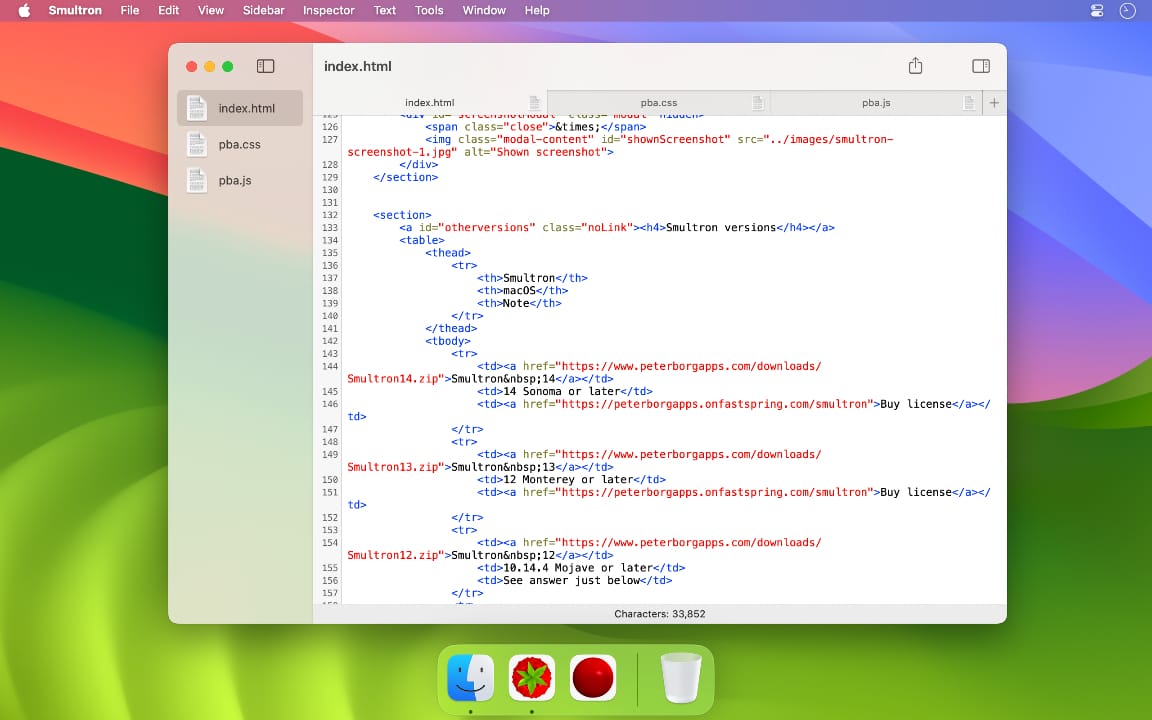
* Unified one window design - see all documents in the sidebar
* Columns - sort, rearrange and delete tabular data
* Language - see what words are nouns and verbs and so on (not for all languages and only in 10.14)
* Focus - concentrate on the text without distractions
* Improved dark mode (dark mode only available in 10.14)
* Split window
* Faster
* Improved advanced find, hex view and syntax coloring
* New syntax support: Crystal, Quanty, Rebol
* Many other small improvements and fixes
System Requirements:
* macOS High Sierra 10.13 or later
Pricing and Availability:
Smultron 11 is available now for US$ 14.99 (or an equivalent amount in other currencies). Upgrade and site licenses are available.
Peter Borg Apps: https://www.peterborgapps.com/
Smultron 11: https://www.peterborgapps.com/smultron
Direct Download Link: https://www.peterborgapps.com/downloads/Smultron11.zip
Purchase Link: https://sites.fastspring.com/peterborgapps/product/smultron
Screenshot: https://www.peterborgapps.com/images/smultron-screenshot-1.jpg
App Icon: https://www.peterborgapps.com/images/smultron-logo.png
Peter Borg Apps is a small, but great, company that creates apps for macOS, iOS, watchOS and tvOS. They believe in creating easy to use, powerful and elegant apps. All Material and Software (C) Copyright 2018 Peter Borg Apps. All Rights Reserved. Apple, the Apple logo, Macintosh Mac OS X and macOS are registered trademarks of Apple Inc. in the U.S. and/or other countries. Other trademarks and registered trademarks may be the property of their respective owners.
*******
Link To Article: https://prmac.com/release-id-83001.htm
*******
---------------------------------------------------------------------------------
Note that you can alter delivered distributions at any time.
Login to your account on prMac to alter your channel selection, or to opt-out at any time.
Smultron 11 - The Text Editor for All of Us - Published on 09/22/18
Peter Borg Apps announces Smultron 11, their powerful text editor for macOS. Smultron is powerful and confident without being complicated. Its elegance and simplicity helps everyone being creative and to write and edit all sorts of texts. Smultron is designed for both beginners and experts. It is a joy to use and it has all the text tools one needs. And everyone can use it because it is translated into many languages and has full support for accessibility.
Stockholm, Sweden - Peter Borg Apps is proud to announce the release of Smultron 11, their powerful text editor for macOS. Smultron is powerful and confident without being complicated. Its elegance and simplicity helps everyone being creative and to write and edit all sorts of texts. Use Smultron to write everything from a web page, a script, a to do list, a novel to a whole app.
Smultron is designed for both beginners and experts. It is a joy to use and it has all the text tools one needs. And everyone can use it because it is translated into many languages and has full support for accessibility.
Here is what is new in Smultron 11:
* Unified one window design - see all documents in the sidebar
* Columns - sort, rearrange and delete tabular data
* Language - see what words are nouns and verbs and so on (not for all languages and only in 10.14)
* Focus - concentrate on the text without distractions
* Improved dark mode (dark mode only available in 10.14)
* Split window
* Faster
* Improved advanced find, hex view and syntax coloring
* New syntax support: Crystal, Quanty, Rebol
* Many other small improvements and fixes
System Requirements:
* macOS High Sierra 10.13 or later
Pricing and Availability:
Smultron 11 is available now for US$ 14.99 (or an equivalent amount in other currencies). Upgrade and site licenses are available.
Peter Borg Apps: https://www.peterborgapps.com/
Smultron 11: https://www.peterborgapps.com/smultron
Direct Download Link: https://www.peterborgapps.com/downloads/Smultron11.zip
Purchase Link: https://sites.fastspring.com/peterborgapps/product/smultron
Screenshot: https://www.peterborgapps.com/images/smultron-screenshot-1.jpg
App Icon: https://www.peterborgapps.com/images/smultron-logo.png

Peter Borg Apps is a small, but great, company that creates apps for macOS, iOS, watchOS and tvOS. They believe in creating easy to use, powerful and elegant apps. All Material and Software (C) Copyright 2018 Peter Borg Apps. All Rights Reserved. Apple, the Apple logo, Macintosh Mac OS X and macOS are registered trademarks of Apple Inc. in the U.S. and/or other countries. Other trademarks and registered trademarks may be the property of their respective owners.
*******
Link To Article: https://prmac.com/release-id-83001.htm
*******
---------------------------------------------------------------------------------
Note that you can alter delivered distributions at any time.
Login to your account on prMac to alter your channel selection, or to opt-out at any time.
BKeeney Software Launches New, Cross-Platform Reporting Tool
A new article has been published at prMac.
BKeeney Software Launches New, Cross-Platform Reporting Tool - Published on 09/21/18
BKeeney Software Inc. today introduces BKS Report Studio, a database reporting tool for Mac and Windows. Designed for every skill level, BKS Report Studio features a visual interface, templates, and editing features that allow users to create reports without writing SQL. It operates like a layout editor by allowing users to drag and drop data sources, labels, images, and even barcodes to build powerful reports, quickly. Reports can be printed directly, or can be exported in several file formats.
Lenexa, Kansas - BKeeney Software Inc. launches BKS Report Studio, a simple database reporting tool that features a visual interface, templates, and editing features that allow users to create reports without writing SQL.
Designed for every skill level, BKS Report Studio operates like a layout editor by allowing users to drag and drop data sources, labels, images, and even barcodes to build powerful reports, quickly. Reports can be printed directly, or can be exported in several file formats. Created by a need to simplify and extend the database reporting process, BKS Report Studio focuses on making the report design phase easier.
BKS Report Studio features several functions:
* Drag & Drop layout design for report templates
* Export as PDF documents or print directly
* SQL engine generates the necessary query and gathers data
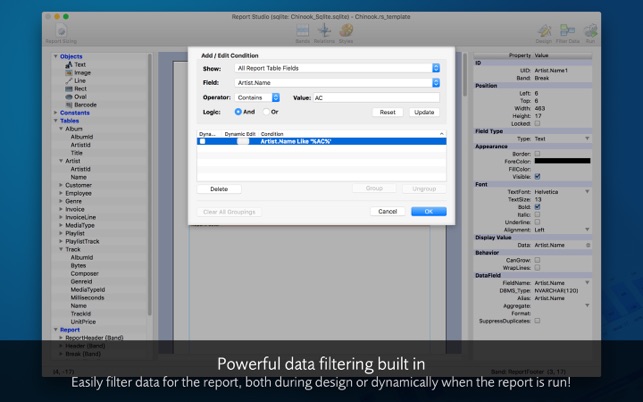
* Filter data beforehand, or live at runtime with dynamic runtime filtering
* Boolean display is fully customizable, and supports Emoji
* Format numbers, and perform scripts on bands as they are generated
Connect to the most popular database engines, or connect to any database engine that provides an ODBC driver. BKS Report Studio supports these database engines: CubeSQL, MySQL, ODBC, PostgreSQL, and SQLite.
Pricing and Availability:
BKS Report Studio 1.0.1 is available now for Mac and Windows. Download it from the website for free today. BKS Report Studio 1.0.1 is also available worldwide through the Mac App Store in the Business category. Demo reports will be watermarked. Purchase a license for $175 (USD) to permanently remove the watermark and unlock the export-to-file functions.
BKS Report Studio 1.0.1: https://bksreportstudio.com
Purchase from Mac App Store: https://itunes.apple.com/app/bks-report-studio/id1434926773
Purchase from BKeeney Software: https://bksreportstudio.com/buy
Download Trial: https://bksreportstudio.com/download/auto
Screenshot: https://is2-ssl.mzstatic.com/image/thumb/Purple128/v4/c3/6d/78/c36d7869-e495-2627-d6e9-1acee79a35bc/pr_source.jpg/643x0w.jpg
Application Icon: https://is5-ssl.mzstatic.com/image/thumb/Purple128/v4/4b/94/b9/4b94b997-ecdd-fdf6-9969-44126d2e933f/App.png/246x0w.png
BKeeney Software is software consulting firm specializing in cross-platform, web, and mobile applications, developer tools, and training using the Xojo development platform. Copyright (C) 2018 BKeeney Software Inc. All Rights Reserved. Apple, the Apple logo and macOS are registered trademarks of Apple Inc. in the U.S. and/or other countries. Other trademarks and registered trademarks may be the property of their respective owners.
*******
Link To Article: https://prmac.com/release-id-82997.htm
*******
---------------------------------------------------------------------------------
Note that you can alter delivered distributions at any time.
Login to your account on prMac to alter your channel selection, or to opt-out at any time.
BKeeney Software Launches New, Cross-Platform Reporting Tool - Published on 09/21/18
BKeeney Software Inc. today introduces BKS Report Studio, a database reporting tool for Mac and Windows. Designed for every skill level, BKS Report Studio features a visual interface, templates, and editing features that allow users to create reports without writing SQL. It operates like a layout editor by allowing users to drag and drop data sources, labels, images, and even barcodes to build powerful reports, quickly. Reports can be printed directly, or can be exported in several file formats.
Lenexa, Kansas - BKeeney Software Inc. launches BKS Report Studio, a simple database reporting tool that features a visual interface, templates, and editing features that allow users to create reports without writing SQL.
Designed for every skill level, BKS Report Studio operates like a layout editor by allowing users to drag and drop data sources, labels, images, and even barcodes to build powerful reports, quickly. Reports can be printed directly, or can be exported in several file formats. Created by a need to simplify and extend the database reporting process, BKS Report Studio focuses on making the report design phase easier.
BKS Report Studio features several functions:
* Drag & Drop layout design for report templates
* Export as PDF documents or print directly
* SQL engine generates the necessary query and gathers data
* Filter data beforehand, or live at runtime with dynamic runtime filtering
* Boolean display is fully customizable, and supports Emoji
* Format numbers, and perform scripts on bands as they are generated
Connect to the most popular database engines, or connect to any database engine that provides an ODBC driver. BKS Report Studio supports these database engines: CubeSQL, MySQL, ODBC, PostgreSQL, and SQLite.
Pricing and Availability:
BKS Report Studio 1.0.1 is available now for Mac and Windows. Download it from the website for free today. BKS Report Studio 1.0.1 is also available worldwide through the Mac App Store in the Business category. Demo reports will be watermarked. Purchase a license for $175 (USD) to permanently remove the watermark and unlock the export-to-file functions.
BKS Report Studio 1.0.1: https://bksreportstudio.com
Purchase from Mac App Store: https://itunes.apple.com/app/bks-report-studio/id1434926773
Purchase from BKeeney Software: https://bksreportstudio.com/buy
Download Trial: https://bksreportstudio.com/download/auto
Screenshot: https://is2-ssl.mzstatic.com/image/thumb/Purple128/v4/c3/6d/78/c36d7869-e495-2627-d6e9-1acee79a35bc/pr_source.jpg/643x0w.jpg
Application Icon: https://is5-ssl.mzstatic.com/image/thumb/Purple128/v4/4b/94/b9/4b94b997-ecdd-fdf6-9969-44126d2e933f/App.png/246x0w.png

BKeeney Software is software consulting firm specializing in cross-platform, web, and mobile applications, developer tools, and training using the Xojo development platform. Copyright (C) 2018 BKeeney Software Inc. All Rights Reserved. Apple, the Apple logo and macOS are registered trademarks of Apple Inc. in the U.S. and/or other countries. Other trademarks and registered trademarks may be the property of their respective owners.
*******
Link To Article: https://prmac.com/release-id-82997.htm
*******
---------------------------------------------------------------------------------
Note that you can alter delivered distributions at any time.
Login to your account on prMac to alter your channel selection, or to opt-out at any time.
DEVONthink To Go 2.6.4 adds compatibility to iOS 12 and iPhone XS Max
A new article has been published at prMac.
DEVONthink To Go 2.6.4 adds compatibility to iOS 12 and iPhone XS Max - Published on 09/21/18
DEVONtechnologies today releases DEVONthink To Go 2.6.4, an important update to its mobile document and information manager for iOS devices. Serving as repository for a large variety of data types DEVONthink To Go lets users keep their important documents with them at all times. It offers a rich set of organizing features as well as built-in viewers and editors for many file formats. Version 2.6.4 supports the new display size of the iPhone XS Max, brings workflow improvements, and fixes bugs.
Coeur d'Alene, Idaho - DEVONtechnologies updates its iOS document and information manager DEVONthink To Go for compatibility to iOS 12. The new version also supports the new display size of the iPhone XS Max, brings workflow improvements, and fixes bugs. The update is free and recommended for all users.
DEVONthink To Go is DEVONtechnologies' document and information management solution for iOS. Serving as repository for a large variety of data types it lets users keep their important documents with them at all times. It offers a rich set of organizing features as well as built-in viewers and editors for many file formats. Document provider and file provider extensions make documents available in other apps, and an encrypted synchronization keeps all data in sync with other iOS devices as well as with its Mac counterpart, DEVONthink, without compromizing the user's privacy.
Use DEVONthink To Go to put all your text files, PDFs, notes, images, and bookmarks into your pocket and have them at hand even when you are not connected to your office network or the internet.
* Take your documents with you
* Organize your data on the go
* Use super-fast full text search
* Sync locally, via WebDAV, or Dropbox
What's new in DEVONthink To Go 2.6.4:
DEVONthink To Go 2.6.4 brings compatibility fixes for iOS 12 as well as adjustments for the new iPhone XS Max screen size. In landscape orientation DEVONthink To Go shows item lists as an overlay. This makes it possible to navigate databases while retaining the view of the current document.
In addition, DEVONthink To Go 2.6.4 improves the workflow when creating, grouping, or searching for items. It eliminates unnecessary taps, e.g. by directly navigating to newly created items. Tapping search results dismisses the iPhone software keyboard, and bookmarks created from PDF page links are properly named automatically.
The update also improves the legibility of on-screen text by using the easier-to-read San Francisco font for text documents. Headers in item lists are no longer semi-transparent which makes them better readable.
iOS 12 and the new iPhones are solid updates for Apple's mobile device fleet. We had to iron out a few glitches that always come with a larger operating system update. But we've also used the day for updating some internal components and for removing older code on our side. Together with some workflow and interface enhancement this makes DEVONthink To Go 2.6.4 more robust and productive than ever," comments Eric Bohnisch-Volkmann, President of DEVONtechnologies.
On the sync side version 2.6.4 takes the guesswork out of using shallowly synchronized databases while the device operates as a Bonjour sync server at the same time. Informative texts and warnings explain which settings might have unexpected effects. Of course, version 2.6.4 fixes issues and improves the overall reliabilty of DEVONthink To Go too.
Device requirements:
* iPhone, iPad, and iPod touch running iOS 10.0 or later
Availability and Pricing:
DEVONthink To Go is available world-wide for $14.99 USD (or the equivalent amount in other currencies) through the iOS App Store in the Productivity category. Some features require a one-time in-app purchase. Customers find more information about our apps on the DEVONtechnologies website. Eric Bohnisch-Volkmann also posts news, opinions, previews, and public betas in the company blog Devonian Times.
DEVONthink To Go 2.6.4: https://www.devontechnologies.com/redirect.php?id=product-dttg
Release Notes: https://www.devontechnologies.com/redirect.php?id=releasenotes-dttg
Purchase and Download: https://itunes.apple.com/app/devonthink-to-go/id395722470
Company Blog: http://www.devontechnologies.com/redirect.php?id=blog
DEVONtechnologies LLC creates end-user and server applications for the Mac and iOS platforms that enhance productivity, organization, and user experience with unique artificial intelligence technology. All applications are focused on both ease of use and satisfying the needs of even the most savvy users. The underlying DEVONtechnology is a flexible and versatile foundation that can be used for a large range of purposes from databases, data mining, and information retrieval to human-computer interfaces. DEVONtechnologies LLC was founded 2002 and incorporated 2004, and is today headquartered in Coeur d'Alene, Idaho, USA. All Material and Software (C) Copyright 2018 DEVONtechnologies LLC. All Rights Reserved. Apple, the Apple logo, Macintosh and Mac OS X are registered trademarks of Apple Inc. in the U.S. and/or other countries. Other trademarks and registered trademarks may be the property of their respective owners.
*******
Link To Article: https://prmac.com/release-id-82996.htm
*******
---------------------------------------------------------------------------------
Note that you can alter delivered distributions at any time.
Login to your account on prMac to alter your channel selection, or to opt-out at any time.
DEVONthink To Go 2.6.4 adds compatibility to iOS 12 and iPhone XS Max - Published on 09/21/18
DEVONtechnologies today releases DEVONthink To Go 2.6.4, an important update to its mobile document and information manager for iOS devices. Serving as repository for a large variety of data types DEVONthink To Go lets users keep their important documents with them at all times. It offers a rich set of organizing features as well as built-in viewers and editors for many file formats. Version 2.6.4 supports the new display size of the iPhone XS Max, brings workflow improvements, and fixes bugs.
Coeur d'Alene, Idaho - DEVONtechnologies updates its iOS document and information manager DEVONthink To Go for compatibility to iOS 12. The new version also supports the new display size of the iPhone XS Max, brings workflow improvements, and fixes bugs. The update is free and recommended for all users.
DEVONthink To Go is DEVONtechnologies' document and information management solution for iOS. Serving as repository for a large variety of data types it lets users keep their important documents with them at all times. It offers a rich set of organizing features as well as built-in viewers and editors for many file formats. Document provider and file provider extensions make documents available in other apps, and an encrypted synchronization keeps all data in sync with other iOS devices as well as with its Mac counterpart, DEVONthink, without compromizing the user's privacy.
Use DEVONthink To Go to put all your text files, PDFs, notes, images, and bookmarks into your pocket and have them at hand even when you are not connected to your office network or the internet.
* Take your documents with you
* Organize your data on the go
* Use super-fast full text search
* Sync locally, via WebDAV, or Dropbox
What's new in DEVONthink To Go 2.6.4:
DEVONthink To Go 2.6.4 brings compatibility fixes for iOS 12 as well as adjustments for the new iPhone XS Max screen size. In landscape orientation DEVONthink To Go shows item lists as an overlay. This makes it possible to navigate databases while retaining the view of the current document.
In addition, DEVONthink To Go 2.6.4 improves the workflow when creating, grouping, or searching for items. It eliminates unnecessary taps, e.g. by directly navigating to newly created items. Tapping search results dismisses the iPhone software keyboard, and bookmarks created from PDF page links are properly named automatically.
The update also improves the legibility of on-screen text by using the easier-to-read San Francisco font for text documents. Headers in item lists are no longer semi-transparent which makes them better readable.
iOS 12 and the new iPhones are solid updates for Apple's mobile device fleet. We had to iron out a few glitches that always come with a larger operating system update. But we've also used the day for updating some internal components and for removing older code on our side. Together with some workflow and interface enhancement this makes DEVONthink To Go 2.6.4 more robust and productive than ever," comments Eric Bohnisch-Volkmann, President of DEVONtechnologies.
On the sync side version 2.6.4 takes the guesswork out of using shallowly synchronized databases while the device operates as a Bonjour sync server at the same time. Informative texts and warnings explain which settings might have unexpected effects. Of course, version 2.6.4 fixes issues and improves the overall reliabilty of DEVONthink To Go too.
Device requirements:
* iPhone, iPad, and iPod touch running iOS 10.0 or later
Availability and Pricing:
DEVONthink To Go is available world-wide for $14.99 USD (or the equivalent amount in other currencies) through the iOS App Store in the Productivity category. Some features require a one-time in-app purchase. Customers find more information about our apps on the DEVONtechnologies website. Eric Bohnisch-Volkmann also posts news, opinions, previews, and public betas in the company blog Devonian Times.
DEVONthink To Go 2.6.4: https://www.devontechnologies.com/redirect.php?id=product-dttg
Release Notes: https://www.devontechnologies.com/redirect.php?id=releasenotes-dttg
Purchase and Download: https://itunes.apple.com/app/devonthink-to-go/id395722470
Company Blog: http://www.devontechnologies.com/redirect.php?id=blog
DEVONtechnologies LLC creates end-user and server applications for the Mac and iOS platforms that enhance productivity, organization, and user experience with unique artificial intelligence technology. All applications are focused on both ease of use and satisfying the needs of even the most savvy users. The underlying DEVONtechnology is a flexible and versatile foundation that can be used for a large range of purposes from databases, data mining, and information retrieval to human-computer interfaces. DEVONtechnologies LLC was founded 2002 and incorporated 2004, and is today headquartered in Coeur d'Alene, Idaho, USA. All Material and Software (C) Copyright 2018 DEVONtechnologies LLC. All Rights Reserved. Apple, the Apple logo, Macintosh and Mac OS X are registered trademarks of Apple Inc. in the U.S. and/or other countries. Other trademarks and registered trademarks may be the property of their respective owners.
*******
Link To Article: https://prmac.com/release-id-82996.htm
*******
---------------------------------------------------------------------------------
Note that you can alter delivered distributions at any time.
Login to your account on prMac to alter your channel selection, or to opt-out at any time.
Subscribe to:
Posts (Atom)