A new article has been published at prMac.
Money by Jumsoft joins the dark side with macOS Mojave - Published on 09/25/18
Jumsoft today releases Money 5.5, an important feature update to their popular finance management app for macOS. Money offers a powerful, comprehensive and intuitive system designed to help you keep control of your financial life. Version 5.5 adds many under-the-hood improvements, brings macOS Mojave Dark Mode integration, custom-colored tags, identification and search. The update also contains security improvements, including Touch ID availability for supported Mac models.
Vilnius, Lithuania - Jumsoft has launched an update to Money, a popular macOS and iOS finance tracker, which bumps the version number to 5.5. The update is focused primarily on technical and compatibility improvements to make Money compatible with the new version of macOS Mojave. It also brings a couple of noticeable additions: Mac Touch ID support, full Mojave Dark Mode integration and custom-colored tags to add an extra (good-looking) layer for sorting and identifying transactions.
"We are very excited about the release of macOS Mojave, and all new features it has to offer. Mojave brings the highly anticipated system-wide Dark mode and we've made sure Money embraces this new look. Our design department have worked overtime revamping colors and interface elements, and Money looks astonishing in dark mode! In addition to this, we have introduced custom-colored tags, which bring new life to transaction tags, substantially improving their usability and effectiveness," said Algirdas Unguvaitis, CEO of Jumsoft. "Money 5.5 is more than meets the eye, and thanks to active involvement from our user community, we have made this release of Money its best yet. It contains numerous under-the-hood improvements to enhance and speed-up everything from navigating the interface to syncing your data with iCloud."
Money for Mac is available worldwide on the Mac App Store and is offered in three price tiers:
* Money Free - designed primarily for trial purposes so users could see if Money is right for them (limited to 100 transactions/accounts);
* Money Standard - a one-time $24.99 purchase allows unlimited access to all Money features with offline (manually managed) accounts and transactions;
* Money Premium - an affordable $4.99 monthly or $49.99 annual subscription plan enabling over 50,000 financial institution connections across 57 countries for automatic data downloads into Money. Opting in for Money Premium unlocks all Money Standard benefits for the duration of the subscription. Money Premium is available as a free-trial for a month, and can be canceled any time.
Jumsoft: http://www.jumsoft.com
Money 5.5: http://www.jumsoft.com/money/
Download from the Mac App Store: https://itunes.apple.com/app/money/id1185488696
Download from iTunes: https://itunes.apple.com/app/money-5/id1185487791
Press Kit (zip): http://jumsoft.com/press-kit
Based in Vilnius, Lithuania, Jumsoft is a privately funded company, founded in 2002. Committed to developing highest-quality applications, Jumsoft consists of a team of macOS and iOS experts and enthusiasts who dedicate their time to develop amazing tools for personal and professional use. Copyright 2002-2018 Jumsoft. All Rights Reserved. Apple, the Apple logo, iWork and macOS are registered trademarks of Apple Inc. in the U.S. and/or other countries.
*******
Link To Article: https://prmac.com/release-id-83015.htm
*******
---------------------------------------------------------------------------------
Note that you can alter delivered distributions at any time.
Login to your account on prMac to alter your channel selection, or to opt-out at any time.

Maintain Releases Cocktail 12.0 (Mojave Edition)
A new article has been published at prMac.
Maintain Releases Cocktail 12.0 (Mojave Edition) - Published on 09/25/18
Maintain today announces Cocktail 12.0 (Mojave Edition), a new edition of Cocktail for users running macOS Mojave 10.14. Cocktail is a general purpose utility for macOS that lets users clean, repair and optimize their Macs. Cocktail's features are arranged into five categories that help manage various aspects of your Mac. Version 12.0 adds compatibility with macOS Mojave 10.14, contains miscellaneous bug fixes, improvements and enhancements as well as updated Automator actions and Help files.
Ekero, Sweden - Maintain today is proud to announce the release of Cocktail 12.0 (Mojave Edition), a new edition of Cocktail for users running macOS Mojave 10.14. Cocktail is a general purpose utility for macOS that lets you clean, repair and optimize your Mac. The application serves up a perfect mix of maintenance tools and tweaks, all accessible through a clean and easy to use interface. Cocktail's features are arranged into five categories that helps you manage various aspects of your computer. It also comes with an automatic Pilot mode that allows you to simply press a button and relax, knowing that Cocktail will take care of the rest.
Disk
* Automatically check S.M.A.R.T. status of disks
* Enable or disable journaling
* Set disk sleep (spindown) time
* Modify standby delay
* Change other disk sleep settings
* Force eject CD/DVD
System
* Run periodic maintenance scripts
* Purge inactive memory and optimize virtual memory usage
* Manage Spotlight indexing
* Erase Spotlight indexes
* Modify Time Machine settings
* Rebuild Launch Services and Help databases
* Rebuild Mail's Envelope Index
* Update locate and whatis databases
* Force empty the Trash
* Change startup mode or set startup delay
* Disable startup sound
* Disable Notification Center and App Nap
Files
* Clear system caches
* Clear user caches
* Clear font caches
* Clear virtual memory swap files
* Clear temporary files
* Clear Internet caches
* Clear cookies, download lists, form values and history files
* Clear Adobe Flash Player caches and cookies
* Clear applications caches
* Search for corrupted preference files
* Delete unnecessary localization (language resources) files
* Clear and manage (view, print and save) log files
* Delete invisible DS Store files
* Delete locked or inaccessible items
Network
* Change speed, duplex and MTU of network cards
* Easily optimize network settings for common connection types
* Modify IP configuration parameters
* Configure File Sharing settings
Interface
* Customize look and features of Finder, Dock, login window and other system services
* Modify hidden settings of Safari, iTunes and Launchpad
What's New:
* Added compatibility with macOS Mojave 10.14
* Miscellaneous improvements and enhancements
* Updated Automator actions
* Updated help files
System Requirements:
Cocktail (Mojave Edition) requires macOS Mojave 10.14 to run. Cocktail (High Sierra Edition) for macOS 10.13, Cocktail (Sierra Edition) for macOS 10.12, Cocktail (El Capitan Edition) for OS X 10.11 and Cocktail (Yosemite Edition) for OS X 10.10 are available for download from Maintain website.
Pricing and Availability:
Cocktail is $19.00 (USD) for a single user license and available for purchase from the Maintain website. When unregistered, Cocktail runs in demo mode and will expire after the tenth launch.
Cocktail 12.0 (Mojave Edition): http://www.maintain.se/cocktail
Download Cocktail 12.0 (Mojave Edition): http://usa.maintain.se/Cocktail12ME.dmg
Vimeo Video: https://vimeo.com/109816714
Screenshot 1: http://www.maintain.se/downloads/screenshots/screenshot1.png
Screenshot 2: http://www.maintain.se/downloads/screenshots/screenshot3.png
App Icon: http://www.maintain.se/downloads/screenshots/icon.png
Maintain develops tailored applications for Mac users. We work towards creating technical solutions which maintain your computer and make it as efficient and easy to use as possible. In addition, we offer comprehensive consultancy and support services which cover everything from operation of existing systems to purchase and implementation of new technical solutions. Among our clients are: Major League Baseball, Puma, The New York Times, Sony Pictures, Ericsson, Fortum, The City Of Calgary, Peak Performance, Loreal, Harvard University, Los Angeles Times, Swedish Film Institute, Weber, ESPN, Business Week, Swedish National Police Board, Norwegian Broadcasting Corporation, Getty Images, University of Texas, South Park Studios, CompUSA, bwin, Lockheed Martin, Defense Intelligence Agency, University of Michigan and hundred of thousands of Mac users around the world. Copyright (C) 2018 Maintain. All Rights Reserved. Apple, the Apple logo and Mac are registered trademarks of Apple Inc. in
the U.S. and/or other countries.
*******
Link To Article: https://prmac.com/release-id-83013.htm
*******
---------------------------------------------------------------------------------
Note that you can alter delivered distributions at any time.
Login to your account on prMac to alter your channel selection, or to opt-out at any time.
Maintain Releases Cocktail 12.0 (Mojave Edition) - Published on 09/25/18
Maintain today announces Cocktail 12.0 (Mojave Edition), a new edition of Cocktail for users running macOS Mojave 10.14. Cocktail is a general purpose utility for macOS that lets users clean, repair and optimize their Macs. Cocktail's features are arranged into five categories that help manage various aspects of your Mac. Version 12.0 adds compatibility with macOS Mojave 10.14, contains miscellaneous bug fixes, improvements and enhancements as well as updated Automator actions and Help files.
Ekero, Sweden - Maintain today is proud to announce the release of Cocktail 12.0 (Mojave Edition), a new edition of Cocktail for users running macOS Mojave 10.14. Cocktail is a general purpose utility for macOS that lets you clean, repair and optimize your Mac. The application serves up a perfect mix of maintenance tools and tweaks, all accessible through a clean and easy to use interface. Cocktail's features are arranged into five categories that helps you manage various aspects of your computer. It also comes with an automatic Pilot mode that allows you to simply press a button and relax, knowing that Cocktail will take care of the rest.
Disk
* Automatically check S.M.A.R.T. status of disks
* Enable or disable journaling
* Set disk sleep (spindown) time
* Modify standby delay
* Change other disk sleep settings
* Force eject CD/DVD
System
* Run periodic maintenance scripts
* Purge inactive memory and optimize virtual memory usage
* Manage Spotlight indexing
* Erase Spotlight indexes
* Modify Time Machine settings
* Rebuild Launch Services and Help databases
* Rebuild Mail's Envelope Index
* Update locate and whatis databases
* Force empty the Trash
* Change startup mode or set startup delay
* Disable startup sound
* Disable Notification Center and App Nap
Files
* Clear system caches
* Clear user caches
* Clear font caches
* Clear virtual memory swap files
* Clear temporary files
* Clear Internet caches
* Clear cookies, download lists, form values and history files
* Clear Adobe Flash Player caches and cookies
* Clear applications caches
* Search for corrupted preference files
* Delete unnecessary localization (language resources) files
* Clear and manage (view, print and save) log files
* Delete invisible DS Store files
* Delete locked or inaccessible items
Network
* Change speed, duplex and MTU of network cards
* Easily optimize network settings for common connection types
* Modify IP configuration parameters
* Configure File Sharing settings
Interface
* Customize look and features of Finder, Dock, login window and other system services
* Modify hidden settings of Safari, iTunes and Launchpad
What's New:
* Added compatibility with macOS Mojave 10.14
* Miscellaneous improvements and enhancements
* Updated Automator actions
* Updated help files
System Requirements:
Cocktail (Mojave Edition) requires macOS Mojave 10.14 to run. Cocktail (High Sierra Edition) for macOS 10.13, Cocktail (Sierra Edition) for macOS 10.12, Cocktail (El Capitan Edition) for OS X 10.11 and Cocktail (Yosemite Edition) for OS X 10.10 are available for download from Maintain website.
Pricing and Availability:
Cocktail is $19.00 (USD) for a single user license and available for purchase from the Maintain website. When unregistered, Cocktail runs in demo mode and will expire after the tenth launch.
Cocktail 12.0 (Mojave Edition): http://www.maintain.se/cocktail
Download Cocktail 12.0 (Mojave Edition): http://usa.maintain.se/Cocktail12ME.dmg
Vimeo Video: https://vimeo.com/109816714
Screenshot 1: http://www.maintain.se/downloads/screenshots/screenshot1.png
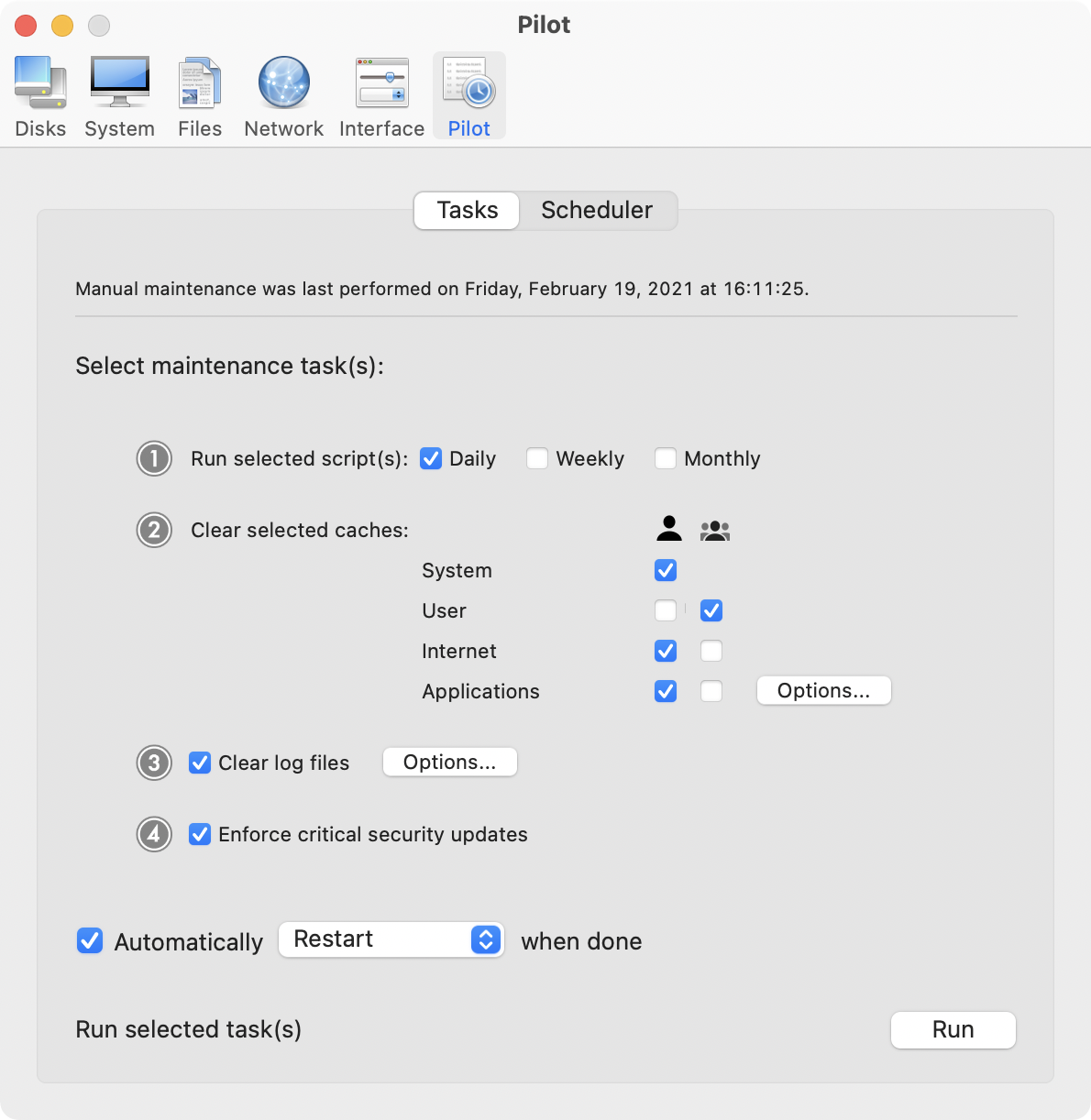
Screenshot 2: http://www.maintain.se/downloads/screenshots/screenshot3.png
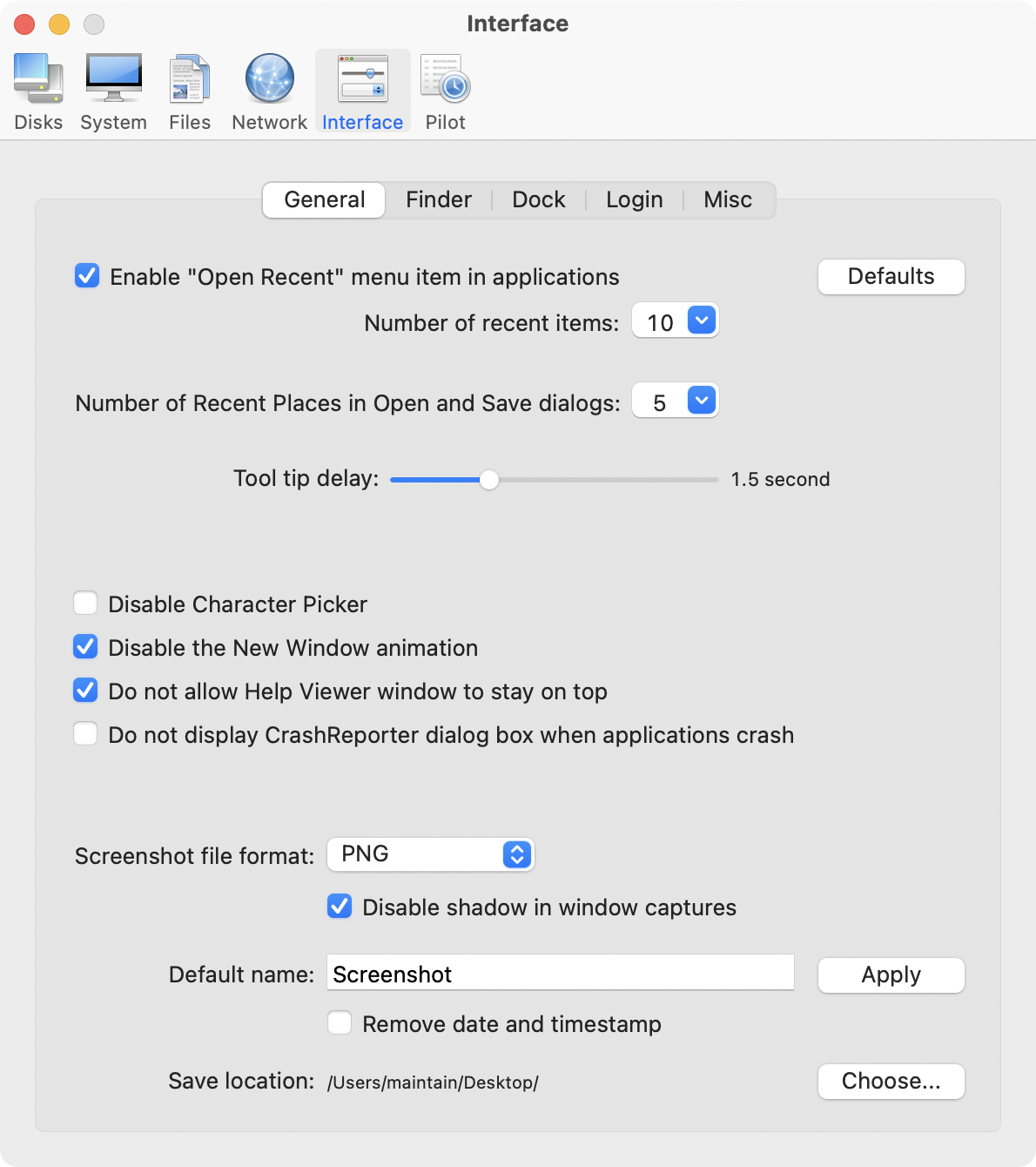
App Icon: http://www.maintain.se/downloads/screenshots/icon.png

Maintain develops tailored applications for Mac users. We work towards creating technical solutions which maintain your computer and make it as efficient and easy to use as possible. In addition, we offer comprehensive consultancy and support services which cover everything from operation of existing systems to purchase and implementation of new technical solutions. Among our clients are: Major League Baseball, Puma, The New York Times, Sony Pictures, Ericsson, Fortum, The City Of Calgary, Peak Performance, Loreal, Harvard University, Los Angeles Times, Swedish Film Institute, Weber, ESPN, Business Week, Swedish National Police Board, Norwegian Broadcasting Corporation, Getty Images, University of Texas, South Park Studios, CompUSA, bwin, Lockheed Martin, Defense Intelligence Agency, University of Michigan and hundred of thousands of Mac users around the world. Copyright (C) 2018 Maintain. All Rights Reserved. Apple, the Apple logo and Mac are registered trademarks of Apple Inc. in
the U.S. and/or other countries.
*******
Link To Article: https://prmac.com/release-id-83013.htm
*******
---------------------------------------------------------------------------------
Note that you can alter delivered distributions at any time.
Login to your account on prMac to alter your channel selection, or to opt-out at any time.
IGG Software Releases Banktivity 7
A new article has been published at prMac.
IGG Software Releases Banktivity 7 - Published on 09/25/18
Oregon based IGG Software today announces Banktivity 7, a new version of its popular personal financial manager for macOS. Banktivity aims to be the most complete personal finance software available on both macOS and mobile devices. The new version brings Dark Mode for a seamless experience with macOS Mojave, a new calendar view to see past and upcoming bills, real estate tracking with Zillow integration and stock lot selection.
Ashland, Oregon - IGG Software today released Banktivity 7, a new version of their personal finance manager. The new version brings Dark Mode for a seamless experience with macOS Mojave, a new calendar view to see past and upcoming bills, real estate tracking with Zillow integration and stock lot selection.
"Banktivity 7 brings some great features to make tracking your finances easier," says IGG Software's CEO, Ian Gillespie. "I also know people are just going to love Dark Mode in macOS Mojave."
New Features:
* Dark Mode makes Banktivity look perfect in Apple's new macOS Mojave operating system. Every screen was examined and redesigned to take full advantage of this great new way to see your finances.
* Real Estate Tracking allows you to link your loans and mortgages with the properties you own. If your home is in the United States you can automatically update its estimated value using Zillow**. A new view lets you see details about your property like available equity and its estimated value.
* Calendar lets customers see their past and upcoming bills and transactions. This feature, highly requested by customers, also gives a composite total balance of all of your accounts and weekly investment performance.
* Stock Lot Selection allows customers to choose which stocks they've sold by picking from their available lots. This is an important feature for those that don't want to use first-in first-out for their cost basis.
* Trial Version on the Mac App Store allows customers to download Banktivity 7 and try it for free for 30 days. Discounted upgrade pricing is also now available through the Mac App Store for the first time.
Additional Improvements:
Banktivity 7 improves reconciling by allowing customers to choose how to automatically include transactions in each statement. Search was also added to more places so customers can more easily filter their categories, payees, securities and tags. Banktivity features the ability to pay bills from within the app*, schedule transactions, setup budgets, track income, spending and savings rate and much more. Direct Access (purchased separately) and Direct Download allow customers to connect to over 10,000 different banks to download their financial data.
Pricing and Availability:
Banktivity 7 costs $69.99 USD. Customers upgrading from version 5 or 6 purchased either directly from IGG Software or the Mac App Store qualify for upgrade pricing of $34.99 USD. Banktivity 7 requires macOS High Sierra or macOS Mojave. For more information, please contact John Redfield.
* Bill Pay requires bank support for Bill Pay via OFX/Direct Download. Banks may charge an additional fee for this.
** Requires optional subscription to Banktivity's Direct Access service.
Banktivity 7 for macOS: https://www.iggsoftware.com/banktivity/
Banktivity for iPhone: https://www.iggsoftware.com/banktivity_for_iphone/
Banktivity for iPad: https://www.iggsoftware.com/banktivity_for_ipad/
IGG Software, Inc. develops the Banktivity family of personal finance management solutions exclusively for macOS and iOS, including Banktivity for Mac, Banktivity for iPhone, and Banktivity for iPad. Founded in 2003, the Ashland, Oregon based company is dedicated to creating intuitive, elegant and powerful applications, empowering users to budget better, save more, and invest to secure their financial future. All Material and Software (C) Copyright 2017 IGG Software, Inc. All Rights Reserved. Apple, the Apple logo, Mac OS X, iPhone, iPod, iPad and Macintosh are registered trademarks of Apple Inc. in the U.S. and/or other countries. Other trademarks and registered trademarks may be the property of their respective owners.
*******
Link To Article: https://prmac.com/release-id-83012.htm
*******
---------------------------------------------------------------------------------
Note that you can alter delivered distributions at any time.
Login to your account on prMac to alter your channel selection, or to opt-out at any time.
IGG Software Releases Banktivity 7 - Published on 09/25/18
Oregon based IGG Software today announces Banktivity 7, a new version of its popular personal financial manager for macOS. Banktivity aims to be the most complete personal finance software available on both macOS and mobile devices. The new version brings Dark Mode for a seamless experience with macOS Mojave, a new calendar view to see past and upcoming bills, real estate tracking with Zillow integration and stock lot selection.
Ashland, Oregon - IGG Software today released Banktivity 7, a new version of their personal finance manager. The new version brings Dark Mode for a seamless experience with macOS Mojave, a new calendar view to see past and upcoming bills, real estate tracking with Zillow integration and stock lot selection.
"Banktivity 7 brings some great features to make tracking your finances easier," says IGG Software's CEO, Ian Gillespie. "I also know people are just going to love Dark Mode in macOS Mojave."
New Features:
* Dark Mode makes Banktivity look perfect in Apple's new macOS Mojave operating system. Every screen was examined and redesigned to take full advantage of this great new way to see your finances.
* Real Estate Tracking allows you to link your loans and mortgages with the properties you own. If your home is in the United States you can automatically update its estimated value using Zillow**. A new view lets you see details about your property like available equity and its estimated value.
* Calendar lets customers see their past and upcoming bills and transactions. This feature, highly requested by customers, also gives a composite total balance of all of your accounts and weekly investment performance.
* Stock Lot Selection allows customers to choose which stocks they've sold by picking from their available lots. This is an important feature for those that don't want to use first-in first-out for their cost basis.
* Trial Version on the Mac App Store allows customers to download Banktivity 7 and try it for free for 30 days. Discounted upgrade pricing is also now available through the Mac App Store for the first time.
Additional Improvements:
Banktivity 7 improves reconciling by allowing customers to choose how to automatically include transactions in each statement. Search was also added to more places so customers can more easily filter their categories, payees, securities and tags. Banktivity features the ability to pay bills from within the app*, schedule transactions, setup budgets, track income, spending and savings rate and much more. Direct Access (purchased separately) and Direct Download allow customers to connect to over 10,000 different banks to download their financial data.
Pricing and Availability:
Banktivity 7 costs $69.99 USD. Customers upgrading from version 5 or 6 purchased either directly from IGG Software or the Mac App Store qualify for upgrade pricing of $34.99 USD. Banktivity 7 requires macOS High Sierra or macOS Mojave. For more information, please contact John Redfield.
* Bill Pay requires bank support for Bill Pay via OFX/Direct Download. Banks may charge an additional fee for this.
** Requires optional subscription to Banktivity's Direct Access service.
Banktivity 7 for macOS: https://www.iggsoftware.com/banktivity/
Banktivity for iPhone: https://www.iggsoftware.com/banktivity_for_iphone/
Banktivity for iPad: https://www.iggsoftware.com/banktivity_for_ipad/
IGG Software, Inc. develops the Banktivity family of personal finance management solutions exclusively for macOS and iOS, including Banktivity for Mac, Banktivity for iPhone, and Banktivity for iPad. Founded in 2003, the Ashland, Oregon based company is dedicated to creating intuitive, elegant and powerful applications, empowering users to budget better, save more, and invest to secure their financial future. All Material and Software (C) Copyright 2017 IGG Software, Inc. All Rights Reserved. Apple, the Apple logo, Mac OS X, iPhone, iPod, iPad and Macintosh are registered trademarks of Apple Inc. in the U.S. and/or other countries. Other trademarks and registered trademarks may be the property of their respective owners.
*******
Link To Article: https://prmac.com/release-id-83012.htm
*******
---------------------------------------------------------------------------------
Note that you can alter delivered distributions at any time.
Login to your account on prMac to alter your channel selection, or to opt-out at any time.
Easily Improve the Audio in Your Videos
A new article has been published at prMac.
Easily Improve the Audio in Your Videos - Published on 09/24/18
Future Moments releases the latest version of AudioFix: For Videos 1.7 for iOS devices, their instant audio app for videos, "AudioFix" with a brand-new function; "Live Music Filter". AudioFix instantly boosts and improves the audio in your videos. And now with this new filter it immediately improves the audio quality of all live music footage. Instantly improve, boost, extract or mute the audio in your videos. Import a video and AudioFix immediately cleans its sound and maximizes its volume.
Brooklyn, NY - Future Moments is proud to announce the release of AudioFix: For Videos 1.7 for iPhone, iPad, and iPod touch. AudioFix: For Videos can instantly improve, boost, extract or mute the audio in your videos. Import a video and AudioFix immediately cleans its sound and maximizes its volume. Free to download so you can hear the improvement and try before you export.
Press and hold 'compare' to hear the difference from your original. Press and hold on a filter to bypass it and so you only hear the volume change.
Also by Future Moments:
* MicSwap
* MicSwap Pro
* AudioFix Pro: For Videos
* AudioMaster: For Podcasts And Music
* AudioMaster Pro: For Podcasts And Music
FEATURES
* Automatically boosts the audio in your video
* Choose from 12 filters to clean your audio
* Extract the audio from your video
* Mute the audio in your video
* Save as new or compress for sharing
* Easily compare to your original video
* We never overwrite your original file
* Press a filter to bypass it
FILTER CHOICES
* Silence
* Live Music
* Audio Smoother
* Volume Booster
* Mild Wind Removal
* Hard Wind Removal
* Mild Hiss Removal
* Strong Hiss Removal
* Audio Fix Mild
* Audio Fix Medium
* Audio Fix Strong
* Audio Fix Ultra
AudioFix never overwrites your original. Save as a new video in the same resolution. You can also use Audio Fix to reduce the file size of your video for easier sharing with our compress video option. Use Audio Fix to remove all sound from your video. Lots of options!
For Youtubers, Instavideos, Vimeo, Youtube, Instagram etc..
Device Requirements:
* iPhone, iPad, and iPod touch
* Requires iOS 9.0 or later
* Universal Application
* 26.9 MB
Pricing and Availability:
AudioFix: For Videos 1.7 is free and is available worldwide exclusively through the Photo & Video category. Convenient in-app purchases are available.
AudioFix: For Videos 1.7: http://future-moments.com/audiofix
Download from App Store: https://itunes.apple.com/app/audio-fix/id1060647377
Screenshot: https://static1.squarespace.com/static/56731226d8af10a9410cc85e/t/5ab969ad1ae6cffc65f6aed9/152210067
Future Moments was formed in 2015 by Gary Levitt and Wim De Nood. As a musician, recording engineer and songwriter Gary Levitt released 5 records under the band name Setting Sun. Also a musician, Wim De Nood is an expert programmer who so far has created 15 iOS apps and 2 AppleTV apps. With a masters degree in Electrotechnical Engineering, Wim started his career as a backend web developer in 1999. He grew from a developer in a small company to product manager, and on to lead a large software team at ASML, one of the bigger multinationals in the Netherlands. Comprised of musicians and engineers, we make top-notch mobile apps for content creation. We've been written about in TechCrunch, Forbes, MacLife, Technical.ly Brooklyn and more. So far we've created MicSwap, MicSwap Pro, AudioFix: For Videos and AudioMaster. MicSwap was the first microphone modeler to hit the iTunes App Store and currently has over 350,000 downloads. The recently released AudioFix: for Videos and AudioMaster are
broadly useful apps that immediately provide the final step for audio in podcasts, videos, voiceover, music, etc. Whatever content you're creating, we have tools that easily improve your audio. All Material and Software (C) Copyright 2018 Future Moments. All Rights Reserved. Apple, the Apple logo, iPhone, iPod and iPad are registered trademarks of Apple Inc. in the U.S. and/or other countries. Other trademarks and registered trademarks may be the property of their respective owners.
*******
Link To Article: https://prmac.com/release-id-83011.htm
*******
---------------------------------------------------------------------------------
Note that you can alter delivered distributions at any time.
Login to your account on prMac to alter your channel selection, or to opt-out at any time.
Easily Improve the Audio in Your Videos - Published on 09/24/18
Future Moments releases the latest version of AudioFix: For Videos 1.7 for iOS devices, their instant audio app for videos, "AudioFix" with a brand-new function; "Live Music Filter". AudioFix instantly boosts and improves the audio in your videos. And now with this new filter it immediately improves the audio quality of all live music footage. Instantly improve, boost, extract or mute the audio in your videos. Import a video and AudioFix immediately cleans its sound and maximizes its volume.
Brooklyn, NY - Future Moments is proud to announce the release of AudioFix: For Videos 1.7 for iPhone, iPad, and iPod touch. AudioFix: For Videos can instantly improve, boost, extract or mute the audio in your videos. Import a video and AudioFix immediately cleans its sound and maximizes its volume. Free to download so you can hear the improvement and try before you export.
Press and hold 'compare' to hear the difference from your original. Press and hold on a filter to bypass it and so you only hear the volume change.
Also by Future Moments:
* MicSwap
* MicSwap Pro
* AudioFix Pro: For Videos
* AudioMaster: For Podcasts And Music
* AudioMaster Pro: For Podcasts And Music
FEATURES
* Automatically boosts the audio in your video
* Choose from 12 filters to clean your audio
* Extract the audio from your video
* Mute the audio in your video
* Save as new or compress for sharing
* Easily compare to your original video
* We never overwrite your original file
* Press a filter to bypass it
FILTER CHOICES
* Silence
* Live Music
* Audio Smoother
* Volume Booster
* Mild Wind Removal
* Hard Wind Removal
* Mild Hiss Removal
* Strong Hiss Removal
* Audio Fix Mild
* Audio Fix Medium
* Audio Fix Strong
* Audio Fix Ultra
AudioFix never overwrites your original. Save as a new video in the same resolution. You can also use Audio Fix to reduce the file size of your video for easier sharing with our compress video option. Use Audio Fix to remove all sound from your video. Lots of options!
For Youtubers, Instavideos, Vimeo, Youtube, Instagram etc..
Device Requirements:
* iPhone, iPad, and iPod touch
* Requires iOS 9.0 or later
* Universal Application
* 26.9 MB
Pricing and Availability:
AudioFix: For Videos 1.7 is free and is available worldwide exclusively through the Photo & Video category. Convenient in-app purchases are available.
AudioFix: For Videos 1.7: http://future-moments.com/audiofix
Download from App Store: https://itunes.apple.com/app/audio-fix/id1060647377
Screenshot: https://static1.squarespace.com/static/56731226d8af10a9410cc85e/t/5ab969ad1ae6cffc65f6aed9/152210067
Future Moments was formed in 2015 by Gary Levitt and Wim De Nood. As a musician, recording engineer and songwriter Gary Levitt released 5 records under the band name Setting Sun. Also a musician, Wim De Nood is an expert programmer who so far has created 15 iOS apps and 2 AppleTV apps. With a masters degree in Electrotechnical Engineering, Wim started his career as a backend web developer in 1999. He grew from a developer in a small company to product manager, and on to lead a large software team at ASML, one of the bigger multinationals in the Netherlands. Comprised of musicians and engineers, we make top-notch mobile apps for content creation. We've been written about in TechCrunch, Forbes, MacLife, Technical.ly Brooklyn and more. So far we've created MicSwap, MicSwap Pro, AudioFix: For Videos and AudioMaster. MicSwap was the first microphone modeler to hit the iTunes App Store and currently has over 350,000 downloads. The recently released AudioFix: for Videos and AudioMaster are
broadly useful apps that immediately provide the final step for audio in podcasts, videos, voiceover, music, etc. Whatever content you're creating, we have tools that easily improve your audio. All Material and Software (C) Copyright 2018 Future Moments. All Rights Reserved. Apple, the Apple logo, iPhone, iPod and iPad are registered trademarks of Apple Inc. in the U.S. and/or other countries. Other trademarks and registered trademarks may be the property of their respective owners.
*******
Link To Article: https://prmac.com/release-id-83011.htm
*******
---------------------------------------------------------------------------------
Note that you can alter delivered distributions at any time.
Login to your account on prMac to alter your channel selection, or to opt-out at any time.
IconFly 3.8 Greatly Simplifies Icons Creation, with DEMO
A new article has been published at prMac.
IconFly 3.8 Greatly Simplifies Icons Creation, with DEMO - Published on 09/24/18
Aperio Lux announces IconFly 3.8 for macOS. IconFly is an incredible time saver that allows users to create all the necessary icons in many formats for their Mac, iPhone, iPad, and Apple Watch applications as well as Web clip icons and favicon much more easier and faster, and save their time for more important things. All the icons created using IconFly are fully compatible with all the latest devices and OS created by Apple as well as with Human Interface Guideline.
Kiev, Ukraine - Aperio Lux is pleased to inform about the release of IconFly 3.8, an update to their elegant, powerful and easy-to-use tool for creating icons, that allows users to create all necessary app icons for Mac, iPhone, iPad, and Apple Watch applications. Moreover, IconFly 3.8 allows users to create icons for Android applications as well as Web clip icons and favicon.
Key Features:
* Supported image formats for icons creation: PNG, JPEG, TIFF, GIF, ICNS, PSD, EPS, AI, PDF
* Create appiconset and icons packages for your Mac, iPhone, iPad, and Apple Watch applications
* Supports app icons for iOS 7 and later (including latest iOS 12)
* Supports app icons for watchOS 1 - watchOS 5
* Supports app icons for iPhone (including latest iPhone Xs and iPhone Xs Max)
* Supports app icons for iPad (including latest iPad Pro)
* Create full icons package for Android applications
* Create favicon and Web Clip icons
* Create Mac app icons in the additional formats: iconset, ICNS
* Save icons as images in the following formats: PNG, JPEG, TIFF
IconFly is a great tool for creating different types of icons. IconFly can produce Standard (@1x), Retina (@2x) and Retina HD (@3x) icons.
First, Appiconset with all the correctly sized icons and properly formatted JSON file created by IconFly is fully compatible with Xcode 6.0 or later. Users can save it directly in Assets Catalog in their projects and use it right after that without any additional changes.
Second, QuickIcon allows users to create Mac, iPhone, iPad, and Apple Watch applications icons in one go. It's true also for Android app icons and Web icons.
Third, IconFly 3.8 supports the creation of app icons for both the new Apple Watch 40mm and Apple Watch 44mm as well as for both previously released Apple Watch 38mm and Apple Watch 42mm.
IconFly 3.8 exists in 4 editions: IconFly, IconFly Desktop, IconFly Mobile and IconFly Web.
System Requirements:
* OS X Lion 10.10 or later
* Intel 64-bit processor
* 11.1 MB
Pricing/Availability:
IconFly 3.8 is only $6.99 (USD). IconFly Desktop 3.7 is only $3.99 (USD). IconFly Mobile 3.8 is only $3.99 (USD). IconFly Web 3.7 is only $2.99 (USD). All editions of IconFly available worldwide through the Mac App Store in the Developer Tools category. Promo codes for review available on the request.
IconFly 3.8: http://iconfly.aperio-lux.com/
Purchase and Download (MAS): http://appstore.com/mac/IconFly
Download Demo: http://iconfly.aperio-lux.com/try/
Media Kit: http://aperio-lux.com/MediaKitArchives/IconFly_Media_Kit.zip
Aperio Lux is an independent team of enthusiasts and innovators from Ukraine. The Aperio Lux team develops ergonomic and user-friendly software for macOS and iOS. Copyright (C) 2011-2018. All Rights Reserved. Apple, the Apple logo, MacBook, OS X, iOS, Retina, iPhone, iPad, Apple Watch, and Mac are trademarks of Apple Inc., registered in the U.S. and other countries. Mac App Store is a service mark of Apple Inc.
*******
Link To Article: https://prmac.com/release-id-83010.htm
*******
---------------------------------------------------------------------------------
Note that you can alter delivered distributions at any time.
Login to your account on prMac to alter your channel selection, or to opt-out at any time.
IconFly 3.8 Greatly Simplifies Icons Creation, with DEMO - Published on 09/24/18
Aperio Lux announces IconFly 3.8 for macOS. IconFly is an incredible time saver that allows users to create all the necessary icons in many formats for their Mac, iPhone, iPad, and Apple Watch applications as well as Web clip icons and favicon much more easier and faster, and save their time for more important things. All the icons created using IconFly are fully compatible with all the latest devices and OS created by Apple as well as with Human Interface Guideline.
Kiev, Ukraine - Aperio Lux is pleased to inform about the release of IconFly 3.8, an update to their elegant, powerful and easy-to-use tool for creating icons, that allows users to create all necessary app icons for Mac, iPhone, iPad, and Apple Watch applications. Moreover, IconFly 3.8 allows users to create icons for Android applications as well as Web clip icons and favicon.
Key Features:
* Supported image formats for icons creation: PNG, JPEG, TIFF, GIF, ICNS, PSD, EPS, AI, PDF
* Create appiconset and icons packages for your Mac, iPhone, iPad, and Apple Watch applications
* Supports app icons for iOS 7 and later (including latest iOS 12)
* Supports app icons for watchOS 1 - watchOS 5
* Supports app icons for iPhone (including latest iPhone Xs and iPhone Xs Max)
* Supports app icons for iPad (including latest iPad Pro)
* Create full icons package for Android applications
* Create favicon and Web Clip icons
* Create Mac app icons in the additional formats: iconset, ICNS
* Save icons as images in the following formats: PNG, JPEG, TIFF
IconFly is a great tool for creating different types of icons. IconFly can produce Standard (@1x), Retina (@2x) and Retina HD (@3x) icons.
First, Appiconset with all the correctly sized icons and properly formatted JSON file created by IconFly is fully compatible with Xcode 6.0 or later. Users can save it directly in Assets Catalog in their projects and use it right after that without any additional changes.
Second, QuickIcon allows users to create Mac, iPhone, iPad, and Apple Watch applications icons in one go. It's true also for Android app icons and Web icons.
Third, IconFly 3.8 supports the creation of app icons for both the new Apple Watch 40mm and Apple Watch 44mm as well as for both previously released Apple Watch 38mm and Apple Watch 42mm.
IconFly 3.8 exists in 4 editions: IconFly, IconFly Desktop, IconFly Mobile and IconFly Web.
System Requirements:
* OS X Lion 10.10 or later
* Intel 64-bit processor
* 11.1 MB
Pricing/Availability:
IconFly 3.8 is only $6.99 (USD). IconFly Desktop 3.7 is only $3.99 (USD). IconFly Mobile 3.8 is only $3.99 (USD). IconFly Web 3.7 is only $2.99 (USD). All editions of IconFly available worldwide through the Mac App Store in the Developer Tools category. Promo codes for review available on the request.
IconFly 3.8: http://iconfly.aperio-lux.com/
Purchase and Download (MAS): http://appstore.com/mac/IconFly
Download Demo: http://iconfly.aperio-lux.com/try/
Media Kit: http://aperio-lux.com/MediaKitArchives/IconFly_Media_Kit.zip
Aperio Lux is an independent team of enthusiasts and innovators from Ukraine. The Aperio Lux team develops ergonomic and user-friendly software for macOS and iOS. Copyright (C) 2011-2018. All Rights Reserved. Apple, the Apple logo, MacBook, OS X, iOS, Retina, iPhone, iPad, Apple Watch, and Mac are trademarks of Apple Inc., registered in the U.S. and other countries. Mac App Store is a service mark of Apple Inc.
*******
Link To Article: https://prmac.com/release-id-83010.htm
*******
---------------------------------------------------------------------------------
Note that you can alter delivered distributions at any time.
Login to your account on prMac to alter your channel selection, or to opt-out at any time.
Noodlesoft Releases Hazel 4.3 With Mojave Support
A new article has been published at prMac.
Noodlesoft Releases Hazel 4.3 With Mojave Support - Published on 09/24/18
Noodlesoft today releases Hazel 4.3 an important update to their popular housekeeping utility for macOS. Using Hazel's powerful rule engine, users can easily create workflows that keep files organized automatically. Hazel also features options for managing your Trash and includes an intuitive application uninstaller. Hazel 4.3's interface has been updated to fully support Mojave's new Dark Mode, and also includes various improvements, tweaks and fixes to the interface for all versions of macOS.
New York, New York - Noodlesoft is proud to announce the availability of Hazel 4.3 for Mac OS X. Hazel 4.3 adds support for Mojave, Apple's latest release of macOS, as well as other new features and fixes.
Hazel 4.3's interface has been updated to fully support Mojave's new Dark Mode, with new colors, icons, and other touches to make Hazel look right at home on Apple's new OS. This version also includes various improvements, tweaks and fixes to the interface for all versions of macOS, including the ability to take advantage of wider System Preferences window used in certain regions. Hazel is also ready for the new privacy protections added in Mojave.
Other new features include the ability to relocate folders, allowing for replacement of folders across all your rules, alleviating having to manually reset folders on all your rules. Hazel also includes numerous other fixes and enhancements.
Version 4.3 is a free update for registered 4.0 users. Users with licenses for version 3 or earlier can upgrade for $10 (USD).
About Hazel:
Hazel is a housekeeper for your folders and files. Using Hazel's powerful rule engine, you can easily create workflows that keep your files organized automatically. Hazel also features options for managing your Trash and includes an intuitive application uninstaller.
Hazel 4.3: https://www.noodlesoft.com
Download Hazel: https://www.noodlesoft.com/Products/Hazel/download/
Purchase: https://www.noodlesoft.com/store
Screenshot: https://www.noodlesoft.com/kb/uploads/main.png
App Icon: https://www.noodlesoft.com/kb/uploads/Hazel-256x256.png
Noodlesoft, LLC is an independent developer of software for macOS. All Material and Software (C) Copyright 2018 Noodlesoft, LLC. All Rights Reserved. Apple, the Apple logo, macOS and Macintosh are registered trademarks of Apple Inc. in the U.S. and/or other countries. Other trademarks and registered trademarks may be the property of their respective owners.
*******
Link To Article: https://prmac.com/release-id-83009.htm
*******
---------------------------------------------------------------------------------
Note that you can alter delivered distributions at any time.
Login to your account on prMac to alter your channel selection, or to opt-out at any time.
Noodlesoft Releases Hazel 4.3 With Mojave Support - Published on 09/24/18
Noodlesoft today releases Hazel 4.3 an important update to their popular housekeeping utility for macOS. Using Hazel's powerful rule engine, users can easily create workflows that keep files organized automatically. Hazel also features options for managing your Trash and includes an intuitive application uninstaller. Hazel 4.3's interface has been updated to fully support Mojave's new Dark Mode, and also includes various improvements, tweaks and fixes to the interface for all versions of macOS.
New York, New York - Noodlesoft is proud to announce the availability of Hazel 4.3 for Mac OS X. Hazel 4.3 adds support for Mojave, Apple's latest release of macOS, as well as other new features and fixes.
Hazel 4.3's interface has been updated to fully support Mojave's new Dark Mode, with new colors, icons, and other touches to make Hazel look right at home on Apple's new OS. This version also includes various improvements, tweaks and fixes to the interface for all versions of macOS, including the ability to take advantage of wider System Preferences window used in certain regions. Hazel is also ready for the new privacy protections added in Mojave.
Other new features include the ability to relocate folders, allowing for replacement of folders across all your rules, alleviating having to manually reset folders on all your rules. Hazel also includes numerous other fixes and enhancements.
Version 4.3 is a free update for registered 4.0 users. Users with licenses for version 3 or earlier can upgrade for $10 (USD).
About Hazel:
Hazel is a housekeeper for your folders and files. Using Hazel's powerful rule engine, you can easily create workflows that keep your files organized automatically. Hazel also features options for managing your Trash and includes an intuitive application uninstaller.
Hazel 4.3: https://www.noodlesoft.com
Download Hazel: https://www.noodlesoft.com/Products/Hazel/download/
Purchase: https://www.noodlesoft.com/store
Screenshot: https://www.noodlesoft.com/kb/uploads/main.png
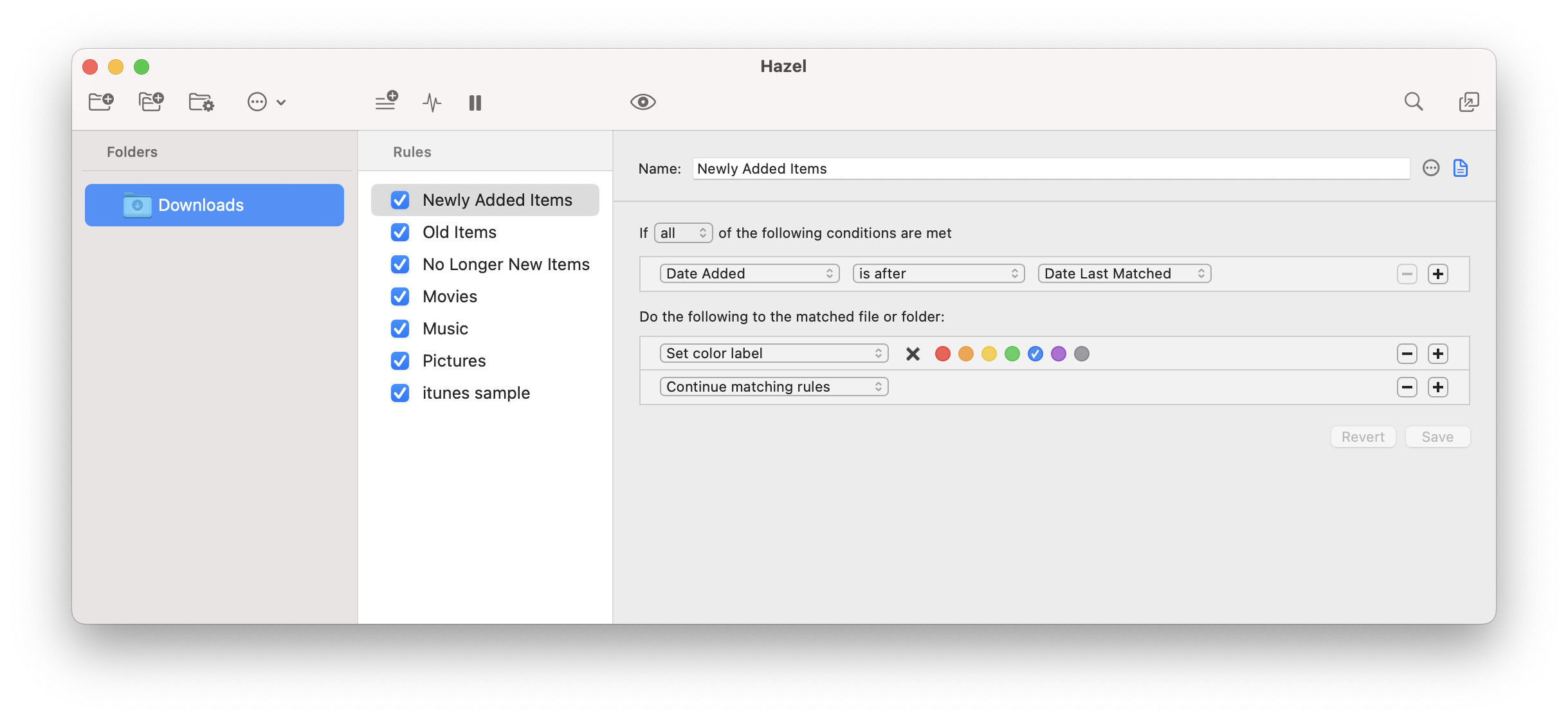
App Icon: https://www.noodlesoft.com/kb/uploads/Hazel-256x256.png

Noodlesoft, LLC is an independent developer of software for macOS. All Material and Software (C) Copyright 2018 Noodlesoft, LLC. All Rights Reserved. Apple, the Apple logo, macOS and Macintosh are registered trademarks of Apple Inc. in the U.S. and/or other countries. Other trademarks and registered trademarks may be the property of their respective owners.
*******
Link To Article: https://prmac.com/release-id-83009.htm
*******
---------------------------------------------------------------------------------
Note that you can alter delivered distributions at any time.
Login to your account on prMac to alter your channel selection, or to opt-out at any time.
Pterm for Mac 9.1.0 has been released
A new article has been published at prMac.
Pterm for Mac 9.1.0 has been released - Published on 09/24/18
California based Wine Reviews today announces Pterm for Mac 9.1.0 for MacOS. Version 9.1.0 is another major release, Pterm is now 64bit macOS Mojave compatiable. Pterm and Putty are the Best Terminal Emulators available today. It Supports different types of Network Protocols such as SSH, FTP, SCP, Telnet and more. Official versions of Pterm and Putty are available on Unix-like platforms, and now it's widely available for Mac systems running OSX 10.12.3 or higher.
San Jose, California - Wine Reviews released Pterm for Mac 9.1.0 for MacOS today. Pterm 9.1.0 is another major release. We have fixed a lot of minor bugs and updated Pterm to be 64bit macOS Mojave compatible. Please see the full change-log below for all the exciting changes in this release.
Putty is one of the Best Terminal Emulators available today. It Supports different types of Network Protocols such as SSH, FTP, SCP, Telnet etc. In Windows it is used as SSH Client to connect to Your Linux server or for some other purpose But what will you do if you are on Mac? You might be thinking, Is there any Software like Putty for Mac Available? The answer is Yes! With the help of some other Software's we can Use putty on MacOS although Putty is used widely on Windows Platform. Official Versions of Putty are available on Unix like Platforms, and now it's widely available for Mac systems running OSX 10.12.3 or higher.
SSH is available by default in Mac and Linux or Unix. Although you can use terminal for SSH connections still there are some benefits in using Putty such as Other clients don't keep connections alive whereas Putty does. Also it is cool to use Putty as your SSH client if you are doing some VMware ESXi or CISCO Stuffs, transferring files, managing files on a server or whatever.
Supported Protocols:
* Telnet
* FTP
* SSH
* SCP
Version 9.1.0 New Features:
* Now 64bit macOS Mojave compatible
* A lot of minor bug fixes
Pricing and Availability:
The cost of Putty is only $15.00 at this time, Pterm 64bit stand alone cost $19.95 per license. Anyone who has purchased Pterm or Putty in the past three months is entitled to a free upgrade. Pterm and Putty comes with three months of upgrades and of course a 14-day money back guarantee. We now use FastSpring as our preferred storefront, you can pay with Credit / Debit Cards, PayPal, Amazon payments, Wire Transfer etc. etc. This store is very secure, simple and fast.
Wine Reviews: https://winonmacs.com/
Pterm for Mac 9.1.0: https://winonmacs.com/2018/09/16/pterm-for-mac-9-1-0-has-been-released-with-macos-mojave-support/
Purchase and Download: https://winereviews.onfastspring.com/
Screenshot 1: https://blogger.googleusercontent.com/img/b/R29vZ2xl/AVvXsEiwOFZTm9HO9u7_XDmPrSxgqR9hTz-u-U_oOQdTVceEgmnZ8IXP8BzHYWw6pcLT7Rg3MCE1UDNpXU5O1yOmgzcMJZyqdG2_LC8JQhQLxK0HT_Ha25d6Jht-f5g2XGeHAxlmOHAh9NJ3oh5L/s1600/Putty_Mac_New_Window.jpg
Screenshot 2: https://blogger.googleusercontent.com/img/b/R29vZ2xl/AVvXsEjlVVDrzQjeladY6hZD7BF14ZtdbPlZA07_DspVPdGHxVEuPOg3U6hsTMqeF_h_6ZOc_HrM5rpIMPwBEw1QuqQMmOoyi6r9QXNoVC0GqXSjZj-h24f5keX6eHJsHNDiQQ4M5mrE9lV3BlTx/s400/Putty_Mac_Quit_Pterm.jpg
There is a multitude of software developed only for the Windows operating system and even when software vendors port their applications to another platform, generally it lacks features that the Windows version contains. The only solution these developers face is to have access to both systems for testing which leads to increased infrastructure demands, and wasted project resources. Our goal is to have native ports of essential Windows tools and applications made available for MacOS users. All Material and Software (C) Copyright 2018 Wine Reviews. All Rights Reserved. Apple, the Apple logo, Macintosh and Mac OS X are registered trademarks of Apple Inc. in the U.S. and/or other countries. Other trademarks and registered trademarks may be the property of their respective owners.
*******
Link To Article: https://prmac.com/release-id-83007.htm
*******
---------------------------------------------------------------------------------
Note that you can alter delivered distributions at any time.
Login to your account on prMac to alter your channel selection, or to opt-out at any time.
Pterm for Mac 9.1.0 has been released - Published on 09/24/18
California based Wine Reviews today announces Pterm for Mac 9.1.0 for MacOS. Version 9.1.0 is another major release, Pterm is now 64bit macOS Mojave compatiable. Pterm and Putty are the Best Terminal Emulators available today. It Supports different types of Network Protocols such as SSH, FTP, SCP, Telnet and more. Official versions of Pterm and Putty are available on Unix-like platforms, and now it's widely available for Mac systems running OSX 10.12.3 or higher.
San Jose, California - Wine Reviews released Pterm for Mac 9.1.0 for MacOS today. Pterm 9.1.0 is another major release. We have fixed a lot of minor bugs and updated Pterm to be 64bit macOS Mojave compatible. Please see the full change-log below for all the exciting changes in this release.
Putty is one of the Best Terminal Emulators available today. It Supports different types of Network Protocols such as SSH, FTP, SCP, Telnet etc. In Windows it is used as SSH Client to connect to Your Linux server or for some other purpose But what will you do if you are on Mac? You might be thinking, Is there any Software like Putty for Mac Available? The answer is Yes! With the help of some other Software's we can Use putty on MacOS although Putty is used widely on Windows Platform. Official Versions of Putty are available on Unix like Platforms, and now it's widely available for Mac systems running OSX 10.12.3 or higher.
SSH is available by default in Mac and Linux or Unix. Although you can use terminal for SSH connections still there are some benefits in using Putty such as Other clients don't keep connections alive whereas Putty does. Also it is cool to use Putty as your SSH client if you are doing some VMware ESXi or CISCO Stuffs, transferring files, managing files on a server or whatever.
Supported Protocols:
* Telnet
* FTP
* SSH
* SCP
Version 9.1.0 New Features:
* Now 64bit macOS Mojave compatible
* A lot of minor bug fixes
Pricing and Availability:
The cost of Putty is only $15.00 at this time, Pterm 64bit stand alone cost $19.95 per license. Anyone who has purchased Pterm or Putty in the past three months is entitled to a free upgrade. Pterm and Putty comes with three months of upgrades and of course a 14-day money back guarantee. We now use FastSpring as our preferred storefront, you can pay with Credit / Debit Cards, PayPal, Amazon payments, Wire Transfer etc. etc. This store is very secure, simple and fast.
Wine Reviews: https://winonmacs.com/
Pterm for Mac 9.1.0: https://winonmacs.com/2018/09/16/pterm-for-mac-9-1-0-has-been-released-with-macos-mojave-support/
Purchase and Download: https://winereviews.onfastspring.com/
Screenshot 1: https://blogger.googleusercontent.com/img/b/R29vZ2xl/AVvXsEiwOFZTm9HO9u7_XDmPrSxgqR9hTz-u-U_oOQdTVceEgmnZ8IXP8BzHYWw6pcLT7Rg3MCE1UDNpXU5O1yOmgzcMJZyqdG2_LC8JQhQLxK0HT_Ha25d6Jht-f5g2XGeHAxlmOHAh9NJ3oh5L/s1600/Putty_Mac_New_Window.jpg

Screenshot 2: https://blogger.googleusercontent.com/img/b/R29vZ2xl/AVvXsEjlVVDrzQjeladY6hZD7BF14ZtdbPlZA07_DspVPdGHxVEuPOg3U6hsTMqeF_h_6ZOc_HrM5rpIMPwBEw1QuqQMmOoyi6r9QXNoVC0GqXSjZj-h24f5keX6eHJsHNDiQQ4M5mrE9lV3BlTx/s400/Putty_Mac_Quit_Pterm.jpg

There is a multitude of software developed only for the Windows operating system and even when software vendors port their applications to another platform, generally it lacks features that the Windows version contains. The only solution these developers face is to have access to both systems for testing which leads to increased infrastructure demands, and wasted project resources. Our goal is to have native ports of essential Windows tools and applications made available for MacOS users. All Material and Software (C) Copyright 2018 Wine Reviews. All Rights Reserved. Apple, the Apple logo, Macintosh and Mac OS X are registered trademarks of Apple Inc. in the U.S. and/or other countries. Other trademarks and registered trademarks may be the property of their respective owners.
*******
Link To Article: https://prmac.com/release-id-83007.htm
*******
---------------------------------------------------------------------------------
Note that you can alter delivered distributions at any time.
Login to your account on prMac to alter your channel selection, or to opt-out at any time.
Subscribe to:
Posts (Atom)