A new article has been published at prMac.
VideoDuke - a dedicated video downloader for Mac - Published on 10/16/18
Frankfurt based Eltima Software today released VideoDuke 1.0, their new application for easy video downloading on macOS with only a URL at hand. VideoDuke can download video files from a great variety of popular websites directly to a user's hard drive. The app also offers downloading of streaming videos. VideoDuke operates at a good speed rate with high-quality results. The application offers a convenient option of bookmarking favorite content for quick access at any time.
Frankfurt, Germany - Eltima Software is pleased to announce the release of VideoDuke 1.0, a new product in their range of user-friendly media apps for Mac OS. VideoDuke is a dedicated video downloader for macOS that supports a multitude of websites and can download various types of videos from them in different resolutions. Support for streaming videos means one can save live streams of sports events, video games, educational programs, etc. on their computer.
VideoDuke can download videos embedded via HTML5 and those streamed over RTMP. As well as many other popular platforms, YouTube is well supported by VideoDuke. This means one can save videos in a desired quality as well as simply extract audio files from any YouTube video.
VideDuke can operate in two modes: simple and advanced. The names speak for themselves - Simple mode is laconic, only has a handful of controls to allow for quick and easy downloading in the least amount of clicks. In Advanced mode more complex options are available: the app will display all resources fetched from the web page including the video itself, audio, Flash animation, images, etc. If you need to download any of the mentioned above, you can easily do so by clicking the Download button next to each item.
You can switch between the tabs of the app to filter the content you are interested in.
If a video has subtitles or closed captions in different languages, you can save them to your computer along with the video. The subtitles will be downloaded as an SRT file that can be played by the majority of video players or embedded, depends on the original type.
VideoDuke offers a convenient option of bookmarking favorite content for quick access at any time.
By integrating VideoDuke with your web browser you get to download videos even faster: whenever you see something worth saving on your Mac, click the app bookmark to initiate the download.
VideoDuke is an intuitive and straightforward application that will download a large variety of file types from popular web resources mainly targeting video content. The team behind VideoDuke is knowledgeable and striving to deliver the best product to its customers. As a result users don't just get the software, they also receive a helpful tech support as part of the package.
VideoDuke 1.0: https://mac.eltima.com/video-downloader.html
Download VideoDuke: https://mac.eltima.com/videoduke-download.html
Purchase VideoDuke: https://mac.eltima.com/video-downloader-purchase.html
Screenshot: https://mac.eltima.com/imgnew/products/vd/screenSimpleModeHolder.jpg
Eltima Software is a global software Development Company, specializing primarily in serial communication, mobile and flash software for Mac OS and Windows. Eltima Software delivers top-notch solutions having a friendly team of 40 professionals. Copyright (C) 2018 Eltima Software. All Rights Reserved. Apple, the Apple logo and Macintosh are registered trademarks of Apple Inc. in the U.S. and/or other countries.
*******
Link To Article: https://prmac.com/release-id-83062.htm
*******
---------------------------------------------------------------------------------
Note that you can alter delivered distributions at any time.
Login to your account on prMac to alter your channel selection, or to opt-out at any time.


Gamers Flood the Pixel Dance Floor in Block Party for iOS
A new article has been published at prMac.
Gamers Flood the Pixel Dance Floor in Block Party for iOS - Published on 10/16/18
London-based Indie development team Pixamo today announces Block Party 1.0, their dazzling musical puzzler for iOS devices. Players run the best pixel parties New York has ever seen. The party starts with an empty dance floor, and it's the player's job to keep the action going by placing dancers to make lines to clear spots for more dancers. Get enough partygoers out on on the floor, and it's on to the next level, where the action gets crazier.
London, England - Independent developer Pixamo is today proud to announce the release and immediate availability of Block Party 1.0, their dazzling musical puzzler for iPhone iPad, and iPod touch devices. Block Party is an easy to learn, yet tricky to master, puzzle challenge. Players start with an empty dance floor and must strategically place partygoers to complete lines to clear space on the floor for more dancers.
Players work to build a reputation as the best pixel party master New York City has ever seen. Throw parties on forty pixel-packed levels, ranging from Manhattan to The Bronx. As the dance floor begins to fill, players must place each group of revelers to fit them onto the floor, clearing space as they create lines. As each level is completed, the parties get crazier and the dance groups get tougher to clear from the floor. However, run out of room on the dance floor and it's game over.
"Block Party is a stylish and unique take on the traditional 'fill the lines' puzzles that are so popular with players of all ages," says Pixamo CEO Morgan Davies. "The game features amazing pixel-based graphics and fantastic music. The graphics were created by artists, Cocefi and Kirokaze, and the music was composed by Kick Lee and Katrina Stone, amongst others."
The Game's Great Features Include:
* 40 levels
* Addictive gameplay
* Endless play on each level
* Awesome retro pixel graphics
* Fantastic music
* Pixamo rewards
* Free, with no in-app purchases
Party goers come to request help throwing parties for their friend and celebrities, with each party taking place on a different dance floor. When VIP celebrities show up, and players squeeze them onto the dance floor, they get to actually tweet in real life about the celeb's appearance at the block party.
Real celebrities and their Twitter handles are included in the game, with such Twitter favorites as Chance the Rapper, will.i.am, Bella Thorne, and many others hitting the dance floor. Players can even tweet a request to be a VIP, possibly getting to make a future appearance in the game.
BlockParty also offers a unique Pixamo Rewards system, where completing tasks in Block Party will earn rewards for use in other Pixamo games, including "Pizza Dog" and "Let Them Eat Slime!" This allows players to level up their total Pixamo Ranking.
"Block Party puts a fun spin on the traditional puzzle games players know so well, by adding a fun musical dancing twist to the action," continues Morgan. "Plus, the game's unique point of view adds to the challenge, keeping your interest as your party throwing reputation continues to grow!"
Pixamo invites iOS device owners to hit the dance floor and party with the VIPs at the best pixel parties ever thrown. Just make sure to squeeze everyone onto the dance floor, or it's party over.
Device Requirements:
* iPhone, iPad, and iPod touch
* Requires iOS 10.0 or later
* Universal Application
* 123.4 MB
Pricing and Availability:
Block Party 1.0 is free and is available worldwide exclusively through the App Store in the Games category.
Pixamo: http://www.pixamogames.com/
Block Party 1.0: http://www.pixamogames.com/block-party/
Download from App Store: https://itunes.apple.com/app/id1378591900
Screenshot 1: http://www.pixamogames.com/wp-content/uploads/2018/10/0x0ss.jpg
Screenshot 2: http://www.pixamogames.com/wp-content/uploads/2018/10/0x0ss-2.jpg
Screenshot 3: http://www.pixamogames.com/wp-content/uploads/2018/10/0x0ss-3.jpg
Pixamo is a new mobile game studio based in London, founded by Morgan Davies. October 2018 marks the release of Pixamo's first games. Targeting iOS, they are Block Party, Pizza Dog and Let Them Eat Slime! Pixamo's founder Morgan Davies is a seasoned Game Developer. He has previously released top 10 iOS games including Killer Pool, Nano Rally and Snow Fight, and others. All Material and Software (C) Copyright 2018 Pixamo. All Rights Reserved. Apple, the Apple logo, iPhone, iPod and iPad are registered trademarks of Apple Inc. in the U.S. and/or other countries. Other trademarks and registered trademarks may be the property of their respective owners.
*******
Link To Article: https://prmac.com/release-id-83061.htm
*******
---------------------------------------------------------------------------------
Note that you can alter delivered distributions at any time.
Login to your account on prMac to alter your channel selection, or to opt-out at any time.
Gamers Flood the Pixel Dance Floor in Block Party for iOS - Published on 10/16/18
London-based Indie development team Pixamo today announces Block Party 1.0, their dazzling musical puzzler for iOS devices. Players run the best pixel parties New York has ever seen. The party starts with an empty dance floor, and it's the player's job to keep the action going by placing dancers to make lines to clear spots for more dancers. Get enough partygoers out on on the floor, and it's on to the next level, where the action gets crazier.
London, England - Independent developer Pixamo is today proud to announce the release and immediate availability of Block Party 1.0, their dazzling musical puzzler for iPhone iPad, and iPod touch devices. Block Party is an easy to learn, yet tricky to master, puzzle challenge. Players start with an empty dance floor and must strategically place partygoers to complete lines to clear space on the floor for more dancers.
Players work to build a reputation as the best pixel party master New York City has ever seen. Throw parties on forty pixel-packed levels, ranging from Manhattan to The Bronx. As the dance floor begins to fill, players must place each group of revelers to fit them onto the floor, clearing space as they create lines. As each level is completed, the parties get crazier and the dance groups get tougher to clear from the floor. However, run out of room on the dance floor and it's game over.
"Block Party is a stylish and unique take on the traditional 'fill the lines' puzzles that are so popular with players of all ages," says Pixamo CEO Morgan Davies. "The game features amazing pixel-based graphics and fantastic music. The graphics were created by artists, Cocefi and Kirokaze, and the music was composed by Kick Lee and Katrina Stone, amongst others."
The Game's Great Features Include:
* 40 levels
* Addictive gameplay
* Endless play on each level
* Awesome retro pixel graphics
* Fantastic music
* Pixamo rewards
* Free, with no in-app purchases
Party goers come to request help throwing parties for their friend and celebrities, with each party taking place on a different dance floor. When VIP celebrities show up, and players squeeze them onto the dance floor, they get to actually tweet in real life about the celeb's appearance at the block party.
Real celebrities and their Twitter handles are included in the game, with such Twitter favorites as Chance the Rapper, will.i.am, Bella Thorne, and many others hitting the dance floor. Players can even tweet a request to be a VIP, possibly getting to make a future appearance in the game.
BlockParty also offers a unique Pixamo Rewards system, where completing tasks in Block Party will earn rewards for use in other Pixamo games, including "Pizza Dog" and "Let Them Eat Slime!" This allows players to level up their total Pixamo Ranking.
"Block Party puts a fun spin on the traditional puzzle games players know so well, by adding a fun musical dancing twist to the action," continues Morgan. "Plus, the game's unique point of view adds to the challenge, keeping your interest as your party throwing reputation continues to grow!"
Pixamo invites iOS device owners to hit the dance floor and party with the VIPs at the best pixel parties ever thrown. Just make sure to squeeze everyone onto the dance floor, or it's party over.
Device Requirements:
* iPhone, iPad, and iPod touch
* Requires iOS 10.0 or later
* Universal Application
* 123.4 MB
Pricing and Availability:
Block Party 1.0 is free and is available worldwide exclusively through the App Store in the Games category.
Pixamo: http://www.pixamogames.com/
Block Party 1.0: http://www.pixamogames.com/block-party/
Download from App Store: https://itunes.apple.com/app/id1378591900
Screenshot 1: http://www.pixamogames.com/wp-content/uploads/2018/10/0x0ss.jpg

Screenshot 2: http://www.pixamogames.com/wp-content/uploads/2018/10/0x0ss-2.jpg

Screenshot 3: http://www.pixamogames.com/wp-content/uploads/2018/10/0x0ss-3.jpg

Pixamo is a new mobile game studio based in London, founded by Morgan Davies. October 2018 marks the release of Pixamo's first games. Targeting iOS, they are Block Party, Pizza Dog and Let Them Eat Slime! Pixamo's founder Morgan Davies is a seasoned Game Developer. He has previously released top 10 iOS games including Killer Pool, Nano Rally and Snow Fight, and others. All Material and Software (C) Copyright 2018 Pixamo. All Rights Reserved. Apple, the Apple logo, iPhone, iPod and iPad are registered trademarks of Apple Inc. in the U.S. and/or other countries. Other trademarks and registered trademarks may be the property of their respective owners.
*******
Link To Article: https://prmac.com/release-id-83061.htm
*******
---------------------------------------------------------------------------------
Note that you can alter delivered distributions at any time.
Login to your account on prMac to alter your channel selection, or to opt-out at any time.
iFunia YouTube Downloader 5.2.1- Get Faster, More Effective Downloads
A new article has been published at prMac.
iFunia YouTube Downloader 5.2.1- Get Faster, More Effective Downloads - Published on 10/12/18
Developer iFunia announces iFunia YouTube Downloader has been updated to version 5.2.1, which greatly solved download failed errors and increased the chances of successful downloads. With uncluttered interface and advanced technology, iFunia YouTube Downloader effortlessly makes for free video downloads and management. It saves downloaded videos in MP4 format and in a resolution of your choice.
Qingdao, China - iFunia Studio, a industry-leader of multimedia software provider, announced the release of YouTube Downloader 5.2.1 for macOS - one of the best tools around for quick, fuss-free video downloads. The new version solved partial download failed problems, which increasing the chances of successful downloads.
With uncluttered interface and advanced technology, iFunia YouTube Downloader effortlessly makes for free video downloads and management. It saves downloaded videos in MP4 format and in a resolution of your choice. Plus, in the last version, YouTube Downloader upgrade to support MP3 output format, one can extract just the sound file.
Not to live up to the expectations of old users, the software from iFunia has been insisting on upgrading. The developers made hard efforts on iFunia YouTube Downloader 5.2.1, and are committed to creating a more practical YouTube downloader to get the job done well.
Highlights:
* Automatically identify the copied video link
* Drag-n-drop support
* Download multiple videos & audios simultaneously
* Support dozens of video sites
* Download entire YouTube playlists
* 2K, 4K, 8K HD videos support
* Perform conversion to MP4, MP3
* Download video for iPhone, iPad, iPod, etc.
* Display video duration
* Show download process
* Cancel download at any time
* No ads and pop-ups
* Super fast download speed
Main Features:
* Batch Download Online Videos
It lets you download high-resolution videos from more than 1000 websites, including but not limited to Facebook, MTV, BBC, Vine, etc. You can play the downloaded videos on most potable devices.
* Download YouTube Playlist
It supports to download of all videos of a playlist. The app automatically detects the artist, the title and the thumbnail each video. If you encounter a video that you don't want to download, cancel the tick in the checkbox.
* Save Downloaded Videos
You can save your downloaded videos in original quality, usually in MP4 format, without any modifications. There is no need to have Internet connection to play those videos you saved.
Price and Availability:
iFunia YouTube Downloader 5.2.1 is currently available on iFunia Studio's official website. You can upgrade free version (only allow to download 3 videos) to pro at $19.99 for 1 Mac/lifetime license or at $29.99 for 2 Mac/lifetime license. In short, the more you buy, the more affordable.
A free version is open to all users. To get more information about this newly released iFunia YouTube Downloader, please visit the iFunia YouTube Downloader for Mac website.
iFunia Studio: https://www.ifunia.com
iFunia YouTube Downloader for Mac : https://www.ifunia.com/free-youtube-downloader-mac.html
Direct Download Link: https://www.ifunia.com/downloads/ifunia-free-youtube-downloader.dmg
Purchase Link: https://www.ifunia.com/free-youtube-downloader-mac.html#s1
Screenshot: https://www.ifunia.com/images/youtube-new/new_scroll9.png
App Icon: https://www.ifunia.com/images/icon/youtube-icon76.png
iFunia was founded by and for people who are passionate about Apple. With a focus on the Mac platform, iFunia develops the easy software solutions exclusively for the video and digital photo community. The company is dedicated in creating more affordable and easy multimedia software to make Mac life fun. iFunia will take full advantage of her multimedia and compression technologies in the development of its exciting new product line. Copyright (C) 2018 iFunia. All Rights Reserved. Apple, the Apple logo, iPhone, iPod and iPad are registered trademarks of Apple Inc. in the U.S. and/or other countries.
*******
Link To Article: https://prmac.com/release-id-83059.htm
*******
---------------------------------------------------------------------------------
Note that you can alter delivered distributions at any time.
Login to your account on prMac to alter your channel selection, or to opt-out at any time.
iFunia YouTube Downloader 5.2.1- Get Faster, More Effective Downloads - Published on 10/12/18
Developer iFunia announces iFunia YouTube Downloader has been updated to version 5.2.1, which greatly solved download failed errors and increased the chances of successful downloads. With uncluttered interface and advanced technology, iFunia YouTube Downloader effortlessly makes for free video downloads and management. It saves downloaded videos in MP4 format and in a resolution of your choice.
Qingdao, China - iFunia Studio, a industry-leader of multimedia software provider, announced the release of YouTube Downloader 5.2.1 for macOS - one of the best tools around for quick, fuss-free video downloads. The new version solved partial download failed problems, which increasing the chances of successful downloads.
With uncluttered interface and advanced technology, iFunia YouTube Downloader effortlessly makes for free video downloads and management. It saves downloaded videos in MP4 format and in a resolution of your choice. Plus, in the last version, YouTube Downloader upgrade to support MP3 output format, one can extract just the sound file.
Not to live up to the expectations of old users, the software from iFunia has been insisting on upgrading. The developers made hard efforts on iFunia YouTube Downloader 5.2.1, and are committed to creating a more practical YouTube downloader to get the job done well.
Highlights:
* Automatically identify the copied video link
* Drag-n-drop support
* Download multiple videos & audios simultaneously
* Support dozens of video sites
* Download entire YouTube playlists
* 2K, 4K, 8K HD videos support
* Perform conversion to MP4, MP3
* Download video for iPhone, iPad, iPod, etc.
* Display video duration
* Show download process
* Cancel download at any time
* No ads and pop-ups
* Super fast download speed
Main Features:
* Batch Download Online Videos
It lets you download high-resolution videos from more than 1000 websites, including but not limited to Facebook, MTV, BBC, Vine, etc. You can play the downloaded videos on most potable devices.
* Download YouTube Playlist
It supports to download of all videos of a playlist. The app automatically detects the artist, the title and the thumbnail each video. If you encounter a video that you don't want to download, cancel the tick in the checkbox.
* Save Downloaded Videos
You can save your downloaded videos in original quality, usually in MP4 format, without any modifications. There is no need to have Internet connection to play those videos you saved.
Price and Availability:
iFunia YouTube Downloader 5.2.1 is currently available on iFunia Studio's official website. You can upgrade free version (only allow to download 3 videos) to pro at $19.99 for 1 Mac/lifetime license or at $29.99 for 2 Mac/lifetime license. In short, the more you buy, the more affordable.
A free version is open to all users. To get more information about this newly released iFunia YouTube Downloader, please visit the iFunia YouTube Downloader for Mac website.
iFunia Studio: https://www.ifunia.com
iFunia YouTube Downloader for Mac : https://www.ifunia.com/free-youtube-downloader-mac.html
Direct Download Link: https://www.ifunia.com/downloads/ifunia-free-youtube-downloader.dmg
Purchase Link: https://www.ifunia.com/free-youtube-downloader-mac.html#s1
Screenshot: https://www.ifunia.com/images/youtube-new/new_scroll9.png

App Icon: https://www.ifunia.com/images/icon/youtube-icon76.png

iFunia was founded by and for people who are passionate about Apple. With a focus on the Mac platform, iFunia develops the easy software solutions exclusively for the video and digital photo community. The company is dedicated in creating more affordable and easy multimedia software to make Mac life fun. iFunia will take full advantage of her multimedia and compression technologies in the development of its exciting new product line. Copyright (C) 2018 iFunia. All Rights Reserved. Apple, the Apple logo, iPhone, iPod and iPad are registered trademarks of Apple Inc. in the U.S. and/or other countries.
*******
Link To Article: https://prmac.com/release-id-83059.htm
*******
---------------------------------------------------------------------------------
Note that you can alter delivered distributions at any time.
Login to your account on prMac to alter your channel selection, or to opt-out at any time.
Merge Balls - An Easy but Addictive Billiard Game, Out On iOS Oct. 10th
A new article has been published at prMac.
Merge Balls - An Easy but Addictive Billiard Game, Out On iOS Oct. 10th - Published on 10/11/18
Global mobile game publisher ZPLAY announces Merge Balls 1.1.2 for iOS devices. The cool, easy but super addictive billiard game is now available. Merge Balls is easy enough for everyone to pick up. As soon as players start the funny and most comfortable billiards experiences, they will be fully obsessed in it.
Beijing,China - Global mobile game publisher ZPLAY is glad to announce that another cool, easy but super addictive billiard game is going to be out on iOS on the world wide on 10th Oct. Merge Balls 1.1.2 is easy enough for everyone to pick up. As soon as you start the funny and most comfortable billiards experiences, you will be fully obsessed in it.
How to play:
* Slide and release to shoot the balls with one hand.
* Merge the balls with the same colors
* Use Tricky Design to get high score!
Game features:
* 12 different balls, pool colors and pool arts;
* Various challenges to use your sexy merging skills;
* Portal launch, rainbow time, pinballs...tricky design for you to explore;
* So simple yet so comfortably satisfying
Come to Challenge yourself, and get more Rewards!
Device Requirements:
* iPhone, iPad, and iPod touch
* Requires iOS 8.0 or later
* Universal Application
* 137.7 MB
Pricing and Availability:
Merge Balls 1.1.2 is free and is available worldwide through the App Store in the Games category.
Website: http://zplay.com/
Download on App Store : https://itunes.apple.com/app/id1386118652
Press Kit: https://drive.google.com/open?id=1Z5rO2B0zeX5cTvcZv2HmAzsiGik15VpS
YouTube Trailer : https://www.youtube.com/watch?v=OKMnLcef-oc
Founded in 2010, ZPLAY is a fast growing, global, mobile games publisher, having the solid strength of both experience and industry success. To date, ZPLAY has attracted close to half a billion users, and its products cover more than 100 countries and regions. ZPLAY, along with its developer partners, has enjoyed top 10 rankings in all major markets, including Europe, America, Asia, and the Middle East. All Material and Software (C) Copyright 2018 ZPLAY. All Rights Reserved. Apple, the Apple logo, iPhone, iPod and iPad are registered trademarks of Apple Inc. in the U.S. and/or other countries. Other trademarks and registered trademarks may be the property of their respective owners.
*******
Link To Article: https://prmac.com/release-id-83058.htm
*******
---------------------------------------------------------------------------------
Note that you can alter delivered distributions at any time.
Login to your account on prMac to alter your channel selection, or to opt-out at any time.
Merge Balls - An Easy but Addictive Billiard Game, Out On iOS Oct. 10th - Published on 10/11/18
Global mobile game publisher ZPLAY announces Merge Balls 1.1.2 for iOS devices. The cool, easy but super addictive billiard game is now available. Merge Balls is easy enough for everyone to pick up. As soon as players start the funny and most comfortable billiards experiences, they will be fully obsessed in it.
Beijing,China - Global mobile game publisher ZPLAY is glad to announce that another cool, easy but super addictive billiard game is going to be out on iOS on the world wide on 10th Oct. Merge Balls 1.1.2 is easy enough for everyone to pick up. As soon as you start the funny and most comfortable billiards experiences, you will be fully obsessed in it.
How to play:
* Slide and release to shoot the balls with one hand.
* Merge the balls with the same colors
* Use Tricky Design to get high score!
Game features:
* 12 different balls, pool colors and pool arts;
* Various challenges to use your sexy merging skills;
* Portal launch, rainbow time, pinballs...tricky design for you to explore;
* So simple yet so comfortably satisfying
Come to Challenge yourself, and get more Rewards!
Device Requirements:
* iPhone, iPad, and iPod touch
* Requires iOS 8.0 or later
* Universal Application
* 137.7 MB
Pricing and Availability:
Merge Balls 1.1.2 is free and is available worldwide through the App Store in the Games category.
Website: http://zplay.com/
Download on App Store : https://itunes.apple.com/app/id1386118652
Press Kit: https://drive.google.com/open?id=1Z5rO2B0zeX5cTvcZv2HmAzsiGik15VpS
YouTube Trailer : https://www.youtube.com/watch?v=OKMnLcef-oc
Founded in 2010, ZPLAY is a fast growing, global, mobile games publisher, having the solid strength of both experience and industry success. To date, ZPLAY has attracted close to half a billion users, and its products cover more than 100 countries and regions. ZPLAY, along with its developer partners, has enjoyed top 10 rankings in all major markets, including Europe, America, Asia, and the Middle East. All Material and Software (C) Copyright 2018 ZPLAY. All Rights Reserved. Apple, the Apple logo, iPhone, iPod and iPad are registered trademarks of Apple Inc. in the U.S. and/or other countries. Other trademarks and registered trademarks may be the property of their respective owners.
*******
Link To Article: https://prmac.com/release-id-83058.htm
*******
---------------------------------------------------------------------------------
Note that you can alter delivered distributions at any time.
Login to your account on prMac to alter your channel selection, or to opt-out at any time.
Output Factory Server for Adobe InDesign Now Supports macOS Mojave
A new article has been published at prMac.
Output Factory Server for Adobe InDesign Now Supports macOS Mojave - Published on 10/15/18
Toronto based Zevrix Solutions announces Output Factory Server 2.1.6, a compatibility update to company's output automation solution for Adobe InDesign. The software automates printing and exporting from InDesign by processing files from hot folders. Output Factory Server offers layer versioning, preflighting, email notifications, custom scripts, multi-target output, variable file names and more. The new version introduces support for macOS 10.14 Mojave as well as UI improvements and bug fixes.
Toronto (ON), Canada - Zevrix Solutions today announces the release of Output Factory Server 2.1.6, a compatibility update to company's output automation tool for Adobe InDesign. Output Factory Server automates InDesign production workflow by processing files from watched hot folders. The app offloads printing and exporting from InDesign to a central system leaving operator workstations free from the output process.
The new version introduces support for the recently released macOS 10.14 Mojave and is offered as a free update to licensed users. While Output Factory Server is fully compatible with the new Dark Mode, the app currently preserves its original appearance. A dark appearance will be introduced in the future.
"Output Factory Server is an extremely useful utility for a busy production facility or advertising agency", writes David Creamer in Layers magazine. "The setup process is simple and users experience is very straightforward. It can save lots of time - which equates to money."
Under the Output Factory Server workflow, production artists, prepress operators and designers simply copy InDesign jobs to hot folders that reside on a network. Users can create hot folders for different output targets such as hi-res PDF, large format printing, EPUB files and so on. The software offers the following key features:
* Output InDesign files automatically from hot folders
* Supports print, PDF, PostScript, TIFF, EPUB and other formats
* Output to multiple formats from a single hot folder
* Automatic email notifications on errors and other events
* Layer versioning: output layer combinations as separate files
* Variable output file names
* Automatic preflighting
* PDF security presets for different workflows
Pricing and Availability:
Output Factory Server can be purchased from Zevrix web site for $699.95 (USD), as well as from authorized resellers. Trial is also available for download. The upgrade to version 2 is $350 for the licensed users of Output Factory Server 1.x and BatchOutput Server. Output Factory Server requires macOS 10.7-10.14 and Adobe InDesign CS5-CC 2018.
Zevrix Solutions: http://zevrix.com
Output Factory Server 2.1.6: http://zevrix.com/OutputFactoryServer.php
Download Output Factory Server: http://zevrix.com/OutputFactoryServer.dmg
Purchase: http://zevrix.com/store.php
Screenshot: http://zevrix.com/screenshots/ofs2/ofs-main-pdf.jpg
Located in Toronto, Canada, Zevrix Solutions provides automation and productivity solutions for Adobe Creative Cloud and Creative Suite software, PDF workflows, graphic file diagnostics and Microsoft Office output on Mac OS. Zevrix is dedicated to help professionals increase their profits through automating everyday tasks, producing error-free documents, saving disk space and cutting production costs. For more information, visit their website. Copyright (C) 2018 Zevrix Solutions. All Rights Reserved. Other trademarks and registered trademarks may be the property of their respective owners.
*******
Link To Article: https://prmac.com/release-id-83056.htm
*******
---------------------------------------------------------------------------------
Note that you can alter delivered distributions at any time.
Login to your account on prMac to alter your channel selection, or to opt-out at any time.
Output Factory Server for Adobe InDesign Now Supports macOS Mojave - Published on 10/15/18
Toronto based Zevrix Solutions announces Output Factory Server 2.1.6, a compatibility update to company's output automation solution for Adobe InDesign. The software automates printing and exporting from InDesign by processing files from hot folders. Output Factory Server offers layer versioning, preflighting, email notifications, custom scripts, multi-target output, variable file names and more. The new version introduces support for macOS 10.14 Mojave as well as UI improvements and bug fixes.
Toronto (ON), Canada - Zevrix Solutions today announces the release of Output Factory Server 2.1.6, a compatibility update to company's output automation tool for Adobe InDesign. Output Factory Server automates InDesign production workflow by processing files from watched hot folders. The app offloads printing and exporting from InDesign to a central system leaving operator workstations free from the output process.
The new version introduces support for the recently released macOS 10.14 Mojave and is offered as a free update to licensed users. While Output Factory Server is fully compatible with the new Dark Mode, the app currently preserves its original appearance. A dark appearance will be introduced in the future.
"Output Factory Server is an extremely useful utility for a busy production facility or advertising agency", writes David Creamer in Layers magazine. "The setup process is simple and users experience is very straightforward. It can save lots of time - which equates to money."
Under the Output Factory Server workflow, production artists, prepress operators and designers simply copy InDesign jobs to hot folders that reside on a network. Users can create hot folders for different output targets such as hi-res PDF, large format printing, EPUB files and so on. The software offers the following key features:
* Output InDesign files automatically from hot folders
* Supports print, PDF, PostScript, TIFF, EPUB and other formats
* Output to multiple formats from a single hot folder
* Automatic email notifications on errors and other events
* Layer versioning: output layer combinations as separate files
* Variable output file names
* Automatic preflighting
* PDF security presets for different workflows
Pricing and Availability:
Output Factory Server can be purchased from Zevrix web site for $699.95 (USD), as well as from authorized resellers. Trial is also available for download. The upgrade to version 2 is $350 for the licensed users of Output Factory Server 1.x and BatchOutput Server. Output Factory Server requires macOS 10.7-10.14 and Adobe InDesign CS5-CC 2018.
Zevrix Solutions: http://zevrix.com
Output Factory Server 2.1.6: http://zevrix.com/OutputFactoryServer.php
Download Output Factory Server: http://zevrix.com/OutputFactoryServer.dmg
Purchase: http://zevrix.com/store.php
Screenshot: http://zevrix.com/screenshots/ofs2/ofs-main-pdf.jpg

Located in Toronto, Canada, Zevrix Solutions provides automation and productivity solutions for Adobe Creative Cloud and Creative Suite software, PDF workflows, graphic file diagnostics and Microsoft Office output on Mac OS. Zevrix is dedicated to help professionals increase their profits through automating everyday tasks, producing error-free documents, saving disk space and cutting production costs. For more information, visit their website. Copyright (C) 2018 Zevrix Solutions. All Rights Reserved. Other trademarks and registered trademarks may be the property of their respective owners.
*******
Link To Article: https://prmac.com/release-id-83056.htm
*******
---------------------------------------------------------------------------------
Note that you can alter delivered distributions at any time.
Login to your account on prMac to alter your channel selection, or to opt-out at any time.
Station 2.0 - Multilevel Dock for macOS
A new article has been published at prMac.
Station 2.0 - Multilevel Dock for macOS - Published on 10/12/18
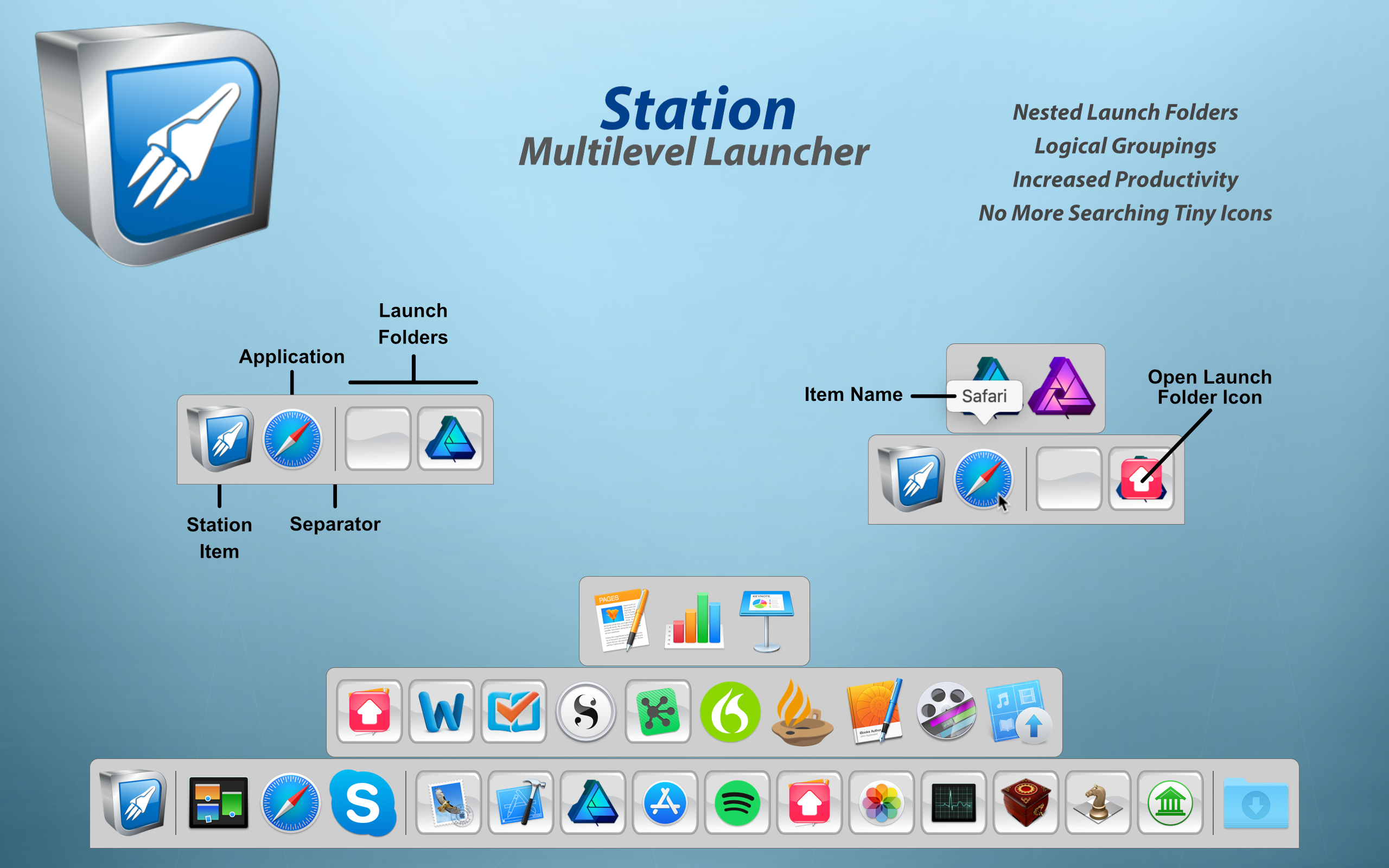
True North Software today introduces Station 2.0, their multilevel (hierarchical) launcher for macOS. Station promotes a more natural organization of applications and documents into folders. With nested folders, you can arrange items in Station in a way that fits your workflow with an uncluttered look and feel. Scalability is greatly increased through logical groupings thus increasing the sheer number of items that can be added to Station without having to shrink the launcher size.
Rockford, Minnesota - True North Software today is very proud to announce the release of Station 2.0, the company's multilevel (hierarchical) launcher for macOS. Station promotes a more natural organization of applications and documents into folders. With nested folders, you can arrange items in Station in a way that fits your workflow with an uncluttered look and feel. Scalability is greatly increased through logical groupings thus increasing the sheer number of items that can be added to Station without having to shrink the launcher size.
Productivity is increased because related items can be grouped together into a single folder. For example, one folder can contain work related items and another folder gaming items. Another useful feature of Station is the ability to launch, all at once, the items in a launch folder. This is useful when switching between tasks like business and spreadsheets to graphics work. With ten levels of folders available, enough space is provided to spread out even the most diverse set of applications and documents.
What's New for Version 2.0:
* Panel sets
* Keyboard navigation
* Auto hide switch global key
* Gesture scrolling
* Item Separators
* Custom folder icons
* Auto sort panels
* Skip confirmations preference
Enhancements:
* Maximum icon size has been increased to 128 points
* You can now delete multiple items from the snap shots list
* Increased the maximum number of snap shots to 200
* Performance optimizations
* Assorted bug fixes
* Cosmetic updates
System Requirements:
* Requires macOS 10.11 or higher
* 64-bit processor
* 25.2 MB
Pricing and Availability:
Station 2.0 is priced at $14.99 (USD) and is available through the Mac App Store in the Productivity category. A demo version is available from the True North Website. For more information, please contact Brendan Murphy.
True North Software: http://www.truenorthsoftware.com
Station 2.0: http://www.truenorthsoftware.com/station/
Purchase and Download (MAS): https://itunes.apple.com/app/station/id1126126612
Screenshot: http://www.truenorthsoftware.com/resources/station_2-0_screenshot.png
Application Icon: http://www.truenorthsoftware.com/resources/StationIcon.png
Located in Rockford, Minnesota/USA, True North Software, founded in 2003, provides design solutions for Apple platforms. With a passion for Apple technologies, our focus is to provide real world solutions that make a difference in the lives of people. All Material and Software (C) 2003-2018 True North Software / All Rights Reserved. Apple, the Apple logo, macOS, iPhone, iPod and iPad are registered trademarks of Apple Inc. in the U.S. and/or other countries. Other trademarks and registered trademarks may be the property of their respective owners.
*******
Link To Article: https://prmac.com/release-id-83054.htm
*******
---------------------------------------------------------------------------------
Note that you can alter delivered distributions at any time.
Login to your account on prMac to alter your channel selection, or to opt-out at any time.
Station 2.0 - Multilevel Dock for macOS - Published on 10/12/18
True North Software today introduces Station 2.0, their multilevel (hierarchical) launcher for macOS. Station promotes a more natural organization of applications and documents into folders. With nested folders, you can arrange items in Station in a way that fits your workflow with an uncluttered look and feel. Scalability is greatly increased through logical groupings thus increasing the sheer number of items that can be added to Station without having to shrink the launcher size.
Rockford, Minnesota - True North Software today is very proud to announce the release of Station 2.0, the company's multilevel (hierarchical) launcher for macOS. Station promotes a more natural organization of applications and documents into folders. With nested folders, you can arrange items in Station in a way that fits your workflow with an uncluttered look and feel. Scalability is greatly increased through logical groupings thus increasing the sheer number of items that can be added to Station without having to shrink the launcher size.
Productivity is increased because related items can be grouped together into a single folder. For example, one folder can contain work related items and another folder gaming items. Another useful feature of Station is the ability to launch, all at once, the items in a launch folder. This is useful when switching between tasks like business and spreadsheets to graphics work. With ten levels of folders available, enough space is provided to spread out even the most diverse set of applications and documents.
What's New for Version 2.0:
* Panel sets
* Keyboard navigation
* Auto hide switch global key
* Gesture scrolling
* Item Separators
* Custom folder icons
* Auto sort panels
* Skip confirmations preference
Enhancements:
* Maximum icon size has been increased to 128 points
* You can now delete multiple items from the snap shots list
* Increased the maximum number of snap shots to 200
* Performance optimizations
* Assorted bug fixes
* Cosmetic updates
System Requirements:
* Requires macOS 10.11 or higher
* 64-bit processor
* 25.2 MB
Pricing and Availability:
Station 2.0 is priced at $14.99 (USD) and is available through the Mac App Store in the Productivity category. A demo version is available from the True North Website. For more information, please contact Brendan Murphy.
True North Software: http://www.truenorthsoftware.com
Station 2.0: http://www.truenorthsoftware.com/station/
Purchase and Download (MAS): https://itunes.apple.com/app/station/id1126126612
Screenshot: http://www.truenorthsoftware.com/resources/station_2-0_screenshot.png
Application Icon: http://www.truenorthsoftware.com/resources/StationIcon.png

Located in Rockford, Minnesota/USA, True North Software, founded in 2003, provides design solutions for Apple platforms. With a passion for Apple technologies, our focus is to provide real world solutions that make a difference in the lives of people. All Material and Software (C) 2003-2018 True North Software / All Rights Reserved. Apple, the Apple logo, macOS, iPhone, iPod and iPad are registered trademarks of Apple Inc. in the U.S. and/or other countries. Other trademarks and registered trademarks may be the property of their respective owners.
*******
Link To Article: https://prmac.com/release-id-83054.htm
*******
---------------------------------------------------------------------------------
Note that you can alter delivered distributions at any time.
Login to your account on prMac to alter your channel selection, or to opt-out at any time.
Papercraft Hack & Slash Game - Book of Demons - pops up on Mac
A new article has been published at prMac.
Papercraft Hack & Slash Game - Book of Demons - pops up on Mac - Published on 10/11/18
Warsaw based development team, Thing Trunk announces Book of Demons, their award-winning papercraft, deck-building hack and slash game is now available on Mac computers. Book of Demons is a single-player, dark fantasy set in a paper world, where players fight the Archdemon's army of darkness with magical cards instead of weapons. With the added support for the new platform, Mac gamers can now experience all of the signature features that Windows gamers have loved about Book of Demons.
Warsaw, Poland - Thing Trunk, the studio behind the unique deck-building, papercraft hack & slash, Book of Demons, just announced that the game is now playable on Mac computers. Together with Windows, both versions are now ready for download on Steam. To celebrate this, an updated trailer with new footage from the game has been released.
Book of Demons is currently in its last months of Early Access, with the final release expected to happen before the end of the year. Mac support is one of the last milestones on Thing Trunk's roadmap, just before the planned announcement of the definitive release date.
Just like on Windows, Mac version is fully integrated with multiple Steamworks features, such as Stats, Achievements, Leaderboards and full Steam Controller support. Saved games can be moved between the platforms via Steam Cloud. For those who need an introduction to Book of Demons, the video "Book of Demons explained in 2 minutes" is an excellent start.
Book of Demons is a single-player, dark fantasy hack & slash, set in a paper world, where players fight the Archdemon's army of darkness with magical cards instead of weapons. With the added support for the new platform, Mac gamers can now experience all of the signature features that Windows gamers have loved about Book of Demons:
* Flexiscope system to adjust quest length to your liking
* Papercraft visual art-style
* Unique card based hack & slash mechanics
Thing Trunk launched Book of Demons on Steam Early Access in July 2016 to very positive reviews and has since continued to support the game and its community with ongoing updates and bug fixes. This allowed the game to reach and hold a very positive overall review rating. A free demo of Book of Demons is available for Mac and PC on Steam.
Book of Demons is part of Thing Trunk's Return 2 Games series, which focuses on creating memorable and engaging titles inspired by the early days of PC gaming. Fans of the series can support Thing Trunk's future development by purchasing the R2G Supporter's Pack DLC on Steam.
Book of Demons Minimum Requirements:
* Mac OS X Version 10.12 or higher
* Memory: 2 GB RAM
* Graphics: Open GL 3.3 Compliant
* Storage: 1 GB available Hard Drive space
About Return 2 Games Series:
Return 2 Games is a series of original mid-core titles inspired by the golden days of desktop gaming. Thing Trunk's plan is to build seven games in total, each unique in terms of genre and theme, but all sharing the same vision: to make deeply engaging experiences accessible.
Return 2 Games draws inspiration from the early days of desktop gaming when developers weren't afraid to innovate, defined new genres, and created the most memorable experiences. Return 2 Games titles are designed to deeply engage in a matter of minutes. They explore powerful universal stories, like good versus evil, that are immediately familiar. Return 2 Games caters even to people who don't play as much as they used to, who find casual games shallow and unengaging, and who can't invest enough time into hardcore games to really enjoy them.
Thing Trunk: http://www.thingtrunk.com/
Book of Demons: http://www.bookofdemons.com
Purchase Book of Demons on Steam (with free demo): http://store.steampowered.com/app/449960/
YouTube Video (Mac release Trailer): https://www.youtube.com/watch?v=V8hXDOCHhYU
YouTube Video (Book of Demons explained in 2 minutes): https://www.youtube.com/watch?v=cKm2YoRYnPQ
Media Assets: http://media.thingtrunk.com/press-kit/sheet.php?p=Book%20of%20Demons
Thing Trunk is a small game development studio based in Warsaw, Poland. The core team is comprised of seven dedicated developers. The 3 founders - Filip Starzyski, Konstanty Kalicki, and Maciej Biedrzycki - are casual game industry veterans who (despite a level of success) became disappointed with the miring trends in the market and scrapped their former brands (Codeminon and Twinbottles) to focus solely on the ambitious Return 2 Games idea. Since then they are trying to prove that making high quality, unique games is possible in a small but experienced team with lots of passion. All Material and Software (C) Copyright 2018 Thing Trunk. All Rights Reserved. Apple, the Apple logo, iPhone, iPod and iPad are registered trademarks of Apple Inc. in the U.S. and/or other countries. Other trademarks and registered trademarks may be the property of their respective owners.
*******
Link To Article: https://prmac.com/release-id-83055.htm
*******
---------------------------------------------------------------------------------
Note that you can alter delivered distributions at any time.
Login to your account on prMac to alter your channel selection, or to opt-out at any time.
Papercraft Hack & Slash Game - Book of Demons - pops up on Mac - Published on 10/11/18
Warsaw based development team, Thing Trunk announces Book of Demons, their award-winning papercraft, deck-building hack and slash game is now available on Mac computers. Book of Demons is a single-player, dark fantasy set in a paper world, where players fight the Archdemon's army of darkness with magical cards instead of weapons. With the added support for the new platform, Mac gamers can now experience all of the signature features that Windows gamers have loved about Book of Demons.
Warsaw, Poland - Thing Trunk, the studio behind the unique deck-building, papercraft hack & slash, Book of Demons, just announced that the game is now playable on Mac computers. Together with Windows, both versions are now ready for download on Steam. To celebrate this, an updated trailer with new footage from the game has been released.
Book of Demons is currently in its last months of Early Access, with the final release expected to happen before the end of the year. Mac support is one of the last milestones on Thing Trunk's roadmap, just before the planned announcement of the definitive release date.
Just like on Windows, Mac version is fully integrated with multiple Steamworks features, such as Stats, Achievements, Leaderboards and full Steam Controller support. Saved games can be moved between the platforms via Steam Cloud. For those who need an introduction to Book of Demons, the video "Book of Demons explained in 2 minutes" is an excellent start.
Book of Demons is a single-player, dark fantasy hack & slash, set in a paper world, where players fight the Archdemon's army of darkness with magical cards instead of weapons. With the added support for the new platform, Mac gamers can now experience all of the signature features that Windows gamers have loved about Book of Demons:
* Flexiscope system to adjust quest length to your liking
* Papercraft visual art-style
* Unique card based hack & slash mechanics
Thing Trunk launched Book of Demons on Steam Early Access in July 2016 to very positive reviews and has since continued to support the game and its community with ongoing updates and bug fixes. This allowed the game to reach and hold a very positive overall review rating. A free demo of Book of Demons is available for Mac and PC on Steam.
Book of Demons is part of Thing Trunk's Return 2 Games series, which focuses on creating memorable and engaging titles inspired by the early days of PC gaming. Fans of the series can support Thing Trunk's future development by purchasing the R2G Supporter's Pack DLC on Steam.
Book of Demons Minimum Requirements:
* Mac OS X Version 10.12 or higher
* Memory: 2 GB RAM
* Graphics: Open GL 3.3 Compliant
* Storage: 1 GB available Hard Drive space
About Return 2 Games Series:
Return 2 Games is a series of original mid-core titles inspired by the golden days of desktop gaming. Thing Trunk's plan is to build seven games in total, each unique in terms of genre and theme, but all sharing the same vision: to make deeply engaging experiences accessible.
Return 2 Games draws inspiration from the early days of desktop gaming when developers weren't afraid to innovate, defined new genres, and created the most memorable experiences. Return 2 Games titles are designed to deeply engage in a matter of minutes. They explore powerful universal stories, like good versus evil, that are immediately familiar. Return 2 Games caters even to people who don't play as much as they used to, who find casual games shallow and unengaging, and who can't invest enough time into hardcore games to really enjoy them.
Thing Trunk: http://www.thingtrunk.com/
Book of Demons: http://www.bookofdemons.com
Purchase Book of Demons on Steam (with free demo): http://store.steampowered.com/app/449960/
YouTube Video (Mac release Trailer): https://www.youtube.com/watch?v=V8hXDOCHhYU
YouTube Video (Book of Demons explained in 2 minutes): https://www.youtube.com/watch?v=cKm2YoRYnPQ
Media Assets: http://media.thingtrunk.com/press-kit/sheet.php?p=Book%20of%20Demons
Thing Trunk is a small game development studio based in Warsaw, Poland. The core team is comprised of seven dedicated developers. The 3 founders - Filip Starzyski, Konstanty Kalicki, and Maciej Biedrzycki - are casual game industry veterans who (despite a level of success) became disappointed with the miring trends in the market and scrapped their former brands (Codeminon and Twinbottles) to focus solely on the ambitious Return 2 Games idea. Since then they are trying to prove that making high quality, unique games is possible in a small but experienced team with lots of passion. All Material and Software (C) Copyright 2018 Thing Trunk. All Rights Reserved. Apple, the Apple logo, iPhone, iPod and iPad are registered trademarks of Apple Inc. in the U.S. and/or other countries. Other trademarks and registered trademarks may be the property of their respective owners.
*******
Link To Article: https://prmac.com/release-id-83055.htm
*******
---------------------------------------------------------------------------------
Note that you can alter delivered distributions at any time.
Login to your account on prMac to alter your channel selection, or to opt-out at any time.
Subscribe to:
Posts (Atom)