A new article has been published at prMac.
First App Designed to help Moms shape their Babies' Palates - Published on 10/24/18
Rockne Production LLC today announces FlavorBaby 1.0, the company's free, baby taste planner and tracker app developed exclusively for iOS devices. FlavorBaby offers an evidence-based approach to shaping a baby's taste preferences, utilizing the natural process of early flavor learning. The app divides vegetables into four major flavor families and then provides moms with a "Flavor the Day," giving her the flexibility to choose the vegetable she prefers from within that day's flavor family.
Tarrytown, New York - Rockne Production LLC today is pleased to announce the release and immediate availability of FlavorBaby 1.0, the company's free, baby taste planner and tracker app developed exclusively for iPhone. Backed by years of research, FlavorBaby is an evidence-based approach to shaping a baby's taste preferences that utilizes the natural process of Early Flavor Learning. It begins during pregnancy, extends through breastfeeding, formula feeding, weaning and continues to toddler age.
Unlike other pregnancy, nutrition, baby trackers and baby weaning apps, FlavorBaby is designed to guide your baby's taste development, so that they grow to become healthy, adventurous eaters who like and prefer the flavors of vegetables for life. The app divides vegetables into four major flavor families and then provides moms with a "Flavor the Day," giving her the flexibility to choose the vegetable she prefers from within that day's flavor family:
* Sweet
* Buttery + Mild
* Earthy + Grassy
* Bitte + Spicy
FlavorBaby is also organized by life stage and provides daily flavor suggestions and information that matches baby's needs during each important phase of Early Flavor Learning:
* Pregnancy
* Breastfeeding
* Formula feeding
* Veggie primer (weaning)
* Early eater (usually 6 to 9 months)
* Toddler (10 to 20 months)
During pregnancy and breastfeeding, the mother eats the day's suggested vegetable providing her baby with a taste exposure in utero or via breast milk. During all other phases, the baby eats (or tastes) the day's vegetable, sometimes in puree form, depending on life stage.
Science has confirmed that children can learn to like and prefer the flavors of vegetables at a very early age especially during pregnancy, as a breastfed or formula-fed infant, during weaning and up through toddler age. FlavorBaby is designed to guide parents through this process making Early Flavor Learning easy and fun. Plus, our methodology is plant-based (because vegetables are difficult for kids to love) so it's perfect for moms who prefer vegetarian and vegan diets.
The FlavorBaby app allows parents to choose the vegetables they like best, so they can customize their (and your child's) experience. That way the flavors they share with their child during EFL better match those of the foods they'll prepare for them later in life. FlavorBaby is visually-based (like Instagram) and contains photos and cooking methods for 44 vegetables, and has simple, delicious recipes for each, including recipes for baby food puree.
The app can be personalized with your child's name and photo and up to three children can be added. There's also a Trial Tracker feature so mom's can track how many times their baby has tried a vegetable and whether or not they liked it, plus, a shopping list feature and a color-coded, monthly overview to track overall progress as well.
Motherhood is a job like no other. Moms are tasked with every responsibility to set up a successful life for their children, and at times it can feel overwhelming. We hope that FlavorBaby helps to lighten mom's load when it comes to nourishing and teaching their babies about healthy flavors.
Device Requirements:
* iPhone, iPad, and iPod touch
* Requires iOS 11.3 or later
* 83.2 MB
Pricing and Availability:
FlavorBaby 1.0 is Free and available worldwide exclusively through the App Store in the Health & Fitness category. For more information, please contact Mac Mclaurin.
FlavorBaby 1.0: http://flavorbabyapp.com/
Download from iTunes: https://itunes.apple.com/app/flavorbaby-taste-tracker/id1388044210
Screenshot: https://is3-ssl.mzstatic.com/image/thumb/Purple128/v4/05/4c/8c/054c8c56-93a0-e787-3c55-7f36b6930cdf/pr_source.jpg/300x0w.jpg
App Icon: https://is2-ssl.mzstatic.com/image/thumb/Purple118/v4/1b/bb/06/1bbb0660-fa31-2844-f933-c3f7e2c039cf/AppIcon-0-1x_U007emarketing-0-0-GLES2_U002c0-512MB-sRGB-0-0-0-85-220-0-0-0-5.png/246x0w.jpg
Established in 2016, Rockne Production is a digital marketing, video production, app development firm located in Tarrytown, New York. Mac McLaurin is the company's sole founder and owner. All Material and Software (C) Copyright 2018 Rockne Production LLC. All Rights Reserved. Apple, the Apple logo, iPhone, iPod and iPad are registered trademarks of Apple Inc. in the U.S. and/or other countries. Other trademarks and registered trademarks may be the property of their respective owners.
*******
Link To Article: https://prmac.com/release-id-83083.htm
*******
---------------------------------------------------------------------------------
Note that you can alter delivered distributions at any time.
Login to your account on prMac to alter your channel selection, or to opt-out at any time.



Minder Softworks releases Photonium Access, menubar Photos.app access
A new article has been published at prMac.
Minder Softworks releases Photonium Access, menubar Photos.app access - Published on 10/23/18
Minder Softworks announces a new product, Photonium Access, for macOS. Photonium Access is a menubar widget that gives users the ability to view photos stored in Apple's Photos.app and drag and drop them into any application. This gives users the ability to use their photos anywhere without launching Photos, and without the need to export from Photos to a folder. Photonium Access is immediately available for the introductory price of $1.99.
Columbus, Ohio - Minder Softworks announces that it has released Photonium Access, a menubar widget that allows users to access their Photos.app library. Photonium Access was designed to solve a simple problem that many users have: getting photos out of Apple's Photos.app and into other applications. While Photos.app has built-in sharing ability for email and common social media platforms, using photos stored in Photos.app with other applications is an involved process.
Traditionally, users who have their photos organized in Photos.app are unable to drag from Photos.app directly into other applications. Instead, they are forced to save images from Photos.app to their desktop or other folder, switch applications, then import their files. This then leaves the extra image files on their desktop or in another folder, which must then be deleted.
Photonium Access vastly simplifies this process by allowing instant access to the Photos.app library from the menubar. Users simply click Photonium Access' icon in the menubar to reveal the images and movies that are saved in Photos.app. They can view by album and adjust the size of the thumbnail. Once the desired image is located, the user can simply drag and drop it into any application that supports drag-and-drop.
This includes Word, Keynote, PowerPoint, Pages, web browsers, and thousands more. The user can stay in their favorite application while being able to find and use the images and movies they need, and there are never any files to clean up. What's more, the user does not have to adjust the window size to be able to see files that are on their desktop or in a Finder window in order to upload them.
Pricing and Availability:
Photonium Access is immediately available for the introductory price of $1.99 (USD). A trial version is available from Minder Softworks online. For more information, please contact Michael LaMorte.
Minder Softworks: http://mindersoftworks.com
Photonium Access: http://mindersoftworks.com/products/photonium-access
Download Photonium Access: https://mindersoftworks.com/downloads/photonium-access/PhotoniumAccess.zip
Purchase: https://sites.fastspring.com/mindersoftworks/product/photoniumaccess
Screenshot 1: http://mindersoftworks.com/pr/photonium-access-hero.gif
Screenshot 2: http://mindersoftworks.com/pr/photonium-access-static1.png
Minder Softworks is dedicated to developing software that is intuitive, easy to use, and a good value for our customers. Copyright (C) 2018 Minder Softworks. All Rights Reserved. Apple, the Apple logo and Macintosh are registered trademarks of Apple Inc. in the U.S. and/or other countries.
*******
Link To Article: https://prmac.com/release-id-83082.htm
*******
---------------------------------------------------------------------------------
Note that you can alter delivered distributions at any time.
Login to your account on prMac to alter your channel selection, or to opt-out at any time.
Minder Softworks releases Photonium Access, menubar Photos.app access - Published on 10/23/18
Minder Softworks announces a new product, Photonium Access, for macOS. Photonium Access is a menubar widget that gives users the ability to view photos stored in Apple's Photos.app and drag and drop them into any application. This gives users the ability to use their photos anywhere without launching Photos, and without the need to export from Photos to a folder. Photonium Access is immediately available for the introductory price of $1.99.
Columbus, Ohio - Minder Softworks announces that it has released Photonium Access, a menubar widget that allows users to access their Photos.app library. Photonium Access was designed to solve a simple problem that many users have: getting photos out of Apple's Photos.app and into other applications. While Photos.app has built-in sharing ability for email and common social media platforms, using photos stored in Photos.app with other applications is an involved process.
Traditionally, users who have their photos organized in Photos.app are unable to drag from Photos.app directly into other applications. Instead, they are forced to save images from Photos.app to their desktop or other folder, switch applications, then import their files. This then leaves the extra image files on their desktop or in another folder, which must then be deleted.
Photonium Access vastly simplifies this process by allowing instant access to the Photos.app library from the menubar. Users simply click Photonium Access' icon in the menubar to reveal the images and movies that are saved in Photos.app. They can view by album and adjust the size of the thumbnail. Once the desired image is located, the user can simply drag and drop it into any application that supports drag-and-drop.
This includes Word, Keynote, PowerPoint, Pages, web browsers, and thousands more. The user can stay in their favorite application while being able to find and use the images and movies they need, and there are never any files to clean up. What's more, the user does not have to adjust the window size to be able to see files that are on their desktop or in a Finder window in order to upload them.
Pricing and Availability:
Photonium Access is immediately available for the introductory price of $1.99 (USD). A trial version is available from Minder Softworks online. For more information, please contact Michael LaMorte.
Minder Softworks: http://mindersoftworks.com
Photonium Access: http://mindersoftworks.com/products/photonium-access
Download Photonium Access: https://mindersoftworks.com/downloads/photonium-access/PhotoniumAccess.zip
Purchase: https://sites.fastspring.com/mindersoftworks/product/photoniumaccess
Screenshot 1: http://mindersoftworks.com/pr/photonium-access-hero.gif

Screenshot 2: http://mindersoftworks.com/pr/photonium-access-static1.png

Minder Softworks is dedicated to developing software that is intuitive, easy to use, and a good value for our customers. Copyright (C) 2018 Minder Softworks. All Rights Reserved. Apple, the Apple logo and Macintosh are registered trademarks of Apple Inc. in the U.S. and/or other countries.
*******
Link To Article: https://prmac.com/release-id-83082.htm
*******
---------------------------------------------------------------------------------
Note that you can alter delivered distributions at any time.
Login to your account on prMac to alter your channel selection, or to opt-out at any time.
Xojo 2018 Release 3 Is Now Available; Adds Support For Mojave Dark Mode
A new article has been published at prMac.
Xojo 2018 Release 3 Is Now Available; Adds Support For Mojave Dark Mode - Published on 10/23/18
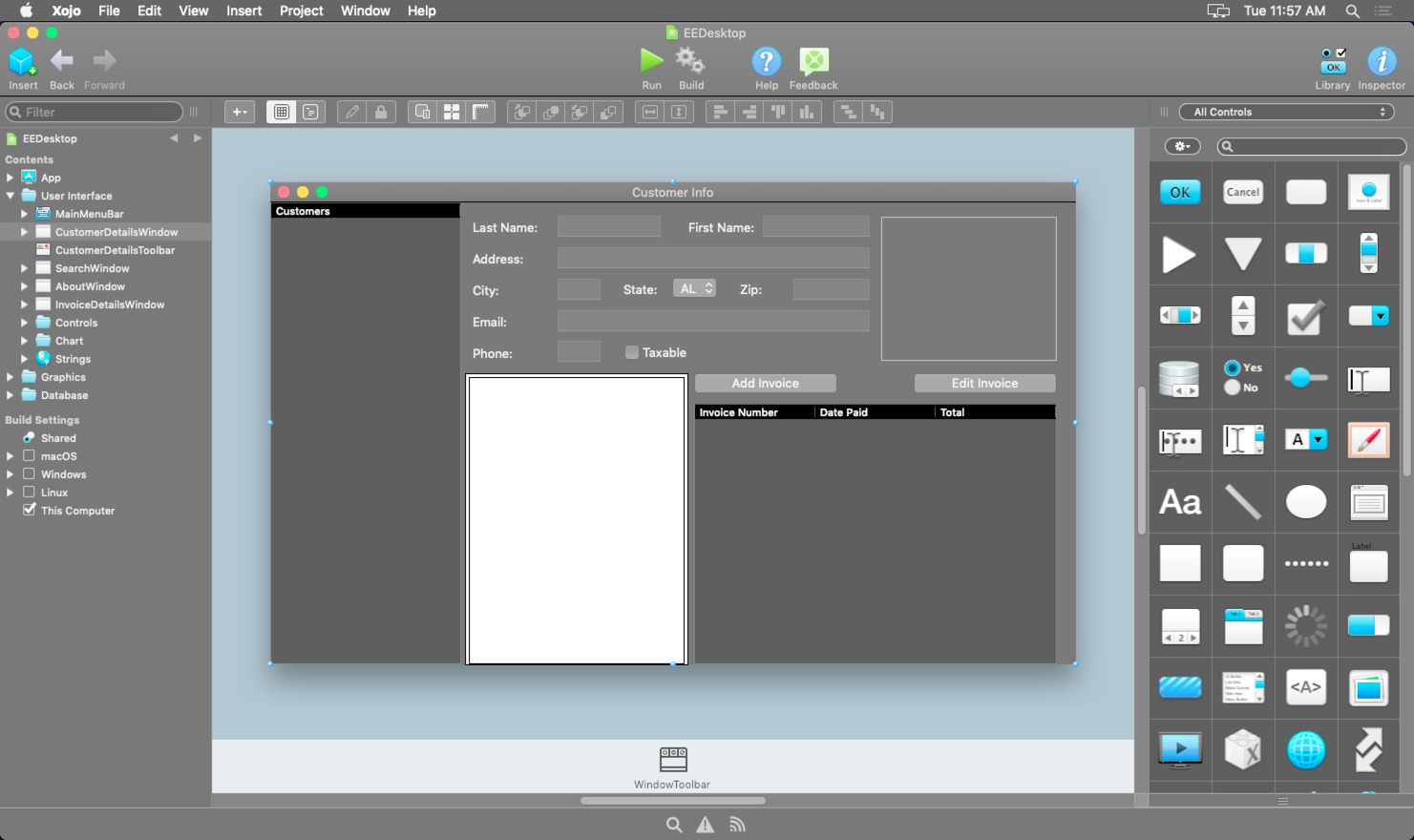
Austin based Xojo, Inc. today announces Xojo 2018 Release 3. Offering the best environment for professional developers, citizen developers and hobbyists alike, Xojo comes with a drag and drop user interface builder and one straightforward programming language for development. It uses native controls so apps look and feel right on each platform. Development is 10 times faster than traditional tools. Release 3 adds support for Mojave Dark Mode, Windows updates and more.
Austin, Texas - Xojo, Inc., the company that has enabled over 360,000 developers to build native cross-platform applications, today announced the availability of Xojo 2018 Release 3. Xojo is a rapid application development tool for making apps for the desktop (macOS, Windows and Linux), web, iOS, and Raspberry Pi. With over 120 improvements, this release has some exciting updates, including support for macOS Mojave Dark Mode, Windows improvements, and incremental compilation for 64-bit and ARM.
Xojo is the best environment for professional developers, citizen developers and hobbyists alike. Xojo applications compile to machine code for greater performance and security. Xojo uses native controls so apps look and feel right on each platform. Since one set of source code can be used to support multiple platforms, development is 10 times faster than traditional tools. Xojo comes with a drag and drop user interface builder and one straightforward programming language for development.
"When Mojave Dark Mode was announced we knew it would be an aesthetic option our developers would want," commented Xojo Founder and CEO, Geoff Perlman. "We are pleased to deliver Dark Mode support for the Xojo IDE itself and compiled apps. In addition, this release has some big features like incremental compilation and Windows updates for better accuracy and speed. This release definitely has a lot of new updates and continues on Xojo's promise to deliver a modern, reliable development tool."
Xojo 2018 Release 3 includes:
* macOS Mojave Dark Mode support for the Xojo IDE and your own apps
* Windows improvements:
* Now using native Label control for better performance
* More accurate text rendering
* Incremental Compilation for 64-bit and ARM enables faster debug builds
* iOS projects now work with Xcode 10 and iOS 12 Simulator
* SQLite updated to 3.24.0
* New Documentation Wiki
Xojo 2018 Release 3 is available now. Xojo is free to use for learning and development. For information on pricing and licensing options, please visit Xojo online.
Xojo 2018 Release 3: http://www.xojo.com
Xojo Download: http://www.xojo.com/download
Xojo Purchase: http://www.xojo.com/store
Screenshot: http://www.xojo.com/images/ide_darkmode.png
Xojo, Inc. was founded with the idea that software development should be accessible to anyone. With traditional tools, creating software applications can be a very complicated process, but using Xojo anyone can learn to create high quality, native apps for the desktop, web, mobile and Raspberry Pi. With users all over the world, Xojo apps can be found in every conceivable category - from commercial software applications to use in governments, universities, businesses, and the Fortune 500. All Material and Software (C) Copyright 2018 Xojo, Inc. All Rights Reserved. Apple, the Apple logo, iPhone, iPod, iPad and macOS are registered trademarks of Apple Inc. in the U.S. and/or other countries. Other trademarks and registered trademarks may be the property of their respective owners.
*******
Link To Article: https://prmac.com/release-id-83081.htm
*******
---------------------------------------------------------------------------------
Note that you can alter delivered distributions at any time.
Login to your account on prMac to alter your channel selection, or to opt-out at any time.
Xojo 2018 Release 3 Is Now Available; Adds Support For Mojave Dark Mode - Published on 10/23/18
Austin based Xojo, Inc. today announces Xojo 2018 Release 3. Offering the best environment for professional developers, citizen developers and hobbyists alike, Xojo comes with a drag and drop user interface builder and one straightforward programming language for development. It uses native controls so apps look and feel right on each platform. Development is 10 times faster than traditional tools. Release 3 adds support for Mojave Dark Mode, Windows updates and more.
Austin, Texas - Xojo, Inc., the company that has enabled over 360,000 developers to build native cross-platform applications, today announced the availability of Xojo 2018 Release 3. Xojo is a rapid application development tool for making apps for the desktop (macOS, Windows and Linux), web, iOS, and Raspberry Pi. With over 120 improvements, this release has some exciting updates, including support for macOS Mojave Dark Mode, Windows improvements, and incremental compilation for 64-bit and ARM.
Xojo is the best environment for professional developers, citizen developers and hobbyists alike. Xojo applications compile to machine code for greater performance and security. Xojo uses native controls so apps look and feel right on each platform. Since one set of source code can be used to support multiple platforms, development is 10 times faster than traditional tools. Xojo comes with a drag and drop user interface builder and one straightforward programming language for development.
"When Mojave Dark Mode was announced we knew it would be an aesthetic option our developers would want," commented Xojo Founder and CEO, Geoff Perlman. "We are pleased to deliver Dark Mode support for the Xojo IDE itself and compiled apps. In addition, this release has some big features like incremental compilation and Windows updates for better accuracy and speed. This release definitely has a lot of new updates and continues on Xojo's promise to deliver a modern, reliable development tool."
Xojo 2018 Release 3 includes:
* macOS Mojave Dark Mode support for the Xojo IDE and your own apps
* Windows improvements:
* Now using native Label control for better performance
* More accurate text rendering
* Incremental Compilation for 64-bit and ARM enables faster debug builds
* iOS projects now work with Xcode 10 and iOS 12 Simulator
* SQLite updated to 3.24.0
* New Documentation Wiki
Xojo 2018 Release 3 is available now. Xojo is free to use for learning and development. For information on pricing and licensing options, please visit Xojo online.
Xojo 2018 Release 3: http://www.xojo.com
Xojo Download: http://www.xojo.com/download
Xojo Purchase: http://www.xojo.com/store
Screenshot: http://www.xojo.com/images/ide_darkmode.png
Xojo, Inc. was founded with the idea that software development should be accessible to anyone. With traditional tools, creating software applications can be a very complicated process, but using Xojo anyone can learn to create high quality, native apps for the desktop, web, mobile and Raspberry Pi. With users all over the world, Xojo apps can be found in every conceivable category - from commercial software applications to use in governments, universities, businesses, and the Fortune 500. All Material and Software (C) Copyright 2018 Xojo, Inc. All Rights Reserved. Apple, the Apple logo, iPhone, iPod, iPad and macOS are registered trademarks of Apple Inc. in the U.S. and/or other countries. Other trademarks and registered trademarks may be the property of their respective owners.
*******
Link To Article: https://prmac.com/release-id-83081.htm
*******
---------------------------------------------------------------------------------
Note that you can alter delivered distributions at any time.
Login to your account on prMac to alter your channel selection, or to opt-out at any time.
Cocoatech Releases Path Finder 8.3 (macOS Mojave Edition)
A new article has been published at prMac.
Cocoatech Releases Path Finder 8.3 (macOS Mojave Edition) - Published on 10/23/18
California based Cocoatech today announces Path Finder 8.3, a free update of their popular file browser for users running macOS Mojave 10.14. Path Finder allows you to view hidden files, compare, merge and synchronize folders, batch rename and batch select files, use Dual Pane and full keyboard navigation to browse your file system and much more. Path Finder is extremely customizable and allows you to work how you want. Become a master of file management with Path Finder 8.3!
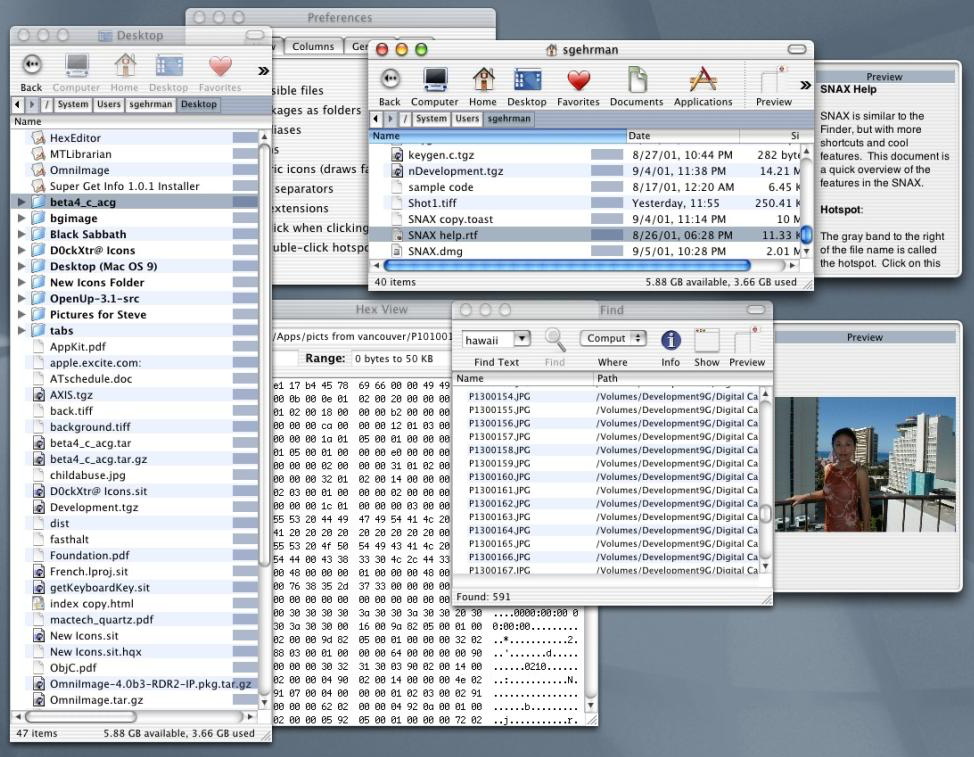
San Francisco, California - Cocoatech is pleased to announce the release of Path Finder 8.3, a free update of their popular file browser for users running macOS Mojave 10.14. Path Finder allows you to view hidden files, compare, merge and synchronize folders, batch rename and batch select files, use Dual Pane and full keyboard navigation to browse your file system and much more. Path Finder is one of the oldest software on the macOS market (*first released in 2001) and boasts a large and loyal userbase. The application is extremely customizable and allows you to work how you want. Become a master of file management with Path Finder 8.3!
What's new:
* Path Finder 8.3 now brings the much anticipated support for macOS Mojave's Dark Mode.
Path Finder 8 lays the foundation for a total redesign and rewrite of the very powerful file manager. Estimated 40% of the internal code is new. The big new thing in version 8 are the way modules are organized and used within the new and flexible modules structure. You can put as many modules in a single window as you need, they can be arbitrarily arranged, dismissed, closed and dragged out of the window. They can be assigned to either left or right pane and they are extensively customizable (light mode only). With new module structure, Path Finder probably becomes the most configurable and flexible Mac application on the market.
Supported Languages:
Path Finder supports Chinese, Czech, Dutch, English, Finnish, French, German, Italian, Japanese, Korean, Norwegian, Polish, Portuguese, Russian, Spanish and Swedish languages.
System Requirements:
* Mac OS X 10.11 or newer
Pricing and Availability:
You can try Path Finder for free for 30 days with all the features available to you during that period. Path Finder costs $40.00 (USD) for a single user license applicable for up to 3 user-owned computers, and $20.00 (USD) when upgrading from version 7. The software is available for purchase from the Cocoatech online store or from within the application itself. Volume license discounts available.
Path Finder 8.3: http://www.cocoatech.com/
Read more about Path Finder 8 History: https://cocoatech.com/#/post/path-finder-8
Download Free Trial (dmg): https://get.cocoatech.com/PF8.dmg
Screenshot: https://cocoatech.com/wp-content/uploads/2016/05/SNAX.png
Headquartered in San Francisco, California, Cocoatech LLC is a privately funded software company founded in 2001 by Steve Gehrman. Steve has over 20 years as a software developer, and founded Cocoatech with the intention of bringing this experience to the Mac platform. Copyright 2008-2018 Cocoatech, LLC. All Rights Reserved. Apple, the Apple logo, and Finder are registered trademarks of Apple Computer in the U.S. and/or other countries. Other trademarks and registered trademarks may be the property of their respective owners.
*******
Link To Article: https://prmac.com/release-id-83080.htm
*******
---------------------------------------------------------------------------------
Note that you can alter delivered distributions at any time.
Login to your account on prMac to alter your channel selection, or to opt-out at any time.
Cocoatech Releases Path Finder 8.3 (macOS Mojave Edition) - Published on 10/23/18
California based Cocoatech today announces Path Finder 8.3, a free update of their popular file browser for users running macOS Mojave 10.14. Path Finder allows you to view hidden files, compare, merge and synchronize folders, batch rename and batch select files, use Dual Pane and full keyboard navigation to browse your file system and much more. Path Finder is extremely customizable and allows you to work how you want. Become a master of file management with Path Finder 8.3!
San Francisco, California - Cocoatech is pleased to announce the release of Path Finder 8.3, a free update of their popular file browser for users running macOS Mojave 10.14. Path Finder allows you to view hidden files, compare, merge and synchronize folders, batch rename and batch select files, use Dual Pane and full keyboard navigation to browse your file system and much more. Path Finder is one of the oldest software on the macOS market (*first released in 2001) and boasts a large and loyal userbase. The application is extremely customizable and allows you to work how you want. Become a master of file management with Path Finder 8.3!
What's new:
* Path Finder 8.3 now brings the much anticipated support for macOS Mojave's Dark Mode.
Path Finder 8 lays the foundation for a total redesign and rewrite of the very powerful file manager. Estimated 40% of the internal code is new. The big new thing in version 8 are the way modules are organized and used within the new and flexible modules structure. You can put as many modules in a single window as you need, they can be arbitrarily arranged, dismissed, closed and dragged out of the window. They can be assigned to either left or right pane and they are extensively customizable (light mode only). With new module structure, Path Finder probably becomes the most configurable and flexible Mac application on the market.
Supported Languages:
Path Finder supports Chinese, Czech, Dutch, English, Finnish, French, German, Italian, Japanese, Korean, Norwegian, Polish, Portuguese, Russian, Spanish and Swedish languages.
System Requirements:
* Mac OS X 10.11 or newer
Pricing and Availability:
You can try Path Finder for free for 30 days with all the features available to you during that period. Path Finder costs $40.00 (USD) for a single user license applicable for up to 3 user-owned computers, and $20.00 (USD) when upgrading from version 7. The software is available for purchase from the Cocoatech online store or from within the application itself. Volume license discounts available.
Path Finder 8.3: http://www.cocoatech.com/
Read more about Path Finder 8 History: https://cocoatech.com/#/post/path-finder-8
Download Free Trial (dmg): https://get.cocoatech.com/PF8.dmg
Screenshot: https://cocoatech.com/wp-content/uploads/2016/05/SNAX.png
Headquartered in San Francisco, California, Cocoatech LLC is a privately funded software company founded in 2001 by Steve Gehrman. Steve has over 20 years as a software developer, and founded Cocoatech with the intention of bringing this experience to the Mac platform. Copyright 2008-2018 Cocoatech, LLC. All Rights Reserved. Apple, the Apple logo, and Finder are registered trademarks of Apple Computer in the U.S. and/or other countries. Other trademarks and registered trademarks may be the property of their respective owners.
*******
Link To Article: https://prmac.com/release-id-83080.htm
*******
---------------------------------------------------------------------------------
Note that you can alter delivered distributions at any time.
Login to your account on prMac to alter your channel selection, or to opt-out at any time.
MaBaSoft Releases Currency Assistant 3.3
A new article has been published at prMac.
MaBaSoft Releases Currency Assistant 3.3 - Published on 10/22/18
MaBaSoft announces Currency Assistant 3.3, an important update to their currency converter for macOS. Currency Assistant is a very flexible currency conversion calculator that provides 174 currencies, including all major circulating currencies plus the 19 Eurozone legacy currencies, allows the creation of multiple converters, and automatically updates exchange rates over the Internet. Version 3.3 introduces support for Dark Mode and restores the automatic update of the IMF rates.
Milano, Italy - MaBaSoft announces the release of Currency Assistant 3.3, the latest version of their currency converter for macOS. Currency Assistant allows users to easily calculate conversions between 174 world currencies (all major circulating currencies plus the 19 Eurozone legacy currencies) and updates exchange rates automatically over the Internet. Version 3.3 solves the incompatibilities with macOS 10.4 Mojave, introduces support for Dark Mode, restores the automatic update of the International Monetary Fund rates, replaces the tape drawer with the tape sidebar, and introduces several minor improvements.
Currency Assistant is a very flexible currency converter; users can define multiple conversion windows which can contain up to 24 currencies. Converters are very easy to set up or edit and have an Action pop-up menu to quickly accomplish recurrent tasks, a Rate pop-up menu to view and copy exchange rates, and a tape to log results.
With Currency Assistant users can quickly calculate conversions to multiple currencies and automatically convert the result of expressions. In addition to that, multiple amounts can be copied from a spreadsheet or another document and pasted to the desired input display: Currency Assistant will automatically convert the pasted amounts and log results in the tape. Finally, Currency Assistant can import text files, Word documents, and text clippings containing series of amounts and automatically convert the enclosed values.
Working with results is also very easy. Amounts can be copied from a display or from the tape, conversions can be exported by dragging them from the tape to a document in another application, and the tape can be saved to a RTF or plain text file and printed. Moreover, configurable Copy Special commands allow users to copy results including ISO code, currency name, or symbol and quickly copy frequently used text snippets containing conversion results, ISO codes, currency names, and symbols.
Managing currencies is simple and straightforward with Currency Assistant. The Currencies window allows users to quickly search, sort, edit, batch edit, and restore currencies, set a base currency, and automatically update exchange rates. Currency Assistant uses the rates published by the European Central Bank, the International Monetary Fund, and the Bank of Italy to automatically update exchange rates.
Language Support:
* US English, German, French, Dutch, and Italian
System Requirements:
* macOS 10.11, 10.12, 10.13, or 10.14 (Mojave)
Pricing and Availability:
Currency Assistant 3.3 is now 50% off and available for just $8.95 (USD) for new users or $4.95 (USD) for Euro Assistant Pro registered users. Version 3.3 is a free update for registered version 3 users. Site and world-wide licenses are also available.
MaBaSoft: https://www.mabasoft.net/
Currency Assistant 3.3: https://www.mabasoft.net/products/currencyAssistant.html
Purchase Currency Assistant: https://sites.fastspring.com/mabasoft/product/all?language=en
Direct Download: https://www.mabasoft.net/downloads/files/Currency_Assistant_3.3.dmg
Release Notes: https://www.mabasoft.net/releaseNotes/currencyAssistant.html
Media Assets: https://www.mabasoft.net/pressImages/currencyAssistant.html
MaBaSoft, based in Milano, Italy, is a small independent company founded by Marco Damaschi and Barbara Canino in 1997. MaBaSoft develops quality system utilities and applications for the Macintosh. Copyright 1997-2018 MaBaSoft. All Rights Reserved. Apple, the Apple logo, Macintosh and macOS are registered trademarks of Apple Inc. in the U.S. and/or other countries. Other trademarks and registered trademarks may be the property of their respective owners.
*******
Link To Article: https://prmac.com/release-id-83077.htm
*******
---------------------------------------------------------------------------------
Note that you can alter delivered distributions at any time.
Login to your account on prMac to alter your channel selection, or to opt-out at any time.
MaBaSoft Releases Currency Assistant 3.3 - Published on 10/22/18
MaBaSoft announces Currency Assistant 3.3, an important update to their currency converter for macOS. Currency Assistant is a very flexible currency conversion calculator that provides 174 currencies, including all major circulating currencies plus the 19 Eurozone legacy currencies, allows the creation of multiple converters, and automatically updates exchange rates over the Internet. Version 3.3 introduces support for Dark Mode and restores the automatic update of the IMF rates.
Milano, Italy - MaBaSoft announces the release of Currency Assistant 3.3, the latest version of their currency converter for macOS. Currency Assistant allows users to easily calculate conversions between 174 world currencies (all major circulating currencies plus the 19 Eurozone legacy currencies) and updates exchange rates automatically over the Internet. Version 3.3 solves the incompatibilities with macOS 10.4 Mojave, introduces support for Dark Mode, restores the automatic update of the International Monetary Fund rates, replaces the tape drawer with the tape sidebar, and introduces several minor improvements.
Currency Assistant is a very flexible currency converter; users can define multiple conversion windows which can contain up to 24 currencies. Converters are very easy to set up or edit and have an Action pop-up menu to quickly accomplish recurrent tasks, a Rate pop-up menu to view and copy exchange rates, and a tape to log results.
With Currency Assistant users can quickly calculate conversions to multiple currencies and automatically convert the result of expressions. In addition to that, multiple amounts can be copied from a spreadsheet or another document and pasted to the desired input display: Currency Assistant will automatically convert the pasted amounts and log results in the tape. Finally, Currency Assistant can import text files, Word documents, and text clippings containing series of amounts and automatically convert the enclosed values.
Working with results is also very easy. Amounts can be copied from a display or from the tape, conversions can be exported by dragging them from the tape to a document in another application, and the tape can be saved to a RTF or plain text file and printed. Moreover, configurable Copy Special commands allow users to copy results including ISO code, currency name, or symbol and quickly copy frequently used text snippets containing conversion results, ISO codes, currency names, and symbols.
Managing currencies is simple and straightforward with Currency Assistant. The Currencies window allows users to quickly search, sort, edit, batch edit, and restore currencies, set a base currency, and automatically update exchange rates. Currency Assistant uses the rates published by the European Central Bank, the International Monetary Fund, and the Bank of Italy to automatically update exchange rates.
Language Support:
* US English, German, French, Dutch, and Italian
System Requirements:
* macOS 10.11, 10.12, 10.13, or 10.14 (Mojave)
Pricing and Availability:
Currency Assistant 3.3 is now 50% off and available for just $8.95 (USD) for new users or $4.95 (USD) for Euro Assistant Pro registered users. Version 3.3 is a free update for registered version 3 users. Site and world-wide licenses are also available.
MaBaSoft: https://www.mabasoft.net/
Currency Assistant 3.3: https://www.mabasoft.net/products/currencyAssistant.html
Purchase Currency Assistant: https://sites.fastspring.com/mabasoft/product/all?language=en
Direct Download: https://www.mabasoft.net/downloads/files/Currency_Assistant_3.3.dmg
Release Notes: https://www.mabasoft.net/releaseNotes/currencyAssistant.html
Media Assets: https://www.mabasoft.net/pressImages/currencyAssistant.html
MaBaSoft, based in Milano, Italy, is a small independent company founded by Marco Damaschi and Barbara Canino in 1997. MaBaSoft develops quality system utilities and applications for the Macintosh. Copyright 1997-2018 MaBaSoft. All Rights Reserved. Apple, the Apple logo, Macintosh and macOS are registered trademarks of Apple Inc. in the U.S. and/or other countries. Other trademarks and registered trademarks may be the property of their respective owners.
*******
Link To Article: https://prmac.com/release-id-83077.htm
*******
---------------------------------------------------------------------------------
Note that you can alter delivered distributions at any time.
Login to your account on prMac to alter your channel selection, or to opt-out at any time.
mDecks Music releases Mapping Tonal Harmony Pro 7.2.5 for macOS
A new article has been published at prMac.
mDecks Music releases Mapping Tonal Harmony Pro 7.2.5 for macOS - Published on 10/22/18
Florida based mDecks Music LLC releases Mapping Tonal Harmony Pro 7.2.5, an important update to their interactive music theory app for macOS. Mapping Tonal Harmony Pro was envisioned as auxiliary material in the study of Tonal Harmony. It provides the student, teachers, composers and/or songwriters with a tool that will aid them in hearing, analyzing, foreseeing and composing harmonic progressions without struggle, in all keys alike. Study effortlessly tonal harmony in different styles.
Coral Springs, Florida - mDecks Music LLC is pleased to announce the release of Mapping Tonal Harmony Pro 7.2.5, an important update to their interactive music theory app for macOS. Mapping Tonal Harmony Pro was developed exclusively to study tonal harmony, cadences, chords and chord-scales, all accompanied by 7 workbooks to teach and study tonal harmony.
Mapping Tonal Harmony Pro has been envisioned as auxiliary material in the study of Tonal Harmony. The main objective of this app is to provide the student, teachers, composers and/or songwriters with a tool that will aid them in hearing, analyzing, foreseeing and composing harmonic progressions without struggle, in all keys alike. Study Tonal Harmony in different styles: Classical, Jazz, Rock/Pop, Blues, Gospel, Contemporary and more.
The map has seven levels of complexity, from the basic diatonic neighborhood advanced secondary functions in major and minor modes and is viewable in all 12 keys and enharmonic spellings, plus a functional view (relative to the tonic). Each level is also accompanied by its respective workbook available at mDecks.com for further study and research.
Create your own progressions and workouts or download progressions book files with, tonal harmony progressions, jazz theory progressions and workouts, or entires song progressions. View their harmonic analysis in different formats which you can view in any key and print:
7 Map Levels:
1) Basic Diatonic functions
2) IIIm and Deceptive Cadences
3) SubV7 and Neapolitan sixth (N6)
4) Secondary Dominants
5) Blues and other modes
6) Advanced Secondary Dominants
7) Complete Map with all functions
10 Map Layouts for different styles:
1) Jazz Standard
2) Blues
3) Late Baroque - Early Classical
4) Late Classical
5) Romanticism
6) Pop/Rock
7) Gospel
8) Contemporary Pop/Rock
9) Quartal Music
10) All Possibilities
9 Staff Layout Templates (and you can create your own):
1) Full Analysis
2) Analysis without scales
3) Omit Functional Analysis
4) Only Functional Analysis
5) Lead Sheet Standard
6) Lead Sheet Large
7) Lead Sheet Small
8) Smaller Tonal Harmony Worksheet
9) Tonal Harmony Worksheet
Version 7.2.5 sports a new Reharmonizer to create a reharmonization of the current progression. There are also new Play-along Styles: These new styles (starting with Z) will favor playing all the chord changes in the progression at all times. The other styles use a more loose approach, sometimes leaving some chord changes out to balance spacing in the bass & piano accompaniment. There is also new Auto-Spacing. Users can enable auto-spacing (progression panel's top menu) to automatically space chords appart avoiding overlapping in dense scores. Disable auto-spacing to evenly space quarter notes and measures. Play-along style now changes atuomatically to the default for that song when loading.
Play-along in different Styles such as Jazz, Blues, Bossa, Rock/Pop. Choose tempo, adjust volumes, reverb, or apply a limiter to any of the instruments. Mapping Tonal Harmony will play the functions using 3 to 6 voices, resolve voice-leading, add tensions for jazz using customizable voicing creation rules or using just chord-tones for classical progressions. You can adjust the volume of each voice independently, and use a bass sound on the lowest note if you like.
Create workouts in just one click to practice progressions in all twelve keys. View the voicings in standard music notation or in the piano keyboard. View the chord-scale and identify chord-tones, tensions and avoid notes. The score editor has all the necessary tools to create a complete song-form, including sections, repeats, DS. al Coda, Fine, First Endings, direct modulations and common-tone modulations
Save your songs to the catalog or export entire progressions-books and share them with other Mapping Tonal Harmony Pro users. Transpose your progression to any key and print it using any of the preloaded layouts or create your own.
System Requirements:
* macOS 10.12 or later
* 64-bit processor
* 116.3 MB
Pricing and Availability:
Mapping Tonal Harmony Pro 7.2.5 is $29.99 USD (or equivalent amount in other currencies) and available worldwide exclusively through the Mac App Store in the Music category.
mDecks Music: https://mdecks.com
Mapping Tonal Harmony Pro 7.2.5: https://mdecks.com/mapharmony.phtml
Purchase and Download (MAS): https://itunes.apple.com/us/app/mapping-tonal-harmony-pro/id599212305
Screenshot: https://mdecks.com/nueva/upload/mapping-tonal-harmony-promo-1800x800.jpg
Application Icon: http://mdecks.com/nueva/upload/mapping-icon-400x363.jpg
mDecks Music is dedicated to the creating of music software and books for intermediate to advanced musicians. Music Theory Apps: From tonal harmony, music scales & modes to sight-reading and ear training. Study Music Theory like never before with our apps.Music Theory Books: from Decoding the Circle of Fifths, Upper Structure Triads, Tonal Harmony to Piano Technique, Doubling on Woodwinds, Rhythmic Training. Music Theory Channel on YouTube: Free Online Music Theory Lessons & Tutorials. From Reharmonization Techniques, Advanced Jazz Chord-Scales to Decoding Beethoven. All Material and Software (C) Copyright 2018 mDecks Music LLC. All Rights Reserved. Apple, the Apple logo, Macintosh Mac OS X and macOS are registered trademarks of Apple Inc. in the U.S. and/or other countries. Other trademarks and registered trademarks may be the property of their respective owners.
*******
Link To Article: https://prmac.com/release-id-83079.htm
*******
---------------------------------------------------------------------------------
Note that you can alter delivered distributions at any time.
Login to your account on prMac to alter your channel selection, or to opt-out at any time.
mDecks Music releases Mapping Tonal Harmony Pro 7.2.5 for macOS - Published on 10/22/18
Florida based mDecks Music LLC releases Mapping Tonal Harmony Pro 7.2.5, an important update to their interactive music theory app for macOS. Mapping Tonal Harmony Pro was envisioned as auxiliary material in the study of Tonal Harmony. It provides the student, teachers, composers and/or songwriters with a tool that will aid them in hearing, analyzing, foreseeing and composing harmonic progressions without struggle, in all keys alike. Study effortlessly tonal harmony in different styles.
Coral Springs, Florida - mDecks Music LLC is pleased to announce the release of Mapping Tonal Harmony Pro 7.2.5, an important update to their interactive music theory app for macOS. Mapping Tonal Harmony Pro was developed exclusively to study tonal harmony, cadences, chords and chord-scales, all accompanied by 7 workbooks to teach and study tonal harmony.
Mapping Tonal Harmony Pro has been envisioned as auxiliary material in the study of Tonal Harmony. The main objective of this app is to provide the student, teachers, composers and/or songwriters with a tool that will aid them in hearing, analyzing, foreseeing and composing harmonic progressions without struggle, in all keys alike. Study Tonal Harmony in different styles: Classical, Jazz, Rock/Pop, Blues, Gospel, Contemporary and more.
The map has seven levels of complexity, from the basic diatonic neighborhood advanced secondary functions in major and minor modes and is viewable in all 12 keys and enharmonic spellings, plus a functional view (relative to the tonic). Each level is also accompanied by its respective workbook available at mDecks.com for further study and research.
Create your own progressions and workouts or download progressions book files with, tonal harmony progressions, jazz theory progressions and workouts, or entires song progressions. View their harmonic analysis in different formats which you can view in any key and print:
7 Map Levels:
1) Basic Diatonic functions
2) IIIm and Deceptive Cadences
3) SubV7 and Neapolitan sixth (N6)
4) Secondary Dominants
5) Blues and other modes
6) Advanced Secondary Dominants
7) Complete Map with all functions
10 Map Layouts for different styles:
1) Jazz Standard
2) Blues
3) Late Baroque - Early Classical
4) Late Classical
5) Romanticism
6) Pop/Rock
7) Gospel
8) Contemporary Pop/Rock
9) Quartal Music
10) All Possibilities
9 Staff Layout Templates (and you can create your own):
1) Full Analysis
2) Analysis without scales
3) Omit Functional Analysis
4) Only Functional Analysis
5) Lead Sheet Standard
6) Lead Sheet Large
7) Lead Sheet Small
8) Smaller Tonal Harmony Worksheet
9) Tonal Harmony Worksheet
Version 7.2.5 sports a new Reharmonizer to create a reharmonization of the current progression. There are also new Play-along Styles: These new styles (starting with Z) will favor playing all the chord changes in the progression at all times. The other styles use a more loose approach, sometimes leaving some chord changes out to balance spacing in the bass & piano accompaniment. There is also new Auto-Spacing. Users can enable auto-spacing (progression panel's top menu) to automatically space chords appart avoiding overlapping in dense scores. Disable auto-spacing to evenly space quarter notes and measures. Play-along style now changes atuomatically to the default for that song when loading.
Play-along in different Styles such as Jazz, Blues, Bossa, Rock/Pop. Choose tempo, adjust volumes, reverb, or apply a limiter to any of the instruments. Mapping Tonal Harmony will play the functions using 3 to 6 voices, resolve voice-leading, add tensions for jazz using customizable voicing creation rules or using just chord-tones for classical progressions. You can adjust the volume of each voice independently, and use a bass sound on the lowest note if you like.
Create workouts in just one click to practice progressions in all twelve keys. View the voicings in standard music notation or in the piano keyboard. View the chord-scale and identify chord-tones, tensions and avoid notes. The score editor has all the necessary tools to create a complete song-form, including sections, repeats, DS. al Coda, Fine, First Endings, direct modulations and common-tone modulations
Save your songs to the catalog or export entire progressions-books and share them with other Mapping Tonal Harmony Pro users. Transpose your progression to any key and print it using any of the preloaded layouts or create your own.
System Requirements:
* macOS 10.12 or later
* 64-bit processor
* 116.3 MB
Pricing and Availability:
Mapping Tonal Harmony Pro 7.2.5 is $29.99 USD (or equivalent amount in other currencies) and available worldwide exclusively through the Mac App Store in the Music category.
mDecks Music: https://mdecks.com
Mapping Tonal Harmony Pro 7.2.5: https://mdecks.com/mapharmony.phtml
Purchase and Download (MAS): https://itunes.apple.com/us/app/mapping-tonal-harmony-pro/id599212305
Screenshot: https://mdecks.com/nueva/upload/mapping-tonal-harmony-promo-1800x800.jpg

Application Icon: http://mdecks.com/nueva/upload/mapping-icon-400x363.jpg

mDecks Music is dedicated to the creating of music software and books for intermediate to advanced musicians. Music Theory Apps: From tonal harmony, music scales & modes to sight-reading and ear training. Study Music Theory like never before with our apps.Music Theory Books: from Decoding the Circle of Fifths, Upper Structure Triads, Tonal Harmony to Piano Technique, Doubling on Woodwinds, Rhythmic Training. Music Theory Channel on YouTube: Free Online Music Theory Lessons & Tutorials. From Reharmonization Techniques, Advanced Jazz Chord-Scales to Decoding Beethoven. All Material and Software (C) Copyright 2018 mDecks Music LLC. All Rights Reserved. Apple, the Apple logo, Macintosh Mac OS X and macOS are registered trademarks of Apple Inc. in the U.S. and/or other countries. Other trademarks and registered trademarks may be the property of their respective owners.
*******
Link To Article: https://prmac.com/release-id-83079.htm
*******
---------------------------------------------------------------------------------
Note that you can alter delivered distributions at any time.
Login to your account on prMac to alter your channel selection, or to opt-out at any time.
InPreflight for Adobe InDesign Now Supports Creative Cloud 2019
A new article has been published at prMac.
InPreflight for Adobe InDesign Now Supports Creative Cloud 2019 - Published on 10/22/18
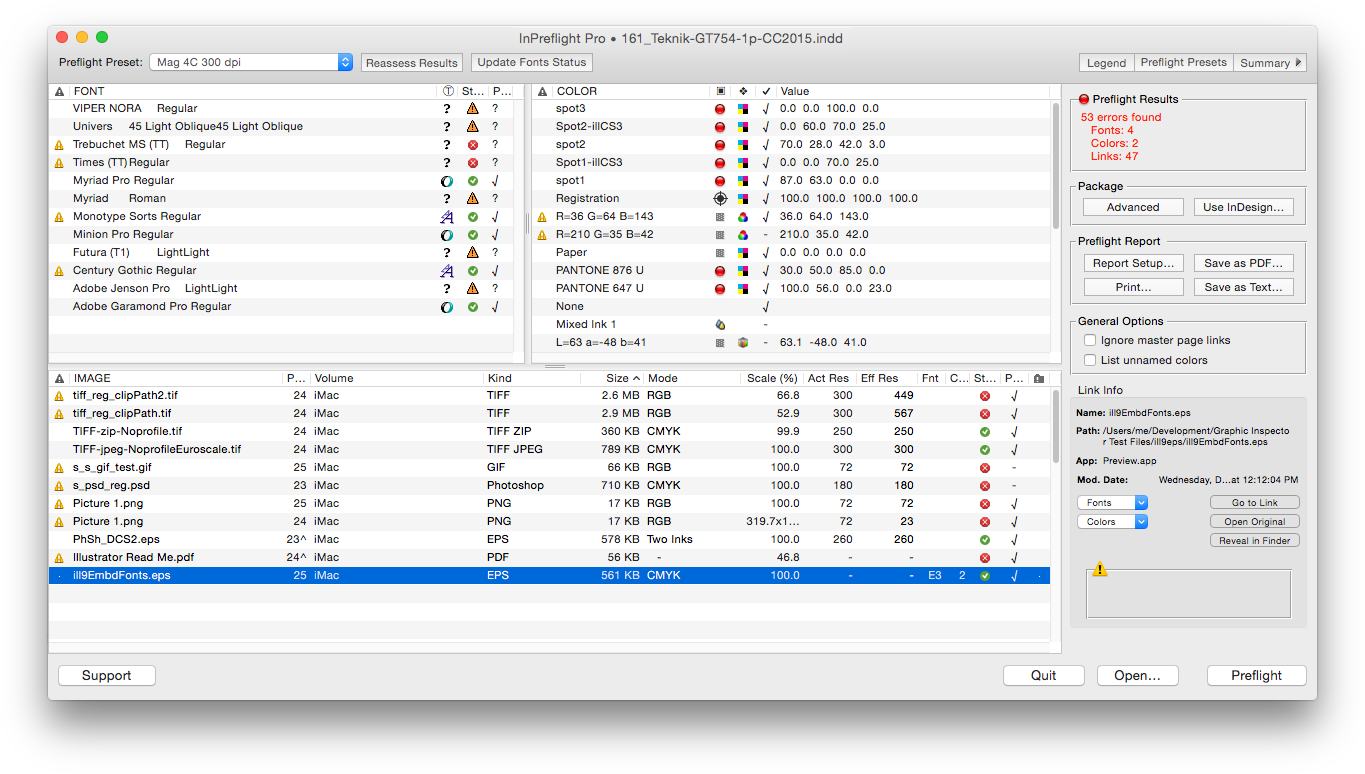
Zevrix Solutions announces InPreflight Pro 2.11.29, a compatibility update to its document preparation solution for Adobe InDesign. Described as "delightfully simple to use" by Macworld magazine, InPreflight is an all-in-one solution to check InDesign documents for errors, automatically collect multiple files for output, and ship them to final destination. The new version adds support for the 2019 release of InDesign CC featured as part of Adobe Creative Cloud.
Toronto (ON), Canada - Zevrix Solutions today announces the release of InPreflight Pro 2.11.29, a compatibility update to its document preparation solution for Adobe InDesign. InPreflight is a powerful all-in-one solution to check InDesign documents for errors, collect them for output, and ship to final destination. InPreflight helps graphics and print professionals prevent costly mistakes by uncovering hidden problems, save disk space through smart batch-packaging, and reduce production time and costs.
The new version of InPreflight adds support for the recently announced 2019 release of InDesign CC, featured as part of Adobe Creative Cloud. The update is offered free of charge to InPreflight users. The same version of InPreflight can be used with any release of InDesign from CS3 and later.
"InPreflight is very simple, it provides excellent display of document's elements with full control over preflighting and file collection," says Michael Anikst of Anikst Design in London, UK. "I am designing very big books on art, and InPreflight lets me keep all my documents in perfect order."
InPreflight Pro provides a robust, affordable, reliable and easy-to-use solution for printers, service providers, ad agencies, and publishing houses. It offers the following key features:
Batch-packaging:
* Package multiple InDesign documents automatically
* Collect all shared links into one folder, saving gigabytes of disk space and hours of production time
Quality control:
* Quickly check InDesign fonts, colors and links for common errors
* Create preflight presets for different projects
* Uncover hidden issues such as image compression, embedded fonts and illegal link locations
Graphic preflight reports:
* Print graphic reports and save them as PDF
* Detailed paragraph styles report for typography professionals
Pricing and Availability:
InPreflight Pro can be purchased from Zevrix website for $99.95 USD (Studio version: $39.95), as well as from authorized resellers and Adobe Exchange. Trial version is available for download. Update is free for licensed users of version 2, and $50 from earlier versions. InPreflight requires macOS 10.7-10.14 and Adobe InDesign CS3-CC 2019.
Zevrix Solutions: http://zevrix.com
InPreflight Pro 2.11.29: http://zevrix.com/InPreflight.php
Download InPreflight Pro: http://zevrix.com/InPreflight.dmg
Purchase InPreflight Pro: http://zevrix.com/store.php
Screenshot: http://zevrix.com/screenshots/ipf2/ipf2-main-no-doc.png
Located in Toronto, Canada, Zevrix Solutions provides automation and productivity solutions for Adobe Creative Cloud and Creative Suite software, PDF workflows, graphic file diagnostics and Microsoft Office output on Mac OS. Zevrix is dedicated to help professionals increase their profits through automating everyday tasks, producing error-free documents, saving disk space and cutting production costs. For more information, visit their website. Copyright (C) 2018 Zevrix Solutions. All Rights Reserved. Other trademarks and registered trademarks may be the property of their respective owners.
*******
Link To Article: https://prmac.com/release-id-83078.htm
*******
---------------------------------------------------------------------------------
Note that you can alter delivered distributions at any time.
Login to your account on prMac to alter your channel selection, or to opt-out at any time.
InPreflight for Adobe InDesign Now Supports Creative Cloud 2019 - Published on 10/22/18
Zevrix Solutions announces InPreflight Pro 2.11.29, a compatibility update to its document preparation solution for Adobe InDesign. Described as "delightfully simple to use" by Macworld magazine, InPreflight is an all-in-one solution to check InDesign documents for errors, automatically collect multiple files for output, and ship them to final destination. The new version adds support for the 2019 release of InDesign CC featured as part of Adobe Creative Cloud.
Toronto (ON), Canada - Zevrix Solutions today announces the release of InPreflight Pro 2.11.29, a compatibility update to its document preparation solution for Adobe InDesign. InPreflight is a powerful all-in-one solution to check InDesign documents for errors, collect them for output, and ship to final destination. InPreflight helps graphics and print professionals prevent costly mistakes by uncovering hidden problems, save disk space through smart batch-packaging, and reduce production time and costs.
The new version of InPreflight adds support for the recently announced 2019 release of InDesign CC, featured as part of Adobe Creative Cloud. The update is offered free of charge to InPreflight users. The same version of InPreflight can be used with any release of InDesign from CS3 and later.
"InPreflight is very simple, it provides excellent display of document's elements with full control over preflighting and file collection," says Michael Anikst of Anikst Design in London, UK. "I am designing very big books on art, and InPreflight lets me keep all my documents in perfect order."
InPreflight Pro provides a robust, affordable, reliable and easy-to-use solution for printers, service providers, ad agencies, and publishing houses. It offers the following key features:
Batch-packaging:
* Package multiple InDesign documents automatically
* Collect all shared links into one folder, saving gigabytes of disk space and hours of production time
Quality control:
* Quickly check InDesign fonts, colors and links for common errors
* Create preflight presets for different projects
* Uncover hidden issues such as image compression, embedded fonts and illegal link locations
Graphic preflight reports:
* Print graphic reports and save them as PDF
* Detailed paragraph styles report for typography professionals
Pricing and Availability:
InPreflight Pro can be purchased from Zevrix website for $99.95 USD (Studio version: $39.95), as well as from authorized resellers and Adobe Exchange. Trial version is available for download. Update is free for licensed users of version 2, and $50 from earlier versions. InPreflight requires macOS 10.7-10.14 and Adobe InDesign CS3-CC 2019.
Zevrix Solutions: http://zevrix.com
InPreflight Pro 2.11.29: http://zevrix.com/InPreflight.php
Download InPreflight Pro: http://zevrix.com/InPreflight.dmg
Purchase InPreflight Pro: http://zevrix.com/store.php
Screenshot: http://zevrix.com/screenshots/ipf2/ipf2-main-no-doc.png
Located in Toronto, Canada, Zevrix Solutions provides automation and productivity solutions for Adobe Creative Cloud and Creative Suite software, PDF workflows, graphic file diagnostics and Microsoft Office output on Mac OS. Zevrix is dedicated to help professionals increase their profits through automating everyday tasks, producing error-free documents, saving disk space and cutting production costs. For more information, visit their website. Copyright (C) 2018 Zevrix Solutions. All Rights Reserved. Other trademarks and registered trademarks may be the property of their respective owners.
*******
Link To Article: https://prmac.com/release-id-83078.htm
*******
---------------------------------------------------------------------------------
Note that you can alter delivered distributions at any time.
Login to your account on prMac to alter your channel selection, or to opt-out at any time.
Subscribe to:
Posts (Atom)