A new article has been published at prMac.
DEVONthink 2.10.2 updated for macOS Mojave - Published on 10/26/18
DEVONtechnologies updates its smart document and information manager DEVONthink with interface fixes for macOS Mojave, support for Fujitsu ScanSnap Home, and a modernized web server. It also improves Evernote import, email archiving, and drag-and-drop with e.g. Tinderbox. All four editions also receive additional improvements and bug fixes. DEVONthink supports a large variety of file formats and stores them in a database enhanced by artificial intelligence (AI).
Coeur d'Alene, Idaho - DEVONtechnologies updates its smart document and information manager DEVONthink with interface fixes for mac OS Mojave, support for Fujitsu ScanSnap Home, and a modernized web server. It also improves Evernote import, email archiving, and drag-and-drop with e.g. Tinderbox. All four editions also receive additional improvements and bug fixes. The updates are free and recommended for all users.
DEVONthink is DEVONtechnologies' document and information management solution for the Mac. It supports a large variety of file formats and stores them in a database enhanced by artificial intelligence (AI). Many document formats can be directly viewed and edited, PDFs annotated. DEVONnote is DEVONthink's little sibling with a reduced feature set targeted at users with notetaking-centric needs.
Sophisticated organization tools, AI-based techniques that handle even the largest collections, and numerous integration options make DEVONthink the work environment of choice for researchers, lawyers, and educators. With its fast, reliable, and secure synchronization users keep their data available on all their Macs and iOS devices. DEVONthink To Go for iPad and iPhone completes the DEVONthink ecosystem.
* Keep your data together in one place
* Scan your paper, archive your email
* Let artificial intelligence help you file your data
* Sync your data to all your devices, fast and secure
* Share your data with anyone, whether they use Mac or PC
New in DEVONthink 2.10.2:
The latest update for DEVONthink and DEVONnote brings compatibility adjustments for macOS Mojave. Among a row of other changes it fixes visual glitches in panels, menus, and the scan window.
In addition, DEVONthink Pro Office 2.10.2 supports Fujitsu's new ScanSnap Home application. It recognizes incoming scans and converts them to searchable PDF documents if needed. The built-in webserver has been modernized, too. It makes better use of fast network connections for serving Mac and PC users connecting to its databases via web sharing.
DEVONthink now preserves checkboxes in notes imported from Evernote and better supports ebook metadata. The update also enhances drag-and-drop with third-party applications like Eastgate Tinderbox. Users doing a lot of research will notice that jumping to search hits in documents with highlighted text is easier too.
On the sync side DEVONthink 2.10.2 lets users import databases from sync locations by double-clicking them in the sync preferences. The update also makes the progress indication while verifying or cleaning sync stores more comprehensive and improves the handling of indexed files as well as the reliability of the synchronization in general.
DEVONnote 2.10.2 receives the relevant enhancements and bug fixes from its siblings, too.
The updates for all editions of DEVONthink and DEVONnote are free for existings users and highly recommended.
System requirements:
* OS X Yosemite or later
Availability and Pricing:
All editions of DEVONthink and DEVONnote for the Mac can be downloaded from www.devontechnologies.com and be test-driven for free before they need to be licensed. DEVONthink Personal as well as all editions of DEVONagent are also available in the App Store; DEVONthink can be purchased in bundles with DEVONagent for attractive bundle prices in DEVONtechnologies' online shop. DEVONthink To Go for iOS is available through the iOS App Store.
* DEVONthink Pro Office: US $149.95
* DEVONthink Pro: US $79.95
* DEVONthink Personal: US $49.95 (App Store: $49.99)
* DEVONnote: US $24.95 (App Store: $24.99)
More information:
Customers find more information about our apps on the DEVONtechnologies website. Eric Bohnisch-Volkmann, DEVONtechnologies' President, also posts news, opinions, previews, and public betas in the company blog Devonian Times.
DEVONthink: http://www.devontechnologies.com/redirect.php?id=product-dt
Download DEVONthink and DEVONnote: http://www.devontechnologies.com/redirect.php?id=download
DEVONtechnologies Online Shop: http://www.devontechnologies.com/redirect.php?id=shop
DEVONtechnologies Blog: http://www.devontechnologies.com/redirect.php?id=blog
DEVONtechnologies LLC creates end-user and server applications for the Mac and iOS platforms that enhance productivity, organization, and user experience with unique artificial intelligence technology. All applications are focused on both ease of use and satisfying the needs of even the most savvy users. The underlying DEVONtechnology is a flexible and versatile foundation that can be used for a large range of purposes from databases, data mining, and information retrieval to human-computer interfaces. DEVONtechnologies LLC was founded 2002 and incorporated 2004, and is today headquartered in Coeur d'Alene, Idaho, USA. All Material and Software (C) Copyright 2018 DEVONtechnologies LLC. All Rights Reserved. Apple, the Apple logo, Macintosh and Mac OS X are registered trademarks of Apple Inc. in the U.S. and/or other countries. Other trademarks and registered trademarks may be the property of their respective owners.
*******
Link To Article: https://prmac.com/release-id-83090.htm
*******
---------------------------------------------------------------------------------
Note that you can alter delivered distributions at any time.
Login to your account on prMac to alter your channel selection, or to opt-out at any time.

PFiddlesoft Releases UI Browser 2.8.0
A new article has been published at prMac.
PFiddlesoft Releases UI Browser 2.8.0 - Published on 10/25/18
PFiddlesoft releases UI Browser 2.8.0, an update to the "ultimate assistant" for Apple's AppleScript GUI Scripting and Accessibility technologies in macOS Yosemite 10.10 or later. UI Browser helps users to explore, manipulate, and monitor the user interface of most macOS applications running on your computer. With the push of a button, it also generates AppleScript statements to control any application using GUI Scripting.
Quechee, Vermont - PFiddlesoft today announced the release of version 2.8.0 of its popular product, UI Browser, the "ultimate assistant" for GUI Scripting with AppleScript, and a developer utility for exploring Apple's Accessibility API.
UI Browser helps you to explore, manipulate, and monitor the user interface of most macOS applications running on your computer. With the push of a button, it also generates AppleScript statements to control any application using GUI Scripting, even applications that are not otherwise scriptable. No other utility provides all of the information you need in order to write scripts using GUI Scripting.
Version 2.8.0 of UI Browser adds support for new Accessibility features introduced in macOS Mojave 10.14. It also incorporates new PFAssistive Framework 3.9.0 and PFEventTaps Framework 1.6.0. UI Browser now requires OS X Yosemite 10.10 or later.
In addition, version 2.8.0 adds these new features:
* UI Browser now uses Apple's Hardened Runtime in Mojave for increased security. It may require user authorization to perform some tasks.
* UI Browser has been notarized by Apple to assure users that it is from a trusted developer and was scanned for malicious code by Apple to ensure its security.
* UI Browser no longer allows in-application purchase. Instead, go to the secure PFiddlesoft website and navigate to the eSellerate Online Store to purchase a license.
* UI Browser's Target menu now includes Apple's new Script Menu application in Mojave. The Script Menu application handles the Script menu extra if Script Editor preferences are set to show it in the menu bar.
* UI Browser supports Dark Mode in Mojave.
* UI Browser now uses the current "Highlight color" setting in System Preferences to highlight the target UI element when running in Highlight mode.
* AppleScript statements generated by UI Brtwoser can now be sent to Script Debugger 7 from Late Night Software, as well as Script Editor, Smile and earlier versions of Script Debugger.
* UI Browser implements numerous performance enhancements and a number of minor bug fixes.
Download a free, full-featured 30-day trial version of UI Browser now at pfiddlesoft.com/uibrowser/.
New customers may purchase UI Browser for $55, with quantity discounts available. It is a free upgrade for registered owners of UI Browser 2.0.0 and newer. UI Browser 1.4.1 is no longer supported and no free upgrade path is available.
UI Browser is based on the PFiddlesoft Frameworks, including the PFAssistive and PFEventTaps Frameworks. The frameworks are written using Objective-C, and they support 64-bit architectures using reference counted memory management and ARC. Developers can license the PFiddlesoft Frameworks for distribution or use with their own products that use Apple's Accessibility and Quartz Event Taps technologies. The frameworks may be licensed free of charge for personal use or for distribution or use with a free software product. A modest license fee is required to distribute or use the frameworks with a product for which payment is requested or required. Source code is available for a separate fee. Different terms apply to large or established commercial software developers. For more information, visit the PFiddlesoft website.
PFiddlesoft(TM) has unmatched experience controlling the Macintosh Graphical User Interface using AppleScript and other technologies. PFiddlesoft is a trademark of PreForm Assistive Technologies, LLC, a company formed by Bill Cheeseman to develop and market Macintosh software based on Apple's Accessibility technologies. PFiddlesoft distributes applications written by Bill Cheeseman, including UI Browser, Event Taps Testbench, and the PFiddlesoft Frameworks. These products for macOS carry on the tradition of PreFab Player, a seminal product released for the classic Mac OS in 1994. UI Browser was first released in 2003 to support Apple's GUI Scripting and Accessibility technologies. It was followed in 2007 by Event Taps Testbench, a free developer utility to explore Quartz Event Taps.
PFiddlesoft: https://pfiddlesoft.com
UI Browser 2.8.0: https://pfiddlesoft.com/uibrowser
Direct Download Link: https://pfiddlesoft.com/uibrowser/downloads/UIBrowser280.dmg
Formed by Bill Cheeseman to develop and market Macintosh software based on Apple's Accessibility technologies, PFiddlesoft(TM) has unmatched experience controlling the Macintosh Graphical User Interface using AppleScript and other technologies. PFiddlesoft distributes applications written by Bill Cheeseman and formerly distributed by PreFab Software, Inc., including UI Browser, UI Actions, Event Taps Testbench, and the PFiddlesoft Frameworks. These products for Mac OS X carry on the tradition of PreFab Player, a seminal product released for the classic Mac OS in 1994. UI Browser was first released in 2003 to support Apple's GUI Scripting and Accessibility technologies. It was followed in 2007 by Event Taps Testbench, a free developer utility to explore Quartz Event Taps. All Material and Software (C) Copyright 2018 PFiddlesoft is a trademark of PreForm Assistive Technologies, LLC. All Rights Reserved. Apple, the Apple logo, Mac OS X and Macintosh are registered trademarks of Apple
Inc. in the U.S. and/or other countries.
*******
Link To Article: https://prmac.com/release-id-83089.htm
*******
---------------------------------------------------------------------------------
Note that you can alter delivered distributions at any time.
Login to your account on prMac to alter your channel selection, or to opt-out at any time.
PFiddlesoft Releases UI Browser 2.8.0 - Published on 10/25/18
PFiddlesoft releases UI Browser 2.8.0, an update to the "ultimate assistant" for Apple's AppleScript GUI Scripting and Accessibility technologies in macOS Yosemite 10.10 or later. UI Browser helps users to explore, manipulate, and monitor the user interface of most macOS applications running on your computer. With the push of a button, it also generates AppleScript statements to control any application using GUI Scripting.
Quechee, Vermont - PFiddlesoft today announced the release of version 2.8.0 of its popular product, UI Browser, the "ultimate assistant" for GUI Scripting with AppleScript, and a developer utility for exploring Apple's Accessibility API.
UI Browser helps you to explore, manipulate, and monitor the user interface of most macOS applications running on your computer. With the push of a button, it also generates AppleScript statements to control any application using GUI Scripting, even applications that are not otherwise scriptable. No other utility provides all of the information you need in order to write scripts using GUI Scripting.
Version 2.8.0 of UI Browser adds support for new Accessibility features introduced in macOS Mojave 10.14. It also incorporates new PFAssistive Framework 3.9.0 and PFEventTaps Framework 1.6.0. UI Browser now requires OS X Yosemite 10.10 or later.
In addition, version 2.8.0 adds these new features:
* UI Browser now uses Apple's Hardened Runtime in Mojave for increased security. It may require user authorization to perform some tasks.
* UI Browser has been notarized by Apple to assure users that it is from a trusted developer and was scanned for malicious code by Apple to ensure its security.
* UI Browser no longer allows in-application purchase. Instead, go to the secure PFiddlesoft website and navigate to the eSellerate Online Store to purchase a license.
* UI Browser's Target menu now includes Apple's new Script Menu application in Mojave. The Script Menu application handles the Script menu extra if Script Editor preferences are set to show it in the menu bar.
* UI Browser supports Dark Mode in Mojave.
* UI Browser now uses the current "Highlight color" setting in System Preferences to highlight the target UI element when running in Highlight mode.
* AppleScript statements generated by UI Brtwoser can now be sent to Script Debugger 7 from Late Night Software, as well as Script Editor, Smile and earlier versions of Script Debugger.
* UI Browser implements numerous performance enhancements and a number of minor bug fixes.
Download a free, full-featured 30-day trial version of UI Browser now at pfiddlesoft.com/uibrowser/.
New customers may purchase UI Browser for $55, with quantity discounts available. It is a free upgrade for registered owners of UI Browser 2.0.0 and newer. UI Browser 1.4.1 is no longer supported and no free upgrade path is available.
UI Browser is based on the PFiddlesoft Frameworks, including the PFAssistive and PFEventTaps Frameworks. The frameworks are written using Objective-C, and they support 64-bit architectures using reference counted memory management and ARC. Developers can license the PFiddlesoft Frameworks for distribution or use with their own products that use Apple's Accessibility and Quartz Event Taps technologies. The frameworks may be licensed free of charge for personal use or for distribution or use with a free software product. A modest license fee is required to distribute or use the frameworks with a product for which payment is requested or required. Source code is available for a separate fee. Different terms apply to large or established commercial software developers. For more information, visit the PFiddlesoft website.
PFiddlesoft(TM) has unmatched experience controlling the Macintosh Graphical User Interface using AppleScript and other technologies. PFiddlesoft is a trademark of PreForm Assistive Technologies, LLC, a company formed by Bill Cheeseman to develop and market Macintosh software based on Apple's Accessibility technologies. PFiddlesoft distributes applications written by Bill Cheeseman, including UI Browser, Event Taps Testbench, and the PFiddlesoft Frameworks. These products for macOS carry on the tradition of PreFab Player, a seminal product released for the classic Mac OS in 1994. UI Browser was first released in 2003 to support Apple's GUI Scripting and Accessibility technologies. It was followed in 2007 by Event Taps Testbench, a free developer utility to explore Quartz Event Taps.
PFiddlesoft: https://pfiddlesoft.com
UI Browser 2.8.0: https://pfiddlesoft.com/uibrowser
Direct Download Link: https://pfiddlesoft.com/uibrowser/downloads/UIBrowser280.dmg
Formed by Bill Cheeseman to develop and market Macintosh software based on Apple's Accessibility technologies, PFiddlesoft(TM) has unmatched experience controlling the Macintosh Graphical User Interface using AppleScript and other technologies. PFiddlesoft distributes applications written by Bill Cheeseman and formerly distributed by PreFab Software, Inc., including UI Browser, UI Actions, Event Taps Testbench, and the PFiddlesoft Frameworks. These products for Mac OS X carry on the tradition of PreFab Player, a seminal product released for the classic Mac OS in 1994. UI Browser was first released in 2003 to support Apple's GUI Scripting and Accessibility technologies. It was followed in 2007 by Event Taps Testbench, a free developer utility to explore Quartz Event Taps. All Material and Software (C) Copyright 2018 PFiddlesoft is a trademark of PreForm Assistive Technologies, LLC. All Rights Reserved. Apple, the Apple logo, Mac OS X and Macintosh are registered trademarks of Apple
Inc. in the U.S. and/or other countries.
*******
Link To Article: https://prmac.com/release-id-83089.htm
*******
---------------------------------------------------------------------------------
Note that you can alter delivered distributions at any time.
Login to your account on prMac to alter your channel selection, or to opt-out at any time.
Sprite Cutter Cuts Perfect PNGs from iOS12 Portrait Mode Photos
A new article has been published at prMac.
Sprite Cutter Cuts Perfect PNGs from iOS12 Portrait Mode Photos - Published on 10/23/18
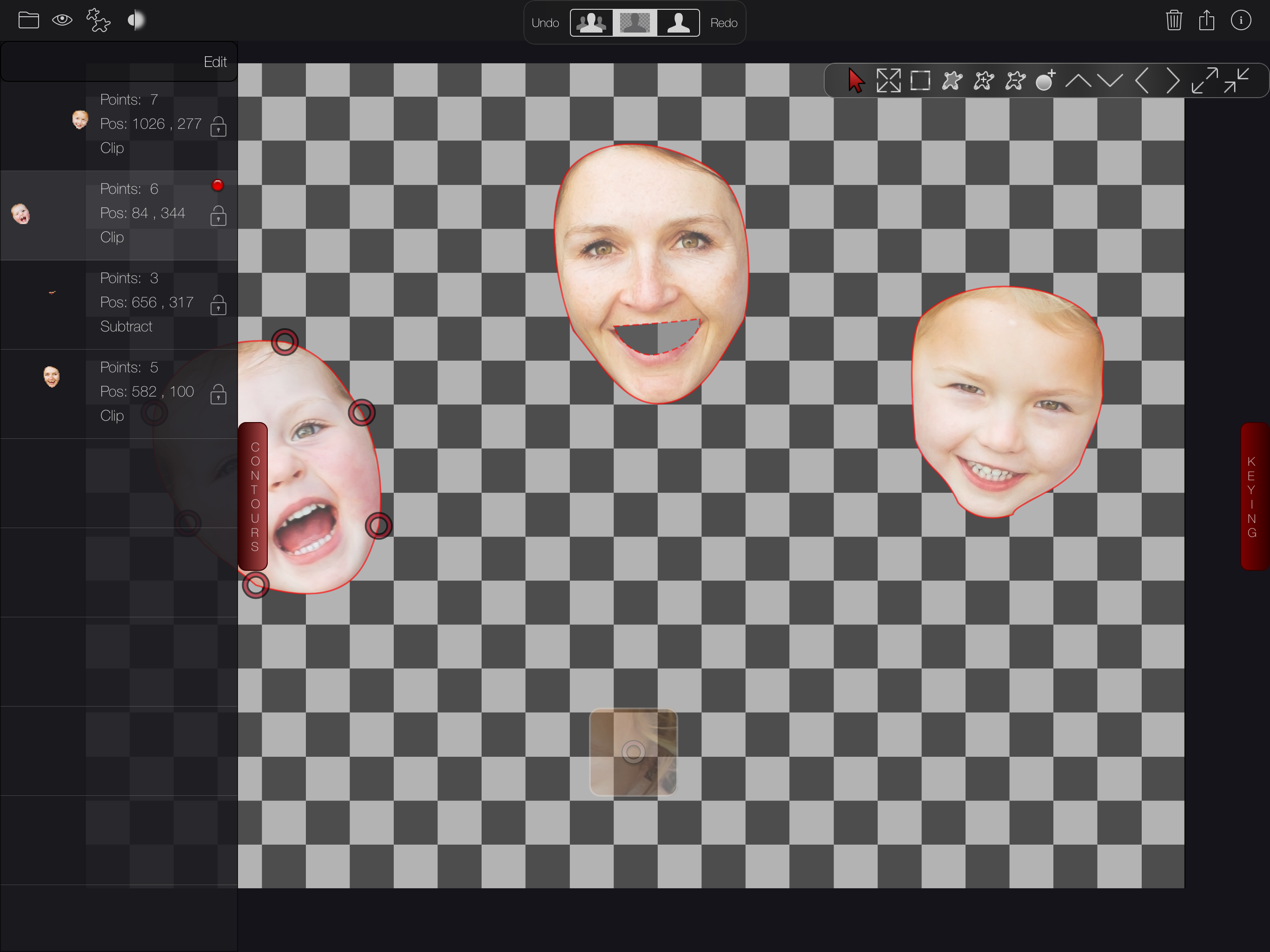
PixelSplincher announces Sprite Cutter 3.3 for iOS devices, a powerful update to the best app for cutting out faces, pets, or any other shape from your photos. Using the new Portrait Effects Matte in iOS12 portrait mode photos, Sprite Cutter can cleanly pull foreground figures off the background and save them with transparent backgrounds. Combined with Sprite Cutter's subtraction, holdout, and boundary shapes, it is easier than ever to make clean cutouts with precise control.
Salt Lake City, Utah - PixelSplincher is excited to announce Sprite Cutter version 3.3, a powerful update to the best iOS app for cutting out faces, pets, or any other shape from your photos. Using the new Portrait Effects Matte that Apple added to iOS12 portrait mode photos, Sprite Cutter can cleanly pull foreground figures off the background and save them as PNG or Gif format images with transparent backgrounds. Combined with Sprite Cutter's subtraction, holdout, and boundary shapes, it is easier than ever to make clean cutouts with precise control.
Apple's Portrait Effects Matte technology uses the iPhone's depth camera in conjunction with machine learning algorithms to segment foreground subjects from the background, cleanly preserving sharp edges and capturing problem areas like hair or fine edge features with amazing detail and partial transparency. Sprite Cutter can use this segmentation as the starting point for for your cutout, letting you add or remove areas using Bezier curves as well as a color removal filter.
And, Sprite Cutter's unique Depth Cutter can use the depth data embedded in your photos to cut out foreground and background elements by selecting only a range of depths, allowing you to define your own segmentation. All the Sprite Cutter filters are implemented directly in Metal, and run with blazing speed by taking advantage of the GPU.
Features:
* Cut multiple sprites from a single image, save separated or as a single picture
* Cut out green-screen backgrounds, or any other color with range, edge softness and color fringe removal
* Use embedded depth data taken with newer iPhone cameras to perfectly cut objects based on distance
* Use curves with green screen or depth keying to hold out or cut out elements
* View and edit sprite with background visible, removed, or as black & white mask
* Magnified view inset makes precision cutting easy
* Save sprites as 32-bit PNG images with smooth transparency and lossless compression
* Soften sprite edges for glow or halo effects
* Save sprites to .gif files with transparency
* Inline help: documentation with no internet connection needed
* Undo-redo: hey, nobody's perfect...
* Optionally rescale sprites on export to fit standard 64x64, 128x128, or 256x256 resolutions
* Nudge position and scale of shape for quick adjustments to the whole shape
* Double-tap on any curve point to quickly smooth the curve
* Insert and remove points with a touch
* Save and reload curves
Note: A sprite is a small image, stored with transparency information (called an 'alpha channel') which hides the portions of the image you don't want to see. Sprite Cutter uses standard 32-bit PNG format to save your image with lossless compression, and an 8-bit antialiased alpha channel. This makes the sprites compatible with web browsers and virtually all apps which work with pictures.
Device Requirements:
* iPhone, iPad, and iPod touch
* Requires iOS 11.0 or later
* Universal Application
* 108.9 MB
Pricing and Availability:
Sprite Cutter 3.3 is $1.99 and is available worldwide exclusively through the App Store in the Photo and Video category.
Sprite Cutter 3.3: http://www.pixelsplincher.com/SpriteCutter.html
Purchase and Download from App Store: https://itunes.apple.com/us/app/sprite-cutter/id520534410?mt=8
YouTube App Preview: https://www.youtube.com/watch?v=6E-54sQoZrM
YouTube Playlist: https://www.youtube.com/watch?v=psgF-c9NPRE&list=PLl_9pEZRGCpe9V698lhbN5J-YkGuT_z3Y
Screenshot: http://www.pixelsplincher.com/icons/SpriteCutterScreenShot1.png
App Icon: http://www.pixelsplincher.com/icons/SpriteCutterIcon.png
PixelSplincher was founded in 2011 by veteran visual effects programmers Frances Dose and Arnie Cachelin. Their sole focus is to apply years of coding and graphics wizardry to the creation of enchanting apps. Copyright (C) 2018 PixelSplincher. All Rights Reserved. Apple, the Apple logo, iPhone, iPod and iPad are registered trademarks of Apple Inc. in the U.S. and/or other countries. Other trademarks and registered trademarks may be the property of their respective owners.
*******
Link To Article: https://prmac.com/release-id-83088.htm
*******
---------------------------------------------------------------------------------
Note that you can alter delivered distributions at any time.
Login to your account on prMac to alter your channel selection, or to opt-out at any time.
Sprite Cutter Cuts Perfect PNGs from iOS12 Portrait Mode Photos - Published on 10/23/18
PixelSplincher announces Sprite Cutter 3.3 for iOS devices, a powerful update to the best app for cutting out faces, pets, or any other shape from your photos. Using the new Portrait Effects Matte in iOS12 portrait mode photos, Sprite Cutter can cleanly pull foreground figures off the background and save them with transparent backgrounds. Combined with Sprite Cutter's subtraction, holdout, and boundary shapes, it is easier than ever to make clean cutouts with precise control.
Salt Lake City, Utah - PixelSplincher is excited to announce Sprite Cutter version 3.3, a powerful update to the best iOS app for cutting out faces, pets, or any other shape from your photos. Using the new Portrait Effects Matte that Apple added to iOS12 portrait mode photos, Sprite Cutter can cleanly pull foreground figures off the background and save them as PNG or Gif format images with transparent backgrounds. Combined with Sprite Cutter's subtraction, holdout, and boundary shapes, it is easier than ever to make clean cutouts with precise control.
Apple's Portrait Effects Matte technology uses the iPhone's depth camera in conjunction with machine learning algorithms to segment foreground subjects from the background, cleanly preserving sharp edges and capturing problem areas like hair or fine edge features with amazing detail and partial transparency. Sprite Cutter can use this segmentation as the starting point for for your cutout, letting you add or remove areas using Bezier curves as well as a color removal filter.
And, Sprite Cutter's unique Depth Cutter can use the depth data embedded in your photos to cut out foreground and background elements by selecting only a range of depths, allowing you to define your own segmentation. All the Sprite Cutter filters are implemented directly in Metal, and run with blazing speed by taking advantage of the GPU.
Features:
* Cut multiple sprites from a single image, save separated or as a single picture
* Cut out green-screen backgrounds, or any other color with range, edge softness and color fringe removal
* Use embedded depth data taken with newer iPhone cameras to perfectly cut objects based on distance
* Use curves with green screen or depth keying to hold out or cut out elements
* View and edit sprite with background visible, removed, or as black & white mask
* Magnified view inset makes precision cutting easy
* Save sprites as 32-bit PNG images with smooth transparency and lossless compression
* Soften sprite edges for glow or halo effects
* Save sprites to .gif files with transparency
* Inline help: documentation with no internet connection needed
* Undo-redo: hey, nobody's perfect...
* Optionally rescale sprites on export to fit standard 64x64, 128x128, or 256x256 resolutions
* Nudge position and scale of shape for quick adjustments to the whole shape
* Double-tap on any curve point to quickly smooth the curve
* Insert and remove points with a touch
* Save and reload curves
Note: A sprite is a small image, stored with transparency information (called an 'alpha channel') which hides the portions of the image you don't want to see. Sprite Cutter uses standard 32-bit PNG format to save your image with lossless compression, and an 8-bit antialiased alpha channel. This makes the sprites compatible with web browsers and virtually all apps which work with pictures.
Device Requirements:
* iPhone, iPad, and iPod touch
* Requires iOS 11.0 or later
* Universal Application
* 108.9 MB
Pricing and Availability:
Sprite Cutter 3.3 is $1.99 and is available worldwide exclusively through the App Store in the Photo and Video category.
Sprite Cutter 3.3: http://www.pixelsplincher.com/SpriteCutter.html
Purchase and Download from App Store: https://itunes.apple.com/us/app/sprite-cutter/id520534410?mt=8
YouTube App Preview: https://www.youtube.com/watch?v=6E-54sQoZrM
YouTube Playlist: https://www.youtube.com/watch?v=psgF-c9NPRE&list=PLl_9pEZRGCpe9V698lhbN5J-YkGuT_z3Y
Screenshot: http://www.pixelsplincher.com/icons/SpriteCutterScreenShot1.png
App Icon: http://www.pixelsplincher.com/icons/SpriteCutterIcon.png

PixelSplincher was founded in 2011 by veteran visual effects programmers Frances Dose and Arnie Cachelin. Their sole focus is to apply years of coding and graphics wizardry to the creation of enchanting apps. Copyright (C) 2018 PixelSplincher. All Rights Reserved. Apple, the Apple logo, iPhone, iPod and iPad are registered trademarks of Apple Inc. in the U.S. and/or other countries. Other trademarks and registered trademarks may be the property of their respective owners.
*******
Link To Article: https://prmac.com/release-id-83088.htm
*******
---------------------------------------------------------------------------------
Note that you can alter delivered distributions at any time.
Login to your account on prMac to alter your channel selection, or to opt-out at any time.
Nisus Software, Inc. Releases Nisus Writer Pro 3
A new article has been published at prMac.
Nisus Software, Inc. Releases Nisus Writer Pro 3 - Published on 10/24/18
California based Nisus Software today announces Nisus Writer Pro 3, a significant upgrade to its professional word processor for macOS. Nisus Writer Pro offers an impressive set of features to help you create beautiful documents. New features in Nisus Writer Pro 3 include split view, a redesigned UI and palette system, an upgraded full screen view, printable comments and tracked changes, and a lower price. In all there are over 300 new features, fixes, and enhancements.
Solana Beach, California - Nisus Software, Inc. has announced the release of Nisus Writer Pro 3, a significant upgrade to its professional word processor for macOS. New features in Nisus Writer Pro 3 include split view, a redesigned UI and palette system, an upgraded full screen view, printable comments and tracked changes, even more powerful find and replace, icons updated for retina displays, cloud sync for almost all settings, a new formatting examiner palette, typewriter scrolling, a new notes view, macOS Mojave compatible, and over 300 new features, fixes, and enhancements.
"This release adds many commonly requested features" said CEO Jerzy Lewak. "We have also added numerous improvements that we ourselves have found useful. For over 25 years we have developed software which supports our users' creativity. This new version includes exciting features which will help our customers be even more creative in their writings."
The new features add to an already rich feature set that includes an intuitive interface, multilingual text support, powerful find and replace, easy to use style system, cross-references, bookmarks, table of contents, indexing, and a native file format (RTF) that almost any word processor can read.
System Requirements
* Requires Mac OS 10.11 or later
Pricing and Availability
Nisus Writer Pro 3 is available now at the Nisus web store and the Mac App Store for only $65.00 (USD). An upgrade version is available for $45.00 and an academic version is $55, both available from the Nisus store.
Nisus Software: http://www.nisus.com
Nisus Writer Pro 3: http://nisus.com/pro
Download Nisus Writer Pro: http://nisus.com/pro/download.php
Purchase: http://nisus.com/store
Screenshot (zip): https://nisus.com/pr/files/NWP3-Screenshot.zip
Application Icon (zip): https://nisus.com/pr/files/NWP3-Appicon.zip
For over 25 years, Nisus Software, Inc. has developed award winning text and productivity tools for the Macintosh, such as Nisus Writer Pro, Nisus Writer Express, and Nisus Thesaurus. Copyright (C) 2018 Nisus Software, Inc. All Rights Reserved. Apple, the Apple logo, and Macintosh are registered trademarks of Apple Inc. in the U.S. and/or other countries.
*******
Link To Article: https://prmac.com/release-id-83087.htm
*******
---------------------------------------------------------------------------------
Note that you can alter delivered distributions at any time.
Login to your account on prMac to alter your channel selection, or to opt-out at any time.
Nisus Software, Inc. Releases Nisus Writer Pro 3 - Published on 10/24/18
California based Nisus Software today announces Nisus Writer Pro 3, a significant upgrade to its professional word processor for macOS. Nisus Writer Pro offers an impressive set of features to help you create beautiful documents. New features in Nisus Writer Pro 3 include split view, a redesigned UI and palette system, an upgraded full screen view, printable comments and tracked changes, and a lower price. In all there are over 300 new features, fixes, and enhancements.
Solana Beach, California - Nisus Software, Inc. has announced the release of Nisus Writer Pro 3, a significant upgrade to its professional word processor for macOS. New features in Nisus Writer Pro 3 include split view, a redesigned UI and palette system, an upgraded full screen view, printable comments and tracked changes, even more powerful find and replace, icons updated for retina displays, cloud sync for almost all settings, a new formatting examiner palette, typewriter scrolling, a new notes view, macOS Mojave compatible, and over 300 new features, fixes, and enhancements.
"This release adds many commonly requested features" said CEO Jerzy Lewak. "We have also added numerous improvements that we ourselves have found useful. For over 25 years we have developed software which supports our users' creativity. This new version includes exciting features which will help our customers be even more creative in their writings."
The new features add to an already rich feature set that includes an intuitive interface, multilingual text support, powerful find and replace, easy to use style system, cross-references, bookmarks, table of contents, indexing, and a native file format (RTF) that almost any word processor can read.
System Requirements
* Requires Mac OS 10.11 or later
Pricing and Availability
Nisus Writer Pro 3 is available now at the Nisus web store and the Mac App Store for only $65.00 (USD). An upgrade version is available for $45.00 and an academic version is $55, both available from the Nisus store.
Nisus Software: http://www.nisus.com
Nisus Writer Pro 3: http://nisus.com/pro
Download Nisus Writer Pro: http://nisus.com/pro/download.php
Purchase: http://nisus.com/store
Screenshot (zip): https://nisus.com/pr/files/NWP3-Screenshot.zip
Application Icon (zip): https://nisus.com/pr/files/NWP3-Appicon.zip
For over 25 years, Nisus Software, Inc. has developed award winning text and productivity tools for the Macintosh, such as Nisus Writer Pro, Nisus Writer Express, and Nisus Thesaurus. Copyright (C) 2018 Nisus Software, Inc. All Rights Reserved. Apple, the Apple logo, and Macintosh are registered trademarks of Apple Inc. in the U.S. and/or other countries.
*******
Link To Article: https://prmac.com/release-id-83087.htm
*******
---------------------------------------------------------------------------------
Note that you can alter delivered distributions at any time.
Login to your account on prMac to alter your channel selection, or to opt-out at any time.
iPhone XR Guidebook - eBook released for iPhone XR and iOS 12
A new article has been published at prMac.
iPhone XR Guidebook - eBook released for iPhone XR and iOS 12 - Published on 10/24/18
UK based Tap Guides today introduces iPhone XR Guidebook, a brand new eBook available in the Apple iBookstore that reveals everything you need to know about the iPhone XR. Priced at just $3.99, iPhone XR Guidebook is concise and jargon-free, enabling readers to become proficient with iPhone XR features such as Face ID, iOS 12, every built-in app, and the iPhone XR hardware in next to no time. It's also packed with large color images that help to visually explain tips and tutorials.
Poole, United Kingdom - Tap Guides is today delighted to announce its latest book: iPhone XR Guidebook. Brought to you by the expert team at Tap Guides, and written by best-selling technology author Thomas Anthony, iPhone XR Guidebook is packed with top tips and in-depth tutorials. You'll uncover the history of the iPhone's development from 2007 to 2018, learn about iPhone XR features such as Face ID, discover how to use iOS 12 and its built-in apps, plus much more.
With the largest LCD display ever shipped in an iPhone, the same camera lens included with the iPhone XS, and the most powerful chip ever included in a smartphone, the iPhone XR is an incredible piece of technology. Arguably, it's also the most beautiful, coming in six bold color choices: white, black, blue, coral, yellow, and product red. iPhone XR Guidebook explores this amazing new smartphone, and unveils everything you need to know about iOS 12. By the time you've finished reading iPhone XR Guidebook you'll be a pro in nearly everything iPhone and iOS related.
Inside you'll discover:
* The history of the iPhone
* The exclusive features of iPhone XR
* Detailed app tutorials
* The secrets of mastering mobile photography
* How to edit photos
* Essential Settings and configurations
* Troubleshooting tips
Device Requirements:
* Available on iPhone, iPad, iPod touch, Mac & Kindle Devices
* Print Length: 522 Pages
Pricing and Availability:
iPhone XR Guidebook is $3.99 USD (or equivalent amount in other currencies) and available worldwide exclusively through the iBookstore in the Computers category.
Tap Guides: http://www.tapguides.co.uk/
iPhone XR Guidebook: http://itunes.apple.com/us/book/id1439925062
Screenshots (zip): http://www.tapguides.co.uk/wp-content/uploads/2018/10/iPhone_XR_Guidebook_Screenshots.zip
Press Kit (zip): http://www.tapguides.co.uk/wp-content/uploads/2018/10/iPhone_XR_Guidebook_Press_Kit.zip
Cover: http://www.tapguides.co.uk/wp-content/uploads/2018/10/iPhone-XR-Guidebook-Cover.jpg
Launched in 2015, Tap Guides Ltd publishes eBooks and interactive apps that teach users how to use their iOS devices. Tap Guides most notable book to date is the iPad Pro Guidebook. Copyright (C) 2018 Tap Guides Ltd. All Rights Reserved. Apple, the Apple logo, iPhone, iPod and iPad are registered trademarks of Apple Inc. in the U.S. and/or other countries. Other trademarks and registered trademarks may be the property of their respective owners.
*******
Link To Article: https://prmac.com/release-id-83086.htm
*******
---------------------------------------------------------------------------------
Note that you can alter delivered distributions at any time.
Login to your account on prMac to alter your channel selection, or to opt-out at any time.
iPhone XR Guidebook - eBook released for iPhone XR and iOS 12 - Published on 10/24/18
UK based Tap Guides today introduces iPhone XR Guidebook, a brand new eBook available in the Apple iBookstore that reveals everything you need to know about the iPhone XR. Priced at just $3.99, iPhone XR Guidebook is concise and jargon-free, enabling readers to become proficient with iPhone XR features such as Face ID, iOS 12, every built-in app, and the iPhone XR hardware in next to no time. It's also packed with large color images that help to visually explain tips and tutorials.
Poole, United Kingdom - Tap Guides is today delighted to announce its latest book: iPhone XR Guidebook. Brought to you by the expert team at Tap Guides, and written by best-selling technology author Thomas Anthony, iPhone XR Guidebook is packed with top tips and in-depth tutorials. You'll uncover the history of the iPhone's development from 2007 to 2018, learn about iPhone XR features such as Face ID, discover how to use iOS 12 and its built-in apps, plus much more.
With the largest LCD display ever shipped in an iPhone, the same camera lens included with the iPhone XS, and the most powerful chip ever included in a smartphone, the iPhone XR is an incredible piece of technology. Arguably, it's also the most beautiful, coming in six bold color choices: white, black, blue, coral, yellow, and product red. iPhone XR Guidebook explores this amazing new smartphone, and unveils everything you need to know about iOS 12. By the time you've finished reading iPhone XR Guidebook you'll be a pro in nearly everything iPhone and iOS related.
Inside you'll discover:
* The history of the iPhone
* The exclusive features of iPhone XR
* Detailed app tutorials
* The secrets of mastering mobile photography
* How to edit photos
* Essential Settings and configurations
* Troubleshooting tips
Device Requirements:
* Available on iPhone, iPad, iPod touch, Mac & Kindle Devices
* Print Length: 522 Pages
Pricing and Availability:
iPhone XR Guidebook is $3.99 USD (or equivalent amount in other currencies) and available worldwide exclusively through the iBookstore in the Computers category.
Tap Guides: http://www.tapguides.co.uk/
iPhone XR Guidebook: http://itunes.apple.com/us/book/id1439925062
Screenshots (zip): http://www.tapguides.co.uk/wp-content/uploads/2018/10/iPhone_XR_Guidebook_Screenshots.zip
Press Kit (zip): http://www.tapguides.co.uk/wp-content/uploads/2018/10/iPhone_XR_Guidebook_Press_Kit.zip
Cover: http://www.tapguides.co.uk/wp-content/uploads/2018/10/iPhone-XR-Guidebook-Cover.jpg

Launched in 2015, Tap Guides Ltd publishes eBooks and interactive apps that teach users how to use their iOS devices. Tap Guides most notable book to date is the iPad Pro Guidebook. Copyright (C) 2018 Tap Guides Ltd. All Rights Reserved. Apple, the Apple logo, iPhone, iPod and iPad are registered trademarks of Apple Inc. in the U.S. and/or other countries. Other trademarks and registered trademarks may be the property of their respective owners.
*******
Link To Article: https://prmac.com/release-id-83086.htm
*******
---------------------------------------------------------------------------------
Note that you can alter delivered distributions at any time.
Login to your account on prMac to alter your channel selection, or to opt-out at any time.
Graphic Inspector Now Supports macOS Mojave: Image Preflight Tool
A new article has been published at prMac.
Graphic Inspector Now Supports macOS Mojave: Image Preflight Tool - Published on 10/24/18
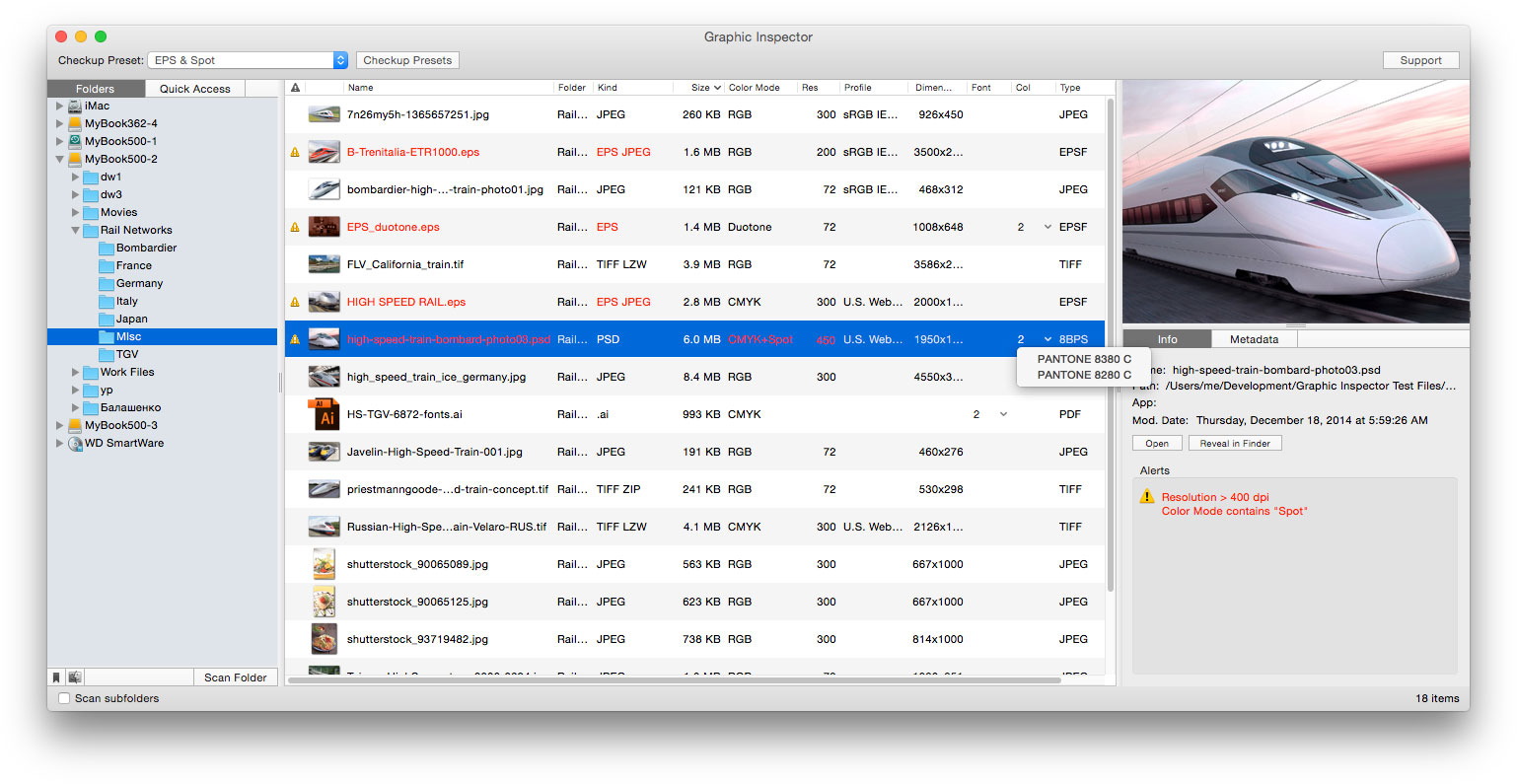
Zevrix Solutions announces Graphic Inspector 2.4.1, a compatibility update to company's quality control solution for images and vector graphics files. Graphic Inspector can quickly locate documents with specific attributes such as resolution, color, spot channels, fonts, metadata and more. The app is the only tool on the market that can preflight both raster images and vector documents for potential issues. The new version makes adds support for the recently released macOS 10.14 Mojave.
Toronto (ON), Canada - Zevrix Solutions today announces the release of Graphic Inspector 2.4.1, a compatibility update to company's quality control solution for images and vector graphic files. Graphic Inspector can check entire folders of documents for potential problems according to specific workflow requirements. The app is the only tool on the market that lets graphics industry professionals inspect both raster images and Adobe Illustrator documents.
The new version introduces support for the recently released macOS 10.14 Mojave and is offered as a free update to the licensed users. While BatchOutput XLS is fully compatible with the new Dark Mode, the app currently preserves its original appearance. A dark appearance will be introduced in the future.
"I'm surprised no one else thought of it before: to display every bit of useful information about vector or raster graphic files and flag the ones that match rules you define," writes Jay Nelson in Layers magazine. "With its combination of price, utility, and thoughtful design, Graphic Inspector is a rare gem."
Graphic Inspector is designed to help users of any trade, whether it's print, prepress, web design, electronic publishing or digital photography. For example, users can quickly locate files whose color mode is CMYK, format - TIFF, resolution is below 300 dpi, ICC profile isn't "US Web Coated" and so on.
Graphic Inspector offers the following key features:
* Check multiple images and vector files for potential problems
* Customizable checkup presets
* Common checks such as resolution, color mode, ICC profile and file size
* Professional prepress checks: spot colors, fonts in vector files, image compression and more
* Search image EXIF, IPTC and GPS metadata
Pricing and Availability:
Graphic Inspector can be purchased from the Zevrix web site for $19.95 (USD), as well as from authorized resellers. Graphic Inspector is free with purchase of PDF Checkpoint or InPreflight Pro for Adobe InDesign. Trial is also available for download. The update is free for users of version 2 ($10 to upgrade from version 1). Graphic Inspector requires macOS 10.7-10.14.
Zevrix Solutions: http://zevrix.com
Graphic Inspector 2.4.1: http://zevrix.com/GraphicInspector.php
Download Graphic Inspector: http://zevrix.com/GraphicInspector.dmg
Purchase Graphic Inspector: http://zevrix.com/store.php
Screenshot: http://zevrix.com/screenshots/gi2/gi2-main.jpg
Located in Toronto, Canada, Zevrix Solutions provides automation and productivity solutions for Adobe Creative Cloud and Creative Suite software, PDF workflows, graphic file diagnostics and Microsoft Office output on Mac OS. Zevrix is dedicated to help professionals increase their profits through automating everyday tasks, producing error-free documents, saving disk space and cutting production costs. For more information, visit their website. Copyright (C) 2018 Zevrix Solutions. All Rights Reserved. Other trademarks and registered trademarks may be the property of their respective owners.
*******
Link To Article: https://prmac.com/release-id-83084.htm
*******
---------------------------------------------------------------------------------
Note that you can alter delivered distributions at any time.
Login to your account on prMac to alter your channel selection, or to opt-out at any time.
Graphic Inspector Now Supports macOS Mojave: Image Preflight Tool - Published on 10/24/18
Zevrix Solutions announces Graphic Inspector 2.4.1, a compatibility update to company's quality control solution for images and vector graphics files. Graphic Inspector can quickly locate documents with specific attributes such as resolution, color, spot channels, fonts, metadata and more. The app is the only tool on the market that can preflight both raster images and vector documents for potential issues. The new version makes adds support for the recently released macOS 10.14 Mojave.
Toronto (ON), Canada - Zevrix Solutions today announces the release of Graphic Inspector 2.4.1, a compatibility update to company's quality control solution for images and vector graphic files. Graphic Inspector can check entire folders of documents for potential problems according to specific workflow requirements. The app is the only tool on the market that lets graphics industry professionals inspect both raster images and Adobe Illustrator documents.
The new version introduces support for the recently released macOS 10.14 Mojave and is offered as a free update to the licensed users. While BatchOutput XLS is fully compatible with the new Dark Mode, the app currently preserves its original appearance. A dark appearance will be introduced in the future.
"I'm surprised no one else thought of it before: to display every bit of useful information about vector or raster graphic files and flag the ones that match rules you define," writes Jay Nelson in Layers magazine. "With its combination of price, utility, and thoughtful design, Graphic Inspector is a rare gem."
Graphic Inspector is designed to help users of any trade, whether it's print, prepress, web design, electronic publishing or digital photography. For example, users can quickly locate files whose color mode is CMYK, format - TIFF, resolution is below 300 dpi, ICC profile isn't "US Web Coated" and so on.
Graphic Inspector offers the following key features:
* Check multiple images and vector files for potential problems
* Customizable checkup presets
* Common checks such as resolution, color mode, ICC profile and file size
* Professional prepress checks: spot colors, fonts in vector files, image compression and more
* Search image EXIF, IPTC and GPS metadata
Pricing and Availability:
Graphic Inspector can be purchased from the Zevrix web site for $19.95 (USD), as well as from authorized resellers. Graphic Inspector is free with purchase of PDF Checkpoint or InPreflight Pro for Adobe InDesign. Trial is also available for download. The update is free for users of version 2 ($10 to upgrade from version 1). Graphic Inspector requires macOS 10.7-10.14.
Zevrix Solutions: http://zevrix.com
Graphic Inspector 2.4.1: http://zevrix.com/GraphicInspector.php
Download Graphic Inspector: http://zevrix.com/GraphicInspector.dmg
Purchase Graphic Inspector: http://zevrix.com/store.php
Screenshot: http://zevrix.com/screenshots/gi2/gi2-main.jpg
Located in Toronto, Canada, Zevrix Solutions provides automation and productivity solutions for Adobe Creative Cloud and Creative Suite software, PDF workflows, graphic file diagnostics and Microsoft Office output on Mac OS. Zevrix is dedicated to help professionals increase their profits through automating everyday tasks, producing error-free documents, saving disk space and cutting production costs. For more information, visit their website. Copyright (C) 2018 Zevrix Solutions. All Rights Reserved. Other trademarks and registered trademarks may be the property of their respective owners.
*******
Link To Article: https://prmac.com/release-id-83084.htm
*******
---------------------------------------------------------------------------------
Note that you can alter delivered distributions at any time.
Login to your account on prMac to alter your channel selection, or to opt-out at any time.
PopChar X 8.5 improves support for Mojave, particularly for Dark Mode
A new article has been published at prMac.
PopChar X 8.5 improves support for Mojave, particularly for Dark Mode - Published on 10/24/18
Ergonis Software today released PopChar X 8.5, which improves support for Mojave, particularly for Dark Mode. If you use your Mac in Dark Mode, you now have the choice to see PopChar's character table in a traditional black-on-white view as on paper or a light-on-dark view that blends perfectly with the dark appearance. PopChar 8.5 is now the recommended minimum version of PopChar for anyone who is running Mojave or plans to upgrade to Mojave.
Perg, Austria - Ergonis Software today released PopChar X 8.5, an improved version of the company's award-winning tool for finding and inserting special characters and exploring fonts. PopChar X 8.5 improves support for Mojave, particularly for Dark Mode. If you use your Mac in Dark Mode, you now have the choice to see PopChar's character table in a traditional black-on-white view as on paper or a light-on-dark view that blends perfectly with the dark appearance. Since this is a matter of taste, the preferred style can be changed in PopChar's preferences.
PopChar now also contains fine-tuned color adjustments of colors, such as highlight colors in both Light and Dark Mode, and it works around an issue where PopChar could not be reliably activated in Mojave. Since some of the improvements in the new version are important for Mojave, PopChar 8.5 is now the recommended minimum version of PopChar for anyone who is running Mojave or plans to upgrade to Mojave.
Finally, PopChar X 8.5 contains fixes and workarounds for user-reported issues and improves overall compatibility and stability on all versions of macOS. Visit Ergonis Software's website to learn more about the changes in this release and to download the new version.
PopChar solves a problem faced by every technologist and multi-lingual worker. Inserting special characters into application documents can be frustrating and results in a steady loss of productivity. With PopChar, thousands of special characters are only a few clicks away. Just pop up the PopChar window, click the desired character, and the character appears in your current document right away.
System Requirements:
Requires Mac OS X 10.6 or newer and is recommended for macOS Mojave (10.14).
Availability and Ordering:
PopChar X 8.5 can be purchased securely on the Ergonis Software website. The upgrade to PopChar X 8.5 is free for anyone who purchased a license for PopChar X 8 or for PopChar X 7 on or after September 1st 2016. Upgrade paths are available for owners of older licenses. For information about purchases, including enterprise licenses, volume discounts, and upgrade pricing offers, see the company's web site. Instead of purchasing PopChar separately, customers can save money by ordering the Ergonis Productivity Bundle, which also includes the text expander Typinator and the keyboard shortcut helper KeyCue.
Ergonis Software: http://www.ergonis.com/
PopChar X 8.5: http://www.ergonis.com/products/popcharx
Download PopChar X: http://www.ergonis.com/downloads/popcharx-install.dmg
Purchase PopChar X: https://store.ergonis.com/products/popcharx
Screenshot (Main Window): http://www.ergonis.com/images/products/pcx/external/popcharx-screen.png
Screenshot (Darker mode): https://www.ergonis.com/press/2018/20181024/popcharx-darker.png
Ergonis Software develops ergonomic and intuitive software that boosts the productivity of Mac and PC users. Ergonis Software, a privately held company founded in 2002, is headquartered in Perg, Austria. Copyright 2002-2018 Ergonis Software Gmbh. All Rights Reserved. Ergonis products are either registered trademarks or trademarks of Ergonis Software GmbH. Other company and product names may be trademarks of their respective owners.
*******
Link To Article: https://prmac.com/release-id-83085.htm
*******
---------------------------------------------------------------------------------
Note that you can alter delivered distributions at any time.
Login to your account on prMac to alter your channel selection, or to opt-out at any time.
PopChar X 8.5 improves support for Mojave, particularly for Dark Mode - Published on 10/24/18
Ergonis Software today released PopChar X 8.5, which improves support for Mojave, particularly for Dark Mode. If you use your Mac in Dark Mode, you now have the choice to see PopChar's character table in a traditional black-on-white view as on paper or a light-on-dark view that blends perfectly with the dark appearance. PopChar 8.5 is now the recommended minimum version of PopChar for anyone who is running Mojave or plans to upgrade to Mojave.
Perg, Austria - Ergonis Software today released PopChar X 8.5, an improved version of the company's award-winning tool for finding and inserting special characters and exploring fonts. PopChar X 8.5 improves support for Mojave, particularly for Dark Mode. If you use your Mac in Dark Mode, you now have the choice to see PopChar's character table in a traditional black-on-white view as on paper or a light-on-dark view that blends perfectly with the dark appearance. Since this is a matter of taste, the preferred style can be changed in PopChar's preferences.
PopChar now also contains fine-tuned color adjustments of colors, such as highlight colors in both Light and Dark Mode, and it works around an issue where PopChar could not be reliably activated in Mojave. Since some of the improvements in the new version are important for Mojave, PopChar 8.5 is now the recommended minimum version of PopChar for anyone who is running Mojave or plans to upgrade to Mojave.
Finally, PopChar X 8.5 contains fixes and workarounds for user-reported issues and improves overall compatibility and stability on all versions of macOS. Visit Ergonis Software's website to learn more about the changes in this release and to download the new version.
PopChar solves a problem faced by every technologist and multi-lingual worker. Inserting special characters into application documents can be frustrating and results in a steady loss of productivity. With PopChar, thousands of special characters are only a few clicks away. Just pop up the PopChar window, click the desired character, and the character appears in your current document right away.
System Requirements:
Requires Mac OS X 10.6 or newer and is recommended for macOS Mojave (10.14).
Availability and Ordering:
PopChar X 8.5 can be purchased securely on the Ergonis Software website. The upgrade to PopChar X 8.5 is free for anyone who purchased a license for PopChar X 8 or for PopChar X 7 on or after September 1st 2016. Upgrade paths are available for owners of older licenses. For information about purchases, including enterprise licenses, volume discounts, and upgrade pricing offers, see the company's web site. Instead of purchasing PopChar separately, customers can save money by ordering the Ergonis Productivity Bundle, which also includes the text expander Typinator and the keyboard shortcut helper KeyCue.
Ergonis Software: http://www.ergonis.com/
PopChar X 8.5: http://www.ergonis.com/products/popcharx
Download PopChar X: http://www.ergonis.com/downloads/popcharx-install.dmg
Purchase PopChar X: https://store.ergonis.com/products/popcharx
Screenshot (Main Window): http://www.ergonis.com/images/products/pcx/external/popcharx-screen.png

Screenshot (Darker mode): https://www.ergonis.com/press/2018/20181024/popcharx-darker.png

Ergonis Software develops ergonomic and intuitive software that boosts the productivity of Mac and PC users. Ergonis Software, a privately held company founded in 2002, is headquartered in Perg, Austria. Copyright 2002-2018 Ergonis Software Gmbh. All Rights Reserved. Ergonis products are either registered trademarks or trademarks of Ergonis Software GmbH. Other company and product names may be trademarks of their respective owners.
*******
Link To Article: https://prmac.com/release-id-83085.htm
*******
---------------------------------------------------------------------------------
Note that you can alter delivered distributions at any time.
Login to your account on prMac to alter your channel selection, or to opt-out at any time.
Subscribe to:
Posts (Atom)