A new article has been published at prMac.
Typinator 7.8 improves support for Mojave and is notarized by Apple - Published on 11/13/18
Ergonis Software today announced Typinator 7.8, a new version of their highly acclaimed text expander for macOS.Typinator is a powerful, yet elegantly simple solution that automates the process of inserting frequently used text and auto-correcting typing errors. Version 7.8 improves support for Mojave, particularly for Dark Mode. The new version also contains many further improvements like better import from TextExpander, improved scrolling and clipping in the expansion field, and much more.
Perg, Austria - Ergonis Software today announced Typinator 7.8, a new release of their highly acclaimed text expander. Typinator 7.8 improves support for Mojave, particularly for Dark Mode. If you use your Mac in Dark Mode, the plain text and HTML expansion fields now fully adopt Mojave's dark mode, Typinator's menu bar icon uses the correct accent color when clicked, and readability of selected quick search results has been improved as well.
Typinator 7.8 has also been notarized by Apple. This means that the software has been uploaded to Apple before distribution, and Apple has confirmed that all executables are signed correctly and that the app does not contain any malware. This is another security feature that all Ergonis products will carry from now on.
Besides these improvements for Mojave, Typinator 7.8 contains many further improvements like better import from TextExpander, improved scrolling and clipping in the expansion field, and enhanced compatibility with third-party apps like Microsoft Remote Desktop 10, Vivaldi, and Citrix. All these changes make Typinator 7.8 a highly recommended upgrade for every Typinator user, particularly in combination with macOS Mojave. Visit Ergonis Software's website to learn more about the changes in this release and to download and try the new version.
Typinator is a powerful, yet elegantly simple solution that boosts your productivity by automating the process of inserting frequently used text and auto-correcting typing errors. Across all applications, it detects specific sequences of typed characters and automatically replaces them with text snippets, graphics, URLs, dates and special characters.
System Requirements:
* Mac OS X 10.6 or newer
* Recommended for macOS Mojave (10.14)
Availability and Ordering:
Typinator 7.8 can be purchased securely on the Ergonis Software website. The upgrade to version 7.8 is free for anyone who purchased a license for Typinator 6 or Typinator 7 on or after January 1st 2016. Upgrade paths are available for owners of older licenses. For information about purchases, including enterprise licenses, volume discounts, and upgrade pricing offers, see the company's web site.
Ergonis Software: https://www.ergonis.com/
Typinator 7.8: https://www.ergonis.com/products/typinator
Download Typinator: https://www.ergonis.com/downloads/typinator-install.dmg
Purchase Typinator: https://store.ergonis.com/products/typinator
Screenshot (Typinator window in Mojave's Dark Mode): https://www.ergonis.com/press/2018/20181113/typinator-screen-dark.png
Screenshot (Main Screen): https://www.ergonis.com/images/products/typi/external/typinator-screen.png
Headquartered in Perg, Austria, Ergonis Software Gmbh is a privately held software development company founded in 2002. With a focus on innovation, Ergonis develops ergonomic and intuitive software that boosts the productivity of Mac and PC users alike. Copyright 2002-2018 Ergonis Software Gmbh. All Rights Reserved. Ergonis products are either registered trademarks or trademarks of Ergonis Software GmbH. Other company and product names may be trademarks of their respective owners.
*******
Link To Article: https://prmac.com/release-id-83132.htm
*******
---------------------------------------------------------------------------------
Note that you can alter delivered distributions at any time.
Login to your account on prMac to alter your channel selection, or to opt-out at any time.


Pre-order HITCASE PRO for Xs MAX and Receive a SuperWide Lens
A new article has been published at prMac.
Pre-order HITCASE PRO for Xs MAX and Receive a SuperWide Lens - Published on 11/13/18
Vancouver based HIT Technologies, Inc. today launches their holiday sale. Pre-order a HITCASE PRO for the Xs MAX through November 19, 2018 and receive a complimentary HITCASE TrueLUX SuperWide lens. The HITCASE PRO is a rugged waterproof aluminum iPhone case and is the ideal choice for adventurers and outdoor lovers. The TrueLUX SuperWide lens is thread mounted onto the case, turning your iPhone into a sharper and more versatile camera for mobile photography and video, including underwater.
Vancouver, British Columbia Canada - HIT Technologies, Inc. today launches their holiday sale. Pre-order a HITCASE PRO for the Xs MAX through November 19, 2018 and receive a complimentary HITCASE TrueLUX(R) SuperWide lens. The HITCASE PRO is HITCASE's most rugged waterproof aluminum iPhone case and is the ideal choice for adventurers and outdoor lovers.
Crafted out of premium aluminum, its slim, form-fitting design keeps the iPhone safe no matter what the occasion. And HITCASE is the only protective case company to offer two screen protective covers: Air Shield, a screen-less bumper, for everyday use and Aqua Shield, water-seal screen protection. The TrueLUX SuperWide lens is thread mounted onto the case, turning your iPhone into a sharper and more versatile camera for mobile photography and video, including underwater.
"Ready for your next adventure? Never worry about your phone again," said Brooks Bergreen, founder and CEO of HITCASE. "Now you can fearlessly capture and share your adventures with the world and have the freedom to take your iPhone anywhere - anytime."
HITCASE PRO Design Features and Specs:
* Triple patented design
* Low profile anodized Aluminum frame
* IP68 Waterproof rating up to 33ft/10m
* Drop-proof to 16ft/5m - MIL SPEC Shock rated
* Mount it anywhere with HITCASE Railslide mount system
* Compatible with all 8 HITCASE mounts and GoPro(R) mounts
* Scratch resistant screen
* Get your phone in and out in seconds with HITCASE Shockseal design
* 100% Satisfaction Guarantee 30-Day Risk Free Return Policy
* 1-year limited product warranty
The HITCASE TrueLUX SuperWide is the perfect ultra wide lens to compliment your iPhone. With 3 spherical lens elements, the TrueLUX SuperWide delivers high-quality images with excel-lent detail throughout the entire field of view (FOV), with none of the vignetting typical of other ultra-wide lenses. Compact and lightweight, it's the perfect lens for creatives on the go.
Pricing and Availability:
Hitcase PRO for iPhone Xs MAX and SuperWide Lens Pre-order Bundle retails at $99.99 (USD) and will ship January 2019. This offer is only available online. For more information, please contact MIchele Baker.
HITCASE: https://www.hitcase.com/
HITCASE PRO: https://www.hitcase.com/pages/waterproof-iphone-case-pro
TrueLUX SuperWide Lens: https://www.hitcase.com/products/fisheye-lens-iphone-truelux
Waterproof and Protective iPhone Xs Max Cases: https://www.hitcase.com/collections/iphone-xs-max
Hitcase PRO for iPhone Xs MAX and Super-Wide Lens Pre-order Bundle : https://www.hitcase.com/products/hitcase-pro-preorder
Hitcase Holiday Bundles: https://www.hitcase.com/collections/holiday-bundles
HIT Technologies, Inc. (TSX VENTURE: HIT), headquartered in Vancouver, British Columbia, Canada, under the brand HITCASE, makes the world's most innovative mobile accessories using patented technologies and quality materials. By designing industry leading device protection, the TrueLUX(R) lens system and versatile mounts, our products protect devices while turning them into a better camera. HITCASE is getting the world Ready for Adventure(R), one HITCASE at a time. Find out more at hitcase.com and follow @hitcase. All Material and Software (C) Copyright 2018 HIT Technologies, Inc. All Rights Reserved. Apple, the Apple logo, iPhone, iPod and iPad are registered trademarks of Apple Inc. in the U.S. and/or other countries. Other trademarks and registered trademarks may be the property of their respective owners.
*******
Link To Article: https://prmac.com/release-id-83131.htm
*******
---------------------------------------------------------------------------------
Note that you can alter delivered distributions at any time.
Login to your account on prMac to alter your channel selection, or to opt-out at any time.
Pre-order HITCASE PRO for Xs MAX and Receive a SuperWide Lens - Published on 11/13/18
Vancouver based HIT Technologies, Inc. today launches their holiday sale. Pre-order a HITCASE PRO for the Xs MAX through November 19, 2018 and receive a complimentary HITCASE TrueLUX SuperWide lens. The HITCASE PRO is a rugged waterproof aluminum iPhone case and is the ideal choice for adventurers and outdoor lovers. The TrueLUX SuperWide lens is thread mounted onto the case, turning your iPhone into a sharper and more versatile camera for mobile photography and video, including underwater.
Vancouver, British Columbia Canada - HIT Technologies, Inc. today launches their holiday sale. Pre-order a HITCASE PRO for the Xs MAX through November 19, 2018 and receive a complimentary HITCASE TrueLUX(R) SuperWide lens. The HITCASE PRO is HITCASE's most rugged waterproof aluminum iPhone case and is the ideal choice for adventurers and outdoor lovers.
Crafted out of premium aluminum, its slim, form-fitting design keeps the iPhone safe no matter what the occasion. And HITCASE is the only protective case company to offer two screen protective covers: Air Shield, a screen-less bumper, for everyday use and Aqua Shield, water-seal screen protection. The TrueLUX SuperWide lens is thread mounted onto the case, turning your iPhone into a sharper and more versatile camera for mobile photography and video, including underwater.
"Ready for your next adventure? Never worry about your phone again," said Brooks Bergreen, founder and CEO of HITCASE. "Now you can fearlessly capture and share your adventures with the world and have the freedom to take your iPhone anywhere - anytime."
HITCASE PRO Design Features and Specs:
* Triple patented design
* Low profile anodized Aluminum frame
* IP68 Waterproof rating up to 33ft/10m
* Drop-proof to 16ft/5m - MIL SPEC Shock rated
* Mount it anywhere with HITCASE Railslide mount system
* Compatible with all 8 HITCASE mounts and GoPro(R) mounts
* Scratch resistant screen
* Get your phone in and out in seconds with HITCASE Shockseal design
* 100% Satisfaction Guarantee 30-Day Risk Free Return Policy
* 1-year limited product warranty
The HITCASE TrueLUX SuperWide is the perfect ultra wide lens to compliment your iPhone. With 3 spherical lens elements, the TrueLUX SuperWide delivers high-quality images with excel-lent detail throughout the entire field of view (FOV), with none of the vignetting typical of other ultra-wide lenses. Compact and lightweight, it's the perfect lens for creatives on the go.
Pricing and Availability:
Hitcase PRO for iPhone Xs MAX and SuperWide Lens Pre-order Bundle retails at $99.99 (USD) and will ship January 2019. This offer is only available online. For more information, please contact MIchele Baker.
HITCASE: https://www.hitcase.com/
HITCASE PRO: https://www.hitcase.com/pages/waterproof-iphone-case-pro
TrueLUX SuperWide Lens: https://www.hitcase.com/products/fisheye-lens-iphone-truelux
Waterproof and Protective iPhone Xs Max Cases: https://www.hitcase.com/collections/iphone-xs-max
Hitcase PRO for iPhone Xs MAX and Super-Wide Lens Pre-order Bundle : https://www.hitcase.com/products/hitcase-pro-preorder
Hitcase Holiday Bundles: https://www.hitcase.com/collections/holiday-bundles
HIT Technologies, Inc. (TSX VENTURE: HIT), headquartered in Vancouver, British Columbia, Canada, under the brand HITCASE, makes the world's most innovative mobile accessories using patented technologies and quality materials. By designing industry leading device protection, the TrueLUX(R) lens system and versatile mounts, our products protect devices while turning them into a better camera. HITCASE is getting the world Ready for Adventure(R), one HITCASE at a time. Find out more at hitcase.com and follow @hitcase. All Material and Software (C) Copyright 2018 HIT Technologies, Inc. All Rights Reserved. Apple, the Apple logo, iPhone, iPod and iPad are registered trademarks of Apple Inc. in the U.S. and/or other countries. Other trademarks and registered trademarks may be the property of their respective owners.
*******
Link To Article: https://prmac.com/release-id-83131.htm
*******
---------------------------------------------------------------------------------
Note that you can alter delivered distributions at any time.
Login to your account on prMac to alter your channel selection, or to opt-out at any time.
LinkOptimizer for Adobe InDesign at 50% off until November 18
A new article has been published at prMac.
LinkOptimizer for Adobe InDesign at 50% off until November 18 - Published on 11/13/18
Zevrix Solutions announces that LinkOptimizer for Adobe InDesign is available at 50% off until November 18 only. LinkOptimizer is workflow automation solution for InDesign that works with Photoshop to help users reduce InDesign link size and speed up processing by eliminating excess image data. The app also can convert colors and image file formats, perform image adjustments, run Photoshop actions, batch process InDesign files and more. The sale lets users save $130 on each copy of the app.
Toronto (ON), Canada - Zevrix Solutions announces that LinkOptimizer for Adobe InDesign is available at 50% off until November 18 only. Awarded 4 out of 5 starts by Computer Arts magazine, LinkOptimizer automates complex image manipulation tasks allowing users to reduce the size of InDesign links, save processing time, and reduce production costs. The discount lets users save $130 on each new license of LinkOptimizer and is also applied to upgrade prices from earlier versions.
"Today LinkOptimizer batched a huge book project and another magazine project in minutes vs. hours. Now I can take the afternoon off and drink beer," says Brian Donahue, owner of Bedesign studio in Minneapolis, Minnesota. "Thanks for freeing up my afternoon, rather than doing production work."
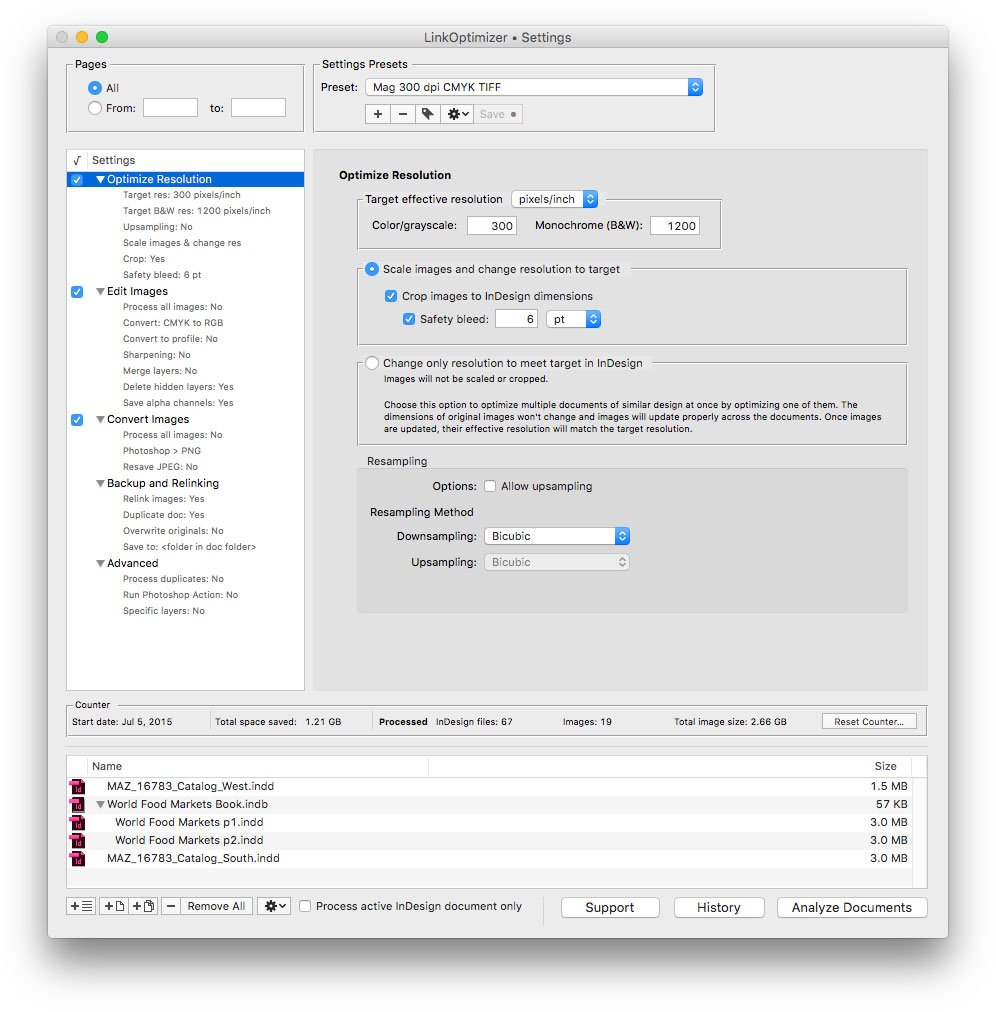
LinkOptimizer works automatically with Photoshop to eliminate the excess image data of InDesign links, perform essential image adjustments and convert image formats. For example, with just a click of a button users can:
* Optimize dozens of InDesign files
* Scale and crop images to match their dimensions in InDesign
* Change their resolution to 300 dpi
* Resave JPEGs as TIFF
* Convert RGB images to CMYK
* Assign variable image names based on page number, color, date and other values
* Run a Photoshop action on each image
At the end of processing, LinkOptimizer reimports images to InDesign at 100% in their precise position. In addition, the software can merge and delete hidden layers, apply ICC color profiles, and process document copies instead of original files. As a result users can save gigabytes of disk space and countless hours of optimizing images manually, accelerate document output, reduce job turnaround and cut costs through faster processing.
Pricing and Availability:
LinkOptimizer can be purchased form Zevrix.com at 50% off for $130 USD (LinkOptimizer Lite - $90) until November 18 only. the discount also applies to the upgrade prices to LinkOptimizer 5 from earlier versions. Trial is also available for download. LinkOptimizer requires macOS 10.7-10.14 and InDesign/Photoshop CS3-CC 2019.
Zevrix Solutions: http://zevrix.com
LinkOptimizer: http://zevrix.com/LinkOptimizer.php
Download LinkOptimizer: http://zevrix.com/LinkOptimizer.dmg
Purchase: http://zevrix.com/store.php
Screenshot: http://zevrix.com/screenshots/lo5/res-win.jpg
Located in Toronto, Canada, Zevrix Solutions provides automation and productivity solutions for Adobe Creative Cloud and Creative Suite software, PDF workflows, graphic file diagnostics and Microsoft Office output on Mac OS. Zevrix is dedicated to help professionals increase their profits through automating everyday tasks, producing error-free documents, saving disk space and cutting production costs. For more information, visit their website. Copyright (C) 2018 Zevrix Solutions. All Rights Reserved. Other trademarks and registered trademarks may be the property of their respective owners.
*******
Link To Article: https://prmac.com/release-id-83129.htm
*******
---------------------------------------------------------------------------------
Note that you can alter delivered distributions at any time.
Login to your account on prMac to alter your channel selection, or to opt-out at any time.
LinkOptimizer for Adobe InDesign at 50% off until November 18 - Published on 11/13/18
Zevrix Solutions announces that LinkOptimizer for Adobe InDesign is available at 50% off until November 18 only. LinkOptimizer is workflow automation solution for InDesign that works with Photoshop to help users reduce InDesign link size and speed up processing by eliminating excess image data. The app also can convert colors and image file formats, perform image adjustments, run Photoshop actions, batch process InDesign files and more. The sale lets users save $130 on each copy of the app.
Toronto (ON), Canada - Zevrix Solutions announces that LinkOptimizer for Adobe InDesign is available at 50% off until November 18 only. Awarded 4 out of 5 starts by Computer Arts magazine, LinkOptimizer automates complex image manipulation tasks allowing users to reduce the size of InDesign links, save processing time, and reduce production costs. The discount lets users save $130 on each new license of LinkOptimizer and is also applied to upgrade prices from earlier versions.
"Today LinkOptimizer batched a huge book project and another magazine project in minutes vs. hours. Now I can take the afternoon off and drink beer," says Brian Donahue, owner of Bedesign studio in Minneapolis, Minnesota. "Thanks for freeing up my afternoon, rather than doing production work."
LinkOptimizer works automatically with Photoshop to eliminate the excess image data of InDesign links, perform essential image adjustments and convert image formats. For example, with just a click of a button users can:
* Optimize dozens of InDesign files
* Scale and crop images to match their dimensions in InDesign
* Change their resolution to 300 dpi
* Resave JPEGs as TIFF
* Convert RGB images to CMYK
* Assign variable image names based on page number, color, date and other values
* Run a Photoshop action on each image
At the end of processing, LinkOptimizer reimports images to InDesign at 100% in their precise position. In addition, the software can merge and delete hidden layers, apply ICC color profiles, and process document copies instead of original files. As a result users can save gigabytes of disk space and countless hours of optimizing images manually, accelerate document output, reduce job turnaround and cut costs through faster processing.
Pricing and Availability:
LinkOptimizer can be purchased form Zevrix.com at 50% off for $130 USD (LinkOptimizer Lite - $90) until November 18 only. the discount also applies to the upgrade prices to LinkOptimizer 5 from earlier versions. Trial is also available for download. LinkOptimizer requires macOS 10.7-10.14 and InDesign/Photoshop CS3-CC 2019.
Zevrix Solutions: http://zevrix.com
LinkOptimizer: http://zevrix.com/LinkOptimizer.php
Download LinkOptimizer: http://zevrix.com/LinkOptimizer.dmg
Purchase: http://zevrix.com/store.php
Screenshot: http://zevrix.com/screenshots/lo5/res-win.jpg
Located in Toronto, Canada, Zevrix Solutions provides automation and productivity solutions for Adobe Creative Cloud and Creative Suite software, PDF workflows, graphic file diagnostics and Microsoft Office output on Mac OS. Zevrix is dedicated to help professionals increase their profits through automating everyday tasks, producing error-free documents, saving disk space and cutting production costs. For more information, visit their website. Copyright (C) 2018 Zevrix Solutions. All Rights Reserved. Other trademarks and registered trademarks may be the property of their respective owners.
*******
Link To Article: https://prmac.com/release-id-83129.htm
*******
---------------------------------------------------------------------------------
Note that you can alter delivered distributions at any time.
Login to your account on prMac to alter your channel selection, or to opt-out at any time.
Vitamin-R - Pomodoro Technique Productivity Tool goes to version 3
A new article has been published at prMac.
Vitamin-R - Pomodoro Technique Productivity Tool goes to version 3 - Published on 11/13/18
publicspace today is proud to announce version 3 of Vitamin-R, its innovative time boxing solution designed to overcome procrastination, retain focus and maintain motivation. Version 3 features a completely reimagined single window user experience, a soft break and lock screen option, deeper customization, improved support for the Pomodoro Technique, clearer statistics, faster log handling, personalized profiles, an integrated help system, improved OmniFocus 3 and Things 3 integration, etc.
Luxembourg City, Luxembourg - publicspace today is proud to announce version 3 of Vitamin-R, its innovative time boxing solution designed to overcome procrastination, retain focus and maintain motivation. Version 3 features a completely reimagined single window user experience, a soft break and lock screen option, deeper customization, improved support for the Pomodoro Technique, clearer statistics, faster log handling, personalized profiles, an integrated help system, improved integration with OmniFocus 3 and Things 3 and many other improvements.
Vitamin-R creates optimal conditions for the human brain by structuring work into short bursts of distraction-free, highly-focused activity alternating with opportunities for renewal, reflection and intuition. The built-in task logging and analysis features create positive momentum towards productivity by providing users with tangible feedback on their progress and achievements.
* Slices Up Daunting Tasks into Manageable Chunks:
Vitamin-R breaks down large, vaguely defined tasks into a series of short "time slices" of between 10 and 30 minutes, each with a specific, actionable and reachable objective.
* Promotes Higher Focus:
Vitamin-R features an array of highly configurable visual, audio and speech notifications that prod users to get back to their task as soon as their attention starts to wander.
* Gets You Started, Keeps You Motivated:
Vitamin-R allows users to break through the resistance of procrastination and create a positive feedback loop of small achievements that gets them closer to their ultimate aims.
* Effective Task Switching:
Task switching is a big, but often unavoidable productivity killer. Vitamin-R makes it as efficient as possible and the built-in "breadcrumbing" technique helps users to pick up where they left off.
* Productive Breaks:
Regular breaks are not for slackers. In fact, they are especially important for people who work with high focus. Vitamin-R's timed breaks make sure that a renewal break does not turn into a free afternoon and the "priming" technique allows your intuition to work overtime even before you start on a new objective.
* Promotes Awareness of Individual Rhythms:
Each one of us is different. Finding out what works best for you is the key to true productivity. Vitamin-R provides the tools to gain improved awareness of preferred work methods and rhythms. Armed with this new knowledge, you can eliminate unproductive work patterns.
* Get It Out of Your Head Quickly:
Did you know that your short term memory can only hold 4-6 "chunks" of information? The slightest interruption and it's all gone and you have to start from scratch. That's why Vitamin-R provides you with the "Now & Later Board", complete with FastType magic, to give you a place to quickly dump all those things that go through your head and allow you to quickly return to your task.
* Make It Your Own:
Vitamin-R plugs into your life rather than trying to take it over. You can use it occasionally to overcome procrastination or mental blocks or re-organize your entire working life around the concepts that it embodies.
* Works with OmniFocus, Things & The Hit List:
Vitamin-R integrates with traditional to-do list managers rather than trying to replace them.
* Block Out Noise:
The built-in noise machine can block out irritating coworkers and create energizing soundscapes.
* Ideal for Pomodoro Technique Aficionados:
Vitamin-R provides everything you need to implement the Pomodoro Technique: sophisticated timer, log book and analysis component.
* Attention Deficit Disorder:
While Vitamin-R was never specifically designed with ADHD "suffers" in mind, many ADHD-ers have found its approach to focusing attention invaluable.
New In Version 3:
Version 3 features a completely rewritten single window user interface which integrates all major tools: workflow, log book, statistics, help system and note pads into a single window. The new interface takes Vitamin-R's peerless configurability to the next level, by offering the option to add or remove user interface and workflow elements to create individualized workflows.
The new "soft break" feature no longer interrupts the user at the end of a time slice, but instead waits for up to 30 seconds for the user to stop typing or mousing. Vitamin-R makes it easy to extend time slices for short periods.
The new "lock screen" feature allows users to optionally lock the display of their Mac during timed break to force them to take breaks away from their desk.
The statistics tool has been completely rewritten for improved clarity and the log file handling has been optimized for users with a lot of logged time slices. The new log book provide a much improved overview of recent time slices and serves as a place to rapidly switch tasks.
Vitamin-R's integration with OmniFocus 3 and Things 3 has been updated and improved and now imports tag names and durations where available.
The new "Profiles" feature allows users to pre-configure the countless tool options to best match their preferences and workflow. Particular attention has been given to people who want to implement a purer version of the Pomodoro Technique rather than Vitamin-R's more flexible approach.
The new "Pomodoro-style breaks" control allows timed breaks to be configured with the two or three short breaks followed by a long break advocated by the Pomodoro technique.
Other improvements include quicker keyboard-based controls for changing durations, improved options in the right click status bar menu and support for macOS 10.14 Mojave and its unique visual style.
System Requirements:
* Mac OS X 10.10 Yosemite or later
* 64-bit Mac
* 32 MB Hard Drive space
Pricing and Availability:
For now, the Vitamin-R 3 Beta is exclusively available from the publicspace web store for for $24.99 (USD). The web store also offers Family, Business and Enterprise licensing and customers may chose to include a "forever upgrade" with their purchase. Each Vitamin-R web store purchase includes a free license for its companion product, Noise Machine, which is also available separately starting at $4.95 (USD).
Version 2 is available on the Mac App Store and will be joined there by version 3 shortly after its official launch.
publicspace: http://www.publicspace.net/
Vitamin-R 3.0: http://www.publicspace.net/Vitamin-R/index.html
Download Vitamin-R 3: http://www.publicspace.net/download/Vitamin.dmg
Purchase and Upgrade: http://www.publicspace.net/Vitamin-R/order.html
publicspace was founded by Frank Reiff in 1996 with the aim of producing affordable best-of-breed software for the Macintosh. In the past decade, our A Better Finder series of file utilities and our MacBreakZ personal ergonomic assistant have become familiar fixtures of the Macintosh community. publicspace is also produces "The Big Mean Folder Machine", Rest Time and Vitamin-R. Copyright (C) 2018 publicspace. All Rights Reserved. Apple, the Apple logo and Mac are registered trademarks of Apple Inc. in the U.S. and/or other countries.
*******
Link To Article: https://prmac.com/release-id-83130.htm
*******
---------------------------------------------------------------------------------
Note that you can alter delivered distributions at any time.
Login to your account on prMac to alter your channel selection, or to opt-out at any time.
Vitamin-R - Pomodoro Technique Productivity Tool goes to version 3 - Published on 11/13/18
publicspace today is proud to announce version 3 of Vitamin-R, its innovative time boxing solution designed to overcome procrastination, retain focus and maintain motivation. Version 3 features a completely reimagined single window user experience, a soft break and lock screen option, deeper customization, improved support for the Pomodoro Technique, clearer statistics, faster log handling, personalized profiles, an integrated help system, improved OmniFocus 3 and Things 3 integration, etc.
Luxembourg City, Luxembourg - publicspace today is proud to announce version 3 of Vitamin-R, its innovative time boxing solution designed to overcome procrastination, retain focus and maintain motivation. Version 3 features a completely reimagined single window user experience, a soft break and lock screen option, deeper customization, improved support for the Pomodoro Technique, clearer statistics, faster log handling, personalized profiles, an integrated help system, improved integration with OmniFocus 3 and Things 3 and many other improvements.
Vitamin-R creates optimal conditions for the human brain by structuring work into short bursts of distraction-free, highly-focused activity alternating with opportunities for renewal, reflection and intuition. The built-in task logging and analysis features create positive momentum towards productivity by providing users with tangible feedback on their progress and achievements.
* Slices Up Daunting Tasks into Manageable Chunks:
Vitamin-R breaks down large, vaguely defined tasks into a series of short "time slices" of between 10 and 30 minutes, each with a specific, actionable and reachable objective.
* Promotes Higher Focus:
Vitamin-R features an array of highly configurable visual, audio and speech notifications that prod users to get back to their task as soon as their attention starts to wander.
* Gets You Started, Keeps You Motivated:
Vitamin-R allows users to break through the resistance of procrastination and create a positive feedback loop of small achievements that gets them closer to their ultimate aims.
* Effective Task Switching:
Task switching is a big, but often unavoidable productivity killer. Vitamin-R makes it as efficient as possible and the built-in "breadcrumbing" technique helps users to pick up where they left off.
* Productive Breaks:
Regular breaks are not for slackers. In fact, they are especially important for people who work with high focus. Vitamin-R's timed breaks make sure that a renewal break does not turn into a free afternoon and the "priming" technique allows your intuition to work overtime even before you start on a new objective.
* Promotes Awareness of Individual Rhythms:
Each one of us is different. Finding out what works best for you is the key to true productivity. Vitamin-R provides the tools to gain improved awareness of preferred work methods and rhythms. Armed with this new knowledge, you can eliminate unproductive work patterns.
* Get It Out of Your Head Quickly:
Did you know that your short term memory can only hold 4-6 "chunks" of information? The slightest interruption and it's all gone and you have to start from scratch. That's why Vitamin-R provides you with the "Now & Later Board", complete with FastType magic, to give you a place to quickly dump all those things that go through your head and allow you to quickly return to your task.
* Make It Your Own:
Vitamin-R plugs into your life rather than trying to take it over. You can use it occasionally to overcome procrastination or mental blocks or re-organize your entire working life around the concepts that it embodies.
* Works with OmniFocus, Things & The Hit List:
Vitamin-R integrates with traditional to-do list managers rather than trying to replace them.
* Block Out Noise:
The built-in noise machine can block out irritating coworkers and create energizing soundscapes.
* Ideal for Pomodoro Technique Aficionados:
Vitamin-R provides everything you need to implement the Pomodoro Technique: sophisticated timer, log book and analysis component.
* Attention Deficit Disorder:
While Vitamin-R was never specifically designed with ADHD "suffers" in mind, many ADHD-ers have found its approach to focusing attention invaluable.
New In Version 3:
Version 3 features a completely rewritten single window user interface which integrates all major tools: workflow, log book, statistics, help system and note pads into a single window. The new interface takes Vitamin-R's peerless configurability to the next level, by offering the option to add or remove user interface and workflow elements to create individualized workflows.
The new "soft break" feature no longer interrupts the user at the end of a time slice, but instead waits for up to 30 seconds for the user to stop typing or mousing. Vitamin-R makes it easy to extend time slices for short periods.
The new "lock screen" feature allows users to optionally lock the display of their Mac during timed break to force them to take breaks away from their desk.
The statistics tool has been completely rewritten for improved clarity and the log file handling has been optimized for users with a lot of logged time slices. The new log book provide a much improved overview of recent time slices and serves as a place to rapidly switch tasks.
Vitamin-R's integration with OmniFocus 3 and Things 3 has been updated and improved and now imports tag names and durations where available.
The new "Profiles" feature allows users to pre-configure the countless tool options to best match their preferences and workflow. Particular attention has been given to people who want to implement a purer version of the Pomodoro Technique rather than Vitamin-R's more flexible approach.
The new "Pomodoro-style breaks" control allows timed breaks to be configured with the two or three short breaks followed by a long break advocated by the Pomodoro technique.
Other improvements include quicker keyboard-based controls for changing durations, improved options in the right click status bar menu and support for macOS 10.14 Mojave and its unique visual style.
System Requirements:
* Mac OS X 10.10 Yosemite or later
* 64-bit Mac
* 32 MB Hard Drive space
Pricing and Availability:
For now, the Vitamin-R 3 Beta is exclusively available from the publicspace web store for for $24.99 (USD). The web store also offers Family, Business and Enterprise licensing and customers may chose to include a "forever upgrade" with their purchase. Each Vitamin-R web store purchase includes a free license for its companion product, Noise Machine, which is also available separately starting at $4.95 (USD).
Version 2 is available on the Mac App Store and will be joined there by version 3 shortly after its official launch.
publicspace: http://www.publicspace.net/
Vitamin-R 3.0: http://www.publicspace.net/Vitamin-R/index.html
Download Vitamin-R 3: http://www.publicspace.net/download/Vitamin.dmg
Purchase and Upgrade: http://www.publicspace.net/Vitamin-R/order.html
publicspace was founded by Frank Reiff in 1996 with the aim of producing affordable best-of-breed software for the Macintosh. In the past decade, our A Better Finder series of file utilities and our MacBreakZ personal ergonomic assistant have become familiar fixtures of the Macintosh community. publicspace is also produces "The Big Mean Folder Machine", Rest Time and Vitamin-R. Copyright (C) 2018 publicspace. All Rights Reserved. Apple, the Apple logo and Mac are registered trademarks of Apple Inc. in the U.S. and/or other countries.
*******
Link To Article: https://prmac.com/release-id-83130.htm
*******
---------------------------------------------------------------------------------
Note that you can alter delivered distributions at any time.
Login to your account on prMac to alter your channel selection, or to opt-out at any time.
Create a Floating License Server for Any App
A new article has been published at prMac.
Create a Floating License Server for Any App - Published on 11/12/18
Excel Software announces QuickLicense Server 2.0 for macOS and Windows. A developer can generate a vendor-branded, floating license system for their Mac, Windows or Linux applications. Generate a vendor-branded, code signed, floating license system in minutes with royalty free distribution for any number of products or licenses.
Henderson, Nevada - Excel Software has announced QuickLicense Server 2.0 for macOS and Windows. A developer can generate a vendor-branded, floating license system for their Mac, Windows or Linux applications. Vendors enjoy royalty free distribution for any number of products or licenses. Version 2 was enhanced for the new QuickLicense 9, new Mac and Windows OS changes, adds Code Signing of the generated Server and Monitor applications and uses 64-bit macOS Mojave compliant executables.
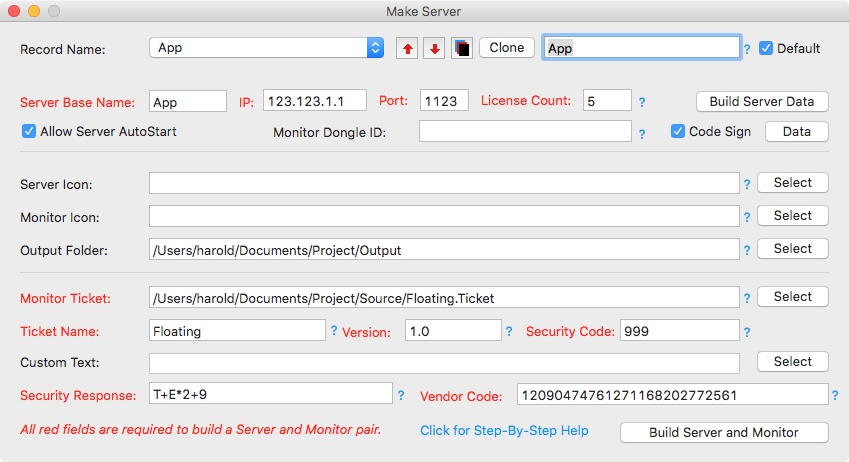
A floating license system consists of a License Server, License Monitor and Protected Applications. The License Monitor is used by a customer to securely configure the Server IP address and Port, change the number of purchased licenses or monitor server operation. The License Server silently manages the number of allowed concurrent Apps in use on a customer network.
The QuickLicense Server Windows edition generates Server and Monitor applications that run on any Windows 7, 8 or 10 computer. It can manage protected Apps running on macOS, Windows or Linux computers connected to that network. Likewise, QuickLicense Server on macOS generates a License Server and Monitor application that runs on any macOS computer with 10.10 or later and serves macOS, Windows or Linux Apps.
The MakeServer application provided by the QuickLicense Server product generates the Server and Monitor Apps using a 10-minute point and click process. The macOS, Windows or Linux Apps are protected with QuickLicense using a programming API or point and click wrapping process. QuickLicense can protect and license almost any software including a business application, Unity3D game, MAX MSP music application, Excel workbook, MS Access project, FileMaker application or Adobe plugin. The system also works with DocProtect to protect PDF files, slide shows, video, audio and EPUB files or compiled HTML based applications.
A developer can brand the License Server and Monitor applications with their own file names, icons, user presented Monitor window and dialog text customizations and security features. Vendors can offer and price their products with various numbers of floating licenses. Additional licenses can be securely added to the License Server running at a customer site by typing a code into the License Monitor.
Since QuickLicense Server requires no programming, new revenue streams can quickly be added for existing software products. Applications can be licensed to meet the needs of an organization. Customers enjoy the ability to use floating licenses across all computers on their network with minimal administrative effort and no Internet access required.
QuickLicense Server 2.0 is $995 for a Single User License on either Windows 7, 8 or 10 or macOS 10.10 or later. The product includes a User Guide with step-by-step tutorial. Excel Software provides online demonstration videos, detailed product information, free technical support and secure online ordering.
Excel Software: http://www.excelsoftware.com
QuickLicense Server 2.0: http://www.excelsoftware.com/quicklicenseserver
Purchase Link: http://www.excelsoftware.com/priceandordering
Screenshot: http://www.excelsoftware.com/image/makeserver.jpg
Application Icon: http://www.excelsoftware.com/image/makeserver.gif
Established in 1985, Excel Software provides Windows and Mac OS X software products to thousands of users worldwide. Capabilities include system modeling & simulation, requirements management, software design, code generation, reengineering, bug tracking, help authoring, software license management, document protection and internet marketing automation. All Material and Software (C) Copyright 2018 Excel Software. All Rights Reserved. Apple, the Apple logo, Macintosh Mac OS X and macOS are registered trademarks of Apple Inc. in the U.S. and/or other countries. Other trademarks and registered trademarks may be the property of their respective owners.
*******
Link To Article: https://prmac.com/release-id-83128.htm
*******
---------------------------------------------------------------------------------
Note that you can alter delivered distributions at any time.
Login to your account on prMac to alter your channel selection, or to opt-out at any time.
Create a Floating License Server for Any App - Published on 11/12/18
Excel Software announces QuickLicense Server 2.0 for macOS and Windows. A developer can generate a vendor-branded, floating license system for their Mac, Windows or Linux applications. Generate a vendor-branded, code signed, floating license system in minutes with royalty free distribution for any number of products or licenses.
Henderson, Nevada - Excel Software has announced QuickLicense Server 2.0 for macOS and Windows. A developer can generate a vendor-branded, floating license system for their Mac, Windows or Linux applications. Vendors enjoy royalty free distribution for any number of products or licenses. Version 2 was enhanced for the new QuickLicense 9, new Mac and Windows OS changes, adds Code Signing of the generated Server and Monitor applications and uses 64-bit macOS Mojave compliant executables.
A floating license system consists of a License Server, License Monitor and Protected Applications. The License Monitor is used by a customer to securely configure the Server IP address and Port, change the number of purchased licenses or monitor server operation. The License Server silently manages the number of allowed concurrent Apps in use on a customer network.
The QuickLicense Server Windows edition generates Server and Monitor applications that run on any Windows 7, 8 or 10 computer. It can manage protected Apps running on macOS, Windows or Linux computers connected to that network. Likewise, QuickLicense Server on macOS generates a License Server and Monitor application that runs on any macOS computer with 10.10 or later and serves macOS, Windows or Linux Apps.
The MakeServer application provided by the QuickLicense Server product generates the Server and Monitor Apps using a 10-minute point and click process. The macOS, Windows or Linux Apps are protected with QuickLicense using a programming API or point and click wrapping process. QuickLicense can protect and license almost any software including a business application, Unity3D game, MAX MSP music application, Excel workbook, MS Access project, FileMaker application or Adobe plugin. The system also works with DocProtect to protect PDF files, slide shows, video, audio and EPUB files or compiled HTML based applications.
A developer can brand the License Server and Monitor applications with their own file names, icons, user presented Monitor window and dialog text customizations and security features. Vendors can offer and price their products with various numbers of floating licenses. Additional licenses can be securely added to the License Server running at a customer site by typing a code into the License Monitor.
Since QuickLicense Server requires no programming, new revenue streams can quickly be added for existing software products. Applications can be licensed to meet the needs of an organization. Customers enjoy the ability to use floating licenses across all computers on their network with minimal administrative effort and no Internet access required.
QuickLicense Server 2.0 is $995 for a Single User License on either Windows 7, 8 or 10 or macOS 10.10 or later. The product includes a User Guide with step-by-step tutorial. Excel Software provides online demonstration videos, detailed product information, free technical support and secure online ordering.
Excel Software: http://www.excelsoftware.com
QuickLicense Server 2.0: http://www.excelsoftware.com/quicklicenseserver
Purchase Link: http://www.excelsoftware.com/priceandordering
Screenshot: http://www.excelsoftware.com/image/makeserver.jpg
Application Icon: http://www.excelsoftware.com/image/makeserver.gif

Established in 1985, Excel Software provides Windows and Mac OS X software products to thousands of users worldwide. Capabilities include system modeling & simulation, requirements management, software design, code generation, reengineering, bug tracking, help authoring, software license management, document protection and internet marketing automation. All Material and Software (C) Copyright 2018 Excel Software. All Rights Reserved. Apple, the Apple logo, Macintosh Mac OS X and macOS are registered trademarks of Apple Inc. in the U.S. and/or other countries. Other trademarks and registered trademarks may be the property of their respective owners.
*******
Link To Article: https://prmac.com/release-id-83128.htm
*******
---------------------------------------------------------------------------------
Note that you can alter delivered distributions at any time.
Login to your account on prMac to alter your channel selection, or to opt-out at any time.
Cisdem PDF Converter OCR is Now Available for macOS Mojave
A new article has been published at prMac.
Cisdem PDF Converter OCR is Now Available for macOS Mojave - Published on 11/09/18
Cisdem announces PDF Converter OCR for Mac V6.2.0 their new release that's compatible with MacOS 10.14 Mojave. Cisdem PDF Converter OCR for Mac, which was originally developed in 2013, is a Mac program helping users to convert native, scanned, even protected PDF files into Microsoft Office (Word, PowerPoint, Excel), to iWork (Keynote, Pages), to eBook (Text, ePub), to web HTML and to image formats.
Madelia, Minnesota - Cisdem is proud to announce the release of PDF Converter OCR for Mac V6.2.0 their new release that's compatible with MacOS 10.14 Mojave.
With the official release of MacOS Mojave on Sep 24, more and more Mac users have upgraded to this great new version. And to allow Mojave users utilize Cisdem PDF Converter OCR without any trouble, the Cisdem team devoted themselves to such an update immediately after the official release of Mojave, and it is available NOW.
Cisdem PDF Converter OCR for Mac, which was originally developed in 2013, is a Mac program helping users to convert native, scanned, even protected PDF files into Microsoft Office (Word, PowerPoint, Excel), to iWork (Keynote, Pages), to eBook (Text, ePub), to web HTML and to image formats. With its OCR feature, this program also enables users to copy or extract text from images, to make scanned PDF files editable and searchable in different formats. To meet users' needs of generating PDFs from existing resources, Cisdem even integrates the capability of creating PDFs, making this tool an all-round solution for PDF conversion.
New Features:
Cisdem PDF Converter OCR V6.2.0 is now available for MacOS Mojave. Users who work on MacOS 10.14, 10.13, 10.12, 10.11 and 10.10 can apply this PDF tool to deal with all kinds of task regarding PDF conversion.
Key Features:
1. Convert all types of PDF into 16 formats
Users can convert native, scanned or protected PDF files into Word, PowerPoint, Excel, Text, RTFD, Keynote, Pages, HTML, ePub, JPG, BMP, GIF, TIFF, PNG and searchable PDF;
2. Convert Images
The OCR function enables users to convert image to editable text or other formats, even to searchable PDF;
3. Create PDF
Users can generate PDFs from Word, PowerPoint, ePub, HTML, Images, CHM and so on. During the creation process, users can merge, compress or protect the PDF file;
4. Batch Conversion
5. Select pages for conversion
6. Preview files
7. Recognize 27 languages
The OCR features covers all the popular languages, including English, Spanish, Chinese, French, Deutsch, Japanese, Arabic, etc. For users who want to OCR files in more languages, visit here to download;
8. Preserve original file quality
The formatting, layout or image resolution will be preserved highly, that's to say, the output file will look the same as original as highly as possible.
Pricing and Availability:
Cisdem PDF Converter OCR V6.2.0 is now available on the official website and users can download the free trial. With $59.99, users can get a lifetime license of Cisdem PDF Converter OCR, including a free service to get lifetime upgrades.
Cisdem: https://www.cisdem.com/
PDF Converter OCR: https://www.cisdem.com/pdf-converter-ocr-mac.html
Download Free Trial: https://www.cisdem.com/downloads/cisdem-pdfconverterocr-6.dmg
Cisdem provides productivity and business software that helps Mac users to get their job done faster. Cisdem products include top rated software centered on PDF Conversion, PDF Management, Data Recovery, and File Management. The company is dedicated in building highly efficient Mac software that make life easier and processes simpler. All Material and Software (C) Copyright 2018 Cisdem. All Rights Reserved. Apple, the Apple logo, Mac OS X and Macintosh are registered trademarks of Apple Inc. in the U.S. and/or other countries. Other trademarks and registered trademarks may be the property of their respective owners.
*******
Link To Article: https://prmac.com/release-id-83126.htm
*******
---------------------------------------------------------------------------------
Note that you can alter delivered distributions at any time.
Login to your account on prMac to alter your channel selection, or to opt-out at any time.
Cisdem PDF Converter OCR is Now Available for macOS Mojave - Published on 11/09/18
Cisdem announces PDF Converter OCR for Mac V6.2.0 their new release that's compatible with MacOS 10.14 Mojave. Cisdem PDF Converter OCR for Mac, which was originally developed in 2013, is a Mac program helping users to convert native, scanned, even protected PDF files into Microsoft Office (Word, PowerPoint, Excel), to iWork (Keynote, Pages), to eBook (Text, ePub), to web HTML and to image formats.
Madelia, Minnesota - Cisdem is proud to announce the release of PDF Converter OCR for Mac V6.2.0 their new release that's compatible with MacOS 10.14 Mojave.
With the official release of MacOS Mojave on Sep 24, more and more Mac users have upgraded to this great new version. And to allow Mojave users utilize Cisdem PDF Converter OCR without any trouble, the Cisdem team devoted themselves to such an update immediately after the official release of Mojave, and it is available NOW.
Cisdem PDF Converter OCR for Mac, which was originally developed in 2013, is a Mac program helping users to convert native, scanned, even protected PDF files into Microsoft Office (Word, PowerPoint, Excel), to iWork (Keynote, Pages), to eBook (Text, ePub), to web HTML and to image formats. With its OCR feature, this program also enables users to copy or extract text from images, to make scanned PDF files editable and searchable in different formats. To meet users' needs of generating PDFs from existing resources, Cisdem even integrates the capability of creating PDFs, making this tool an all-round solution for PDF conversion.
New Features:
Cisdem PDF Converter OCR V6.2.0 is now available for MacOS Mojave. Users who work on MacOS 10.14, 10.13, 10.12, 10.11 and 10.10 can apply this PDF tool to deal with all kinds of task regarding PDF conversion.
Key Features:
1. Convert all types of PDF into 16 formats
Users can convert native, scanned or protected PDF files into Word, PowerPoint, Excel, Text, RTFD, Keynote, Pages, HTML, ePub, JPG, BMP, GIF, TIFF, PNG and searchable PDF;
2. Convert Images
The OCR function enables users to convert image to editable text or other formats, even to searchable PDF;
3. Create PDF
Users can generate PDFs from Word, PowerPoint, ePub, HTML, Images, CHM and so on. During the creation process, users can merge, compress or protect the PDF file;
4. Batch Conversion
5. Select pages for conversion
6. Preview files
7. Recognize 27 languages
The OCR features covers all the popular languages, including English, Spanish, Chinese, French, Deutsch, Japanese, Arabic, etc. For users who want to OCR files in more languages, visit here to download;
8. Preserve original file quality
The formatting, layout or image resolution will be preserved highly, that's to say, the output file will look the same as original as highly as possible.
Pricing and Availability:
Cisdem PDF Converter OCR V6.2.0 is now available on the official website and users can download the free trial. With $59.99, users can get a lifetime license of Cisdem PDF Converter OCR, including a free service to get lifetime upgrades.
Cisdem: https://www.cisdem.com/
PDF Converter OCR: https://www.cisdem.com/pdf-converter-ocr-mac.html
Download Free Trial: https://www.cisdem.com/downloads/cisdem-pdfconverterocr-6.dmg
Cisdem provides productivity and business software that helps Mac users to get their job done faster. Cisdem products include top rated software centered on PDF Conversion, PDF Management, Data Recovery, and File Management. The company is dedicated in building highly efficient Mac software that make life easier and processes simpler. All Material and Software (C) Copyright 2018 Cisdem. All Rights Reserved. Apple, the Apple logo, Mac OS X and Macintosh are registered trademarks of Apple Inc. in the U.S. and/or other countries. Other trademarks and registered trademarks may be the property of their respective owners.
*******
Link To Article: https://prmac.com/release-id-83126.htm
*******
---------------------------------------------------------------------------------
Note that you can alter delivered distributions at any time.
Login to your account on prMac to alter your channel selection, or to opt-out at any time.
Front Page - Your Very Personal Newspaper for macOS
A new article has been published at prMac.
Front Page - Your Very Personal Newspaper for macOS - Published on 11/09/18
FrozenPepper announces Front Page 1.0 for macOS, which allows users to setup and customize their very personal newspaper. Front Page allows users to setup and customize their very own personal newspaper allowing them to setup news categories mixing RSS feeds and Twitter timelines, lists and even their home feed. Integrated openweathermap.org support brings customized weather forecasts too.
Pisa (Pisa), Italy - FrozenPepper is happy to introduce their latest app, designed for MacOSX, Front Page 1.0 allows users to setup and customize their very personal newspaper. Configure categories of news from RSS and Twitter sources so to have your daily news highly customised and always up to date.
Integrated Twitter API allows users to plug timelines, lists and even their home feed into one or multiple news categories, native like and retweet buttons allowing them to interact with tweets, and an integrated web browser grants you access to twitters full power while OpenWeatherMap.org data provides weather forecasts at your fingertips.
Some features:
* RSS, Atom and JSON feeds supported
* Twitter
* Can mix RSS and Twitter news sources into single news categories
* Integrated Image viewer for tweets and feeds images.
* Integrated webkit web browser with "private" mode support.
* Large builtin library of RSS feeds to immediately start composing your newspaper.
* RSS support integrated into OsX, click on RSS feed links in your favourite browser and add them to Front Page library.
Front Page was born out of our personal needs, we use it and love it. More features and "tunings" are already planned and will come with time, but we would love to hear your suggestions, feedback and bug reports, so reach us out on Facebook, Twitter, or email us.
We are more than open to provide promo codes for journalists who want to give our app a try, reach out to us and we will get back to you as soon as possible.
System Requirements:
* macOS 10.13 or later
* 64-bit processor
* 25.5 MB
Pricing and Availability:
Front Page 1.0 is just $3.99 USD (or an equivalent amount in other currencies) and is available worldwide exclusively through the Mac App Store.
Front Page 1.0: http://www.frozenpepper.it/front-page-your-…rsonal-newspaper/
Purchase and Download from Mac App Store: https://itunes.apple.com/us/app/front-page/id1437398362
Founded in 2008 at the dawn of mobile apps era, FrozenPepper mainly focuses on realistic simulation "games", known for the RC Plane series it constantly tries to extend its knowledge, research and designs apps and games we would love to play and use. All Material and Software (C) Copyright 2018 FrozenPepper. All Rights Reserved. Apple, the Apple logo, Macintosh Mac OS X and macOS are registered trademarks of Apple Inc. in the U.S. and/or other countries. Other trademarks and registered trademarks may be the property of their respective owners.
*******
Link To Article: https://prmac.com/release-id-83127.htm
*******
---------------------------------------------------------------------------------
Note that you can alter delivered distributions at any time.
Login to your account on prMac to alter your channel selection, or to opt-out at any time.
Front Page - Your Very Personal Newspaper for macOS - Published on 11/09/18
FrozenPepper announces Front Page 1.0 for macOS, which allows users to setup and customize their very personal newspaper. Front Page allows users to setup and customize their very own personal newspaper allowing them to setup news categories mixing RSS feeds and Twitter timelines, lists and even their home feed. Integrated openweathermap.org support brings customized weather forecasts too.
Pisa (Pisa), Italy - FrozenPepper is happy to introduce their latest app, designed for MacOSX, Front Page 1.0 allows users to setup and customize their very personal newspaper. Configure categories of news from RSS and Twitter sources so to have your daily news highly customised and always up to date.
Integrated Twitter API allows users to plug timelines, lists and even their home feed into one or multiple news categories, native like and retweet buttons allowing them to interact with tweets, and an integrated web browser grants you access to twitters full power while OpenWeatherMap.org data provides weather forecasts at your fingertips.
Some features:
* RSS, Atom and JSON feeds supported
* Can mix RSS and Twitter news sources into single news categories
* Integrated Image viewer for tweets and feeds images.
* Integrated webkit web browser with "private" mode support.
* Large builtin library of RSS feeds to immediately start composing your newspaper.
* RSS support integrated into OsX, click on RSS feed links in your favourite browser and add them to Front Page library.
Front Page was born out of our personal needs, we use it and love it. More features and "tunings" are already planned and will come with time, but we would love to hear your suggestions, feedback and bug reports, so reach us out on Facebook, Twitter, or email us.
We are more than open to provide promo codes for journalists who want to give our app a try, reach out to us and we will get back to you as soon as possible.
System Requirements:
* macOS 10.13 or later
* 64-bit processor
* 25.5 MB
Pricing and Availability:
Front Page 1.0 is just $3.99 USD (or an equivalent amount in other currencies) and is available worldwide exclusively through the Mac App Store.
Front Page 1.0: http://www.frozenpepper.it/front-page-your-…rsonal-newspaper/
Purchase and Download from Mac App Store: https://itunes.apple.com/us/app/front-page/id1437398362
Founded in 2008 at the dawn of mobile apps era, FrozenPepper mainly focuses on realistic simulation "games", known for the RC Plane series it constantly tries to extend its knowledge, research and designs apps and games we would love to play and use. All Material and Software (C) Copyright 2018 FrozenPepper. All Rights Reserved. Apple, the Apple logo, Macintosh Mac OS X and macOS are registered trademarks of Apple Inc. in the U.S. and/or other countries. Other trademarks and registered trademarks may be the property of their respective owners.
*******
Link To Article: https://prmac.com/release-id-83127.htm
*******
---------------------------------------------------------------------------------
Note that you can alter delivered distributions at any time.
Login to your account on prMac to alter your channel selection, or to opt-out at any time.
Subscribe to:
Posts (Atom)