A new article has been published at prMac.
SheetPlanner Brings Easy Long-Range Planning to macOS Users - Published on 11/28/18
Virginia-based indie developer, SheetPlanner Software LLC today announces SheetPlanner 1.0, their new planning, project and and task tracking application for macOS. SheetPlanner allows anyone to easily organize tasks, perform long range planning, manage projects, and more. Users can plan and visualize goals in a convenient timeline view - by days, weeks, months, quarters, and years while also focusing on their most immediate tasks in the calendar.
Alexandria, Virginia - Independent developer, SheetPlanner Software LLC is today proud to announce the release and immediate availability of SheetPlanner 1.0, their new planning, project and task management application for macOS. SheetPlanner helps anyone organize information, make long range plans, manage projects, and track everyday tasks.
Activities can be organized in the app's outliner, and categorized using the standard columns including start and finish dates. Create custom date, text, number or drop-down list columns. Quickly link to documents and web sites.
"Project management doesn't have to be difficult," says SheetPlanner Software owner Peter Davey. "SheetPlanner makes it simple to plan and visualize your long term goals, helping to keep your projects and tasks on schedule until they're finished."
Users can plan and visualize their goals, project tasks and schedules in SheetPlanner's convenient timeline and calendar views. It's easy to quickly view all task's and their duration and sequence. Timelines can be viewed by days, weeks, months, quarters, or years.
SheetPlanner Features Include:
* Outliner with columns - Add text, numeric, date, or list columns
* Keep inline notes using the built-in full text editor
* Customize row styles using custom fonts, size, and color
* Focus on a row, or a row and its children, transverse row hierarchy via the handy path bar
* Create Smart Filters using simple or complex criteria, save them for future use
* Search outlines across columns from the toolbar, save the search as a Smart Filter
* Sort outlines by any column and order
* Link documents and folders, whether they're stored locally or in the cloud
* View documents via Quicklook or in tabs
* Link to web pages via quicklook or in a tab of their own
* View an outline in multiple tabs simultaneously in any combination of views
* View a monthly view of outline rows using assigned dates
* Convenient heat-mapped yearly calendar shows activities starting and ending for each date
* Timeline allows viewing and adjusting of key dates for each task on a convenient horizontal timeline
* Cells, columns, rows, calendars and timeline can all be customized
* Convenient import and export functionality can export in .CSV or .OPML format
* Copy and paste information to and from Excel and Numbers spreadsheets
* Personalize the Outline view using green bar, yellow notepad or green notepad themes
* Easy to use templates for business, educational, and personal use
* macOS Mojave dark mode
* Much more
SheetPlanner's filters allow users to concentrate on important tasks, what's due today, due tomorrow, or whatever criteria is needed. Tasks can be viewed in a monthly or yearly calendar, or both.
SheetPlanner also offers a Dock badge count, strikethrough of completed items, carry forward of incomplete items, the ability to filter by cell value, and much more.
"We designed SheetPlanner to allow users to easily track everything they need to accomplish their goals and complete all of their tasks," continues Peter. "We also want users to be sure SheetPlanner is the right app for their needs, so we offer a free 21-day trial. Users pay only after they're sure SheetPlanner fits their unique needs. However, I'm confident they'll like it once they've tried it."
Device Requirements:
* macOS 10.12 Sierra or Later
* mac OS 10.14 Mojave Compatible
* 18.6 MB
Pricing and Availability:
SheetPlanner 1.0 is only $49.95 USD (or an equivalent amount in other currencies) and is available worldwide exclusively from the Mac App Store. A 21-day trial version is available for download. Users can continue to view documents in read-only mode after the trial has expired. A convenient in-app purchase of $49.95 will unlock the app's full features after the trial has expired. Review copies are available to journalists upon request.
SheetPlanner 1.0: http://www.sheetplanner.com
Download from Mac App Store: https://itunes.apple.com/app/sheetplanner/id1438761088
Screenshot: http://www.sheetplanner.com/user/pages/01.home/_hero/sp_calendar.png
Application Icon: http://www.sheetplanner.com/user/themes/twentyfifteen/images/Sheetplanner_mark.png
SheetPlanner Software LLC is located in Alexandria, VA and is focused on bringing great planning software to individuals and teams. All Material and Software (C) Copyright 2018 SheetPlanner Software LLC. All Rights Reserved. Apple, the Apple logo, Macintosh Mac OS X and macOS are registered trademarks of Apple Inc. in the U.S. and/or other countries. Other trademarks and registered trademarks may be the property of their respective owners.
*******
Link To Article: https://prmac.com/release-id-83167.htm
*******
---------------------------------------------------------------------------------
Note that you can alter delivered distributions at any time.
Login to your account on prMac to alter your channel selection, or to opt-out at any time.


Package Central for Adobe InDesign Now Supports Creative Cloud 2019
A new article has been published at prMac.
Package Central for Adobe InDesign Now Supports Creative Cloud 2019 - Published on 11/27/18
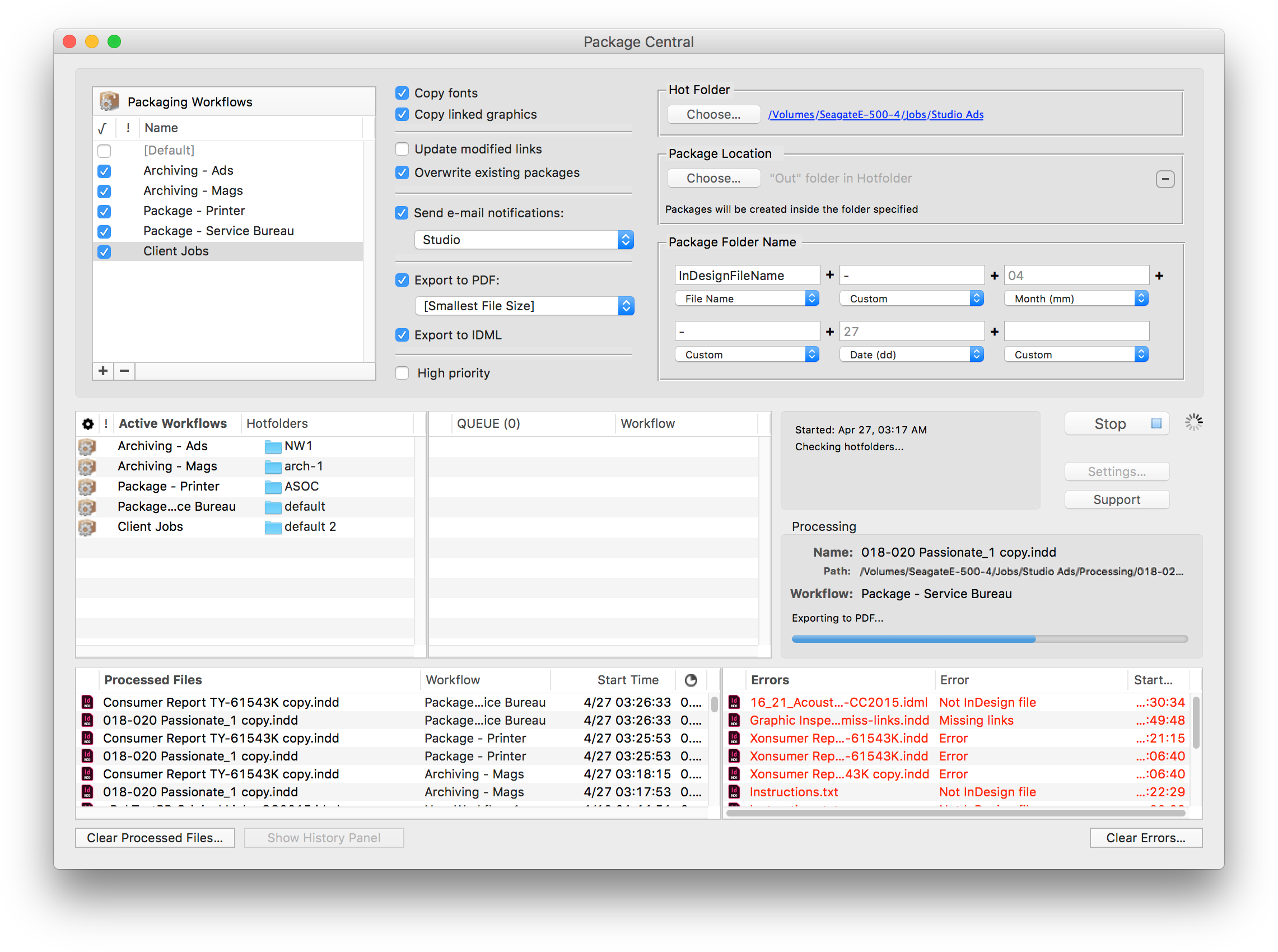
Zevrix Solutions announces Package Central 1.11.4, a compatibility update to company's file packaging workflow automation solution for Adobe InDesign. The software automatically collects InDesign documents along with their fonts and links from watched hot folders. Package Central can serve unlimited users on a network and offers email notifications, variable folder names, PDF/IDML export, and more. The new version adds support for InDesign CC 2019 featured as part of Adobe Creative Cloud.
Toronto (ON), Canada - Zevrix Solutions today announces Package Central 1.11.4, a compatibility update to its document packaging workflow automation solution for Adobe InDesign. Originally developed for a major publisher in the United States, the software automates InDesign packaging by processing files from hot folders. Package Central offloads file packaging to a central system leaving operator workstations free from the document collection process.
The new version makes Package Central compatible with the recently released InDesign CC 2019 featured as part of Adobe Creative Cloud. The update is offered free of charge to Package Central users. The same version of Package Central can be used with any release of InDesign from CS5 and later.
Under Package Central workflow, production artists, prepress operators and designers simply submit files to watched hot folders that reside on a network. The software automatically collects InDesign files along with their fonts and links freeing user's time for important tasks such as design and layout. Operator workstations will never again be tied up by the packaging process.
Package Central runs on a dedicated Mac station and watches hot folders for incoming InDesign files. The software performs all its tasks automatically and can run absolutely unattended. It offers the following key features and benefits:
* Automatically collect InDesign files from hot folders
* Create PDF and IDML files on the fly
* Update modified links automatically
* Automatic email notifications on process stages and errors
* Compose variable folder names
* Detailed processing history
* Serve unlimited users on a network
Pricing and Availability
Package Central 1.11.4 can be purchased for $149.95 (USD) from Zevrix website as well as from authorized resellers and Adobe Exchange. Trial is also available for download. The update is free for registered users. Package Central requires macOS 10.7-10.14 and Adobe InDesign CS5-CC 2019.
Zevrix Solutions: http://zevrix.com
Package Central 1.11.4: http://zevrix.com/PackageCentral.php
Download Package Central: http://zevrix.com/PackageCentral.dmg
Purchase: http://zevrix.com/store.php
Screenshot: http://zevrix.com/screenshots/pac/pac-main.png
Located in Toronto, Canada, Zevrix Solutions provides automation and productivity solutions for Adobe Creative Cloud and Creative Suite software, PDF workflows, graphic file diagnostics and Microsoft Office output on Mac OS. Zevrix is dedicated to help professionals increase their profits through automating everyday tasks, producing error-free documents, saving disk space and cutting production costs. For more information, visit their website. Copyright (C) 2018 Zevrix Solutions. All Rights Reserved. Other trademarks and registered trademarks may be the property of their respective owners.
*******
Link To Article: https://prmac.com/release-id-83166.htm
*******
---------------------------------------------------------------------------------
Note that you can alter delivered distributions at any time.
Login to your account on prMac to alter your channel selection, or to opt-out at any time.
Package Central for Adobe InDesign Now Supports Creative Cloud 2019 - Published on 11/27/18
Zevrix Solutions announces Package Central 1.11.4, a compatibility update to company's file packaging workflow automation solution for Adobe InDesign. The software automatically collects InDesign documents along with their fonts and links from watched hot folders. Package Central can serve unlimited users on a network and offers email notifications, variable folder names, PDF/IDML export, and more. The new version adds support for InDesign CC 2019 featured as part of Adobe Creative Cloud.
Toronto (ON), Canada - Zevrix Solutions today announces Package Central 1.11.4, a compatibility update to its document packaging workflow automation solution for Adobe InDesign. Originally developed for a major publisher in the United States, the software automates InDesign packaging by processing files from hot folders. Package Central offloads file packaging to a central system leaving operator workstations free from the document collection process.
The new version makes Package Central compatible with the recently released InDesign CC 2019 featured as part of Adobe Creative Cloud. The update is offered free of charge to Package Central users. The same version of Package Central can be used with any release of InDesign from CS5 and later.
Under Package Central workflow, production artists, prepress operators and designers simply submit files to watched hot folders that reside on a network. The software automatically collects InDesign files along with their fonts and links freeing user's time for important tasks such as design and layout. Operator workstations will never again be tied up by the packaging process.
Package Central runs on a dedicated Mac station and watches hot folders for incoming InDesign files. The software performs all its tasks automatically and can run absolutely unattended. It offers the following key features and benefits:
* Automatically collect InDesign files from hot folders
* Create PDF and IDML files on the fly
* Update modified links automatically
* Automatic email notifications on process stages and errors
* Compose variable folder names
* Detailed processing history
* Serve unlimited users on a network
Pricing and Availability
Package Central 1.11.4 can be purchased for $149.95 (USD) from Zevrix website as well as from authorized resellers and Adobe Exchange. Trial is also available for download. The update is free for registered users. Package Central requires macOS 10.7-10.14 and Adobe InDesign CS5-CC 2019.
Zevrix Solutions: http://zevrix.com
Package Central 1.11.4: http://zevrix.com/PackageCentral.php
Download Package Central: http://zevrix.com/PackageCentral.dmg
Purchase: http://zevrix.com/store.php
Screenshot: http://zevrix.com/screenshots/pac/pac-main.png
Located in Toronto, Canada, Zevrix Solutions provides automation and productivity solutions for Adobe Creative Cloud and Creative Suite software, PDF workflows, graphic file diagnostics and Microsoft Office output on Mac OS. Zevrix is dedicated to help professionals increase their profits through automating everyday tasks, producing error-free documents, saving disk space and cutting production costs. For more information, visit their website. Copyright (C) 2018 Zevrix Solutions. All Rights Reserved. Other trademarks and registered trademarks may be the property of their respective owners.
*******
Link To Article: https://prmac.com/release-id-83166.htm
*******
---------------------------------------------------------------------------------
Note that you can alter delivered distributions at any time.
Login to your account on prMac to alter your channel selection, or to opt-out at any time.
Media24 adds its best-selling magazines to Magzter GOLD
A new article has been published at prMac.
Media24 adds its best-selling magazines to Magzter GOLD - Published on 11/27/18
Media24 has added its best-selling titles to Magzter GOLD, the "All-You-Can-Read" subscription which offers unlimited access to 5,000 magazines from around the globe. One of the most prestigious magazine publishers in South Africa, Media24 offers many diverse and renowned titles, including You South Africa, TV Plus, go! South Africa and more. Powered by Magzter's world-class digital reading platform, Media24 titles are now all set to reach millions of more readers.
New York, New York - Media24, one of the most prestigious magazine publishers in South Africa, has added its best-selling titles to Magzter GOLD, the "All-You-Can-Read" subscription which offers unlimited access to 5,000+ magazines from around the globe. Powered by Magzter's world-class digital reading platform, Media24 titles are now all set to reach millions of more readers via Magzter GOLD.
With an extensive catalog of 5,000+ magazines across 40+ exciting categories and many innovative features like curated premium articles and Family Sharing, Magzter GOLD has been revolutionizing the digital reading space ever since its launch in 2015. Thousands of publishers have found Magzter GOLD to be an effective way to instantly reach potential readers across the globe. Here's the list of some of the leading Media24 titles that can be read with a Magzter GOLD subscription:
* You South Africa is an exciting entertainment magazine filled with human dramas, medical and scientific discoveries, general interest news, consumer issues, fashion and glamour.
* TV Plus is aimed at dedicated viewers of the two million South Africans who spend more than 25 hours a week in front of the TV. The magazine is not just another TV schedule, but provides valuable information on programmes.
* go! South Africa offers practical information about affordable destinations in South Africa. Each issue is crammed with excellent photography, honest gear reviews and delicious recipes.
* Landbouweekblad is South Africa's largest and most influential agricultural magazine, and has been serving farmers for more than 95 years. The magazine focuses on the latest news in agriculture, agriculture equipment, products and forestry.
* Your Pregnancy offers relevant, credible and accurate information on all aspects of pregnancy. The magazine provides all the information that's needed, as well as the latest fashion and beauty trends, health issues and exercises.
"We always strive to continuously expand our Magzter GOLD catalog so that our users can read more of their favorite magazines with just one subscription. In this direction, we're immensely happy to add the diverse and renowned titles from Media24 to Magzter GOLD, and we firmly believe that our users will thoroughly enjoy reading them." - Girish Ramdas, CEO, Magzter Inc.
"The arrival of Media24 titles to Magzter GOLD is a win-win situation for all. While Magzter GOLD subscribers can enjoy reading these superlative magazines with their existing subscription, Media24 is sure to widen its global reach and increase its readership exponentially." - Vijay Radhakrishnan, President, Magzter Inc.
Device Requirements:
* iPhone, iPad, and iPod touch
* Requires iOS 9.0 or later
* 64.9 MB
Pricing and Availability:
Magzter - Digital Magazine Newsstand 7.6 is free (with in-app purchases) and available worldwide through the App Store in the News category. The Magzter app is also available on the web, Google Play and is expanding to more platforms soon. Magzter's easy purchase and renewal systems ensure subscriptions are paid on time, eliminating the need for paper checks and postal mail issues. Users can buy their magazines on any of the above devices/platforms and seamlessly port their purchases to any other devices, a feature unique to Magzter.
Magzter - Digital Magazine Newsstand 7.6: http://www.magzter.com
Media24: https://www.magzter.com/publishers/Media24
Download from iTunes: https://itunes.apple.com/app/magzter-10-000-magazines/id412163953
Download from Google Play: https://play.google.com/store/apps/details?id=com.dci.magzter
Screenshot: https://rse.magzter.com/314x408/1359122596/1542623912/images/thumb/390_thumb_1.jpg
App Icon: http://akcdn.magzter.com/magcom/mailer/common/Icon1024-curved.png
Magzter is the world's largest and fastest growing global digital magazine newsstand with over 50 million digital consumers, more than 10,500 magazines from over 4,000 publishers. Headquartered in New York, Magzter has its local offices in London, Barcelona, Amsterdam, Mexico City, Cape Town, Chennai, Singapore and Tokyo and will soon be expanding to other countries. Founded by global entrepreneurs, Girish Ramdas and Vijay Radhakrishnan in June 2011, Magzter enables magazine publishers around the world to create and deliver digital editions of their titles to global consumers. Powered by its proprietary OREY Click Publishing System(R), Magzter also enables their customers to publish interactive/audio-visual content in the magazine as it supports HTML5. Magzter launched Magzter GOLD subscription service to give digital readers unlimited access to thousands of magazines for a low monthly price. All Material and Software (C) Copyright 2018 Magzter Inc. All Rights Reserved. Apple, the
Apple logo, iPhone, iPod, and iPad are registered trademarks of Apple Inc. in the U.S. and/or other countries. Other trademarks and registered trademarks may be the property of their respective owners.
*******
Link To Article: https://prmac.com/release-id-83165.htm
*******
---------------------------------------------------------------------------------
Note that you can alter delivered distributions at any time.
Login to your account on prMac to alter your channel selection, or to opt-out at any time.
Media24 adds its best-selling magazines to Magzter GOLD - Published on 11/27/18
Media24 has added its best-selling titles to Magzter GOLD, the "All-You-Can-Read" subscription which offers unlimited access to 5,000 magazines from around the globe. One of the most prestigious magazine publishers in South Africa, Media24 offers many diverse and renowned titles, including You South Africa, TV Plus, go! South Africa and more. Powered by Magzter's world-class digital reading platform, Media24 titles are now all set to reach millions of more readers.
New York, New York - Media24, one of the most prestigious magazine publishers in South Africa, has added its best-selling titles to Magzter GOLD, the "All-You-Can-Read" subscription which offers unlimited access to 5,000+ magazines from around the globe. Powered by Magzter's world-class digital reading platform, Media24 titles are now all set to reach millions of more readers via Magzter GOLD.
With an extensive catalog of 5,000+ magazines across 40+ exciting categories and many innovative features like curated premium articles and Family Sharing, Magzter GOLD has been revolutionizing the digital reading space ever since its launch in 2015. Thousands of publishers have found Magzter GOLD to be an effective way to instantly reach potential readers across the globe. Here's the list of some of the leading Media24 titles that can be read with a Magzter GOLD subscription:
* You South Africa is an exciting entertainment magazine filled with human dramas, medical and scientific discoveries, general interest news, consumer issues, fashion and glamour.
* TV Plus is aimed at dedicated viewers of the two million South Africans who spend more than 25 hours a week in front of the TV. The magazine is not just another TV schedule, but provides valuable information on programmes.
* go! South Africa offers practical information about affordable destinations in South Africa. Each issue is crammed with excellent photography, honest gear reviews and delicious recipes.
* Landbouweekblad is South Africa's largest and most influential agricultural magazine, and has been serving farmers for more than 95 years. The magazine focuses on the latest news in agriculture, agriculture equipment, products and forestry.
* Your Pregnancy offers relevant, credible and accurate information on all aspects of pregnancy. The magazine provides all the information that's needed, as well as the latest fashion and beauty trends, health issues and exercises.
"We always strive to continuously expand our Magzter GOLD catalog so that our users can read more of their favorite magazines with just one subscription. In this direction, we're immensely happy to add the diverse and renowned titles from Media24 to Magzter GOLD, and we firmly believe that our users will thoroughly enjoy reading them." - Girish Ramdas, CEO, Magzter Inc.
"The arrival of Media24 titles to Magzter GOLD is a win-win situation for all. While Magzter GOLD subscribers can enjoy reading these superlative magazines with their existing subscription, Media24 is sure to widen its global reach and increase its readership exponentially." - Vijay Radhakrishnan, President, Magzter Inc.
Device Requirements:
* iPhone, iPad, and iPod touch
* Requires iOS 9.0 or later
* 64.9 MB
Pricing and Availability:
Magzter - Digital Magazine Newsstand 7.6 is free (with in-app purchases) and available worldwide through the App Store in the News category. The Magzter app is also available on the web, Google Play and is expanding to more platforms soon. Magzter's easy purchase and renewal systems ensure subscriptions are paid on time, eliminating the need for paper checks and postal mail issues. Users can buy their magazines on any of the above devices/platforms and seamlessly port their purchases to any other devices, a feature unique to Magzter.
Magzter - Digital Magazine Newsstand 7.6: http://www.magzter.com
Media24: https://www.magzter.com/publishers/Media24
Download from iTunes: https://itunes.apple.com/app/magzter-10-000-magazines/id412163953
Download from Google Play: https://play.google.com/store/apps/details?id=com.dci.magzter
Screenshot: https://rse.magzter.com/314x408/1359122596/1542623912/images/thumb/390_thumb_1.jpg

App Icon: http://akcdn.magzter.com/magcom/mailer/common/Icon1024-curved.png

Magzter is the world's largest and fastest growing global digital magazine newsstand with over 50 million digital consumers, more than 10,500 magazines from over 4,000 publishers. Headquartered in New York, Magzter has its local offices in London, Barcelona, Amsterdam, Mexico City, Cape Town, Chennai, Singapore and Tokyo and will soon be expanding to other countries. Founded by global entrepreneurs, Girish Ramdas and Vijay Radhakrishnan in June 2011, Magzter enables magazine publishers around the world to create and deliver digital editions of their titles to global consumers. Powered by its proprietary OREY Click Publishing System(R), Magzter also enables their customers to publish interactive/audio-visual content in the magazine as it supports HTML5. Magzter launched Magzter GOLD subscription service to give digital readers unlimited access to thousands of magazines for a low monthly price. All Material and Software (C) Copyright 2018 Magzter Inc. All Rights Reserved. Apple, the
Apple logo, iPhone, iPod, and iPad are registered trademarks of Apple Inc. in the U.S. and/or other countries. Other trademarks and registered trademarks may be the property of their respective owners.
*******
Link To Article: https://prmac.com/release-id-83165.htm
*******
---------------------------------------------------------------------------------
Note that you can alter delivered distributions at any time.
Login to your account on prMac to alter your channel selection, or to opt-out at any time.
Ergonis Cyber Monday deal: Save 30% on PopChar, Typinator, and KeyCue
A new article has been published at prMac.
Ergonis Cyber Monday deal: Save 30% on PopChar, Typinator, and KeyCue - Published on 11/26/18
Ergonis Software extends their Black Friday deal for their award-winning productivity tools PopChar, Typinator, and KeyCue until today, Cyber Monday. The Cyber Monday deal is a great opportunity to get started with Ergonis' highly acclaimed productivity boosters at an unbeatable price. Customers visiting the company's online store on Cyber Monday, November 26th 2018, can enter the coupon code "CyberMonday18P" during checkout to get a 30% discount. Offer is good for all purchases except upgrades.
Perg, Austria - Ergonis Software extends their Black Friday promotion for Typinator, KeyCue, and PopChar until Cyber Monday. If you missed Ergonis' Black Friday promotion, this is your chance to save time and money! This is your last chance to get additional Ergonis productivity boosters at an unbeatable price and thus SAVE TIME AND MONEY! But hurry, this offer is time-limited. It ends at the end of Cyber Monday and will not be further extended. The offer is good for all purchases except upgrades.
Typinator boosts your productivity and eliminates errors by automating the insertion of frequently used text and graphics. Typinator also corrects common typos and misspelled words for you. Just define abbreviations and their replacement text or picture. Whenever you type one of these abbreviations, Typinator inserts the corresponding replacement.
KeyCue helps you to learn and remember the keyboard shortcuts of the applications you are using. Over time, you will automatically remember frequently used shortcuts and start working more efficiently. KeyCue also has a bunch of other productivity features beyond keyboard shortcuts. For example, you can use KeyCue to quickly and conveniently insert Emoji characters in any application.
PopChar makes "typing" of unusual characters easy without having to remember keyboard combinations. Whenever you need a special character, PopChar is there to help. With PopChar, you can also take a look at fonts from a designer's perspective " see a font preview, check out what a given text fragment looks like in a certain font, and print beautiful font sheets. PopChar is available for Mac OS and Windows.
Availability and Ordering:
Customers visiting the company's online store on Cyber Monday, November 26th 2018, can enter the coupon code "CyberMonday18P" during checkout to get a 30% discount. Orders can be placed securely on the Ergonis Software online store. For information about purchases, including enterprise licenses, volume discounts, and upgrade pricing offers, see the company's web site.
Ergonis Software: https://www.ergonis.com/
Product Overview: https://www.ergonis.com/products/
Online Store: https://store.ergonis.com/
Typinator: https://www.ergonis.com/products/typinator
PopChar: https://www.ergonis.com/products/popcharx
KeyCue: https://www.ergonis.com/products/keycue
Ergonis Software develops ergonomic and intuitive software that boosts the productivity of Mac and PC users. Ergonis Software, a privately held company founded in 2002, is headquartered in Perg, Austria. Copyright 2002-2018 Ergonis Software Gmbh. All Rights Reserved. Ergonis products are either registered trademarks or trademarks of Ergonis Software GmbH. Other company and product names may be trademarks of their respective owners.
*******
Link To Article: https://prmac.com/release-id-83164.htm
*******
---------------------------------------------------------------------------------
Note that you can alter delivered distributions at any time.
Login to your account on prMac to alter your channel selection, or to opt-out at any time.
Ergonis Cyber Monday deal: Save 30% on PopChar, Typinator, and KeyCue - Published on 11/26/18
Ergonis Software extends their Black Friday deal for their award-winning productivity tools PopChar, Typinator, and KeyCue until today, Cyber Monday. The Cyber Monday deal is a great opportunity to get started with Ergonis' highly acclaimed productivity boosters at an unbeatable price. Customers visiting the company's online store on Cyber Monday, November 26th 2018, can enter the coupon code "CyberMonday18P" during checkout to get a 30% discount. Offer is good for all purchases except upgrades.
Perg, Austria - Ergonis Software extends their Black Friday promotion for Typinator, KeyCue, and PopChar until Cyber Monday. If you missed Ergonis' Black Friday promotion, this is your chance to save time and money! This is your last chance to get additional Ergonis productivity boosters at an unbeatable price and thus SAVE TIME AND MONEY! But hurry, this offer is time-limited. It ends at the end of Cyber Monday and will not be further extended. The offer is good for all purchases except upgrades.
Typinator boosts your productivity and eliminates errors by automating the insertion of frequently used text and graphics. Typinator also corrects common typos and misspelled words for you. Just define abbreviations and their replacement text or picture. Whenever you type one of these abbreviations, Typinator inserts the corresponding replacement.
KeyCue helps you to learn and remember the keyboard shortcuts of the applications you are using. Over time, you will automatically remember frequently used shortcuts and start working more efficiently. KeyCue also has a bunch of other productivity features beyond keyboard shortcuts. For example, you can use KeyCue to quickly and conveniently insert Emoji characters in any application.
PopChar makes "typing" of unusual characters easy without having to remember keyboard combinations. Whenever you need a special character, PopChar is there to help. With PopChar, you can also take a look at fonts from a designer's perspective " see a font preview, check out what a given text fragment looks like in a certain font, and print beautiful font sheets. PopChar is available for Mac OS and Windows.
Availability and Ordering:
Customers visiting the company's online store on Cyber Monday, November 26th 2018, can enter the coupon code "CyberMonday18P" during checkout to get a 30% discount. Orders can be placed securely on the Ergonis Software online store. For information about purchases, including enterprise licenses, volume discounts, and upgrade pricing offers, see the company's web site.
Ergonis Software: https://www.ergonis.com/
Product Overview: https://www.ergonis.com/products/
Online Store: https://store.ergonis.com/
Typinator: https://www.ergonis.com/products/typinator
PopChar: https://www.ergonis.com/products/popcharx
KeyCue: https://www.ergonis.com/products/keycue
Ergonis Software develops ergonomic and intuitive software that boosts the productivity of Mac and PC users. Ergonis Software, a privately held company founded in 2002, is headquartered in Perg, Austria. Copyright 2002-2018 Ergonis Software Gmbh. All Rights Reserved. Ergonis products are either registered trademarks or trademarks of Ergonis Software GmbH. Other company and product names may be trademarks of their respective owners.
*******
Link To Article: https://prmac.com/release-id-83164.htm
*******
---------------------------------------------------------------------------------
Note that you can alter delivered distributions at any time.
Login to your account on prMac to alter your channel selection, or to opt-out at any time.
24U Software releases 24U PhoneCompanion 3.0 for FileMaker Pro 17
A new article has been published at prMac.
24U Software releases 24U PhoneCompanion 3.0 for FileMaker Pro 17 - Published on 11/26/18
24U Software today announces 24U Phone Companion 3.0, a new version of the company's popular FileMaker plugin for Mac and Windows. 24U Phone Companion enables your FileMaker solutions to interact directly with your phone system to save you time and let you take better care of your customers. 24U Phone Companion 3.0 adds full support for SNOM VOIP phones, support for 48 new phone systems as well as script steps for even easier implementation.
Zvole, Czech Republic - 24U Software is pleased to announce the release of 24U Phone Companion 3.0, a new version of the company's popular FileMaker plugin for Mac and Windows. Offering robust telephony integration, 24U Phone Companion enables your FileMaker solutions to interact directly with your phone system to save you time and let you take better care of your customers.
* Make calls by clicking a button you avoid calling wrong numbers
* Run script on incoming call to lookup caller's record before answering
* Automate evidence of phone calls so you can focus on the contents of your calls
* Know the number dialed to be able to provide call center service for different companies
* Use raw commands to get the most out of your own PBX
What's new in version 3.0:
24U Phone Companion 3.0 adds support for SNOM VOIP phones, support for 48 new phone systems and script steps for even easier implementation. Added support for Voice Over IP systems using SNOM phones is successfully tested with RingCentral. When user has SNOM phones and 24U Phone Companion 3.0 he can use hosted IP phone systems.
* Support for SNOM VOIP phones lets you integrate cloud-hosted phone systems, such as RingCentral
* New version of TeamCall which is faster, more stable, and adds support for 48 new phone systems, such as Mitel on macOS
* Script steps for even easier implementation
When FileMaker users have SNOM phones and 24U Phone Companion 3.0 they can use hosted IP phone systems. The better and wider support for new PBX models makes it easier for users to integrate their FileMaker apps with their phone system without being too constrained in their selection of the right platform. By using calculations for processing data and scrip steps to trigger actions, integrating telephony with users custom app is now even easier and more intuitive than ever before.
System Requirements and Compatibility:
24 Phone Companion 3.0 requires OS X El Capitan 10.11 or newer and FileMaker Pro 16 or newer. Recommended is macOS Sierra 10.12 and FileMaker Pro 16 or newer. Windows 7 and FileMaker Pro 16 are minimum requirements for using the plug-in on the Windows platform. Windows 8.1 or newer and FileMaker Pro 16 or newer are recommended.
Pricing and Availability:
24U Phone Companion 3.0 is immediately available for download free of charge as a fully functional 14-days trial version, which can be activated after purchasing a license. Licenses for 24U Phone Companion start at $79 per user and $840 (USD) per switch. Volume discounts are available for 5 or more users. Existing customers can upgrade to the new version at 30% off the regular prices. Until 10 December 2018 customers can upgrade at 50 % off the regular prices!
24U Software: http://www.24usoftware.com/
24U Phone Companion 3.0: http://www.24usoftware.com/PhoneCompanion/
Download for Mac: http://24usoftware.com/download/24uPhoneCompanion30.dmg
Download for Windows: http://24usoftware.com/download/24uPhoneCompanion30.zip
Purchase a license: http://www.24uSoftware.com/PhoneCompanion#buy
Media Assets: http://www.24usoftware.com/pr/
With a team of full-time testers, web, plug-in, Mac, Windows, Linux, iOS, and Android native app developers, and FileMaker certified developers, led by the FileMaker DevCon 2015 Developer Cup champion, 24U excels in taking care of existing FileMaker solutions, optimizing their performance, identifying and resolving potential issues and liabilities, improving reliability, stability and scalability, integrating them with other systems including various hardware devices, and extending them beyond expectation. We help global businesses around the world to maintain sustainable growth by working with their in-house developers or completely taking care of the maintenance and development of their business solutions. (C) 2018 24U s.r.o. All rights reserved. 24U, 24U Software, and Email OSAX are trademarks of 24U s.r.o. FileMaker is a trademark of FileMaker, Inc., registered in the U.S. and other countries. All other trademarks are the property of their respective owners.
*******
Link To Article: https://prmac.com/release-id-83163.htm
*******
---------------------------------------------------------------------------------
Note that you can alter delivered distributions at any time.
Login to your account on prMac to alter your channel selection, or to opt-out at any time.
24U Software releases 24U PhoneCompanion 3.0 for FileMaker Pro 17 - Published on 11/26/18
24U Software today announces 24U Phone Companion 3.0, a new version of the company's popular FileMaker plugin for Mac and Windows. 24U Phone Companion enables your FileMaker solutions to interact directly with your phone system to save you time and let you take better care of your customers. 24U Phone Companion 3.0 adds full support for SNOM VOIP phones, support for 48 new phone systems as well as script steps for even easier implementation.
Zvole, Czech Republic - 24U Software is pleased to announce the release of 24U Phone Companion 3.0, a new version of the company's popular FileMaker plugin for Mac and Windows. Offering robust telephony integration, 24U Phone Companion enables your FileMaker solutions to interact directly with your phone system to save you time and let you take better care of your customers.
* Make calls by clicking a button you avoid calling wrong numbers
* Run script on incoming call to lookup caller's record before answering
* Automate evidence of phone calls so you can focus on the contents of your calls
* Know the number dialed to be able to provide call center service for different companies
* Use raw commands to get the most out of your own PBX
What's new in version 3.0:
24U Phone Companion 3.0 adds support for SNOM VOIP phones, support for 48 new phone systems and script steps for even easier implementation. Added support for Voice Over IP systems using SNOM phones is successfully tested with RingCentral. When user has SNOM phones and 24U Phone Companion 3.0 he can use hosted IP phone systems.
* Support for SNOM VOIP phones lets you integrate cloud-hosted phone systems, such as RingCentral
* New version of TeamCall which is faster, more stable, and adds support for 48 new phone systems, such as Mitel on macOS
* Script steps for even easier implementation
When FileMaker users have SNOM phones and 24U Phone Companion 3.0 they can use hosted IP phone systems. The better and wider support for new PBX models makes it easier for users to integrate their FileMaker apps with their phone system without being too constrained in their selection of the right platform. By using calculations for processing data and scrip steps to trigger actions, integrating telephony with users custom app is now even easier and more intuitive than ever before.
System Requirements and Compatibility:
24 Phone Companion 3.0 requires OS X El Capitan 10.11 or newer and FileMaker Pro 16 or newer. Recommended is macOS Sierra 10.12 and FileMaker Pro 16 or newer. Windows 7 and FileMaker Pro 16 are minimum requirements for using the plug-in on the Windows platform. Windows 8.1 or newer and FileMaker Pro 16 or newer are recommended.
Pricing and Availability:
24U Phone Companion 3.0 is immediately available for download free of charge as a fully functional 14-days trial version, which can be activated after purchasing a license. Licenses for 24U Phone Companion start at $79 per user and $840 (USD) per switch. Volume discounts are available for 5 or more users. Existing customers can upgrade to the new version at 30% off the regular prices. Until 10 December 2018 customers can upgrade at 50 % off the regular prices!
24U Software: http://www.24usoftware.com/
24U Phone Companion 3.0: http://www.24usoftware.com/PhoneCompanion/
Download for Mac: http://24usoftware.com/download/24uPhoneCompanion30.dmg
Download for Windows: http://24usoftware.com/download/24uPhoneCompanion30.zip
Purchase a license: http://www.24uSoftware.com/PhoneCompanion#buy
Media Assets: http://www.24usoftware.com/pr/
With a team of full-time testers, web, plug-in, Mac, Windows, Linux, iOS, and Android native app developers, and FileMaker certified developers, led by the FileMaker DevCon 2015 Developer Cup champion, 24U excels in taking care of existing FileMaker solutions, optimizing their performance, identifying and resolving potential issues and liabilities, improving reliability, stability and scalability, integrating them with other systems including various hardware devices, and extending them beyond expectation. We help global businesses around the world to maintain sustainable growth by working with their in-house developers or completely taking care of the maintenance and development of their business solutions. (C) 2018 24U s.r.o. All rights reserved. 24U, 24U Software, and Email OSAX are trademarks of 24U s.r.o. FileMaker is a trademark of FileMaker, Inc., registered in the U.S. and other countries. All other trademarks are the property of their respective owners.
*******
Link To Article: https://prmac.com/release-id-83163.htm
*******
---------------------------------------------------------------------------------
Note that you can alter delivered distributions at any time.
Login to your account on prMac to alter your channel selection, or to opt-out at any time.
Tank Combat: Team Force - Epic Tank Simulation Comes to Multi-Touch
A new article has been published at prMac.
Tank Combat: Team Force - Epic Tank Simulation Comes to Multi-Touch - Published on 11/26/18
Indie game studio, VOLV LLC today announces Tank Combat: Team Force, their brand new tank warfare game title for iOS and Android devices. Tank Combat is a team-based real-time multiplayer online action game dedicated to armored warfare that let you engage in the fierce tank battles across the world! Breathingtaking graphics coupled with highly detailed tanks and photo-realistic scenery makes this the most engaging Tank Combat to date.
Beijing, China - VOLV LLC today is proud to announce the release and immediate availability of Tank Combat: Team Force, the company's brand new tank warfare game title for iOS and Android devices. The game is going to delight you with the visual awesomeness, the challenging tactical thinking and multiplayer online cooperation. Featuring improved graphics, easy-to-learn controls, and highly social interactive, Tank Combat redefines an exquisite experience of tank warfare on mobile devices. Online multiplayer is perhaps the best aspect of Tank Combat. You've got your typical and atypical multiplayer modes, ranging from Team Friendly battle, Online quick-match, event challenges and bonus hunter.
Immerse yourself in a world of armored tank battles. Choose from a wide range of famous tanks of the major combatants. Pick the best tank and blast your way across the battlefield. Defeat your enemies with force and strategic decisions! And lead your team on a glorious road to victory!
Features:
* Action-packed, fast-paced, real-time multiplayer online tank battles
* A cross-platform approach: multiple devices, link with one account
* Wide selection of famous WWII tanks: Tiger, T-34, M4 Sherman and many more
* Huge collection of tank blueprints to max out your war machines
* Upgradeable aviation system like armor, engine, barrel, turret and suspension
* Customize your tanks with cool camouflages and pattern designs for a competitive edge
* Sophisticated and realistic 3D, console quality and painstakingly detailed graphics
* Realistic combat arenas that represent different geographical zones: vast desert, middle-age town, harbor, etc.
* 3 VS 3 team-based battles; the excitement and heat of real-time tactical-strategy combat
* Intuitive controls that will be appreciated by novices and hardcore gamers alike
Device Requirements:
* iPhone 5s, 6/6 Plus, 6s/6s Plus, 7/7Plus, 8/8Plus, X/Xs Max, iPad, and iPod touch
* Requires iOS 7.0 or later
* 594 MB
Tank Combat: Team Force 1.0.0 is Free and available worldwide through the App Store in the Games category. There is also an Android version available on Google Play Store and Amazon Store.
Tank Combat: Team Force 1.0.0: http://www.volvapps.com/V3/projects/tk1/home.html
Download from iTunes: https://itunes.apple.com/app/tank-combat-team-force/id1424143668
Download from Google Play: https://play.google.com/store/apps/details?id=com.volvapps.tk1
Screenshot 1: http://www.volvapps.com/V3/images/tk1.jpg
screenshot 2: http://www.volvapps.com/V3/images/tk2.jpg
Screenshot 3: http://www.volvapps.com/V3/images/tk3.jpg
VOLV LLC is a rapidly developing game company founded in 2011. It is bringing the next generation of free-to-play, Strategy and Simulation Game to mobile devices. All Material and Software (C) Copyright (C) 2011-2018 VOLV LLC. All Rights Reserved. Apple, the Apple logo, iPhone, iPod, iPad and Apple Game Center are registered trademarks of Apple Inc. in the U.S. and/or other countries. Other trademarks and registered trademarks may be the property of their respective owners.
*******
Link To Article: https://prmac.com/release-id-83162.htm
*******
---------------------------------------------------------------------------------
Note that you can alter delivered distributions at any time.
Login to your account on prMac to alter your channel selection, or to opt-out at any time.
Tank Combat: Team Force - Epic Tank Simulation Comes to Multi-Touch - Published on 11/26/18
Indie game studio, VOLV LLC today announces Tank Combat: Team Force, their brand new tank warfare game title for iOS and Android devices. Tank Combat is a team-based real-time multiplayer online action game dedicated to armored warfare that let you engage in the fierce tank battles across the world! Breathingtaking graphics coupled with highly detailed tanks and photo-realistic scenery makes this the most engaging Tank Combat to date.
Beijing, China - VOLV LLC today is proud to announce the release and immediate availability of Tank Combat: Team Force, the company's brand new tank warfare game title for iOS and Android devices. The game is going to delight you with the visual awesomeness, the challenging tactical thinking and multiplayer online cooperation. Featuring improved graphics, easy-to-learn controls, and highly social interactive, Tank Combat redefines an exquisite experience of tank warfare on mobile devices. Online multiplayer is perhaps the best aspect of Tank Combat. You've got your typical and atypical multiplayer modes, ranging from Team Friendly battle, Online quick-match, event challenges and bonus hunter.
Immerse yourself in a world of armored tank battles. Choose from a wide range of famous tanks of the major combatants. Pick the best tank and blast your way across the battlefield. Defeat your enemies with force and strategic decisions! And lead your team on a glorious road to victory!
Features:
* Action-packed, fast-paced, real-time multiplayer online tank battles
* A cross-platform approach: multiple devices, link with one account
* Wide selection of famous WWII tanks: Tiger, T-34, M4 Sherman and many more
* Huge collection of tank blueprints to max out your war machines
* Upgradeable aviation system like armor, engine, barrel, turret and suspension
* Customize your tanks with cool camouflages and pattern designs for a competitive edge
* Sophisticated and realistic 3D, console quality and painstakingly detailed graphics
* Realistic combat arenas that represent different geographical zones: vast desert, middle-age town, harbor, etc.
* 3 VS 3 team-based battles; the excitement and heat of real-time tactical-strategy combat
* Intuitive controls that will be appreciated by novices and hardcore gamers alike
Device Requirements:
* iPhone 5s, 6/6 Plus, 6s/6s Plus, 7/7Plus, 8/8Plus, X/Xs Max, iPad, and iPod touch
* Requires iOS 7.0 or later
* 594 MB
Tank Combat: Team Force 1.0.0 is Free and available worldwide through the App Store in the Games category. There is also an Android version available on Google Play Store and Amazon Store.
Tank Combat: Team Force 1.0.0: http://www.volvapps.com/V3/projects/tk1/home.html
Download from iTunes: https://itunes.apple.com/app/tank-combat-team-force/id1424143668
Download from Google Play: https://play.google.com/store/apps/details?id=com.volvapps.tk1
Screenshot 1: http://www.volvapps.com/V3/images/tk1.jpg

screenshot 2: http://www.volvapps.com/V3/images/tk2.jpg

Screenshot 3: http://www.volvapps.com/V3/images/tk3.jpg

VOLV LLC is a rapidly developing game company founded in 2011. It is bringing the next generation of free-to-play, Strategy and Simulation Game to mobile devices. All Material and Software (C) Copyright (C) 2011-2018 VOLV LLC. All Rights Reserved. Apple, the Apple logo, iPhone, iPod, iPad and Apple Game Center are registered trademarks of Apple Inc. in the U.S. and/or other countries. Other trademarks and registered trademarks may be the property of their respective owners.
*******
Link To Article: https://prmac.com/release-id-83162.htm
*******
---------------------------------------------------------------------------------
Note that you can alter delivered distributions at any time.
Login to your account on prMac to alter your channel selection, or to opt-out at any time.
iPhone Augmented Reality App Animates Printed Photos
A new article has been published at prMac.
iPhone Augmented Reality App Animates Printed Photos - Published on 11/26/18
UK based indie developer, Akshay Kapoor today announces Magic Photos - AR 1.4, an important update to his augmented reality photo animation app for iOS devices. The app allows users to animate printed photos using the iOS 12 Augmented Reality Feature. By recording a short video, printing a frame from the video and pointing their iPhone at the photos, anyone can animate their still photos, exactly as seen in the popular Harry Potter series of movies. Version 1.4 offers bug fixes.
London, England - Independent developer, Akshay Kapoor today is proud to announce the release and immediate availability of Magic Photos - AR 1.4, an important update to his augmented reality photo animation app for iPhone. Magic Photos - AR allows anyone to record or select a short video, print a frame from the video, then use their iPhone to play the video over the printed photo, using the iOS 12 Augmented Reality feature.
Harry Potter fans will recall the magic photos seen in the popular movie series, Unlike the still photos "Muggles" are stuck with, photos in the Harry Potter movies come to life. Now, by using an iPhone running iOS 12, anyone can create motion-filled Magic Photos with a few taps of their finger.
"I've long been both a photography fan and a Harry Potter fan. I've always loved the magical animated photos enjoyed by the characters in the movies featuring everybody's favorite wizard," says app developer Akshay Kapoor. "Now, thanks to Apple's iOS 12 Augmented Reality feature, anyone can enjoy magic photos in full motion, no complicated magic spell or special printer required!"
Using the app is easy, simply record a six second video using your iPhone's camera (or select an existing video from your device's camera roll,), then print a photo that the app generated from the video. Next, lay the printed photo on a table (or even put the photo in a frame for a really cool effect), and point the iPhone at the photo and press the Magic Wand icon in the Magic Photos app. Kazam! the video will begin playing over the printed photo, via Augmented Reality.
Unlike other pricey motion photo solutions, Magic Photos doesn't require users to purchase an expensive pocket printer and its overpriced special supplies. Instead, Magic Photos works with any iOS AirPrint-compatible printer. Users can even print the photos on plain paper, no expensive glossy photo paper or special inks are required.
"I feel like iPhone owners won't fully appreciate the animated photo effect until they see it in action for the first time," says Akshay. "That's why I encourage them to visit and follow my Twitter page at the link below or watch app preview videos in Apple app store on their device. There, they can view videos that demonstrate how everything works, and I'm sure that they'll get a full appreciation of how well the Magic Photos - AR app works."
Although Magic Photos - AR is great entertainment for all ages, and young wizards in any family are sure to appreciate the magic motion photos created by the app. Even the older members of the family are sure to enjoy reliving special moments by simply pointing their iPhone at photos in the home. The whole family will enjoy living like a wizard with their family photos.
Device Requirements:
* iPhone
* Requires iOS 12.0 or later
* 9 MB
Pricing and Availability:
Magic Photos - AR 1.4 is just $0.99 USD (or an equivalent amount in other currencies) and is available worldwide exclusively through the App Store in the Photo and Video category. Review codes are available upon request to qualified journalists.
Akshay Kapoor: https://www.appshay.com/
Magic Photos - AR 1.4: http://www.appshay.com/MagicPhotos
Purchase and Download from App Store: https://itunes.apple.com/app/magic-photos-ar/id1437161811
Screenshot: https://is4-ssl.mzstatic.com/image/thumb/Purple118/v4/f3/0f/4d/f30f4d04-9ff2-2bdc-25d7-1695384c6f20/pr_source.png/300x0w.jpg
App Icon: https://is3-ssl.mzstatic.com/image/thumb/Purple128/v4/57/b6/97/57b69799-b0e6-edf2-c53e-88903e4f49f3/AppIcon-0-1x_U007emarketing-0-0-GLES2_U002c0-512MB-sRGB-0-0-0-85-220-0-0-0-2.png/246x0w.jpg
London, England-based developer Akshay Kapoor has developed numerous apps for iOS devices, creating a wide-range of apps for fun and leisure. All Material and Software (C) Copyright 2018 Akshay Kapoor. All Rights Reserved. Apple, the Apple logo, iPhone, iPod and iPad are registered trademarks of Apple Inc. in the U.S. and/or other countries. Other trademarks and registered trademarks may be the property of their respective owners.
*******
Link To Article: https://prmac.com/release-id-83158.htm
*******
---------------------------------------------------------------------------------
Note that you can alter delivered distributions at any time.
Login to your account on prMac to alter your channel selection, or to opt-out at any time.
iPhone Augmented Reality App Animates Printed Photos - Published on 11/26/18
UK based indie developer, Akshay Kapoor today announces Magic Photos - AR 1.4, an important update to his augmented reality photo animation app for iOS devices. The app allows users to animate printed photos using the iOS 12 Augmented Reality Feature. By recording a short video, printing a frame from the video and pointing their iPhone at the photos, anyone can animate their still photos, exactly as seen in the popular Harry Potter series of movies. Version 1.4 offers bug fixes.
London, England - Independent developer, Akshay Kapoor today is proud to announce the release and immediate availability of Magic Photos - AR 1.4, an important update to his augmented reality photo animation app for iPhone. Magic Photos - AR allows anyone to record or select a short video, print a frame from the video, then use their iPhone to play the video over the printed photo, using the iOS 12 Augmented Reality feature.
Harry Potter fans will recall the magic photos seen in the popular movie series, Unlike the still photos "Muggles" are stuck with, photos in the Harry Potter movies come to life. Now, by using an iPhone running iOS 12, anyone can create motion-filled Magic Photos with a few taps of their finger.
"I've long been both a photography fan and a Harry Potter fan. I've always loved the magical animated photos enjoyed by the characters in the movies featuring everybody's favorite wizard," says app developer Akshay Kapoor. "Now, thanks to Apple's iOS 12 Augmented Reality feature, anyone can enjoy magic photos in full motion, no complicated magic spell or special printer required!"
Using the app is easy, simply record a six second video using your iPhone's camera (or select an existing video from your device's camera roll,), then print a photo that the app generated from the video. Next, lay the printed photo on a table (or even put the photo in a frame for a really cool effect), and point the iPhone at the photo and press the Magic Wand icon in the Magic Photos app. Kazam! the video will begin playing over the printed photo, via Augmented Reality.
Unlike other pricey motion photo solutions, Magic Photos doesn't require users to purchase an expensive pocket printer and its overpriced special supplies. Instead, Magic Photos works with any iOS AirPrint-compatible printer. Users can even print the photos on plain paper, no expensive glossy photo paper or special inks are required.
"I feel like iPhone owners won't fully appreciate the animated photo effect until they see it in action for the first time," says Akshay. "That's why I encourage them to visit and follow my Twitter page at the link below or watch app preview videos in Apple app store on their device. There, they can view videos that demonstrate how everything works, and I'm sure that they'll get a full appreciation of how well the Magic Photos - AR app works."
Although Magic Photos - AR is great entertainment for all ages, and young wizards in any family are sure to appreciate the magic motion photos created by the app. Even the older members of the family are sure to enjoy reliving special moments by simply pointing their iPhone at photos in the home. The whole family will enjoy living like a wizard with their family photos.
Device Requirements:
* iPhone
* Requires iOS 12.0 or later
* 9 MB
Pricing and Availability:
Magic Photos - AR 1.4 is just $0.99 USD (or an equivalent amount in other currencies) and is available worldwide exclusively through the App Store in the Photo and Video category. Review codes are available upon request to qualified journalists.
Akshay Kapoor: https://www.appshay.com/
Magic Photos - AR 1.4: http://www.appshay.com/MagicPhotos
Purchase and Download from App Store: https://itunes.apple.com/app/magic-photos-ar/id1437161811
Screenshot: https://is4-ssl.mzstatic.com/image/thumb/Purple118/v4/f3/0f/4d/f30f4d04-9ff2-2bdc-25d7-1695384c6f20/pr_source.png/300x0w.jpg

App Icon: https://is3-ssl.mzstatic.com/image/thumb/Purple128/v4/57/b6/97/57b69799-b0e6-edf2-c53e-88903e4f49f3/AppIcon-0-1x_U007emarketing-0-0-GLES2_U002c0-512MB-sRGB-0-0-0-85-220-0-0-0-2.png/246x0w.jpg

London, England-based developer Akshay Kapoor has developed numerous apps for iOS devices, creating a wide-range of apps for fun and leisure. All Material and Software (C) Copyright 2018 Akshay Kapoor. All Rights Reserved. Apple, the Apple logo, iPhone, iPod and iPad are registered trademarks of Apple Inc. in the U.S. and/or other countries. Other trademarks and registered trademarks may be the property of their respective owners.
*******
Link To Article: https://prmac.com/release-id-83158.htm
*******
---------------------------------------------------------------------------------
Note that you can alter delivered distributions at any time.
Login to your account on prMac to alter your channel selection, or to opt-out at any time.
Subscribe to:
Posts (Atom)