A new article has been published at prMac.
New Elmedia Player 7.0 with powerful streaming possibilities - Published on 12/03/18
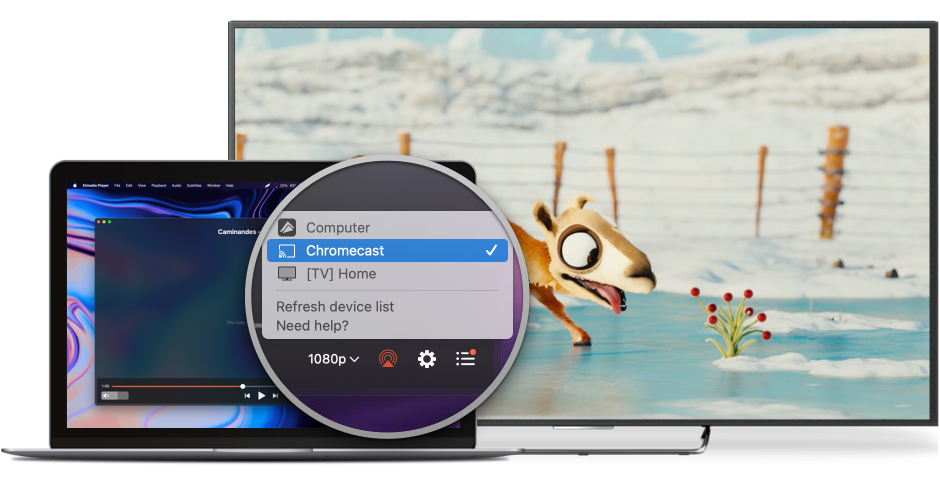
Frankfurt based Eltima Software today announces Elmedia Player version 7.0, an important update to the company's popular multiformat video player for macOS. Elmedia Player works with a large variety of file types including uncommon ones. One can create playlists and manage them, adjust playback settings, and much more. Version 7.0 includes Chromecast support, DLNA streaming to smart TV, 4K video streaming with AirPlay and many more useful improvements.
Frankfurt, Germany - Eltima Software has released a new version of their well-known media player - Elmedia. Version 7.0 has a lot of improvements with the Chromecast support being the most substantial one. Elmedia Player allows casting local videos and audio files of almost any file format from Mac, Macbook Macbook PRO, etc. to Chromecast. Online videos can be streamed from Mac to Chromecast as well. One can watch YouTube, Vimeo and Dailymotion videos via Chromecast without in-built ads inevitable in a web browser.
Those who have Apple TV will appreciate the newly added possibility to stream 4K videos there. When streaming 4K videos from your computer to Apple TV with the help of Elmedia Player you get to enjoy high-quality media content on a large screen.
As with this version Elmedia Player becomes DLNA-enabled, you can now easily stream various media wirelessly from your Mac or MacBook to DLNA-compatible devices on your home network. Thanks to the DLNA support you can turn your Mac into a media server gaining quick wireless access to video and audio files on your smart TV's large screen (Samsung, LG, Sony Smart TV, and the list goes on). This eliminates the need to copy files to USB flash drive or connect your device to your TV with an HDMI cable.
Another handy addition to the player is the built-in subtitles search through Open Subtitles, one of the most popular subtitle resources. One can find various subtitle files, download them and use for their videos.
If you are newly acquainted with Elmedia Player, here's what it is: a free media player for Mac that supports an immense variety of video and audio formats and offers convenient options for ultimate video watching. It has a 10-band equalizer to shape audio tone that you can adjust manually, allows managing subtitles, supports playlists for local files and web videos, internal volume control, internal audio tracks support and more.
The unique Open Online Videos option allows you to open any video on YouTube, Vimeo, or Dailymotion in the player and watch it without ads that you would otherwise have to watch and wait to be able to skip.
Such options as downloading of web videos from YouTube, Dailymotion, Vimeo and huge number of other websites, making screenshots or series of screenshots from the videos, streaming music and videos from Elmedia Player to other devices with AirPlay support, playback enhancement options (A-B loop, 10-band audio equalizer with presets, video and image layout adjustments), as well as streaming to smart TV, Chromecast, or Apple TV are available in Elmedia Player PRO.
The PRO version can be obtained from developer's website and ranges from $19.95 to $39.95 (USD) depending on the number of computers it will be installed on.
Elmedia Player 7.0: https://mac.eltima.com/elmediaplayer.html
Download Elmedia Player Free Edition: https://mac.eltima.com/download/elmediaplayer1.dmg
Purchase Elmedia Player PRO : https://mac.eltima.com/media-player-pro.html
Screenshot: https://mac.eltima.com/images/upload/elmedia/splash/streaming.png
Eltima Software is a global software Development Company, specializing primarily in serial communication, mobile and flash software for Mac OS and Windows. Eltima Software delivers top-notch solutions having a friendly team of 40 professionals. Copyright (C) 2018 Eltima Software. All Rights Reserved. Apple, the Apple logo and Macintosh are registered trademarks of Apple Inc. in the U.S. and/or other countries.
*******
Link To Article: https://prmac.com/release-id-83175.htm
*******
---------------------------------------------------------------------------------
Note that you can alter delivered distributions at any time.
Login to your account on prMac to alter your channel selection, or to opt-out at any time.

Outraged, Bored? Now is the Time to UnFaceBook. Come on Over to WebSonar
A new article has been published at prMac.
Outraged, Bored? Now is the Time to UnFaceBook. Come on Over to WebSonar - Published on 11/30/18
NeoNet Corp has developed a document management solution that solves the social network information privacy problem. WebSonar is a macOS application that dynamically generates a WWW presence from content stored in WebSonar Libraries. With WebSonar you serve your own content, hosted on your own computer, located at home, in a Data Center, or at your School without trading your privacy. No Tracking, No ads, No Likes, No Nagging, No Registration, Safe and Secure.
Salmon Arm, British Columbia - NeoNet Corp has developed a Made in Canada document management solution that solves the social network information privacy problem. WebSonar is based on Virginia Systems' Sonar Professional search engine that was originally developed in 1988. WebSonar combines this powerful search engine with a standard web server to provide a flexible and scaleable, browser based document management solution.
WebSonar Libraries provide a platform for sharing that does not require users to trade their privacy. Every individual library can host an unlimited number of documents. Each Library's home page has a unique URL, provides search functions and a ten page looped slide show. The library's document access is controlled by the library owner.
The service is free with an option to contribute a small monthly commitment of $5.00 for the use of one hosted Library, but this is strictly voluntary. There is no limit to the number of participants in a library group. Each group member can be provided with the upload password by the library owner so they can contribute content as well as participate in the exchange. You can set the access to your content to private or public. If it is set to private visitors will require the upload password to browse the content. Use the Comments link for discussion.
Privacy Statement:
WebSonar does not collect any information from your computer or from anyone accessing your library.
Security Statement:
WebSonar encrypts your password. A forgotten password can not be retrieved. The users library can only be reset to default (to no credentials) if you have physical access to the server.
"If you think the internet is not working in its current incarnation, you can't change the system through think-pieces and F.C.C. regulations alone. You need new code," stated Duane Bemister, Principal.
We Offer Five Scalable Solutions:
* 1 Library - $5.00 per month Hosted in our Data Center (free trial period, no registration required)
* 9 Libraries - $9.99 WebSonar 9 macOS app includes in-app purchase to serve to the Internet
* 36 Libraries - $19.99 WebSonar 36 macOS app requires WAN IP address to serve to the Internet
* 120 Libraries - $99.99 WebSonar Pro macOS app requires WAN IP address to serve to the Internet
* 2500 Libraries - $2500.00 Includes Mac Mini requires WAN IP address to serve to the Internet
Acquire a Hosted Library: http://w01.mylibraries.online
Purchase and Download WebSonar 9: https://itunes.apple.com/us/app/websonar-9/id1193676150?mt=12
Purchase and Download WebSonar 36: https://itunes.apple.com/us/app/websonar-36/id1193676158?mt=12
Purchase and Download WebSonar Pro: https://itunes.apple.com/us/app/websonar-pro/id1193316617?mt=12
Visit School Libraries Network: https://schoollibraries.net/privacy.html
View Sample Libraries: https://websonarlibraries.net/home.html
NeoNet Corp was established in Salmon Arm British Columbia in 2017 by Jake Jacobson and Duane Bemister to integrate CREATEit with WebSonar to create an iPad cloud document management platform that is independent, and free from tracking. A safe and practical solution to enable student collaboration and presentation. Copyright (c) 2018 NeoNet Corp. All Rights Reserved. Apple, the Apple logo, iPhone, iPad and iPod are registered trademarks of Apple Inc. in the U.S. and/or other countries. Other trademarks and registered trademarks may be the property of their respective owners.
*******
Link To Article: https://prmac.com/release-id-83174.htm
*******
---------------------------------------------------------------------------------
Note that you can alter delivered distributions at any time.
Login to your account on prMac to alter your channel selection, or to opt-out at any time.
Outraged, Bored? Now is the Time to UnFaceBook. Come on Over to WebSonar - Published on 11/30/18
NeoNet Corp has developed a document management solution that solves the social network information privacy problem. WebSonar is a macOS application that dynamically generates a WWW presence from content stored in WebSonar Libraries. With WebSonar you serve your own content, hosted on your own computer, located at home, in a Data Center, or at your School without trading your privacy. No Tracking, No ads, No Likes, No Nagging, No Registration, Safe and Secure.
Salmon Arm, British Columbia - NeoNet Corp has developed a Made in Canada document management solution that solves the social network information privacy problem. WebSonar is based on Virginia Systems' Sonar Professional search engine that was originally developed in 1988. WebSonar combines this powerful search engine with a standard web server to provide a flexible and scaleable, browser based document management solution.
WebSonar Libraries provide a platform for sharing that does not require users to trade their privacy. Every individual library can host an unlimited number of documents. Each Library's home page has a unique URL, provides search functions and a ten page looped slide show. The library's document access is controlled by the library owner.
The service is free with an option to contribute a small monthly commitment of $5.00 for the use of one hosted Library, but this is strictly voluntary. There is no limit to the number of participants in a library group. Each group member can be provided with the upload password by the library owner so they can contribute content as well as participate in the exchange. You can set the access to your content to private or public. If it is set to private visitors will require the upload password to browse the content. Use the Comments link for discussion.
Privacy Statement:
WebSonar does not collect any information from your computer or from anyone accessing your library.
Security Statement:
WebSonar encrypts your password. A forgotten password can not be retrieved. The users library can only be reset to default (to no credentials) if you have physical access to the server.
"If you think the internet is not working in its current incarnation, you can't change the system through think-pieces and F.C.C. regulations alone. You need new code," stated Duane Bemister, Principal.
We Offer Five Scalable Solutions:
* 1 Library - $5.00 per month Hosted in our Data Center (free trial period, no registration required)
* 9 Libraries - $9.99 WebSonar 9 macOS app includes in-app purchase to serve to the Internet
* 36 Libraries - $19.99 WebSonar 36 macOS app requires WAN IP address to serve to the Internet
* 120 Libraries - $99.99 WebSonar Pro macOS app requires WAN IP address to serve to the Internet
* 2500 Libraries - $2500.00 Includes Mac Mini requires WAN IP address to serve to the Internet
Acquire a Hosted Library: http://w01.mylibraries.online
Purchase and Download WebSonar 9: https://itunes.apple.com/us/app/websonar-9/id1193676150?mt=12
Purchase and Download WebSonar 36: https://itunes.apple.com/us/app/websonar-36/id1193676158?mt=12
Purchase and Download WebSonar Pro: https://itunes.apple.com/us/app/websonar-pro/id1193316617?mt=12
Visit School Libraries Network: https://schoollibraries.net/privacy.html
View Sample Libraries: https://websonarlibraries.net/home.html
NeoNet Corp was established in Salmon Arm British Columbia in 2017 by Jake Jacobson and Duane Bemister to integrate CREATEit with WebSonar to create an iPad cloud document management platform that is independent, and free from tracking. A safe and practical solution to enable student collaboration and presentation. Copyright (c) 2018 NeoNet Corp. All Rights Reserved. Apple, the Apple logo, iPhone, iPad and iPod are registered trademarks of Apple Inc. in the U.S. and/or other countries. Other trademarks and registered trademarks may be the property of their respective owners.
*******
Link To Article: https://prmac.com/release-id-83174.htm
*******
---------------------------------------------------------------------------------
Note that you can alter delivered distributions at any time.
Login to your account on prMac to alter your channel selection, or to opt-out at any time.
BatchOutput for Microsoft PowerPoint Now Supports macOS Mojave
A new article has been published at prMac.
BatchOutput for Microsoft PowerPoint Now Supports macOS Mojave - Published on 11/30/18
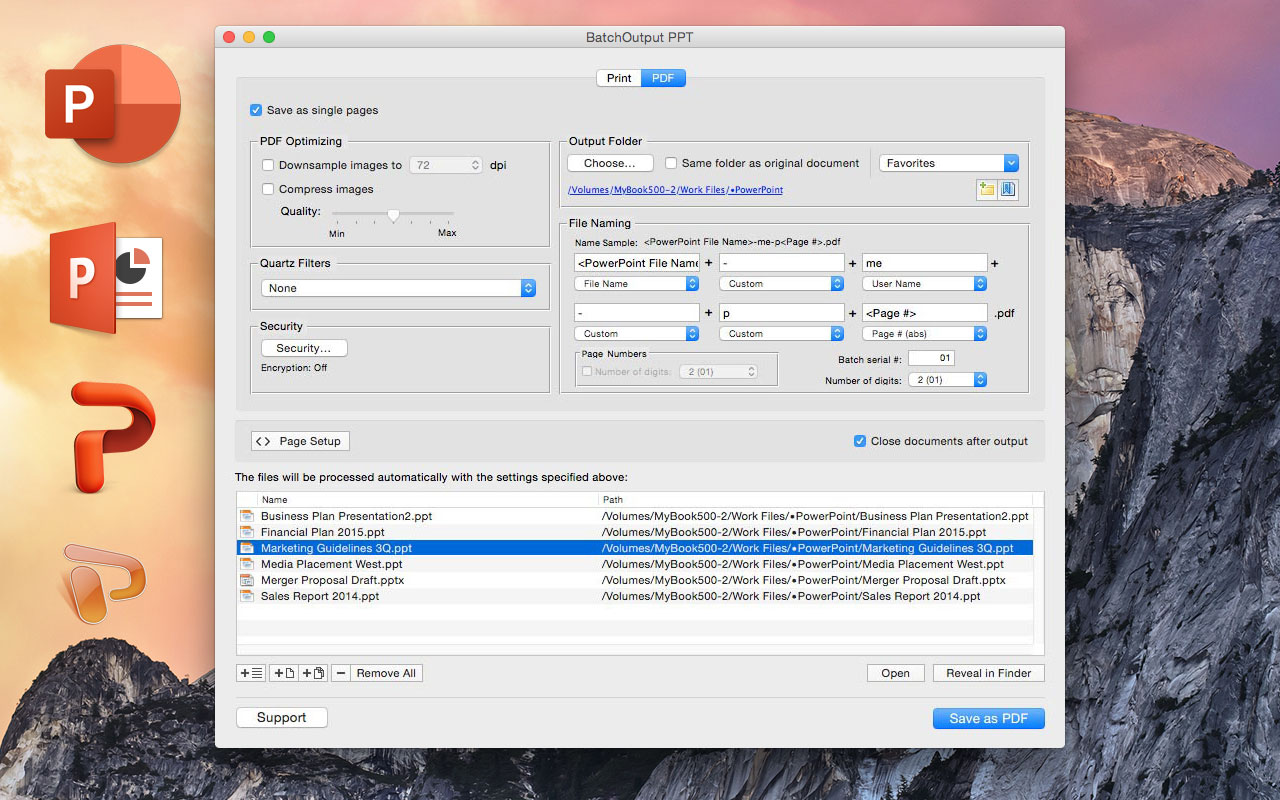
Zevrix Solutions announces BatchOutput PPT 2.2.14, a compatibility update to its output automation solution for Microsoft PowerPoint on macOS. In addition to batch printing, the software lets users carry out automated professional feature-rich PDF production directly from PowerPoint. Users can reduce PDF file size, optimize images and encrypt PDF files. The new version makes BatchOutput PPT compatible with the recently released macOS 10.14 Mojave.
Toronto (ON), Canada - Zevrix Solutions announces BatchOutput PPT 2.2.14, a compatibility update to its output automation solution for Microsoft PowerPoint on macOS. The software provides advanced solutions for demanding enterprise and office publishing environments through automation of printing and professional PDF output. With BatchOutput PPT, users only need to select the desired files and adjust output settings letting the software will do the rest automatically. For example, users can save dozens of PowerPoint files as PDF with just a click of a button, or leave the app to print hundreds of files overnight and pick up the completed job next morning.
The new version makes BatchOutput PPT compatible with the recently released macOS 10.14 Mojave, and introduces some stability and performance improvements. The update is free for licensed users of BatchOutput PPT 2.x.
In addition to batch printing, the software lets users carry out powerful professional PDF production directly from PowerPoint eliminating the need for time consuming post-processing. BatchOutput PPT brings advanced PDF and printing options right to the user's fingertips:
* Print and export to PDF multiple PowerPoint documents
* Split PowerPoint files into single page PDFs
* Variable output file names
* Reduce PDF file size and optimize documents for web, print or mobile devices
* Encrypt and password-protect PDF from unauthorized copying, printing, and viewing
* Change PDF color tone, brightness and other properties
BatchOutput PPT is a part of the Zevrix BatchOutput family which also includes output automation solutions for Microsoft Word, Excel, Adobe InDesign and PDF workflows.
Pricing and Availability
BatchOutput PPT can be purchased for $19.95 (USD) from the Zevrix website as well as from authorized resellers. Trial is also available for download. BatchOutput PPT requires macOS 10.7 - 10.41 and Microsoft PowerPoint 2008, 201, 2016 or 2019.
Zevrix Solutions: http://zevrix.com
BatchOutput PPT 2.2.14: http://zevrix.com/BatchOutputOffice.php
Download BatchOutput PPT: http://zevrix.com/BatchOutputOffice.dmg
Purchase: http://zevrix.com/store.php
Screenshot: http://zevrix.com/screenshots/bo-office/MAS/boppt-pdf-mas.jpg
Located in Toronto, Canada, Zevrix Solutions provides automation and productivity solutions for Adobe Creative Cloud and Creative Suite software, PDF workflows, graphic file diagnostics and Microsoft Office output on Mac OS. Zevrix is dedicated to help professionals increase their profits through automating everyday tasks, producing error-free documents, saving disk space and cutting production costs. For more information, visit their website. Copyright (C) 2018 Zevrix Solutions. All Rights Reserved. Other trademarks and registered trademarks may be the property of their respective owners.
*******
Link To Article: https://prmac.com/release-id-83173.htm
*******
---------------------------------------------------------------------------------
Note that you can alter delivered distributions at any time.
Login to your account on prMac to alter your channel selection, or to opt-out at any time.
BatchOutput for Microsoft PowerPoint Now Supports macOS Mojave - Published on 11/30/18
Zevrix Solutions announces BatchOutput PPT 2.2.14, a compatibility update to its output automation solution for Microsoft PowerPoint on macOS. In addition to batch printing, the software lets users carry out automated professional feature-rich PDF production directly from PowerPoint. Users can reduce PDF file size, optimize images and encrypt PDF files. The new version makes BatchOutput PPT compatible with the recently released macOS 10.14 Mojave.
Toronto (ON), Canada - Zevrix Solutions announces BatchOutput PPT 2.2.14, a compatibility update to its output automation solution for Microsoft PowerPoint on macOS. The software provides advanced solutions for demanding enterprise and office publishing environments through automation of printing and professional PDF output. With BatchOutput PPT, users only need to select the desired files and adjust output settings letting the software will do the rest automatically. For example, users can save dozens of PowerPoint files as PDF with just a click of a button, or leave the app to print hundreds of files overnight and pick up the completed job next morning.
The new version makes BatchOutput PPT compatible with the recently released macOS 10.14 Mojave, and introduces some stability and performance improvements. The update is free for licensed users of BatchOutput PPT 2.x.
In addition to batch printing, the software lets users carry out powerful professional PDF production directly from PowerPoint eliminating the need for time consuming post-processing. BatchOutput PPT brings advanced PDF and printing options right to the user's fingertips:
* Print and export to PDF multiple PowerPoint documents
* Split PowerPoint files into single page PDFs
* Variable output file names
* Reduce PDF file size and optimize documents for web, print or mobile devices
* Encrypt and password-protect PDF from unauthorized copying, printing, and viewing
* Change PDF color tone, brightness and other properties
BatchOutput PPT is a part of the Zevrix BatchOutput family which also includes output automation solutions for Microsoft Word, Excel, Adobe InDesign and PDF workflows.
Pricing and Availability
BatchOutput PPT can be purchased for $19.95 (USD) from the Zevrix website as well as from authorized resellers. Trial is also available for download. BatchOutput PPT requires macOS 10.7 - 10.41 and Microsoft PowerPoint 2008, 201, 2016 or 2019.
Zevrix Solutions: http://zevrix.com
BatchOutput PPT 2.2.14: http://zevrix.com/BatchOutputOffice.php
Download BatchOutput PPT: http://zevrix.com/BatchOutputOffice.dmg
Purchase: http://zevrix.com/store.php
Screenshot: http://zevrix.com/screenshots/bo-office/MAS/boppt-pdf-mas.jpg
Located in Toronto, Canada, Zevrix Solutions provides automation and productivity solutions for Adobe Creative Cloud and Creative Suite software, PDF workflows, graphic file diagnostics and Microsoft Office output on Mac OS. Zevrix is dedicated to help professionals increase their profits through automating everyday tasks, producing error-free documents, saving disk space and cutting production costs. For more information, visit their website. Copyright (C) 2018 Zevrix Solutions. All Rights Reserved. Other trademarks and registered trademarks may be the property of their respective owners.
*******
Link To Article: https://prmac.com/release-id-83173.htm
*******
---------------------------------------------------------------------------------
Note that you can alter delivered distributions at any time.
Login to your account on prMac to alter your channel selection, or to opt-out at any time.
Scopely and CBS Interactive Combine Forces For Star Trek Fleet Command
A new article has been published at prMac.
Scopely and CBS Interactive Combine Forces For Star Trek Fleet Command - Published on 11/29/18
Interactive entertainment company, Scopely, together with CBS Interactive, today announces Star Trek Fleet Command, a real-time multiplayer strategy and role-play title for iOS and Android devices. Star Trek Fleet Command offers a multiplayer experience to combine role-playing game style progression and real-time battles with enemy ships on mobile devices. Players have the opportunity to build dream teams made up of their favorite characters as well as from different factions.
Los Angeles, California - Scopely, an interactive entertainment company and mobile games publisher, together with CBS Interactive, today announced the launch of Star Trek Fleet Command, a multiplayer real-time strategy and role-play mobile game that brings an entire galaxy of characters and ships to life for the ultimate Star Trek gaming experience.
Based on the 2009, 2013 and 2016 cinematic Star Trek universe, Star Trek Fleet Command is the first free-roaming multiplayer Star Trek experience to combine role-playing game style progression and real-time battles with enemy ships on mobile devices. Players have the opportunity to build dream teams made up of their favorite characters including Captain Kirk, Spock and Uhura as well as from different factions such as the Federation, Klingons and Romulans as they determine their place in the cosmos. Star Trek Fleet Command also boasts augmented reality (AR) features, bringing a football field-sized USS Enterprise into the real world for the first time. Players can use their mobile camera to hover their ship over their home or local park, allowing them to capture screenshots to share with friends.
"We are excited to add a strategy game to our multi-genre games portfolio," said Javier Ferreira, President and Chief Operating Officer at Scopely. "Star TrekFleet Command further expands the diverse set of experiences our teams are building for gamers worldwide with another globally beloved universe where we can deploy our core strengths of creative gameplay and deep, highly personal user experiences."
Steve Huff, General Manager of Product at Scopely added, "Star Trek has cultivated one of the most devoted and passionate fan bases in entertainment and we sought to stay true to the franchise when creating Star Trek Fleet Command -offering players one of the most aesthetically, narratively and mechanically immersive Star Trek experiences to date. Our teams have been working with tremendous passion to deliver the ultimate gaming experience for fans around the globe."
Star Trek Fleet Command offers players the ability to customize their gameplay experience through various narrative paths across hundreds of available missions. How players interact with other deep-space denizens and utilize the different factions' unique officers, ships and technologies will further tailor each user experience, making the amount of personalization offered in Star Trek: Fleet Command about as limitless as the universe.
To celebrate the launch of the game, YouTube star Typical Gamer hosted a roundtable discussion about all things Star Trek with franchise star John Cho and superfans actress Megan Fox, musician Steve Aoki and athlete Hunter Pence. The first Star Trek talk premieres today on Typical Gamer's YouTube channel with an additional episode forthcoming December 1. Published by Scopely, Star Trek Fleet Command was created and developed in partnership with DIGIT Game Studios.
Device Requirements:
* iPhone, iPad, and iPod touch
* Requires iOS 10.0 or later
* 46 MB
Pricing and Availability:
Star Trek Fleet Command 1.7.2 is Free (With In-App Purchases) and available worldwide through the App Store in the Games category. There is also an Android version available on Google Play.
Star Trek Fleet Command 1.7.2: https://scopely.com/game/star-trek-fleet-command/
Download from iTunes: https://itunes.apple.com/app/star-trek-fleet-command/id1427744264
YouTube Video (Gameplay Trailer): https://www.youtube.com/watch?v=rjut4UlO0pc
CBS Interactive: https://www.cbsinteractive.com/
DIGIT Game Studios: https://www.digitgaming.com/
Media Assets: https://drive.google.com/drive/folders/1vcRn_PaD9ys_TiwYx8-vKy8kTzRp117t?usp=sharing
Scopely is an interactive entertainment company and a leading mobile games publisher. With a diverse portfolio of original and beloved franchises, Scopely games provide immersive experiences for millions of casual and core gamers around the globe. Founded in 2011, Scopely is home to a proprietary technology platform that creates personalized user experiences and effectively monetizes free-to-play games at scale with multiple franchises each achieving more than $300 million in lifetime revenues. Recognized in Fast Company's 'World's Most Innovative Companies' and #2 on Deloitte's 'Technology Fast 500' as one of the fastest-growing companies in North America, Scopely has achieved ten consecutive #1 games in the U.S. and raised more than $250 million in financing from global entertainment and technology investors. Scopely has operations in Los Angeles (HQ) and Barcelona with studios in eight countries across four continents. All Material and Software (C) Copyright 2018 Scopely Inc. All
Rights Reserved. Apple, the Apple logo, iPhone, iPod and iPad are registered trademarks of Apple Inc. in the U.S. and/or other countries. Other trademarks and registered trademarks may be the property of their respective owners.
*******
Link To Article: https://prmac.com/release-id-83172.htm
*******
---------------------------------------------------------------------------------
Note that you can alter delivered distributions at any time.
Login to your account on prMac to alter your channel selection, or to opt-out at any time.
Scopely and CBS Interactive Combine Forces For Star Trek Fleet Command - Published on 11/29/18
Interactive entertainment company, Scopely, together with CBS Interactive, today announces Star Trek Fleet Command, a real-time multiplayer strategy and role-play title for iOS and Android devices. Star Trek Fleet Command offers a multiplayer experience to combine role-playing game style progression and real-time battles with enemy ships on mobile devices. Players have the opportunity to build dream teams made up of their favorite characters as well as from different factions.
Los Angeles, California - Scopely, an interactive entertainment company and mobile games publisher, together with CBS Interactive, today announced the launch of Star Trek Fleet Command, a multiplayer real-time strategy and role-play mobile game that brings an entire galaxy of characters and ships to life for the ultimate Star Trek gaming experience.
Based on the 2009, 2013 and 2016 cinematic Star Trek universe, Star Trek Fleet Command is the first free-roaming multiplayer Star Trek experience to combine role-playing game style progression and real-time battles with enemy ships on mobile devices. Players have the opportunity to build dream teams made up of their favorite characters including Captain Kirk, Spock and Uhura as well as from different factions such as the Federation, Klingons and Romulans as they determine their place in the cosmos. Star Trek Fleet Command also boasts augmented reality (AR) features, bringing a football field-sized USS Enterprise into the real world for the first time. Players can use their mobile camera to hover their ship over their home or local park, allowing them to capture screenshots to share with friends.
"We are excited to add a strategy game to our multi-genre games portfolio," said Javier Ferreira, President and Chief Operating Officer at Scopely. "Star TrekFleet Command further expands the diverse set of experiences our teams are building for gamers worldwide with another globally beloved universe where we can deploy our core strengths of creative gameplay and deep, highly personal user experiences."
Steve Huff, General Manager of Product at Scopely added, "Star Trek has cultivated one of the most devoted and passionate fan bases in entertainment and we sought to stay true to the franchise when creating Star Trek Fleet Command -offering players one of the most aesthetically, narratively and mechanically immersive Star Trek experiences to date. Our teams have been working with tremendous passion to deliver the ultimate gaming experience for fans around the globe."
Star Trek Fleet Command offers players the ability to customize their gameplay experience through various narrative paths across hundreds of available missions. How players interact with other deep-space denizens and utilize the different factions' unique officers, ships and technologies will further tailor each user experience, making the amount of personalization offered in Star Trek: Fleet Command about as limitless as the universe.
To celebrate the launch of the game, YouTube star Typical Gamer hosted a roundtable discussion about all things Star Trek with franchise star John Cho and superfans actress Megan Fox, musician Steve Aoki and athlete Hunter Pence. The first Star Trek talk premieres today on Typical Gamer's YouTube channel with an additional episode forthcoming December 1. Published by Scopely, Star Trek Fleet Command was created and developed in partnership with DIGIT Game Studios.
Device Requirements:
* iPhone, iPad, and iPod touch
* Requires iOS 10.0 or later
* 46 MB
Pricing and Availability:
Star Trek Fleet Command 1.7.2 is Free (With In-App Purchases) and available worldwide through the App Store in the Games category. There is also an Android version available on Google Play.
Star Trek Fleet Command 1.7.2: https://scopely.com/game/star-trek-fleet-command/
Download from iTunes: https://itunes.apple.com/app/star-trek-fleet-command/id1427744264
YouTube Video (Gameplay Trailer): https://www.youtube.com/watch?v=rjut4UlO0pc
CBS Interactive: https://www.cbsinteractive.com/
DIGIT Game Studios: https://www.digitgaming.com/
Media Assets: https://drive.google.com/drive/folders/1vcRn_PaD9ys_TiwYx8-vKy8kTzRp117t?usp=sharing
Scopely is an interactive entertainment company and a leading mobile games publisher. With a diverse portfolio of original and beloved franchises, Scopely games provide immersive experiences for millions of casual and core gamers around the globe. Founded in 2011, Scopely is home to a proprietary technology platform that creates personalized user experiences and effectively monetizes free-to-play games at scale with multiple franchises each achieving more than $300 million in lifetime revenues. Recognized in Fast Company's 'World's Most Innovative Companies' and #2 on Deloitte's 'Technology Fast 500' as one of the fastest-growing companies in North America, Scopely has achieved ten consecutive #1 games in the U.S. and raised more than $250 million in financing from global entertainment and technology investors. Scopely has operations in Los Angeles (HQ) and Barcelona with studios in eight countries across four continents. All Material and Software (C) Copyright 2018 Scopely Inc. All
Rights Reserved. Apple, the Apple logo, iPhone, iPod and iPad are registered trademarks of Apple Inc. in the U.S. and/or other countries. Other trademarks and registered trademarks may be the property of their respective owners.
*******
Link To Article: https://prmac.com/release-id-83172.htm
*******
---------------------------------------------------------------------------------
Note that you can alter delivered distributions at any time.
Login to your account on prMac to alter your channel selection, or to opt-out at any time.
Free Christmas puzzle game for the whole family
A new article has been published at prMac.
Free Christmas puzzle game for the whole family - Published on 11/29/18
Notus Games studio releases Christmas Mansion 3, an update to their fun-to-play game title for iOS devices. Christmas Mansion 3 is a puzzle game with fun Christmas themed quests. Build cafes and shops for Christmas fair, lure cops with donuts to provide safety, organize snowball-fighting competitions, decorate the fir-tree and town hall, get ornaments, illuminations and design ice sculptures to create the real Christmas spirit. In latest updates we added new levels, quests and features.
Sheffield, United Kingdom - Notus Games studio is pleased to announce several major updates of Christmas Mansion 3, a puzzle game for iOS that the whole family can enjoy. Christmas Mansion 3 is easy-to-play and nice puzzle game with fun Christmas themed quests. Help the Elf to prepare your town for Christmas with beautiful ornaments and decorations! Build cafes and shops for Christmas fair, lure cops with donuts to provide safety, organize snowball-fighting competitions, decorate the fir-tree and town hall, get beautiful ornaments, illuminations and design ice sculptures to create the real Christmas spirit. All of it happens in semi-animated location with parallax effect.
So hurry up to get dozens of upgrades and decorations for your Christmas fair and earn free diamonds to charge the powerups, blast through the puzzles and have a fantastic Christmas Puzzle holiday!
In the latest updates we added new levels, quests and features. The game supports Retina displays and latest iPhone X series. It is a continuation of Christmas Mansion series. In previous parts we offered player to decorate a house exterior and living room for Christmas. Now an entire town square is available to prepare for Christmas fair.
"The Christmas Mansion series is one of our most successful products," explained Oleksandr Movchan, Director. "These games are simple, easy and fun. They have good reviews and significant amount of players due to the same element, which an initial inspiration to create them in the first place - holiday spirit of winter festivities, with atmospheric music, falling snow and cozy locations."
Device Requirements:
* iPhone, iPad, or iPod touch
* Requires iOS 8.0 or later
* 178.7 MB
Pricing and Availability:
Christmas Mansion 3 (v1.2.4) is available worldwide exclusively through the App Store for free for iPhone, iPod and iPad. PC and Mac versions are also available.
Notus Games: http://notusgames.com/
Christmas Mansion 3 (v1.2.4): http://notusgames.com/games/13
Download from iTunes: https://itunes.apple.com/app/christmas-mansion-3/id1174329493
Screenshot: http://press.notusgames.com/christmas_mansion_3/images/1224x2208_2.png
App Icon: http://press.notusgames.com/christmas_mansion_3/images/icon.png
Notus Games Ltd is a rapidly developing company founded in 2010. Copyright (C) 2010-2018 Notus Games Ltd. All Rights Reserved. Apple, the Apple logo, iPhone, iPod and iPad are registered trademarks of Apple Inc. in the U.S. and/or other countries.
*******
Link To Article: https://prmac.com/release-id-83170.htm
*******
---------------------------------------------------------------------------------
Note that you can alter delivered distributions at any time.
Login to your account on prMac to alter your channel selection, or to opt-out at any time.
Free Christmas puzzle game for the whole family - Published on 11/29/18
Notus Games studio releases Christmas Mansion 3, an update to their fun-to-play game title for iOS devices. Christmas Mansion 3 is a puzzle game with fun Christmas themed quests. Build cafes and shops for Christmas fair, lure cops with donuts to provide safety, organize snowball-fighting competitions, decorate the fir-tree and town hall, get ornaments, illuminations and design ice sculptures to create the real Christmas spirit. In latest updates we added new levels, quests and features.
Sheffield, United Kingdom - Notus Games studio is pleased to announce several major updates of Christmas Mansion 3, a puzzle game for iOS that the whole family can enjoy. Christmas Mansion 3 is easy-to-play and nice puzzle game with fun Christmas themed quests. Help the Elf to prepare your town for Christmas with beautiful ornaments and decorations! Build cafes and shops for Christmas fair, lure cops with donuts to provide safety, organize snowball-fighting competitions, decorate the fir-tree and town hall, get beautiful ornaments, illuminations and design ice sculptures to create the real Christmas spirit. All of it happens in semi-animated location with parallax effect.
So hurry up to get dozens of upgrades and decorations for your Christmas fair and earn free diamonds to charge the powerups, blast through the puzzles and have a fantastic Christmas Puzzle holiday!
In the latest updates we added new levels, quests and features. The game supports Retina displays and latest iPhone X series. It is a continuation of Christmas Mansion series. In previous parts we offered player to decorate a house exterior and living room for Christmas. Now an entire town square is available to prepare for Christmas fair.
"The Christmas Mansion series is one of our most successful products," explained Oleksandr Movchan, Director. "These games are simple, easy and fun. They have good reviews and significant amount of players due to the same element, which an initial inspiration to create them in the first place - holiday spirit of winter festivities, with atmospheric music, falling snow and cozy locations."
Device Requirements:
* iPhone, iPad, or iPod touch
* Requires iOS 8.0 or later
* 178.7 MB
Pricing and Availability:
Christmas Mansion 3 (v1.2.4) is available worldwide exclusively through the App Store for free for iPhone, iPod and iPad. PC and Mac versions are also available.
Notus Games: http://notusgames.com/
Christmas Mansion 3 (v1.2.4): http://notusgames.com/games/13
Download from iTunes: https://itunes.apple.com/app/christmas-mansion-3/id1174329493
Screenshot: http://press.notusgames.com/christmas_mansion_3/images/1224x2208_2.png

App Icon: http://press.notusgames.com/christmas_mansion_3/images/icon.png

Notus Games Ltd is a rapidly developing company founded in 2010. Copyright (C) 2010-2018 Notus Games Ltd. All Rights Reserved. Apple, the Apple logo, iPhone, iPod and iPad are registered trademarks of Apple Inc. in the U.S. and/or other countries.
*******
Link To Article: https://prmac.com/release-id-83170.htm
*******
---------------------------------------------------------------------------------
Note that you can alter delivered distributions at any time.
Login to your account on prMac to alter your channel selection, or to opt-out at any time.
Free Imposition Software Now Available for Adobe InDesign CC 2019 Users
A new article has been published at prMac.
Free Imposition Software Now Available for Adobe InDesign CC 2019 Users - Published on 11/29/18
Meadows Publishing Solutions has released a new version of their Meadows Productivity Suite, a completely free set of software utilities for Adobe InDesign. With complete control over content placement and fitting, the MPS Pro Suite includes an advanced multi-up imposition utility, allowing users to quickly create multi-up imposition layouts of graphics, PDF files, or InDesign documents. The new release is now compatible with all Adobe InDesign CC 2019 systems.
Schaumburg, Illinois - Meadows Publishing Solutions today announced a new release of their Meadows Productivity Suite software, a completely Free set of software tools for Adobe InDesign that have been designed to streamline multi-up impositions, and other publishing tasks. The new release is now compatible with all Adobe InDesign CC 2019 systems.
About the Free Productivity Suite:
The MPS Pro Suite currently includes an advanced multi-up imposition utility, allowing users to quickly create multi-up imposition layouts of graphics, PDF files, or InDesign documents. The process is driven by a user interface that allows for the specification of trim size, bleed, spacing, and rotation of the imposed elements.
As the imposed elements are placed, crop and bleed marks can also be added automatically, and assigned to InDesign layers as they are created. For two-page impositions, the user can choose from one of several duplex modes, which ensures the imposed content will back up properly when printed. Control over content placement and fitting is also provided via a set of preference options.
The MPS Pro Suite comes with a comprehensive set of documentation, including a set of tutorial graphic files. In addition, online help for the software is being made available via the Meadows support ticketing system.
To receive a free copy of the MPS Pro Suite, users simply visit the Meadows web site and fill in the short registration form. A confirmation email is then sent with all of the download and installation details. Please visit our online press center for logos, images, and product information. For more information, please contact John Kriho, President, Meadows Publishing Solutions.
Meadows Publishing Solutions: http://www.meadowsps.com
MPS Pro Suite: http://www.meadowsps.com/mpsprosupport
More Information: http://www.meadowsps.com/site/marketing/productinfo/company_info.htm
Register for Free: http://www.meadowsps.com/mpspro
Screenshot: http://www.meadowsps.com/site/marketing/pressreleases/graphics/mps-pro-suite-screen-shot.jpg
Media Assets: http://www.meadowsps.com/press
Meadows Publishing Solutions is a software development and integration company specializing in commercial and custom plug-in modules for Adobe InDesign and Adobe Acrobat as well as other extensible technologies. Meadows has developed a number of popular software packages for the database publishing and variable data printing markets, including their award-winning products AutoPrice and DesignMerge. Founded in 1991, Meadows is based just outside of Chicago in Schaumburg, Illinois. All Material and Software (C) Copyright 2018 Meadows Publishing Solutions. All Rights Reserved. Apple, the Apple logo, macOS and Macintosh are registered trademarks of Apple Inc. in the U.S. and/or other countries. Other trademarks and registered trademarks may be the property of their respective owners.
*******
Link To Article: https://prmac.com/release-id-83171.htm
*******
---------------------------------------------------------------------------------
Note that you can alter delivered distributions at any time.
Login to your account on prMac to alter your channel selection, or to opt-out at any time.
Free Imposition Software Now Available for Adobe InDesign CC 2019 Users - Published on 11/29/18
Meadows Publishing Solutions has released a new version of their Meadows Productivity Suite, a completely free set of software utilities for Adobe InDesign. With complete control over content placement and fitting, the MPS Pro Suite includes an advanced multi-up imposition utility, allowing users to quickly create multi-up imposition layouts of graphics, PDF files, or InDesign documents. The new release is now compatible with all Adobe InDesign CC 2019 systems.
Schaumburg, Illinois - Meadows Publishing Solutions today announced a new release of their Meadows Productivity Suite software, a completely Free set of software tools for Adobe InDesign that have been designed to streamline multi-up impositions, and other publishing tasks. The new release is now compatible with all Adobe InDesign CC 2019 systems.
About the Free Productivity Suite:
The MPS Pro Suite currently includes an advanced multi-up imposition utility, allowing users to quickly create multi-up imposition layouts of graphics, PDF files, or InDesign documents. The process is driven by a user interface that allows for the specification of trim size, bleed, spacing, and rotation of the imposed elements.
As the imposed elements are placed, crop and bleed marks can also be added automatically, and assigned to InDesign layers as they are created. For two-page impositions, the user can choose from one of several duplex modes, which ensures the imposed content will back up properly when printed. Control over content placement and fitting is also provided via a set of preference options.
The MPS Pro Suite comes with a comprehensive set of documentation, including a set of tutorial graphic files. In addition, online help for the software is being made available via the Meadows support ticketing system.
To receive a free copy of the MPS Pro Suite, users simply visit the Meadows web site and fill in the short registration form. A confirmation email is then sent with all of the download and installation details. Please visit our online press center for logos, images, and product information. For more information, please contact John Kriho, President, Meadows Publishing Solutions.
Meadows Publishing Solutions: http://www.meadowsps.com
MPS Pro Suite: http://www.meadowsps.com/mpsprosupport
More Information: http://www.meadowsps.com/site/marketing/productinfo/company_info.htm
Register for Free: http://www.meadowsps.com/mpspro
Screenshot: http://www.meadowsps.com/site/marketing/pressreleases/graphics/mps-pro-suite-screen-shot.jpg

Media Assets: http://www.meadowsps.com/press
Meadows Publishing Solutions is a software development and integration company specializing in commercial and custom plug-in modules for Adobe InDesign and Adobe Acrobat as well as other extensible technologies. Meadows has developed a number of popular software packages for the database publishing and variable data printing markets, including their award-winning products AutoPrice and DesignMerge. Founded in 1991, Meadows is based just outside of Chicago in Schaumburg, Illinois. All Material and Software (C) Copyright 2018 Meadows Publishing Solutions. All Rights Reserved. Apple, the Apple logo, macOS and Macintosh are registered trademarks of Apple Inc. in the U.S. and/or other countries. Other trademarks and registered trademarks may be the property of their respective owners.
*******
Link To Article: https://prmac.com/release-id-83171.htm
*******
---------------------------------------------------------------------------------
Note that you can alter delivered distributions at any time.
Login to your account on prMac to alter your channel selection, or to opt-out at any time.
ChronoSync and ChronoAgent Support macOS Mojave
A new article has been published at prMac.
ChronoSync and ChronoAgent Support macOS Mojave - Published on 11/29/18
Florida based Econ Technologies today announces ChronoSync 4.9, an important update to their multipurpose app for local and cloud backup, bootable clones and folder synchronizing as well as its reliable remote backup companion App, ChronoAgent. Version 4.9 offers full macOS 10.14 (Mojave) support and adds more than 90 new features and enhancements that focus primarily on exploiting new operating system technologies. The biggest notable addition to these updates is full Mojave Dark Mode support.
Casselberry, Florida - Econ Technologies, Inc. announces full macOS 10.14 (Mojave) support for ChronoSync and its reliable remote backup companion App, ChronoAgent. The biggest notable addition is the easy-on-the-eyes full Mojave Dark Mode support! But the latest version of these Apps is not just window dressing!
Under the hood, you will find the fastest ChronoSync ever optimized specifically for the APFS File System. This along with support for APFS Snapshot on both ChronoSync and ChronoAgent delivers the best performance for local and remote backups.
The ChronoSync user interface now takes advantage of TouchID while offering significant improvements in usability. Easily configure ChronoSync for the strict Mojave Security Model using the Full Disk Access Assistant. The new ChronoSync Organizer streamlines access to all the information about Sync Tasks while offering new tagging, actions, sorting, and notifications so you can see what is going on at-a-glance.
Setting up syncs and backups continues to get easier as the Assistants now offer APFS target formatting when creating Bootable Backups and Disk Image Backups.
ChronoAgent, installed on any Mac to accept secure direct connections from any ChronoSync Mac, includes the same APFS File System optimizations, APFS Snapshot capabilities and a full Mojave Dark Mode user interface.
These changes are delivered along with numerous bug fixes, tweaks and improvements. See the highlights of the newest features in the "What's new in ChronoSync v4.9" guide. See the details of all the changes in the "Release Notes."
Owners of ChronoSync and ChronoAgent know about Econ Technologies' commitment to keeping ChronoSync the professional choice for reliable Mac Backup, Bootable Backup and Folder Synchronization. They can install the updates immediately for free!
If you don't already own ChronoSync or you need to add ChronoAgent to backup additional Macs, download today and start the 15-day free trial to experience this reliable and feature-rich backup solution!
ChronoSync, the multipurpose Mac App for local and cloud backup, bootable backup, and folder synchronizing, is designed to work on macOS version 10.11 and newer. Full working trial licenses are available or purchase ChronoSync for $49.99. ChronoSync's companion app, ChronoAgent, allows any Mac to accept direct, secure connections from any ChronoSync Mac or any InterConneX iOS device to access or transfer data! ChronoAgent is designed to work on macOS version 10.10 and newer. Full working trial licenses are available or purchase ChronoAgent for $14.99. ChronoMonitor is an iPhone app that monitors Macs running ChronoSync or ChronoAgent. ChronoMonitor is available in the Apple App Store for $3.99 (USD).
ChronoSync 4.9: https://www.econtechnologies.com/chronosync/overview.html
Release Notes: https://www.econtechnologies.com/chronosync/notes.html
Download Today: https://www.econtechnologies.com/downloads/downloads.html
ChronoAgent: https://www.econtechnologies.com/chronoagent/overview.html
InterConneX: https://www.econtechnologies.com/interconnex/overview.html
Media Assets (PDF): https://downloads.econtechnologies.com/manuals/Whats_New_in_v49.pdf
Econ has produced software that runs on Apple products for over 20 years. Econ Technologies, Inc. was established in Central Florida in 1991. It is named after the Econlockhatchee River, which flows past the site of our original office where all of this began. On October 31, 2001 we introduced our first app, Portraits & Prints, that was developed specifically for macOS. We followed that up with ChronoSync which was first released February 15, 2002. Since that time ChronoSync has gone through numerous updates and we have never charged for a single update. On July 29, 2013 we launched InterConneX for the iPad followed by InterConneX for the iPhone in September. All Material and Software (C) Copyright 2018 Econ Technologies. All Rights Reserved. Apple, the Apple logo, Macintosh and macOS are registered trademarks of Apple Inc. in the U.S. and/or other countries. Other trademarks and registered trademarks may be the property of their respective owners.
*******
Link To Article: https://prmac.com/release-id-83169.htm
*******
---------------------------------------------------------------------------------
Note that you can alter delivered distributions at any time.
Login to your account on prMac to alter your channel selection, or to opt-out at any time.
ChronoSync and ChronoAgent Support macOS Mojave - Published on 11/29/18
Florida based Econ Technologies today announces ChronoSync 4.9, an important update to their multipurpose app for local and cloud backup, bootable clones and folder synchronizing as well as its reliable remote backup companion App, ChronoAgent. Version 4.9 offers full macOS 10.14 (Mojave) support and adds more than 90 new features and enhancements that focus primarily on exploiting new operating system technologies. The biggest notable addition to these updates is full Mojave Dark Mode support.
Casselberry, Florida - Econ Technologies, Inc. announces full macOS 10.14 (Mojave) support for ChronoSync and its reliable remote backup companion App, ChronoAgent. The biggest notable addition is the easy-on-the-eyes full Mojave Dark Mode support! But the latest version of these Apps is not just window dressing!
Under the hood, you will find the fastest ChronoSync ever optimized specifically for the APFS File System. This along with support for APFS Snapshot on both ChronoSync and ChronoAgent delivers the best performance for local and remote backups.
The ChronoSync user interface now takes advantage of TouchID while offering significant improvements in usability. Easily configure ChronoSync for the strict Mojave Security Model using the Full Disk Access Assistant. The new ChronoSync Organizer streamlines access to all the information about Sync Tasks while offering new tagging, actions, sorting, and notifications so you can see what is going on at-a-glance.
Setting up syncs and backups continues to get easier as the Assistants now offer APFS target formatting when creating Bootable Backups and Disk Image Backups.
ChronoAgent, installed on any Mac to accept secure direct connections from any ChronoSync Mac, includes the same APFS File System optimizations, APFS Snapshot capabilities and a full Mojave Dark Mode user interface.
These changes are delivered along with numerous bug fixes, tweaks and improvements. See the highlights of the newest features in the "What's new in ChronoSync v4.9" guide. See the details of all the changes in the "Release Notes."
Owners of ChronoSync and ChronoAgent know about Econ Technologies' commitment to keeping ChronoSync the professional choice for reliable Mac Backup, Bootable Backup and Folder Synchronization. They can install the updates immediately for free!
If you don't already own ChronoSync or you need to add ChronoAgent to backup additional Macs, download today and start the 15-day free trial to experience this reliable and feature-rich backup solution!
ChronoSync, the multipurpose Mac App for local and cloud backup, bootable backup, and folder synchronizing, is designed to work on macOS version 10.11 and newer. Full working trial licenses are available or purchase ChronoSync for $49.99. ChronoSync's companion app, ChronoAgent, allows any Mac to accept direct, secure connections from any ChronoSync Mac or any InterConneX iOS device to access or transfer data! ChronoAgent is designed to work on macOS version 10.10 and newer. Full working trial licenses are available or purchase ChronoAgent for $14.99. ChronoMonitor is an iPhone app that monitors Macs running ChronoSync or ChronoAgent. ChronoMonitor is available in the Apple App Store for $3.99 (USD).
ChronoSync 4.9: https://www.econtechnologies.com/chronosync/overview.html
Release Notes: https://www.econtechnologies.com/chronosync/notes.html
Download Today: https://www.econtechnologies.com/downloads/downloads.html
ChronoAgent: https://www.econtechnologies.com/chronoagent/overview.html
InterConneX: https://www.econtechnologies.com/interconnex/overview.html
Media Assets (PDF): https://downloads.econtechnologies.com/manuals/Whats_New_in_v49.pdf
Econ has produced software that runs on Apple products for over 20 years. Econ Technologies, Inc. was established in Central Florida in 1991. It is named after the Econlockhatchee River, which flows past the site of our original office where all of this began. On October 31, 2001 we introduced our first app, Portraits & Prints, that was developed specifically for macOS. We followed that up with ChronoSync which was first released February 15, 2002. Since that time ChronoSync has gone through numerous updates and we have never charged for a single update. On July 29, 2013 we launched InterConneX for the iPad followed by InterConneX for the iPhone in September. All Material and Software (C) Copyright 2018 Econ Technologies. All Rights Reserved. Apple, the Apple logo, Macintosh and macOS are registered trademarks of Apple Inc. in the U.S. and/or other countries. Other trademarks and registered trademarks may be the property of their respective owners.
*******
Link To Article: https://prmac.com/release-id-83169.htm
*******
---------------------------------------------------------------------------------
Note that you can alter delivered distributions at any time.
Login to your account on prMac to alter your channel selection, or to opt-out at any time.
Subscribe to:
Posts (Atom)