A new article has been published at prMac.
Databuzz Releases fmEcommerce Link (Shopify Edition) v1.3 - Published on 12/11/18
Databuzz today announced fmEcommerce Link (Shopify Edition) v1.3, a major update to their FileMaker solution that integrates the FileMaker platform with the Shopify eCommerce platform. fmEcommerce Link (Shopify Edition) v1.3 now runs natively on the FileMaker 16 and 17 platforms, including FileMaker Pro, FileMaker Go and FileMaker Server without requiring a FileMaker plug-in.
Sydney, Australia - Databuzz today announced fmEcommerce Link (Shopify Edition) v1.3, a major update to their FileMaker solution that integrates the FileMaker platform with the Shopify eCommerce platform.
fmEcommerce Link (Shopify Edition) v1.3 now runs natively on the FileMaker 16 and 17 platforms, including FileMaker Pro, FileMaker Go and FileMaker Server without requiring a FileMaker plug-in. It also includes examples for Shopify Webhooks, allowing new Shopify Orders to be automatically pushed to the fmEcommerce Link (Shopify Edition) solution.
fmEcommerce Link (Shopify Edition) allows you to upload and download data between your FileMaker solution and Shopify, the leading cloud-based, multi-channel commerce platform designed for small and medium-sized businesses. Shopify currently powers over 600,000 businesses in approximately 175 countries and is trusted by brands such as Red Bull, Nestle, Rebecca Minkoff, Kylie Cosmetics, and many more.
fmEcommerce Link (Shopify Edition) removes double data entry and human errors saving your company significant time, money and hassle by automating the exchange of data between FileMaker and Shopify. fmEcommerce Link (Shopify Edition) is completely unlocked allowing you to integrate it into your FileMaker solution. You can copy and paste examples showing you how to authenticate with the Shopify API and download Customers, Orders, Products, Collections and more at the click of a button.
fmEcommerce Link (Shopify Edition) features include:
* works with FileMaker Pro v12, v13, v14, v15, v16 and v17
* works with Macintosh and Windows
* completely unlocked for you to integrate into your own FileMaker solution
* can be hosted by FileMaker Pro or FileMaker Server
* Webhooks support (create new Orders automatically from Shopify)
"The FileMaker 16 platform included many new features, including support for working with JSON data and being able to specify cURL options," said Andrew Duncan, CEO of Databuzz. "We've updated fmEcommerce Link (Shopify Edition) to use these new features so it now runs natively without requiring a plug-in on the FileMaker 16 and 17 platforms, including FileMaker Go and FileMaker Server. We've seen improvements of up to 35% when running the native scripts and functions compared with the plug-in versions."
fmEcommerce Link (Shopify Edition) includes examples for the following Shopify API endpoints:
* Customers: download and upload Customers
* Products: download and upload Products (including Options, Variants, Images and
Metafields)
* Orders: download Orders from Shopify (including Order line items)
* Inventory: download Inventory Levels and upload/update Inventory Levels at multiple
Locations
* Price Rules: download and upload Price Rules (Discounts)
* Custom Collections: download and upload Custom Collections
* Smart Collections: download and upload Smart Collections
* Shipping Countries: download Shipping Countries from Shopify
* Locations: download Locations from Shopify
Availability, Pricing, and Compatibility
fmEcommerce Link (Shopify Edition) v1.3 is a free update for all existing customers who can download the updated version immediately.
fmEcommerce Link (Shopify Edition) is available in a number of licenses: Company, Vertical Solution and Developer. It is available now from the Databuzz website at https://www.databuzz.com.au. Company Licenses start at AUD $495.00. fmEcommerce Link (Shopify Edition) requires FileMaker Pro v12, v13, v14, v15, v16 or v17.
Databuzz: https://www.databuzz.com.au/
fmEcommerce Link (Shopify Edition) v1.3: https://www.databuzz.com.au/fmecommerce-link-shopify-edition/
Purchase Link: https://www.databuzz.com.au/product-category/shopify/
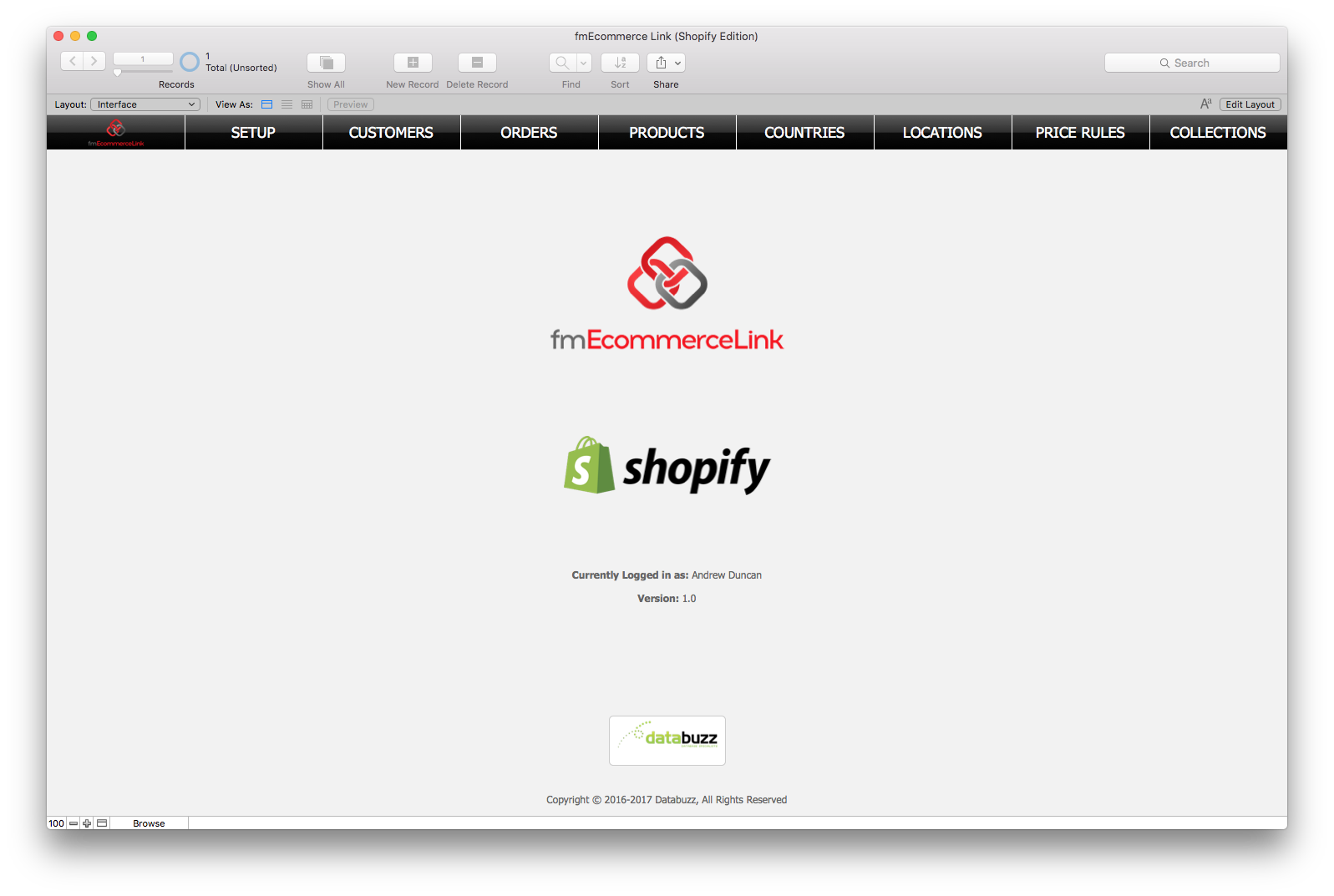
Screenshot 1: https://www.databuzz.com.au/wp-content/uploads/2017/06/Shopify-Home-Screen.png
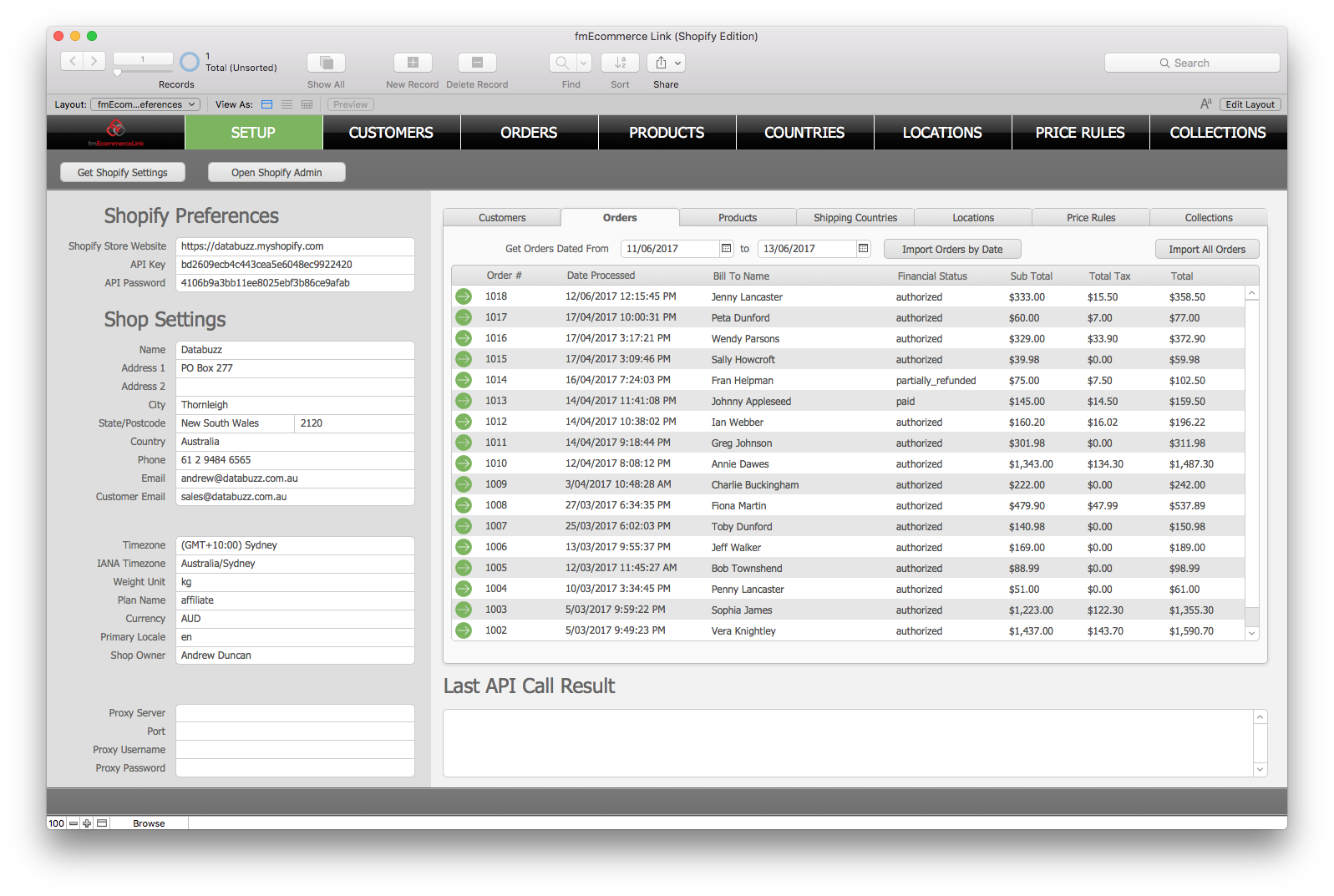
Screenshot 2: https://www.databuzz.com.au/wp-content/uploads/2017/06/Download-Orders.png
Databuzz is a long standing member of the FileMaker Business Alliance. We have been developing and deploying FileMaker solutions for clients in Australia and internationally since 1999. Our clients are individuals, small-medium businesses, government agencies and multi-national corporations. Databuzz was founded by Andrew Duncan, a Certified FileMaker 16 Developer. For more information please visit the Databuzz website. Copyright (C) 2018 Databuzz. All Rights Reserved. FileMaker is a trademark of FileMaker, Inc., registered in the U.S. and other countries. All other trademarks are the property of their respective owners.
*******
Link To Article: https://prmac.com/release-id-83197.htm
*******
---------------------------------------------------------------------------------
Note that you can alter delivered distributions at any time.
Login to your account on prMac to alter your channel selection, or to opt-out at any time.

Word Genius 1.1 released for iOS/Android - Hidden Words Game
A new article has been published at prMac.
Word Genius 1.1 released for iOS/Android - Hidden Words Game - Published on 12/11/18
Palindrome Mobile today releases WordGenius 1.1, the latest update to their word search game for iOS and Android devices. Fun and educational, Word Genius: Hidden Words will make a fine addition to your collection of word games. With over 370 brain twisting puzzles spanning across 24 chapters, fans of word games will find many hours of fun and addicting gameplay in this latest offering. The new version features a new light and jovial design.
Petaling Jaya, Malaysia - Palindrome Mobile today is pleased to announce the release of WordGenius 1.1, the latest update to their word search game for iOS and Android devices. Fun and educational, Word Genius: Hidden Words will make a fine addition to your collection of word games. The game mechanics are simple enough. The player is presented with a grid of letters containing the jumbled up hidden words. He/she slides along each letter to form a valid word, causing the letters to be removed from the block, and the remaining letters above to fall through. When all of the letters have been cleared, the player has completed the level.
Game features:
* Fun and addicting word puzzles with many hours of gameplay
* 22 chapters with over 370 brain twisting puzzles
* Starts out easy, but gets challenging as you progress
* Simple game mechanics - guess the word and slide to connect the letters
* Educational game for all ages - have fun while training your brain
* Not your ordinary word search game, you have to think and solve words in the correct order
The new version features a new light and jovial design. As in the previous game, the game starts out easy with four letters, but gets challenging quickly. With over 370 brain twisting puzzles spanning across 24 chapters, fans of word games will find many hours of fun and addicting gameplay in this latest offering.
Device Requirements:
* iPhone, iPad, and iPod touch
* Requires iOS 8.0 or later
* 66.1 MB
Pricing and Availability:
WordGenius 1.1 is Free (With In-App Purchases) and available worldwide exclusively through the App Store in the Games category. For more information, please contact Michael Cheong.
WordGenius 1.1: http://contact0954.wixsite.com/wordgenius
Download from iTunes: https://itunes.apple.com/app/wordgenius-hidden-words/id1190332897
Download from Google Play: https://play.google.com/store/apps/details?id=com.palindromemobile.wordgenius2&hl=en
Screenshot: https://is1-ssl.mzstatic.com/image/thumb/Purple128/v4/4d/34/1c/4d341ce1-ad7c-d2a0-2b25-ca58abe92800/pr_source.jpg/300x0w.jpg
App Icon: https://is2-ssl.mzstatic.com/image/thumb/Purple128/v4/00/2b/c3/002bc33d-3e1d-faf1-3d13-bbd3a48243ee/AppIcon-1x_U007emarketing-85-220-4.png/246x0w.jpg
Palindrome Mobile is a company dedicated to making fun and addicting games for mobile devices. All Material and Software (C) Copyright 2018 Palindrome Mobile. All Rights Reserved. Apple, the Apple logo, iPhone, iPod and iPad are registered trademarks of Apple Inc. in the U.S. and/or other countries. Other trademarks and registered trademarks may be the property of their respective owners.
*******
Link To Article: https://prmac.com/release-id-83196.htm
*******
---------------------------------------------------------------------------------
Note that you can alter delivered distributions at any time.
Login to your account on prMac to alter your channel selection, or to opt-out at any time.
Word Genius 1.1 released for iOS/Android - Hidden Words Game - Published on 12/11/18
Palindrome Mobile today releases WordGenius 1.1, the latest update to their word search game for iOS and Android devices. Fun and educational, Word Genius: Hidden Words will make a fine addition to your collection of word games. With over 370 brain twisting puzzles spanning across 24 chapters, fans of word games will find many hours of fun and addicting gameplay in this latest offering. The new version features a new light and jovial design.
Petaling Jaya, Malaysia - Palindrome Mobile today is pleased to announce the release of WordGenius 1.1, the latest update to their word search game for iOS and Android devices. Fun and educational, Word Genius: Hidden Words will make a fine addition to your collection of word games. The game mechanics are simple enough. The player is presented with a grid of letters containing the jumbled up hidden words. He/she slides along each letter to form a valid word, causing the letters to be removed from the block, and the remaining letters above to fall through. When all of the letters have been cleared, the player has completed the level.
Game features:
* Fun and addicting word puzzles with many hours of gameplay
* 22 chapters with over 370 brain twisting puzzles
* Starts out easy, but gets challenging as you progress
* Simple game mechanics - guess the word and slide to connect the letters
* Educational game for all ages - have fun while training your brain
* Not your ordinary word search game, you have to think and solve words in the correct order
The new version features a new light and jovial design. As in the previous game, the game starts out easy with four letters, but gets challenging quickly. With over 370 brain twisting puzzles spanning across 24 chapters, fans of word games will find many hours of fun and addicting gameplay in this latest offering.
Device Requirements:
* iPhone, iPad, and iPod touch
* Requires iOS 8.0 or later
* 66.1 MB
Pricing and Availability:
WordGenius 1.1 is Free (With In-App Purchases) and available worldwide exclusively through the App Store in the Games category. For more information, please contact Michael Cheong.
WordGenius 1.1: http://contact0954.wixsite.com/wordgenius
Download from iTunes: https://itunes.apple.com/app/wordgenius-hidden-words/id1190332897
Download from Google Play: https://play.google.com/store/apps/details?id=com.palindromemobile.wordgenius2&hl=en
Screenshot: https://is1-ssl.mzstatic.com/image/thumb/Purple128/v4/4d/34/1c/4d341ce1-ad7c-d2a0-2b25-ca58abe92800/pr_source.jpg/300x0w.jpg

App Icon: https://is2-ssl.mzstatic.com/image/thumb/Purple128/v4/00/2b/c3/002bc33d-3e1d-faf1-3d13-bbd3a48243ee/AppIcon-1x_U007emarketing-85-220-4.png/246x0w.jpg

Palindrome Mobile is a company dedicated to making fun and addicting games for mobile devices. All Material and Software (C) Copyright 2018 Palindrome Mobile. All Rights Reserved. Apple, the Apple logo, iPhone, iPod and iPad are registered trademarks of Apple Inc. in the U.S. and/or other countries. Other trademarks and registered trademarks may be the property of their respective owners.
*******
Link To Article: https://prmac.com/release-id-83196.htm
*******
---------------------------------------------------------------------------------
Note that you can alter delivered distributions at any time.
Login to your account on prMac to alter your channel selection, or to opt-out at any time.
SniperSight for iOS Advanced Methods To Correct Your Eyesight
A new article has been published at prMac.
SniperSight for iOS Advanced Methods To Correct Your Eyesight - Published on 12/11/18
Ohio based Lost Technology LLP releasees SniperSight 1.1 for the iOS platform, an app for improving eyesight without needing lenses or surgery. A method devised by Dr. Horatio Bates, and based on organized pattern of exercises for all kinds of eye conditions, SniperSight can help anyone who use lenses/spectacles to regain vision and start reading letters and numbers more clearly. The methods have been specifically designed to suit the users of every age group.
Columbus, Ohio - Lost Technology LLP is proud to announce the global availability of SniperSight(TM) for the iOS platform, an App for improving eyesight without needing lenses or surgery. SniperSight is an exceptional app that uses Dr. Bates method to help people who use lenses/spectacles to regain vision and start reading letters and numbers more clearly.
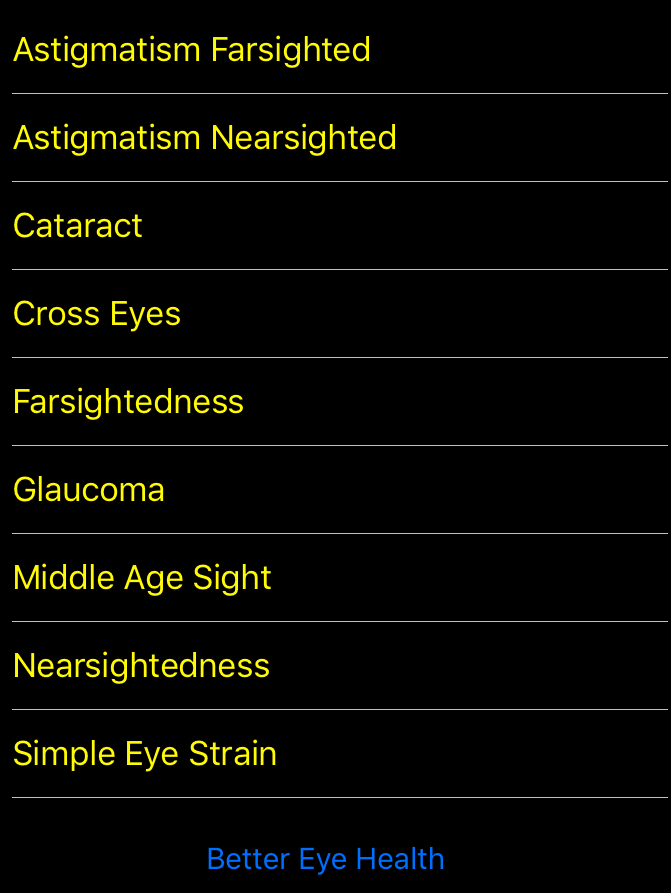
The method devised by Dr. Horatio Bates to improve eyesight is based on organized pattern of exercises for all kinds of eye conditions. The interface is robust and very clear to read and has the information placed right up front. The information on eye conditions can be read by tapping on a specific ailment and finding which exercises can heal it.
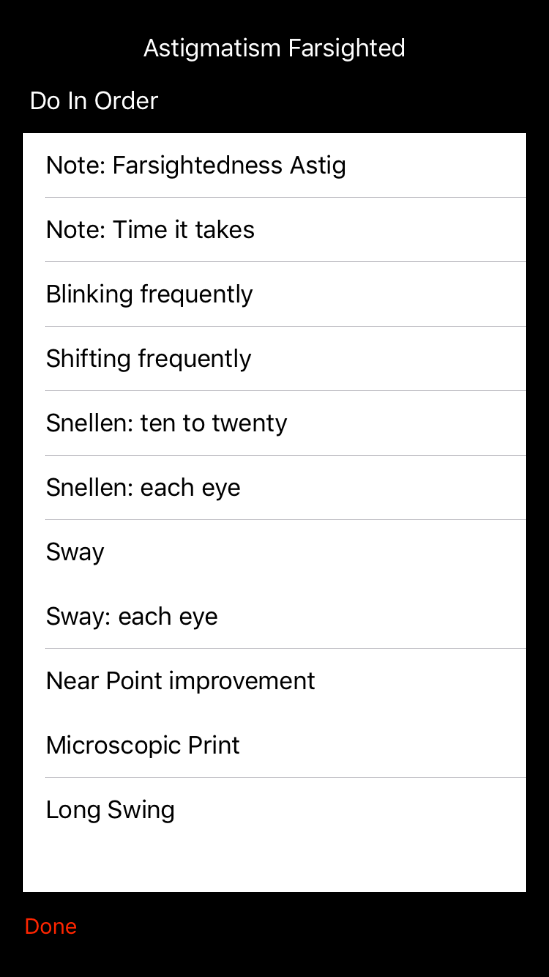
The exercises for the Bates method show how it can be done perfectly with all the diagrams and illustrations and also by following the step-by-step process to improve eyesight faster. The methods have been specifically designed to suit the users of every age group, who can start using the App and get rid of their lenses by practicing a few simple exercises everyday.
SniperSight also helps to combat stress on the eyes caused by our digital and working lives staring at laptops, smartphones, and tablets, or simply not getting enough sleep due to your schedule.
Key Features:
* Covers all the basics for the Bated method with detailed exercise descriptions
* Read how to do the exercises with visuals and diagram representations
* A step-by-step as you go guide to follow all the techniques and practice them
* Simple to search for any specific exercises
* Ideal method for people who wear contact lens and spectacles
* Healing process starts immediately, finally get rid of their glasses or contacts
* Results can be seen depending on your schedule and consistency
* Effective for people of all age groups
* Great for kids. Helps them improve their eyesight at an early age
* Handy for older people to improve their vision and start seeing better
* Read on your problem and the treatment required and get started in just a few minutes
Device Requirements:
* iPhone, iPad, and iPod touch
* Requires iOS 11.3 or later
* 13.9 MB
Pricing and Availability:
SniperSight 1.1 is $4.99 USD (or equivalent amount in other currencies) and available worldwide exclusively through the App Store in the Health and Fitness category.
SniperSight 1.1: http://www.snipersight.app/
Purchase and Download: https://itunes.apple.com/app/snipersight/id1434157023
Promotional Image: https://www.snipersight.app/assets/images/simulator-screen-shot-conditions-750x1334.png
Screenshot: https://www.snipersight.app/assets/images/simulator-screen-shot-ex-table-1-549x977.png
App Icon: https://www.snipersight.app/assets/images/itunesartwork1x-502x502.png
Lost Technology LLP is based in Ohio, United States and is a partnership of Techies. The company develops applications that are health, fitness and education based for iOS and reserves all rights. Apple and the Apple Logo, iPod, iPhone, iPad are all registered trademarks of Apple Inc. in the United States of America and other countries. Respective owners may own other trademarks. All Material and Software (C) Copyright 2018 Apps For All. All Rights Reserved. Apple, the Apple logo, iPhone, iPod and iPad are registered trademarks of Apple Inc. in the U.S. and/or other countries. Other trademarks and registered trademarks may be the property of their respective owners.
*******
Link To Article: https://prmac.com/release-id-83194.htm
*******
---------------------------------------------------------------------------------
Note that you can alter delivered distributions at any time.
Login to your account on prMac to alter your channel selection, or to opt-out at any time.
SniperSight for iOS Advanced Methods To Correct Your Eyesight - Published on 12/11/18
Ohio based Lost Technology LLP releasees SniperSight 1.1 for the iOS platform, an app for improving eyesight without needing lenses or surgery. A method devised by Dr. Horatio Bates, and based on organized pattern of exercises for all kinds of eye conditions, SniperSight can help anyone who use lenses/spectacles to regain vision and start reading letters and numbers more clearly. The methods have been specifically designed to suit the users of every age group.
Columbus, Ohio - Lost Technology LLP is proud to announce the global availability of SniperSight(TM) for the iOS platform, an App for improving eyesight without needing lenses or surgery. SniperSight is an exceptional app that uses Dr. Bates method to help people who use lenses/spectacles to regain vision and start reading letters and numbers more clearly.
The method devised by Dr. Horatio Bates to improve eyesight is based on organized pattern of exercises for all kinds of eye conditions. The interface is robust and very clear to read and has the information placed right up front. The information on eye conditions can be read by tapping on a specific ailment and finding which exercises can heal it.
The exercises for the Bates method show how it can be done perfectly with all the diagrams and illustrations and also by following the step-by-step process to improve eyesight faster. The methods have been specifically designed to suit the users of every age group, who can start using the App and get rid of their lenses by practicing a few simple exercises everyday.
SniperSight also helps to combat stress on the eyes caused by our digital and working lives staring at laptops, smartphones, and tablets, or simply not getting enough sleep due to your schedule.
Key Features:
* Covers all the basics for the Bated method with detailed exercise descriptions
* Read how to do the exercises with visuals and diagram representations
* A step-by-step as you go guide to follow all the techniques and practice them
* Simple to search for any specific exercises
* Ideal method for people who wear contact lens and spectacles
* Healing process starts immediately, finally get rid of their glasses or contacts
* Results can be seen depending on your schedule and consistency
* Effective for people of all age groups
* Great for kids. Helps them improve their eyesight at an early age
* Handy for older people to improve their vision and start seeing better
* Read on your problem and the treatment required and get started in just a few minutes
Device Requirements:
* iPhone, iPad, and iPod touch
* Requires iOS 11.3 or later
* 13.9 MB
Pricing and Availability:
SniperSight 1.1 is $4.99 USD (or equivalent amount in other currencies) and available worldwide exclusively through the App Store in the Health and Fitness category.
SniperSight 1.1: http://www.snipersight.app/
Purchase and Download: https://itunes.apple.com/app/snipersight/id1434157023
Promotional Image: https://www.snipersight.app/assets/images/simulator-screen-shot-conditions-750x1334.png
Screenshot: https://www.snipersight.app/assets/images/simulator-screen-shot-ex-table-1-549x977.png
App Icon: https://www.snipersight.app/assets/images/itunesartwork1x-502x502.png
Lost Technology LLP is based in Ohio, United States and is a partnership of Techies. The company develops applications that are health, fitness and education based for iOS and reserves all rights. Apple and the Apple Logo, iPod, iPhone, iPad are all registered trademarks of Apple Inc. in the United States of America and other countries. Respective owners may own other trademarks. All Material and Software (C) Copyright 2018 Apps For All. All Rights Reserved. Apple, the Apple logo, iPhone, iPod and iPad are registered trademarks of Apple Inc. in the U.S. and/or other countries. Other trademarks and registered trademarks may be the property of their respective owners.
*******
Link To Article: https://prmac.com/release-id-83194.htm
*******
---------------------------------------------------------------------------------
Note that you can alter delivered distributions at any time.
Login to your account on prMac to alter your channel selection, or to opt-out at any time.
ActivityTracker (The App), Track All-Day Activity on Android and iPhone
A new article has been published at prMac.
ActivityTracker (The App), Track All-Day Activity on Android and iPhone - Published on 12/10/18
Bits&Coffee has released ActivityTracker for Android. The app empowers users to quantify their daily activity without wearing a fitness gadget and without draining their phone's battery. The app is already available on iPhone and Apple Watch since June 2015 and has more than 100k monthly active users with a 4.7 rating.
Craiova, Romania - Bits&Coffee has released ActivityTracker for Android. The app empowers users to quantify their daily activity without wearing a fitness gadget and without draining their phone's battery. The app is already available on iPhone and Apple Watch since June 2015 and has more than 100k monthly active users with a 4.7 rating.
There are many fitness gadgets that track daily activity as steps taken, the only problem is that users need to wear those gadgets all the time and not forget to charge them. Yet, most people already carry a multifunctional device, perfectly capable of quantifying their daily activity: their Android or iPhone smartphone.
Many activity tracker apps (like Facebook's now defunct Move app) use the GPS for tracking, which gives accurate results but quickly drains the already short-lived smartphone battery. Thanks to the motion processors available in all modern devices, ActivityTracker can track all-day activity without using the GPS, and as a result without draining the battery.
ActivityTracker will keep track of steps taken, distance walked, active calorie burn, active time, and flights of stairs climbed effortlessly, when the users have a smartphone with them. The app offers accurate measurements by taking into account the users' gender, weight, and height.
ActivityTracker motivates users to be more active through self quantification, gamification, and color coded progress. Since no day is like the other, the app helps users be more active by setting a weekly target for steps taken, that will be broken into daily goals for a day-by-day overview.
The app is designed with great attention to details. In the main view, an overview of today and the current week can be seen, with a big animated wheel indicating the day's progress. The app offers accurate statistics, from a fine grained hour-by-hour breakdown to an overview of the monthly activity.
Pricing and Availability:
ActivityTracker is a fully-functional free app. It also has a Pro version with advanced features locked under a single in-app purchase (US$2.99). This is an Android, iPhone, and Apple Watch app that runs on the latest devices.
ActivityTracker (the app) 1.0.2: https://activitytrackerapp.com/
Download from Google Play: https://play.google.com/store/apps/details?id=com.bitscoffee.ActivityTracker
Download from App Store: https://itunes.apple.com/us/app/activitytracker-pedometer/id993667592
Since 2007, Bits&Coffee has been developing and marketing apps on iOS, Android, Mac, and Windows. Since 2015 Bits&Coffee has been offering ActivityTracker for iPhone and Apple Watch with a current monthly active user base of more than 100k, and a 4.7 mark from more than 15k ratings (US). All Material and Software (C) Copyright 2018 Bits&Coffee. All Rights Reserved. Apple, the Apple logo, iPhone, iPod and iPad are registered trademarks of Apple Inc. in the U.S. and/or other countries. Other trademarks and registered trademarks may be the property of their respective owners.
*******
Link To Article: https://prmac.com/release-id-83193.htm
*******
---------------------------------------------------------------------------------
Note that you can alter delivered distributions at any time.
Login to your account on prMac to alter your channel selection, or to opt-out at any time.
ActivityTracker (The App), Track All-Day Activity on Android and iPhone - Published on 12/10/18
Bits&Coffee has released ActivityTracker for Android. The app empowers users to quantify their daily activity without wearing a fitness gadget and without draining their phone's battery. The app is already available on iPhone and Apple Watch since June 2015 and has more than 100k monthly active users with a 4.7 rating.
Craiova, Romania - Bits&Coffee has released ActivityTracker for Android. The app empowers users to quantify their daily activity without wearing a fitness gadget and without draining their phone's battery. The app is already available on iPhone and Apple Watch since June 2015 and has more than 100k monthly active users with a 4.7 rating.
There are many fitness gadgets that track daily activity as steps taken, the only problem is that users need to wear those gadgets all the time and not forget to charge them. Yet, most people already carry a multifunctional device, perfectly capable of quantifying their daily activity: their Android or iPhone smartphone.
Many activity tracker apps (like Facebook's now defunct Move app) use the GPS for tracking, which gives accurate results but quickly drains the already short-lived smartphone battery. Thanks to the motion processors available in all modern devices, ActivityTracker can track all-day activity without using the GPS, and as a result without draining the battery.
ActivityTracker will keep track of steps taken, distance walked, active calorie burn, active time, and flights of stairs climbed effortlessly, when the users have a smartphone with them. The app offers accurate measurements by taking into account the users' gender, weight, and height.
ActivityTracker motivates users to be more active through self quantification, gamification, and color coded progress. Since no day is like the other, the app helps users be more active by setting a weekly target for steps taken, that will be broken into daily goals for a day-by-day overview.
The app is designed with great attention to details. In the main view, an overview of today and the current week can be seen, with a big animated wheel indicating the day's progress. The app offers accurate statistics, from a fine grained hour-by-hour breakdown to an overview of the monthly activity.
Pricing and Availability:
ActivityTracker is a fully-functional free app. It also has a Pro version with advanced features locked under a single in-app purchase (US$2.99). This is an Android, iPhone, and Apple Watch app that runs on the latest devices.
ActivityTracker (the app) 1.0.2: https://activitytrackerapp.com/
Download from Google Play: https://play.google.com/store/apps/details?id=com.bitscoffee.ActivityTracker
Download from App Store: https://itunes.apple.com/us/app/activitytracker-pedometer/id993667592
Since 2007, Bits&Coffee has been developing and marketing apps on iOS, Android, Mac, and Windows. Since 2015 Bits&Coffee has been offering ActivityTracker for iPhone and Apple Watch with a current monthly active user base of more than 100k, and a 4.7 mark from more than 15k ratings (US). All Material and Software (C) Copyright 2018 Bits&Coffee. All Rights Reserved. Apple, the Apple logo, iPhone, iPod and iPad are registered trademarks of Apple Inc. in the U.S. and/or other countries. Other trademarks and registered trademarks may be the property of their respective owners.
*******
Link To Article: https://prmac.com/release-id-83193.htm
*******
---------------------------------------------------------------------------------
Note that you can alter delivered distributions at any time.
Login to your account on prMac to alter your channel selection, or to opt-out at any time.
Cisdem Video Converter Adds Supported Sites to Video Download Function
A new article has been published at prMac.
Cisdem Video Converter Adds Supported Sites to Video Download Function - Published on 12/08/18
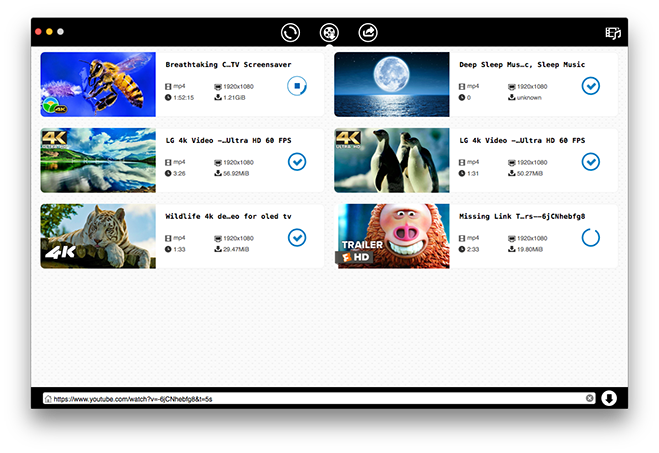
Cisdem Video Converter for Mac 3.10.0 upgrade adds more supported sites to its download function along with improved overall download performance. Cisdem Video Converter is an all-around video downloader, video converter, DVD ripper, video editor and video compressor. It can download SD, HD and 4K UHD videos from more than 1000 sites including YouTube, Facebook, Twitter, Vimeo, Dailymotion, Metacafe, Instagram, etc.
Madelia, Minnesota - Cisdem announces the release of Cisdem Video Converter for Mac 3.10.0. This update adds more than 20 supported sites to its video download function, which can already download videos from over 1000 sites including YouTube.
Cisdem Video Converter is an all-around video downloader, video converter, DVD ripper, video editor and video compressor. It can download SD, HD and 4K UHD videos from more than 1000 sites including YouTube, Facebook, Twitter, Vimeo, Dailymotion, Metacafe, Instagram, etc.
"Despite its name, Cisdem Video Converter is also a powerful video downloader," said Edward Riley, Cisdem's project manager. "The previous versions can already download videos from more than 1000 sites that provide video content. That includes all popular video sharing sites and social networking sites. It's a very long list. And this update makes the list even longer. In addition to the newly added supported sites, the update has also fixed the download failure of some YouTube videos and improved the overall download performance."
What's New in Version 3.10.0
1. Add support for more websites
2. Fix the download failure of partial YouTube videos
Main Features of Cisdem Video Converter for Mac
1. Download SD, HD and 4K UHD videos from more than 1000 sites
Users can use this Mac video converter to download videos, individually or in batch, from YouTube, Facebook and many other sites with high speed and high quality.
2. Convert video and audio files to various formats without losing quality
This video converter for Mac supports all common video and audio formats as the input format and output format. It allows users to easily convert videos and audios, individually or in batch, to make them perfectly compatible with media players, iPhones, Android devices, video editing software, video-sharing platforms, or for other purposes.
3. Convert DVD and DVD folder to MP4, AVI, MP3, MKV, etc.
It is also able to rip DVDs and DVD folders to different video or audio formats so that these movies and series can become easily available at your fingertips.
4. Compress video size and help save disk space
This app can also help users shrink video file size and save storage space. It will downsize video files with minimum quality loss.
5. Crop, rotate, watermark videos and perform other basic editing tasks
It can also do some basic video editing such as merging, trimming, cropping, rotating, watermarking, adding subtitles, adding effects, etc.
Price and Availability
Cisdem Video Converter for Mac 3.10.0 is available for download and purchase on Cisdem's official website. You can get a lifetime license with $49.99 with lifetime free upgrades. A free trial is available on the Cisdem Video Converter for Mac website. To get more information about Cisdem Data Recovery for Mac, please visit the Cisdem Video Converter for Mac website.
Cisdem: https://www.cisdem.com/
Cisdem Video Converter for Mac: https://www.cisdem.com/video-converter-mac.html
Download Free Trial: https://www.cisdem.com/downloads/cisdem-videoconverter-17.dmg
Purchase: https://www.cisdem.com/video-converter-mac/buy.html
Screenshot: https://www.cisdem.com/images/features/videoconverter/new_scroll3.png
Application Icon: https://www.cisdem.com/images/appicon/videoconverter-icon100.png
Cisdem provides productivity and business software that helps Mac users to get their job done faster. Cisdem products include top rated software centered on PDF Conversion, PDF Management, Data Recovery, and File Management. The company is dedicated in building highly efficient Mac software that make life easier and processes simpler. All Material and Software (C) Copyright 2018 Cisdem. All Rights Reserved. Apple, the Apple logo, Mac OS X and Macintosh are registered trademarks of Apple Inc. in the U.S. and/or other countries. Other trademarks and registered trademarks may be the property of their respective owners.
*******
Link To Article: https://prmac.com/release-id-83187.htm
*******
---------------------------------------------------------------------------------
Note that you can alter delivered distributions at any time.
Login to your account on prMac to alter your channel selection, or to opt-out at any time.
Cisdem Video Converter Adds Supported Sites to Video Download Function - Published on 12/08/18
Cisdem Video Converter for Mac 3.10.0 upgrade adds more supported sites to its download function along with improved overall download performance. Cisdem Video Converter is an all-around video downloader, video converter, DVD ripper, video editor and video compressor. It can download SD, HD and 4K UHD videos from more than 1000 sites including YouTube, Facebook, Twitter, Vimeo, Dailymotion, Metacafe, Instagram, etc.
Madelia, Minnesota - Cisdem announces the release of Cisdem Video Converter for Mac 3.10.0. This update adds more than 20 supported sites to its video download function, which can already download videos from over 1000 sites including YouTube.
Cisdem Video Converter is an all-around video downloader, video converter, DVD ripper, video editor and video compressor. It can download SD, HD and 4K UHD videos from more than 1000 sites including YouTube, Facebook, Twitter, Vimeo, Dailymotion, Metacafe, Instagram, etc.
"Despite its name, Cisdem Video Converter is also a powerful video downloader," said Edward Riley, Cisdem's project manager. "The previous versions can already download videos from more than 1000 sites that provide video content. That includes all popular video sharing sites and social networking sites. It's a very long list. And this update makes the list even longer. In addition to the newly added supported sites, the update has also fixed the download failure of some YouTube videos and improved the overall download performance."
What's New in Version 3.10.0
1. Add support for more websites
2. Fix the download failure of partial YouTube videos
Main Features of Cisdem Video Converter for Mac
1. Download SD, HD and 4K UHD videos from more than 1000 sites
Users can use this Mac video converter to download videos, individually or in batch, from YouTube, Facebook and many other sites with high speed and high quality.
2. Convert video and audio files to various formats without losing quality
This video converter for Mac supports all common video and audio formats as the input format and output format. It allows users to easily convert videos and audios, individually or in batch, to make them perfectly compatible with media players, iPhones, Android devices, video editing software, video-sharing platforms, or for other purposes.
3. Convert DVD and DVD folder to MP4, AVI, MP3, MKV, etc.
It is also able to rip DVDs and DVD folders to different video or audio formats so that these movies and series can become easily available at your fingertips.
4. Compress video size and help save disk space
This app can also help users shrink video file size and save storage space. It will downsize video files with minimum quality loss.
5. Crop, rotate, watermark videos and perform other basic editing tasks
It can also do some basic video editing such as merging, trimming, cropping, rotating, watermarking, adding subtitles, adding effects, etc.
Price and Availability
Cisdem Video Converter for Mac 3.10.0 is available for download and purchase on Cisdem's official website. You can get a lifetime license with $49.99 with lifetime free upgrades. A free trial is available on the Cisdem Video Converter for Mac website. To get more information about Cisdem Data Recovery for Mac, please visit the Cisdem Video Converter for Mac website.
Cisdem: https://www.cisdem.com/
Cisdem Video Converter for Mac: https://www.cisdem.com/video-converter-mac.html
Download Free Trial: https://www.cisdem.com/downloads/cisdem-videoconverter-17.dmg
Purchase: https://www.cisdem.com/video-converter-mac/buy.html
Screenshot: https://www.cisdem.com/images/features/videoconverter/new_scroll3.png
Application Icon: https://www.cisdem.com/images/appicon/videoconverter-icon100.png

Cisdem provides productivity and business software that helps Mac users to get their job done faster. Cisdem products include top rated software centered on PDF Conversion, PDF Management, Data Recovery, and File Management. The company is dedicated in building highly efficient Mac software that make life easier and processes simpler. All Material and Software (C) Copyright 2018 Cisdem. All Rights Reserved. Apple, the Apple logo, Mac OS X and Macintosh are registered trademarks of Apple Inc. in the U.S. and/or other countries. Other trademarks and registered trademarks may be the property of their respective owners.
*******
Link To Article: https://prmac.com/release-id-83187.htm
*******
---------------------------------------------------------------------------------
Note that you can alter delivered distributions at any time.
Login to your account on prMac to alter your channel selection, or to opt-out at any time.
Qoppa's Free PDF Reader, Annotator, Form Filler on Mac App Store
A new article has been published at prMac.
Qoppa's Free PDF Reader, Annotator, Form Filler on Mac App Store - Published on 12/07/18
Atlanta based Qoppa Software today announces PDF Studio Viewer 2018, an important update to their free and easy-to-use PDF Reader for macOS. Fully compliant with the new PDF 2.0 standards and Adobe PDF Specifications, PDF Studio Viewer's user-friendly design makes PDF creation, markup, and editing easier, including advanced view tools including the loupe, pan and zoom and more. Version 2.2 offers digital signature validation improvements, as well as other important bug fixes.
Atlanta, Georgia - PDF Studio Viewer, Qoppa's friendly and reliable PDF reader / annotator / form filler, is now available on the Mac App store, and it is completely free to download, without any in-app purchases. If you are a Mac user unable to markup a PDF document, fill tax forms, or simply need more features than available in the Preview application, try downloading Qoppa's Free PDF Reader from Itunes App store. PDF Studio Viewer is an easy to use PDF Reader that comes with a lot of viewing, printing, searching and annotating features.
Features:
* Fully compliant with the new PDF 2.0 standards & Adobe PDF Specifications
* User friendly design makes PDF creation, markup, and editing easier
* Top customer satisfaction rate & responsive customer service
View PDFs:
* Display PDFs in high fidelity with full Retina & 5k screen support
* Advanced view tools including the loupe, pan and zoom
* View PDFs as single page, continuous scroll, facing (2 up), facing continuous, cover and cover continuous
* View and save file attachments
* Show / hide PDF layers
* Display rulers & grids
* Open encrypted (password protected) documents (including 256 bit encryption)
Advanced User Interface:
* Modern ribbon toolbar (classic toolbar also available)
* Quick navigation with thumbnail, bookmark and comment panes
* Search text in multiple documents using advanced search tool
Annotate & Markup PDFs:
* Text annotations: Typewriter, callout, text box, & sticky note
* Text markups: Text highlight, text underline, text cross-out, text squiggly, text replace, & text instert
* Shape Annotations: Circle, polygon, square, cloud, line, arrow, pencil
Fill & Save Forms:
* Fill Forms: Text fields, Multi line text areas, Combo box, Radio button, Check box
* Display and validates digital signatures
* Support for JavaScript formatting and validation
Advanced Printing:
* Advanced dialog with print preview
* Print current view option
* Duplex (2 sided) printing
* Multiple pages per sheet
* Booklet printing
Advanced Searching:
* Search through current document, all open documents
* Search all documents within a folder
* Search content, annotation, form fields, metadata, filename
Customer Support:
* Online - Step-by-step tutorials as well as answers to most common questions on just about anything you would need
* Help Tab -> Online User Guide
* Help Tab -> Knowledge Base
Within PDF Studio:
Contact us from within PDF Studio by going to Help Tab > Email Support and sending us an email or question. This is the most effective way for us to assist you as it will provide us a copy of the PDF Studio error logs which will help us to resolve any problems you may have.
Mac Versions
PDF Studio Viewer works on macOS 10.14 Mojave, macOS 10.13 High Sierra, macOS 10.12 Sierra, Mac OS X 10.11 (El Capitan), 10.10 (Yosemite), 10.9 (Mavericks), 10.8 (Mountain Lion), 10.7 (Lion).
Need More Functionality?
For more editing features, such as content editing, OCR, optimizer, form creation, digital signatures, PDF comparison, measuring tools, imposition, permanent redaction, preflight, Qoppa Software also publishes PDF Studio Pro, the advanced edition of our PDF reader app.
Qoppa Software: https://www.qoppa.com
PDF Studio Viewer 2018 (v2.2): https://www.qoppa.com/pdfstudioviewer/
PDF Developer Tools : https://www.qoppa.com/javapdf/
Download from Mac App Store: https://itunes.apple.com/app/pdf-studio-viewer-2018/id1349436734
Affordable Advanced PDF Editor for Mac: https://www.qoppa.com/pdfstudio/
Automated PDF Handling - Server Side: https://www.qoppa.com/pdfautomation/
Qoppa Software is located in Atlanta, GA and is a leading producer of PDF solutions. Qoppa Software offers a suite of highly portable products that cover every aspect of PDF processes and integrate seamlessly into document workflows, including end-user, server and PDF library products. Qoppa's products are carefully designed to provide the highest level of performance and reliability. Copyright (C) 2012 Qoppa Software. All Rights Reserved. Apple, the Apple logo, and OS X are registered trademarks of Apple Inc. in the U.S. and/or other countries.
*******
Link To Article: https://prmac.com/release-id-83191.htm
*******
---------------------------------------------------------------------------------
Note that you can alter delivered distributions at any time.
Login to your account on prMac to alter your channel selection, or to opt-out at any time.
Qoppa's Free PDF Reader, Annotator, Form Filler on Mac App Store - Published on 12/07/18
Atlanta based Qoppa Software today announces PDF Studio Viewer 2018, an important update to their free and easy-to-use PDF Reader for macOS. Fully compliant with the new PDF 2.0 standards and Adobe PDF Specifications, PDF Studio Viewer's user-friendly design makes PDF creation, markup, and editing easier, including advanced view tools including the loupe, pan and zoom and more. Version 2.2 offers digital signature validation improvements, as well as other important bug fixes.
Atlanta, Georgia - PDF Studio Viewer, Qoppa's friendly and reliable PDF reader / annotator / form filler, is now available on the Mac App store, and it is completely free to download, without any in-app purchases. If you are a Mac user unable to markup a PDF document, fill tax forms, or simply need more features than available in the Preview application, try downloading Qoppa's Free PDF Reader from Itunes App store. PDF Studio Viewer is an easy to use PDF Reader that comes with a lot of viewing, printing, searching and annotating features.
Features:
* Fully compliant with the new PDF 2.0 standards & Adobe PDF Specifications
* User friendly design makes PDF creation, markup, and editing easier
* Top customer satisfaction rate & responsive customer service
View PDFs:
* Display PDFs in high fidelity with full Retina & 5k screen support
* Advanced view tools including the loupe, pan and zoom
* View PDFs as single page, continuous scroll, facing (2 up), facing continuous, cover and cover continuous
* View and save file attachments
* Show / hide PDF layers
* Display rulers & grids
* Open encrypted (password protected) documents (including 256 bit encryption)
Advanced User Interface:
* Modern ribbon toolbar (classic toolbar also available)
* Quick navigation with thumbnail, bookmark and comment panes
* Search text in multiple documents using advanced search tool
Annotate & Markup PDFs:
* Text annotations: Typewriter, callout, text box, & sticky note
* Text markups: Text highlight, text underline, text cross-out, text squiggly, text replace, & text instert
* Shape Annotations: Circle, polygon, square, cloud, line, arrow, pencil
Fill & Save Forms:
* Fill Forms: Text fields, Multi line text areas, Combo box, Radio button, Check box
* Display and validates digital signatures
* Support for JavaScript formatting and validation
Advanced Printing:
* Advanced dialog with print preview
* Print current view option
* Duplex (2 sided) printing
* Multiple pages per sheet
* Booklet printing
Advanced Searching:
* Search through current document, all open documents
* Search all documents within a folder
* Search content, annotation, form fields, metadata, filename
Customer Support:
* Online - Step-by-step tutorials as well as answers to most common questions on just about anything you would need
* Help Tab -> Online User Guide
* Help Tab -> Knowledge Base
Within PDF Studio:
Contact us from within PDF Studio by going to Help Tab > Email Support and sending us an email or question. This is the most effective way for us to assist you as it will provide us a copy of the PDF Studio error logs which will help us to resolve any problems you may have.
Mac Versions
PDF Studio Viewer works on macOS 10.14 Mojave, macOS 10.13 High Sierra, macOS 10.12 Sierra, Mac OS X 10.11 (El Capitan), 10.10 (Yosemite), 10.9 (Mavericks), 10.8 (Mountain Lion), 10.7 (Lion).
Need More Functionality?
For more editing features, such as content editing, OCR, optimizer, form creation, digital signatures, PDF comparison, measuring tools, imposition, permanent redaction, preflight, Qoppa Software also publishes PDF Studio Pro, the advanced edition of our PDF reader app.
Qoppa Software: https://www.qoppa.com
PDF Studio Viewer 2018 (v2.2): https://www.qoppa.com/pdfstudioviewer/
PDF Developer Tools : https://www.qoppa.com/javapdf/
Download from Mac App Store: https://itunes.apple.com/app/pdf-studio-viewer-2018/id1349436734
Affordable Advanced PDF Editor for Mac: https://www.qoppa.com/pdfstudio/
Automated PDF Handling - Server Side: https://www.qoppa.com/pdfautomation/
Qoppa Software is located in Atlanta, GA and is a leading producer of PDF solutions. Qoppa Software offers a suite of highly portable products that cover every aspect of PDF processes and integrate seamlessly into document workflows, including end-user, server and PDF library products. Qoppa's products are carefully designed to provide the highest level of performance and reliability. Copyright (C) 2012 Qoppa Software. All Rights Reserved. Apple, the Apple logo, and OS X are registered trademarks of Apple Inc. in the U.S. and/or other countries.
*******
Link To Article: https://prmac.com/release-id-83191.htm
*******
---------------------------------------------------------------------------------
Note that you can alter delivered distributions at any time.
Login to your account on prMac to alter your channel selection, or to opt-out at any time.
Speed PRO+ 2.5 adds a huge iOS12 upgrade and support for all iOS devices
A new article has been published at prMac.
Speed PRO+ 2.5 adds a huge iOS12 upgrade and support for all iOS devices - Published on 12/07/18
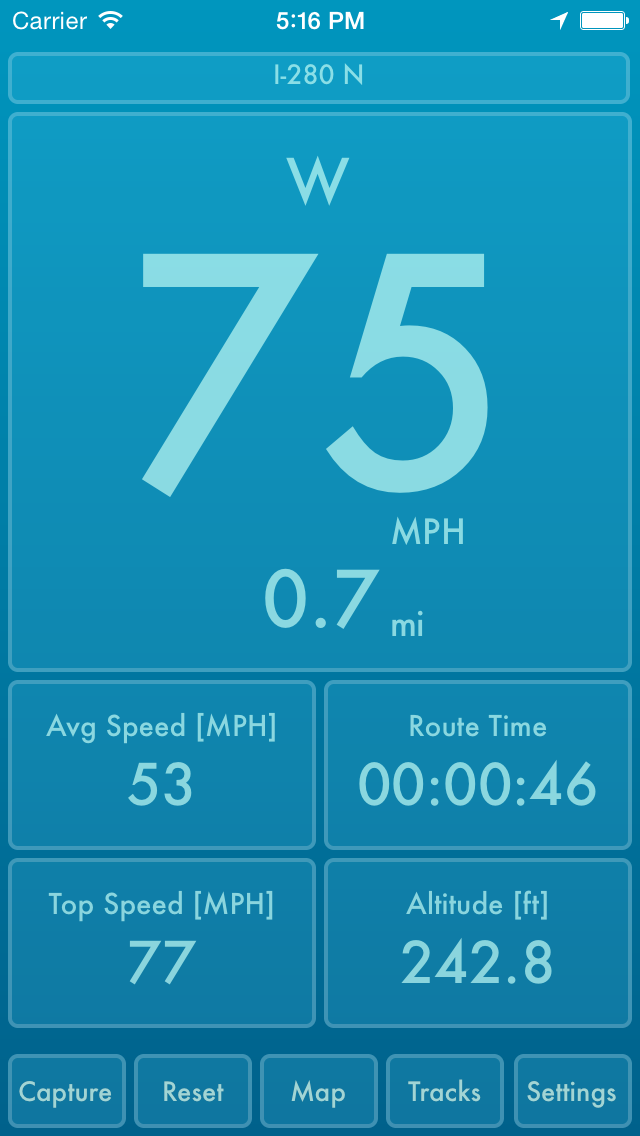
Austin based Mother Tucker, LLC today announces Speed PRO+ 2.5, an update to their GPS and Activity tracking app for iPhones and iPads. Featuring a full-screen display of average speed, top speed, distance, route time, altitude and more, Speed PRO+ gives users a realtime dashboard and map view of their current track and allows them to save their tracks with GPS and activity data. Version 2.5 adds a huge iOS12 upgrade, support for all iOS devices, and expands themes to saved tracks.
Austin, Texas - Mother Tucker, LLC today is proud to announce the release of Speed PRO+ 2.5, an update to their GPS and Activity tracking app for iPhones and iPads. Designed for GPS-equipped iPhones and iPads, Speed PRO+ gives users a realtime dashboard and map view of their current track and allows them to save their tracks with GPS and activity data. The most significant features are: realtime tracking; saved tracks; automatic pause/resume; downloadable altitude readings; track editing; and customizable speedometer themes.
Main Features:
* GPS & Activity Tracking (Step Count, Stairs Ascended, Stairs Descended)
* Track Database: iCloud or local
* Track Editing: Trim off the unwanted portions in your saved tracks
* 'Background Updates' location option allows your app to execute in the background
* Full-screen display of your Speed, Average Speed, Top Speed, Distance, Route Time, Altitude and Course
* Pause/Resume tracking by tapping Speedometer
* Auto Pause/Resume option keeps the app paused when you're stopped
* Auto Pause At option allows you to control the speed at which the app auto pauses & resumes
* Silent Mode option to turn off sound effects
* Orientation Lock option
* Option to remove the fractions from the displayed speed
* Reset Confirmations option (Turn On if you want a confirmation sheet when you tap 'Reset')
* Navigate back to the camera with a Left or Right swipe
* Share Map&Speedometer snapshots
* Share Track in KML format
* Altitude source option ("Device," "MapQuest," "USGS")
* Portrait and Landscape orientation support
* Camera Background option: Turn on to show a live feed of your camera in the speedometer background
* Mirroring option for HUD on windshield
* Units option ("Miles," "Km")
* GPS Accuracy option
* 'Background Updates' location option allows your app to execute in the background
* Built-in Speedometer Themes
* Custom Theme lets you choose your speedometer colors with a color picker
Camera Features:
* Take a Photo by Single Tapping anywhere
* Start/Stop Recording by Double Tapping anywhere
* Set Focus by Pressing & Holding 1 finger on desired point
* Set Exposure by Pressing & Holding 2 fingers on desired point
* Navigate back to the speedometer with a Left or Right swipe
* Your videos and photos are saved to your Saved Photos Album
* EXIF (Camera Timestamp GPS)
Device Requirements:
* iPhone and iPad WiFi
* iOS 11.0 or higher
* Universal Application
* 17.0 MB Hard Drive space
Pricing and Availability:
Speed PRO+ 2.5 is Free for a limited time and available worldwide exclusively through the App Store in the Navigation category.
Mother Tucker: http://www.mothertuckerllc.com
Speed PRO+ 2.5: http://www.mothertuckerllc.com/speedpro/speedpro.html
Download from iTunes: http://itunes.apple.com/us/app/speed-pro+/id510776298
Screenshot: http://www.mothertuckerllc.com/speedpro/10.PNG
App Icon: http://www.mothertuckerllc.com/speedpro256x256.png
Located in Austin, TX, Mother Tucker, LLC was founded in 2009 by Raymond Perez and Nicole Tucker Perez. Mother Tucker, LLC develops software for iOS devices including many that were featured by Apple. Copyright (C) 2009-2018 Mother Tucker, LLC. All Rights Reserved. Apple, the Apple logo, iPhone, iPod and iPad are registered trademarks of Apple Inc. in the U.S. and/or other countries.
*******
Link To Article: https://prmac.com/release-id-83190.htm
*******
---------------------------------------------------------------------------------
Note that you can alter delivered distributions at any time.
Login to your account on prMac to alter your channel selection, or to opt-out at any time.
Speed PRO+ 2.5 adds a huge iOS12 upgrade and support for all iOS devices - Published on 12/07/18
Austin based Mother Tucker, LLC today announces Speed PRO+ 2.5, an update to their GPS and Activity tracking app for iPhones and iPads. Featuring a full-screen display of average speed, top speed, distance, route time, altitude and more, Speed PRO+ gives users a realtime dashboard and map view of their current track and allows them to save their tracks with GPS and activity data. Version 2.5 adds a huge iOS12 upgrade, support for all iOS devices, and expands themes to saved tracks.
Austin, Texas - Mother Tucker, LLC today is proud to announce the release of Speed PRO+ 2.5, an update to their GPS and Activity tracking app for iPhones and iPads. Designed for GPS-equipped iPhones and iPads, Speed PRO+ gives users a realtime dashboard and map view of their current track and allows them to save their tracks with GPS and activity data. The most significant features are: realtime tracking; saved tracks; automatic pause/resume; downloadable altitude readings; track editing; and customizable speedometer themes.
Main Features:
* GPS & Activity Tracking (Step Count, Stairs Ascended, Stairs Descended)
* Track Database: iCloud or local
* Track Editing: Trim off the unwanted portions in your saved tracks
* 'Background Updates' location option allows your app to execute in the background
* Full-screen display of your Speed, Average Speed, Top Speed, Distance, Route Time, Altitude and Course
* Pause/Resume tracking by tapping Speedometer
* Auto Pause/Resume option keeps the app paused when you're stopped
* Auto Pause At option allows you to control the speed at which the app auto pauses & resumes
* Silent Mode option to turn off sound effects
* Orientation Lock option
* Option to remove the fractions from the displayed speed
* Reset Confirmations option (Turn On if you want a confirmation sheet when you tap 'Reset')
* Navigate back to the camera with a Left or Right swipe
* Share Map&Speedometer snapshots
* Share Track in KML format
* Altitude source option ("Device," "MapQuest," "USGS")
* Portrait and Landscape orientation support
* Camera Background option: Turn on to show a live feed of your camera in the speedometer background
* Mirroring option for HUD on windshield
* Units option ("Miles," "Km")
* GPS Accuracy option
* 'Background Updates' location option allows your app to execute in the background
* Built-in Speedometer Themes
* Custom Theme lets you choose your speedometer colors with a color picker
Camera Features:
* Take a Photo by Single Tapping anywhere
* Start/Stop Recording by Double Tapping anywhere
* Set Focus by Pressing & Holding 1 finger on desired point
* Set Exposure by Pressing & Holding 2 fingers on desired point
* Navigate back to the speedometer with a Left or Right swipe
* Your videos and photos are saved to your Saved Photos Album
* EXIF (Camera Timestamp GPS)
Device Requirements:
* iPhone and iPad WiFi
* iOS 11.0 or higher
* Universal Application
* 17.0 MB Hard Drive space
Pricing and Availability:
Speed PRO+ 2.5 is Free for a limited time and available worldwide exclusively through the App Store in the Navigation category.
Mother Tucker: http://www.mothertuckerllc.com
Speed PRO+ 2.5: http://www.mothertuckerllc.com/speedpro/speedpro.html
Download from iTunes: http://itunes.apple.com/us/app/speed-pro+/id510776298
Screenshot: http://www.mothertuckerllc.com/speedpro/10.PNG
App Icon: http://www.mothertuckerllc.com/speedpro256x256.png

Located in Austin, TX, Mother Tucker, LLC was founded in 2009 by Raymond Perez and Nicole Tucker Perez. Mother Tucker, LLC develops software for iOS devices including many that were featured by Apple. Copyright (C) 2009-2018 Mother Tucker, LLC. All Rights Reserved. Apple, the Apple logo, iPhone, iPod and iPad are registered trademarks of Apple Inc. in the U.S. and/or other countries.
*******
Link To Article: https://prmac.com/release-id-83190.htm
*******
---------------------------------------------------------------------------------
Note that you can alter delivered distributions at any time.
Login to your account on prMac to alter your channel selection, or to opt-out at any time.
Subscribe to:
Posts (Atom)