A new article has been published at prMac.
Book of Demons exits Early Access on Steam - Time to face the Archdemon - Published on 12/13/18
Warsaw based developer, Thing Trunk today announces Book of Demons 1.0, the company's unique deck-building, papercraft Hack and Slash for PC and macOS. Book of Demons is a single-player, dark fantasy set in a paper world, where players fight the Archdemon's army of darkness. Wield magic cards instead of weapons and slay the armies of darkness in the dungeons below the Old Cathedral. Save the terror-stricken Paperverse from the clutches of the Archdemon himself.
Warsaw, Poland - Today is the day! Book of Demons, Thing Trunk's unique deck-building, papercraft Hack and Slash, leaves early access with Book of Demons 1.0 landing on Steam 8am PST! Get ready to save the Paperverse from evil by facing your foe with the new Archdemon reveal trailer!
To celebrate the launch, Thing Trunk will be selling Book of Demons at 20% off the regular price during the launch week. Also available, for the first time, is the Collector's Content DLC which includes a 70 pages digital PDF art book, the full Original Book of Demons Soundtrack, 18 thematic 4K wallpapers, and a digital poster! The launch week sale, the DLC and a free demo are available TODAY on Steam!
Book of Demons is a Hack & Slash deck-building hybrid in which YOU decide the length of quests. Wield magic cards instead of weapons and slay the armies of darkness in the dungeons below the Old Cathedral. Save the terror-stricken Paperverse from the clutches of the Archdemon himself! Featuring:
* Hack & Slash deck-building hybrid
* Procedurally Generated Dungeons
* 40 magic cards plus magical and legendary variants per character class
* Tailored sessions with Flexiscope
* Roguelike Mode for fans of an extreme challenge
* 70 different types of monsters, with different traits and custom mechanics
* Xbox and Steam controller support
* 3 underground realms and epic Quest Boss battles
* Monthly and all-time Leaderboards, 200 Achievements
* Allow your Twitch or Mixer audience to interact with your game
* Free demo
Book of Demons has been in early access for two and a half years and many of the above features were implemented in response to community feedback. The final 1.0 update also brings the much-anticipated new batch of common, magical and legendary cards for each of the 3 playable classes.
Book of Demons is the first installment of Return 2 Games - a series of original mid-core titles, inspired by the early golden days of PC gaming coming from Thing Trunk. Book of Demons launches for PC and Mac OSX gamers on December 13, 2018 at 8am PST.
Thing Trunk: http://www.thingtrunk.com/
Book of Demons 1.0: https://return2games.com/
Book of Demons on Stream: https://store.steampowered.com/app/449960/Book_of_Demons/
YouTube Video (Archdemon Launch Trailer): https://www.youtube.com/watch?v=Nra-iXBBLrM
YouTube Video (Song Trailer): https://www.youtube.com/watch?v=TpuO-PxWATI
Media Assets: http://media.thingtrunk.com/press-kit/sheet.php?p=Book%20of%20Demons
Thing Trunk is a small game development studio based in Warsaw, Poland. The core team is comprised of seven dedicated developers. The 3 founders Filip Starzyski, Konstanty Kalicki, and Maciej Biedrzycki are casual game industry veterans who (despite a level of success) became disappointed with the miring trends in the market and scrapped their former brands (Codeminon and Twinbottles) to focus solely on the ambitious Return 2 Games idea. Since then, they have been busy trying to prove that making the high-quality games is possible with a small but experienced team with lots of passion. All Material and Software (C) Copyright 2018 Thing Trunk. All Rights Reserved. Apple, the Apple logo, and macOS are registered trademarks of Apple Inc. in the U.S. and/or other countries. Other trademarks and registered trademarks may be the property of their respective owners.
*******
Link To Article: https://prmac.com/release-id-83201.htm
*******
---------------------------------------------------------------------------------
Note that you can alter delivered distributions at any time.
Login to your account on prMac to alter your channel selection, or to opt-out at any time.

Subtitles Viewer 3.0 - Great news for Hearing Impaired
A new article has been published at prMac.
Subtitles Viewer 3.0 - Great news for Hearing Impaired - Published on 12/13/18
Interactive Coconut today announces Subtitles Viewer 3.0, an update to their movie utility for iOS. Use Subtitles Viewer to download subtitles/captions from the vast database at OpenSubtitles and then view them on your iPhone/iPad, synchronized with TV or movies at home or at the cinema. Amongst other improvements, version 3.0 of Subtitles Viewer now displays a hearing impaired symbol on subtitles that were made especially for the deaf or hard of hearing.
Melbourne, Australia - Interactive Coconut today is proud to announce the release of Subtitles Viewer 3.0, an update to their movie utility for iPhone, iPad and iPod touch. Ever been to the movies in a foreign country and it's dubbed in the local language? Frustrating! Or how about the deaf or hard of hearing? A cinema experience can be impossible when no captioning is available. Subtitles Viewer works to solve this problem.
Users can view subtitles on their iOS device synchronized with television or movies at home, or at the cinema. Subtitles Viewer make use of the vast database of subtitles at Open Subtitles, with subtitles available for downloading in over 20 languages.
Subtitles Viewer is ideal for a number of situations, for example:
* Travelling/living abroad - the cinema has audio in another language, and there are no subtitles
* The hearing impaired can enjoy going to the cinema
* Resolving arguments at home about which language the subtitles should be in!
"I'm always really pleased to see an app that serves the handicapped, and Subtitles Viewer makes a strong contribution to this category of iOS owner." commented Mel Martin of TUAW. "It's also useful for people struggling with a new language and want to view movies and TV in their native language."
Version 3.0 of Subtitles Viewer is localized into 14 languages and has several improvements, including:
1. A brilliant feature for the deaf or hard of hearing " subtitles with descriptions of ambient audio (such as doors slamming, ominous music, etc) are now marked with the hearing impaired symbol.
2. A new Settings tab, where you can now adjust the "Upload Encoding" of any subtitles you upload. Ever had any issues with uploading subtitles? This new advanced feature gives you access to adjust how the app interprets the encoding of your subtitle.
3. Encoding for downloads has been improved, and bugs ironed out.
4. Some changes have been made to design. The app now starts with a fancy animation of the title.
Since its launch, Subtitles Viewer has generated multiple 5-star reviews from impressed users who have commented that the app is a "must have", "really improves my life", and is "a life saver."
Device Requirements:
* iPhone, iPad, and iPod touch
* Requires iOS 9.1 or later
* 37 MB
Pricing and Availability:
Subtitles Viewer starts you off with three credits to experience the app. To continue viewing and downloading subtitles, you can pay an in-app purchase for more credits or even unlimited credits. You can also make an in-app purchase to upload subtitles to the app. Currently, the costs in USD are as follows:
* 1 credit = $0.99
* 5 credits = $2.99
* 10 credits = $3.99
* Unlimited Subtitle Downloads = $6.99
* Unlimited Subtitle Uploads = $4.99
Interactive Coconut: http://www.interactivecoconut.com
Subtitles Viewer 3.0: http://www.subtitlesviewer.com
Download from iTunes: https://itunes.apple.com/app/subtitles-viewer/id877811411
YouTube Video (Promotional): https://www.youtube.com/watch?v=WmvULQQgQ3Q
Screenshot: http://a1.mzstatic.com/us/r30/Purple7/v4/1e/a6/d6/1ea6d644-5d9a-ffac-7fea-5556111588c9/screen568x568.jpeg
App Icon: http://a3.mzstatic.com/us/r30/Purple7/v4/19/f7/a4/19f7a4be-2344-e351-05fa-3010adc68721/icon175x175.png
Located in Melbourne, Australia, Interactive Coconut is an independent app developer in the App Store. Founder Craig Grummitt has several apps on the app store and is a published author on iOS development. All Material and Software (C) Copyright 2018 Interactive Coconut. All Rights Reserved. Apple, the Apple logo, iPhone, iPod and iPad are registered trademarks of Apple Inc. in the U.S. and/or other countries. Other trademarks and registered trademarks may be the property of their respective owners.
*******
Link To Article: https://prmac.com/release-id-83200.htm
*******
---------------------------------------------------------------------------------
Note that you can alter delivered distributions at any time.
Login to your account on prMac to alter your channel selection, or to opt-out at any time.
Subtitles Viewer 3.0 - Great news for Hearing Impaired - Published on 12/13/18
Interactive Coconut today announces Subtitles Viewer 3.0, an update to their movie utility for iOS. Use Subtitles Viewer to download subtitles/captions from the vast database at OpenSubtitles and then view them on your iPhone/iPad, synchronized with TV or movies at home or at the cinema. Amongst other improvements, version 3.0 of Subtitles Viewer now displays a hearing impaired symbol on subtitles that were made especially for the deaf or hard of hearing.
Melbourne, Australia - Interactive Coconut today is proud to announce the release of Subtitles Viewer 3.0, an update to their movie utility for iPhone, iPad and iPod touch. Ever been to the movies in a foreign country and it's dubbed in the local language? Frustrating! Or how about the deaf or hard of hearing? A cinema experience can be impossible when no captioning is available. Subtitles Viewer works to solve this problem.
Users can view subtitles on their iOS device synchronized with television or movies at home, or at the cinema. Subtitles Viewer make use of the vast database of subtitles at Open Subtitles, with subtitles available for downloading in over 20 languages.
Subtitles Viewer is ideal for a number of situations, for example:
* Travelling/living abroad - the cinema has audio in another language, and there are no subtitles
* The hearing impaired can enjoy going to the cinema
* Resolving arguments at home about which language the subtitles should be in!
"I'm always really pleased to see an app that serves the handicapped, and Subtitles Viewer makes a strong contribution to this category of iOS owner." commented Mel Martin of TUAW. "It's also useful for people struggling with a new language and want to view movies and TV in their native language."
Version 3.0 of Subtitles Viewer is localized into 14 languages and has several improvements, including:
1. A brilliant feature for the deaf or hard of hearing " subtitles with descriptions of ambient audio (such as doors slamming, ominous music, etc) are now marked with the hearing impaired symbol.
2. A new Settings tab, where you can now adjust the "Upload Encoding" of any subtitles you upload. Ever had any issues with uploading subtitles? This new advanced feature gives you access to adjust how the app interprets the encoding of your subtitle.
3. Encoding for downloads has been improved, and bugs ironed out.
4. Some changes have been made to design. The app now starts with a fancy animation of the title.
Since its launch, Subtitles Viewer has generated multiple 5-star reviews from impressed users who have commented that the app is a "must have", "really improves my life", and is "a life saver."
Device Requirements:
* iPhone, iPad, and iPod touch
* Requires iOS 9.1 or later
* 37 MB
Pricing and Availability:
Subtitles Viewer starts you off with three credits to experience the app. To continue viewing and downloading subtitles, you can pay an in-app purchase for more credits or even unlimited credits. You can also make an in-app purchase to upload subtitles to the app. Currently, the costs in USD are as follows:
* 1 credit = $0.99
* 5 credits = $2.99
* 10 credits = $3.99
* Unlimited Subtitle Downloads = $6.99
* Unlimited Subtitle Uploads = $4.99
Interactive Coconut: http://www.interactivecoconut.com
Subtitles Viewer 3.0: http://www.subtitlesviewer.com
Download from iTunes: https://itunes.apple.com/app/subtitles-viewer/id877811411
YouTube Video (Promotional): https://www.youtube.com/watch?v=WmvULQQgQ3Q
Screenshot: http://a1.mzstatic.com/us/r30/Purple7/v4/1e/a6/d6/1ea6d644-5d9a-ffac-7fea-5556111588c9/screen568x568.jpeg

App Icon: http://a3.mzstatic.com/us/r30/Purple7/v4/19/f7/a4/19f7a4be-2344-e351-05fa-3010adc68721/icon175x175.png

Located in Melbourne, Australia, Interactive Coconut is an independent app developer in the App Store. Founder Craig Grummitt has several apps on the app store and is a published author on iOS development. All Material and Software (C) Copyright 2018 Interactive Coconut. All Rights Reserved. Apple, the Apple logo, iPhone, iPod and iPad are registered trademarks of Apple Inc. in the U.S. and/or other countries. Other trademarks and registered trademarks may be the property of their respective owners.
*******
Link To Article: https://prmac.com/release-id-83200.htm
*******
---------------------------------------------------------------------------------
Note that you can alter delivered distributions at any time.
Login to your account on prMac to alter your channel selection, or to opt-out at any time.
Radio Control Challenge for iOS, Android, Apple TV, Win10 PC and Xbox
A new article has been published at prMac.
Radio Control Challenge for iOS, Android, Apple TV, Win10 PC and Xbox - Published on 12/13/18
Texas based developer, Magnin & Associates today introduces Radio Control Challenge 1.0, their new game for iOS, Android, Apple TV, Windows PC and Xbox. Relive the thrill of operating radio control vehicles, like RC Cars, RC Jet Skis, RC Monster Trucks, RC Helicopters, and even hit targets with a RC Tank. Players can race solo or up against 3 other AI players. Players can optionally shares their accomplishments via social media, email, or instant messaging.
Farmers Branch, Texas - Magnin & Associates today introduces Radio Control Challenge 1.0, their new game for iOS, Android, Apple TV, Windows PC and Xbox.
Relive the thrill of operating radio control vehicles:
* Race other RC Cars (solo or against up to 3 AI players).
* Race other RC Jet Skis (solo or against up to 3 AI players).
* Race other RC Monster Trucks (solo or against up to 3 AI players).
* Use your RC Helicopter to deliver packages.
* Race your RC Helicopter through rings.
* Hit targets with your RC Tank (practice or time attack modes)
Optionally shares your accomplishments via social media, email, or instant messaging.
The game was produced by Ed Magnin, programmed and level design by Willie Johnson, Jr, art and 3d models from Unity Assets, and playtested by David Hayes, a game dev intern from Dallas ISD, Conrad H-TECH at Richland College. Matt Campana created the music and audio effects. According to Ed Magnin, "I've always enjoyed playing with radio control cars, boats, and other vehicles. We tried to recreate the excitement in our latest game."
Device Requirements (iOS):
* Compatible with iPhone, iPad, and iPod touch
* Requires iOS 8.0 or later
* Universal App (includes Standard, Retina, and iPhone X and XS displays; Apple TV version also available)
* 97.5 MB
* Rated 4+
Pricing and Availability:
Radio Control Challenge 1.0 is $2.99 USD (or equivalent amount in other currencies) and available worldwide through the App Store in the Games category for iPhone, iPad, and Apple TV. An Android version is available worldwide from both Google Play and Amazon AppStore. Windows 10 PC and Xbox versions will be available any day from the Windows Store. For more information, please contact Ed Magnin.
Magnin & Associates: http://MagninGames.com
Radio Control Challenge 1.0: http://MagninGames.com/radiocontrol
YouTube Video: https://www.youtube.com/watch?v=TccFd5yVJ20
Image (Title Screen): http://magningames.com/iphone/radiocontrol/images/Title.png
App Icon: http://MagninGames.com/iphone/radiocontrol/images/Icon_144.png
Game Credits: https://www.pinterest.com/pin/477733472969165697/
Ed Magnin has been actively involved in the game industry since 1979. Earlier in his career he worked for some of the top game developers of their day - MicroProse, Cinemaware, Virgin Games, and Park Place Productions. In 1993, he founded Magnin & Associates and has focused on handheld games ever since. They have created over 30 games for iOS (with over a million App Store downloads). Most are also available for Android, Windows 10 PC and Xbox. All Material and Software (C) Copyright 2018 Magnin & Associates. All Rights Reserved. Apple, the Apple logo, iPhone, iPod and iPad are registered trademarks of Apple Inc. in the U.S. and/or other countries. Other trademarks and registered trademarks may be the property of their respective owners.
*******
Link To Article: https://prmac.com/release-id-83199.htm
*******
---------------------------------------------------------------------------------
Note that you can alter delivered distributions at any time.
Login to your account on prMac to alter your channel selection, or to opt-out at any time.
Radio Control Challenge for iOS, Android, Apple TV, Win10 PC and Xbox - Published on 12/13/18
Texas based developer, Magnin & Associates today introduces Radio Control Challenge 1.0, their new game for iOS, Android, Apple TV, Windows PC and Xbox. Relive the thrill of operating radio control vehicles, like RC Cars, RC Jet Skis, RC Monster Trucks, RC Helicopters, and even hit targets with a RC Tank. Players can race solo or up against 3 other AI players. Players can optionally shares their accomplishments via social media, email, or instant messaging.
Farmers Branch, Texas - Magnin & Associates today introduces Radio Control Challenge 1.0, their new game for iOS, Android, Apple TV, Windows PC and Xbox.
Relive the thrill of operating radio control vehicles:
* Race other RC Cars (solo or against up to 3 AI players).
* Race other RC Jet Skis (solo or against up to 3 AI players).
* Race other RC Monster Trucks (solo or against up to 3 AI players).
* Use your RC Helicopter to deliver packages.
* Race your RC Helicopter through rings.
* Hit targets with your RC Tank (practice or time attack modes)
Optionally shares your accomplishments via social media, email, or instant messaging.
The game was produced by Ed Magnin, programmed and level design by Willie Johnson, Jr, art and 3d models from Unity Assets, and playtested by David Hayes, a game dev intern from Dallas ISD, Conrad H-TECH at Richland College. Matt Campana created the music and audio effects. According to Ed Magnin, "I've always enjoyed playing with radio control cars, boats, and other vehicles. We tried to recreate the excitement in our latest game."
Device Requirements (iOS):
* Compatible with iPhone, iPad, and iPod touch
* Requires iOS 8.0 or later
* Universal App (includes Standard, Retina, and iPhone X and XS displays; Apple TV version also available)
* 97.5 MB
* Rated 4+
Pricing and Availability:
Radio Control Challenge 1.0 is $2.99 USD (or equivalent amount in other currencies) and available worldwide through the App Store in the Games category for iPhone, iPad, and Apple TV. An Android version is available worldwide from both Google Play and Amazon AppStore. Windows 10 PC and Xbox versions will be available any day from the Windows Store. For more information, please contact Ed Magnin.
Magnin & Associates: http://MagninGames.com
Radio Control Challenge 1.0: http://MagninGames.com/radiocontrol
YouTube Video: https://www.youtube.com/watch?v=TccFd5yVJ20
Image (Title Screen): http://magningames.com/iphone/radiocontrol/images/Title.png

App Icon: http://MagninGames.com/iphone/radiocontrol/images/Icon_144.png

Game Credits: https://www.pinterest.com/pin/477733472969165697/
Ed Magnin has been actively involved in the game industry since 1979. Earlier in his career he worked for some of the top game developers of their day - MicroProse, Cinemaware, Virgin Games, and Park Place Productions. In 1993, he founded Magnin & Associates and has focused on handheld games ever since. They have created over 30 games for iOS (with over a million App Store downloads). Most are also available for Android, Windows 10 PC and Xbox. All Material and Software (C) Copyright 2018 Magnin & Associates. All Rights Reserved. Apple, the Apple logo, iPhone, iPod and iPad are registered trademarks of Apple Inc. in the U.S. and/or other countries. Other trademarks and registered trademarks may be the property of their respective owners.
*******
Link To Article: https://prmac.com/release-id-83199.htm
*******
---------------------------------------------------------------------------------
Note that you can alter delivered distributions at any time.
Login to your account on prMac to alter your channel selection, or to opt-out at any time.
Orderly - Simple To-do lists, gets even simpler, after a big update
A new article has been published at prMac.
Orderly - Simple To-do lists, gets even simpler, after a big update - Published on 12/12/18
California based Tekton Technologies today announces Orderly - Simple To-do Lists, Location Based Reminders 4.0, that has undergone a big update, which helps users focus on what matters to them the most. Introducing new features like Automatic Backup, the App now is even more simpler to use. Featured by Apple on the App Store in 2017, under productivity category, Orderly is exclusively designed based on how the human mind visualizes to-do lists.
San Jose, California - Orderly - Simple To-do Lists, Location Based Reminders 4.0, that has undergone a big update, which helps users focus on what matters to them the most. Introducing new features like 'Automatic Backup', the App now is even more simpler to use. Featured by Apple on the App Store in 2017, under productivity category, Orderly is exclusively designed based on how the human mind visualizes to-do lists. Orderly features unlimited folders, location based reminders, archiving of notes, cloud sync and awesome themes. Introducing 'Today View' helps users focus on today's tasks across all categories. Extremely improved smoother animations, and intuitive design makes users keep coming back, to help them get the task done, quickly.
Orderly also makes sure that a task never goes unnoticed, when the user is at a particular location.
Once a to-do is created, it is displayed on one of three shelves using Apple's bookshelf metaphor: High Priority, Medium, and Low. Users can instantly view all their to-dos, expand and contract them with pinch gestures, edit items, change their priority, mark them as complete, or swipe them to delete.
The extraordinary simplicity, practicality, and design of Orderly sets it apart from the many to-do apps available. Tekton Technologies has employed the fundamental principles of human factors to design a to-do list app that is highly efficient, instantly informative, and accommodates to the daily needs of real people. With its intuitive gesture based commands, the learning curve for the app and all its features is about one minute.
Feature Highlights:
* Visual interface and layout, provides absolute ease for managing errands and chores
* Create unlimited Folders(Categories) to categorize multiple to-do lists under each of them
* 'Today items' view enables you to quickly check of items that are due only today, across all categories
* Location based reminders, alerts you of a to-do at a particular location
* Email backup and Automatic backup, provides a secure backup of all your data on the cloud
* Create Recurring to-dos
* Cloud sync across devices
* Powerful search within a folder or across all folders
* Easily re-order items, undo completed items on Today items as well as list notes
* 'Due Items' folder shows the items that are past due beyond this date
* 'New List' button allows to quickly add a new note instantly from any folder
"Orderly," offers the most natural way to create your To-Do lists using simple iPhone gestures," states Tekton Technologies. "All your tasks and to-dos are presented as simple visual list notes, so that you can create to-dos and post them on your board. This App allows you to prioritize your to-do tasks, without the hassle of misplacing a note or forgetting an item, just because there are too many to-dos to manage. The best part of the app is that Orderly automatically prioritizes your to-dos by moving around those list notes."
Device Requirements:
* iPhone, iPad, or iPod touch
* Requires iOS 10.0 or later
* 57.7 MB
Pricing and Availability:
Orderly 4.0 is now available at a price of $0.99 (USD) and available worldwide exclusively through the App Store in the Productivity category. Review copies are available on request.
Orderly 4.0: https://orderly.tektontek.com
Purchase and Download: http://itunes.apple.com/app/orderly/id506632088
Screenshot (Highlights): https://www.dropbox.com/s/r366aerx4dkieio/Orderly_feat.jpg?dl=0
Screenshot (Focus on what matters to you most): https://www.dropbox.com/s/kdd0798pf6wvnxi/Orderly_1.jpg?dl=0
Screenshot (Secure and Automatic Backup): https://www.dropbox.com/s/v87ytzjmebrw2ge/Orderly_2.jpg?dl=0
Screenshot (Highly improved usability): https://www.dropbox.com/s/ha86ihmhwadghnk/Orderly_3.jpg?dl=0
Tekton Technologies is a software technology company that focuses on lifestyle enhancing iOS Apps, for users. The company has developed great Apps available on the App Store for iOS devices and has a great user base for their Apps. Copyright (C) 2018 Tekton Technologies. All Rights Reserved. Apple, the Apple logo, iPhone, and iPod are registered trademarks of Apple Inc. in the U.S. and/or other countries. Other trademarks and registered trademarks may be the property of their respective owners.
*******
Link To Article: https://prmac.com/release-id-83198.htm
*******
---------------------------------------------------------------------------------
Note that you can alter delivered distributions at any time.
Login to your account on prMac to alter your channel selection, or to opt-out at any time.
Orderly - Simple To-do lists, gets even simpler, after a big update - Published on 12/12/18
California based Tekton Technologies today announces Orderly - Simple To-do Lists, Location Based Reminders 4.0, that has undergone a big update, which helps users focus on what matters to them the most. Introducing new features like Automatic Backup, the App now is even more simpler to use. Featured by Apple on the App Store in 2017, under productivity category, Orderly is exclusively designed based on how the human mind visualizes to-do lists.
San Jose, California - Orderly - Simple To-do Lists, Location Based Reminders 4.0, that has undergone a big update, which helps users focus on what matters to them the most. Introducing new features like 'Automatic Backup', the App now is even more simpler to use. Featured by Apple on the App Store in 2017, under productivity category, Orderly is exclusively designed based on how the human mind visualizes to-do lists. Orderly features unlimited folders, location based reminders, archiving of notes, cloud sync and awesome themes. Introducing 'Today View' helps users focus on today's tasks across all categories. Extremely improved smoother animations, and intuitive design makes users keep coming back, to help them get the task done, quickly.
Orderly also makes sure that a task never goes unnoticed, when the user is at a particular location.
Once a to-do is created, it is displayed on one of three shelves using Apple's bookshelf metaphor: High Priority, Medium, and Low. Users can instantly view all their to-dos, expand and contract them with pinch gestures, edit items, change their priority, mark them as complete, or swipe them to delete.
The extraordinary simplicity, practicality, and design of Orderly sets it apart from the many to-do apps available. Tekton Technologies has employed the fundamental principles of human factors to design a to-do list app that is highly efficient, instantly informative, and accommodates to the daily needs of real people. With its intuitive gesture based commands, the learning curve for the app and all its features is about one minute.
Feature Highlights:
* Visual interface and layout, provides absolute ease for managing errands and chores
* Create unlimited Folders(Categories) to categorize multiple to-do lists under each of them
* 'Today items' view enables you to quickly check of items that are due only today, across all categories
* Location based reminders, alerts you of a to-do at a particular location
* Email backup and Automatic backup, provides a secure backup of all your data on the cloud
* Create Recurring to-dos
* Cloud sync across devices
* Powerful search within a folder or across all folders
* Easily re-order items, undo completed items on Today items as well as list notes
* 'Due Items' folder shows the items that are past due beyond this date
* 'New List' button allows to quickly add a new note instantly from any folder
"Orderly," offers the most natural way to create your To-Do lists using simple iPhone gestures," states Tekton Technologies. "All your tasks and to-dos are presented as simple visual list notes, so that you can create to-dos and post them on your board. This App allows you to prioritize your to-do tasks, without the hassle of misplacing a note or forgetting an item, just because there are too many to-dos to manage. The best part of the app is that Orderly automatically prioritizes your to-dos by moving around those list notes."
Device Requirements:
* iPhone, iPad, or iPod touch
* Requires iOS 10.0 or later
* 57.7 MB
Pricing and Availability:
Orderly 4.0 is now available at a price of $0.99 (USD) and available worldwide exclusively through the App Store in the Productivity category. Review copies are available on request.
Orderly 4.0: https://orderly.tektontek.com
Purchase and Download: http://itunes.apple.com/app/orderly/id506632088
Screenshot (Highlights): https://www.dropbox.com/s/r366aerx4dkieio/Orderly_feat.jpg?dl=0

Screenshot (Focus on what matters to you most): https://www.dropbox.com/s/kdd0798pf6wvnxi/Orderly_1.jpg?dl=0

Screenshot (Secure and Automatic Backup): https://www.dropbox.com/s/v87ytzjmebrw2ge/Orderly_2.jpg?dl=0

Screenshot (Highly improved usability): https://www.dropbox.com/s/ha86ihmhwadghnk/Orderly_3.jpg?dl=0

Tekton Technologies is a software technology company that focuses on lifestyle enhancing iOS Apps, for users. The company has developed great Apps available on the App Store for iOS devices and has a great user base for their Apps. Copyright (C) 2018 Tekton Technologies. All Rights Reserved. Apple, the Apple logo, iPhone, and iPod are registered trademarks of Apple Inc. in the U.S. and/or other countries. Other trademarks and registered trademarks may be the property of their respective owners.
*******
Link To Article: https://prmac.com/release-id-83198.htm
*******
---------------------------------------------------------------------------------
Note that you can alter delivered distributions at any time.
Login to your account on prMac to alter your channel selection, or to opt-out at any time.
Databuzz Releases fmEcommerce Link (Shopify Edition) v1.3
A new article has been published at prMac.
Databuzz Releases fmEcommerce Link (Shopify Edition) v1.3 - Published on 12/11/18
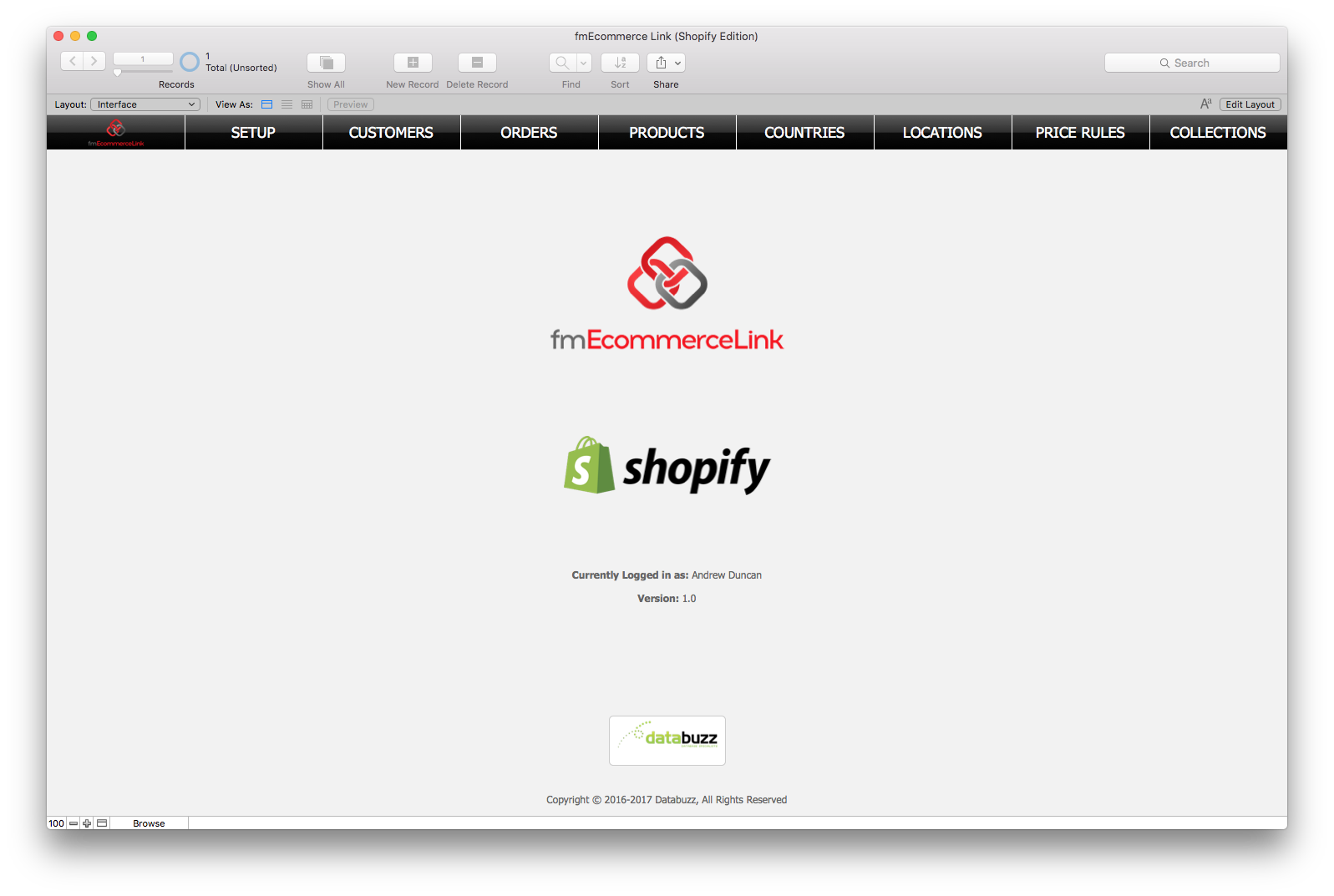
Databuzz today announced fmEcommerce Link (Shopify Edition) v1.3, a major update to their FileMaker solution that integrates the FileMaker platform with the Shopify eCommerce platform. fmEcommerce Link (Shopify Edition) v1.3 now runs natively on the FileMaker 16 and 17 platforms, including FileMaker Pro, FileMaker Go and FileMaker Server without requiring a FileMaker plug-in.
Sydney, Australia - Databuzz today announced fmEcommerce Link (Shopify Edition) v1.3, a major update to their FileMaker solution that integrates the FileMaker platform with the Shopify eCommerce platform.
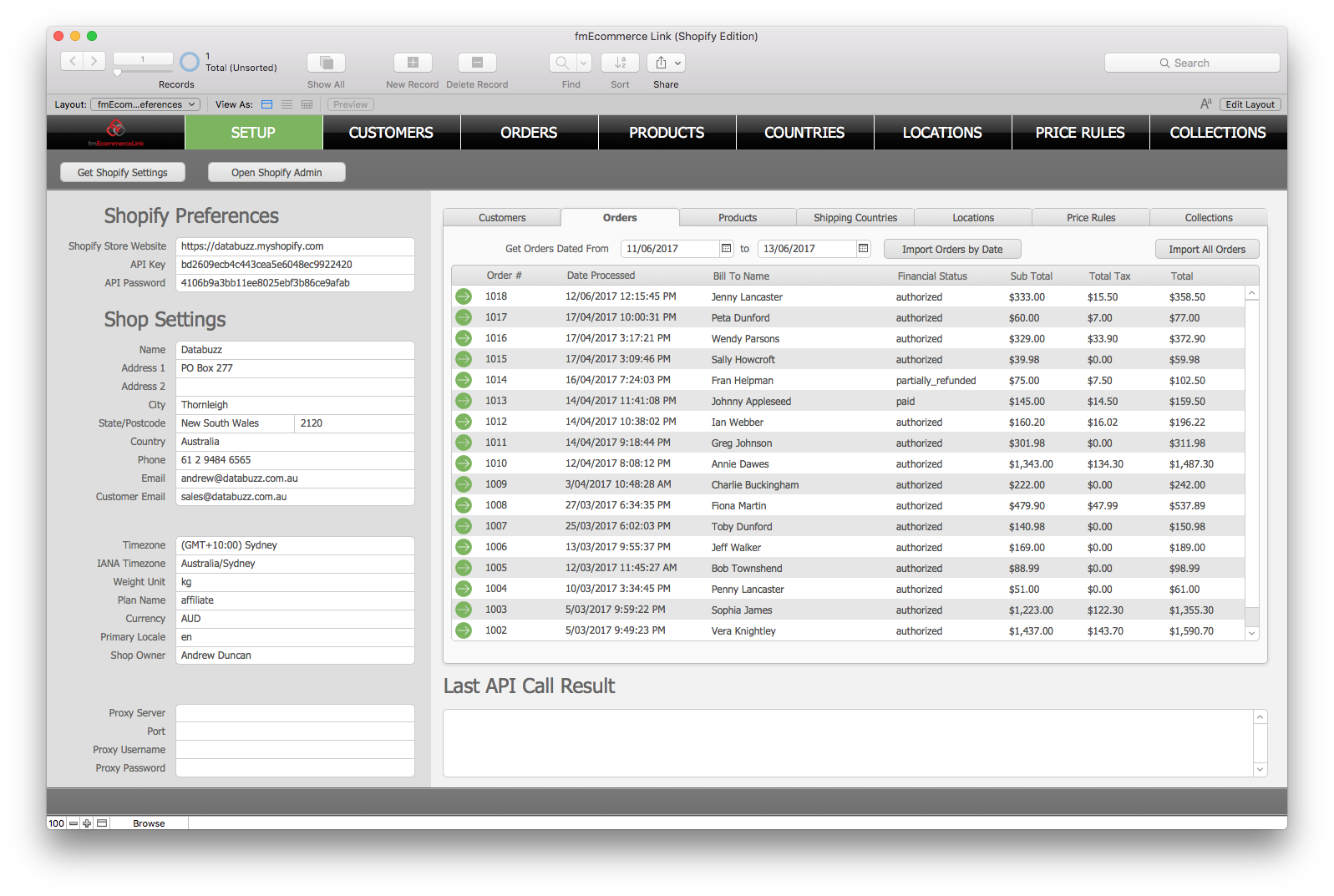
fmEcommerce Link (Shopify Edition) v1.3 now runs natively on the FileMaker 16 and 17 platforms, including FileMaker Pro, FileMaker Go and FileMaker Server without requiring a FileMaker plug-in. It also includes examples for Shopify Webhooks, allowing new Shopify Orders to be automatically pushed to the fmEcommerce Link (Shopify Edition) solution.
fmEcommerce Link (Shopify Edition) allows you to upload and download data between your FileMaker solution and Shopify, the leading cloud-based, multi-channel commerce platform designed for small and medium-sized businesses. Shopify currently powers over 600,000 businesses in approximately 175 countries and is trusted by brands such as Red Bull, Nestle, Rebecca Minkoff, Kylie Cosmetics, and many more.
fmEcommerce Link (Shopify Edition) removes double data entry and human errors saving your company significant time, money and hassle by automating the exchange of data between FileMaker and Shopify. fmEcommerce Link (Shopify Edition) is completely unlocked allowing you to integrate it into your FileMaker solution. You can copy and paste examples showing you how to authenticate with the Shopify API and download Customers, Orders, Products, Collections and more at the click of a button.
fmEcommerce Link (Shopify Edition) features include:
* works with FileMaker Pro v12, v13, v14, v15, v16 and v17
* works with Macintosh and Windows
* completely unlocked for you to integrate into your own FileMaker solution
* can be hosted by FileMaker Pro or FileMaker Server
* Webhooks support (create new Orders automatically from Shopify)
"The FileMaker 16 platform included many new features, including support for working with JSON data and being able to specify cURL options," said Andrew Duncan, CEO of Databuzz. "We've updated fmEcommerce Link (Shopify Edition) to use these new features so it now runs natively without requiring a plug-in on the FileMaker 16 and 17 platforms, including FileMaker Go and FileMaker Server. We've seen improvements of up to 35% when running the native scripts and functions compared with the plug-in versions."
fmEcommerce Link (Shopify Edition) includes examples for the following Shopify API endpoints:
* Customers: download and upload Customers
* Products: download and upload Products (including Options, Variants, Images and
Metafields)
* Orders: download Orders from Shopify (including Order line items)
* Inventory: download Inventory Levels and upload/update Inventory Levels at multiple
Locations
* Price Rules: download and upload Price Rules (Discounts)
* Custom Collections: download and upload Custom Collections
* Smart Collections: download and upload Smart Collections
* Shipping Countries: download Shipping Countries from Shopify
* Locations: download Locations from Shopify
Availability, Pricing, and Compatibility
fmEcommerce Link (Shopify Edition) v1.3 is a free update for all existing customers who can download the updated version immediately.
fmEcommerce Link (Shopify Edition) is available in a number of licenses: Company, Vertical Solution and Developer. It is available now from the Databuzz website at https://www.databuzz.com.au. Company Licenses start at AUD $495.00. fmEcommerce Link (Shopify Edition) requires FileMaker Pro v12, v13, v14, v15, v16 or v17.
Databuzz: https://www.databuzz.com.au/
fmEcommerce Link (Shopify Edition) v1.3: https://www.databuzz.com.au/fmecommerce-link-shopify-edition/
Purchase Link: https://www.databuzz.com.au/product-category/shopify/
Screenshot 1: https://www.databuzz.com.au/wp-content/uploads/2017/06/Shopify-Home-Screen.png
Screenshot 2: https://www.databuzz.com.au/wp-content/uploads/2017/06/Download-Orders.png
Databuzz is a long standing member of the FileMaker Business Alliance. We have been developing and deploying FileMaker solutions for clients in Australia and internationally since 1999. Our clients are individuals, small-medium businesses, government agencies and multi-national corporations. Databuzz was founded by Andrew Duncan, a Certified FileMaker 16 Developer. For more information please visit the Databuzz website. Copyright (C) 2018 Databuzz. All Rights Reserved. FileMaker is a trademark of FileMaker, Inc., registered in the U.S. and other countries. All other trademarks are the property of their respective owners.
*******
Link To Article: https://prmac.com/release-id-83197.htm
*******
---------------------------------------------------------------------------------
Note that you can alter delivered distributions at any time.
Login to your account on prMac to alter your channel selection, or to opt-out at any time.
Databuzz Releases fmEcommerce Link (Shopify Edition) v1.3 - Published on 12/11/18
Databuzz today announced fmEcommerce Link (Shopify Edition) v1.3, a major update to their FileMaker solution that integrates the FileMaker platform with the Shopify eCommerce platform. fmEcommerce Link (Shopify Edition) v1.3 now runs natively on the FileMaker 16 and 17 platforms, including FileMaker Pro, FileMaker Go and FileMaker Server without requiring a FileMaker plug-in.
Sydney, Australia - Databuzz today announced fmEcommerce Link (Shopify Edition) v1.3, a major update to their FileMaker solution that integrates the FileMaker platform with the Shopify eCommerce platform.
fmEcommerce Link (Shopify Edition) v1.3 now runs natively on the FileMaker 16 and 17 platforms, including FileMaker Pro, FileMaker Go and FileMaker Server without requiring a FileMaker plug-in. It also includes examples for Shopify Webhooks, allowing new Shopify Orders to be automatically pushed to the fmEcommerce Link (Shopify Edition) solution.
fmEcommerce Link (Shopify Edition) allows you to upload and download data between your FileMaker solution and Shopify, the leading cloud-based, multi-channel commerce platform designed for small and medium-sized businesses. Shopify currently powers over 600,000 businesses in approximately 175 countries and is trusted by brands such as Red Bull, Nestle, Rebecca Minkoff, Kylie Cosmetics, and many more.
fmEcommerce Link (Shopify Edition) removes double data entry and human errors saving your company significant time, money and hassle by automating the exchange of data between FileMaker and Shopify. fmEcommerce Link (Shopify Edition) is completely unlocked allowing you to integrate it into your FileMaker solution. You can copy and paste examples showing you how to authenticate with the Shopify API and download Customers, Orders, Products, Collections and more at the click of a button.
fmEcommerce Link (Shopify Edition) features include:
* works with FileMaker Pro v12, v13, v14, v15, v16 and v17
* works with Macintosh and Windows
* completely unlocked for you to integrate into your own FileMaker solution
* can be hosted by FileMaker Pro or FileMaker Server
* Webhooks support (create new Orders automatically from Shopify)
"The FileMaker 16 platform included many new features, including support for working with JSON data and being able to specify cURL options," said Andrew Duncan, CEO of Databuzz. "We've updated fmEcommerce Link (Shopify Edition) to use these new features so it now runs natively without requiring a plug-in on the FileMaker 16 and 17 platforms, including FileMaker Go and FileMaker Server. We've seen improvements of up to 35% when running the native scripts and functions compared with the plug-in versions."
fmEcommerce Link (Shopify Edition) includes examples for the following Shopify API endpoints:
* Customers: download and upload Customers
* Products: download and upload Products (including Options, Variants, Images and
Metafields)
* Orders: download Orders from Shopify (including Order line items)
* Inventory: download Inventory Levels and upload/update Inventory Levels at multiple
Locations
* Price Rules: download and upload Price Rules (Discounts)
* Custom Collections: download and upload Custom Collections
* Smart Collections: download and upload Smart Collections
* Shipping Countries: download Shipping Countries from Shopify
* Locations: download Locations from Shopify
Availability, Pricing, and Compatibility
fmEcommerce Link (Shopify Edition) v1.3 is a free update for all existing customers who can download the updated version immediately.
fmEcommerce Link (Shopify Edition) is available in a number of licenses: Company, Vertical Solution and Developer. It is available now from the Databuzz website at https://www.databuzz.com.au. Company Licenses start at AUD $495.00. fmEcommerce Link (Shopify Edition) requires FileMaker Pro v12, v13, v14, v15, v16 or v17.
Databuzz: https://www.databuzz.com.au/
fmEcommerce Link (Shopify Edition) v1.3: https://www.databuzz.com.au/fmecommerce-link-shopify-edition/
Purchase Link: https://www.databuzz.com.au/product-category/shopify/
Screenshot 1: https://www.databuzz.com.au/wp-content/uploads/2017/06/Shopify-Home-Screen.png
Screenshot 2: https://www.databuzz.com.au/wp-content/uploads/2017/06/Download-Orders.png
Databuzz is a long standing member of the FileMaker Business Alliance. We have been developing and deploying FileMaker solutions for clients in Australia and internationally since 1999. Our clients are individuals, small-medium businesses, government agencies and multi-national corporations. Databuzz was founded by Andrew Duncan, a Certified FileMaker 16 Developer. For more information please visit the Databuzz website. Copyright (C) 2018 Databuzz. All Rights Reserved. FileMaker is a trademark of FileMaker, Inc., registered in the U.S. and other countries. All other trademarks are the property of their respective owners.
*******
Link To Article: https://prmac.com/release-id-83197.htm
*******
---------------------------------------------------------------------------------
Note that you can alter delivered distributions at any time.
Login to your account on prMac to alter your channel selection, or to opt-out at any time.
Word Genius 1.1 released for iOS/Android - Hidden Words Game
A new article has been published at prMac.
Word Genius 1.1 released for iOS/Android - Hidden Words Game - Published on 12/11/18
Palindrome Mobile today releases WordGenius 1.1, the latest update to their word search game for iOS and Android devices. Fun and educational, Word Genius: Hidden Words will make a fine addition to your collection of word games. With over 370 brain twisting puzzles spanning across 24 chapters, fans of word games will find many hours of fun and addicting gameplay in this latest offering. The new version features a new light and jovial design.
Petaling Jaya, Malaysia - Palindrome Mobile today is pleased to announce the release of WordGenius 1.1, the latest update to their word search game for iOS and Android devices. Fun and educational, Word Genius: Hidden Words will make a fine addition to your collection of word games. The game mechanics are simple enough. The player is presented with a grid of letters containing the jumbled up hidden words. He/she slides along each letter to form a valid word, causing the letters to be removed from the block, and the remaining letters above to fall through. When all of the letters have been cleared, the player has completed the level.
Game features:
* Fun and addicting word puzzles with many hours of gameplay
* 22 chapters with over 370 brain twisting puzzles
* Starts out easy, but gets challenging as you progress
* Simple game mechanics - guess the word and slide to connect the letters
* Educational game for all ages - have fun while training your brain
* Not your ordinary word search game, you have to think and solve words in the correct order
The new version features a new light and jovial design. As in the previous game, the game starts out easy with four letters, but gets challenging quickly. With over 370 brain twisting puzzles spanning across 24 chapters, fans of word games will find many hours of fun and addicting gameplay in this latest offering.
Device Requirements:
* iPhone, iPad, and iPod touch
* Requires iOS 8.0 or later
* 66.1 MB
Pricing and Availability:
WordGenius 1.1 is Free (With In-App Purchases) and available worldwide exclusively through the App Store in the Games category. For more information, please contact Michael Cheong.
WordGenius 1.1: http://contact0954.wixsite.com/wordgenius
Download from iTunes: https://itunes.apple.com/app/wordgenius-hidden-words/id1190332897
Download from Google Play: https://play.google.com/store/apps/details?id=com.palindromemobile.wordgenius2&hl=en
Screenshot: https://is1-ssl.mzstatic.com/image/thumb/Purple128/v4/4d/34/1c/4d341ce1-ad7c-d2a0-2b25-ca58abe92800/pr_source.jpg/300x0w.jpg
App Icon: https://is2-ssl.mzstatic.com/image/thumb/Purple128/v4/00/2b/c3/002bc33d-3e1d-faf1-3d13-bbd3a48243ee/AppIcon-1x_U007emarketing-85-220-4.png/246x0w.jpg
Palindrome Mobile is a company dedicated to making fun and addicting games for mobile devices. All Material and Software (C) Copyright 2018 Palindrome Mobile. All Rights Reserved. Apple, the Apple logo, iPhone, iPod and iPad are registered trademarks of Apple Inc. in the U.S. and/or other countries. Other trademarks and registered trademarks may be the property of their respective owners.
*******
Link To Article: https://prmac.com/release-id-83196.htm
*******
---------------------------------------------------------------------------------
Note that you can alter delivered distributions at any time.
Login to your account on prMac to alter your channel selection, or to opt-out at any time.
Word Genius 1.1 released for iOS/Android - Hidden Words Game - Published on 12/11/18
Palindrome Mobile today releases WordGenius 1.1, the latest update to their word search game for iOS and Android devices. Fun and educational, Word Genius: Hidden Words will make a fine addition to your collection of word games. With over 370 brain twisting puzzles spanning across 24 chapters, fans of word games will find many hours of fun and addicting gameplay in this latest offering. The new version features a new light and jovial design.
Petaling Jaya, Malaysia - Palindrome Mobile today is pleased to announce the release of WordGenius 1.1, the latest update to their word search game for iOS and Android devices. Fun and educational, Word Genius: Hidden Words will make a fine addition to your collection of word games. The game mechanics are simple enough. The player is presented with a grid of letters containing the jumbled up hidden words. He/she slides along each letter to form a valid word, causing the letters to be removed from the block, and the remaining letters above to fall through. When all of the letters have been cleared, the player has completed the level.
Game features:
* Fun and addicting word puzzles with many hours of gameplay
* 22 chapters with over 370 brain twisting puzzles
* Starts out easy, but gets challenging as you progress
* Simple game mechanics - guess the word and slide to connect the letters
* Educational game for all ages - have fun while training your brain
* Not your ordinary word search game, you have to think and solve words in the correct order
The new version features a new light and jovial design. As in the previous game, the game starts out easy with four letters, but gets challenging quickly. With over 370 brain twisting puzzles spanning across 24 chapters, fans of word games will find many hours of fun and addicting gameplay in this latest offering.
Device Requirements:
* iPhone, iPad, and iPod touch
* Requires iOS 8.0 or later
* 66.1 MB
Pricing and Availability:
WordGenius 1.1 is Free (With In-App Purchases) and available worldwide exclusively through the App Store in the Games category. For more information, please contact Michael Cheong.
WordGenius 1.1: http://contact0954.wixsite.com/wordgenius
Download from iTunes: https://itunes.apple.com/app/wordgenius-hidden-words/id1190332897
Download from Google Play: https://play.google.com/store/apps/details?id=com.palindromemobile.wordgenius2&hl=en
Screenshot: https://is1-ssl.mzstatic.com/image/thumb/Purple128/v4/4d/34/1c/4d341ce1-ad7c-d2a0-2b25-ca58abe92800/pr_source.jpg/300x0w.jpg

App Icon: https://is2-ssl.mzstatic.com/image/thumb/Purple128/v4/00/2b/c3/002bc33d-3e1d-faf1-3d13-bbd3a48243ee/AppIcon-1x_U007emarketing-85-220-4.png/246x0w.jpg

Palindrome Mobile is a company dedicated to making fun and addicting games for mobile devices. All Material and Software (C) Copyright 2018 Palindrome Mobile. All Rights Reserved. Apple, the Apple logo, iPhone, iPod and iPad are registered trademarks of Apple Inc. in the U.S. and/or other countries. Other trademarks and registered trademarks may be the property of their respective owners.
*******
Link To Article: https://prmac.com/release-id-83196.htm
*******
---------------------------------------------------------------------------------
Note that you can alter delivered distributions at any time.
Login to your account on prMac to alter your channel selection, or to opt-out at any time.
SniperSight for iOS Advanced Methods To Correct Your Eyesight
A new article has been published at prMac.
SniperSight for iOS Advanced Methods To Correct Your Eyesight - Published on 12/11/18
Ohio based Lost Technology LLP releasees SniperSight 1.1 for the iOS platform, an app for improving eyesight without needing lenses or surgery. A method devised by Dr. Horatio Bates, and based on organized pattern of exercises for all kinds of eye conditions, SniperSight can help anyone who use lenses/spectacles to regain vision and start reading letters and numbers more clearly. The methods have been specifically designed to suit the users of every age group.
Columbus, Ohio - Lost Technology LLP is proud to announce the global availability of SniperSight(TM) for the iOS platform, an App for improving eyesight without needing lenses or surgery. SniperSight is an exceptional app that uses Dr. Bates method to help people who use lenses/spectacles to regain vision and start reading letters and numbers more clearly.
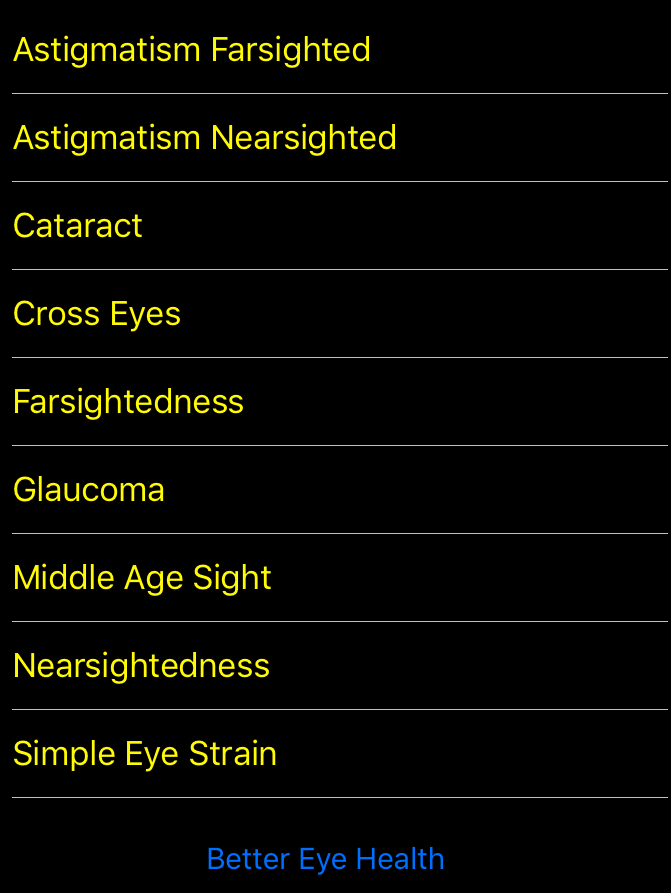
The method devised by Dr. Horatio Bates to improve eyesight is based on organized pattern of exercises for all kinds of eye conditions. The interface is robust and very clear to read and has the information placed right up front. The information on eye conditions can be read by tapping on a specific ailment and finding which exercises can heal it.
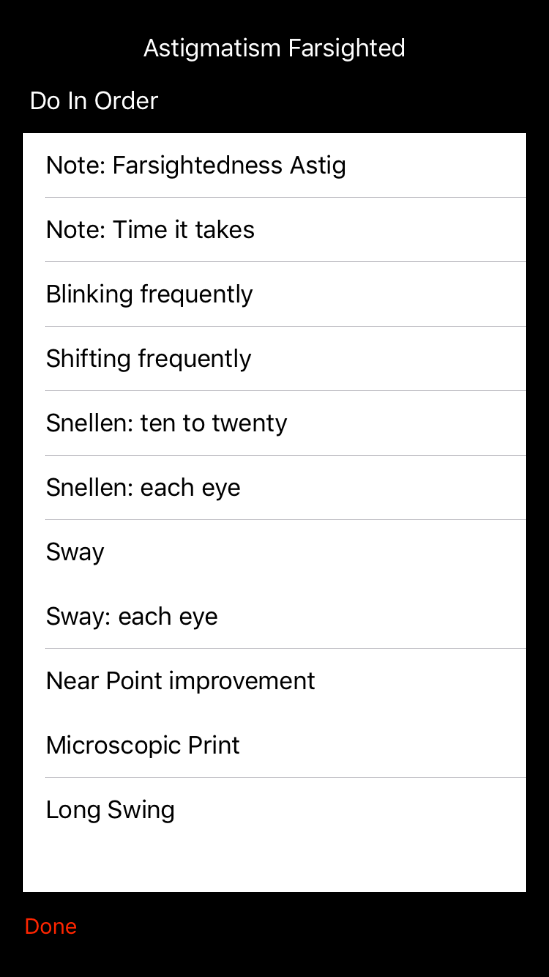
The exercises for the Bates method show how it can be done perfectly with all the diagrams and illustrations and also by following the step-by-step process to improve eyesight faster. The methods have been specifically designed to suit the users of every age group, who can start using the App and get rid of their lenses by practicing a few simple exercises everyday.
SniperSight also helps to combat stress on the eyes caused by our digital and working lives staring at laptops, smartphones, and tablets, or simply not getting enough sleep due to your schedule.
Key Features:
* Covers all the basics for the Bated method with detailed exercise descriptions
* Read how to do the exercises with visuals and diagram representations
* A step-by-step as you go guide to follow all the techniques and practice them
* Simple to search for any specific exercises
* Ideal method for people who wear contact lens and spectacles
* Healing process starts immediately, finally get rid of their glasses or contacts
* Results can be seen depending on your schedule and consistency
* Effective for people of all age groups
* Great for kids. Helps them improve their eyesight at an early age
* Handy for older people to improve their vision and start seeing better
* Read on your problem and the treatment required and get started in just a few minutes
Device Requirements:
* iPhone, iPad, and iPod touch
* Requires iOS 11.3 or later
* 13.9 MB
Pricing and Availability:
SniperSight 1.1 is $4.99 USD (or equivalent amount in other currencies) and available worldwide exclusively through the App Store in the Health and Fitness category.
SniperSight 1.1: http://www.snipersight.app/
Purchase and Download: https://itunes.apple.com/app/snipersight/id1434157023
Promotional Image: https://www.snipersight.app/assets/images/simulator-screen-shot-conditions-750x1334.png
Screenshot: https://www.snipersight.app/assets/images/simulator-screen-shot-ex-table-1-549x977.png
App Icon: https://www.snipersight.app/assets/images/itunesartwork1x-502x502.png
Lost Technology LLP is based in Ohio, United States and is a partnership of Techies. The company develops applications that are health, fitness and education based for iOS and reserves all rights. Apple and the Apple Logo, iPod, iPhone, iPad are all registered trademarks of Apple Inc. in the United States of America and other countries. Respective owners may own other trademarks. All Material and Software (C) Copyright 2018 Apps For All. All Rights Reserved. Apple, the Apple logo, iPhone, iPod and iPad are registered trademarks of Apple Inc. in the U.S. and/or other countries. Other trademarks and registered trademarks may be the property of their respective owners.
*******
Link To Article: https://prmac.com/release-id-83194.htm
*******
---------------------------------------------------------------------------------
Note that you can alter delivered distributions at any time.
Login to your account on prMac to alter your channel selection, or to opt-out at any time.
SniperSight for iOS Advanced Methods To Correct Your Eyesight - Published on 12/11/18
Ohio based Lost Technology LLP releasees SniperSight 1.1 for the iOS platform, an app for improving eyesight without needing lenses or surgery. A method devised by Dr. Horatio Bates, and based on organized pattern of exercises for all kinds of eye conditions, SniperSight can help anyone who use lenses/spectacles to regain vision and start reading letters and numbers more clearly. The methods have been specifically designed to suit the users of every age group.
Columbus, Ohio - Lost Technology LLP is proud to announce the global availability of SniperSight(TM) for the iOS platform, an App for improving eyesight without needing lenses or surgery. SniperSight is an exceptional app that uses Dr. Bates method to help people who use lenses/spectacles to regain vision and start reading letters and numbers more clearly.
The method devised by Dr. Horatio Bates to improve eyesight is based on organized pattern of exercises for all kinds of eye conditions. The interface is robust and very clear to read and has the information placed right up front. The information on eye conditions can be read by tapping on a specific ailment and finding which exercises can heal it.
The exercises for the Bates method show how it can be done perfectly with all the diagrams and illustrations and also by following the step-by-step process to improve eyesight faster. The methods have been specifically designed to suit the users of every age group, who can start using the App and get rid of their lenses by practicing a few simple exercises everyday.
SniperSight also helps to combat stress on the eyes caused by our digital and working lives staring at laptops, smartphones, and tablets, or simply not getting enough sleep due to your schedule.
Key Features:
* Covers all the basics for the Bated method with detailed exercise descriptions
* Read how to do the exercises with visuals and diagram representations
* A step-by-step as you go guide to follow all the techniques and practice them
* Simple to search for any specific exercises
* Ideal method for people who wear contact lens and spectacles
* Healing process starts immediately, finally get rid of their glasses or contacts
* Results can be seen depending on your schedule and consistency
* Effective for people of all age groups
* Great for kids. Helps them improve their eyesight at an early age
* Handy for older people to improve their vision and start seeing better
* Read on your problem and the treatment required and get started in just a few minutes
Device Requirements:
* iPhone, iPad, and iPod touch
* Requires iOS 11.3 or later
* 13.9 MB
Pricing and Availability:
SniperSight 1.1 is $4.99 USD (or equivalent amount in other currencies) and available worldwide exclusively through the App Store in the Health and Fitness category.
SniperSight 1.1: http://www.snipersight.app/
Purchase and Download: https://itunes.apple.com/app/snipersight/id1434157023
Promotional Image: https://www.snipersight.app/assets/images/simulator-screen-shot-conditions-750x1334.png
Screenshot: https://www.snipersight.app/assets/images/simulator-screen-shot-ex-table-1-549x977.png
App Icon: https://www.snipersight.app/assets/images/itunesartwork1x-502x502.png

Lost Technology LLP is based in Ohio, United States and is a partnership of Techies. The company develops applications that are health, fitness and education based for iOS and reserves all rights. Apple and the Apple Logo, iPod, iPhone, iPad are all registered trademarks of Apple Inc. in the United States of America and other countries. Respective owners may own other trademarks. All Material and Software (C) Copyright 2018 Apps For All. All Rights Reserved. Apple, the Apple logo, iPhone, iPod and iPad are registered trademarks of Apple Inc. in the U.S. and/or other countries. Other trademarks and registered trademarks may be the property of their respective owners.
*******
Link To Article: https://prmac.com/release-id-83194.htm
*******
---------------------------------------------------------------------------------
Note that you can alter delivered distributions at any time.
Login to your account on prMac to alter your channel selection, or to opt-out at any time.
Subscribe to:
Posts (Atom)