A new article has been published at prMac.
Maxprog releases iCash 7.7 for macOS and MS Windows - Published on 12/18/18
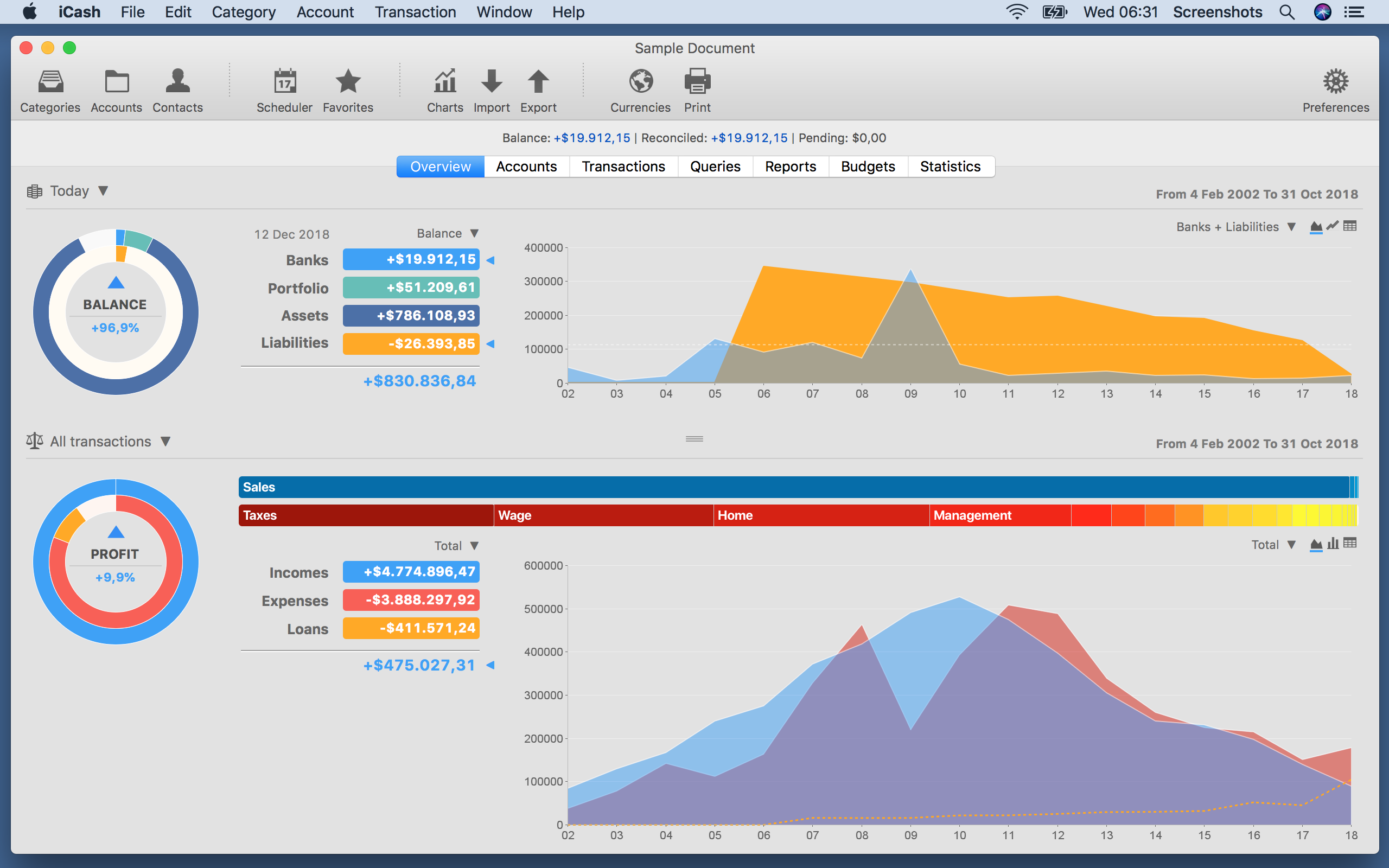
Maxprog today announces iCash 7.7, an important update to their personal finance solution for macOS and Windows. iCash was designed specifically to track incomes, expenses, credits, debts and banks transactions. It offers unlimited categories, multiple accounts, multiple currencies, a SQL backend engine, password protection, export/import routines, search functions, and drag & drop support. Version 7.7 offers a lot of new features, improvements and now available in several new languages.
Denia, Spain - Maxprog today is proud to announce the release of iCash 7.7, an important update to their personal finance software for macOS and Windows. iCash is a Personal Finance software, a tool intended to control your money, keeping track of incomes, expenses, credits, debts and Banks transactions for you. As simple as creating the accounts you need, and move money between them! You don't even need to know about accounting or even care about it.
iCash was designed specifically to track incomes, expenses, credits, debts and banks transactions. It offers unlimited categories, multiple accounts creation, multiple currencies, a SQL backend engine, password protection, export/import routines, search functions, and drag & drop support (macOS and Windows).
iCash can serve several small accounting needs for either private users, or clubs, associations, self-employed, small businesses or simply to be used at home, making keeping track of incomes, expenses and Bank transactions a snap. With a few clicks you can begin creating accounts and making transactions in minutes.
Version 7.7 is now available in English, German, French, Swedish, Italian, Dutch, Russian, Spanish, Portuguese, Japanese, Chinese and Korean on Maxprog website with a lot of new features and improvements.
iCash is versatil and user-friendly. For this reason it doesn't use the principle of double-entry bookkeeping making it much easier to be used by people with very little or no accounting knowledge at all. Simply create accounts for all your expenses, incomes, Banks - and start moving money between them. iCash will then allow you to find out where all your money comes from and where it goes.
All accounts are well organized according to user-defined categories and built-in types so reports can be tailored to include all records or only ones meeting specified criteria. iCash also allows you to have as many money manager documents as necessary so you can control almost anything from Clubs, associations, home and so on at the same time.
Language Support:
iCash is available in English, German, French, Swedish, Italian, Dutch, Russian, Spanish, Portuguese, Japanese, Chinese and Korean languages.
Pricing and Availability:
iCash 7.7 is $25 (USD), available now and can be downloaded from MAX Programming online. For more information, please contact Stanley Roche Busk.
Maxprog: https://www.maxprog.com
iCash 7.7: https://www.maxprog.com/site/software/personal-finance/icash_sheet_us.php
Download iCash: https://www.maxprog.com/products/iCash.dmg
Purchase iCash: https://www.maxprog.com/store_selector.php?cmd=_xclick&sku=8
Screenshot: https://www.maxprog.com/pr/img/icash_overview_panel.png
Denia, Spain - Maxprog today is proud to announce the release of iCash 7.7, an important update to t: https://www.maxprog.com/pictures/icon_icash_new_1024x1024.png
MAX Programming, LLC. also known as Maxprog(R) is a privately held company dedicated to Macintosh, Windows and Linux software development. MAX Programming mainly develops and markets Internet, communication and database tools. Max Programming was founded in the early nineties by French-born programmer Stanley Roche Busk, after over 15 years of experience in the high-tech networking industry and computer software development, now Chief Executive Officer of the company. Since its creation, Max Programming has built firm business relations with thousands of clients from over 136 countries with products localized in up to 14 different languages like English, French, German, Spanish, Italian, Russian, Japanese, Chinese, Dutch, Swedish and Portuguese. English is our primary language. Copyright (C) 2002-2018 Max Programming, LLC - All rights reserved. Other trademarks and registered trademarks may be the property of their respective owners.
*******
Link To Article: https://prmac.com/release-id-83212.htm
*******
---------------------------------------------------------------------------------
Note that you can alter delivered distributions at any time.
Login to your account on prMac to alter your channel selection, or to opt-out at any time.


The Entire USDA National Nutrient DB: Calories to Vitamin K - iNutrients
A new article has been published at prMac.
The Entire USDA National Nutrient DB: Calories to Vitamin K - iNutrients - Published on 12/17/18
Indie developer James Hollender offers version 3.1.1 of his iNutrients app with the entire USDA National Nutrient Database (Internet access NOT required) for: Calories, Carbohydrates, Dietary Cholesterol, Fiber, Potassium, Proteins, Saturated Fat, Sodium, Sugars and Vitamin K. The database now includes 8,789 different foods and 15,438 food servings. Even with this large quantity it may still not be enough. Users can now add their own custom foods and food servings to help fill that gap.
Revere, Massachusetts - Indie developer James Hollender offers version 3.1.1 of his iNutrients app with the latest USDA National Nutrient Database (SR-28), which requires no Internet access, for 10 nutrients: Calories, Carbohydrates, Dietary Cholesterol, Fiber, Potassium, Proteins, Saturated Fat, Sodium, Sugars and Vitamin K. The database now includes 8,789 different foods and 15,438 food servings.
Despite the enormous number of foods and food servings in the USDA National Nutrient Database, there are still many which aren't included, especially most name brands. Having the capability of defining Custom Foods that are missing fills this gap, which then makes keeping track of daily nutritional intake more complete.
It's extremely slick to be able to input the information from a packaged food's nutrition label and moments later see color codings for all ten nutrients indicating the ranking of their concentration. As an example the developer talks about a popular brand name frozen dinner.
Once the data from the nutrition label is input and saved, the color rankings show up for the Custom Food indicating Carbohydrates are Extremely High (Black); Sodium is Very High (Dark Red); Calories are High (Red); Potassium, Saturated Fat & Sugars are Moderately High (Orange); Proteins are Moderate (Yellow); Cholesterol & Fiber are Moderately Low (Light Green); and Vitamin K is Unknown (Gray) because data wasn't available. This immediately points out that maybe this small meal, eaten frequently, isn't as nutritionally good as originally thought.
Each Custom Food Definition has one main Serving Size and an allowance to add up to three additional ones. Nutrient data is extrapolated for each of the additional Serving Sizes based on their weight compared to the main Serving Size.
There is nothing that prevents the user from collecting nutritional information for a complete meal and then creating a single Custom Food for that meal. This provides the capability to speed input of the same meal eaten frequently.
All Custom Food Definitions are automatically included in searches of the entire USDA database.
If for some reason the user doesn't agree with the developer's default Color Scales for the ten nutrients covered, each individual scale can be customized. Making a change will be reflected for all previously recorded data when next presented.
The iNutrients app provides information based on the USDA National Nutrient Database for Standard Reference concerning ten key nutrients:
* Calories - Great for anyone concerned about weight management
* Carbohydrates - Used to make glucose which is the fuel that gives you energy
* Cholesterol - Dietary Cholesterol - Aids in the production of Vitamin D
* Fiber - Essential for cardiovascular health; prevents constipation; improves control of diabetes
* Potassium - Helps with anxiety and stress; blood pressure; brain function; cramps, etc.
* Proteins - Important for Bodybuilders, Vegetarians or Vegans
* Saturated Fat - Eat only moderate amounts to keep healthy
* Sodium - Would you believe there's sodium in water?
* Sugars - Help keep your sugar intake under control
* Vitamin K - Vitamins K1, K1D & K2 - Extremely important for anyone taking Blood Thinning Medications like Coumadin or Warfarin
These nutrients are listed and presented throughout the app in alphabetical order. Icons used to help easily identify the nutrients are from other apps by the developer, each covering a single nutrient corresponding to the nutrients in this app are used throughout. For the price of just a little more than two individual nutrient apps, users can get all ten nutrients in a single app.
iNutrients utilizes information taken from 100% of the USDA National Nutrient Database for each of these ten nutrients, unlike the individual apps which only cover less than 10% of what's available. Users will find the Search functionality lightning fast as all needed infromation from the USDA database is local to the app - no internet connectivity is required.
From the Search functionality the user can save information for the foods they eat each day. They are able to pick a serving size and then either record a multiple of 0.1 - 9.9 servings; or optionally create a custom serving size from 1 to 500 grams. As they change the serving size they can graphically see the the effect on the various nutrients via color coding ranging from white to black:
* Black - Extremely High
* Dark Red - Very High
* Red - High
* Orange - Moderately High
* Yellow - Moderate
* Light Green - Moderately Low
* Green - Low
* Light Blue - Very Low
* White - Extremely Low
The My Data section allows users to access up to a full year's worth of Food Serving Intake Items stored in their Personal iNutrients Database. Select any Intake Item to get the complete information available. From the display users can tap the Action button in the upper right corner to:
* Delete - Delete the current Food Serving.
* Change Number of Servings - Change the number of Servings for the current Food Intake Item.
* Change the Intake Date - Move the current Food Serving to another day. - This is extremely useful if the user wasn't able to enter what they've eaten on the day it occurred; just simply enter it and then use this function to change to the date needed.
* Copy the Intake Item to Today - This allows the user to copy an individual Food Intake Item from any day, making a copy for the current day.
Also available is an allowance to copy all the Food Intake Items from a single day to the current day. This is extremely handy for people who eat the same foods on a regular basis.
The Customize section provides a means for users to create their own Custom Color Scale for each nutrient if desired in addition to the new feature of creating or updating Custom Food Definitions.
This universal app shows rotating images occasionally on the right, when run on an iPad, that are representative of the 25 different Food Groups designated by the USDA. Versions of these images will typically be seen whenever a food group is identified on iPad, iPhone or iPod touch. More features are planned for upcoming future releases, especially in the areas of customization and reporting.
James Hollender is also the creator of the Life Inventory apps which allow users to discover more about themselves than they ever thought possible, and at just a small fraction the cost of a single visit to a therapist.
Device Requirements:
* iPhone, iPad or iPod touch
* iOS 6.0 or later
* Universal Application
* 43 MB
Pricing and Availability:
iNutrients is $7.99 (USD) and available worldwide exclusively through the iTunes App Store in the Health & Fitness and Medical categories. Review copies are available on request to qualified organizations.
iNutrients 3.1.1: http://www.hollender.com/iNutrients.html
Purchase and Download from App Store: https://itunes.apple.com/app/id580660547
YouTube Video: http://www.youtube.com/watch?v=iHpa9hmy8IA
iPhone Screenshots: http://www.hollender.com/iNutrients.html#screenshots1
iPad Screenshots: http://www.hollender.com/iNutrients.html#screenshots2
App Icon: http://www.hollender.com/images/iNutrients1024.png
Based in Revere, Massachusetts, Indie developer James Hollender is a well seasoned Information Technology professional who has been familiar with Apple products since the days of the first Macintosh computer and has been involved with object oriented programming since the introduction of Java, culminating most recently in writing apps in Objective C for the iPhone, iPod touch and iPad. His innovative ideas have resulted in numerous suggestions and other awards including a commendation from The President of the United States. James Hollender has been involved writing iPad apps with Foliage, Kronos, Olympus, Agero and Valmarc. Copyright (C) 2010-2018 James Hollender. All Rights Reserved. Apple, the Apple logo, iPhone, and iPod are registered trademarks of Apple Inc. in the U.S. and/or other countries. Other trademarks and registered trademarks may be the property of their respective owners.
*******
Link To Article: https://prmac.com/release-id-83211.htm
*******
---------------------------------------------------------------------------------
Note that you can alter delivered distributions at any time.
Login to your account on prMac to alter your channel selection, or to opt-out at any time.
The Entire USDA National Nutrient DB: Calories to Vitamin K - iNutrients - Published on 12/17/18
Indie developer James Hollender offers version 3.1.1 of his iNutrients app with the entire USDA National Nutrient Database (Internet access NOT required) for: Calories, Carbohydrates, Dietary Cholesterol, Fiber, Potassium, Proteins, Saturated Fat, Sodium, Sugars and Vitamin K. The database now includes 8,789 different foods and 15,438 food servings. Even with this large quantity it may still not be enough. Users can now add their own custom foods and food servings to help fill that gap.
Revere, Massachusetts - Indie developer James Hollender offers version 3.1.1 of his iNutrients app with the latest USDA National Nutrient Database (SR-28), which requires no Internet access, for 10 nutrients: Calories, Carbohydrates, Dietary Cholesterol, Fiber, Potassium, Proteins, Saturated Fat, Sodium, Sugars and Vitamin K. The database now includes 8,789 different foods and 15,438 food servings.
Despite the enormous number of foods and food servings in the USDA National Nutrient Database, there are still many which aren't included, especially most name brands. Having the capability of defining Custom Foods that are missing fills this gap, which then makes keeping track of daily nutritional intake more complete.
It's extremely slick to be able to input the information from a packaged food's nutrition label and moments later see color codings for all ten nutrients indicating the ranking of their concentration. As an example the developer talks about a popular brand name frozen dinner.
Once the data from the nutrition label is input and saved, the color rankings show up for the Custom Food indicating Carbohydrates are Extremely High (Black); Sodium is Very High (Dark Red); Calories are High (Red); Potassium, Saturated Fat & Sugars are Moderately High (Orange); Proteins are Moderate (Yellow); Cholesterol & Fiber are Moderately Low (Light Green); and Vitamin K is Unknown (Gray) because data wasn't available. This immediately points out that maybe this small meal, eaten frequently, isn't as nutritionally good as originally thought.
Each Custom Food Definition has one main Serving Size and an allowance to add up to three additional ones. Nutrient data is extrapolated for each of the additional Serving Sizes based on their weight compared to the main Serving Size.
There is nothing that prevents the user from collecting nutritional information for a complete meal and then creating a single Custom Food for that meal. This provides the capability to speed input of the same meal eaten frequently.
All Custom Food Definitions are automatically included in searches of the entire USDA database.
If for some reason the user doesn't agree with the developer's default Color Scales for the ten nutrients covered, each individual scale can be customized. Making a change will be reflected for all previously recorded data when next presented.
The iNutrients app provides information based on the USDA National Nutrient Database for Standard Reference concerning ten key nutrients:
* Calories - Great for anyone concerned about weight management
* Carbohydrates - Used to make glucose which is the fuel that gives you energy
* Cholesterol - Dietary Cholesterol - Aids in the production of Vitamin D
* Fiber - Essential for cardiovascular health; prevents constipation; improves control of diabetes
* Potassium - Helps with anxiety and stress; blood pressure; brain function; cramps, etc.
* Proteins - Important for Bodybuilders, Vegetarians or Vegans
* Saturated Fat - Eat only moderate amounts to keep healthy
* Sodium - Would you believe there's sodium in water?
* Sugars - Help keep your sugar intake under control
* Vitamin K - Vitamins K1, K1D & K2 - Extremely important for anyone taking Blood Thinning Medications like Coumadin or Warfarin
These nutrients are listed and presented throughout the app in alphabetical order. Icons used to help easily identify the nutrients are from other apps by the developer, each covering a single nutrient corresponding to the nutrients in this app are used throughout. For the price of just a little more than two individual nutrient apps, users can get all ten nutrients in a single app.
iNutrients utilizes information taken from 100% of the USDA National Nutrient Database for each of these ten nutrients, unlike the individual apps which only cover less than 10% of what's available. Users will find the Search functionality lightning fast as all needed infromation from the USDA database is local to the app - no internet connectivity is required.
From the Search functionality the user can save information for the foods they eat each day. They are able to pick a serving size and then either record a multiple of 0.1 - 9.9 servings; or optionally create a custom serving size from 1 to 500 grams. As they change the serving size they can graphically see the the effect on the various nutrients via color coding ranging from white to black:
* Black - Extremely High
* Dark Red - Very High
* Red - High
* Orange - Moderately High
* Yellow - Moderate
* Light Green - Moderately Low
* Green - Low
* Light Blue - Very Low
* White - Extremely Low
The My Data section allows users to access up to a full year's worth of Food Serving Intake Items stored in their Personal iNutrients Database. Select any Intake Item to get the complete information available. From the display users can tap the Action button in the upper right corner to:
* Delete - Delete the current Food Serving.
* Change Number of Servings - Change the number of Servings for the current Food Intake Item.
* Change the Intake Date - Move the current Food Serving to another day. - This is extremely useful if the user wasn't able to enter what they've eaten on the day it occurred; just simply enter it and then use this function to change to the date needed.
* Copy the Intake Item to Today - This allows the user to copy an individual Food Intake Item from any day, making a copy for the current day.
Also available is an allowance to copy all the Food Intake Items from a single day to the current day. This is extremely handy for people who eat the same foods on a regular basis.
The Customize section provides a means for users to create their own Custom Color Scale for each nutrient if desired in addition to the new feature of creating or updating Custom Food Definitions.
This universal app shows rotating images occasionally on the right, when run on an iPad, that are representative of the 25 different Food Groups designated by the USDA. Versions of these images will typically be seen whenever a food group is identified on iPad, iPhone or iPod touch. More features are planned for upcoming future releases, especially in the areas of customization and reporting.
James Hollender is also the creator of the Life Inventory apps which allow users to discover more about themselves than they ever thought possible, and at just a small fraction the cost of a single visit to a therapist.
Device Requirements:
* iPhone, iPad or iPod touch
* iOS 6.0 or later
* Universal Application
* 43 MB
Pricing and Availability:
iNutrients is $7.99 (USD) and available worldwide exclusively through the iTunes App Store in the Health & Fitness and Medical categories. Review copies are available on request to qualified organizations.
iNutrients 3.1.1: http://www.hollender.com/iNutrients.html
Purchase and Download from App Store: https://itunes.apple.com/app/id580660547
YouTube Video: http://www.youtube.com/watch?v=iHpa9hmy8IA
iPhone Screenshots: http://www.hollender.com/iNutrients.html#screenshots1
iPad Screenshots: http://www.hollender.com/iNutrients.html#screenshots2
App Icon: http://www.hollender.com/images/iNutrients1024.png

Based in Revere, Massachusetts, Indie developer James Hollender is a well seasoned Information Technology professional who has been familiar with Apple products since the days of the first Macintosh computer and has been involved with object oriented programming since the introduction of Java, culminating most recently in writing apps in Objective C for the iPhone, iPod touch and iPad. His innovative ideas have resulted in numerous suggestions and other awards including a commendation from The President of the United States. James Hollender has been involved writing iPad apps with Foliage, Kronos, Olympus, Agero and Valmarc. Copyright (C) 2010-2018 James Hollender. All Rights Reserved. Apple, the Apple logo, iPhone, and iPod are registered trademarks of Apple Inc. in the U.S. and/or other countries. Other trademarks and registered trademarks may be the property of their respective owners.
*******
Link To Article: https://prmac.com/release-id-83211.htm
*******
---------------------------------------------------------------------------------
Note that you can alter delivered distributions at any time.
Login to your account on prMac to alter your channel selection, or to opt-out at any time.
DEVONthink To Go 2.7 adds push notifications for sync, PDF outline view
A new article has been published at prMac.
DEVONthink To Go 2.7 adds push notifications for sync, PDF outline view - Published on 12/17/18
DEVONtechnologies today releases DEVONthink To Go 2.7, an important update to its mobile document and information manager for iOS devices. Serving as repository for a large variety of data types DEVONthink To Go lets users keep their important documents with them at all times. It offers a rich set of organizing features as well as built-in viewers and editors for many file formats. Version 2.7 offers push notifications, an outline view for PDF documents, as well as further enhancements.
Coeur d'Alene, Idaho - DEVONtechnologies updates its iOS document and information manager DEVONthink To Go with push notifications for faster synchronization, an outline view for PDF documents, as well as further enhancements. The update is free and recommended for all users.
DEVONthink is DEVONtechnologies' document and information management solution for the Mac. It supports a large variety of file formats and stores them in a database enhanced by artificial intelligence (AI). Many document formats can be directly viewed and edited, PDFs annotated. DEVONnote is DEVONthink's little sibling with a reduced feature set targeted at users with notetaking-centric needs.
Sophisticated organization tools, AI-based techniques that handle even the largest collections, and numerous integration options make DEVONthink the work environment of choice for researchers, lawyers, and educators. With its fast, reliable, and secure synchronization users keep their data available on all their Macs and iOS devices. DEVONthink To Go for iPad and iPhone completes the DEVONthink ecosystem.
* Keep your data together in one place
* Scan your paper, archive your email
* Let artificial intelligence help you file your data
* Sync your data to all your devices, fast and secure
* Share your data with anyone, whether they use Mac or PC
New in DEVONthink To Go 2.7:
This release adds push notifications to the synchronization. Whenever users make changes to their databases on their Mac, iPad, or iPhone, DEVONthink (To Go) sends notifications to all other devices. This decreases the amount of time before changes are available on all devices. It also enables DEVONthink To Go to receive the new data in the background.
For those who work with long PDF documents, DEVONthink To Go 2.7 adds an outline view. It lets the user browse the table of content and quickly navigate to other parts of the document.
Other improvements in this update include the ability to sort by date added. An alert lets users clean a sync store after changing its encryption key. When viewing PDFs the app chooses one- or two-page mode more reliably. Dragging messages from the Mail app to DEVONthink To Go sets the creation date to the messages' date. This way users can better sort them by date received. Finally, its now possible to open search results without dismissing the software keyboard first.
"With push notifications we've made synchronizing data across devices a much more natural experience. Strong encryption ensures that our users can rely on the cloud services of their choice without comprimising privacy. The push notifications help distribute new information to all devices quickly. Of course, we anonymize the data that we need for this and store as less data as possible", comments Eric Böhnisch-Volkmann, DEVONtechnologies' President.
Of course, version 2.7 fixes issues and improves the general reliabilty of DEVONthink To Go too.
The update is free for existings users and highly recommended. The push notification service requires DEVONthink for Mac 2.11 or later and DEVONthink To Go 2.7 or later on participating devices.
System requirements:
* iPhone, iPad, or iPod touch
* iOS 10 or later
Availability and Pricing:
DEVONthink To Go is available world-wide for $14.99 USD (or the equivalent amount in other currencies) through the iOS App Store in the Productivity category. Some features require a one-time in-app purchase.
More information:
Customers find more information about our apps on the DEVONtechnologies website. Eric Böhnisch-Volkmann also posts news, opinions, previews, and public betas in the company blog Devonian Times.
DEVONthink To Go 2.7: https://www.devontechnologies.com/redirect.php?id=product-dttg
Purchase and Download (iOS): https://itunes.apple.com/app/devonthink-to-go/id395722470
Company blog: https://www.devontechnologies.com/redirect.php?id=blog
DEVONtechnologies LLC creates end-user and server applications for the Mac and iOS platforms that enhance productivity, organization, and user experience with unique artificial intelligence technology. All applications are focused on both ease of use and satisfying the needs of even the most savvy users. The underlying DEVONtechnology is a flexible and versatile foundation that can be used for a large range of purposes from databases, data mining, and information retrieval to human-computer interfaces. DEVONtechnologies LLC was founded 2002 and incorporated 2004, and is today headquartered in Coeur d'Alene, Idaho, USA. All Material and Software (C) Copyright 2018 DEVONtechnologies LLC. All Rights Reserved. Apple, the Apple logo, Macintosh and Mac OS X are registered trademarks of Apple Inc. in the U.S. and/or other countries. Other trademarks and registered trademarks may be the property of their respective owners.
*******
Link To Article: https://prmac.com/release-id-83206.htm
*******
---------------------------------------------------------------------------------
Note that you can alter delivered distributions at any time.
Login to your account on prMac to alter your channel selection, or to opt-out at any time.
DEVONthink To Go 2.7 adds push notifications for sync, PDF outline view - Published on 12/17/18
DEVONtechnologies today releases DEVONthink To Go 2.7, an important update to its mobile document and information manager for iOS devices. Serving as repository for a large variety of data types DEVONthink To Go lets users keep their important documents with them at all times. It offers a rich set of organizing features as well as built-in viewers and editors for many file formats. Version 2.7 offers push notifications, an outline view for PDF documents, as well as further enhancements.
Coeur d'Alene, Idaho - DEVONtechnologies updates its iOS document and information manager DEVONthink To Go with push notifications for faster synchronization, an outline view for PDF documents, as well as further enhancements. The update is free and recommended for all users.
DEVONthink is DEVONtechnologies' document and information management solution for the Mac. It supports a large variety of file formats and stores them in a database enhanced by artificial intelligence (AI). Many document formats can be directly viewed and edited, PDFs annotated. DEVONnote is DEVONthink's little sibling with a reduced feature set targeted at users with notetaking-centric needs.
Sophisticated organization tools, AI-based techniques that handle even the largest collections, and numerous integration options make DEVONthink the work environment of choice for researchers, lawyers, and educators. With its fast, reliable, and secure synchronization users keep their data available on all their Macs and iOS devices. DEVONthink To Go for iPad and iPhone completes the DEVONthink ecosystem.
* Keep your data together in one place
* Scan your paper, archive your email
* Let artificial intelligence help you file your data
* Sync your data to all your devices, fast and secure
* Share your data with anyone, whether they use Mac or PC
New in DEVONthink To Go 2.7:
This release adds push notifications to the synchronization. Whenever users make changes to their databases on their Mac, iPad, or iPhone, DEVONthink (To Go) sends notifications to all other devices. This decreases the amount of time before changes are available on all devices. It also enables DEVONthink To Go to receive the new data in the background.
For those who work with long PDF documents, DEVONthink To Go 2.7 adds an outline view. It lets the user browse the table of content and quickly navigate to other parts of the document.
Other improvements in this update include the ability to sort by date added. An alert lets users clean a sync store after changing its encryption key. When viewing PDFs the app chooses one- or two-page mode more reliably. Dragging messages from the Mail app to DEVONthink To Go sets the creation date to the messages' date. This way users can better sort them by date received. Finally, its now possible to open search results without dismissing the software keyboard first.
"With push notifications we've made synchronizing data across devices a much more natural experience. Strong encryption ensures that our users can rely on the cloud services of their choice without comprimising privacy. The push notifications help distribute new information to all devices quickly. Of course, we anonymize the data that we need for this and store as less data as possible", comments Eric Böhnisch-Volkmann, DEVONtechnologies' President.
Of course, version 2.7 fixes issues and improves the general reliabilty of DEVONthink To Go too.
The update is free for existings users and highly recommended. The push notification service requires DEVONthink for Mac 2.11 or later and DEVONthink To Go 2.7 or later on participating devices.
System requirements:
* iPhone, iPad, or iPod touch
* iOS 10 or later
Availability and Pricing:
DEVONthink To Go is available world-wide for $14.99 USD (or the equivalent amount in other currencies) through the iOS App Store in the Productivity category. Some features require a one-time in-app purchase.
More information:
Customers find more information about our apps on the DEVONtechnologies website. Eric Böhnisch-Volkmann also posts news, opinions, previews, and public betas in the company blog Devonian Times.
DEVONthink To Go 2.7: https://www.devontechnologies.com/redirect.php?id=product-dttg
Purchase and Download (iOS): https://itunes.apple.com/app/devonthink-to-go/id395722470
Company blog: https://www.devontechnologies.com/redirect.php?id=blog
DEVONtechnologies LLC creates end-user and server applications for the Mac and iOS platforms that enhance productivity, organization, and user experience with unique artificial intelligence technology. All applications are focused on both ease of use and satisfying the needs of even the most savvy users. The underlying DEVONtechnology is a flexible and versatile foundation that can be used for a large range of purposes from databases, data mining, and information retrieval to human-computer interfaces. DEVONtechnologies LLC was founded 2002 and incorporated 2004, and is today headquartered in Coeur d'Alene, Idaho, USA. All Material and Software (C) Copyright 2018 DEVONtechnologies LLC. All Rights Reserved. Apple, the Apple logo, Macintosh and Mac OS X are registered trademarks of Apple Inc. in the U.S. and/or other countries. Other trademarks and registered trademarks may be the property of their respective owners.
*******
Link To Article: https://prmac.com/release-id-83206.htm
*******
---------------------------------------------------------------------------------
Note that you can alter delivered distributions at any time.
Login to your account on prMac to alter your channel selection, or to opt-out at any time.
LinkOptimizer for InDesign Now Disables Content-Aware Fit in CC 2019
A new article has been published at prMac.
LinkOptimizer for InDesign Now Disables Content-Aware Fit in CC 2019 - Published on 12/17/18
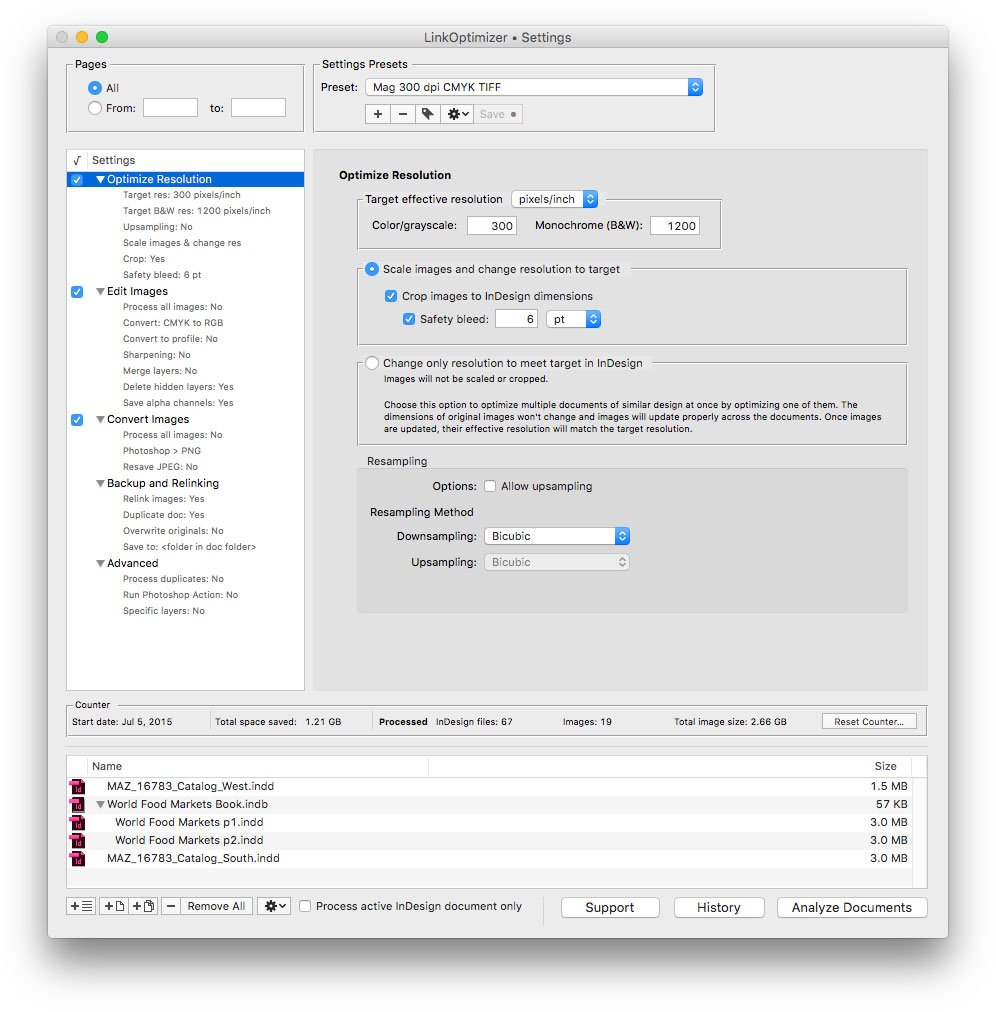
Zevrix Solutions announces LinkOptimizer 5.2.15, a feature update to company's workflow automation solution for Adobe InDesign. LinkOptimizer works with Photoshop to lets users automatically scale and crop images to their InDesign size at specified target resolution, convert image formats, adjust colors, embed profiles and more. The new version automatically disables the content aware-fit option in InDesign document preferences before processing to avoid incorrect placement of optimized images.
Toronto (ON), Canada - Zevrix Solutions today announces LinkOptimizer 5.2.15, a feature update to its image processing automation solution for Adobe InDesign. Awarded 4 out of 5 stars by Computer Arts magazine, LinkOptimizer automates complex image manipulation tasks and helps users reduce the size of InDesign links, save prepress costs, and easily repurpose InDesign documents for web and mobile devices.
The new version automatically disables the content aware-fit option for placed images before processing eliminating the need for users to uncheck it manually in InDesign CC 2019 preferences. The content-aware fit feature applies artificial intelligence to placing images by automatically scaling and repositioning the image with the best parts of it displayed. This results in incorrect placement of links processed by LinkOptimizer, which is now automatically prevented. LinkOptimizer also restores the original state of the content-aware fit option after the processing is done, if needed.
"LinkOptimizer has changed my life and saved me days and days of work as a retoucher for an international quarterly magazine," says Steve Krason of Chicago based SK Design Group. "It's a lifesaver".
LinkOptimizer works automatically with Photoshop to eliminate the excess image data of InDesign links, perform essential image adjustments and convert image formats. For example, with just a click of a button users can:
* Optimize dozens of InDesign files
* Scale and crop images to match their dimensions in InDesign
* Change their resolution to 300 dpi
* Convert RGB images to CMYK
* Resave JPEGs as TIFF
* Run a Photoshop action on each image.
As a result users can save gigabytes of disk space and countless hours of optimizing images manually, accelerate document output, reduce job turnaround and cut costs through faster processing.
Pricing and Availability:
LinkOptimizer can be purchased from Zevrix website for US$259.95 (Lite version: $179.95) as well as from Adobe Exchange and authorized resellers. A trial is also available for download. The update is free for LinkOptimizer 5.x users and $130 to upgrade from previous versions. LinkOptimizer requires macOS 10.7-10.14 and Adobe InDesign / Photoshop CS5-CC 2019.
Zevrix Solutions: http://zevrix.com
Product Page: http://zevrix.com/LinkOptimizer.php
Download: http://zevrix.com/LinkOptimizer.dmg
Purchase: http://zevrix.com/store.php
Screenshot: http://zevrix.com/screenshots/lo5/res-win.jpg
Located in Toronto, Canada, Zevrix Solutions provides automation and productivity solutions for Adobe Creative Cloud and Creative Suite software, PDF workflows, graphic file diagnostics and Microsoft Office output on Mac OS. Zevrix is dedicated to help professionals increase their profits through automating everyday tasks, producing error-free documents, saving disk space and cutting production costs. For more information, visit their website. Copyright (C) 2018 Zevrix Solutions. All Rights Reserved. Other trademarks and registered trademarks may be the property of their respective owners.
*******
Link To Article: https://prmac.com/release-id-83210.htm
*******
---------------------------------------------------------------------------------
Note that you can alter delivered distributions at any time.
Login to your account on prMac to alter your channel selection, or to opt-out at any time.
LinkOptimizer for InDesign Now Disables Content-Aware Fit in CC 2019 - Published on 12/17/18
Zevrix Solutions announces LinkOptimizer 5.2.15, a feature update to company's workflow automation solution for Adobe InDesign. LinkOptimizer works with Photoshop to lets users automatically scale and crop images to their InDesign size at specified target resolution, convert image formats, adjust colors, embed profiles and more. The new version automatically disables the content aware-fit option in InDesign document preferences before processing to avoid incorrect placement of optimized images.
Toronto (ON), Canada - Zevrix Solutions today announces LinkOptimizer 5.2.15, a feature update to its image processing automation solution for Adobe InDesign. Awarded 4 out of 5 stars by Computer Arts magazine, LinkOptimizer automates complex image manipulation tasks and helps users reduce the size of InDesign links, save prepress costs, and easily repurpose InDesign documents for web and mobile devices.
The new version automatically disables the content aware-fit option for placed images before processing eliminating the need for users to uncheck it manually in InDesign CC 2019 preferences. The content-aware fit feature applies artificial intelligence to placing images by automatically scaling and repositioning the image with the best parts of it displayed. This results in incorrect placement of links processed by LinkOptimizer, which is now automatically prevented. LinkOptimizer also restores the original state of the content-aware fit option after the processing is done, if needed.
"LinkOptimizer has changed my life and saved me days and days of work as a retoucher for an international quarterly magazine," says Steve Krason of Chicago based SK Design Group. "It's a lifesaver".
LinkOptimizer works automatically with Photoshop to eliminate the excess image data of InDesign links, perform essential image adjustments and convert image formats. For example, with just a click of a button users can:
* Optimize dozens of InDesign files
* Scale and crop images to match their dimensions in InDesign
* Change their resolution to 300 dpi
* Convert RGB images to CMYK
* Resave JPEGs as TIFF
* Run a Photoshop action on each image.
As a result users can save gigabytes of disk space and countless hours of optimizing images manually, accelerate document output, reduce job turnaround and cut costs through faster processing.
Pricing and Availability:
LinkOptimizer can be purchased from Zevrix website for US$259.95 (Lite version: $179.95) as well as from Adobe Exchange and authorized resellers. A trial is also available for download. The update is free for LinkOptimizer 5.x users and $130 to upgrade from previous versions. LinkOptimizer requires macOS 10.7-10.14 and Adobe InDesign / Photoshop CS5-CC 2019.
Zevrix Solutions: http://zevrix.com
Product Page: http://zevrix.com/LinkOptimizer.php
Download: http://zevrix.com/LinkOptimizer.dmg
Purchase: http://zevrix.com/store.php
Screenshot: http://zevrix.com/screenshots/lo5/res-win.jpg
Located in Toronto, Canada, Zevrix Solutions provides automation and productivity solutions for Adobe Creative Cloud and Creative Suite software, PDF workflows, graphic file diagnostics and Microsoft Office output on Mac OS. Zevrix is dedicated to help professionals increase their profits through automating everyday tasks, producing error-free documents, saving disk space and cutting production costs. For more information, visit their website. Copyright (C) 2018 Zevrix Solutions. All Rights Reserved. Other trademarks and registered trademarks may be the property of their respective owners.
*******
Link To Article: https://prmac.com/release-id-83210.htm
*******
---------------------------------------------------------------------------------
Note that you can alter delivered distributions at any time.
Login to your account on prMac to alter your channel selection, or to opt-out at any time.
Zuvolo Friends - The real-time location sharing app for friends & family
A new article has been published at prMac.
Zuvolo Friends - The real-time location sharing app for friends & family - Published on 12/17/18
Zuvolo Ltd releases Zuvolo Friends 1.3.99, a new location sharing app allowing friends and family to quickly share locations and important markers in real-time. In two taps users can start sharing their location and appear on the map, or stop and disappear, offering total privacy control. Add and remove markers from the map using tap-and-hold. Watch location tracking in almost real-time. A beautifully polished UI perfect for any activity and between any number of friends for day to day use.
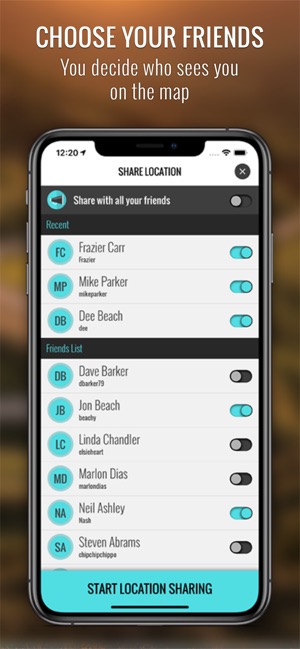
Sonning, Oxfordshire, United Kingdom - Zuvolo Ltd today introduces Zuvolo Friends 1.3.99 their brand new location sharing app that allows users to share their location when they want to, and with whom they want. Control over privacy is important. With Zuvolo Friends users can:
* Choose exactly which friends and family will have permission to see them on the map
* Decide exactly when they want to start and stop sharing their location
* Set a Privacy Zone for a location where they don't want to be visible on the map
* Add Markers to the map to share points of interest and important locations
* Send and receive real-time location updates every few seconds
Zuvolo Friends makes location sharing a simple and seamless experience for almost any situation or activity. Keeping your location up to date has never been easier. Using Markers makes it easier to find meeting points, favourite locations, important places, or for leaving messages at a particular location. Users can share markers on the map instantly for friends and family to see up to a month, before they disappear.
"Zuvolo Friends has been built from the ground up with the main focus being the user experience" commented CEO and company founder, Steven Abrams. "We wanted to craft a social location sharing app that gave people full control, honoured their privacy, and could be used for any occasion. This is just the beginning and we have plans to add engaging and fun features in the future. Soon we also plan to release Zuvolo Cycling for the cycling community. We are very keen to get your feedback to help us shape and develop our features. Zuvolo Friends is already primed for future releases on different platforms and we are very excited about the road."
Device Requirements:
* iPhone Compatible
* iOS 9.3 or later
* 107.7 MB
Pricing and Availability:
Zuvolo Friends 1.3.99 is Free and available worldwide exclusively through the App Store in the Lifestyle category. For more information, please contact Steven Abrams.
Zuvolo Friends 1.3.99: http://www.zuvolo.com
Download from iTunes: https://itunes.apple.com/app/zuvolo/id1265959852
Screenshot: https://is5-ssl.mzstatic.com/image/thumb/Purple118/v4/42/1d/e9/421de90c-fcca-d87e-6f3e-24033db74357/pr_source.png/300x0w.jpg
App Icon: https://is4-ssl.mzstatic.com/image/thumb/Purple118/v4/6a/76/f2/6a76f2c0-ae0d-d960-3e8f-3a42e77cb7a5/AppIcon-0-1x_U007emarketing-0-0-GLES2_U002c0-512MB-sRGB-0-0-0-85-220-0-0-0-6.png/690x0w.jpg
Located in Sonning, Oxfordshire, United Kingdom, the Zuvolo team is an independent software company founded by Steven Abrams in 2016. With their strong blend of design and development skills, Zuvolo Ltd's philosophy is to craft a beautiful looking application that focuses on the user experience. Copyright (C) 2018 Zuvolo Ltd. All Rights Reserved. Apple, the Apple logo, Mac, iPhone, iPod, and iPad are registered trademarks of Apple Inc. in the U.S. and/or other countries.
*******
Link To Article: https://prmac.com/release-id-83209.htm
*******
---------------------------------------------------------------------------------
Note that you can alter delivered distributions at any time.
Login to your account on prMac to alter your channel selection, or to opt-out at any time.
Zuvolo Friends - The real-time location sharing app for friends & family - Published on 12/17/18
Zuvolo Ltd releases Zuvolo Friends 1.3.99, a new location sharing app allowing friends and family to quickly share locations and important markers in real-time. In two taps users can start sharing their location and appear on the map, or stop and disappear, offering total privacy control. Add and remove markers from the map using tap-and-hold. Watch location tracking in almost real-time. A beautifully polished UI perfect for any activity and between any number of friends for day to day use.
Sonning, Oxfordshire, United Kingdom - Zuvolo Ltd today introduces Zuvolo Friends 1.3.99 their brand new location sharing app that allows users to share their location when they want to, and with whom they want. Control over privacy is important. With Zuvolo Friends users can:
* Choose exactly which friends and family will have permission to see them on the map
* Decide exactly when they want to start and stop sharing their location
* Set a Privacy Zone for a location where they don't want to be visible on the map
* Add Markers to the map to share points of interest and important locations
* Send and receive real-time location updates every few seconds
Zuvolo Friends makes location sharing a simple and seamless experience for almost any situation or activity. Keeping your location up to date has never been easier. Using Markers makes it easier to find meeting points, favourite locations, important places, or for leaving messages at a particular location. Users can share markers on the map instantly for friends and family to see up to a month, before they disappear.
"Zuvolo Friends has been built from the ground up with the main focus being the user experience" commented CEO and company founder, Steven Abrams. "We wanted to craft a social location sharing app that gave people full control, honoured their privacy, and could be used for any occasion. This is just the beginning and we have plans to add engaging and fun features in the future. Soon we also plan to release Zuvolo Cycling for the cycling community. We are very keen to get your feedback to help us shape and develop our features. Zuvolo Friends is already primed for future releases on different platforms and we are very excited about the road."
Device Requirements:
* iPhone Compatible
* iOS 9.3 or later
* 107.7 MB
Pricing and Availability:
Zuvolo Friends 1.3.99 is Free and available worldwide exclusively through the App Store in the Lifestyle category. For more information, please contact Steven Abrams.
Zuvolo Friends 1.3.99: http://www.zuvolo.com
Download from iTunes: https://itunes.apple.com/app/zuvolo/id1265959852
Screenshot: https://is5-ssl.mzstatic.com/image/thumb/Purple118/v4/42/1d/e9/421de90c-fcca-d87e-6f3e-24033db74357/pr_source.png/300x0w.jpg
App Icon: https://is4-ssl.mzstatic.com/image/thumb/Purple118/v4/6a/76/f2/6a76f2c0-ae0d-d960-3e8f-3a42e77cb7a5/AppIcon-0-1x_U007emarketing-0-0-GLES2_U002c0-512MB-sRGB-0-0-0-85-220-0-0-0-6.png/690x0w.jpg

Located in Sonning, Oxfordshire, United Kingdom, the Zuvolo team is an independent software company founded by Steven Abrams in 2016. With their strong blend of design and development skills, Zuvolo Ltd's philosophy is to craft a beautiful looking application that focuses on the user experience. Copyright (C) 2018 Zuvolo Ltd. All Rights Reserved. Apple, the Apple logo, Mac, iPhone, iPod, and iPad are registered trademarks of Apple Inc. in the U.S. and/or other countries.
*******
Link To Article: https://prmac.com/release-id-83209.htm
*******
---------------------------------------------------------------------------------
Note that you can alter delivered distributions at any time.
Login to your account on prMac to alter your channel selection, or to opt-out at any time.
Sphinx Solutions Announces Christmas Offer to Help Businesses
A new article has been published at prMac.
Sphinx Solutions Announces Christmas Offer to Help Businesses - Published on 12/14/18
Bag the most innovative gift for your business from Sphinx Solutions. Turn your web & mobile app development ideas into reality at just $1499. In this Christmas celebration time, Sphinx Solutions brings heavy discount on its standard web & mobile app development package including logo designing and consultation session.
Pune, Maharashtra - Sphinx Solutions announced their early Christmas offer for the entrepreneurs and startups. In this celebration time, Sphinx Solutions brings heavy discount on its standard web & mobile app development package including logo designing and consultation session.
The sphinx's gift is crafted with confidence for you to boost your business. This amazing gift of the season will allow businesses to build the web and mobile app with their own style. We understand the business complexity and likewise the solution. Our Christmas will readily add value to your enterprise needs.
Our offer includes:
* Wireframe creation and development
* Interactive UI/UX design
* Logo designing
* Consultation with their experts
* Necessary branding materials
We take immense pride in experimenting to deliver pioneering solutions by thinking out-of-the-box strategies. Our customized package offer is a great solution to several early-stage web and mobile app development problems.
It is a limited period offer and the detail is presented on Sphinx Solutions official website. However, our super enthusiastic team added that they will come up with more offers in the coming year.
Contact Sphinx Solution for more information.
Sphinx Solutions: https://www.sphinx-solution.com/
Christmas Offer: https://www.sphinx-solution.com/offers
Sphinx Solutions is a young and vibrant company established with the vision to offer result driven software development solutions globally, like mobile app development, web app development, blockchain development and many more. Headquartered in Pune, Sphinx is an ISO 9001: 2015 company incorporated in 2010. It's a team of 80+ highly dedicated and skilled people who have successfully developed 500+ projects. They majorly work on mobile application development and recently added ICO, Blockchain development, and RPA in their list. Their award-winning apps and entrepreneur solutions have generated revenue for companies around the world including Disney, Nissan, and Daiichi Sankyo, Vivino, Dahmakan, Seekmi. All Material and Software (C) Copyright 2018 Sphinx Solutions. All Rights Reserved. Apple, the Apple logo, iPhone, iPod and iPad are registered trademarks of Apple Inc. in the U.S. and/or other countries. Other trademarks and registered trademarks may be the property of their
respective owners.
*******
Link To Article: https://prmac.com/release-id-83208.htm
*******
---------------------------------------------------------------------------------
Note that you can alter delivered distributions at any time.
Login to your account on prMac to alter your channel selection, or to opt-out at any time.
Sphinx Solutions Announces Christmas Offer to Help Businesses - Published on 12/14/18
Bag the most innovative gift for your business from Sphinx Solutions. Turn your web & mobile app development ideas into reality at just $1499. In this Christmas celebration time, Sphinx Solutions brings heavy discount on its standard web & mobile app development package including logo designing and consultation session.
Pune, Maharashtra - Sphinx Solutions announced their early Christmas offer for the entrepreneurs and startups. In this celebration time, Sphinx Solutions brings heavy discount on its standard web & mobile app development package including logo designing and consultation session.
The sphinx's gift is crafted with confidence for you to boost your business. This amazing gift of the season will allow businesses to build the web and mobile app with their own style. We understand the business complexity and likewise the solution. Our Christmas will readily add value to your enterprise needs.
Our offer includes:
* Wireframe creation and development
* Interactive UI/UX design
* Logo designing
* Consultation with their experts
* Necessary branding materials
We take immense pride in experimenting to deliver pioneering solutions by thinking out-of-the-box strategies. Our customized package offer is a great solution to several early-stage web and mobile app development problems.
It is a limited period offer and the detail is presented on Sphinx Solutions official website. However, our super enthusiastic team added that they will come up with more offers in the coming year.
Contact Sphinx Solution for more information.
Sphinx Solutions: https://www.sphinx-solution.com/
Christmas Offer: https://www.sphinx-solution.com/offers
Sphinx Solutions is a young and vibrant company established with the vision to offer result driven software development solutions globally, like mobile app development, web app development, blockchain development and many more. Headquartered in Pune, Sphinx is an ISO 9001: 2015 company incorporated in 2010. It's a team of 80+ highly dedicated and skilled people who have successfully developed 500+ projects. They majorly work on mobile application development and recently added ICO, Blockchain development, and RPA in their list. Their award-winning apps and entrepreneur solutions have generated revenue for companies around the world including Disney, Nissan, and Daiichi Sankyo, Vivino, Dahmakan, Seekmi. All Material and Software (C) Copyright 2018 Sphinx Solutions. All Rights Reserved. Apple, the Apple logo, iPhone, iPod and iPad are registered trademarks of Apple Inc. in the U.S. and/or other countries. Other trademarks and registered trademarks may be the property of their
respective owners.
*******
Link To Article: https://prmac.com/release-id-83208.htm
*******
---------------------------------------------------------------------------------
Note that you can alter delivered distributions at any time.
Login to your account on prMac to alter your channel selection, or to opt-out at any time.
Cisdem AppCrypt V4.0.0 is Released with Enhanced Performance
A new article has been published at prMac.
Cisdem AppCrypt V4.0.0 is Released with Enhanced Performance - Published on 12/13/18
Recently, Cisdem announced to release its new version of AppCrypt, i.e. the version 4.0.0 and claimed to give much better performance on working for productivity boost and privacy protection. AppCrypt is a Mac program helping users to lock apps or block websites on mac, to be able to focus on current job.
Madelia, Minnesota - Cisdem AppCrypt is a Mac program helping users to lock apps or block websites on mac, to be able to focus on current job. You can lock all kinds of Apps on your mac, such as Facebook, Twitter, Reddit, Gmail, Outlook or others, either for the reason to stop someone's illegal access to your privacy or for the reason to keep yourself concentrated on your work. Also, you are able to block all types of websites on your mac on a schedule to block or unblock those distractions according to your own needs. To successfully do the jobs on locking or blocking, Cisdem AppCrypt is designed to be quite tough even there is a program trying to force quit or delete the program in an unauthorized way.
What's New in V4.0.0
1. Prevent the program from being forced to close.
2. Backup the data to prevent data deletion.
3. Support auto update
4. Fix some bugs
Main Features
1. Lock Apps
No matter which App you want to lock, just add to the program and that's done. To use the App again, you just need to enter your Cisdem AppCrypt password.
2. Block Websites
For Web-Block, there are blacklist and whitelist accommodated in the program. Also, users are allowed to block or unblock a website on a schedule according to routine.
3. Record Failure Attempt
In the case there is an unauthorized access to the program by entering the wrong password, Cisdem AppCrypt will take a picture of the person who caused such a failure and record the details.
4. Defend when There is Unauthorized Quit or Uninstallation
The program is designed to stop an unauthorized force quit or uninstallation, also all the data is backed up in case there is a data deletion.
5. Auto Update
Cisdem AppCrypt is under active development to get more improvements in functionality and performance. It will check for updates and guide users to update to the latest version.
Price and Availability
Cisdem AppCrypt V4.0.0 is now available on the official website. Users can download the free trial to enhance work efficiency. With $29.99, users can get a lifetime license of Cisdem AppCrypt, including a free service to get lifetime upgrades.
Cisdem: https://www.cisdem.com/
Cisdem AppCrypt: https://www.cisdem.com/appcrypt-mac.html
Download the Free Trial: https://www.cisdem.com/downloads/cisdem-appcrypt-14.dmg
Cisdem provides productivity and business software that helps Mac users to get their job done faster. Cisdem products include top rated software centered on PDF Conversion, PDF Management, Data Recovery, and File Management. The company is dedicated in building highly efficient Mac software that make life easier and processes simpler. All Material and Software (C) Copyright 2018 Cisdem. All Rights Reserved. Apple, the Apple logo, Mac OS X and Macintosh are registered trademarks of Apple Inc. in the U.S. and/or other countries. Other trademarks and registered trademarks may be the property of their respective owners.
*******
Link To Article: https://prmac.com/release-id-83207.htm
*******
---------------------------------------------------------------------------------
Note that you can alter delivered distributions at any time.
Login to your account on prMac to alter your channel selection, or to opt-out at any time.
Cisdem AppCrypt V4.0.0 is Released with Enhanced Performance - Published on 12/13/18
Recently, Cisdem announced to release its new version of AppCrypt, i.e. the version 4.0.0 and claimed to give much better performance on working for productivity boost and privacy protection. AppCrypt is a Mac program helping users to lock apps or block websites on mac, to be able to focus on current job.
Madelia, Minnesota - Cisdem AppCrypt is a Mac program helping users to lock apps or block websites on mac, to be able to focus on current job. You can lock all kinds of Apps on your mac, such as Facebook, Twitter, Reddit, Gmail, Outlook or others, either for the reason to stop someone's illegal access to your privacy or for the reason to keep yourself concentrated on your work. Also, you are able to block all types of websites on your mac on a schedule to block or unblock those distractions according to your own needs. To successfully do the jobs on locking or blocking, Cisdem AppCrypt is designed to be quite tough even there is a program trying to force quit or delete the program in an unauthorized way.
What's New in V4.0.0
1. Prevent the program from being forced to close.
2. Backup the data to prevent data deletion.
3. Support auto update
4. Fix some bugs
Main Features
1. Lock Apps
No matter which App you want to lock, just add to the program and that's done. To use the App again, you just need to enter your Cisdem AppCrypt password.
2. Block Websites
For Web-Block, there are blacklist and whitelist accommodated in the program. Also, users are allowed to block or unblock a website on a schedule according to routine.
3. Record Failure Attempt
In the case there is an unauthorized access to the program by entering the wrong password, Cisdem AppCrypt will take a picture of the person who caused such a failure and record the details.
4. Defend when There is Unauthorized Quit or Uninstallation
The program is designed to stop an unauthorized force quit or uninstallation, also all the data is backed up in case there is a data deletion.
5. Auto Update
Cisdem AppCrypt is under active development to get more improvements in functionality and performance. It will check for updates and guide users to update to the latest version.
Price and Availability
Cisdem AppCrypt V4.0.0 is now available on the official website. Users can download the free trial to enhance work efficiency. With $29.99, users can get a lifetime license of Cisdem AppCrypt, including a free service to get lifetime upgrades.
Cisdem: https://www.cisdem.com/
Cisdem AppCrypt: https://www.cisdem.com/appcrypt-mac.html
Download the Free Trial: https://www.cisdem.com/downloads/cisdem-appcrypt-14.dmg
Cisdem provides productivity and business software that helps Mac users to get their job done faster. Cisdem products include top rated software centered on PDF Conversion, PDF Management, Data Recovery, and File Management. The company is dedicated in building highly efficient Mac software that make life easier and processes simpler. All Material and Software (C) Copyright 2018 Cisdem. All Rights Reserved. Apple, the Apple logo, Mac OS X and Macintosh are registered trademarks of Apple Inc. in the U.S. and/or other countries. Other trademarks and registered trademarks may be the property of their respective owners.
*******
Link To Article: https://prmac.com/release-id-83207.htm
*******
---------------------------------------------------------------------------------
Note that you can alter delivered distributions at any time.
Login to your account on prMac to alter your channel selection, or to opt-out at any time.
Subscribe to:
Posts (Atom)