A new article has been published at prMac.
12-Star Apps Unveils Its Christmas App Roundup for iPhone, iPad, and Mac - Published on 12/20/18
12-Star Apps (https://12starapps.eu) unveils its app selection and promotions for the holiday season starting today, December 20th, and ending on January 2nd at midnight, featuring apps of all categories that made it under the 12-Star Christmas tree. This new roundup again wishes to overcome language and market challenges by bringing together 24 apps made by passionate European indie developers from 9 different countries.
Belgium, Europe - 12-Star Apps unveils its app selection and promotions for the holiday season starting today, December 20th, and ending on January 2nd at midnight, featuring apps of all categories that made it under the 12-Star Christmas tree. This new roundup again wishes to overcome language and market challenges by bringing together 24 apps made by passionate European indie developers from 9 different countries:
iOS apps:
* Semonto by CodingMammoth (BEL) > now 9,75 Euro/$9.75 (35% Off)
* Hydra by Creaceed SPRL (BEL) > now 3,49 Euro/$2.99 (35% Off)
* Prizmo Go by Creaceed SPRL (BEL) > now 3,49 Euro/$2.99 (35% Off)
* Grafio by Ten Touch Ltd. (BGR) > now 8,99 Euro/$7.99 (20% Off)
* iStopMotion for iPad by Boinx Software (DEU) > now 8,99Euro/$7.99 (50% Off)
* Streets by FutureTap GmbH (DEU) > now 1,09 Euro/$0.99 (50% Off)
* Planny 2 by Kevin Reutter (DEU) > now 4,99 Euro/$3.99 (45% Off)
* PocketCAS by Daniel Alm (DEU) > now 9,99 Euro/$8.99 (50% Off)
* Working Copy by Applied Phasor (DNK) > now 12,99 Euro/$11.99 (25% Off)
* Tayasui Color by Tayasui (FRA) > now FREE
* Tayasui Blocks by Tayasui (FRA) > now FREE
* Money by Jumsoft (LTU) > now 1,09 Euro/$0.99 (70% Off on Standard IAP)
* Future by Matic Leban (SLO) > now 1,09 Euro/$0.99 (50% Off)
Mac apps:
* QuickScale by CodingMammoth (BEL) > now 1,09 Euro/$0.99 (70% Off)
* Hydra by Creaceed SPRL (BEL) > now 27,99 Euro/$24.99 (50% Off)
* FotoMagico 5 Pro by Boinx Software (DEU) > now 79,99Euro/$79.99 (20% Off)
* PocketCAS by Daniel Alm (DEU) > now 14,99 Euro/$13.99 (50% Off)
* NotePlan by NotePlan (DEU) > now 13,99 Euro/$12.99 (35% Off)
* PDF Watermarker by seense (FRA) > now 7,99 Euro/$6.99 (60% Off)
* Money by Jumsoft (LTU) > now 16,99 Euro/$14.99 (40% Off on Standard IAP)
* Workspaces by Apptorium (POL) > now 6,99 Euro/$5.99 (35% Off)
* Expressions by Apptorium (POL) > now 2,29 Euro/$1.99 (65% Off)
* GIF'ted by Bitfield AB (SWE) > now 6,75 Euro/$6.75 (25% Off)
* Submerge by Bitfield AB (SWE) > now 15 Euro/$15 (25% Off)
Pricing and Availability
App listing is available on the 12-Star Apps website. Apps are sold either through Apple's App Store/Mac App Store or directly from developers' website (Mac apps only). The 2018 Christmas Special featuring takes place from Thursday, December 20th to Tuesday, January 2nd (ending at 23:59 GMT 1). Apps are offered for an ephemeral special pricing, with discounts of up to 70%. Some apps are also free for a limited time. All the apps featured on the website can be purchased individually.
12-Star App Selection: https://12starapps.eu
Newsletter Sign-up: https://12starapps.eu/newsletter
12-Star Apps is a collaborative project that brings together a number of European developers behind some of the finest and most popular apps on iOS and Mac. An initiative of Creaceed SPRL, Belgium. All Material and Software (C) Copyright 2018 12-Star Apps. All Rights Reserved. Apple, the Apple logo, iPhone, iPod and iPad are registered trademarks of Apple Inc. in the U.S. and/or other countries. Other trademarks and registered trademarks may be the property of their respective owners.
*******
Link To Article: https://prmac.com/release-id-83218.htm
*******
---------------------------------------------------------------------------------
Note that you can alter delivered distributions at any time.
Login to your account on prMac to alter your channel selection, or to opt-out at any time.

Christmas Super Sale for Packing Pro Travel App
A new article has been published at prMac.
Christmas Super Sale for Packing Pro Travel App - Published on 12/20/18
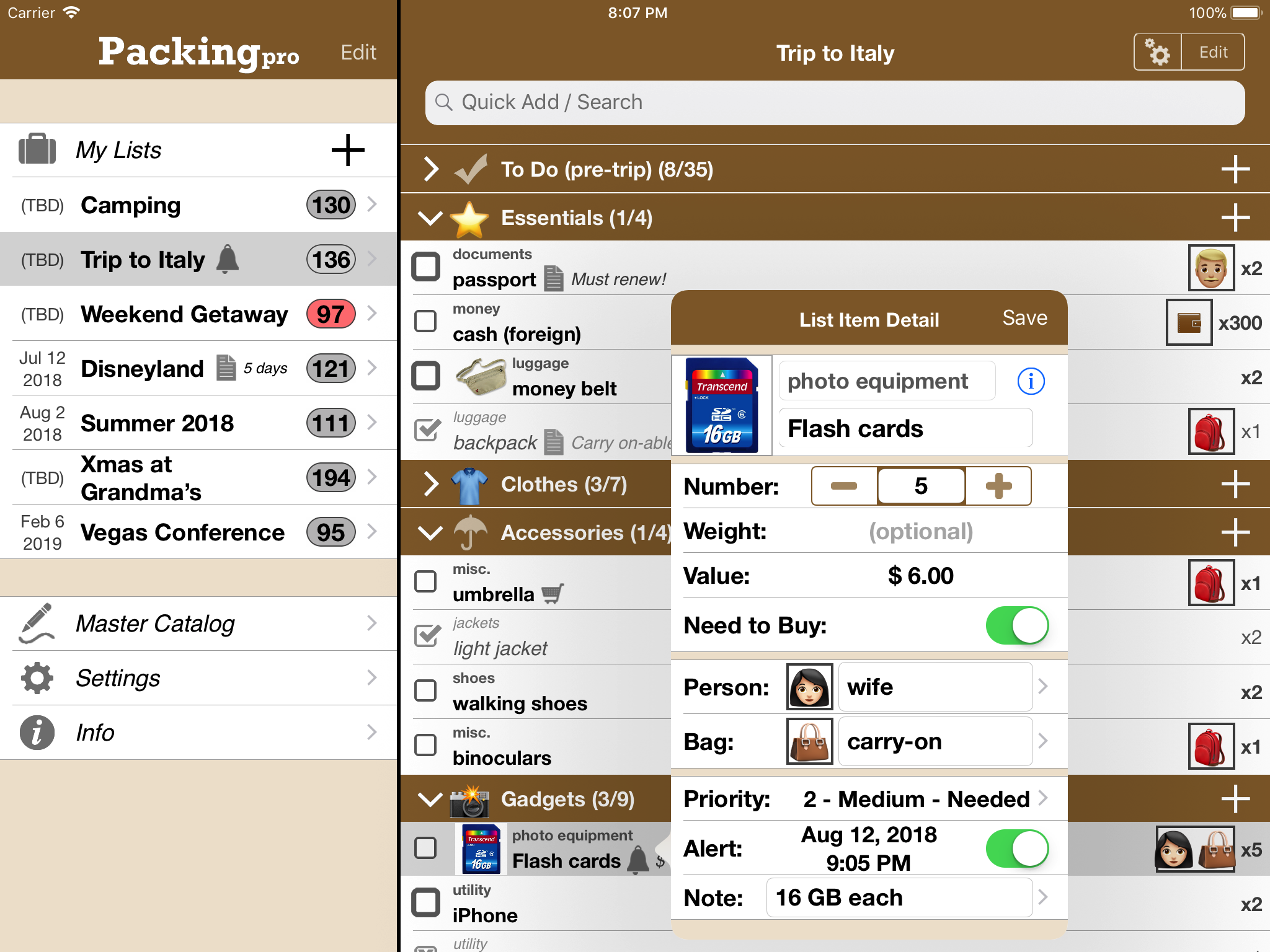
QuinnScape today announces a limited-time Christmas Sale of 66% off its popular Packing Pro travel app. From now until December 28, Packing Pro can be purchased for one third of its original price - a great deal, and perfect timing for any holiday traveling. Packing Pro is a mobile travel packing list app that features unlimited, 100% customizable packing lists, an extensive, yet flexible, catalog, handy sample lists, iCloud auto-sync and various list sharing options.
Taipei, Taiwan - QuinnScape today announces a limited-time Christmas Sale of 66% off for its popular Packing Pro travel app. From now until December 28, Packing Pro can be purchased for only US$0.99 - one third of its original price of US$2.99 - a great deal, and perfect timing for any holiday traveling. Packing Pro has been the flagship travel packing app on Apple's iOS App Store for nearly 10 years, and has been updated and improved dozens of times, most recently adding helpful organizing and editing features this past spring.
During the nearly ten years that Packing Pro has been on Apple's App Store, it has been highlighted several times, such as in the "Travel Survival Kit" and "Travel Expenses" promotions. It has also ranked at #1 for iPads and #2 for iPhones in the U.S. App Store's Travel section. Besides Apple, Packing Pro has also been recognized by CNN, WSJ, BBC, The New York Times, Expedia and Budget Travel, and has earned glowing reviews on major tech and app blogs (Gizmodo, Mashable, Macworld, CNET and iPhone Life, among others).
Packing Pro is a mobile travel packing list app that features unlimited, 100% customizable packing lists, an extensive, yet flexible, catalog, handy sample lists, iCloud auto-sync and various list sharing options. A host of special functions include:
* Multi-item selection from catalog for speedy list building
* Multi-item editing for easy list & catalog management
* Collapsable categories with floating headers & running item tallies
* List sorting & filtering by packing status, priority, need to buy, bag and/or person
* Item, weight and value totals & subtotals
* Item images to eliminate any confusion - never again pack the wrong item
* Item & list alerts for user-set reminders
* Email export for file sharing
* Wireless printing
* Fully customized device support for all sizes of iPhone, iPod touch & iPad
* Full multi-lingual support for English, Spanish, French, German, Italian, Portuguese, Russian, Polish, Japanese & Chinese
Besides the core features listed above (which are also present in the basic Packing (+TO DO!) app), Packing Pro also gives its users the following Pro-level features:
* iCloud auto-syncing support
* Expert packing list wizard that can "automagically" create a list
* Email, iTunes, AirDrop, Dropbox & Box file sharing, backup & out-of-app editing support
* Customized design (themes, layout, fonts, colors, textures)
* Double-sized Master Catalog with over 800 items and to-do tasks
* Twice as many sample lists
* Smart Search (lists & catalog)
Packing Pro's huge Christmas sale comes at the perfect time for any end-of-year traveling. Check it out today, and happy packing!
Pricing and Availability:
Packing Pro is a universal app that is available for purchase worldwide on the iPhone & iPad App Store for $2.99 (NOW ONLY US$ 0.99!), or the equivalent in local currency. The basic Packing (+TO DO!) sells for $0.99 (USD).
QuinnScape: http://www.quinnscape.com/
Packing Pro 13.0: http://www.quinnscape.com/PackingPro.asp
Purchase and Download: https://geo.itunes.apple.com/us/app/packing-pro/id312266675?mt=8&at=1l3v8Yv&pt=55410&ct=prmac
Video Demos: http://www.quinnscape.com/PackingPro-videodemo.asp
Screenshot: http://www.quinnscape.com/media/images/PackingPro-iPad-v12.4.png
App Icon: http://www.quinnscape.com/media/images/PackingPro-Icon-250x250.png
Since its founding in October 2008, QuinnScape has been managed by Quinn Genzel. Quinn is best known for his popular, top-ranking travel packing apps: Packing (+TO DO!) and Packing Pro. Packing Pro has been recognized by Apple, CNN, WSJ, BBC, National Geographic, Budget Travel, Fodor's, CNET, Macworld and a host of others as one of their top apps for traveling. Other app created by Quinn include a grocery shopping list app (Shopping Pro), nature appreciation apps (iLove Nature and iLove Birds), 3D VR action games (R.I.P and Ghost Buddy) and high-quality puzzles (the aQ's Pro Slider Puzzle series). Copyright (C) 2008-2018 QuinnScape. All Rights Reserved. Apple, the Apple logo, iPhone, iPod and iPad are registered trademarks of Apple Inc. in the U.S. and/or other countries.
*******
Link To Article: https://prmac.com/release-id-83217.htm
*******
---------------------------------------------------------------------------------
Note that you can alter delivered distributions at any time.
Login to your account on prMac to alter your channel selection, or to opt-out at any time.
Christmas Super Sale for Packing Pro Travel App - Published on 12/20/18
QuinnScape today announces a limited-time Christmas Sale of 66% off its popular Packing Pro travel app. From now until December 28, Packing Pro can be purchased for one third of its original price - a great deal, and perfect timing for any holiday traveling. Packing Pro is a mobile travel packing list app that features unlimited, 100% customizable packing lists, an extensive, yet flexible, catalog, handy sample lists, iCloud auto-sync and various list sharing options.
Taipei, Taiwan - QuinnScape today announces a limited-time Christmas Sale of 66% off for its popular Packing Pro travel app. From now until December 28, Packing Pro can be purchased for only US$0.99 - one third of its original price of US$2.99 - a great deal, and perfect timing for any holiday traveling. Packing Pro has been the flagship travel packing app on Apple's iOS App Store for nearly 10 years, and has been updated and improved dozens of times, most recently adding helpful organizing and editing features this past spring.
During the nearly ten years that Packing Pro has been on Apple's App Store, it has been highlighted several times, such as in the "Travel Survival Kit" and "Travel Expenses" promotions. It has also ranked at #1 for iPads and #2 for iPhones in the U.S. App Store's Travel section. Besides Apple, Packing Pro has also been recognized by CNN, WSJ, BBC, The New York Times, Expedia and Budget Travel, and has earned glowing reviews on major tech and app blogs (Gizmodo, Mashable, Macworld, CNET and iPhone Life, among others).
Packing Pro is a mobile travel packing list app that features unlimited, 100% customizable packing lists, an extensive, yet flexible, catalog, handy sample lists, iCloud auto-sync and various list sharing options. A host of special functions include:
* Multi-item selection from catalog for speedy list building
* Multi-item editing for easy list & catalog management
* Collapsable categories with floating headers & running item tallies
* List sorting & filtering by packing status, priority, need to buy, bag and/or person
* Item, weight and value totals & subtotals
* Item images to eliminate any confusion - never again pack the wrong item
* Item & list alerts for user-set reminders
* Email export for file sharing
* Wireless printing
* Fully customized device support for all sizes of iPhone, iPod touch & iPad
* Full multi-lingual support for English, Spanish, French, German, Italian, Portuguese, Russian, Polish, Japanese & Chinese
Besides the core features listed above (which are also present in the basic Packing (+TO DO!) app), Packing Pro also gives its users the following Pro-level features:
* iCloud auto-syncing support
* Expert packing list wizard that can "automagically" create a list
* Email, iTunes, AirDrop, Dropbox & Box file sharing, backup & out-of-app editing support
* Customized design (themes, layout, fonts, colors, textures)
* Double-sized Master Catalog with over 800 items and to-do tasks
* Twice as many sample lists
* Smart Search (lists & catalog)
Packing Pro's huge Christmas sale comes at the perfect time for any end-of-year traveling. Check it out today, and happy packing!
Pricing and Availability:
Packing Pro is a universal app that is available for purchase worldwide on the iPhone & iPad App Store for $2.99 (NOW ONLY US$ 0.99!), or the equivalent in local currency. The basic Packing (+TO DO!) sells for $0.99 (USD).
QuinnScape: http://www.quinnscape.com/
Packing Pro 13.0: http://www.quinnscape.com/PackingPro.asp
Purchase and Download: https://geo.itunes.apple.com/us/app/packing-pro/id312266675?mt=8&at=1l3v8Yv&pt=55410&ct=prmac
Video Demos: http://www.quinnscape.com/PackingPro-videodemo.asp
Screenshot: http://www.quinnscape.com/media/images/PackingPro-iPad-v12.4.png
App Icon: http://www.quinnscape.com/media/images/PackingPro-Icon-250x250.png

Since its founding in October 2008, QuinnScape has been managed by Quinn Genzel. Quinn is best known for his popular, top-ranking travel packing apps: Packing (+TO DO!) and Packing Pro. Packing Pro has been recognized by Apple, CNN, WSJ, BBC, National Geographic, Budget Travel, Fodor's, CNET, Macworld and a host of others as one of their top apps for traveling. Other app created by Quinn include a grocery shopping list app (Shopping Pro), nature appreciation apps (iLove Nature and iLove Birds), 3D VR action games (R.I.P and Ghost Buddy) and high-quality puzzles (the aQ's Pro Slider Puzzle series). Copyright (C) 2008-2018 QuinnScape. All Rights Reserved. Apple, the Apple logo, iPhone, iPod and iPad are registered trademarks of Apple Inc. in the U.S. and/or other countries.
*******
Link To Article: https://prmac.com/release-id-83217.htm
*******
---------------------------------------------------------------------------------
Note that you can alter delivered distributions at any time.
Login to your account on prMac to alter your channel selection, or to opt-out at any time.
Excel Software Ships MacA&D 5.1 & MacTranslator 4.1 for Software Design
A new article has been published at prMac.
Excel Software Ships MacA&D 5.1 & MacTranslator 4.1 for Software Design - Published on 12/19/18
Excel Software announces major enhancements to MacA&D for software design and requirements management. The companion MacTranslator tool generates design models from source code for procedural, object-oriented and SQL languages. Both are now 64-bit apps delivered by a 64-bit, Code Signed installer is enhanced for use on macOS Mohave. These tools support almost all popular software design methods and notations.
Henderson, Nevada - Excel Software released major enhancements to MacA&D for software design and requirements management. The companion MacTranslator tool generates design models from source code for procedural, object-oriented and SQL languages. Both tools are now 64-bit macOS applications delivered by a 64-bit, Code Signed installer enhanced for use on macOS Mohave.
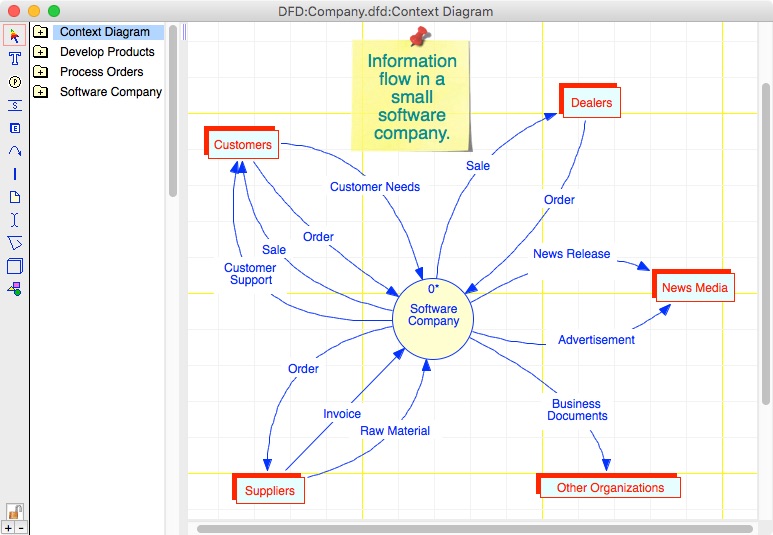
MacA&D 5.1 supports flow charts, the full 14-diagram UML notation for object-oriented design, structured analysis & design, data models, Business Process Models (BPMN), screen prototypes, system models with simulation, Pert charts and real-time, multi-task design. The integrated environment includes data dictionary, requirements management, code generation, reengineering, design namespaces and scriptable reports.
MacA&D includes model editors for process, data, class, state, screen, structure, object and task models. All model editors support multiple diagram levels, table of contents, multiple diagram notations, configurable color schemes, scaling, rich customization and navigational features plus extensive verification and balancing reports of information flow and consistency between diagrams.
MacTranslator 4.1 scans source code to extract design information into text files that are imported into MacA&D. The entire process from textual code to graphic design is fully automated.
When a developer selects the code folders, language and options, MacTranslator generates a project file of commands to extract the design information. That data is imported into MacA&D to populate the data dictionary and generate a stack of diagrams that reflect the code structure. Selectable features control code organization into diagrams, presentation options or identification of execution threads for representation on separate diagrams.
Together MacA&D and MacTranslator support design, code generation and reengineering for most popular programing languages:
* UML Class Models to and from Xojo, Swift, C , Objective-C, PHP, Java or Delphi
* Rich Data Models to and from SQL Schema with Indexes, Triggers, Primary and Foreign Keys
* Structure Charts to and from procedural C, Pascal, Basic, PHP or Fortran
With 30 years of continuous development and real-world experience by thousands of developers, MacA&D and MacTranslator support almost all popular design methods and notations. These tools are used for desktop, mainframe, embedded, mobile and web applications.
MacA&D 5.1 and MacTranslator 4.1 run on macOS 10.10 or newer computers. Both tools are available in Single User and Site License editions. MacA&D is scalable from a single user to a large development team with capabilities like design namespaces, powerful import and export features and multi-user team documents.
MacA&D comes in a Standard edition at $395, Desktop edition at $595 and Developer edition at $995. Each product includes 4 manuals, the Setup & Tutorials, Modeling Guide, User Guide and Code & Reports Guide. MacTranslator at $495 includes a User Guide with tutorials. Online resources include white papers and demonstration videos.
Excel Software: http://www.excelsoftware.com
MacA&D 5.1: http://www.excelsoftware.com/maca&dproducts
Purchase MacA&D: http://www.excelsoftware.com/priceandordering
Screenshot: http://www.excelsoftware.com/image/maca&d3screen.jpg
App Icon: http://www.excelsoftware.com/image/a&d_icon_128x128.gif
Established in 1985, Excel Software provides Windows and Mac OS X software products to thousands of users worldwide. Capabilities include system modeling & simulation, requirements management, software design, code generation, reengineering, bug tracking, help authoring, software license management, document protection and internet marketing automation. All Material and Software (C) Copyright 2018 Excel Software. All Rights Reserved. Apple, the Apple logo, Macintosh Mac OS X and macOS are registered trademarks of Apple Inc. in the U.S. and/or other countries. Other trademarks and registered trademarks may be the property of their respective owners.
*******
Link To Article: https://prmac.com/release-id-83216.htm
*******
---------------------------------------------------------------------------------
Note that you can alter delivered distributions at any time.
Login to your account on prMac to alter your channel selection, or to opt-out at any time.
Excel Software Ships MacA&D 5.1 & MacTranslator 4.1 for Software Design - Published on 12/19/18
Excel Software announces major enhancements to MacA&D for software design and requirements management. The companion MacTranslator tool generates design models from source code for procedural, object-oriented and SQL languages. Both are now 64-bit apps delivered by a 64-bit, Code Signed installer is enhanced for use on macOS Mohave. These tools support almost all popular software design methods and notations.
Henderson, Nevada - Excel Software released major enhancements to MacA&D for software design and requirements management. The companion MacTranslator tool generates design models from source code for procedural, object-oriented and SQL languages. Both tools are now 64-bit macOS applications delivered by a 64-bit, Code Signed installer enhanced for use on macOS Mohave.
MacA&D 5.1 supports flow charts, the full 14-diagram UML notation for object-oriented design, structured analysis & design, data models, Business Process Models (BPMN), screen prototypes, system models with simulation, Pert charts and real-time, multi-task design. The integrated environment includes data dictionary, requirements management, code generation, reengineering, design namespaces and scriptable reports.
MacA&D includes model editors for process, data, class, state, screen, structure, object and task models. All model editors support multiple diagram levels, table of contents, multiple diagram notations, configurable color schemes, scaling, rich customization and navigational features plus extensive verification and balancing reports of information flow and consistency between diagrams.
MacTranslator 4.1 scans source code to extract design information into text files that are imported into MacA&D. The entire process from textual code to graphic design is fully automated.
When a developer selects the code folders, language and options, MacTranslator generates a project file of commands to extract the design information. That data is imported into MacA&D to populate the data dictionary and generate a stack of diagrams that reflect the code structure. Selectable features control code organization into diagrams, presentation options or identification of execution threads for representation on separate diagrams.
Together MacA&D and MacTranslator support design, code generation and reengineering for most popular programing languages:
* UML Class Models to and from Xojo, Swift, C , Objective-C, PHP, Java or Delphi
* Rich Data Models to and from SQL Schema with Indexes, Triggers, Primary and Foreign Keys
* Structure Charts to and from procedural C, Pascal, Basic, PHP or Fortran
With 30 years of continuous development and real-world experience by thousands of developers, MacA&D and MacTranslator support almost all popular design methods and notations. These tools are used for desktop, mainframe, embedded, mobile and web applications.
MacA&D 5.1 and MacTranslator 4.1 run on macOS 10.10 or newer computers. Both tools are available in Single User and Site License editions. MacA&D is scalable from a single user to a large development team with capabilities like design namespaces, powerful import and export features and multi-user team documents.
MacA&D comes in a Standard edition at $395, Desktop edition at $595 and Developer edition at $995. Each product includes 4 manuals, the Setup & Tutorials, Modeling Guide, User Guide and Code & Reports Guide. MacTranslator at $495 includes a User Guide with tutorials. Online resources include white papers and demonstration videos.
Excel Software: http://www.excelsoftware.com
MacA&D 5.1: http://www.excelsoftware.com/maca&dproducts
Purchase MacA&D: http://www.excelsoftware.com/priceandordering
Screenshot: http://www.excelsoftware.com/image/maca&d3screen.jpg
App Icon: http://www.excelsoftware.com/image/a&d_icon_128x128.gif

Established in 1985, Excel Software provides Windows and Mac OS X software products to thousands of users worldwide. Capabilities include system modeling & simulation, requirements management, software design, code generation, reengineering, bug tracking, help authoring, software license management, document protection and internet marketing automation. All Material and Software (C) Copyright 2018 Excel Software. All Rights Reserved. Apple, the Apple logo, Macintosh Mac OS X and macOS are registered trademarks of Apple Inc. in the U.S. and/or other countries. Other trademarks and registered trademarks may be the property of their respective owners.
*******
Link To Article: https://prmac.com/release-id-83216.htm
*******
---------------------------------------------------------------------------------
Note that you can alter delivered distributions at any time.
Login to your account on prMac to alter your channel selection, or to opt-out at any time.
Scorpion BarCode 3.00 Released - Mojave Dark Mode Capable!
A new article has been published at prMac.
Scorpion BarCode 3.00 Released - Mojave Dark Mode Capable! - Published on 12/18/18
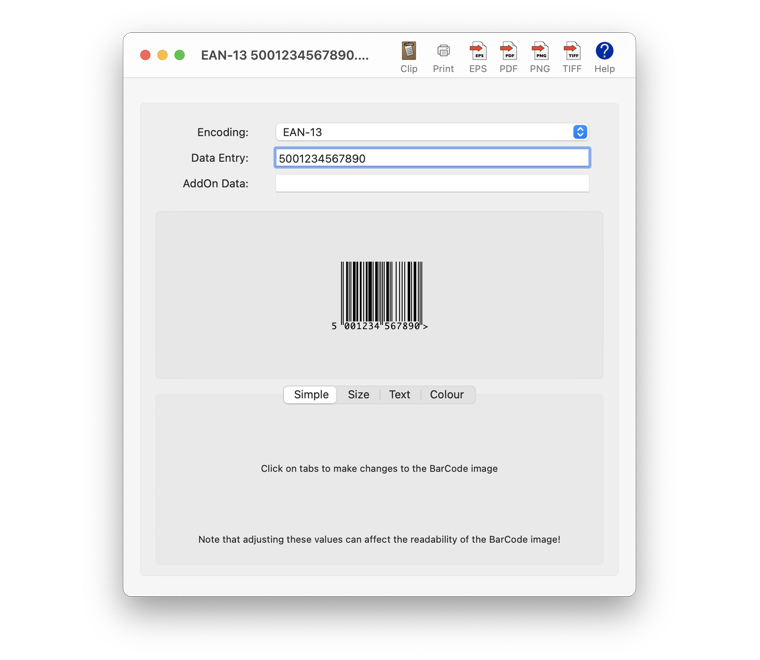
Scorpion Research today announces Scorpion BarCode 3.00, an update to its popular barcode creation software for Apple macOS. Scorpion BarCode helps with easy creation and printing of all major barcode symbologies in EPS, PDF, PNG, or TIFF file formats. Easily integrate Barcodes into popular database, spreadsheet and word processor applications. A command line version is also provided to build powerful scripted solutions. Designed for macOS 10.14 Mojave but works with OS X 10.8 or later.
Chislehurst Kent, United Kingdom - Scorpion Research today announced the release of version 3.00 of Scorpion BarCode, its popular BarCode creation software for Apple macOS computers. Scorpion BarCode is a complete Barcode creation utility that users can use to quickly create Barcode images for use in other applications.
The software supports the following symbologies:
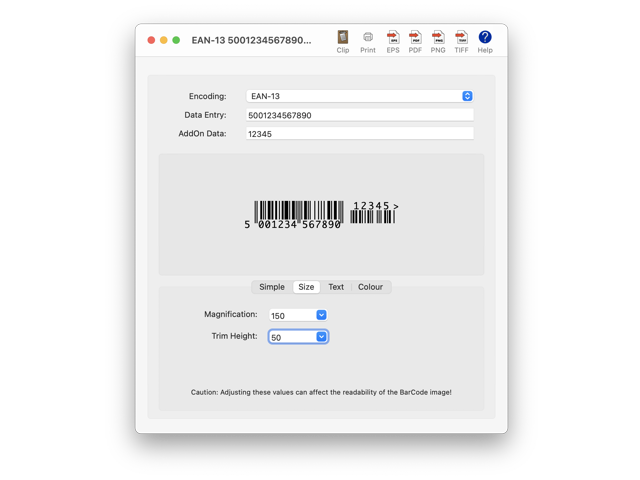
* EAN-13 (With or without Add-On codes)
* EAN-8
* EAN-128 (Codeset B and Codeset C)
* EAN-14
* EAN-18
* EAN-99
* EAN-Coupon
* EAN-Velocity
* UPC-A (With or without Add-On codes)
* UPC-E
* Code-128 (Codeset B and Codeset C)
* Code-93
* Code-39
* Code-32
* Code-25
* UPC-Coupon
* Codabar
* ISSN (10 digit / 13 digit)
* ISBN (10 digit / 13 digit)
* ISMN
* PostNet (5 digit / 9 digit / 11 digit)
* RM4SCC
* Pharmacode
* CIP
* PZN
* MSI
* ITF-SCC
* ITF-14
* Interleaved-25
* QRCode
* MicroQR
* PDF417
* Identcode
* DataMatrix
* USPS4CB
* FIM
* Databar-Omnidirectional
* Databar-Truncated
* Databar-Stacked
* Databar-StackedOmnidirectional
* Databar-Limited
* Databar-Expanded
* Telepen
By entering the text of a Barcode, the software produces the graphic equivalent using one of the above selected symbologies.
Use it to:
* Create editable vector PDF or EPS documents
* Create bitmap PNG or TIFF documents with transparency
* Paste into another application simply via the Clipboard
* Print camera ready artwork automatically
* Convert text in other applications into Barcode graphics using AppleScript
Sample AppleScripts are available to enable you to automate anyone's BarCode creation workflow including integrating Barcodes into popular database, spreadsheet and word processor software.
A command line version is also available, enabling powerful custom scripting solutions beyond AppleScript or Automator. Integrate into solutions directly using Unix technologies such as shell scripts or via web CGI scripts.
The Scorpion BarCode software embraces the latest Apple technology to simplify the user experience. The entire User Guide is built into the onscreen help and separately viewable.
New in Scorpion BarCode 3.00:
* Optimized for macOS 10.14 Mojave
* Dark Mode capability
System Requirements:
The Scorpion BarCode software operates on any Mac compatible system running MacOS X 10.8 Mountain Lion or later. Optimized for macOS 10.14 Mojave.
Pricing and Availability:
Scorpion BarCode 3.00 is available now with a Free 30 day trial. A single user license GBP 25.00 (Approx $30.00 USD). Scorpion BarCode may be downloaded from the Scorpion Research web site, following the links to Software Products, Scorpion BarCode and then Download.
Scorpion Research: http://www.scorpionresearch.com/
Scorpion BarCode 3.00: http://www.scorpionresearch.com/srl/SBCH_Hom.htm
Download Scorpion BarCode 3.00: http://www.scorpionresearch.com/srl/ScorpionBarCode_300.dmg
Purchase: http://www.scorpionresearch.com/srl/SBCH_Buy.htm
Screenshot 1: http://www.scorpionresearch.com/srl/SBCH_L01.png
Screenshot 2: http://www.scorpionresearch.com/srl/SBCH_ScL.png
Scorpion Research was founded in 1994 focusing its activities on implementing modern management techniques using its innovative software products. Scorpion Research is an ISO 9001 and ISO 14001 compliant company demonstrating its commitment to a consistent level of quality and environmental responsibility. Scorpion Research complements these activities by providing consultancy and support services that assist in implementing rapid, efficient and cost effective solutions. Copyright (C) 1994-2018 Scorpion Research Ltd. All Rights Reserved Worldwide. Apple, the Apple logo and Macintosh are registered trademarks of Apple Inc. in the U.S. and/or other countries.
*******
Link To Article: https://prmac.com/release-id-83215.htm
*******
---------------------------------------------------------------------------------
Note that you can alter delivered distributions at any time.
Login to your account on prMac to alter your channel selection, or to opt-out at any time.
Scorpion BarCode 3.00 Released - Mojave Dark Mode Capable! - Published on 12/18/18
Scorpion Research today announces Scorpion BarCode 3.00, an update to its popular barcode creation software for Apple macOS. Scorpion BarCode helps with easy creation and printing of all major barcode symbologies in EPS, PDF, PNG, or TIFF file formats. Easily integrate Barcodes into popular database, spreadsheet and word processor applications. A command line version is also provided to build powerful scripted solutions. Designed for macOS 10.14 Mojave but works with OS X 10.8 or later.
Chislehurst Kent, United Kingdom - Scorpion Research today announced the release of version 3.00 of Scorpion BarCode, its popular BarCode creation software for Apple macOS computers. Scorpion BarCode is a complete Barcode creation utility that users can use to quickly create Barcode images for use in other applications.
The software supports the following symbologies:
* EAN-13 (With or without Add-On codes)
* EAN-8
* EAN-128 (Codeset B and Codeset C)
* EAN-14
* EAN-18
* EAN-99
* EAN-Coupon
* EAN-Velocity
* UPC-A (With or without Add-On codes)
* UPC-E
* Code-128 (Codeset B and Codeset C)
* Code-93
* Code-39
* Code-32
* Code-25
* UPC-Coupon
* Codabar
* ISSN (10 digit / 13 digit)
* ISBN (10 digit / 13 digit)
* ISMN
* PostNet (5 digit / 9 digit / 11 digit)
* RM4SCC
* Pharmacode
* CIP
* PZN
* MSI
* ITF-SCC
* ITF-14
* Interleaved-25
* QRCode
* MicroQR
* PDF417
* Identcode
* DataMatrix
* USPS4CB
* FIM
* Databar-Omnidirectional
* Databar-Truncated
* Databar-Stacked
* Databar-StackedOmnidirectional
* Databar-Limited
* Databar-Expanded
* Telepen
By entering the text of a Barcode, the software produces the graphic equivalent using one of the above selected symbologies.
Use it to:
* Create editable vector PDF or EPS documents
* Create bitmap PNG or TIFF documents with transparency
* Paste into another application simply via the Clipboard
* Print camera ready artwork automatically
* Convert text in other applications into Barcode graphics using AppleScript
Sample AppleScripts are available to enable you to automate anyone's BarCode creation workflow including integrating Barcodes into popular database, spreadsheet and word processor software.
A command line version is also available, enabling powerful custom scripting solutions beyond AppleScript or Automator. Integrate into solutions directly using Unix technologies such as shell scripts or via web CGI scripts.
The Scorpion BarCode software embraces the latest Apple technology to simplify the user experience. The entire User Guide is built into the onscreen help and separately viewable.
New in Scorpion BarCode 3.00:
* Optimized for macOS 10.14 Mojave
* Dark Mode capability
System Requirements:
The Scorpion BarCode software operates on any Mac compatible system running MacOS X 10.8 Mountain Lion or later. Optimized for macOS 10.14 Mojave.
Pricing and Availability:
Scorpion BarCode 3.00 is available now with a Free 30 day trial. A single user license GBP 25.00 (Approx $30.00 USD). Scorpion BarCode may be downloaded from the Scorpion Research web site, following the links to Software Products, Scorpion BarCode and then Download.
Scorpion Research: http://www.scorpionresearch.com/
Scorpion BarCode 3.00: http://www.scorpionresearch.com/srl/SBCH_Hom.htm
Download Scorpion BarCode 3.00: http://www.scorpionresearch.com/srl/ScorpionBarCode_300.dmg
Purchase: http://www.scorpionresearch.com/srl/SBCH_Buy.htm
Screenshot 1: http://www.scorpionresearch.com/srl/SBCH_L01.png
Screenshot 2: http://www.scorpionresearch.com/srl/SBCH_ScL.png
Scorpion Research was founded in 1994 focusing its activities on implementing modern management techniques using its innovative software products. Scorpion Research is an ISO 9001 and ISO 14001 compliant company demonstrating its commitment to a consistent level of quality and environmental responsibility. Scorpion Research complements these activities by providing consultancy and support services that assist in implementing rapid, efficient and cost effective solutions. Copyright (C) 1994-2018 Scorpion Research Ltd. All Rights Reserved Worldwide. Apple, the Apple logo and Macintosh are registered trademarks of Apple Inc. in the U.S. and/or other countries.
*******
Link To Article: https://prmac.com/release-id-83215.htm
*******
---------------------------------------------------------------------------------
Note that you can alter delivered distributions at any time.
Login to your account on prMac to alter your channel selection, or to opt-out at any time.
Jigsaw Puzzles Clash Announces Fun New Multiplayer Jigsaw Puzzle Game!
A new article has been published at prMac.
Jigsaw Puzzles Clash Announces Fun New Multiplayer Jigsaw Puzzle Game! - Published on 12/18/18
RV AppStudios is proud to announce the release of the first and only competitive multiplayer jigsaw game that takes place on a single puzzle board, and where the most points wins!
Atlanta, Georgia - RV AppStudios is proud to announce the release of the first and only competitive multiplayer jigsaw game that takes place on a single puzzle board, and where the most points wins!
Jigsaw Puzzles Clash offers a brand new way to solve jigsaw puzzles on mobile devices with an multiplayer mode. Race against your opponent to see who can fit together the most pieces of the same puzzle. The faster a player works, the more points they get, and more points means an epic victory!
The beauty of single-board puzzle solving is that all actions are shown as they occur. There are no time delays, just real-time movement and jigsaw placement. For the first-ever point based multiplayer jigsaw puzzle game for mobile platforms!
Jigsaw Puzzles Clash also comes with a full-featured single player mode packed with content, just in case users want a break from multiplayer mayhem. This includes thousands of HD puzzle images, regular free puzzle releases, and a beautiful Christmas theme just in time for the holidays.
Jigsaw Puzzles Clash presents an innovative new experience for mobile jigsaw fans. It's sure to excite players of all ages, both solo puzzle solvers and PvP multiplayer fans alike.
RV AppStudios creates fun, colorful, and entertaining gaming experiences and high-quality mobile utilities. Some of the team's recent hits include Fruit Cube Blast and Ice Cream Paradise.
For more information about Jigsaw Puzzles Clash, including images and videos, visit the official website. To stay up-to-date on all things Jigsaw Puzzles Clash, follow @RVAppStudios on Twitter and Facebook.
RV AppStudios: http://www.rvappstudios.com
Jigsaw Puzzles Clash : http://www.rvappstudios.com/jigsaw-puzzles-clash-52.html
Download Jigsaw Puzzles Clash From iTunes: https://itunes.apple.com/us/app/jigsaw-puzzles-clash/id1440151043?mt=8
Download Jigsaw Puzzles Clash from Google Play: https://play.google.com/store/apps/details?id=com.rvappstudios.jigsaw.puzzles
YouTube Video (Gameplay Trailer): https://www.youtube.com/watch?v=vEKYsSIuzTE
App Icon: http://www.rvappstudios.com/appimg/52/jigsaw-puzzles-clashlogo2.png
RV AppStudios, creators of hit puzzle games like Fruit Cube Blast and Ice Cream Paradise, is proud to announce the release of Jigsaw Puzzles Clash, the first single-board competitive multiplayer jigsaw puzzle game for mobile platforms! Copyright (C) 2018 RV AppStudios. All Rights Reserved. Apple, the Apple logo, iPhone, iPad and iPod are registered trademarks of Apple Inc. in the U.S. and/or other countries.
*******
Link To Article: https://prmac.com/release-id-83214.htm
*******
---------------------------------------------------------------------------------
Note that you can alter delivered distributions at any time.
Login to your account on prMac to alter your channel selection, or to opt-out at any time.
Jigsaw Puzzles Clash Announces Fun New Multiplayer Jigsaw Puzzle Game! - Published on 12/18/18
RV AppStudios is proud to announce the release of the first and only competitive multiplayer jigsaw game that takes place on a single puzzle board, and where the most points wins!
Atlanta, Georgia - RV AppStudios is proud to announce the release of the first and only competitive multiplayer jigsaw game that takes place on a single puzzle board, and where the most points wins!
Jigsaw Puzzles Clash offers a brand new way to solve jigsaw puzzles on mobile devices with an multiplayer mode. Race against your opponent to see who can fit together the most pieces of the same puzzle. The faster a player works, the more points they get, and more points means an epic victory!
The beauty of single-board puzzle solving is that all actions are shown as they occur. There are no time delays, just real-time movement and jigsaw placement. For the first-ever point based multiplayer jigsaw puzzle game for mobile platforms!
Jigsaw Puzzles Clash also comes with a full-featured single player mode packed with content, just in case users want a break from multiplayer mayhem. This includes thousands of HD puzzle images, regular free puzzle releases, and a beautiful Christmas theme just in time for the holidays.
Jigsaw Puzzles Clash presents an innovative new experience for mobile jigsaw fans. It's sure to excite players of all ages, both solo puzzle solvers and PvP multiplayer fans alike.
RV AppStudios creates fun, colorful, and entertaining gaming experiences and high-quality mobile utilities. Some of the team's recent hits include Fruit Cube Blast and Ice Cream Paradise.
For more information about Jigsaw Puzzles Clash, including images and videos, visit the official website. To stay up-to-date on all things Jigsaw Puzzles Clash, follow @RVAppStudios on Twitter and Facebook.
RV AppStudios: http://www.rvappstudios.com
Jigsaw Puzzles Clash : http://www.rvappstudios.com/jigsaw-puzzles-clash-52.html
Download Jigsaw Puzzles Clash From iTunes: https://itunes.apple.com/us/app/jigsaw-puzzles-clash/id1440151043?mt=8
Download Jigsaw Puzzles Clash from Google Play: https://play.google.com/store/apps/details?id=com.rvappstudios.jigsaw.puzzles
YouTube Video (Gameplay Trailer): https://www.youtube.com/watch?v=vEKYsSIuzTE
App Icon: http://www.rvappstudios.com/appimg/52/jigsaw-puzzles-clashlogo2.png

RV AppStudios, creators of hit puzzle games like Fruit Cube Blast and Ice Cream Paradise, is proud to announce the release of Jigsaw Puzzles Clash, the first single-board competitive multiplayer jigsaw puzzle game for mobile platforms! Copyright (C) 2018 RV AppStudios. All Rights Reserved. Apple, the Apple logo, iPhone, iPad and iPod are registered trademarks of Apple Inc. in the U.S. and/or other countries.
*******
Link To Article: https://prmac.com/release-id-83214.htm
*******
---------------------------------------------------------------------------------
Note that you can alter delivered distributions at any time.
Login to your account on prMac to alter your channel selection, or to opt-out at any time.
Maxprog releases iCash 7.7 for macOS and MS Windows
A new article has been published at prMac.
Maxprog releases iCash 7.7 for macOS and MS Windows - Published on 12/18/18
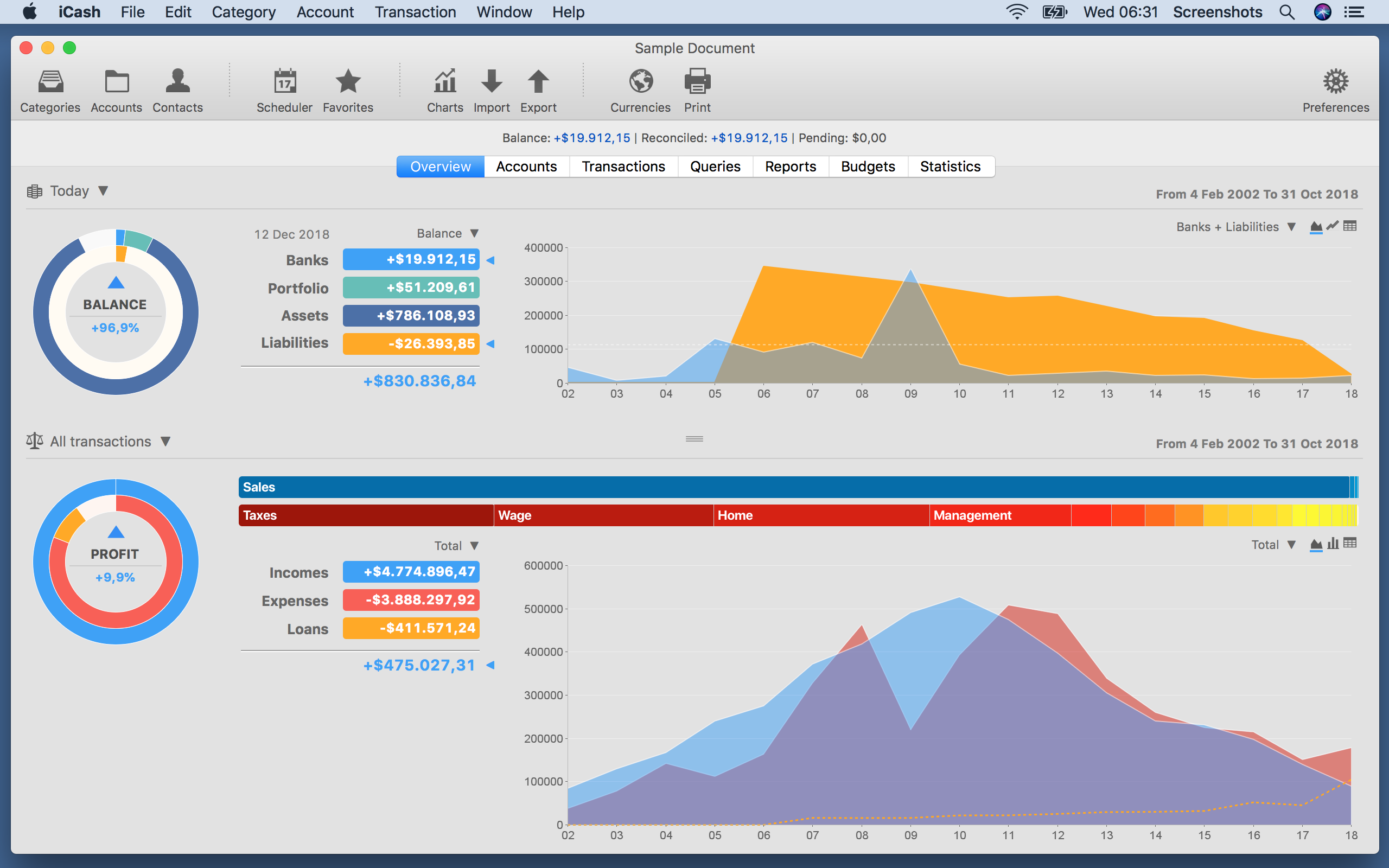
Maxprog today announces iCash 7.7, an important update to their personal finance solution for macOS and Windows. iCash was designed specifically to track incomes, expenses, credits, debts and banks transactions. It offers unlimited categories, multiple accounts, multiple currencies, a SQL backend engine, password protection, export/import routines, search functions, and drag & drop support. Version 7.7 offers a lot of new features, improvements and now available in several new languages.
Denia, Spain - Maxprog today is proud to announce the release of iCash 7.7, an important update to their personal finance software for macOS and Windows. iCash is a Personal Finance software, a tool intended to control your money, keeping track of incomes, expenses, credits, debts and Banks transactions for you. As simple as creating the accounts you need, and move money between them! You don't even need to know about accounting or even care about it.
iCash was designed specifically to track incomes, expenses, credits, debts and banks transactions. It offers unlimited categories, multiple accounts creation, multiple currencies, a SQL backend engine, password protection, export/import routines, search functions, and drag & drop support (macOS and Windows).
iCash can serve several small accounting needs for either private users, or clubs, associations, self-employed, small businesses or simply to be used at home, making keeping track of incomes, expenses and Bank transactions a snap. With a few clicks you can begin creating accounts and making transactions in minutes.
Version 7.7 is now available in English, German, French, Swedish, Italian, Dutch, Russian, Spanish, Portuguese, Japanese, Chinese and Korean on Maxprog website with a lot of new features and improvements.
iCash is versatil and user-friendly. For this reason it doesn't use the principle of double-entry bookkeeping making it much easier to be used by people with very little or no accounting knowledge at all. Simply create accounts for all your expenses, incomes, Banks - and start moving money between them. iCash will then allow you to find out where all your money comes from and where it goes.
All accounts are well organized according to user-defined categories and built-in types so reports can be tailored to include all records or only ones meeting specified criteria. iCash also allows you to have as many money manager documents as necessary so you can control almost anything from Clubs, associations, home and so on at the same time.
Language Support:
iCash is available in English, German, French, Swedish, Italian, Dutch, Russian, Spanish, Portuguese, Japanese, Chinese and Korean languages.
Pricing and Availability:
iCash 7.7 is $25 (USD), available now and can be downloaded from MAX Programming online. For more information, please contact Stanley Roche Busk.
Maxprog: https://www.maxprog.com
iCash 7.7: https://www.maxprog.com/site/software/personal-finance/icash_sheet_us.php
Download iCash: https://www.maxprog.com/products/iCash.dmg
Purchase iCash: https://www.maxprog.com/store_selector.php?cmd=_xclick&sku=8
Screenshot: https://www.maxprog.com/pr/img/icash_overview_panel.png
Denia, Spain - Maxprog today is proud to announce the release of iCash 7.7, an important update to t: https://www.maxprog.com/pictures/icon_icash_new_1024x1024.png
MAX Programming, LLC. also known as Maxprog(R) is a privately held company dedicated to Macintosh, Windows and Linux software development. MAX Programming mainly develops and markets Internet, communication and database tools. Max Programming was founded in the early nineties by French-born programmer Stanley Roche Busk, after over 15 years of experience in the high-tech networking industry and computer software development, now Chief Executive Officer of the company. Since its creation, Max Programming has built firm business relations with thousands of clients from over 136 countries with products localized in up to 14 different languages like English, French, German, Spanish, Italian, Russian, Japanese, Chinese, Dutch, Swedish and Portuguese. English is our primary language. Copyright (C) 2002-2018 Max Programming, LLC - All rights reserved. Other trademarks and registered trademarks may be the property of their respective owners.
*******
Link To Article: https://prmac.com/release-id-83212.htm
*******
---------------------------------------------------------------------------------
Note that you can alter delivered distributions at any time.
Login to your account on prMac to alter your channel selection, or to opt-out at any time.
Maxprog releases iCash 7.7 for macOS and MS Windows - Published on 12/18/18
Maxprog today announces iCash 7.7, an important update to their personal finance solution for macOS and Windows. iCash was designed specifically to track incomes, expenses, credits, debts and banks transactions. It offers unlimited categories, multiple accounts, multiple currencies, a SQL backend engine, password protection, export/import routines, search functions, and drag & drop support. Version 7.7 offers a lot of new features, improvements and now available in several new languages.
Denia, Spain - Maxprog today is proud to announce the release of iCash 7.7, an important update to their personal finance software for macOS and Windows. iCash is a Personal Finance software, a tool intended to control your money, keeping track of incomes, expenses, credits, debts and Banks transactions for you. As simple as creating the accounts you need, and move money between them! You don't even need to know about accounting or even care about it.
iCash was designed specifically to track incomes, expenses, credits, debts and banks transactions. It offers unlimited categories, multiple accounts creation, multiple currencies, a SQL backend engine, password protection, export/import routines, search functions, and drag & drop support (macOS and Windows).
iCash can serve several small accounting needs for either private users, or clubs, associations, self-employed, small businesses or simply to be used at home, making keeping track of incomes, expenses and Bank transactions a snap. With a few clicks you can begin creating accounts and making transactions in minutes.
Version 7.7 is now available in English, German, French, Swedish, Italian, Dutch, Russian, Spanish, Portuguese, Japanese, Chinese and Korean on Maxprog website with a lot of new features and improvements.
iCash is versatil and user-friendly. For this reason it doesn't use the principle of double-entry bookkeeping making it much easier to be used by people with very little or no accounting knowledge at all. Simply create accounts for all your expenses, incomes, Banks - and start moving money between them. iCash will then allow you to find out where all your money comes from and where it goes.
All accounts are well organized according to user-defined categories and built-in types so reports can be tailored to include all records or only ones meeting specified criteria. iCash also allows you to have as many money manager documents as necessary so you can control almost anything from Clubs, associations, home and so on at the same time.
Language Support:
iCash is available in English, German, French, Swedish, Italian, Dutch, Russian, Spanish, Portuguese, Japanese, Chinese and Korean languages.
Pricing and Availability:
iCash 7.7 is $25 (USD), available now and can be downloaded from MAX Programming online. For more information, please contact Stanley Roche Busk.
Maxprog: https://www.maxprog.com
iCash 7.7: https://www.maxprog.com/site/software/personal-finance/icash_sheet_us.php
Download iCash: https://www.maxprog.com/products/iCash.dmg
Purchase iCash: https://www.maxprog.com/store_selector.php?cmd=_xclick&sku=8
Screenshot: https://www.maxprog.com/pr/img/icash_overview_panel.png
Denia, Spain - Maxprog today is proud to announce the release of iCash 7.7, an important update to t: https://www.maxprog.com/pictures/icon_icash_new_1024x1024.png

MAX Programming, LLC. also known as Maxprog(R) is a privately held company dedicated to Macintosh, Windows and Linux software development. MAX Programming mainly develops and markets Internet, communication and database tools. Max Programming was founded in the early nineties by French-born programmer Stanley Roche Busk, after over 15 years of experience in the high-tech networking industry and computer software development, now Chief Executive Officer of the company. Since its creation, Max Programming has built firm business relations with thousands of clients from over 136 countries with products localized in up to 14 different languages like English, French, German, Spanish, Italian, Russian, Japanese, Chinese, Dutch, Swedish and Portuguese. English is our primary language. Copyright (C) 2002-2018 Max Programming, LLC - All rights reserved. Other trademarks and registered trademarks may be the property of their respective owners.
*******
Link To Article: https://prmac.com/release-id-83212.htm
*******
---------------------------------------------------------------------------------
Note that you can alter delivered distributions at any time.
Login to your account on prMac to alter your channel selection, or to opt-out at any time.
The Entire USDA National Nutrient DB: Calories to Vitamin K - iNutrients
A new article has been published at prMac.
The Entire USDA National Nutrient DB: Calories to Vitamin K - iNutrients - Published on 12/17/18
Indie developer James Hollender offers version 3.1.1 of his iNutrients app with the entire USDA National Nutrient Database (Internet access NOT required) for: Calories, Carbohydrates, Dietary Cholesterol, Fiber, Potassium, Proteins, Saturated Fat, Sodium, Sugars and Vitamin K. The database now includes 8,789 different foods and 15,438 food servings. Even with this large quantity it may still not be enough. Users can now add their own custom foods and food servings to help fill that gap.
Revere, Massachusetts - Indie developer James Hollender offers version 3.1.1 of his iNutrients app with the latest USDA National Nutrient Database (SR-28), which requires no Internet access, for 10 nutrients: Calories, Carbohydrates, Dietary Cholesterol, Fiber, Potassium, Proteins, Saturated Fat, Sodium, Sugars and Vitamin K. The database now includes 8,789 different foods and 15,438 food servings.
Despite the enormous number of foods and food servings in the USDA National Nutrient Database, there are still many which aren't included, especially most name brands. Having the capability of defining Custom Foods that are missing fills this gap, which then makes keeping track of daily nutritional intake more complete.
It's extremely slick to be able to input the information from a packaged food's nutrition label and moments later see color codings for all ten nutrients indicating the ranking of their concentration. As an example the developer talks about a popular brand name frozen dinner.
Once the data from the nutrition label is input and saved, the color rankings show up for the Custom Food indicating Carbohydrates are Extremely High (Black); Sodium is Very High (Dark Red); Calories are High (Red); Potassium, Saturated Fat & Sugars are Moderately High (Orange); Proteins are Moderate (Yellow); Cholesterol & Fiber are Moderately Low (Light Green); and Vitamin K is Unknown (Gray) because data wasn't available. This immediately points out that maybe this small meal, eaten frequently, isn't as nutritionally good as originally thought.
Each Custom Food Definition has one main Serving Size and an allowance to add up to three additional ones. Nutrient data is extrapolated for each of the additional Serving Sizes based on their weight compared to the main Serving Size.
There is nothing that prevents the user from collecting nutritional information for a complete meal and then creating a single Custom Food for that meal. This provides the capability to speed input of the same meal eaten frequently.
All Custom Food Definitions are automatically included in searches of the entire USDA database.
If for some reason the user doesn't agree with the developer's default Color Scales for the ten nutrients covered, each individual scale can be customized. Making a change will be reflected for all previously recorded data when next presented.
The iNutrients app provides information based on the USDA National Nutrient Database for Standard Reference concerning ten key nutrients:
* Calories - Great for anyone concerned about weight management
* Carbohydrates - Used to make glucose which is the fuel that gives you energy
* Cholesterol - Dietary Cholesterol - Aids in the production of Vitamin D
* Fiber - Essential for cardiovascular health; prevents constipation; improves control of diabetes
* Potassium - Helps with anxiety and stress; blood pressure; brain function; cramps, etc.
* Proteins - Important for Bodybuilders, Vegetarians or Vegans
* Saturated Fat - Eat only moderate amounts to keep healthy
* Sodium - Would you believe there's sodium in water?
* Sugars - Help keep your sugar intake under control
* Vitamin K - Vitamins K1, K1D & K2 - Extremely important for anyone taking Blood Thinning Medications like Coumadin or Warfarin
These nutrients are listed and presented throughout the app in alphabetical order. Icons used to help easily identify the nutrients are from other apps by the developer, each covering a single nutrient corresponding to the nutrients in this app are used throughout. For the price of just a little more than two individual nutrient apps, users can get all ten nutrients in a single app.
iNutrients utilizes information taken from 100% of the USDA National Nutrient Database for each of these ten nutrients, unlike the individual apps which only cover less than 10% of what's available. Users will find the Search functionality lightning fast as all needed infromation from the USDA database is local to the app - no internet connectivity is required.
From the Search functionality the user can save information for the foods they eat each day. They are able to pick a serving size and then either record a multiple of 0.1 - 9.9 servings; or optionally create a custom serving size from 1 to 500 grams. As they change the serving size they can graphically see the the effect on the various nutrients via color coding ranging from white to black:
* Black - Extremely High
* Dark Red - Very High
* Red - High
* Orange - Moderately High
* Yellow - Moderate
* Light Green - Moderately Low
* Green - Low
* Light Blue - Very Low
* White - Extremely Low
The My Data section allows users to access up to a full year's worth of Food Serving Intake Items stored in their Personal iNutrients Database. Select any Intake Item to get the complete information available. From the display users can tap the Action button in the upper right corner to:
* Delete - Delete the current Food Serving.
* Change Number of Servings - Change the number of Servings for the current Food Intake Item.
* Change the Intake Date - Move the current Food Serving to another day. - This is extremely useful if the user wasn't able to enter what they've eaten on the day it occurred; just simply enter it and then use this function to change to the date needed.
* Copy the Intake Item to Today - This allows the user to copy an individual Food Intake Item from any day, making a copy for the current day.
Also available is an allowance to copy all the Food Intake Items from a single day to the current day. This is extremely handy for people who eat the same foods on a regular basis.
The Customize section provides a means for users to create their own Custom Color Scale for each nutrient if desired in addition to the new feature of creating or updating Custom Food Definitions.
This universal app shows rotating images occasionally on the right, when run on an iPad, that are representative of the 25 different Food Groups designated by the USDA. Versions of these images will typically be seen whenever a food group is identified on iPad, iPhone or iPod touch. More features are planned for upcoming future releases, especially in the areas of customization and reporting.
James Hollender is also the creator of the Life Inventory apps which allow users to discover more about themselves than they ever thought possible, and at just a small fraction the cost of a single visit to a therapist.
Device Requirements:
* iPhone, iPad or iPod touch
* iOS 6.0 or later
* Universal Application
* 43 MB
Pricing and Availability:
iNutrients is $7.99 (USD) and available worldwide exclusively through the iTunes App Store in the Health & Fitness and Medical categories. Review copies are available on request to qualified organizations.
iNutrients 3.1.1: http://www.hollender.com/iNutrients.html
Purchase and Download from App Store: https://itunes.apple.com/app/id580660547
YouTube Video: http://www.youtube.com/watch?v=iHpa9hmy8IA
iPhone Screenshots: http://www.hollender.com/iNutrients.html#screenshots1
iPad Screenshots: http://www.hollender.com/iNutrients.html#screenshots2
App Icon: http://www.hollender.com/images/iNutrients1024.png
Based in Revere, Massachusetts, Indie developer James Hollender is a well seasoned Information Technology professional who has been familiar with Apple products since the days of the first Macintosh computer and has been involved with object oriented programming since the introduction of Java, culminating most recently in writing apps in Objective C for the iPhone, iPod touch and iPad. His innovative ideas have resulted in numerous suggestions and other awards including a commendation from The President of the United States. James Hollender has been involved writing iPad apps with Foliage, Kronos, Olympus, Agero and Valmarc. Copyright (C) 2010-2018 James Hollender. All Rights Reserved. Apple, the Apple logo, iPhone, and iPod are registered trademarks of Apple Inc. in the U.S. and/or other countries. Other trademarks and registered trademarks may be the property of their respective owners.
*******
Link To Article: https://prmac.com/release-id-83211.htm
*******
---------------------------------------------------------------------------------
Note that you can alter delivered distributions at any time.
Login to your account on prMac to alter your channel selection, or to opt-out at any time.
The Entire USDA National Nutrient DB: Calories to Vitamin K - iNutrients - Published on 12/17/18
Indie developer James Hollender offers version 3.1.1 of his iNutrients app with the entire USDA National Nutrient Database (Internet access NOT required) for: Calories, Carbohydrates, Dietary Cholesterol, Fiber, Potassium, Proteins, Saturated Fat, Sodium, Sugars and Vitamin K. The database now includes 8,789 different foods and 15,438 food servings. Even with this large quantity it may still not be enough. Users can now add their own custom foods and food servings to help fill that gap.
Revere, Massachusetts - Indie developer James Hollender offers version 3.1.1 of his iNutrients app with the latest USDA National Nutrient Database (SR-28), which requires no Internet access, for 10 nutrients: Calories, Carbohydrates, Dietary Cholesterol, Fiber, Potassium, Proteins, Saturated Fat, Sodium, Sugars and Vitamin K. The database now includes 8,789 different foods and 15,438 food servings.
Despite the enormous number of foods and food servings in the USDA National Nutrient Database, there are still many which aren't included, especially most name brands. Having the capability of defining Custom Foods that are missing fills this gap, which then makes keeping track of daily nutritional intake more complete.
It's extremely slick to be able to input the information from a packaged food's nutrition label and moments later see color codings for all ten nutrients indicating the ranking of their concentration. As an example the developer talks about a popular brand name frozen dinner.
Once the data from the nutrition label is input and saved, the color rankings show up for the Custom Food indicating Carbohydrates are Extremely High (Black); Sodium is Very High (Dark Red); Calories are High (Red); Potassium, Saturated Fat & Sugars are Moderately High (Orange); Proteins are Moderate (Yellow); Cholesterol & Fiber are Moderately Low (Light Green); and Vitamin K is Unknown (Gray) because data wasn't available. This immediately points out that maybe this small meal, eaten frequently, isn't as nutritionally good as originally thought.
Each Custom Food Definition has one main Serving Size and an allowance to add up to three additional ones. Nutrient data is extrapolated for each of the additional Serving Sizes based on their weight compared to the main Serving Size.
There is nothing that prevents the user from collecting nutritional information for a complete meal and then creating a single Custom Food for that meal. This provides the capability to speed input of the same meal eaten frequently.
All Custom Food Definitions are automatically included in searches of the entire USDA database.
If for some reason the user doesn't agree with the developer's default Color Scales for the ten nutrients covered, each individual scale can be customized. Making a change will be reflected for all previously recorded data when next presented.
The iNutrients app provides information based on the USDA National Nutrient Database for Standard Reference concerning ten key nutrients:
* Calories - Great for anyone concerned about weight management
* Carbohydrates - Used to make glucose which is the fuel that gives you energy
* Cholesterol - Dietary Cholesterol - Aids in the production of Vitamin D
* Fiber - Essential for cardiovascular health; prevents constipation; improves control of diabetes
* Potassium - Helps with anxiety and stress; blood pressure; brain function; cramps, etc.
* Proteins - Important for Bodybuilders, Vegetarians or Vegans
* Saturated Fat - Eat only moderate amounts to keep healthy
* Sodium - Would you believe there's sodium in water?
* Sugars - Help keep your sugar intake under control
* Vitamin K - Vitamins K1, K1D & K2 - Extremely important for anyone taking Blood Thinning Medications like Coumadin or Warfarin
These nutrients are listed and presented throughout the app in alphabetical order. Icons used to help easily identify the nutrients are from other apps by the developer, each covering a single nutrient corresponding to the nutrients in this app are used throughout. For the price of just a little more than two individual nutrient apps, users can get all ten nutrients in a single app.
iNutrients utilizes information taken from 100% of the USDA National Nutrient Database for each of these ten nutrients, unlike the individual apps which only cover less than 10% of what's available. Users will find the Search functionality lightning fast as all needed infromation from the USDA database is local to the app - no internet connectivity is required.
From the Search functionality the user can save information for the foods they eat each day. They are able to pick a serving size and then either record a multiple of 0.1 - 9.9 servings; or optionally create a custom serving size from 1 to 500 grams. As they change the serving size they can graphically see the the effect on the various nutrients via color coding ranging from white to black:
* Black - Extremely High
* Dark Red - Very High
* Red - High
* Orange - Moderately High
* Yellow - Moderate
* Light Green - Moderately Low
* Green - Low
* Light Blue - Very Low
* White - Extremely Low
The My Data section allows users to access up to a full year's worth of Food Serving Intake Items stored in their Personal iNutrients Database. Select any Intake Item to get the complete information available. From the display users can tap the Action button in the upper right corner to:
* Delete - Delete the current Food Serving.
* Change Number of Servings - Change the number of Servings for the current Food Intake Item.
* Change the Intake Date - Move the current Food Serving to another day. - This is extremely useful if the user wasn't able to enter what they've eaten on the day it occurred; just simply enter it and then use this function to change to the date needed.
* Copy the Intake Item to Today - This allows the user to copy an individual Food Intake Item from any day, making a copy for the current day.
Also available is an allowance to copy all the Food Intake Items from a single day to the current day. This is extremely handy for people who eat the same foods on a regular basis.
The Customize section provides a means for users to create their own Custom Color Scale for each nutrient if desired in addition to the new feature of creating or updating Custom Food Definitions.
This universal app shows rotating images occasionally on the right, when run on an iPad, that are representative of the 25 different Food Groups designated by the USDA. Versions of these images will typically be seen whenever a food group is identified on iPad, iPhone or iPod touch. More features are planned for upcoming future releases, especially in the areas of customization and reporting.
James Hollender is also the creator of the Life Inventory apps which allow users to discover more about themselves than they ever thought possible, and at just a small fraction the cost of a single visit to a therapist.
Device Requirements:
* iPhone, iPad or iPod touch
* iOS 6.0 or later
* Universal Application
* 43 MB
Pricing and Availability:
iNutrients is $7.99 (USD) and available worldwide exclusively through the iTunes App Store in the Health & Fitness and Medical categories. Review copies are available on request to qualified organizations.
iNutrients 3.1.1: http://www.hollender.com/iNutrients.html
Purchase and Download from App Store: https://itunes.apple.com/app/id580660547
YouTube Video: http://www.youtube.com/watch?v=iHpa9hmy8IA
iPhone Screenshots: http://www.hollender.com/iNutrients.html#screenshots1
iPad Screenshots: http://www.hollender.com/iNutrients.html#screenshots2
App Icon: http://www.hollender.com/images/iNutrients1024.png

Based in Revere, Massachusetts, Indie developer James Hollender is a well seasoned Information Technology professional who has been familiar with Apple products since the days of the first Macintosh computer and has been involved with object oriented programming since the introduction of Java, culminating most recently in writing apps in Objective C for the iPhone, iPod touch and iPad. His innovative ideas have resulted in numerous suggestions and other awards including a commendation from The President of the United States. James Hollender has been involved writing iPad apps with Foliage, Kronos, Olympus, Agero and Valmarc. Copyright (C) 2010-2018 James Hollender. All Rights Reserved. Apple, the Apple logo, iPhone, and iPod are registered trademarks of Apple Inc. in the U.S. and/or other countries. Other trademarks and registered trademarks may be the property of their respective owners.
*******
Link To Article: https://prmac.com/release-id-83211.htm
*******
---------------------------------------------------------------------------------
Note that you can alter delivered distributions at any time.
Login to your account on prMac to alter your channel selection, or to opt-out at any time.
Subscribe to:
Posts (Atom)