A new article has been published at prMac.
Everlisten++ is the best music file player that plays its main portion - Published on 01/07/19
Independent developer, Tomoyoshi Natsui today introduces Everlisten++, a music listening app for iPhone, iPad and iPod touch devices. With Everlisten++, users can listen to the main portion of a song track, one after another. Everlisten++ has a special feature to display the sensitive audio level meter for each 10 frequency segments. Furthermore, you can control the playback speed and its pitch freely, so how much to unleash the power of the music depends on you.
Tokyo, Japan - Indie developer, Tomoyoshi Natsui today is proud to announce the release of Everlisten++, a music listening app developed for iPhone, iPad and iPod touch devices. Are you making the best of your music files? Using Everlisten++, you can listen to the main portion of a song track, one after another.
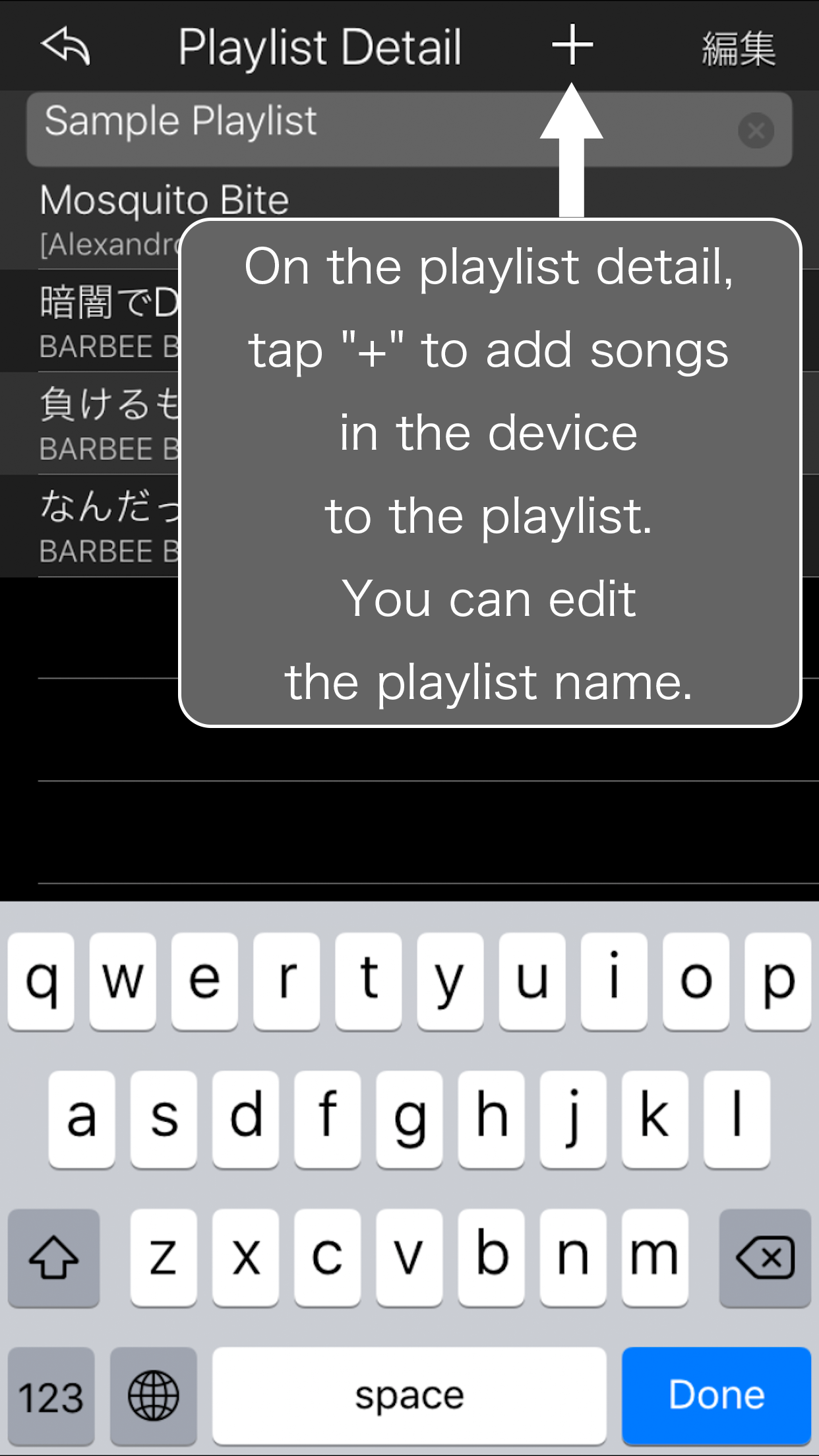
Its usage is up to you. At first, let's create a playlist. You can add the music from your iTunes library to the playlist. This application plays a music from the "Start Position," and it plays music for the "Playback Duration." For example, if you made a setup playback 30 seconds respectively, you can listen to 100 musics in 50 minutes of commuting time. And you may discover a new charm which you have never known in many musics!
Furthermore, you can experience new 'Parameter' function with Everlisten. You can control the playback speed and its pitch freely, so how much to unleash the power of the music depends on you. Your favorite music may remind you the thought which only you felt. Now, let's recover you-likeness. After installation of this application, it has some restrictions as below. If you want to unlock it, please tap 'Unlock' at Playlist view:
1. You can create and edit only one playlist
2. You can register only 5 musics to the playlist
Device Requirements:
* iPhone, iPad, and iPod touch
* Requires iOS 8.0 or later
* 21.4 MB
Pricing and Availability:
Everlisten++ 2.5 is free and is available worldwide exclusively through the App Store in the Music category. Convenient in-app purchases are available.
Tomoyoshi Natsui: http://hrathnir.info/
Everlisten++ 2.5: http://hrathnir.info/index.php/page/iPhoneAppSupport
Download from App Store: https://itunes.apple.com/app/everlisten++/id1116483197
Screenshot 1: http://hrathnir.info/images/iPhoneApp/screenshot/English/5.5inch-01.png
Screenshot 2: http://hrathnir.info/images/iPhoneApp/screenshot/English/5.5inch-02.png
Screenshot 3: http://hrathnir.info/images/iPhoneApp/screenshot/English/5.5inch-03.png
Located in Tokyo, Japan, indie developer Tomoyoshi Natsui creates apps for the mobile market. All Material and Software (C) Copyright 2019 Tomoyoshi Natsui. All Rights Reserved. Apple, the Apple logo, iPhone, iPod and iPad are registered trademarks of Apple Inc. in the U.S. and/or other countries. Other trademarks and registered trademarks may be the property of their respective owners.
*******
Link To Article: https://prmac.com/release-id-83241.htm
*******
---------------------------------------------------------------------------------
Note that you can alter delivered distributions at any time.
Login to your account on prMac to alter your channel selection, or to opt-out at any time.


Public Beta of DataOrganizer 1.0 with Bento Importer Now Available
A new article has been published at prMac.
Public Beta of DataOrganizer 1.0 with Bento Importer Now Available - Published on 01/04/19
Bayhoff Software today released the public beta of DataOrganizer 1.0, the first public release of their new personal database app for Mac. DataOrganizer is designed to be a powerful yet easy-to-use personal database. DataOrganizer ships with eight ready-made templates, including Clients, Inventory, Issues, Journal, Membership List, Party Planner, Recipes, and Serial Numbers. In addition, DataOrganizer includes a Bento 4 importer and supports Mojave's Dark Mode.
Huntington, New York - Bayhoff Software today released the public beta of DataOrganizer 1.0, the first public release of their new personal database app for Mac. DataOrganizer is designed to be a powerful yet easy to use personal database. Prior versions of the DataOrganizer beta have been available for readers of the Bayhoff Software blog for a few months. Starting with the present release, the beta is now available for everyone to download.
Main Features:
* Imports data from Bento 4; DataOrganizer supports 20 of the 23 Bento field types
* Includes eight ready-made templates; Clients, Inventory, Issues, Journal, Membership List, Party Planner, Recipes, and Serial Numbers.
* Creates custom libraries in minutes
* Links to Contacts, Calendar, Mail, and the Finder using the contacts list fields, calendar events list fields, messages list fields, and files list fields, respectively
* Stores collections of photos using media collection fields
* Libraries can link to other libraries using relationship fields
* Supports Mojave's Dark Mode
System Requirements:
* macOS 10.13 High Sierra or later
Pricing and Availability:
The DataOrganizer 1.0 beta is available now and is free to use throughout the beta period. Pricing and availability for the final version will be announced at a later date. For more information, please contact Daniel Freedman.
DataOrganizer 1.0 Beta: http://www.bayhoff.com
Screenshot (Light Mode): http://www.bayhoff.com/images/OverviewFullScreenshot.png
Screenshot (Dark Mode): http://www.bayhoff.com/images/OverviewFullScreenshotDark.png
Application Icon: http://www.bayhoff.com/images/1024x1024Icon.png
Media Assets: http://www.bayhoff.com/press.html
Located in Huntington, New York, Bayhoff Software was founded in 2006 by Daniel Freedman. They primarily develop software for macOS and iOS. All Material and Software (C) 2006-2019 Bayhoff Software. All Rights Reserved worldwide. Apple, the Apple logo, Mac, iPhone, iPod touch, iPad, iTunes, macOS and Spotlight are registered trademarks of Apple Computer in the U.S. and/or other countries. FileMaker and Bento are registered trademarks of FileMaker, Inc. Other trademarks and registered trademarks may be the property of their respective owners.
*******
Link To Article: https://prmac.com/release-id-83240.htm
*******
---------------------------------------------------------------------------------
Note that you can alter delivered distributions at any time.
Login to your account on prMac to alter your channel selection, or to opt-out at any time.
Public Beta of DataOrganizer 1.0 with Bento Importer Now Available - Published on 01/04/19
Bayhoff Software today released the public beta of DataOrganizer 1.0, the first public release of their new personal database app for Mac. DataOrganizer is designed to be a powerful yet easy-to-use personal database. DataOrganizer ships with eight ready-made templates, including Clients, Inventory, Issues, Journal, Membership List, Party Planner, Recipes, and Serial Numbers. In addition, DataOrganizer includes a Bento 4 importer and supports Mojave's Dark Mode.
Huntington, New York - Bayhoff Software today released the public beta of DataOrganizer 1.0, the first public release of their new personal database app for Mac. DataOrganizer is designed to be a powerful yet easy to use personal database. Prior versions of the DataOrganizer beta have been available for readers of the Bayhoff Software blog for a few months. Starting with the present release, the beta is now available for everyone to download.
Main Features:
* Imports data from Bento 4; DataOrganizer supports 20 of the 23 Bento field types
* Includes eight ready-made templates; Clients, Inventory, Issues, Journal, Membership List, Party Planner, Recipes, and Serial Numbers.
* Creates custom libraries in minutes
* Links to Contacts, Calendar, Mail, and the Finder using the contacts list fields, calendar events list fields, messages list fields, and files list fields, respectively
* Stores collections of photos using media collection fields
* Libraries can link to other libraries using relationship fields
* Supports Mojave's Dark Mode
System Requirements:
* macOS 10.13 High Sierra or later
Pricing and Availability:
The DataOrganizer 1.0 beta is available now and is free to use throughout the beta period. Pricing and availability for the final version will be announced at a later date. For more information, please contact Daniel Freedman.
DataOrganizer 1.0 Beta: http://www.bayhoff.com
Screenshot (Light Mode): http://www.bayhoff.com/images/OverviewFullScreenshot.png

Screenshot (Dark Mode): http://www.bayhoff.com/images/OverviewFullScreenshotDark.png

Application Icon: http://www.bayhoff.com/images/1024x1024Icon.png
Media Assets: http://www.bayhoff.com/press.html
Located in Huntington, New York, Bayhoff Software was founded in 2006 by Daniel Freedman. They primarily develop software for macOS and iOS. All Material and Software (C) 2006-2019 Bayhoff Software. All Rights Reserved worldwide. Apple, the Apple logo, Mac, iPhone, iPod touch, iPad, iTunes, macOS and Spotlight are registered trademarks of Apple Computer in the U.S. and/or other countries. FileMaker and Bento are registered trademarks of FileMaker, Inc. Other trademarks and registered trademarks may be the property of their respective owners.
*******
Link To Article: https://prmac.com/release-id-83240.htm
*******
---------------------------------------------------------------------------------
Note that you can alter delivered distributions at any time.
Login to your account on prMac to alter your channel selection, or to opt-out at any time.
Zevrix Extends 50% Sale of InDesign and PDF Tools until January 7
A new article has been published at prMac.
Zevrix Extends 50% Sale of InDesign and PDF Tools until January 7 - Published on 01/03/19
Zevrix Solutions, a developer of automation tools for Adobe InDesign and publishing workflows, announces today that it has extended its holiday sale until January 7. The company offers 50% discount on all its software including product upgrades. Zevrix makes several prepress automation plug-ins for Adobe InDesign and Illustrator, as well as productivity solutions for PDF workflows, graphic files checkup, file sharing and delivery, and Microsoft Office output automation on Mac.
Toronto, Canada - Zevrix Solutions, a developer of automation tools for Adobe InDesign and publishing workflows, announces today that it has extended its holiday sale until January 7. The company offers 50% discount on all products and upgrades. Zevrix makes several prepress automation plug-ins for Adobe InDesign and Illustrator, as well as solutions for graphic files checkup, PDF workflows and automated file delivery.
LinkOptimizer, the company's flagship product for InDesign, lets users reduce linked graphics size by eliminating excess image data, perform image adjustments and convert file formats. The software automatically scales and crops the images in Photoshop to match their dimensions in InDesign, changes resolution to the specified target, and reimports images to InDesign at 100%.
Output Factory is another InDesign plug-in which lets users eliminate repetitive tasks through automation of printing and exporting. It offers batch output, layer versioning, variable file names, output as single pages, automatic preflighting and much more. A server version of Output Factory can process InDesign files automatically from watched hot folders and serve unlimited users on a network.
Zevrix offers two PDF workflow automation tools: PDF Checkpoint and BatchOutput PDF. PDF Checkpoint helps users automate preflight and conversion of multiple PDF files, while BatchOutput PDF allows for hands-free PDF printing from watched hot folders. The company also makes BatchOutput Office, a suite of output automation tools for Microsoft Word, Excel and PowerPoint.
The line of Zevrix products also features Deliver - a file transfer program which automates delivery to FTP, SFTP, Amazon S3, WebDAV and other remote and local servers. The software offers hot folder processing, automatic email notifications, file compression and encryption, and detailed delivery history.
Pricing and Availability:
Zevrix software can be purchased at 50% off until January 7, 2019 from Zevrix website. For details, please visit the website. Product trials are also available for download. All Zevrix products require macOS 10.7-10.14; InDesign and Illustrator solutions require Adobe CS5-CC 2019 software; software for Microsoft Office require Office 2008, 2011 or 2016.
Zevrix Solutions: http://zevrix.com
Zevrix Products: http://zevrix.com/products.php
Download: http://zevrix.com/download.php
Purchase: http://zevrix.com/store.php
Located in Toronto, Canada, Zevrix Solutions provides automation and productivity solutions for Adobe Creative Cloud and Creative Suite software, PDF workflows, graphic file diagnostics and Microsoft Office output on Mac OS. Zevrix is dedicated to help professionals increase their profits through automating everyday tasks, producing error-free documents, saving disk space and cutting production costs. For more information, visit their website. Copyright (C) 2019 Zevrix Solutions. All Rights Reserved. Other trademarks and registered trademarks may be the property of their respective owners.
*******
Link To Article: https://prmac.com/release-id-83239.htm
*******
---------------------------------------------------------------------------------
Note that you can alter delivered distributions at any time.
Login to your account on prMac to alter your channel selection, or to opt-out at any time.
Zevrix Extends 50% Sale of InDesign and PDF Tools until January 7 - Published on 01/03/19
Zevrix Solutions, a developer of automation tools for Adobe InDesign and publishing workflows, announces today that it has extended its holiday sale until January 7. The company offers 50% discount on all its software including product upgrades. Zevrix makes several prepress automation plug-ins for Adobe InDesign and Illustrator, as well as productivity solutions for PDF workflows, graphic files checkup, file sharing and delivery, and Microsoft Office output automation on Mac.
Toronto, Canada - Zevrix Solutions, a developer of automation tools for Adobe InDesign and publishing workflows, announces today that it has extended its holiday sale until January 7. The company offers 50% discount on all products and upgrades. Zevrix makes several prepress automation plug-ins for Adobe InDesign and Illustrator, as well as solutions for graphic files checkup, PDF workflows and automated file delivery.
LinkOptimizer, the company's flagship product for InDesign, lets users reduce linked graphics size by eliminating excess image data, perform image adjustments and convert file formats. The software automatically scales and crops the images in Photoshop to match their dimensions in InDesign, changes resolution to the specified target, and reimports images to InDesign at 100%.
Output Factory is another InDesign plug-in which lets users eliminate repetitive tasks through automation of printing and exporting. It offers batch output, layer versioning, variable file names, output as single pages, automatic preflighting and much more. A server version of Output Factory can process InDesign files automatically from watched hot folders and serve unlimited users on a network.
Zevrix offers two PDF workflow automation tools: PDF Checkpoint and BatchOutput PDF. PDF Checkpoint helps users automate preflight and conversion of multiple PDF files, while BatchOutput PDF allows for hands-free PDF printing from watched hot folders. The company also makes BatchOutput Office, a suite of output automation tools for Microsoft Word, Excel and PowerPoint.
The line of Zevrix products also features Deliver - a file transfer program which automates delivery to FTP, SFTP, Amazon S3, WebDAV and other remote and local servers. The software offers hot folder processing, automatic email notifications, file compression and encryption, and detailed delivery history.
Pricing and Availability:
Zevrix software can be purchased at 50% off until January 7, 2019 from Zevrix website. For details, please visit the website. Product trials are also available for download. All Zevrix products require macOS 10.7-10.14; InDesign and Illustrator solutions require Adobe CS5-CC 2019 software; software for Microsoft Office require Office 2008, 2011 or 2016.
Zevrix Solutions: http://zevrix.com
Zevrix Products: http://zevrix.com/products.php
Download: http://zevrix.com/download.php
Purchase: http://zevrix.com/store.php
Located in Toronto, Canada, Zevrix Solutions provides automation and productivity solutions for Adobe Creative Cloud and Creative Suite software, PDF workflows, graphic file diagnostics and Microsoft Office output on Mac OS. Zevrix is dedicated to help professionals increase their profits through automating everyday tasks, producing error-free documents, saving disk space and cutting production costs. For more information, visit their website. Copyright (C) 2019 Zevrix Solutions. All Rights Reserved. Other trademarks and registered trademarks may be the property of their respective owners.
*******
Link To Article: https://prmac.com/release-id-83239.htm
*******
---------------------------------------------------------------------------------
Note that you can alter delivered distributions at any time.
Login to your account on prMac to alter your channel selection, or to opt-out at any time.
App Tamer 2.4.2 delivers interface improvements and bug fixes
A new article has been published at prMac.
App Tamer 2.4.2 delivers interface improvements and bug fixes - Published on 01/03/19
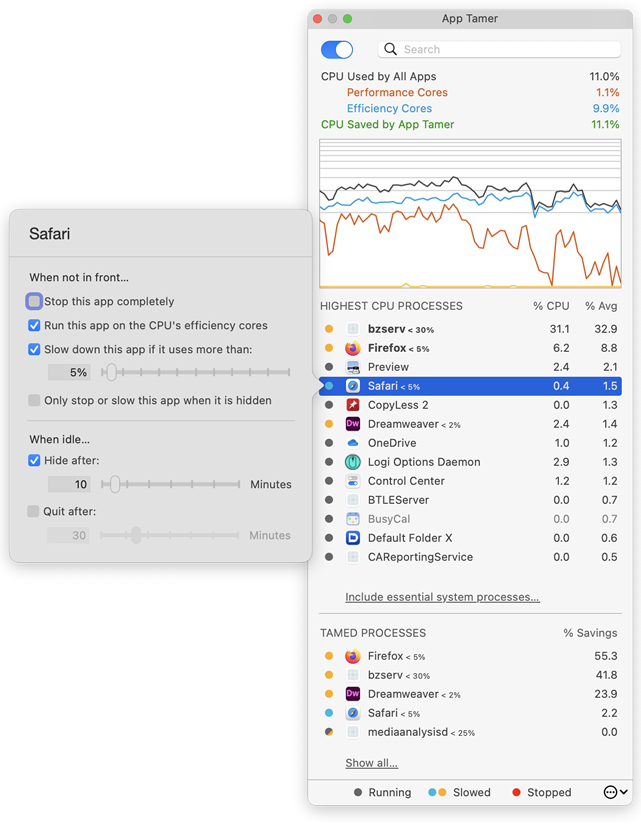
St. Clair Software delivers an update today for App Tamer, its Macintosh utility that manages applications to yield more efficient CPU usage, increased battery life and quieter operation. App Tamer's unique AutoStop capability automatically slows down or pauses applications when you switch away from them, and then restarts them when you click back to them. Version 2.4.2 improves keyboard navigation, offers a floating window mode, and corrects several issues reported by users.
Denver, Colorado - St. Clair Software is pleased to deliver another free update to its App Tamer utility for macOS. App Tamer 2.4.2 features a new floating-window mode to keep performance information close at hand, provides better keyboard-based navigation, and offers several bug fixes and other improvements.
The changes in version 2.4.2 include:
* An option to keep App Tamer's window floating above other windows when it's torn from the menu bar
* A fix for a bug in Mojave that prevented App Tamer from waking background apps for scroll wheel activity or scrolling gestures
* Improved keyboard traversal of the process lists in App Tamer's window, enabling type-to-select and selection using the arrow keys
* A correction for a bug that could result in App Tamer not keeping Safari awake while it was downloading a file
* Elimination of UI glitches that occurred when the process list updated while you were using it
More about App Tamer:
Some Mac applications, especially web browsers, continue running tasks or animations even when they're supposed to be idle in the background. This can consume valuable processing power, reducing battery life and producing heat that increases fan noise. App Tamer's unique AutoStop capability automatically slows down or pauses these applications when you switch away from them, and then restarts them when you click back to them. This frees your CPU and reduces power consumption.
App Tamer comes pre-configured to automatically manage Safari, Firefox, Chrome, Spotlight, Time Machine, Word and many other apps when they're in the background. And customizing it for other applications is just a mouse click away.
Pricing and Availability:
App Tamer will operate on any Macintosh running macOS 10.8 or higher, and is free to try for 15 days. A license to continue using it after the trial period is $14.95 (USD). This update is free for users who purchased App Tamer 2.x or bought App Tamer 1.x after July 1, 2013. For those that purchased a license before that date, the upgrade is $7.95 (USD).
St. Clair Software: http://www.stclairsoft.com/
App Tamer 2.4.2: http://www.stclairsoft.com/AppTamer/
Download App Tamer: http://www.stclairsoft.com/cgi-bin/dl.cgi?AT
Purchase: http://stclairsoft.com/store
Screenshot: http://www.stclairsoft.com/AppTamer/images/MainPanelWithSettingsTall.png
Based in Denver, Colorado, St. Clair Software is a privately held company that has been specializing in utilities and custom software solutions for the Macintosh since 1988. St. Clair Software can be contacted at: St. Clair Software, 271 S. Emerson Street, Denver, CO, USA 80209. Copyright (C) 1988-2019 St. Clair Software. All Rights Reserved. Apple, the Apple logo, and Macintosh are registered trademarks of Apple Inc. in the U.S. and/or other countries.
*******
Link To Article: https://prmac.com/release-id-83238.htm
*******
---------------------------------------------------------------------------------
Note that you can alter delivered distributions at any time.
Login to your account on prMac to alter your channel selection, or to opt-out at any time.
App Tamer 2.4.2 delivers interface improvements and bug fixes - Published on 01/03/19
St. Clair Software delivers an update today for App Tamer, its Macintosh utility that manages applications to yield more efficient CPU usage, increased battery life and quieter operation. App Tamer's unique AutoStop capability automatically slows down or pauses applications when you switch away from them, and then restarts them when you click back to them. Version 2.4.2 improves keyboard navigation, offers a floating window mode, and corrects several issues reported by users.
Denver, Colorado - St. Clair Software is pleased to deliver another free update to its App Tamer utility for macOS. App Tamer 2.4.2 features a new floating-window mode to keep performance information close at hand, provides better keyboard-based navigation, and offers several bug fixes and other improvements.
The changes in version 2.4.2 include:
* An option to keep App Tamer's window floating above other windows when it's torn from the menu bar
* A fix for a bug in Mojave that prevented App Tamer from waking background apps for scroll wheel activity or scrolling gestures
* Improved keyboard traversal of the process lists in App Tamer's window, enabling type-to-select and selection using the arrow keys
* A correction for a bug that could result in App Tamer not keeping Safari awake while it was downloading a file
* Elimination of UI glitches that occurred when the process list updated while you were using it
More about App Tamer:
Some Mac applications, especially web browsers, continue running tasks or animations even when they're supposed to be idle in the background. This can consume valuable processing power, reducing battery life and producing heat that increases fan noise. App Tamer's unique AutoStop capability automatically slows down or pauses these applications when you switch away from them, and then restarts them when you click back to them. This frees your CPU and reduces power consumption.
App Tamer comes pre-configured to automatically manage Safari, Firefox, Chrome, Spotlight, Time Machine, Word and many other apps when they're in the background. And customizing it for other applications is just a mouse click away.
Pricing and Availability:
App Tamer will operate on any Macintosh running macOS 10.8 or higher, and is free to try for 15 days. A license to continue using it after the trial period is $14.95 (USD). This update is free for users who purchased App Tamer 2.x or bought App Tamer 1.x after July 1, 2013. For those that purchased a license before that date, the upgrade is $7.95 (USD).
St. Clair Software: http://www.stclairsoft.com/
App Tamer 2.4.2: http://www.stclairsoft.com/AppTamer/
Download App Tamer: http://www.stclairsoft.com/cgi-bin/dl.cgi?AT
Purchase: http://stclairsoft.com/store
Screenshot: http://www.stclairsoft.com/AppTamer/images/MainPanelWithSettingsTall.png
Based in Denver, Colorado, St. Clair Software is a privately held company that has been specializing in utilities and custom software solutions for the Macintosh since 1988. St. Clair Software can be contacted at: St. Clair Software, 271 S. Emerson Street, Denver, CO, USA 80209. Copyright (C) 1988-2019 St. Clair Software. All Rights Reserved. Apple, the Apple logo, and Macintosh are registered trademarks of Apple Inc. in the U.S. and/or other countries.
*******
Link To Article: https://prmac.com/release-id-83238.htm
*******
---------------------------------------------------------------------------------
Note that you can alter delivered distributions at any time.
Login to your account on prMac to alter your channel selection, or to opt-out at any time.
AlphaDigits Top Rated Mobile Apps December 2018
A new article has been published at prMac.
AlphaDigits Top Rated Mobile Apps December 2018 - Published on 01/01/19
Mobile app review publisher AlphaDigits has named top rated applications for December 2018. 6QS facilitates a quality sales conversation and allows keeping that conversation. Weightium monitors your progress in weight loss. E13 Call Bouncer identifies the callers that are not blocked from your phone contacts. WinX DVD Ripper helps in DVD ripping. Esquared hooks you up with the right class or exercise session.
Long Island, New York - Mobile app review publisher AlphaDigits has named top rated applications for December 2018. AlphaDigits names five top class mobile apps every month based on the reviews published in the website during the particular month. This website has now released the names of top rated mobile apps for the month of December.
6QS (10/10): Making a sale is not easy. Converting possible leads to solid sales is the first step. This involves conversations with potential clients in which you convince them that you have a product or solution that will meet their current needs and will help them well into the future. Clear communication is the key. While many conversations take place face to face, some do not. In those cases, 6qs facilitates a quality conversation and allows keeping that conversation.
Weightium (9.5/10): Simple by design and easy to use, this Android app allows you to enter your weight, enter your goal and then provides a variety of ways to collect data and monitor your progress by viewing changes over different periods of time so you can see the rate at which you may be losing or gaining weight, how many times you increase or decrease, and more.
E13 Call Bouncer (9/10): With Call Bouncer you do not identify the callers you want blocked, you identify the callers that are not blocked from your phone contacts, all other calls are blocked by default. This is White List only. This app is built in a way it should to be as simple as possible for people to use. If someone wants to take calls from particular numbers that they do not currently have in their phone book, then they add that number to their phone book and add that number to a particular Group in E13 Call Bouncer.
WinX DVD Ripper (8.5/10): Easy to use, the program guides you, step by step, on how to setup the DVD rip and start it. With so many built in option, one is sure to fit your needs. So, if you are new to this, all you have to do is select one of the preset options to copying DVDs. Once you become more familiar with the options and the process and you see the outputs, you can delve into the settings and start to play around with them to see what kind of results you get.
Esquared (8/10): It's an app that lets you search amongst participating gyms in a designated area, based on all sorts of search criteria. Once you find what you are looking for, you can choose to book some time and go in. As I described earlier, Esquared is all about hooking you up with the right class or exercise session, no matter where it's being held and without the restriction of requiring a membership.
Joe Ellen, an Editor at AlphaDigits said, "2018 was absolutely fabulous for Team Alphadigits. Hope this New Year brings a lot more excitement to all the people involved in mobile app industry." Developers can also contact AlphaDigits through the onsite form, mail or the contact form to get their apps reviewed.
AlphaDigits: https://alphadigits.com/
Submit App for Review: https://alphadigits.com/submit-app-for-review/
AlphaDigits is a review site run by a few app marketers. Enjoying the support from a handy amount of regular visitors, AlphaDigits provides reviews for iPhone, iPad and Android apps. Copyright (C) 2018 AlphaDigits. All Rights Reserved. Apple, the Apple logo, iPhone, iPod and iPad are registered trademarks of Apple Inc. in the U.S. and/or other countries.
*******
Link To Article: https://prmac.com/release-id-83237.htm
*******
---------------------------------------------------------------------------------
Note that you can alter delivered distributions at any time.
Login to your account on prMac to alter your channel selection, or to opt-out at any time.
AlphaDigits Top Rated Mobile Apps December 2018 - Published on 01/01/19
Mobile app review publisher AlphaDigits has named top rated applications for December 2018. 6QS facilitates a quality sales conversation and allows keeping that conversation. Weightium monitors your progress in weight loss. E13 Call Bouncer identifies the callers that are not blocked from your phone contacts. WinX DVD Ripper helps in DVD ripping. Esquared hooks you up with the right class or exercise session.
Long Island, New York - Mobile app review publisher AlphaDigits has named top rated applications for December 2018. AlphaDigits names five top class mobile apps every month based on the reviews published in the website during the particular month. This website has now released the names of top rated mobile apps for the month of December.
6QS (10/10): Making a sale is not easy. Converting possible leads to solid sales is the first step. This involves conversations with potential clients in which you convince them that you have a product or solution that will meet their current needs and will help them well into the future. Clear communication is the key. While many conversations take place face to face, some do not. In those cases, 6qs facilitates a quality conversation and allows keeping that conversation.
Weightium (9.5/10): Simple by design and easy to use, this Android app allows you to enter your weight, enter your goal and then provides a variety of ways to collect data and monitor your progress by viewing changes over different periods of time so you can see the rate at which you may be losing or gaining weight, how many times you increase or decrease, and more.
E13 Call Bouncer (9/10): With Call Bouncer you do not identify the callers you want blocked, you identify the callers that are not blocked from your phone contacts, all other calls are blocked by default. This is White List only. This app is built in a way it should to be as simple as possible for people to use. If someone wants to take calls from particular numbers that they do not currently have in their phone book, then they add that number to their phone book and add that number to a particular Group in E13 Call Bouncer.
WinX DVD Ripper (8.5/10): Easy to use, the program guides you, step by step, on how to setup the DVD rip and start it. With so many built in option, one is sure to fit your needs. So, if you are new to this, all you have to do is select one of the preset options to copying DVDs. Once you become more familiar with the options and the process and you see the outputs, you can delve into the settings and start to play around with them to see what kind of results you get.
Esquared (8/10): It's an app that lets you search amongst participating gyms in a designated area, based on all sorts of search criteria. Once you find what you are looking for, you can choose to book some time and go in. As I described earlier, Esquared is all about hooking you up with the right class or exercise session, no matter where it's being held and without the restriction of requiring a membership.
Joe Ellen, an Editor at AlphaDigits said, "2018 was absolutely fabulous for Team Alphadigits. Hope this New Year brings a lot more excitement to all the people involved in mobile app industry." Developers can also contact AlphaDigits through the onsite form, mail or the contact form to get their apps reviewed.
AlphaDigits: https://alphadigits.com/
Submit App for Review: https://alphadigits.com/submit-app-for-review/
AlphaDigits is a review site run by a few app marketers. Enjoying the support from a handy amount of regular visitors, AlphaDigits provides reviews for iPhone, iPad and Android apps. Copyright (C) 2018 AlphaDigits. All Rights Reserved. Apple, the Apple logo, iPhone, iPod and iPad are registered trademarks of Apple Inc. in the U.S. and/or other countries.
*******
Link To Article: https://prmac.com/release-id-83237.htm
*******
---------------------------------------------------------------------------------
Note that you can alter delivered distributions at any time.
Login to your account on prMac to alter your channel selection, or to opt-out at any time.
Houdah Software Joins WinterFest Sale. Great Mac Software. Great Prices
A new article has been published at prMac.
Houdah Software Joins WinterFest Sale. Great Mac Software. Great Prices - Published on 01/02/19
Houdah Software has joined up with twelve like-minded makers of Mac software and productivity books for the WinterFest 2018 sale. For a limited time, Houdah Software, Aeon Timeline, Apparent Software, Bare Bones Software, Eastgate, DEVONtechnologies, Literature and Latte, Nisus, Smile Software, Sonny Software, Take Control Books, and Timing offer their tools and ebooks at a 20-25% discount. The WinterFest discount is available by following the links from the WinterFest homepage.
Luxembourg - Houdah Software has joined up with twelve like-minded makers of Mac software and productivity books for WinterFest 2018. The annual WinterFest sale is a celebration of carefully crafted software and books. Software made by creators. For creators. Designed to work together.
The WinterFest sale offers discounts a curated selection of fine apps and books. Customers can purchase any of the participating products directly from the respective publisher. The WinterFest discount is available by following the links from the WinterFest homepage or by using the coupon code WINTERFEST2018.
For a limited time, Houdah Software, Aeon Timeline, Apparent Software, Bare Bones Software, Eastgate, DEVONtechnologies, Literature and Latte, Nisus, Smile Software, Sonny Software, Take Control Books, and Timing offer their tools and ebooks at a 20-25% discount.
* Aeon Timeline: The timeline tool for creative thinking
* BBEdit: Power tool for text
* Bookends: The reference manager you've been looking for
* DEVONthink Pro Office: Your paperless Mac office
* DEVONagent Pro: Your personal research assistant
* HoudahSpot: Powerful file search for Mac
* HoudahGeo: Photo geocoding and geotagging for Mac
* ImageFramer Pro: Your art, showcased
* Nisus Writer Pro: Powerful word processing for your Mac
* Panorama X: Collect, organize and understand your data
* PDFpen: Powerful PDF editing
* Scapple: Quickly capture and connect ideas
* Scrivener: Your complete writing studio
* Storyspace: Serious hypertext narrative
* Take Control Books: Essential books about Mac and iOS
* TextExpander: Type more with less effort
* Timing: Automatic time tracking for Mac
* Tinderbox: Visualize and organize your notes, plans, and ideas
The applications on offer for WinterFest strike the magic balance of being essential yet almost invisible. Tools that assist without getting in the way.These eager helpers keep you abreast of your notes, your tasks, keep information at your fingertips, help you type faster, or take care of nitty gritty details while you do what you do best: create.
Houdah Software: https://www.houdah.com/
WinterFest 2018: http://www.eastgate.com/Tinderbox/Specials/WinterFest.html
HoudahSpot - File Search for Mac: https://www.houdah.com/houdahSpot/
HoudahGeo - Photo Geotagging: https://www.houdah.com/houdahGeo/
Houdah Software Store: https://www.houdah.com/store/
Founded in 2005 by Pierre Bernard, Houdah Software s.a r.l is a small company based in Luxembourg, Europe. Houdah Software specializes in quality software for Mac, iPhone and Apple iPad. Our mission is to pair quality products with excellent customer support. All Material and Software Copyright (C) 2005-2019 s.a r.l. All Rights Reserved. Apple, the Apple logo, Macintosh, MacOS, iPhone, iPod and iPad are registered trademarks of Apple Inc. in the U.S. and/or other countries. Other trademarks and registered trademarks may be the property of their respective owners.
*******
Link To Article: https://prmac.com/release-id-83236.htm
*******
---------------------------------------------------------------------------------
Note that you can alter delivered distributions at any time.
Login to your account on prMac to alter your channel selection, or to opt-out at any time.
Houdah Software Joins WinterFest Sale. Great Mac Software. Great Prices - Published on 01/02/19
Houdah Software has joined up with twelve like-minded makers of Mac software and productivity books for the WinterFest 2018 sale. For a limited time, Houdah Software, Aeon Timeline, Apparent Software, Bare Bones Software, Eastgate, DEVONtechnologies, Literature and Latte, Nisus, Smile Software, Sonny Software, Take Control Books, and Timing offer their tools and ebooks at a 20-25% discount. The WinterFest discount is available by following the links from the WinterFest homepage.
Luxembourg - Houdah Software has joined up with twelve like-minded makers of Mac software and productivity books for WinterFest 2018. The annual WinterFest sale is a celebration of carefully crafted software and books. Software made by creators. For creators. Designed to work together.
The WinterFest sale offers discounts a curated selection of fine apps and books. Customers can purchase any of the participating products directly from the respective publisher. The WinterFest discount is available by following the links from the WinterFest homepage or by using the coupon code WINTERFEST2018.
For a limited time, Houdah Software, Aeon Timeline, Apparent Software, Bare Bones Software, Eastgate, DEVONtechnologies, Literature and Latte, Nisus, Smile Software, Sonny Software, Take Control Books, and Timing offer their tools and ebooks at a 20-25% discount.
* Aeon Timeline: The timeline tool for creative thinking
* BBEdit: Power tool for text
* Bookends: The reference manager you've been looking for
* DEVONthink Pro Office: Your paperless Mac office
* DEVONagent Pro: Your personal research assistant
* HoudahSpot: Powerful file search for Mac
* HoudahGeo: Photo geocoding and geotagging for Mac
* ImageFramer Pro: Your art, showcased
* Nisus Writer Pro: Powerful word processing for your Mac
* Panorama X: Collect, organize and understand your data
* PDFpen: Powerful PDF editing
* Scapple: Quickly capture and connect ideas
* Scrivener: Your complete writing studio
* Storyspace: Serious hypertext narrative
* Take Control Books: Essential books about Mac and iOS
* TextExpander: Type more with less effort
* Timing: Automatic time tracking for Mac
* Tinderbox: Visualize and organize your notes, plans, and ideas
The applications on offer for WinterFest strike the magic balance of being essential yet almost invisible. Tools that assist without getting in the way.These eager helpers keep you abreast of your notes, your tasks, keep information at your fingertips, help you type faster, or take care of nitty gritty details while you do what you do best: create.
Houdah Software: https://www.houdah.com/
WinterFest 2018: http://www.eastgate.com/Tinderbox/Specials/WinterFest.html
HoudahSpot - File Search for Mac: https://www.houdah.com/houdahSpot/
HoudahGeo - Photo Geotagging: https://www.houdah.com/houdahGeo/
Houdah Software Store: https://www.houdah.com/store/
Founded in 2005 by Pierre Bernard, Houdah Software s.a r.l is a small company based in Luxembourg, Europe. Houdah Software specializes in quality software for Mac, iPhone and Apple iPad. Our mission is to pair quality products with excellent customer support. All Material and Software Copyright (C) 2005-2019 s.a r.l. All Rights Reserved. Apple, the Apple logo, Macintosh, MacOS, iPhone, iPod and iPad are registered trademarks of Apple Inc. in the U.S. and/or other countries. Other trademarks and registered trademarks may be the property of their respective owners.
*******
Link To Article: https://prmac.com/release-id-83236.htm
*******
---------------------------------------------------------------------------------
Note that you can alter delivered distributions at any time.
Login to your account on prMac to alter your channel selection, or to opt-out at any time.
iBarcoder 3.10.3, The Barcode and Label Maker Software for Mac Released
A new article has been published at prMac.
iBarcoder 3.10.3, The Barcode and Label Maker Software for Mac Released - Published on 12/30/18
The iBarcoder version 3.10.3, one of the most popular Mac barcode software has been released. The product supports more then 40 barcode types, QR Code, UPC, ISBN, EAN13, GS1-128, SSCC-18 and GTIN-14, pdf-417 among them. It helps you to generate individual and sequential barcodes, to create labels using built-in or custom label formats, and print the barcodes, or labels designs in a fast and simple way directly from the label editor window.
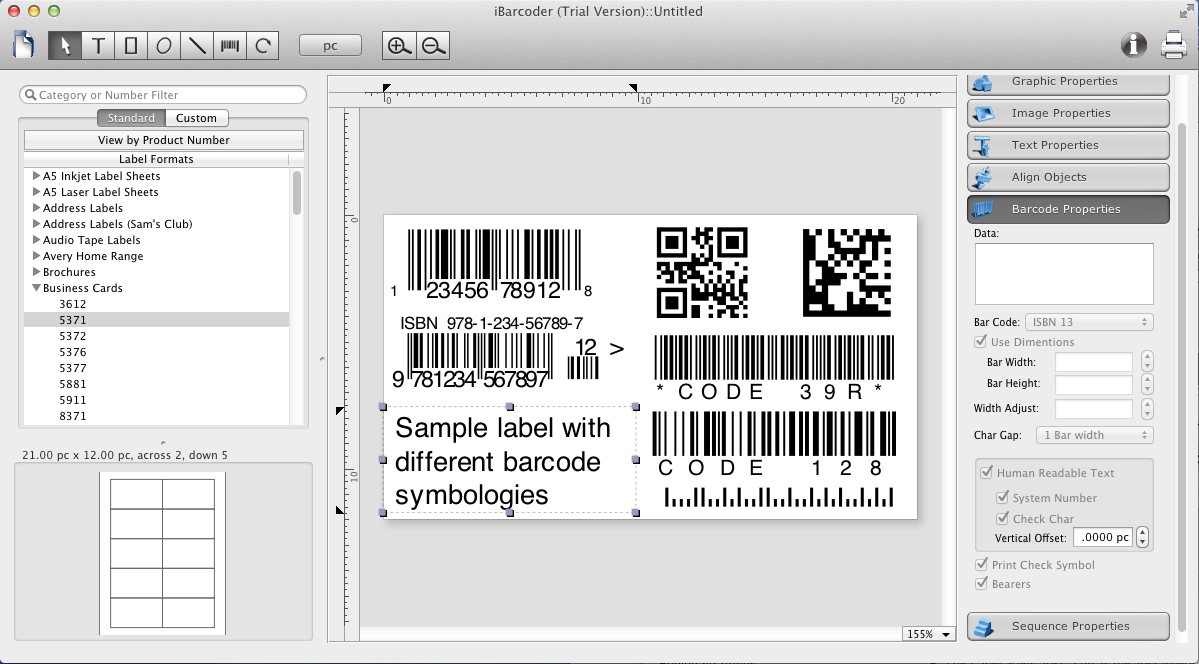
Palatine, Illinois - Cristallight Software announced the release of the iBarcoder 3.10.3, the Mac barcode generator and label maker software for MacOS X. The product supports more then 40 barcode types, QR Code, UPC, ISBN, EAN13, GS1-128, SSCC-18 and GTIN-14 among them. It helps you to generate individual and sequential barcodes, to create labels using built-in, or custom label formats, and print barcodes, or labels designs in a fast and simple way directly from the label editor window. The Contacts (Address Book) integration allows to encode personal data into QR Code and DataMatrix 2D barcodes using the plain text, vCard, meCard, xCard, and other data templates.
The product gives you access to multiple editing options. Not only can you add bar code objects, but text, image boxes, rectangles, ovals and lines. Text objects can also be set to sequential mode, as well as barcodes objects. Simple text files or Excel files can be used as data sources, or automatic incrementing in the Counter mode can be set.
When exporting barcode images, not only raster images are needed, but also PDF and EPS vector images. You may want to witch between RGB and CMYK color modes for exporting barcodes for avoiding color conversion problems when importing these files into graphic software (Illustrator, CoredDraw). Advanced printing options allow you to exclude certain labels from printing with just a mouse click on the label format preview, set the print range of the labels and more.
The iBarcoder is affordable, innovative, and high quality professional mac barcode generator. It has a simple and intuitive interface, and makes easy and quick the process of creating and exporting barcodes as vector or raster image files, printing barcoded labels. No special skills, or knowledge are necessary, so anyone can start using it practically in no time. LIFETIME license with FREE updates, and free tech support means no costly software or equipment upgrades.
The latest improvements made:
* pdf417 code support added,
* Sequential barcodes from Excel workbook file improved
* Mac OS 10.14 compatibility added
* Export barcodes improved
* GS1 Databar Extended functionality improved
The iBarcoder 3.10.3 requires Mac OS X 10.8 or later, and costs $49.95, (includes the lifetime license with upcoming free upgrades), and free tech support.
Visit us at the iBarcoder website.
iBarcoder 3.10.3: http://www.ibarcoder.com
Features: http://www.ibarcoder.com/barcode-generator-features.html
Direct Download Link: http://www.cristallight.com/Downloads/mac/ibarcoder.dmg
Purchase Link: https://shopper.mycommerce.com/checkout/product/11839-1?linkid=0-@-0-@-ibar
Screenshot: http://www.cristallight.com/Images/iBarcoder/barcode_label.png
Application Icon: http://www.cristallight.com/Images/Icon/iBarcoder_ICO.jpg
Based in Palatine, Illinois, Cristallight Software was founded by Don Kurt in 2004. Cristallight Software development company produces the best Mac software for business and home. Cristallight Software is the leader in Mac software developing and distribution in business cards and labeling, desktop publishing, business inventory & barcoding, imaging & 3D solutions areas. The company has released more then 10 software titles for the Mac platform. Copyright (C) 2004-2018 Cristallight Software. All Rights Reserved. Apple, the Apple logo, iPhone, and iPod are registered trademarks of Apple Inc. in the U.S. and/or other countries. Other trademarks and registered trademarks may be the property of their respective owners.
*******
Link To Article: https://prmac.com/release-id-83235.htm
*******
---------------------------------------------------------------------------------
Note that you can alter delivered distributions at any time.
Login to your account on prMac to alter your channel selection, or to opt-out at any time.
iBarcoder 3.10.3, The Barcode and Label Maker Software for Mac Released - Published on 12/30/18
The iBarcoder version 3.10.3, one of the most popular Mac barcode software has been released. The product supports more then 40 barcode types, QR Code, UPC, ISBN, EAN13, GS1-128, SSCC-18 and GTIN-14, pdf-417 among them. It helps you to generate individual and sequential barcodes, to create labels using built-in or custom label formats, and print the barcodes, or labels designs in a fast and simple way directly from the label editor window.
Palatine, Illinois - Cristallight Software announced the release of the iBarcoder 3.10.3, the Mac barcode generator and label maker software for MacOS X. The product supports more then 40 barcode types, QR Code, UPC, ISBN, EAN13, GS1-128, SSCC-18 and GTIN-14 among them. It helps you to generate individual and sequential barcodes, to create labels using built-in, or custom label formats, and print barcodes, or labels designs in a fast and simple way directly from the label editor window. The Contacts (Address Book) integration allows to encode personal data into QR Code and DataMatrix 2D barcodes using the plain text, vCard, meCard, xCard, and other data templates.
The product gives you access to multiple editing options. Not only can you add bar code objects, but text, image boxes, rectangles, ovals and lines. Text objects can also be set to sequential mode, as well as barcodes objects. Simple text files or Excel files can be used as data sources, or automatic incrementing in the Counter mode can be set.
When exporting barcode images, not only raster images are needed, but also PDF and EPS vector images. You may want to witch between RGB and CMYK color modes for exporting barcodes for avoiding color conversion problems when importing these files into graphic software (Illustrator, CoredDraw). Advanced printing options allow you to exclude certain labels from printing with just a mouse click on the label format preview, set the print range of the labels and more.
The iBarcoder is affordable, innovative, and high quality professional mac barcode generator. It has a simple and intuitive interface, and makes easy and quick the process of creating and exporting barcodes as vector or raster image files, printing barcoded labels. No special skills, or knowledge are necessary, so anyone can start using it practically in no time. LIFETIME license with FREE updates, and free tech support means no costly software or equipment upgrades.
The latest improvements made:
* pdf417 code support added,
* Sequential barcodes from Excel workbook file improved
* Mac OS 10.14 compatibility added
* Export barcodes improved
* GS1 Databar Extended functionality improved
The iBarcoder 3.10.3 requires Mac OS X 10.8 or later, and costs $49.95, (includes the lifetime license with upcoming free upgrades), and free tech support.
Visit us at the iBarcoder website.
iBarcoder 3.10.3: http://www.ibarcoder.com
Features: http://www.ibarcoder.com/barcode-generator-features.html
Direct Download Link: http://www.cristallight.com/Downloads/mac/ibarcoder.dmg
Purchase Link: https://shopper.mycommerce.com/checkout/product/11839-1?linkid=0-@-0-@-ibar
Screenshot: http://www.cristallight.com/Images/iBarcoder/barcode_label.png
Application Icon: http://www.cristallight.com/Images/Icon/iBarcoder_ICO.jpg

Based in Palatine, Illinois, Cristallight Software was founded by Don Kurt in 2004. Cristallight Software development company produces the best Mac software for business and home. Cristallight Software is the leader in Mac software developing and distribution in business cards and labeling, desktop publishing, business inventory & barcoding, imaging & 3D solutions areas. The company has released more then 10 software titles for the Mac platform. Copyright (C) 2004-2018 Cristallight Software. All Rights Reserved. Apple, the Apple logo, iPhone, and iPod are registered trademarks of Apple Inc. in the U.S. and/or other countries. Other trademarks and registered trademarks may be the property of their respective owners.
*******
Link To Article: https://prmac.com/release-id-83235.htm
*******
---------------------------------------------------------------------------------
Note that you can alter delivered distributions at any time.
Login to your account on prMac to alter your channel selection, or to opt-out at any time.
Subscribe to:
Posts (Atom)