A new article has been published at prMac.
Introducing Translate Box - Use multiple translation services for macOS - Published on 02/12/19
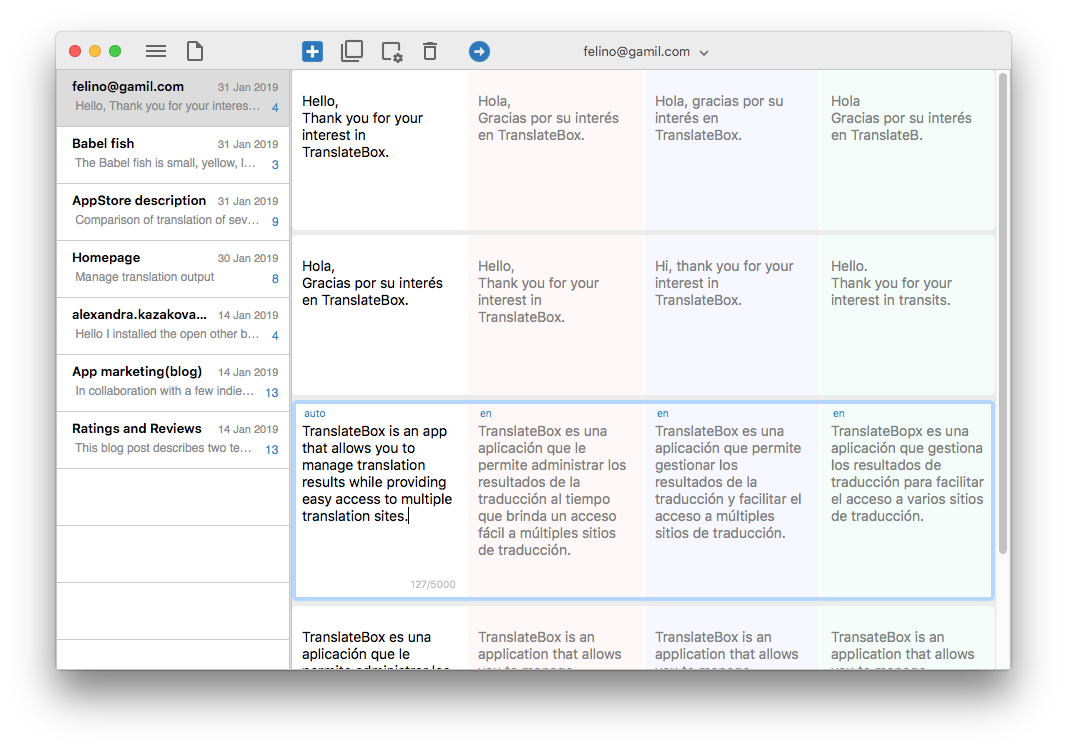
Groosoft today releases Translate Box 1.0.1, a translation comparison and management app for macOS. Translate Box shows translation results from several famous translation services simultaneously to provide optimal translations. Additionally, all contents of a translation can be tabulated and systematically managed. Users can easily add new boxes to create new translations, as well as create well-organized documents in table form as boxes stack.
Seoul, Korea - Groosoft has released Translate Box 1.0.1, a translation comparison and management app for macOS. Translate Box shows translation results from several famous translation services at the same time to provide optimal translations. Also, all contents of a translation can be tabulated and systematically managed.
* Comparison of Translation Services - Users can compare translation results from multiple translation services to obtain the desired translation.
* Tabulated Document - Users can add new boxes to create new translations, and you can create well-organized documents in table form as boxes stack.
* Automatic Language Selection - Language is automatically selected and translated into the native language or secondary language according to the input language after setting the native second languages that are most commonly used.
Users can translate simultaneously from multiple translation services. Translate Box can translate from the desired translation service and translate from up to four translation services at the same time to see different results all at once. Therefore, users can compare translations from multiple translation services or translate a text into four different languages at the same time. In addition, it can continue to add new translations into table-based documents to manage translations for related content without erasing existing content.
Users can add new boxes to create new translations, add boxes to add new translation services, and remove boxes to remove translation services in use. Translating can be done just like writing a document and it is also possible to separate documents by subject.
System Requirements:
* macOS 10.13 or later
* 64-bit processor
* 5.5 MB
Pricing and Availability:
Translate Box 1.0.1 is $4.99 USD (or equivalent amount in other currencies) and available worldwide exclusively through the Mac App Store in the Utilities category.
groosoft: http://www.groosoft.com/
Translate Box 1.0.1: http://www.groosoft.com/translatebox/
Purchase and Download from Mac App Store: https://itunes.apple.com/app/translate-box/id1451071992
Screenshot: http://www.groosoft.com/translatebox/resources/images/translatebox_screenshot.png
Application Icon: http://www.groosoft.com/translatebox/resources/images/translatebox_appicon.png
Based in Seoul, Korea, groosoft was founded by Hyoseo Park in 2011. The company develops mobile and OS X apps. Copyright (C) 2011-2019 groosoft. All Rights Reserved. Apple, the Apple logo, and macOS are registered trademarks of Apple Inc. in the U.S. and/or other countries. Other trademarks and registered trademarks may be the property of their respective owners.
*******
Link To Article: https://prmac.com/release-id-83298.htm
*******
---------------------------------------------------------------------------------
Note that you can alter delivered distributions at any time.
Login to your account on prMac to alter your channel selection, or to opt-out at any time.


Didi Learns - The Water - A New Educational App for Kids
A new article has been published at prMac.
Didi Learns - The Water - A New Educational App for Kids - Published on 02/08/19
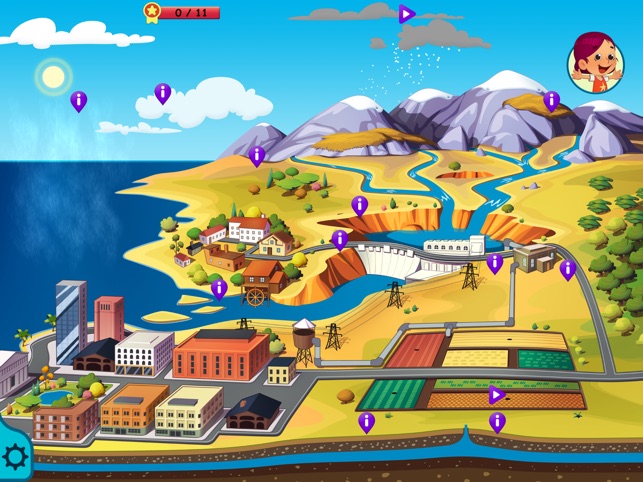
G.K. releases Didi Learns - The Water 1.0, their new educational app for iPhone, iPad & iPod touch devices. Didi, a little girl with a learning appetite, explores the water cycle, the sea and the river. Kids can learn how the rain and snow is produced, and how the rivers & lakes are created. Traveling in a submarine, kids can explore the deep ocean and control a harbor near the river end. Kids can click on the play symbols to start an action, like start the rain and fill the mountains with snow.
Thessaloniki, Greece - G.K. is proud to announce the release and availability of Didi Learns - The Water 1.0, their educational app for iPhone, iPad, and iPod touch devices. Didi, a little girl with a learning appetite explores the water cycle, the sea and the river. She learns how the rain and snow is produced and how the water is used from the people. She discovers amazing creatures in the deep sea as she travels with her submarine. She can find the whale and hear its amazing song. Near by a river she helps the ships to escape to the open ocean, and the little boat to carry woods to the factory.
Kids can click to the play symbols to start an action like start the rain and fill the mountains with snow. They can also click on the info signs and learn by reading or hearing about the article that they discover. Finally, they can go to the Achievements page to check all articles they discover and see what is missing to complete the three available pages. Together with Didi your kids will play and enjoy learning!
Device Requirements:
* iPhone, iPad and iPod touch
* Requires iOS 8.0 or later
* Available only in English
* 201.4 MB
Pricing and Availability:
Didi Learns - The Water 1.0 is just $1,99 USD (or an equivalent amount in other currencies) and is available worldwide exclusively through the App Store in the Education category. A free, lite version of the app is also available. The full version offers the complete material. Promo codes are available to members of the press.
Didi Learns - The Water: https://didilearns.wordpress.com/
Purchase and Download (iOS): http://itunes.apple.com/app/id1446220536
YouTube Video: https://www.youtube.com/watch?v=Qr3JcNWsxZA
Screenshot: https://is1-ssl.mzstatic.com/image/thumb/Purple118/v4/70/61/15/70611552-a41f-cd1c-b66f-28dbc0700d10/pr_source.png/643x0w.jpg
App Icon: https://is1-ssl.mzstatic.com/image/thumb/Purple124/v4/c4/75/38/c4753817-0d13-aaaf-4f03-3f86458de5dd/AppIcon-0-1x_U007emarketing-0-85-220-7.png/246x0w.jpg
G.K. is a private company located in Thessaloniki, Greece. All Material and Software (C) Copyright 2019 G.K. All Rights Reserved. Apple, the Apple logo, iPhone, iPod and iPad are registered trademarks of Apple Inc. in the U.S. and/or other countries. Other trademarks and registered trademarks may be the property of their respective owners.
*******
Link To Article: https://prmac.com/release-id-83296.htm
*******
---------------------------------------------------------------------------------
Note that you can alter delivered distributions at any time.
Login to your account on prMac to alter your channel selection, or to opt-out at any time.
Didi Learns - The Water - A New Educational App for Kids - Published on 02/08/19
G.K. releases Didi Learns - The Water 1.0, their new educational app for iPhone, iPad & iPod touch devices. Didi, a little girl with a learning appetite, explores the water cycle, the sea and the river. Kids can learn how the rain and snow is produced, and how the rivers & lakes are created. Traveling in a submarine, kids can explore the deep ocean and control a harbor near the river end. Kids can click on the play symbols to start an action, like start the rain and fill the mountains with snow.
Thessaloniki, Greece - G.K. is proud to announce the release and availability of Didi Learns - The Water 1.0, their educational app for iPhone, iPad, and iPod touch devices. Didi, a little girl with a learning appetite explores the water cycle, the sea and the river. She learns how the rain and snow is produced and how the water is used from the people. She discovers amazing creatures in the deep sea as she travels with her submarine. She can find the whale and hear its amazing song. Near by a river she helps the ships to escape to the open ocean, and the little boat to carry woods to the factory.
Kids can click to the play symbols to start an action like start the rain and fill the mountains with snow. They can also click on the info signs and learn by reading or hearing about the article that they discover. Finally, they can go to the Achievements page to check all articles they discover and see what is missing to complete the three available pages. Together with Didi your kids will play and enjoy learning!
Device Requirements:
* iPhone, iPad and iPod touch
* Requires iOS 8.0 or later
* Available only in English
* 201.4 MB
Pricing and Availability:
Didi Learns - The Water 1.0 is just $1,99 USD (or an equivalent amount in other currencies) and is available worldwide exclusively through the App Store in the Education category. A free, lite version of the app is also available. The full version offers the complete material. Promo codes are available to members of the press.
Didi Learns - The Water: https://didilearns.wordpress.com/
Purchase and Download (iOS): http://itunes.apple.com/app/id1446220536
YouTube Video: https://www.youtube.com/watch?v=Qr3JcNWsxZA
Screenshot: https://is1-ssl.mzstatic.com/image/thumb/Purple118/v4/70/61/15/70611552-a41f-cd1c-b66f-28dbc0700d10/pr_source.png/643x0w.jpg
App Icon: https://is1-ssl.mzstatic.com/image/thumb/Purple124/v4/c4/75/38/c4753817-0d13-aaaf-4f03-3f86458de5dd/AppIcon-0-1x_U007emarketing-0-85-220-7.png/246x0w.jpg

G.K. is a private company located in Thessaloniki, Greece. All Material and Software (C) Copyright 2019 G.K. All Rights Reserved. Apple, the Apple logo, iPhone, iPod and iPad are registered trademarks of Apple Inc. in the U.S. and/or other countries. Other trademarks and registered trademarks may be the property of their respective owners.
*******
Link To Article: https://prmac.com/release-id-83296.htm
*******
---------------------------------------------------------------------------------
Note that you can alter delivered distributions at any time.
Login to your account on prMac to alter your channel selection, or to opt-out at any time.
Introducing Mac mini Open Compute Cloud (OC2)
A new article has been published at prMac.
Introducing Mac mini Open Compute Cloud (OC2) - Published on 02/06/19
California based MacWeb.com introduces Mac mini Open Compute Cloud, an Internet cloud service renting on-demand compute capacity using dedicated 2018 Apple Mac mini computers. MacWeb.com's Open Compute Cloud combines the hardware and software advantages of a dedicated Mac mini server with the low cost and instant deployment of cloud computing. All Mac mini OC2 instances feature Intel eighth-generation i5 or i7 6-core processors, fast 2666MHz DDR4 memory, and blazing-fast all-flash storage
Palo Alto, California - MacWeb.com introduces Mac mini Open Compute Cloud (OC2), an Internet cloud service renting on-demand compute capacity using dedicated 2018 Apple Mac mini computers. MacWeb.com's Open Compute Cloud combines the hardware and software advantages of a dedicated Mac mini server with the low cost and instant deployment of cloud computing. With provisioning of a new 2018 Apple Mac mini on demand iOS, macOS, web, and database developers now have a dedicated solution for cloud computing that does NOT share hardware resources or use virtualization.
All Mac mini OC2 instances feature Intel eighth-generation i5 or i7 6-core processors, fast 2666MHz DDR4 memory, and blazing-fast all-flash storage starting at only $100 per month. The new, re-engineered 2018 Mac mini is a fast, reliable, and cost effective little powerhouse. Compile iOS or macOS apps remotely with Xcode, run web applications, publish databases, or share files easily. With a Mac mini OC2 instance there is no hardware to purchase, no hardware to ship, no lead time, and no commitment. Replace an aging Mac mini Internet server today with a new Mac mini OC2 instance from MacWeb.com.
* Apple Mac mini 3.0GHz 6-Core i5/8GB/256GB SSD $100/mo (Late 2018)
* Apple Mac mini 3.2GHz 6-Core i7/8GB/128GB SSD $100/mo (Late 2018)
* Apple Mac mini 3.2GHz 6-Core i7/16GB/128GB SSD $120/mo (Late 2018)
* Apple Mac mini 3.2GHz 6-Core i7/16GB/256GB SSD $140/mo (Late 2018)
* and more
Custom build your own Supercomputer or Private Cloud with a bank of new 2018 Apple Mac mini. Quotes and discounts also available for volume Mac mini OC2 deployments.
Don't worry about success. With unmetered bandwidth and Internet bursting to 1Gbps there are no surprises. And with no contract or commitment required, cancel at any time.
MacWeb.com is conveniently located next door to Google headquarters in Mountain View, California, and near Moffett Field NASA AMES in the heart of Silicon Valley. This Class A facility is a former SGI data center.
MacWeb: http://www.macweb.com
MacWeb.com is a cloud services company renting on-demand compute capacity using dedicated Apple Mac mini computers. All Material and Software (C) Copyright 2019 MacWeb.com. All Rights Reserved. Apple, the Apple logo, and Mac mini are registered trademarks of Apple Inc. in the U.S. and/or other countries. Other trademarks and registered trademarks may be the property of their respective owners.
*******
Link To Article: https://prmac.com/release-id-83295.htm
*******
---------------------------------------------------------------------------------
Note that you can alter delivered distributions at any time.
Login to your account on prMac to alter your channel selection, or to opt-out at any time.
Introducing Mac mini Open Compute Cloud (OC2) - Published on 02/06/19
California based MacWeb.com introduces Mac mini Open Compute Cloud, an Internet cloud service renting on-demand compute capacity using dedicated 2018 Apple Mac mini computers. MacWeb.com's Open Compute Cloud combines the hardware and software advantages of a dedicated Mac mini server with the low cost and instant deployment of cloud computing. All Mac mini OC2 instances feature Intel eighth-generation i5 or i7 6-core processors, fast 2666MHz DDR4 memory, and blazing-fast all-flash storage
Palo Alto, California - MacWeb.com introduces Mac mini Open Compute Cloud (OC2), an Internet cloud service renting on-demand compute capacity using dedicated 2018 Apple Mac mini computers. MacWeb.com's Open Compute Cloud combines the hardware and software advantages of a dedicated Mac mini server with the low cost and instant deployment of cloud computing. With provisioning of a new 2018 Apple Mac mini on demand iOS, macOS, web, and database developers now have a dedicated solution for cloud computing that does NOT share hardware resources or use virtualization.
All Mac mini OC2 instances feature Intel eighth-generation i5 or i7 6-core processors, fast 2666MHz DDR4 memory, and blazing-fast all-flash storage starting at only $100 per month. The new, re-engineered 2018 Mac mini is a fast, reliable, and cost effective little powerhouse. Compile iOS or macOS apps remotely with Xcode, run web applications, publish databases, or share files easily. With a Mac mini OC2 instance there is no hardware to purchase, no hardware to ship, no lead time, and no commitment. Replace an aging Mac mini Internet server today with a new Mac mini OC2 instance from MacWeb.com.
* Apple Mac mini 3.0GHz 6-Core i5/8GB/256GB SSD $100/mo (Late 2018)
* Apple Mac mini 3.2GHz 6-Core i7/8GB/128GB SSD $100/mo (Late 2018)
* Apple Mac mini 3.2GHz 6-Core i7/16GB/128GB SSD $120/mo (Late 2018)
* Apple Mac mini 3.2GHz 6-Core i7/16GB/256GB SSD $140/mo (Late 2018)
* and more
Custom build your own Supercomputer or Private Cloud with a bank of new 2018 Apple Mac mini. Quotes and discounts also available for volume Mac mini OC2 deployments.
Don't worry about success. With unmetered bandwidth and Internet bursting to 1Gbps there are no surprises. And with no contract or commitment required, cancel at any time.
MacWeb.com is conveniently located next door to Google headquarters in Mountain View, California, and near Moffett Field NASA AMES in the heart of Silicon Valley. This Class A facility is a former SGI data center.
MacWeb: http://www.macweb.com
MacWeb.com is a cloud services company renting on-demand compute capacity using dedicated Apple Mac mini computers. All Material and Software (C) Copyright 2019 MacWeb.com. All Rights Reserved. Apple, the Apple logo, and Mac mini are registered trademarks of Apple Inc. in the U.S. and/or other countries. Other trademarks and registered trademarks may be the property of their respective owners.
*******
Link To Article: https://prmac.com/release-id-83295.htm
*******
---------------------------------------------------------------------------------
Note that you can alter delivered distributions at any time.
Login to your account on prMac to alter your channel selection, or to opt-out at any time.
MacX DVD Ripper Pro Upgraded to Fix Play & Backup Errors with New DVDs
A new article has been published at prMac.
MacX DVD Ripper Pro Upgraded to Fix Play & Backup Errors with New DVDs - Published on 02/06/19
MacXDVD today announces MacX DVD Ripper Pro, an update to its flagship DVD ripper. MacX DVD Ripper Pro is able to rip protected/homemade DVDs to any format fast and efficiently. In this upgrade, the core algorithm gets an overhaul to support the latest disc mechanism technologies of 2019. Now MacX DVD Ripper Pro is capable to eliminate most all of the long-term obstacles caused by multiple titles, new releases, workout/exercise titles, and more.
Chengdu, China - MacXDVD Software just released a new version of its MacX DVD Ripper Pro, and, as the company stated, is "the ultimate solution that has eliminated all problems a user may encounter when ripping and playing a new DVD." This update focuses on the longstanding problems to play and convert a new-released DVD and updates its core algorithm to address all the errors and deliver users an error-free DVD ripping experience.
The newly-updated DVD ripper is offered for free together with iPad Pro, Netflix Gift Card and more gifts. Get a free copy and start a flawless DVD ripping experience before Feb 20, 2019.
While many DVD owners worldwide are now using open-source tools to manage their collections, yet a majority of them have already encountered performance issues -according to a global survey of 10,000 consumers. And the problems have been myriad. Some suffer errors during the conversion like no valid source found, app crashes, frozen conversion, failure to read discs, wrong title, no disc content showing up, etc., while some others are getting bad video results - they can't get the new DVD played normally.
MacXDVD began working on an ultimate solution to end the nettlesome troubles after numerous reports from depressed consumers who couldn't play or convert new DVDs successfully using the popular ways. And now MacX DVD Ripper Pro has the solution.
The company also offers a step-by-step guide to fix these problems.
MacX DVD Ripper Pro is a reputable DVD ripper professional in converting DVD to MP4, MKV, MOV, HEVC, AVI, WMV, iPhone, iPad, and Android. Its rich features yet user-friendly operations has long enjoyed a good reputation from Macworld, Softonic, Cnet, MacUpdate, and various other pundit sites. More importantly, when it comes to dealing disc with restrictions, it has exceeded rivals for years in supported encryptions and outputs. The DVD ripper sees 90% happy customers and 85% users who use it to remove tough disc limits.
In this upgrade, the core algorithm gets an overhaul to get updated with the latest disc mechanism technologies of 2019. For this purpose, MacXDVD Software has performed analysis and conducted multiple tests with the latest discs under numerous scenarios. Now MacX DVD Ripper Pro is capable to eliminate most if not all of the long-term obstacles caused by multiple titles, new releases, workout/exercise titles, etc.
Pricing and Availability:
MacX DVD Ripper Pro, normally priced at $67.95 )USD_, is free for grabs during MacXDVD Giveaway. Also, everyone has the chance to win free iPad Pro, Netflix gift card and more prizes by taking a quick quiz and sharing the campaign. The Giveaway starts today and will end on Feb 20, 2019.
MacX DVD Ripper Pro: https://www.macxdvd.com/mac-dvd-ripper-pro/
MacXDVD Giveaway: https://www.macxdvd.com/mac-dvd-video-converter-how-to/rip-dvd-free-mac.htm
MacXDVD Software is a division of Digiarty Software Company, owns a professional multimedia software development team, providing a range of products for Macintosh Computer users, including MacX Video Converter, MacX DVD Ripper, DVD Author, DVD backup tools, etc, series of apps for Apple video player, and iPhone, iPad 2D and 3D video games. Copyright (C) 2019 MacXDVD Software. All Rights Reserved. Apple, the Apple logo and Macintosh are registered trademarks of Apple Inc. in the U.S. and/or other countries.
*******
Link To Article: https://prmac.com/release-id-83290.htm
*******
---------------------------------------------------------------------------------
Note that you can alter delivered distributions at any time.
Login to your account on prMac to alter your channel selection, or to opt-out at any time.
MacX DVD Ripper Pro Upgraded to Fix Play & Backup Errors with New DVDs - Published on 02/06/19
MacXDVD today announces MacX DVD Ripper Pro, an update to its flagship DVD ripper. MacX DVD Ripper Pro is able to rip protected/homemade DVDs to any format fast and efficiently. In this upgrade, the core algorithm gets an overhaul to support the latest disc mechanism technologies of 2019. Now MacX DVD Ripper Pro is capable to eliminate most all of the long-term obstacles caused by multiple titles, new releases, workout/exercise titles, and more.
Chengdu, China - MacXDVD Software just released a new version of its MacX DVD Ripper Pro, and, as the company stated, is "the ultimate solution that has eliminated all problems a user may encounter when ripping and playing a new DVD." This update focuses on the longstanding problems to play and convert a new-released DVD and updates its core algorithm to address all the errors and deliver users an error-free DVD ripping experience.
The newly-updated DVD ripper is offered for free together with iPad Pro, Netflix Gift Card and more gifts. Get a free copy and start a flawless DVD ripping experience before Feb 20, 2019.
While many DVD owners worldwide are now using open-source tools to manage their collections, yet a majority of them have already encountered performance issues -according to a global survey of 10,000 consumers. And the problems have been myriad. Some suffer errors during the conversion like no valid source found, app crashes, frozen conversion, failure to read discs, wrong title, no disc content showing up, etc., while some others are getting bad video results - they can't get the new DVD played normally.
MacXDVD began working on an ultimate solution to end the nettlesome troubles after numerous reports from depressed consumers who couldn't play or convert new DVDs successfully using the popular ways. And now MacX DVD Ripper Pro has the solution.
The company also offers a step-by-step guide to fix these problems.
MacX DVD Ripper Pro is a reputable DVD ripper professional in converting DVD to MP4, MKV, MOV, HEVC, AVI, WMV, iPhone, iPad, and Android. Its rich features yet user-friendly operations has long enjoyed a good reputation from Macworld, Softonic, Cnet, MacUpdate, and various other pundit sites. More importantly, when it comes to dealing disc with restrictions, it has exceeded rivals for years in supported encryptions and outputs. The DVD ripper sees 90% happy customers and 85% users who use it to remove tough disc limits.
In this upgrade, the core algorithm gets an overhaul to get updated with the latest disc mechanism technologies of 2019. For this purpose, MacXDVD Software has performed analysis and conducted multiple tests with the latest discs under numerous scenarios. Now MacX DVD Ripper Pro is capable to eliminate most if not all of the long-term obstacles caused by multiple titles, new releases, workout/exercise titles, etc.
Pricing and Availability:
MacX DVD Ripper Pro, normally priced at $67.95 )USD_, is free for grabs during MacXDVD Giveaway. Also, everyone has the chance to win free iPad Pro, Netflix gift card and more prizes by taking a quick quiz and sharing the campaign. The Giveaway starts today and will end on Feb 20, 2019.
MacX DVD Ripper Pro: https://www.macxdvd.com/mac-dvd-ripper-pro/
MacXDVD Giveaway: https://www.macxdvd.com/mac-dvd-video-converter-how-to/rip-dvd-free-mac.htm
MacXDVD Software is a division of Digiarty Software Company, owns a professional multimedia software development team, providing a range of products for Macintosh Computer users, including MacX Video Converter, MacX DVD Ripper, DVD Author, DVD backup tools, etc, series of apps for Apple video player, and iPhone, iPad 2D and 3D video games. Copyright (C) 2019 MacXDVD Software. All Rights Reserved. Apple, the Apple logo and Macintosh are registered trademarks of Apple Inc. in the U.S. and/or other countries.
*******
Link To Article: https://prmac.com/release-id-83290.htm
*******
---------------------------------------------------------------------------------
Note that you can alter delivered distributions at any time.
Login to your account on prMac to alter your channel selection, or to opt-out at any time.
Print Window 5.4 - Update to Simple, Yet Powerful, File Listing Utility
A new article has been published at prMac.
Print Window 5.4 - Update to Simple, Yet Powerful, File Listing Utility - Published on 02/05/19
Searchware Solutions has announced Print Window 5.4, an update to their file listing utility for macOS. Seamlessly integrated with the macOS Finder, Print Window allows users to print a file listing of folders with a simple key command (or other methods of triggering a file listing). In addition to adding full 64-bit support, version 5.4 makes numerous improvements to add even greater versatility to this powerful, but easy-to-use tool.
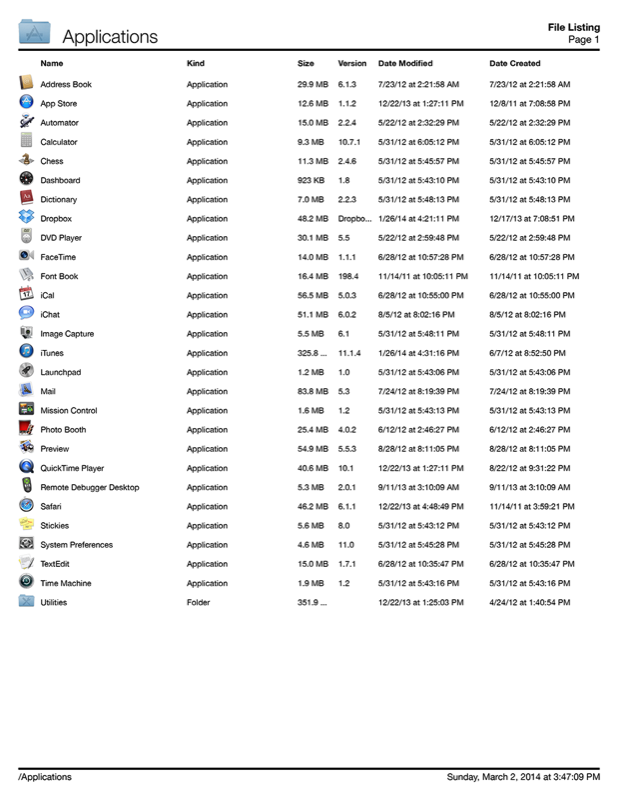
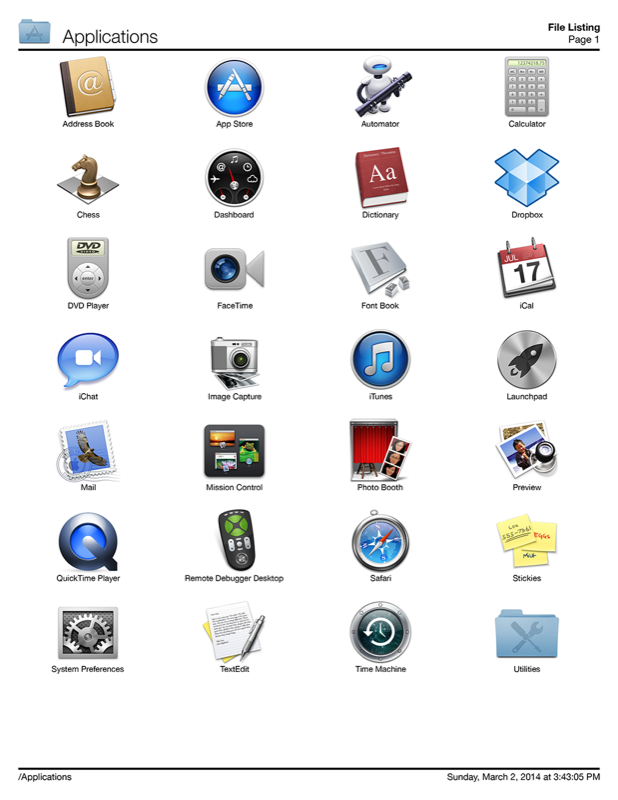
Aurora, Illinois - Searchware Solutions has announced the release of Print Window 5.4 for macOS, an update to their simple but powerful file listing utility. Print Window works seamlessly with the macOS Finder, allowing users to generate and print a file listing of folders using several different methods including a simple key command, the Status menu, the Dock menu, or drag and drop.
Users have complete control over what gets included in the file listings and what does not. Print Window can also print subfolder contents of a specified folder manually selected by the user. Print Window also allows complete autonomy in the sorting process. Users can sort file listings by a variety of different criteria (including ascending and descending order) and even determine the files' icons and size.
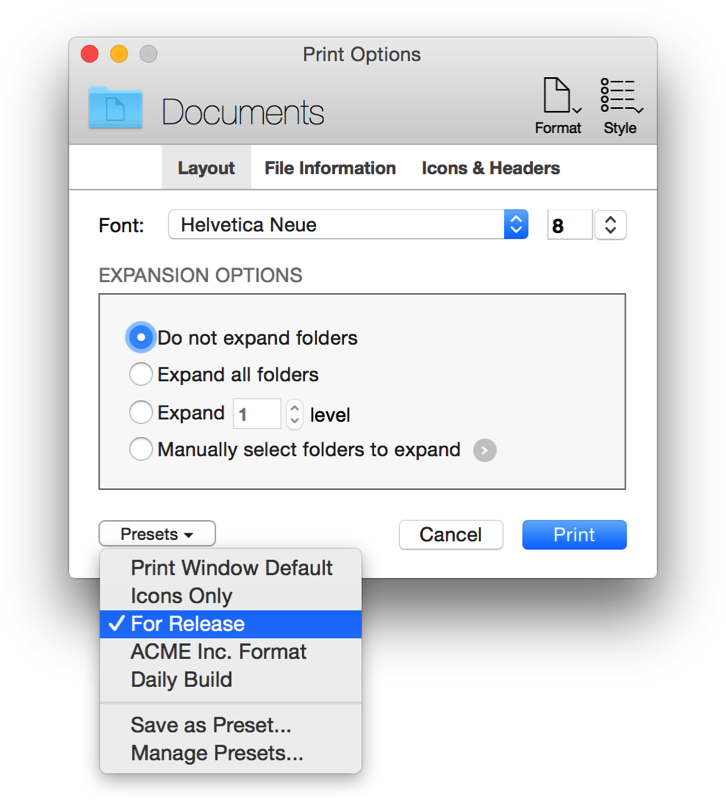
There are two different versions of Print Window: Standard Edition and Advanced Edition. The free Standard Edition includes basic features such as the ability to print full page file listings. The Advanced Edition includes full access to Print Window and is enabled when a valid serial number is entered. Both versions come in the same executable. In addition to making Print Window a fully Cocoa-based application, version 5.2 offers a wealth of new features to create a more powerful but easy-to-use tool including:
* Print Window is now a 64-bit application
* Numerous changes for additional macOS Mojave compatibility
* Print engine is significantly faster for some types of file listings
* Improved display of icons in the Print Options and Preferences windows when shown on a Retina display
* Fixed an issue where some text could display in the wrong color in the Print Options window
* Print Window now displays file counter with thousands separators in the Progress window
* Completely revamped error reporting system. The new system is more reliable and provides more robust information in the unlikely case an error does occur
* Various other minor bug fixes and improvements
Print Window provides a wide range of options for configuring file listings. Users of Print Window Advanced have the option to save multiple different file listing settings for quick recall. Print Window enables users to easily print a file listing without having to configure common options repeatedly.
Print Window is a multifunctional tool. In the Advanced version, users can also create CD jewel case and DVD case covers. In addition to generating and printing file listings, Print Window Advanced also has the ability to save file listings as tab-delimited text and Microsoft Excel files. File listings can be exported as PDF files and the latest version adds the ability to save file listings as CSV files for use in a wide variety of other applications.
"Print Window 5.4 continues to show why it is the best file listing utility for macOS," says Scott Crick of Searchware Solutions. "Users no longer have to rely on taking screenshots of windows or settling for text-only printouts of filenames only. Print Window provides the works: icons, file information, sorting, and so much more! We also offer users a chance to experience all the features of Print Window by offering them a 30-day trial of the Advanced mode. After that time, Print Window will continue to run but only in Standard mode. Print Window can be upgraded to Advanced mode at any time by purchasing a license."
System Requirements:
* Mac OS X 10.10 or better
* 18.1 MB
Pricing and Availability:
Print Window 5.2 is available in two versions through Searchware Solutions online. The Standard Edition is free. The Advanced Edition, which provides more features, is $20.00 (USD) for a single-user license. Upgrade pricing is available. Volume licensing is available as well.
Print Window 5.4: http://www.printwindowapp.com
Download Print Window: http://www.printwindowapp.com/software/printwindow.dmg
Purchase Print Window: http://www.printwindowapp.com/Store/default.html
Screenshot: http://printwindowapp.com/files/stacks_image_657.png
Screenshot (Example Listing 1): http://printwindowapp.com/files/stacks_image_601.png
Screenshot (Example Listing 2): http://www.printwindowapp.com/default_files/stacks-image-a12ddb4-618x800.png
Headquartered in Aurora, Illinois, Searchware Solutions was founded by Scott Crick in 1998 with a focus on providing quality macOS products with development based on customer feedback. All Material and Software (C) Copyright (C) 2019 Searchware Solutions. All Rights Reserved. Apple, the Apple logo, Macintosh, Mac OS X and macOS are registered trademarks of Apple Inc. in the U.S. and/or other countries. Other trademarks and registered trademarks may be the property of their respective owners.
*******
Link To Article: https://prmac.com/release-id-83294.htm
*******
---------------------------------------------------------------------------------
Note that you can alter delivered distributions at any time.
Login to your account on prMac to alter your channel selection, or to opt-out at any time.
Print Window 5.4 - Update to Simple, Yet Powerful, File Listing Utility - Published on 02/05/19
Searchware Solutions has announced Print Window 5.4, an update to their file listing utility for macOS. Seamlessly integrated with the macOS Finder, Print Window allows users to print a file listing of folders with a simple key command (or other methods of triggering a file listing). In addition to adding full 64-bit support, version 5.4 makes numerous improvements to add even greater versatility to this powerful, but easy-to-use tool.
Aurora, Illinois - Searchware Solutions has announced the release of Print Window 5.4 for macOS, an update to their simple but powerful file listing utility. Print Window works seamlessly with the macOS Finder, allowing users to generate and print a file listing of folders using several different methods including a simple key command, the Status menu, the Dock menu, or drag and drop.
Users have complete control over what gets included in the file listings and what does not. Print Window can also print subfolder contents of a specified folder manually selected by the user. Print Window also allows complete autonomy in the sorting process. Users can sort file listings by a variety of different criteria (including ascending and descending order) and even determine the files' icons and size.
There are two different versions of Print Window: Standard Edition and Advanced Edition. The free Standard Edition includes basic features such as the ability to print full page file listings. The Advanced Edition includes full access to Print Window and is enabled when a valid serial number is entered. Both versions come in the same executable. In addition to making Print Window a fully Cocoa-based application, version 5.2 offers a wealth of new features to create a more powerful but easy-to-use tool including:
* Print Window is now a 64-bit application
* Numerous changes for additional macOS Mojave compatibility
* Print engine is significantly faster for some types of file listings
* Improved display of icons in the Print Options and Preferences windows when shown on a Retina display
* Fixed an issue where some text could display in the wrong color in the Print Options window
* Print Window now displays file counter with thousands separators in the Progress window
* Completely revamped error reporting system. The new system is more reliable and provides more robust information in the unlikely case an error does occur
* Various other minor bug fixes and improvements
Print Window provides a wide range of options for configuring file listings. Users of Print Window Advanced have the option to save multiple different file listing settings for quick recall. Print Window enables users to easily print a file listing without having to configure common options repeatedly.
Print Window is a multifunctional tool. In the Advanced version, users can also create CD jewel case and DVD case covers. In addition to generating and printing file listings, Print Window Advanced also has the ability to save file listings as tab-delimited text and Microsoft Excel files. File listings can be exported as PDF files and the latest version adds the ability to save file listings as CSV files for use in a wide variety of other applications.
"Print Window 5.4 continues to show why it is the best file listing utility for macOS," says Scott Crick of Searchware Solutions. "Users no longer have to rely on taking screenshots of windows or settling for text-only printouts of filenames only. Print Window provides the works: icons, file information, sorting, and so much more! We also offer users a chance to experience all the features of Print Window by offering them a 30-day trial of the Advanced mode. After that time, Print Window will continue to run but only in Standard mode. Print Window can be upgraded to Advanced mode at any time by purchasing a license."
System Requirements:
* Mac OS X 10.10 or better
* 18.1 MB
Pricing and Availability:
Print Window 5.2 is available in two versions through Searchware Solutions online. The Standard Edition is free. The Advanced Edition, which provides more features, is $20.00 (USD) for a single-user license. Upgrade pricing is available. Volume licensing is available as well.
Print Window 5.4: http://www.printwindowapp.com
Download Print Window: http://www.printwindowapp.com/software/printwindow.dmg
Purchase Print Window: http://www.printwindowapp.com/Store/default.html
Screenshot: http://printwindowapp.com/files/stacks_image_657.png
Screenshot (Example Listing 1): http://printwindowapp.com/files/stacks_image_601.png
Screenshot (Example Listing 2): http://www.printwindowapp.com/default_files/stacks-image-a12ddb4-618x800.png
Headquartered in Aurora, Illinois, Searchware Solutions was founded by Scott Crick in 1998 with a focus on providing quality macOS products with development based on customer feedback. All Material and Software (C) Copyright (C) 2019 Searchware Solutions. All Rights Reserved. Apple, the Apple logo, Macintosh, Mac OS X and macOS are registered trademarks of Apple Inc. in the U.S. and/or other countries. Other trademarks and registered trademarks may be the property of their respective owners.
*******
Link To Article: https://prmac.com/release-id-83294.htm
*******
---------------------------------------------------------------------------------
Note that you can alter delivered distributions at any time.
Login to your account on prMac to alter your channel selection, or to opt-out at any time.
Mobile Application Development Services - Oodles Technologies
A new article has been published at prMac.
Mobile Application Development Services - Oodles Technologies - Published on 02/03/19
Want to build a highly responsive mobile app for your business? Or just want to enhance the features and capabilities of your existing mobile app with a wide range of custom integrations? Leverage the Mobile Application Development Services from Oodles Technologies to get highly scalable mobile app best suited for your business.
Gurgaon, India, Haryana - Want to build a highly responsive mobile app for your business? Or just want to enhance the features and capabilities of your existing mobile app with a wide range of custom integrations? Leverage the Mobile Application Development Services from Oodles Technologies to get highly scalable mobile app best suited for your business.
Importance of Mobile Apps
As the world is moving towards mobility, the internet users are also moving toward the mobile platform rather quickly. There's no doubt that mobile technology has been through tremendous advancements in the recent past and it brings an essential shift in business operations. Mobile platforms have become so advanced nowadays that thousands of businesses today, solely rely on them for their revenues.
Mobile apps these days are not just meant for entertainment but are alleviating the complex tasks of various companies, businesses and organizations. As a matter of fact, having a mobile app for your business aids in increasing productivity, employee engagement, client acquisition, retention and eventually increases the ROI.
All the forward thinking organizations devise smart mobile strategies and applications by addressing the challenges like performance, speed, security, privacy and many other factors.
Features and Advantages of Availing Mobile Application Development Services:
* An attractive option for your business as the apps are customized for your business
* Performs multiple functions that are tailored to your business specific needs
* Reinforced data security system with relevant security measures addressed
* Ability to manage the apps by yourself without any discontinuity
* Ability to send personalized updates to your customers on products and services
* Retrieve client data easily and thus save time from physical documentation
* Get ready access to your projects and work from anywhere anytime
* Keep a check on your project progress and deadlines easily
* Serve your customers better with enhanced performance and authenticity
Technical Expertise:
User-Interface Design: Deliver relevant UI/UX design with high code quality, fast loading, animations, material design, and, the release of apps after testing.
Programming Skills: Hands on experience in C, C , Java, Web development languages,Google API, Android, Third Party Integration, Ajax Frameworks, Objective-C, C# based frameworks, jQuery, and, etc.
Business Expertise: Skilled in market research across varied industrial segments, proven excellency in developing futuristic apps with clean and bug-free codes, on the cloud, or traditional as per the client requisite.
App optimization and Marketing: Our dedicated experts optimize your apps with reference to design, user experience, intuitive navigation, other user-friendly features, and pave the way for maximum downloads on their respective app stores.
Discover Oodles Service Offerings in Mobile Apps Development
Android Application Development Services: We have carved a niche in Android Application Development with an extensive experience of years in creating interactive apps.
iOS Application Development Services: We create easy-to-use and customer-centric iOS apps to produce anticipated business results.
Titanium Application Development Services: We are experts in creating secure, deployable, and scalable Appcelerator Titanium mobile applications.
PhoneGap Application Development Services: Our seasoned experts create scalable and modern PhoneGap Applications across varied industrial segments.
Why Choose Oodles Technologies?
Oodles technologies stays at the forefront when it comes Mobile Application Development Services. We have seasoned team of experts separately working on Android and iOS projects. Our custom mobile application development services meet the tech-savvy customers' demand and beyond as per their business value, market research, and competitor analysis.
The Mobile App Developers working at Oodles are proficient in:
* Custom mobile application development services aligned to business goals
* Iterative approach from ideation to the deployment of mobility solutions
* Enhanced customer interface, engagement, and, loyalty
* Leverage the abilities of the platform and device to its maximum
* Seamless mobile apps development at cost-effective and competitive pricing
* Implementation of proven methodologies for data protection and privacy
Interested in working with us? Get in touch. Contact Us today!
Blockchain Development Company: https://www.oodlestechnologies.com/blockchain-development-company
ICO Development Company: https://www.oodlestechnologies.com/ico-development-company
Cryptocurrency Development Company: https://www.oodlestechnologies.com/cryptocurrency-development-company
Oodles Technologies is an offshore software development company with a focus on state-of-the-art technologies. We have our niche in awe-inspiring domains like Blockchain, Machine Learning, Artificial Intelligence, ERP, Big Data and Live Video Streaming. We keep close tabs on the latest trends and technologies and with our highly skilled team of developers, we deliver end-to-end development solutions at the best market rates. All Material and Software (C) Copyright 2019 Oodles Technologies. All Rights Reserved. Apple, the Apple logo, iPhone, iPod and iPad are registered trademarks of Apple Inc. in the U.S. and/or other countries. Other trademarks and registered trademarks may be the property of their respective owners.
*******
Link To Article: https://prmac.com/release-id-83293.htm
*******
---------------------------------------------------------------------------------
Note that you can alter delivered distributions at any time.
Login to your account on prMac to alter your channel selection, or to opt-out at any time.
Mobile Application Development Services - Oodles Technologies - Published on 02/03/19
Want to build a highly responsive mobile app for your business? Or just want to enhance the features and capabilities of your existing mobile app with a wide range of custom integrations? Leverage the Mobile Application Development Services from Oodles Technologies to get highly scalable mobile app best suited for your business.
Gurgaon, India, Haryana - Want to build a highly responsive mobile app for your business? Or just want to enhance the features and capabilities of your existing mobile app with a wide range of custom integrations? Leverage the Mobile Application Development Services from Oodles Technologies to get highly scalable mobile app best suited for your business.
Importance of Mobile Apps
As the world is moving towards mobility, the internet users are also moving toward the mobile platform rather quickly. There's no doubt that mobile technology has been through tremendous advancements in the recent past and it brings an essential shift in business operations. Mobile platforms have become so advanced nowadays that thousands of businesses today, solely rely on them for their revenues.
Mobile apps these days are not just meant for entertainment but are alleviating the complex tasks of various companies, businesses and organizations. As a matter of fact, having a mobile app for your business aids in increasing productivity, employee engagement, client acquisition, retention and eventually increases the ROI.
All the forward thinking organizations devise smart mobile strategies and applications by addressing the challenges like performance, speed, security, privacy and many other factors.
Features and Advantages of Availing Mobile Application Development Services:
* An attractive option for your business as the apps are customized for your business
* Performs multiple functions that are tailored to your business specific needs
* Reinforced data security system with relevant security measures addressed
* Ability to manage the apps by yourself without any discontinuity
* Ability to send personalized updates to your customers on products and services
* Retrieve client data easily and thus save time from physical documentation
* Get ready access to your projects and work from anywhere anytime
* Keep a check on your project progress and deadlines easily
* Serve your customers better with enhanced performance and authenticity
Technical Expertise:
User-Interface Design: Deliver relevant UI/UX design with high code quality, fast loading, animations, material design, and, the release of apps after testing.
Programming Skills: Hands on experience in C, C , Java, Web development languages,Google API, Android, Third Party Integration, Ajax Frameworks, Objective-C, C# based frameworks, jQuery, and, etc.
Business Expertise: Skilled in market research across varied industrial segments, proven excellency in developing futuristic apps with clean and bug-free codes, on the cloud, or traditional as per the client requisite.
App optimization and Marketing: Our dedicated experts optimize your apps with reference to design, user experience, intuitive navigation, other user-friendly features, and pave the way for maximum downloads on their respective app stores.
Discover Oodles Service Offerings in Mobile Apps Development
Android Application Development Services: We have carved a niche in Android Application Development with an extensive experience of years in creating interactive apps.
iOS Application Development Services: We create easy-to-use and customer-centric iOS apps to produce anticipated business results.
Titanium Application Development Services: We are experts in creating secure, deployable, and scalable Appcelerator Titanium mobile applications.
PhoneGap Application Development Services: Our seasoned experts create scalable and modern PhoneGap Applications across varied industrial segments.
Why Choose Oodles Technologies?
Oodles technologies stays at the forefront when it comes Mobile Application Development Services. We have seasoned team of experts separately working on Android and iOS projects. Our custom mobile application development services meet the tech-savvy customers' demand and beyond as per their business value, market research, and competitor analysis.
The Mobile App Developers working at Oodles are proficient in:
* Custom mobile application development services aligned to business goals
* Iterative approach from ideation to the deployment of mobility solutions
* Enhanced customer interface, engagement, and, loyalty
* Leverage the abilities of the platform and device to its maximum
* Seamless mobile apps development at cost-effective and competitive pricing
* Implementation of proven methodologies for data protection and privacy
Interested in working with us? Get in touch. Contact Us today!
Blockchain Development Company: https://www.oodlestechnologies.com/blockchain-development-company
ICO Development Company: https://www.oodlestechnologies.com/ico-development-company
Cryptocurrency Development Company: https://www.oodlestechnologies.com/cryptocurrency-development-company
Oodles Technologies is an offshore software development company with a focus on state-of-the-art technologies. We have our niche in awe-inspiring domains like Blockchain, Machine Learning, Artificial Intelligence, ERP, Big Data and Live Video Streaming. We keep close tabs on the latest trends and technologies and with our highly skilled team of developers, we deliver end-to-end development solutions at the best market rates. All Material and Software (C) Copyright 2019 Oodles Technologies. All Rights Reserved. Apple, the Apple logo, iPhone, iPod and iPad are registered trademarks of Apple Inc. in the U.S. and/or other countries. Other trademarks and registered trademarks may be the property of their respective owners.
*******
Link To Article: https://prmac.com/release-id-83293.htm
*******
---------------------------------------------------------------------------------
Note that you can alter delivered distributions at any time.
Login to your account on prMac to alter your channel selection, or to opt-out at any time.
iFlicks 3 for macOS - Video Metadata Editor and Conversion
A new article has been published at prMac.
iFlicks 3 for macOS - Video Metadata Editor and Conversion - Published on 02/02/19
Indie developer, Jendrik Bertram today announces the release of iFlicks 3, a major update of the popular iFlicks for macOS. iFlicks is the best and most complete video and metadata handling solution available for macOS. There is no easier way to add you video files to iTunes or Plex, so you can watch them on your iOS devices or third party media players. With version 3.0.1, it is now possible to process videos containing HEVC content, encode video tracks to HEVC, custom presets and more.
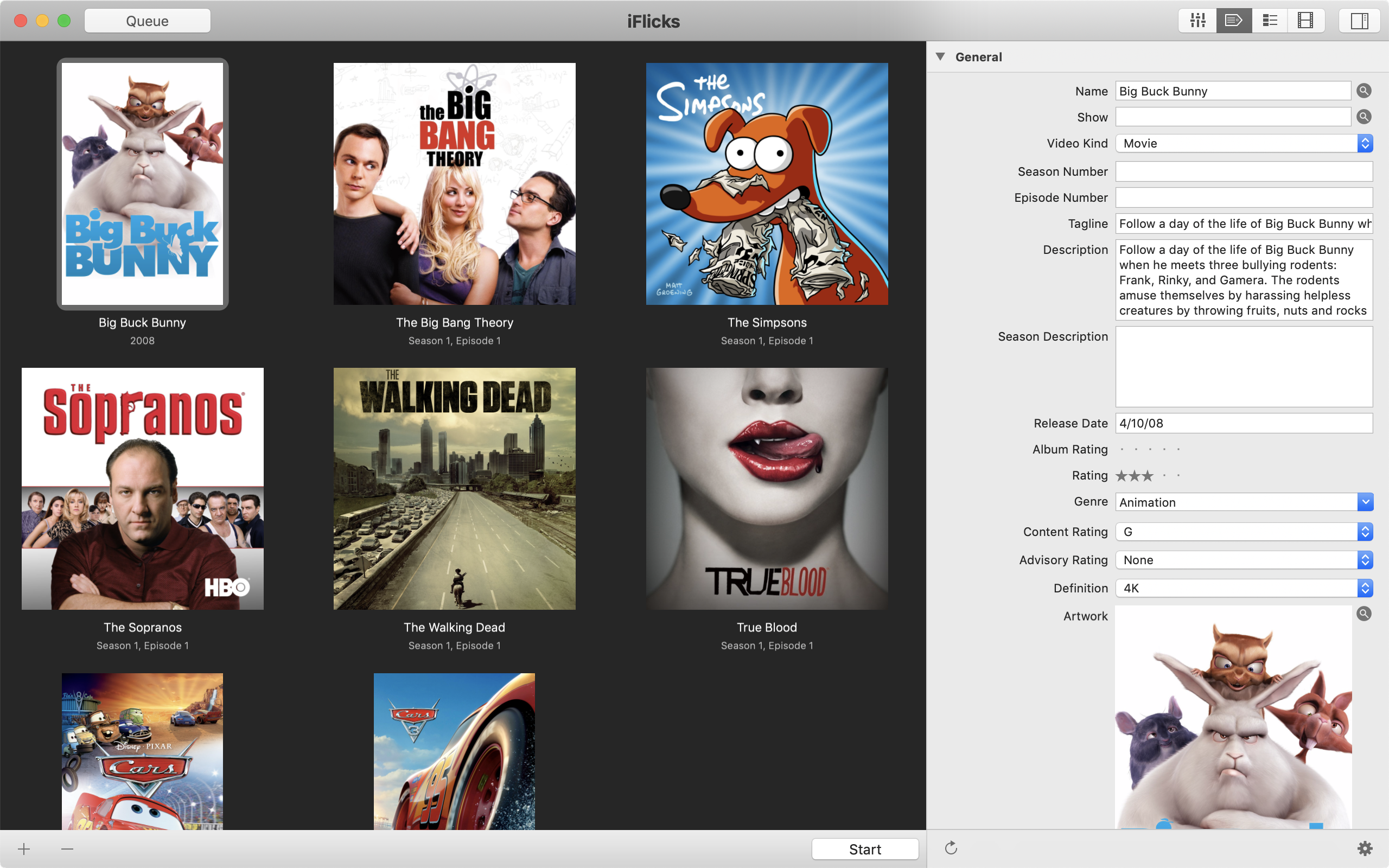
Paderborn, Germany - Indie developer, Jendrik Bertram today announces the release of iFlicks 3, a major update of the popular iFlicks for macOS. iFlicks is the best and most complete video and metadata handling solution available for macOS. There is no easier way to add you video files to iTunes or Plex, so you can watch them on your iOS devices or third party media players.
iFlicks 3 is the third major release of iFlicks, which brings you a bunch of new features and improvements.
It is now possible to process videos containing HEVC content just as quick as H.264. Direct passthrough of HEVC tracks from mkv files to m4v now only takes seconds, just like it has always worked for H.264 tracks. This works just as quick for all your HD content, no matter if 4k or 1080p. Additionally you can use iFlicks 3 to encode video tracks to HEVC. To make use of this feature you need at least macOS High Sierra, as it is the first version to natively support HEVC. On the newest generation of Macs, video encoding can even make use of the T2 Chip to perform encoding as fast as possible.
To provide even more flexibility to our power users, it is now also possible to create custom presets with different settings from the builtin ones. It is also possible to use these custom presets together with the immensely powerful rule system to create an even more customised workflow.
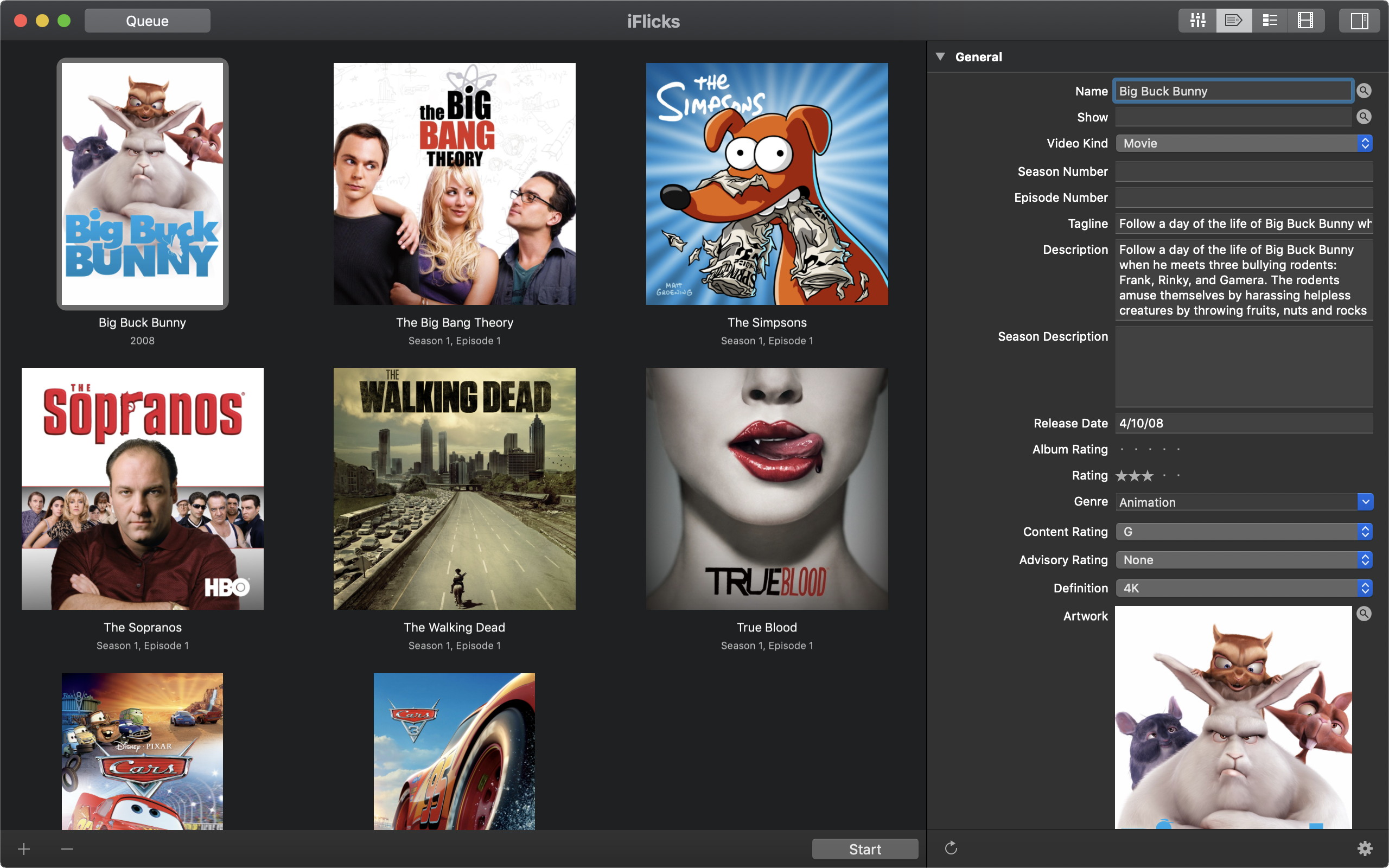
As additional bonus iFlicks 3 has a tweaked interface incorporating countless improvements. The most notable ones being full Dark Mode support on macOS Mojave, as well as Touch Bar support for MacBook Pro.
Leading Metadata Handling
* Automatic lookup for Movie and TV Show metadata
* Finds beautiful Artwork, including squared Artwork for TV Shows
* Automatic lookup for subtitles and chapter titles
* Behaviour completely customisable using a extremely powerful Rules
Powerful Video Processing
* Extremely fast and lossless passthrough for H.264 and HEVC
* High Quality encoding capabilities for H.264 and HEVC
* Dedicated presets for Apple Devices like iPhone, iPad and Apple TV
* HD support (4k, 1080p, 720p)
* Encoding of Stereo and Surround Audio tracks
* Supports all common video formats like mkv, mp4, m4v, mov, avi, mpg and many many more
* Subtitle and Chapter support
Extensive Automation Possibilities
* Support for Custom Presets based on user preferences
* Watch Folders to pick up and automatically process files added to monitored folders
* Extremely powerful rules to customise the complete workflow
* AppleScript support for even more fine grained control
Intuitive User Interface
* Just drag videos to iFlicks and hit start to process the videos
* Clean interface to get you started without distractions, Advanced functionality just a click away
* Tightly coupled with iTunes. Just drag items from iTunes to iFlicks to update metadata
Language Support:
iFlicks supports English, Arabic, Catalan, Croatian, Czech, Danish, Dutch, Finnish, French, German, Greek, Hebrew, Hindi, Hungarian, Indonesian, Italian, Japanese, Korean, Malay, Norwegian Bokml, Persian, Polish, Portuguese, Romanian, Russian, Simplified Chinese, Slovak, Spanish, Swedish, Thai, Traditional Chinese, Turkish, Ukrainian and Vietnamese languages.
Device Requirements:
* macOS 12.2 or later
* iTunes 12
Pricing and Availability:
iFlicks 3 is available as subscription and one-time payment version. The one-time payment version is available from the Mac App Store for US $34.99, the same price as iFlicks 2 before. Prices may vary by location.
The subscription versions are available from the Website and Mac App Store:
* iFlicks Basic: $0.99 monthly, $9.49 annually
* iFlicks Plus: $2.49 monthly, $18.49 annually
Special upgrade pricing will be in place for the yearly subscription versions:
* 50% Off until end of February 2019
* 25% Off until end of March 2019
iFlicks 3: https://iflicks.app
Download iFlicks (subscription): http://download.iflicksapp.com
Download from Mac App Store (subscription): https://itunes.apple.com/us/app/iflicks/id408937559?mt=12&ign-mpt=uo%3D4
Download from Mac App Store (one-time payment): https://itunes.apple.com/us/app/iflicks-3/id1274494218?mt=12&ign-mpt=uo%3D4
Screenshot: https://www.iflicksapp.com/img/screenshots/screenshot-metadata.png
Screenshot (Dark Mode): https://www.iflicksapp.com/img/screenshots/screenshot-metadata-dark.png
Located in Paderborn, Germany, independent software developer Jendrik Bertram has a passion to craft elegant, easy-to-use applications for the Mac platform. As an indie developer, Jendrik Bertram would like to thank all of his wonderful beta testers. All Rights Reserved. Apple, the Apple logo, iPhone, iPod, iPad, QuickTime and iTunes are registered trademarks of Apple Inc. in the U.S. and/or other countries. Other registered trademarks may be the property of their respective owners.
*******
Link To Article: https://prmac.com/release-id-83291.htm
*******
---------------------------------------------------------------------------------
Note that you can alter delivered distributions at any time.
Login to your account on prMac to alter your channel selection, or to opt-out at any time.
iFlicks 3 for macOS - Video Metadata Editor and Conversion - Published on 02/02/19
Indie developer, Jendrik Bertram today announces the release of iFlicks 3, a major update of the popular iFlicks for macOS. iFlicks is the best and most complete video and metadata handling solution available for macOS. There is no easier way to add you video files to iTunes or Plex, so you can watch them on your iOS devices or third party media players. With version 3.0.1, it is now possible to process videos containing HEVC content, encode video tracks to HEVC, custom presets and more.
Paderborn, Germany - Indie developer, Jendrik Bertram today announces the release of iFlicks 3, a major update of the popular iFlicks for macOS. iFlicks is the best and most complete video and metadata handling solution available for macOS. There is no easier way to add you video files to iTunes or Plex, so you can watch them on your iOS devices or third party media players.
iFlicks 3 is the third major release of iFlicks, which brings you a bunch of new features and improvements.
It is now possible to process videos containing HEVC content just as quick as H.264. Direct passthrough of HEVC tracks from mkv files to m4v now only takes seconds, just like it has always worked for H.264 tracks. This works just as quick for all your HD content, no matter if 4k or 1080p. Additionally you can use iFlicks 3 to encode video tracks to HEVC. To make use of this feature you need at least macOS High Sierra, as it is the first version to natively support HEVC. On the newest generation of Macs, video encoding can even make use of the T2 Chip to perform encoding as fast as possible.
To provide even more flexibility to our power users, it is now also possible to create custom presets with different settings from the builtin ones. It is also possible to use these custom presets together with the immensely powerful rule system to create an even more customised workflow.
As additional bonus iFlicks 3 has a tweaked interface incorporating countless improvements. The most notable ones being full Dark Mode support on macOS Mojave, as well as Touch Bar support for MacBook Pro.
Leading Metadata Handling
* Automatic lookup for Movie and TV Show metadata
* Finds beautiful Artwork, including squared Artwork for TV Shows
* Automatic lookup for subtitles and chapter titles
* Behaviour completely customisable using a extremely powerful Rules
Powerful Video Processing
* Extremely fast and lossless passthrough for H.264 and HEVC
* High Quality encoding capabilities for H.264 and HEVC
* Dedicated presets for Apple Devices like iPhone, iPad and Apple TV
* HD support (4k, 1080p, 720p)
* Encoding of Stereo and Surround Audio tracks
* Supports all common video formats like mkv, mp4, m4v, mov, avi, mpg and many many more
* Subtitle and Chapter support
Extensive Automation Possibilities
* Support for Custom Presets based on user preferences
* Watch Folders to pick up and automatically process files added to monitored folders
* Extremely powerful rules to customise the complete workflow
* AppleScript support for even more fine grained control
Intuitive User Interface
* Just drag videos to iFlicks and hit start to process the videos
* Clean interface to get you started without distractions, Advanced functionality just a click away
* Tightly coupled with iTunes. Just drag items from iTunes to iFlicks to update metadata
Language Support:
iFlicks supports English, Arabic, Catalan, Croatian, Czech, Danish, Dutch, Finnish, French, German, Greek, Hebrew, Hindi, Hungarian, Indonesian, Italian, Japanese, Korean, Malay, Norwegian Bokml, Persian, Polish, Portuguese, Romanian, Russian, Simplified Chinese, Slovak, Spanish, Swedish, Thai, Traditional Chinese, Turkish, Ukrainian and Vietnamese languages.
Device Requirements:
* macOS 12.2 or later
* iTunes 12
Pricing and Availability:
iFlicks 3 is available as subscription and one-time payment version. The one-time payment version is available from the Mac App Store for US $34.99, the same price as iFlicks 2 before. Prices may vary by location.
The subscription versions are available from the Website and Mac App Store:
* iFlicks Basic: $0.99 monthly, $9.49 annually
* iFlicks Plus: $2.49 monthly, $18.49 annually
Special upgrade pricing will be in place for the yearly subscription versions:
* 50% Off until end of February 2019
* 25% Off until end of March 2019
iFlicks 3: https://iflicks.app
Download iFlicks (subscription): http://download.iflicksapp.com
Download from Mac App Store (subscription): https://itunes.apple.com/us/app/iflicks/id408937559?mt=12&ign-mpt=uo%3D4
Download from Mac App Store (one-time payment): https://itunes.apple.com/us/app/iflicks-3/id1274494218?mt=12&ign-mpt=uo%3D4
Screenshot: https://www.iflicksapp.com/img/screenshots/screenshot-metadata.png
Screenshot (Dark Mode): https://www.iflicksapp.com/img/screenshots/screenshot-metadata-dark.png
Located in Paderborn, Germany, independent software developer Jendrik Bertram has a passion to craft elegant, easy-to-use applications for the Mac platform. As an indie developer, Jendrik Bertram would like to thank all of his wonderful beta testers. All Rights Reserved. Apple, the Apple logo, iPhone, iPod, iPad, QuickTime and iTunes are registered trademarks of Apple Inc. in the U.S. and/or other countries. Other registered trademarks may be the property of their respective owners.
*******
Link To Article: https://prmac.com/release-id-83291.htm
*******
---------------------------------------------------------------------------------
Note that you can alter delivered distributions at any time.
Login to your account on prMac to alter your channel selection, or to opt-out at any time.
Subscribe to:
Posts (Atom)