A new article has been published at prMac.
SwampDog, LLC announces WhoDo 1.0 - a contact creation tool for iOS - Published on 02/18/19
Oregon based SwampDog, LLC announces WhoDo, a contact creation tool available now for iOS. WhoDo for iOS supports speech as a data source, allowing the customer to simply speak a new contact's data. WhoDo for iOS also enables customers to create new Contacts without even launching the WhoDo app. WhoDo for iOS uses several internal databases, Apple Foundation level frameworks, natural language processing, and data detectors to deliver its unique solution for Apple mobile devices.
Bend, Oregon - SwampDog, LLC is delighted to announce WhoDo, a contact creation tool available now for iOS. WhoDo for iOS supports speech as a data source, allowing the customer to simply speak a new contact's data. WhoDo for iOS also enables customers to create new Contacts without even launching the WhoDo app. WhoDo for iOS uses several internal databases, Apple Foundation level frameworks, natural language processing, and data detectors to deliver its unique solution for Apple mobile devices.
WhoDo for iOS allows the customer to make a text selection inside any app then use the system-wide 'Share' action to create a contact. No need to launch or close the WhoDo app.
WhoDo provides several options which make it more powerful and flexible than a standard data detector. WhoDo provides assignment to a group, a default area code when none has been supplied, optional nickname assignment, optional name prefix, optional text to be included in the Note field and optional date and time embedded in the Note field.
WhoDo recognizes personal and company names, job titles, email addresses, phone numbers, street addresses, websites, instant message handles, and social media profiles.
iOS Minimum Requirements:
* iOS Version 11.0 or later
* 7.3 MB Hard Drive space
* Internet Connection (required only for App Store)
Pricing and Availability:
* WhoDo 1.0 is available exclusively on Apple's App Store
* WhoDo 1.0 is available as an auto-renewable subscription for only 99¢ (USD) per year. A free 3 day trial is included.
* WhoDo 1.0 is also available as permanent license for a one time cost of $4.99 (USD).
* SwampDog is also releasing WhoDo for macOS.
Swamp Dog: http://swampdog.info
WhoDo for iOS 1.0.3: https://swampdog.info/whodoios
Download from the App Store: https://itunes.apple.com/us/app/whodo/id1448588605
Product Videos: https://swampdog.info/whodoios/core/videos/
Headquartered in outdoor-loving Bend, Oregon, Swamp Dog, LLC is an Oregon LLC founded in 2018. The staff of Swamp Dog, LLC have been delivering solutions to companies like Apple, VISA, AMD, Motorola, Alcatel Lucent, and others for over 30 years. Today the company's development efforts are focused exclusively on macOS and iOS. SwampDog, LLC delivers contact-friendly software that enlivens your people. Copyright 2019 Swamp Dog, LLC. All Rights Reserved. Apple and the Apple logo, are registered trademarks of Apple Computer in the U.S. and/or other countries.
*******
Link To Article: https://prmac.com/release-id-83306.htm
*******
---------------------------------------------------------------------------------
Note that you can alter delivered distributions at any time.
Login to your account on prMac to alter your channel selection, or to opt-out at any time.

FlexiHub 3.4 massive update brings login via token, new device filters
A new article has been published at prMac.
FlexiHub 3.4 massive update brings login via token, new device filters - Published on 02/14/19
Eltima Software releases FlexiHub 3.4, an update to their USB sharing tool for macOS. The solution allows redirecting USB ports and devices attached to them across the Internet so that multiple network users can access the shared USB peripherals from their local computers. The latest update offers new advanced device filters and a convenient option to log in to the software account using tokens. All network connections created using FlexiHub are reliably protected with 256-bit SSL encryption.
Frankfurt, Germany - Eltima Software is pleased to announce the release of FlexiHub 3.4, an important feature update to the company's advanced USB port sharing solution for macOS. The new version adds the ability to access the software account using tokens. These secure digital keys allow logging in to a FlexiHub account without entering an email address and password. The latest edition also provides the new convenient device filtering options and lots of improvements for accounts with a large number of nodes.
FlexiHub is a powerful utility for remote access to USB ports and devices connected to them. It enables secure communications with remote peripherals over the Internet and makes it possible to establish cross-platform connections between macOS, Windows, Linux, and Android platforms.
The latest version of FlexiHub gives the new secure way to share USB devices among multiple remote users. Now, owners of FlexiHub accounts can generate digital keys, tokens, in their online user cabinets and send them to other users instead of an email address and password. This ability allows the account owners to keep their registration information confidential while sharing access to their software accounts.
What's new in FlexiHub v3.4:
* Login via a token. A token provides access to a software account but doesn't allow logging into online personal cabinets of users
* Advanced filters for displaying only USB devices, only serial ports, or only remote devices connected to a local computer
* The abilities to collapse and expand all computers in the account, which is especially useful for FlexiHub accounts with a big number of nodes
* The option to disconnect all remote devices from a local computer
* Alphabetical sorting of nodes, and more
Also, FlexiHub 3.4 retains the best of its main functionality:
* Efficient USB redirection technology - FlexiHub is based on the unique USB over IP sharing technology which lets you connect to remote USB devices no matter the distance and use them as though they were attached directly to your machine.
* Traffic encryption - All network connections created using FlexiHub are reliably protected with 256-bit SSL encryption. This ensures the security of network communications and protects your sensitive data from unauthorized access.
* Data compression - The software offers an efficient data compression method that helps significantly improve the speed of data transfer.
* Friendly interface - FlexiHub comes with a streamlined and intuitive interface. No programming skills are required to be able to share and access USB devices with the program.
* Individual subscription plan - You can choose your own subscription plan depending on how many simultaneous connections you require. If you don't feel the need to connect to remote USB peripherals but just want to share devices attached to your PC, you can sign up for a FlexiShare plan provided at no cost.
FlexiHub 3.4: https://www.flexihub.com/
Download FlexiHub: https://www.flexihub.com/download.html
Screenshot 1: https://www.eltima.com/wiki/wp-content/uploads/2015/12/connect.png
Screenshot 2: https://www.eltima.com/wiki/wp-content/uploads/2015/12/connect-menu.png
Application Icon: https://www.eltima.com/wiki/wp-content/uploads/2019/02/apple-touch-icon-144x144.png
Eltima Software is a global software Development Company, specializing primarily in serial communication, mobile and flash software for Mac OS and Windows. Eltima Software delivers top-notch solutions having a friendly team of 40 professionals. Copyright (C) 2019 Eltima Software. All Rights Reserved. Apple, the Apple logo and Macintosh are registered trademarks of Apple Inc. in the U.S. and/or other countries.
*******
Link To Article: https://prmac.com/release-id-83304.htm
*******
---------------------------------------------------------------------------------
Note that you can alter delivered distributions at any time.
Login to your account on prMac to alter your channel selection, or to opt-out at any time.
FlexiHub 3.4 massive update brings login via token, new device filters - Published on 02/14/19
Eltima Software releases FlexiHub 3.4, an update to their USB sharing tool for macOS. The solution allows redirecting USB ports and devices attached to them across the Internet so that multiple network users can access the shared USB peripherals from their local computers. The latest update offers new advanced device filters and a convenient option to log in to the software account using tokens. All network connections created using FlexiHub are reliably protected with 256-bit SSL encryption.
Frankfurt, Germany - Eltima Software is pleased to announce the release of FlexiHub 3.4, an important feature update to the company's advanced USB port sharing solution for macOS. The new version adds the ability to access the software account using tokens. These secure digital keys allow logging in to a FlexiHub account without entering an email address and password. The latest edition also provides the new convenient device filtering options and lots of improvements for accounts with a large number of nodes.
FlexiHub is a powerful utility for remote access to USB ports and devices connected to them. It enables secure communications with remote peripherals over the Internet and makes it possible to establish cross-platform connections between macOS, Windows, Linux, and Android platforms.
The latest version of FlexiHub gives the new secure way to share USB devices among multiple remote users. Now, owners of FlexiHub accounts can generate digital keys, tokens, in their online user cabinets and send them to other users instead of an email address and password. This ability allows the account owners to keep their registration information confidential while sharing access to their software accounts.
What's new in FlexiHub v3.4:
* Login via a token. A token provides access to a software account but doesn't allow logging into online personal cabinets of users
* Advanced filters for displaying only USB devices, only serial ports, or only remote devices connected to a local computer
* The abilities to collapse and expand all computers in the account, which is especially useful for FlexiHub accounts with a big number of nodes
* The option to disconnect all remote devices from a local computer
* Alphabetical sorting of nodes, and more
Also, FlexiHub 3.4 retains the best of its main functionality:
* Efficient USB redirection technology - FlexiHub is based on the unique USB over IP sharing technology which lets you connect to remote USB devices no matter the distance and use them as though they were attached directly to your machine.
* Traffic encryption - All network connections created using FlexiHub are reliably protected with 256-bit SSL encryption. This ensures the security of network communications and protects your sensitive data from unauthorized access.
* Data compression - The software offers an efficient data compression method that helps significantly improve the speed of data transfer.
* Friendly interface - FlexiHub comes with a streamlined and intuitive interface. No programming skills are required to be able to share and access USB devices with the program.
* Individual subscription plan - You can choose your own subscription plan depending on how many simultaneous connections you require. If you don't feel the need to connect to remote USB peripherals but just want to share devices attached to your PC, you can sign up for a FlexiShare plan provided at no cost.
FlexiHub 3.4: https://www.flexihub.com/
Download FlexiHub: https://www.flexihub.com/download.html
Screenshot 1: https://www.eltima.com/wiki/wp-content/uploads/2015/12/connect.png

Screenshot 2: https://www.eltima.com/wiki/wp-content/uploads/2015/12/connect-menu.png

Application Icon: https://www.eltima.com/wiki/wp-content/uploads/2019/02/apple-touch-icon-144x144.png

Eltima Software is a global software Development Company, specializing primarily in serial communication, mobile and flash software for Mac OS and Windows. Eltima Software delivers top-notch solutions having a friendly team of 40 professionals. Copyright (C) 2019 Eltima Software. All Rights Reserved. Apple, the Apple logo and Macintosh are registered trademarks of Apple Inc. in the U.S. and/or other countries.
*******
Link To Article: https://prmac.com/release-id-83304.htm
*******
---------------------------------------------------------------------------------
Note that you can alter delivered distributions at any time.
Login to your account on prMac to alter your channel selection, or to opt-out at any time.
ChronoSync Express Supports macOS Mojave
A new article has been published at prMac.
ChronoSync Express Supports macOS Mojave - Published on 02/13/19
Econ Technologies releases ChronoSync Express 1.3, an important update to their entry level version of ChronoSync for macOS. It provides the basic file synchronization, backup & scheduling capabilities found in ChronoSync but at a more affordable price. Version 1.3 offers full macOS Mojave support and adds several new features and enhancements that focus primarily on exploiting new operating system technologies. The biggest notable addition to these updates is full Mojave Dark Mode support.
Casselberry, Florida - Econ Technologies, Inc. announces full macOS 10.14 (Mojave) support for ChronoSync Express. The first thing you'll want to try is the easy-on-the-eyes full Mojave Dark Mode support! Beyond that, take advantage of the new streamlined access to all the information about Sync Tasks in the ChronoSync Express Organizer that now offers Task Document Tagging, Sorting, Actions and Alerts so you can see what is going on at-a-glance.
The ChronoSync Express Scheduler system menu now offers a view of Running Scheduled Tasks while the Scheduled Tasks Manager offers easy access to Task Document Logs for quick review of completion status or errors.
These changes are delivered along with numerous bug fixes, tweaks and improvements. See the highlights of the newest features and capabilities in the ChronoSync Express video series. See the details of all the changes in the "Release Notes".
Owners of ChronoSync Express can start using these new features today with a free update! If you don't already own ChronoSync Express, you can find it on the Mac App Store for $24.99 (USD). Or try ChronoSync Express along with over 100 other Apps as part of the Setapp subscription service. ChronoSync Express is designed to work on macOS version 10.10 and newer.
ChronoSync Express 1.3: https://www.econtechnologies.com/chronosync-express/overview.html
ChronoSync Express video series: https://www.econtechnologies.com/about/videos.html
Release Notes: https://www.econtechnologies.com/chronosync-express/notes.html
Purchase from Mac App Store: https://itunes.apple.com/app/chronosync-express/id904801687
Setapp subscription service: https://go.setapp.com/stp134?refAppID=217
Econ Technologies, Inc has been creating Apple software for over 20 years. ChronoSync Express is part of a suite of macOS and iOS products. ChronoSync Express is the entry level version of ChronoSync, the complete synchronization and backup utility for macOS. It is the perfect tool for those who want to synchronize files and folders between two computers. It can also perform local backups to external hard drives, NAS devices and file servers. For high performance file sharing, it is fully compatible with ChronoAgent. It can even exchange files with iOS devices running InterConneX and send completion notifications to your iPhone via ChronoMonitor. All Material and Software (C) Copyright 2019 Econ Technologies. All Rights Reserved. Apple, the Apple logo, Macintosh and macOS are registered trademarks of Apple Inc. in the U.S. and/or other countries. Other trademarks and registered trademarks may be the property of their respective owners.
*******
Link To Article: https://prmac.com/release-id-83303.htm
*******
---------------------------------------------------------------------------------
Note that you can alter delivered distributions at any time.
Login to your account on prMac to alter your channel selection, or to opt-out at any time.
ChronoSync Express Supports macOS Mojave - Published on 02/13/19
Econ Technologies releases ChronoSync Express 1.3, an important update to their entry level version of ChronoSync for macOS. It provides the basic file synchronization, backup & scheduling capabilities found in ChronoSync but at a more affordable price. Version 1.3 offers full macOS Mojave support and adds several new features and enhancements that focus primarily on exploiting new operating system technologies. The biggest notable addition to these updates is full Mojave Dark Mode support.
Casselberry, Florida - Econ Technologies, Inc. announces full macOS 10.14 (Mojave) support for ChronoSync Express. The first thing you'll want to try is the easy-on-the-eyes full Mojave Dark Mode support! Beyond that, take advantage of the new streamlined access to all the information about Sync Tasks in the ChronoSync Express Organizer that now offers Task Document Tagging, Sorting, Actions and Alerts so you can see what is going on at-a-glance.
The ChronoSync Express Scheduler system menu now offers a view of Running Scheduled Tasks while the Scheduled Tasks Manager offers easy access to Task Document Logs for quick review of completion status or errors.
These changes are delivered along with numerous bug fixes, tweaks and improvements. See the highlights of the newest features and capabilities in the ChronoSync Express video series. See the details of all the changes in the "Release Notes".
Owners of ChronoSync Express can start using these new features today with a free update! If you don't already own ChronoSync Express, you can find it on the Mac App Store for $24.99 (USD). Or try ChronoSync Express along with over 100 other Apps as part of the Setapp subscription service. ChronoSync Express is designed to work on macOS version 10.10 and newer.
ChronoSync Express 1.3: https://www.econtechnologies.com/chronosync-express/overview.html
ChronoSync Express video series: https://www.econtechnologies.com/about/videos.html
Release Notes: https://www.econtechnologies.com/chronosync-express/notes.html
Purchase from Mac App Store: https://itunes.apple.com/app/chronosync-express/id904801687
Setapp subscription service: https://go.setapp.com/stp134?refAppID=217
Econ Technologies, Inc has been creating Apple software for over 20 years. ChronoSync Express is part of a suite of macOS and iOS products. ChronoSync Express is the entry level version of ChronoSync, the complete synchronization and backup utility for macOS. It is the perfect tool for those who want to synchronize files and folders between two computers. It can also perform local backups to external hard drives, NAS devices and file servers. For high performance file sharing, it is fully compatible with ChronoAgent. It can even exchange files with iOS devices running InterConneX and send completion notifications to your iPhone via ChronoMonitor. All Material and Software (C) Copyright 2019 Econ Technologies. All Rights Reserved. Apple, the Apple logo, Macintosh and macOS are registered trademarks of Apple Inc. in the U.S. and/or other countries. Other trademarks and registered trademarks may be the property of their respective owners.
*******
Link To Article: https://prmac.com/release-id-83303.htm
*******
---------------------------------------------------------------------------------
Note that you can alter delivered distributions at any time.
Login to your account on prMac to alter your channel selection, or to opt-out at any time.
HITCASE Announces The All New TrueLUX Wide Lens For iPhone
A new article has been published at prMac.
HITCASE Announces The All New TrueLUX Wide Lens For iPhone - Published on 02/12/19
HITCASE announced today that the all new TrueLUX(R) Wide Angle Lens for iPhone has officially launched. Redesigned to offer a larger field of view and crisper edge to edge optic clarity while remaining compact, impact resistant and waterproof. Ideal for landscape, travel and sports mobile photography, the new Wide Lens offers triple element glass that captures sharp images and video at an affordable price point, ideal for creative content capture using simply an iPhone and HITCASE.
Vancouver, British Columbia, Canada - HITCASE announced today that the all new TrueLUX(R) Wide Angle Lens for better photo and video capture has officially launched. Redesigned to offer a larger field of view and crisper edge to edge optic clarity while remaining compact, impact resistant and waterproof. HIT Technologies Inc. designs, develops, manufactures and distributes the world's most advanced protective products for iPhone.
"We're excited to announce today that the 2019 version of the TrueLUX(R) Wide Lens will include a larger field of view than its predecessor (now 120, previously 104), triple element glass (previously 2 element glass), sharper image clarity and less chromatic aberration, making the new TrueLUX(R) Wide Lens the best we've designed to date," said Brooks Bergreen, Founder and CEO of HITCASE. "Our best-in-class TrueLUX(R) Lens Series remains focused on offering compact, drop-resistant and waterproof iPhone lenses with sharp image quality at an affordable price point. We believe everyone should have access to creative content capture without breaking the bank. The all new Wide Lens is a continuation of this vision."
The all-new HITCASE TrueLUX(R) Wide Lens allows you to fit 2x more photo into the frame, ideal for landscape, travel or sport iPhone photography and video. With incredible clarity across the entire field of view, the new Wide Lens features triple element optical grade glass, capturing crisp images with a wider 120 diagonal FOV in photo mode (previously 104) and 98.6 degrees (Diagonal), 86.1 (Horizontal) FOV in video mode. Weighing in at only 22 grams, the super-compact waterproof and shockproof lens fits right in your pocket allowing you to take it literally anywhere.
* TrueLUX(R) Wide Lens Specifications:
* Size: 19mm long x 29mm wide / Weight: 22g
* Triple element glass lens
* No vignetting, edge to edge clarity
* 120 diagonal FOV in photo mode
* 98.6 degrees (Diagonal), 86.1 (Horizontal), FOV in video mode
* Refined optical design produces the sharpest image in its class
* Very low chromatic aberration
* Magnification: 0.55X
* Minimum focus distance: 27mm
* Completely waterproof, dust-proof, snow-proof with or without a Hitcase
* Two start thread and magnetic LINK(TM) mounting for ease of use between all Hitcase products
* Anodized aluminum construction
* Anti-reflective and anti-scratch coatings on all lens elements
* One year limited product warranty.
The all new TrueLUX(R) Wide Lens is available online as of today for $39.99 (USD) and will begin shipping February 12, 2019. TrueLUX Lenses work alongside HITCASE protective cases, including the Splash, Crio, Shield LINK and PRO. Find out more at HITCASE online and follow @hitcase.
HITCASE: http://www.hitcase.com
TrueLUX Wide Angle Lens: https://www.hitcase.com/products/wide-lens-for-iphone-truelux
Screenshot: https://cdn.shopify.com/s/files/1/1770/4703/products/Lens_XR_Zoom_1A.png
HIT Technologies Inc. headquartered in Vancouver, British Columbia, Canada, under the brand HITCASE, makes the world's most innovative mobile accessories using patented technologies and quality materials. By designing industry leading device protection, the TrueLUX(R) lens system and versatile mounts, our products protect devices while turning them into a better camera. HITCASE is getting the world Ready for Adventure(R), one HITCASE at a time. All Material and Software (C) Copyright 2019 HIT Technologies Inc. All Rights Reserved. Apple, the Apple logo, iPhone, iPod and iPad are registered trademarks of Apple Inc. in the U.S. and/or other countries. Other trademarks and registered trademarks may be the property of their respective owners.
*******
Link To Article: https://prmac.com/release-id-83302.htm
*******
---------------------------------------------------------------------------------
Note that you can alter delivered distributions at any time.
Login to your account on prMac to alter your channel selection, or to opt-out at any time.
HITCASE Announces The All New TrueLUX Wide Lens For iPhone - Published on 02/12/19
HITCASE announced today that the all new TrueLUX(R) Wide Angle Lens for iPhone has officially launched. Redesigned to offer a larger field of view and crisper edge to edge optic clarity while remaining compact, impact resistant and waterproof. Ideal for landscape, travel and sports mobile photography, the new Wide Lens offers triple element glass that captures sharp images and video at an affordable price point, ideal for creative content capture using simply an iPhone and HITCASE.
Vancouver, British Columbia, Canada - HITCASE announced today that the all new TrueLUX(R) Wide Angle Lens for better photo and video capture has officially launched. Redesigned to offer a larger field of view and crisper edge to edge optic clarity while remaining compact, impact resistant and waterproof. HIT Technologies Inc. designs, develops, manufactures and distributes the world's most advanced protective products for iPhone.
"We're excited to announce today that the 2019 version of the TrueLUX(R) Wide Lens will include a larger field of view than its predecessor (now 120, previously 104), triple element glass (previously 2 element glass), sharper image clarity and less chromatic aberration, making the new TrueLUX(R) Wide Lens the best we've designed to date," said Brooks Bergreen, Founder and CEO of HITCASE. "Our best-in-class TrueLUX(R) Lens Series remains focused on offering compact, drop-resistant and waterproof iPhone lenses with sharp image quality at an affordable price point. We believe everyone should have access to creative content capture without breaking the bank. The all new Wide Lens is a continuation of this vision."
The all-new HITCASE TrueLUX(R) Wide Lens allows you to fit 2x more photo into the frame, ideal for landscape, travel or sport iPhone photography and video. With incredible clarity across the entire field of view, the new Wide Lens features triple element optical grade glass, capturing crisp images with a wider 120 diagonal FOV in photo mode (previously 104) and 98.6 degrees (Diagonal), 86.1 (Horizontal) FOV in video mode. Weighing in at only 22 grams, the super-compact waterproof and shockproof lens fits right in your pocket allowing you to take it literally anywhere.
* TrueLUX(R) Wide Lens Specifications:
* Size: 19mm long x 29mm wide / Weight: 22g
* Triple element glass lens
* No vignetting, edge to edge clarity
* 120 diagonal FOV in photo mode
* 98.6 degrees (Diagonal), 86.1 (Horizontal), FOV in video mode
* Refined optical design produces the sharpest image in its class
* Very low chromatic aberration
* Magnification: 0.55X
* Minimum focus distance: 27mm
* Completely waterproof, dust-proof, snow-proof with or without a Hitcase
* Two start thread and magnetic LINK(TM) mounting for ease of use between all Hitcase products
* Anodized aluminum construction
* Anti-reflective and anti-scratch coatings on all lens elements
* One year limited product warranty.
The all new TrueLUX(R) Wide Lens is available online as of today for $39.99 (USD) and will begin shipping February 12, 2019. TrueLUX Lenses work alongside HITCASE protective cases, including the Splash, Crio, Shield LINK and PRO. Find out more at HITCASE online and follow @hitcase.
HITCASE: http://www.hitcase.com
TrueLUX Wide Angle Lens: https://www.hitcase.com/products/wide-lens-for-iphone-truelux
Screenshot: https://cdn.shopify.com/s/files/1/1770/4703/products/Lens_XR_Zoom_1A.png

HIT Technologies Inc. headquartered in Vancouver, British Columbia, Canada, under the brand HITCASE, makes the world's most innovative mobile accessories using patented technologies and quality materials. By designing industry leading device protection, the TrueLUX(R) lens system and versatile mounts, our products protect devices while turning them into a better camera. HITCASE is getting the world Ready for Adventure(R), one HITCASE at a time. All Material and Software (C) Copyright 2019 HIT Technologies Inc. All Rights Reserved. Apple, the Apple logo, iPhone, iPod and iPad are registered trademarks of Apple Inc. in the U.S. and/or other countries. Other trademarks and registered trademarks may be the property of their respective owners.
*******
Link To Article: https://prmac.com/release-id-83302.htm
*******
---------------------------------------------------------------------------------
Note that you can alter delivered distributions at any time.
Login to your account on prMac to alter your channel selection, or to opt-out at any time.
Up-date: Manage Your Lifestyle for iOS - Launching 15th February 2019
A new article has been published at prMac.
Up-date: Manage Your Lifestyle for iOS - Launching 15th February 2019 - Published on 02/12/19
Vortex Ventures, Inc. announces their up-and-coming release of Up-date: Manage Your Lifestyle, an iOS app that goes beyond the functionality of a traditional contact app. It allows everyone to keep track of the real details that matter in their dating & business relationships. Users who are actively dating can record every aspect of each prospective partner, allowing them to focus on the connections with the greatest likelihood of reaching their dating goals. Launching on 15th February 2019.
Long Island, New York - Modern life enables everyone to have wider personal & business connections than ever before. Individuals who desire to manage these relationships in an efficient, yet meaningful way can download the innovative new must-have app Up-date: Manage Your Lifestyle from Vortex Ventures, Inc. which is launching on the App Store on 15th February 2019.
In addition to scheduling dates and meetings, "Up-date: Manage Your Lifestyle" expands on the functionality available within more traditional contact management apps by allowing users to honestly record a range of important information that is often ignored - or even taboo - but often vital in having effective relationships. Users who are actively dating can record every aspect of each prospective partner, allowing them to focus on the connections with the greatest likelihood of reaching their dating goals:
* Store photographs, contact details and general information
* Track every encounter and record notes of progress
* Keep a record of romantic milestones & events; including when you exchange numbers, a first kiss, spend a night together and more
* Easily evaluate the monetary costs of dating
* Identify dates with the most potential, and those nearing a dead-end
Business relationships can also be managed effectively:
* Store photographs, contact details and company information
* Track the monetary value of the business prospect over time
* Keep a record of potential business and its value
* Identify the most beneficial business relationships
"The bottom line is that people have their own personal goals and motivations when pursuing dating & business relationships. This could range from casual dating encounters to starting a committed relationship or obtaining a new long-term business client/partner." commented Kevin Walters CEO of Vortex Ventures, Inc. "Up-date: Manage Your Lifestyle is the first app that allows users to save meaningful moments of their journey so they can reflect on whether they're getting the most out of these relationships."
"Up-date: Manage Your Lifestyle", the innovative relationship management app that allows everyone to manage their relationships, remember moments, schedule dates/ appointments and more, is launching 15th February 2019 on the App Store.
Up-date Manage Your Lifestyle: https://www.updatemyl.com
Interactive Press Pack: http://apps.appshout.com/up-date-manage-your-lifestyle/
Founded in 2013 Vortex Ventures, Inc. is a mobile app publishing company in Long Island, New York. We started this company after we couldn't find an app anywhere to manage our dating & business connections. The black book, journal and organizer apps in the App Store were very bare bones in design and limited in functionality. The philosophy behind our company is to build apps that people always wanted but never thought they needed. All Material and Software (C) Copyright 2019 Vortex Ventures, Inc. All Rights Reserved. Apple, the Apple logo, iPhone, iPod and iPad are registered trademarks of Apple Inc. in the U.S. and/or other countries. Other trademarks and registered trademarks may be the property of their respective owners.
*******
Link To Article: https://prmac.com/release-id-83301.htm
*******
---------------------------------------------------------------------------------
Note that you can alter delivered distributions at any time.
Login to your account on prMac to alter your channel selection, or to opt-out at any time.
Up-date: Manage Your Lifestyle for iOS - Launching 15th February 2019 - Published on 02/12/19
Vortex Ventures, Inc. announces their up-and-coming release of Up-date: Manage Your Lifestyle, an iOS app that goes beyond the functionality of a traditional contact app. It allows everyone to keep track of the real details that matter in their dating & business relationships. Users who are actively dating can record every aspect of each prospective partner, allowing them to focus on the connections with the greatest likelihood of reaching their dating goals. Launching on 15th February 2019.
Long Island, New York - Modern life enables everyone to have wider personal & business connections than ever before. Individuals who desire to manage these relationships in an efficient, yet meaningful way can download the innovative new must-have app Up-date: Manage Your Lifestyle from Vortex Ventures, Inc. which is launching on the App Store on 15th February 2019.
In addition to scheduling dates and meetings, "Up-date: Manage Your Lifestyle" expands on the functionality available within more traditional contact management apps by allowing users to honestly record a range of important information that is often ignored - or even taboo - but often vital in having effective relationships. Users who are actively dating can record every aspect of each prospective partner, allowing them to focus on the connections with the greatest likelihood of reaching their dating goals:
* Store photographs, contact details and general information
* Track every encounter and record notes of progress
* Keep a record of romantic milestones & events; including when you exchange numbers, a first kiss, spend a night together and more
* Easily evaluate the monetary costs of dating
* Identify dates with the most potential, and those nearing a dead-end
Business relationships can also be managed effectively:
* Store photographs, contact details and company information
* Track the monetary value of the business prospect over time
* Keep a record of potential business and its value
* Identify the most beneficial business relationships
"The bottom line is that people have their own personal goals and motivations when pursuing dating & business relationships. This could range from casual dating encounters to starting a committed relationship or obtaining a new long-term business client/partner." commented Kevin Walters CEO of Vortex Ventures, Inc. "Up-date: Manage Your Lifestyle is the first app that allows users to save meaningful moments of their journey so they can reflect on whether they're getting the most out of these relationships."
"Up-date: Manage Your Lifestyle", the innovative relationship management app that allows everyone to manage their relationships, remember moments, schedule dates/ appointments and more, is launching 15th February 2019 on the App Store.
Up-date Manage Your Lifestyle: https://www.updatemyl.com
Interactive Press Pack: http://apps.appshout.com/up-date-manage-your-lifestyle/
Founded in 2013 Vortex Ventures, Inc. is a mobile app publishing company in Long Island, New York. We started this company after we couldn't find an app anywhere to manage our dating & business connections. The black book, journal and organizer apps in the App Store were very bare bones in design and limited in functionality. The philosophy behind our company is to build apps that people always wanted but never thought they needed. All Material and Software (C) Copyright 2019 Vortex Ventures, Inc. All Rights Reserved. Apple, the Apple logo, iPhone, iPod and iPad are registered trademarks of Apple Inc. in the U.S. and/or other countries. Other trademarks and registered trademarks may be the property of their respective owners.
*******
Link To Article: https://prmac.com/release-id-83301.htm
*******
---------------------------------------------------------------------------------
Note that you can alter delivered distributions at any time.
Login to your account on prMac to alter your channel selection, or to opt-out at any time.
Personal Medical Record System App Officially Launches on App Store
A new article has been published at prMac.
Personal Medical Record System App Officially Launches on App Store - Published on 02/12/19
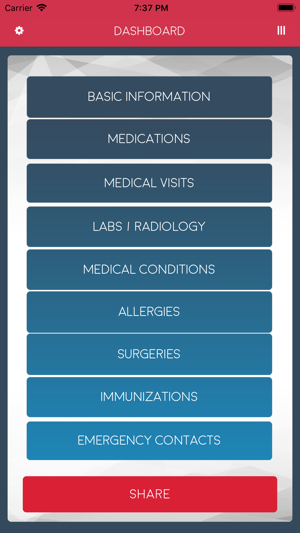
Florida based developer, Key of Life App, LLC releases Key Of Life 1.3, a comprehensive medical record-keeping app for patients and their families. Key Of Life was specifically developed to provide anyone with a medical records storage option that can be shared with anyone. Users can maintain, record, track, and update their medical information, and share their records with family, loved ones, physicians, specialists, first responders, or anyone else of their choosing.
Fleming Island, Florida - Key of Life, a mobile application for patients to keep medical records in one place, has officially launched in the Apple Store and Google Play Store. Key of Life allows patients to take control of their healthcare by creating a single, digital location to store all information regarding medications, lab results, health history, radiology, and more, that can be shared with anyone they choose. Key Of Life's entrance into the app world dramatically improves the healthcare industry by enabling users to quickly access all medical records for a smooth transaction to their healthcare providers.
"The Key of Life app is on the forefront of medical technology and drastically improves EHR, EMR transactions," said Chad Anfinson, owner and CEO of Key of Life App, LLC. "Managing your family medical history can be cumbersome and stressful, but with Key of Life, parents can easily pull up their children's records with a touch of a button, adults can share their parents' medical information, and any caregiver can instantly access their loved ones' medical history."
Prior to Key of Life, patients would need to fax, email, or provide physical copies of their medical records and charts from different doctors to the corresponding physician's office. Key of Life allows patients to store, update, and organize all of their EHR and EMR on their mobile device.
A leading feature of Key of Life is the in-app purchase option that allows users to share patient profiles between family, physicians, specialists, first responders, or anyone else prior to attending their medical appointments. Patients can store their records via text or photo; and easily update, manage, and share. Using the Key of Life sharing feature, gives patients' family members, caregivers, and others access to their loved ones recent and past medical updates.
"Patients switch primary care doctors or visit specialists, but medical offices and healthcare providers do not have total, unrestricted access to outside records," said Anfinson. "Key of Life streamlines the patient/doctor experience by allowing the patient to have all of their medical records from every physician handy when attending doctor appointments."
Device Requirements:
* iPhone, iPad, and iPod touch
* Requires iOS 8.0 or later
* 37.7 MB
Pricing and Availability:
Key Of Life 1.3 is Free (With In-App Purchases) and available worldwide through the App Store in the Health & Fitness category. There is also an Android version available on Google Play. For more information, download the app or visit the official website.
Key Of Life 1.3: http://keyoflifeapp.com/
Download from the App Store: https://itunes.apple.com/app/key-of-life/id1405487626
Screenshot: https://is2-ssl.mzstatic.com/image/thumb/Purple128/v4/81/30/e1/8130e172-eaeb-e218-3e2e-51f0b5641ac8/pr_source.png/300x0w.png
App Icon: https://is2-ssl.mzstatic.com/image/thumb/Purple118/v4/2f/4e/09/2f4e09b9-f1cd-b380-732c-2b6b8b7b9d84/AppIcon-1x_U007emarketing-85-220-4.png/246x0w.jpg
Founded by Chad and Leiah Anfinson, a leading doctor in Fleming Island, Florida, Key of Life App, LLC is the newest global leader in medical mobile applications. All Material and Software (C) Copyright 2019 Key of Life App, LLC. All Rights Reserved. Apple, the Apple logo, iPhone, iPod and iPad are registered trademarks of Apple Inc. in the U.S. and/or other countries. Other trademarks and registered trademarks may be the property of their respective owners.
*******
Link To Article: https://prmac.com/release-id-83299.htm
*******
---------------------------------------------------------------------------------
Note that you can alter delivered distributions at any time.
Login to your account on prMac to alter your channel selection, or to opt-out at any time.
Personal Medical Record System App Officially Launches on App Store - Published on 02/12/19
Florida based developer, Key of Life App, LLC releases Key Of Life 1.3, a comprehensive medical record-keeping app for patients and their families. Key Of Life was specifically developed to provide anyone with a medical records storage option that can be shared with anyone. Users can maintain, record, track, and update their medical information, and share their records with family, loved ones, physicians, specialists, first responders, or anyone else of their choosing.
Fleming Island, Florida - Key of Life, a mobile application for patients to keep medical records in one place, has officially launched in the Apple Store and Google Play Store. Key of Life allows patients to take control of their healthcare by creating a single, digital location to store all information regarding medications, lab results, health history, radiology, and more, that can be shared with anyone they choose. Key Of Life's entrance into the app world dramatically improves the healthcare industry by enabling users to quickly access all medical records for a smooth transaction to their healthcare providers.
"The Key of Life app is on the forefront of medical technology and drastically improves EHR, EMR transactions," said Chad Anfinson, owner and CEO of Key of Life App, LLC. "Managing your family medical history can be cumbersome and stressful, but with Key of Life, parents can easily pull up their children's records with a touch of a button, adults can share their parents' medical information, and any caregiver can instantly access their loved ones' medical history."
Prior to Key of Life, patients would need to fax, email, or provide physical copies of their medical records and charts from different doctors to the corresponding physician's office. Key of Life allows patients to store, update, and organize all of their EHR and EMR on their mobile device.
A leading feature of Key of Life is the in-app purchase option that allows users to share patient profiles between family, physicians, specialists, first responders, or anyone else prior to attending their medical appointments. Patients can store their records via text or photo; and easily update, manage, and share. Using the Key of Life sharing feature, gives patients' family members, caregivers, and others access to their loved ones recent and past medical updates.
"Patients switch primary care doctors or visit specialists, but medical offices and healthcare providers do not have total, unrestricted access to outside records," said Anfinson. "Key of Life streamlines the patient/doctor experience by allowing the patient to have all of their medical records from every physician handy when attending doctor appointments."
Device Requirements:
* iPhone, iPad, and iPod touch
* Requires iOS 8.0 or later
* 37.7 MB
Pricing and Availability:
Key Of Life 1.3 is Free (With In-App Purchases) and available worldwide through the App Store in the Health & Fitness category. There is also an Android version available on Google Play. For more information, download the app or visit the official website.
Key Of Life 1.3: http://keyoflifeapp.com/
Download from the App Store: https://itunes.apple.com/app/key-of-life/id1405487626
Screenshot: https://is2-ssl.mzstatic.com/image/thumb/Purple128/v4/81/30/e1/8130e172-eaeb-e218-3e2e-51f0b5641ac8/pr_source.png/300x0w.png
App Icon: https://is2-ssl.mzstatic.com/image/thumb/Purple118/v4/2f/4e/09/2f4e09b9-f1cd-b380-732c-2b6b8b7b9d84/AppIcon-1x_U007emarketing-85-220-4.png/246x0w.jpg

Founded by Chad and Leiah Anfinson, a leading doctor in Fleming Island, Florida, Key of Life App, LLC is the newest global leader in medical mobile applications. All Material and Software (C) Copyright 2019 Key of Life App, LLC. All Rights Reserved. Apple, the Apple logo, iPhone, iPod and iPad are registered trademarks of Apple Inc. in the U.S. and/or other countries. Other trademarks and registered trademarks may be the property of their respective owners.
*******
Link To Article: https://prmac.com/release-id-83299.htm
*******
---------------------------------------------------------------------------------
Note that you can alter delivered distributions at any time.
Login to your account on prMac to alter your channel selection, or to opt-out at any time.
BatchOutput PDF Simplifies Print Workflow Management
A new article has been published at prMac.
BatchOutput PDF Simplifies Print Workflow Management - Published on 02/12/19
Zevrix Solutions releases BatchOutput PDF 2.2.35, a feature update to company's PDF printing automation solution for macOS. The app prints PDFs from watched hot folders. Users only need to drop PDFs into hot folders, and the files will be printed automatically using the assigned output settings. The app saves users significant time and effort of printing PDF files manually. The new version allows users to edit print settings on the fly and adds integration of the SoftwareKey licensing system.
Toronto (ON), Canada - Zevrix Solutions today announces the release of BatchOutput PDF 2.2.35, a feature update to the company's PDF printing automation solution for macOS. The software allows users to print PDF files from watched hot folders, saving the time and effort of opening and printing each document manually.
The new version allows users to edit hot folder print settings on the fly without having to pause the watching process. The changes will be applied to the next file in the queue automatically. The update also adds integration of the SoftwareKey licensing system which simplifies the software activation process and enables users to easily manage their licenses in a personal online license portal.
"This is one of those apps that you never knew you needed until you spend a day using it," says Glen Saville of eponymous design firm in Hornchurch, UK. "If you handle a large number of PDFs daily this will save you time, without a doubt."
With BatchOutput PDF, users only need to drop their PDF files into watched hot folders - and the software will print the documents automatically using the hot folder settings. For example, users can create hot folders for color and black-and-white printers, specific paper sizes, duplex modes, various color profiles and other controls.
BatchOutput PDF helps users eliminate countless repetitive tasks of opening PDF files and adjusting print settings manually by bypassing the print dialog. The app offers the following key features:
* Print PDFs automatically from watched hot folders
* Create hot folders for different print settings
* Detailed output history
* Specify password for encrypted PDFs
* Save time and hassle of printing each PDF manually
Pricing and Availability:
BatchOutput PDF can be purchased from Zevrix website for $24.95 USD (Server version $99.95), as well as from Mac App Store and authorized resellers. The update is free for licensed users of version 2. Trial is also available for download. BatchOutput PDF supports macOS 10.7-10.14.
Zevrix Solutions: http://zevrix.com
BatchOutput PDF 2.2.35: http://zevrix.com/BatchOutputPDF.php
Download BatchOutput PDF: http://zevrix.com/BatchOutputPDF.dmg
Purchase: http://zevrix.com/store.php
Screenshot: http://zevrix.com/screenshots/bo-pdf/mas/bopdf2-main-mas-ysmt.jpg
Located in Toronto, Canada, Zevrix Solutions provides automation and productivity solutions for Adobe Creative Cloud and Creative Suite software, PDF workflows, graphic file diagnostics and Microsoft Office output on Mac OS. Zevrix is dedicated to help professionals increase their profits through automating everyday tasks, producing error-free documents, saving disk space and cutting production costs. For more information, visit their website. Copyright (C) 2019 Zevrix Solutions. All Rights Reserved. Other trademarks and registered trademarks may be the property of their respective owners.
*******
Link To Article: https://prmac.com/release-id-83300.htm
*******
---------------------------------------------------------------------------------
Note that you can alter delivered distributions at any time.
Login to your account on prMac to alter your channel selection, or to opt-out at any time.
BatchOutput PDF Simplifies Print Workflow Management - Published on 02/12/19
Zevrix Solutions releases BatchOutput PDF 2.2.35, a feature update to company's PDF printing automation solution for macOS. The app prints PDFs from watched hot folders. Users only need to drop PDFs into hot folders, and the files will be printed automatically using the assigned output settings. The app saves users significant time and effort of printing PDF files manually. The new version allows users to edit print settings on the fly and adds integration of the SoftwareKey licensing system.
Toronto (ON), Canada - Zevrix Solutions today announces the release of BatchOutput PDF 2.2.35, a feature update to the company's PDF printing automation solution for macOS. The software allows users to print PDF files from watched hot folders, saving the time and effort of opening and printing each document manually.
The new version allows users to edit hot folder print settings on the fly without having to pause the watching process. The changes will be applied to the next file in the queue automatically. The update also adds integration of the SoftwareKey licensing system which simplifies the software activation process and enables users to easily manage their licenses in a personal online license portal.
"This is one of those apps that you never knew you needed until you spend a day using it," says Glen Saville of eponymous design firm in Hornchurch, UK. "If you handle a large number of PDFs daily this will save you time, without a doubt."
With BatchOutput PDF, users only need to drop their PDF files into watched hot folders - and the software will print the documents automatically using the hot folder settings. For example, users can create hot folders for color and black-and-white printers, specific paper sizes, duplex modes, various color profiles and other controls.
BatchOutput PDF helps users eliminate countless repetitive tasks of opening PDF files and adjusting print settings manually by bypassing the print dialog. The app offers the following key features:
* Print PDFs automatically from watched hot folders
* Create hot folders for different print settings
* Detailed output history
* Specify password for encrypted PDFs
* Save time and hassle of printing each PDF manually
Pricing and Availability:
BatchOutput PDF can be purchased from Zevrix website for $24.95 USD (Server version $99.95), as well as from Mac App Store and authorized resellers. The update is free for licensed users of version 2. Trial is also available for download. BatchOutput PDF supports macOS 10.7-10.14.
Zevrix Solutions: http://zevrix.com
BatchOutput PDF 2.2.35: http://zevrix.com/BatchOutputPDF.php
Download BatchOutput PDF: http://zevrix.com/BatchOutputPDF.dmg
Purchase: http://zevrix.com/store.php
Screenshot: http://zevrix.com/screenshots/bo-pdf/mas/bopdf2-main-mas-ysmt.jpg

Located in Toronto, Canada, Zevrix Solutions provides automation and productivity solutions for Adobe Creative Cloud and Creative Suite software, PDF workflows, graphic file diagnostics and Microsoft Office output on Mac OS. Zevrix is dedicated to help professionals increase their profits through automating everyday tasks, producing error-free documents, saving disk space and cutting production costs. For more information, visit their website. Copyright (C) 2019 Zevrix Solutions. All Rights Reserved. Other trademarks and registered trademarks may be the property of their respective owners.
*******
Link To Article: https://prmac.com/release-id-83300.htm
*******
---------------------------------------------------------------------------------
Note that you can alter delivered distributions at any time.
Login to your account on prMac to alter your channel selection, or to opt-out at any time.
Subscribe to:
Posts (Atom)