A new article has been published at prMac.
Boris FX Adds Major Speed Improvements & Functionality to Continuum 2019 - Published on 02/24/19
The most comprehensive plug-in collection on the market keeps getting better. Continuum 2019 (12.0.1) is a significant update to the award-winning product line from Boris FX. Editors and VFX artists already praising the addition of Continuum 2019's new Particle Illusion real-time motion graphics generator can now produce high-end animations with far speedier results and design flexibility. The update also includes new host support for Apple's FCP X and Motion 5 on macOS Mojave.
Boston, Massachusetts - New point release provides even greater time-saving benefits for busy editors and VFX artists and new support for Apple's FCP X and Motion 5 on macOS Mojave
The most comprehensive plug-in collection on the market keeps getting better. Continuum 2019 (12.0.1) is a significant update to the award-winning product line from Boris FX. Editors and VFX artists already praising the addition of Continuum 2019's new Particle Illusion real-time motion graphics generator can now produce high-end animations with far speedier results and design flexibility.
Continuum 2019 (12.0.1) is a free update for Adobe, Avid, and OFX users who previously purchased the 2019 version. The update also includes new host support for Apple's FCP X and Motion 5 on macOS Mojave with new licenses, upgrades, and annual subscription options starting at only $195.
"We're constantly looking for ways to improve our products to provide the post-production community with the fastest, most powerful plug-ins that help get the job done" and well," says Boris Yamnitsky, President & Founder, Boris FX. "The new Continuum 2019 (12.0.1) release includes a huge Particle Illusion performance boost especially on long clips and new emitter editing capabilities that give users more control and creative freedom when designing motion graphics."
Yamnitsky continues, "We've also added Apple FCP X and Motion 5 support to Continuum 2019 as part of our unwavering commitment to delivering the most comprehensive video application support on the market. FCP X editors will enjoy faster render speeds and over 35 new easy-to-use titling and transition templates."
"I'm so excited about the rebirth of Particle Illusion. With hundreds of high-quality presets that ship with the plug-in, it's so easy to be up and running and adding particle systems to your projects," states Benjamin Eshagpoor, Creative Director, beMOTION.dESIGN. "And if that wasn't enough, it's CPU and GPU agnostic which is a fancy way of saying that it's blazing fast no matter what graphics card or computer you're using. I can now composite particle systems into 4K footage on a 2012 MacBook Pro and render out within minutes...it's remarkably fast!"
New in Continuum 2019 (12.0.1):
Particle Illusion: Adds major performance improvements both in rendering and within the interface itself; new properties group allows users to edit nearly all applied emitter settings including color, color gradient, alpha gradient, etc; adds tool tips and particle count to stage view; new preference option allows user to decide whether or not clicking on stage automatically adds an emitter. (Particle Illusion is available in both Continuum 2019 and the Particle Unit.)
16 New Particle Emitter 3D Presets including photorealistic drifting dust and snow
Apple FCP X and Motion 5 Support: Includes 20 new title templates, 19 new transition templates, and rendering performance improvements. Compatible with macOS Mojave.
Title Studio Improvements: Adds center cut title safe and action safe zones, improved C4D support, improved render quality and interactivity in Material Panel.
Enhanced External Broadcast Monitor Support: The FX Browser and Title Studio include support for external/client/broadcast monitor previews (Blackmagic Design and AJA) from a custom UI window.
Pricing & Availability
Continuum 2019 supports popular video host applications including Adobe After Effects CC and Adobe Premiere Pro CC, Apple FCP X and Motion 5, Avid Media Composer, and OFX hosts such as Blackmagic Design DaVinci Resolve and Magix VEGAS Pro. Full license, upgrade, and subscription options can be purchased through www.borisfx.com.
Multi-Host Option #1 (includes all supported host plug-ins: Adobe, Avid, Apple, OFX)
Upgrades start at $695
Annual subscription: $695
Permanent license: $1995
Multi-Host Option #2 (includes all supported host plug-ins: Adobe, Apple, OFX)
Upgrades start at $395
Annual subscription: $395
Permanent license: $1295
Individual Plug-in Host
Adobe
Upgrades start at $295
Annual subscription: $295
Permanent license: $995
Avid
Upgrades start at $495
Annual subscription: $495
Permanent license: $1695
Apple*/OFX
Upgrades start at $195
Annual subscription: $195
Permanent license: $695
* Continuum 2019 for Apple hosts does not currently support Particle Illusion
Continuum 2019 is also available as seventeen individual effect category units. New licenses start at $199. Upgrades from previous versions start at $49.95.
Boris FX: https://borisfx.com/
Continuum 2019 (12.0.1): https://borisfx.com/products/continuum/
Free Trial: https://borisfx.com/downloads/?product=Continuum
Purchase Link: https://borisfx.com/store/?collection=continuum&product=continuum
Continuum 2019 - Particle Illusion - Screenshots: https://bit.ly/2SQo5xr
Continuum 2019 for Apple FCP X and Motion 5 - Screenshot: https://bit.ly/2Il2Yi5
Founded in 1995, Boris FX is a leading developer of VFX, compositing, titling, video editing, and workflow tools for broadcast, post-production, and film professionals. Boris FX products have grown to serve over a million artists worldwide. The company's success lies in its ability to tightly integrate and leverage technologies through strong partnerships with Adobe, Apple, Avid, Blackmagic Design, Autodesk, Grass Valley, Magix, Sony, Quantel, and other leading developers of video editing software. In 2014, Boris FX acquired Imagineer Systems, the Academy Award-winning developer of Mocha planar tracking software. In 2016, Boris FX acquired GenArts, the developer of Sapphire, the gold standard plug-in package for high-end visual effects.
*******
Link To Article: https://prmac.com/release-id-83311.htm
*******
---------------------------------------------------------------------------------
Note that you can alter delivered distributions at any time.
Login to your account on prMac to alter your channel selection, or to opt-out at any time.

YOPEY YOPEY Launches New Shmush Brain Puzzle App with a Spin
A new article has been published at prMac.
YOPEY YOPEY Launches New Shmush Brain Puzzle App with a Spin - Published on 02/19/19
Taiwan-based gaming company,YOPEY YOPEY LLC, launches Shmush: The Spinning, a new game from its popular Shmush series of games for iOS and Android. The color merge puzzle game comes with a unique spin feature that allows players to spin the board and let gravity rearrange the shmushies. You free the shmushies by combining ones of the same color, and once all the shmushies are free then the level is complete. You may spin the board at any time to change the direction that the shmushies fall.
Taipei, Taiwan - Puzzle lovers around the world are in for a treat as YOPEY YOPEY LLC launches its latest game from the Shmush Universe. Shmush: The Spinning, the latest in the line of releases of the popular Shmush game by YOPEY YOPEY LLC, presents a happy twist to all brain puzzle game app lovers.
The app features the cute, adorable characters, shmushies. Users rearrange the shmushies until the same colors shmushies are together, and then presses to free them. The remaining shmushies fall down. Users control the direction that they fall by spinning the board. When all the shmushies are free, the user completes the level and moves to the next one.
"I'm always looking to find new variants for puzzle games. I started with the original Shmush color puzzle and added a pleasant twist," said David Figatner, Founder, YOPEY YOPEY LLC. "Like many of my puzzle games, it's deceptively simple but with increasing challenge," he added.
The spinning feature in the color puzzle app is unique. Picture a set of Shmushies in different colors, arranged in different matrix sizes (3x3, 4x4, or larger) yearning to be free. You spin the board to find arrangements where, within a single touch, you free as many shmushies of the same color as possible. Spin more to let the remaining Shmushies tumble down into vacated spaces, creating new arrangements.
"In our latest game app, by spinning the board, you can let the gravity do its work and conjure exciting color arrangements," said David. "So, what's difficult or challenging in this new game? Well, the new puzzle game app limits you on the number of moves you get to clear the board of all shmushies. Yes, you need thinking prowess and focus to make winning arrangements."
The game is designed with ease of use and fast puzzles. You need only a few minutes of idle time to play, and you pick up where you leave off.
Shmush: The Spinning includes five worlds and 100 brain-teasing puzzles. The matrices increase in size from 3x3 to 5x5. Special pieces are added later in the game to increase the complications. There is also an arcade mode that challenges the player by dropping different colored shmushies from the top of the screen. The player needs to clear the shmushies to stay ahead.
As the game processes, the falling speed and number of colors increase. The game also includes a daily challenge where a new puzzle is generated each day and you need to compete against the world to complete the puzzle in the fewest moves (and the fastest time). All game modes include a worldwide leader board and achievements.
Device Requirements:
* OS Requirements: Android 4.0.3 and up & iOS 9.0 or later
* Compatible with iPhone, iPad, and iPod touch
* Size: iOS - 20.5 MB & Android - 4.8 MB
Pricing and Availability:
Shmush 2.0.0 is currently available for free on the App Store under the Games category and Google Play under the Puzzle category.
Shmush: The Spinning 2.0.0: http://yopeyopey.com/
Download from the App Store: http://itunes.apple.com/app/shmush-the-spinning/id1420343547
Download from Google Play: http://play.google.com/store/apps/details?id=com.yopeyopey.shmushspin&hl=en
Screenshot 1: https://lh3.googleusercontent.com/tXtDzTzJxEI3tg3ys2ADtC0ny_CQ6eq_NsXNO8jQMq5cyi-H_ZsXS7gTqnKeGNb5uA=w720-h310-rw
Screenshot 2: https://lh3.googleusercontent.com/8ddZadBK4V2gJnpZ_fhE9hHYBu4tQjwCS4l05-5Bi1_gNQX0f3e29ub9d1INw1sQtc2q=w720-h310-rw
App Icon: https://lh3.googleusercontent.com/0ZJgtcdJmizxRjlKdyR4ms6LmTPNhGXxDQX2sffgIjImuPX6tcA5xSlKm3AdCrjtLA=s180-rw
YOPEY YOPEY was founded by David Figatner and has a presence in Taipei, Taiwan and Bellevue, Washington. The company has developed ten games since its inception in 2014. David Figatner is a reformed video game lawyer for a AAA publisher who sought the better life of animating pixels. All Material and Software (C) Copyright 2019 YOPEY YOPEY LLC. All Rights Reserved. Apple, the Apple logo, iPhone, iPod and iPad are registered trademarks of Apple Inc. in the U.S. and/or other countries. Other trademarks and registered trademarks may be the property of their respective owners.
*******
Link To Article: https://prmac.com/release-id-83310.htm
*******
---------------------------------------------------------------------------------
Note that you can alter delivered distributions at any time.
Login to your account on prMac to alter your channel selection, or to opt-out at any time.
YOPEY YOPEY Launches New Shmush Brain Puzzle App with a Spin - Published on 02/19/19
Taiwan-based gaming company,YOPEY YOPEY LLC, launches Shmush: The Spinning, a new game from its popular Shmush series of games for iOS and Android. The color merge puzzle game comes with a unique spin feature that allows players to spin the board and let gravity rearrange the shmushies. You free the shmushies by combining ones of the same color, and once all the shmushies are free then the level is complete. You may spin the board at any time to change the direction that the shmushies fall.
Taipei, Taiwan - Puzzle lovers around the world are in for a treat as YOPEY YOPEY LLC launches its latest game from the Shmush Universe. Shmush: The Spinning, the latest in the line of releases of the popular Shmush game by YOPEY YOPEY LLC, presents a happy twist to all brain puzzle game app lovers.
The app features the cute, adorable characters, shmushies. Users rearrange the shmushies until the same colors shmushies are together, and then presses to free them. The remaining shmushies fall down. Users control the direction that they fall by spinning the board. When all the shmushies are free, the user completes the level and moves to the next one.
"I'm always looking to find new variants for puzzle games. I started with the original Shmush color puzzle and added a pleasant twist," said David Figatner, Founder, YOPEY YOPEY LLC. "Like many of my puzzle games, it's deceptively simple but with increasing challenge," he added.
The spinning feature in the color puzzle app is unique. Picture a set of Shmushies in different colors, arranged in different matrix sizes (3x3, 4x4, or larger) yearning to be free. You spin the board to find arrangements where, within a single touch, you free as many shmushies of the same color as possible. Spin more to let the remaining Shmushies tumble down into vacated spaces, creating new arrangements.
"In our latest game app, by spinning the board, you can let the gravity do its work and conjure exciting color arrangements," said David. "So, what's difficult or challenging in this new game? Well, the new puzzle game app limits you on the number of moves you get to clear the board of all shmushies. Yes, you need thinking prowess and focus to make winning arrangements."
The game is designed with ease of use and fast puzzles. You need only a few minutes of idle time to play, and you pick up where you leave off.
Shmush: The Spinning includes five worlds and 100 brain-teasing puzzles. The matrices increase in size from 3x3 to 5x5. Special pieces are added later in the game to increase the complications. There is also an arcade mode that challenges the player by dropping different colored shmushies from the top of the screen. The player needs to clear the shmushies to stay ahead.
As the game processes, the falling speed and number of colors increase. The game also includes a daily challenge where a new puzzle is generated each day and you need to compete against the world to complete the puzzle in the fewest moves (and the fastest time). All game modes include a worldwide leader board and achievements.
Device Requirements:
* OS Requirements: Android 4.0.3 and up & iOS 9.0 or later
* Compatible with iPhone, iPad, and iPod touch
* Size: iOS - 20.5 MB & Android - 4.8 MB
Pricing and Availability:
Shmush 2.0.0 is currently available for free on the App Store under the Games category and Google Play under the Puzzle category.
Shmush: The Spinning 2.0.0: http://yopeyopey.com/
Download from the App Store: http://itunes.apple.com/app/shmush-the-spinning/id1420343547
Download from Google Play: http://play.google.com/store/apps/details?id=com.yopeyopey.shmushspin&hl=en
Screenshot 1: https://lh3.googleusercontent.com/tXtDzTzJxEI3tg3ys2ADtC0ny_CQ6eq_NsXNO8jQMq5cyi-H_ZsXS7gTqnKeGNb5uA=w720-h310-rw
Screenshot 2: https://lh3.googleusercontent.com/8ddZadBK4V2gJnpZ_fhE9hHYBu4tQjwCS4l05-5Bi1_gNQX0f3e29ub9d1INw1sQtc2q=w720-h310-rw
App Icon: https://lh3.googleusercontent.com/0ZJgtcdJmizxRjlKdyR4ms6LmTPNhGXxDQX2sffgIjImuPX6tcA5xSlKm3AdCrjtLA=s180-rw
YOPEY YOPEY was founded by David Figatner and has a presence in Taipei, Taiwan and Bellevue, Washington. The company has developed ten games since its inception in 2014. David Figatner is a reformed video game lawyer for a AAA publisher who sought the better life of animating pixels. All Material and Software (C) Copyright 2019 YOPEY YOPEY LLC. All Rights Reserved. Apple, the Apple logo, iPhone, iPod and iPad are registered trademarks of Apple Inc. in the U.S. and/or other countries. Other trademarks and registered trademarks may be the property of their respective owners.
*******
Link To Article: https://prmac.com/release-id-83310.htm
*******
---------------------------------------------------------------------------------
Note that you can alter delivered distributions at any time.
Login to your account on prMac to alter your channel selection, or to opt-out at any time.
Sneaky Viking AR introduced for iOS - The Tower Defence to make You Move
A new article has been published at prMac.
Sneaky Viking AR introduced for iOS - The Tower Defence to make You Move - Published on 02/19/19
GBTI Games releases Sneaky Viking AR, their new game title developed for iOS devices. Calling all tower defenders! Sneaky Viking AR is a tower defence game with a touch of augmented reality. This game is designed to make you move! Instead of playing on your mobile device screen place, the AR game table on your lawn, driveway, or carpet and get ready to fight for your people! Sneaky Viking AR features simple controls with addictive gameplay offering an immersive AR experience.
Katowice, Poland - GBTI Games is proud to announce the release of Sneaky Viking AR, their new game title developed for iOS devices. Sneaky Viking AR is a tower defence game with a touch of augmented reality. This game is designed to make you move! Instead of playing on your mobile device screen place, the AR game table on your lawn, driveway, carpet etc and get ready to fight for your people! Stop being a couch potato! Play on your phone or tablet in AR. Move around to aim and shoot better. Get closer to spot Vikings in disguise. Stand tall or squat to find the perfect shooting point. Get coins by defeating Vikings, upgrade your defence towers and by all means avoid hitting peasants running to your village.
How to play the game:
* Move your mobile device around to aim!
* Use the semi-transparent little circle in the centre of your screen!
* Aim at the Shield Post to enter a new game level!
* Aim at the tower and tap buttons on the bottom left of the screen to build or upgrade it!
* Aim at the Vikings and use buttons on the bottom right of the screen to shoot Vikings!
* When the last Viking is defeated move on to defend another village!
Save all villages to free your country from Sneaky Vikings once and for all! Collect all three stars at each level. Do not lose a single life and conquer the leaderboard!
Features:
* Simple controls
* Addictive gameplay
* Epic soundtrack
* Immersive AR experience
* Physical activity while playing
Device Requirements:
* iPhone 6s or later
* iPad 5th generation or later
* Requires iOS 11.0 or later
* 152.7 MB
Pricing and Availability:
Sneaky Vikings AR 1.0.2 is $3.99 USD (or equivalent amount in other currencies) and available worldwide exclusively through the App Store in the Games (Strategy and Arcade) category. Follow GBTI Games on Facebook and Instagram to keep up with all the latest news. To request Press/Influencers promo codes please contact Mateusz Bagdziun.
GBTI Games: https://gbtigames.com/
Sneaky Vikings AR 1.0.2: https://itunes.apple.com/app/sneaky-vikings-ar/id1449238926
Screenshot: https://is1-ssl.mzstatic.com/image/thumb/Purple124/v4/a3/6e/9a/a36e9a91-9012-fd3c-dc46-df4500faf383/pr_source.jpg/643x0w.jpg
App Icon: https://gbtigames.com/img/sneakyvikingsar.png
Press Kit (zip): https://gbtigames.com/press/SneakyVikingsAR_press_kit.zip
GBTI Games is a young game studio that combines the love of 3D modelling and game development to bring you fun and quirky mobile games. Their team consists of designers and developers that have created many successful award-winning games for other studios before joining GBTI Games. All Material and Software (C) Copyright 2019 GBTI S.A. All Rights Reserved. Apple, the Apple logo, iPhone, iPod and iPad are registered trademarks of Apple Inc. in the U.S. and/or other countries. Other trademarks and registered trademarks may be the property of their respective owners.
*******
Link To Article: https://prmac.com/release-id-83309.htm
*******
---------------------------------------------------------------------------------
Note that you can alter delivered distributions at any time.
Login to your account on prMac to alter your channel selection, or to opt-out at any time.
Sneaky Viking AR introduced for iOS - The Tower Defence to make You Move - Published on 02/19/19
GBTI Games releases Sneaky Viking AR, their new game title developed for iOS devices. Calling all tower defenders! Sneaky Viking AR is a tower defence game with a touch of augmented reality. This game is designed to make you move! Instead of playing on your mobile device screen place, the AR game table on your lawn, driveway, or carpet and get ready to fight for your people! Sneaky Viking AR features simple controls with addictive gameplay offering an immersive AR experience.
Katowice, Poland - GBTI Games is proud to announce the release of Sneaky Viking AR, their new game title developed for iOS devices. Sneaky Viking AR is a tower defence game with a touch of augmented reality. This game is designed to make you move! Instead of playing on your mobile device screen place, the AR game table on your lawn, driveway, carpet etc and get ready to fight for your people! Stop being a couch potato! Play on your phone or tablet in AR. Move around to aim and shoot better. Get closer to spot Vikings in disguise. Stand tall or squat to find the perfect shooting point. Get coins by defeating Vikings, upgrade your defence towers and by all means avoid hitting peasants running to your village.
How to play the game:
* Move your mobile device around to aim!
* Use the semi-transparent little circle in the centre of your screen!
* Aim at the Shield Post to enter a new game level!
* Aim at the tower and tap buttons on the bottom left of the screen to build or upgrade it!
* Aim at the Vikings and use buttons on the bottom right of the screen to shoot Vikings!
* When the last Viking is defeated move on to defend another village!
Save all villages to free your country from Sneaky Vikings once and for all! Collect all three stars at each level. Do not lose a single life and conquer the leaderboard!
Features:
* Simple controls
* Addictive gameplay
* Epic soundtrack
* Immersive AR experience
* Physical activity while playing
Device Requirements:
* iPhone 6s or later
* iPad 5th generation or later
* Requires iOS 11.0 or later
* 152.7 MB
Pricing and Availability:
Sneaky Vikings AR 1.0.2 is $3.99 USD (or equivalent amount in other currencies) and available worldwide exclusively through the App Store in the Games (Strategy and Arcade) category. Follow GBTI Games on Facebook and Instagram to keep up with all the latest news. To request Press/Influencers promo codes please contact Mateusz Bagdziun.
GBTI Games: https://gbtigames.com/
Sneaky Vikings AR 1.0.2: https://itunes.apple.com/app/sneaky-vikings-ar/id1449238926
Screenshot: https://is1-ssl.mzstatic.com/image/thumb/Purple124/v4/a3/6e/9a/a36e9a91-9012-fd3c-dc46-df4500faf383/pr_source.jpg/643x0w.jpg

App Icon: https://gbtigames.com/img/sneakyvikingsar.png

Press Kit (zip): https://gbtigames.com/press/SneakyVikingsAR_press_kit.zip
GBTI Games is a young game studio that combines the love of 3D modelling and game development to bring you fun and quirky mobile games. Their team consists of designers and developers that have created many successful award-winning games for other studios before joining GBTI Games. All Material and Software (C) Copyright 2019 GBTI S.A. All Rights Reserved. Apple, the Apple logo, iPhone, iPod and iPad are registered trademarks of Apple Inc. in the U.S. and/or other countries. Other trademarks and registered trademarks may be the property of their respective owners.
*******
Link To Article: https://prmac.com/release-id-83309.htm
*******
---------------------------------------------------------------------------------
Note that you can alter delivered distributions at any time.
Login to your account on prMac to alter your channel selection, or to opt-out at any time.
SwampDog, LLC announces WhoDo 1.0 - A Contact Creation Tool for macOS
A new article has been published at prMac.
SwampDog, LLC announces WhoDo 1.0 - A Contact Creation Tool for macOS - Published on 02/19/19
Oregon based SwampDog, LLC introduces WhoDo 1.0, a contact creation tool available now for macOS. WhoDo supports macOS dictation as a data source, allowing the customer to simply speak any new contact's data. WhoDo can also transform selected text in any application into a new contact when a customizable keyboard shortcut is invoked. WhoDo uses several internal databases, Apple Foundation level frameworks, natural language processing, and data detectors to deliver its unique solution for macOS.
Bend, Oregon - SwampDog, LLC is delighted to announce WhoDo 1.0, a contact creation tool available now for macOS. WhoDo supports macOS dictation as a data source, allowing the customer to simply speak any new contact's data. WhoDo can also transform selected text in any application into a new contact when a customizable keyboard shortcut is invoked. WhoDo uses several internal databases, Apple Foundation level frameworks, natural language processing, and data detectors to deliver its unique solution for macOS.
WhoDo for macOS provides several options which make it more powerful and more flexible than a standard data detector. WhoDo provides assignment to a group, a default area code used whenever none has been supplied, optional nickname assignment, optional name prefix assignment, optional text to be included in the Note field, optional date and time embedded in the Note field, and offers the customer a choice of work or home label.
WhoDo recognizes personal and company names, job titles, email addresses, phone numbers, street addresses, websites, instant message handles, and social media profiles.
WhoDo 1.0 for macOS has an optional Pro capability which is available as a separate purchase. The Pro capability includes seven utility functions for clearing up the crud that infiltrates most address books: locating and fixing upper-case and lower-case entries, missing area codes, contact records containing invalid or duplicated data. More utilities are already in development. The Pro capability also provides fix operations which work at the individual record.
macOS Minimum Requirements:
* macOS Version 10.13 High Sierra or later
* 20.4 MB Hard Drive space
* Internet Connection (required only for Mac App Store)
Pricing and Availability:
* WhoDo for macOS is available in 2 flavors: Basic and Pro
* WhoDo Basic 1.0 is available as an auto-renewable subscription for only 99 (USD) per year. A free 3 day trial is included.
* WhoDo Basic 1.0 is also available as permanent license for a one time cost of $4.99 (USD).
* WhoDo Pro 1.0 is available as an auto-renewable subscription for only $1.99 (USD) per year. A free 3 day trial is included.
* WhoDo Pro 1.0 is also available as permanent license for a one time cost of $9.99 (USD)
* WhoDo is also available for iOS
SwampDog: http://swampdog.info
WhoDo for macOS 1.0: https://swampdog.info/whodo
Download from Mac App Store: https://itunes.apple.com/app/kudos/id1444816378
Screenshot: https://is3-ssl.mzstatic.com/image/thumb/Purple114/v4/9b/62/d7/9b62d77a-eb8b-0b29-4eb6-40e101f383d1/pr_source.png/643x0w.jpg
Application Icon: https://is4-ssl.mzstatic.com/image/thumb/Purple124/v4/8b/5c/d7/8b5cd7a8-0774-fb0a-730d-d2aeaf31f5ef/AppIcon-0-85-220-0-0-0-0-4-0-0-0-2x-sRGB-0-0-0.png/246x0w.png
Headquartered in outdoor-loving Bend, Oregon, Swamp Dog, LLC is an Oregon LLC founded in 2018. The staff of Swamp Dog, LLC have been delivering solutions to companies like Apple, VISA, AMD, Motorola, Alcatel Lucent, and others for over 30 years. Today the company's development efforts are focused exclusively on macOS and iOS. SwampDog, LLC delivers contact-friendly software that enlivens your people. Copyright 2019 Swamp Dog, LLC. All Rights Reserved. Apple and the Apple logo, are registered trademarks of Apple Computer in the U.S. and/or other countries.
*******
Link To Article: https://prmac.com/release-id-83308.htm
*******
---------------------------------------------------------------------------------
Note that you can alter delivered distributions at any time.
Login to your account on prMac to alter your channel selection, or to opt-out at any time.
SwampDog, LLC announces WhoDo 1.0 - A Contact Creation Tool for macOS - Published on 02/19/19
Oregon based SwampDog, LLC introduces WhoDo 1.0, a contact creation tool available now for macOS. WhoDo supports macOS dictation as a data source, allowing the customer to simply speak any new contact's data. WhoDo can also transform selected text in any application into a new contact when a customizable keyboard shortcut is invoked. WhoDo uses several internal databases, Apple Foundation level frameworks, natural language processing, and data detectors to deliver its unique solution for macOS.
Bend, Oregon - SwampDog, LLC is delighted to announce WhoDo 1.0, a contact creation tool available now for macOS. WhoDo supports macOS dictation as a data source, allowing the customer to simply speak any new contact's data. WhoDo can also transform selected text in any application into a new contact when a customizable keyboard shortcut is invoked. WhoDo uses several internal databases, Apple Foundation level frameworks, natural language processing, and data detectors to deliver its unique solution for macOS.
WhoDo for macOS provides several options which make it more powerful and more flexible than a standard data detector. WhoDo provides assignment to a group, a default area code used whenever none has been supplied, optional nickname assignment, optional name prefix assignment, optional text to be included in the Note field, optional date and time embedded in the Note field, and offers the customer a choice of work or home label.
WhoDo recognizes personal and company names, job titles, email addresses, phone numbers, street addresses, websites, instant message handles, and social media profiles.
WhoDo 1.0 for macOS has an optional Pro capability which is available as a separate purchase. The Pro capability includes seven utility functions for clearing up the crud that infiltrates most address books: locating and fixing upper-case and lower-case entries, missing area codes, contact records containing invalid or duplicated data. More utilities are already in development. The Pro capability also provides fix operations which work at the individual record.
macOS Minimum Requirements:
* macOS Version 10.13 High Sierra or later
* 20.4 MB Hard Drive space
* Internet Connection (required only for Mac App Store)
Pricing and Availability:
* WhoDo for macOS is available in 2 flavors: Basic and Pro
* WhoDo Basic 1.0 is available as an auto-renewable subscription for only 99 (USD) per year. A free 3 day trial is included.
* WhoDo Basic 1.0 is also available as permanent license for a one time cost of $4.99 (USD).
* WhoDo Pro 1.0 is available as an auto-renewable subscription for only $1.99 (USD) per year. A free 3 day trial is included.
* WhoDo Pro 1.0 is also available as permanent license for a one time cost of $9.99 (USD)
* WhoDo is also available for iOS
SwampDog: http://swampdog.info
WhoDo for macOS 1.0: https://swampdog.info/whodo
Download from Mac App Store: https://itunes.apple.com/app/kudos/id1444816378
Screenshot: https://is3-ssl.mzstatic.com/image/thumb/Purple114/v4/9b/62/d7/9b62d77a-eb8b-0b29-4eb6-40e101f383d1/pr_source.png/643x0w.jpg

Application Icon: https://is4-ssl.mzstatic.com/image/thumb/Purple124/v4/8b/5c/d7/8b5cd7a8-0774-fb0a-730d-d2aeaf31f5ef/AppIcon-0-85-220-0-0-0-0-4-0-0-0-2x-sRGB-0-0-0.png/246x0w.png

Headquartered in outdoor-loving Bend, Oregon, Swamp Dog, LLC is an Oregon LLC founded in 2018. The staff of Swamp Dog, LLC have been delivering solutions to companies like Apple, VISA, AMD, Motorola, Alcatel Lucent, and others for over 30 years. Today the company's development efforts are focused exclusively on macOS and iOS. SwampDog, LLC delivers contact-friendly software that enlivens your people. Copyright 2019 Swamp Dog, LLC. All Rights Reserved. Apple and the Apple logo, are registered trademarks of Apple Computer in the U.S. and/or other countries.
*******
Link To Article: https://prmac.com/release-id-83308.htm
*******
---------------------------------------------------------------------------------
Note that you can alter delivered distributions at any time.
Login to your account on prMac to alter your channel selection, or to opt-out at any time.
WindowSwitcher - Unique 3D Window Manager for macOS
A new article has been published at prMac.
WindowSwitcher - Unique 3D Window Manager for macOS - Published on 02/18/19
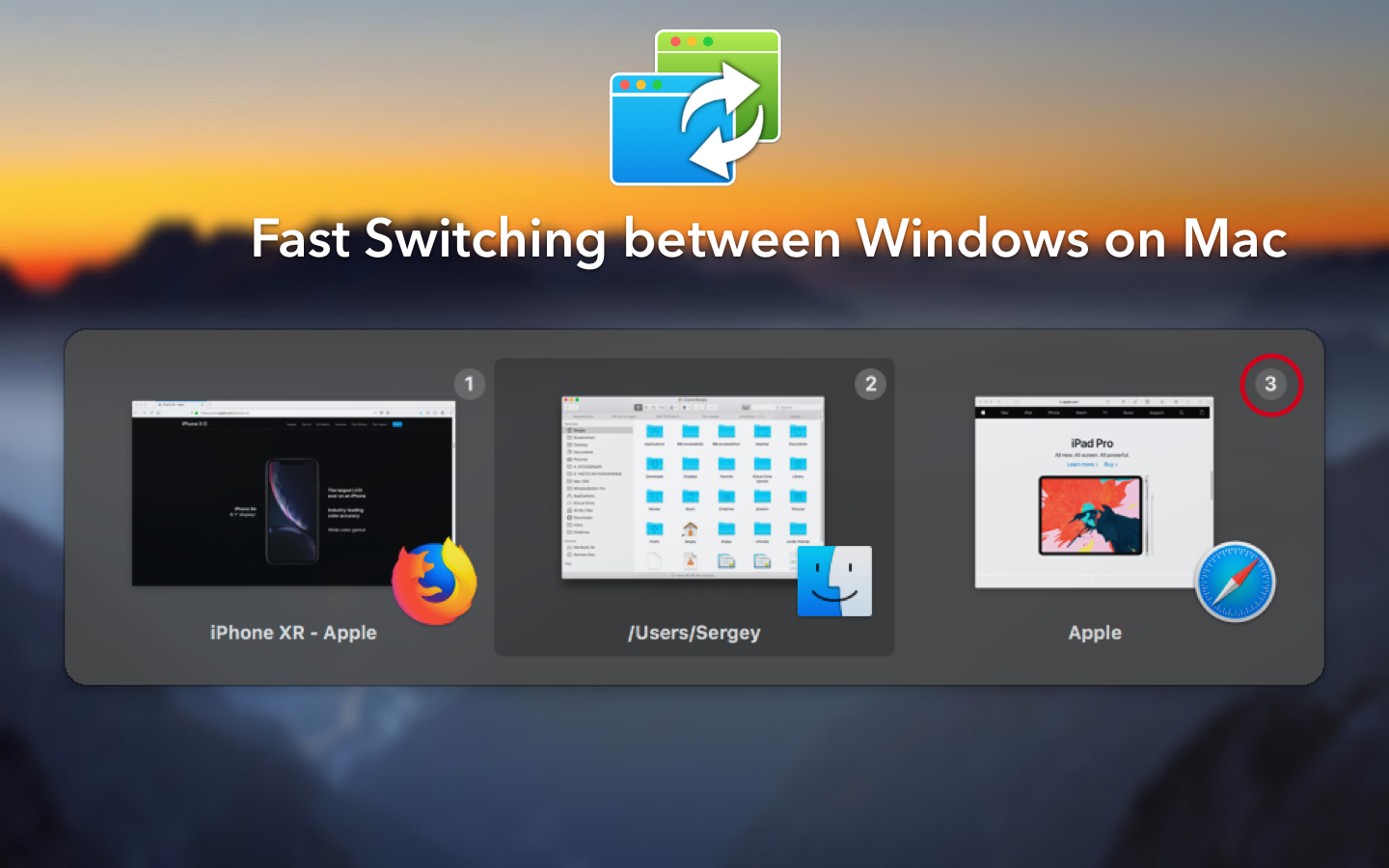
MacPlus Software introduces WindowSwitcher 1.0, a unique new application that aims to deal with the chaos of the open windows on your Mac. WindowSwitcher provides several tools to quickly switch and manage Mac desktop windows. This easy-to-use utility transforms the chaos of a messy desktop into neatly arranged windows, where one can easily see all the information in an organised display. You get full control over any opened windows: easily close, minimize, maximize, or even restore any window.
Kiev, Ukraine - MacPlus Software announces the launch of WindowSwitcher 1.0, a new unique application that aims to deal with the chaos of the opened windows on your Mac. WindowSwitcher provides several tools to quickly switch and manage Mac desktop windows. This easy-to-use utility transforms the chaos of a messy desktop into neatly arranged windows, where one can easily see all the information in an organised display.
When several applications are running with many windows open, it is sometimes difficult to manage the chaos and to work productively. Manually switching between windows and placing them on the screen wastes a lot of time. Thanks to functionality for quick positioning control and window size, users can quickly find and switch between windows and efficiently use screen space:
* Manage Windows with Ease - WindowSwitcher allows you to easily manage your window positions and sizes with one click. You get full control over any opened windows: easily close, minimize, maximize, or even restore any window.
* WindowSwitcher also lets one use gestures to move and resize windows. For example, swipe with two fingers, from right to left, to place a window on the left of the screen and resize to 1/2 of the entire screen. Another example, Swiping down minimizes the window, and swiping uup up de-minimizes or enlarges the window to full screen.
* Fast Switching: Using the Command > Number key you can easily switch to windows without pressing many keys.
* Convenient View Options: WindowSwitcher offers several options (layouts) for displaying a list of open windows. You can use the one that best suits your work style.
WindowSwitcher 1.0: https://www.noteifyapp.com/windowswitcher/
Download WindowSwitcher: https://dl.devmate.com/com.sergey-gerasimenko.WindowSwitcher/WindowSwitcher.zip
YouTube Video: https://www.youtube.com/watch?v=BryoWfXDCa8
Screenshot: https://www.noteifyapp.com/wp-content/uploads/2019/02/WindowSwitcher-macOS-1.png
Application Icon: https://www.noteifyapp.com/wp-content/uploads/2019/02/WindowSwitcherIcon256.png
MacPlus Software specializes in desktop and mobile application. The company is based in Kiev, Ukraine. All Material and Software Copyright (C) 2019 MacPlus Software. All Rights Reserved. Apple, the Apple logo, iPhone, iPod and iPad are registered trademarks of Apple Inc. in the U.S. and/or other countries.
*******
Link To Article: https://prmac.com/release-id-83307.htm
*******
---------------------------------------------------------------------------------
Note that you can alter delivered distributions at any time.
Login to your account on prMac to alter your channel selection, or to opt-out at any time.
WindowSwitcher - Unique 3D Window Manager for macOS - Published on 02/18/19
MacPlus Software introduces WindowSwitcher 1.0, a unique new application that aims to deal with the chaos of the open windows on your Mac. WindowSwitcher provides several tools to quickly switch and manage Mac desktop windows. This easy-to-use utility transforms the chaos of a messy desktop into neatly arranged windows, where one can easily see all the information in an organised display. You get full control over any opened windows: easily close, minimize, maximize, or even restore any window.
Kiev, Ukraine - MacPlus Software announces the launch of WindowSwitcher 1.0, a new unique application that aims to deal with the chaos of the opened windows on your Mac. WindowSwitcher provides several tools to quickly switch and manage Mac desktop windows. This easy-to-use utility transforms the chaos of a messy desktop into neatly arranged windows, where one can easily see all the information in an organised display.
When several applications are running with many windows open, it is sometimes difficult to manage the chaos and to work productively. Manually switching between windows and placing them on the screen wastes a lot of time. Thanks to functionality for quick positioning control and window size, users can quickly find and switch between windows and efficiently use screen space:
* Manage Windows with Ease - WindowSwitcher allows you to easily manage your window positions and sizes with one click. You get full control over any opened windows: easily close, minimize, maximize, or even restore any window.
* WindowSwitcher also lets one use gestures to move and resize windows. For example, swipe with two fingers, from right to left, to place a window on the left of the screen and resize to 1/2 of the entire screen. Another example, Swiping down minimizes the window, and swiping uup up de-minimizes or enlarges the window to full screen.
* Fast Switching: Using the Command > Number key you can easily switch to windows without pressing many keys.
* Convenient View Options: WindowSwitcher offers several options (layouts) for displaying a list of open windows. You can use the one that best suits your work style.
WindowSwitcher 1.0: https://www.noteifyapp.com/windowswitcher/
Download WindowSwitcher: https://dl.devmate.com/com.sergey-gerasimenko.WindowSwitcher/WindowSwitcher.zip
YouTube Video: https://www.youtube.com/watch?v=BryoWfXDCa8
Screenshot: https://www.noteifyapp.com/wp-content/uploads/2019/02/WindowSwitcher-macOS-1.png
Application Icon: https://www.noteifyapp.com/wp-content/uploads/2019/02/WindowSwitcherIcon256.png

MacPlus Software specializes in desktop and mobile application. The company is based in Kiev, Ukraine. All Material and Software Copyright (C) 2019 MacPlus Software. All Rights Reserved. Apple, the Apple logo, iPhone, iPod and iPad are registered trademarks of Apple Inc. in the U.S. and/or other countries.
*******
Link To Article: https://prmac.com/release-id-83307.htm
*******
---------------------------------------------------------------------------------
Note that you can alter delivered distributions at any time.
Login to your account on prMac to alter your channel selection, or to opt-out at any time.
SwampDog, LLC announces WhoDo 1.0 - a contact creation tool for iOS
A new article has been published at prMac.
SwampDog, LLC announces WhoDo 1.0 - a contact creation tool for iOS - Published on 02/18/19
Oregon based SwampDog, LLC announces WhoDo, a contact creation tool available now for iOS. WhoDo for iOS supports speech as a data source, allowing the customer to simply speak a new contact's data. WhoDo for iOS also enables customers to create new Contacts without even launching the WhoDo app. WhoDo for iOS uses several internal databases, Apple Foundation level frameworks, natural language processing, and data detectors to deliver its unique solution for Apple mobile devices.
Bend, Oregon - SwampDog, LLC is delighted to announce WhoDo, a contact creation tool available now for iOS. WhoDo for iOS supports speech as a data source, allowing the customer to simply speak a new contact's data. WhoDo for iOS also enables customers to create new Contacts without even launching the WhoDo app. WhoDo for iOS uses several internal databases, Apple Foundation level frameworks, natural language processing, and data detectors to deliver its unique solution for Apple mobile devices.
WhoDo for iOS allows the customer to make a text selection inside any app then use the system-wide 'Share' action to create a contact. No need to launch or close the WhoDo app.
WhoDo provides several options which make it more powerful and flexible than a standard data detector. WhoDo provides assignment to a group, a default area code when none has been supplied, optional nickname assignment, optional name prefix, optional text to be included in the Note field and optional date and time embedded in the Note field.
WhoDo recognizes personal and company names, job titles, email addresses, phone numbers, street addresses, websites, instant message handles, and social media profiles.
iOS Minimum Requirements:
* iOS Version 11.0 or later
* 7.3 MB Hard Drive space
* Internet Connection (required only for App Store)
Pricing and Availability:
* WhoDo 1.0 is available exclusively on Apple's App Store
* WhoDo 1.0 is available as an auto-renewable subscription for only 99¢ (USD) per year. A free 3 day trial is included.
* WhoDo 1.0 is also available as permanent license for a one time cost of $4.99 (USD).
* SwampDog is also releasing WhoDo for macOS.
Swamp Dog: http://swampdog.info
WhoDo for iOS 1.0.3: https://swampdog.info/whodoios
Download from the App Store: https://itunes.apple.com/us/app/whodo/id1448588605
Product Videos: https://swampdog.info/whodoios/core/videos/
Headquartered in outdoor-loving Bend, Oregon, Swamp Dog, LLC is an Oregon LLC founded in 2018. The staff of Swamp Dog, LLC have been delivering solutions to companies like Apple, VISA, AMD, Motorola, Alcatel Lucent, and others for over 30 years. Today the company's development efforts are focused exclusively on macOS and iOS. SwampDog, LLC delivers contact-friendly software that enlivens your people. Copyright 2019 Swamp Dog, LLC. All Rights Reserved. Apple and the Apple logo, are registered trademarks of Apple Computer in the U.S. and/or other countries.
*******
Link To Article: https://prmac.com/release-id-83306.htm
*******
---------------------------------------------------------------------------------
Note that you can alter delivered distributions at any time.
Login to your account on prMac to alter your channel selection, or to opt-out at any time.
SwampDog, LLC announces WhoDo 1.0 - a contact creation tool for iOS - Published on 02/18/19
Oregon based SwampDog, LLC announces WhoDo, a contact creation tool available now for iOS. WhoDo for iOS supports speech as a data source, allowing the customer to simply speak a new contact's data. WhoDo for iOS also enables customers to create new Contacts without even launching the WhoDo app. WhoDo for iOS uses several internal databases, Apple Foundation level frameworks, natural language processing, and data detectors to deliver its unique solution for Apple mobile devices.
Bend, Oregon - SwampDog, LLC is delighted to announce WhoDo, a contact creation tool available now for iOS. WhoDo for iOS supports speech as a data source, allowing the customer to simply speak a new contact's data. WhoDo for iOS also enables customers to create new Contacts without even launching the WhoDo app. WhoDo for iOS uses several internal databases, Apple Foundation level frameworks, natural language processing, and data detectors to deliver its unique solution for Apple mobile devices.
WhoDo for iOS allows the customer to make a text selection inside any app then use the system-wide 'Share' action to create a contact. No need to launch or close the WhoDo app.
WhoDo provides several options which make it more powerful and flexible than a standard data detector. WhoDo provides assignment to a group, a default area code when none has been supplied, optional nickname assignment, optional name prefix, optional text to be included in the Note field and optional date and time embedded in the Note field.
WhoDo recognizes personal and company names, job titles, email addresses, phone numbers, street addresses, websites, instant message handles, and social media profiles.
iOS Minimum Requirements:
* iOS Version 11.0 or later
* 7.3 MB Hard Drive space
* Internet Connection (required only for App Store)
Pricing and Availability:
* WhoDo 1.0 is available exclusively on Apple's App Store
* WhoDo 1.0 is available as an auto-renewable subscription for only 99¢ (USD) per year. A free 3 day trial is included.
* WhoDo 1.0 is also available as permanent license for a one time cost of $4.99 (USD).
* SwampDog is also releasing WhoDo for macOS.
Swamp Dog: http://swampdog.info
WhoDo for iOS 1.0.3: https://swampdog.info/whodoios
Download from the App Store: https://itunes.apple.com/us/app/whodo/id1448588605
Product Videos: https://swampdog.info/whodoios/core/videos/
Headquartered in outdoor-loving Bend, Oregon, Swamp Dog, LLC is an Oregon LLC founded in 2018. The staff of Swamp Dog, LLC have been delivering solutions to companies like Apple, VISA, AMD, Motorola, Alcatel Lucent, and others for over 30 years. Today the company's development efforts are focused exclusively on macOS and iOS. SwampDog, LLC delivers contact-friendly software that enlivens your people. Copyright 2019 Swamp Dog, LLC. All Rights Reserved. Apple and the Apple logo, are registered trademarks of Apple Computer in the U.S. and/or other countries.
*******
Link To Article: https://prmac.com/release-id-83306.htm
*******
---------------------------------------------------------------------------------
Note that you can alter delivered distributions at any time.
Login to your account on prMac to alter your channel selection, or to opt-out at any time.
FlexiHub 3.4 massive update brings login via token, new device filters
A new article has been published at prMac.
FlexiHub 3.4 massive update brings login via token, new device filters - Published on 02/14/19
Eltima Software releases FlexiHub 3.4, an update to their USB sharing tool for macOS. The solution allows redirecting USB ports and devices attached to them across the Internet so that multiple network users can access the shared USB peripherals from their local computers. The latest update offers new advanced device filters and a convenient option to log in to the software account using tokens. All network connections created using FlexiHub are reliably protected with 256-bit SSL encryption.
Frankfurt, Germany - Eltima Software is pleased to announce the release of FlexiHub 3.4, an important feature update to the company's advanced USB port sharing solution for macOS. The new version adds the ability to access the software account using tokens. These secure digital keys allow logging in to a FlexiHub account without entering an email address and password. The latest edition also provides the new convenient device filtering options and lots of improvements for accounts with a large number of nodes.
FlexiHub is a powerful utility for remote access to USB ports and devices connected to them. It enables secure communications with remote peripherals over the Internet and makes it possible to establish cross-platform connections between macOS, Windows, Linux, and Android platforms.
The latest version of FlexiHub gives the new secure way to share USB devices among multiple remote users. Now, owners of FlexiHub accounts can generate digital keys, tokens, in their online user cabinets and send them to other users instead of an email address and password. This ability allows the account owners to keep their registration information confidential while sharing access to their software accounts.
What's new in FlexiHub v3.4:
* Login via a token. A token provides access to a software account but doesn't allow logging into online personal cabinets of users
* Advanced filters for displaying only USB devices, only serial ports, or only remote devices connected to a local computer
* The abilities to collapse and expand all computers in the account, which is especially useful for FlexiHub accounts with a big number of nodes
* The option to disconnect all remote devices from a local computer
* Alphabetical sorting of nodes, and more
Also, FlexiHub 3.4 retains the best of its main functionality:
* Efficient USB redirection technology - FlexiHub is based on the unique USB over IP sharing technology which lets you connect to remote USB devices no matter the distance and use them as though they were attached directly to your machine.
* Traffic encryption - All network connections created using FlexiHub are reliably protected with 256-bit SSL encryption. This ensures the security of network communications and protects your sensitive data from unauthorized access.
* Data compression - The software offers an efficient data compression method that helps significantly improve the speed of data transfer.
* Friendly interface - FlexiHub comes with a streamlined and intuitive interface. No programming skills are required to be able to share and access USB devices with the program.
* Individual subscription plan - You can choose your own subscription plan depending on how many simultaneous connections you require. If you don't feel the need to connect to remote USB peripherals but just want to share devices attached to your PC, you can sign up for a FlexiShare plan provided at no cost.
FlexiHub 3.4: https://www.flexihub.com/
Download FlexiHub: https://www.flexihub.com/download.html
Screenshot 1: https://www.eltima.com/wiki/wp-content/uploads/2015/12/connect.png
Screenshot 2: https://www.eltima.com/wiki/wp-content/uploads/2015/12/connect-menu.png
Application Icon: https://www.eltima.com/wiki/wp-content/uploads/2019/02/apple-touch-icon-144x144.png
Eltima Software is a global software Development Company, specializing primarily in serial communication, mobile and flash software for Mac OS and Windows. Eltima Software delivers top-notch solutions having a friendly team of 40 professionals. Copyright (C) 2019 Eltima Software. All Rights Reserved. Apple, the Apple logo and Macintosh are registered trademarks of Apple Inc. in the U.S. and/or other countries.
*******
Link To Article: https://prmac.com/release-id-83304.htm
*******
---------------------------------------------------------------------------------
Note that you can alter delivered distributions at any time.
Login to your account on prMac to alter your channel selection, or to opt-out at any time.
FlexiHub 3.4 massive update brings login via token, new device filters - Published on 02/14/19
Eltima Software releases FlexiHub 3.4, an update to their USB sharing tool for macOS. The solution allows redirecting USB ports and devices attached to them across the Internet so that multiple network users can access the shared USB peripherals from their local computers. The latest update offers new advanced device filters and a convenient option to log in to the software account using tokens. All network connections created using FlexiHub are reliably protected with 256-bit SSL encryption.
Frankfurt, Germany - Eltima Software is pleased to announce the release of FlexiHub 3.4, an important feature update to the company's advanced USB port sharing solution for macOS. The new version adds the ability to access the software account using tokens. These secure digital keys allow logging in to a FlexiHub account without entering an email address and password. The latest edition also provides the new convenient device filtering options and lots of improvements for accounts with a large number of nodes.
FlexiHub is a powerful utility for remote access to USB ports and devices connected to them. It enables secure communications with remote peripherals over the Internet and makes it possible to establish cross-platform connections between macOS, Windows, Linux, and Android platforms.
The latest version of FlexiHub gives the new secure way to share USB devices among multiple remote users. Now, owners of FlexiHub accounts can generate digital keys, tokens, in their online user cabinets and send them to other users instead of an email address and password. This ability allows the account owners to keep their registration information confidential while sharing access to their software accounts.
What's new in FlexiHub v3.4:
* Login via a token. A token provides access to a software account but doesn't allow logging into online personal cabinets of users
* Advanced filters for displaying only USB devices, only serial ports, or only remote devices connected to a local computer
* The abilities to collapse and expand all computers in the account, which is especially useful for FlexiHub accounts with a big number of nodes
* The option to disconnect all remote devices from a local computer
* Alphabetical sorting of nodes, and more
Also, FlexiHub 3.4 retains the best of its main functionality:
* Efficient USB redirection technology - FlexiHub is based on the unique USB over IP sharing technology which lets you connect to remote USB devices no matter the distance and use them as though they were attached directly to your machine.
* Traffic encryption - All network connections created using FlexiHub are reliably protected with 256-bit SSL encryption. This ensures the security of network communications and protects your sensitive data from unauthorized access.
* Data compression - The software offers an efficient data compression method that helps significantly improve the speed of data transfer.
* Friendly interface - FlexiHub comes with a streamlined and intuitive interface. No programming skills are required to be able to share and access USB devices with the program.
* Individual subscription plan - You can choose your own subscription plan depending on how many simultaneous connections you require. If you don't feel the need to connect to remote USB peripherals but just want to share devices attached to your PC, you can sign up for a FlexiShare plan provided at no cost.
FlexiHub 3.4: https://www.flexihub.com/
Download FlexiHub: https://www.flexihub.com/download.html
Screenshot 1: https://www.eltima.com/wiki/wp-content/uploads/2015/12/connect.png

Screenshot 2: https://www.eltima.com/wiki/wp-content/uploads/2015/12/connect-menu.png

Application Icon: https://www.eltima.com/wiki/wp-content/uploads/2019/02/apple-touch-icon-144x144.png

Eltima Software is a global software Development Company, specializing primarily in serial communication, mobile and flash software for Mac OS and Windows. Eltima Software delivers top-notch solutions having a friendly team of 40 professionals. Copyright (C) 2019 Eltima Software. All Rights Reserved. Apple, the Apple logo and Macintosh are registered trademarks of Apple Inc. in the U.S. and/or other countries.
*******
Link To Article: https://prmac.com/release-id-83304.htm
*******
---------------------------------------------------------------------------------
Note that you can alter delivered distributions at any time.
Login to your account on prMac to alter your channel selection, or to opt-out at any time.
Subscribe to:
Posts (Atom)