A new article has been published at prMac.
LinkOptimizer for InDesign Eliminates Security Hassles on macOS Mojave - Published on 03/13/19
Zevrix Solutions announces LinkOptimizer 5.2.19, a maintenance update to company's workflow automation solution for Adobe InDesign. LinkOptimizer lets users automatically eliminate the excess image data of InDesign links, convert image formats and colors, embed profiles and more. The new version eliminates the hassles associated with Apple Event sandboxing - a security measure introduced in macOS Mojave that prevents interaction between different applications without prior user authorization.
Toronto (ON), Canada - Zevrix Solutions today announces LinkOptimizer 5.2.19, a maintenance update to its image processing automation plug-in for Adobe InDesign. LinkOptimizer automates complex image manipulation tasks and allows users to reduce the size of InDesign links, save production costs, and easily repurpose InDesign documents for web and mobile devices.
The new version eliminates the hassles associated with Apple Event sandboxing, a new security measure introduced in macOS Mojave. Under the new policy, different apps can no longer interact with each other without prior user authorization. This change directly affects such tools as LinkOptimizer, which require access to InDesign and other system resources to perform complex workflow automation tasks. The new update streamlines the authorization process by clearing all permissions during launch time, which eliminates workflow interruptions during file processing. LinkOptimizer will also reset Apple Event permissions automatically if the authorization was previously revoked by accident.
"LinkOptimizer has changed my life and saved me days and days of work as a retoucher for an international quarterly magazine," says Steve Krason of Chicago based SK Design Group. "It's a lifesaver".
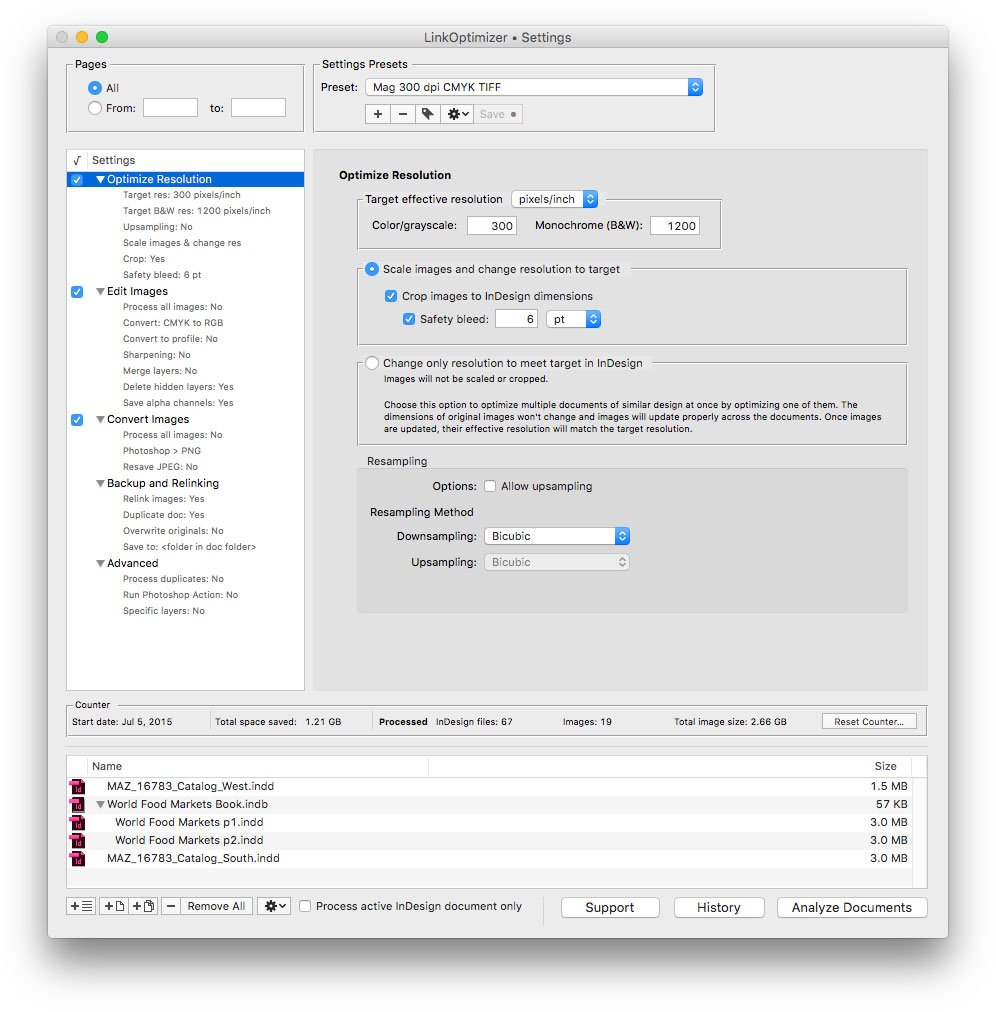
LinkOptimizer works automatically with Photoshop to eliminate the excess image data of InDesign links, convert image formats, and perform essential image adjustments. For example, with just a click of a button users can:
* Optimize multiple InDesign files
* Scale and crop images to match their dimensions in InDesign
* Convert RGB images to specific CMYK profile
* Change their resolution to 300 dpi
* Run a Photoshop action on each image.
* Resave PNG files as PSD
As a result users can save gigabytes of disk space and countless hours of optimizing images manually, accelerate document output, reduce job turnaround and cut costs through faster processing.
Pricing and Availability:
LinkOptimizer can be purchased from Zevrix website for $259.95 USD (Lite version: $179.95) as well as from Adobe Exchange and authorized resellers. Trial is also available for download. The update is free for LinkOptimizer 5.x users and $130 to upgrade from previous versions. LinkOptimizer requires macOS 10.7-10.14 and Adobe InDesign / Photoshop CS5-CC 2019.
Zevrix Solutions: http://zevrix.com
LinkOptimizer 5.2.19: http://zevrix.com/LinkOptimizer.php
Download LinkOptimizer: http://zevrix.com/LinkOptimizer.dmg
Purchase: http://zevrix.com/store.php
Screenshot: http://zevrix.com/screenshots/lo5/res-win.jpg
Located in Toronto, Canada, Zevrix Solutions provides automation and productivity solutions for Adobe Creative Cloud and Creative Suite software, PDF workflows, graphic file diagnostics and Microsoft Office output on Mac OS. Zevrix is dedicated to help professionals increase their profits through automating everyday tasks, producing error-free documents, saving disk space and cutting production costs. For more information, visit their website. Copyright (C) 2019 Zevrix Solutions. All Rights Reserved. Other trademarks and registered trademarks may be the property of their respective owners.
*******
Link To Article: https://prmac.com/release-id-83340.htm
*******
---------------------------------------------------------------------------------
Note that you can alter delivered distributions at any time.
Login to your account on prMac to alter your channel selection, or to opt-out at any time.

Overflow 3.1 now available - New color and sizing customization options
A new article has been published at prMac.
Overflow 3.1 now available - New color and sizing customization options - Published on 03/13/19
Stunt Software today announces Overflow 3.1, a feature update to their popular visual launcher for macOS. Overflow allows you to quickly and easily launch applications, open documents, access folders and search your hard drive. Reduce clutter in your Dock by storing infrequently-used items in Overflow. Version 3.1 introduces new much-requested color and icon sizing customization options, as well as many other bug fixes and feature enhancements such as the new quick-access menu bar menu item.
Portland, Oregon - Stunt Software today is proud to announce the release of Overflow 3.1, an important feature update to the company's popular visual launcher for macOS. Overflow allows you to quickly and easily launch applications, open documents, access folders and search your hard drive. Reduce clutter in your Dock by storing infrequently-used items in Overflow instead. Any item you see in the Finder can be added to the Overflow interface, making it accessible through a few simple mouse clicks or keystrokes. Version 3.1 introduces new much-requested color and icon sizing customization options!
Other notable features include:
* Added Quick Access right-click menu to the menu bar item
* Added contextual menu to the collection list
* Search performance enhancements
* Mojave performance and appearance enhancements
* As well as many other bug fixes
These are in addition to Overflow 3's already great features:
* Visual Organization - Create separate collections for your applications, project files, commonly-visited websites, games, often-needed folders, or anything else that makes sense for you.
* Fully Customizable Layout - Rearrange items by clicking, holding the mouse down for a moment, then dragging the item to a new position or collection.
* Hot Key Shortcut - Instantly pop open the Overflow window from anywhere using a customizable keyboard shortcut.
* Type-to-Search - With the Overflow window open, just start typing to instantly search for any app or file on your computer. Use type-to-search to find not just items you've added to Overflow, but any file on your computer! Filter items by category to quickly find exactly what you're looking for.
* Quicklook Previews - Overflow makes it easy to check the contents of files: just hit the space bar when hovering over an item to open a Quicklook preview.
* Full URL Support - Drop URLs or web bookmarks from your web browser or the Finder into Overflow. Works great with Quicklook!
* Keyboard Support - In addition to type-to-search, you can use the keyboard to control almost every aspect of Overflow.
Overflow 3.1: https://stuntsoftware.com/overflow/
Download Overflow: https://stuntsoftware.com/download/overflow.zip
Stunt Software is has been creating great Mac software in Winnipeg, Manitoba and Portland, Oregon for 15 years. From On The Job to Overflow and more, Stunt Software is dedicated to high quality software for the Macintosh platform. All Material and Software (C) Copyright 2019 Stunt Software. All Rights Reserved. Apple, the Apple logo, and macOS are registered trademarks of Apple Inc. in the U.S. and/or other countries. Other trademarks and registered trademarks may be the property of their respective owners.
*******
Link To Article: https://prmac.com/release-id-83338.htm
*******
---------------------------------------------------------------------------------
Note that you can alter delivered distributions at any time.
Login to your account on prMac to alter your channel selection, or to opt-out at any time.
Overflow 3.1 now available - New color and sizing customization options - Published on 03/13/19
Stunt Software today announces Overflow 3.1, a feature update to their popular visual launcher for macOS. Overflow allows you to quickly and easily launch applications, open documents, access folders and search your hard drive. Reduce clutter in your Dock by storing infrequently-used items in Overflow. Version 3.1 introduces new much-requested color and icon sizing customization options, as well as many other bug fixes and feature enhancements such as the new quick-access menu bar menu item.
Portland, Oregon - Stunt Software today is proud to announce the release of Overflow 3.1, an important feature update to the company's popular visual launcher for macOS. Overflow allows you to quickly and easily launch applications, open documents, access folders and search your hard drive. Reduce clutter in your Dock by storing infrequently-used items in Overflow instead. Any item you see in the Finder can be added to the Overflow interface, making it accessible through a few simple mouse clicks or keystrokes. Version 3.1 introduces new much-requested color and icon sizing customization options!
Other notable features include:
* Added Quick Access right-click menu to the menu bar item
* Added contextual menu to the collection list
* Search performance enhancements
* Mojave performance and appearance enhancements
* As well as many other bug fixes
These are in addition to Overflow 3's already great features:
* Visual Organization - Create separate collections for your applications, project files, commonly-visited websites, games, often-needed folders, or anything else that makes sense for you.
* Fully Customizable Layout - Rearrange items by clicking, holding the mouse down for a moment, then dragging the item to a new position or collection.
* Hot Key Shortcut - Instantly pop open the Overflow window from anywhere using a customizable keyboard shortcut.
* Type-to-Search - With the Overflow window open, just start typing to instantly search for any app or file on your computer. Use type-to-search to find not just items you've added to Overflow, but any file on your computer! Filter items by category to quickly find exactly what you're looking for.
* Quicklook Previews - Overflow makes it easy to check the contents of files: just hit the space bar when hovering over an item to open a Quicklook preview.
* Full URL Support - Drop URLs or web bookmarks from your web browser or the Finder into Overflow. Works great with Quicklook!
* Keyboard Support - In addition to type-to-search, you can use the keyboard to control almost every aspect of Overflow.
Overflow 3.1: https://stuntsoftware.com/overflow/
Download Overflow: https://stuntsoftware.com/download/overflow.zip
Stunt Software is has been creating great Mac software in Winnipeg, Manitoba and Portland, Oregon for 15 years. From On The Job to Overflow and more, Stunt Software is dedicated to high quality software for the Macintosh platform. All Material and Software (C) Copyright 2019 Stunt Software. All Rights Reserved. Apple, the Apple logo, and macOS are registered trademarks of Apple Inc. in the U.S. and/or other countries. Other trademarks and registered trademarks may be the property of their respective owners.
*******
Link To Article: https://prmac.com/release-id-83338.htm
*******
---------------------------------------------------------------------------------
Note that you can alter delivered distributions at any time.
Login to your account on prMac to alter your channel selection, or to opt-out at any time.
FontAgent 9 Adds New Tagging, Activation, Monotype and Adobe Integration
A new article has been published at prMac.
FontAgent 9 Adds New Tagging, Activation, Monotype and Adobe Integration - Published on 03/13/19
Insider Software today announced FontAgent 9 for Macintosh. FontAgent integrates diagnostics, repair, font selection, font book creation, and design tools and more. Built atop FontAgent's robust font rendering, searching, activation, integrity and metadata engines, the latest V9 edition adds an all-new tagging manager, nested sets, performance improvements, and more extensive support for macOS Mojave, Monotype SkyFonts, Adobe Fonts, Adobe Creative Cloud and Affinity applications.
San Jose, California - Insider Software today announced FontAgent(R) 9 for Macintosh. Built atop FontAgent's robust font rendering, searching, activation, integrity and metadata engines, the latest V9 edition adds an all-new tagging manager, nested sets, performance improvements, and more extensive support for macOS Mojave, Monotype SkyFonts, Adobe Fonts, Adobe Creative Cloud and Affinity applications.
FontAgent 9 Highlights:
* Sharable tags for categorizing and organizing fonts
* macOS Mojave, High Sierra and Sierra compatibility
* Support for Mojave's Dark Mode
* All-new, optimized font-rendering engine for faster previews
* Tight integration with Monotype SkyFonts and Adobe Fonts
* Auto-activation in Adobe CC 2019 - InDesign, Illustrator, Photoshop, After Effects, InCopy
* Auto-activation in Affinity applications - Photo, Designer, Publisher
* Auto-activation in QuarkXPress 2018
* Group-by-tag display in the Table View
* Expanded, speedy searching of font tags and comments
* Improved font cache auto-clearing
Auto-Activation in More Applications:
FontAgent 9 significantly widens font auto-activation support, so as users open documents in supported apps, FontAgent auto-activates them in macOS. Auto-activation now works in Adobe Creative Cloud 2019 (InDesign, Photoshop, Illustrator, After Effects and InCopy); the Affinity product suite (Designer, Photo and Publisher); and QuarkXPress 2018.
Full Support for macOS Mojave and Dark Mode:
The V9 release is compatible with Mojave (macOS 10.14) and includes new support for Dark Mode. It also takes advantage of Mojave platform functionality and APIs to optimize application performance, font activation and font rendering. V9 is also compatible with the High Sierra and Sierra releases of macOS.
Sharable and Searchable Tags:
The most visible addition to FontAgent 9 is the addition of a new tag manager that lets users tag fonts and sets to classify them by project, appearance, job numbers, client, and more. FontAgent lets users search by tag to preview, compare and activate associated fonts easily. As users share fonts with others, FontAgent 9 shares their tags as well, adding an all-new level of metadata richness to the creative process for workgroups.
Nested Sets and Subsets:
Back by popular demand, FontAgent 9 adds nested sets for organizing fonts hierarchically by client, project, foundry or style. And in V9, when users share nested sets with others, the sets' hierarchies and all their fonts are shared as well.
Monotype SkyFonts and Adobe Fonts Integration:
Fonts activated in Monotype SkyFonts and Adobe Fonts appear automatically in FontAgent and work just like all other managed fonts. The Monotype service offers access to over 11,000 industry-leading fonts and Adobe offers access to thousands of fonts as part of their Creative Cloud subscription service. Both include access to the popular Google Fonts library with over 915 font families.
Lightning-Fast Search:
The search facility in FontAgent 9 is expanded and improved to include a full spectrum of font characteristics including name, style, foundry, designer, tags, comments, ratings, and other metadata. Users can perform complex searches and save them as Smart Sets whose contents auto-update as they import new fonts into FontAgent.
Table View Improvements:
The Table View in FontAgent 9 now lets you group fonts by tag, which organizes the order of fonts in the table topically. Using tags and table groups is a fast way to easily view and manage related fonts.
Freeform Comments Manager:
FontAgent 9 lets users enter freeform comments for fonts to describe their associated projects, clients, colors, type settings and design treatments. It also lets users search those comments to find the fonts they need and to use those fonts consistently.
Automatic Font Cache Management:
V9 improves the performance of its automatic cache clearing that heads off display problems, garbled fonts, strange font substitution, printing problems and application crashes.
Code Streamlining and Modernization:
FontAgent 9 is recoded in the latest Apple platform technologies to deliver better performance, sharper rendering, faster importing, speedier searches and more platform compatibility.
Share and Sync Fonts Easily:
The Sync Edition of FontAgent continues its role as a simple, cost-effective way to standardize, share and sync fonts across teams and computers. It makes fonts instantly available through the Cloud to others without the need to define libraries, create folders, maintain a server or find an IT expert.
Cost-Effective Licensing Alternatives
A perpetual license for FontAgent 9 Standard Edition is priced at $99 (USD) per user. FontAgent 8 users can purchase V9 upgrades or opt for a FontAgent Sync subscription for $59 a year. The Sync license includes free software upgrades and support and lets you archive and share fonts with others through cloud services provided by Insider.
Free 30-Day Trials:
For more information about FontAgent 9 and Sync, visit www.insidersoftware.com. Free 30-day trials are available for download from Insider Software online.
Insider Software: http://www.insidersoftware.com
FontAgent 9: http://www.insidersoftware.com/fontagent-mac
Download 30-Day Trial: http://www.insidersoftware.com/fontagent-trial
Media Assets: http://www.insidersoftware.com/fontagent-9-for-mac-media assets
Founded in 1994, Insider Software makes products that streamline the creative process. With the most extensive array of font management utilities on the market, Insider has the ideal solution for every font management scenario. FontAgent is a registered trademark, and Insider, and the Insider logo are trademarks of Insider Software. Other products mentioned are trademarks of their respective owners.
*******
Link To Article: https://prmac.com/release-id-83337.htm
*******
---------------------------------------------------------------------------------
Note that you can alter delivered distributions at any time.
Login to your account on prMac to alter your channel selection, or to opt-out at any time.
FontAgent 9 Adds New Tagging, Activation, Monotype and Adobe Integration - Published on 03/13/19
Insider Software today announced FontAgent 9 for Macintosh. FontAgent integrates diagnostics, repair, font selection, font book creation, and design tools and more. Built atop FontAgent's robust font rendering, searching, activation, integrity and metadata engines, the latest V9 edition adds an all-new tagging manager, nested sets, performance improvements, and more extensive support for macOS Mojave, Monotype SkyFonts, Adobe Fonts, Adobe Creative Cloud and Affinity applications.
San Jose, California - Insider Software today announced FontAgent(R) 9 for Macintosh. Built atop FontAgent's robust font rendering, searching, activation, integrity and metadata engines, the latest V9 edition adds an all-new tagging manager, nested sets, performance improvements, and more extensive support for macOS Mojave, Monotype SkyFonts, Adobe Fonts, Adobe Creative Cloud and Affinity applications.
FontAgent 9 Highlights:
* Sharable tags for categorizing and organizing fonts
* macOS Mojave, High Sierra and Sierra compatibility
* Support for Mojave's Dark Mode
* All-new, optimized font-rendering engine for faster previews
* Tight integration with Monotype SkyFonts and Adobe Fonts
* Auto-activation in Adobe CC 2019 - InDesign, Illustrator, Photoshop, After Effects, InCopy
* Auto-activation in Affinity applications - Photo, Designer, Publisher
* Auto-activation in QuarkXPress 2018
* Group-by-tag display in the Table View
* Expanded, speedy searching of font tags and comments
* Improved font cache auto-clearing
Auto-Activation in More Applications:
FontAgent 9 significantly widens font auto-activation support, so as users open documents in supported apps, FontAgent auto-activates them in macOS. Auto-activation now works in Adobe Creative Cloud 2019 (InDesign, Photoshop, Illustrator, After Effects and InCopy); the Affinity product suite (Designer, Photo and Publisher); and QuarkXPress 2018.
Full Support for macOS Mojave and Dark Mode:
The V9 release is compatible with Mojave (macOS 10.14) and includes new support for Dark Mode. It also takes advantage of Mojave platform functionality and APIs to optimize application performance, font activation and font rendering. V9 is also compatible with the High Sierra and Sierra releases of macOS.
Sharable and Searchable Tags:
The most visible addition to FontAgent 9 is the addition of a new tag manager that lets users tag fonts and sets to classify them by project, appearance, job numbers, client, and more. FontAgent lets users search by tag to preview, compare and activate associated fonts easily. As users share fonts with others, FontAgent 9 shares their tags as well, adding an all-new level of metadata richness to the creative process for workgroups.
Nested Sets and Subsets:
Back by popular demand, FontAgent 9 adds nested sets for organizing fonts hierarchically by client, project, foundry or style. And in V9, when users share nested sets with others, the sets' hierarchies and all their fonts are shared as well.
Monotype SkyFonts and Adobe Fonts Integration:
Fonts activated in Monotype SkyFonts and Adobe Fonts appear automatically in FontAgent and work just like all other managed fonts. The Monotype service offers access to over 11,000 industry-leading fonts and Adobe offers access to thousands of fonts as part of their Creative Cloud subscription service. Both include access to the popular Google Fonts library with over 915 font families.
Lightning-Fast Search:
The search facility in FontAgent 9 is expanded and improved to include a full spectrum of font characteristics including name, style, foundry, designer, tags, comments, ratings, and other metadata. Users can perform complex searches and save them as Smart Sets whose contents auto-update as they import new fonts into FontAgent.
Table View Improvements:
The Table View in FontAgent 9 now lets you group fonts by tag, which organizes the order of fonts in the table topically. Using tags and table groups is a fast way to easily view and manage related fonts.
Freeform Comments Manager:
FontAgent 9 lets users enter freeform comments for fonts to describe their associated projects, clients, colors, type settings and design treatments. It also lets users search those comments to find the fonts they need and to use those fonts consistently.
Automatic Font Cache Management:
V9 improves the performance of its automatic cache clearing that heads off display problems, garbled fonts, strange font substitution, printing problems and application crashes.
Code Streamlining and Modernization:
FontAgent 9 is recoded in the latest Apple platform technologies to deliver better performance, sharper rendering, faster importing, speedier searches and more platform compatibility.
Share and Sync Fonts Easily:
The Sync Edition of FontAgent continues its role as a simple, cost-effective way to standardize, share and sync fonts across teams and computers. It makes fonts instantly available through the Cloud to others without the need to define libraries, create folders, maintain a server or find an IT expert.
Cost-Effective Licensing Alternatives
A perpetual license for FontAgent 9 Standard Edition is priced at $99 (USD) per user. FontAgent 8 users can purchase V9 upgrades or opt for a FontAgent Sync subscription for $59 a year. The Sync license includes free software upgrades and support and lets you archive and share fonts with others through cloud services provided by Insider.
Free 30-Day Trials:
For more information about FontAgent 9 and Sync, visit www.insidersoftware.com. Free 30-day trials are available for download from Insider Software online.
Insider Software: http://www.insidersoftware.com
FontAgent 9: http://www.insidersoftware.com/fontagent-mac
Download 30-Day Trial: http://www.insidersoftware.com/fontagent-trial
Media Assets: http://www.insidersoftware.com/fontagent-9-for-mac-media assets
Founded in 1994, Insider Software makes products that streamline the creative process. With the most extensive array of font management utilities on the market, Insider has the ideal solution for every font management scenario. FontAgent is a registered trademark, and Insider, and the Insider logo are trademarks of Insider Software. Other products mentioned are trademarks of their respective owners.
*******
Link To Article: https://prmac.com/release-id-83337.htm
*******
---------------------------------------------------------------------------------
Note that you can alter delivered distributions at any time.
Login to your account on prMac to alter your channel selection, or to opt-out at any time.
Default Folder X 5.3.5 improves integration and compatibility
A new article has been published at prMac.
Default Folder X 5.3.5 improves integration and compatibility - Published on 03/13/19
St. Clair Software releases Default Folder X 5.3.5 today, an update to their award-winning utility for macOS. Default Folder X enhances the file dialogs in all macOS applications. It provides fast navigation to your files, convenient previews, integrated Spotlight tagging, and more. Default Folder X's custom keyboard shortcuts put favorite and recent folders at your fingertips. Version 5.3.5 brings cooperation with HoudahSpot, better compatibility with LaunchBar, CopyPaste Pro, Mojave and more.
Denver, Colorado - St. Clair Software is pleased to announce the availability of Default Folder X version 5.3.5 today. This release of its award-winning utility for enhancing Open and Save dialogs integrates Houdah Software's HoudahSpot search application into file dialogs and corrects compatibility issues with LaunchBar, CopyPaste Pro, and Mojave's screenshot utility. It also enhances Default Folder X's drawer in the Finder and improves its switching between folders in Open and Save dialogs.
Default Folder X's custom keyboard shortcuts put your favorite and recent folders at your fingertips. Pop-up menus let you quickly navigate your folders and open Finder windows. Previews, file information, Spotlight tagging and comments are there when you need them. Open, save, and get back to work: Default Folder X speeds your workflow by making file management fast and efficient.
The changes in Default Folder X 5.3.5 include:
* Default Folder X works correctly in the Save dialog of Mojave's enhanced screenshot utility
* You can now search folders with HoudahSpot using a menu item in Open and Save dialogs
* Numerous improvements have been made to Default Folder X's drawer in the Finder
* Switching between folders in Open and Save dialogs has been made more reliable
* Compatibility issues with LaunchBar and CopyPaste Pro have been corrected
* A number of bugs and crashes have been fixed
For a complete change history, visit the URL listed below.
System Requirements:
* macOS 10.10 through 10.14
Pricing and Availability:
Default Folder X 5.3.5 is a free update for existing version 5 users. New licenses are $34.95 (USD) and upgrades from version 4 and prior are $14.95. Please see the St. Clair Software web site for screencasts, screenshots, a full change log, and additional feature information. St. Clair Software strongly recommends that anyone using Default Folder X install this update.
Default Folder X 5.3.5: http://www.stclairsoft.com/DefaultFolderX/index.html
Detailed Change History: http://www.stclairsoft.com/DefaultFolderX/release.html
Download Default Folder X: http://www.stclairsoft.com/cgi-bin/dl.cgi?DX
Purchase Default Folder X: http://www.stclairsoft.com/store/
Based in Denver, Colorado, St. Clair Software is a privately held company that has been specializing in utilities and custom software solutions for the Macintosh since 1988. St. Clair Software can be contacted at: St. Clair Software, 271 S. Emerson Street, Denver, CO, USA 80209. Copyright (C) 1988-2019 St. Clair Software. All Rights Reserved. Apple, Macintosh, macOS and Finder are registered trademarks of Apple Inc. in the U.S. and/or other countries.
*******
Link To Article: https://prmac.com/release-id-83336.htm
*******
---------------------------------------------------------------------------------
Note that you can alter delivered distributions at any time.
Login to your account on prMac to alter your channel selection, or to opt-out at any time.
Default Folder X 5.3.5 improves integration and compatibility - Published on 03/13/19
St. Clair Software releases Default Folder X 5.3.5 today, an update to their award-winning utility for macOS. Default Folder X enhances the file dialogs in all macOS applications. It provides fast navigation to your files, convenient previews, integrated Spotlight tagging, and more. Default Folder X's custom keyboard shortcuts put favorite and recent folders at your fingertips. Version 5.3.5 brings cooperation with HoudahSpot, better compatibility with LaunchBar, CopyPaste Pro, Mojave and more.
Denver, Colorado - St. Clair Software is pleased to announce the availability of Default Folder X version 5.3.5 today. This release of its award-winning utility for enhancing Open and Save dialogs integrates Houdah Software's HoudahSpot search application into file dialogs and corrects compatibility issues with LaunchBar, CopyPaste Pro, and Mojave's screenshot utility. It also enhances Default Folder X's drawer in the Finder and improves its switching between folders in Open and Save dialogs.
Default Folder X's custom keyboard shortcuts put your favorite and recent folders at your fingertips. Pop-up menus let you quickly navigate your folders and open Finder windows. Previews, file information, Spotlight tagging and comments are there when you need them. Open, save, and get back to work: Default Folder X speeds your workflow by making file management fast and efficient.
The changes in Default Folder X 5.3.5 include:
* Default Folder X works correctly in the Save dialog of Mojave's enhanced screenshot utility
* You can now search folders with HoudahSpot using a menu item in Open and Save dialogs
* Numerous improvements have been made to Default Folder X's drawer in the Finder
* Switching between folders in Open and Save dialogs has been made more reliable
* Compatibility issues with LaunchBar and CopyPaste Pro have been corrected
* A number of bugs and crashes have been fixed
For a complete change history, visit the URL listed below.
System Requirements:
* macOS 10.10 through 10.14
Pricing and Availability:
Default Folder X 5.3.5 is a free update for existing version 5 users. New licenses are $34.95 (USD) and upgrades from version 4 and prior are $14.95. Please see the St. Clair Software web site for screencasts, screenshots, a full change log, and additional feature information. St. Clair Software strongly recommends that anyone using Default Folder X install this update.
Default Folder X 5.3.5: http://www.stclairsoft.com/DefaultFolderX/index.html
Detailed Change History: http://www.stclairsoft.com/DefaultFolderX/release.html
Download Default Folder X: http://www.stclairsoft.com/cgi-bin/dl.cgi?DX
Purchase Default Folder X: http://www.stclairsoft.com/store/
Based in Denver, Colorado, St. Clair Software is a privately held company that has been specializing in utilities and custom software solutions for the Macintosh since 1988. St. Clair Software can be contacted at: St. Clair Software, 271 S. Emerson Street, Denver, CO, USA 80209. Copyright (C) 1988-2019 St. Clair Software. All Rights Reserved. Apple, Macintosh, macOS and Finder are registered trademarks of Apple Inc. in the U.S. and/or other countries.
*******
Link To Article: https://prmac.com/release-id-83336.htm
*******
---------------------------------------------------------------------------------
Note that you can alter delivered distributions at any time.
Login to your account on prMac to alter your channel selection, or to opt-out at any time.
Numerics makes Siri aware of your business metrics
A new article has been published at prMac.
Numerics makes Siri aware of your business metrics - Published on 03/12/19
Cynapse today releases Numerics 6, the latest version of the realtime business dashboard app for iOS, Apple Watch and Apple TV. Numerics is a dashboard app that lets you design custom dashboards, personalized to your business KPIs and metrics. Numerics helps you make better decisions by ensuring your most important numbers are always a glance away. Version 6 connects Siri to your key performance indicators giving you handsfree access to the numbers that matter most to you.
Mumbai, India - Numerics 6, the latest version of the realtime business dashboard app, integrates deeply with Siri to deliver a handsfree experience of tracking business performance metrics. Customers can ask Siri questions about metrics tracked in their Numerics dashboards to hear Siri respond with a spoken brief for that KPI. Each visualization has a carefully designed spoken description that provides deeper insight into the metric via Siri, without opening the app. This makes Numerics usable in a handsfree, voice only mode and hence compatible with HomePods and AirPods. So users can ask Siri about a metric on their dashboard using any Siri device and be instantly updated with the latest numbers.
"Being a native app on the Apple ecosystem allows Numerics to extend the power of Siri like no other dashboard solution in the market." said Viraf Sarkari, COO, Cynapse. "Numerics 6 weaves the power of Siri into its DNA enabling customers to always have access to their KPIs via voice."
Once a metric is added to Siri, the custom voice commands set by the user are synchronized across all their iCloud connected devices and work out-of-the-box! The incredibly useful integration with the Apple Shortcuts app lets users combine multiple metrics to build custom reports that Siri can speak out when triggered. This is perfect for creating a 'Morning Briefing' shortcut, that will trigger Siri to speak out a brief of select KPIs.
Numerics 6 adds 2 new capabilities to its feature set - Gauge and Timer. The new gauge is designed to be a barometer of progress towards business targets and can be used to track sales & marketing goals, revenue performance or any metric with a defined objective. The Timer visualization allows users to track the timespan from or to an event in real time count-up and count-down timers. Uniquely designed to display a live timer custom tailored for the various form factors of all supported devices and extensions, the timer visualization ensures users have a realtime counter to their important event in the most relevant and clear format.
Numerics 6 on the Apple Watch has been re-designed to take advantage of the new dimensions of Apple Watch Series 4. Numerics adds support for all the complication slots on the new Infograph watch faces. Re-designed to use the new gauges and dials, Numerics complications give the user a rich overview of the health of their KPI in a quick glance, right from their watch face. Numerics on the Apple Watch sports an all new design with beautifully structured metrics, rounded widgets and brighter colors.
The latest version also adds 7 new integrations - Asana, Baremetrics, Google Calendar, Hitsteps, Linkedin, Twitch, & Zoho Analytics. With these new integrations, customers can now visualize their data from 50 services.
Numerics 6 takes advantage of all the cutting-edge technologies enabled by Apple's hardware and software to deliver a secure and seamless dashboard experience for customers. The new update is packed with great new features for iOS 12, watchOS 5 and tvOS 12 - including support for the iPhone Xr & Xs Max, iPad Pro and Apple Pencil and more. A full list of all that's new is available on the App Store.
Device Requirements:
* iPhone, iPad, iPod touch and Apple TV
* Requires iOS 12.1 or later
* 48.9 MB
Pricing and Availability:
Numerics 6 is Free (With In-App Purchases) and available worldwide exclusively through the App Store in the Business category. For more information, please contact Romasha Roy Choudhury.
Numerics 6.0.2: https://cynapse.com/numerics/
Numerics Features: https://cynapse.com/numerics/features
Whats New in Numerics 6: https://cynapse.com/numerics/whats-new-v6/
Download from App Store: https://itunes.apple.com/us/app/numerics-dashboards-to-visualize/id875319874
Cynapse Apple Mobility Partner: https://cynapse.com/blog/cynapse-apple-mobility-partner/
Media Assets: https://www.dropbox.com/sh/tu2p5cm9eqv6msq/AAAkRvASYs36Wd3mxgPepft4a
Headquartered in Mumbai, India, Cynapse invents technology that applies to and benefits everyday life. Cynapse creates products that solve specific fundamental problems in the most beautiful and amazing way. Cynapse has successfully produced 10 products in its lifespan, focused in the areas of productivity and collaboration. Cynapse is the creator of open source Enterprise 2.0 software Cyn.in, provider of the realtime collaboration software Sync.in and inventor of Numerics, Localscope and Phlo for the iOS and Mac platforms. Over 100,000 businesses and institutions and millions of users across the world benefit using Cynapse technology. Copyright (C) 2019 Cynapse. All Rights Reserved. Apple, the Apple logo, iPhone, iPod and iPad are registered trademarks of Apple Inc. in the U.S. and/or other countries.
*******
Link To Article: https://prmac.com/release-id-83335.htm
*******
---------------------------------------------------------------------------------
Note that you can alter delivered distributions at any time.
Login to your account on prMac to alter your channel selection, or to opt-out at any time.
Numerics makes Siri aware of your business metrics - Published on 03/12/19
Cynapse today releases Numerics 6, the latest version of the realtime business dashboard app for iOS, Apple Watch and Apple TV. Numerics is a dashboard app that lets you design custom dashboards, personalized to your business KPIs and metrics. Numerics helps you make better decisions by ensuring your most important numbers are always a glance away. Version 6 connects Siri to your key performance indicators giving you handsfree access to the numbers that matter most to you.
Mumbai, India - Numerics 6, the latest version of the realtime business dashboard app, integrates deeply with Siri to deliver a handsfree experience of tracking business performance metrics. Customers can ask Siri questions about metrics tracked in their Numerics dashboards to hear Siri respond with a spoken brief for that KPI. Each visualization has a carefully designed spoken description that provides deeper insight into the metric via Siri, without opening the app. This makes Numerics usable in a handsfree, voice only mode and hence compatible with HomePods and AirPods. So users can ask Siri about a metric on their dashboard using any Siri device and be instantly updated with the latest numbers.
"Being a native app on the Apple ecosystem allows Numerics to extend the power of Siri like no other dashboard solution in the market." said Viraf Sarkari, COO, Cynapse. "Numerics 6 weaves the power of Siri into its DNA enabling customers to always have access to their KPIs via voice."
Once a metric is added to Siri, the custom voice commands set by the user are synchronized across all their iCloud connected devices and work out-of-the-box! The incredibly useful integration with the Apple Shortcuts app lets users combine multiple metrics to build custom reports that Siri can speak out when triggered. This is perfect for creating a 'Morning Briefing' shortcut, that will trigger Siri to speak out a brief of select KPIs.
Numerics 6 adds 2 new capabilities to its feature set - Gauge and Timer. The new gauge is designed to be a barometer of progress towards business targets and can be used to track sales & marketing goals, revenue performance or any metric with a defined objective. The Timer visualization allows users to track the timespan from or to an event in real time count-up and count-down timers. Uniquely designed to display a live timer custom tailored for the various form factors of all supported devices and extensions, the timer visualization ensures users have a realtime counter to their important event in the most relevant and clear format.
Numerics 6 on the Apple Watch has been re-designed to take advantage of the new dimensions of Apple Watch Series 4. Numerics adds support for all the complication slots on the new Infograph watch faces. Re-designed to use the new gauges and dials, Numerics complications give the user a rich overview of the health of their KPI in a quick glance, right from their watch face. Numerics on the Apple Watch sports an all new design with beautifully structured metrics, rounded widgets and brighter colors.
The latest version also adds 7 new integrations - Asana, Baremetrics, Google Calendar, Hitsteps, Linkedin, Twitch, & Zoho Analytics. With these new integrations, customers can now visualize their data from 50 services.
Numerics 6 takes advantage of all the cutting-edge technologies enabled by Apple's hardware and software to deliver a secure and seamless dashboard experience for customers. The new update is packed with great new features for iOS 12, watchOS 5 and tvOS 12 - including support for the iPhone Xr & Xs Max, iPad Pro and Apple Pencil and more. A full list of all that's new is available on the App Store.
Device Requirements:
* iPhone, iPad, iPod touch and Apple TV
* Requires iOS 12.1 or later
* 48.9 MB
Pricing and Availability:
Numerics 6 is Free (With In-App Purchases) and available worldwide exclusively through the App Store in the Business category. For more information, please contact Romasha Roy Choudhury.
Numerics 6.0.2: https://cynapse.com/numerics/
Numerics Features: https://cynapse.com/numerics/features
Whats New in Numerics 6: https://cynapse.com/numerics/whats-new-v6/
Download from App Store: https://itunes.apple.com/us/app/numerics-dashboards-to-visualize/id875319874
Cynapse Apple Mobility Partner: https://cynapse.com/blog/cynapse-apple-mobility-partner/
Media Assets: https://www.dropbox.com/sh/tu2p5cm9eqv6msq/AAAkRvASYs36Wd3mxgPepft4a
Headquartered in Mumbai, India, Cynapse invents technology that applies to and benefits everyday life. Cynapse creates products that solve specific fundamental problems in the most beautiful and amazing way. Cynapse has successfully produced 10 products in its lifespan, focused in the areas of productivity and collaboration. Cynapse is the creator of open source Enterprise 2.0 software Cyn.in, provider of the realtime collaboration software Sync.in and inventor of Numerics, Localscope and Phlo for the iOS and Mac platforms. Over 100,000 businesses and institutions and millions of users across the world benefit using Cynapse technology. Copyright (C) 2019 Cynapse. All Rights Reserved. Apple, the Apple logo, iPhone, iPod and iPad are registered trademarks of Apple Inc. in the U.S. and/or other countries.
*******
Link To Article: https://prmac.com/release-id-83335.htm
*******
---------------------------------------------------------------------------------
Note that you can alter delivered distributions at any time.
Login to your account on prMac to alter your channel selection, or to opt-out at any time.
Output Factory Server for InDesign Streamlines Workflow on macOS Mojave
A new article has been published at prMac.
Output Factory Server for InDesign Streamlines Workflow on macOS Mojave - Published on 03/11/19
Zevrix Solutions announces Output Factory Server 2.1.21, a maintenance update to company's output automation solution for Adobe InDesign. The software automates printing and exporting from InDesign by processing files from watched hot folders. Output Factory Server offers layer versioning, preflighting, email notifications, PDF security presets and more. The new version eliminates workflow interruptions which can be caused by some new security measure introduced in macOS Mojave.
Toronto (ON), Canada - Zevrix Solutions today announces the release of Output Factory Server 2.1.21 a feature update to company's output automation solution for Adobe InDesign. Output Factory Server automates InDesign production workflow by processing files from watched hot folders. The software offloads printing and exporting from InDesign to a central system leaving operator workstations free from the output process.
The new version eliminates workflow interruptions which can be caused by Apple Event sandboxing - a new security measure introduced in macOS Mojave. Under the new policy, apps can no longer control other apps without initial user authorization, which directly affects productivity tools that require access to InDesign and other system resources in order to perform complex workflow automation tasks. The new update of Output Factory Server streamlines the authorization process by clearing all permissions during launch time, which eliminates workflow interruptions during file processing. The app will also automatically reset Apple Event permissions if the authorization was previously revoked by accident.
Output Factory Server is intended to run on a dedicated Mac station where it can serve unlimited users via watched hot folders on a network. Users can create hot folders for different output targets such as hi-res PDF, color printing, EPUB files and so on. The app offers the following key features:
* Output InDesign files automatically from hot folders
* Supports print, PDF, PostScript, TIFF, EPUB and other formats
* Output to multiple formats from a single hot folder
* Automatic email notifications
* Layer versioning
* Run custom scripts
* Variable output file names
* Automatic preflighting
* PDF security presets for different workflows
Pricing and Availability:
Output Factory Server can be purchased from Zevrix web site for $699.95 (USD), as well as from authorized resellers. Trial is also available for download. The upgrade to version 2 is $350 for the licensed users of Output Factory Server 1.x and BatchOutput Server. Output Factory Server requires macOS 10.7-10.14 and Adobe InDesign CS5-CC 2019.
Zevrix Solutions: http://zevrix.com
Output Factory Server 2.1.21: http://zevrix.com/OutputFactoryServer.php
Download Output Factory Server: http://zevrix.com/OutputFactoryServer.dmg
Purchase: http://zevrix.com/store.php
Screenshot: http://zevrix.com/screenshots/ofs2/ofs-main-pdf.jpg
Located in Toronto, Canada, Zevrix Solutions provides automation and productivity solutions for Adobe Creative Cloud and Creative Suite software, PDF workflows, graphic file diagnostics and Microsoft Office output on Mac OS. Zevrix is dedicated to help professionals increase their profits through automating everyday tasks, producing error-free documents, saving disk space and cutting production costs. For more information, visit their website. Copyright (C) 2019 Zevrix Solutions. All Rights Reserved. Other trademarks and registered trademarks may be the property of their respective owners.
*******
Link To Article: https://prmac.com/release-id-83334.htm
*******
---------------------------------------------------------------------------------
Note that you can alter delivered distributions at any time.
Login to your account on prMac to alter your channel selection, or to opt-out at any time.
Output Factory Server for InDesign Streamlines Workflow on macOS Mojave - Published on 03/11/19
Zevrix Solutions announces Output Factory Server 2.1.21, a maintenance update to company's output automation solution for Adobe InDesign. The software automates printing and exporting from InDesign by processing files from watched hot folders. Output Factory Server offers layer versioning, preflighting, email notifications, PDF security presets and more. The new version eliminates workflow interruptions which can be caused by some new security measure introduced in macOS Mojave.
Toronto (ON), Canada - Zevrix Solutions today announces the release of Output Factory Server 2.1.21 a feature update to company's output automation solution for Adobe InDesign. Output Factory Server automates InDesign production workflow by processing files from watched hot folders. The software offloads printing and exporting from InDesign to a central system leaving operator workstations free from the output process.
The new version eliminates workflow interruptions which can be caused by Apple Event sandboxing - a new security measure introduced in macOS Mojave. Under the new policy, apps can no longer control other apps without initial user authorization, which directly affects productivity tools that require access to InDesign and other system resources in order to perform complex workflow automation tasks. The new update of Output Factory Server streamlines the authorization process by clearing all permissions during launch time, which eliminates workflow interruptions during file processing. The app will also automatically reset Apple Event permissions if the authorization was previously revoked by accident.
Output Factory Server is intended to run on a dedicated Mac station where it can serve unlimited users via watched hot folders on a network. Users can create hot folders for different output targets such as hi-res PDF, color printing, EPUB files and so on. The app offers the following key features:
* Output InDesign files automatically from hot folders
* Supports print, PDF, PostScript, TIFF, EPUB and other formats
* Output to multiple formats from a single hot folder
* Automatic email notifications
* Layer versioning
* Run custom scripts
* Variable output file names
* Automatic preflighting
* PDF security presets for different workflows
Pricing and Availability:
Output Factory Server can be purchased from Zevrix web site for $699.95 (USD), as well as from authorized resellers. Trial is also available for download. The upgrade to version 2 is $350 for the licensed users of Output Factory Server 1.x and BatchOutput Server. Output Factory Server requires macOS 10.7-10.14 and Adobe InDesign CS5-CC 2019.
Zevrix Solutions: http://zevrix.com
Output Factory Server 2.1.21: http://zevrix.com/OutputFactoryServer.php
Download Output Factory Server: http://zevrix.com/OutputFactoryServer.dmg
Purchase: http://zevrix.com/store.php
Screenshot: http://zevrix.com/screenshots/ofs2/ofs-main-pdf.jpg

Located in Toronto, Canada, Zevrix Solutions provides automation and productivity solutions for Adobe Creative Cloud and Creative Suite software, PDF workflows, graphic file diagnostics and Microsoft Office output on Mac OS. Zevrix is dedicated to help professionals increase their profits through automating everyday tasks, producing error-free documents, saving disk space and cutting production costs. For more information, visit their website. Copyright (C) 2019 Zevrix Solutions. All Rights Reserved. Other trademarks and registered trademarks may be the property of their respective owners.
*******
Link To Article: https://prmac.com/release-id-83334.htm
*******
---------------------------------------------------------------------------------
Note that you can alter delivered distributions at any time.
Login to your account on prMac to alter your channel selection, or to opt-out at any time.
monCarbone MFi Fast Charging Carbon Fiber USB-C to Lightning Cable
A new article has been published at prMac.
monCarbone MFi Fast Charging Carbon Fiber USB-C to Lightning Cable - Published on 03/08/19
monCarbone innovator of Carbon Fiber iPhone accessories and handcrafted lifestyle product announces the world's first premium USB-C to Lightning Apple Certified MFi Cable for fast charging. Continuously becoming MFi member for years, monCarbone will be one of the first to market the long-awaited alternative of Apple USB-C to Lightning since its released.
Los Angeles, California - Joining the first wave released, monCarbone innovator of Carbon Fiber iPhone accessories and handcrafted lifestyle product introduces the world's first premium USB-C to Lightning Apple Certified MFi Cable for fast charging. Continuously becoming MFi member for years, monCarbone will be one of the first to market the long-awaited alternative of Apple USB-C to Lightning since its released.
monCarbone brings forward technology combined with advanced material delivering breakthrough for a more faster and more durable premium USB-C to Lightning selection. KOBRA III USB-C to Lightning will enhance iPhone charging performance up to 70% faster when combining with 18W USB Power Delivery (USB-PD) Wall Charger and Car Charger accessories. Conveniently recharges 50% your iPhone in only 30 minutes maximizing your iPhone charging and supporting Thunderbolt 3 data transfer rates.
Featuring monCarbone Kore(TM) Technology with *DuPont(TM) Ballistic Kevlar(R), KOBRA III is constructed with triple reinforced and Power & Data interwoven Kevlar(R) Fiber to deliver superior strength exceeding 20,000 times Flex Tested. Kore(TM) Technology developed with DuPont(TM) Kevlar(R) for its well-known ballistic properties in military use and lightweight at 5-times the strength of steel on equal weight basis.
KOBRA III unique Unibody SR (Strain Relief) Structural Design prevents cable joint connectors from fraying. Enclosed in premium Carbon Fiber & Aluminum Housing with High Tensile Braided Nylon finish, KOBRA III is entirely designed in classy stylish look but highly durable to withstand long-term wear and tear.
monCarbone KOBRA III will be available in monCarbone online store www.monCarbone.com and monCarbone Amazon store in early Spring 2019. Also available in two other variations, Tangle-Free TPE shield and premium Aluminum housing both 10X more durable than Apple Lightning Cable. For the latest update news, follow us on Facebook and Instagram (@moncarbone.inc).
*DuPont(TM) and Kevlar(R) are trademarks or registered trademarks of E.I. du Pont de Nemours and Company.
monCarbone: http://www.moncarbone.com
Inspired by the intricacy of Aerospace Carbon Fiber, monCarbone creates lifestyle products merging influences and techniques, fusing design, manufacturing technology and craftsmanship with carbon fiber of the highest quality. monCarbone applies to transform the rigid surface feel of carbon fiber into a luxurious user experience. monCarbone is an expert in turning the dreams of carbon fiber material engineering into reality as they help to invent advanced yet efficient products that suit the modern lifestyle. We extend the normal everyday goods into a new realm of possibilities. monCarbone represents the highest quality of all carbon fiber products. All Material and Software (C) Copyright 2019 monCarbone. All Rights Reserved. Apple, the Apple logo, iPhone, iPod and iPad are registered trademarks of Apple Inc. in the U.S. and/or other countries. Other trademarks and registered trademarks may be the property of their respective owners.
*******
Link To Article: https://prmac.com/release-id-83333.htm
*******
---------------------------------------------------------------------------------
Note that you can alter delivered distributions at any time.
Login to your account on prMac to alter your channel selection, or to opt-out at any time.
monCarbone MFi Fast Charging Carbon Fiber USB-C to Lightning Cable - Published on 03/08/19
monCarbone innovator of Carbon Fiber iPhone accessories and handcrafted lifestyle product announces the world's first premium USB-C to Lightning Apple Certified MFi Cable for fast charging. Continuously becoming MFi member for years, monCarbone will be one of the first to market the long-awaited alternative of Apple USB-C to Lightning since its released.
Los Angeles, California - Joining the first wave released, monCarbone innovator of Carbon Fiber iPhone accessories and handcrafted lifestyle product introduces the world's first premium USB-C to Lightning Apple Certified MFi Cable for fast charging. Continuously becoming MFi member for years, monCarbone will be one of the first to market the long-awaited alternative of Apple USB-C to Lightning since its released.
monCarbone brings forward technology combined with advanced material delivering breakthrough for a more faster and more durable premium USB-C to Lightning selection. KOBRA III USB-C to Lightning will enhance iPhone charging performance up to 70% faster when combining with 18W USB Power Delivery (USB-PD) Wall Charger and Car Charger accessories. Conveniently recharges 50% your iPhone in only 30 minutes maximizing your iPhone charging and supporting Thunderbolt 3 data transfer rates.
Featuring monCarbone Kore(TM) Technology with *DuPont(TM) Ballistic Kevlar(R), KOBRA III is constructed with triple reinforced and Power & Data interwoven Kevlar(R) Fiber to deliver superior strength exceeding 20,000 times Flex Tested. Kore(TM) Technology developed with DuPont(TM) Kevlar(R) for its well-known ballistic properties in military use and lightweight at 5-times the strength of steel on equal weight basis.
KOBRA III unique Unibody SR (Strain Relief) Structural Design prevents cable joint connectors from fraying. Enclosed in premium Carbon Fiber & Aluminum Housing with High Tensile Braided Nylon finish, KOBRA III is entirely designed in classy stylish look but highly durable to withstand long-term wear and tear.
monCarbone KOBRA III will be available in monCarbone online store www.monCarbone.com and monCarbone Amazon store in early Spring 2019. Also available in two other variations, Tangle-Free TPE shield and premium Aluminum housing both 10X more durable than Apple Lightning Cable. For the latest update news, follow us on Facebook and Instagram (@moncarbone.inc).
*DuPont(TM) and Kevlar(R) are trademarks or registered trademarks of E.I. du Pont de Nemours and Company.
monCarbone: http://www.moncarbone.com
Inspired by the intricacy of Aerospace Carbon Fiber, monCarbone creates lifestyle products merging influences and techniques, fusing design, manufacturing technology and craftsmanship with carbon fiber of the highest quality. monCarbone applies to transform the rigid surface feel of carbon fiber into a luxurious user experience. monCarbone is an expert in turning the dreams of carbon fiber material engineering into reality as they help to invent advanced yet efficient products that suit the modern lifestyle. We extend the normal everyday goods into a new realm of possibilities. monCarbone represents the highest quality of all carbon fiber products. All Material and Software (C) Copyright 2019 monCarbone. All Rights Reserved. Apple, the Apple logo, iPhone, iPod and iPad are registered trademarks of Apple Inc. in the U.S. and/or other countries. Other trademarks and registered trademarks may be the property of their respective owners.
*******
Link To Article: https://prmac.com/release-id-83333.htm
*******
---------------------------------------------------------------------------------
Note that you can alter delivered distributions at any time.
Login to your account on prMac to alter your channel selection, or to opt-out at any time.
Subscribe to:
Posts (Atom)