A new article has been published at prMac.
Project management at your fingertips - Published on 03/14/19
ProjectWizards releases Merlin Project for iPad, the company's popular professional project management app. Merlin Project is the standard for project management in industries such as Architecture & Construction, Media & Agencies, Development & IT, Education and others. With Merlin Project, you simply create the flow of your tasks, determine duration and dependencies, and define fixed milestones. With just a few clicks, you can transform a complex plan into an elegant and expressive mind map.
Melle, Germany - For 15 years, Merlin Project has been at the heart of all project managers on the Mac. Now with the new version ProjectWizards also makes the iPad a powerful project tool.
Apple's magic tablet attracts everyone. Whether holding it up like a piece of paper in a meeting, appreciating its light weight when travelling, or using it as an intuitive tool and letting your fingers fly over its glass: Everyone loves the iPad. So it was obvious for ProjectWizards to prepare their favorite tool for the next decade. Now users have their projects within reach: Move Gantt bars and Kanban cards with just one finger and effortlessly wipe through large project plans. Experience all the powerful Merlin Project features on the iPad.
The patented MagicSync synchronizes all project data with all devices. If your tablet is already in the meeting room, but you want to make a last, quick change, this is no problem. Modify it on the Mac - by the time you're in the meeting, everything's synchronized. But Merlin Project doesn't just run on the iPad. On an iPhone, it displays all project content in portrait format as compact lists and shows a dynamic Gantt chart in landscape format.
Try Merlin Project for iPad free for 30 days. The price for the monthly subscription is $6.99 (USD), the annual subscription is $69.99. The new Merlin Project for iPad replaces the previous Merlin Project Go. Customers who have already subscribed, will automatically receive the new version at the old price.
ProjectWizards: https://www.projectwizards.net
Merlin Project: https://www.projectwizards.net/en/merlin-project
Download from the App Store: https://itunes.apple.com/app/merlin-project/id1043550230
Product image (Kanban Board): https://pws-8e80.kxcdn.com/content/merlin-project/kanban_en.jpg
Product image (Project assignments and their utilization): https://pws-8e80.kxcdn.com/content/merlin-project/wbs/assignment_en.jpg
Product image (Mind map): https://pws-8e80.kxcdn.com/content/merlin-project/mindmap_en.jpg
We are ProjectWizards. We help people solve complex tasks with ease. Our project management software allows Mac users to turn big ideas into reality in a stunningly simple way. We conjure up code so you can experience project management magic. We develop software for both small and complex projects. Software that's intuitive to use and can be customized to suit, so you can focus on what really matters: your project. Our software solutions are the tools you need to become more productive and efficient in achieving your goal. Copyright (C) 2019 ProjectWizards. All Rights Reserved. Apple, the Apple logo, iPhone, iPod, iPad, macOS, and Macintosh are registered trademarks of Apple Inc. in the U.S. and/or other countries.
*******
Link To Article: https://prmac.com/release-id-83343.htm
*******
---------------------------------------------------------------------------------
Note that you can alter delivered distributions at any time.
Login to your account on prMac to alter your channel selection, or to opt-out at any time.


RemoteSight 1.4: Network Video Streaming for Video Surveillance
A new article has been published at prMac.
RemoteSight 1.4: Network Video Streaming for Video Surveillance - Published on 03/14/19
Ben Software today announced the release of RemoteSight 1.4, an update to their video and audio network streaming software. RemoteSight supports a variety of devices, such as built-in iSight / FaceTime cameras included in many Macs, as well as USB webcams and Blackmagic devices. Designed to operate as part of a video surveillance system, RemoteSight integrates seamlessly with SecuritySpy, the premier multi-camera video surveillance software for macOS.
London, United Kingdom - Ben Software today announced the release of RemoteSight 1.4, an update to their video and audio network streaming software. RemoteSight supports a variety of devices, such as built-in iSight / FaceTime cameras included in many Macs, as well as USB webcams and Blackmagic devices. Designed to operate as part of a video surveillance system, RemoteSight integrates seamlessly with SecuritySpy, the premier multi-camera video surveillance software for macOS.
"This update represents our ongoing commitment to maintaining top quality software and responding to our customers' feedback" said Ben Bird, the developer of RemoteSight. "Many organisations as well as home users already have a network of computers with built-in cameras; RemoteSight allows users to inexpensively utilise these cameras for the purposes of video security."
RemoteSight can also be used as a standalone application for remotely monitoring anything happening on or around a particular computer, or for adding live images to web pages. RemoteSight effectively turns the computer's camera into a network IP camera that can be viewed using a web browser such as Safari, Chrome or FireFox.
The main features of RemoteSight are:
* Streams video and audio from its built-in web interface
* Supports most Mac-compatible cameras and audio input devices
* Screen capture
* Runs in the background with low CPU usage
* Integrates seamlessly with SecuritySpy
* Supports both JPEG HTTP and H.264 RTSP streaming formats
* Remote monitoring over a local network or over the Internet
New features in this version include:
* 64-bit app for full compatibility with current and future macOS systems
* Redesigned web interface
* Support for H.264 RTSP streaming
* Support for live audio via the web interface
* Support for Blackmagic video input devices
* Improved text overlays with more date options
* Efficiency improvements for higher performance
* IPv6 support
RemoteSight can be downloaded and tested free of charge for 30 days before purchasing. Pricing is in British Pounds, Euros or US Dollars, and both single-user and site licenses are available, for GBP 18.90 (approx. $26) and GBP 189.00 (approx. $260) respectively.
RemoteSight 1.4: http://www.bensoftware.com/remotesight/
SecuritySpy macOS CCTV Software: http://www.bensoftware.com/securityspy/
Download RemoteSight: http://www.bensoftware.com/remotesight/RemoteSight.dmg
Purchase RemoteSight: http://www.bensoftware.com/purchase/
Screenshot: https://www.bensoftware.com/remotesight/m_main.png
Application Icon: https://www.bensoftware.com/remotesight/img/mainlogo.gif
Ben Software Ltd is an independent software development house focused on providing high-quality video-related software for the Mac platform. Copyright (C) 2019 Ben Software. All Rights Reserved. Apple, the Apple logo, Mac OS X, and Macintosh are registered trademarks of Apple Inc. in the U.S. and/or other countries.
*******
Link To Article: https://prmac.com/release-id-83342.htm
*******
---------------------------------------------------------------------------------
Note that you can alter delivered distributions at any time.
Login to your account on prMac to alter your channel selection, or to opt-out at any time.
RemoteSight 1.4: Network Video Streaming for Video Surveillance - Published on 03/14/19
Ben Software today announced the release of RemoteSight 1.4, an update to their video and audio network streaming software. RemoteSight supports a variety of devices, such as built-in iSight / FaceTime cameras included in many Macs, as well as USB webcams and Blackmagic devices. Designed to operate as part of a video surveillance system, RemoteSight integrates seamlessly with SecuritySpy, the premier multi-camera video surveillance software for macOS.
London, United Kingdom - Ben Software today announced the release of RemoteSight 1.4, an update to their video and audio network streaming software. RemoteSight supports a variety of devices, such as built-in iSight / FaceTime cameras included in many Macs, as well as USB webcams and Blackmagic devices. Designed to operate as part of a video surveillance system, RemoteSight integrates seamlessly with SecuritySpy, the premier multi-camera video surveillance software for macOS.
"This update represents our ongoing commitment to maintaining top quality software and responding to our customers' feedback" said Ben Bird, the developer of RemoteSight. "Many organisations as well as home users already have a network of computers with built-in cameras; RemoteSight allows users to inexpensively utilise these cameras for the purposes of video security."
RemoteSight can also be used as a standalone application for remotely monitoring anything happening on or around a particular computer, or for adding live images to web pages. RemoteSight effectively turns the computer's camera into a network IP camera that can be viewed using a web browser such as Safari, Chrome or FireFox.
The main features of RemoteSight are:
* Streams video and audio from its built-in web interface
* Supports most Mac-compatible cameras and audio input devices
* Screen capture
* Runs in the background with low CPU usage
* Integrates seamlessly with SecuritySpy
* Supports both JPEG HTTP and H.264 RTSP streaming formats
* Remote monitoring over a local network or over the Internet
New features in this version include:
* 64-bit app for full compatibility with current and future macOS systems
* Redesigned web interface
* Support for H.264 RTSP streaming
* Support for live audio via the web interface
* Support for Blackmagic video input devices
* Improved text overlays with more date options
* Efficiency improvements for higher performance
* IPv6 support
RemoteSight can be downloaded and tested free of charge for 30 days before purchasing. Pricing is in British Pounds, Euros or US Dollars, and both single-user and site licenses are available, for GBP 18.90 (approx. $26) and GBP 189.00 (approx. $260) respectively.
RemoteSight 1.4: http://www.bensoftware.com/remotesight/
SecuritySpy macOS CCTV Software: http://www.bensoftware.com/securityspy/
Download RemoteSight: http://www.bensoftware.com/remotesight/RemoteSight.dmg
Purchase RemoteSight: http://www.bensoftware.com/purchase/
Screenshot: https://www.bensoftware.com/remotesight/m_main.png

Application Icon: https://www.bensoftware.com/remotesight/img/mainlogo.gif

Ben Software Ltd is an independent software development house focused on providing high-quality video-related software for the Mac platform. Copyright (C) 2019 Ben Software. All Rights Reserved. Apple, the Apple logo, Mac OS X, and Macintosh are registered trademarks of Apple Inc. in the U.S. and/or other countries.
*******
Link To Article: https://prmac.com/release-id-83342.htm
*******
---------------------------------------------------------------------------------
Note that you can alter delivered distributions at any time.
Login to your account on prMac to alter your channel selection, or to opt-out at any time.
AnyTrans Now Wirelessly Manages Android Content Via Computer, App & Web
A new article has been published at prMac.
AnyTrans Now Wirelessly Manages Android Content Via Computer, App & Web - Published on 03/14/19
iMobie Inc. today announces AnyTrans Android Manager 7.0.0 for Mac and Windows. AnyTrans brings an in-depth manager for users to manage Android content in different scenarios, across multiple platforms. AnyTrans is revamped to let users take complete control of Android content on computer more conveniently via Wi-Fi. Version 7 is the first remarkable update that covers desktop program, web app, and mobile app with a whole new UI.
Newark, California - iMobie Inc., an industry-leading developer focused on Android and iOS software, today announced its Android manager 7.0.0, available both on Mac and Windows. It's the first remarkable update that covers desktop program, web app, and mobile app with a whole new UI. V7.0.0 brings an in-depth manager for users to manage Android content in different scenarios, across multiple platforms.
AnyTrans is revamped to let users take complete control of Android content on computer more conveniently via Wi-Fi. For iPhone-to-Android switchers, they're provided with a comprehensive migration solution, ensuring they can move over everything important from iPhone, iPad, iTunes library, iTunes backups, iCloud and iCloud backups. The web app also enables users to transfer photos, music, videos and more files instantly between phone and computer, no software required. Better yet, with AnyTrans Android app, users can even share files directly from phone to phone by simply scanning a QR code.
"Aiming to meet users' needs to manage Android content across multiple platforms, we are devoted to optimizing and perfecting our product. The newly-released AnyTrans consolidates desktop program, Android app, and web app seamlessly, providing an all-in-one content management channel for users," said Frank Kong, CEO of iMobie Inc. "Meanwhile, to help iOS-to-Android switchers migrate data to new Android phone breezily, we've perfected 1-click migration feature to make sure users can get what they matter from multiple resources."
Master Whole Content with an In-depth Manager:
With a well-optimized UI, AnyTrans allows users to wirelessly in-depth manage Android content, like photos, music, messages, contacts, etc. For those who want to switch from iPhone to the new Samsung Galaxy S10, it makes sure users can move over crucial content from iPhone, iPad, iTunes library, iTunes backups, iCloud and iCloud backups. Downloading online videos to Android phones and computer is also easier than ever.
Enjoy an Instant Transfer with Lighter Experience:
Want to export photos to computer quickly? AnyTrans has got you covered with a lighter web app. By simply scanning a QR code, users can move photos, videos, and more between Android and computer smoothly and seamlessly. No USB cables, no software required. It not only helps users save more storage (80M ) on computer, but also brings them a more lightweight and faster transfer.
Share Files from Phone-to-Phone Directly and Wirelessly:
AnyTrans also brings Android users a quick Android data transfer. No USB cable: it helps batch share documents, Zip files, or other files to the receiver's phone in a blink of an eye. Users can also check and lock the needed file they want via 1-click search feature, and share it with family, friends, or colleagues instantly. No need to take the risk to upload files to a third-party cloud for sharing.
Pricing and Availability:
AnyTrans 7.0.0 is available for both Windows and Mac. License available from iMobie online store.
AnyTrans Android Manager 7.0.0: https://www.imobie.com/anytrans/android-manager.htm
Download AnyTrans: https://www.imobie.com/anytrans/download.htm
AnyTrans Online Store: https://www.imobie.com/anytrans/buy-android-manager.htm
AnyTrans Android App on Google Play : https://play.google.com/store/apps/details?id=com.imobie.anytrans
AnyTrans User Guides: https://www.imobie.com/anytrans/guide-android.htm
iMobie Inc., established in 2011, and located in Central Ave, Newark CA, is an advanced software developer dedicated to making the digital life simpler for all iOS, Android, and Mac users worldwide. We believe that all our efforts are worthwhile since over 8 million happy users have been served by iMobie products and services. All Material and Software (C) Copyright 2019 iMobie Inc. All Rights Reserved. Apple, the Apple logo, Mac OS X, iPhone, iPod, iPad and Macintosh are registered trademarks of Apple Inc. in the U.S. and/or other countries. Other trademarks and registered trademarks may be the property of their respective owners.
*******
Link To Article: https://prmac.com/release-id-83339.htm
*******
---------------------------------------------------------------------------------
Note that you can alter delivered distributions at any time.
Login to your account on prMac to alter your channel selection, or to opt-out at any time.
AnyTrans Now Wirelessly Manages Android Content Via Computer, App & Web - Published on 03/14/19
iMobie Inc. today announces AnyTrans Android Manager 7.0.0 for Mac and Windows. AnyTrans brings an in-depth manager for users to manage Android content in different scenarios, across multiple platforms. AnyTrans is revamped to let users take complete control of Android content on computer more conveniently via Wi-Fi. Version 7 is the first remarkable update that covers desktop program, web app, and mobile app with a whole new UI.
Newark, California - iMobie Inc., an industry-leading developer focused on Android and iOS software, today announced its Android manager 7.0.0, available both on Mac and Windows. It's the first remarkable update that covers desktop program, web app, and mobile app with a whole new UI. V7.0.0 brings an in-depth manager for users to manage Android content in different scenarios, across multiple platforms.
AnyTrans is revamped to let users take complete control of Android content on computer more conveniently via Wi-Fi. For iPhone-to-Android switchers, they're provided with a comprehensive migration solution, ensuring they can move over everything important from iPhone, iPad, iTunes library, iTunes backups, iCloud and iCloud backups. The web app also enables users to transfer photos, music, videos and more files instantly between phone and computer, no software required. Better yet, with AnyTrans Android app, users can even share files directly from phone to phone by simply scanning a QR code.
"Aiming to meet users' needs to manage Android content across multiple platforms, we are devoted to optimizing and perfecting our product. The newly-released AnyTrans consolidates desktop program, Android app, and web app seamlessly, providing an all-in-one content management channel for users," said Frank Kong, CEO of iMobie Inc. "Meanwhile, to help iOS-to-Android switchers migrate data to new Android phone breezily, we've perfected 1-click migration feature to make sure users can get what they matter from multiple resources."
Master Whole Content with an In-depth Manager:
With a well-optimized UI, AnyTrans allows users to wirelessly in-depth manage Android content, like photos, music, messages, contacts, etc. For those who want to switch from iPhone to the new Samsung Galaxy S10, it makes sure users can move over crucial content from iPhone, iPad, iTunes library, iTunes backups, iCloud and iCloud backups. Downloading online videos to Android phones and computer is also easier than ever.
Enjoy an Instant Transfer with Lighter Experience:
Want to export photos to computer quickly? AnyTrans has got you covered with a lighter web app. By simply scanning a QR code, users can move photos, videos, and more between Android and computer smoothly and seamlessly. No USB cables, no software required. It not only helps users save more storage (80M ) on computer, but also brings them a more lightweight and faster transfer.
Share Files from Phone-to-Phone Directly and Wirelessly:
AnyTrans also brings Android users a quick Android data transfer. No USB cable: it helps batch share documents, Zip files, or other files to the receiver's phone in a blink of an eye. Users can also check and lock the needed file they want via 1-click search feature, and share it with family, friends, or colleagues instantly. No need to take the risk to upload files to a third-party cloud for sharing.
Pricing and Availability:
AnyTrans 7.0.0 is available for both Windows and Mac. License available from iMobie online store.
AnyTrans Android Manager 7.0.0: https://www.imobie.com/anytrans/android-manager.htm
Download AnyTrans: https://www.imobie.com/anytrans/download.htm
AnyTrans Online Store: https://www.imobie.com/anytrans/buy-android-manager.htm
AnyTrans Android App on Google Play : https://play.google.com/store/apps/details?id=com.imobie.anytrans
AnyTrans User Guides: https://www.imobie.com/anytrans/guide-android.htm
iMobie Inc., established in 2011, and located in Central Ave, Newark CA, is an advanced software developer dedicated to making the digital life simpler for all iOS, Android, and Mac users worldwide. We believe that all our efforts are worthwhile since over 8 million happy users have been served by iMobie products and services. All Material and Software (C) Copyright 2019 iMobie Inc. All Rights Reserved. Apple, the Apple logo, Mac OS X, iPhone, iPod, iPad and Macintosh are registered trademarks of Apple Inc. in the U.S. and/or other countries. Other trademarks and registered trademarks may be the property of their respective owners.
*******
Link To Article: https://prmac.com/release-id-83339.htm
*******
---------------------------------------------------------------------------------
Note that you can alter delivered distributions at any time.
Login to your account on prMac to alter your channel selection, or to opt-out at any time.
iziTime Work Planning App is Now Compatible With Dropbox
A new article has been published at prMac.
iziTime Work Planning App is Now Compatible With Dropbox - Published on 03/13/19
HooliApps, a publisher of utilities and mobile games, announces version 6 of iziTime for iOS devices is now synced with Dropbox. The iziTime mobile app allows you to enter daily work schedules and overtime worked, and calculate the total time worked. The app is now compatible with Dropbox, users can save their schedules in the cloud and access them from their iOS and Android devices.
Forbach, Other - HooliApps, a publisher of utilities and mobile games, today announced that version 6 of iziTime for iPhone, iPad, and iPod touch devices is now synced with Dropbox. The update has been published in the App Store
The addition of this feature is the answer to the demand of many users to share their data between their devices, smartphones and tablets, and to ensure the retention of their data in case of malfunction or change of their phone.
"Users will be able to save their work schedules in a simple, secure and free way on their Dropbox personal account, and also to be able to use the application on all their mobile devices. Dropbox is a reference among the various online storage services," says the developer.
Features:
* Enter scheduled working hours and hours (arrival time, departure time, breaks, comments, and overtime)
* Night time management
* Cut-off work management (morning, afternoon)
* Multi schedules and projects
* Automatic calculation of the total duration worked
* Adjustable hourly rate (eg 90% / 75% for ambulance attendants)
* Print weekly time sheets / monthly / yearly (PDF, csv)
The app is translated into 27 languages, and is actively used by over 18,000 users (47% in France, 13% in Italy, 3.8% in the United States, 2.3% in Germany, 2.3 % in Vietnam, 0.5% in Poland, 0.4% in Russia).
Device Requirements:
* iPhone, iPad, and iPod touch
* Requires iOS 9.0 or later
* Universal Application
* 37.2 MB
Pricing and Availability:
iziTime : Work Planning 6.0 is free and is available worldwide exclusively through the App Store in the Utilities category. Subscriptions are available as convenient in-app purchases.
Hooliapps: https://www.hooliapps.com/
iziTime : Work Planning 6.0: https://www.hooliapps.com/izitime/
App Store: https://itunes.apple.com/app/izitime-planning-de-travail/id1173642542?mt=8
Screenshot: https://is4-ssl.mzstatic.com/image/thumb/Purple128/v4/3e/70/f0/3e70f0ef-b2ff-f16a-a0f9-1a3e66f71461/pr_source.jpg/300x0w.jpg
App Icon: https://is5-ssl.mzstatic.com/image/thumb/Purple124/v4/63/a2/cf/63a2cfd5-f0c0-6ee2-d133-ea7bcf0d3c7c/AppIcon-0-1x_U007emarketing-0-0-85-220-0-10.png/246x0w.jpg
HooliApps is a developer of iOS apps. All Material and Software (C) Copyright 2019 HooliApps. All Rights Reserved. Apple, the Apple logo, iPhone, iPod and iPad are registered trademarks of Apple Inc. in the U.S. and/or other countries. Other trademarks and registered trademarks may be the property of their respective owners.
*******
Link To Article: https://prmac.com/release-id-83341.htm
*******
---------------------------------------------------------------------------------
Note that you can alter delivered distributions at any time.
Login to your account on prMac to alter your channel selection, or to opt-out at any time.
iziTime Work Planning App is Now Compatible With Dropbox - Published on 03/13/19
HooliApps, a publisher of utilities and mobile games, announces version 6 of iziTime for iOS devices is now synced with Dropbox. The iziTime mobile app allows you to enter daily work schedules and overtime worked, and calculate the total time worked. The app is now compatible with Dropbox, users can save their schedules in the cloud and access them from their iOS and Android devices.
Forbach, Other - HooliApps, a publisher of utilities and mobile games, today announced that version 6 of iziTime for iPhone, iPad, and iPod touch devices is now synced with Dropbox. The update has been published in the App Store
The addition of this feature is the answer to the demand of many users to share their data between their devices, smartphones and tablets, and to ensure the retention of their data in case of malfunction or change of their phone.
"Users will be able to save their work schedules in a simple, secure and free way on their Dropbox personal account, and also to be able to use the application on all their mobile devices. Dropbox is a reference among the various online storage services," says the developer.
Features:
* Enter scheduled working hours and hours (arrival time, departure time, breaks, comments, and overtime)
* Night time management
* Cut-off work management (morning, afternoon)
* Multi schedules and projects
* Automatic calculation of the total duration worked
* Adjustable hourly rate (eg 90% / 75% for ambulance attendants)
* Print weekly time sheets / monthly / yearly (PDF, csv)
The app is translated into 27 languages, and is actively used by over 18,000 users (47% in France, 13% in Italy, 3.8% in the United States, 2.3% in Germany, 2.3 % in Vietnam, 0.5% in Poland, 0.4% in Russia).
Device Requirements:
* iPhone, iPad, and iPod touch
* Requires iOS 9.0 or later
* Universal Application
* 37.2 MB
Pricing and Availability:
iziTime : Work Planning 6.0 is free and is available worldwide exclusively through the App Store in the Utilities category. Subscriptions are available as convenient in-app purchases.
Hooliapps: https://www.hooliapps.com/
iziTime : Work Planning 6.0: https://www.hooliapps.com/izitime/
App Store: https://itunes.apple.com/app/izitime-planning-de-travail/id1173642542?mt=8
Screenshot: https://is4-ssl.mzstatic.com/image/thumb/Purple128/v4/3e/70/f0/3e70f0ef-b2ff-f16a-a0f9-1a3e66f71461/pr_source.jpg/300x0w.jpg

App Icon: https://is5-ssl.mzstatic.com/image/thumb/Purple124/v4/63/a2/cf/63a2cfd5-f0c0-6ee2-d133-ea7bcf0d3c7c/AppIcon-0-1x_U007emarketing-0-0-85-220-0-10.png/246x0w.jpg

HooliApps is a developer of iOS apps. All Material and Software (C) Copyright 2019 HooliApps. All Rights Reserved. Apple, the Apple logo, iPhone, iPod and iPad are registered trademarks of Apple Inc. in the U.S. and/or other countries. Other trademarks and registered trademarks may be the property of their respective owners.
*******
Link To Article: https://prmac.com/release-id-83341.htm
*******
---------------------------------------------------------------------------------
Note that you can alter delivered distributions at any time.
Login to your account on prMac to alter your channel selection, or to opt-out at any time.
LinkOptimizer for InDesign Eliminates Security Hassles on macOS Mojave
A new article has been published at prMac.
LinkOptimizer for InDesign Eliminates Security Hassles on macOS Mojave - Published on 03/13/19
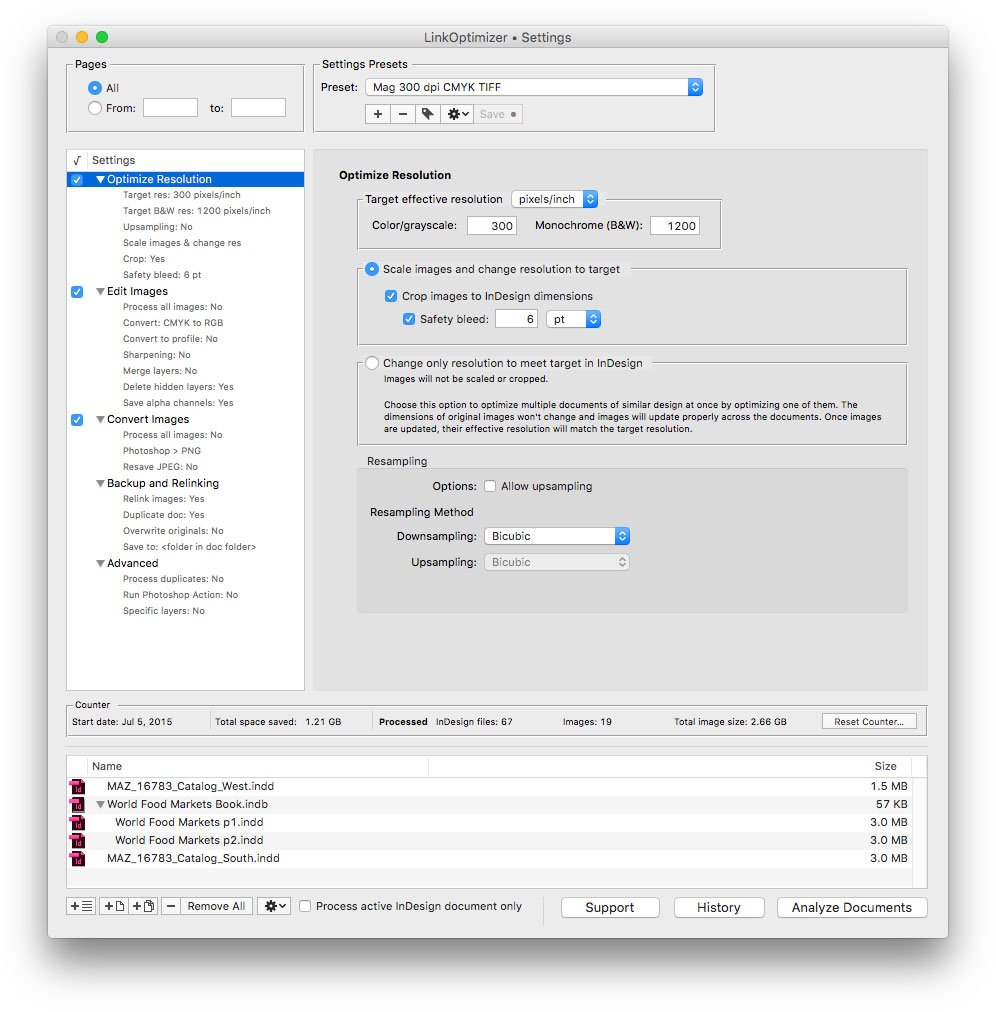
Zevrix Solutions announces LinkOptimizer 5.2.19, a maintenance update to company's workflow automation solution for Adobe InDesign. LinkOptimizer lets users automatically eliminate the excess image data of InDesign links, convert image formats and colors, embed profiles and more. The new version eliminates the hassles associated with Apple Event sandboxing - a security measure introduced in macOS Mojave that prevents interaction between different applications without prior user authorization.
Toronto (ON), Canada - Zevrix Solutions today announces LinkOptimizer 5.2.19, a maintenance update to its image processing automation plug-in for Adobe InDesign. LinkOptimizer automates complex image manipulation tasks and allows users to reduce the size of InDesign links, save production costs, and easily repurpose InDesign documents for web and mobile devices.
The new version eliminates the hassles associated with Apple Event sandboxing, a new security measure introduced in macOS Mojave. Under the new policy, different apps can no longer interact with each other without prior user authorization. This change directly affects such tools as LinkOptimizer, which require access to InDesign and other system resources to perform complex workflow automation tasks. The new update streamlines the authorization process by clearing all permissions during launch time, which eliminates workflow interruptions during file processing. LinkOptimizer will also reset Apple Event permissions automatically if the authorization was previously revoked by accident.
"LinkOptimizer has changed my life and saved me days and days of work as a retoucher for an international quarterly magazine," says Steve Krason of Chicago based SK Design Group. "It's a lifesaver".
LinkOptimizer works automatically with Photoshop to eliminate the excess image data of InDesign links, convert image formats, and perform essential image adjustments. For example, with just a click of a button users can:
* Optimize multiple InDesign files
* Scale and crop images to match their dimensions in InDesign
* Convert RGB images to specific CMYK profile
* Change their resolution to 300 dpi
* Run a Photoshop action on each image.
* Resave PNG files as PSD
As a result users can save gigabytes of disk space and countless hours of optimizing images manually, accelerate document output, reduce job turnaround and cut costs through faster processing.
Pricing and Availability:
LinkOptimizer can be purchased from Zevrix website for $259.95 USD (Lite version: $179.95) as well as from Adobe Exchange and authorized resellers. Trial is also available for download. The update is free for LinkOptimizer 5.x users and $130 to upgrade from previous versions. LinkOptimizer requires macOS 10.7-10.14 and Adobe InDesign / Photoshop CS5-CC 2019.
Zevrix Solutions: http://zevrix.com
LinkOptimizer 5.2.19: http://zevrix.com/LinkOptimizer.php
Download LinkOptimizer: http://zevrix.com/LinkOptimizer.dmg
Purchase: http://zevrix.com/store.php
Screenshot: http://zevrix.com/screenshots/lo5/res-win.jpg
Located in Toronto, Canada, Zevrix Solutions provides automation and productivity solutions for Adobe Creative Cloud and Creative Suite software, PDF workflows, graphic file diagnostics and Microsoft Office output on Mac OS. Zevrix is dedicated to help professionals increase their profits through automating everyday tasks, producing error-free documents, saving disk space and cutting production costs. For more information, visit their website. Copyright (C) 2019 Zevrix Solutions. All Rights Reserved. Other trademarks and registered trademarks may be the property of their respective owners.
*******
Link To Article: https://prmac.com/release-id-83340.htm
*******
---------------------------------------------------------------------------------
Note that you can alter delivered distributions at any time.
Login to your account on prMac to alter your channel selection, or to opt-out at any time.
LinkOptimizer for InDesign Eliminates Security Hassles on macOS Mojave - Published on 03/13/19
Zevrix Solutions announces LinkOptimizer 5.2.19, a maintenance update to company's workflow automation solution for Adobe InDesign. LinkOptimizer lets users automatically eliminate the excess image data of InDesign links, convert image formats and colors, embed profiles and more. The new version eliminates the hassles associated with Apple Event sandboxing - a security measure introduced in macOS Mojave that prevents interaction between different applications without prior user authorization.
Toronto (ON), Canada - Zevrix Solutions today announces LinkOptimizer 5.2.19, a maintenance update to its image processing automation plug-in for Adobe InDesign. LinkOptimizer automates complex image manipulation tasks and allows users to reduce the size of InDesign links, save production costs, and easily repurpose InDesign documents for web and mobile devices.
The new version eliminates the hassles associated with Apple Event sandboxing, a new security measure introduced in macOS Mojave. Under the new policy, different apps can no longer interact with each other without prior user authorization. This change directly affects such tools as LinkOptimizer, which require access to InDesign and other system resources to perform complex workflow automation tasks. The new update streamlines the authorization process by clearing all permissions during launch time, which eliminates workflow interruptions during file processing. LinkOptimizer will also reset Apple Event permissions automatically if the authorization was previously revoked by accident.
"LinkOptimizer has changed my life and saved me days and days of work as a retoucher for an international quarterly magazine," says Steve Krason of Chicago based SK Design Group. "It's a lifesaver".
LinkOptimizer works automatically with Photoshop to eliminate the excess image data of InDesign links, convert image formats, and perform essential image adjustments. For example, with just a click of a button users can:
* Optimize multiple InDesign files
* Scale and crop images to match their dimensions in InDesign
* Convert RGB images to specific CMYK profile
* Change their resolution to 300 dpi
* Run a Photoshop action on each image.
* Resave PNG files as PSD
As a result users can save gigabytes of disk space and countless hours of optimizing images manually, accelerate document output, reduce job turnaround and cut costs through faster processing.
Pricing and Availability:
LinkOptimizer can be purchased from Zevrix website for $259.95 USD (Lite version: $179.95) as well as from Adobe Exchange and authorized resellers. Trial is also available for download. The update is free for LinkOptimizer 5.x users and $130 to upgrade from previous versions. LinkOptimizer requires macOS 10.7-10.14 and Adobe InDesign / Photoshop CS5-CC 2019.
Zevrix Solutions: http://zevrix.com
LinkOptimizer 5.2.19: http://zevrix.com/LinkOptimizer.php
Download LinkOptimizer: http://zevrix.com/LinkOptimizer.dmg
Purchase: http://zevrix.com/store.php
Screenshot: http://zevrix.com/screenshots/lo5/res-win.jpg
Located in Toronto, Canada, Zevrix Solutions provides automation and productivity solutions for Adobe Creative Cloud and Creative Suite software, PDF workflows, graphic file diagnostics and Microsoft Office output on Mac OS. Zevrix is dedicated to help professionals increase their profits through automating everyday tasks, producing error-free documents, saving disk space and cutting production costs. For more information, visit their website. Copyright (C) 2019 Zevrix Solutions. All Rights Reserved. Other trademarks and registered trademarks may be the property of their respective owners.
*******
Link To Article: https://prmac.com/release-id-83340.htm
*******
---------------------------------------------------------------------------------
Note that you can alter delivered distributions at any time.
Login to your account on prMac to alter your channel selection, or to opt-out at any time.
Overflow 3.1 now available - New color and sizing customization options
A new article has been published at prMac.
Overflow 3.1 now available - New color and sizing customization options - Published on 03/13/19
Stunt Software today announces Overflow 3.1, a feature update to their popular visual launcher for macOS. Overflow allows you to quickly and easily launch applications, open documents, access folders and search your hard drive. Reduce clutter in your Dock by storing infrequently-used items in Overflow. Version 3.1 introduces new much-requested color and icon sizing customization options, as well as many other bug fixes and feature enhancements such as the new quick-access menu bar menu item.
Portland, Oregon - Stunt Software today is proud to announce the release of Overflow 3.1, an important feature update to the company's popular visual launcher for macOS. Overflow allows you to quickly and easily launch applications, open documents, access folders and search your hard drive. Reduce clutter in your Dock by storing infrequently-used items in Overflow instead. Any item you see in the Finder can be added to the Overflow interface, making it accessible through a few simple mouse clicks or keystrokes. Version 3.1 introduces new much-requested color and icon sizing customization options!
Other notable features include:
* Added Quick Access right-click menu to the menu bar item
* Added contextual menu to the collection list
* Search performance enhancements
* Mojave performance and appearance enhancements
* As well as many other bug fixes
These are in addition to Overflow 3's already great features:
* Visual Organization - Create separate collections for your applications, project files, commonly-visited websites, games, often-needed folders, or anything else that makes sense for you.
* Fully Customizable Layout - Rearrange items by clicking, holding the mouse down for a moment, then dragging the item to a new position or collection.
* Hot Key Shortcut - Instantly pop open the Overflow window from anywhere using a customizable keyboard shortcut.
* Type-to-Search - With the Overflow window open, just start typing to instantly search for any app or file on your computer. Use type-to-search to find not just items you've added to Overflow, but any file on your computer! Filter items by category to quickly find exactly what you're looking for.
* Quicklook Previews - Overflow makes it easy to check the contents of files: just hit the space bar when hovering over an item to open a Quicklook preview.
* Full URL Support - Drop URLs or web bookmarks from your web browser or the Finder into Overflow. Works great with Quicklook!
* Keyboard Support - In addition to type-to-search, you can use the keyboard to control almost every aspect of Overflow.
Overflow 3.1: https://stuntsoftware.com/overflow/
Download Overflow: https://stuntsoftware.com/download/overflow.zip
Stunt Software is has been creating great Mac software in Winnipeg, Manitoba and Portland, Oregon for 15 years. From On The Job to Overflow and more, Stunt Software is dedicated to high quality software for the Macintosh platform. All Material and Software (C) Copyright 2019 Stunt Software. All Rights Reserved. Apple, the Apple logo, and macOS are registered trademarks of Apple Inc. in the U.S. and/or other countries. Other trademarks and registered trademarks may be the property of their respective owners.
*******
Link To Article: https://prmac.com/release-id-83338.htm
*******
---------------------------------------------------------------------------------
Note that you can alter delivered distributions at any time.
Login to your account on prMac to alter your channel selection, or to opt-out at any time.
Overflow 3.1 now available - New color and sizing customization options - Published on 03/13/19
Stunt Software today announces Overflow 3.1, a feature update to their popular visual launcher for macOS. Overflow allows you to quickly and easily launch applications, open documents, access folders and search your hard drive. Reduce clutter in your Dock by storing infrequently-used items in Overflow. Version 3.1 introduces new much-requested color and icon sizing customization options, as well as many other bug fixes and feature enhancements such as the new quick-access menu bar menu item.
Portland, Oregon - Stunt Software today is proud to announce the release of Overflow 3.1, an important feature update to the company's popular visual launcher for macOS. Overflow allows you to quickly and easily launch applications, open documents, access folders and search your hard drive. Reduce clutter in your Dock by storing infrequently-used items in Overflow instead. Any item you see in the Finder can be added to the Overflow interface, making it accessible through a few simple mouse clicks or keystrokes. Version 3.1 introduces new much-requested color and icon sizing customization options!
Other notable features include:
* Added Quick Access right-click menu to the menu bar item
* Added contextual menu to the collection list
* Search performance enhancements
* Mojave performance and appearance enhancements
* As well as many other bug fixes
These are in addition to Overflow 3's already great features:
* Visual Organization - Create separate collections for your applications, project files, commonly-visited websites, games, often-needed folders, or anything else that makes sense for you.
* Fully Customizable Layout - Rearrange items by clicking, holding the mouse down for a moment, then dragging the item to a new position or collection.
* Hot Key Shortcut - Instantly pop open the Overflow window from anywhere using a customizable keyboard shortcut.
* Type-to-Search - With the Overflow window open, just start typing to instantly search for any app or file on your computer. Use type-to-search to find not just items you've added to Overflow, but any file on your computer! Filter items by category to quickly find exactly what you're looking for.
* Quicklook Previews - Overflow makes it easy to check the contents of files: just hit the space bar when hovering over an item to open a Quicklook preview.
* Full URL Support - Drop URLs or web bookmarks from your web browser or the Finder into Overflow. Works great with Quicklook!
* Keyboard Support - In addition to type-to-search, you can use the keyboard to control almost every aspect of Overflow.
Overflow 3.1: https://stuntsoftware.com/overflow/
Download Overflow: https://stuntsoftware.com/download/overflow.zip
Stunt Software is has been creating great Mac software in Winnipeg, Manitoba and Portland, Oregon for 15 years. From On The Job to Overflow and more, Stunt Software is dedicated to high quality software for the Macintosh platform. All Material and Software (C) Copyright 2019 Stunt Software. All Rights Reserved. Apple, the Apple logo, and macOS are registered trademarks of Apple Inc. in the U.S. and/or other countries. Other trademarks and registered trademarks may be the property of their respective owners.
*******
Link To Article: https://prmac.com/release-id-83338.htm
*******
---------------------------------------------------------------------------------
Note that you can alter delivered distributions at any time.
Login to your account on prMac to alter your channel selection, or to opt-out at any time.
FontAgent 9 Adds New Tagging, Activation, Monotype and Adobe Integration
A new article has been published at prMac.
FontAgent 9 Adds New Tagging, Activation, Monotype and Adobe Integration - Published on 03/13/19
Insider Software today announced FontAgent 9 for Macintosh. FontAgent integrates diagnostics, repair, font selection, font book creation, and design tools and more. Built atop FontAgent's robust font rendering, searching, activation, integrity and metadata engines, the latest V9 edition adds an all-new tagging manager, nested sets, performance improvements, and more extensive support for macOS Mojave, Monotype SkyFonts, Adobe Fonts, Adobe Creative Cloud and Affinity applications.
San Jose, California - Insider Software today announced FontAgent(R) 9 for Macintosh. Built atop FontAgent's robust font rendering, searching, activation, integrity and metadata engines, the latest V9 edition adds an all-new tagging manager, nested sets, performance improvements, and more extensive support for macOS Mojave, Monotype SkyFonts, Adobe Fonts, Adobe Creative Cloud and Affinity applications.
FontAgent 9 Highlights:
* Sharable tags for categorizing and organizing fonts
* macOS Mojave, High Sierra and Sierra compatibility
* Support for Mojave's Dark Mode
* All-new, optimized font-rendering engine for faster previews
* Tight integration with Monotype SkyFonts and Adobe Fonts
* Auto-activation in Adobe CC 2019 - InDesign, Illustrator, Photoshop, After Effects, InCopy
* Auto-activation in Affinity applications - Photo, Designer, Publisher
* Auto-activation in QuarkXPress 2018
* Group-by-tag display in the Table View
* Expanded, speedy searching of font tags and comments
* Improved font cache auto-clearing
Auto-Activation in More Applications:
FontAgent 9 significantly widens font auto-activation support, so as users open documents in supported apps, FontAgent auto-activates them in macOS. Auto-activation now works in Adobe Creative Cloud 2019 (InDesign, Photoshop, Illustrator, After Effects and InCopy); the Affinity product suite (Designer, Photo and Publisher); and QuarkXPress 2018.
Full Support for macOS Mojave and Dark Mode:
The V9 release is compatible with Mojave (macOS 10.14) and includes new support for Dark Mode. It also takes advantage of Mojave platform functionality and APIs to optimize application performance, font activation and font rendering. V9 is also compatible with the High Sierra and Sierra releases of macOS.
Sharable and Searchable Tags:
The most visible addition to FontAgent 9 is the addition of a new tag manager that lets users tag fonts and sets to classify them by project, appearance, job numbers, client, and more. FontAgent lets users search by tag to preview, compare and activate associated fonts easily. As users share fonts with others, FontAgent 9 shares their tags as well, adding an all-new level of metadata richness to the creative process for workgroups.
Nested Sets and Subsets:
Back by popular demand, FontAgent 9 adds nested sets for organizing fonts hierarchically by client, project, foundry or style. And in V9, when users share nested sets with others, the sets' hierarchies and all their fonts are shared as well.
Monotype SkyFonts and Adobe Fonts Integration:
Fonts activated in Monotype SkyFonts and Adobe Fonts appear automatically in FontAgent and work just like all other managed fonts. The Monotype service offers access to over 11,000 industry-leading fonts and Adobe offers access to thousands of fonts as part of their Creative Cloud subscription service. Both include access to the popular Google Fonts library with over 915 font families.
Lightning-Fast Search:
The search facility in FontAgent 9 is expanded and improved to include a full spectrum of font characteristics including name, style, foundry, designer, tags, comments, ratings, and other metadata. Users can perform complex searches and save them as Smart Sets whose contents auto-update as they import new fonts into FontAgent.
Table View Improvements:
The Table View in FontAgent 9 now lets you group fonts by tag, which organizes the order of fonts in the table topically. Using tags and table groups is a fast way to easily view and manage related fonts.
Freeform Comments Manager:
FontAgent 9 lets users enter freeform comments for fonts to describe their associated projects, clients, colors, type settings and design treatments. It also lets users search those comments to find the fonts they need and to use those fonts consistently.
Automatic Font Cache Management:
V9 improves the performance of its automatic cache clearing that heads off display problems, garbled fonts, strange font substitution, printing problems and application crashes.
Code Streamlining and Modernization:
FontAgent 9 is recoded in the latest Apple platform technologies to deliver better performance, sharper rendering, faster importing, speedier searches and more platform compatibility.
Share and Sync Fonts Easily:
The Sync Edition of FontAgent continues its role as a simple, cost-effective way to standardize, share and sync fonts across teams and computers. It makes fonts instantly available through the Cloud to others without the need to define libraries, create folders, maintain a server or find an IT expert.
Cost-Effective Licensing Alternatives
A perpetual license for FontAgent 9 Standard Edition is priced at $99 (USD) per user. FontAgent 8 users can purchase V9 upgrades or opt for a FontAgent Sync subscription for $59 a year. The Sync license includes free software upgrades and support and lets you archive and share fonts with others through cloud services provided by Insider.
Free 30-Day Trials:
For more information about FontAgent 9 and Sync, visit www.insidersoftware.com. Free 30-day trials are available for download from Insider Software online.
Insider Software: http://www.insidersoftware.com
FontAgent 9: http://www.insidersoftware.com/fontagent-mac
Download 30-Day Trial: http://www.insidersoftware.com/fontagent-trial
Media Assets: http://www.insidersoftware.com/fontagent-9-for-mac-media assets
Founded in 1994, Insider Software makes products that streamline the creative process. With the most extensive array of font management utilities on the market, Insider has the ideal solution for every font management scenario. FontAgent is a registered trademark, and Insider, and the Insider logo are trademarks of Insider Software. Other products mentioned are trademarks of their respective owners.
*******
Link To Article: https://prmac.com/release-id-83337.htm
*******
---------------------------------------------------------------------------------
Note that you can alter delivered distributions at any time.
Login to your account on prMac to alter your channel selection, or to opt-out at any time.
FontAgent 9 Adds New Tagging, Activation, Monotype and Adobe Integration - Published on 03/13/19
Insider Software today announced FontAgent 9 for Macintosh. FontAgent integrates diagnostics, repair, font selection, font book creation, and design tools and more. Built atop FontAgent's robust font rendering, searching, activation, integrity and metadata engines, the latest V9 edition adds an all-new tagging manager, nested sets, performance improvements, and more extensive support for macOS Mojave, Monotype SkyFonts, Adobe Fonts, Adobe Creative Cloud and Affinity applications.
San Jose, California - Insider Software today announced FontAgent(R) 9 for Macintosh. Built atop FontAgent's robust font rendering, searching, activation, integrity and metadata engines, the latest V9 edition adds an all-new tagging manager, nested sets, performance improvements, and more extensive support for macOS Mojave, Monotype SkyFonts, Adobe Fonts, Adobe Creative Cloud and Affinity applications.
FontAgent 9 Highlights:
* Sharable tags for categorizing and organizing fonts
* macOS Mojave, High Sierra and Sierra compatibility
* Support for Mojave's Dark Mode
* All-new, optimized font-rendering engine for faster previews
* Tight integration with Monotype SkyFonts and Adobe Fonts
* Auto-activation in Adobe CC 2019 - InDesign, Illustrator, Photoshop, After Effects, InCopy
* Auto-activation in Affinity applications - Photo, Designer, Publisher
* Auto-activation in QuarkXPress 2018
* Group-by-tag display in the Table View
* Expanded, speedy searching of font tags and comments
* Improved font cache auto-clearing
Auto-Activation in More Applications:
FontAgent 9 significantly widens font auto-activation support, so as users open documents in supported apps, FontAgent auto-activates them in macOS. Auto-activation now works in Adobe Creative Cloud 2019 (InDesign, Photoshop, Illustrator, After Effects and InCopy); the Affinity product suite (Designer, Photo and Publisher); and QuarkXPress 2018.
Full Support for macOS Mojave and Dark Mode:
The V9 release is compatible with Mojave (macOS 10.14) and includes new support for Dark Mode. It also takes advantage of Mojave platform functionality and APIs to optimize application performance, font activation and font rendering. V9 is also compatible with the High Sierra and Sierra releases of macOS.
Sharable and Searchable Tags:
The most visible addition to FontAgent 9 is the addition of a new tag manager that lets users tag fonts and sets to classify them by project, appearance, job numbers, client, and more. FontAgent lets users search by tag to preview, compare and activate associated fonts easily. As users share fonts with others, FontAgent 9 shares their tags as well, adding an all-new level of metadata richness to the creative process for workgroups.
Nested Sets and Subsets:
Back by popular demand, FontAgent 9 adds nested sets for organizing fonts hierarchically by client, project, foundry or style. And in V9, when users share nested sets with others, the sets' hierarchies and all their fonts are shared as well.
Monotype SkyFonts and Adobe Fonts Integration:
Fonts activated in Monotype SkyFonts and Adobe Fonts appear automatically in FontAgent and work just like all other managed fonts. The Monotype service offers access to over 11,000 industry-leading fonts and Adobe offers access to thousands of fonts as part of their Creative Cloud subscription service. Both include access to the popular Google Fonts library with over 915 font families.
Lightning-Fast Search:
The search facility in FontAgent 9 is expanded and improved to include a full spectrum of font characteristics including name, style, foundry, designer, tags, comments, ratings, and other metadata. Users can perform complex searches and save them as Smart Sets whose contents auto-update as they import new fonts into FontAgent.
Table View Improvements:
The Table View in FontAgent 9 now lets you group fonts by tag, which organizes the order of fonts in the table topically. Using tags and table groups is a fast way to easily view and manage related fonts.
Freeform Comments Manager:
FontAgent 9 lets users enter freeform comments for fonts to describe their associated projects, clients, colors, type settings and design treatments. It also lets users search those comments to find the fonts they need and to use those fonts consistently.
Automatic Font Cache Management:
V9 improves the performance of its automatic cache clearing that heads off display problems, garbled fonts, strange font substitution, printing problems and application crashes.
Code Streamlining and Modernization:
FontAgent 9 is recoded in the latest Apple platform technologies to deliver better performance, sharper rendering, faster importing, speedier searches and more platform compatibility.
Share and Sync Fonts Easily:
The Sync Edition of FontAgent continues its role as a simple, cost-effective way to standardize, share and sync fonts across teams and computers. It makes fonts instantly available through the Cloud to others without the need to define libraries, create folders, maintain a server or find an IT expert.
Cost-Effective Licensing Alternatives
A perpetual license for FontAgent 9 Standard Edition is priced at $99 (USD) per user. FontAgent 8 users can purchase V9 upgrades or opt for a FontAgent Sync subscription for $59 a year. The Sync license includes free software upgrades and support and lets you archive and share fonts with others through cloud services provided by Insider.
Free 30-Day Trials:
For more information about FontAgent 9 and Sync, visit www.insidersoftware.com. Free 30-day trials are available for download from Insider Software online.
Insider Software: http://www.insidersoftware.com
FontAgent 9: http://www.insidersoftware.com/fontagent-mac
Download 30-Day Trial: http://www.insidersoftware.com/fontagent-trial
Media Assets: http://www.insidersoftware.com/fontagent-9-for-mac-media assets
Founded in 1994, Insider Software makes products that streamline the creative process. With the most extensive array of font management utilities on the market, Insider has the ideal solution for every font management scenario. FontAgent is a registered trademark, and Insider, and the Insider logo are trademarks of Insider Software. Other products mentioned are trademarks of their respective owners.
*******
Link To Article: https://prmac.com/release-id-83337.htm
*******
---------------------------------------------------------------------------------
Note that you can alter delivered distributions at any time.
Login to your account on prMac to alter your channel selection, or to opt-out at any time.
Subscribe to:
Posts (Atom)