A new article has been published at prMac.
AlphaDigits Top Rated Mobile Apps March 2019 - Published on 04/01/19
Mobile app review publisher AlphaDigits has named top rated applications for March 2019. Candy Words is a mix of a wordscape game and Candy Crush. Dragon Ace Casino Baccarat offers new gaming experience. The Gaminator app is constituted from a multitude of slot games. My World AR is an Augmented Reality social media app. Tic Tac Toe Trio is a Free multiplayer puzzle game with good gameplay with attractive design.
Long Island, New York - Mobile app review publisher AlphaDigits has named top rated applications for March 2019. AlphaDigits names five top class mobile apps every month based on the reviews published in the website during the particular month. This website has now released the names of top rated mobile apps for the month of February.
Candy Words (10/10): Candy Words is a mix of a wordscape game and Candy Crush. The setup is such: you get a matrix of letter tiles and a list of words. There's also a timer. You get 90 seconds to arrange the tiles in such a way as to build each word. The words must appear from left to right and from top to bottom. No other direction is allowed and all words must appear on one line.
Dragon Ace Casino Baccarat (9.5/10): If you are a Baccarat fan and are looking for a new gaming experience to enjoy it, consider downloading Dragon Ace Casino. Gamespring is the creator of this app and they have done a superb job of capturing the essence and excitement of the game in a mobile app. Players can enjoy on their own or compete against others. Play to win and collect chips, just like you would in the casino.
Gaminator (9/10): The Gaminator app is constituted from a multitude of slot games, allowing the players to enjoy a larger number of mini-games that have different features while being still in the main app. The concept surely sounds like fun but, what makes this app great, and the thing they excelled at, is their use of only the highest quality games possible.
My World AR (8.5/10): The app suggests users that you can follow, people nearby you, and there are different kinds of collections for you to follow and post your own content: photos, videos or ready images. To publish something, all you have to do is select an image, take a photo or record a video, then you have to select a collection. In seconds your content will be shared to thousands of people around you!
Tic Tac Toe Trio (8/10): Free multiplayer puzzle game developed by Qiu technologies takes the classic tic tac toe game to a whole new level. Now you can play tic tac toe on your android phone without wasting paper and using a pencil. The AI of the game is good. It adapts the user's play style and is highly unpredictable. The game has a good gameplay with attractive design.
Joe Ellen, an Editor at AlphaDigits said, "We have an expert marketing team for mobile applications and our service comes at a competitive price". Developers can also contact AlphaDigits through the onsite app submission form, mail or the contact form to get their apps reviewed.
AlphaDigits: https://alphadigits.com
Submit App for Review: https://alphadigits.com/submit-app-for-review/
AlphaDigits is a review site run by a few app marketers. Enjoying the support from a handy amount of regular visitors, AlphaDigits provides reviews for iPhone, iPad and Android apps. Copyright (C) 2019 AlphaDigits. All Rights Reserved. Apple, the Apple logo, iPhone, iPod and iPad are registered trademarks of Apple Inc. in the U.S. and/or other countries.
*******
Link To Article: https://prmac.com/release-id-83359.htm
*******
---------------------------------------------------------------------------------
Note that you can alter delivered distributions at any time.
Login to your account on prMac to alter your channel selection, or to opt-out at any time.

WidsMob PhotoVault Keeps All Secret Photos Locked Up
A new article has been published at prMac.
WidsMob PhotoVault Keeps All Secret Photos Locked Up - Published on 04/01/19
WidsMob announces WidsMob PhotoVault, their photo vault program for Mac. WidsMob PhotoVault offers different security levels to encrypt and hide photos. All photos are locked up and protected with password protection. It custom slideshows with loop and duration automatically. The Best and Most Private Photo app to Lock Up All Secret Photos on Mac.
Hongkong, China - WidsMob is happy to announce the release and availability of WidsMob PhotoVault, their photo vault program for Mac. WidsMob PhotoVault has different security levels to encrypt and hide photos. All photos are locked up and protected with password protection. It custom slideshows with loop and duration automatically.
Users can group photos with Favorites and different albums with ease. Furthermore, it is supported to export hidden photos to Email and save those encrypted photos to computer. Moreover, WidsMob PhotoVault has more editing features to make the whole process easy.
All the sensitive photos can be well encrypted and organized by WidsMob PhotoVault. There is no extra technology background or storage space required. The encrypted photos will be moved into the private database. Others will not find encrypted photos in the original destination folder. None third-party application could find those photos either. What's more, the image encryption software supports to decrypt and export any hidden photo without restrictions.
Here are some useful features about the photo vault software.
* Double security protection for the password and photos.
* Encrypted photo data.
* Quick screen lock.
* Batch import photos/folders at lightning spend.
* Remove original photos after importing.
* Add photos to Favorites.
* Import photos into album directly.
* Order by name, date, type and size.
* Create Albums right in the App.
* Add photos to album.
* Batch export photos.
* Email photos.
* Support nearly all image formats.
* Fast photo viewing experience with in-app photo viewer.
* Support JPEG, PNG, BMP, GIF and over 50 RAW image formats.
Pricing and Availability:
WidsMob PhotoVault is just $12.99 USD (or an equivalent amount in other currencies) and is available from the Widsmob website. A free trial version is available for download.
WidsMob: https://www.widsmob.com/
WidsMob PhotoVault: https://www.widsmob.com/photovault
Direct Download Link: http://download.widsmob.com/pro/widsmob_photovault.dmg
Purchase Link: https://www.widsmob.com/product/widsmob-photovault
Screenshot: https://www.widsmob.com/wp-content/uploads/2018/10/security.png
Application Icon: https://www.widsmob.com/wp-content/uploads/2018/09/photo-vault300.png
WidsMob is a professional application software developer located in Hong Kong with users from all over the world. WidsMob is dedicated in bringing people great software to make life smarter and simpler. All Material and Software (C) Copyright 2019 WidsMob. All Rights Reserved. Apple, the Apple logo, Macintosh Mac OS X and macOS are registered trademarks of Apple Inc. in the U.S. and/or other countries. Other trademarks and registered trademarks may be the property of their respective owners.
*******
Link To Article: https://prmac.com/release-id-83358.htm
*******
---------------------------------------------------------------------------------
Note that you can alter delivered distributions at any time.
Login to your account on prMac to alter your channel selection, or to opt-out at any time.
WidsMob PhotoVault Keeps All Secret Photos Locked Up - Published on 04/01/19
WidsMob announces WidsMob PhotoVault, their photo vault program for Mac. WidsMob PhotoVault offers different security levels to encrypt and hide photos. All photos are locked up and protected with password protection. It custom slideshows with loop and duration automatically. The Best and Most Private Photo app to Lock Up All Secret Photos on Mac.
Hongkong, China - WidsMob is happy to announce the release and availability of WidsMob PhotoVault, their photo vault program for Mac. WidsMob PhotoVault has different security levels to encrypt and hide photos. All photos are locked up and protected with password protection. It custom slideshows with loop and duration automatically.
Users can group photos with Favorites and different albums with ease. Furthermore, it is supported to export hidden photos to Email and save those encrypted photos to computer. Moreover, WidsMob PhotoVault has more editing features to make the whole process easy.
All the sensitive photos can be well encrypted and organized by WidsMob PhotoVault. There is no extra technology background or storage space required. The encrypted photos will be moved into the private database. Others will not find encrypted photos in the original destination folder. None third-party application could find those photos either. What's more, the image encryption software supports to decrypt and export any hidden photo without restrictions.
Here are some useful features about the photo vault software.
* Double security protection for the password and photos.
* Encrypted photo data.
* Quick screen lock.
* Batch import photos/folders at lightning spend.
* Remove original photos after importing.
* Add photos to Favorites.
* Import photos into album directly.
* Order by name, date, type and size.
* Create Albums right in the App.
* Add photos to album.
* Batch export photos.
* Email photos.
* Support nearly all image formats.
* Fast photo viewing experience with in-app photo viewer.
* Support JPEG, PNG, BMP, GIF and over 50 RAW image formats.
Pricing and Availability:
WidsMob PhotoVault is just $12.99 USD (or an equivalent amount in other currencies) and is available from the Widsmob website. A free trial version is available for download.
WidsMob: https://www.widsmob.com/
WidsMob PhotoVault: https://www.widsmob.com/photovault
Direct Download Link: http://download.widsmob.com/pro/widsmob_photovault.dmg
Purchase Link: https://www.widsmob.com/product/widsmob-photovault
Screenshot: https://www.widsmob.com/wp-content/uploads/2018/10/security.png

Application Icon: https://www.widsmob.com/wp-content/uploads/2018/09/photo-vault300.png

WidsMob is a professional application software developer located in Hong Kong with users from all over the world. WidsMob is dedicated in bringing people great software to make life smarter and simpler. All Material and Software (C) Copyright 2019 WidsMob. All Rights Reserved. Apple, the Apple logo, Macintosh Mac OS X and macOS are registered trademarks of Apple Inc. in the U.S. and/or other countries. Other trademarks and registered trademarks may be the property of their respective owners.
*******
Link To Article: https://prmac.com/release-id-83358.htm
*******
---------------------------------------------------------------------------------
Note that you can alter delivered distributions at any time.
Login to your account on prMac to alter your channel selection, or to opt-out at any time.
Text Recognition in Genius Scan takes mobile scanning to the next level
A new article has been published at prMac.
Text Recognition in Genius Scan takes mobile scanning to the next level - Published on 04/01/19
The Grizzly Labs releases Genius Scan 5.2 for iOS, a major update to the popular mobile scanning app. With Genius Scan, effortlessly scan your documents on-the-go & export them as JPEG or multi-page PDF files. The app includes smart page detection, perspective correction & image enhancement. The batch scanning lets you scan dozens of pages in a matter of seconds. Version 5.2 introduces Text Recognition, enabling a new set of features such as creating searchable PDFs or scanning business cards.
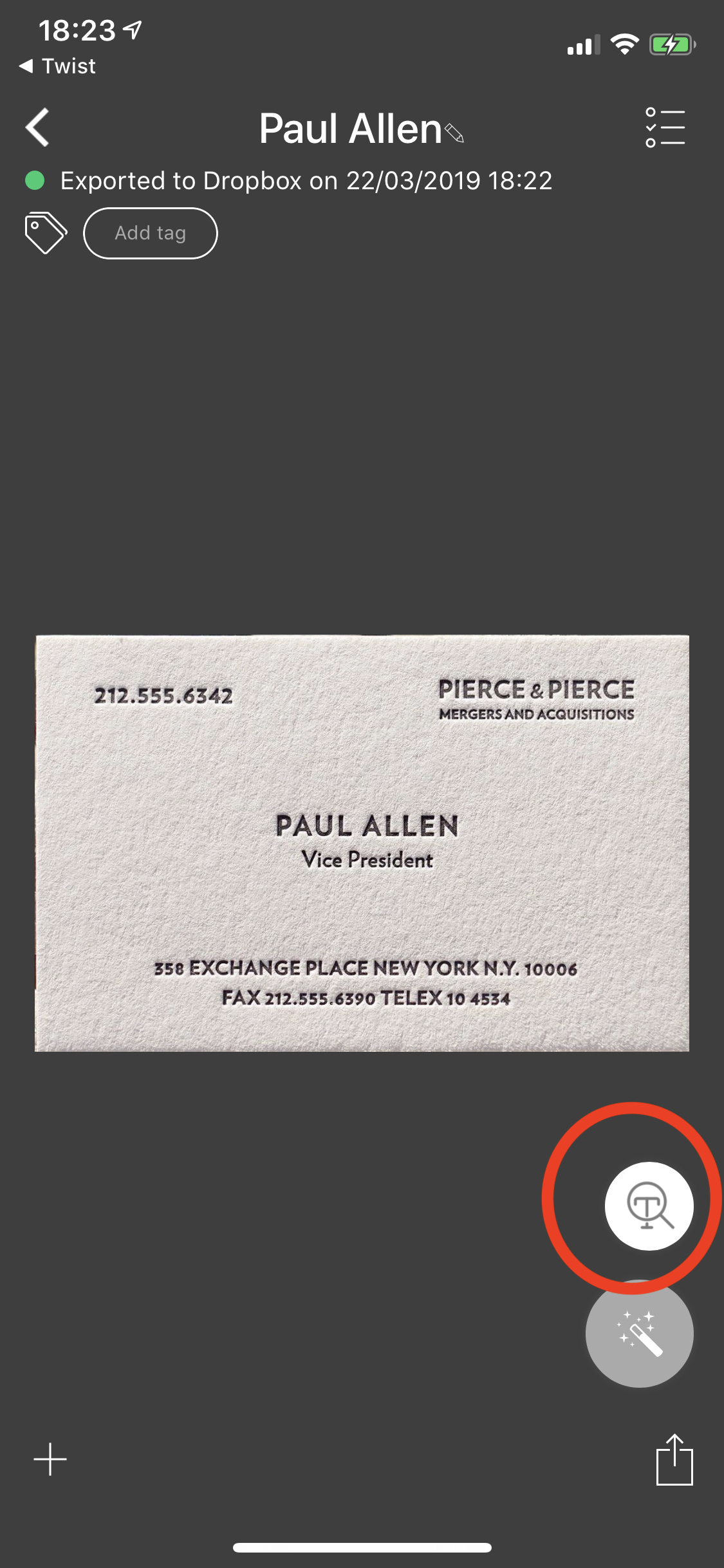
Paris, France - The Grizzly Labs today released Genius Scan 5.2 for iOS, a major update to the popular mobile scanning app. This latest version introduces Text Recognition (commonly known as OCR), enabling a new set of features such as creating searchable PDFs or scanning business cards.
Text Recognition takes mobile scanning and archiving to the next level: Genius Scan not only produces image versions of scanned documents, but also extracts the text from the images. Combining the bitmap image and the text layer enables several new features:
* Creating searchable/copyable PDFs.** With Text Recognition, the PDF files created with Genius Scan contain a text layer. Users can copy the text or search within their documents in Apple Preview or Adobe Acrobat Reader.
* Indexing and searching the documents content.** Search is not limited to the title of documents anymore. Searching for "Best Buy" will surface any receipt containing these words in the document body. Retrieving archived documents becomes effortless.
* Scanning business cards.** Genius Scan 5.2 recognizes business cards and surfaces relevant actions, such as the ability to create a contact, call a number, email someone or navigate to an address.
* Other smart content actions**. If a date is detected in a document, Genius Scan will suggest to rename the document with this date. This lets users archive document based on their actual date rather than the scan date, resulting in more accurate document archiving.
"OCR has been on the top of our mind for a while. It took us a while to get it right, so we are delighted to release it today", says Bruno Virlet, co-founder of The Grizzly Labs and developer of Genius Scan. "Text Recognition upgrades the scanning and archiving experience".
Text Recognition is available either as part of Genius Scan (a one-time purchase of $7.99 that unlocks the advanced features of Genius Scan) or with the Genius Cloud subscription ($2.99/month for backup, synchronization and all the advanced features). It's an iOS-only feature for now.
Grizzly Labs: http://www.thegrizzlylabs.com
Genius Scan 5.2: https://dl.tglapp.com/genius-scan
Introducing Text Recognition in Genius Scan 5.2: https://blog.thegrizzlylabs.com/2019/03/genius-scan-5.2-with-text-recognition
Text Recognition FAQ: https://help.thegrizzlylabs.com/category/236-text-recognition
Screenshot: https://blog.thegrizzlylabs.com/img/2019-03-25/business-card.jpg
App Icon: https://www.dropbox.com/s/7tvpy9q0a9lcwj5/Icon-512x512.png?dl=1
Located in Paris, France, The Grizzly Labs develops mobile applications that simplify the life of individuals and businesses. Genius Scan has been featured several times by Apple and has been downloaded more than 25 million times worldwide. Every day, Genius Scan helps tens of thousand users and small businesses to digitize documents, organize papers, remember stuff, communicate contracts or manage expenses. Copyright (C) 2019 The Grizzly Labs. All Rights Reserved. Apple, the Apple logo, iPhone, iPod and iPad are registered trademarks of Apple Inc. in the U.S. and/or other countries.
*******
Link To Article: https://prmac.com/release-id-83357.htm
*******
---------------------------------------------------------------------------------
Note that you can alter delivered distributions at any time.
Login to your account on prMac to alter your channel selection, or to opt-out at any time.
Text Recognition in Genius Scan takes mobile scanning to the next level - Published on 04/01/19
The Grizzly Labs releases Genius Scan 5.2 for iOS, a major update to the popular mobile scanning app. With Genius Scan, effortlessly scan your documents on-the-go & export them as JPEG or multi-page PDF files. The app includes smart page detection, perspective correction & image enhancement. The batch scanning lets you scan dozens of pages in a matter of seconds. Version 5.2 introduces Text Recognition, enabling a new set of features such as creating searchable PDFs or scanning business cards.
Paris, France - The Grizzly Labs today released Genius Scan 5.2 for iOS, a major update to the popular mobile scanning app. This latest version introduces Text Recognition (commonly known as OCR), enabling a new set of features such as creating searchable PDFs or scanning business cards.
Text Recognition takes mobile scanning and archiving to the next level: Genius Scan not only produces image versions of scanned documents, but also extracts the text from the images. Combining the bitmap image and the text layer enables several new features:
* Creating searchable/copyable PDFs.** With Text Recognition, the PDF files created with Genius Scan contain a text layer. Users can copy the text or search within their documents in Apple Preview or Adobe Acrobat Reader.
* Indexing and searching the documents content.** Search is not limited to the title of documents anymore. Searching for "Best Buy" will surface any receipt containing these words in the document body. Retrieving archived documents becomes effortless.
* Scanning business cards.** Genius Scan 5.2 recognizes business cards and surfaces relevant actions, such as the ability to create a contact, call a number, email someone or navigate to an address.
* Other smart content actions**. If a date is detected in a document, Genius Scan will suggest to rename the document with this date. This lets users archive document based on their actual date rather than the scan date, resulting in more accurate document archiving.
"OCR has been on the top of our mind for a while. It took us a while to get it right, so we are delighted to release it today", says Bruno Virlet, co-founder of The Grizzly Labs and developer of Genius Scan. "Text Recognition upgrades the scanning and archiving experience".
Text Recognition is available either as part of Genius Scan (a one-time purchase of $7.99 that unlocks the advanced features of Genius Scan) or with the Genius Cloud subscription ($2.99/month for backup, synchronization and all the advanced features). It's an iOS-only feature for now.
Grizzly Labs: http://www.thegrizzlylabs.com
Genius Scan 5.2: https://dl.tglapp.com/genius-scan
Introducing Text Recognition in Genius Scan 5.2: https://blog.thegrizzlylabs.com/2019/03/genius-scan-5.2-with-text-recognition
Text Recognition FAQ: https://help.thegrizzlylabs.com/category/236-text-recognition
Screenshot: https://blog.thegrizzlylabs.com/img/2019-03-25/business-card.jpg
App Icon: https://www.dropbox.com/s/7tvpy9q0a9lcwj5/Icon-512x512.png?dl=1

Located in Paris, France, The Grizzly Labs develops mobile applications that simplify the life of individuals and businesses. Genius Scan has been featured several times by Apple and has been downloaded more than 25 million times worldwide. Every day, Genius Scan helps tens of thousand users and small businesses to digitize documents, organize papers, remember stuff, communicate contracts or manage expenses. Copyright (C) 2019 The Grizzly Labs. All Rights Reserved. Apple, the Apple logo, iPhone, iPod and iPad are registered trademarks of Apple Inc. in the U.S. and/or other countries.
*******
Link To Article: https://prmac.com/release-id-83357.htm
*******
---------------------------------------------------------------------------------
Note that you can alter delivered distributions at any time.
Login to your account on prMac to alter your channel selection, or to opt-out at any time.
New Health Informatics Solution for ConceptDraw DIAGRAM
A new article has been published at prMac.
New Health Informatics Solution for ConceptDraw DIAGRAM - Published on 03/29/19
CS Odessa announces the newest addition to ConceptDraw Solutions. Health Informatics Solution provides the ConceptDraw DIAGRAM with new capabilities in a field of medical workflow tasks management and healthcare information documenting. The Health Informatics Solution free add-on for ConceptDraw DIAGRAM makes documenting medical workflow easy for professionals of any drawing level.
Odessa, Ukraine - CS Odessa announces the newest addition to ConceptDraw Solutions. Health Informatics Solution provides the ConceptDraw DIAGRAM with new capabilities in a field of medical workflow tasks management and healthcare information documenting.
The Health Informatics Solution allows one to quickly assemble any medical process, build medical instructional documents, enhance the medical education experience, and explain complex medical information in a straightforward manner. A large percentage of the medical professionals is involved in the process of issuing medical statistics, reports and other documents. ConceptDraw DIAGRAM with its new health solution makes quick work of visually communicating medical information to any audience.
The Health Informatics Solution is a free item for current users of ConceptDraw DIAGRAM v12 and is available for download via STORE.
ConceptDraw DIAGRAM is well-known for its ability to exchange documents with Microsoft Visio - the de facto standard in business graphics documents. It can open and save documents that can be used by Visio (VSD, VDX and VSDX documents) users. It retails for only US$199 per end user license.
The dynamic suite of three products found in ConceptDraw OFFICE v5 consists of a diagramming platform, a mind mapping tool, and a project management tool. It is designed for knowledge workers, project managers, managers, and academics and retails for US$499 per end user license. The combination of powerful products, no charge dynamic support, and ongoing development make ConceptDraw OFFICE v5 a good choice to support the activities that move businesses ahead.
Operating Systems Supported
* macOS 10.12, 10.13 and 10.14
* Windows 7, 8.1, and 10 (64-bit certified)
Health Informatics: http://www.conceptdraw.com/solution-park/health-informatics
ConceptDraw DIAGRAM v12 - business graphics and diagramming product (compatible with MS Visio): http://www.conceptdraw.com/products/drawing-tool
ConceptDraw MINDMAP v10 - brainstorming, planning, and mind mapping software: http://www.conceptdraw.com/products/mind-map
ConceptDraw PROJECT v9 - project and resource management tool (compatible with MS Project): http://www.conceptdraw.com/products/project-management-software
ConceptDraw OFFICE v5 - business suite that contains the entire ConceptDraw Desktop Product line: http://www.conceptdraw.com/products/office
Solution Park - an online collection of visual solutions: http://www.conceptdraw.com/solution-park
Founded in 1993, Computer Systems Odessa supplies cross-platform productivity tools and graphic technologies to professional and corporate users around the world. With headquarter in Odessa, Ukraine, CS Odessa sells products internationally through resellers in over 150 countries, both directly and through resellers. The ConceptDraw line of products has won numerous awards and is used by hundreds of thousands, including Fortune 500 companies, U.S. Federal Government agencies, small and medium businesses, and students and educators around the globe. ConceptDraw is a registered trademark, and ConceptDraw Office, ConceptDraw Solution Park, ConceptDraw PRO, ConceptDraw MINDMAP, ConceptDraw PROJECT, and ConceptDraw STORE are trademarks of CS Odessa. All other trademarks and registered trademarks are the properties of their respective owners.
*******
Link To Article: https://prmac.com/release-id-83356.htm
*******
---------------------------------------------------------------------------------
Note that you can alter delivered distributions at any time.
Login to your account on prMac to alter your channel selection, or to opt-out at any time.
New Health Informatics Solution for ConceptDraw DIAGRAM - Published on 03/29/19
CS Odessa announces the newest addition to ConceptDraw Solutions. Health Informatics Solution provides the ConceptDraw DIAGRAM with new capabilities in a field of medical workflow tasks management and healthcare information documenting. The Health Informatics Solution free add-on for ConceptDraw DIAGRAM makes documenting medical workflow easy for professionals of any drawing level.
Odessa, Ukraine - CS Odessa announces the newest addition to ConceptDraw Solutions. Health Informatics Solution provides the ConceptDraw DIAGRAM with new capabilities in a field of medical workflow tasks management and healthcare information documenting.
The Health Informatics Solution allows one to quickly assemble any medical process, build medical instructional documents, enhance the medical education experience, and explain complex medical information in a straightforward manner. A large percentage of the medical professionals is involved in the process of issuing medical statistics, reports and other documents. ConceptDraw DIAGRAM with its new health solution makes quick work of visually communicating medical information to any audience.
The Health Informatics Solution is a free item for current users of ConceptDraw DIAGRAM v12 and is available for download via STORE.
ConceptDraw DIAGRAM is well-known for its ability to exchange documents with Microsoft Visio - the de facto standard in business graphics documents. It can open and save documents that can be used by Visio (VSD, VDX and VSDX documents) users. It retails for only US$199 per end user license.
The dynamic suite of three products found in ConceptDraw OFFICE v5 consists of a diagramming platform, a mind mapping tool, and a project management tool. It is designed for knowledge workers, project managers, managers, and academics and retails for US$499 per end user license. The combination of powerful products, no charge dynamic support, and ongoing development make ConceptDraw OFFICE v5 a good choice to support the activities that move businesses ahead.
Operating Systems Supported
* macOS 10.12, 10.13 and 10.14
* Windows 7, 8.1, and 10 (64-bit certified)
Health Informatics: http://www.conceptdraw.com/solution-park/health-informatics
ConceptDraw DIAGRAM v12 - business graphics and diagramming product (compatible with MS Visio): http://www.conceptdraw.com/products/drawing-tool
ConceptDraw MINDMAP v10 - brainstorming, planning, and mind mapping software: http://www.conceptdraw.com/products/mind-map
ConceptDraw PROJECT v9 - project and resource management tool (compatible with MS Project): http://www.conceptdraw.com/products/project-management-software
ConceptDraw OFFICE v5 - business suite that contains the entire ConceptDraw Desktop Product line: http://www.conceptdraw.com/products/office
Solution Park - an online collection of visual solutions: http://www.conceptdraw.com/solution-park
Founded in 1993, Computer Systems Odessa supplies cross-platform productivity tools and graphic technologies to professional and corporate users around the world. With headquarter in Odessa, Ukraine, CS Odessa sells products internationally through resellers in over 150 countries, both directly and through resellers. The ConceptDraw line of products has won numerous awards and is used by hundreds of thousands, including Fortune 500 companies, U.S. Federal Government agencies, small and medium businesses, and students and educators around the globe. ConceptDraw is a registered trademark, and ConceptDraw Office, ConceptDraw Solution Park, ConceptDraw PRO, ConceptDraw MINDMAP, ConceptDraw PROJECT, and ConceptDraw STORE are trademarks of CS Odessa. All other trademarks and registered trademarks are the properties of their respective owners.
*******
Link To Article: https://prmac.com/release-id-83356.htm
*******
---------------------------------------------------------------------------------
Note that you can alter delivered distributions at any time.
Login to your account on prMac to alter your channel selection, or to opt-out at any time.
BatchOutput for Microsoft Word Reduces Security Hassles on macOS Mojave
A new article has been published at prMac.
BatchOutput for Microsoft Word Reduces Security Hassles on macOS Mojave - Published on 03/26/19
Zevrix Solutions announces BatchOutput DOC 2.5.9, a maintenance update to company's output automation solution for Microsoft Word. The only Word output automation tool on the Mac market, BatchOutput automates printing and exporting of multiple Office documents to PDF. The software offers batch printing, PDF security, variable file names, export as single pages, and more. The new version reduces the hassles associated with Apple Event sandboxing, a new security measure introduced in macOS Mojave.
Toronto (ON), Canada - Zevrix Solutions announces the release of BatchOutput DOC 2.5.9, a compatibility update to its output automation solution for Microsoft Word on macOS. The only batch processing tool for Word on the Mac market, the software helps users eliminate repetitive tasks through automation of printing and professional PDF output.
The new version eliminates the hassles associated with Apple Event sandboxing, a new security measure introduced in macOS Mojave. Under the new policy, different apps can no longer interact with each other without prior user authorization. This change directly affects BatchOutput DOC which require access to Word and other system resources to perform complex workflow automation tasks. The new update streamlines the authorization process by clearing all permissions during launch time, which eliminates workflow interruptions during file processing. BatchOutput will also reset Apple Event permissions automatically if the authorization was previously revoked by accident.
"Love this app. It makes the process of saving collections of Word docs to PDF so much faster and easier," writes the user Danni-L on MacUpdate. "Great configuration features, and great time-saving value."
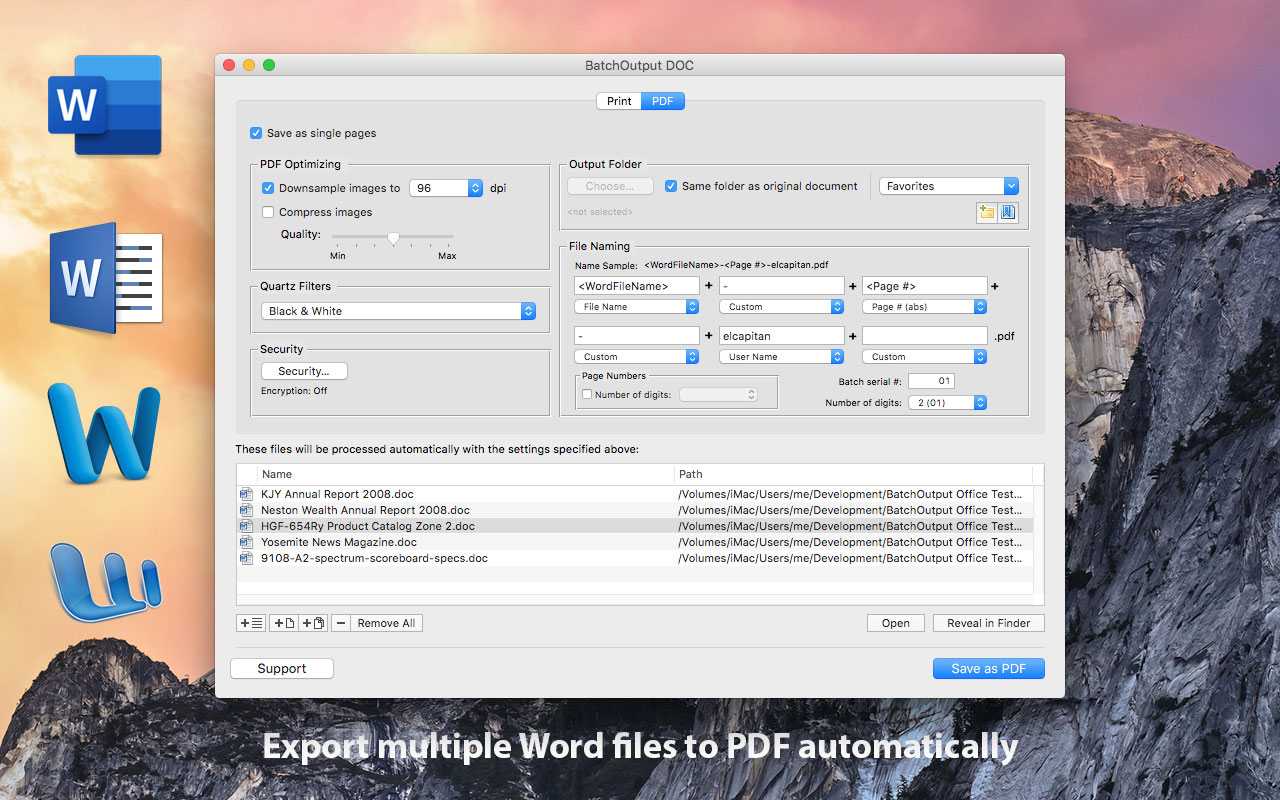
In addition to batch printing, BatchOutput DOC allows to carry out professional PDF production directly from Word, bringing advanced PDF creation options right to the user's fingertips:
* Print and export multiple Word documents to PDF with a single click.
* Variable output file names.
* Split Word files into single page PDFs.
* Reduce PDF file size and optimize documents for web, print and mobile devices.
* Encrypt and password-protect PDF documents.
* Change PDF color tone, brightness and other qualities.
BatchOutput DOC is a part of the Zevrix BatchOutput family of products which also includes output automation solutions for Microsoft Excel, PowerPoint, Adobe InDesign and PDF workflows.
Pricing and Availability:
BatchOutput DOC can be purchased for $19.95 (USD) from the Zevrix Solutions website as well as from authorized resellers and Mac App Store. Trial is also available for download. The update is free for users of version 2 and $20 from version 1. BatchOutput DOC requires macOS 10.7-10.14 and Microsoft Word 2008-2019.
Zevrix Solutions: http://zevrix.com
BatchOutput DOC 2.5.9: http://zevrix.com/BatchOutputOffice.php
Download BatchOutput DOC: http://zevrix.com/BatchOutputOffice.dmg
Purchase: http://zevrix.com/store.php
Screenshot: http://zevrix.com/screenshots/bo-office/MAS/bodoc-pdf-mas.jpg
Located in Toronto, Canada, Zevrix Solutions provides automation and productivity solutions for Adobe Creative Cloud and Creative Suite software, PDF workflows, graphic file diagnostics and Microsoft Office output on Mac OS. Zevrix is dedicated to help professionals increase their profits through automating everyday tasks, producing error-free documents, saving disk space and cutting production costs. For more information, visit their website. Copyright (C) 2019 Zevrix Solutions. All Rights Reserved. Other trademarks and registered trademarks may be the property of their respective owners.
*******
Link To Article: https://prmac.com/release-id-83355.htm
*******
---------------------------------------------------------------------------------
Note that you can alter delivered distributions at any time.
Login to your account on prMac to alter your channel selection, or to opt-out at any time.
BatchOutput for Microsoft Word Reduces Security Hassles on macOS Mojave - Published on 03/26/19
Zevrix Solutions announces BatchOutput DOC 2.5.9, a maintenance update to company's output automation solution for Microsoft Word. The only Word output automation tool on the Mac market, BatchOutput automates printing and exporting of multiple Office documents to PDF. The software offers batch printing, PDF security, variable file names, export as single pages, and more. The new version reduces the hassles associated with Apple Event sandboxing, a new security measure introduced in macOS Mojave.
Toronto (ON), Canada - Zevrix Solutions announces the release of BatchOutput DOC 2.5.9, a compatibility update to its output automation solution for Microsoft Word on macOS. The only batch processing tool for Word on the Mac market, the software helps users eliminate repetitive tasks through automation of printing and professional PDF output.
The new version eliminates the hassles associated with Apple Event sandboxing, a new security measure introduced in macOS Mojave. Under the new policy, different apps can no longer interact with each other without prior user authorization. This change directly affects BatchOutput DOC which require access to Word and other system resources to perform complex workflow automation tasks. The new update streamlines the authorization process by clearing all permissions during launch time, which eliminates workflow interruptions during file processing. BatchOutput will also reset Apple Event permissions automatically if the authorization was previously revoked by accident.
"Love this app. It makes the process of saving collections of Word docs to PDF so much faster and easier," writes the user Danni-L on MacUpdate. "Great configuration features, and great time-saving value."
In addition to batch printing, BatchOutput DOC allows to carry out professional PDF production directly from Word, bringing advanced PDF creation options right to the user's fingertips:
* Print and export multiple Word documents to PDF with a single click.
* Variable output file names.
* Split Word files into single page PDFs.
* Reduce PDF file size and optimize documents for web, print and mobile devices.
* Encrypt and password-protect PDF documents.
* Change PDF color tone, brightness and other qualities.
BatchOutput DOC is a part of the Zevrix BatchOutput family of products which also includes output automation solutions for Microsoft Excel, PowerPoint, Adobe InDesign and PDF workflows.
Pricing and Availability:
BatchOutput DOC can be purchased for $19.95 (USD) from the Zevrix Solutions website as well as from authorized resellers and Mac App Store. Trial is also available for download. The update is free for users of version 2 and $20 from version 1. BatchOutput DOC requires macOS 10.7-10.14 and Microsoft Word 2008-2019.
Zevrix Solutions: http://zevrix.com
BatchOutput DOC 2.5.9: http://zevrix.com/BatchOutputOffice.php
Download BatchOutput DOC: http://zevrix.com/BatchOutputOffice.dmg
Purchase: http://zevrix.com/store.php
Screenshot: http://zevrix.com/screenshots/bo-office/MAS/bodoc-pdf-mas.jpg
Located in Toronto, Canada, Zevrix Solutions provides automation and productivity solutions for Adobe Creative Cloud and Creative Suite software, PDF workflows, graphic file diagnostics and Microsoft Office output on Mac OS. Zevrix is dedicated to help professionals increase their profits through automating everyday tasks, producing error-free documents, saving disk space and cutting production costs. For more information, visit their website. Copyright (C) 2019 Zevrix Solutions. All Rights Reserved. Other trademarks and registered trademarks may be the property of their respective owners.
*******
Link To Article: https://prmac.com/release-id-83355.htm
*******
---------------------------------------------------------------------------------
Note that you can alter delivered distributions at any time.
Login to your account on prMac to alter your channel selection, or to opt-out at any time.
WaterField Unveils iPad Mini Travel Case in New High-Performance Textile
A new article has been published at prMac.
WaterField Unveils iPad Mini Travel Case in New High-Performance Textile - Published on 03/26/19
WaterField Designs introduces the iPad Mini Travel Case, a protective organizational sleeve for the iPad mini 5, Apple Pencil, and accessories. In a distinctive high-performance Italian textile and ultra-plush padding, the iPad mini case maintains the slim, lightweight appeal of Apple's new iPad mini and keeps it secure and handy for students, professionals, and travelers. This case features Gold-lined front pocket that holds charger, AirPods or earbuds, and other small accessories.
San Francisco, California - WaterField Designs, an innovative San-Francisco designer and manufacturer of handcrafted bags and cases for digital gear, unveils the iPad Mini Travel Case. The new custom-fitted iPad mini case organizes and safeguards the iPad mini 5, Apple Pencil, charger, and AirPods in a high-tech, water-resistant Italian textile or in ballistic nylon, each lined with ultra-plush padding. Its agile, high-performance materials and compact portability make the new iPad mini case effective for students and creatives, air travelers and sightseers, or just about any type of professional on the go.
"With the iPad mini's improved Wi-Fi and camera, we think you will be inclined to take it along when you travel," said company owner Gary Waterfield, "so we designed a case that would carry both the tablet and its essential accessories. We imported a new, highly-durable, colorful Italian textile with a professional appearance that keeps the case lightweight and slim like the iPad itself. You can easily slide the iPad mini Travel Case into a work or travel bag, or into the airline seat-back pocket on long flights."
iPad mini Travel Case highlights:
* Tablet compartment lined with ultra-soft, plush padding that protects the iPad screen
* Apple Pencil 2 slot strategically positioned for maximal protection and ease of access
* Gold-lined (for easy visibility) front pocket holds charger, AirPods or earbuds, and other small accessories
* Available in a blue, coffee or red lightweight, water-resistant, and finely-textured Italian textile with a sheen that adds sophistication and color depth, or in 1050 denier black ballistic nylon
The iPad Mini Travel Case meets the needs of a wide range of users: creatives and students who rely on the Apple Pencil to sketch or to interact with iPad apps, sightseers who snap iPad photos and duck into cafes to check city guides on free Wi-Fi, and air travelers who would be lost on long flights without their iPad mini loaded with movies and other content.
The new Travel Case pairs well with Waterfield's lean messenger bags, backpacks, and travel bags including the Bolt Crossbody, Vitesse Messenger, new Sutter Slim Backpack, and Air Porter Carry-on. WaterField's hot-selling Sutter Tech Sling Pouch, a modern version of the popular waist pack, is another ideal case for toting the new Apple iPad mini. All WaterField bags and cases are handmade in the company's San Francisco sewing studio.
Dimensions and weight:
* 8.87 x 6.37 x 1.25 inches; 4.5 oz.
Pricing and Availability
The Gear Pouch is priced at only $59 (USD). Colors and Materials: Blue, Coffee or Red Italian Forza water-resistant textile; Black Ballistic Nylon. Shipping now. For more information, please contact Heidi Marzke.
WaterField Designs: http://www.sfbags.com/
iPad mini Travel Case: https://www.sfbags.com/products/ipad-mini-travel-case
YouTube Video (Demo): https://www.youtube.com/watch?v=eSHJxFr3sZ8
WaterField Designs is an innovative San Francisco designer and manufacturer of bags and cases for tech-savvy consumers who want to stylishly and responsibly transport their technology. WaterField manufactures custom-fitted, high-quality cases and bags for a full-range of laptop computers, smartphones, tablets, gaming devices, and other digital gear. All products are manufactured to exacting standards entirely in San Francisco. More information at "Our Story." WaterField Designs, Sutter Sling Pouch, Muzetto, Bolt Crossbody, Staad Backpack, Vitesse Messenger, and SFBags are trademarks of WaterField Designs (C) 1998-2019. Other company and product names may be trademarks of their respective owners.
*******
Link To Article: https://prmac.com/release-id-83354.htm
*******
---------------------------------------------------------------------------------
Note that you can alter delivered distributions at any time.
Login to your account on prMac to alter your channel selection, or to opt-out at any time.
WaterField Unveils iPad Mini Travel Case in New High-Performance Textile - Published on 03/26/19
WaterField Designs introduces the iPad Mini Travel Case, a protective organizational sleeve for the iPad mini 5, Apple Pencil, and accessories. In a distinctive high-performance Italian textile and ultra-plush padding, the iPad mini case maintains the slim, lightweight appeal of Apple's new iPad mini and keeps it secure and handy for students, professionals, and travelers. This case features Gold-lined front pocket that holds charger, AirPods or earbuds, and other small accessories.
San Francisco, California - WaterField Designs, an innovative San-Francisco designer and manufacturer of handcrafted bags and cases for digital gear, unveils the iPad Mini Travel Case. The new custom-fitted iPad mini case organizes and safeguards the iPad mini 5, Apple Pencil, charger, and AirPods in a high-tech, water-resistant Italian textile or in ballistic nylon, each lined with ultra-plush padding. Its agile, high-performance materials and compact portability make the new iPad mini case effective for students and creatives, air travelers and sightseers, or just about any type of professional on the go.
"With the iPad mini's improved Wi-Fi and camera, we think you will be inclined to take it along when you travel," said company owner Gary Waterfield, "so we designed a case that would carry both the tablet and its essential accessories. We imported a new, highly-durable, colorful Italian textile with a professional appearance that keeps the case lightweight and slim like the iPad itself. You can easily slide the iPad mini Travel Case into a work or travel bag, or into the airline seat-back pocket on long flights."
iPad mini Travel Case highlights:
* Tablet compartment lined with ultra-soft, plush padding that protects the iPad screen
* Apple Pencil 2 slot strategically positioned for maximal protection and ease of access
* Gold-lined (for easy visibility) front pocket holds charger, AirPods or earbuds, and other small accessories
* Available in a blue, coffee or red lightweight, water-resistant, and finely-textured Italian textile with a sheen that adds sophistication and color depth, or in 1050 denier black ballistic nylon
The iPad Mini Travel Case meets the needs of a wide range of users: creatives and students who rely on the Apple Pencil to sketch or to interact with iPad apps, sightseers who snap iPad photos and duck into cafes to check city guides on free Wi-Fi, and air travelers who would be lost on long flights without their iPad mini loaded with movies and other content.
The new Travel Case pairs well with Waterfield's lean messenger bags, backpacks, and travel bags including the Bolt Crossbody, Vitesse Messenger, new Sutter Slim Backpack, and Air Porter Carry-on. WaterField's hot-selling Sutter Tech Sling Pouch, a modern version of the popular waist pack, is another ideal case for toting the new Apple iPad mini. All WaterField bags and cases are handmade in the company's San Francisco sewing studio.
Dimensions and weight:
* 8.87 x 6.37 x 1.25 inches; 4.5 oz.
Pricing and Availability
The Gear Pouch is priced at only $59 (USD). Colors and Materials: Blue, Coffee or Red Italian Forza water-resistant textile; Black Ballistic Nylon. Shipping now. For more information, please contact Heidi Marzke.
WaterField Designs: http://www.sfbags.com/
iPad mini Travel Case: https://www.sfbags.com/products/ipad-mini-travel-case
YouTube Video (Demo): https://www.youtube.com/watch?v=eSHJxFr3sZ8
WaterField Designs is an innovative San Francisco designer and manufacturer of bags and cases for tech-savvy consumers who want to stylishly and responsibly transport their technology. WaterField manufactures custom-fitted, high-quality cases and bags for a full-range of laptop computers, smartphones, tablets, gaming devices, and other digital gear. All products are manufactured to exacting standards entirely in San Francisco. More information at "Our Story." WaterField Designs, Sutter Sling Pouch, Muzetto, Bolt Crossbody, Staad Backpack, Vitesse Messenger, and SFBags are trademarks of WaterField Designs (C) 1998-2019. Other company and product names may be trademarks of their respective owners.
*******
Link To Article: https://prmac.com/release-id-83354.htm
*******
---------------------------------------------------------------------------------
Note that you can alter delivered distributions at any time.
Login to your account on prMac to alter your channel selection, or to opt-out at any time.
Shopping Guru 1.0 introduced for iOS - Plan, Shop and Save with Amazon
A new article has been published at prMac.
Shopping Guru 1.0 introduced for iOS - Plan, Shop and Save with Amazon - Published on 03/25/19
Massachusetts based Cloud Nine Apps, LLC. announces Shopping Guru 1.0, a free iOS app to plan, shop and save on Amazon with a novel approach. Shopping Guru makes it easy to make goal driven purchases by organizing these into projects. Choose from built-in templates to create projects or easily start from scratch. With several useful features like price drop alerts, managing ad hoc items purchases, a savings dashboard, Shopping Guru is a perfect shopping companion.
Lexington, Massachusetts - Lexington, Massachusetts - Cloud Nine Apps, LLC. is proud to announce the release of Shopping Guru 1.0, a free iOS app to plan, shop and save with Amazon with a novel approach. The app makes it easy to make a goal driven purchases by organizing these into projects. Choose from built-in templates to create projects or start from scratch. With several useful features like price drop alerts, managing ad hoc items purchases, a savings dashboard, Shopping Guru is a perfect shopping companion.
Online shopping has been popular for many years now. It is fast and convenient with lots of choices. But, have you ever wondered what all should you buy for a given goal? What would be the total budget? Let's say you are looking to set up a cool home theater. But, you just do not know what all would be needed? Or that vegetable garden you always wanted. How do you go about it?
Shopping Guru takes the guesswork out and makes it easy to plan your purchases as projects by choosing from several out-of-the-box templates. Think of a template as a guide for items you should buy. For example, if you are looking to set up a home theater, just choose the Home Theater Setup template. Likewise, if you were always wanting to set up a vegetable garden, but did not have the time to research what all would be needed, use the Vegetable Garden Setup template.
A template makes it easy to find the items. Of course, you can always add or remove items from the project. And, if you do not find a template that matches your needs directly, simply use the Blank Project template to create a project from scratch. Once you set up a project, the app will provide an estimated total so that you can plan your purchases. Shopping Guru will track price movements (up or down) and notify you when the price drops. This way you can time your purchases and save money.
"As a DIY homeowner I have done several projects over years and I do the majority of my shopping on Amazon because of the number of choices and their fast delivery. The challenge, however, was I just did not know what all I should buy and I wished there was something that gave me a jump start. Over the years as I helped other members in the community, I sensed this is a common problem and that's when I thought to have an app that provides a template-based approach will be helpful to many people. The template can guide on what all you should look for. Of course, the actual items bought may be different from person to person based on prices, aesthetics and other criteria. But, at least it will give a good starting point. Secondly, because Amazon's site has frequent price changes, it would be nice if there were a way to track price drops and save money. I put these ideas together and Shopping Guru was born!"
Got some ad hoc items to purchase? No problem. You can always add items and take advantage of the price drop notifications. Organize items into Item Groups for convenience. Be it wishlists, recurring items, gifts and so on, Item Groups are perfect for grouping items. Personalize the app using Settings. Choose a theme color, launch the Quick Guide, get help and more. You can also suggest a new template!
Device Requirements:
* iPhone, iPad and iPod touch
* Requires iOS 10.0 or later
* 103 MB
Pricing and Availability:
Shopping Guru is free and currently available in the United States and India App Stores only in the Shopping category. For more information, please contact Nitin Patil.
Cloud Nine Apps: https://cloudnineapps.com/
Shopping Guru 1.0: https://cloudnineapps.com/products/mobile/shopping-guru/
Download from the App Store: https://itunes.apple.com/app/id1447653025
App Icon: https://cloudnineapps.com/wp-content/uploads/products/mobile/ShoppingGuru/ShoppingGuru_Logo_Circle-300x300.png
Media Assets: https://cloudnineapps.com/products/mobile/shopping-guru#screenshots
Located in Lexington, Massachusetts, Cloud Nine Apps, LLC was founded in 2014 by Nitin Patil. The company focuses on building solutions that simplify technology usage in the areas of Mobile, Cloud Computing, Word Press and Smart Home. All Material and Software (C) 2014-2019 Cloud Nine Apps, LLC. All Rights Reserved. Apple, the Apple logo, iPhone, iPod and iPad are registered trademarks of Apple Inc. in the U.S. and/or other countries. Other trademarks and registered trademarks may be the property of their respective owners.
*******
Link To Article: https://prmac.com/release-id-83353.htm
*******
---------------------------------------------------------------------------------
Note that you can alter delivered distributions at any time.
Login to your account on prMac to alter your channel selection, or to opt-out at any time.
Shopping Guru 1.0 introduced for iOS - Plan, Shop and Save with Amazon - Published on 03/25/19
Massachusetts based Cloud Nine Apps, LLC. announces Shopping Guru 1.0, a free iOS app to plan, shop and save on Amazon with a novel approach. Shopping Guru makes it easy to make goal driven purchases by organizing these into projects. Choose from built-in templates to create projects or easily start from scratch. With several useful features like price drop alerts, managing ad hoc items purchases, a savings dashboard, Shopping Guru is a perfect shopping companion.
Lexington, Massachusetts - Lexington, Massachusetts - Cloud Nine Apps, LLC. is proud to announce the release of Shopping Guru 1.0, a free iOS app to plan, shop and save with Amazon with a novel approach. The app makes it easy to make a goal driven purchases by organizing these into projects. Choose from built-in templates to create projects or start from scratch. With several useful features like price drop alerts, managing ad hoc items purchases, a savings dashboard, Shopping Guru is a perfect shopping companion.
Online shopping has been popular for many years now. It is fast and convenient with lots of choices. But, have you ever wondered what all should you buy for a given goal? What would be the total budget? Let's say you are looking to set up a cool home theater. But, you just do not know what all would be needed? Or that vegetable garden you always wanted. How do you go about it?
Shopping Guru takes the guesswork out and makes it easy to plan your purchases as projects by choosing from several out-of-the-box templates. Think of a template as a guide for items you should buy. For example, if you are looking to set up a home theater, just choose the Home Theater Setup template. Likewise, if you were always wanting to set up a vegetable garden, but did not have the time to research what all would be needed, use the Vegetable Garden Setup template.
A template makes it easy to find the items. Of course, you can always add or remove items from the project. And, if you do not find a template that matches your needs directly, simply use the Blank Project template to create a project from scratch. Once you set up a project, the app will provide an estimated total so that you can plan your purchases. Shopping Guru will track price movements (up or down) and notify you when the price drops. This way you can time your purchases and save money.
"As a DIY homeowner I have done several projects over years and I do the majority of my shopping on Amazon because of the number of choices and their fast delivery. The challenge, however, was I just did not know what all I should buy and I wished there was something that gave me a jump start. Over the years as I helped other members in the community, I sensed this is a common problem and that's when I thought to have an app that provides a template-based approach will be helpful to many people. The template can guide on what all you should look for. Of course, the actual items bought may be different from person to person based on prices, aesthetics and other criteria. But, at least it will give a good starting point. Secondly, because Amazon's site has frequent price changes, it would be nice if there were a way to track price drops and save money. I put these ideas together and Shopping Guru was born!"
Got some ad hoc items to purchase? No problem. You can always add items and take advantage of the price drop notifications. Organize items into Item Groups for convenience. Be it wishlists, recurring items, gifts and so on, Item Groups are perfect for grouping items. Personalize the app using Settings. Choose a theme color, launch the Quick Guide, get help and more. You can also suggest a new template!
Device Requirements:
* iPhone, iPad and iPod touch
* Requires iOS 10.0 or later
* 103 MB
Pricing and Availability:
Shopping Guru is free and currently available in the United States and India App Stores only in the Shopping category. For more information, please contact Nitin Patil.
Cloud Nine Apps: https://cloudnineapps.com/
Shopping Guru 1.0: https://cloudnineapps.com/products/mobile/shopping-guru/
Download from the App Store: https://itunes.apple.com/app/id1447653025
App Icon: https://cloudnineapps.com/wp-content/uploads/products/mobile/ShoppingGuru/ShoppingGuru_Logo_Circle-300x300.png

Media Assets: https://cloudnineapps.com/products/mobile/shopping-guru#screenshots
Located in Lexington, Massachusetts, Cloud Nine Apps, LLC was founded in 2014 by Nitin Patil. The company focuses on building solutions that simplify technology usage in the areas of Mobile, Cloud Computing, Word Press and Smart Home. All Material and Software (C) 2014-2019 Cloud Nine Apps, LLC. All Rights Reserved. Apple, the Apple logo, iPhone, iPod and iPad are registered trademarks of Apple Inc. in the U.S. and/or other countries. Other trademarks and registered trademarks may be the property of their respective owners.
*******
Link To Article: https://prmac.com/release-id-83353.htm
*******
---------------------------------------------------------------------------------
Note that you can alter delivered distributions at any time.
Login to your account on prMac to alter your channel selection, or to opt-out at any time.
Subscribe to:
Posts (Atom)