A new article has been published at prMac.
Innovative Penquills iOS App with Handwriting Recognition Now Available - Published on 04/03/19
Penquills announces the immediate availability of the Penquills iOS application, an advanced note-taking iOS app with state-of-the-art handwriting recognition. Penquills makes digital note-taking as easy as writing on paper. The app allows users to take notes by hand, and these notes are converted into digital text for natural, intelligent note-taking. Users can even write in their own handwriting and have it converted to text in any iOS app that allows text input
Newark, California - Penquills (formerly PhatWare Corporation), worldwide leader of award-winning handwriting recognition software and application development, is excited to announce the immediate availability of the Penquills iOS application, an advanced word processing, note-taking, and document management app. The app takes full advantage of Penquills's state-of-the-art handwriting recognition technology. Penquills offers a multitude of new features and enhancements designed to increase user experience and productivity.
Penquills makes digital note-taking as easy as writing on paper. The app allows users to take notes by hand, and these notes are converted into digital text with Penquills's handwriting recognition software for natural, intelligent note-taking. You can now write emails in Gmail and even text messages by hand. Once the app has been downloaded, users can write in their own handwriting and have it converted to text in any iOS app that allows text input.
Penquills's handwriting recognition technology has a spell-checker with its own custom dictionary, a context analyzer, auto-corrector, and a Shorthand feature that fills-in frequently used words and phrases.
Propelled by the success of its handwriting recognition software, Penquills is now optimized for iOS 11 and 12 and includes a custom keyboard that offers handwriting recognition input in any iPad and iPhone app. A "today" screen extension allowing quick access to recent documents, and improved iCloud integration for easy document sharing between devices.
Penquills/PhatWare first entered the world of handwriting recognition and software development over twenty years ago when Stanislav Miasnikov, a physicist and tech enthusiast, saw major flaws in the UX and operation of mobile software and sought to improve their performance capabilities. What started as a one-person business has launched a global brand that leads the field of handwriting recognition and mobile notetaking applications.
The company's handwriting recognition software took on new life when the founder's son was diagnosed with dyslexia. For many young students who struggle with dyslexia, writing by hand has proved useful when it comes to improving other skills such as spelling, memory, vocabulary, and reading. Penquills's handwriting recognition helps dyslexic readers and writers practice their handwriting by seeing it convert immediately into digital text, retraining the brain to learn letters more effectively.
From the beginning, Penquills's mission has been to develop cutting-edge software using the latest development practices in combination with world-class engineers. Upon achieving global recognition for the company's groundbreaking software, the brand has sought to improve upon its Penquills application.
Penquills, which builds upon the original WritePad app, adds rich text editing which can be combined with images, custom drawings, and text. The app integrates with various system resources including email, contacts, maps, iCloud, social networks, and more. Penquills creates HTML and PDF documents and can open text, Microsoft Word, RTF, HTML and text files for editing. The app offers superior integration with online language translators to support collaboration with users across the world.
Penquills offers advanced shorthand features for efficiency, which enables users to format text using written commands. Users can scribble shorthand commands to change the font, paragraph, and formatting in addition to inserting user-defined text blocks, invoking translators, maps and other system resources. To enable collaboration, Penquills HTML documents can be synchronized with Box, Dropbox, Evernote, Google Drive, iCloud, and Microsoft OneDrive.
Penquills: http://www.penquills.com/
Penquills: Creative Notetaking: https://www.penquills.com/ios-apps
Purchase and Download from the App Store: https://itunes.apple.com/app/penquills-creattive-notetaking/id1457645512
Screenshot: https://is5-ssl.mzstatic.com/image/thumb/Purple113/v4/a3/61/e8/a361e812-3738-0b16-3ede-f3dcdf4e91be/pr_source.png/643x0w.png
App Icon: https://images.squarespace-cdn.com/content/5c2d9c24a2772cc452d3bda4/1552597126382-BVJXHG6FT7IJ8HEYW448/500w
Penquills, formerly known as PhatWare Corporation, is a company driven by innovation and consumer ease. As a market leading provider of handwriting recognition software for mobile and desktop computers worldwide, Penquills remains the leading choice for consumers and businesses who depend upon performance and powerful software products. Penquills specializes in handwriting recognition, digital ink, note-taking, and document management software development. Contact Penquills for discounts on education-related expenses, like using Penquills to power your classroom. All Material and Software (C) Copyright 2019 PhatWare Corporation. All Rights Reserved. Apple, the Apple logo, iPhone, iPod and iPad are registered trademarks of Apple Inc. in the U.S. and/or other countries. Other trademarks and registered trademarks may be the property of their respective owners.
*******
Link To Article: https://prmac.com/release-id-83362.htm
*******
---------------------------------------------------------------------------------
Note that you can alter delivered distributions at any time.
Login to your account on prMac to alter your channel selection, or to opt-out at any time.


Pixelmator Team announces AI-powered Pixelmator Photo coming April 9th
A new article has been published at prMac.
Pixelmator Team announces AI-powered Pixelmator Photo coming April 9th - Published on 04/02/19
The Pixelmator Team today announced its latest app, the AI-powered Pixelmator Photo, will be released on April 9th and is now available for pre-order from the App Store with a 20% discount off its launch price. Pixelmator Photo gives photographers all the tools they need to edit photos on iPad - a collection of nondestructive, desktop-class color adjustments, AI that enhances photographs like a pro photographer, full RAW support, a magical Repair tool to remove unwanted objects, and more.
Vilnius, Lithuania - The Pixelmator Team today announced its latest app, the AI-powered Pixelmator Photo, will be released on April 9th and is now available for pre-order from the App Store with a 20% discount off its launch price. Pixelmator Photo gives photographers all the tools they need to edit photos on iPad - a collection of nondestructive, desktop-class color adjustments, AI that enhances photographs like a pro photographer, full RAW support, a magical Repair tool to remove unwanted objects from photos, a set of gorgeous presets inspired by analog photographic films, and more.
"Pixelmator Photo is an unbelievably powerful and incredibly easy to use photo editor for iPad," said Saulius Dailide, one of the founders of the Pixelmator Team. "It brings an extensive collection of tools that experienced photographers know and love but, thanks to its clean and intuitive interface, it makes these powerful tools accessible even to beginner users. And with ML Enhance, the most intelligent and advanced automatic photo enhancement tool in any app, truly anyone can create great-looking shots in seconds."
With an extensive collection of powerful, nondestructive color adjustments, Pixelmator Photo brings a desktop photo editing experience to iPad. It includes foundational tools like Brightness, Exposure, and Shadows & Highlights, time-tested photo editing classics, such as Levels and Curves, as well adjustments for adding film-style grain, selectively adjusting colors, correcting white balance, and many others. What's more, the Repair and Crop tools let photographers perfect all the details that go into great-looking shots, like removing blemishes or unwanted objects, as well as adjusting the composition of photos, their perspective, and more.
Pixelmator Photo takes full advantage of breakthrough artificial intelligence, using machine learning to power automatic image enhancement and automatic cropping. The ML Enhance feature automatically improves photos like a pro photographer. Using a Core ML-powered algorithm trained on 20 million professional photos, it intelligently enhances exposure, white balance, and every individual color range of an image. ML Crop, also powered by Core ML, crops photos to make them more striking and compositionally eye-catching. Photographers can use ML Crop freely or they can choose the best crop for their selected image proportions by using ML Crop together with aspect ratio presets.
The magical Repair tool, enhanced by machine learning, lets users easily remove blemishes, imperfections, and even entire objects from photos. The Repair tool recreates complex backgrounds with ease, so even if you didn't quite get the perfect shot the first time around, you can use image editing magic to make sure the final photo looks its best.
With a wide range of color adjustments presets inspired by analog photographic films, Pixelmator Photo lets users apply a specific style or look to a photo with just a tap. Included with the app are collections based on classic photographic films, modern films, as well as presets designed for landscape, urban, and night photography. Adjustment presets in Pixelmator Photo have also been developed to work seamlessly with ML Enhance. When a photo has already been automatically enhanced, the stylistic changes are applied alongside the most important automatic adjustments. This ensures consistently beautiful presets on every photo.
Pixelmator Photo: https://www.pixelmator.com/photo/
Pre-Order (App Store): https://itunes.apple.com/app/pixelmator/id1444636541?mt=8
Vimeo Video: https://vimeo.com/309300182/057d34181e
Color Adjustments (Screenshot): http://pixelmator-download.s3.amazonaws.com/press/photo/Pixelmator-Photo-Color-Adjustments.png
ML Enhance (Screenshot): http://pixelmator-download.s3.amazonaws.com/press/photo/Pixelmator-Photo-ML-Enhance.png
Press Kit (ZIP): http://pixelmator-download.s3.amazonaws.com/press/Pixelmator-Photo-Press-Kit.zip
Founded in 2007 by two brothers, Saulius Dailide and Aidas Dailide, the Pixelmator Team develops powerful image editing apps for Mac and iOS. The team's apps have been honored with multiple Mac App of the Year awards, an iPad App of the Year award, an Apple Design Award, and many others. Pixelmator for iPad was featured at the Apple Special Event in October 2014. All Material and Software (C) Copyright 2007-2019 Pixelmator. All Rights Reserved. Apple, the Apple logo, Macintosh, iPhone, iPad, and macOS are registered trademarks of Apple Inc. in the U.S. and/or other countries. Other trademarks and registered trademarks may be the property of their respective owners.
*******
Link To Article: https://prmac.com/release-id-83361.htm
*******
---------------------------------------------------------------------------------
Note that you can alter delivered distributions at any time.
Login to your account on prMac to alter your channel selection, or to opt-out at any time.
Pixelmator Team announces AI-powered Pixelmator Photo coming April 9th - Published on 04/02/19
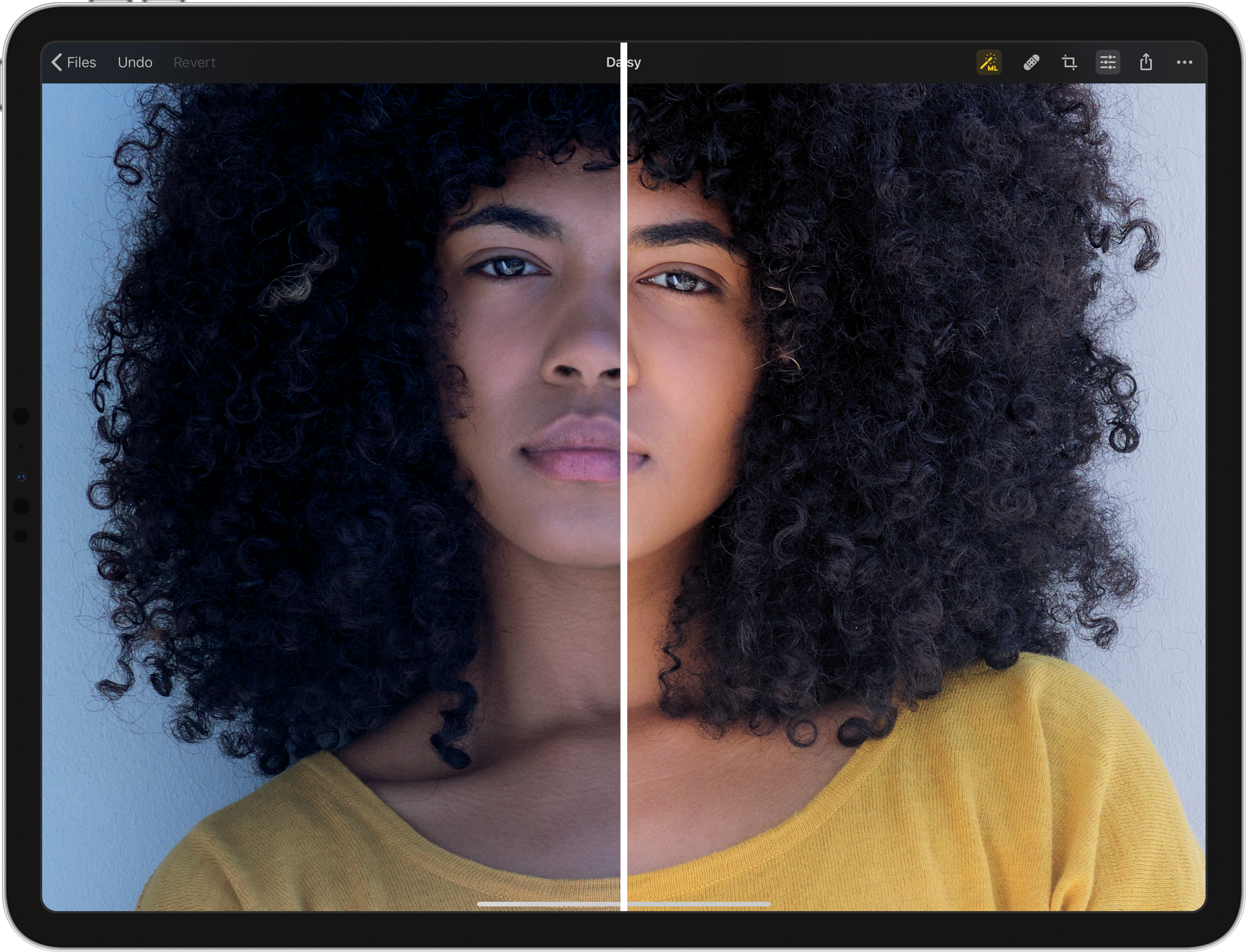
The Pixelmator Team today announced its latest app, the AI-powered Pixelmator Photo, will be released on April 9th and is now available for pre-order from the App Store with a 20% discount off its launch price. Pixelmator Photo gives photographers all the tools they need to edit photos on iPad - a collection of nondestructive, desktop-class color adjustments, AI that enhances photographs like a pro photographer, full RAW support, a magical Repair tool to remove unwanted objects, and more.
Vilnius, Lithuania - The Pixelmator Team today announced its latest app, the AI-powered Pixelmator Photo, will be released on April 9th and is now available for pre-order from the App Store with a 20% discount off its launch price. Pixelmator Photo gives photographers all the tools they need to edit photos on iPad - a collection of nondestructive, desktop-class color adjustments, AI that enhances photographs like a pro photographer, full RAW support, a magical Repair tool to remove unwanted objects from photos, a set of gorgeous presets inspired by analog photographic films, and more.
"Pixelmator Photo is an unbelievably powerful and incredibly easy to use photo editor for iPad," said Saulius Dailide, one of the founders of the Pixelmator Team. "It brings an extensive collection of tools that experienced photographers know and love but, thanks to its clean and intuitive interface, it makes these powerful tools accessible even to beginner users. And with ML Enhance, the most intelligent and advanced automatic photo enhancement tool in any app, truly anyone can create great-looking shots in seconds."
With an extensive collection of powerful, nondestructive color adjustments, Pixelmator Photo brings a desktop photo editing experience to iPad. It includes foundational tools like Brightness, Exposure, and Shadows & Highlights, time-tested photo editing classics, such as Levels and Curves, as well adjustments for adding film-style grain, selectively adjusting colors, correcting white balance, and many others. What's more, the Repair and Crop tools let photographers perfect all the details that go into great-looking shots, like removing blemishes or unwanted objects, as well as adjusting the composition of photos, their perspective, and more.
Pixelmator Photo takes full advantage of breakthrough artificial intelligence, using machine learning to power automatic image enhancement and automatic cropping. The ML Enhance feature automatically improves photos like a pro photographer. Using a Core ML-powered algorithm trained on 20 million professional photos, it intelligently enhances exposure, white balance, and every individual color range of an image. ML Crop, also powered by Core ML, crops photos to make them more striking and compositionally eye-catching. Photographers can use ML Crop freely or they can choose the best crop for their selected image proportions by using ML Crop together with aspect ratio presets.
The magical Repair tool, enhanced by machine learning, lets users easily remove blemishes, imperfections, and even entire objects from photos. The Repair tool recreates complex backgrounds with ease, so even if you didn't quite get the perfect shot the first time around, you can use image editing magic to make sure the final photo looks its best.
With a wide range of color adjustments presets inspired by analog photographic films, Pixelmator Photo lets users apply a specific style or look to a photo with just a tap. Included with the app are collections based on classic photographic films, modern films, as well as presets designed for landscape, urban, and night photography. Adjustment presets in Pixelmator Photo have also been developed to work seamlessly with ML Enhance. When a photo has already been automatically enhanced, the stylistic changes are applied alongside the most important automatic adjustments. This ensures consistently beautiful presets on every photo.
Pixelmator Photo: https://www.pixelmator.com/photo/
Pre-Order (App Store): https://itunes.apple.com/app/pixelmator/id1444636541?mt=8
Vimeo Video: https://vimeo.com/309300182/057d34181e
Color Adjustments (Screenshot): http://pixelmator-download.s3.amazonaws.com/press/photo/Pixelmator-Photo-Color-Adjustments.png

ML Enhance (Screenshot): http://pixelmator-download.s3.amazonaws.com/press/photo/Pixelmator-Photo-ML-Enhance.png
Press Kit (ZIP): http://pixelmator-download.s3.amazonaws.com/press/Pixelmator-Photo-Press-Kit.zip
Founded in 2007 by two brothers, Saulius Dailide and Aidas Dailide, the Pixelmator Team develops powerful image editing apps for Mac and iOS. The team's apps have been honored with multiple Mac App of the Year awards, an iPad App of the Year award, an Apple Design Award, and many others. Pixelmator for iPad was featured at the Apple Special Event in October 2014. All Material and Software (C) Copyright 2007-2019 Pixelmator. All Rights Reserved. Apple, the Apple logo, Macintosh, iPhone, iPad, and macOS are registered trademarks of Apple Inc. in the U.S. and/or other countries. Other trademarks and registered trademarks may be the property of their respective owners.
*******
Link To Article: https://prmac.com/release-id-83361.htm
*******
---------------------------------------------------------------------------------
Note that you can alter delivered distributions at any time.
Login to your account on prMac to alter your channel selection, or to opt-out at any time.
Granny Invader Offers Augmented Reality Arcade Challenge for iOS Gamers
A new article has been published at prMac.
Granny Invader Offers Augmented Reality Arcade Challenge for iOS Gamers - Published on 04/02/19
Manila-based indie development team Appkoji announces the upcoming release of Granny Invader 1.1, their exciting Augmented Reality game for iOS devices. Granny Invader uses iOS 12 ARKit technology to offer an unusual gaming challenge. Gamers must protect the Earth from crazy invading grannies from another dimension. The invading grannies will hide, spin, and throw fireballs. It's up to the player to dodge the fireballs and shoot back at the crazy grannies.
Manila, Philippines - Independent development team, Appkoji is proud to announce the upcoming release of Granny Invader 1.1, their challenging Augmented Reality shooter game for iPhone, iPad, and iPod touch devices. Crazy grannies from another dimension are invading our world, and it's up to the player to stop them before they rule the Earth. Gamers will face over 25 waves of grannies who hide, spin, and throw fireballs.
Players will need quick reflexes as they dodge fireballs and shoot these crazed grannies, preventing them from ruling our dimension. iOS gamers will fight their way through more than 25 waves of grannies, only to find that at the end of some levels they will be required to face various "boss" grannies.
"I've always been a fan of arcade shooter games, and once I saw what Apple's iOS 12 brought to the game development world with their ARKit for Augmented Reality, I knew I had to create a game that would use the new technology," enthuses game developer Koji Murata. "Granny Invader is the result of my hard work. Using the motion detecting and AR abilities of their iPhone, players can battle the grannies in any location in the real world around them!"
Granny Invader Features include:
* Colorful Augmented Reality game mixing crisp graphics with real world locations
* Simple one handed controls allow players to tap anywhere to shoot
* Invading grannies with different abilities
* 25+ challenging stages
* Challenging boss stages force players to move around
* An exciting and thrilling gaming experience
* Premium app - no ads or in-app purchases
Granny Invader contains beautiful yet challenging stages full of excitement, challenges, thrills, and wonder. The immersive Augmented Reality experience mixes colorful fractal graphics with the real world objects in your immediate area.
The grannies will ambush players from behind fractal structures, quickly shooting giant fireballs, which the player must dodge while they fire back. Many of the grannies have special abilities, which the player must learn to deal with.
Finally, after battling through more than 25 challenging stages comes the ultimate challenges, the Boss Grannies! These challenging boss stages force players to move as they shoot. But they have to be careful, as the grannies are tracking their movements!
"The Grannies have gone crazy and invaded our dimension, and only you can stop them," says Koji. "The world needs your help in saving the world from the Granny Invaders! Wipe them out and live another day! Fail, and the crazy grannies will take over our dimension!"
The concept of Granny Invader was formed while working with ARKit's plane detection. Developer Koji believes he can safely say his is the first ARKit-based game that features invading Grannies. All indications are that he is correct. The game allows any surface to become a galactic battleground, making it possible to battle no matter the location.
Device Requirements:
* iPhone, iPad, or iPod touch
* Requires iOS 12.0 or later
* Universal Application
* 60.1 MB
Pricing and Availability:
Granny Invader 1.1 is only $1.99 USD (or an equivalent amount in other currencies) and is currently available for pre-order worldwide exclusively through the App Store in the Games category. Review copies are available upon request to qualified journalists. The game will be available in the App Store on May 1, 2019.
Appkoji: http://appkoji.com
Granny Invader 1.1: https://grannyinvader.com
Pre-Order from App Store: https://itunes.apple.com/us/app/granny-invader-ar/id1434798655
Screenshot: https://is3-ssl.mzstatic.com/image/thumb/Purple114/v4/96/6c/67/966c6709-ad76-df86-9c71-18aa70eac9bc/pr_source.png/643x0w.jpg
App Icon: https://is2-ssl.mzstatic.com/image/thumb/Purple124/v4/5b/b0/e7/5bb0e761-6592-8950-2e2f-47750f4215b0/AppIcon-0-1x_U007emarketing-0-0-GLES2_U002c0-512MB-sRGB-0-0-0-85-220-0-0-0-7.png/246x0w.jpg
Media Assets: https://www.grannyinvader.com/presskit
Appkoji was founded in Manila, Philippines by two Japanese technology lovers; Hideki Murata and Koji Murata. Koji focuses on creating app concepts and development, while Hideki focuses on marketing stuff. Since they both love technologies, they're always thinking how to implement the latest technology available on iOS. Copyright (C) 2019 Appkoji. All Rights Reserved. Apple, the Apple logo, iPhone and iPod are registered trademarks of Apple Inc. in the U.S. and/or other countries.
*******
Link To Article: https://prmac.com/release-id-83360.htm
*******
---------------------------------------------------------------------------------
Note that you can alter delivered distributions at any time.
Login to your account on prMac to alter your channel selection, or to opt-out at any time.
Granny Invader Offers Augmented Reality Arcade Challenge for iOS Gamers - Published on 04/02/19
Manila-based indie development team Appkoji announces the upcoming release of Granny Invader 1.1, their exciting Augmented Reality game for iOS devices. Granny Invader uses iOS 12 ARKit technology to offer an unusual gaming challenge. Gamers must protect the Earth from crazy invading grannies from another dimension. The invading grannies will hide, spin, and throw fireballs. It's up to the player to dodge the fireballs and shoot back at the crazy grannies.
Manila, Philippines - Independent development team, Appkoji is proud to announce the upcoming release of Granny Invader 1.1, their challenging Augmented Reality shooter game for iPhone, iPad, and iPod touch devices. Crazy grannies from another dimension are invading our world, and it's up to the player to stop them before they rule the Earth. Gamers will face over 25 waves of grannies who hide, spin, and throw fireballs.
Players will need quick reflexes as they dodge fireballs and shoot these crazed grannies, preventing them from ruling our dimension. iOS gamers will fight their way through more than 25 waves of grannies, only to find that at the end of some levels they will be required to face various "boss" grannies.
"I've always been a fan of arcade shooter games, and once I saw what Apple's iOS 12 brought to the game development world with their ARKit for Augmented Reality, I knew I had to create a game that would use the new technology," enthuses game developer Koji Murata. "Granny Invader is the result of my hard work. Using the motion detecting and AR abilities of their iPhone, players can battle the grannies in any location in the real world around them!"
Granny Invader Features include:
* Colorful Augmented Reality game mixing crisp graphics with real world locations
* Simple one handed controls allow players to tap anywhere to shoot
* Invading grannies with different abilities
* 25+ challenging stages
* Challenging boss stages force players to move around
* An exciting and thrilling gaming experience
* Premium app - no ads or in-app purchases
Granny Invader contains beautiful yet challenging stages full of excitement, challenges, thrills, and wonder. The immersive Augmented Reality experience mixes colorful fractal graphics with the real world objects in your immediate area.
The grannies will ambush players from behind fractal structures, quickly shooting giant fireballs, which the player must dodge while they fire back. Many of the grannies have special abilities, which the player must learn to deal with.
Finally, after battling through more than 25 challenging stages comes the ultimate challenges, the Boss Grannies! These challenging boss stages force players to move as they shoot. But they have to be careful, as the grannies are tracking their movements!
"The Grannies have gone crazy and invaded our dimension, and only you can stop them," says Koji. "The world needs your help in saving the world from the Granny Invaders! Wipe them out and live another day! Fail, and the crazy grannies will take over our dimension!"
The concept of Granny Invader was formed while working with ARKit's plane detection. Developer Koji believes he can safely say his is the first ARKit-based game that features invading Grannies. All indications are that he is correct. The game allows any surface to become a galactic battleground, making it possible to battle no matter the location.
Device Requirements:
* iPhone, iPad, or iPod touch
* Requires iOS 12.0 or later
* Universal Application
* 60.1 MB
Pricing and Availability:
Granny Invader 1.1 is only $1.99 USD (or an equivalent amount in other currencies) and is currently available for pre-order worldwide exclusively through the App Store in the Games category. Review copies are available upon request to qualified journalists. The game will be available in the App Store on May 1, 2019.
Appkoji: http://appkoji.com
Granny Invader 1.1: https://grannyinvader.com
Pre-Order from App Store: https://itunes.apple.com/us/app/granny-invader-ar/id1434798655
Screenshot: https://is3-ssl.mzstatic.com/image/thumb/Purple114/v4/96/6c/67/966c6709-ad76-df86-9c71-18aa70eac9bc/pr_source.png/643x0w.jpg

App Icon: https://is2-ssl.mzstatic.com/image/thumb/Purple124/v4/5b/b0/e7/5bb0e761-6592-8950-2e2f-47750f4215b0/AppIcon-0-1x_U007emarketing-0-0-GLES2_U002c0-512MB-sRGB-0-0-0-85-220-0-0-0-7.png/246x0w.jpg

Media Assets: https://www.grannyinvader.com/presskit
Appkoji was founded in Manila, Philippines by two Japanese technology lovers; Hideki Murata and Koji Murata. Koji focuses on creating app concepts and development, while Hideki focuses on marketing stuff. Since they both love technologies, they're always thinking how to implement the latest technology available on iOS. Copyright (C) 2019 Appkoji. All Rights Reserved. Apple, the Apple logo, iPhone and iPod are registered trademarks of Apple Inc. in the U.S. and/or other countries.
*******
Link To Article: https://prmac.com/release-id-83360.htm
*******
---------------------------------------------------------------------------------
Note that you can alter delivered distributions at any time.
Login to your account on prMac to alter your channel selection, or to opt-out at any time.
AlphaDigits Top Rated Mobile Apps March 2019
A new article has been published at prMac.
AlphaDigits Top Rated Mobile Apps March 2019 - Published on 04/01/19
Mobile app review publisher AlphaDigits has named top rated applications for March 2019. Candy Words is a mix of a wordscape game and Candy Crush. Dragon Ace Casino Baccarat offers new gaming experience. The Gaminator app is constituted from a multitude of slot games. My World AR is an Augmented Reality social media app. Tic Tac Toe Trio is a Free multiplayer puzzle game with good gameplay with attractive design.
Long Island, New York - Mobile app review publisher AlphaDigits has named top rated applications for March 2019. AlphaDigits names five top class mobile apps every month based on the reviews published in the website during the particular month. This website has now released the names of top rated mobile apps for the month of February.
Candy Words (10/10): Candy Words is a mix of a wordscape game and Candy Crush. The setup is such: you get a matrix of letter tiles and a list of words. There's also a timer. You get 90 seconds to arrange the tiles in such a way as to build each word. The words must appear from left to right and from top to bottom. No other direction is allowed and all words must appear on one line.
Dragon Ace Casino Baccarat (9.5/10): If you are a Baccarat fan and are looking for a new gaming experience to enjoy it, consider downloading Dragon Ace Casino. Gamespring is the creator of this app and they have done a superb job of capturing the essence and excitement of the game in a mobile app. Players can enjoy on their own or compete against others. Play to win and collect chips, just like you would in the casino.
Gaminator (9/10): The Gaminator app is constituted from a multitude of slot games, allowing the players to enjoy a larger number of mini-games that have different features while being still in the main app. The concept surely sounds like fun but, what makes this app great, and the thing they excelled at, is their use of only the highest quality games possible.
My World AR (8.5/10): The app suggests users that you can follow, people nearby you, and there are different kinds of collections for you to follow and post your own content: photos, videos or ready images. To publish something, all you have to do is select an image, take a photo or record a video, then you have to select a collection. In seconds your content will be shared to thousands of people around you!
Tic Tac Toe Trio (8/10): Free multiplayer puzzle game developed by Qiu technologies takes the classic tic tac toe game to a whole new level. Now you can play tic tac toe on your android phone without wasting paper and using a pencil. The AI of the game is good. It adapts the user's play style and is highly unpredictable. The game has a good gameplay with attractive design.
Joe Ellen, an Editor at AlphaDigits said, "We have an expert marketing team for mobile applications and our service comes at a competitive price". Developers can also contact AlphaDigits through the onsite app submission form, mail or the contact form to get their apps reviewed.
AlphaDigits: https://alphadigits.com
Submit App for Review: https://alphadigits.com/submit-app-for-review/
AlphaDigits is a review site run by a few app marketers. Enjoying the support from a handy amount of regular visitors, AlphaDigits provides reviews for iPhone, iPad and Android apps. Copyright (C) 2019 AlphaDigits. All Rights Reserved. Apple, the Apple logo, iPhone, iPod and iPad are registered trademarks of Apple Inc. in the U.S. and/or other countries.
*******
Link To Article: https://prmac.com/release-id-83359.htm
*******
---------------------------------------------------------------------------------
Note that you can alter delivered distributions at any time.
Login to your account on prMac to alter your channel selection, or to opt-out at any time.
AlphaDigits Top Rated Mobile Apps March 2019 - Published on 04/01/19
Mobile app review publisher AlphaDigits has named top rated applications for March 2019. Candy Words is a mix of a wordscape game and Candy Crush. Dragon Ace Casino Baccarat offers new gaming experience. The Gaminator app is constituted from a multitude of slot games. My World AR is an Augmented Reality social media app. Tic Tac Toe Trio is a Free multiplayer puzzle game with good gameplay with attractive design.
Long Island, New York - Mobile app review publisher AlphaDigits has named top rated applications for March 2019. AlphaDigits names five top class mobile apps every month based on the reviews published in the website during the particular month. This website has now released the names of top rated mobile apps for the month of February.
Candy Words (10/10): Candy Words is a mix of a wordscape game and Candy Crush. The setup is such: you get a matrix of letter tiles and a list of words. There's also a timer. You get 90 seconds to arrange the tiles in such a way as to build each word. The words must appear from left to right and from top to bottom. No other direction is allowed and all words must appear on one line.
Dragon Ace Casino Baccarat (9.5/10): If you are a Baccarat fan and are looking for a new gaming experience to enjoy it, consider downloading Dragon Ace Casino. Gamespring is the creator of this app and they have done a superb job of capturing the essence and excitement of the game in a mobile app. Players can enjoy on their own or compete against others. Play to win and collect chips, just like you would in the casino.
Gaminator (9/10): The Gaminator app is constituted from a multitude of slot games, allowing the players to enjoy a larger number of mini-games that have different features while being still in the main app. The concept surely sounds like fun but, what makes this app great, and the thing they excelled at, is their use of only the highest quality games possible.
My World AR (8.5/10): The app suggests users that you can follow, people nearby you, and there are different kinds of collections for you to follow and post your own content: photos, videos or ready images. To publish something, all you have to do is select an image, take a photo or record a video, then you have to select a collection. In seconds your content will be shared to thousands of people around you!
Tic Tac Toe Trio (8/10): Free multiplayer puzzle game developed by Qiu technologies takes the classic tic tac toe game to a whole new level. Now you can play tic tac toe on your android phone without wasting paper and using a pencil. The AI of the game is good. It adapts the user's play style and is highly unpredictable. The game has a good gameplay with attractive design.
Joe Ellen, an Editor at AlphaDigits said, "We have an expert marketing team for mobile applications and our service comes at a competitive price". Developers can also contact AlphaDigits through the onsite app submission form, mail or the contact form to get their apps reviewed.
AlphaDigits: https://alphadigits.com
Submit App for Review: https://alphadigits.com/submit-app-for-review/
AlphaDigits is a review site run by a few app marketers. Enjoying the support from a handy amount of regular visitors, AlphaDigits provides reviews for iPhone, iPad and Android apps. Copyright (C) 2019 AlphaDigits. All Rights Reserved. Apple, the Apple logo, iPhone, iPod and iPad are registered trademarks of Apple Inc. in the U.S. and/or other countries.
*******
Link To Article: https://prmac.com/release-id-83359.htm
*******
---------------------------------------------------------------------------------
Note that you can alter delivered distributions at any time.
Login to your account on prMac to alter your channel selection, or to opt-out at any time.
WidsMob PhotoVault Keeps All Secret Photos Locked Up
A new article has been published at prMac.
WidsMob PhotoVault Keeps All Secret Photos Locked Up - Published on 04/01/19
WidsMob announces WidsMob PhotoVault, their photo vault program for Mac. WidsMob PhotoVault offers different security levels to encrypt and hide photos. All photos are locked up and protected with password protection. It custom slideshows with loop and duration automatically. The Best and Most Private Photo app to Lock Up All Secret Photos on Mac.
Hongkong, China - WidsMob is happy to announce the release and availability of WidsMob PhotoVault, their photo vault program for Mac. WidsMob PhotoVault has different security levels to encrypt and hide photos. All photos are locked up and protected with password protection. It custom slideshows with loop and duration automatically.
Users can group photos with Favorites and different albums with ease. Furthermore, it is supported to export hidden photos to Email and save those encrypted photos to computer. Moreover, WidsMob PhotoVault has more editing features to make the whole process easy.
All the sensitive photos can be well encrypted and organized by WidsMob PhotoVault. There is no extra technology background or storage space required. The encrypted photos will be moved into the private database. Others will not find encrypted photos in the original destination folder. None third-party application could find those photos either. What's more, the image encryption software supports to decrypt and export any hidden photo without restrictions.
Here are some useful features about the photo vault software.
* Double security protection for the password and photos.
* Encrypted photo data.
* Quick screen lock.
* Batch import photos/folders at lightning spend.
* Remove original photos after importing.
* Add photos to Favorites.
* Import photos into album directly.
* Order by name, date, type and size.
* Create Albums right in the App.
* Add photos to album.
* Batch export photos.
* Email photos.
* Support nearly all image formats.
* Fast photo viewing experience with in-app photo viewer.
* Support JPEG, PNG, BMP, GIF and over 50 RAW image formats.
Pricing and Availability:
WidsMob PhotoVault is just $12.99 USD (or an equivalent amount in other currencies) and is available from the Widsmob website. A free trial version is available for download.
WidsMob: https://www.widsmob.com/
WidsMob PhotoVault: https://www.widsmob.com/photovault
Direct Download Link: http://download.widsmob.com/pro/widsmob_photovault.dmg
Purchase Link: https://www.widsmob.com/product/widsmob-photovault
Screenshot: https://www.widsmob.com/wp-content/uploads/2018/10/security.png
Application Icon: https://www.widsmob.com/wp-content/uploads/2018/09/photo-vault300.png
WidsMob is a professional application software developer located in Hong Kong with users from all over the world. WidsMob is dedicated in bringing people great software to make life smarter and simpler. All Material and Software (C) Copyright 2019 WidsMob. All Rights Reserved. Apple, the Apple logo, Macintosh Mac OS X and macOS are registered trademarks of Apple Inc. in the U.S. and/or other countries. Other trademarks and registered trademarks may be the property of their respective owners.
*******
Link To Article: https://prmac.com/release-id-83358.htm
*******
---------------------------------------------------------------------------------
Note that you can alter delivered distributions at any time.
Login to your account on prMac to alter your channel selection, or to opt-out at any time.
WidsMob PhotoVault Keeps All Secret Photos Locked Up - Published on 04/01/19
WidsMob announces WidsMob PhotoVault, their photo vault program for Mac. WidsMob PhotoVault offers different security levels to encrypt and hide photos. All photos are locked up and protected with password protection. It custom slideshows with loop and duration automatically. The Best and Most Private Photo app to Lock Up All Secret Photos on Mac.
Hongkong, China - WidsMob is happy to announce the release and availability of WidsMob PhotoVault, their photo vault program for Mac. WidsMob PhotoVault has different security levels to encrypt and hide photos. All photos are locked up and protected with password protection. It custom slideshows with loop and duration automatically.
Users can group photos with Favorites and different albums with ease. Furthermore, it is supported to export hidden photos to Email and save those encrypted photos to computer. Moreover, WidsMob PhotoVault has more editing features to make the whole process easy.
All the sensitive photos can be well encrypted and organized by WidsMob PhotoVault. There is no extra technology background or storage space required. The encrypted photos will be moved into the private database. Others will not find encrypted photos in the original destination folder. None third-party application could find those photos either. What's more, the image encryption software supports to decrypt and export any hidden photo without restrictions.
Here are some useful features about the photo vault software.
* Double security protection for the password and photos.
* Encrypted photo data.
* Quick screen lock.
* Batch import photos/folders at lightning spend.
* Remove original photos after importing.
* Add photos to Favorites.
* Import photos into album directly.
* Order by name, date, type and size.
* Create Albums right in the App.
* Add photos to album.
* Batch export photos.
* Email photos.
* Support nearly all image formats.
* Fast photo viewing experience with in-app photo viewer.
* Support JPEG, PNG, BMP, GIF and over 50 RAW image formats.
Pricing and Availability:
WidsMob PhotoVault is just $12.99 USD (or an equivalent amount in other currencies) and is available from the Widsmob website. A free trial version is available for download.
WidsMob: https://www.widsmob.com/
WidsMob PhotoVault: https://www.widsmob.com/photovault
Direct Download Link: http://download.widsmob.com/pro/widsmob_photovault.dmg
Purchase Link: https://www.widsmob.com/product/widsmob-photovault
Screenshot: https://www.widsmob.com/wp-content/uploads/2018/10/security.png

Application Icon: https://www.widsmob.com/wp-content/uploads/2018/09/photo-vault300.png

WidsMob is a professional application software developer located in Hong Kong with users from all over the world. WidsMob is dedicated in bringing people great software to make life smarter and simpler. All Material and Software (C) Copyright 2019 WidsMob. All Rights Reserved. Apple, the Apple logo, Macintosh Mac OS X and macOS are registered trademarks of Apple Inc. in the U.S. and/or other countries. Other trademarks and registered trademarks may be the property of their respective owners.
*******
Link To Article: https://prmac.com/release-id-83358.htm
*******
---------------------------------------------------------------------------------
Note that you can alter delivered distributions at any time.
Login to your account on prMac to alter your channel selection, or to opt-out at any time.
Text Recognition in Genius Scan takes mobile scanning to the next level
A new article has been published at prMac.
Text Recognition in Genius Scan takes mobile scanning to the next level - Published on 04/01/19
The Grizzly Labs releases Genius Scan 5.2 for iOS, a major update to the popular mobile scanning app. With Genius Scan, effortlessly scan your documents on-the-go & export them as JPEG or multi-page PDF files. The app includes smart page detection, perspective correction & image enhancement. The batch scanning lets you scan dozens of pages in a matter of seconds. Version 5.2 introduces Text Recognition, enabling a new set of features such as creating searchable PDFs or scanning business cards.
Paris, France - The Grizzly Labs today released Genius Scan 5.2 for iOS, a major update to the popular mobile scanning app. This latest version introduces Text Recognition (commonly known as OCR), enabling a new set of features such as creating searchable PDFs or scanning business cards.
Text Recognition takes mobile scanning and archiving to the next level: Genius Scan not only produces image versions of scanned documents, but also extracts the text from the images. Combining the bitmap image and the text layer enables several new features:
* Creating searchable/copyable PDFs.** With Text Recognition, the PDF files created with Genius Scan contain a text layer. Users can copy the text or search within their documents in Apple Preview or Adobe Acrobat Reader.
* Indexing and searching the documents content.** Search is not limited to the title of documents anymore. Searching for "Best Buy" will surface any receipt containing these words in the document body. Retrieving archived documents becomes effortless.
* Scanning business cards.** Genius Scan 5.2 recognizes business cards and surfaces relevant actions, such as the ability to create a contact, call a number, email someone or navigate to an address.
* Other smart content actions**. If a date is detected in a document, Genius Scan will suggest to rename the document with this date. This lets users archive document based on their actual date rather than the scan date, resulting in more accurate document archiving.
"OCR has been on the top of our mind for a while. It took us a while to get it right, so we are delighted to release it today", says Bruno Virlet, co-founder of The Grizzly Labs and developer of Genius Scan. "Text Recognition upgrades the scanning and archiving experience".
Text Recognition is available either as part of Genius Scan (a one-time purchase of $7.99 that unlocks the advanced features of Genius Scan) or with the Genius Cloud subscription ($2.99/month for backup, synchronization and all the advanced features). It's an iOS-only feature for now.
Grizzly Labs: http://www.thegrizzlylabs.com
Genius Scan 5.2: https://dl.tglapp.com/genius-scan
Introducing Text Recognition in Genius Scan 5.2: https://blog.thegrizzlylabs.com/2019/03/genius-scan-5.2-with-text-recognition
Text Recognition FAQ: https://help.thegrizzlylabs.com/category/236-text-recognition
Screenshot: https://blog.thegrizzlylabs.com/img/2019-03-25/business-card.jpg
App Icon: https://www.dropbox.com/s/7tvpy9q0a9lcwj5/Icon-512x512.png?dl=1
Located in Paris, France, The Grizzly Labs develops mobile applications that simplify the life of individuals and businesses. Genius Scan has been featured several times by Apple and has been downloaded more than 25 million times worldwide. Every day, Genius Scan helps tens of thousand users and small businesses to digitize documents, organize papers, remember stuff, communicate contracts or manage expenses. Copyright (C) 2019 The Grizzly Labs. All Rights Reserved. Apple, the Apple logo, iPhone, iPod and iPad are registered trademarks of Apple Inc. in the U.S. and/or other countries.
*******
Link To Article: https://prmac.com/release-id-83357.htm
*******
---------------------------------------------------------------------------------
Note that you can alter delivered distributions at any time.
Login to your account on prMac to alter your channel selection, or to opt-out at any time.
Text Recognition in Genius Scan takes mobile scanning to the next level - Published on 04/01/19
The Grizzly Labs releases Genius Scan 5.2 for iOS, a major update to the popular mobile scanning app. With Genius Scan, effortlessly scan your documents on-the-go & export them as JPEG or multi-page PDF files. The app includes smart page detection, perspective correction & image enhancement. The batch scanning lets you scan dozens of pages in a matter of seconds. Version 5.2 introduces Text Recognition, enabling a new set of features such as creating searchable PDFs or scanning business cards.
Paris, France - The Grizzly Labs today released Genius Scan 5.2 for iOS, a major update to the popular mobile scanning app. This latest version introduces Text Recognition (commonly known as OCR), enabling a new set of features such as creating searchable PDFs or scanning business cards.
Text Recognition takes mobile scanning and archiving to the next level: Genius Scan not only produces image versions of scanned documents, but also extracts the text from the images. Combining the bitmap image and the text layer enables several new features:
* Creating searchable/copyable PDFs.** With Text Recognition, the PDF files created with Genius Scan contain a text layer. Users can copy the text or search within their documents in Apple Preview or Adobe Acrobat Reader.
* Indexing and searching the documents content.** Search is not limited to the title of documents anymore. Searching for "Best Buy" will surface any receipt containing these words in the document body. Retrieving archived documents becomes effortless.
* Scanning business cards.** Genius Scan 5.2 recognizes business cards and surfaces relevant actions, such as the ability to create a contact, call a number, email someone or navigate to an address.
* Other smart content actions**. If a date is detected in a document, Genius Scan will suggest to rename the document with this date. This lets users archive document based on their actual date rather than the scan date, resulting in more accurate document archiving.
"OCR has been on the top of our mind for a while. It took us a while to get it right, so we are delighted to release it today", says Bruno Virlet, co-founder of The Grizzly Labs and developer of Genius Scan. "Text Recognition upgrades the scanning and archiving experience".
Text Recognition is available either as part of Genius Scan (a one-time purchase of $7.99 that unlocks the advanced features of Genius Scan) or with the Genius Cloud subscription ($2.99/month for backup, synchronization and all the advanced features). It's an iOS-only feature for now.
Grizzly Labs: http://www.thegrizzlylabs.com
Genius Scan 5.2: https://dl.tglapp.com/genius-scan
Introducing Text Recognition in Genius Scan 5.2: https://blog.thegrizzlylabs.com/2019/03/genius-scan-5.2-with-text-recognition
Text Recognition FAQ: https://help.thegrizzlylabs.com/category/236-text-recognition
Screenshot: https://blog.thegrizzlylabs.com/img/2019-03-25/business-card.jpg

App Icon: https://www.dropbox.com/s/7tvpy9q0a9lcwj5/Icon-512x512.png?dl=1

Located in Paris, France, The Grizzly Labs develops mobile applications that simplify the life of individuals and businesses. Genius Scan has been featured several times by Apple and has been downloaded more than 25 million times worldwide. Every day, Genius Scan helps tens of thousand users and small businesses to digitize documents, organize papers, remember stuff, communicate contracts or manage expenses. Copyright (C) 2019 The Grizzly Labs. All Rights Reserved. Apple, the Apple logo, iPhone, iPod and iPad are registered trademarks of Apple Inc. in the U.S. and/or other countries.
*******
Link To Article: https://prmac.com/release-id-83357.htm
*******
---------------------------------------------------------------------------------
Note that you can alter delivered distributions at any time.
Login to your account on prMac to alter your channel selection, or to opt-out at any time.
New Health Informatics Solution for ConceptDraw DIAGRAM
A new article has been published at prMac.
New Health Informatics Solution for ConceptDraw DIAGRAM - Published on 03/29/19
CS Odessa announces the newest addition to ConceptDraw Solutions. Health Informatics Solution provides the ConceptDraw DIAGRAM with new capabilities in a field of medical workflow tasks management and healthcare information documenting. The Health Informatics Solution free add-on for ConceptDraw DIAGRAM makes documenting medical workflow easy for professionals of any drawing level.
Odessa, Ukraine - CS Odessa announces the newest addition to ConceptDraw Solutions. Health Informatics Solution provides the ConceptDraw DIAGRAM with new capabilities in a field of medical workflow tasks management and healthcare information documenting.
The Health Informatics Solution allows one to quickly assemble any medical process, build medical instructional documents, enhance the medical education experience, and explain complex medical information in a straightforward manner. A large percentage of the medical professionals is involved in the process of issuing medical statistics, reports and other documents. ConceptDraw DIAGRAM with its new health solution makes quick work of visually communicating medical information to any audience.
The Health Informatics Solution is a free item for current users of ConceptDraw DIAGRAM v12 and is available for download via STORE.
ConceptDraw DIAGRAM is well-known for its ability to exchange documents with Microsoft Visio - the de facto standard in business graphics documents. It can open and save documents that can be used by Visio (VSD, VDX and VSDX documents) users. It retails for only US$199 per end user license.
The dynamic suite of three products found in ConceptDraw OFFICE v5 consists of a diagramming platform, a mind mapping tool, and a project management tool. It is designed for knowledge workers, project managers, managers, and academics and retails for US$499 per end user license. The combination of powerful products, no charge dynamic support, and ongoing development make ConceptDraw OFFICE v5 a good choice to support the activities that move businesses ahead.
Operating Systems Supported
* macOS 10.12, 10.13 and 10.14
* Windows 7, 8.1, and 10 (64-bit certified)
Health Informatics: http://www.conceptdraw.com/solution-park/health-informatics
ConceptDraw DIAGRAM v12 - business graphics and diagramming product (compatible with MS Visio): http://www.conceptdraw.com/products/drawing-tool
ConceptDraw MINDMAP v10 - brainstorming, planning, and mind mapping software: http://www.conceptdraw.com/products/mind-map
ConceptDraw PROJECT v9 - project and resource management tool (compatible with MS Project): http://www.conceptdraw.com/products/project-management-software
ConceptDraw OFFICE v5 - business suite that contains the entire ConceptDraw Desktop Product line: http://www.conceptdraw.com/products/office
Solution Park - an online collection of visual solutions: http://www.conceptdraw.com/solution-park
Founded in 1993, Computer Systems Odessa supplies cross-platform productivity tools and graphic technologies to professional and corporate users around the world. With headquarter in Odessa, Ukraine, CS Odessa sells products internationally through resellers in over 150 countries, both directly and through resellers. The ConceptDraw line of products has won numerous awards and is used by hundreds of thousands, including Fortune 500 companies, U.S. Federal Government agencies, small and medium businesses, and students and educators around the globe. ConceptDraw is a registered trademark, and ConceptDraw Office, ConceptDraw Solution Park, ConceptDraw PRO, ConceptDraw MINDMAP, ConceptDraw PROJECT, and ConceptDraw STORE are trademarks of CS Odessa. All other trademarks and registered trademarks are the properties of their respective owners.
*******
Link To Article: https://prmac.com/release-id-83356.htm
*******
---------------------------------------------------------------------------------
Note that you can alter delivered distributions at any time.
Login to your account on prMac to alter your channel selection, or to opt-out at any time.
New Health Informatics Solution for ConceptDraw DIAGRAM - Published on 03/29/19
CS Odessa announces the newest addition to ConceptDraw Solutions. Health Informatics Solution provides the ConceptDraw DIAGRAM with new capabilities in a field of medical workflow tasks management and healthcare information documenting. The Health Informatics Solution free add-on for ConceptDraw DIAGRAM makes documenting medical workflow easy for professionals of any drawing level.
Odessa, Ukraine - CS Odessa announces the newest addition to ConceptDraw Solutions. Health Informatics Solution provides the ConceptDraw DIAGRAM with new capabilities in a field of medical workflow tasks management and healthcare information documenting.
The Health Informatics Solution allows one to quickly assemble any medical process, build medical instructional documents, enhance the medical education experience, and explain complex medical information in a straightforward manner. A large percentage of the medical professionals is involved in the process of issuing medical statistics, reports and other documents. ConceptDraw DIAGRAM with its new health solution makes quick work of visually communicating medical information to any audience.
The Health Informatics Solution is a free item for current users of ConceptDraw DIAGRAM v12 and is available for download via STORE.
ConceptDraw DIAGRAM is well-known for its ability to exchange documents with Microsoft Visio - the de facto standard in business graphics documents. It can open and save documents that can be used by Visio (VSD, VDX and VSDX documents) users. It retails for only US$199 per end user license.
The dynamic suite of three products found in ConceptDraw OFFICE v5 consists of a diagramming platform, a mind mapping tool, and a project management tool. It is designed for knowledge workers, project managers, managers, and academics and retails for US$499 per end user license. The combination of powerful products, no charge dynamic support, and ongoing development make ConceptDraw OFFICE v5 a good choice to support the activities that move businesses ahead.
Operating Systems Supported
* macOS 10.12, 10.13 and 10.14
* Windows 7, 8.1, and 10 (64-bit certified)
Health Informatics: http://www.conceptdraw.com/solution-park/health-informatics
ConceptDraw DIAGRAM v12 - business graphics and diagramming product (compatible with MS Visio): http://www.conceptdraw.com/products/drawing-tool
ConceptDraw MINDMAP v10 - brainstorming, planning, and mind mapping software: http://www.conceptdraw.com/products/mind-map
ConceptDraw PROJECT v9 - project and resource management tool (compatible with MS Project): http://www.conceptdraw.com/products/project-management-software
ConceptDraw OFFICE v5 - business suite that contains the entire ConceptDraw Desktop Product line: http://www.conceptdraw.com/products/office
Solution Park - an online collection of visual solutions: http://www.conceptdraw.com/solution-park
Founded in 1993, Computer Systems Odessa supplies cross-platform productivity tools and graphic technologies to professional and corporate users around the world. With headquarter in Odessa, Ukraine, CS Odessa sells products internationally through resellers in over 150 countries, both directly and through resellers. The ConceptDraw line of products has won numerous awards and is used by hundreds of thousands, including Fortune 500 companies, U.S. Federal Government agencies, small and medium businesses, and students and educators around the globe. ConceptDraw is a registered trademark, and ConceptDraw Office, ConceptDraw Solution Park, ConceptDraw PRO, ConceptDraw MINDMAP, ConceptDraw PROJECT, and ConceptDraw STORE are trademarks of CS Odessa. All other trademarks and registered trademarks are the properties of their respective owners.
*******
Link To Article: https://prmac.com/release-id-83356.htm
*******
---------------------------------------------------------------------------------
Note that you can alter delivered distributions at any time.
Login to your account on prMac to alter your channel selection, or to opt-out at any time.
Subscribe to:
Posts (Atom)