A new article has been published at prMac.
New App Brings All-in-One Fitness Trainer to iPhone and Apple Watch - Published on 04/24/19
Austria-based team GREEAL e.U. announces FITOLOG - Fitness Assistant 4.0, the important update to their all-in-one fitness assistant app for iOS and Apple Watch devices. FITOLOG is the easiest and most enjoyable way to log and track users' fitness activity. The app offers all of the elements of an intelligent personal trainer. Apple Watch users will find they can leave their iPhone in their pocket or exercise bag, as they can control everything on their Apple Watch.
Gmunden, Austria - Independent development team GREEAL e.U. is proud to announce FITOLOG - Fitness Assistant 4.0, the update to their all-in-one fitness training app for iPhone, iPad, iPod touch and Apple Watch devices. The app uses a simple process of logging a users' fitness data and displaying it in easy to understand graphs.
FITOLOG uses the iPhone or Apple Watch to log a user's exercise and activities, warning the user if there is no progress. The app shares all of the data with Apple's Health Kit. FITOLOG is a great choice for those who are new in the fitness area, providing helpful workout tips and exercise performing instructions with demos.
"There are various amounts of apps available on the App Store, which fitness enthusiasts can use to log and track their fitness activity. However, some can be frustrating and complicated to use," says the app's developer, Yauheni Hrynchyk. "Depending on fitness activity, a user might be required to use multiple apps. This is why we created FITOLOG. The app has a simple process of logging user's fitness data and displaying it in graphs."
Fitness is all about progress, the more progress a user sees, the more encouraged they are to continue to exercise. FITOLOG has everything a user needs to track their progress, offering a bodyweight graph, an exercise graph, and tracks progress via photos.
The app is suitable for all body types and fitness levels. Beginners will love the app's ease-of-use, while experienced users will appreciate the fitness tracking features that include 10 preloaded workouts as well as the ability to create custom workouts.
Features Include:
* 10 preloaded workouts. Including 4 with weights and 5 bodyweight high intensity workouts
* Create custom workouts
* Record and monitor body weight
* Photo history for 4 different poses and ability to compare them with body weight progress graph
* 84 preloaded exercises
* Create custom exercises
* Audio prompts guide you through workouts
* Create workout music playlists and play them during workouts
* Share all bodyweight records and workout data with Apple Health
* Track workouts using just the Apple Watch or with the iPhone
* Suitable for all body types and fitness levels
* No need to create a profile, get started immediately
FITOLOG makes it easy to log cardio exercises. Make use of the iPhone and Apple Watch's built-in location services to allow not only automatic recording of time and distance, but also display the route of a run, walk, or bicycling session and display it on the map. For those that prefer to not use location services, the application will record distances using motion detection, making it a great way to measure exercise on workout equipment like steppers and treadmills.
"We're excited about FITOLOG, and we believe it will change the way users workout for the better," continues Yauheni. "We're sure users will find it to be the easiest and most enjoyable way to log and track their fitness activity, allowing them to make real progress, and allowing them to see that progress. We can't wait to hear feedback from our users."
Device Requirements:
* iPhone, iPad or iPod touch
* Apple Watch App
* Requires iOS 11.2 or later
* 85.7 MB
Pricing and Availability:
FITOLOG - Fitness Assistant 4.0 is free and is available worldwide exclusively through the App Store in the Health and Fitness category. Auto-renewable subscriptions are available. 1-month is $2.99, 3-months is $7.49, 6-months is $13.99 and 1-year is $24.99. USD (or an equivalent amount in other currencies).
FITOLOG - Fitness Assistant 4.0: https://www.fitolog.com/
Download from the App Store: https://itunes.apple.com/app/fitolog-fitness-assistant/id1440417230
Screenshot 1: https://is1-ssl.mzstatic.com/image/thumb/Purple123/v4/bb/a3/98/bba39885-db50-d711-798d-7f45cff1f316/pr_source.png/300x0w.jpg
Screenshot 2: https://is3-ssl.mzstatic.com/image/thumb/Purple113/v4/f3/e4/a4/f3e4a455-ea8e-d76e-64e6-21a0b17e56e8/pr_source.png/300x0w.jpg
App Icon: https://is5-ssl.mzstatic.com/image/thumb/Purple113/v4/82/fd/e2/82fde266-227b-91c3-8cd2-ac5b4f47e9cd/AppIcon-1-0-1x_U007emarketing-0-0-GLES2_U002c0-512MB-sRGB-0-0-0-85-220-0-0-0-5.png/246x0w.jpg
Headquartered in Gmunden, Austria, GREEAL e.U. was founded in 2015 by Yauheni Hrynchyk. The company is focused on creating apps designed to improve a user's physical and mental fitness. The company leverages years of experience in developing apps to offer the best in fitness apps to iOS users. All Material and Software (C) Copyright 2019 GREEAL e.U. All Rights Reserved. Apple, the Apple logo, iPhone, iPod and iPad are registered trademarks of Apple Inc. in the U.S. and/or other countries. Other trademarks and registered trademarks may be the property of their respective owners.
*******
Link To Article: https://prmac.com/release-id-83388.htm
*******
---------------------------------------------------------------------------------
Note that you can alter delivered distributions at any time.
Login to your account on prMac to alter your channel selection, or to opt-out at any time.



Gadget Creative Challenge for iOS, Android, and Win10 PC
A new article has been published at prMac.
Gadget Creative Challenge for iOS, Android, and Win10 PC - Published on 04/23/19
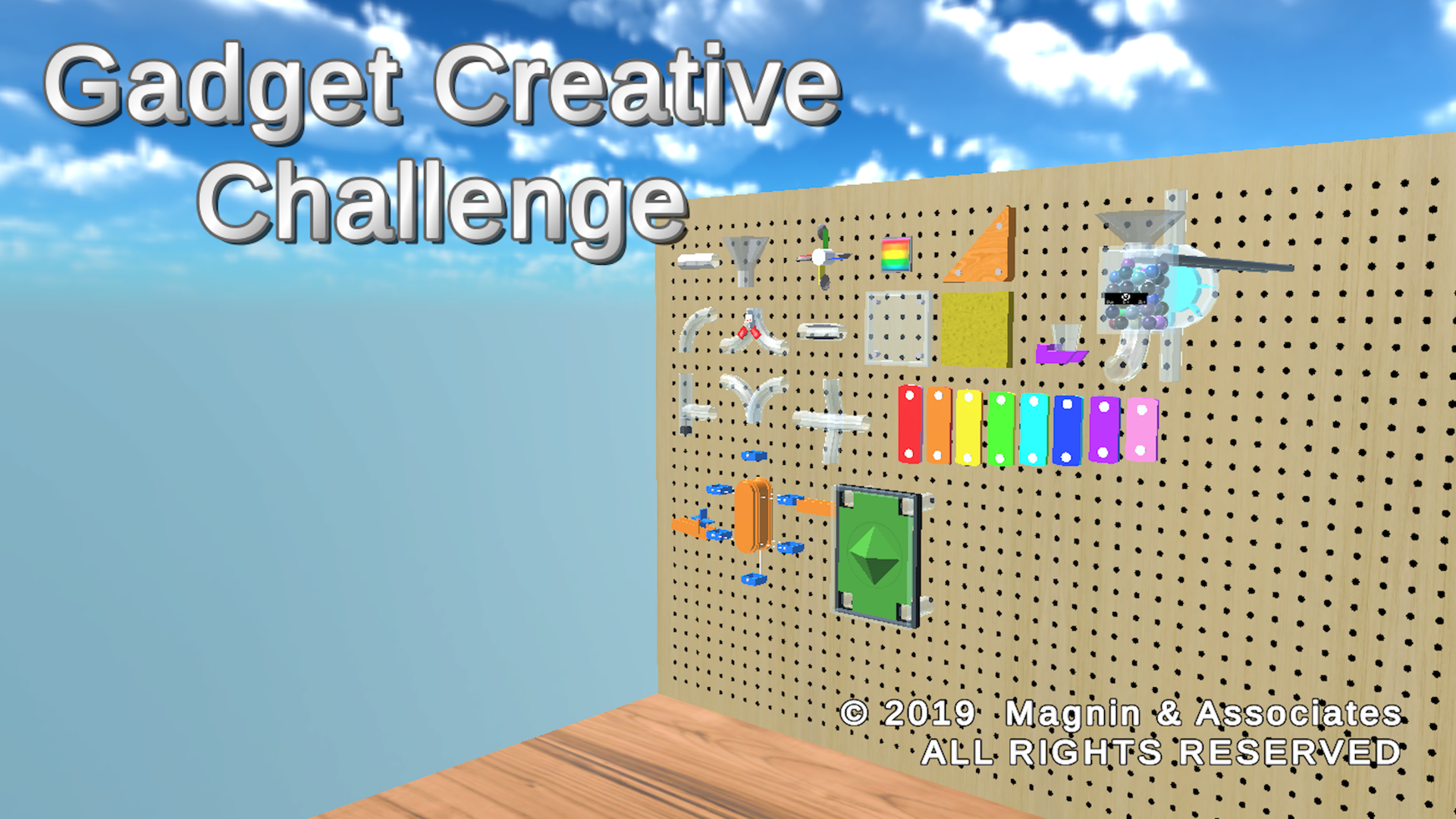
Texas based developer, Magnin & Associates today introduces Gadget Creative Challenge 1.0, their new game for iOS, Android, and Windows PC. Create your own marble machine gadgets. Choose parts from a work bench that contains dozens of pipe sections and animated pieces. Combine up to 100 pieces into a single creation. Choose from 4 different preset camera positions, or use the controls to create your own custom view. Share gadgets you create via text or email.
Farmers Branch, Texas - Magnin & Associates today introduces Gadget Creative Challenge 1.0, their new game for iOS, Android, and Windows PC.
Create your own marble machine gadgets.
Choose parts from a work bench that contains dozens of pipe sections and animated pieces. Pieces can be easily moved and rotated and snapped to connect with nearby pieces. You can combine up to 100 pieces into a single creation.
You can easily adjust the time interval between marbles being released. You can also adjust how powerful the spring is and how much the anti-gravity accelerators boost the marbles uphill. Some pieces have sliding controls so they can be adjusted at run-time.
You can design a closed system, that returns the marbles back up to the box where they started, so it could theoretically run indefinitely.
Hit Play to watch your creation run. Choose from 4 different preset camera positions, or use the controls to create your own custom view. An additional Marble View will show you what it's like to travel inside your device.
Easily save or load previous creations or optionally Share your creations with friends via email or text messages.
Optionally shares your accomplishments via social media, email, or instant messaging. Gadgets are multi-platform, allowing them to play on another copy of Gadget Creative Challenge running on most popular smartphones, tablets, and computers.
Universal App - supports iPhone, iPod touch, and iPad, including standard, Retina, iPhone X and XS displays.
The game was produced by Ed Magnin, programmed and 3d models by Willie Johnson, Jr, and playtested by David Hayes and Amber Roberson, game dev interns from Dallas ISD, Conrad H-TECH at Richland College. Matt Campana created the music and audio effects. According to Ed Magnin, "I've always been fascinated by those Rube Goldberg type marble machines. We wanted to give the player a chance to create their own."
Device Requirements (iOS):
* Compatible with iPhone, iPad, and iPod touch
* Requires iOS 9.0 or later
* Universal App (includes Standard, Retina, and iPhone X and XS displays)
* 140 MB
* Rated 4
Pricing and Availability:
Gadget Creative Challenge 1.0 is $2.99 USD (or equivalent amount in other currencies) and available worldwide through the App Store in the Games category for iPhone, iPad. An Android version is available worldwide from both Google Play and Amazon AppStore. Windows 10 PC versions is available from the Windows Store. For more information, please contact Ed Magnin.
Magnin & Associates: http://MagninGames.com
Gadget Creative Challenge 1.0: http://MagninGames.com/gadgets
YouTube Video: https://www.youtube.com/watch?v=_WFZlhBvq88
Image (Title Screen): http://magningames.com/iphone/gadgets/images/Title.png
App Icon: http://MagninGames.com/iphone/gadgets/images/Icon_144.png
Game Credits: https://www.pinterest.com/pin/477733472970689288/
Ed Magnin has been actively involved in the game industry since 1979. Earlier in his career he worked for some of the top game developers of their day - MicroProse, Cinemaware, Virgin Games, and Park Place Productions. In 1993, he founded Magnin & Associates and has focused on handheld games ever since. They have created over 30 games for iOS (with over a million App Store downloads). Most are also available for Android, Apple TV, Windows 10 PC and Xbox. All Material and Software (C) Copyright 2019 Magnin & Associates. All Rights Reserved. Apple, the Apple logo, iPhone, iPod and iPad are registered trademarks of Apple Inc. in the U.S. and/or other countries. Other trademarks and registered trademarks may be the property of their respective owners.
*******
Link To Article: https://prmac.com/release-id-83387.htm
*******
---------------------------------------------------------------------------------
Note that you can alter delivered distributions at any time.
Login to your account on prMac to alter your channel selection, or to opt-out at any time.
Gadget Creative Challenge for iOS, Android, and Win10 PC - Published on 04/23/19
Texas based developer, Magnin & Associates today introduces Gadget Creative Challenge 1.0, their new game for iOS, Android, and Windows PC. Create your own marble machine gadgets. Choose parts from a work bench that contains dozens of pipe sections and animated pieces. Combine up to 100 pieces into a single creation. Choose from 4 different preset camera positions, or use the controls to create your own custom view. Share gadgets you create via text or email.
Farmers Branch, Texas - Magnin & Associates today introduces Gadget Creative Challenge 1.0, their new game for iOS, Android, and Windows PC.
Create your own marble machine gadgets.
Choose parts from a work bench that contains dozens of pipe sections and animated pieces. Pieces can be easily moved and rotated and snapped to connect with nearby pieces. You can combine up to 100 pieces into a single creation.
You can easily adjust the time interval between marbles being released. You can also adjust how powerful the spring is and how much the anti-gravity accelerators boost the marbles uphill. Some pieces have sliding controls so they can be adjusted at run-time.
You can design a closed system, that returns the marbles back up to the box where they started, so it could theoretically run indefinitely.
Hit Play to watch your creation run. Choose from 4 different preset camera positions, or use the controls to create your own custom view. An additional Marble View will show you what it's like to travel inside your device.
Easily save or load previous creations or optionally Share your creations with friends via email or text messages.
Optionally shares your accomplishments via social media, email, or instant messaging. Gadgets are multi-platform, allowing them to play on another copy of Gadget Creative Challenge running on most popular smartphones, tablets, and computers.
Universal App - supports iPhone, iPod touch, and iPad, including standard, Retina, iPhone X and XS displays.
The game was produced by Ed Magnin, programmed and 3d models by Willie Johnson, Jr, and playtested by David Hayes and Amber Roberson, game dev interns from Dallas ISD, Conrad H-TECH at Richland College. Matt Campana created the music and audio effects. According to Ed Magnin, "I've always been fascinated by those Rube Goldberg type marble machines. We wanted to give the player a chance to create their own."
Device Requirements (iOS):
* Compatible with iPhone, iPad, and iPod touch
* Requires iOS 9.0 or later
* Universal App (includes Standard, Retina, and iPhone X and XS displays)
* 140 MB
* Rated 4
Pricing and Availability:
Gadget Creative Challenge 1.0 is $2.99 USD (or equivalent amount in other currencies) and available worldwide through the App Store in the Games category for iPhone, iPad. An Android version is available worldwide from both Google Play and Amazon AppStore. Windows 10 PC versions is available from the Windows Store. For more information, please contact Ed Magnin.
Magnin & Associates: http://MagninGames.com
Gadget Creative Challenge 1.0: http://MagninGames.com/gadgets
YouTube Video: https://www.youtube.com/watch?v=_WFZlhBvq88
Image (Title Screen): http://magningames.com/iphone/gadgets/images/Title.png
App Icon: http://MagninGames.com/iphone/gadgets/images/Icon_144.png
Game Credits: https://www.pinterest.com/pin/477733472970689288/
Ed Magnin has been actively involved in the game industry since 1979. Earlier in his career he worked for some of the top game developers of their day - MicroProse, Cinemaware, Virgin Games, and Park Place Productions. In 1993, he founded Magnin & Associates and has focused on handheld games ever since. They have created over 30 games for iOS (with over a million App Store downloads). Most are also available for Android, Apple TV, Windows 10 PC and Xbox. All Material and Software (C) Copyright 2019 Magnin & Associates. All Rights Reserved. Apple, the Apple logo, iPhone, iPod and iPad are registered trademarks of Apple Inc. in the U.S. and/or other countries. Other trademarks and registered trademarks may be the property of their respective owners.
*******
Link To Article: https://prmac.com/release-id-83387.htm
*******
---------------------------------------------------------------------------------
Note that you can alter delivered distributions at any time.
Login to your account on prMac to alter your channel selection, or to opt-out at any time.
ProteinScope Free 3D Printing Edition available now on Mac App Store
A new article has been published at prMac.
ProteinScope Free 3D Printing Edition available now on Mac App Store - Published on 04/22/19
ProteinScope(R) Free 3D Printing Edition is available now on Mac App Store for macOS Mojave 10.14+. ProteinScope reads in any PDBML file directly from the Protein Data Bank and displays it in various color schemes and rendering styles. It is not endorsed in any way by the RCSB or any other institution. Eligible protein molecules can be 3D printed in full color using the color scheme selected for display. ProteinScope builds and prepares the order and ordering URL with the 3D printing service.
Oakland, California - Independent developer, Mark S. Morris is today announcing the release of ProteinScope(R) for Mac. Previously released for Windows in 2002, ProteinScope has been used in online encyclopedias, research paper publications, and was recommended in the U.S. Federal Registry by the Patent and Trademark Office for use in drug patent applications.
ProteinScope(R) for Mac enables full color 3D printing of eligible proteins, using structure files from the RCSB Protein Data Bank. ProteinScope for Mac is hand-optimized for use with the very latest features in macOS Mojave 10.14, providing a fast, smooth user interface and rendering of molecules. ProteinScope can have multiple protein windows open simultaneously, and can display individual proteins in full screen mode.
ProteinScope connects to the Research Collaboratory for Structural Bioinformatics Protein Data Bank (RCSB PDB) to retrieve structure information. ProteinScope is not endorsed in any way by the RCSB or any other institution. ProteinScope for Mac parses the major elements of the PDB XML (PDBML) file to display the molecule. PDBML is the canonical XML format for the PDB data, and every protein on the RCSB is available in this format. Legacy .pdb file format is not supported. PDB XML files stored on local drives will have the extension .xml with the 4 digit PDB ID as the filename, eg 9ins.xml - from the ProteinScope File menu select 'Open PDB From Disk...' and a File Open dialog limited to .xml extension files will open for file selection. Double click the file to open, and parsing will commence. Larger PDB structures will take longer to process. The proteins being displayed will auto rotate. Use the mouse wheel (or equivalent) to zoom in and out.
PDB XML can also be downloaded directly from the RCSB PDB from the ProteinScope File menu; select 'Open PDB From RCSB...' and a PDB ID dialog will appear. Type in the PDB ID of the structure to examine, eg 9ins, and the XML file will be downloaded from the RCSB PDB FTP Archive over HTTP. This downloaded file will be accessible via the ProteinScope File menu item 'Open Recent'. The downloaded file is then parsed as described above. Once the PDB file has been fully parsed, rendering setup begins. ProteinScope for Mac uses the latest Metal 2 rendering engine, exclusively on OS X Mojave. ProteinScope no longer uses the Apple deprecated OpenGL system, but larger files of many atoms may still take some time for initial scene setup and frame rendering. For this version, rendering display has been limited to 65,000 atoms per molecule - most of the Protein Data Bank deposited structures are less than 19,000 atoms.
Proteins can be displayed in different styles; Space-fill and Carbon Backbone. Atom coordinates are interpreted as 1 Angstrom = 1 SceneKit Unit. For Space-fill, the calculated atomic radius is modified for visual effect. For Carbon Backbone, carbon alphas in the same chain are joined together in a continuous linkage. Each link between carbon alphas is colored by the residue it represents, only residue color mode is available in this display style.
The color schemes available in ProteinScope for Mac are:
* Residue - based on the Shapely color scheme
* Atom - based on the CPK color scheme
* Chain - a unique color for each chain the residue is on
* SETOR - designed to allow the display of secondary, tertiary and quaternary structures of molecules
* Temperature - Red is hotter, blue colder. Not all PDBs have this information
* Hydrophobicity - Blue is more hydrophilic, red more hydrophobic
The 3D printing features of ProteinScope can accessed from the "3D Printing" top level menu. With a protein open, menu item 'Generate 3D Print...' will take you to the 3D print ordering sequence that is also available from the main toolbar button item 'Order 3D Print'. The menu item 'Available 3D Prints..." opens up the main ProteinScope 3D printed molecule store, where existing 3D prints of proteins in various styles and color schemes can be ordered. Recent 3D print orders that have been made from this application device show the ordering URLs below the menu separator, so you can get back to them between application sessions.
If you have an iPhone or Android device with a recent OS version installed, holding the camera up to the QR code 3D printed on the base of the protein will open the rcsb.org URL contained in the QR code. Proteins are printed to a scale of 1 Angstrom = 1mm, so most prints end up being similar in size to a C or D battery. Protein 3D prints are created with full color sandstone printing. Three sandstone finishes are available: natural, glossy and matte. The colors used in the 3D printed model are the same as selected for displaying on screen.
Device Requirements:
* macOS 10.14 or later
* 4.3 MB
Pricing and Availability:
ProteinScope is Free and available worldwide on the Mac App Store in the Reference category.
ProteinScope citations:
The Protein Data Bank: rcsb.org. H.M. Berman, J. Westbrook, Z. Feng, G. Gilliland, T.N. Bhat, H. Weissig, I.N. Shindyalov, P.E. Bourne. Nucleic Acids Research, 28: 235-242. (2000)
SETOR: Hardware-lighted three-dimensional solid model representations of macromolecules. Stephen V.Evans, Journal of Molecular Graphics Volume 11, Issue 2, June 1993, Pages 134-138
ProteinScope: https://proteinscope.com/
More Info: https://proteinscope.com/macindex.htm
Download from the Mac App Store: https://itunes.apple.com/app/proteinscope/id1438595055
Purchase: https://proteinscope.com/3dprints
Screenshot (Main Display): https://proteinscope.com/images/psMain2.jpg
Screenshot (3D Print Ordering): https://proteinscope.com/images/ps3dPrint3.jpg
Mark S. Morris is an independent software and 3D printing developer in Oakland, California. ProteinScope is part of the uplink.to network. ProteinScope is (R) and (C) Mark S. Morris 2019. All Rights Reserved. Apple, Mac and macOS are trademarks of Apple Inc., registered in the U.S. and other countries. Other trademarks and registered trademarks are the property of their respective owners.
*******
Link To Article: https://prmac.com/release-id-83386.htm
*******
---------------------------------------------------------------------------------
Note that you can alter delivered distributions at any time.
Login to your account on prMac to alter your channel selection, or to opt-out at any time.
ProteinScope Free 3D Printing Edition available now on Mac App Store - Published on 04/22/19
ProteinScope(R) Free 3D Printing Edition is available now on Mac App Store for macOS Mojave 10.14+. ProteinScope reads in any PDBML file directly from the Protein Data Bank and displays it in various color schemes and rendering styles. It is not endorsed in any way by the RCSB or any other institution. Eligible protein molecules can be 3D printed in full color using the color scheme selected for display. ProteinScope builds and prepares the order and ordering URL with the 3D printing service.
Oakland, California - Independent developer, Mark S. Morris is today announcing the release of ProteinScope(R) for Mac. Previously released for Windows in 2002, ProteinScope has been used in online encyclopedias, research paper publications, and was recommended in the U.S. Federal Registry by the Patent and Trademark Office for use in drug patent applications.
ProteinScope(R) for Mac enables full color 3D printing of eligible proteins, using structure files from the RCSB Protein Data Bank. ProteinScope for Mac is hand-optimized for use with the very latest features in macOS Mojave 10.14, providing a fast, smooth user interface and rendering of molecules. ProteinScope can have multiple protein windows open simultaneously, and can display individual proteins in full screen mode.
ProteinScope connects to the Research Collaboratory for Structural Bioinformatics Protein Data Bank (RCSB PDB) to retrieve structure information. ProteinScope is not endorsed in any way by the RCSB or any other institution. ProteinScope for Mac parses the major elements of the PDB XML (PDBML) file to display the molecule. PDBML is the canonical XML format for the PDB data, and every protein on the RCSB is available in this format. Legacy .pdb file format is not supported. PDB XML files stored on local drives will have the extension .xml with the 4 digit PDB ID as the filename, eg 9ins.xml - from the ProteinScope File menu select 'Open PDB From Disk...' and a File Open dialog limited to .xml extension files will open for file selection. Double click the file to open, and parsing will commence. Larger PDB structures will take longer to process. The proteins being displayed will auto rotate. Use the mouse wheel (or equivalent) to zoom in and out.
PDB XML can also be downloaded directly from the RCSB PDB from the ProteinScope File menu; select 'Open PDB From RCSB...' and a PDB ID dialog will appear. Type in the PDB ID of the structure to examine, eg 9ins, and the XML file will be downloaded from the RCSB PDB FTP Archive over HTTP. This downloaded file will be accessible via the ProteinScope File menu item 'Open Recent'. The downloaded file is then parsed as described above. Once the PDB file has been fully parsed, rendering setup begins. ProteinScope for Mac uses the latest Metal 2 rendering engine, exclusively on OS X Mojave. ProteinScope no longer uses the Apple deprecated OpenGL system, but larger files of many atoms may still take some time for initial scene setup and frame rendering. For this version, rendering display has been limited to 65,000 atoms per molecule - most of the Protein Data Bank deposited structures are less than 19,000 atoms.
Proteins can be displayed in different styles; Space-fill and Carbon Backbone. Atom coordinates are interpreted as 1 Angstrom = 1 SceneKit Unit. For Space-fill, the calculated atomic radius is modified for visual effect. For Carbon Backbone, carbon alphas in the same chain are joined together in a continuous linkage. Each link between carbon alphas is colored by the residue it represents, only residue color mode is available in this display style.
The color schemes available in ProteinScope for Mac are:
* Residue - based on the Shapely color scheme
* Atom - based on the CPK color scheme
* Chain - a unique color for each chain the residue is on
* SETOR - designed to allow the display of secondary, tertiary and quaternary structures of molecules
* Temperature - Red is hotter, blue colder. Not all PDBs have this information
* Hydrophobicity - Blue is more hydrophilic, red more hydrophobic
The 3D printing features of ProteinScope can accessed from the "3D Printing" top level menu. With a protein open, menu item 'Generate 3D Print...' will take you to the 3D print ordering sequence that is also available from the main toolbar button item 'Order 3D Print'. The menu item 'Available 3D Prints..." opens up the main ProteinScope 3D printed molecule store, where existing 3D prints of proteins in various styles and color schemes can be ordered. Recent 3D print orders that have been made from this application device show the ordering URLs below the menu separator, so you can get back to them between application sessions.
If you have an iPhone or Android device with a recent OS version installed, holding the camera up to the QR code 3D printed on the base of the protein will open the rcsb.org URL contained in the QR code. Proteins are printed to a scale of 1 Angstrom = 1mm, so most prints end up being similar in size to a C or D battery. Protein 3D prints are created with full color sandstone printing. Three sandstone finishes are available: natural, glossy and matte. The colors used in the 3D printed model are the same as selected for displaying on screen.
Device Requirements:
* macOS 10.14 or later
* 4.3 MB
Pricing and Availability:
ProteinScope is Free and available worldwide on the Mac App Store in the Reference category.
ProteinScope citations:
The Protein Data Bank: rcsb.org. H.M. Berman, J. Westbrook, Z. Feng, G. Gilliland, T.N. Bhat, H. Weissig, I.N. Shindyalov, P.E. Bourne. Nucleic Acids Research, 28: 235-242. (2000)
SETOR: Hardware-lighted three-dimensional solid model representations of macromolecules. Stephen V.Evans, Journal of Molecular Graphics Volume 11, Issue 2, June 1993, Pages 134-138
ProteinScope: https://proteinscope.com/
More Info: https://proteinscope.com/macindex.htm
Download from the Mac App Store: https://itunes.apple.com/app/proteinscope/id1438595055
Purchase: https://proteinscope.com/3dprints
Screenshot (Main Display): https://proteinscope.com/images/psMain2.jpg

Screenshot (3D Print Ordering): https://proteinscope.com/images/ps3dPrint3.jpg

Mark S. Morris is an independent software and 3D printing developer in Oakland, California. ProteinScope is part of the uplink.to network. ProteinScope is (R) and (C) Mark S. Morris 2019. All Rights Reserved. Apple, Mac and macOS are trademarks of Apple Inc., registered in the U.S. and other countries. Other trademarks and registered trademarks are the property of their respective owners.
*******
Link To Article: https://prmac.com/release-id-83386.htm
*******
---------------------------------------------------------------------------------
Note that you can alter delivered distributions at any time.
Login to your account on prMac to alter your channel selection, or to opt-out at any time.
EarthDesk Adds New Satellite Cloud Imagery
A new article has been published at prMac.
EarthDesk Adds New Satellite Cloud Imagery - Published on 04/16/19
Xeric Design has launched a beautiful new cloud image service for EarthDesk Data subscribers. The cloud image is now precisely geo-located and parallax-corrected, contains data from up to 23 satellites, and includes polar coverage. We have worked with the Space Science and Engineering Center's RealEarth project at the University of Wisconsin, Madison to bring this high-quality data feed to EarthDesk. Previously, only six satellites were used and the data did not extend to the poles.
Incline Village, Nevada - Xeric Design has launched a beautiful new cloud image service for EarthDesk Data subscribers. The cloud image is now precisely geo-located and parallax-corrected, contains data from up to 23 satellites, and includes polar coverage. We have worked with the Space Science and Engineering Center's RealEarth project at the University of Wisconsin, Madison to bring this high-quality data feed to EarthDesk. Previously, only six satellites were used and the data did not extend to the poles.
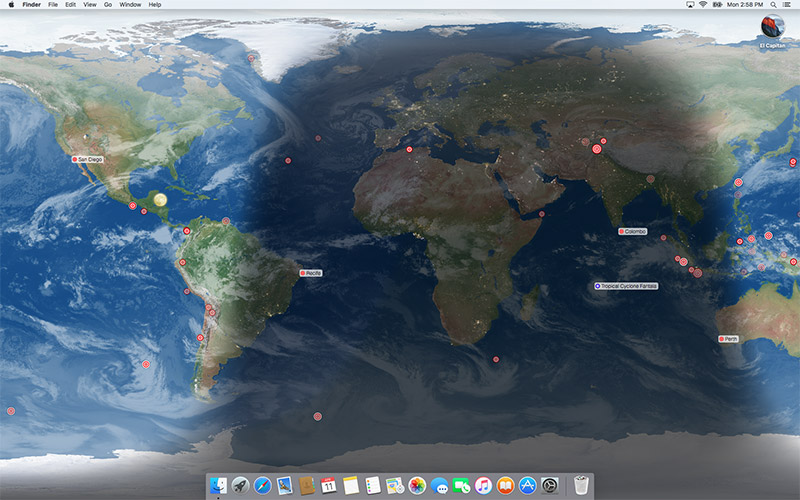
EarthDesk replaces your static desktop with an image of the Earth showing current sun, moon and city illumination, as well as near real-time cloud coverage. The software allows users to purchase an optional data subscription that offers the new precision clouds with 16 times more detail than the standard cloud layer. In addition, this service displays real-time data including worldwide earthquakes, named storms (typhoons, hurricanes, etc.) and the position of the International Space Station.
The software operates silently in the background, keeping your desktop updated while you work. Unlike a screen saver, which only appears when your system is idle, EarthDesk's dynamic desktop is continuously displayed as your desktop background (and optionally as a screen saver on the Mac version).
System Requirements:
* Mac OS X 10.10 or later.
* Windows 7 or later.
Pricing and Availability:
Single user copies may be purchased for $24.99 (USD). Upgrades are available for $12.99 for licensed users of versions 5 and 6. A data subscription adds precision clouds, earthquakes, named storms and tracking of the International Space Station starting at $11.99 per year. Bundles that include EarthDesk and a discounted data subscription are available. For more details, please refer to our website.
Xeric Design: http://www.xericdesign.com
EarthDesk 7: http://www.xericdesign.com/earthdesk.php
Download EarthDesk: http://www.xericdesign.com/software/earthdesk.dmg
Purchase: http://www.xericdesign.com/earthdesk-buy.php
Screenshot: http://www.xericdesign.com/images/earthdesk/fullscreen.jpg
Application Icon: https://www.xericdesign.com/images/earthdesk/icon256-v7.png
Xeric Design, based in Incline Village, Nevada, is a leader in global time and mapping software. Its flagship product, EarthDesk, for both Macintosh and Windows, is enjoyed by users in more than 140 countries. Copyright (C) 2019 Xeric Design. All Rights Reserved. Apple, the Apple logo and Mac OS X are registered trademarks of Apple Inc. in the U.S. and/or other countries.
*******
Link To Article: https://prmac.com/release-id-83376.htm
*******
---------------------------------------------------------------------------------
Note that you can alter delivered distributions at any time.
Login to your account on prMac to alter your channel selection, or to opt-out at any time.
EarthDesk Adds New Satellite Cloud Imagery - Published on 04/16/19
Xeric Design has launched a beautiful new cloud image service for EarthDesk Data subscribers. The cloud image is now precisely geo-located and parallax-corrected, contains data from up to 23 satellites, and includes polar coverage. We have worked with the Space Science and Engineering Center's RealEarth project at the University of Wisconsin, Madison to bring this high-quality data feed to EarthDesk. Previously, only six satellites were used and the data did not extend to the poles.
Incline Village, Nevada - Xeric Design has launched a beautiful new cloud image service for EarthDesk Data subscribers. The cloud image is now precisely geo-located and parallax-corrected, contains data from up to 23 satellites, and includes polar coverage. We have worked with the Space Science and Engineering Center's RealEarth project at the University of Wisconsin, Madison to bring this high-quality data feed to EarthDesk. Previously, only six satellites were used and the data did not extend to the poles.
EarthDesk replaces your static desktop with an image of the Earth showing current sun, moon and city illumination, as well as near real-time cloud coverage. The software allows users to purchase an optional data subscription that offers the new precision clouds with 16 times more detail than the standard cloud layer. In addition, this service displays real-time data including worldwide earthquakes, named storms (typhoons, hurricanes, etc.) and the position of the International Space Station.
The software operates silently in the background, keeping your desktop updated while you work. Unlike a screen saver, which only appears when your system is idle, EarthDesk's dynamic desktop is continuously displayed as your desktop background (and optionally as a screen saver on the Mac version).
System Requirements:
* Mac OS X 10.10 or later.
* Windows 7 or later.
Pricing and Availability:
Single user copies may be purchased for $24.99 (USD). Upgrades are available for $12.99 for licensed users of versions 5 and 6. A data subscription adds precision clouds, earthquakes, named storms and tracking of the International Space Station starting at $11.99 per year. Bundles that include EarthDesk and a discounted data subscription are available. For more details, please refer to our website.
Xeric Design: http://www.xericdesign.com
EarthDesk 7: http://www.xericdesign.com/earthdesk.php
Download EarthDesk: http://www.xericdesign.com/software/earthdesk.dmg
Purchase: http://www.xericdesign.com/earthdesk-buy.php
Screenshot: http://www.xericdesign.com/images/earthdesk/fullscreen.jpg
Application Icon: https://www.xericdesign.com/images/earthdesk/icon256-v7.png

Xeric Design, based in Incline Village, Nevada, is a leader in global time and mapping software. Its flagship product, EarthDesk, for both Macintosh and Windows, is enjoyed by users in more than 140 countries. Copyright (C) 2019 Xeric Design. All Rights Reserved. Apple, the Apple logo and Mac OS X are registered trademarks of Apple Inc. in the U.S. and/or other countries.
*******
Link To Article: https://prmac.com/release-id-83376.htm
*******
---------------------------------------------------------------------------------
Note that you can alter delivered distributions at any time.
Login to your account on prMac to alter your channel selection, or to opt-out at any time.
Share your iPhone or iPad display wirelessly on your computer
A new article has been published at prMac.
Share your iPhone or iPad display wirelessly on your computer - Published on 04/15/19
AirBeamTV today presents Mirror for Mac or Windows PC 3.3.1, an update to their popular wireless presentation app for iOS devices. A must-have app for anyone who gives presentations, Mirror for Mac or Windows PC gives every iPhone or iPad owner an easy and effective way to mirror the display of their phone or tablet on a Mac or PC. It's a perfect solution for any classroom or training environment. Version 3.3.1 offers bugfixes and stability improvements.
Naarden, Netherlands - Today, AirBeamTV presents the new app "Mirror for Mac or Windows PC". With this app every iPhone or iPad owner can mirror the display of their phone or tablet on a Mac or PC.
Wireless phone screen sharing:
The idea for the app arose from the demand of app developers and other professionals who could not find an easy wireless alternative for presenting the content of their phone. "Nowadays it is common practice to connect your computer with a cable to a projector or large TV screen during presentations or demonstrations. Our new app makes it possible to share your phone screen with the same setup without the need of an AppleTV or additional cables," says Jan van Ottele, CEO of AirBeamTV.
Ideal classroom solution:
In addition, according to Van Ottele, the app is excellent to use in a classroom or training environment. "Especially when teaching at external locations, it is usually not practically organized in terms of technology and you are dependent on the computer systems present. However, with our app you can always share videos, photos and apps from your own phone, as long as the computer or screen you are viewing them is connected to the internet and has the free Chrome browser."
Device Requirements:
* iPhone, iPad, and iPod touch
* Requires iOS 12.0 or later
* 124 MB
Pricing and Availability:
Mirror for Mac or Windows PC 3.3.1 is free to download in the App Store. Users can test the app free before upgrading to the paid version ($4.99 in the US App Store). The premium version has no time limits for mirroring and supports lifetime updates. For both the free and the paid version, everyone can count on fast and free customer service.
Mirror for Mac or Windows PC 3.3.1: https://www.airbeam.tv/mirror-iphone-ipad-screen/mac-windows/
Download from the App Store: https://itunes.apple.com/app/mirror-to-mac-or-windows-pc/id1350663974
YouTube Video: https://www.youtube.com/watch?v=Fzn2sTJEFYM
Media Assets: https://www.dropbox.com/sh/8ax8pfhegyiddek/AACdb7rcifregdERcMoW21wka?dl=0
Since 2014, AirBeamTV is the market leader in easy and smart "screen mirorring" solutions for Apple's iOS and MacOS devices such as iPhones and MacBooks. The company sells screen mirroring applications for most major TV brands, including Samsung, LG, Sony, Panasonic, Philips, Roku and many more. From the picturesque village of Naarden, The Netherlands, a diverse and motivated team of programmers works daily on developing and improving innovative apps. All Material and Software (C) Copyright 2014-2018 AirBeamTV. All Rights Reserved. Apple, the Apple logo, macOS, iPhone, iPad, iPod and Macintosh are registered trademarks of Apple Inc. in the U.S. and/or other countries. Other trademarks and registered trademarks may be the property of their respective owners.
*******
Link To Article: https://prmac.com/release-id-83375.htm
*******
---------------------------------------------------------------------------------
Note that you can alter delivered distributions at any time.
Login to your account on prMac to alter your channel selection, or to opt-out at any time.
Share your iPhone or iPad display wirelessly on your computer - Published on 04/15/19
AirBeamTV today presents Mirror for Mac or Windows PC 3.3.1, an update to their popular wireless presentation app for iOS devices. A must-have app for anyone who gives presentations, Mirror for Mac or Windows PC gives every iPhone or iPad owner an easy and effective way to mirror the display of their phone or tablet on a Mac or PC. It's a perfect solution for any classroom or training environment. Version 3.3.1 offers bugfixes and stability improvements.
Naarden, Netherlands - Today, AirBeamTV presents the new app "Mirror for Mac or Windows PC". With this app every iPhone or iPad owner can mirror the display of their phone or tablet on a Mac or PC.
Wireless phone screen sharing:
The idea for the app arose from the demand of app developers and other professionals who could not find an easy wireless alternative for presenting the content of their phone. "Nowadays it is common practice to connect your computer with a cable to a projector or large TV screen during presentations or demonstrations. Our new app makes it possible to share your phone screen with the same setup without the need of an AppleTV or additional cables," says Jan van Ottele, CEO of AirBeamTV.
Ideal classroom solution:
In addition, according to Van Ottele, the app is excellent to use in a classroom or training environment. "Especially when teaching at external locations, it is usually not practically organized in terms of technology and you are dependent on the computer systems present. However, with our app you can always share videos, photos and apps from your own phone, as long as the computer or screen you are viewing them is connected to the internet and has the free Chrome browser."
Device Requirements:
* iPhone, iPad, and iPod touch
* Requires iOS 12.0 or later
* 124 MB
Pricing and Availability:
Mirror for Mac or Windows PC 3.3.1 is free to download in the App Store. Users can test the app free before upgrading to the paid version ($4.99 in the US App Store). The premium version has no time limits for mirroring and supports lifetime updates. For both the free and the paid version, everyone can count on fast and free customer service.
Mirror for Mac or Windows PC 3.3.1: https://www.airbeam.tv/mirror-iphone-ipad-screen/mac-windows/
Download from the App Store: https://itunes.apple.com/app/mirror-to-mac-or-windows-pc/id1350663974
YouTube Video: https://www.youtube.com/watch?v=Fzn2sTJEFYM
Media Assets: https://www.dropbox.com/sh/8ax8pfhegyiddek/AACdb7rcifregdERcMoW21wka?dl=0
Since 2014, AirBeamTV is the market leader in easy and smart "screen mirorring" solutions for Apple's iOS and MacOS devices such as iPhones and MacBooks. The company sells screen mirroring applications for most major TV brands, including Samsung, LG, Sony, Panasonic, Philips, Roku and many more. From the picturesque village of Naarden, The Netherlands, a diverse and motivated team of programmers works daily on developing and improving innovative apps. All Material and Software (C) Copyright 2014-2018 AirBeamTV. All Rights Reserved. Apple, the Apple logo, macOS, iPhone, iPad, iPod and Macintosh are registered trademarks of Apple Inc. in the U.S. and/or other countries. Other trademarks and registered trademarks may be the property of their respective owners.
*******
Link To Article: https://prmac.com/release-id-83375.htm
*******
---------------------------------------------------------------------------------
Note that you can alter delivered distributions at any time.
Login to your account on prMac to alter your channel selection, or to opt-out at any time.
GraphicConverter 10.7 Adds Dehaze Batch Action, New JPEG Convert Service
A new article has been published at prMac.
GraphicConverter 10.7 Adds Dehaze Batch Action, New JPEG Convert Service - Published on 04/15/19
German indie development team Lemke Software GmbH today announces GraphicConverter 10.7, an important update to their award-winning image editing utility for macOS. The app offers users the ability to convert most any format graphic file to one of nearly 80 other graphic formats. Version 10.7 brings a dehaze batch action, the ability to sort by rating and aspect ratio as well as resolution and pixel size, converting to JPEG at 75 or 85 percent, and much more.
Peine, Germany - Independent developer, Lemke Software GmbH today is proud to announce the release and immediate availability of GraphicConverter 10.7, an important update to their popular image editing utility for macOS. The utility has become known as the "Swiss Army Knife" of image editing applications, and allows users to convert any of over 200 graphic file formats into any of almost 80 other graphic formats.
GraphicConverter's 1.5 million users around the globe will appreciate the new features version 10.7 brings to the app. New features include a dehaze batch action, a new service to convert JPEG files to 75 or 85 percent, the ability to import exported LR keywords into the keyword palette, and much, much more.
"GraphicConverter has long been one of the most popular image editing utilities available for the Mac," says Thorsten Lemke, founder of Lemke Software GmbH. "This new version builds on GraphicConverter's already great feature set, providing both new and improved features for our users."
New Features Include:
* Browser context menu: append path to iptc caption
* Offset GPS date/time stamp command
* Dehaze batch action
* Clear of keyword palette
* Import of exported LR keywords into keyword palette
* Sort by rating & aspect ratio and resolution & pixel size added
* Sort folders separate
* A new service: convert to JPEG at 75 or 85 percent
* Sliders in dialogs moveable by scrollwheel
* Image context menu entry for animation: save frames as separate GIFs/PNGs
* Browser context menu: copy exif date to other metadata dates
GraphicConverter has long been one of the most respected image utility tools available for the Mac. Apple was even impressed enough to have included GraphicConverter as a default app on many of their Mac models.
While Lemke Software added several great new features to version 10.7, the improvements didn't stop there, as the new version also offers considerable improvements to the app's previous features.
Feature Improvements Include:
* Display of autofocus point of some FUJI cameras
* Open with application will be called with all selected files at once (macOS 10.10 or later)
* Option to disable slideshow effects on 10.13.x or earlier
* Option to disable display of zoom during slideshow zoom
* Find duplicate resolves aliases and symlinks
* Improved ratio display in browser
* Localizations
As always, GraphicConverter 10.7 is the best way available on the Mac to capture, import, convert, and export images. The app also offers power image editing and slideshow capabilities, and provides color management profiles, 3D image support and much more.
Feature Include:
* Ability to open files in 200 graphics formats
* Ability to export to almost 80 different formats
* Import directly from camera (also RAW)
* Catalog generation (web, print, picture)
* TWAIN and image capture interface for scanners
* Direct support of the photo services Flickr and locr
* Graphical file and picture browser
* Slide show functions
* Powerful batch processor feature
* Support for Applescript
* Express picture enhancement function
* Powerful functions for editing pictures
* Advanced effects and filters
* Plug-in architecture
* Color management with ColorSync and ICC profiles
* 3D image support
* Supports the latest technologies of the different Mac OS versions
* Multilingual (12 available languages)
* Image verifier
* Ability to browse local copies on cloud services like Dropbox, SkyDrive, Amazon Cloud and Google Drive
"We've made GraphicConverter 10.7 easier to use than ever, thanks to the informative tutorial videos we've posted on out YouTube page," continues Thorsten. "Users who would like to try GraphicConverter to make sure it fits their needs can download a trial version and follow along with the video tutorials. Plus, version 10.7 is a totally free update to any version 10.x customers."
GraphicConverter 10.7 provides the best way to capture, import, convert, and export images on the Mac. The utility's graphic conversion features alone are worth the price of the app. Users are encouraged to try GraphicConverter today.
System Requirements:
* Requires OS X 10.9 or higher
* 64-bit processor
* 145 MB
Pricing/Availability:
GraphicConverter 10.7 is only $39.95 USD (or an equivalent amount in other currencies) and is available worldwide through the Mac App Store in the Photography category. It can also be directly purchased online from the Lemkesoft website. GraphicConverter 10.7 is a free update for all customers of version 10.x. Upgrades from older versions of GraphicConverter are available for $25.95 USD.
Lemke Software: https://www.lemkesoft.de/en/image-editing-slideshow-browser-batch-conversion-metadata-and-more-on-your-mac/
GraphicConverter 10.7: https://www.lemkesoft.de/en/products/graphicconverter/
Download GraphicConverter: https://www.lemkesoft.de/en/products/graphicconverter/download/
Purchase: https://www.lemkesoft.de/en/order/
Purchase and Download (MAS): https://itunes.apple.com/app/graphicconverter-10/id1090470302
YouTube Channel (Tutorial Videos): https://www.youtube.com/channel/UCAtl9qcyQ3-hxhYnSCkbZ7Q
Based in Peine, Germany, Lemke Software GmbH is a developer and publisher of Macintosh software. Founded by Thorsten Lemke in 2002, the main focus and passion of Lemke Software is centered on the maintenance and further development of GraphicConverter. Lemke Software also develops individual solutions for special customer requirements. All Material and Software (C) Copyright 2019 Lemke Software GmbH. All Rights Reserved. Apple, the Apple logo, Macintosh Mac OS X, and macOS are registered trademarks of Apple Inc. in the U.S. and/or other countries. Other trademarks and registered trademarks may be the property of their respective owners.
*******
Link To Article: https://prmac.com/release-id-83374.htm
*******
---------------------------------------------------------------------------------
Note that you can alter delivered distributions at any time.
Login to your account on prMac to alter your channel selection, or to opt-out at any time.
GraphicConverter 10.7 Adds Dehaze Batch Action, New JPEG Convert Service - Published on 04/15/19
German indie development team Lemke Software GmbH today announces GraphicConverter 10.7, an important update to their award-winning image editing utility for macOS. The app offers users the ability to convert most any format graphic file to one of nearly 80 other graphic formats. Version 10.7 brings a dehaze batch action, the ability to sort by rating and aspect ratio as well as resolution and pixel size, converting to JPEG at 75 or 85 percent, and much more.
Peine, Germany - Independent developer, Lemke Software GmbH today is proud to announce the release and immediate availability of GraphicConverter 10.7, an important update to their popular image editing utility for macOS. The utility has become known as the "Swiss Army Knife" of image editing applications, and allows users to convert any of over 200 graphic file formats into any of almost 80 other graphic formats.
GraphicConverter's 1.5 million users around the globe will appreciate the new features version 10.7 brings to the app. New features include a dehaze batch action, a new service to convert JPEG files to 75 or 85 percent, the ability to import exported LR keywords into the keyword palette, and much, much more.
"GraphicConverter has long been one of the most popular image editing utilities available for the Mac," says Thorsten Lemke, founder of Lemke Software GmbH. "This new version builds on GraphicConverter's already great feature set, providing both new and improved features for our users."
New Features Include:
* Browser context menu: append path to iptc caption
* Offset GPS date/time stamp command
* Dehaze batch action
* Clear of keyword palette
* Import of exported LR keywords into keyword palette
* Sort by rating & aspect ratio and resolution & pixel size added
* Sort folders separate
* A new service: convert to JPEG at 75 or 85 percent
* Sliders in dialogs moveable by scrollwheel
* Image context menu entry for animation: save frames as separate GIFs/PNGs
* Browser context menu: copy exif date to other metadata dates
GraphicConverter has long been one of the most respected image utility tools available for the Mac. Apple was even impressed enough to have included GraphicConverter as a default app on many of their Mac models.
While Lemke Software added several great new features to version 10.7, the improvements didn't stop there, as the new version also offers considerable improvements to the app's previous features.
Feature Improvements Include:
* Display of autofocus point of some FUJI cameras
* Open with application will be called with all selected files at once (macOS 10.10 or later)
* Option to disable slideshow effects on 10.13.x or earlier
* Option to disable display of zoom during slideshow zoom
* Find duplicate resolves aliases and symlinks
* Improved ratio display in browser
* Localizations
As always, GraphicConverter 10.7 is the best way available on the Mac to capture, import, convert, and export images. The app also offers power image editing and slideshow capabilities, and provides color management profiles, 3D image support and much more.
Feature Include:
* Ability to open files in 200 graphics formats
* Ability to export to almost 80 different formats
* Import directly from camera (also RAW)
* Catalog generation (web, print, picture)
* TWAIN and image capture interface for scanners
* Direct support of the photo services Flickr and locr
* Graphical file and picture browser
* Slide show functions
* Powerful batch processor feature
* Support for Applescript
* Express picture enhancement function
* Powerful functions for editing pictures
* Advanced effects and filters
* Plug-in architecture
* Color management with ColorSync and ICC profiles
* 3D image support
* Supports the latest technologies of the different Mac OS versions
* Multilingual (12 available languages)
* Image verifier
* Ability to browse local copies on cloud services like Dropbox, SkyDrive, Amazon Cloud and Google Drive
"We've made GraphicConverter 10.7 easier to use than ever, thanks to the informative tutorial videos we've posted on out YouTube page," continues Thorsten. "Users who would like to try GraphicConverter to make sure it fits their needs can download a trial version and follow along with the video tutorials. Plus, version 10.7 is a totally free update to any version 10.x customers."
GraphicConverter 10.7 provides the best way to capture, import, convert, and export images on the Mac. The utility's graphic conversion features alone are worth the price of the app. Users are encouraged to try GraphicConverter today.
System Requirements:
* Requires OS X 10.9 or higher
* 64-bit processor
* 145 MB
Pricing/Availability:
GraphicConverter 10.7 is only $39.95 USD (or an equivalent amount in other currencies) and is available worldwide through the Mac App Store in the Photography category. It can also be directly purchased online from the Lemkesoft website. GraphicConverter 10.7 is a free update for all customers of version 10.x. Upgrades from older versions of GraphicConverter are available for $25.95 USD.
Lemke Software: https://www.lemkesoft.de/en/image-editing-slideshow-browser-batch-conversion-metadata-and-more-on-your-mac/
GraphicConverter 10.7: https://www.lemkesoft.de/en/products/graphicconverter/
Download GraphicConverter: https://www.lemkesoft.de/en/products/graphicconverter/download/
Purchase: https://www.lemkesoft.de/en/order/
Purchase and Download (MAS): https://itunes.apple.com/app/graphicconverter-10/id1090470302
YouTube Channel (Tutorial Videos): https://www.youtube.com/channel/UCAtl9qcyQ3-hxhYnSCkbZ7Q
Based in Peine, Germany, Lemke Software GmbH is a developer and publisher of Macintosh software. Founded by Thorsten Lemke in 2002, the main focus and passion of Lemke Software is centered on the maintenance and further development of GraphicConverter. Lemke Software also develops individual solutions for special customer requirements. All Material and Software (C) Copyright 2019 Lemke Software GmbH. All Rights Reserved. Apple, the Apple logo, Macintosh Mac OS X, and macOS are registered trademarks of Apple Inc. in the U.S. and/or other countries. Other trademarks and registered trademarks may be the property of their respective owners.
*******
Link To Article: https://prmac.com/release-id-83374.htm
*******
---------------------------------------------------------------------------------
Note that you can alter delivered distributions at any time.
Login to your account on prMac to alter your channel selection, or to opt-out at any time.
School ID Now Supports Suicide Lifelines
A new article has been published at prMac.
School ID Now Supports Suicide Lifelines - Published on 04/11/19
California based Good School Tools today announced School ID Cards and Photos 4.0.0, an important update to their popular educational app for iOS devices. With this useful app, individual student IDs are distributed directly to the student's phone. There is no need to print cards or rely on students to carry them. Mug-books are created and displayed on the phone. Immediately find a group of students by name, gender, and grade. Version 4.0 now includes Suicide Lifelines and more.
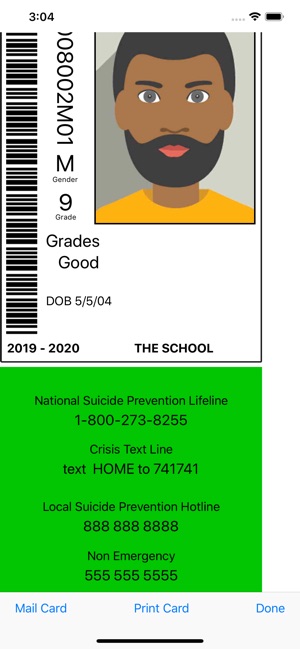
San Diego, California - Good School Tools announced today that School ID Cards and Photos version 4.0.0, will include information on every student ID for the National and Local Suicide Prevention Hotlines, the Crisis Text Line, and Campus Police.
Governor Brown of California signed SB 972 (authored by Senator Anthony Portantino) into law in September 2018 to address the increase of student suicides by mandating Suicide Lifeline information be included on every student ID card. This law goes into effect July 1, 2019. Good School Tools has responded by putting the mandated National and Local Suicide Prevention Hotline numbers on every ID card. Good School Tools also includes the Crisis Text Line number and local Campus Police contact information.
Tim Walton of Good School Tools said: "We are appalled by the increase in teen suicides. School ID provides the perfect means to impact this problem by providing IDs right on a student's smart phone. We hope students will take advantage of the hotline and crisis information available right on their phones to reach out to the help they need. School ID is already in use in Los Angeles and NYC schools. We are aware that other states have begun legislation to require student IDs and to include Lifeline information on those IDs. School ID is priced at $199/yr/school so that as many schools as possible can benefit from the use of the app. We have also partnered with a number of school photographers who provide student photo IDs as a part of their normal services. We hope to see more partnerships evolve so that we may help safeguard our students."
Device Requirements:
* iPhone 5s or later and iPod touch
* iPad 5th generation or later
* Requires iOS 11.0 or later
* 16.3 MB
Pricing and Availability:
Apps are Free (With In-App Subscription Purchase options) and available exclusively through the App Store in the Education category. For more information, please contact Tim Walton.
Good School Tools: http://www.goodschooltools.com
School ID Cards and Photos .4.0.0: http://www.goodschooltools.com/Tools/SchoolID/
Download from App Store: https://itunes.apple.com/app/school-id-cards-and-photos/id362528188
Screenshot: https://is2-ssl.mzstatic.com/image/thumb/Purple123/v4/aa/7b/13/aa7b13f0-74e5-b7f5-643d-7554b43e9d8d/pr_source.png/300x0w.jpg
App Icon: https://is5-ssl.mzstatic.com/image/thumb/Purple113/v4/ab/83/c4/ab83c451-c307-98e8-a9a8-24db497a2f00/IDIcon-0-1x_U007emarketing-0-0-GLES2_U002c0-512MB-sRGB-0-0-0-85-220-0-0-0-7.png/246x0w.jpg
San Diego based Good School Tools, previously operating as TrueIDApps and School ID, has been providing Southern California school districts with mobile apps for administering students during normal and emergency conditions for nearly 15 years. Their flagship product, GSTools provides a suite of mobile apps which streamline the administrators' job around school by providing critical student information, including photos, right on the administrators' iPhone or iPad. GSTools integrates with most SISs. Good School Tools other tools take information exported from SIS systems to provide administrators additional capabilities to run the schools more efficiently. All Material and Software (C) Copyright 2019 Good School Tools. All Rights Reserved. Apple, the Apple logo, iPhone, iPod and iPad are registered trademarks of Apple Inc. in the U.S. and/or other countries. Other trademarks and registered trademarks may be the property of their respective owners.
*******
Link To Article: https://prmac.com/release-id-83372.htm
*******
---------------------------------------------------------------------------------
Note that you can alter delivered distributions at any time.
Login to your account on prMac to alter your channel selection, or to opt-out at any time.
School ID Now Supports Suicide Lifelines - Published on 04/11/19
California based Good School Tools today announced School ID Cards and Photos 4.0.0, an important update to their popular educational app for iOS devices. With this useful app, individual student IDs are distributed directly to the student's phone. There is no need to print cards or rely on students to carry them. Mug-books are created and displayed on the phone. Immediately find a group of students by name, gender, and grade. Version 4.0 now includes Suicide Lifelines and more.
San Diego, California - Good School Tools announced today that School ID Cards and Photos version 4.0.0, will include information on every student ID for the National and Local Suicide Prevention Hotlines, the Crisis Text Line, and Campus Police.
Governor Brown of California signed SB 972 (authored by Senator Anthony Portantino) into law in September 2018 to address the increase of student suicides by mandating Suicide Lifeline information be included on every student ID card. This law goes into effect July 1, 2019. Good School Tools has responded by putting the mandated National and Local Suicide Prevention Hotline numbers on every ID card. Good School Tools also includes the Crisis Text Line number and local Campus Police contact information.
Tim Walton of Good School Tools said: "We are appalled by the increase in teen suicides. School ID provides the perfect means to impact this problem by providing IDs right on a student's smart phone. We hope students will take advantage of the hotline and crisis information available right on their phones to reach out to the help they need. School ID is already in use in Los Angeles and NYC schools. We are aware that other states have begun legislation to require student IDs and to include Lifeline information on those IDs. School ID is priced at $199/yr/school so that as many schools as possible can benefit from the use of the app. We have also partnered with a number of school photographers who provide student photo IDs as a part of their normal services. We hope to see more partnerships evolve so that we may help safeguard our students."
Device Requirements:
* iPhone 5s or later and iPod touch
* iPad 5th generation or later
* Requires iOS 11.0 or later
* 16.3 MB
Pricing and Availability:
Apps are Free (With In-App Subscription Purchase options) and available exclusively through the App Store in the Education category. For more information, please contact Tim Walton.
Good School Tools: http://www.goodschooltools.com
School ID Cards and Photos .4.0.0: http://www.goodschooltools.com/Tools/SchoolID/
Download from App Store: https://itunes.apple.com/app/school-id-cards-and-photos/id362528188
Screenshot: https://is2-ssl.mzstatic.com/image/thumb/Purple123/v4/aa/7b/13/aa7b13f0-74e5-b7f5-643d-7554b43e9d8d/pr_source.png/300x0w.jpg
App Icon: https://is5-ssl.mzstatic.com/image/thumb/Purple113/v4/ab/83/c4/ab83c451-c307-98e8-a9a8-24db497a2f00/IDIcon-0-1x_U007emarketing-0-0-GLES2_U002c0-512MB-sRGB-0-0-0-85-220-0-0-0-7.png/246x0w.jpg
San Diego based Good School Tools, previously operating as TrueIDApps and School ID, has been providing Southern California school districts with mobile apps for administering students during normal and emergency conditions for nearly 15 years. Their flagship product, GSTools provides a suite of mobile apps which streamline the administrators' job around school by providing critical student information, including photos, right on the administrators' iPhone or iPad. GSTools integrates with most SISs. Good School Tools other tools take information exported from SIS systems to provide administrators additional capabilities to run the schools more efficiently. All Material and Software (C) Copyright 2019 Good School Tools. All Rights Reserved. Apple, the Apple logo, iPhone, iPod and iPad are registered trademarks of Apple Inc. in the U.S. and/or other countries. Other trademarks and registered trademarks may be the property of their respective owners.
*******
Link To Article: https://prmac.com/release-id-83372.htm
*******
---------------------------------------------------------------------------------
Note that you can alter delivered distributions at any time.
Login to your account on prMac to alter your channel selection, or to opt-out at any time.
Subscribe to:
Posts (Atom)