A new article has been published at prMac.
Station 2.6 - Multilevel Dock for macOS - Published on 04/25/19
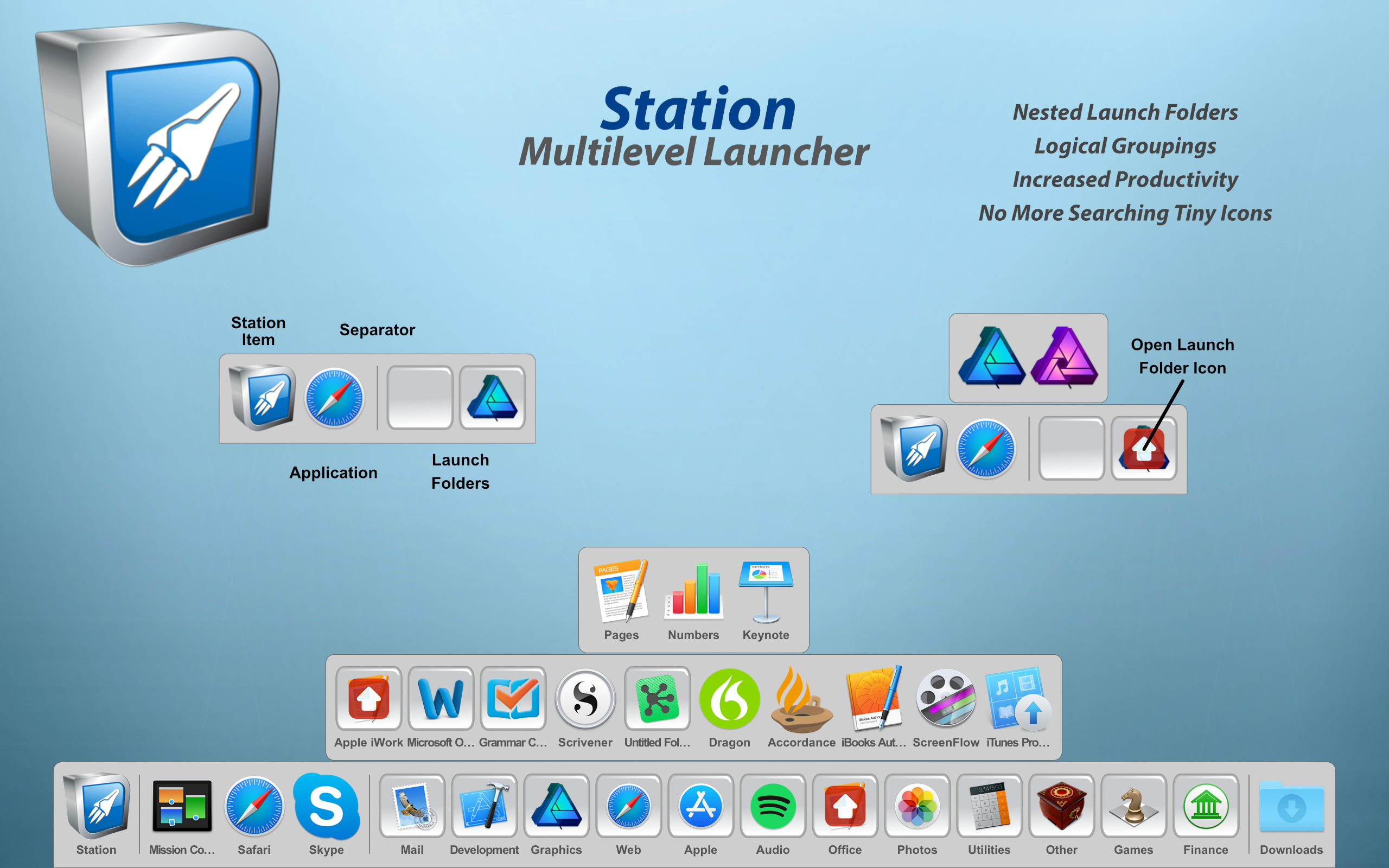
True North Software today introduces Station 2.6, their multilevel (hierarchical) launcher for macOS. Station promotes a more natural organization of applications and documents into folders. With nested folders, you can arrange items in Station in a way that fits your workflow with an uncluttered look and feel. Scalability is greatly increased through logical groupings thus increasing the sheer number of items that can be added to Station without having to shrink the launcher size.
Rockford, Minnesota - True North Software today is very proud to announce the release of Station 2.6, the company's multilevel (hierarchical) launcher for macOS. Station promotes a more natural organization of applications and documents into folders. With nested folders, you can arrange items in Station in a way that fits your workflow with an uncluttered look and feel. Scalability is greatly increased through logical groupings thus increasing the sheer number of items that can be added to Station without having to shrink the launcher size.
Productivity is increased because related items can be grouped together into a single folder. For example, one folder can contain work related items and another folder gaming items. Another useful feature of Station is the ability to launch, all at once, the items in a launch folder. This is useful when switching between tasks like business and spreadsheets to graphics work. With ten levels of folders available, enough space is provided to spread out even the most diverse set of applications and documents.
Station has been quickly evolving through new features and enhancements over the past several releases and version 2.6 continues that growth. Many customers looking for an alternative for DragThing have found a new home with Station.
What's New for Version 2.6:
New Features:
* Bookmark files (Finder aliases) are supported
* Web URLs from programs like Safari are supported
* Dropping files on a Finder folder in Station will now move or copy the files to the actual Finder folder
* Added a utility menu item to delete all items in the current panel set
Enhancements:
* Enhancements to file resolution
* Bug fixes
System Requirements:
* Requires macOS 10.11 or higher
* 64-bit processor
* 19.9 MB
Pricing and Availability:
Station 2.6 is priced at $14.99 (USD) and is available through the Mac App Store in the Productivity category. A demo version is available from the True North Website. For more information, please contact Brendan Murphy.
True North Software: http://www.truenorthsoftware.com
Station 2.6: http://www.truenorthsoftware.com/station/
Purchase and Download (MAS): https://itunes.apple.com/app/station/id1126126612
Screenshot: http://www.truenorthsoftware.com/resources/station_2-6_screenshot.png
Application Icon: http://www.truenorthsoftware.com/resources/StationIcon.png
Located in Rockford, Minnesota/USA, True North Software, founded in 2003, provides design solutions for Apple platforms. With a passion for Apple technologies, our focus is to provide real world solutions that make a difference in the lives of people. All Material and Software (C) 2003-2019 True North Software / All Rights Reserved. Apple, the Apple logo, macOS, iPhone, iPod and iPad are registered trademarks of Apple Inc. in the U.S. and/or other countries. Other trademarks and registered trademarks may be the property of their respective owners.
*******
Link To Article: https://prmac.com/release-id-83391.htm
*******
---------------------------------------------------------------------------------
Note that you can alter delivered distributions at any time.
Login to your account on prMac to alter your channel selection, or to opt-out at any time.


DEVONthink 3.0 Public Beta is available
A new article has been published at prMac.
DEVONthink 3.0 Public Beta is available - Published on 04/25/19
DEVONtechnologies releases the first public beta of DEVONthink 3.0 for Mac. The smart information manager receives an interface overhaul. It comes with dark mode, an extended search language, and a new menu extra for capturing notes. Version 3.0 also adds custom metadata and tables with form views. Office users can add imprints to PDFs and images, use the improved OCR engine, and share databases via the new web interface. Smart rules and reminders make DEVONthink 3 easier to automate than ever.
Coeur d'Alene, Idaho - DEVONtechnologies today releases the first public beta of DEVONthink 3.0 for Mac. The popular smart document and information manager receives a complete user interface overhaul. It now comes with support for dark mode, an extended search language, and a new menu extra for capturing notes and more. Version 3.0 also adds custom metadata and tables with typed data and form views. Office users can add imprints to PDFs and images, use the improved OCR engine, and share databases via the rewritten web interface. Smart rules and reminders make DEVONthink 3 easier to automate than ever before.
DEVONthink is DEVONtechnologies' document and information management solution. It supports a large variety of file formats and stores them in a database enhanced by artificial intelligence (AI). Many document formats can be directly viewed, edited, and annotated. A powerful search language finds documents in an instant, smart groups keep them always at hand.
Sophisticated organization tools, AI-based techniques that handle even the largest collections, and numerous integration options make DEVONthink the work environment of choice for researchers, lawyers, and educators. Smart rules, flexible reminders, and deep AppleScript support allow automating even complex repeating tasks. And with its fast, reliable, and secure synchronization users keep their data available on all their Macs. DEVONthink To Go for iPad and iPhone completes the DEVONthink ecosystem.
* Keep your data together in one place
* Scan your paper, archive your email
* Let artificial intelligence help you organize your data
* Automate tasks with smart rules and reminders
* Sync your data to all your devices, fast and secure
* Share your data with anyone, whether they use Mac or PC
New in DEVONthink 3.0:
The long-awaited third DEVONthink generation debuts, quite literally, hundreds of new features and improvements.
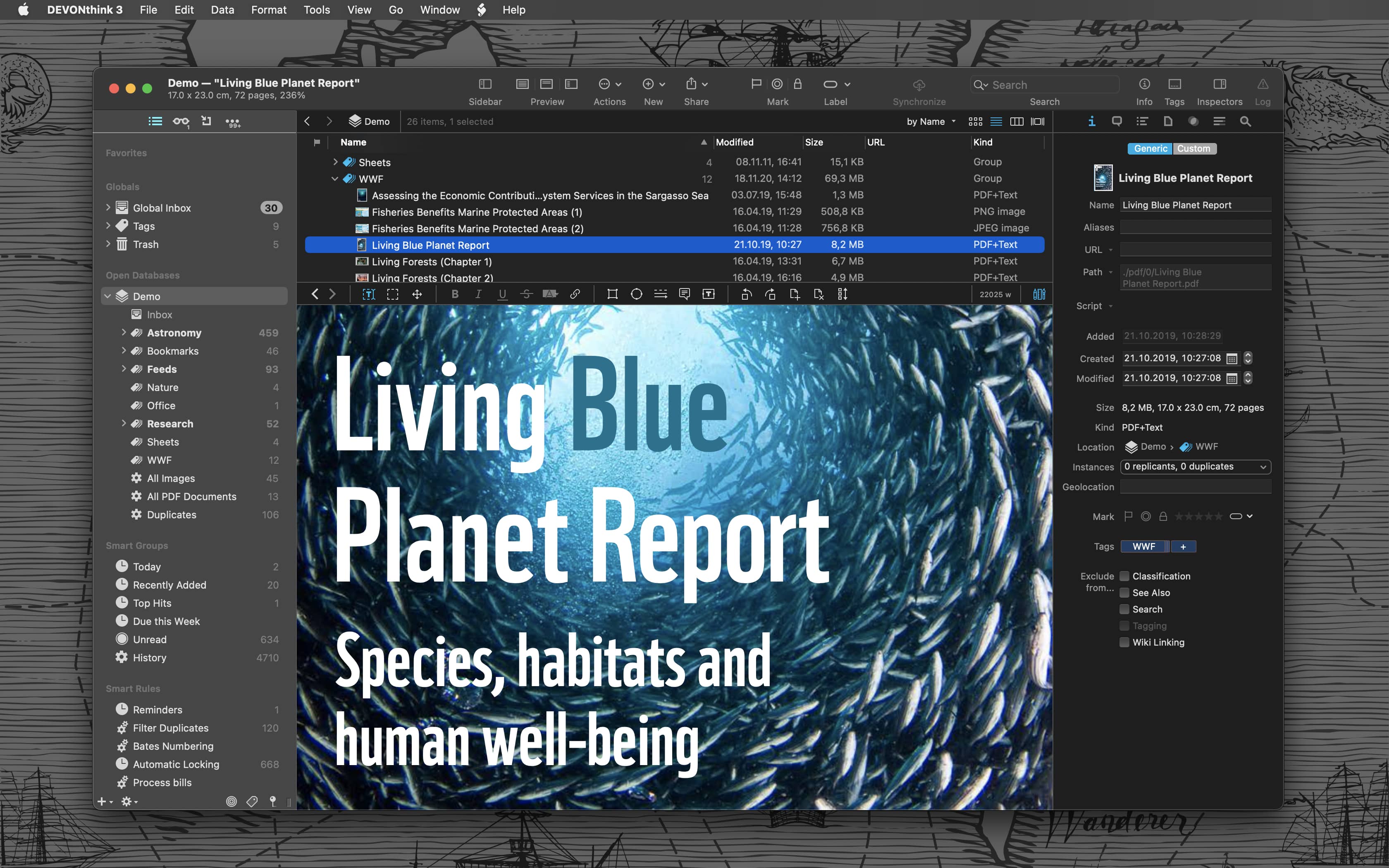
As the most obvious change, DEVONthink 3.0 brings a completely overhauled user interface including support for macOS Mojave's dark mode. It follows a modern single-window design that integrates many elements that used to appear in separate windows.
An extended sidebar gives access to databases, favorites, smart groups, smart rules, and filters as well as to a new reading list, import options, and more. Inspectors present metadata about documents and groups, offer AI assistance, and let the user set reminders or search within the document.
"DEVONthink 3 is the most feature-rich upgrade we have ever published. For the new DEVONthink generation we revisited every aspect of the app, from the user interface to search, from the office functionality to automation. And we added what we found missing," comments Eric Bohnisch-Volkmann, President of DEVONtechnologies.
Capturing text, audio, and voice notes, screenshots, or web clippings becomes much easier with the redesigned Sorter. It also allows finding groups in all open databases for adding files or data from other apps via drag-and-drop. The Sorter is available as a menu bar extension or a tab docked to the side of the screen.
More subtle are the numerous changes to the search engine which now better supports Asian languages, indexes also PDF and RTF attachments, and highlights search hits more precisely. Its enhanced search language allows prefixes for mouse-less specific searching, and filters quickly focus the displayed items on tags, dates, marks, or geolocation.
For the office environment DEVONthink 3 brings a new 64-bit optimized OCR engine that supports multiple CPU cores, Asian languages, barcode detection, and multiple output formats. It's now possible to add custom imprints to images and PDFs including placeholder text and Bates numbering.
The rewritten web interface gives coworkers or clients access to the document databases even when they're not using a Mac. User accounts and per-database permissions give fine-grained control over what web visitors see and can do. TLS support makes sure all connections are encrypted.
Other improvements include geolocation metadata, ratings, and custom, typed metadata that can be added to all documents and that is, of course, searchable. When importing documents metadata can be converted to tags, and images can be automatically tagged using machine learning.
Markdown and HTML documents can be edited side-by-side with a rendered preview, sheets with tabular data support specific data types and have a form view. Formatting and editing bars keep frequently used tools at hand and adding cross-references has become more versatile with improved WikiLinking and support for the square bracked syntax. DEVONthink 3 now also supports EPUB ebooks and, useful for research, collects highlighted search hits and metadata into summary documents.
Last but not least, DEVONthink 3 massively extends its automation options. Smart rules perform actions based on events and search queries, where events can be anything from a scheduled time to the arrival of a newly imported document. Users can also attach one-time or repeating reminders to any document. They support several alarm options including running scripts. Placeholders insert dynamic data in templates, imprints, or smart rules without requiring any programming skills.
"We have always believed in enabling the computer to free up the user's time for what's really important. DEVONthink 3 holds true to this tradition with new powerful but easy to use automation tools for every workflow. If it can't be automated with DEVONthink 3 then it probably can't be automated," says Eric Bohnisch-Volkmann, President of DEVONtechnologies.
Of course, DEVONthink 3 brings a large number of under-the-hood enhancements. To name just a few: better file system integration for indexed files, better background processing, e.g. for email archiving, indexing, or generating thumbnails, and an improved overall performance.
System Requirements:
* OS X El Capitan or later
Availability and Pricing:
DEVONthink 3 is available in three editions for different needs and budgets: regular, Pro, and Server. DEVONthink 3 can be downloaded for free from the DEVONtechnologies website. The public beta does not require a valid license key but to use email archiving and text recognition beyond the trial limits it needs to be properly licensed. After the public beta phase DEVONthink 3 will require a license key for one of the three available editions which can be purchased starting today:
* DEVONthink 3: US $99
* DEVONthink Pro 3: US $199
* DEVONthink Server 3: US $499
DEVONthink 3 is currently not available in the App Store but will become so after the public beta phase. The former DEVONthink Personal and DEVONnote editions have been retired.
More information:
Customers find more information about our apps on the DEVONtechnologies website. Eric Boehnisch-Volkmann also posts news, opinions, previews, and public betas in his blog Devonian Times.
DEVONthink 3.0: https://www.devontechnologies.com/redirect/devonthink
What's new in DEVONthink 3.0: https://www.devontechnologies.com/apps/devonthink/new
New Editions: https://www.devontechnologies.com/apps/devonthink/editions
More Info: http://www.devontechnologies.com/redirect/blog
Device Shot: https://www.devontechnologies.com/media/pages/press/archive/devonthink-30b1/1491622749-1556108429/packshot_devonthink_3_dark.png
Screenshot: https://www.devontechnologies.com/media/pages/apps/devonthink/1688504094-1556108428/blue_planet_dark.jpg
DEVONtechnologies LLC creates end-user and server applications for the Mac and iOS platforms that enhance productivity, organization, and user experience with unique artificial intelligence technology. All applications are focused on both ease of use and satisfying the needs of even the most savvy users. The underlying DEVONtechnology is a flexible and versatile foundation that can be used for a large range of purposes from databases, data mining, and information retrieval to human-computer interfaces. DEVONtechnologies LLC was founded 2002 and incorporated 2004, and is today headquartered in Coeur d'Alene, Idaho, USA. All Material and Software (C) Copyright 2019 DEVONtechnologies LLC. All Rights Reserved. Apple, the Apple logo, Macintosh and Mac OS X are registered trademarks of Apple Inc. in the U.S. and/or other countries. Other trademarks and registered trademarks may be the property of their respective owners.
*******
Link To Article: https://prmac.com/release-id-83390.htm
*******
---------------------------------------------------------------------------------
Note that you can alter delivered distributions at any time.
Login to your account on prMac to alter your channel selection, or to opt-out at any time.
DEVONthink 3.0 Public Beta is available - Published on 04/25/19
DEVONtechnologies releases the first public beta of DEVONthink 3.0 for Mac. The smart information manager receives an interface overhaul. It comes with dark mode, an extended search language, and a new menu extra for capturing notes. Version 3.0 also adds custom metadata and tables with form views. Office users can add imprints to PDFs and images, use the improved OCR engine, and share databases via the new web interface. Smart rules and reminders make DEVONthink 3 easier to automate than ever.
Coeur d'Alene, Idaho - DEVONtechnologies today releases the first public beta of DEVONthink 3.0 for Mac. The popular smart document and information manager receives a complete user interface overhaul. It now comes with support for dark mode, an extended search language, and a new menu extra for capturing notes and more. Version 3.0 also adds custom metadata and tables with typed data and form views. Office users can add imprints to PDFs and images, use the improved OCR engine, and share databases via the rewritten web interface. Smart rules and reminders make DEVONthink 3 easier to automate than ever before.
DEVONthink is DEVONtechnologies' document and information management solution. It supports a large variety of file formats and stores them in a database enhanced by artificial intelligence (AI). Many document formats can be directly viewed, edited, and annotated. A powerful search language finds documents in an instant, smart groups keep them always at hand.
Sophisticated organization tools, AI-based techniques that handle even the largest collections, and numerous integration options make DEVONthink the work environment of choice for researchers, lawyers, and educators. Smart rules, flexible reminders, and deep AppleScript support allow automating even complex repeating tasks. And with its fast, reliable, and secure synchronization users keep their data available on all their Macs. DEVONthink To Go for iPad and iPhone completes the DEVONthink ecosystem.
* Keep your data together in one place
* Scan your paper, archive your email
* Let artificial intelligence help you organize your data
* Automate tasks with smart rules and reminders
* Sync your data to all your devices, fast and secure
* Share your data with anyone, whether they use Mac or PC
New in DEVONthink 3.0:
The long-awaited third DEVONthink generation debuts, quite literally, hundreds of new features and improvements.
As the most obvious change, DEVONthink 3.0 brings a completely overhauled user interface including support for macOS Mojave's dark mode. It follows a modern single-window design that integrates many elements that used to appear in separate windows.
An extended sidebar gives access to databases, favorites, smart groups, smart rules, and filters as well as to a new reading list, import options, and more. Inspectors present metadata about documents and groups, offer AI assistance, and let the user set reminders or search within the document.
"DEVONthink 3 is the most feature-rich upgrade we have ever published. For the new DEVONthink generation we revisited every aspect of the app, from the user interface to search, from the office functionality to automation. And we added what we found missing," comments Eric Bohnisch-Volkmann, President of DEVONtechnologies.
Capturing text, audio, and voice notes, screenshots, or web clippings becomes much easier with the redesigned Sorter. It also allows finding groups in all open databases for adding files or data from other apps via drag-and-drop. The Sorter is available as a menu bar extension or a tab docked to the side of the screen.
More subtle are the numerous changes to the search engine which now better supports Asian languages, indexes also PDF and RTF attachments, and highlights search hits more precisely. Its enhanced search language allows prefixes for mouse-less specific searching, and filters quickly focus the displayed items on tags, dates, marks, or geolocation.
For the office environment DEVONthink 3 brings a new 64-bit optimized OCR engine that supports multiple CPU cores, Asian languages, barcode detection, and multiple output formats. It's now possible to add custom imprints to images and PDFs including placeholder text and Bates numbering.
The rewritten web interface gives coworkers or clients access to the document databases even when they're not using a Mac. User accounts and per-database permissions give fine-grained control over what web visitors see and can do. TLS support makes sure all connections are encrypted.
Other improvements include geolocation metadata, ratings, and custom, typed metadata that can be added to all documents and that is, of course, searchable. When importing documents metadata can be converted to tags, and images can be automatically tagged using machine learning.
Markdown and HTML documents can be edited side-by-side with a rendered preview, sheets with tabular data support specific data types and have a form view. Formatting and editing bars keep frequently used tools at hand and adding cross-references has become more versatile with improved WikiLinking and support for the square bracked syntax. DEVONthink 3 now also supports EPUB ebooks and, useful for research, collects highlighted search hits and metadata into summary documents.
Last but not least, DEVONthink 3 massively extends its automation options. Smart rules perform actions based on events and search queries, where events can be anything from a scheduled time to the arrival of a newly imported document. Users can also attach one-time or repeating reminders to any document. They support several alarm options including running scripts. Placeholders insert dynamic data in templates, imprints, or smart rules without requiring any programming skills.
"We have always believed in enabling the computer to free up the user's time for what's really important. DEVONthink 3 holds true to this tradition with new powerful but easy to use automation tools for every workflow. If it can't be automated with DEVONthink 3 then it probably can't be automated," says Eric Bohnisch-Volkmann, President of DEVONtechnologies.
Of course, DEVONthink 3 brings a large number of under-the-hood enhancements. To name just a few: better file system integration for indexed files, better background processing, e.g. for email archiving, indexing, or generating thumbnails, and an improved overall performance.
System Requirements:
* OS X El Capitan or later
Availability and Pricing:
DEVONthink 3 is available in three editions for different needs and budgets: regular, Pro, and Server. DEVONthink 3 can be downloaded for free from the DEVONtechnologies website. The public beta does not require a valid license key but to use email archiving and text recognition beyond the trial limits it needs to be properly licensed. After the public beta phase DEVONthink 3 will require a license key for one of the three available editions which can be purchased starting today:
* DEVONthink 3: US $99
* DEVONthink Pro 3: US $199
* DEVONthink Server 3: US $499
DEVONthink 3 is currently not available in the App Store but will become so after the public beta phase. The former DEVONthink Personal and DEVONnote editions have been retired.
More information:
Customers find more information about our apps on the DEVONtechnologies website. Eric Boehnisch-Volkmann also posts news, opinions, previews, and public betas in his blog Devonian Times.
DEVONthink 3.0: https://www.devontechnologies.com/redirect/devonthink
What's new in DEVONthink 3.0: https://www.devontechnologies.com/apps/devonthink/new
New Editions: https://www.devontechnologies.com/apps/devonthink/editions
More Info: http://www.devontechnologies.com/redirect/blog
Device Shot: https://www.devontechnologies.com/media/pages/press/archive/devonthink-30b1/1491622749-1556108429/packshot_devonthink_3_dark.png

Screenshot: https://www.devontechnologies.com/media/pages/apps/devonthink/1688504094-1556108428/blue_planet_dark.jpg
DEVONtechnologies LLC creates end-user and server applications for the Mac and iOS platforms that enhance productivity, organization, and user experience with unique artificial intelligence technology. All applications are focused on both ease of use and satisfying the needs of even the most savvy users. The underlying DEVONtechnology is a flexible and versatile foundation that can be used for a large range of purposes from databases, data mining, and information retrieval to human-computer interfaces. DEVONtechnologies LLC was founded 2002 and incorporated 2004, and is today headquartered in Coeur d'Alene, Idaho, USA. All Material and Software (C) Copyright 2019 DEVONtechnologies LLC. All Rights Reserved. Apple, the Apple logo, Macintosh and Mac OS X are registered trademarks of Apple Inc. in the U.S. and/or other countries. Other trademarks and registered trademarks may be the property of their respective owners.
*******
Link To Article: https://prmac.com/release-id-83390.htm
*******
---------------------------------------------------------------------------------
Note that you can alter delivered distributions at any time.
Login to your account on prMac to alter your channel selection, or to opt-out at any time.
ChronoAgent/Mac and ChronoMonitor/iOS Updates Now Available
A new article has been published at prMac.
ChronoAgent/Mac and ChronoMonitor/iOS Updates Now Available - Published on 04/25/19
Florida based Econ Technologies, Inc. today announced ChronoAgent 1.9.2, a maintenance update to their multipurpose app for local and cloud backup, bootable clone, and folder synchronizing. The ChronoSync / ChronoAgent combination allows you to synchronize files between two Macs, back up Macs to a Mac server, or even maintain a bootable backup over a network. Version 1.9.2 adds details to the console logs, improves concurrent file operations and much more.
Casselberry, Florida - ChronoAgent 1.9.2, the indispensable companion app to ChronoSync, is now available for download. This ChronoAgent maintenance release adds details to the console logs, improves concurrent file operations and takes advantage of the latest security features available. Several potential crashes were quashed as part of the suite of bug fixes and tweaks.
ChronoMonitor 1.1.3, the best tool to stand watch over your sync and backup performance, offers support for the latest iOS device sizes including iPhone X, Xr, Xs and Xs Max! There's a new Activity Graph showing separate metrics as well as numerous tweaks, refinements and bug fixes.
Owners of ChronoAgent can start using version 1.9.2 today with a simple download and update! If you don't already own ChronoAgent, download today and start the 15-day free trial on your Mac to accept secure, reliable and higher performance connections from ChronoSync Macs than using standard file sharing. The ChronoSync/ChronoAgent combination allows you to synchronize files between two Macs, back up Macs to a Mac server or even maintain a bootable backup over a network. ChronoAgent 1.9.2 works on macOS 10.10 or newer and is available for $14.99.
Get ChronoMonitor version 1.1.3 through the iOS App Store. Learn how to better track and monitor your backups straight from your iPhone with ChronoMonitor at EconTechnologies.com.
ChronoSync, the multipurpose app for local and cloud backup, bootable clone and folder synchronizing, is designed to work on macOS version 10.11 and newer. Full working trial licenses are available, or purchase ChronoSync for $49.99. ChronoAgent allows any Mac to accept direct, secure connections from any ChronoSync Mac or any InterConneX iOS device so you can access or transfer your data! Full working trial licenses are available, or purchase ChronoAgent for $14.99. ChronoMonitor is an iPhone app that monitors Macs running ChronoSync or ChronoAgent. ChronoMonitor is available in the Apple App Store for $3.99.
Econ Technologies: https://www.econtechnologies.com/index.html
ChronoAgent 1.9.2: https://www.econtechnologies.com/chronoagent/overview.html
bug fixes and tweaks: https://www.econtechnologies.com/chronoagent/notes.html
ChronoSync: https://www.econtechnologies.com/chronosync/overview.html
Download ChronoAgent: https://www.econtechnologies.com/downloads/downloads.html
ChronoMonitor: https://www.econtechnologies.com/chronomonitor/overview.html
Econ has produced software that runs on Apple products for over 20 years. Econ Technologies, Inc. was established in Central Florida in 1991. It is named after the Econlockhatchee River, which flows past the site of our original office where all of this began. On October 31, 2001 we introduced our first app, Portraits & Prints, that was developed specifically for macOS. We followed that up with ChronoSync which was first released February 15, 2002. Since that time ChronoSync has gone through numerous updates and we have never charged for a single update. On July 29, 2013 we launched InterConneX for the iPad followed by InterConneX for the iPhone in September. All Material and Software (C) Copyright 2019 Econ Technologies. All Rights Reserved. Apple, the Apple logo, Macintosh and macOS are registered trademarks of Apple Inc. in the U.S. and/or other countries. Other trademarks and registered trademarks may be the property of their respective owners.
*******
Link To Article: https://prmac.com/release-id-83392.htm
*******
---------------------------------------------------------------------------------
Note that you can alter delivered distributions at any time.
Login to your account on prMac to alter your channel selection, or to opt-out at any time.
ChronoAgent/Mac and ChronoMonitor/iOS Updates Now Available - Published on 04/25/19
Florida based Econ Technologies, Inc. today announced ChronoAgent 1.9.2, a maintenance update to their multipurpose app for local and cloud backup, bootable clone, and folder synchronizing. The ChronoSync / ChronoAgent combination allows you to synchronize files between two Macs, back up Macs to a Mac server, or even maintain a bootable backup over a network. Version 1.9.2 adds details to the console logs, improves concurrent file operations and much more.
Casselberry, Florida - ChronoAgent 1.9.2, the indispensable companion app to ChronoSync, is now available for download. This ChronoAgent maintenance release adds details to the console logs, improves concurrent file operations and takes advantage of the latest security features available. Several potential crashes were quashed as part of the suite of bug fixes and tweaks.
ChronoMonitor 1.1.3, the best tool to stand watch over your sync and backup performance, offers support for the latest iOS device sizes including iPhone X, Xr, Xs and Xs Max! There's a new Activity Graph showing separate metrics as well as numerous tweaks, refinements and bug fixes.
Owners of ChronoAgent can start using version 1.9.2 today with a simple download and update! If you don't already own ChronoAgent, download today and start the 15-day free trial on your Mac to accept secure, reliable and higher performance connections from ChronoSync Macs than using standard file sharing. The ChronoSync/ChronoAgent combination allows you to synchronize files between two Macs, back up Macs to a Mac server or even maintain a bootable backup over a network. ChronoAgent 1.9.2 works on macOS 10.10 or newer and is available for $14.99.
Get ChronoMonitor version 1.1.3 through the iOS App Store. Learn how to better track and monitor your backups straight from your iPhone with ChronoMonitor at EconTechnologies.com.
ChronoSync, the multipurpose app for local and cloud backup, bootable clone and folder synchronizing, is designed to work on macOS version 10.11 and newer. Full working trial licenses are available, or purchase ChronoSync for $49.99. ChronoAgent allows any Mac to accept direct, secure connections from any ChronoSync Mac or any InterConneX iOS device so you can access or transfer your data! Full working trial licenses are available, or purchase ChronoAgent for $14.99. ChronoMonitor is an iPhone app that monitors Macs running ChronoSync or ChronoAgent. ChronoMonitor is available in the Apple App Store for $3.99.
Econ Technologies: https://www.econtechnologies.com/index.html
ChronoAgent 1.9.2: https://www.econtechnologies.com/chronoagent/overview.html
bug fixes and tweaks: https://www.econtechnologies.com/chronoagent/notes.html
ChronoSync: https://www.econtechnologies.com/chronosync/overview.html
Download ChronoAgent: https://www.econtechnologies.com/downloads/downloads.html
ChronoMonitor: https://www.econtechnologies.com/chronomonitor/overview.html
Econ has produced software that runs on Apple products for over 20 years. Econ Technologies, Inc. was established in Central Florida in 1991. It is named after the Econlockhatchee River, which flows past the site of our original office where all of this began. On October 31, 2001 we introduced our first app, Portraits & Prints, that was developed specifically for macOS. We followed that up with ChronoSync which was first released February 15, 2002. Since that time ChronoSync has gone through numerous updates and we have never charged for a single update. On July 29, 2013 we launched InterConneX for the iPad followed by InterConneX for the iPhone in September. All Material and Software (C) Copyright 2019 Econ Technologies. All Rights Reserved. Apple, the Apple logo, Macintosh and macOS are registered trademarks of Apple Inc. in the U.S. and/or other countries. Other trademarks and registered trademarks may be the property of their respective owners.
*******
Link To Article: https://prmac.com/release-id-83392.htm
*******
---------------------------------------------------------------------------------
Note that you can alter delivered distributions at any time.
Login to your account on prMac to alter your channel selection, or to opt-out at any time.
Server Ranger 2.5 Out Now
A new article has been published at prMac.
Server Ranger 2.5 Out Now - Published on 04/24/19
LibertyApp Ltd today releases Server Ranger 2.5, an update to their website and server monitoring solution for Mac, Windows and Linux. Server Ranger monitors your devices, websites and servers so you don't have to, automatically sending you alerts when things go wrong. Create alert policies for websites and servers that have a slow response or go offline. Version 2.5 includes stability improvements, introduces Raspberry Pi support and offers the Mac version on and off the Mac App Store.
Belfast, United Kingdom - LibertyApp Ltd today is pleased to announce the immediate availability of Server Ranger 2.5, an update to their website and server monitoring solution for Mac, Windows and Linux. The new version includes stability improvements, introduces Raspberry Pi support and, for the first time, offers the Mac version on and off the Mac App Store.
Server Ranger monitors your devices, websites and servers so you don't have to, automatically sending you alerts when things go wrong. Create alert policies for websites and servers that have a slow response or go offline. Get emails, SMS messages and other alerts automatically sent to you or your colleagues. Analyse the log files for server error messages.
Server Ranger is already in use around the world, from home offices to IT departments to schools. It has been in the Top 5 and Top 10 App Store charts in several categories and in several countries and won a Xojo Design Award in 2018.
Per-Device Policies:
Choose from Critical, Normal or Less important default policies. Or create a custom policy for each server.
Smart Interface:
Nodes performing properly are in green. Yellow indicates the node is online but slow. Red is for offline. Only interested in 1 device? Switch to Single Server Mode to reduce on-screen clutter.
Alerts:
Emails, SMS text messages (*), notifications, sound alerts and more. Decide if alerts should repeat or not. Only receive alerts after a timeframe of your choice. It's all entirely customisable. (*) Optional SMS alerts use the Twilio service and costs may vary.
Not Just Ping:
Server Ranger can Ping any device to check if it is online and performing properly. But it's possible for a server to be online yet still have website problems so Server Ranger does more than just Ping. Check HTTP headers are successfully downloaded and in a timely manner. Login to email servers and test for availability. You choose the type of check that Server Ranger performs.
Statistics:
Server Ranger logs every response from your devices. Graphs show uptime and performance. Spot patterns of poor performance and print or export the log to a CSV file.
Big Screen Mode:
Open the Overview window and get a glance at all your servers. Airplay to a screen on the wall or another monitor.
Support:
Fast, friendly, professional support is just an email a way. Stay up to date with a free newsletter with Server Ranger news and tips.
Release Notes:
* Web server port setting is now always used
* New info pane for detailed information when a log entry is selected
* Email alert fixes for some email servers
* Various bug fixes and optimizations
* Now includes a built-in version checker
Updates:
* Server Ranger 2.5 is a free update for all current customers.
Pricing and Availability:
Server Ranger 2.5 for Windows, Linux and Mac ships today and costs $49.99 (USD). Visit the official website for more information.
Server Ranger 2.5: https://www.serverranger.com
Purchase: https://www.serverranger.com/buy.html
Screenshot: https://www.serverranger.com/images/pr/serverranger_screenshot.png
Application Icon: https://www.serverranger.com/images/pr/serverranger_icon.png
LibertyApp Ltd is an independent app development studio based in the UK. All Material and Software (C) Copyright 2019 LibertyApp Ltd. All Rights Reserved. Apple, the Apple logo, macOS, iOS, watchOS and tvOS are registered trademarks of Apple Inc. in the U.S. and/or other countries. Other trademarks and registered trademarks may be the property of their respective owners.
*******
Link To Article: https://prmac.com/release-id-83389.htm
*******
---------------------------------------------------------------------------------
Note that you can alter delivered distributions at any time.
Login to your account on prMac to alter your channel selection, or to opt-out at any time.
Server Ranger 2.5 Out Now - Published on 04/24/19
LibertyApp Ltd today releases Server Ranger 2.5, an update to their website and server monitoring solution for Mac, Windows and Linux. Server Ranger monitors your devices, websites and servers so you don't have to, automatically sending you alerts when things go wrong. Create alert policies for websites and servers that have a slow response or go offline. Version 2.5 includes stability improvements, introduces Raspberry Pi support and offers the Mac version on and off the Mac App Store.
Belfast, United Kingdom - LibertyApp Ltd today is pleased to announce the immediate availability of Server Ranger 2.5, an update to their website and server monitoring solution for Mac, Windows and Linux. The new version includes stability improvements, introduces Raspberry Pi support and, for the first time, offers the Mac version on and off the Mac App Store.
Server Ranger monitors your devices, websites and servers so you don't have to, automatically sending you alerts when things go wrong. Create alert policies for websites and servers that have a slow response or go offline. Get emails, SMS messages and other alerts automatically sent to you or your colleagues. Analyse the log files for server error messages.
Server Ranger is already in use around the world, from home offices to IT departments to schools. It has been in the Top 5 and Top 10 App Store charts in several categories and in several countries and won a Xojo Design Award in 2018.
Per-Device Policies:
Choose from Critical, Normal or Less important default policies. Or create a custom policy for each server.
Smart Interface:
Nodes performing properly are in green. Yellow indicates the node is online but slow. Red is for offline. Only interested in 1 device? Switch to Single Server Mode to reduce on-screen clutter.
Alerts:
Emails, SMS text messages (*), notifications, sound alerts and more. Decide if alerts should repeat or not. Only receive alerts after a timeframe of your choice. It's all entirely customisable. (*) Optional SMS alerts use the Twilio service and costs may vary.
Not Just Ping:
Server Ranger can Ping any device to check if it is online and performing properly. But it's possible for a server to be online yet still have website problems so Server Ranger does more than just Ping. Check HTTP headers are successfully downloaded and in a timely manner. Login to email servers and test for availability. You choose the type of check that Server Ranger performs.
Statistics:
Server Ranger logs every response from your devices. Graphs show uptime and performance. Spot patterns of poor performance and print or export the log to a CSV file.
Big Screen Mode:
Open the Overview window and get a glance at all your servers. Airplay to a screen on the wall or another monitor.
Support:
Fast, friendly, professional support is just an email a way. Stay up to date with a free newsletter with Server Ranger news and tips.
Release Notes:
* Web server port setting is now always used
* New info pane for detailed information when a log entry is selected
* Email alert fixes for some email servers
* Various bug fixes and optimizations
* Now includes a built-in version checker
Updates:
* Server Ranger 2.5 is a free update for all current customers.
Pricing and Availability:
Server Ranger 2.5 for Windows, Linux and Mac ships today and costs $49.99 (USD). Visit the official website for more information.
Server Ranger 2.5: https://www.serverranger.com
Purchase: https://www.serverranger.com/buy.html
Screenshot: https://www.serverranger.com/images/pr/serverranger_screenshot.png

Application Icon: https://www.serverranger.com/images/pr/serverranger_icon.png

LibertyApp Ltd is an independent app development studio based in the UK. All Material and Software (C) Copyright 2019 LibertyApp Ltd. All Rights Reserved. Apple, the Apple logo, macOS, iOS, watchOS and tvOS are registered trademarks of Apple Inc. in the U.S. and/or other countries. Other trademarks and registered trademarks may be the property of their respective owners.
*******
Link To Article: https://prmac.com/release-id-83389.htm
*******
---------------------------------------------------------------------------------
Note that you can alter delivered distributions at any time.
Login to your account on prMac to alter your channel selection, or to opt-out at any time.
New App Brings All-in-One Fitness Trainer to iPhone and Apple Watch
A new article has been published at prMac.
New App Brings All-in-One Fitness Trainer to iPhone and Apple Watch - Published on 04/24/19
Austria-based team GREEAL e.U. announces FITOLOG - Fitness Assistant 4.0, the important update to their all-in-one fitness assistant app for iOS and Apple Watch devices. FITOLOG is the easiest and most enjoyable way to log and track users' fitness activity. The app offers all of the elements of an intelligent personal trainer. Apple Watch users will find they can leave their iPhone in their pocket or exercise bag, as they can control everything on their Apple Watch.
Gmunden, Austria - Independent development team GREEAL e.U. is proud to announce FITOLOG - Fitness Assistant 4.0, the update to their all-in-one fitness training app for iPhone, iPad, iPod touch and Apple Watch devices. The app uses a simple process of logging a users' fitness data and displaying it in easy to understand graphs.
FITOLOG uses the iPhone or Apple Watch to log a user's exercise and activities, warning the user if there is no progress. The app shares all of the data with Apple's Health Kit. FITOLOG is a great choice for those who are new in the fitness area, providing helpful workout tips and exercise performing instructions with demos.
"There are various amounts of apps available on the App Store, which fitness enthusiasts can use to log and track their fitness activity. However, some can be frustrating and complicated to use," says the app's developer, Yauheni Hrynchyk. "Depending on fitness activity, a user might be required to use multiple apps. This is why we created FITOLOG. The app has a simple process of logging user's fitness data and displaying it in graphs."
Fitness is all about progress, the more progress a user sees, the more encouraged they are to continue to exercise. FITOLOG has everything a user needs to track their progress, offering a bodyweight graph, an exercise graph, and tracks progress via photos.
The app is suitable for all body types and fitness levels. Beginners will love the app's ease-of-use, while experienced users will appreciate the fitness tracking features that include 10 preloaded workouts as well as the ability to create custom workouts.
Features Include:
* 10 preloaded workouts. Including 4 with weights and 5 bodyweight high intensity workouts
* Create custom workouts
* Record and monitor body weight
* Photo history for 4 different poses and ability to compare them with body weight progress graph
* 84 preloaded exercises
* Create custom exercises
* Audio prompts guide you through workouts
* Create workout music playlists and play them during workouts
* Share all bodyweight records and workout data with Apple Health
* Track workouts using just the Apple Watch or with the iPhone
* Suitable for all body types and fitness levels
* No need to create a profile, get started immediately
FITOLOG makes it easy to log cardio exercises. Make use of the iPhone and Apple Watch's built-in location services to allow not only automatic recording of time and distance, but also display the route of a run, walk, or bicycling session and display it on the map. For those that prefer to not use location services, the application will record distances using motion detection, making it a great way to measure exercise on workout equipment like steppers and treadmills.
"We're excited about FITOLOG, and we believe it will change the way users workout for the better," continues Yauheni. "We're sure users will find it to be the easiest and most enjoyable way to log and track their fitness activity, allowing them to make real progress, and allowing them to see that progress. We can't wait to hear feedback from our users."
Device Requirements:
* iPhone, iPad or iPod touch
* Apple Watch App
* Requires iOS 11.2 or later
* 85.7 MB
Pricing and Availability:
FITOLOG - Fitness Assistant 4.0 is free and is available worldwide exclusively through the App Store in the Health and Fitness category. Auto-renewable subscriptions are available. 1-month is $2.99, 3-months is $7.49, 6-months is $13.99 and 1-year is $24.99. USD (or an equivalent amount in other currencies).
FITOLOG - Fitness Assistant 4.0: https://www.fitolog.com/
Download from the App Store: https://itunes.apple.com/app/fitolog-fitness-assistant/id1440417230
Screenshot 1: https://is1-ssl.mzstatic.com/image/thumb/Purple123/v4/bb/a3/98/bba39885-db50-d711-798d-7f45cff1f316/pr_source.png/300x0w.jpg
Screenshot 2: https://is3-ssl.mzstatic.com/image/thumb/Purple113/v4/f3/e4/a4/f3e4a455-ea8e-d76e-64e6-21a0b17e56e8/pr_source.png/300x0w.jpg
App Icon: https://is5-ssl.mzstatic.com/image/thumb/Purple113/v4/82/fd/e2/82fde266-227b-91c3-8cd2-ac5b4f47e9cd/AppIcon-1-0-1x_U007emarketing-0-0-GLES2_U002c0-512MB-sRGB-0-0-0-85-220-0-0-0-5.png/246x0w.jpg
Headquartered in Gmunden, Austria, GREEAL e.U. was founded in 2015 by Yauheni Hrynchyk. The company is focused on creating apps designed to improve a user's physical and mental fitness. The company leverages years of experience in developing apps to offer the best in fitness apps to iOS users. All Material and Software (C) Copyright 2019 GREEAL e.U. All Rights Reserved. Apple, the Apple logo, iPhone, iPod and iPad are registered trademarks of Apple Inc. in the U.S. and/or other countries. Other trademarks and registered trademarks may be the property of their respective owners.
*******
Link To Article: https://prmac.com/release-id-83388.htm
*******
---------------------------------------------------------------------------------
Note that you can alter delivered distributions at any time.
Login to your account on prMac to alter your channel selection, or to opt-out at any time.
New App Brings All-in-One Fitness Trainer to iPhone and Apple Watch - Published on 04/24/19
Austria-based team GREEAL e.U. announces FITOLOG - Fitness Assistant 4.0, the important update to their all-in-one fitness assistant app for iOS and Apple Watch devices. FITOLOG is the easiest and most enjoyable way to log and track users' fitness activity. The app offers all of the elements of an intelligent personal trainer. Apple Watch users will find they can leave their iPhone in their pocket or exercise bag, as they can control everything on their Apple Watch.
Gmunden, Austria - Independent development team GREEAL e.U. is proud to announce FITOLOG - Fitness Assistant 4.0, the update to their all-in-one fitness training app for iPhone, iPad, iPod touch and Apple Watch devices. The app uses a simple process of logging a users' fitness data and displaying it in easy to understand graphs.
FITOLOG uses the iPhone or Apple Watch to log a user's exercise and activities, warning the user if there is no progress. The app shares all of the data with Apple's Health Kit. FITOLOG is a great choice for those who are new in the fitness area, providing helpful workout tips and exercise performing instructions with demos.
"There are various amounts of apps available on the App Store, which fitness enthusiasts can use to log and track their fitness activity. However, some can be frustrating and complicated to use," says the app's developer, Yauheni Hrynchyk. "Depending on fitness activity, a user might be required to use multiple apps. This is why we created FITOLOG. The app has a simple process of logging user's fitness data and displaying it in graphs."
Fitness is all about progress, the more progress a user sees, the more encouraged they are to continue to exercise. FITOLOG has everything a user needs to track their progress, offering a bodyweight graph, an exercise graph, and tracks progress via photos.
The app is suitable for all body types and fitness levels. Beginners will love the app's ease-of-use, while experienced users will appreciate the fitness tracking features that include 10 preloaded workouts as well as the ability to create custom workouts.
Features Include:
* 10 preloaded workouts. Including 4 with weights and 5 bodyweight high intensity workouts
* Create custom workouts
* Record and monitor body weight
* Photo history for 4 different poses and ability to compare them with body weight progress graph
* 84 preloaded exercises
* Create custom exercises
* Audio prompts guide you through workouts
* Create workout music playlists and play them during workouts
* Share all bodyweight records and workout data with Apple Health
* Track workouts using just the Apple Watch or with the iPhone
* Suitable for all body types and fitness levels
* No need to create a profile, get started immediately
FITOLOG makes it easy to log cardio exercises. Make use of the iPhone and Apple Watch's built-in location services to allow not only automatic recording of time and distance, but also display the route of a run, walk, or bicycling session and display it on the map. For those that prefer to not use location services, the application will record distances using motion detection, making it a great way to measure exercise on workout equipment like steppers and treadmills.
"We're excited about FITOLOG, and we believe it will change the way users workout for the better," continues Yauheni. "We're sure users will find it to be the easiest and most enjoyable way to log and track their fitness activity, allowing them to make real progress, and allowing them to see that progress. We can't wait to hear feedback from our users."
Device Requirements:
* iPhone, iPad or iPod touch
* Apple Watch App
* Requires iOS 11.2 or later
* 85.7 MB
Pricing and Availability:
FITOLOG - Fitness Assistant 4.0 is free and is available worldwide exclusively through the App Store in the Health and Fitness category. Auto-renewable subscriptions are available. 1-month is $2.99, 3-months is $7.49, 6-months is $13.99 and 1-year is $24.99. USD (or an equivalent amount in other currencies).
FITOLOG - Fitness Assistant 4.0: https://www.fitolog.com/
Download from the App Store: https://itunes.apple.com/app/fitolog-fitness-assistant/id1440417230
Screenshot 1: https://is1-ssl.mzstatic.com/image/thumb/Purple123/v4/bb/a3/98/bba39885-db50-d711-798d-7f45cff1f316/pr_source.png/300x0w.jpg

Screenshot 2: https://is3-ssl.mzstatic.com/image/thumb/Purple113/v4/f3/e4/a4/f3e4a455-ea8e-d76e-64e6-21a0b17e56e8/pr_source.png/300x0w.jpg

App Icon: https://is5-ssl.mzstatic.com/image/thumb/Purple113/v4/82/fd/e2/82fde266-227b-91c3-8cd2-ac5b4f47e9cd/AppIcon-1-0-1x_U007emarketing-0-0-GLES2_U002c0-512MB-sRGB-0-0-0-85-220-0-0-0-5.png/246x0w.jpg

Headquartered in Gmunden, Austria, GREEAL e.U. was founded in 2015 by Yauheni Hrynchyk. The company is focused on creating apps designed to improve a user's physical and mental fitness. The company leverages years of experience in developing apps to offer the best in fitness apps to iOS users. All Material and Software (C) Copyright 2019 GREEAL e.U. All Rights Reserved. Apple, the Apple logo, iPhone, iPod and iPad are registered trademarks of Apple Inc. in the U.S. and/or other countries. Other trademarks and registered trademarks may be the property of their respective owners.
*******
Link To Article: https://prmac.com/release-id-83388.htm
*******
---------------------------------------------------------------------------------
Note that you can alter delivered distributions at any time.
Login to your account on prMac to alter your channel selection, or to opt-out at any time.
Gadget Creative Challenge for iOS, Android, and Win10 PC
A new article has been published at prMac.
Gadget Creative Challenge for iOS, Android, and Win10 PC - Published on 04/23/19
Texas based developer, Magnin & Associates today introduces Gadget Creative Challenge 1.0, their new game for iOS, Android, and Windows PC. Create your own marble machine gadgets. Choose parts from a work bench that contains dozens of pipe sections and animated pieces. Combine up to 100 pieces into a single creation. Choose from 4 different preset camera positions, or use the controls to create your own custom view. Share gadgets you create via text or email.
Farmers Branch, Texas - Magnin & Associates today introduces Gadget Creative Challenge 1.0, their new game for iOS, Android, and Windows PC.
Create your own marble machine gadgets.
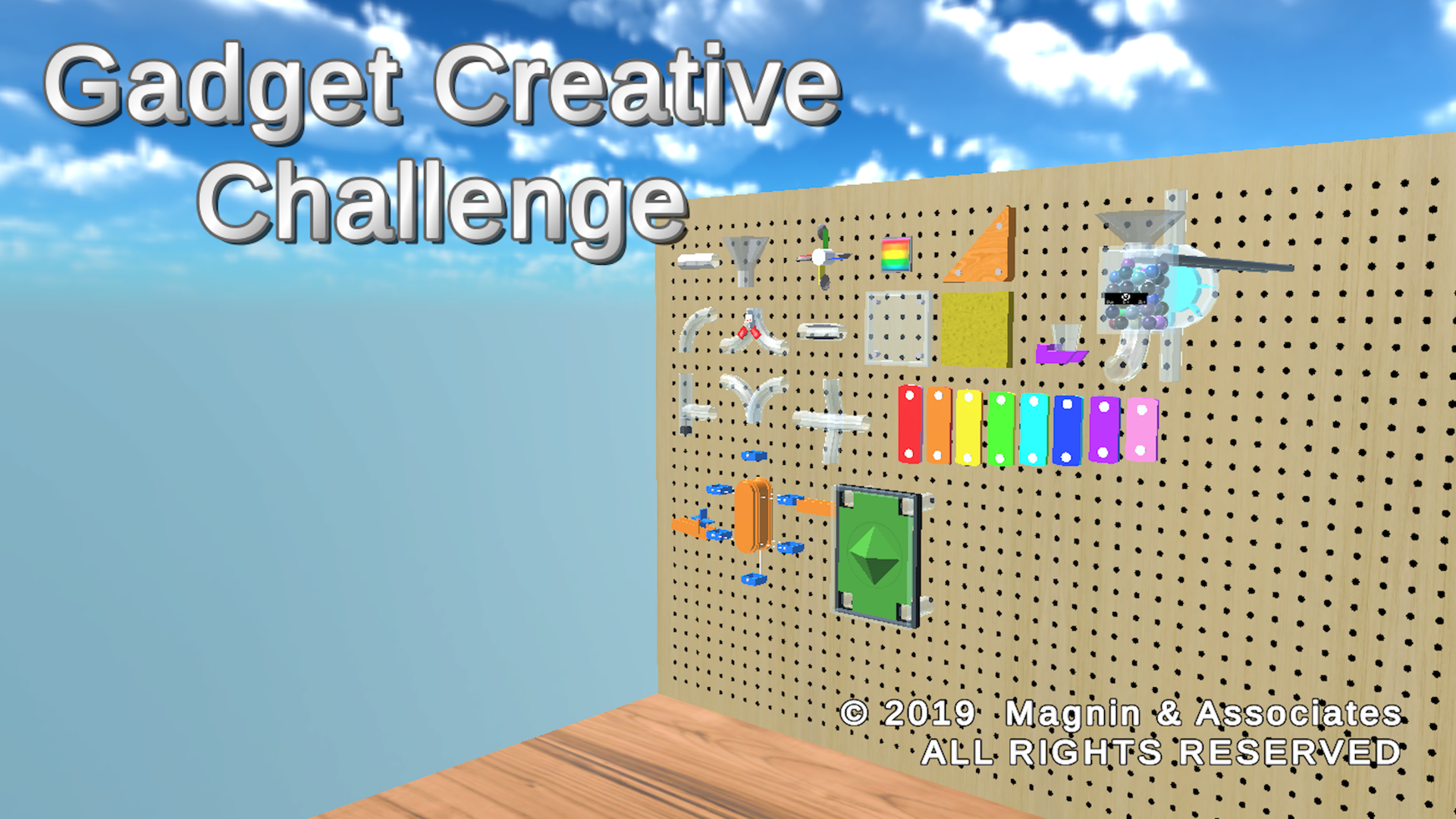
Choose parts from a work bench that contains dozens of pipe sections and animated pieces. Pieces can be easily moved and rotated and snapped to connect with nearby pieces. You can combine up to 100 pieces into a single creation.
You can easily adjust the time interval between marbles being released. You can also adjust how powerful the spring is and how much the anti-gravity accelerators boost the marbles uphill. Some pieces have sliding controls so they can be adjusted at run-time.
You can design a closed system, that returns the marbles back up to the box where they started, so it could theoretically run indefinitely.
Hit Play to watch your creation run. Choose from 4 different preset camera positions, or use the controls to create your own custom view. An additional Marble View will show you what it's like to travel inside your device.
Easily save or load previous creations or optionally Share your creations with friends via email or text messages.
Optionally shares your accomplishments via social media, email, or instant messaging. Gadgets are multi-platform, allowing them to play on another copy of Gadget Creative Challenge running on most popular smartphones, tablets, and computers.
Universal App - supports iPhone, iPod touch, and iPad, including standard, Retina, iPhone X and XS displays.
The game was produced by Ed Magnin, programmed and 3d models by Willie Johnson, Jr, and playtested by David Hayes and Amber Roberson, game dev interns from Dallas ISD, Conrad H-TECH at Richland College. Matt Campana created the music and audio effects. According to Ed Magnin, "I've always been fascinated by those Rube Goldberg type marble machines. We wanted to give the player a chance to create their own."
Device Requirements (iOS):
* Compatible with iPhone, iPad, and iPod touch
* Requires iOS 9.0 or later
* Universal App (includes Standard, Retina, and iPhone X and XS displays)
* 140 MB
* Rated 4
Pricing and Availability:
Gadget Creative Challenge 1.0 is $2.99 USD (or equivalent amount in other currencies) and available worldwide through the App Store in the Games category for iPhone, iPad. An Android version is available worldwide from both Google Play and Amazon AppStore. Windows 10 PC versions is available from the Windows Store. For more information, please contact Ed Magnin.
Magnin & Associates: http://MagninGames.com
Gadget Creative Challenge 1.0: http://MagninGames.com/gadgets
YouTube Video: https://www.youtube.com/watch?v=_WFZlhBvq88
Image (Title Screen): http://magningames.com/iphone/gadgets/images/Title.png
App Icon: http://MagninGames.com/iphone/gadgets/images/Icon_144.png
Game Credits: https://www.pinterest.com/pin/477733472970689288/
Ed Magnin has been actively involved in the game industry since 1979. Earlier in his career he worked for some of the top game developers of their day - MicroProse, Cinemaware, Virgin Games, and Park Place Productions. In 1993, he founded Magnin & Associates and has focused on handheld games ever since. They have created over 30 games for iOS (with over a million App Store downloads). Most are also available for Android, Apple TV, Windows 10 PC and Xbox. All Material and Software (C) Copyright 2019 Magnin & Associates. All Rights Reserved. Apple, the Apple logo, iPhone, iPod and iPad are registered trademarks of Apple Inc. in the U.S. and/or other countries. Other trademarks and registered trademarks may be the property of their respective owners.
*******
Link To Article: https://prmac.com/release-id-83387.htm
*******
---------------------------------------------------------------------------------
Note that you can alter delivered distributions at any time.
Login to your account on prMac to alter your channel selection, or to opt-out at any time.
Gadget Creative Challenge for iOS, Android, and Win10 PC - Published on 04/23/19
Texas based developer, Magnin & Associates today introduces Gadget Creative Challenge 1.0, their new game for iOS, Android, and Windows PC. Create your own marble machine gadgets. Choose parts from a work bench that contains dozens of pipe sections and animated pieces. Combine up to 100 pieces into a single creation. Choose from 4 different preset camera positions, or use the controls to create your own custom view. Share gadgets you create via text or email.
Farmers Branch, Texas - Magnin & Associates today introduces Gadget Creative Challenge 1.0, their new game for iOS, Android, and Windows PC.
Create your own marble machine gadgets.
Choose parts from a work bench that contains dozens of pipe sections and animated pieces. Pieces can be easily moved and rotated and snapped to connect with nearby pieces. You can combine up to 100 pieces into a single creation.
You can easily adjust the time interval between marbles being released. You can also adjust how powerful the spring is and how much the anti-gravity accelerators boost the marbles uphill. Some pieces have sliding controls so they can be adjusted at run-time.
You can design a closed system, that returns the marbles back up to the box where they started, so it could theoretically run indefinitely.
Hit Play to watch your creation run. Choose from 4 different preset camera positions, or use the controls to create your own custom view. An additional Marble View will show you what it's like to travel inside your device.
Easily save or load previous creations or optionally Share your creations with friends via email or text messages.
Optionally shares your accomplishments via social media, email, or instant messaging. Gadgets are multi-platform, allowing them to play on another copy of Gadget Creative Challenge running on most popular smartphones, tablets, and computers.
Universal App - supports iPhone, iPod touch, and iPad, including standard, Retina, iPhone X and XS displays.
The game was produced by Ed Magnin, programmed and 3d models by Willie Johnson, Jr, and playtested by David Hayes and Amber Roberson, game dev interns from Dallas ISD, Conrad H-TECH at Richland College. Matt Campana created the music and audio effects. According to Ed Magnin, "I've always been fascinated by those Rube Goldberg type marble machines. We wanted to give the player a chance to create their own."
Device Requirements (iOS):
* Compatible with iPhone, iPad, and iPod touch
* Requires iOS 9.0 or later
* Universal App (includes Standard, Retina, and iPhone X and XS displays)
* 140 MB
* Rated 4
Pricing and Availability:
Gadget Creative Challenge 1.0 is $2.99 USD (or equivalent amount in other currencies) and available worldwide through the App Store in the Games category for iPhone, iPad. An Android version is available worldwide from both Google Play and Amazon AppStore. Windows 10 PC versions is available from the Windows Store. For more information, please contact Ed Magnin.
Magnin & Associates: http://MagninGames.com
Gadget Creative Challenge 1.0: http://MagninGames.com/gadgets
YouTube Video: https://www.youtube.com/watch?v=_WFZlhBvq88
Image (Title Screen): http://magningames.com/iphone/gadgets/images/Title.png
App Icon: http://MagninGames.com/iphone/gadgets/images/Icon_144.png
Game Credits: https://www.pinterest.com/pin/477733472970689288/
Ed Magnin has been actively involved in the game industry since 1979. Earlier in his career he worked for some of the top game developers of their day - MicroProse, Cinemaware, Virgin Games, and Park Place Productions. In 1993, he founded Magnin & Associates and has focused on handheld games ever since. They have created over 30 games for iOS (with over a million App Store downloads). Most are also available for Android, Apple TV, Windows 10 PC and Xbox. All Material and Software (C) Copyright 2019 Magnin & Associates. All Rights Reserved. Apple, the Apple logo, iPhone, iPod and iPad are registered trademarks of Apple Inc. in the U.S. and/or other countries. Other trademarks and registered trademarks may be the property of their respective owners.
*******
Link To Article: https://prmac.com/release-id-83387.htm
*******
---------------------------------------------------------------------------------
Note that you can alter delivered distributions at any time.
Login to your account on prMac to alter your channel selection, or to opt-out at any time.
ProteinScope Free 3D Printing Edition available now on Mac App Store
A new article has been published at prMac.
ProteinScope Free 3D Printing Edition available now on Mac App Store - Published on 04/22/19
ProteinScope(R) Free 3D Printing Edition is available now on Mac App Store for macOS Mojave 10.14+. ProteinScope reads in any PDBML file directly from the Protein Data Bank and displays it in various color schemes and rendering styles. It is not endorsed in any way by the RCSB or any other institution. Eligible protein molecules can be 3D printed in full color using the color scheme selected for display. ProteinScope builds and prepares the order and ordering URL with the 3D printing service.
Oakland, California - Independent developer, Mark S. Morris is today announcing the release of ProteinScope(R) for Mac. Previously released for Windows in 2002, ProteinScope has been used in online encyclopedias, research paper publications, and was recommended in the U.S. Federal Registry by the Patent and Trademark Office for use in drug patent applications.
ProteinScope(R) for Mac enables full color 3D printing of eligible proteins, using structure files from the RCSB Protein Data Bank. ProteinScope for Mac is hand-optimized for use with the very latest features in macOS Mojave 10.14, providing a fast, smooth user interface and rendering of molecules. ProteinScope can have multiple protein windows open simultaneously, and can display individual proteins in full screen mode.
ProteinScope connects to the Research Collaboratory for Structural Bioinformatics Protein Data Bank (RCSB PDB) to retrieve structure information. ProteinScope is not endorsed in any way by the RCSB or any other institution. ProteinScope for Mac parses the major elements of the PDB XML (PDBML) file to display the molecule. PDBML is the canonical XML format for the PDB data, and every protein on the RCSB is available in this format. Legacy .pdb file format is not supported. PDB XML files stored on local drives will have the extension .xml with the 4 digit PDB ID as the filename, eg 9ins.xml - from the ProteinScope File menu select 'Open PDB From Disk...' and a File Open dialog limited to .xml extension files will open for file selection. Double click the file to open, and parsing will commence. Larger PDB structures will take longer to process. The proteins being displayed will auto rotate. Use the mouse wheel (or equivalent) to zoom in and out.
PDB XML can also be downloaded directly from the RCSB PDB from the ProteinScope File menu; select 'Open PDB From RCSB...' and a PDB ID dialog will appear. Type in the PDB ID of the structure to examine, eg 9ins, and the XML file will be downloaded from the RCSB PDB FTP Archive over HTTP. This downloaded file will be accessible via the ProteinScope File menu item 'Open Recent'. The downloaded file is then parsed as described above. Once the PDB file has been fully parsed, rendering setup begins. ProteinScope for Mac uses the latest Metal 2 rendering engine, exclusively on OS X Mojave. ProteinScope no longer uses the Apple deprecated OpenGL system, but larger files of many atoms may still take some time for initial scene setup and frame rendering. For this version, rendering display has been limited to 65,000 atoms per molecule - most of the Protein Data Bank deposited structures are less than 19,000 atoms.
Proteins can be displayed in different styles; Space-fill and Carbon Backbone. Atom coordinates are interpreted as 1 Angstrom = 1 SceneKit Unit. For Space-fill, the calculated atomic radius is modified for visual effect. For Carbon Backbone, carbon alphas in the same chain are joined together in a continuous linkage. Each link between carbon alphas is colored by the residue it represents, only residue color mode is available in this display style.
The color schemes available in ProteinScope for Mac are:
* Residue - based on the Shapely color scheme
* Atom - based on the CPK color scheme
* Chain - a unique color for each chain the residue is on
* SETOR - designed to allow the display of secondary, tertiary and quaternary structures of molecules
* Temperature - Red is hotter, blue colder. Not all PDBs have this information
* Hydrophobicity - Blue is more hydrophilic, red more hydrophobic
The 3D printing features of ProteinScope can accessed from the "3D Printing" top level menu. With a protein open, menu item 'Generate 3D Print...' will take you to the 3D print ordering sequence that is also available from the main toolbar button item 'Order 3D Print'. The menu item 'Available 3D Prints..." opens up the main ProteinScope 3D printed molecule store, where existing 3D prints of proteins in various styles and color schemes can be ordered. Recent 3D print orders that have been made from this application device show the ordering URLs below the menu separator, so you can get back to them between application sessions.
If you have an iPhone or Android device with a recent OS version installed, holding the camera up to the QR code 3D printed on the base of the protein will open the rcsb.org URL contained in the QR code. Proteins are printed to a scale of 1 Angstrom = 1mm, so most prints end up being similar in size to a C or D battery. Protein 3D prints are created with full color sandstone printing. Three sandstone finishes are available: natural, glossy and matte. The colors used in the 3D printed model are the same as selected for displaying on screen.
Device Requirements:
* macOS 10.14 or later
* 4.3 MB
Pricing and Availability:
ProteinScope is Free and available worldwide on the Mac App Store in the Reference category.
ProteinScope citations:
The Protein Data Bank: rcsb.org. H.M. Berman, J. Westbrook, Z. Feng, G. Gilliland, T.N. Bhat, H. Weissig, I.N. Shindyalov, P.E. Bourne. Nucleic Acids Research, 28: 235-242. (2000)
SETOR: Hardware-lighted three-dimensional solid model representations of macromolecules. Stephen V.Evans, Journal of Molecular Graphics Volume 11, Issue 2, June 1993, Pages 134-138
ProteinScope: https://proteinscope.com/
More Info: https://proteinscope.com/macindex.htm
Download from the Mac App Store: https://itunes.apple.com/app/proteinscope/id1438595055
Purchase: https://proteinscope.com/3dprints
Screenshot (Main Display): https://proteinscope.com/images/psMain2.jpg
Screenshot (3D Print Ordering): https://proteinscope.com/images/ps3dPrint3.jpg
Mark S. Morris is an independent software and 3D printing developer in Oakland, California. ProteinScope is part of the uplink.to network. ProteinScope is (R) and (C) Mark S. Morris 2019. All Rights Reserved. Apple, Mac and macOS are trademarks of Apple Inc., registered in the U.S. and other countries. Other trademarks and registered trademarks are the property of their respective owners.
*******
Link To Article: https://prmac.com/release-id-83386.htm
*******
---------------------------------------------------------------------------------
Note that you can alter delivered distributions at any time.
Login to your account on prMac to alter your channel selection, or to opt-out at any time.
ProteinScope Free 3D Printing Edition available now on Mac App Store - Published on 04/22/19
ProteinScope(R) Free 3D Printing Edition is available now on Mac App Store for macOS Mojave 10.14+. ProteinScope reads in any PDBML file directly from the Protein Data Bank and displays it in various color schemes and rendering styles. It is not endorsed in any way by the RCSB or any other institution. Eligible protein molecules can be 3D printed in full color using the color scheme selected for display. ProteinScope builds and prepares the order and ordering URL with the 3D printing service.
Oakland, California - Independent developer, Mark S. Morris is today announcing the release of ProteinScope(R) for Mac. Previously released for Windows in 2002, ProteinScope has been used in online encyclopedias, research paper publications, and was recommended in the U.S. Federal Registry by the Patent and Trademark Office for use in drug patent applications.
ProteinScope(R) for Mac enables full color 3D printing of eligible proteins, using structure files from the RCSB Protein Data Bank. ProteinScope for Mac is hand-optimized for use with the very latest features in macOS Mojave 10.14, providing a fast, smooth user interface and rendering of molecules. ProteinScope can have multiple protein windows open simultaneously, and can display individual proteins in full screen mode.
ProteinScope connects to the Research Collaboratory for Structural Bioinformatics Protein Data Bank (RCSB PDB) to retrieve structure information. ProteinScope is not endorsed in any way by the RCSB or any other institution. ProteinScope for Mac parses the major elements of the PDB XML (PDBML) file to display the molecule. PDBML is the canonical XML format for the PDB data, and every protein on the RCSB is available in this format. Legacy .pdb file format is not supported. PDB XML files stored on local drives will have the extension .xml with the 4 digit PDB ID as the filename, eg 9ins.xml - from the ProteinScope File menu select 'Open PDB From Disk...' and a File Open dialog limited to .xml extension files will open for file selection. Double click the file to open, and parsing will commence. Larger PDB structures will take longer to process. The proteins being displayed will auto rotate. Use the mouse wheel (or equivalent) to zoom in and out.
PDB XML can also be downloaded directly from the RCSB PDB from the ProteinScope File menu; select 'Open PDB From RCSB...' and a PDB ID dialog will appear. Type in the PDB ID of the structure to examine, eg 9ins, and the XML file will be downloaded from the RCSB PDB FTP Archive over HTTP. This downloaded file will be accessible via the ProteinScope File menu item 'Open Recent'. The downloaded file is then parsed as described above. Once the PDB file has been fully parsed, rendering setup begins. ProteinScope for Mac uses the latest Metal 2 rendering engine, exclusively on OS X Mojave. ProteinScope no longer uses the Apple deprecated OpenGL system, but larger files of many atoms may still take some time for initial scene setup and frame rendering. For this version, rendering display has been limited to 65,000 atoms per molecule - most of the Protein Data Bank deposited structures are less than 19,000 atoms.
Proteins can be displayed in different styles; Space-fill and Carbon Backbone. Atom coordinates are interpreted as 1 Angstrom = 1 SceneKit Unit. For Space-fill, the calculated atomic radius is modified for visual effect. For Carbon Backbone, carbon alphas in the same chain are joined together in a continuous linkage. Each link between carbon alphas is colored by the residue it represents, only residue color mode is available in this display style.
The color schemes available in ProteinScope for Mac are:
* Residue - based on the Shapely color scheme
* Atom - based on the CPK color scheme
* Chain - a unique color for each chain the residue is on
* SETOR - designed to allow the display of secondary, tertiary and quaternary structures of molecules
* Temperature - Red is hotter, blue colder. Not all PDBs have this information
* Hydrophobicity - Blue is more hydrophilic, red more hydrophobic
The 3D printing features of ProteinScope can accessed from the "3D Printing" top level menu. With a protein open, menu item 'Generate 3D Print...' will take you to the 3D print ordering sequence that is also available from the main toolbar button item 'Order 3D Print'. The menu item 'Available 3D Prints..." opens up the main ProteinScope 3D printed molecule store, where existing 3D prints of proteins in various styles and color schemes can be ordered. Recent 3D print orders that have been made from this application device show the ordering URLs below the menu separator, so you can get back to them between application sessions.
If you have an iPhone or Android device with a recent OS version installed, holding the camera up to the QR code 3D printed on the base of the protein will open the rcsb.org URL contained in the QR code. Proteins are printed to a scale of 1 Angstrom = 1mm, so most prints end up being similar in size to a C or D battery. Protein 3D prints are created with full color sandstone printing. Three sandstone finishes are available: natural, glossy and matte. The colors used in the 3D printed model are the same as selected for displaying on screen.
Device Requirements:
* macOS 10.14 or later
* 4.3 MB
Pricing and Availability:
ProteinScope is Free and available worldwide on the Mac App Store in the Reference category.
ProteinScope citations:
The Protein Data Bank: rcsb.org. H.M. Berman, J. Westbrook, Z. Feng, G. Gilliland, T.N. Bhat, H. Weissig, I.N. Shindyalov, P.E. Bourne. Nucleic Acids Research, 28: 235-242. (2000)
SETOR: Hardware-lighted three-dimensional solid model representations of macromolecules. Stephen V.Evans, Journal of Molecular Graphics Volume 11, Issue 2, June 1993, Pages 134-138
ProteinScope: https://proteinscope.com/
More Info: https://proteinscope.com/macindex.htm
Download from the Mac App Store: https://itunes.apple.com/app/proteinscope/id1438595055
Purchase: https://proteinscope.com/3dprints
Screenshot (Main Display): https://proteinscope.com/images/psMain2.jpg

Screenshot (3D Print Ordering): https://proteinscope.com/images/ps3dPrint3.jpg

Mark S. Morris is an independent software and 3D printing developer in Oakland, California. ProteinScope is part of the uplink.to network. ProteinScope is (R) and (C) Mark S. Morris 2019. All Rights Reserved. Apple, Mac and macOS are trademarks of Apple Inc., registered in the U.S. and other countries. Other trademarks and registered trademarks are the property of their respective owners.
*******
Link To Article: https://prmac.com/release-id-83386.htm
*******
---------------------------------------------------------------------------------
Note that you can alter delivered distributions at any time.
Login to your account on prMac to alter your channel selection, or to opt-out at any time.
Subscribe to:
Posts (Atom)