A new article has been published at prMac.
Cell4pets is Buying iPhones - Sell Now and Earn an Additional $10.00 - Published on 05/01/19
Cell4pets is buying iPhones. Their mission is to provide a better life for the millions of abandoned dogs and cats throughout the US. The company is offering an additional $10.00 when you sell them your iPhone. Simply enter Coupon Code PRMAC at checkout to receive the bonus. They will take iPhone 6 up through iPhone Xs Max. You can expect to earn significantly more for your iPhone or Samsung when you sell your device to Cell4pets. Sell your iPhone today and earn more!
Mechanicsburg, Pennsylvania - Cell4pets is buying iPhones. Sell an iPhone today and earn $10.00 more! Go to Cell4pets and enter the details about your phone. At checkout, enter Coupon Code PRMAC for an additional $10.00. Cell4pets offers some of the highest payouts in the industry.
Extending the life cycle of electronic devices keeps them out of our landfills. It's estimated there are millions if not a billion unused cell phones in the US. It is our mission to reduce the amount of unused phones that end up in our landfills. By refurbishing, reselling, or recycling, we'll help save our planet as well as give back to our most loyal companions.
Factors impacting the price you'll receive for your device.
* Model: It's simple, iPhones, iPads, and Galaxy phones bring the highest offers. The newer the model the higher the offer.
* Condition: Please read our descriptions carefully. Good and Flawless devices receive significantly more than Fair, Cracked or Broken.
* Manufacturer: Apple and Samsung have an edge over the other smartphone manufacturers due to higher global demand.
You can expect to earn significantly more for your iPhone or Samsung when you sell your device to Cell4pets. Cell4pets has made it really simple for you to sell your smartphone online. The process is quick and easy, just three simple steps! Cell4pets offers an instant price quote for your used Apple iPhones, iPads or Samsung Galaxy smartphones making the entire process seamless. Even if your device is not listed on the portal, you can request a quote from their team of technicians.
Cell4pets: https://cell4pets.com/
Sell Your iPhone Now: https://cell4pets.com/sell
Located in Mechanicsburg, Pennsylvania, Cell4pets has been in the electronic surplus business for 20 years. With a solid reputation, the company is 5 Star rated on Trust Pilot, with 645 100% positive feedbacks on eBay, and 366 all positive reviews on Swappa. All Material and Software (C) Copyright 2019 Cell4pets. All Rights Reserved. Apple, the Apple logo, iPhone, iPod and iPad are registered trademarks of Apple Inc. in the U.S. and/or other countries. Other trademarks and registered trademarks may be the property of their respective owners.
*******
Link To Article: https://prmac.com/release-id-83399.htm
*******
---------------------------------------------------------------------------------
Note that you can alter delivered distributions at any time.
Login to your account on prMac to alter your channel selection, or to opt-out at any time.

Adobe InDesign Automation Tools at 50% off until April 30
A new article has been published at prMac.
Adobe InDesign Automation Tools at 50% off until April 30 - Published on 04/29/19
Zevrix Solutions, a developer of automation solutions for Adobe InDesign, announces today a 50% sale until April 30. The company offers the discount on all InDesign automation tools including product upgrades. Zevrix products include plug-ins for InDesign that automate printing and exporting, reduce linked image size, convert image formats, and simplify file packaging. The software helps users eliminate repetitive tasks, save disk space, and cut production costs through faster processing.
Toronto, Canada - Zevrix Solutions, a developer of automation solutions for Adobe InDesign, announces today a 50% sale until April 30. The company offers the discount on all InDesign automation tools including upgrades. The company's products include several popular plug-ins for Adobe InDesign, which help professionals automate printing and exporting, optimize image format and resolution, save disk space, and cut production costs.
"Zevrix software its the best kept secret out there for the Graphic Design industry," says Darren Rath of eponymous design studio in Melbourne, Australia. "It rocks and continues to impress and improve at a scary rate... Thanks to Zevrix products, every piece of artwork that flies out of here requires no intervention by the prepress departments."
The following InDesign automation tools are available on sale:
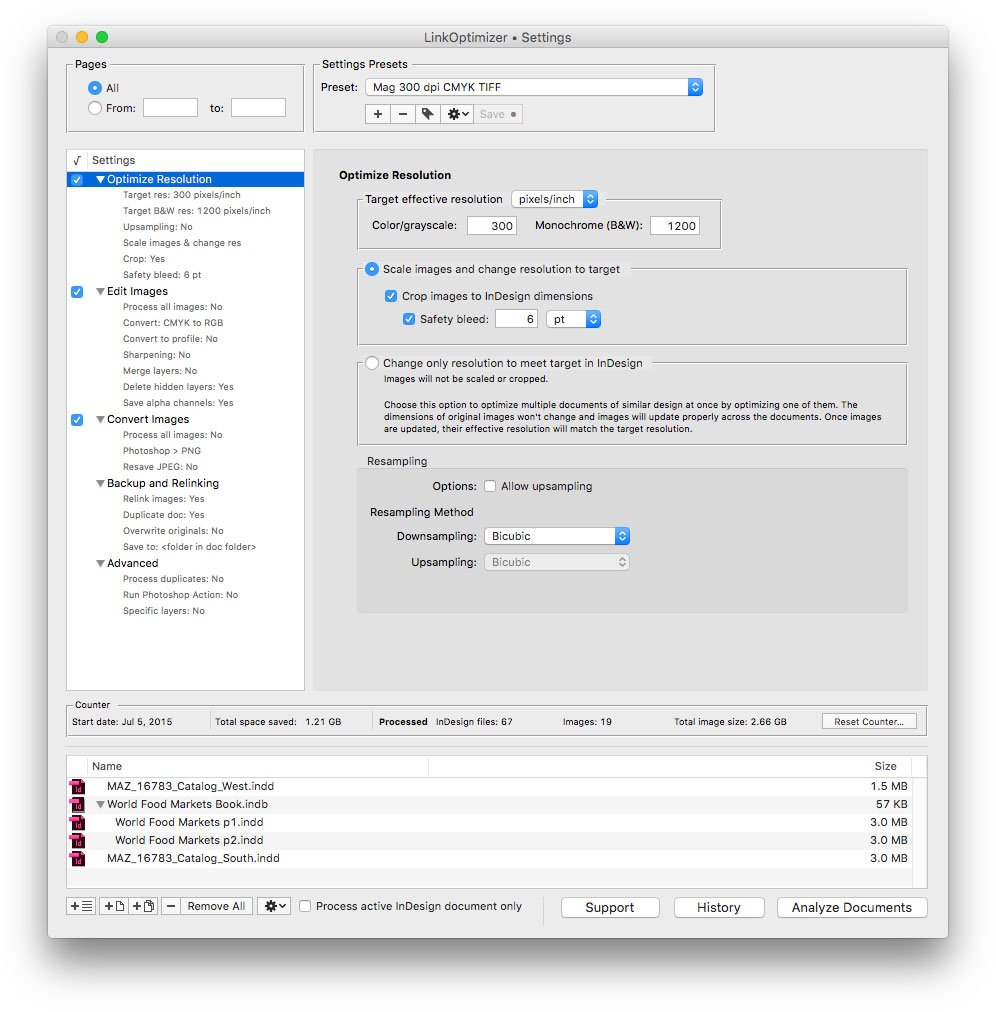
* LinkOptimizer, the company's flagship product, lets users reduce linked graphics size by eliminating excess image data, perform image adjustments and convert file formats. The software automatically scales and crops the images in Photoshop to match their dimensions in InDesign, changes resolution to the specified target, and reimports images to InDesign at 100%.
* Output Factory is a plug-in which automates printing and exporting from InDesign and offers batch output, layer versioning, single page export, preflighting, variable file names and more. A server version of Output Factory can process InDesign files automatically from hot folders and serve unlimited users on a network.
* InPreflight for InDesign offers advanced preflighting as well as automatic packaging of multiple files. InPreflight helps users eliminate errors, save disk space and collect all linked files into a single location.
* The last product on sale is Package Central which automates InDesign file packaging by processing files from watched hot folders. The software offloads file packaging from InDesign to a central system leaving operator workstations free from the collection process.
Pricing and Availability:
Zevrix software can be purchased at 50% off until April 30, 2019 from Zevrix website. The discount also applies to eligible product upgrades. For details, please visit the website. Product trials are also available for download. All products require macOS 10.7-10.14 and Adobe InDesign CS5-CC 2019 software.
Zevrix Solutions: http://zevrix.com
Download: http://zevrix.com/download.php
Purchase: http://zevrix.com/store.php
Screenshot: http://zevrix.com/screenshots/lo5/res-win.jpg
Located in Toronto, Canada, Zevrix Solutions provides automation and productivity solutions for Adobe Creative Cloud and Creative Suite software, PDF workflows, graphic file diagnostics and Microsoft Office output on Mac OS. Zevrix is dedicated to help professionals increase their profits through automating everyday tasks, producing error-free documents, saving disk space and cutting production costs. For more information, visit their website. Copyright (C) 2019 Zevrix Solutions. All Rights Reserved. Other trademarks and registered trademarks may be the property of their respective owners.
*******
Link To Article: https://prmac.com/release-id-83397.htm
*******
---------------------------------------------------------------------------------
Note that you can alter delivered distributions at any time.
Login to your account on prMac to alter your channel selection, or to opt-out at any time.
Adobe InDesign Automation Tools at 50% off until April 30 - Published on 04/29/19
Zevrix Solutions, a developer of automation solutions for Adobe InDesign, announces today a 50% sale until April 30. The company offers the discount on all InDesign automation tools including product upgrades. Zevrix products include plug-ins for InDesign that automate printing and exporting, reduce linked image size, convert image formats, and simplify file packaging. The software helps users eliminate repetitive tasks, save disk space, and cut production costs through faster processing.
Toronto, Canada - Zevrix Solutions, a developer of automation solutions for Adobe InDesign, announces today a 50% sale until April 30. The company offers the discount on all InDesign automation tools including upgrades. The company's products include several popular plug-ins for Adobe InDesign, which help professionals automate printing and exporting, optimize image format and resolution, save disk space, and cut production costs.
"Zevrix software its the best kept secret out there for the Graphic Design industry," says Darren Rath of eponymous design studio in Melbourne, Australia. "It rocks and continues to impress and improve at a scary rate... Thanks to Zevrix products, every piece of artwork that flies out of here requires no intervention by the prepress departments."
The following InDesign automation tools are available on sale:
* LinkOptimizer, the company's flagship product, lets users reduce linked graphics size by eliminating excess image data, perform image adjustments and convert file formats. The software automatically scales and crops the images in Photoshop to match their dimensions in InDesign, changes resolution to the specified target, and reimports images to InDesign at 100%.
* Output Factory is a plug-in which automates printing and exporting from InDesign and offers batch output, layer versioning, single page export, preflighting, variable file names and more. A server version of Output Factory can process InDesign files automatically from hot folders and serve unlimited users on a network.
* InPreflight for InDesign offers advanced preflighting as well as automatic packaging of multiple files. InPreflight helps users eliminate errors, save disk space and collect all linked files into a single location.
* The last product on sale is Package Central which automates InDesign file packaging by processing files from watched hot folders. The software offloads file packaging from InDesign to a central system leaving operator workstations free from the collection process.
Pricing and Availability:
Zevrix software can be purchased at 50% off until April 30, 2019 from Zevrix website. The discount also applies to eligible product upgrades. For details, please visit the website. Product trials are also available for download. All products require macOS 10.7-10.14 and Adobe InDesign CS5-CC 2019 software.
Zevrix Solutions: http://zevrix.com
Download: http://zevrix.com/download.php
Purchase: http://zevrix.com/store.php
Screenshot: http://zevrix.com/screenshots/lo5/res-win.jpg
Located in Toronto, Canada, Zevrix Solutions provides automation and productivity solutions for Adobe Creative Cloud and Creative Suite software, PDF workflows, graphic file diagnostics and Microsoft Office output on Mac OS. Zevrix is dedicated to help professionals increase their profits through automating everyday tasks, producing error-free documents, saving disk space and cutting production costs. For more information, visit their website. Copyright (C) 2019 Zevrix Solutions. All Rights Reserved. Other trademarks and registered trademarks may be the property of their respective owners.
*******
Link To Article: https://prmac.com/release-id-83397.htm
*******
---------------------------------------------------------------------------------
Note that you can alter delivered distributions at any time.
Login to your account on prMac to alter your channel selection, or to opt-out at any time.
The Unic, A Game for Pattern Lovers, Released for Free on iOS
A new article has been published at prMac.
The Unic, A Game for Pattern Lovers, Released for Free on iOS - Published on 04/28/19
Lozange Lab announces The Unic 1.0.2, their new observation game dedicated to pattern and design lovers for iOS devices. The game is free to play. Fully playable without watching ads or buying any in-app purchase. Levels are procedurally generated so users always play with a different setting. 3 game modes: users choose their play style.
Metz, France - Lozange Lab just released The Unic 1.0.2, their new observation game dedicated to pattern and design lovers. The game is downloadable for free on iPhone and iPad.
"For those of you who heard about us last year with our puzzle game Swim Out, let's say we definitely get out of the swimming pool, looked our itsy-bitsy polka dots bikini and had a vision of a very different kind of game," says Mat of Lozenge Lab. "A bit less brain-teasing but much more eye-teasing, our upcoming game, The Unic, is an observation game which should thrill any pattern and design lover. Whether you know what polka dots, tartan, argyle or gingham are, get ready to enjoy yourself in our next fresh, highly colored and delicately crafted new creation!"
Features:
* FREE to play! Fully playable without watching ads or buying any in-app purchase.
* Levels are procedurally generated so you always play with a different setting
* 3 game modes: choose your play style
* Collect shards, complete patterns collections and build your own deck
* A fun experience suitable for all ages
* No internet connection required
Device Requirements:
* iPhone, iPad, or iPod touch
* Requires iOS 8.0 or later
* Universal Application
* 119.7 MB
Pricing and Availability:
The Unic 1.0.2 is free and is available worldwide exclusively through the App Store in the Games category. In-app purchases are available.
The Unic 1.0.2: https://www.the-unic.com/
Download from the App Store: https://itunes.apple.com/us/app/the-unic/id1436830923?mt=8
YouTube Trailer: https://youtu.be/FEvXX9XKAKQ
Presskit: http://press.the-unic.com
Screenshot: https://www.the-unic.com/img/TheUnic-Screenshot001.png
App Icon: https://www.the-unic.com/img/icon.png
Established in 2014, Lozange Lab is an indie developer studio based in Metz, France, consisting of Ava and Mat, a husband-and-wife team who delicately craft indie games and interactive installations with love and passion. Previous games include Swim Out, Shuttle Shuffle. All Material and Software (C) Copyright 2019 Lozange Lab. All Rights Reserved. Apple, the Apple logo, iPhone, iPod and iPad are registered trademarks of Apple Inc. in the U.S. and/or other countries. Other trademarks and registered trademarks may be the property of their respective owners.
*******
Link To Article: https://prmac.com/release-id-83396.htm
*******
---------------------------------------------------------------------------------
Note that you can alter delivered distributions at any time.
Login to your account on prMac to alter your channel selection, or to opt-out at any time.
The Unic, A Game for Pattern Lovers, Released for Free on iOS - Published on 04/28/19
Lozange Lab announces The Unic 1.0.2, their new observation game dedicated to pattern and design lovers for iOS devices. The game is free to play. Fully playable without watching ads or buying any in-app purchase. Levels are procedurally generated so users always play with a different setting. 3 game modes: users choose their play style.
Metz, France - Lozange Lab just released The Unic 1.0.2, their new observation game dedicated to pattern and design lovers. The game is downloadable for free on iPhone and iPad.
"For those of you who heard about us last year with our puzzle game Swim Out, let's say we definitely get out of the swimming pool, looked our itsy-bitsy polka dots bikini and had a vision of a very different kind of game," says Mat of Lozenge Lab. "A bit less brain-teasing but much more eye-teasing, our upcoming game, The Unic, is an observation game which should thrill any pattern and design lover. Whether you know what polka dots, tartan, argyle or gingham are, get ready to enjoy yourself in our next fresh, highly colored and delicately crafted new creation!"
Features:
* FREE to play! Fully playable without watching ads or buying any in-app purchase.
* Levels are procedurally generated so you always play with a different setting
* 3 game modes: choose your play style
* Collect shards, complete patterns collections and build your own deck
* A fun experience suitable for all ages
* No internet connection required
Device Requirements:
* iPhone, iPad, or iPod touch
* Requires iOS 8.0 or later
* Universal Application
* 119.7 MB
Pricing and Availability:
The Unic 1.0.2 is free and is available worldwide exclusively through the App Store in the Games category. In-app purchases are available.
The Unic 1.0.2: https://www.the-unic.com/
Download from the App Store: https://itunes.apple.com/us/app/the-unic/id1436830923?mt=8
YouTube Trailer: https://youtu.be/FEvXX9XKAKQ
Presskit: http://press.the-unic.com
Screenshot: https://www.the-unic.com/img/TheUnic-Screenshot001.png

App Icon: https://www.the-unic.com/img/icon.png

Established in 2014, Lozange Lab is an indie developer studio based in Metz, France, consisting of Ava and Mat, a husband-and-wife team who delicately craft indie games and interactive installations with love and passion. Previous games include Swim Out, Shuttle Shuffle. All Material and Software (C) Copyright 2019 Lozange Lab. All Rights Reserved. Apple, the Apple logo, iPhone, iPod and iPad are registered trademarks of Apple Inc. in the U.S. and/or other countries. Other trademarks and registered trademarks may be the property of their respective owners.
*******
Link To Article: https://prmac.com/release-id-83396.htm
*******
---------------------------------------------------------------------------------
Note that you can alter delivered distributions at any time.
Login to your account on prMac to alter your channel selection, or to opt-out at any time.
New VPN On Demand and Kill Switch Features
A new article has been published at prMac.
New VPN On Demand and Kill Switch Features - Published on 04/26/19
ZoogVPN announces new features on ZoogVPN macOS, iOS, and Android apps: VPN on demand with auto-reconnect and Kill Switch. called VPN on Demand (Auto-reconnect on disconnect). This feature which can be found in the Settings screen of the app and when switched on, ensures that your VPN connection is maintained in case of any disconnects as long as Internet connectivity is available.
Patras, Greece - ZoogVPN is pleased to announce that recently they have implemented a new feature for iOS, Android and macOS apps called VPN on Demand (Auto-reconnect on disconnect). This feature which can be found in the Settings screen of the app and when switched on, ensures that your VPN connection is maintained in case of any disconnects as long as Internet connectivity is available. This is especially useful on mobile phones when changing from Wi-Fi to 3G/4G and back.
Benefits of the new feature:
* Auto-reconnect if VPN connection drops
* Ensures that no data is leaked from your device in case of VPN connection drop
* Replaces and/or complements Kill Switch functionality by immediately reconnecting to VPN
* Uses in-built VPN On Demand feature of iOS and macOS operating systems
* Continuously scans for Internet connectivity to reconnect the VPN on Android devices
* We are also working on introducing this feature to Windows desktop application in the near future.
Please note we've also released a Kill Switch feature for macOS app which ensures your data remains private in case the VPN connection drops. Kill switch acts as a safety line to ensure that no packets escape form your mac in case VPN connection is interrupted.
To update your ZoogVPN app to the latest version please visit the ZoogVPN website.
ZoogVPN looks forward to bringing this feature to their Windows app in the very near future.
ZoogVPN: https://zoogvpn.com
ZoogVPN for Mac: https://zoogvpn.com/vpn-for-mac
macOS Direct Download Link: https://zoogvpn.com/downloads/desktop/osx/ZoogVPN.dmg
ZoogVPN for iOS: https://zoogvpn.com/vpn-for-iphone-ipad
ZoogVPN for Android: https://zoogvpn.com/vpn-for-android
Purchase Link: https://zoogvpn.com/pricing
ZoogVPN was founded in May 2013 by a bunch of networking geeks and techies with IT background stretching as far back as 1990s during the boom years of the Internet. Since then the Internet has become a much more regulated, restricted and dangerous place which poses a great challenge to individual's right to online privacy, freedom and security. With this in mind and given the strong background in IT, Computer Science and Networking, George Agal, Alex Ovan and Sam Jones founded a commercial Virtual Private Network service which is now known as ZoogVPN, intended to break down Internet censorship and offer the average user real freedom and peace of mind online. Simplicity and availability of our VPN service is the key to our success as we continue to innovate and improve our products and services. We have a strong team of management, developers, system administrators, product managers and publishers as we continue to grow our business with support of existing and new customers. All
Material and Software (C) Copyright 2019 ZoogVPN. All Rights Reserved. Apple, the Apple logo, Macintosh Mac OS X and macOS are registered trademarks of Apple Inc. in the U.S. and/or other countries. Other trademarks and registered trademarks may be the property of their respective owners.
*******
Link To Article: https://prmac.com/release-id-83395.htm
*******
---------------------------------------------------------------------------------
Note that you can alter delivered distributions at any time.
Login to your account on prMac to alter your channel selection, or to opt-out at any time.
New VPN On Demand and Kill Switch Features - Published on 04/26/19
ZoogVPN announces new features on ZoogVPN macOS, iOS, and Android apps: VPN on demand with auto-reconnect and Kill Switch. called VPN on Demand (Auto-reconnect on disconnect). This feature which can be found in the Settings screen of the app and when switched on, ensures that your VPN connection is maintained in case of any disconnects as long as Internet connectivity is available.
Patras, Greece - ZoogVPN is pleased to announce that recently they have implemented a new feature for iOS, Android and macOS apps called VPN on Demand (Auto-reconnect on disconnect). This feature which can be found in the Settings screen of the app and when switched on, ensures that your VPN connection is maintained in case of any disconnects as long as Internet connectivity is available. This is especially useful on mobile phones when changing from Wi-Fi to 3G/4G and back.
Benefits of the new feature:
* Auto-reconnect if VPN connection drops
* Ensures that no data is leaked from your device in case of VPN connection drop
* Replaces and/or complements Kill Switch functionality by immediately reconnecting to VPN
* Uses in-built VPN On Demand feature of iOS and macOS operating systems
* Continuously scans for Internet connectivity to reconnect the VPN on Android devices
* We are also working on introducing this feature to Windows desktop application in the near future.
Please note we've also released a Kill Switch feature for macOS app which ensures your data remains private in case the VPN connection drops. Kill switch acts as a safety line to ensure that no packets escape form your mac in case VPN connection is interrupted.
To update your ZoogVPN app to the latest version please visit the ZoogVPN website.
ZoogVPN looks forward to bringing this feature to their Windows app in the very near future.
ZoogVPN: https://zoogvpn.com
ZoogVPN for Mac: https://zoogvpn.com/vpn-for-mac
macOS Direct Download Link: https://zoogvpn.com/downloads/desktop/osx/ZoogVPN.dmg
ZoogVPN for iOS: https://zoogvpn.com/vpn-for-iphone-ipad
ZoogVPN for Android: https://zoogvpn.com/vpn-for-android
Purchase Link: https://zoogvpn.com/pricing
ZoogVPN was founded in May 2013 by a bunch of networking geeks and techies with IT background stretching as far back as 1990s during the boom years of the Internet. Since then the Internet has become a much more regulated, restricted and dangerous place which poses a great challenge to individual's right to online privacy, freedom and security. With this in mind and given the strong background in IT, Computer Science and Networking, George Agal, Alex Ovan and Sam Jones founded a commercial Virtual Private Network service which is now known as ZoogVPN, intended to break down Internet censorship and offer the average user real freedom and peace of mind online. Simplicity and availability of our VPN service is the key to our success as we continue to innovate and improve our products and services. We have a strong team of management, developers, system administrators, product managers and publishers as we continue to grow our business with support of existing and new customers. All
Material and Software (C) Copyright 2019 ZoogVPN. All Rights Reserved. Apple, the Apple logo, Macintosh Mac OS X and macOS are registered trademarks of Apple Inc. in the U.S. and/or other countries. Other trademarks and registered trademarks may be the property of their respective owners.
*******
Link To Article: https://prmac.com/release-id-83395.htm
*******
---------------------------------------------------------------------------------
Note that you can alter delivered distributions at any time.
Login to your account on prMac to alter your channel selection, or to opt-out at any time.
Cisdem Duplicate Finder for Mac 4.4.0 Upgraded with Improved Performance
A new article has been published at prMac.
Cisdem Duplicate Finder for Mac 4.4.0 Upgraded with Improved Performance - Published on 04/25/19
Cisdem announces Cisdem Duplicate Finder for Mac has been upgraded to version 4.4.0 with better performance of detecting and deleting duplicate files in iTunes and Photos on Mac. Cisdem Duplicate Finder for Mac can find duplicate photos, audios, videos, documents, archives and other types of duplicates files and remove them all at once. This duplicate file finder can look for duplicates in Photos and iTunes libraries, Mac's internal storage, external hard drive, SD card, etc.
Madelia, Minnesota - Cisdem Duplicate Finder for Mac has been upgraded to version 4.4.0 with improved performance of finding and deleting duplicate files in Photos and iTunes libraries.
Cisdem Duplicate Finder for Mac can find duplicate photos, audios, videos, documents, archives and other types of duplicates files and remove them all at once. This duplicate file finder can look for duplicates in Photos and iTunes libraries, Mac's internal storage, external hard drive, SD card, etc. It can identify true duplicate files by content and provides users with an array of scan filtering and duplicates removal options. Features like Auto-Select and One-Click Deletion allow users to effortlessly eliminate duplicate files on Mac.
"You can use Cisdem Duplicate Finder for Mac to easily find duplicate files on Mac, including those in your Photos and iTunes libraries, " said Edward Riley, Cisdem's project manager. "This update further improves its performance when removing duplicate copies from Photos and iTunes. By getting rid of useless duplicate files, you can free up space and better organize your files."
What's New in Version 4.4.0?
1. Improve the performance of finding duplicate files in Photos
2. Improve the performance of finding duplicate files in iTunes
3. Fixed some minor bugs
Main Features
1. Find various types of duplicate files such as duplicate photos
This duplicate file finder for Mac can find duplicate images, music files, videos, documents and more. It supports all common formats of the supported file types.
2. Find similar photos
It can also detect similar photos with a customizable similarity level.
3. Support Mac's internal hard drive and external storage devices
This app can scan for duplicate files on Mac's internal hard drive, SSD, external hard drive, memory card, USB flash drive, etc.
4. Support iTunes & Photos
Users can easily remove duplicates from iTunes and Photos folders.
5. Multiple scan methods and scan filters
Users can choose to scan for duplicates by content for by filename. Users can specify file size for scanning and exclude folder or file extension from scanning, among other options.
6. Multiple preview modes including side-by-side preview
Before deleting unwanted duplicates, users can easily preview and compare. This duplicate file finder and remover supports previewing images, videos, audios, documents and spreadsheets.
7. Auto-select and one-click deletion
It will automatically select duplicate files for deletion. In addition, other selection methods are available. By clicking Delete, users can remove all selected duplicates all at once.
Price and Availability
Cisdem Duplicate Finder for Mac 4.4.0 is now available on the official website. The free trial is also available for download at the official website. Users can purchase a lifetime license with $29.99 along with lifetime free upgrades.
Cisdem: https://www.cisdem.com/
Cisdem Duplicate Finder for Mac: https://www.cisdem.com/duplicate-finder-mac.html
Download Free Trial: https://www.cisdem.com/downloads/cisdem-duplicatefinder-4.dmg
Cisdem provides productivity and business software that helps Mac users to get their job done faster. Cisdem products include top rated software centered on PDF Conversion, PDF Management, Data Recovery, and File Management. The company is dedicated in building highly efficient Mac software that make life easier and processes simpler. All Material and Software (C) Copyright 2019 Cisdem. All Rights Reserved. Apple, the Apple logo, macOS and Macintosh are registered trademarks of Apple Inc. in the U.S. and/or other countries. Other trademarks and registered trademarks may be the property of their respective owners.
*******
Link To Article: https://prmac.com/release-id-83394.htm
*******
---------------------------------------------------------------------------------
Note that you can alter delivered distributions at any time.
Login to your account on prMac to alter your channel selection, or to opt-out at any time.
Cisdem Duplicate Finder for Mac 4.4.0 Upgraded with Improved Performance - Published on 04/25/19
Cisdem announces Cisdem Duplicate Finder for Mac has been upgraded to version 4.4.0 with better performance of detecting and deleting duplicate files in iTunes and Photos on Mac. Cisdem Duplicate Finder for Mac can find duplicate photos, audios, videos, documents, archives and other types of duplicates files and remove them all at once. This duplicate file finder can look for duplicates in Photos and iTunes libraries, Mac's internal storage, external hard drive, SD card, etc.
Madelia, Minnesota - Cisdem Duplicate Finder for Mac has been upgraded to version 4.4.0 with improved performance of finding and deleting duplicate files in Photos and iTunes libraries.
Cisdem Duplicate Finder for Mac can find duplicate photos, audios, videos, documents, archives and other types of duplicates files and remove them all at once. This duplicate file finder can look for duplicates in Photos and iTunes libraries, Mac's internal storage, external hard drive, SD card, etc. It can identify true duplicate files by content and provides users with an array of scan filtering and duplicates removal options. Features like Auto-Select and One-Click Deletion allow users to effortlessly eliminate duplicate files on Mac.
"You can use Cisdem Duplicate Finder for Mac to easily find duplicate files on Mac, including those in your Photos and iTunes libraries, " said Edward Riley, Cisdem's project manager. "This update further improves its performance when removing duplicate copies from Photos and iTunes. By getting rid of useless duplicate files, you can free up space and better organize your files."
What's New in Version 4.4.0?
1. Improve the performance of finding duplicate files in Photos
2. Improve the performance of finding duplicate files in iTunes
3. Fixed some minor bugs
Main Features
1. Find various types of duplicate files such as duplicate photos
This duplicate file finder for Mac can find duplicate images, music files, videos, documents and more. It supports all common formats of the supported file types.
2. Find similar photos
It can also detect similar photos with a customizable similarity level.
3. Support Mac's internal hard drive and external storage devices
This app can scan for duplicate files on Mac's internal hard drive, SSD, external hard drive, memory card, USB flash drive, etc.
4. Support iTunes & Photos
Users can easily remove duplicates from iTunes and Photos folders.
5. Multiple scan methods and scan filters
Users can choose to scan for duplicates by content for by filename. Users can specify file size for scanning and exclude folder or file extension from scanning, among other options.
6. Multiple preview modes including side-by-side preview
Before deleting unwanted duplicates, users can easily preview and compare. This duplicate file finder and remover supports previewing images, videos, audios, documents and spreadsheets.
7. Auto-select and one-click deletion
It will automatically select duplicate files for deletion. In addition, other selection methods are available. By clicking Delete, users can remove all selected duplicates all at once.
Price and Availability
Cisdem Duplicate Finder for Mac 4.4.0 is now available on the official website. The free trial is also available for download at the official website. Users can purchase a lifetime license with $29.99 along with lifetime free upgrades.
Cisdem: https://www.cisdem.com/
Cisdem Duplicate Finder for Mac: https://www.cisdem.com/duplicate-finder-mac.html
Download Free Trial: https://www.cisdem.com/downloads/cisdem-duplicatefinder-4.dmg
Cisdem provides productivity and business software that helps Mac users to get their job done faster. Cisdem products include top rated software centered on PDF Conversion, PDF Management, Data Recovery, and File Management. The company is dedicated in building highly efficient Mac software that make life easier and processes simpler. All Material and Software (C) Copyright 2019 Cisdem. All Rights Reserved. Apple, the Apple logo, macOS and Macintosh are registered trademarks of Apple Inc. in the U.S. and/or other countries. Other trademarks and registered trademarks may be the property of their respective owners.
*******
Link To Article: https://prmac.com/release-id-83394.htm
*******
---------------------------------------------------------------------------------
Note that you can alter delivered distributions at any time.
Login to your account on prMac to alter your channel selection, or to opt-out at any time.
Packing Pro Celebrates 10 Years on App Store with Anniversary Sale
A new article has been published at prMac.
Packing Pro Celebrates 10 Years on App Store with Anniversary Sale - Published on 04/26/19
QuinnScape today announces a limited-time 10-year Anniversary Sale of 66% off its popular Packing Pro travel app. From now until April 28, Packing Pro can be purchased for only US$0.99 - one third of its original price of US$2.99 - a great deal, and perfect timing for the Summer vacation. Packing Pro is a mobile travel packing list app that features unlimited, 100% customizable packing lists, an extensive, flexible, catalog, handy sample lists, iCloud auto-sync and various list sharing options.
Taipei, Taiwan - Packing Pro, the popular travel app for the iPhone, iPad & iPod touch by QuinnScape, today celebrates its 10th anniversary on the App Store. In celebration, there is now a limited-time Anniversary Sale of 66% off from now until April 28. Packing Pro can be purchased for only US$0.99 - one third of its original price of US$2.99 - a great deal, and perfect timing for the upcoming Summer travel season. Originally based on the Packing (+TO DO!) app, which was released six months earlier in 2008, these apps were two of the first few thousand apps on the App Store, compared to the millions that are currently there today. During this time, both apps have kept pace with and added support for all of Apple's new iOS updates and devices, starting with iOS 2 and iPhone 3G, and progressing all the way up to the current iOS 12, iPhone X/X Plus, iPad Pro, iPad Air 2, iPad mini 4 & iPod touch 6G. Packing Pro has also maintained its position in the top 10 or 20 for all travel apps
for much of this time.
During these ten years, Packing Pro has been highlighted on Apple's App Store several times, such as in the "Travel Essentials," "Travel Survival Kit" and "Travel Expenses" promotions, among others. It has also ranked at #1 for iPads and #2 for iPhones in the U.S. App Store's Travel section. Besides Apple, Packing Pro has also been recognized by CNN, WSJ, BBC, The New York Times, Expedia and Budget Travel, and has earned glowing reviews on major tech and app blogs (Gizmodo, Mashable, Macworld, CNET and iPhone Life, among others).
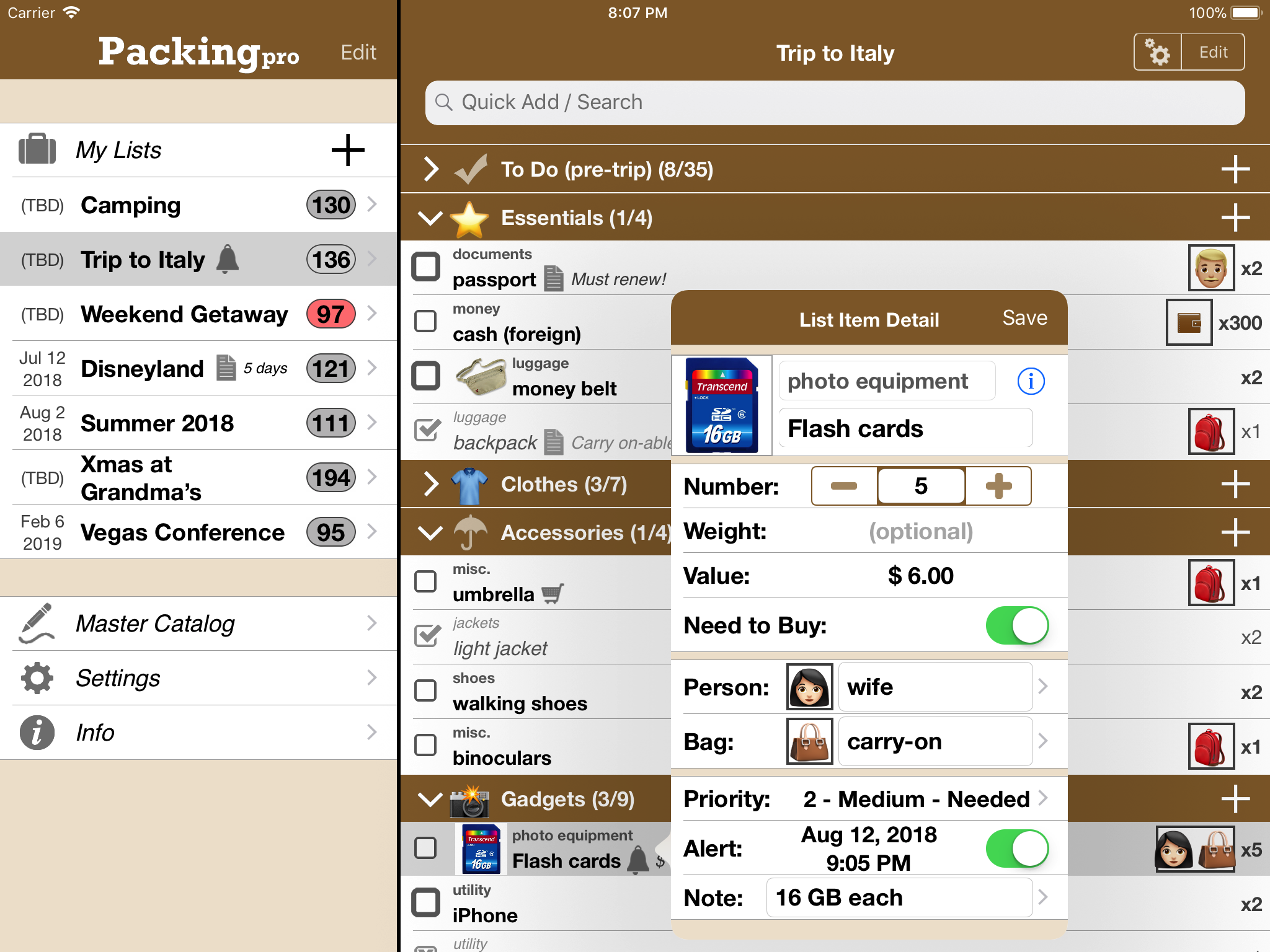
Packing Pro is a mobile travel packing list app that features unlimited, 100% customizable packing lists, an extensive, yet flexible, catalog, handy sample lists, iCloud auto-sync and various list sharing options. A host of special functions include:
* Multi-item selection from catalog for speedy list building
* Multi-item editing for easy list & catalog management
* Collapsable categories with floating headers & running item tallies
* List sorting & filtering by packing status, priority, need to buy, bag and/or person
* Item, weight, value and packing status totals & subtotals
* Item images to eliminate any confusion - never again pack the wrong item
* Item & list alerts for user-set reminders
* Email export for list & file sharing
* Wireless printing
* Fully customized device support for all sizes of iPhone, iPad & iPod touch
* Full multi-lingual support for English, Spanish, French, German, Italian, Portuguese, Russian, Polish, Japanese & Chinese
Besides the core features listed above (which are also present in the basic Packing (+TO DO!) app), Packing Pro also gives its users the following Pro-level features:
* iCloud auto-syncing support
* Expert packing list wizard that can "automagically" create a list
* Email, iTunes, AirDrop, Dropbox & Box file sharing, backup & out-of-app editing support
* Customized design (themes, layout, fonts, colors, textures)
* Double-sized Master Catalog with over 800 items and to-do tasks
* Twice as many sample lists
* Smart Search (lists & catalog)
Ten years on Apple's App Store have given QuinnScape valuable experience, and Packing Pro, its star product, has stood the test of time and truly become an essential app for your iPhone, iPad or iPod touch. Take advantage of this limited-time 66% off sale and check it out today!
Pricing and Availability:
Packing Pro is a universal app that is available for purchase worldwide on the iPhone & iPad App Store for $2.99 USD (Now Only $0.99!), or the equivalent in local currency. The basic Packing (+TO DO!) sells for $0.99.
QuinnScape: http://www.quinnscape.com/
Packing Pro 13.0: http://www.quinnscape.com/PackingPro.asp
Purchase and Download: https://geo.itunes.apple.com/us/app/packing-pro/id312266675?mt=8&at=1l3v8Yv&pt=55410&ct=prmac
Video Demos: http://www.quinnscape.com/PackingPro-videodemo.asp
Screenshot: http://www.quinnscape.com/media/images/PackingPro-iPad-v12.4.png
App Icon: http://www.quinnscape.com/media/images/PackingPro-Icon-250x250.png
Since its founding in October 2008, QuinnScape has been managed by Quinn Genzel. Quinn is best known for his popular, top-ranking travel packing apps: Packing (+TO DO!) and Packing Pro. Packing Pro has been recognized by Apple, CNN, WSJ, BBC, National Geographic, Budget Travel, Fodor's, CNET, Macworld and a host of others as one of their top apps for traveling. Other app created by Quinn include a grocery shopping list app (Shopping Pro), nature appreciation apps (iLove Nature and iLove Birds), 3D VR action games (R.I.P and Ghost Buddy) and high-quality puzzles (the aQ's Pro Slider Puzzle series). Copyright (C) 2008-2019 QuinnScape. All Rights Reserved. Apple, the Apple logo, iPhone, iPod and iPad are registered trademarks of Apple Inc. in the U.S. and/or other countries.
*******
Link To Article: https://prmac.com/release-id-83393.htm
*******
---------------------------------------------------------------------------------
Note that you can alter delivered distributions at any time.
Login to your account on prMac to alter your channel selection, or to opt-out at any time.
Packing Pro Celebrates 10 Years on App Store with Anniversary Sale - Published on 04/26/19
QuinnScape today announces a limited-time 10-year Anniversary Sale of 66% off its popular Packing Pro travel app. From now until April 28, Packing Pro can be purchased for only US$0.99 - one third of its original price of US$2.99 - a great deal, and perfect timing for the Summer vacation. Packing Pro is a mobile travel packing list app that features unlimited, 100% customizable packing lists, an extensive, flexible, catalog, handy sample lists, iCloud auto-sync and various list sharing options.
Taipei, Taiwan - Packing Pro, the popular travel app for the iPhone, iPad & iPod touch by QuinnScape, today celebrates its 10th anniversary on the App Store. In celebration, there is now a limited-time Anniversary Sale of 66% off from now until April 28. Packing Pro can be purchased for only US$0.99 - one third of its original price of US$2.99 - a great deal, and perfect timing for the upcoming Summer travel season. Originally based on the Packing (+TO DO!) app, which was released six months earlier in 2008, these apps were two of the first few thousand apps on the App Store, compared to the millions that are currently there today. During this time, both apps have kept pace with and added support for all of Apple's new iOS updates and devices, starting with iOS 2 and iPhone 3G, and progressing all the way up to the current iOS 12, iPhone X/X Plus, iPad Pro, iPad Air 2, iPad mini 4 & iPod touch 6G. Packing Pro has also maintained its position in the top 10 or 20 for all travel apps
for much of this time.
During these ten years, Packing Pro has been highlighted on Apple's App Store several times, such as in the "Travel Essentials," "Travel Survival Kit" and "Travel Expenses" promotions, among others. It has also ranked at #1 for iPads and #2 for iPhones in the U.S. App Store's Travel section. Besides Apple, Packing Pro has also been recognized by CNN, WSJ, BBC, The New York Times, Expedia and Budget Travel, and has earned glowing reviews on major tech and app blogs (Gizmodo, Mashable, Macworld, CNET and iPhone Life, among others).
Packing Pro is a mobile travel packing list app that features unlimited, 100% customizable packing lists, an extensive, yet flexible, catalog, handy sample lists, iCloud auto-sync and various list sharing options. A host of special functions include:
* Multi-item selection from catalog for speedy list building
* Multi-item editing for easy list & catalog management
* Collapsable categories with floating headers & running item tallies
* List sorting & filtering by packing status, priority, need to buy, bag and/or person
* Item, weight, value and packing status totals & subtotals
* Item images to eliminate any confusion - never again pack the wrong item
* Item & list alerts for user-set reminders
* Email export for list & file sharing
* Wireless printing
* Fully customized device support for all sizes of iPhone, iPad & iPod touch
* Full multi-lingual support for English, Spanish, French, German, Italian, Portuguese, Russian, Polish, Japanese & Chinese
Besides the core features listed above (which are also present in the basic Packing (+TO DO!) app), Packing Pro also gives its users the following Pro-level features:
* iCloud auto-syncing support
* Expert packing list wizard that can "automagically" create a list
* Email, iTunes, AirDrop, Dropbox & Box file sharing, backup & out-of-app editing support
* Customized design (themes, layout, fonts, colors, textures)
* Double-sized Master Catalog with over 800 items and to-do tasks
* Twice as many sample lists
* Smart Search (lists & catalog)
Ten years on Apple's App Store have given QuinnScape valuable experience, and Packing Pro, its star product, has stood the test of time and truly become an essential app for your iPhone, iPad or iPod touch. Take advantage of this limited-time 66% off sale and check it out today!
Pricing and Availability:
Packing Pro is a universal app that is available for purchase worldwide on the iPhone & iPad App Store for $2.99 USD (Now Only $0.99!), or the equivalent in local currency. The basic Packing (+TO DO!) sells for $0.99.
QuinnScape: http://www.quinnscape.com/
Packing Pro 13.0: http://www.quinnscape.com/PackingPro.asp
Purchase and Download: https://geo.itunes.apple.com/us/app/packing-pro/id312266675?mt=8&at=1l3v8Yv&pt=55410&ct=prmac
Video Demos: http://www.quinnscape.com/PackingPro-videodemo.asp
Screenshot: http://www.quinnscape.com/media/images/PackingPro-iPad-v12.4.png
App Icon: http://www.quinnscape.com/media/images/PackingPro-Icon-250x250.png

Since its founding in October 2008, QuinnScape has been managed by Quinn Genzel. Quinn is best known for his popular, top-ranking travel packing apps: Packing (+TO DO!) and Packing Pro. Packing Pro has been recognized by Apple, CNN, WSJ, BBC, National Geographic, Budget Travel, Fodor's, CNET, Macworld and a host of others as one of their top apps for traveling. Other app created by Quinn include a grocery shopping list app (Shopping Pro), nature appreciation apps (iLove Nature and iLove Birds), 3D VR action games (R.I.P and Ghost Buddy) and high-quality puzzles (the aQ's Pro Slider Puzzle series). Copyright (C) 2008-2019 QuinnScape. All Rights Reserved. Apple, the Apple logo, iPhone, iPod and iPad are registered trademarks of Apple Inc. in the U.S. and/or other countries.
*******
Link To Article: https://prmac.com/release-id-83393.htm
*******
---------------------------------------------------------------------------------
Note that you can alter delivered distributions at any time.
Login to your account on prMac to alter your channel selection, or to opt-out at any time.
Station 2.6 - Multilevel Dock for macOS
A new article has been published at prMac.
Station 2.6 - Multilevel Dock for macOS - Published on 04/25/19
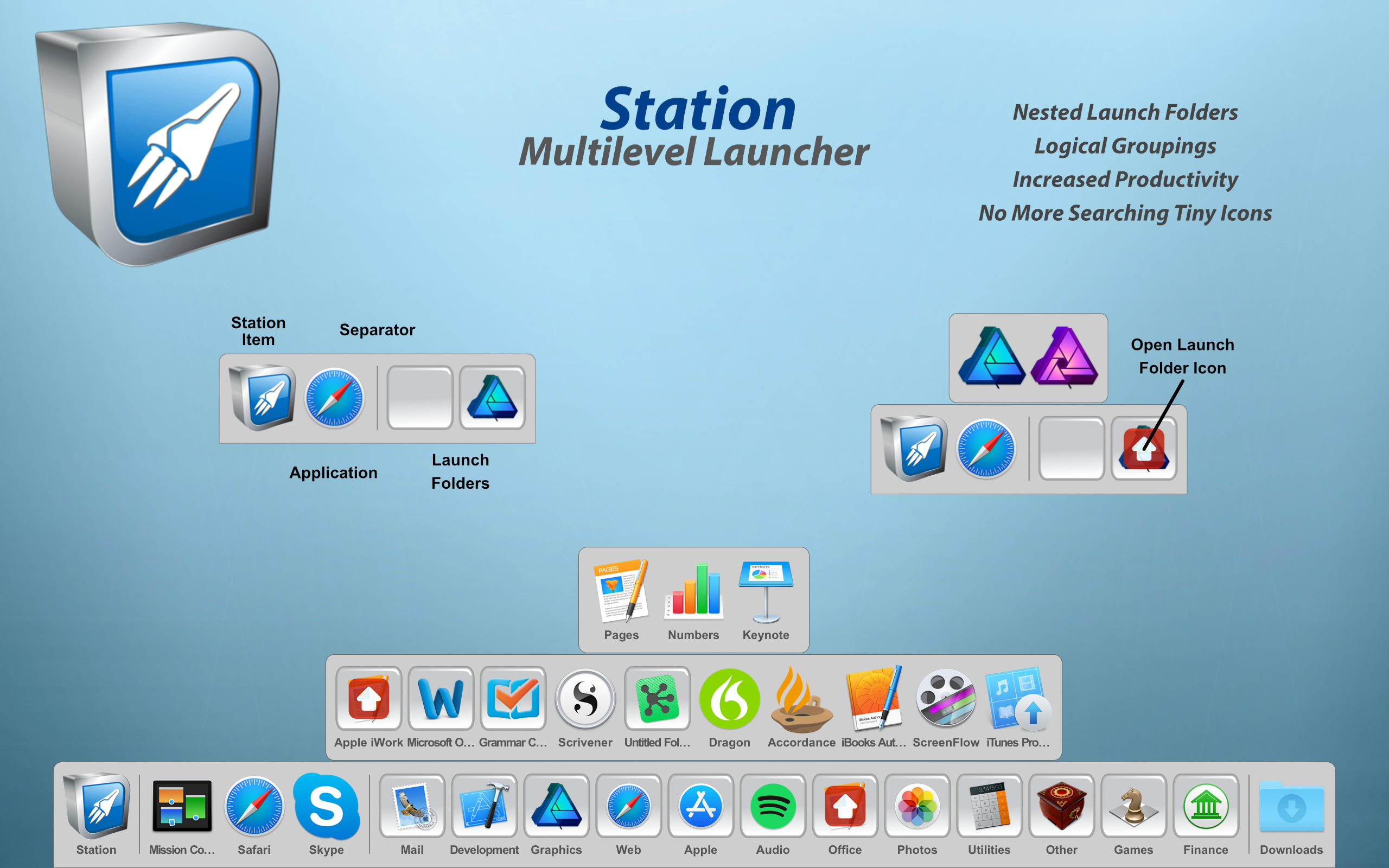
True North Software today introduces Station 2.6, their multilevel (hierarchical) launcher for macOS. Station promotes a more natural organization of applications and documents into folders. With nested folders, you can arrange items in Station in a way that fits your workflow with an uncluttered look and feel. Scalability is greatly increased through logical groupings thus increasing the sheer number of items that can be added to Station without having to shrink the launcher size.
Rockford, Minnesota - True North Software today is very proud to announce the release of Station 2.6, the company's multilevel (hierarchical) launcher for macOS. Station promotes a more natural organization of applications and documents into folders. With nested folders, you can arrange items in Station in a way that fits your workflow with an uncluttered look and feel. Scalability is greatly increased through logical groupings thus increasing the sheer number of items that can be added to Station without having to shrink the launcher size.
Productivity is increased because related items can be grouped together into a single folder. For example, one folder can contain work related items and another folder gaming items. Another useful feature of Station is the ability to launch, all at once, the items in a launch folder. This is useful when switching between tasks like business and spreadsheets to graphics work. With ten levels of folders available, enough space is provided to spread out even the most diverse set of applications and documents.
Station has been quickly evolving through new features and enhancements over the past several releases and version 2.6 continues that growth. Many customers looking for an alternative for DragThing have found a new home with Station.
What's New for Version 2.6:
New Features:
* Bookmark files (Finder aliases) are supported
* Web URLs from programs like Safari are supported
* Dropping files on a Finder folder in Station will now move or copy the files to the actual Finder folder
* Added a utility menu item to delete all items in the current panel set
Enhancements:
* Enhancements to file resolution
* Bug fixes
System Requirements:
* Requires macOS 10.11 or higher
* 64-bit processor
* 19.9 MB
Pricing and Availability:
Station 2.6 is priced at $14.99 (USD) and is available through the Mac App Store in the Productivity category. A demo version is available from the True North Website. For more information, please contact Brendan Murphy.
True North Software: http://www.truenorthsoftware.com
Station 2.6: http://www.truenorthsoftware.com/station/
Purchase and Download (MAS): https://itunes.apple.com/app/station/id1126126612
Screenshot: http://www.truenorthsoftware.com/resources/station_2-6_screenshot.png
Application Icon: http://www.truenorthsoftware.com/resources/StationIcon.png
Located in Rockford, Minnesota/USA, True North Software, founded in 2003, provides design solutions for Apple platforms. With a passion for Apple technologies, our focus is to provide real world solutions that make a difference in the lives of people. All Material and Software (C) 2003-2019 True North Software / All Rights Reserved. Apple, the Apple logo, macOS, iPhone, iPod and iPad are registered trademarks of Apple Inc. in the U.S. and/or other countries. Other trademarks and registered trademarks may be the property of their respective owners.
*******
Link To Article: https://prmac.com/release-id-83391.htm
*******
---------------------------------------------------------------------------------
Note that you can alter delivered distributions at any time.
Login to your account on prMac to alter your channel selection, or to opt-out at any time.
Station 2.6 - Multilevel Dock for macOS - Published on 04/25/19
True North Software today introduces Station 2.6, their multilevel (hierarchical) launcher for macOS. Station promotes a more natural organization of applications and documents into folders. With nested folders, you can arrange items in Station in a way that fits your workflow with an uncluttered look and feel. Scalability is greatly increased through logical groupings thus increasing the sheer number of items that can be added to Station without having to shrink the launcher size.
Rockford, Minnesota - True North Software today is very proud to announce the release of Station 2.6, the company's multilevel (hierarchical) launcher for macOS. Station promotes a more natural organization of applications and documents into folders. With nested folders, you can arrange items in Station in a way that fits your workflow with an uncluttered look and feel. Scalability is greatly increased through logical groupings thus increasing the sheer number of items that can be added to Station without having to shrink the launcher size.
Productivity is increased because related items can be grouped together into a single folder. For example, one folder can contain work related items and another folder gaming items. Another useful feature of Station is the ability to launch, all at once, the items in a launch folder. This is useful when switching between tasks like business and spreadsheets to graphics work. With ten levels of folders available, enough space is provided to spread out even the most diverse set of applications and documents.
Station has been quickly evolving through new features and enhancements over the past several releases and version 2.6 continues that growth. Many customers looking for an alternative for DragThing have found a new home with Station.
What's New for Version 2.6:
New Features:
* Bookmark files (Finder aliases) are supported
* Web URLs from programs like Safari are supported
* Dropping files on a Finder folder in Station will now move or copy the files to the actual Finder folder
* Added a utility menu item to delete all items in the current panel set
Enhancements:
* Enhancements to file resolution
* Bug fixes
System Requirements:
* Requires macOS 10.11 or higher
* 64-bit processor
* 19.9 MB
Pricing and Availability:
Station 2.6 is priced at $14.99 (USD) and is available through the Mac App Store in the Productivity category. A demo version is available from the True North Website. For more information, please contact Brendan Murphy.
True North Software: http://www.truenorthsoftware.com
Station 2.6: http://www.truenorthsoftware.com/station/
Purchase and Download (MAS): https://itunes.apple.com/app/station/id1126126612
Screenshot: http://www.truenorthsoftware.com/resources/station_2-6_screenshot.png
Application Icon: http://www.truenorthsoftware.com/resources/StationIcon.png

Located in Rockford, Minnesota/USA, True North Software, founded in 2003, provides design solutions for Apple platforms. With a passion for Apple technologies, our focus is to provide real world solutions that make a difference in the lives of people. All Material and Software (C) 2003-2019 True North Software / All Rights Reserved. Apple, the Apple logo, macOS, iPhone, iPod and iPad are registered trademarks of Apple Inc. in the U.S. and/or other countries. Other trademarks and registered trademarks may be the property of their respective owners.
*******
Link To Article: https://prmac.com/release-id-83391.htm
*******
---------------------------------------------------------------------------------
Note that you can alter delivered distributions at any time.
Login to your account on prMac to alter your channel selection, or to opt-out at any time.
Subscribe to:
Posts (Atom)