A new article has been published at prMac.
Cisdem AppCrypt 4.1.0 Supports Locking More Apps for Privacy - Published on 05/02/19
Cisdem announce the release of AppCrypt 4.1.0, the update to their app and block distracting websites on your Mac. Cisdem Appcrypt 4.1.0 comes with enhanced performance and it is guaranteed that users will get an even better experience by using the program.
Madelia, Minnesota - Cisdem is proud to announce the release of AppCrypt 4.1.0, the update to their app and block distracting websites on your Mac.
"Since the release, AppCrypt has won great recognition from our users. But over the past months, we got similar feedbacks from our users that the presence of capability to support those apps launched in menu bar. So, this is how the new version 4.1.0 come out. Also, we enhanced the performance and it is guaranteed that users will get an even better experience by using our program." said Edward Riley, Cisdem's project manager.
From 2017 until now, Cisdem AppCrypt is under active development, aiming to provide an easy yet effective way to protect privacy and stay focus for our users. It adds advanced security to your apps, so no one can peek into your privacy or even manipulate inappropriately. Also, it blocks websites and apps when you need to focus on your current job, so you can be more productivity to achieve more in limited hours.
What's New in Version 4.1.0
* Added support for more Apps
Some Apps are lightweight, they are not standalone and can only be manipulated through menu bar, which is not easy for users to control the Apps. Luckily, Cisdem finally comes with the feature to fully control such an application, for easy locking or blocking anytime.
That's to say, even though you cannot locate the App in your Mac Application or Launchpad, Cisdem still helps you to access to the App easily and manipulate as needed.
Main Features of Cisdem AppCrypt
1. Lock Apps
Virtually all applications can be locked by Cisdem, no matter they are mainstream programs or utilities for a specific niche. All you need to do is adding the program to the lock list, and then Cisdem will take over.
2. Block Websites
To protect ourselves and our kids from malicious websites or unwanted information, Cisdem allows users to block Website. You can block by adding blacklist or allow good ones by inputting a whitelist.
3. Customize Lock/Block Time Schedule
Sometimes, the blocking is set up to make us focus during working time, and we still need to access to such a App or Web later. In this case, you can customize a time schedule to put the locking or blocking into effect only in preferred time.
4. Record Fail Attempts to Your Apps
To highly secure your privacy, Cisdem carries out a close supervision on any suspicious manners onto your Applications. If there is any fail attempts to control your Apps, Cisdem will take captures with your Mac camera, so you will realize what has happened and cope with immediately.
Price and Availability
As always, Cisdem AppCrypt is available with the price of $29.99 for lifetime and free upgrade to latest version. For users who purchase multiple license, a discount is offered.
You can download the free trial, it is 100% safe and free to try with limited features. For more details about Cisdem AppCrypt, please visit the official product page.
About the Developer
Cisdem, the developer of AppCrypt, has served as a dedicated software developer for more than a decade. It has won great trust from its users in the field of productivity and utility tools, with its expertise and sincere service year after year. To know what's popular on Cisdem, please go to the official website.
Cisdem: https://www.cisdem.com
Cisdem AppCrypt 4.1.0: https://www.cisdem.com/appcrypt-mac.html
Free Trial Download: https://www.cisdem.com/downloads/cisdem-appcrypt-14.dmg
Cisdem provides productivity and business software that helps Mac users to get their job done faster. Cisdem products include top rated software centered on PDF Conversion, PDF Management, Data Recovery, and File Management. The company is dedicated in building highly efficient Mac software that make life easier and processes simpler. All Material and Software (C) Copyright 2019 Cisdem. All Rights Reserved. Apple, the Apple logo, Mac OS X and Macintosh are registered trademarks of Apple Inc. in the U.S. and/or other countries. Other trademarks and registered trademarks may be the property of their respective owners.
*******
Link To Article: https://prmac.com/release-id-83403.htm
*******
---------------------------------------------------------------------------------
Note that you can alter delivered distributions at any time.
Login to your account on prMac to alter your channel selection, or to opt-out at any time.

New 3D Modeling App for iPad Gives Users Full Control Over Modeling
A new article has been published at prMac.
New 3D Modeling App for iPad Gives Users Full Control Over Modeling - Published on 05/02/19
Independent development team Handcade announces Polydust 1.0, their new 3D modeling app for the iPad. Polydust gives users full control of their model mesh, allowing them to work in vertex, edge, poly and object model. Users can create basic shapes such as cubes, arcs, cylinders and toruses that can act as the base of their 3D models. The app offers a touch-based user interface, augmented by keyboard shortcuts. Polydust has a great and active community, including a forum and YouTube channel.
Wroclaw, Poland - Independent development team, Handcade is proud to announce the release and immediate availability of Polydust 1.0, their new 3D modeling app for the iPad, which turns the tablet into a pro modeling device. Users can create basic shapes such as cubes, arcs, cylinders and toruses that can act as the base of custom 3D models. The app also offers users full control of their model mesh, as they can work in vertex, edge, poly and object model.
While Polydust offers a convenient touch interface, the simple user interface also supports keyboard shortcuts, making it easy to control the app, no matter the user's preferred form of command entry. Polydust allows importing and exporting of FBX models, and offers Sketchfab integration that allows users to publish their creations in a matter of seconds.
"Developing Polydust is a natural consequence of our experience and inclinations," says Polydust Co-Founder Wojciech Roszkowiak. "It is an iPad app with carefully designed UI and UX which gives our users possibility to create 3D content that can be used in many fields (for example game development, 3D printing or AR/VR apps)."
Polygons are the building blocks of 3D modeling. The blocks are connected together with edges. The edges are made from vertices. Using them, you can create anything you can imagine. Thanks to the app's varied polygonal modeling tool set, it's easy to craft anything a user can think of.
Polygonal modeling is the fundamental digital 3D modeling technique that provides modelers unlimited possibilities when creating their 3D objects. Handcade did their best to make modelers feel comfortable, basing their solutions on a series of well-established ideas.
The app's User interface is made up of the following:
1. Project Browser: Browse all projects and scenes
2. Undo/Redo: Make a mistake? Instantly undo or redo
3. Hierarchy: View a scene's hierarchy
4. Scene, Camera, Learn, Export: Adjust all the important settings
5. Add a New Object: Procedural objects, image references, lights and much more
6. Gizmos: Move, Rotate, Scale everything that's selected
7. Selection: Select by edge loop, world/local space, backface selection and others
8. Operations: All modeling operations and object properties
Polydust includes several built-in operations, allowing users to extrude face, weld vertices, bridge edges, and much more. The app's Snap feature gets rid of ugly rotations or unorganized positions by rounding positions, rotation or scale to its nearest whole value. The Symmetry Mode makes it easy to create symmetrical shapes like body, head, cars and many others. Users can save time when creating arcs, cylinders, toruses and other primitives by setting the values before creating them. Meanwhile, by harnessing the ease and efficiency of edge modeling, users can precisely control their models' mesh. Polydust features include:
General:
* Save and close/continue
* Auto-save
* Undo/redo
* Objects hierarchy
Gizmos:
* Move
* Rotate
* Scale - All gizmos with relative / absolute mode and optional snapping
Selection:
* Add to a new container
* Explode container
* Grow selection
* Shrink selection
* Select edge loop
* Select none
* Select all
* Invert selection
* Modes of selection: default / add / subtract
Vertex operations:
* Weld (custom distance)
* Connect (option: to first)
* Collapse
* Split
* Fill hole (option: entire hole)
Edge operations:
* Connect centers
* Bridge
* Insert edge loop
* Subdivide (custom number of subdivisions)
* Bevel (custom distance)
* Extrude (custom distance, options: as group, manifold)
* Fill a hole (option: entire hole)
Other features include such Poly Operations as slice plane, triangulate, swap edge, remove cross edges, unify normals, flip normals, detach, subdivide, bevel (custom distance), extrude, and delete. Object Operations include merge, mirror (custom axes: x / y / z, options: duplicate, mode: copy/instance), smooth, duplicate (mode: copy / instance), and delete.
Objects can quickly be added to a scene form a variety of types, including box, cylinder (custom axis divisions, radius, height and height cuts), sphere, plane, cone, image reference, point light, directional light, empty container, and FBX model (from an iTunes file sharing folder).
It's easy to control the color, smoothness and metallic setting of object materials, as well as an object's properties, include its name, its symmetry mode and its lighting, by controlling the intensity, range, flare, and shadows of the object.
Scene settings allow control of the background mode (solid or gradient), the background lighting, and ambient light. Camera settings offer the ability to control bloom (custom intensity and threshold), vignette (custom intensity and smoothness), and depth of field (custom focus distance and aperture).
Exporting is a breeze, with the ability to export a scene to: PNG (custom width and height), FBX, and Sketchfab (with login). The app also integrates with Sketchfab upload, keyboard shortcuts, and Swiftpoint mouse. Users can also record their creation process via the app's handy record and pause features, and microphone recording controls.
"Being able to model with your fingers instead of an actual mouse changes everything. You can literally 'feel' what you create," says Polydust Co-Founder Piotr Szwach. "Users will appreciate the app's ease of use. Plus, if they have any questions, they are welcome to visit our informative user forum and view our informative tutorials, which are available on our YouTube channel. We are very excited to see what can be created with Polydust, and we are sure it is going to exceed the limits of our imagination."
Device Requirements:
* iPad
* Requires iOS 12.0 or later
* 321 MB
Pricing and Availability:
Polydust 1.0 is a free download and is available worldwide exclusively through the App Store in the Utilities category. Convenient in-app subscriptions are available to unlock all of the app's features. Polydust subscription payments can be made on a monthly ($9.99 per month for full access), or on an annual basis ($79 per year for full access). A 14-day free trial is available.
Polydust 1.0: https://www.polydust.com/
Download from App Store: https://itunes.apple.com/us/app/polydust/id1211684731
Polydust Forum: http://forum.polydust.com/
Polydust YouTube Channel: https://www.youtube.com/channel/UCO9dlJEDaCmiEB6oOonL7Xg
Press Kit: https://www.dropbox.com/sh/qx7wonckvaqv4tt/AADv294SNTq8BsjT2kEFHCHta?dl=0
Terms of Use and Privacy Policy: https://polydust.com/terms-use-privacy-policy
Handcade is a Wroclaw, Poland-based company founded by two friends: Piotr and Wojciech. The two have been friends since they met in high school over 12 years ago. Since then, they have cooperated on numerous projects; in school, at university and professionally. Their adventure with iOS development started during the early days of the App Store. In all of their projects, the duo has always put an emphasis on creating a great user experience. Along with being developers, they are also app users and love apps which are flawless, functional and beautiful. That is why they wanted to create such apps. All Material and Software (C) Copyright 2019 Handcade. All Rights Reserved. Apple, the Apple logo, iPhone, iPod and iPad are registered trademarks of Apple Inc. in the U.S. and/or other countries. Other trademarks and registered trademarks may be the property of their respective owners.
*******
Link To Article: https://prmac.com/release-id-83402.htm
*******
---------------------------------------------------------------------------------
Note that you can alter delivered distributions at any time.
Login to your account on prMac to alter your channel selection, or to opt-out at any time.
New 3D Modeling App for iPad Gives Users Full Control Over Modeling - Published on 05/02/19
Independent development team Handcade announces Polydust 1.0, their new 3D modeling app for the iPad. Polydust gives users full control of their model mesh, allowing them to work in vertex, edge, poly and object model. Users can create basic shapes such as cubes, arcs, cylinders and toruses that can act as the base of their 3D models. The app offers a touch-based user interface, augmented by keyboard shortcuts. Polydust has a great and active community, including a forum and YouTube channel.
Wroclaw, Poland - Independent development team, Handcade is proud to announce the release and immediate availability of Polydust 1.0, their new 3D modeling app for the iPad, which turns the tablet into a pro modeling device. Users can create basic shapes such as cubes, arcs, cylinders and toruses that can act as the base of custom 3D models. The app also offers users full control of their model mesh, as they can work in vertex, edge, poly and object model.
While Polydust offers a convenient touch interface, the simple user interface also supports keyboard shortcuts, making it easy to control the app, no matter the user's preferred form of command entry. Polydust allows importing and exporting of FBX models, and offers Sketchfab integration that allows users to publish their creations in a matter of seconds.
"Developing Polydust is a natural consequence of our experience and inclinations," says Polydust Co-Founder Wojciech Roszkowiak. "It is an iPad app with carefully designed UI and UX which gives our users possibility to create 3D content that can be used in many fields (for example game development, 3D printing or AR/VR apps)."
Polygons are the building blocks of 3D modeling. The blocks are connected together with edges. The edges are made from vertices. Using them, you can create anything you can imagine. Thanks to the app's varied polygonal modeling tool set, it's easy to craft anything a user can think of.
Polygonal modeling is the fundamental digital 3D modeling technique that provides modelers unlimited possibilities when creating their 3D objects. Handcade did their best to make modelers feel comfortable, basing their solutions on a series of well-established ideas.
The app's User interface is made up of the following:
1. Project Browser: Browse all projects and scenes
2. Undo/Redo: Make a mistake? Instantly undo or redo
3. Hierarchy: View a scene's hierarchy
4. Scene, Camera, Learn, Export: Adjust all the important settings
5. Add a New Object: Procedural objects, image references, lights and much more
6. Gizmos: Move, Rotate, Scale everything that's selected
7. Selection: Select by edge loop, world/local space, backface selection and others
8. Operations: All modeling operations and object properties
Polydust includes several built-in operations, allowing users to extrude face, weld vertices, bridge edges, and much more. The app's Snap feature gets rid of ugly rotations or unorganized positions by rounding positions, rotation or scale to its nearest whole value. The Symmetry Mode makes it easy to create symmetrical shapes like body, head, cars and many others. Users can save time when creating arcs, cylinders, toruses and other primitives by setting the values before creating them. Meanwhile, by harnessing the ease and efficiency of edge modeling, users can precisely control their models' mesh. Polydust features include:
General:
* Save and close/continue
* Auto-save
* Undo/redo
* Objects hierarchy
Gizmos:
* Move
* Rotate
* Scale - All gizmos with relative / absolute mode and optional snapping
Selection:
* Add to a new container
* Explode container
* Grow selection
* Shrink selection
* Select edge loop
* Select none
* Select all
* Invert selection
* Modes of selection: default / add / subtract
Vertex operations:
* Weld (custom distance)
* Connect (option: to first)
* Collapse
* Split
* Fill hole (option: entire hole)
Edge operations:
* Connect centers
* Bridge
* Insert edge loop
* Subdivide (custom number of subdivisions)
* Bevel (custom distance)
* Extrude (custom distance, options: as group, manifold)
* Fill a hole (option: entire hole)
Other features include such Poly Operations as slice plane, triangulate, swap edge, remove cross edges, unify normals, flip normals, detach, subdivide, bevel (custom distance), extrude, and delete. Object Operations include merge, mirror (custom axes: x / y / z, options: duplicate, mode: copy/instance), smooth, duplicate (mode: copy / instance), and delete.
Objects can quickly be added to a scene form a variety of types, including box, cylinder (custom axis divisions, radius, height and height cuts), sphere, plane, cone, image reference, point light, directional light, empty container, and FBX model (from an iTunes file sharing folder).
It's easy to control the color, smoothness and metallic setting of object materials, as well as an object's properties, include its name, its symmetry mode and its lighting, by controlling the intensity, range, flare, and shadows of the object.
Scene settings allow control of the background mode (solid or gradient), the background lighting, and ambient light. Camera settings offer the ability to control bloom (custom intensity and threshold), vignette (custom intensity and smoothness), and depth of field (custom focus distance and aperture).
Exporting is a breeze, with the ability to export a scene to: PNG (custom width and height), FBX, and Sketchfab (with login). The app also integrates with Sketchfab upload, keyboard shortcuts, and Swiftpoint mouse. Users can also record their creation process via the app's handy record and pause features, and microphone recording controls.
"Being able to model with your fingers instead of an actual mouse changes everything. You can literally 'feel' what you create," says Polydust Co-Founder Piotr Szwach. "Users will appreciate the app's ease of use. Plus, if they have any questions, they are welcome to visit our informative user forum and view our informative tutorials, which are available on our YouTube channel. We are very excited to see what can be created with Polydust, and we are sure it is going to exceed the limits of our imagination."
Device Requirements:
* iPad
* Requires iOS 12.0 or later
* 321 MB
Pricing and Availability:
Polydust 1.0 is a free download and is available worldwide exclusively through the App Store in the Utilities category. Convenient in-app subscriptions are available to unlock all of the app's features. Polydust subscription payments can be made on a monthly ($9.99 per month for full access), or on an annual basis ($79 per year for full access). A 14-day free trial is available.
Polydust 1.0: https://www.polydust.com/
Download from App Store: https://itunes.apple.com/us/app/polydust/id1211684731
Polydust Forum: http://forum.polydust.com/
Polydust YouTube Channel: https://www.youtube.com/channel/UCO9dlJEDaCmiEB6oOonL7Xg
Press Kit: https://www.dropbox.com/sh/qx7wonckvaqv4tt/AADv294SNTq8BsjT2kEFHCHta?dl=0
Terms of Use and Privacy Policy: https://polydust.com/terms-use-privacy-policy
Handcade is a Wroclaw, Poland-based company founded by two friends: Piotr and Wojciech. The two have been friends since they met in high school over 12 years ago. Since then, they have cooperated on numerous projects; in school, at university and professionally. Their adventure with iOS development started during the early days of the App Store. In all of their projects, the duo has always put an emphasis on creating a great user experience. Along with being developers, they are also app users and love apps which are flawless, functional and beautiful. That is why they wanted to create such apps. All Material and Software (C) Copyright 2019 Handcade. All Rights Reserved. Apple, the Apple logo, iPhone, iPod and iPad are registered trademarks of Apple Inc. in the U.S. and/or other countries. Other trademarks and registered trademarks may be the property of their respective owners.
*******
Link To Article: https://prmac.com/release-id-83402.htm
*******
---------------------------------------------------------------------------------
Note that you can alter delivered distributions at any time.
Login to your account on prMac to alter your channel selection, or to opt-out at any time.
School ID Updates to Distribute via Text Message
A new article has been published at prMac.
School ID Updates to Distribute via Text Message - Published on 04/30/19
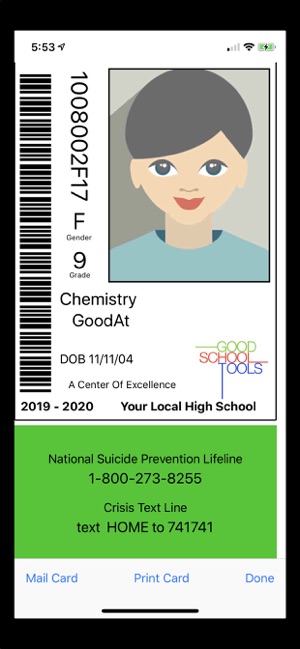
California based Good School Tools today announced School ID Cards and Photos 4.1.0, an update to their popular educational app for iOS devices. With this useful app, individual student IDs are distributed directly to the student's phone via text messaging. There is no need to print cards or rely on students to carry hard copies. Immediately find a group of students by name, gender, and grade on the admin's phone. Version 4.1 includes Suicide Lifelines and more.
San Diego, California - Good School Tools announced today that School ID Cards and Photos version 4.1.0, will include information on every student ID for the National and Local Suicide Prevention Hotlines, the Crisis Text Line, and Special Emergency numbers.
In addition to California law (SB 972 authored by Senator Anthony Portantino), School ID adds crisis information other states, such as Arizona, require to address the increase of student suicides. Suicide Lifeline information, local suicide lifeline and special crisis numbers may be included on every student ID card present on every student's smart phone. The ID information is distributed to students by text message to fit with the life style and smart phone use by that demographic.
Tim Walton of Good School Tools said: "We are appalled by the increase in teen suicides. School ID provides the perfect means to impact this problem by providing IDs right on a student's smart phone. We hope students will take advantage of the hotline and crisis information available right on their phones to reach out for help. School ID is already in use in Los Angeles, NYC and Australian schools. We are committed to providing critical help to students in need even without legislation to require student IDs with Lifeline information. School ID is priced at $199/yr/school so that as many schools as possible can benefit from the use of the app. We have partnered with a number of school photographers who provide student photo IDs as a part of their normal services. We are also seeing new partnerships emerge so that we may help safeguard more of our students."
Device Requirements:
* iPhone 5s or later and iPod touch
* iPad 5th generation or later
* Requires iOS 11.0 or later
* 16.3 MB
Pricing and Availability:
Apps are Free (With In-App Subscription Purchase options) and available worldwide exclusively through the App Store in the Education category. For more information, please contact Tim Walton.
Good School Tools: http://www.goodschooltools.com
School ID Cards and Photos 4.1.0: http://www.goodschooltools.com/Tools/SchoolID/
Download from App Store: https://itunes.apple.com/app/school-id-cards-and-photos/id362528188
Screenshot: https://is3-ssl.mzstatic.com/image/thumb/Purple113/v4/1e/88/71/1e88715d-e355-e90a-c046-9376d0ef511c/pr_source.jpg/300x0w.jpg
App Icon: https://is5-ssl.mzstatic.com/image/thumb/Purple113/v4/ab/83/c4/ab83c451-c307-98e8-a9a8-24db497a2f00/IDIcon-0-1x_U007emarketing-0-0-GLES2_U002c0-512MB-sRGB-0-0-0-85-220-0-0-0-7.png/246x0w.jpg
San Diego based Good School Tools, previously operating as TrueIDApps and School ID, has been providing Southern California school districts with mobile apps for administering students during normal and emergency conditions for nearly 15 years. Their flagship product, GSTools provides a suite of mobile apps which streamline the administrators' job around school by providing critical student information, including photos, right on the administrators' iPhone or iPad. GSTools integrates with most SISs. Good School Tools other tools take information exported from SIS systems to provide administrators additional capabilities to run the schools more efficiently. All Material and Software (C) Copyright 2019 Good School Tools. All Rights Reserved. Apple, the Apple logo, iPhone, iPod and iPad are registered trademarks of Apple Inc. in the U.S. and/or other countries. Other trademarks and registered trademarks may be the property of their respective owners.
*******
Link To Article: https://prmac.com/release-id-83400.htm
*******
---------------------------------------------------------------------------------
Note that you can alter delivered distributions at any time.
Login to your account on prMac to alter your channel selection, or to opt-out at any time.
School ID Updates to Distribute via Text Message - Published on 04/30/19
California based Good School Tools today announced School ID Cards and Photos 4.1.0, an update to their popular educational app for iOS devices. With this useful app, individual student IDs are distributed directly to the student's phone via text messaging. There is no need to print cards or rely on students to carry hard copies. Immediately find a group of students by name, gender, and grade on the admin's phone. Version 4.1 includes Suicide Lifelines and more.
San Diego, California - Good School Tools announced today that School ID Cards and Photos version 4.1.0, will include information on every student ID for the National and Local Suicide Prevention Hotlines, the Crisis Text Line, and Special Emergency numbers.
In addition to California law (SB 972 authored by Senator Anthony Portantino), School ID adds crisis information other states, such as Arizona, require to address the increase of student suicides. Suicide Lifeline information, local suicide lifeline and special crisis numbers may be included on every student ID card present on every student's smart phone. The ID information is distributed to students by text message to fit with the life style and smart phone use by that demographic.
Tim Walton of Good School Tools said: "We are appalled by the increase in teen suicides. School ID provides the perfect means to impact this problem by providing IDs right on a student's smart phone. We hope students will take advantage of the hotline and crisis information available right on their phones to reach out for help. School ID is already in use in Los Angeles, NYC and Australian schools. We are committed to providing critical help to students in need even without legislation to require student IDs with Lifeline information. School ID is priced at $199/yr/school so that as many schools as possible can benefit from the use of the app. We have partnered with a number of school photographers who provide student photo IDs as a part of their normal services. We are also seeing new partnerships emerge so that we may help safeguard more of our students."
Device Requirements:
* iPhone 5s or later and iPod touch
* iPad 5th generation or later
* Requires iOS 11.0 or later
* 16.3 MB
Pricing and Availability:
Apps are Free (With In-App Subscription Purchase options) and available worldwide exclusively through the App Store in the Education category. For more information, please contact Tim Walton.
Good School Tools: http://www.goodschooltools.com
School ID Cards and Photos 4.1.0: http://www.goodschooltools.com/Tools/SchoolID/
Download from App Store: https://itunes.apple.com/app/school-id-cards-and-photos/id362528188
Screenshot: https://is3-ssl.mzstatic.com/image/thumb/Purple113/v4/1e/88/71/1e88715d-e355-e90a-c046-9376d0ef511c/pr_source.jpg/300x0w.jpg
App Icon: https://is5-ssl.mzstatic.com/image/thumb/Purple113/v4/ab/83/c4/ab83c451-c307-98e8-a9a8-24db497a2f00/IDIcon-0-1x_U007emarketing-0-0-GLES2_U002c0-512MB-sRGB-0-0-0-85-220-0-0-0-7.png/246x0w.jpg
San Diego based Good School Tools, previously operating as TrueIDApps and School ID, has been providing Southern California school districts with mobile apps for administering students during normal and emergency conditions for nearly 15 years. Their flagship product, GSTools provides a suite of mobile apps which streamline the administrators' job around school by providing critical student information, including photos, right on the administrators' iPhone or iPad. GSTools integrates with most SISs. Good School Tools other tools take information exported from SIS systems to provide administrators additional capabilities to run the schools more efficiently. All Material and Software (C) Copyright 2019 Good School Tools. All Rights Reserved. Apple, the Apple logo, iPhone, iPod and iPad are registered trademarks of Apple Inc. in the U.S. and/or other countries. Other trademarks and registered trademarks may be the property of their respective owners.
*******
Link To Article: https://prmac.com/release-id-83400.htm
*******
---------------------------------------------------------------------------------
Note that you can alter delivered distributions at any time.
Login to your account on prMac to alter your channel selection, or to opt-out at any time.
AlphaDigits Top Rated Mobile Apps April 2019
A new article has been published at prMac.
AlphaDigits Top Rated Mobile Apps April 2019 - Published on 04/30/19
Mobile app review publisher AlphaDigits has named top rated applications for April 2019. YogaDownload offers an assortment of Yoga class styles. Healthzilla helps manage health and fitness. Jot allows taking notes really fast. SOS Method Meditation puts the SOS Method into action. Nox Cleaner provides perfect user experience on all mobile phones.
Long Island, New York - Mobile app review publisher AlphaDigits has named top rated applications for April 2019. AlphaDigits names five top class mobile apps every month based on the reviews published in the website during the particular month. This website has now released the names of top rated mobile apps for the month of April.
YogaDownload (10/10): Free to download, it comes equipped with an assortment of categories and routines that are super easy to follow and will leave you feeling strengthened and toned and free of tension. What's great about YogaDownload is that you can find an assortment of class styles and teachers, so it's easy to experiment, try out new things and find what works best for you.
Healthzilla (9.5/10): There are a ton of apps out there that help people manage their health and fitness goals. Healthzilla is one of the more fancier apps. It works on iOS and talks to your Apple Watch and Fitbit devices. To expand on that, Healthzilla can sync to any device that supports HealthKit, and includes well known apps like Cardiogram, Calm, Lark, Lifesum, MyFitnessPal, Strava, Nike, Oak, Headspace, 8fit, Zova and Waking Up.
Jot (9/10): This app allows you to take notes really fast with just a few clicks. The exquisite design of the Jot app allows for the usual note-taking and checklist creating a process which can be easily accessed through the notification feature that brings its uniqueness to another level. When making notes and checklist get easier, what else could be as fascinating as having the freedom to organize checklists and notes in folders.
SOS Method Meditation (8.5/10): This is an app that puts the SOS Method into action. While traditional meditation practice takes time, SOS Method makes it fit into our busy lives. If you only have five minutes to spare, SOS Method can help. With uniquely designed exercises, it helps you tap into you mind and let it focus inward, to bring inspiration, calm your emotions and improve overall well-being. When your mind is free from clutter, you function better.
Nox Cleaner (8/10): Every bit of speed is important for perfect user experience on all mobile phones and this is where the unique features of Nox cleaner come into play. The user interface of Nox Cleaner is designed in such a way that is very easy to navigate and is developed as an all-in-one noxious file knockout toolbox with its deep cleaning ability setting it apart from it kinds.
Joe Ellen, an Editor at AlphaDigits said, "Our marketing team can also help developers in writing and distributing PRs and App Store description writing". Developers can also contact AlphaDigits through the onsite app submission form, mail or the contact form to get their apps reviewed.
AlphaDigits: https://alphadigits.com
Submit App for Review: https://alphadigits.com/submit-app-for-review/
AlphaDigits is a review site run by a few app marketers. Enjoying the support from a handy amount of regular visitors, AlphaDigits provides reviews for iPhone, iPad and Android apps. Copyright (C) 2014 AlphaDigits. All Rights Reserved. Apple, the Apple logo, iPhone, iPod and iPad are registered trademarks of Apple Inc. in the U.S. and/or other countries.
*******
Link To Article: https://prmac.com/release-id-83401.htm
*******
---------------------------------------------------------------------------------
Note that you can alter delivered distributions at any time.
Login to your account on prMac to alter your channel selection, or to opt-out at any time.
AlphaDigits Top Rated Mobile Apps April 2019 - Published on 04/30/19
Mobile app review publisher AlphaDigits has named top rated applications for April 2019. YogaDownload offers an assortment of Yoga class styles. Healthzilla helps manage health and fitness. Jot allows taking notes really fast. SOS Method Meditation puts the SOS Method into action. Nox Cleaner provides perfect user experience on all mobile phones.
Long Island, New York - Mobile app review publisher AlphaDigits has named top rated applications for April 2019. AlphaDigits names five top class mobile apps every month based on the reviews published in the website during the particular month. This website has now released the names of top rated mobile apps for the month of April.
YogaDownload (10/10): Free to download, it comes equipped with an assortment of categories and routines that are super easy to follow and will leave you feeling strengthened and toned and free of tension. What's great about YogaDownload is that you can find an assortment of class styles and teachers, so it's easy to experiment, try out new things and find what works best for you.
Healthzilla (9.5/10): There are a ton of apps out there that help people manage their health and fitness goals. Healthzilla is one of the more fancier apps. It works on iOS and talks to your Apple Watch and Fitbit devices. To expand on that, Healthzilla can sync to any device that supports HealthKit, and includes well known apps like Cardiogram, Calm, Lark, Lifesum, MyFitnessPal, Strava, Nike, Oak, Headspace, 8fit, Zova and Waking Up.
Jot (9/10): This app allows you to take notes really fast with just a few clicks. The exquisite design of the Jot app allows for the usual note-taking and checklist creating a process which can be easily accessed through the notification feature that brings its uniqueness to another level. When making notes and checklist get easier, what else could be as fascinating as having the freedom to organize checklists and notes in folders.
SOS Method Meditation (8.5/10): This is an app that puts the SOS Method into action. While traditional meditation practice takes time, SOS Method makes it fit into our busy lives. If you only have five minutes to spare, SOS Method can help. With uniquely designed exercises, it helps you tap into you mind and let it focus inward, to bring inspiration, calm your emotions and improve overall well-being. When your mind is free from clutter, you function better.
Nox Cleaner (8/10): Every bit of speed is important for perfect user experience on all mobile phones and this is where the unique features of Nox cleaner come into play. The user interface of Nox Cleaner is designed in such a way that is very easy to navigate and is developed as an all-in-one noxious file knockout toolbox with its deep cleaning ability setting it apart from it kinds.
Joe Ellen, an Editor at AlphaDigits said, "Our marketing team can also help developers in writing and distributing PRs and App Store description writing". Developers can also contact AlphaDigits through the onsite app submission form, mail or the contact form to get their apps reviewed.
AlphaDigits: https://alphadigits.com
Submit App for Review: https://alphadigits.com/submit-app-for-review/
AlphaDigits is a review site run by a few app marketers. Enjoying the support from a handy amount of regular visitors, AlphaDigits provides reviews for iPhone, iPad and Android apps. Copyright (C) 2014 AlphaDigits. All Rights Reserved. Apple, the Apple logo, iPhone, iPod and iPad are registered trademarks of Apple Inc. in the U.S. and/or other countries.
*******
Link To Article: https://prmac.com/release-id-83401.htm
*******
---------------------------------------------------------------------------------
Note that you can alter delivered distributions at any time.
Login to your account on prMac to alter your channel selection, or to opt-out at any time.
Cell4pets is Buying iPhones - Sell Now and Earn an Additional $10.00
A new article has been published at prMac.
Cell4pets is Buying iPhones - Sell Now and Earn an Additional $10.00 - Published on 05/01/19
Cell4pets is buying iPhones. Their mission is to provide a better life for the millions of abandoned dogs and cats throughout the US. The company is offering an additional $10.00 when you sell them your iPhone. Simply enter Coupon Code PRMAC at checkout to receive the bonus. They will take iPhone 6 up through iPhone Xs Max. You can expect to earn significantly more for your iPhone or Samsung when you sell your device to Cell4pets. Sell your iPhone today and earn more!
Mechanicsburg, Pennsylvania - Cell4pets is buying iPhones. Sell an iPhone today and earn $10.00 more! Go to Cell4pets and enter the details about your phone. At checkout, enter Coupon Code PRMAC for an additional $10.00. Cell4pets offers some of the highest payouts in the industry.
Extending the life cycle of electronic devices keeps them out of our landfills. It's estimated there are millions if not a billion unused cell phones in the US. It is our mission to reduce the amount of unused phones that end up in our landfills. By refurbishing, reselling, or recycling, we'll help save our planet as well as give back to our most loyal companions.
Factors impacting the price you'll receive for your device.
* Model: It's simple, iPhones, iPads, and Galaxy phones bring the highest offers. The newer the model the higher the offer.
* Condition: Please read our descriptions carefully. Good and Flawless devices receive significantly more than Fair, Cracked or Broken.
* Manufacturer: Apple and Samsung have an edge over the other smartphone manufacturers due to higher global demand.
You can expect to earn significantly more for your iPhone or Samsung when you sell your device to Cell4pets. Cell4pets has made it really simple for you to sell your smartphone online. The process is quick and easy, just three simple steps! Cell4pets offers an instant price quote for your used Apple iPhones, iPads or Samsung Galaxy smartphones making the entire process seamless. Even if your device is not listed on the portal, you can request a quote from their team of technicians.
Cell4pets: https://cell4pets.com/
Sell Your iPhone Now: https://cell4pets.com/sell
Located in Mechanicsburg, Pennsylvania, Cell4pets has been in the electronic surplus business for 20 years. With a solid reputation, the company is 5 Star rated on Trust Pilot, with 645 100% positive feedbacks on eBay, and 366 all positive reviews on Swappa. All Material and Software (C) Copyright 2019 Cell4pets. All Rights Reserved. Apple, the Apple logo, iPhone, iPod and iPad are registered trademarks of Apple Inc. in the U.S. and/or other countries. Other trademarks and registered trademarks may be the property of their respective owners.
*******
Link To Article: https://prmac.com/release-id-83399.htm
*******
---------------------------------------------------------------------------------
Note that you can alter delivered distributions at any time.
Login to your account on prMac to alter your channel selection, or to opt-out at any time.
Cell4pets is Buying iPhones - Sell Now and Earn an Additional $10.00 - Published on 05/01/19
Cell4pets is buying iPhones. Their mission is to provide a better life for the millions of abandoned dogs and cats throughout the US. The company is offering an additional $10.00 when you sell them your iPhone. Simply enter Coupon Code PRMAC at checkout to receive the bonus. They will take iPhone 6 up through iPhone Xs Max. You can expect to earn significantly more for your iPhone or Samsung when you sell your device to Cell4pets. Sell your iPhone today and earn more!
Mechanicsburg, Pennsylvania - Cell4pets is buying iPhones. Sell an iPhone today and earn $10.00 more! Go to Cell4pets and enter the details about your phone. At checkout, enter Coupon Code PRMAC for an additional $10.00. Cell4pets offers some of the highest payouts in the industry.
Extending the life cycle of electronic devices keeps them out of our landfills. It's estimated there are millions if not a billion unused cell phones in the US. It is our mission to reduce the amount of unused phones that end up in our landfills. By refurbishing, reselling, or recycling, we'll help save our planet as well as give back to our most loyal companions.
Factors impacting the price you'll receive for your device.
* Model: It's simple, iPhones, iPads, and Galaxy phones bring the highest offers. The newer the model the higher the offer.
* Condition: Please read our descriptions carefully. Good and Flawless devices receive significantly more than Fair, Cracked or Broken.
* Manufacturer: Apple and Samsung have an edge over the other smartphone manufacturers due to higher global demand.
You can expect to earn significantly more for your iPhone or Samsung when you sell your device to Cell4pets. Cell4pets has made it really simple for you to sell your smartphone online. The process is quick and easy, just three simple steps! Cell4pets offers an instant price quote for your used Apple iPhones, iPads or Samsung Galaxy smartphones making the entire process seamless. Even if your device is not listed on the portal, you can request a quote from their team of technicians.
Cell4pets: https://cell4pets.com/
Sell Your iPhone Now: https://cell4pets.com/sell
Located in Mechanicsburg, Pennsylvania, Cell4pets has been in the electronic surplus business for 20 years. With a solid reputation, the company is 5 Star rated on Trust Pilot, with 645 100% positive feedbacks on eBay, and 366 all positive reviews on Swappa. All Material and Software (C) Copyright 2019 Cell4pets. All Rights Reserved. Apple, the Apple logo, iPhone, iPod and iPad are registered trademarks of Apple Inc. in the U.S. and/or other countries. Other trademarks and registered trademarks may be the property of their respective owners.
*******
Link To Article: https://prmac.com/release-id-83399.htm
*******
---------------------------------------------------------------------------------
Note that you can alter delivered distributions at any time.
Login to your account on prMac to alter your channel selection, or to opt-out at any time.
Adobe InDesign Automation Tools at 50% off until April 30
A new article has been published at prMac.
Adobe InDesign Automation Tools at 50% off until April 30 - Published on 04/29/19
Zevrix Solutions, a developer of automation solutions for Adobe InDesign, announces today a 50% sale until April 30. The company offers the discount on all InDesign automation tools including product upgrades. Zevrix products include plug-ins for InDesign that automate printing and exporting, reduce linked image size, convert image formats, and simplify file packaging. The software helps users eliminate repetitive tasks, save disk space, and cut production costs through faster processing.
Toronto, Canada - Zevrix Solutions, a developer of automation solutions for Adobe InDesign, announces today a 50% sale until April 30. The company offers the discount on all InDesign automation tools including upgrades. The company's products include several popular plug-ins for Adobe InDesign, which help professionals automate printing and exporting, optimize image format and resolution, save disk space, and cut production costs.
"Zevrix software its the best kept secret out there for the Graphic Design industry," says Darren Rath of eponymous design studio in Melbourne, Australia. "It rocks and continues to impress and improve at a scary rate... Thanks to Zevrix products, every piece of artwork that flies out of here requires no intervention by the prepress departments."
The following InDesign automation tools are available on sale:
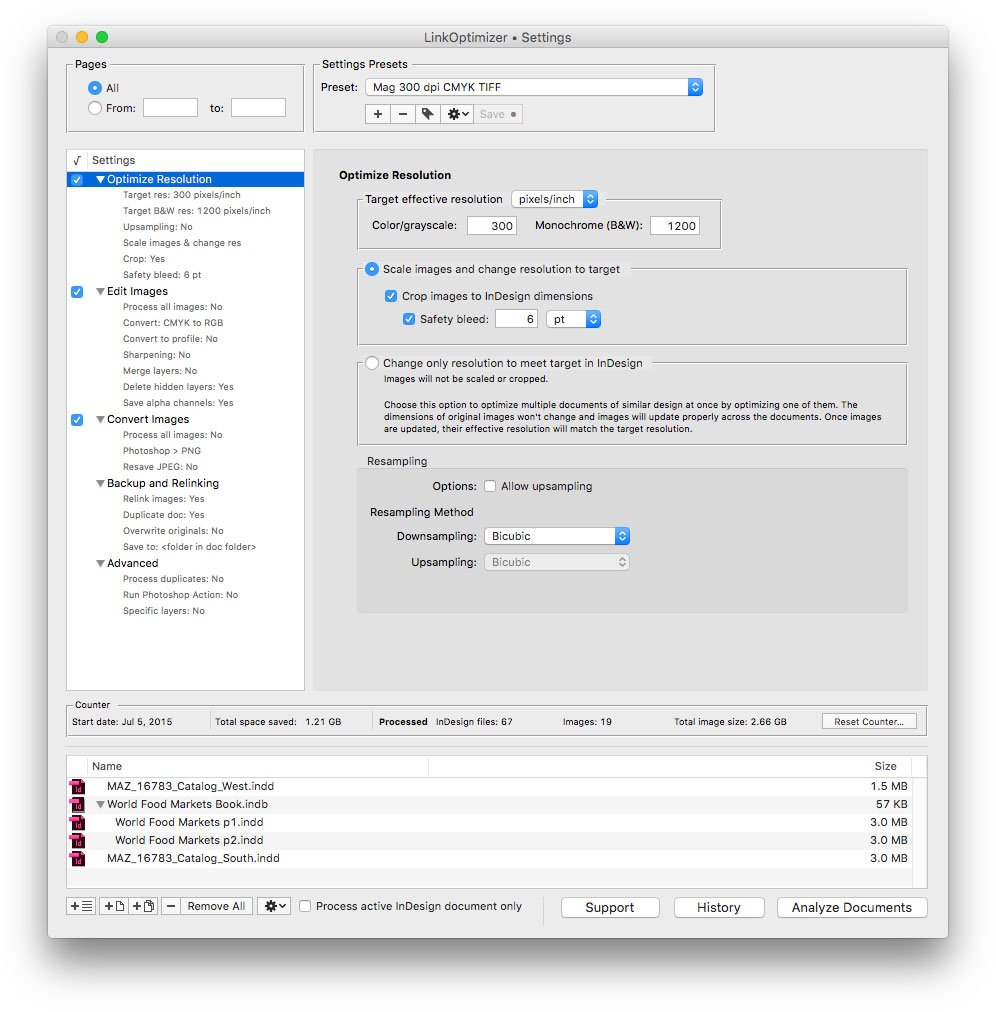
* LinkOptimizer, the company's flagship product, lets users reduce linked graphics size by eliminating excess image data, perform image adjustments and convert file formats. The software automatically scales and crops the images in Photoshop to match their dimensions in InDesign, changes resolution to the specified target, and reimports images to InDesign at 100%.
* Output Factory is a plug-in which automates printing and exporting from InDesign and offers batch output, layer versioning, single page export, preflighting, variable file names and more. A server version of Output Factory can process InDesign files automatically from hot folders and serve unlimited users on a network.
* InPreflight for InDesign offers advanced preflighting as well as automatic packaging of multiple files. InPreflight helps users eliminate errors, save disk space and collect all linked files into a single location.
* The last product on sale is Package Central which automates InDesign file packaging by processing files from watched hot folders. The software offloads file packaging from InDesign to a central system leaving operator workstations free from the collection process.
Pricing and Availability:
Zevrix software can be purchased at 50% off until April 30, 2019 from Zevrix website. The discount also applies to eligible product upgrades. For details, please visit the website. Product trials are also available for download. All products require macOS 10.7-10.14 and Adobe InDesign CS5-CC 2019 software.
Zevrix Solutions: http://zevrix.com
Download: http://zevrix.com/download.php
Purchase: http://zevrix.com/store.php
Screenshot: http://zevrix.com/screenshots/lo5/res-win.jpg
Located in Toronto, Canada, Zevrix Solutions provides automation and productivity solutions for Adobe Creative Cloud and Creative Suite software, PDF workflows, graphic file diagnostics and Microsoft Office output on Mac OS. Zevrix is dedicated to help professionals increase their profits through automating everyday tasks, producing error-free documents, saving disk space and cutting production costs. For more information, visit their website. Copyright (C) 2019 Zevrix Solutions. All Rights Reserved. Other trademarks and registered trademarks may be the property of their respective owners.
*******
Link To Article: https://prmac.com/release-id-83397.htm
*******
---------------------------------------------------------------------------------
Note that you can alter delivered distributions at any time.
Login to your account on prMac to alter your channel selection, or to opt-out at any time.
Adobe InDesign Automation Tools at 50% off until April 30 - Published on 04/29/19
Zevrix Solutions, a developer of automation solutions for Adobe InDesign, announces today a 50% sale until April 30. The company offers the discount on all InDesign automation tools including product upgrades. Zevrix products include plug-ins for InDesign that automate printing and exporting, reduce linked image size, convert image formats, and simplify file packaging. The software helps users eliminate repetitive tasks, save disk space, and cut production costs through faster processing.
Toronto, Canada - Zevrix Solutions, a developer of automation solutions for Adobe InDesign, announces today a 50% sale until April 30. The company offers the discount on all InDesign automation tools including upgrades. The company's products include several popular plug-ins for Adobe InDesign, which help professionals automate printing and exporting, optimize image format and resolution, save disk space, and cut production costs.
"Zevrix software its the best kept secret out there for the Graphic Design industry," says Darren Rath of eponymous design studio in Melbourne, Australia. "It rocks and continues to impress and improve at a scary rate... Thanks to Zevrix products, every piece of artwork that flies out of here requires no intervention by the prepress departments."
The following InDesign automation tools are available on sale:
* LinkOptimizer, the company's flagship product, lets users reduce linked graphics size by eliminating excess image data, perform image adjustments and convert file formats. The software automatically scales and crops the images in Photoshop to match their dimensions in InDesign, changes resolution to the specified target, and reimports images to InDesign at 100%.
* Output Factory is a plug-in which automates printing and exporting from InDesign and offers batch output, layer versioning, single page export, preflighting, variable file names and more. A server version of Output Factory can process InDesign files automatically from hot folders and serve unlimited users on a network.
* InPreflight for InDesign offers advanced preflighting as well as automatic packaging of multiple files. InPreflight helps users eliminate errors, save disk space and collect all linked files into a single location.
* The last product on sale is Package Central which automates InDesign file packaging by processing files from watched hot folders. The software offloads file packaging from InDesign to a central system leaving operator workstations free from the collection process.
Pricing and Availability:
Zevrix software can be purchased at 50% off until April 30, 2019 from Zevrix website. The discount also applies to eligible product upgrades. For details, please visit the website. Product trials are also available for download. All products require macOS 10.7-10.14 and Adobe InDesign CS5-CC 2019 software.
Zevrix Solutions: http://zevrix.com
Download: http://zevrix.com/download.php
Purchase: http://zevrix.com/store.php
Screenshot: http://zevrix.com/screenshots/lo5/res-win.jpg
Located in Toronto, Canada, Zevrix Solutions provides automation and productivity solutions for Adobe Creative Cloud and Creative Suite software, PDF workflows, graphic file diagnostics and Microsoft Office output on Mac OS. Zevrix is dedicated to help professionals increase their profits through automating everyday tasks, producing error-free documents, saving disk space and cutting production costs. For more information, visit their website. Copyright (C) 2019 Zevrix Solutions. All Rights Reserved. Other trademarks and registered trademarks may be the property of their respective owners.
*******
Link To Article: https://prmac.com/release-id-83397.htm
*******
---------------------------------------------------------------------------------
Note that you can alter delivered distributions at any time.
Login to your account on prMac to alter your channel selection, or to opt-out at any time.
The Unic, A Game for Pattern Lovers, Released for Free on iOS
A new article has been published at prMac.
The Unic, A Game for Pattern Lovers, Released for Free on iOS - Published on 04/28/19
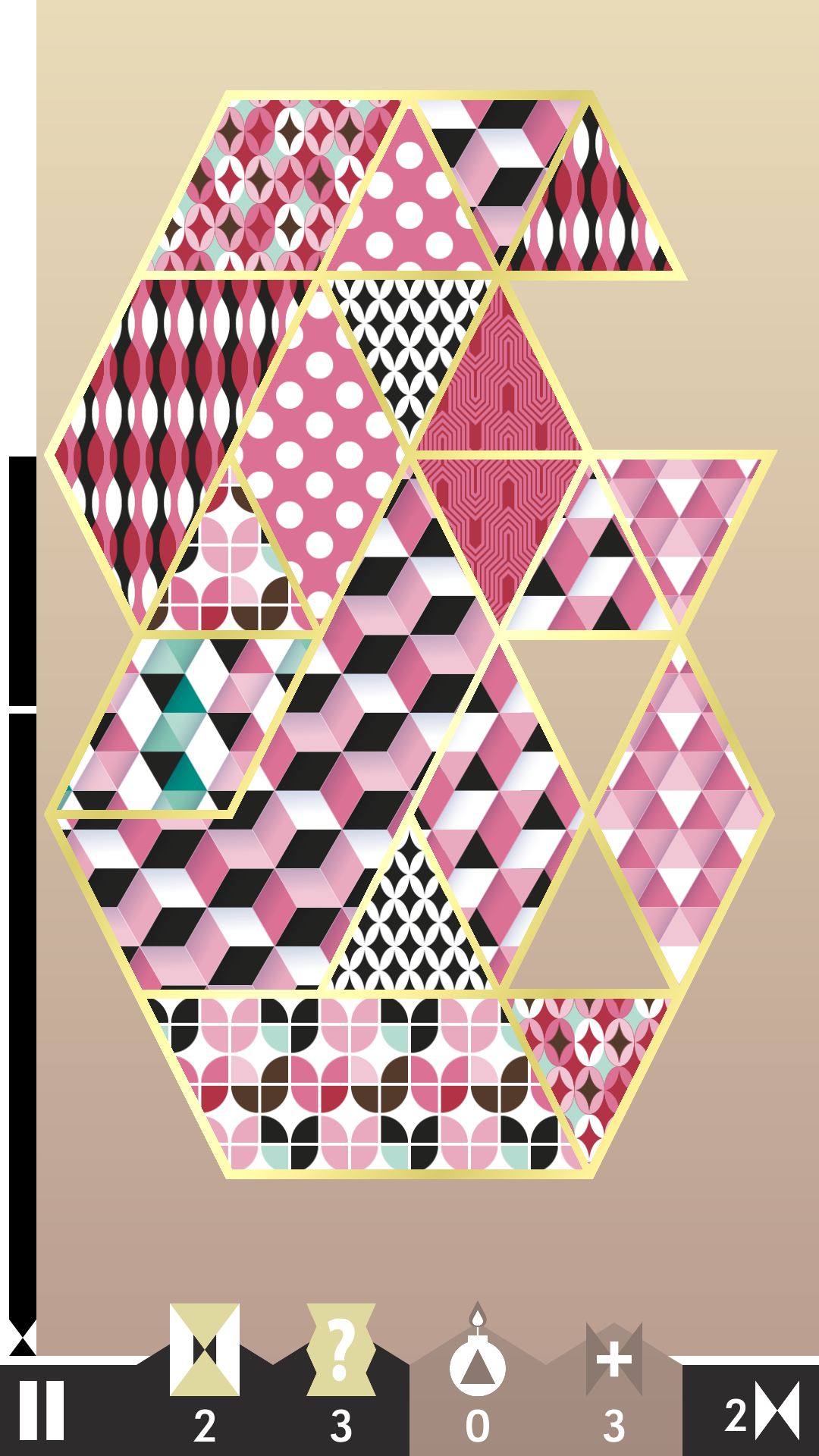
Lozange Lab announces The Unic 1.0.2, their new observation game dedicated to pattern and design lovers for iOS devices. The game is free to play. Fully playable without watching ads or buying any in-app purchase. Levels are procedurally generated so users always play with a different setting. 3 game modes: users choose their play style.
Metz, France - Lozange Lab just released The Unic 1.0.2, their new observation game dedicated to pattern and design lovers. The game is downloadable for free on iPhone and iPad.
"For those of you who heard about us last year with our puzzle game Swim Out, let's say we definitely get out of the swimming pool, looked our itsy-bitsy polka dots bikini and had a vision of a very different kind of game," says Mat of Lozenge Lab. "A bit less brain-teasing but much more eye-teasing, our upcoming game, The Unic, is an observation game which should thrill any pattern and design lover. Whether you know what polka dots, tartan, argyle or gingham are, get ready to enjoy yourself in our next fresh, highly colored and delicately crafted new creation!"
Features:
* FREE to play! Fully playable without watching ads or buying any in-app purchase.
* Levels are procedurally generated so you always play with a different setting
* 3 game modes: choose your play style
* Collect shards, complete patterns collections and build your own deck
* A fun experience suitable for all ages
* No internet connection required
Device Requirements:
* iPhone, iPad, or iPod touch
* Requires iOS 8.0 or later
* Universal Application
* 119.7 MB
Pricing and Availability:
The Unic 1.0.2 is free and is available worldwide exclusively through the App Store in the Games category. In-app purchases are available.
The Unic 1.0.2: https://www.the-unic.com/
Download from the App Store: https://itunes.apple.com/us/app/the-unic/id1436830923?mt=8
YouTube Trailer: https://youtu.be/FEvXX9XKAKQ
Presskit: http://press.the-unic.com
Screenshot: https://www.the-unic.com/img/TheUnic-Screenshot001.png
App Icon: https://www.the-unic.com/img/icon.png
Established in 2014, Lozange Lab is an indie developer studio based in Metz, France, consisting of Ava and Mat, a husband-and-wife team who delicately craft indie games and interactive installations with love and passion. Previous games include Swim Out, Shuttle Shuffle. All Material and Software (C) Copyright 2019 Lozange Lab. All Rights Reserved. Apple, the Apple logo, iPhone, iPod and iPad are registered trademarks of Apple Inc. in the U.S. and/or other countries. Other trademarks and registered trademarks may be the property of their respective owners.
*******
Link To Article: https://prmac.com/release-id-83396.htm
*******
---------------------------------------------------------------------------------
Note that you can alter delivered distributions at any time.
Login to your account on prMac to alter your channel selection, or to opt-out at any time.
The Unic, A Game for Pattern Lovers, Released for Free on iOS - Published on 04/28/19
Lozange Lab announces The Unic 1.0.2, their new observation game dedicated to pattern and design lovers for iOS devices. The game is free to play. Fully playable without watching ads or buying any in-app purchase. Levels are procedurally generated so users always play with a different setting. 3 game modes: users choose their play style.
Metz, France - Lozange Lab just released The Unic 1.0.2, their new observation game dedicated to pattern and design lovers. The game is downloadable for free on iPhone and iPad.
"For those of you who heard about us last year with our puzzle game Swim Out, let's say we definitely get out of the swimming pool, looked our itsy-bitsy polka dots bikini and had a vision of a very different kind of game," says Mat of Lozenge Lab. "A bit less brain-teasing but much more eye-teasing, our upcoming game, The Unic, is an observation game which should thrill any pattern and design lover. Whether you know what polka dots, tartan, argyle or gingham are, get ready to enjoy yourself in our next fresh, highly colored and delicately crafted new creation!"
Features:
* FREE to play! Fully playable without watching ads or buying any in-app purchase.
* Levels are procedurally generated so you always play with a different setting
* 3 game modes: choose your play style
* Collect shards, complete patterns collections and build your own deck
* A fun experience suitable for all ages
* No internet connection required
Device Requirements:
* iPhone, iPad, or iPod touch
* Requires iOS 8.0 or later
* Universal Application
* 119.7 MB
Pricing and Availability:
The Unic 1.0.2 is free and is available worldwide exclusively through the App Store in the Games category. In-app purchases are available.
The Unic 1.0.2: https://www.the-unic.com/
Download from the App Store: https://itunes.apple.com/us/app/the-unic/id1436830923?mt=8
YouTube Trailer: https://youtu.be/FEvXX9XKAKQ
Presskit: http://press.the-unic.com
Screenshot: https://www.the-unic.com/img/TheUnic-Screenshot001.png
App Icon: https://www.the-unic.com/img/icon.png

Established in 2014, Lozange Lab is an indie developer studio based in Metz, France, consisting of Ava and Mat, a husband-and-wife team who delicately craft indie games and interactive installations with love and passion. Previous games include Swim Out, Shuttle Shuffle. All Material and Software (C) Copyright 2019 Lozange Lab. All Rights Reserved. Apple, the Apple logo, iPhone, iPod and iPad are registered trademarks of Apple Inc. in the U.S. and/or other countries. Other trademarks and registered trademarks may be the property of their respective owners.
*******
Link To Article: https://prmac.com/release-id-83396.htm
*******
---------------------------------------------------------------------------------
Note that you can alter delivered distributions at any time.
Login to your account on prMac to alter your channel selection, or to opt-out at any time.
Subscribe to:
Posts (Atom)