A new article has been published at prMac.
NeoFinder Mac 7.4 with iView MediaPro features for 90th update - Published on 05/06/19
Norbert M. Doerner today releases NeoFinder 7.4, the 90th update since CDFinder 1.0 was released in 1996. NeoFinder helps anyone keep track of digital files, photos, songs, movies, fonts on hard drives, USB sticks, servers, Blu-ray disks, DVD-ROMs, CDROMs, and any other digital media. Version 7.4 adds custom HTML templates for web galleries, people metadata cataloging and editing, automatic tag detection in thumbnails, better keyword editing, and 50 new features and improvements.
Bonn, Germany - Norbert M. Doerner today released NeoFinder Mac 7.4, the 90th update since CDFinder 1.0 was released in 1996! The new version adds more than 50 new features and enhancements, many will help iView MediaPro users to work better with NeoFinder.
After the demise of iView MediaPro, many users have started using NeoFinder, and things like the iView compatible web gallery templates, or the "people" metadata cataloging and editing have been added to NeoFinder due to feedback from these users. NeoFinder can use new neural network scene detection engines to automatically find Tags in thumbnails! That will make it a lot easier to handle large amounts of images, and discover surprising photo motives hidden deeply in the folders of the data.
All new features and enhancements of NeoFinder 7.4:
* Catalogs "People" fields in Adobe XMP and IPTC data (and data written by Picasa and Mylio)
* Search for People metadata, and add them to photos and movies in the XMP Editor
* Web Gallery now uses beautiful HTML templates, and you can even design your own! Or use your existing iView Media Pro gallery templates (with some small changes)
* AutoTags: Use ML scene detector engines to automatically detect scenes and items in thumbnails. NeoFinder currently offers two different engines, more to come. This requires macOS 10.13 or newer
* AutoTags: Search a catalog for thumbnails with a particular automatically detected Tag
* AutoTags Inspector shows the detected Tags, and allows you to place them in the file directly
* NeoFinder reads iView MediaPro CatalogSets from XMP records and builds albums and album folders for these automatically during cataloging
* Massively improved handing of XMP keywords for multiple selected files. NeoFinder now displays all keywords in these files, and allows you to add, remove, or edit them, and to place an existing keyword in all selected items
* Refresh thumbnails from photos or videos when updating a catalog, if you need larger or smaller thumbnails
* Delete a keyword from all items in the catalog and even from all files as well
* Detect and "fold" image sequences during cataloging. That is great for video producers with thousands of single frame files to catalog
* Search for video codecs in the Find Editor. That is helpful to quickly find files encoded with deprecated codecs
* The new command "Edit keywords" in the Metadata main menu with the keyboard shortcut Cmd-T places the text cursor in the XMP keywords field of the XMP editor for the selected items
* Rename keywords both in the Controlled Vocabulary, as well as in all items in the database
* A new command in the Metadata menu allows you to write all XMP metadata back to a file. That is useful if you have imported metadata and want to make sure it is actually written into the file, where it belongs
* Catalog metadata and audio thumbnails of ".CAF" Apple CoreAudio Files
* Catalog the number of audio channels for audio files, including 5.1, 6.1, 7.1 formats
* Catalog thumbnails and metadata of compressed Fuji RAW files (RAF file format). Even Apple still cannot do this, but NeoFinder is now able to accomplish that for you!
* Catalogs .JPX, .J2C, and .JPF JPEG 2000 photo files
* Catalog stereoscopic files in the JPS format with thumbnails and metadata
* Edit->Copy now copies the names of all selected items to the clipboard
* File->Open now works like a double click on the selected items
* "Find all media items in a folder" options are now also available in the View menu
* Search for empty, and non empty XMP text fields in the Inspector with a new menu when you click on the label of a field
* The Find Editor can now also find empty and not empty XMP fields
* NeoFinder now displays the number of items in Album Groups (the sum of all files in all contained albums)
* The Display Filter can now filter by "Ratings larger than"
* The QuickLook window will now be opened fullscreen if you hold the Alt key
* Improved handling of .dv video files
* Improved handling of cataloging BMP files
* Improved scrolling in the Gallery View
* NeoFinder now catalogs metadata and thumbnails for Phantom Cine video files
* NeoFinder now catalogs the Creation Date of video content (not the file!), if it is embedded in the data stream
* The Photo Contact Sheet items can now be sorted by EXIF date, too
* NeoFinder can now catalog thumbnails and metadata of Kodak .KDC RAW files
* New AppleScript cataloging option to quit NeoFinder after the cataloging has completed
* You can now drop a folder or whole volume on the icon of NeoFinder in the Dock to catalog it
* The suggested keywords while typing XMP Editor and Find Editor are much better now
* The Help buttons are located for the German translation, too
* After deleting items from a catalog, NeoFinder no longer displays the first item in the current folder
* The Find Editor can now search for Disk Images
* Smart Folders and Groups can now have "/" in their names
* Find all media items in a folder is much faster now
* More improvements in dark mode of macOS 10.14
* Improved handling of cataloging BMP files
* Improved cataloging of BWF and WAV files in their newer extended format
* Editing GPS Geotags in a file now properly updates the creation and modification date of that file in the NeoFinder catalog
* Many small fixes and improvements
* NeoFinder 7.4 requires Mac OS X 10.8 or later
* NeoFinder 7.4 is a free update to all NeoFinder 7.x users.
* NeoFinder 7.x is a paid upgrade to licensed users of NeoFinder 6.x and the old CDFinder, upgrade price starting at 19 Euros.
* New licenses start at 29 Euros for a NeoFinder Private License.
NeoFinder Highlights:
* Cataloging - NeoFinder catalogs metadata of songs, movies, fonts, and photos, including the MP3-Tags of several audio file formats, EXIF, GPS, and IPTC data of photos. NeoFinder also edits Adobe XMP data, including keywords, persons, and ratings. All these are arranged clearly in the user interface, and can be extensively searched. For numerous photo and video formats, fonts, text files, and even audio files, NeoFinder generates thumbnails during cataloging, displaying them in all list and icon views.
* Managing Metadata - The built-in XMP metadata editor with presets can edit and add keywords, ratings, persons, descriptions, copyright information, and more to photos and videos.
* Networking - Store your catalog database on a server for access from all Macs in the network, and with the sidekick product abeMeda (was CDWinder for Windows) even from Microsoft Windows.
* Mobile - Keep your NeoFinder database with you on your iPhone or iPad with the separate NeoFinder for iOS app.
* Integration - Offering a tight connection to major productivity tools, such as Adobe Creative Suite, Microsoft Office, Roxio Toast, FileMaker Pro, Apples Spotlight and Finder, and the extensive support of drag&drop into other applications, NeoFinder can support many workflow scenarios. The AppleScript support in NeoFinder allows custom integrations of all kinds.
* Geotagging - Only NeoFinder offers the integrated GeoFinder, which searches for photos taken near a spot, or the KMZ export for coordinates and photo thumbnails as a way to give geolocated photos to friends. NeoFinder can even geotag photos itself, no other software needed. And only NeoFinder displays important facts about any geolocation in the truly unique Wikipedia Inspector.
Since the initial release of CDFinder 1.0 in 1996, more than 85,000 customers in 101 countries around the world are using CDFinder and now NeoFinder to organize their digital library, and manage their data archive and backups, including NASA, IKEA, BBC, Mattel, Rand McNally, Pfizer, Random House, Oracle, and Warner Bros.
Language Support: German, English, French, Swedish, Italian, Spanish, Dutch, and Japanese
System Requirements:
* Mac OS X v10.8 - macOS 10.14. Previous CDFinder and NeoFinder versions for older Mac OS versions are still available.
* Separate app for iOS (iPhone and iPad) is available
Pricing and Availability:
The price for new users starts at 29,00 (EUR). Multiple user packs are available for network users. Cross-grades for users of similar applications (Cinematica, DiskLibrary, FileFinder, CatFinder, Canto Cumulus, Disk Tracker, DiskCatalogMaker, Atomic View, iView Media Pro, Extensis Portfolio, and others) are available. A free NeoFinder demo version can be downloaded from the NeoFinder website.
NeoFinder 7.4: https://www.cdfinder.de/
Download NeoFinder for macOS: https://www.wfs-apps.de/updates/neofinder.7.4.zip
Purchase: https://www.cdfinder.de/en/order.html
Screenshot: https://www.cdfinder.de/Images/01.Gallery.view.light.jpeg
Application Icon: https://www.cdfinder.de/rw_common/images/NeoFinder%20Icon%20128%20px%20Alpha.png
Norbert M. Doerner is a computer scientist with a love for integration and cool products. He develops great Macintosh software since 1991. Popular products include the disk cataloger NeoFinder (was CDFinder), various plugins for the Finder, iPhoto and Aperture, and the audio transcription software F5.app. All Material and Software Copyright (C) 1991-2019 Norbert M. Doerner. Apple, the Apple logo, Mac and Macintosh are registered trademarks of Apple Inc. in the U.S. and/or other countries. Other trademarks and registered trademarks may be the property of their respective owners.
*******
Link To Article: https://prmac.com/release-id-83406.htm
*******
---------------------------------------------------------------------------------
Note that you can alter delivered distributions at any time.
Login to your account on prMac to alter your channel selection, or to opt-out at any time.


BatchOutput for PowerPoint Reduces Security Hassles on macOS Mojave
A new article has been published at prMac.
BatchOutput for PowerPoint Reduces Security Hassles on macOS Mojave - Published on 05/06/19
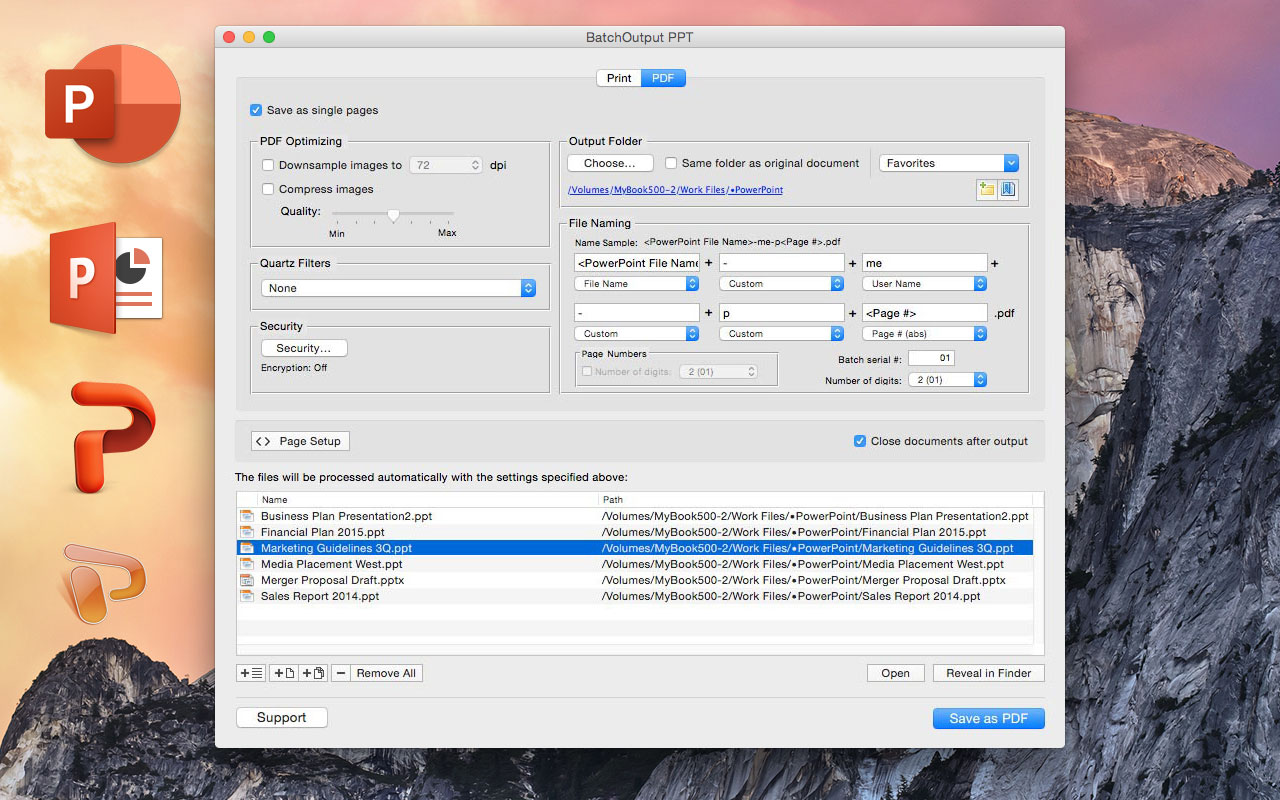
Zevrix Solutions announces BatchOutput PPT 2.2.15 for Microsoft PowerPoint, a maintenance update to its output automation solution for PowerPoint on macOS. In addition to batch printing, the software lets users carry out automated professional feature-rich PDF production directly from PowerPoint. Users can reduce PDF file size, optimize images and encrypt PDF documents. The new version reduces the hassles associated with Apple Event sandboxing, a new security measure introduced in macOS Mojave.
Toronto (ON), Canada - Zevrix Solutions announces BatchOutput PPT 2.2.15, a compatibility update to its output automation solution for Microsoft PowerPoint on macOS. The only batch processing tool for PowerPoint on the Mac market, the software helps users eliminate repetitive tasks through automation of printing and professional PDF output.
The new version eliminates the hassles associated with Apple Event sandboxing, a new security measure introduced in macOS Mojave. Under the new policy, applications can no longer interact with each other without prior user authorization. This change directly affects BatchOutput PPT which requires access to PowerPoint and other system resources to perform complex workflow automation tasks. The new update streamlines the authorization process by clearing all permissions during launch time, which eliminates workflow interruptions during file processing. BatchOutput will also reset Apple Event permissions automatically if the authorization was previously revoked by accident.
In addition to batch printing, the software lets users carry out powerful professional PDF production directly from PowerPoint eliminating the need for time consuming post-processing. BatchOutput PPT brings advanced PDF and printing options right to the user's fingertips:
* Print and export to PDF multiple PowerPoint documents.
* Split PowerPoint files into single page PDFs.
* Reduce PDF file size and optimize documents for web, print and mobile devices.
* Variable output file names.
* Encrypt and password-protect PDF from unauthorized copying, printing, and viewing.
* Change PDF color tone, brightness and other properties.
BatchOutput PPT is a part of the Zevrix BatchOutput family which also includes output automation solutions for Microsoft Word, Excel, Adobe InDesign and PDF workflows.
Pricing and Availability
BatchOutput PPT can be purchased for $19.95 (USD) from the Zevrix website as well as from authorized resellers. Trial is also available for download. BatchOutput PPT requires macOS 10.7 - 10.41 and Microsoft PowerPoint 2008, 201, 2016 or 2019.
Zevrix Solutions: http://zevrix.com
BatchOutput PPT 2.2.15: http://zevrix.com/BatchOutputOffice.php
Download BatchOutput PPT: http://zevrix.com/BatchOutputOffice.dmg
Purchase: http://zevrix.com/store.php
Screenshot: http://zevrix.com/screenshots/bo-office/MAS/boppt-pdf-mas.jpg
Located in Toronto, Canada, Zevrix Solutions provides automation and productivity solutions for Adobe Creative Cloud and Creative Suite software, PDF workflows, graphic file diagnostics and Microsoft Office output on Mac OS. Zevrix is dedicated to help professionals increase their profits through automating everyday tasks, producing error-free documents, saving disk space and cutting production costs. For more information, visit their website. Copyright (C) 2019 Zevrix Solutions. All Rights Reserved. Other trademarks and registered trademarks may be the property of their respective owners.
*******
Link To Article: https://prmac.com/release-id-83405.htm
*******
---------------------------------------------------------------------------------
Note that you can alter delivered distributions at any time.
Login to your account on prMac to alter your channel selection, or to opt-out at any time.
BatchOutput for PowerPoint Reduces Security Hassles on macOS Mojave - Published on 05/06/19
Zevrix Solutions announces BatchOutput PPT 2.2.15 for Microsoft PowerPoint, a maintenance update to its output automation solution for PowerPoint on macOS. In addition to batch printing, the software lets users carry out automated professional feature-rich PDF production directly from PowerPoint. Users can reduce PDF file size, optimize images and encrypt PDF documents. The new version reduces the hassles associated with Apple Event sandboxing, a new security measure introduced in macOS Mojave.
Toronto (ON), Canada - Zevrix Solutions announces BatchOutput PPT 2.2.15, a compatibility update to its output automation solution for Microsoft PowerPoint on macOS. The only batch processing tool for PowerPoint on the Mac market, the software helps users eliminate repetitive tasks through automation of printing and professional PDF output.
The new version eliminates the hassles associated with Apple Event sandboxing, a new security measure introduced in macOS Mojave. Under the new policy, applications can no longer interact with each other without prior user authorization. This change directly affects BatchOutput PPT which requires access to PowerPoint and other system resources to perform complex workflow automation tasks. The new update streamlines the authorization process by clearing all permissions during launch time, which eliminates workflow interruptions during file processing. BatchOutput will also reset Apple Event permissions automatically if the authorization was previously revoked by accident.
In addition to batch printing, the software lets users carry out powerful professional PDF production directly from PowerPoint eliminating the need for time consuming post-processing. BatchOutput PPT brings advanced PDF and printing options right to the user's fingertips:
* Print and export to PDF multiple PowerPoint documents.
* Split PowerPoint files into single page PDFs.
* Reduce PDF file size and optimize documents for web, print and mobile devices.
* Variable output file names.
* Encrypt and password-protect PDF from unauthorized copying, printing, and viewing.
* Change PDF color tone, brightness and other properties.
BatchOutput PPT is a part of the Zevrix BatchOutput family which also includes output automation solutions for Microsoft Word, Excel, Adobe InDesign and PDF workflows.
Pricing and Availability
BatchOutput PPT can be purchased for $19.95 (USD) from the Zevrix website as well as from authorized resellers. Trial is also available for download. BatchOutput PPT requires macOS 10.7 - 10.41 and Microsoft PowerPoint 2008, 201, 2016 or 2019.
Zevrix Solutions: http://zevrix.com
BatchOutput PPT 2.2.15: http://zevrix.com/BatchOutputOffice.php
Download BatchOutput PPT: http://zevrix.com/BatchOutputOffice.dmg
Purchase: http://zevrix.com/store.php
Screenshot: http://zevrix.com/screenshots/bo-office/MAS/boppt-pdf-mas.jpg
Located in Toronto, Canada, Zevrix Solutions provides automation and productivity solutions for Adobe Creative Cloud and Creative Suite software, PDF workflows, graphic file diagnostics and Microsoft Office output on Mac OS. Zevrix is dedicated to help professionals increase their profits through automating everyday tasks, producing error-free documents, saving disk space and cutting production costs. For more information, visit their website. Copyright (C) 2019 Zevrix Solutions. All Rights Reserved. Other trademarks and registered trademarks may be the property of their respective owners.
*******
Link To Article: https://prmac.com/release-id-83405.htm
*******
---------------------------------------------------------------------------------
Note that you can alter delivered distributions at any time.
Login to your account on prMac to alter your channel selection, or to opt-out at any time.
Kalends Calendar App Helps Busy iOS Users Get Their Life Organized
A new article has been published at prMac.
Kalends Calendar App Helps Busy iOS Users Get Their Life Organized - Published on 05/03/19
South Korean development team Yunasoft announces Kalends 1.0.2, their calendar app for iOS devices. Kalends is the calendar app for busy iOS users that need to get their lives organized. The app offers multiple calendar views, provides reminders, includes a note feature, weather forecast, a handy full-month widget, and much more. Kalends includes tons of cute stickers users can place directly on their calendar views like a post-it. Kalends is the most fun users will ever have in a calendar app.
Seoul, Korea, Republic Of - Seoul, Korea - Independent development team, Yunasoft is proud to announce the release and immediate availability of Kalends 1.0.2, their calendar app for iPhone, iPad, and iPod touch devices. Kalends helps busy iOS device users to organize their lives. The app's multiple calendar views, reminders function, notes feature, handy full month widget, and more all make Kalends as efficient as it is fun to use.
In addition to the app's calendar functionality, Kalends also allows users to create check-list reminders for upcoming events, as well as make notes which can include including photos. Kalends also includes a huge number of fun stickers that users can place directly on their calendar view like a virtual post-it, allowing them to mark an important day or to simply decorate and personalize their calendar however they wish.
"Kalends is the most fun you'll ever have in a calendar app and it makes your daily calendar come alive," says Yunasoft CEO Robert Kwon. "The app's handy, full-month widget provides instant access to your Kalends schedule from your lock screen or control center. Your calendar is always a swipe away!"
Features Include:
* Multiple calendar views (month, weekday and day)
* Reminders
* Note
* Weather forecast
* Widget calendar
* Stickers
* Marker to mark important days on the calendar view
Kalends' full-month widget offers convenient, instant access to an entire month of a user's Kalends calendar schedule is just a swipe away, viewable directly from their device's Lock Screen or Control Center.
While Kalends would be incredibly useful if it only included calendar functionality, there is much more to the app than just that. Check-list reminders allow users to stay informed about upcoming events and tasks, and its notes function allow the user to write handy notes, which can also include photos, making the feature much more than a simple note function.
Other functions include:
* Month, week, day, reminder and note list view
* Customizable Home Screen icon
* Mark important days with a designed marker
* Tons of cute stickers
* Custom alert sounds
* Notes functionality with photos
* Search through 30 years of events, reminders, and notes
* Weather forecasts to help users plan their day
* Print or export Notes and Calendars as PDF
* Customize everything: text size, theme color, days of the week, and more
"We've made Kalends as fun to use as it was to create! Enjoy clever animations, sounds, and vibrations as you decorate your calendar and schedule your life," continues Robert. "If users have a suggestion for something we can improve, we'd love to hear from them!"
Device Requirements:
* iPhone, iPad, and iPod touch
* Universal Application
* Requires iOS 10.0 or later
* 62.2 MB
Pricing and Availability:
Kalends 1.0.2 is free and is available worldwide exclusively through the App Store in the Productivity category. An upgrade to Premium (which eliminates ads) is available as a convenient in-app purchase of $14.99. A three-month Premium free trial is available. After the trial ends, the subscription automatically renews at $14.99 per year. The user's Apple ID will be charged for renewal within 24 hours before the end of the trial period, unless the subscription is cancelled before then.
Yunasoft: http://yunasoft.com
Kalends 1.0.2: https://itunes.apple.com/app/kalends-perfect-calendar/id1446836472
Screenshot 1: https://is2-ssl.mzstatic.com/image/thumb/Purple113/v4/8b/a2/6b/8ba26bf7-0380-1fcf-d0c0-d31d63c1b5af/mzl.trtbpymq.png/643x0w.jpg
Screenshot 2: https://is1-ssl.mzstatic.com/image/thumb/Purple113/v4/78/56/82/7856829e-50fa-3553-f96b-9290514fc5eb/mzl.oagirhpe.png/643x0w.jpg
App Icon: https://is2-ssl.mzstatic.com/image/thumb/Purple113/v4/14/53/e2/1453e209-7f3e-bb55-c15f-2694ae76d328/AppIcon-0-1x_U007emarketing-0-0-GLES2_U002c0-512MB-sRGB-0-0-0-85-220-0-0-0-7.png/246x0w.jpg
Yunasoft Inc. is almost 10 years old company which is especially specialized for developing productivity apps for iOS devices such as note, calendars and task apps. We are very proud of our jobs and thank users for loving and using the apps. We hope users' busy life is got organized by using our apps. All Material and Software (C) Copyright 2019 Yunasoft Inc. All Rights Reserved. Apple, the Apple logo, iPhone, iPod and iPad are registered trademarks of Apple Inc. in the U.S. and/or other countries. Other trademarks and registered trademarks may be the property of their respective owners.
*******
Link To Article: https://prmac.com/release-id-83404.htm
*******
---------------------------------------------------------------------------------
Note that you can alter delivered distributions at any time.
Login to your account on prMac to alter your channel selection, or to opt-out at any time.
Kalends Calendar App Helps Busy iOS Users Get Their Life Organized - Published on 05/03/19
South Korean development team Yunasoft announces Kalends 1.0.2, their calendar app for iOS devices. Kalends is the calendar app for busy iOS users that need to get their lives organized. The app offers multiple calendar views, provides reminders, includes a note feature, weather forecast, a handy full-month widget, and much more. Kalends includes tons of cute stickers users can place directly on their calendar views like a post-it. Kalends is the most fun users will ever have in a calendar app.
Seoul, Korea, Republic Of - Seoul, Korea - Independent development team, Yunasoft is proud to announce the release and immediate availability of Kalends 1.0.2, their calendar app for iPhone, iPad, and iPod touch devices. Kalends helps busy iOS device users to organize their lives. The app's multiple calendar views, reminders function, notes feature, handy full month widget, and more all make Kalends as efficient as it is fun to use.
In addition to the app's calendar functionality, Kalends also allows users to create check-list reminders for upcoming events, as well as make notes which can include including photos. Kalends also includes a huge number of fun stickers that users can place directly on their calendar view like a virtual post-it, allowing them to mark an important day or to simply decorate and personalize their calendar however they wish.
"Kalends is the most fun you'll ever have in a calendar app and it makes your daily calendar come alive," says Yunasoft CEO Robert Kwon. "The app's handy, full-month widget provides instant access to your Kalends schedule from your lock screen or control center. Your calendar is always a swipe away!"
Features Include:
* Multiple calendar views (month, weekday and day)
* Reminders
* Note
* Weather forecast
* Widget calendar
* Stickers
* Marker to mark important days on the calendar view
Kalends' full-month widget offers convenient, instant access to an entire month of a user's Kalends calendar schedule is just a swipe away, viewable directly from their device's Lock Screen or Control Center.
While Kalends would be incredibly useful if it only included calendar functionality, there is much more to the app than just that. Check-list reminders allow users to stay informed about upcoming events and tasks, and its notes function allow the user to write handy notes, which can also include photos, making the feature much more than a simple note function.
Other functions include:
* Month, week, day, reminder and note list view
* Customizable Home Screen icon
* Mark important days with a designed marker
* Tons of cute stickers
* Custom alert sounds
* Notes functionality with photos
* Search through 30 years of events, reminders, and notes
* Weather forecasts to help users plan their day
* Print or export Notes and Calendars as PDF
* Customize everything: text size, theme color, days of the week, and more
"We've made Kalends as fun to use as it was to create! Enjoy clever animations, sounds, and vibrations as you decorate your calendar and schedule your life," continues Robert. "If users have a suggestion for something we can improve, we'd love to hear from them!"
Device Requirements:
* iPhone, iPad, and iPod touch
* Universal Application
* Requires iOS 10.0 or later
* 62.2 MB
Pricing and Availability:
Kalends 1.0.2 is free and is available worldwide exclusively through the App Store in the Productivity category. An upgrade to Premium (which eliminates ads) is available as a convenient in-app purchase of $14.99. A three-month Premium free trial is available. After the trial ends, the subscription automatically renews at $14.99 per year. The user's Apple ID will be charged for renewal within 24 hours before the end of the trial period, unless the subscription is cancelled before then.
Yunasoft: http://yunasoft.com
Kalends 1.0.2: https://itunes.apple.com/app/kalends-perfect-calendar/id1446836472
Screenshot 1: https://is2-ssl.mzstatic.com/image/thumb/Purple113/v4/8b/a2/6b/8ba26bf7-0380-1fcf-d0c0-d31d63c1b5af/mzl.trtbpymq.png/643x0w.jpg

Screenshot 2: https://is1-ssl.mzstatic.com/image/thumb/Purple113/v4/78/56/82/7856829e-50fa-3553-f96b-9290514fc5eb/mzl.oagirhpe.png/643x0w.jpg

App Icon: https://is2-ssl.mzstatic.com/image/thumb/Purple113/v4/14/53/e2/1453e209-7f3e-bb55-c15f-2694ae76d328/AppIcon-0-1x_U007emarketing-0-0-GLES2_U002c0-512MB-sRGB-0-0-0-85-220-0-0-0-7.png/246x0w.jpg

Yunasoft Inc. is almost 10 years old company which is especially specialized for developing productivity apps for iOS devices such as note, calendars and task apps. We are very proud of our jobs and thank users for loving and using the apps. We hope users' busy life is got organized by using our apps. All Material and Software (C) Copyright 2019 Yunasoft Inc. All Rights Reserved. Apple, the Apple logo, iPhone, iPod and iPad are registered trademarks of Apple Inc. in the U.S. and/or other countries. Other trademarks and registered trademarks may be the property of their respective owners.
*******
Link To Article: https://prmac.com/release-id-83404.htm
*******
---------------------------------------------------------------------------------
Note that you can alter delivered distributions at any time.
Login to your account on prMac to alter your channel selection, or to opt-out at any time.
Cisdem AppCrypt 4.1.0 Supports Locking More Apps for Privacy
A new article has been published at prMac.
Cisdem AppCrypt 4.1.0 Supports Locking More Apps for Privacy - Published on 05/02/19
Cisdem announce the release of AppCrypt 4.1.0, the update to their app and block distracting websites on your Mac. Cisdem Appcrypt 4.1.0 comes with enhanced performance and it is guaranteed that users will get an even better experience by using the program.
Madelia, Minnesota - Cisdem is proud to announce the release of AppCrypt 4.1.0, the update to their app and block distracting websites on your Mac.
"Since the release, AppCrypt has won great recognition from our users. But over the past months, we got similar feedbacks from our users that the presence of capability to support those apps launched in menu bar. So, this is how the new version 4.1.0 come out. Also, we enhanced the performance and it is guaranteed that users will get an even better experience by using our program." said Edward Riley, Cisdem's project manager.
From 2017 until now, Cisdem AppCrypt is under active development, aiming to provide an easy yet effective way to protect privacy and stay focus for our users. It adds advanced security to your apps, so no one can peek into your privacy or even manipulate inappropriately. Also, it blocks websites and apps when you need to focus on your current job, so you can be more productivity to achieve more in limited hours.
What's New in Version 4.1.0
* Added support for more Apps
Some Apps are lightweight, they are not standalone and can only be manipulated through menu bar, which is not easy for users to control the Apps. Luckily, Cisdem finally comes with the feature to fully control such an application, for easy locking or blocking anytime.
That's to say, even though you cannot locate the App in your Mac Application or Launchpad, Cisdem still helps you to access to the App easily and manipulate as needed.
Main Features of Cisdem AppCrypt
1. Lock Apps
Virtually all applications can be locked by Cisdem, no matter they are mainstream programs or utilities for a specific niche. All you need to do is adding the program to the lock list, and then Cisdem will take over.
2. Block Websites
To protect ourselves and our kids from malicious websites or unwanted information, Cisdem allows users to block Website. You can block by adding blacklist or allow good ones by inputting a whitelist.
3. Customize Lock/Block Time Schedule
Sometimes, the blocking is set up to make us focus during working time, and we still need to access to such a App or Web later. In this case, you can customize a time schedule to put the locking or blocking into effect only in preferred time.
4. Record Fail Attempts to Your Apps
To highly secure your privacy, Cisdem carries out a close supervision on any suspicious manners onto your Applications. If there is any fail attempts to control your Apps, Cisdem will take captures with your Mac camera, so you will realize what has happened and cope with immediately.
Price and Availability
As always, Cisdem AppCrypt is available with the price of $29.99 for lifetime and free upgrade to latest version. For users who purchase multiple license, a discount is offered.
You can download the free trial, it is 100% safe and free to try with limited features. For more details about Cisdem AppCrypt, please visit the official product page.
About the Developer
Cisdem, the developer of AppCrypt, has served as a dedicated software developer for more than a decade. It has won great trust from its users in the field of productivity and utility tools, with its expertise and sincere service year after year. To know what's popular on Cisdem, please go to the official website.
Cisdem: https://www.cisdem.com
Cisdem AppCrypt 4.1.0: https://www.cisdem.com/appcrypt-mac.html
Free Trial Download: https://www.cisdem.com/downloads/cisdem-appcrypt-14.dmg
Cisdem provides productivity and business software that helps Mac users to get their job done faster. Cisdem products include top rated software centered on PDF Conversion, PDF Management, Data Recovery, and File Management. The company is dedicated in building highly efficient Mac software that make life easier and processes simpler. All Material and Software (C) Copyright 2019 Cisdem. All Rights Reserved. Apple, the Apple logo, Mac OS X and Macintosh are registered trademarks of Apple Inc. in the U.S. and/or other countries. Other trademarks and registered trademarks may be the property of their respective owners.
*******
Link To Article: https://prmac.com/release-id-83403.htm
*******
---------------------------------------------------------------------------------
Note that you can alter delivered distributions at any time.
Login to your account on prMac to alter your channel selection, or to opt-out at any time.
Cisdem AppCrypt 4.1.0 Supports Locking More Apps for Privacy - Published on 05/02/19
Cisdem announce the release of AppCrypt 4.1.0, the update to their app and block distracting websites on your Mac. Cisdem Appcrypt 4.1.0 comes with enhanced performance and it is guaranteed that users will get an even better experience by using the program.
Madelia, Minnesota - Cisdem is proud to announce the release of AppCrypt 4.1.0, the update to their app and block distracting websites on your Mac.
"Since the release, AppCrypt has won great recognition from our users. But over the past months, we got similar feedbacks from our users that the presence of capability to support those apps launched in menu bar. So, this is how the new version 4.1.0 come out. Also, we enhanced the performance and it is guaranteed that users will get an even better experience by using our program." said Edward Riley, Cisdem's project manager.
From 2017 until now, Cisdem AppCrypt is under active development, aiming to provide an easy yet effective way to protect privacy and stay focus for our users. It adds advanced security to your apps, so no one can peek into your privacy or even manipulate inappropriately. Also, it blocks websites and apps when you need to focus on your current job, so you can be more productivity to achieve more in limited hours.
What's New in Version 4.1.0
* Added support for more Apps
Some Apps are lightweight, they are not standalone and can only be manipulated through menu bar, which is not easy for users to control the Apps. Luckily, Cisdem finally comes with the feature to fully control such an application, for easy locking or blocking anytime.
That's to say, even though you cannot locate the App in your Mac Application or Launchpad, Cisdem still helps you to access to the App easily and manipulate as needed.
Main Features of Cisdem AppCrypt
1. Lock Apps
Virtually all applications can be locked by Cisdem, no matter they are mainstream programs or utilities for a specific niche. All you need to do is adding the program to the lock list, and then Cisdem will take over.
2. Block Websites
To protect ourselves and our kids from malicious websites or unwanted information, Cisdem allows users to block Website. You can block by adding blacklist or allow good ones by inputting a whitelist.
3. Customize Lock/Block Time Schedule
Sometimes, the blocking is set up to make us focus during working time, and we still need to access to such a App or Web later. In this case, you can customize a time schedule to put the locking or blocking into effect only in preferred time.
4. Record Fail Attempts to Your Apps
To highly secure your privacy, Cisdem carries out a close supervision on any suspicious manners onto your Applications. If there is any fail attempts to control your Apps, Cisdem will take captures with your Mac camera, so you will realize what has happened and cope with immediately.
Price and Availability
As always, Cisdem AppCrypt is available with the price of $29.99 for lifetime and free upgrade to latest version. For users who purchase multiple license, a discount is offered.
You can download the free trial, it is 100% safe and free to try with limited features. For more details about Cisdem AppCrypt, please visit the official product page.
About the Developer
Cisdem, the developer of AppCrypt, has served as a dedicated software developer for more than a decade. It has won great trust from its users in the field of productivity and utility tools, with its expertise and sincere service year after year. To know what's popular on Cisdem, please go to the official website.
Cisdem: https://www.cisdem.com
Cisdem AppCrypt 4.1.0: https://www.cisdem.com/appcrypt-mac.html
Free Trial Download: https://www.cisdem.com/downloads/cisdem-appcrypt-14.dmg
Cisdem provides productivity and business software that helps Mac users to get their job done faster. Cisdem products include top rated software centered on PDF Conversion, PDF Management, Data Recovery, and File Management. The company is dedicated in building highly efficient Mac software that make life easier and processes simpler. All Material and Software (C) Copyright 2019 Cisdem. All Rights Reserved. Apple, the Apple logo, Mac OS X and Macintosh are registered trademarks of Apple Inc. in the U.S. and/or other countries. Other trademarks and registered trademarks may be the property of their respective owners.
*******
Link To Article: https://prmac.com/release-id-83403.htm
*******
---------------------------------------------------------------------------------
Note that you can alter delivered distributions at any time.
Login to your account on prMac to alter your channel selection, or to opt-out at any time.
New 3D Modeling App for iPad Gives Users Full Control Over Modeling
A new article has been published at prMac.
New 3D Modeling App for iPad Gives Users Full Control Over Modeling - Published on 05/02/19
Independent development team Handcade announces Polydust 1.0, their new 3D modeling app for the iPad. Polydust gives users full control of their model mesh, allowing them to work in vertex, edge, poly and object model. Users can create basic shapes such as cubes, arcs, cylinders and toruses that can act as the base of their 3D models. The app offers a touch-based user interface, augmented by keyboard shortcuts. Polydust has a great and active community, including a forum and YouTube channel.
Wroclaw, Poland - Independent development team, Handcade is proud to announce the release and immediate availability of Polydust 1.0, their new 3D modeling app for the iPad, which turns the tablet into a pro modeling device. Users can create basic shapes such as cubes, arcs, cylinders and toruses that can act as the base of custom 3D models. The app also offers users full control of their model mesh, as they can work in vertex, edge, poly and object model.
While Polydust offers a convenient touch interface, the simple user interface also supports keyboard shortcuts, making it easy to control the app, no matter the user's preferred form of command entry. Polydust allows importing and exporting of FBX models, and offers Sketchfab integration that allows users to publish their creations in a matter of seconds.
"Developing Polydust is a natural consequence of our experience and inclinations," says Polydust Co-Founder Wojciech Roszkowiak. "It is an iPad app with carefully designed UI and UX which gives our users possibility to create 3D content that can be used in many fields (for example game development, 3D printing or AR/VR apps)."
Polygons are the building blocks of 3D modeling. The blocks are connected together with edges. The edges are made from vertices. Using them, you can create anything you can imagine. Thanks to the app's varied polygonal modeling tool set, it's easy to craft anything a user can think of.
Polygonal modeling is the fundamental digital 3D modeling technique that provides modelers unlimited possibilities when creating their 3D objects. Handcade did their best to make modelers feel comfortable, basing their solutions on a series of well-established ideas.
The app's User interface is made up of the following:
1. Project Browser: Browse all projects and scenes
2. Undo/Redo: Make a mistake? Instantly undo or redo
3. Hierarchy: View a scene's hierarchy
4. Scene, Camera, Learn, Export: Adjust all the important settings
5. Add a New Object: Procedural objects, image references, lights and much more
6. Gizmos: Move, Rotate, Scale everything that's selected
7. Selection: Select by edge loop, world/local space, backface selection and others
8. Operations: All modeling operations and object properties
Polydust includes several built-in operations, allowing users to extrude face, weld vertices, bridge edges, and much more. The app's Snap feature gets rid of ugly rotations or unorganized positions by rounding positions, rotation or scale to its nearest whole value. The Symmetry Mode makes it easy to create symmetrical shapes like body, head, cars and many others. Users can save time when creating arcs, cylinders, toruses and other primitives by setting the values before creating them. Meanwhile, by harnessing the ease and efficiency of edge modeling, users can precisely control their models' mesh. Polydust features include:
General:
* Save and close/continue
* Auto-save
* Undo/redo
* Objects hierarchy
Gizmos:
* Move
* Rotate
* Scale - All gizmos with relative / absolute mode and optional snapping
Selection:
* Add to a new container
* Explode container
* Grow selection
* Shrink selection
* Select edge loop
* Select none
* Select all
* Invert selection
* Modes of selection: default / add / subtract
Vertex operations:
* Weld (custom distance)
* Connect (option: to first)
* Collapse
* Split
* Fill hole (option: entire hole)
Edge operations:
* Connect centers
* Bridge
* Insert edge loop
* Subdivide (custom number of subdivisions)
* Bevel (custom distance)
* Extrude (custom distance, options: as group, manifold)
* Fill a hole (option: entire hole)
Other features include such Poly Operations as slice plane, triangulate, swap edge, remove cross edges, unify normals, flip normals, detach, subdivide, bevel (custom distance), extrude, and delete. Object Operations include merge, mirror (custom axes: x / y / z, options: duplicate, mode: copy/instance), smooth, duplicate (mode: copy / instance), and delete.
Objects can quickly be added to a scene form a variety of types, including box, cylinder (custom axis divisions, radius, height and height cuts), sphere, plane, cone, image reference, point light, directional light, empty container, and FBX model (from an iTunes file sharing folder).
It's easy to control the color, smoothness and metallic setting of object materials, as well as an object's properties, include its name, its symmetry mode and its lighting, by controlling the intensity, range, flare, and shadows of the object.
Scene settings allow control of the background mode (solid or gradient), the background lighting, and ambient light. Camera settings offer the ability to control bloom (custom intensity and threshold), vignette (custom intensity and smoothness), and depth of field (custom focus distance and aperture).
Exporting is a breeze, with the ability to export a scene to: PNG (custom width and height), FBX, and Sketchfab (with login). The app also integrates with Sketchfab upload, keyboard shortcuts, and Swiftpoint mouse. Users can also record their creation process via the app's handy record and pause features, and microphone recording controls.
"Being able to model with your fingers instead of an actual mouse changes everything. You can literally 'feel' what you create," says Polydust Co-Founder Piotr Szwach. "Users will appreciate the app's ease of use. Plus, if they have any questions, they are welcome to visit our informative user forum and view our informative tutorials, which are available on our YouTube channel. We are very excited to see what can be created with Polydust, and we are sure it is going to exceed the limits of our imagination."
Device Requirements:
* iPad
* Requires iOS 12.0 or later
* 321 MB
Pricing and Availability:
Polydust 1.0 is a free download and is available worldwide exclusively through the App Store in the Utilities category. Convenient in-app subscriptions are available to unlock all of the app's features. Polydust subscription payments can be made on a monthly ($9.99 per month for full access), or on an annual basis ($79 per year for full access). A 14-day free trial is available.
Polydust 1.0: https://www.polydust.com/
Download from App Store: https://itunes.apple.com/us/app/polydust/id1211684731
Polydust Forum: http://forum.polydust.com/
Polydust YouTube Channel: https://www.youtube.com/channel/UCO9dlJEDaCmiEB6oOonL7Xg
Press Kit: https://www.dropbox.com/sh/qx7wonckvaqv4tt/AADv294SNTq8BsjT2kEFHCHta?dl=0
Terms of Use and Privacy Policy: https://polydust.com/terms-use-privacy-policy
Handcade is a Wroclaw, Poland-based company founded by two friends: Piotr and Wojciech. The two have been friends since they met in high school over 12 years ago. Since then, they have cooperated on numerous projects; in school, at university and professionally. Their adventure with iOS development started during the early days of the App Store. In all of their projects, the duo has always put an emphasis on creating a great user experience. Along with being developers, they are also app users and love apps which are flawless, functional and beautiful. That is why they wanted to create such apps. All Material and Software (C) Copyright 2019 Handcade. All Rights Reserved. Apple, the Apple logo, iPhone, iPod and iPad are registered trademarks of Apple Inc. in the U.S. and/or other countries. Other trademarks and registered trademarks may be the property of their respective owners.
*******
Link To Article: https://prmac.com/release-id-83402.htm
*******
---------------------------------------------------------------------------------
Note that you can alter delivered distributions at any time.
Login to your account on prMac to alter your channel selection, or to opt-out at any time.
New 3D Modeling App for iPad Gives Users Full Control Over Modeling - Published on 05/02/19
Independent development team Handcade announces Polydust 1.0, their new 3D modeling app for the iPad. Polydust gives users full control of their model mesh, allowing them to work in vertex, edge, poly and object model. Users can create basic shapes such as cubes, arcs, cylinders and toruses that can act as the base of their 3D models. The app offers a touch-based user interface, augmented by keyboard shortcuts. Polydust has a great and active community, including a forum and YouTube channel.
Wroclaw, Poland - Independent development team, Handcade is proud to announce the release and immediate availability of Polydust 1.0, their new 3D modeling app for the iPad, which turns the tablet into a pro modeling device. Users can create basic shapes such as cubes, arcs, cylinders and toruses that can act as the base of custom 3D models. The app also offers users full control of their model mesh, as they can work in vertex, edge, poly and object model.
While Polydust offers a convenient touch interface, the simple user interface also supports keyboard shortcuts, making it easy to control the app, no matter the user's preferred form of command entry. Polydust allows importing and exporting of FBX models, and offers Sketchfab integration that allows users to publish their creations in a matter of seconds.
"Developing Polydust is a natural consequence of our experience and inclinations," says Polydust Co-Founder Wojciech Roszkowiak. "It is an iPad app with carefully designed UI and UX which gives our users possibility to create 3D content that can be used in many fields (for example game development, 3D printing or AR/VR apps)."
Polygons are the building blocks of 3D modeling. The blocks are connected together with edges. The edges are made from vertices. Using them, you can create anything you can imagine. Thanks to the app's varied polygonal modeling tool set, it's easy to craft anything a user can think of.
Polygonal modeling is the fundamental digital 3D modeling technique that provides modelers unlimited possibilities when creating their 3D objects. Handcade did their best to make modelers feel comfortable, basing their solutions on a series of well-established ideas.
The app's User interface is made up of the following:
1. Project Browser: Browse all projects and scenes
2. Undo/Redo: Make a mistake? Instantly undo or redo
3. Hierarchy: View a scene's hierarchy
4. Scene, Camera, Learn, Export: Adjust all the important settings
5. Add a New Object: Procedural objects, image references, lights and much more
6. Gizmos: Move, Rotate, Scale everything that's selected
7. Selection: Select by edge loop, world/local space, backface selection and others
8. Operations: All modeling operations and object properties
Polydust includes several built-in operations, allowing users to extrude face, weld vertices, bridge edges, and much more. The app's Snap feature gets rid of ugly rotations or unorganized positions by rounding positions, rotation or scale to its nearest whole value. The Symmetry Mode makes it easy to create symmetrical shapes like body, head, cars and many others. Users can save time when creating arcs, cylinders, toruses and other primitives by setting the values before creating them. Meanwhile, by harnessing the ease and efficiency of edge modeling, users can precisely control their models' mesh. Polydust features include:
General:
* Save and close/continue
* Auto-save
* Undo/redo
* Objects hierarchy
Gizmos:
* Move
* Rotate
* Scale - All gizmos with relative / absolute mode and optional snapping
Selection:
* Add to a new container
* Explode container
* Grow selection
* Shrink selection
* Select edge loop
* Select none
* Select all
* Invert selection
* Modes of selection: default / add / subtract
Vertex operations:
* Weld (custom distance)
* Connect (option: to first)
* Collapse
* Split
* Fill hole (option: entire hole)
Edge operations:
* Connect centers
* Bridge
* Insert edge loop
* Subdivide (custom number of subdivisions)
* Bevel (custom distance)
* Extrude (custom distance, options: as group, manifold)
* Fill a hole (option: entire hole)
Other features include such Poly Operations as slice plane, triangulate, swap edge, remove cross edges, unify normals, flip normals, detach, subdivide, bevel (custom distance), extrude, and delete. Object Operations include merge, mirror (custom axes: x / y / z, options: duplicate, mode: copy/instance), smooth, duplicate (mode: copy / instance), and delete.
Objects can quickly be added to a scene form a variety of types, including box, cylinder (custom axis divisions, radius, height and height cuts), sphere, plane, cone, image reference, point light, directional light, empty container, and FBX model (from an iTunes file sharing folder).
It's easy to control the color, smoothness and metallic setting of object materials, as well as an object's properties, include its name, its symmetry mode and its lighting, by controlling the intensity, range, flare, and shadows of the object.
Scene settings allow control of the background mode (solid or gradient), the background lighting, and ambient light. Camera settings offer the ability to control bloom (custom intensity and threshold), vignette (custom intensity and smoothness), and depth of field (custom focus distance and aperture).
Exporting is a breeze, with the ability to export a scene to: PNG (custom width and height), FBX, and Sketchfab (with login). The app also integrates with Sketchfab upload, keyboard shortcuts, and Swiftpoint mouse. Users can also record their creation process via the app's handy record and pause features, and microphone recording controls.
"Being able to model with your fingers instead of an actual mouse changes everything. You can literally 'feel' what you create," says Polydust Co-Founder Piotr Szwach. "Users will appreciate the app's ease of use. Plus, if they have any questions, they are welcome to visit our informative user forum and view our informative tutorials, which are available on our YouTube channel. We are very excited to see what can be created with Polydust, and we are sure it is going to exceed the limits of our imagination."
Device Requirements:
* iPad
* Requires iOS 12.0 or later
* 321 MB
Pricing and Availability:
Polydust 1.0 is a free download and is available worldwide exclusively through the App Store in the Utilities category. Convenient in-app subscriptions are available to unlock all of the app's features. Polydust subscription payments can be made on a monthly ($9.99 per month for full access), or on an annual basis ($79 per year for full access). A 14-day free trial is available.
Polydust 1.0: https://www.polydust.com/
Download from App Store: https://itunes.apple.com/us/app/polydust/id1211684731
Polydust Forum: http://forum.polydust.com/
Polydust YouTube Channel: https://www.youtube.com/channel/UCO9dlJEDaCmiEB6oOonL7Xg
Press Kit: https://www.dropbox.com/sh/qx7wonckvaqv4tt/AADv294SNTq8BsjT2kEFHCHta?dl=0
Terms of Use and Privacy Policy: https://polydust.com/terms-use-privacy-policy
Handcade is a Wroclaw, Poland-based company founded by two friends: Piotr and Wojciech. The two have been friends since they met in high school over 12 years ago. Since then, they have cooperated on numerous projects; in school, at university and professionally. Their adventure with iOS development started during the early days of the App Store. In all of their projects, the duo has always put an emphasis on creating a great user experience. Along with being developers, they are also app users and love apps which are flawless, functional and beautiful. That is why they wanted to create such apps. All Material and Software (C) Copyright 2019 Handcade. All Rights Reserved. Apple, the Apple logo, iPhone, iPod and iPad are registered trademarks of Apple Inc. in the U.S. and/or other countries. Other trademarks and registered trademarks may be the property of their respective owners.
*******
Link To Article: https://prmac.com/release-id-83402.htm
*******
---------------------------------------------------------------------------------
Note that you can alter delivered distributions at any time.
Login to your account on prMac to alter your channel selection, or to opt-out at any time.
School ID Updates to Distribute via Text Message
A new article has been published at prMac.
School ID Updates to Distribute via Text Message - Published on 04/30/19
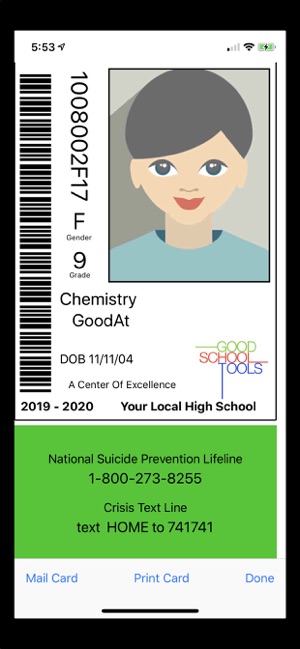
California based Good School Tools today announced School ID Cards and Photos 4.1.0, an update to their popular educational app for iOS devices. With this useful app, individual student IDs are distributed directly to the student's phone via text messaging. There is no need to print cards or rely on students to carry hard copies. Immediately find a group of students by name, gender, and grade on the admin's phone. Version 4.1 includes Suicide Lifelines and more.
San Diego, California - Good School Tools announced today that School ID Cards and Photos version 4.1.0, will include information on every student ID for the National and Local Suicide Prevention Hotlines, the Crisis Text Line, and Special Emergency numbers.
In addition to California law (SB 972 authored by Senator Anthony Portantino), School ID adds crisis information other states, such as Arizona, require to address the increase of student suicides. Suicide Lifeline information, local suicide lifeline and special crisis numbers may be included on every student ID card present on every student's smart phone. The ID information is distributed to students by text message to fit with the life style and smart phone use by that demographic.
Tim Walton of Good School Tools said: "We are appalled by the increase in teen suicides. School ID provides the perfect means to impact this problem by providing IDs right on a student's smart phone. We hope students will take advantage of the hotline and crisis information available right on their phones to reach out for help. School ID is already in use in Los Angeles, NYC and Australian schools. We are committed to providing critical help to students in need even without legislation to require student IDs with Lifeline information. School ID is priced at $199/yr/school so that as many schools as possible can benefit from the use of the app. We have partnered with a number of school photographers who provide student photo IDs as a part of their normal services. We are also seeing new partnerships emerge so that we may help safeguard more of our students."
Device Requirements:
* iPhone 5s or later and iPod touch
* iPad 5th generation or later
* Requires iOS 11.0 or later
* 16.3 MB
Pricing and Availability:
Apps are Free (With In-App Subscription Purchase options) and available worldwide exclusively through the App Store in the Education category. For more information, please contact Tim Walton.
Good School Tools: http://www.goodschooltools.com
School ID Cards and Photos 4.1.0: http://www.goodschooltools.com/Tools/SchoolID/
Download from App Store: https://itunes.apple.com/app/school-id-cards-and-photos/id362528188
Screenshot: https://is3-ssl.mzstatic.com/image/thumb/Purple113/v4/1e/88/71/1e88715d-e355-e90a-c046-9376d0ef511c/pr_source.jpg/300x0w.jpg
App Icon: https://is5-ssl.mzstatic.com/image/thumb/Purple113/v4/ab/83/c4/ab83c451-c307-98e8-a9a8-24db497a2f00/IDIcon-0-1x_U007emarketing-0-0-GLES2_U002c0-512MB-sRGB-0-0-0-85-220-0-0-0-7.png/246x0w.jpg
San Diego based Good School Tools, previously operating as TrueIDApps and School ID, has been providing Southern California school districts with mobile apps for administering students during normal and emergency conditions for nearly 15 years. Their flagship product, GSTools provides a suite of mobile apps which streamline the administrators' job around school by providing critical student information, including photos, right on the administrators' iPhone or iPad. GSTools integrates with most SISs. Good School Tools other tools take information exported from SIS systems to provide administrators additional capabilities to run the schools more efficiently. All Material and Software (C) Copyright 2019 Good School Tools. All Rights Reserved. Apple, the Apple logo, iPhone, iPod and iPad are registered trademarks of Apple Inc. in the U.S. and/or other countries. Other trademarks and registered trademarks may be the property of their respective owners.
*******
Link To Article: https://prmac.com/release-id-83400.htm
*******
---------------------------------------------------------------------------------
Note that you can alter delivered distributions at any time.
Login to your account on prMac to alter your channel selection, or to opt-out at any time.
School ID Updates to Distribute via Text Message - Published on 04/30/19
California based Good School Tools today announced School ID Cards and Photos 4.1.0, an update to their popular educational app for iOS devices. With this useful app, individual student IDs are distributed directly to the student's phone via text messaging. There is no need to print cards or rely on students to carry hard copies. Immediately find a group of students by name, gender, and grade on the admin's phone. Version 4.1 includes Suicide Lifelines and more.
San Diego, California - Good School Tools announced today that School ID Cards and Photos version 4.1.0, will include information on every student ID for the National and Local Suicide Prevention Hotlines, the Crisis Text Line, and Special Emergency numbers.
In addition to California law (SB 972 authored by Senator Anthony Portantino), School ID adds crisis information other states, such as Arizona, require to address the increase of student suicides. Suicide Lifeline information, local suicide lifeline and special crisis numbers may be included on every student ID card present on every student's smart phone. The ID information is distributed to students by text message to fit with the life style and smart phone use by that demographic.
Tim Walton of Good School Tools said: "We are appalled by the increase in teen suicides. School ID provides the perfect means to impact this problem by providing IDs right on a student's smart phone. We hope students will take advantage of the hotline and crisis information available right on their phones to reach out for help. School ID is already in use in Los Angeles, NYC and Australian schools. We are committed to providing critical help to students in need even without legislation to require student IDs with Lifeline information. School ID is priced at $199/yr/school so that as many schools as possible can benefit from the use of the app. We have partnered with a number of school photographers who provide student photo IDs as a part of their normal services. We are also seeing new partnerships emerge so that we may help safeguard more of our students."
Device Requirements:
* iPhone 5s or later and iPod touch
* iPad 5th generation or later
* Requires iOS 11.0 or later
* 16.3 MB
Pricing and Availability:
Apps are Free (With In-App Subscription Purchase options) and available worldwide exclusively through the App Store in the Education category. For more information, please contact Tim Walton.
Good School Tools: http://www.goodschooltools.com
School ID Cards and Photos 4.1.0: http://www.goodschooltools.com/Tools/SchoolID/
Download from App Store: https://itunes.apple.com/app/school-id-cards-and-photos/id362528188
Screenshot: https://is3-ssl.mzstatic.com/image/thumb/Purple113/v4/1e/88/71/1e88715d-e355-e90a-c046-9376d0ef511c/pr_source.jpg/300x0w.jpg
App Icon: https://is5-ssl.mzstatic.com/image/thumb/Purple113/v4/ab/83/c4/ab83c451-c307-98e8-a9a8-24db497a2f00/IDIcon-0-1x_U007emarketing-0-0-GLES2_U002c0-512MB-sRGB-0-0-0-85-220-0-0-0-7.png/246x0w.jpg
San Diego based Good School Tools, previously operating as TrueIDApps and School ID, has been providing Southern California school districts with mobile apps for administering students during normal and emergency conditions for nearly 15 years. Their flagship product, GSTools provides a suite of mobile apps which streamline the administrators' job around school by providing critical student information, including photos, right on the administrators' iPhone or iPad. GSTools integrates with most SISs. Good School Tools other tools take information exported from SIS systems to provide administrators additional capabilities to run the schools more efficiently. All Material and Software (C) Copyright 2019 Good School Tools. All Rights Reserved. Apple, the Apple logo, iPhone, iPod and iPad are registered trademarks of Apple Inc. in the U.S. and/or other countries. Other trademarks and registered trademarks may be the property of their respective owners.
*******
Link To Article: https://prmac.com/release-id-83400.htm
*******
---------------------------------------------------------------------------------
Note that you can alter delivered distributions at any time.
Login to your account on prMac to alter your channel selection, or to opt-out at any time.
AlphaDigits Top Rated Mobile Apps April 2019
A new article has been published at prMac.
AlphaDigits Top Rated Mobile Apps April 2019 - Published on 04/30/19
Mobile app review publisher AlphaDigits has named top rated applications for April 2019. YogaDownload offers an assortment of Yoga class styles. Healthzilla helps manage health and fitness. Jot allows taking notes really fast. SOS Method Meditation puts the SOS Method into action. Nox Cleaner provides perfect user experience on all mobile phones.
Long Island, New York - Mobile app review publisher AlphaDigits has named top rated applications for April 2019. AlphaDigits names five top class mobile apps every month based on the reviews published in the website during the particular month. This website has now released the names of top rated mobile apps for the month of April.
YogaDownload (10/10): Free to download, it comes equipped with an assortment of categories and routines that are super easy to follow and will leave you feeling strengthened and toned and free of tension. What's great about YogaDownload is that you can find an assortment of class styles and teachers, so it's easy to experiment, try out new things and find what works best for you.
Healthzilla (9.5/10): There are a ton of apps out there that help people manage their health and fitness goals. Healthzilla is one of the more fancier apps. It works on iOS and talks to your Apple Watch and Fitbit devices. To expand on that, Healthzilla can sync to any device that supports HealthKit, and includes well known apps like Cardiogram, Calm, Lark, Lifesum, MyFitnessPal, Strava, Nike, Oak, Headspace, 8fit, Zova and Waking Up.
Jot (9/10): This app allows you to take notes really fast with just a few clicks. The exquisite design of the Jot app allows for the usual note-taking and checklist creating a process which can be easily accessed through the notification feature that brings its uniqueness to another level. When making notes and checklist get easier, what else could be as fascinating as having the freedom to organize checklists and notes in folders.
SOS Method Meditation (8.5/10): This is an app that puts the SOS Method into action. While traditional meditation practice takes time, SOS Method makes it fit into our busy lives. If you only have five minutes to spare, SOS Method can help. With uniquely designed exercises, it helps you tap into you mind and let it focus inward, to bring inspiration, calm your emotions and improve overall well-being. When your mind is free from clutter, you function better.
Nox Cleaner (8/10): Every bit of speed is important for perfect user experience on all mobile phones and this is where the unique features of Nox cleaner come into play. The user interface of Nox Cleaner is designed in such a way that is very easy to navigate and is developed as an all-in-one noxious file knockout toolbox with its deep cleaning ability setting it apart from it kinds.
Joe Ellen, an Editor at AlphaDigits said, "Our marketing team can also help developers in writing and distributing PRs and App Store description writing". Developers can also contact AlphaDigits through the onsite app submission form, mail or the contact form to get their apps reviewed.
AlphaDigits: https://alphadigits.com
Submit App for Review: https://alphadigits.com/submit-app-for-review/
AlphaDigits is a review site run by a few app marketers. Enjoying the support from a handy amount of regular visitors, AlphaDigits provides reviews for iPhone, iPad and Android apps. Copyright (C) 2014 AlphaDigits. All Rights Reserved. Apple, the Apple logo, iPhone, iPod and iPad are registered trademarks of Apple Inc. in the U.S. and/or other countries.
*******
Link To Article: https://prmac.com/release-id-83401.htm
*******
---------------------------------------------------------------------------------
Note that you can alter delivered distributions at any time.
Login to your account on prMac to alter your channel selection, or to opt-out at any time.
AlphaDigits Top Rated Mobile Apps April 2019 - Published on 04/30/19
Mobile app review publisher AlphaDigits has named top rated applications for April 2019. YogaDownload offers an assortment of Yoga class styles. Healthzilla helps manage health and fitness. Jot allows taking notes really fast. SOS Method Meditation puts the SOS Method into action. Nox Cleaner provides perfect user experience on all mobile phones.
Long Island, New York - Mobile app review publisher AlphaDigits has named top rated applications for April 2019. AlphaDigits names five top class mobile apps every month based on the reviews published in the website during the particular month. This website has now released the names of top rated mobile apps for the month of April.
YogaDownload (10/10): Free to download, it comes equipped with an assortment of categories and routines that are super easy to follow and will leave you feeling strengthened and toned and free of tension. What's great about YogaDownload is that you can find an assortment of class styles and teachers, so it's easy to experiment, try out new things and find what works best for you.
Healthzilla (9.5/10): There are a ton of apps out there that help people manage their health and fitness goals. Healthzilla is one of the more fancier apps. It works on iOS and talks to your Apple Watch and Fitbit devices. To expand on that, Healthzilla can sync to any device that supports HealthKit, and includes well known apps like Cardiogram, Calm, Lark, Lifesum, MyFitnessPal, Strava, Nike, Oak, Headspace, 8fit, Zova and Waking Up.
Jot (9/10): This app allows you to take notes really fast with just a few clicks. The exquisite design of the Jot app allows for the usual note-taking and checklist creating a process which can be easily accessed through the notification feature that brings its uniqueness to another level. When making notes and checklist get easier, what else could be as fascinating as having the freedom to organize checklists and notes in folders.
SOS Method Meditation (8.5/10): This is an app that puts the SOS Method into action. While traditional meditation practice takes time, SOS Method makes it fit into our busy lives. If you only have five minutes to spare, SOS Method can help. With uniquely designed exercises, it helps you tap into you mind and let it focus inward, to bring inspiration, calm your emotions and improve overall well-being. When your mind is free from clutter, you function better.
Nox Cleaner (8/10): Every bit of speed is important for perfect user experience on all mobile phones and this is where the unique features of Nox cleaner come into play. The user interface of Nox Cleaner is designed in such a way that is very easy to navigate and is developed as an all-in-one noxious file knockout toolbox with its deep cleaning ability setting it apart from it kinds.
Joe Ellen, an Editor at AlphaDigits said, "Our marketing team can also help developers in writing and distributing PRs and App Store description writing". Developers can also contact AlphaDigits through the onsite app submission form, mail or the contact form to get their apps reviewed.
AlphaDigits: https://alphadigits.com
Submit App for Review: https://alphadigits.com/submit-app-for-review/
AlphaDigits is a review site run by a few app marketers. Enjoying the support from a handy amount of regular visitors, AlphaDigits provides reviews for iPhone, iPad and Android apps. Copyright (C) 2014 AlphaDigits. All Rights Reserved. Apple, the Apple logo, iPhone, iPod and iPad are registered trademarks of Apple Inc. in the U.S. and/or other countries.
*******
Link To Article: https://prmac.com/release-id-83401.htm
*******
---------------------------------------------------------------------------------
Note that you can alter delivered distributions at any time.
Login to your account on prMac to alter your channel selection, or to opt-out at any time.
Subscribe to:
Posts (Atom)