A new article has been published at prMac.
Microspot Ltd Releases MacDraft 7 64 bit, the latest CAD App for Mac - Published on 06/07/19
Microspot Ltd releases MacDraft 7 64 bit which has been rewritten from the ground up to create a new, powerful, and feature rich application designed to give you a more intuitive and easy to use drawing program. Boasting a large number of new features and improvements including a completely new interface, tool enhancements, new text system, 64 bit compatibility and much more. These new features combined with a free 14 day trial and free support make it perfect for new and existing customers.
Kent, United Kingdom - Today Microspot Ltd releases the latest version of its 2D CAD application, MacDraft Pro & PE 7 64 bit. MacDraft 7 has been rewritten from the ground up to create a new, powerful, and feature rich application designed to give you a more intuitive and easy to use drawing program. Boasting a large number of new features and improvements including a completely new interface, tool enhancements, new text system, 64 bit compatibility and much more.
Based in Kent, United Kingdom, Microspot prides itself on its easy to use yet professional design applications and MacDraft 7 is right up there as their best yet. MacDraft 7 is now 64 bit meaning it will work seamlessly with Mac OS 10.11 or higher including the upcoming new Mac OS 10.15 and has exciting improvements to text, walls, its library system and DWG support.
Managing Director Phil Bunker states that "it has been a long process but a rewarding one too, we have liaised with customers new and old to build this beautiful, new and powerful CAD app that we hope is everything you need to keep creating detailed, informative designs on your Mac"
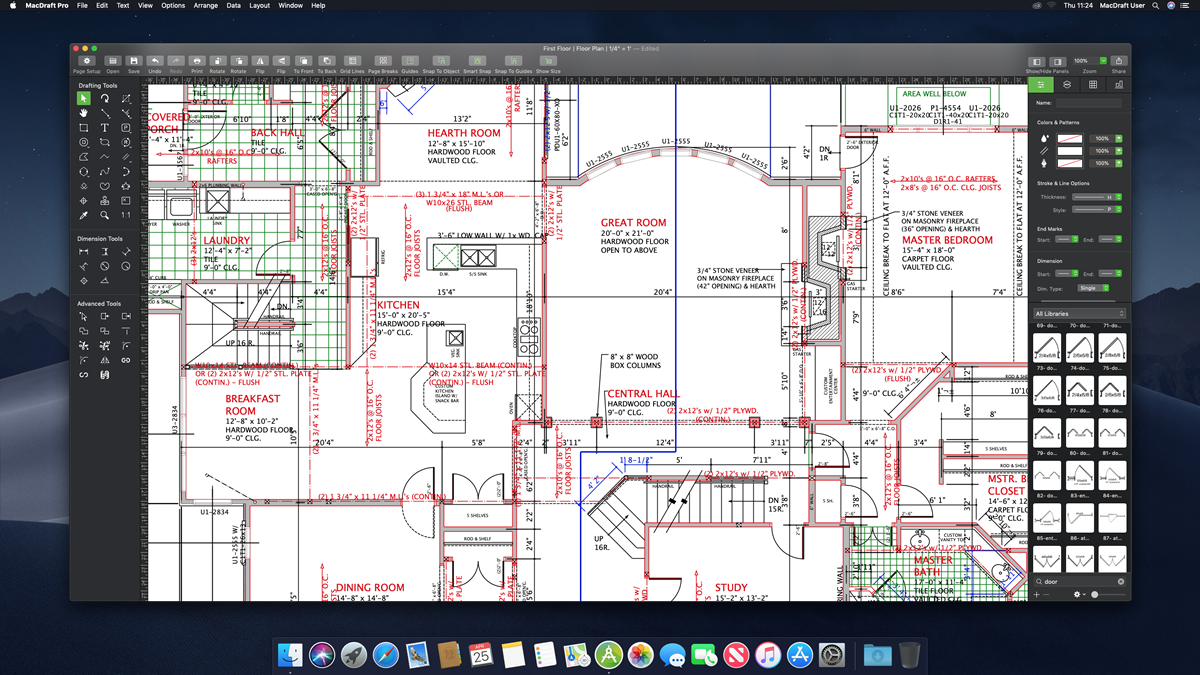
The new interface is built for retina displays and replaces floating palettes with a single screen layout to bring all the tools and options you need right in front of you. The sleek, stylish, intuitive app comes with the option of dark or light mode to switch between if you are running OS Mojave or later. These new features, plus much more, combined with a free 14 day trial and free technical support make it a simple transition for both new and existing customers.
MacDraft 7: http://www.microspot.com/products/macdraft/index.htm
MacDraft Upgrades: http://www.microspot.com/products/upgrade/index.htm
Purchase MacDraft: http://www.microspot.com/products/macdraft/pricing.htm
Screenshot: http://www.microspot.com/images/macdraft-7/screens/Floor-Plan.jpg
Application Icon: http://www.microspot.com/images/products/abobe-illustrator-alternative-icon.png
Founded in 1964, Microspot Ltd develops Mac and Windows software for 2D drawing and drafting. Microspot offers affordable, easy-to-use software that produces professional results. Its customers are both businesses and personal users worldwide and they look to continue improving and innovating these products in the future. Copyright (C) 2019 Microspot Ltd. All Rights Reserved, Apple, the Apple logo, Macintosh and Mac OS X are registered trademarks of Apple Inc. in the U.S. and/or other countries.
*******
Link To Article: https://prmac.com/release-id-83481.htm
*******
---------------------------------------------------------------------------------
Note that you can alter delivered distributions at any time.
Login to your account on prMac to alter your channel selection, or to opt-out at any time.


Mindful App Announces the Release of the Mindful Family App
A new article has been published at prMac.
Mindful App Announces the Release of the Mindful Family App - Published on 06/07/19
Mindful App releases Mindful Family 2.0, its new free app for iOS and Android.. Modern parents want tools that teach their children to manage their stress levels and emotions. Parents also benefit from shared meditation practice. They enjoy quiet time and their children often fall asleep listening to Mindful Family's tracks. Mindful Family includes two meditations to help children process their emotions. Also included are a meditation bell and three relaxing sounds of nature tracks.
Copenhagen, Denmark - Mindful App is excited to announce the release of its new free app Mindful Family 2.0 for iOS and Android. Modern parents want tools that teach their children to manage their stress levels and emotions. Mindful Family combines guided meditations and relaxing sounds from nature to introduce children and parents to natural calming practices.
"When children learn about meditation, a whole new world opens up to them. They realize that emotions are separate from them, and they can learn to listen to them, but also put them into perspective. A strong emotional reaction doesn't have to be acted upon or ruin their day," says Mindful Family co-founder Pia Holgersen.
"Pia has years of experience helping children and families with meditation and other mindfulness exercises. Families transform when emotional awareness becomes part of their DNA. We believe helping children learn about their emotional lives will lead to a generation of healthy adults, and ultimately to a more peaceful world. That's our mission," relates co-founder Jannik Holgersen.
Mindful Family is designed for parents to use with their children. Listening together allows kids to learn from the app and also from their parent's example. Parents also benefit from shared meditation practice. They enjoy quiet time and their children often fall asleep listening to Mindful Family's tracks.
Mindful Family includes two meditations to help children process their emotions. Also included are a meditation bell and three relaxing sounds of nature tracks. Additional tracks, including bedtime meditations, are available as in-app purchases. Mindful Family improves on Mindful Apps' previous free app Mindfulness for Children.
Device Requirements:
* iPhone, iPad, and iPod touch
* Requires iOS 9.0 or later
* 150.6 MB
Pricing and Availability:
Mindful Family 2.0 is Free (In-App Purchases) and available worldwide through the App Store in the Health & Fitness category. There is also an Android version on Google Play. For more information, please contact Jannik Holgersen.
Mindful Family 2.0: https://mindful-app.com/
Download from the App Store: https://itunes.apple.com/app/mindful-family/id1124028741
Download from Google Play: https://play.google.com/store/apps/details?id=com.mindfulapp.mindfulnessforchildren
Promotional Image: https://mindful-app.com/press/Mindful-Family-screens.jpg
Promo Ohoto: https://mindful-app.com/press/mindful-instagram.jpg
App Icon: https://mindful-app.com/press/icon.png
Mindful Family's creators are Pia and Jannik Holgersen. The Holgersen's develop content in Copenhagen, Denmark. Pia studied Psychomotricity and Physiotherapy at the UCC University College North Zealand. Pia holds a Bachelor's Degree in Psychomotor Therapy and Physiotherapy. Jannik develops and produces apps including prior releases Mindful Island and Sound of Mindfulness. Jannik has years of technical experience working in TV and entertainment. All Material and Software (C) Copyright 2019 Jannik Holgersen. All Rights Reserved. Apple, the Apple logo, iPhone, iPod and iPad are registered trademarks of Apple Inc. in the U.S. and/or other countries. Other trademarks and registered trademarks may be the property of their respective owners.
*******
Link To Article: https://prmac.com/release-id-83480.htm
*******
---------------------------------------------------------------------------------
Note that you can alter delivered distributions at any time.
Login to your account on prMac to alter your channel selection, or to opt-out at any time.
Mindful App Announces the Release of the Mindful Family App - Published on 06/07/19
Mindful App releases Mindful Family 2.0, its new free app for iOS and Android.. Modern parents want tools that teach their children to manage their stress levels and emotions. Parents also benefit from shared meditation practice. They enjoy quiet time and their children often fall asleep listening to Mindful Family's tracks. Mindful Family includes two meditations to help children process their emotions. Also included are a meditation bell and three relaxing sounds of nature tracks.
Copenhagen, Denmark - Mindful App is excited to announce the release of its new free app Mindful Family 2.0 for iOS and Android. Modern parents want tools that teach their children to manage their stress levels and emotions. Mindful Family combines guided meditations and relaxing sounds from nature to introduce children and parents to natural calming practices.
"When children learn about meditation, a whole new world opens up to them. They realize that emotions are separate from them, and they can learn to listen to them, but also put them into perspective. A strong emotional reaction doesn't have to be acted upon or ruin their day," says Mindful Family co-founder Pia Holgersen.
"Pia has years of experience helping children and families with meditation and other mindfulness exercises. Families transform when emotional awareness becomes part of their DNA. We believe helping children learn about their emotional lives will lead to a generation of healthy adults, and ultimately to a more peaceful world. That's our mission," relates co-founder Jannik Holgersen.
Mindful Family is designed for parents to use with their children. Listening together allows kids to learn from the app and also from their parent's example. Parents also benefit from shared meditation practice. They enjoy quiet time and their children often fall asleep listening to Mindful Family's tracks.
Mindful Family includes two meditations to help children process their emotions. Also included are a meditation bell and three relaxing sounds of nature tracks. Additional tracks, including bedtime meditations, are available as in-app purchases. Mindful Family improves on Mindful Apps' previous free app Mindfulness for Children.
Device Requirements:
* iPhone, iPad, and iPod touch
* Requires iOS 9.0 or later
* 150.6 MB
Pricing and Availability:
Mindful Family 2.0 is Free (In-App Purchases) and available worldwide through the App Store in the Health & Fitness category. There is also an Android version on Google Play. For more information, please contact Jannik Holgersen.
Mindful Family 2.0: https://mindful-app.com/
Download from the App Store: https://itunes.apple.com/app/mindful-family/id1124028741
Download from Google Play: https://play.google.com/store/apps/details?id=com.mindfulapp.mindfulnessforchildren
Promotional Image: https://mindful-app.com/press/Mindful-Family-screens.jpg

Promo Ohoto: https://mindful-app.com/press/mindful-instagram.jpg

App Icon: https://mindful-app.com/press/icon.png

Mindful Family's creators are Pia and Jannik Holgersen. The Holgersen's develop content in Copenhagen, Denmark. Pia studied Psychomotricity and Physiotherapy at the UCC University College North Zealand. Pia holds a Bachelor's Degree in Psychomotor Therapy and Physiotherapy. Jannik develops and produces apps including prior releases Mindful Island and Sound of Mindfulness. Jannik has years of technical experience working in TV and entertainment. All Material and Software (C) Copyright 2019 Jannik Holgersen. All Rights Reserved. Apple, the Apple logo, iPhone, iPod and iPad are registered trademarks of Apple Inc. in the U.S. and/or other countries. Other trademarks and registered trademarks may be the property of their respective owners.
*******
Link To Article: https://prmac.com/release-id-83480.htm
*******
---------------------------------------------------------------------------------
Note that you can alter delivered distributions at any time.
Login to your account on prMac to alter your channel selection, or to opt-out at any time.
AirDisk Pro App Updates on App Store
A new article has been published at prMac.
AirDisk Pro App Updates on App Store - Published on 06/06/19
App2Pro today announces AirDisk Pro 5.4.1, an update to their innovative, wireless flash drive app for iOS devices. AirDisk Pro allows you to store, view and manage files on your iPhone, iPad or iPod touch. You can connect to AirDisk Pro from any Mac or PC over the Wi-Fi network and transfer files by drag & drop files straight from the Finder or Windows Explorer.
Singapore - App2Pro today is proud to announce the release and immediate availability of AirDisk Pro 5.4.1, an update to their innovative, wireless flash drive app for iPhone, iPad, and iPod touch devices. AirDisk Pro allows you to store, view and manage files on your iPhone, iPad or iPod touch. You can connect to AirDisk Pro from any Mac or PC over the Wi-Fi network and transfer files by drag & drop files straight from the Finder or Windows Explorer.
AirDisk Pro features document viewer, PDF reader, music player, image viewer, voice recorder, text editor, file manager and support most of the file operations: like delete, move, copy, email, share, zip, unzip and more.
-- KEY FEATURES --
1. Support file operation move, copy, rename, delete, zip, unzip, and create folder.
2. Multiple cloud account, iCloud, Google Drive or Dropbox.
3. Easy file upload and download form your PC or linked cloud storage.
4. Complete music player with ability to create playlist with repeat, shuffle, background playback and remote control from multitask.
5. Passcode lock to protect your files from viewing.
6. Support many common file formats
7. Audio (WAV, MP3, M4A, CAF, AIF, AIFF, AAC)
8. Images (JPG, PNG, GIF, BMP, TIF, TIFF, ICO)
9. Movies (MP4, MOV, MPV, M4V)
10. iWorks (Pages, numbers, and Keynote)
11. Microsoft Office (Word, Excel and PowerPoint)
12. RTF (Rich Text Format)
13. RTFD (TextEdit with embedded images)
14. PDF Documents
15. Plain text
16. HTML web pages
Languages supports:
English, Dutch, French, German, Greek, Italian, Japanese, Korean, Portuguese, Russian, Simplified Chinese, Spanish, Swedish, Traditional Chinese, Turkish
Device Requirements:
* iPhone, iPad, and iPod touch
* Requires iOS 9.0 or later
* Universal Application
* 31.2 MB
Pricing and Availability:
AirDisk Pro 5.4.1 is $1.99 USD (or equivalent amount in other currencies) and available worldwide exclusively through the App Store in the Productivity category.
App2Pro: http://app2pro.com
Purchase and Download from App Store: https://itunes.apple.com/us/app/airdisk-pro/id505904421?mt=8
Sreenshot 1: http://app2pro.com/screenshots/1.png
Sreenshot 2: http://app2pro.com/screenshots/2.png
Sreenshot 3: http://app2pro.com/screenshots/3.png
Sreenshot 4: http://app2pro.com/screenshots/4.png
App2Pro is a small, independent studio that creates innnovative products for iOS. We were officially founded in July 2013, and have grown from one app to multiple apps that enable you to do amazing things. All Material and Software (C) Copyright 2019 App2Pro. All Rights Reserved. Apple, the Apple logo, iPhone, iPod and iPad are registered trademarks of Apple Inc. in the U.S. and/or other countries. Other trademarks and registered trademarks may be the property of their respective owners.
*******
Link To Article: https://prmac.com/release-id-83479.htm
*******
---------------------------------------------------------------------------------
Note that you can alter delivered distributions at any time.
Login to your account on prMac to alter your channel selection, or to opt-out at any time.
AirDisk Pro App Updates on App Store - Published on 06/06/19
App2Pro today announces AirDisk Pro 5.4.1, an update to their innovative, wireless flash drive app for iOS devices. AirDisk Pro allows you to store, view and manage files on your iPhone, iPad or iPod touch. You can connect to AirDisk Pro from any Mac or PC over the Wi-Fi network and transfer files by drag & drop files straight from the Finder or Windows Explorer.
Singapore - App2Pro today is proud to announce the release and immediate availability of AirDisk Pro 5.4.1, an update to their innovative, wireless flash drive app for iPhone, iPad, and iPod touch devices. AirDisk Pro allows you to store, view and manage files on your iPhone, iPad or iPod touch. You can connect to AirDisk Pro from any Mac or PC over the Wi-Fi network and transfer files by drag & drop files straight from the Finder or Windows Explorer.
AirDisk Pro features document viewer, PDF reader, music player, image viewer, voice recorder, text editor, file manager and support most of the file operations: like delete, move, copy, email, share, zip, unzip and more.
-- KEY FEATURES --
1. Support file operation move, copy, rename, delete, zip, unzip, and create folder.
2. Multiple cloud account, iCloud, Google Drive or Dropbox.
3. Easy file upload and download form your PC or linked cloud storage.
4. Complete music player with ability to create playlist with repeat, shuffle, background playback and remote control from multitask.
5. Passcode lock to protect your files from viewing.
6. Support many common file formats
7. Audio (WAV, MP3, M4A, CAF, AIF, AIFF, AAC)
8. Images (JPG, PNG, GIF, BMP, TIF, TIFF, ICO)
9. Movies (MP4, MOV, MPV, M4V)
10. iWorks (Pages, numbers, and Keynote)
11. Microsoft Office (Word, Excel and PowerPoint)
12. RTF (Rich Text Format)
13. RTFD (TextEdit with embedded images)
14. PDF Documents
15. Plain text
16. HTML web pages
Languages supports:
English, Dutch, French, German, Greek, Italian, Japanese, Korean, Portuguese, Russian, Simplified Chinese, Spanish, Swedish, Traditional Chinese, Turkish
Device Requirements:
* iPhone, iPad, and iPod touch
* Requires iOS 9.0 or later
* Universal Application
* 31.2 MB
Pricing and Availability:
AirDisk Pro 5.4.1 is $1.99 USD (or equivalent amount in other currencies) and available worldwide exclusively through the App Store in the Productivity category.
App2Pro: http://app2pro.com
Purchase and Download from App Store: https://itunes.apple.com/us/app/airdisk-pro/id505904421?mt=8
Sreenshot 1: http://app2pro.com/screenshots/1.png

Sreenshot 2: http://app2pro.com/screenshots/2.png

Sreenshot 3: http://app2pro.com/screenshots/3.png

Sreenshot 4: http://app2pro.com/screenshots/4.png

App2Pro is a small, independent studio that creates innnovative products for iOS. We were officially founded in July 2013, and have grown from one app to multiple apps that enable you to do amazing things. All Material and Software (C) Copyright 2019 App2Pro. All Rights Reserved. Apple, the Apple logo, iPhone, iPod and iPad are registered trademarks of Apple Inc. in the U.S. and/or other countries. Other trademarks and registered trademarks may be the property of their respective owners.
*******
Link To Article: https://prmac.com/release-id-83479.htm
*******
---------------------------------------------------------------------------------
Note that you can alter delivered distributions at any time.
Login to your account on prMac to alter your channel selection, or to opt-out at any time.
MyArtTools Provides Precision Tools for iPads that Support Apple Pencils
A new article has been published at prMac.
MyArtTools Provides Precision Tools for iPads that Support Apple Pencils - Published on 06/06/19
Indie developer, Pirate's Moon today announces MyArtTools 2.6, an update to their popular drawing app. MyArtTools is designed exclusively for use with iPads that support the Apple Pencil. MyArtTools can be as simple as opening the app, choosing a drawing tool and beginning to draw. As an easy-to-use application with extensive help files built into the program, MyArtTools is the creative onscreen equivalent of a drawing pad or painting on canvas.
Lyndeborough, New Hampshire - Independent developer, Pirate's Moon today is proud to announce the release and immediate availability of MyArtTools 2.6, an important update to their popular drawing app, designed exclusively for use with the iPad Pro (or any iPad that supports the Apple Pencil) and optimized for the precision of the Apple Pencil. MyArtTools is the digital creative equivalent of an artist's painting canvas or drawing pad.
General Info:
MyArtTools is created to be user-friendly and versatile for any skill level from the novice to the professional. All ages can use it for plain-old-fun, fast conceptual sketches or fully finished serious artistic work. Creativity starts with an idea. When inspiration strikes, this tool provides fast easy access to creative sketching tools.
Using MyArtTools can be as simple as opening the app, choosing a drawing tool and beginning to draw. As an easy-to-use application with extensive help files built into the program, MyArtTools is the creative onscreen equivalent of a drawing pad or painting on canvas. From realistic to abstract, finger painting to complex drawing, MyArtTools is developed to emulate real-life artistic media including pastel, brush, pencil, conte, and other artistic mediums. The tools respond perfectly to the precision of the Apple Pencil/iPad Pro combination. Using MyArtTools, users can create beautiful sketches and paintings anywhere. Works-in-progress can be saved and reopened. Finished works can be sent out as high resolution files to iCloud and other storage options. Finished works can also be shared with clients, co-workers, friends and family via email, messaging or directly with any of the popular social sharing networks.
Users can create their drawings from scratch, or they can import images or capture live images using the iPad's camera. Take live camera images or import photos directly where they can be modified or used as templates.
To see examples of what can be accomplished using MyArtTools and the Apple Pencil, visit the Art Fusion blog ( link is below: http://mats.piratesmoon.com/af/index.php) which has over forty example images created during field-testing for this release version.
Technical Info:
MyArtTools supports multiple composition layers, with each tool creating its own layer. Clipping paths can be used to shape and extract images from one layer to a new layer. Layers can be combined into complex drawings. Use the included filters to modify any bitmap image layer. The tool properties panel can be used to adjust the various tool layer controls. Users can create, save and reuse gradients. Works-in-progress can be saved as layered files. Finished works can be saved as high resolution PNG files to iCloud, the Files app, Dropbox, and other storage options. Finished works can also be shared via email, messaging or any of the popular social networks.
Features include:
* Requires any iPad Pro (or any iPad that supports the Apple Pencil)
* Optimized for the Apple Pencil
* Emulates real-life artistic media
* Intuitive interface
* Multiple layers for precise composition control
* Captures images from the iPad cameras
* Imports images from the iPad Photos app
* Crop and share creations with all your social networking accounts
* Save high resolution PNG images to iCloud, the Files app, DropBox, etc.
* Within the app, save layered files of works-in-progress
* Reopen saved layered files
* Use clipping paths to extract images from layers
* Combine layers into one image
* Extensive help files
* Help files are localized for English, Spanish, Russian, and Chinese
* Fully supports retina screens
* Privacy: MyArtTools collects no information from the user. None. Zero.
The app is powered by both a 64-bit drawing engine and a vector drawing engine. Each mode offers a wide-ranging set of tools and features.
Bitmap Drawing:
* Highly responsive 64bit drawing engine
* Exceptional 64-bit color
* 12 Tools emulating real-life artistic media
* Each tool is a separate layer
* Adjustable layer hierarchy
* Adjustable properties for each tool
* Over 30 GPU accelerated artistic filters
* Save and reopen working files
* Multiple color palettes (fixed or custom)
* Eyedropper color selection
* Convert images to drawing tools
Vector Drawing:
* 64bit vector drawing engine
* Pre-defined and custom shape creation
* Vector clipping paths
* Vector based text tool
* Save and reopen custom gradients
What's New in 2.6:
* The Eye Dropper manipulates the Color Picker for more accurate color mixing
* A Settings button has been added to the main menu
* The placement of text has been optimized for clarity
* The splash of the paint bucket has been changed
* Pencil shading has been revised
* Help files have been updated
* The Art Fusion blog displays works of art created by MyArtTools
* Other minor modifications and bug fixes
Device Requirements:
* Any Model iPad Pro (or any iPad that supports the Apple Pencil)
* Requires iOS 12.2 or later
* 43.5 MB
Pricing and Availability:
MyArtTools 2.6 is only $4.99 USD (or an equivalent amount in other currencies) and is available worldwide exclusively through the App Store in the Entertainment category. Potential buyers of the app should note that MyArtTools requires an iPad Pro (or any iPad that supports the Apple Pencil), and is optimized for use with the Apple Pencil. Review copies are available upon request to members of the press.
Pirate's Moon: http://www.piratesmoon.com/
MyArtTools 2.6: http://mats.piratesmoon.com/index.php
More Information: http://mats.piratesmoon.com/technical.php
Purchase and Download: http://itunes.apple.com/app/myarttools/id1211838860
The Art Fusion Blog: http://mats.piratesmoon.com/af/index.php
Pirate's Moon, Inc., of Lyndeborough, NH, was founded in 1986 to provide interactive multimedia development services. Pirate's Moon, Inc. has provided services for many types of companies including: Public Relations, Medical Tutorial, Educational, Enterprise, and Small Business. The company's media services have developed and changed as the Internet has replaced Floppy and CD development and as Mobile apps have replaced Internet use. Their current primary thrusts are developing iOS applications both internally and externally. All Material and Software (C) Copyright 2019 Pirate's Moon, Inc. All Rights Reserved. Apple, the Apple logo, iPhone, iPod and iPad are registered trademarks of Apple Inc. in the U.S. and/or other countries. Other trademarks and registered trademarks may be the property of their respective owners.
*******
Link To Article: https://prmac.com/release-id-83477.htm
*******
---------------------------------------------------------------------------------
Note that you can alter delivered distributions at any time.
Login to your account on prMac to alter your channel selection, or to opt-out at any time.
MyArtTools Provides Precision Tools for iPads that Support Apple Pencils - Published on 06/06/19
Indie developer, Pirate's Moon today announces MyArtTools 2.6, an update to their popular drawing app. MyArtTools is designed exclusively for use with iPads that support the Apple Pencil. MyArtTools can be as simple as opening the app, choosing a drawing tool and beginning to draw. As an easy-to-use application with extensive help files built into the program, MyArtTools is the creative onscreen equivalent of a drawing pad or painting on canvas.
Lyndeborough, New Hampshire - Independent developer, Pirate's Moon today is proud to announce the release and immediate availability of MyArtTools 2.6, an important update to their popular drawing app, designed exclusively for use with the iPad Pro (or any iPad that supports the Apple Pencil) and optimized for the precision of the Apple Pencil. MyArtTools is the digital creative equivalent of an artist's painting canvas or drawing pad.
General Info:
MyArtTools is created to be user-friendly and versatile for any skill level from the novice to the professional. All ages can use it for plain-old-fun, fast conceptual sketches or fully finished serious artistic work. Creativity starts with an idea. When inspiration strikes, this tool provides fast easy access to creative sketching tools.
Using MyArtTools can be as simple as opening the app, choosing a drawing tool and beginning to draw. As an easy-to-use application with extensive help files built into the program, MyArtTools is the creative onscreen equivalent of a drawing pad or painting on canvas. From realistic to abstract, finger painting to complex drawing, MyArtTools is developed to emulate real-life artistic media including pastel, brush, pencil, conte, and other artistic mediums. The tools respond perfectly to the precision of the Apple Pencil/iPad Pro combination. Using MyArtTools, users can create beautiful sketches and paintings anywhere. Works-in-progress can be saved and reopened. Finished works can be sent out as high resolution files to iCloud and other storage options. Finished works can also be shared with clients, co-workers, friends and family via email, messaging or directly with any of the popular social sharing networks.
Users can create their drawings from scratch, or they can import images or capture live images using the iPad's camera. Take live camera images or import photos directly where they can be modified or used as templates.
To see examples of what can be accomplished using MyArtTools and the Apple Pencil, visit the Art Fusion blog ( link is below: http://mats.piratesmoon.com/af/index.php) which has over forty example images created during field-testing for this release version.
Technical Info:
MyArtTools supports multiple composition layers, with each tool creating its own layer. Clipping paths can be used to shape and extract images from one layer to a new layer. Layers can be combined into complex drawings. Use the included filters to modify any bitmap image layer. The tool properties panel can be used to adjust the various tool layer controls. Users can create, save and reuse gradients. Works-in-progress can be saved as layered files. Finished works can be saved as high resolution PNG files to iCloud, the Files app, Dropbox, and other storage options. Finished works can also be shared via email, messaging or any of the popular social networks.
Features include:
* Requires any iPad Pro (or any iPad that supports the Apple Pencil)
* Optimized for the Apple Pencil
* Emulates real-life artistic media
* Intuitive interface
* Multiple layers for precise composition control
* Captures images from the iPad cameras
* Imports images from the iPad Photos app
* Crop and share creations with all your social networking accounts
* Save high resolution PNG images to iCloud, the Files app, DropBox, etc.
* Within the app, save layered files of works-in-progress
* Reopen saved layered files
* Use clipping paths to extract images from layers
* Combine layers into one image
* Extensive help files
* Help files are localized for English, Spanish, Russian, and Chinese
* Fully supports retina screens
* Privacy: MyArtTools collects no information from the user. None. Zero.
The app is powered by both a 64-bit drawing engine and a vector drawing engine. Each mode offers a wide-ranging set of tools and features.
Bitmap Drawing:
* Highly responsive 64bit drawing engine
* Exceptional 64-bit color
* 12 Tools emulating real-life artistic media
* Each tool is a separate layer
* Adjustable layer hierarchy
* Adjustable properties for each tool
* Over 30 GPU accelerated artistic filters
* Save and reopen working files
* Multiple color palettes (fixed or custom)
* Eyedropper color selection
* Convert images to drawing tools
Vector Drawing:
* 64bit vector drawing engine
* Pre-defined and custom shape creation
* Vector clipping paths
* Vector based text tool
* Save and reopen custom gradients
What's New in 2.6:
* The Eye Dropper manipulates the Color Picker for more accurate color mixing
* A Settings button has been added to the main menu
* The placement of text has been optimized for clarity
* The splash of the paint bucket has been changed
* Pencil shading has been revised
* Help files have been updated
* The Art Fusion blog displays works of art created by MyArtTools
* Other minor modifications and bug fixes
Device Requirements:
* Any Model iPad Pro (or any iPad that supports the Apple Pencil)
* Requires iOS 12.2 or later
* 43.5 MB
Pricing and Availability:
MyArtTools 2.6 is only $4.99 USD (or an equivalent amount in other currencies) and is available worldwide exclusively through the App Store in the Entertainment category. Potential buyers of the app should note that MyArtTools requires an iPad Pro (or any iPad that supports the Apple Pencil), and is optimized for use with the Apple Pencil. Review copies are available upon request to members of the press.
Pirate's Moon: http://www.piratesmoon.com/
MyArtTools 2.6: http://mats.piratesmoon.com/index.php
More Information: http://mats.piratesmoon.com/technical.php
Purchase and Download: http://itunes.apple.com/app/myarttools/id1211838860
The Art Fusion Blog: http://mats.piratesmoon.com/af/index.php
Pirate's Moon, Inc., of Lyndeborough, NH, was founded in 1986 to provide interactive multimedia development services. Pirate's Moon, Inc. has provided services for many types of companies including: Public Relations, Medical Tutorial, Educational, Enterprise, and Small Business. The company's media services have developed and changed as the Internet has replaced Floppy and CD development and as Mobile apps have replaced Internet use. Their current primary thrusts are developing iOS applications both internally and externally. All Material and Software (C) Copyright 2019 Pirate's Moon, Inc. All Rights Reserved. Apple, the Apple logo, iPhone, iPod and iPad are registered trademarks of Apple Inc. in the U.S. and/or other countries. Other trademarks and registered trademarks may be the property of their respective owners.
*******
Link To Article: https://prmac.com/release-id-83477.htm
*******
---------------------------------------------------------------------------------
Note that you can alter delivered distributions at any time.
Login to your account on prMac to alter your channel selection, or to opt-out at any time.
An AI-Driven App to Teach You English - Fancy That!
A new article has been published at prMac.
An AI-Driven App to Teach You English - Fancy That! - Published on 06/05/19
Tokyo-based AI company, Impute Inc. has launched its Business English learning mobile app, Fluent8. The AI-driven app helps users to learn the English language from scratch, starting from a few basic words to reading and writing long narratives. The voice recognition technology helps the user to interact with the smart AI chatbot and make improvements on the go. The app is presently available for iOS and will soon be available for Android devices also.
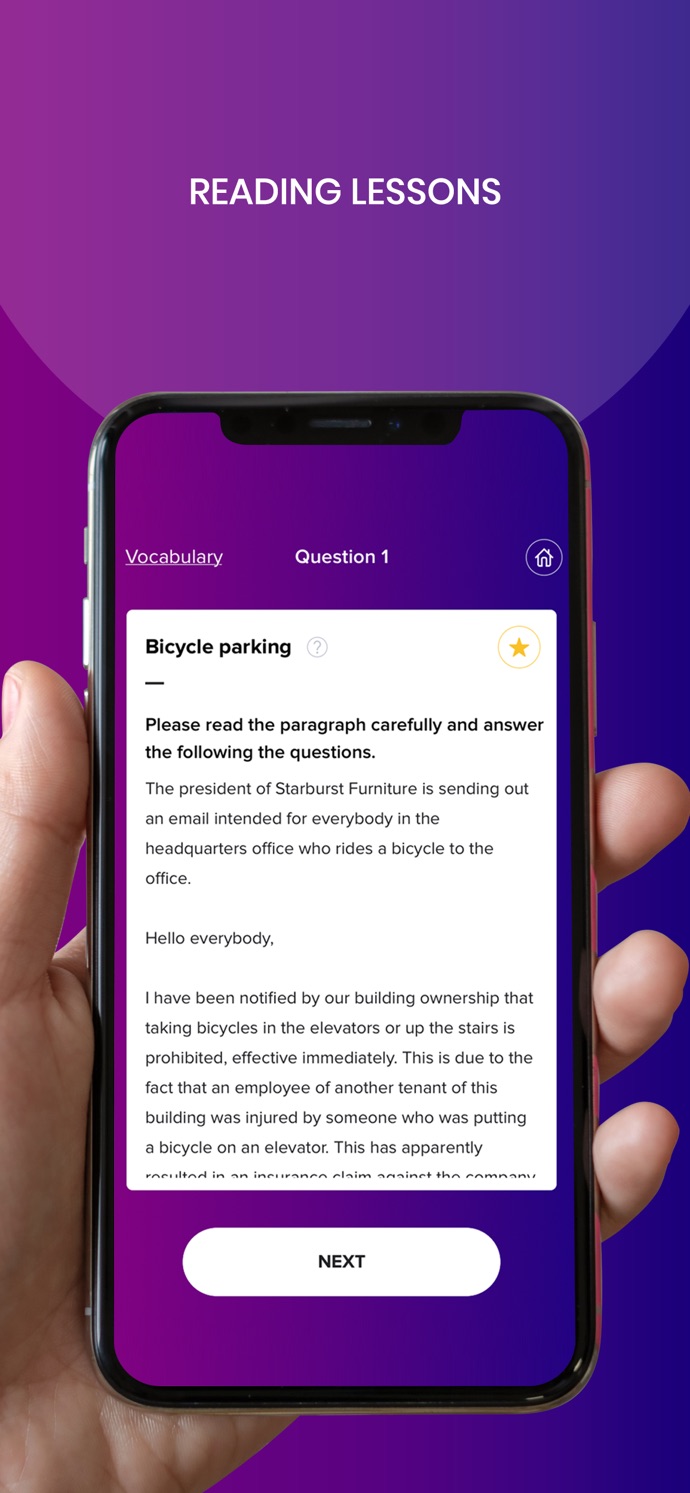
Chiyoda-ku, Tokyo, Japan - IMPUTE Inc. has recently launched its AI-powered Business English learning app, named FLUENT8. The key feature of the FLUENT8 app is its AI-powered Business English "mentor," which makes the whole learning process more personalized, effective and smooth. According to the developers of the FLUENT8 app, it is more effective and efficient for learning to speak English fluently than studying with other methods.
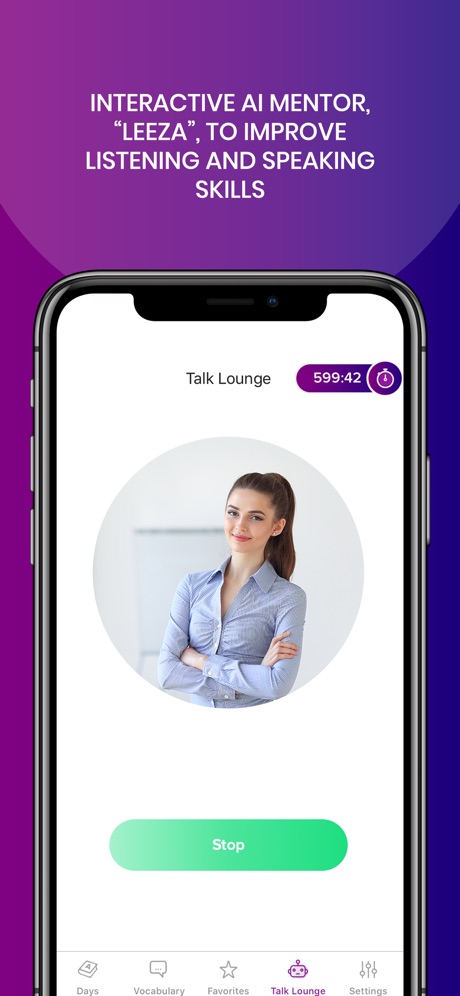
"FLUENT8 is a path-breaking app that will change the way Japanese speakers communicate with the English-speaking world," says M. Singh, CEO, IMPUTE Inc. "The app leverages the benefits of AI, voice recognition and other technologies to provide highly customized Business English learning opportunities to users," he adds.
"As English is one of the most widely spoken languages in the world, it is an effective enabler for conducting business. However, to gain a good command of any language, it normally takes a lot of time and practice. FLUENT8 allows for faster acquisition of the English language." says J. Sylvester, course content director.
The FLUENT8 app acts as a personal English-trainer for users. The AI interface of the app allows users to improve their vocabulary at a pace that is suitable for them, and it helps them refine their pronunciation through conversations and by reading aloud. The system provides instant evaluation, helping users to weed out mistakes immediately.
Key features of the FLUENT8 app:
* AI-customized daily courses focused on Business English: This app has a wide range of vocabulary and expressions, from common, colloquial expressions, to more formal ones.
* Speaking, reading, listening and writing features: The combination of quality contents and the program customization by AI enables a most efficient educational app, which helps users improve their English speaking, reading, listening and writing abilities.
* AI mentor: The smart AI chatbot in the app acts as a teacher and guide to help users improve their English language skills. The high-quality voice recognition function, coupled with a virtual teaching tool, makes the app very effective.
* A wide range of vocabulary and expressions: Users are able to see and study the vocabulary, with translations, before they encounter it in their daily lessons. All of the vocabulary and expressions that the users learn is reviewable at any time. Going back to this list from time to time ensures that the words and expressions "stick".
* Mini-game: FLUENT8 app offers fun tutorials, vocabulary exercises and mini-games to improve fluency and composition.
* The developers of the app say that the intuitive and feature-rich app is better than traditional English-speaking tools and methods, as users can hone their English skills anytime, anywhere, in a one-to-one learning environment.
Device Requirements:
* OS Requirements: iOS 10.0 or later
* Compatible with iPad, iPhone and iPod touch
* Size: iOS - 80.4 MB
Pricing and Availability:
FLUENT8 is currently available for Free with In-App Purchases at iTunes App Store in Education category.
FLUENT8: Learn & Speak English 1.2: https://www.fluent8.com/
Download from the App Store: https://itunes.apple.com/app/fluent8-learn-speak-english/id1444389358
YouTube Video (App Demo): https://www.youtube.com/watch?v=mImlkNMhmTE
Screenshot 1: https://is5-ssl.mzstatic.com/image/thumb/Purple123/v4/e5/77/5c/e5775c7b-4fa3-8c20-51fb-9c25017e7506/pr_source.png/690x0w.jpg
Screenshot 2: https://is5-ssl.mzstatic.com/image/thumb/Purple113/v4/e0/3c/a8/e03ca83f-a36c-2cde-f918-91e079846114/pr_source.png/460x0w.jpg
App Icon: https://is3-ssl.mzstatic.com/image/thumb/Purple123/v4/67/c3/77/67c37709-7180-82ee-307e-4e0ddb96222d/AppIcon-0-1x_U007emarketing-0-0-GLES2_U002c0-512MB-sRGB-0-0-0-85-220-0-0-0-7.png/230x0w.jpg
IMPUTE Inc. is a technology company focused on areas such as Artificial Intelligence, Healthcare, and Consulting. The core philosophy of the company is to transform the world to a higher level of intelligence and sustainability by leveraging IT and emerging technologies. All Material and Software (C) Copyright 2019 IMPUTE Inc. All Rights Reserved. Apple, the Apple logo, iPhone, iPod and iPad are registered trademarks of Apple Inc. in the U.S. and/or other countries. Other trademarks and registered trademarks may be the property of their respective owners.
*******
Link To Article: https://prmac.com/release-id-83476.htm
*******
---------------------------------------------------------------------------------
Note that you can alter delivered distributions at any time.
Login to your account on prMac to alter your channel selection, or to opt-out at any time.
An AI-Driven App to Teach You English - Fancy That! - Published on 06/05/19
Tokyo-based AI company, Impute Inc. has launched its Business English learning mobile app, Fluent8. The AI-driven app helps users to learn the English language from scratch, starting from a few basic words to reading and writing long narratives. The voice recognition technology helps the user to interact with the smart AI chatbot and make improvements on the go. The app is presently available for iOS and will soon be available for Android devices also.
Chiyoda-ku, Tokyo, Japan - IMPUTE Inc. has recently launched its AI-powered Business English learning app, named FLUENT8. The key feature of the FLUENT8 app is its AI-powered Business English "mentor," which makes the whole learning process more personalized, effective and smooth. According to the developers of the FLUENT8 app, it is more effective and efficient for learning to speak English fluently than studying with other methods.
"FLUENT8 is a path-breaking app that will change the way Japanese speakers communicate with the English-speaking world," says M. Singh, CEO, IMPUTE Inc. "The app leverages the benefits of AI, voice recognition and other technologies to provide highly customized Business English learning opportunities to users," he adds.
"As English is one of the most widely spoken languages in the world, it is an effective enabler for conducting business. However, to gain a good command of any language, it normally takes a lot of time and practice. FLUENT8 allows for faster acquisition of the English language." says J. Sylvester, course content director.
The FLUENT8 app acts as a personal English-trainer for users. The AI interface of the app allows users to improve their vocabulary at a pace that is suitable for them, and it helps them refine their pronunciation through conversations and by reading aloud. The system provides instant evaluation, helping users to weed out mistakes immediately.
Key features of the FLUENT8 app:
* AI-customized daily courses focused on Business English: This app has a wide range of vocabulary and expressions, from common, colloquial expressions, to more formal ones.
* Speaking, reading, listening and writing features: The combination of quality contents and the program customization by AI enables a most efficient educational app, which helps users improve their English speaking, reading, listening and writing abilities.
* AI mentor: The smart AI chatbot in the app acts as a teacher and guide to help users improve their English language skills. The high-quality voice recognition function, coupled with a virtual teaching tool, makes the app very effective.
* A wide range of vocabulary and expressions: Users are able to see and study the vocabulary, with translations, before they encounter it in their daily lessons. All of the vocabulary and expressions that the users learn is reviewable at any time. Going back to this list from time to time ensures that the words and expressions "stick".
* Mini-game: FLUENT8 app offers fun tutorials, vocabulary exercises and mini-games to improve fluency and composition.
* The developers of the app say that the intuitive and feature-rich app is better than traditional English-speaking tools and methods, as users can hone their English skills anytime, anywhere, in a one-to-one learning environment.
Device Requirements:
* OS Requirements: iOS 10.0 or later
* Compatible with iPad, iPhone and iPod touch
* Size: iOS - 80.4 MB
Pricing and Availability:
FLUENT8 is currently available for Free with In-App Purchases at iTunes App Store in Education category.
FLUENT8: Learn & Speak English 1.2: https://www.fluent8.com/
Download from the App Store: https://itunes.apple.com/app/fluent8-learn-speak-english/id1444389358
YouTube Video (App Demo): https://www.youtube.com/watch?v=mImlkNMhmTE
Screenshot 1: https://is5-ssl.mzstatic.com/image/thumb/Purple123/v4/e5/77/5c/e5775c7b-4fa3-8c20-51fb-9c25017e7506/pr_source.png/690x0w.jpg
Screenshot 2: https://is5-ssl.mzstatic.com/image/thumb/Purple113/v4/e0/3c/a8/e03ca83f-a36c-2cde-f918-91e079846114/pr_source.png/460x0w.jpg
App Icon: https://is3-ssl.mzstatic.com/image/thumb/Purple123/v4/67/c3/77/67c37709-7180-82ee-307e-4e0ddb96222d/AppIcon-0-1x_U007emarketing-0-0-GLES2_U002c0-512MB-sRGB-0-0-0-85-220-0-0-0-7.png/230x0w.jpg

IMPUTE Inc. is a technology company focused on areas such as Artificial Intelligence, Healthcare, and Consulting. The core philosophy of the company is to transform the world to a higher level of intelligence and sustainability by leveraging IT and emerging technologies. All Material and Software (C) Copyright 2019 IMPUTE Inc. All Rights Reserved. Apple, the Apple logo, iPhone, iPod and iPad are registered trademarks of Apple Inc. in the U.S. and/or other countries. Other trademarks and registered trademarks may be the property of their respective owners.
*******
Link To Article: https://prmac.com/release-id-83476.htm
*******
---------------------------------------------------------------------------------
Note that you can alter delivered distributions at any time.
Login to your account on prMac to alter your channel selection, or to opt-out at any time.
Databuzz Releases fmESignature Link (DocuSign Edition)
A new article has been published at prMac.
Databuzz Releases fmESignature Link (DocuSign Edition) - Published on 06/05/19
Databuzz today announced fmESignature Link (DocuSign Edition), a FileMaker solution that integrates with the DocuSign eSignature platform. DocuSign is one of the most popular electronic signature platforms and helps organisations connect and automate how they prepare, sign, act-on, and manage agreements and allows users to sign electronically on practically any device, from almost anywhere, at any time.
Sydney, Australia - Databuzz today announced fmESignature Link (DocuSign Edition), a FileMaker solution that integrates with the DocuSign eSignature platform. fmESignature Link (DocuSign Edition) is a FileMaker solution that integrates between FileMaker Pro and DocuSign. DocuSign is one of the most popular electronic signature platforms and helps organisations connect and automate how they prepare, sign, act-on, and manage agreements and allows users to sign electronically on practically any device, from almost anywhere, at any time.
fmESignature Link (DocuSign Edition) allows you to quickly send electronic signature requests and download the signed version of the document into FileMaker at the click of a button. fmESignature Link (DocuSign Edition) is completely unlocked allowing you to integrate it into your existing FileMaker solutions. You can copy and paste examples showing you how to authenticate with the DocuSign API and send signing requests and more at the click of a button.
fmESignature Link (DocuSign Edition) features include:
* Works with FileMaker Pro 16 or later
* Uses all native FileMaker scripts and functions (no plug-ins required)
* Completely unlocked for you to integrate into your own FileMaker solution
* Can be hosted by FileMaker Pro or FileMaker Server
* Works with Macintosh and Windows
"Many of our customers use the FileMaker Platform to run their business and DocuSign for electronic document signing," said Andrew Duncan, CEO of Databuzz. "With fmESignature Link (DocuSign Edition) you can send document signing requests and downloaded completed documents from DocuSign at the click of a button, without having to give users direct access to your DocuSign account."
fmESignature Link (DocuSign Edition) includes examples for the following DocuSign features:
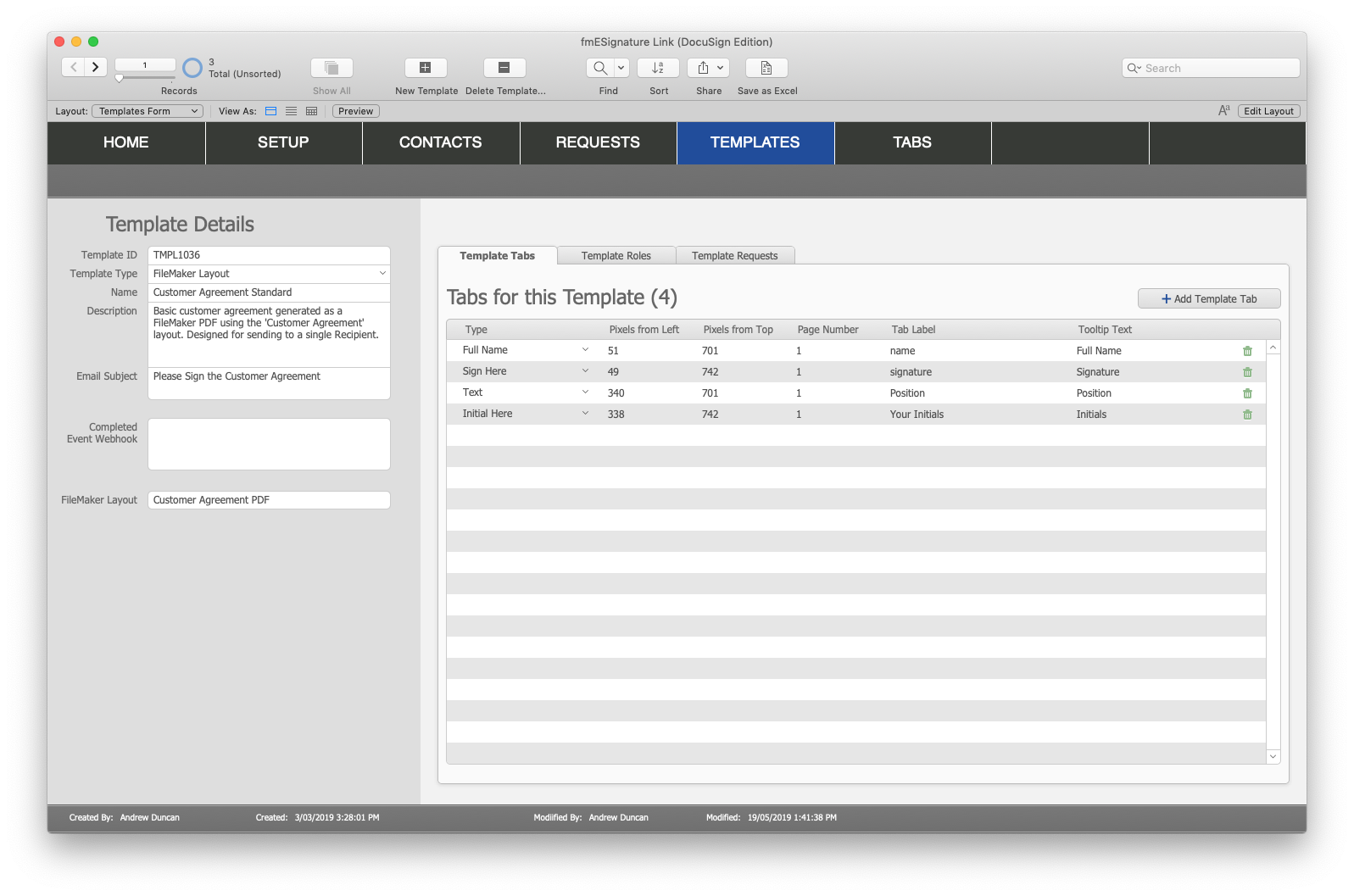
* Send Document Signing Requests: you can use fmESignature Link to send documents that are generated dynamically from a FileMaker layout, from a PDF file stored in a FileMaker container field, or using a DocuSign Template (including support for multiple recipients and roles)
* Check Status: check the Status of Sent Requests at the click of a button
* Download Completed/Signed PDFs: download the completed PDF file into FileMaker at the click of a button
* Download Form Data: download any associated Form Data back into FileMaker at the click of a button
* Support for Webhooks: have completed PDFs pushed automatically to FileMaker within seconds of being completed (requires FileMaker Server and PHP Custom Web Publishing)
* Support for FileMaker Server Schedules: setup schedules to poll DocuSign every 20 minutes for any new completed agreements (requires FileMaker Server and PHP Custom Web Publishing)
* Testing Sandbox support: dynamically switch between the DocuSign Sandbox test environment and the live production environment. You can perform all required tests in the free Sandbox account before switching to your live production account
Availability, Pricing, and Compatibility
fmESignature Link is available in a number of licenses: Company, Product (Vertical Solution) and Developer. It is available now from the Databuzz website. Company Licenses start at AUD $795.00. fmESignature Link (DocuSign Edition) requires FileMaker Pro v16 or later and a DocuSign account with API access.
Databuzz: https://www.databuzz.com.au/
fmESignature Link (DocuSign Edition): https://www.databuzz.com.au/fmesignature-link-docusign-edition/
Purchase Link: https://www.databuzz.com.au/product-category/docusign/
Screenshot 1: https://www.databuzz.com.au/wp-content/uploads/2019/05/fmESignature-Link-Home-Screen.png
Screenshot 2: https://www.databuzz.com.au/wp-content/uploads/2019/05/FileMaker-Template-with-Tabs.png
Databuzz is a long standing member of the FileMaker Business Alliance. We have been developing and deploying FileMaker solutions for clients in Australia and internationally since 1999. Our clients are individuals, small-medium businesses, government agencies and multi-national corporations. Databuzz was founded by Andrew Duncan, a Certified FileMaker 17 Developer. For more information please visit the Databuzz website. Copyright (C) 2019 Databuzz. All Rights Reserved. FileMaker is a trademark of FileMaker, Inc., registered in the U.S. and other countries. All other trademarks are the property of their respective owners.
*******
Link To Article: https://prmac.com/release-id-83475.htm
*******
---------------------------------------------------------------------------------
Note that you can alter delivered distributions at any time.
Login to your account on prMac to alter your channel selection, or to opt-out at any time.
Databuzz Releases fmESignature Link (DocuSign Edition) - Published on 06/05/19
Databuzz today announced fmESignature Link (DocuSign Edition), a FileMaker solution that integrates with the DocuSign eSignature platform. DocuSign is one of the most popular electronic signature platforms and helps organisations connect and automate how they prepare, sign, act-on, and manage agreements and allows users to sign electronically on practically any device, from almost anywhere, at any time.
Sydney, Australia - Databuzz today announced fmESignature Link (DocuSign Edition), a FileMaker solution that integrates with the DocuSign eSignature platform. fmESignature Link (DocuSign Edition) is a FileMaker solution that integrates between FileMaker Pro and DocuSign. DocuSign is one of the most popular electronic signature platforms and helps organisations connect and automate how they prepare, sign, act-on, and manage agreements and allows users to sign electronically on practically any device, from almost anywhere, at any time.
fmESignature Link (DocuSign Edition) allows you to quickly send electronic signature requests and download the signed version of the document into FileMaker at the click of a button. fmESignature Link (DocuSign Edition) is completely unlocked allowing you to integrate it into your existing FileMaker solutions. You can copy and paste examples showing you how to authenticate with the DocuSign API and send signing requests and more at the click of a button.
fmESignature Link (DocuSign Edition) features include:
* Works with FileMaker Pro 16 or later
* Uses all native FileMaker scripts and functions (no plug-ins required)
* Completely unlocked for you to integrate into your own FileMaker solution
* Can be hosted by FileMaker Pro or FileMaker Server
* Works with Macintosh and Windows
"Many of our customers use the FileMaker Platform to run their business and DocuSign for electronic document signing," said Andrew Duncan, CEO of Databuzz. "With fmESignature Link (DocuSign Edition) you can send document signing requests and downloaded completed documents from DocuSign at the click of a button, without having to give users direct access to your DocuSign account."
fmESignature Link (DocuSign Edition) includes examples for the following DocuSign features:
* Send Document Signing Requests: you can use fmESignature Link to send documents that are generated dynamically from a FileMaker layout, from a PDF file stored in a FileMaker container field, or using a DocuSign Template (including support for multiple recipients and roles)
* Check Status: check the Status of Sent Requests at the click of a button
* Download Completed/Signed PDFs: download the completed PDF file into FileMaker at the click of a button
* Download Form Data: download any associated Form Data back into FileMaker at the click of a button
* Support for Webhooks: have completed PDFs pushed automatically to FileMaker within seconds of being completed (requires FileMaker Server and PHP Custom Web Publishing)
* Support for FileMaker Server Schedules: setup schedules to poll DocuSign every 20 minutes for any new completed agreements (requires FileMaker Server and PHP Custom Web Publishing)
* Testing Sandbox support: dynamically switch between the DocuSign Sandbox test environment and the live production environment. You can perform all required tests in the free Sandbox account before switching to your live production account
Availability, Pricing, and Compatibility
fmESignature Link is available in a number of licenses: Company, Product (Vertical Solution) and Developer. It is available now from the Databuzz website. Company Licenses start at AUD $795.00. fmESignature Link (DocuSign Edition) requires FileMaker Pro v16 or later and a DocuSign account with API access.
Databuzz: https://www.databuzz.com.au/
fmESignature Link (DocuSign Edition): https://www.databuzz.com.au/fmesignature-link-docusign-edition/
Purchase Link: https://www.databuzz.com.au/product-category/docusign/
Screenshot 1: https://www.databuzz.com.au/wp-content/uploads/2019/05/fmESignature-Link-Home-Screen.png

Screenshot 2: https://www.databuzz.com.au/wp-content/uploads/2019/05/FileMaker-Template-with-Tabs.png
Databuzz is a long standing member of the FileMaker Business Alliance. We have been developing and deploying FileMaker solutions for clients in Australia and internationally since 1999. Our clients are individuals, small-medium businesses, government agencies and multi-national corporations. Databuzz was founded by Andrew Duncan, a Certified FileMaker 17 Developer. For more information please visit the Databuzz website. Copyright (C) 2019 Databuzz. All Rights Reserved. FileMaker is a trademark of FileMaker, Inc., registered in the U.S. and other countries. All other trademarks are the property of their respective owners.
*******
Link To Article: https://prmac.com/release-id-83475.htm
*******
---------------------------------------------------------------------------------
Note that you can alter delivered distributions at any time.
Login to your account on prMac to alter your channel selection, or to opt-out at any time.
IconMenu 1.0 - 100,000+ Icons on the Buffet - Mac Only
A new article has been published at prMac.
IconMenu 1.0 - 100,000+ Icons on the Buffet - Mac Only - Published on 06/04/19
Independent developer Florian Soenens and graphic artist Rolf Neumann announce their first Mac App, IconMenu 1.0, the ultimate Search App for icons. Enjoy the 100,000 icons on the buffet. Accessed directly from the menubar, directly search for and download a plethora of quality icons and drag them in any app, in any format/size you need. IconMenu supports all available png sizes from 16px up to 1024px as well as svg and ICNS format.
Wingene, Belgium - NY, USA - Wingene, Belgium - Independent developer Florian Soenens and graphic artist Rolf Neumann are proud to announce the release of their first Mac App, IconMenu 1.0, the ultimate Search App for icons. Directly search for and download a plethora of quality icons and drag them in any app, in any format/size you need.
Enjoy the 100.000 icons on the buffet, for your eyes, euhm, Mac only. If you're a designer, web developer, Photoshop wizard, art lover, tattoo, (info)graphics or icon fan, IconMenu is for you. It lets you search through 100,000 icons and let's you drag them directly into your favorite app the way you're used to - The Mac way!
IconMenu supports dragging to Photoshop, Illustrator, Sketch, Pixelmator, Affinity Photo, OmniGraffle, Pages, Numbers, Keynote and lots of other major Apps. Oh yes... also to your Mac Desktop or the Finder.
Here's an overview of the most important features:
* Search through over 100.000 icons and simply directly drag them into your favorite app or onto your desktop
* Using Dark Mode on your Mac? IconMenu adopts natively, so your pretty eyes don't get tired
* IconMenu supports all available png sizes from 16px up to 1024px as well as svg and ICNS format
* Zen UI/UX. Small. Aesthetic. Distraction-free. Sophisticatedly simple (or is it simply sophisticated
* Hidden: It's called IconMenu, so you can access it directly from your menubar, keeping it hidden when needed
* IconMenu is written natively in Cocoa, for your Mac only
* Simple design: No whistles and bells, just the tools you need when you need them, clean and simple
* Powered by Iconfinder: IconMenu uses the iconfinder API, the world's biggest icon database/community. All icons you see come from these awesome guys' servers
Give it a try!
System Requirements:
* Requires macOS 10.12
Pricing and Availability:
IconMenu 1.0 is available now on the official IconMenu website and will soon be available on the Mac App Store. Users can download a 7-day free trial and if they like it, they can purchase directly on the website for only $3.99.
IconMenu 1.0: http://www.iconmenu.com
Operating out of Wingene, Belgium, independent developer Florian Soenens has been creating Mac apps since 1998. His future goal is to further improve IconMenu as well as taking Icon tools to the iOS platform. All Material and Software (C) Copyright 2019 Florian Soenens. All Rights Reserved. Apple, the Apple logo, Macintosh Mac OS X and macOS are registered trademarks of Apple Inc. in the U.S. and/or other countries. Other trademarks and registered trademarks may be the property of their respective owners.
*******
Link To Article: https://prmac.com/release-id-83474.htm
*******
---------------------------------------------------------------------------------
Note that you can alter delivered distributions at any time.
Login to your account on prMac to alter your channel selection, or to opt-out at any time.
IconMenu 1.0 - 100,000+ Icons on the Buffet - Mac Only - Published on 06/04/19
Independent developer Florian Soenens and graphic artist Rolf Neumann announce their first Mac App, IconMenu 1.0, the ultimate Search App for icons. Enjoy the 100,000 icons on the buffet. Accessed directly from the menubar, directly search for and download a plethora of quality icons and drag them in any app, in any format/size you need. IconMenu supports all available png sizes from 16px up to 1024px as well as svg and ICNS format.
Wingene, Belgium - NY, USA - Wingene, Belgium - Independent developer Florian Soenens and graphic artist Rolf Neumann are proud to announce the release of their first Mac App, IconMenu 1.0, the ultimate Search App for icons. Directly search for and download a plethora of quality icons and drag them in any app, in any format/size you need.
Enjoy the 100.000 icons on the buffet, for your eyes, euhm, Mac only. If you're a designer, web developer, Photoshop wizard, art lover, tattoo, (info)graphics or icon fan, IconMenu is for you. It lets you search through 100,000 icons and let's you drag them directly into your favorite app the way you're used to - The Mac way!
IconMenu supports dragging to Photoshop, Illustrator, Sketch, Pixelmator, Affinity Photo, OmniGraffle, Pages, Numbers, Keynote and lots of other major Apps. Oh yes... also to your Mac Desktop or the Finder.
Here's an overview of the most important features:
* Search through over 100.000 icons and simply directly drag them into your favorite app or onto your desktop
* Using Dark Mode on your Mac? IconMenu adopts natively, so your pretty eyes don't get tired
* IconMenu supports all available png sizes from 16px up to 1024px as well as svg and ICNS format
* Zen UI/UX. Small. Aesthetic. Distraction-free. Sophisticatedly simple (or is it simply sophisticated
* Hidden: It's called IconMenu, so you can access it directly from your menubar, keeping it hidden when needed
* IconMenu is written natively in Cocoa, for your Mac only
* Simple design: No whistles and bells, just the tools you need when you need them, clean and simple
* Powered by Iconfinder: IconMenu uses the iconfinder API, the world's biggest icon database/community. All icons you see come from these awesome guys' servers
Give it a try!
System Requirements:
* Requires macOS 10.12
Pricing and Availability:
IconMenu 1.0 is available now on the official IconMenu website and will soon be available on the Mac App Store. Users can download a 7-day free trial and if they like it, they can purchase directly on the website for only $3.99.
IconMenu 1.0: http://www.iconmenu.com
Operating out of Wingene, Belgium, independent developer Florian Soenens has been creating Mac apps since 1998. His future goal is to further improve IconMenu as well as taking Icon tools to the iOS platform. All Material and Software (C) Copyright 2019 Florian Soenens. All Rights Reserved. Apple, the Apple logo, Macintosh Mac OS X and macOS are registered trademarks of Apple Inc. in the U.S. and/or other countries. Other trademarks and registered trademarks may be the property of their respective owners.
*******
Link To Article: https://prmac.com/release-id-83474.htm
*******
---------------------------------------------------------------------------------
Note that you can alter delivered distributions at any time.
Login to your account on prMac to alter your channel selection, or to opt-out at any time.
Subscribe to:
Posts (Atom)