A new article has been published at prMac.
Android and iOS Based Mobile Apps are Developed by Royex Technologies - Published on 07/06/19
Royex Technologies is a dedicated and skilled mobile app development company that specializes in developing iOS, Android, native and HTML5 cross-platform apps. Our mobile app has a very clean, simple and organized look with some of efficient features such as strong security, layout design, push notification, loading speed, mobile friendly UI design etc.
Dubai, UAE - Royex Technologies is a dedicated and skilled mobile app development company that specializes in developing iOS, Android, native and HTML5 cross-platform apps.
Their expert application designers and developers in Dubai are mainly focused on giving cost-effective app development solutions that create more income for the customers. Their talented engineers aptitude in iPhone and Android version mobile apps and can create applications that make smartphones work quicker for their clients.
The CEO of Royex Technologies, Mr Rajib Roy said about their company work procedure, "Our first step is to make proprietary strategies and process to develop ideas that best fit our customer's mobile app requirements. The codes are written in the XCode IDE/Android Studio, which includes a code editor and a GUI for a faultless code development environment. After development process, multiple tests must be taken to ensure our final product so that we can be sure that it is free from technical errors and optimized for the user. A well-defined release cycle plan must be included to ensure smooth app deployment"
With the ascent of the mobile generation, company with fixed mission can be greatly benefited from rowing their range to a more extensive and innovation arranged or technology-oriented audience.
"It is highly appreciated that we are able to work for both android and iOS platform apps, including login registry, to create a highly intuitive and easy-to-navigate app that runs on smartphones and tablets" Mr. Rajib Roy added.
Our mobile app has a very clean, simple and organized look with some of efficient features such as strong security, layout design, push notification, loading speed, mobile friendly ui design etc. There can be put button to show the notification of the update news if customers do require.
Till now, Royex Technologies have developed more than 30 apps for clients in the UAE, Saudi Arabia (KSA), Bahrain, Kuwait, and more.
Royex Technologies: https://www.royex.ae/services/mobile-app-development-company-in-dubai
Products: https://www.royex.ae/products
For more than 5 years, Royex Technologies are giving their best development services in UAE. They have a complete understanding of app development and can create apps that reach your targeted customers. They can help you to select the right technology for your mobile app projects. Because they are committed to providing cost-effective mobile app development solutions that generate more revenue for our clients.
You may have known some app name developed by Royex : JAD Taxi, Stune App, We Do, Kulshee, Testdrive, Diceapp, Homesae and so forth. All Material and Software (C) Copyright 2019 Royex Technologies. All Rights Reserved. Apple, the Apple logo, iPhone, iPod and iPad are registered trademarks of Apple Inc. in the U.S. and/or other countries. Other trademarks and registered trademarks may be the property of their respective owners.
*******
Link To Article: https://prmac.com/release-id-83530.htm
*******
---------------------------------------------------------------------------------
Note that you can alter delivered distributions at any time.
Login to your account on prMac to alter your channel selection, or to opt-out at any time.

64-bit Applications Arrive in Virtual TimeClock 19
A new article has been published at prMac.
64-bit Applications Arrive in Virtual TimeClock 19 - Published on 07/04/19
Redcort Software announces that their new Virtual TimeClock 19 release is 64-bit native, adds support for HiDPI displays, macOS Dark Mode, and offers a Kiosk option for centralized employee time clocks. Virtual TimeClock users will find version 19 completely familiar, while the program runs faster, more efficiently, and is more visually pleasing with dozens of subtle visual enhancements.
Long Island, New York - Today's release of Virtual TimeClock 19 delivers 64-bit versions of Redcort Software's popular employee time clock applications. Virtual TimeClock's new 64-bit apps remain familiar to users while ensuring compatibility with the latest computers and tablets running macOS and Microsoft Windows. Virtual TimeClock 19 adds support for HiDPI displays, Dark Mode for MacOS, and a new Kiosk Mode for increased security of centralized time clock stations.
New 64-bit Applications
Rebuilding Virtual TimeClock as 64-bit applications became a top priority for Redcort Software early in 2018 when Apple announced that their next macOS release would no longer run 32-bit programs. "After more than 30 years developing Virtual TimeClock on a 32-bit platform, the 64-bit conversion was a tremendous undertaking by our development team" explained Keith DeLong, president of Redcort Software Inc. "The new 64-bit architecture of Virtual TimeClock 19 will enable us to continue supporting our user's macOS and Windows PCs for another 30 years."
Virtual TimeClock users will find version 19 completely familiar, while the program runs faster, more efficiently, and is more visually pleasing with dozens of subtle visual enhancements. Virtual TimeClock 19 has HiDPI display support for razor-sharp, high-resolution icons and text. Version 19 also adds support for Apple's Dark Mode that was introduced in macOS Mojave.
New Time Clock Features
Virtual TimeClock 19 has a new Kiosk Mode that adds security for centralized employee time clocks. The Timecard Approval Dashboard has been updated to simplify preparation for payroll processing. Brand new date, time & calendar controls make timecard management easier than ever. Network communications now employ TLS 1.2 encryption for enhanced data security and privacy. Printing has been enhanced for messaging, program logs, and user notes.
Pricing and Availability
Virtual TimeClock is licensed as a one-time purchase, starting at $99. Virtual TimeClock is available in Basic, Pro and Network editions for Macintosh Computers, Windows PCs and tablets. Optional annual software maintenance and support enrollment and discounted upgrade pricing are available upon request or online at the Redcort Software store.
Redcort Software: http://www.redcort.com/
Virtual Time Clock: http://www.redcort.com/timeclock/
Free Virtual Time Clock Software Trial: http://www.redcort.com/timeclock/free-time-clock-software-trial.html
Download Virtual TimeClock Software: http://www.redcort.com/download/
Purchase Virtual TimeClock Software: http://www.redcort.com/store/
Virtual TimeClock Software Technical Support: http://www.redcort.com/support/
Redcort Software pursues a collaborative relationship with customers through direct sales, regular feedback and enthusiastic U.S based technical support specialists. Tens of thousands of workers at businesses in over 50 countries rely on Virtual TimeClock software every business day. All Material and Software (C) Copyright 2019 Redcort Software. All Rights Reserved. Apple, the Apple logo, Macintosh Mac OS X and macOS are registered trademarks of Apple Inc. in the U.S. and/or other countries. Other trademarks and registered trademarks may be the property of their respective owners.
*******
Link To Article: https://prmac.com/release-id-83528.htm
*******
---------------------------------------------------------------------------------
Note that you can alter delivered distributions at any time.
Login to your account on prMac to alter your channel selection, or to opt-out at any time.
64-bit Applications Arrive in Virtual TimeClock 19 - Published on 07/04/19
Redcort Software announces that their new Virtual TimeClock 19 release is 64-bit native, adds support for HiDPI displays, macOS Dark Mode, and offers a Kiosk option for centralized employee time clocks. Virtual TimeClock users will find version 19 completely familiar, while the program runs faster, more efficiently, and is more visually pleasing with dozens of subtle visual enhancements.
Long Island, New York - Today's release of Virtual TimeClock 19 delivers 64-bit versions of Redcort Software's popular employee time clock applications. Virtual TimeClock's new 64-bit apps remain familiar to users while ensuring compatibility with the latest computers and tablets running macOS and Microsoft Windows. Virtual TimeClock 19 adds support for HiDPI displays, Dark Mode for MacOS, and a new Kiosk Mode for increased security of centralized time clock stations.
New 64-bit Applications
Rebuilding Virtual TimeClock as 64-bit applications became a top priority for Redcort Software early in 2018 when Apple announced that their next macOS release would no longer run 32-bit programs. "After more than 30 years developing Virtual TimeClock on a 32-bit platform, the 64-bit conversion was a tremendous undertaking by our development team" explained Keith DeLong, president of Redcort Software Inc. "The new 64-bit architecture of Virtual TimeClock 19 will enable us to continue supporting our user's macOS and Windows PCs for another 30 years."
Virtual TimeClock users will find version 19 completely familiar, while the program runs faster, more efficiently, and is more visually pleasing with dozens of subtle visual enhancements. Virtual TimeClock 19 has HiDPI display support for razor-sharp, high-resolution icons and text. Version 19 also adds support for Apple's Dark Mode that was introduced in macOS Mojave.
New Time Clock Features
Virtual TimeClock 19 has a new Kiosk Mode that adds security for centralized employee time clocks. The Timecard Approval Dashboard has been updated to simplify preparation for payroll processing. Brand new date, time & calendar controls make timecard management easier than ever. Network communications now employ TLS 1.2 encryption for enhanced data security and privacy. Printing has been enhanced for messaging, program logs, and user notes.
Pricing and Availability
Virtual TimeClock is licensed as a one-time purchase, starting at $99. Virtual TimeClock is available in Basic, Pro and Network editions for Macintosh Computers, Windows PCs and tablets. Optional annual software maintenance and support enrollment and discounted upgrade pricing are available upon request or online at the Redcort Software store.
Redcort Software: http://www.redcort.com/
Virtual Time Clock: http://www.redcort.com/timeclock/
Free Virtual Time Clock Software Trial: http://www.redcort.com/timeclock/free-time-clock-software-trial.html
Download Virtual TimeClock Software: http://www.redcort.com/download/
Purchase Virtual TimeClock Software: http://www.redcort.com/store/
Virtual TimeClock Software Technical Support: http://www.redcort.com/support/
Redcort Software pursues a collaborative relationship with customers through direct sales, regular feedback and enthusiastic U.S based technical support specialists. Tens of thousands of workers at businesses in over 50 countries rely on Virtual TimeClock software every business day. All Material and Software (C) Copyright 2019 Redcort Software. All Rights Reserved. Apple, the Apple logo, Macintosh Mac OS X and macOS are registered trademarks of Apple Inc. in the U.S. and/or other countries. Other trademarks and registered trademarks may be the property of their respective owners.
*******
Link To Article: https://prmac.com/release-id-83528.htm
*******
---------------------------------------------------------------------------------
Note that you can alter delivered distributions at any time.
Login to your account on prMac to alter your channel selection, or to opt-out at any time.
AlphaDigits Top Rated Mobile Apps June 2019
A new article has been published at prMac.
AlphaDigits Top Rated Mobile Apps June 2019 - Published on 07/03/19
Mobile app review publisher AlphaDigits has named top rated applications for June 2019. Passwords Keeper is a password storage app. Journey of Water is a cartoon like tutorial. Bing Bong is a ball catching game. SimDif creates eye-catching websites on Android. Pictoword keeps brain sharp.
Long Island, New York - Mobile app review publisher AlphaDigits has named top rated applications for June 2019. AlphaDigits names five top class mobile apps every month based on the reviews published in the website during the particular month. This website has now released the names of top rated mobile apps for the month of June.
Passwords Keeper (10/10): There is nothing worse than trying to log into an app that you haven't been in for a while, or when you have to login to an app after you've updated it. You've been using it for months, and suddenly you are expected to remember the password. If you are a good password generator, then you are not reusing passwords across different accounts. If you are looking for a password storage app that takes away the pain and hassle of remembering passwords, consider Passwords Keeper.
Journey of Water (9.5/10): The app is not a game, but rather, a cartoon-like tutorial that users can listen to and watch. There is a small amount of animation to give the images some life and to help prompt users on what needs to be done next. The aim of the app is to teach people, young and old, about water, its importance of all living things, and how it needs to be treated with care so enough is available for the years to come.
Bing Bong (9/10): In Bing Bong, your aim is to catch the ball as it makes it way from the top of the screen to the bottom, before it reaches the floor. At first, the ball will fall in a somewhat straight path, with nothing in its way to divert it. As you complete each catch successfully, subsequent balls will be met with diversions and obstacles, one at a time. They will pop up randomly and will cause the ball to bounce away and continue its fall.
SimDif (8.5/10): The app provides you with a simple way to navigate its interface and you can view the appearance of your website on a computer by rotating your phone and using the simplified statistics to observe the behavior of your website's visitors. Once you install the app on your android device, you can create a rich, eye catching website without having any technical capabilities.
Pictoword (8/10): This is a game of words that keeps your brain sharp and on the edge of your seat. Based on pictures, you are challenged to build a word out of a sequence of pictures. While it sounds simple and easy, it can get tricky. Our minds think on one thing when we say a word out loud, but our thoughts and ideas are steered by what we see. The pictures you see may not have anything to do with the final word, so while you think you might be able guess the answer quickly, think again.
Joe Ellen, an Editor at AlphaDigits said, "Our marketing team help generate installs and reviews for mobile apps on Play Store and App Store. We can also rank apps for relevant keywords." Developers can also contact AlphaDigits through the onsite form, mail or the contact form to get their apps reviewed.
AlphaDigits: https://alphadigits.com/
Submit App for Review: https://alphadigits.com/submit-app-for-review/
AlphaDigits is a review site run by a few app marketers. Enjoying the support from a handy amount of regular visitors, AlphaDigits provides reviews for iPhone, iPad and Android apps. Copyright (C) 2019 AlphaDigits. All Rights Reserved. Apple, the Apple logo, iPhone, iPod and iPad are registered trademarks of Apple Inc. in the U.S. and/or other countries.
*******
Link To Article: https://prmac.com/release-id-83526.htm
*******
---------------------------------------------------------------------------------
Note that you can alter delivered distributions at any time.
Login to your account on prMac to alter your channel selection, or to opt-out at any time.
AlphaDigits Top Rated Mobile Apps June 2019 - Published on 07/03/19
Mobile app review publisher AlphaDigits has named top rated applications for June 2019. Passwords Keeper is a password storage app. Journey of Water is a cartoon like tutorial. Bing Bong is a ball catching game. SimDif creates eye-catching websites on Android. Pictoword keeps brain sharp.
Long Island, New York - Mobile app review publisher AlphaDigits has named top rated applications for June 2019. AlphaDigits names five top class mobile apps every month based on the reviews published in the website during the particular month. This website has now released the names of top rated mobile apps for the month of June.
Passwords Keeper (10/10): There is nothing worse than trying to log into an app that you haven't been in for a while, or when you have to login to an app after you've updated it. You've been using it for months, and suddenly you are expected to remember the password. If you are a good password generator, then you are not reusing passwords across different accounts. If you are looking for a password storage app that takes away the pain and hassle of remembering passwords, consider Passwords Keeper.
Journey of Water (9.5/10): The app is not a game, but rather, a cartoon-like tutorial that users can listen to and watch. There is a small amount of animation to give the images some life and to help prompt users on what needs to be done next. The aim of the app is to teach people, young and old, about water, its importance of all living things, and how it needs to be treated with care so enough is available for the years to come.
Bing Bong (9/10): In Bing Bong, your aim is to catch the ball as it makes it way from the top of the screen to the bottom, before it reaches the floor. At first, the ball will fall in a somewhat straight path, with nothing in its way to divert it. As you complete each catch successfully, subsequent balls will be met with diversions and obstacles, one at a time. They will pop up randomly and will cause the ball to bounce away and continue its fall.
SimDif (8.5/10): The app provides you with a simple way to navigate its interface and you can view the appearance of your website on a computer by rotating your phone and using the simplified statistics to observe the behavior of your website's visitors. Once you install the app on your android device, you can create a rich, eye catching website without having any technical capabilities.
Pictoword (8/10): This is a game of words that keeps your brain sharp and on the edge of your seat. Based on pictures, you are challenged to build a word out of a sequence of pictures. While it sounds simple and easy, it can get tricky. Our minds think on one thing when we say a word out loud, but our thoughts and ideas are steered by what we see. The pictures you see may not have anything to do with the final word, so while you think you might be able guess the answer quickly, think again.
Joe Ellen, an Editor at AlphaDigits said, "Our marketing team help generate installs and reviews for mobile apps on Play Store and App Store. We can also rank apps for relevant keywords." Developers can also contact AlphaDigits through the onsite form, mail or the contact form to get their apps reviewed.
AlphaDigits: https://alphadigits.com/
Submit App for Review: https://alphadigits.com/submit-app-for-review/
AlphaDigits is a review site run by a few app marketers. Enjoying the support from a handy amount of regular visitors, AlphaDigits provides reviews for iPhone, iPad and Android apps. Copyright (C) 2019 AlphaDigits. All Rights Reserved. Apple, the Apple logo, iPhone, iPod and iPad are registered trademarks of Apple Inc. in the U.S. and/or other countries.
*******
Link To Article: https://prmac.com/release-id-83526.htm
*******
---------------------------------------------------------------------------------
Note that you can alter delivered distributions at any time.
Login to your account on prMac to alter your channel selection, or to opt-out at any time.
Cryptocurrency Twin Launches App to help Investors Avoid Losing Billions
A new article has been published at prMac.
Cryptocurrency Twin Launches App to help Investors Avoid Losing Billions - Published on 07/03/19
ZLOADR limited introduces Zloadr - Bitcoin Wallet 1.0, its new due diligence wallet app for iOS and Android devices. Zloadr - Bitcoin Wallet offers the latest, most transparent information on cryptos before investing. The app provides banks, investors and financial institutions with free unbiased solidly researched information that is completely transparent; useful and reliable when providing loans, financial assistance or making investment decisions on crypto-backed properties and assets.
London, United Kingdom - ZLOADR limited today is proud to announce the release and immediate availability of Zloadr - Bitcoin Wallet 1.0, the company's new due diligence wallet app developed for iOS and Android devices. The fully-transparent due diligence wallet app provides banks, investors and financial institutions with free unbiased solidly researched information that is completely transparent; useful and reliable when providing loans, financial assistance or making investment decisions on crypto-backed properties and assets. Users can send, trade, receive, and store cryptocurrency with a greater sense of security that they are being well-informed before and during the decision-making process.
"We are the only platform offering due diligence and scores on various currencies and platforms for free" commented founder Sam Enrico Williams, who is one of the "cryptocurrency twins", well known and respected in the crypto world for launching a cryptocurrency from their mums' kitchen, which turned them into multi-millionaires overnight. He goes on to say: "We provide answers to vital investment questions for our users on a number of cryptocurrencies and crypto related assets, that are available on the market to use or invest in."
Some of the many highlights of the features of the Zloadr app include: providing Research & Insights, which include due diligence scores, due diligence reports, and due diligence filtering; the ability to Send & Receive Traditional Currencies, with low transaction fees and allowing users to able to exchange between different cryptocurrencies as requested. As the app continues to spread and grow, more features are sure to be added to keep Zloadr on the cutting-edge of crypto-related resources and tools.
The Zloadr app clearly makes it over the bar as a fresh new way for investors to make well-informed decisions when it comes to cryptocurrency investments or making moves of some kind with the cryptocurrency they already own.
Device Requirements:
* iPhone, iPad, and iPod touch
* Requires iOS 12.2 or later
* 15.1 MB
Pricing and Availability:
Zloadr - Bitcoin Wallet 1.0 is Free and available worldwide through the App Store in the Finance category. There is also an Android version available on Google Play. For more information, please contact Dominic Brown.
Zloadr - Bitcoin Wallet 1.0: https://www.zloadr.com
Zloadr Downloads: https://www.zloadr.com/downloads.php
Download from the App Store: https://apps.apple.com/app/zloadr-bitcoin-wallet-app/id1469251859
Download from Google Play: https://play.google.com/store/apps/details?id=com.phonegap.Zloadr
Screenshot: https://www.zloadr.com/new-home/static/img/content/welcome_phone.png
App Icon: https://is4-ssl.mzstatic.com/image/thumb/Purple123/v4/c1/f2/0e/c1f20e9a-4218-1355-6923-98412feb2f97/AppIcon-0-1x_U007emarketing-0-0-GLES2_U002c0-512MB-sRGB-0-0-0-85-220-0-0-0-10.png/230x0w.jpg
Zloadr Limited has been active since 2014 and is a stable company based in the UK. Not just existing in the "digital world" it has a brick and mortar headquarters staffed by very real and knowledgeable people, who offer support 24-hours a day, seven days a week. All Material and Software (C) Copyright 2019 Zloadr Limited. All Rights Reserved. Apple, the Apple logo, iPhone, iPod and iPad are registered trademarks of Apple Inc. in the U.S. and/or other countries. Other trademarks and registered trademarks may be the property of their respective owners.
*******
Link To Article: https://prmac.com/release-id-83525.htm
*******
---------------------------------------------------------------------------------
Note that you can alter delivered distributions at any time.
Login to your account on prMac to alter your channel selection, or to opt-out at any time.
Cryptocurrency Twin Launches App to help Investors Avoid Losing Billions - Published on 07/03/19
ZLOADR limited introduces Zloadr - Bitcoin Wallet 1.0, its new due diligence wallet app for iOS and Android devices. Zloadr - Bitcoin Wallet offers the latest, most transparent information on cryptos before investing. The app provides banks, investors and financial institutions with free unbiased solidly researched information that is completely transparent; useful and reliable when providing loans, financial assistance or making investment decisions on crypto-backed properties and assets.
London, United Kingdom - ZLOADR limited today is proud to announce the release and immediate availability of Zloadr - Bitcoin Wallet 1.0, the company's new due diligence wallet app developed for iOS and Android devices. The fully-transparent due diligence wallet app provides banks, investors and financial institutions with free unbiased solidly researched information that is completely transparent; useful and reliable when providing loans, financial assistance or making investment decisions on crypto-backed properties and assets. Users can send, trade, receive, and store cryptocurrency with a greater sense of security that they are being well-informed before and during the decision-making process.
"We are the only platform offering due diligence and scores on various currencies and platforms for free" commented founder Sam Enrico Williams, who is one of the "cryptocurrency twins", well known and respected in the crypto world for launching a cryptocurrency from their mums' kitchen, which turned them into multi-millionaires overnight. He goes on to say: "We provide answers to vital investment questions for our users on a number of cryptocurrencies and crypto related assets, that are available on the market to use or invest in."
Some of the many highlights of the features of the Zloadr app include: providing Research & Insights, which include due diligence scores, due diligence reports, and due diligence filtering; the ability to Send & Receive Traditional Currencies, with low transaction fees and allowing users to able to exchange between different cryptocurrencies as requested. As the app continues to spread and grow, more features are sure to be added to keep Zloadr on the cutting-edge of crypto-related resources and tools.
The Zloadr app clearly makes it over the bar as a fresh new way for investors to make well-informed decisions when it comes to cryptocurrency investments or making moves of some kind with the cryptocurrency they already own.
Device Requirements:
* iPhone, iPad, and iPod touch
* Requires iOS 12.2 or later
* 15.1 MB
Pricing and Availability:
Zloadr - Bitcoin Wallet 1.0 is Free and available worldwide through the App Store in the Finance category. There is also an Android version available on Google Play. For more information, please contact Dominic Brown.
Zloadr - Bitcoin Wallet 1.0: https://www.zloadr.com
Zloadr Downloads: https://www.zloadr.com/downloads.php
Download from the App Store: https://apps.apple.com/app/zloadr-bitcoin-wallet-app/id1469251859
Download from Google Play: https://play.google.com/store/apps/details?id=com.phonegap.Zloadr
Screenshot: https://www.zloadr.com/new-home/static/img/content/welcome_phone.png

App Icon: https://is4-ssl.mzstatic.com/image/thumb/Purple123/v4/c1/f2/0e/c1f20e9a-4218-1355-6923-98412feb2f97/AppIcon-0-1x_U007emarketing-0-0-GLES2_U002c0-512MB-sRGB-0-0-0-85-220-0-0-0-10.png/230x0w.jpg

Zloadr Limited has been active since 2014 and is a stable company based in the UK. Not just existing in the "digital world" it has a brick and mortar headquarters staffed by very real and knowledgeable people, who offer support 24-hours a day, seven days a week. All Material and Software (C) Copyright 2019 Zloadr Limited. All Rights Reserved. Apple, the Apple logo, iPhone, iPod and iPad are registered trademarks of Apple Inc. in the U.S. and/or other countries. Other trademarks and registered trademarks may be the property of their respective owners.
*******
Link To Article: https://prmac.com/release-id-83525.htm
*******
---------------------------------------------------------------------------------
Note that you can alter delivered distributions at any time.
Login to your account on prMac to alter your channel selection, or to opt-out at any time.
A Mobile-Based Learning App For Toddlers
A new article has been published at prMac.
A Mobile-Based Learning App For Toddlers - Published on 07/02/19
First Media today releases My First University 2.0.14, an important update to its popular learning app for iOS and Android devices. Creative, fun, and exceptionally easy to use, My First University enables pre-school children to play & learn ABC, counting, shapes, colors, and other foundational skills through fun games & videos that are designed by experts. Version 2.0.14 offers a colorful sunny design, offering a new Spatial Concepts category, new Summer theme, with bug fixes and improvements.
Los Angeles, California - First Media today is proud to announce the release and immediate availability of My First University 2.0.14, an important update to the company's popular learning app developed for iOS and Android devices. My First University is an engaging game with cute graphics to make learning more effective and much for fun for toddlers. With over 120 million viewers for their popular TV channel BabyFirst for kids, the company decided to take learning to mobile by launching an engaging app designed by child educators that is ideal for introducing numbers, ABC, shapes, rhymes, etc. to kids.
After the roaring success of their popular TV channel for toddlers, First Media recently launched a mobile-based learning app for infants aptly called My First University. The app has been designed by child educators and aims to develop a toddler's skills, such as counting, vocabulary, and color recognition, in a fun and engaging manner.
"My First University has been designed by child education experts to improve the learning outcomes in babies and toddlers between 6 to 36 months of age. The child-friendly environment of the app and the huge collection of English learning videos and other entertaining yet educational content for children enhances the natural ability of the young minds to explore, learn, and develop basic skills," says Yoav Haruvi, Director of Products (Mobile and OTT), BabyFirst. "The app doubles up as a kindergarten reading resource, as it focuses on phonics to help the kids in reading."
Keeping babies first is the priority of First Media that has been entertaining and educating toddlers through its popular TV channel BabyFirst. Owing to its vast experience in designing programs for pre-school kids, the company is dedicated to building a safe learning environment for toddlers. Consequently, My First University is free from advertisements and gives parents complete control over what their child can access.
"Whether it is Math, vocabulary, shapes, rhymes, or colors " My First University app is the perfect medium to develop your kids' basic skills through immersive, child-friendly video content and games that combine the best of traditional and modern teaching methods," quips Yoav.
Learning begins at home, and My First University app is the perfect aid to turn your child's screen time into an educational experience he or she is going to enjoy and learn from immensely.
Key features of the My First University app:
• Massive collection of ABC videos, flashcards, and games
• Use of phonics to teach children how to read
• Games and videos based on counting and color recognition
• Cool 3D animations to keep babies attentive
• Short educational videos in each game category
• Access to related games to create an educational path
• BabyFirst popular characters
• Positive rewards and funny "wrong answer" rewards for a great learning experience
• Supervised by top educational experts to ensure that the content is suitable for the targeted age-group
• An ad-free, safe learning environment for kids without the need for parent-control
• COPPA compliant
• Seven days of free trial followed by a minimal monthly subscription amount
Version 2.0.14 offers a colorful new sunny design, and offers a new Spatial Concepts category, as well as a new Summer theme, with general bug fixes and app improvements.
Interested parents can visit First Media's website to know more about My First University app. Babies are the key to our future. My First University, a mobile learning app for kindergarten kids, developed by My First Media, aims to give all babies a positive, meaningful, and friendly start with life. In line with the mission of its parent company, the app offers high-quality, safe, and positive content that helps to build basic cognitive skills in children, while also keeping them entertained.
Device Requirements:
* iPhone, iPad, and iPod touch
* Requires iOS 9.0 or later
* 155.7 MB
Pricing and Availability:
My First University 2.0.14 is Free (With In-App Purchases. free for seven days on a trial basis, and for a nominal monthly subscription after that.) and available worldwide through the App Store in the Education category. There is also an Android version available on Google Play.
My First University 2.0.14: https://www.babyfirsttv.com/apps/my-first-university/
Download from the App Store: https://itunes.apple.com/app/my-first-university-abc-kids/id1292237885
Download from Google Play: https://play.google.com/store/apps/details?id=com.babyfirst.abcenglish
Screenshot 1: https://lh3.googleusercontent.com/52w-EKDWAcPbJQRrkV8VskHw3Z5AQxKzRuWN3aLY6j08hds2k_fKxx6kygHAgY2oj1Y=w720-h310-rw
Screenshot 2: https://lh3.googleusercontent.com/-uWOJWzaZLGqQed9vOuMOJmNTdNCfVzDY4CHVaH2DY2aXv4sVOZKBOz_mE5WJjPmujw=w720-h310-rw
App Icon: https://lh3.googleusercontent.com/-EXuYY3HWqAol-F92r0kf4oWB5qPbbajBycmdobTTRUUQJhIpoECDGm6W_p38A8df5Q=s180-rw
Founded in 2004 by Guy Oranim and Sharon Rechter, BabyFirst is a platform that produces and distributes content dedicated to children between the ages 0 & 3 Years. The company creates innovative and engaging content to teach infants skills such as color recognition, counting and vocabulary building. BabyFirst, owned by First Media, reaches out to 120 million homes through TV, the Internet and mobile applications. Headquartered in Hollywood, Los Angeles, US, the channel was officially launched in 2006. Guy Oranim, the founder and CEO of BabyFirst, has a background in advertising, strategic planning and market research. Sharon Rechter, Co-founder and Executive Vice President, Business Development & Marketing, had a successful career in television programming before her entrepreneurial venture. All Material and Software (C) Copyright 2019 BFTV, LLC. All Rights Reserved. Apple, the Apple logo, iPhone, iPod and iPad are registered trademarks of Apple Inc. in the U.S. and/or other
countries. Other trademarks and registered trademarks may be the property of their respective owners.
*******
Link To Article: https://prmac.com/release-id-83523.htm
*******
---------------------------------------------------------------------------------
Note that you can alter delivered distributions at any time.
Login to your account on prMac to alter your channel selection, or to opt-out at any time.
A Mobile-Based Learning App For Toddlers - Published on 07/02/19
First Media today releases My First University 2.0.14, an important update to its popular learning app for iOS and Android devices. Creative, fun, and exceptionally easy to use, My First University enables pre-school children to play & learn ABC, counting, shapes, colors, and other foundational skills through fun games & videos that are designed by experts. Version 2.0.14 offers a colorful sunny design, offering a new Spatial Concepts category, new Summer theme, with bug fixes and improvements.
Los Angeles, California - First Media today is proud to announce the release and immediate availability of My First University 2.0.14, an important update to the company's popular learning app developed for iOS and Android devices. My First University is an engaging game with cute graphics to make learning more effective and much for fun for toddlers. With over 120 million viewers for their popular TV channel BabyFirst for kids, the company decided to take learning to mobile by launching an engaging app designed by child educators that is ideal for introducing numbers, ABC, shapes, rhymes, etc. to kids.
After the roaring success of their popular TV channel for toddlers, First Media recently launched a mobile-based learning app for infants aptly called My First University. The app has been designed by child educators and aims to develop a toddler's skills, such as counting, vocabulary, and color recognition, in a fun and engaging manner.
"My First University has been designed by child education experts to improve the learning outcomes in babies and toddlers between 6 to 36 months of age. The child-friendly environment of the app and the huge collection of English learning videos and other entertaining yet educational content for children enhances the natural ability of the young minds to explore, learn, and develop basic skills," says Yoav Haruvi, Director of Products (Mobile and OTT), BabyFirst. "The app doubles up as a kindergarten reading resource, as it focuses on phonics to help the kids in reading."
Keeping babies first is the priority of First Media that has been entertaining and educating toddlers through its popular TV channel BabyFirst. Owing to its vast experience in designing programs for pre-school kids, the company is dedicated to building a safe learning environment for toddlers. Consequently, My First University is free from advertisements and gives parents complete control over what their child can access.
"Whether it is Math, vocabulary, shapes, rhymes, or colors " My First University app is the perfect medium to develop your kids' basic skills through immersive, child-friendly video content and games that combine the best of traditional and modern teaching methods," quips Yoav.
Learning begins at home, and My First University app is the perfect aid to turn your child's screen time into an educational experience he or she is going to enjoy and learn from immensely.
Key features of the My First University app:
• Massive collection of ABC videos, flashcards, and games
• Use of phonics to teach children how to read
• Games and videos based on counting and color recognition
• Cool 3D animations to keep babies attentive
• Short educational videos in each game category
• Access to related games to create an educational path
• BabyFirst popular characters
• Positive rewards and funny "wrong answer" rewards for a great learning experience
• Supervised by top educational experts to ensure that the content is suitable for the targeted age-group
• An ad-free, safe learning environment for kids without the need for parent-control
• COPPA compliant
• Seven days of free trial followed by a minimal monthly subscription amount
Version 2.0.14 offers a colorful new sunny design, and offers a new Spatial Concepts category, as well as a new Summer theme, with general bug fixes and app improvements.
Interested parents can visit First Media's website to know more about My First University app. Babies are the key to our future. My First University, a mobile learning app for kindergarten kids, developed by My First Media, aims to give all babies a positive, meaningful, and friendly start with life. In line with the mission of its parent company, the app offers high-quality, safe, and positive content that helps to build basic cognitive skills in children, while also keeping them entertained.
Device Requirements:
* iPhone, iPad, and iPod touch
* Requires iOS 9.0 or later
* 155.7 MB
Pricing and Availability:
My First University 2.0.14 is Free (With In-App Purchases. free for seven days on a trial basis, and for a nominal monthly subscription after that.) and available worldwide through the App Store in the Education category. There is also an Android version available on Google Play.
My First University 2.0.14: https://www.babyfirsttv.com/apps/my-first-university/
Download from the App Store: https://itunes.apple.com/app/my-first-university-abc-kids/id1292237885
Download from Google Play: https://play.google.com/store/apps/details?id=com.babyfirst.abcenglish
Screenshot 1: https://lh3.googleusercontent.com/52w-EKDWAcPbJQRrkV8VskHw3Z5AQxKzRuWN3aLY6j08hds2k_fKxx6kygHAgY2oj1Y=w720-h310-rw
Screenshot 2: https://lh3.googleusercontent.com/-uWOJWzaZLGqQed9vOuMOJmNTdNCfVzDY4CHVaH2DY2aXv4sVOZKBOz_mE5WJjPmujw=w720-h310-rw
App Icon: https://lh3.googleusercontent.com/-EXuYY3HWqAol-F92r0kf4oWB5qPbbajBycmdobTTRUUQJhIpoECDGm6W_p38A8df5Q=s180-rw
Founded in 2004 by Guy Oranim and Sharon Rechter, BabyFirst is a platform that produces and distributes content dedicated to children between the ages 0 & 3 Years. The company creates innovative and engaging content to teach infants skills such as color recognition, counting and vocabulary building. BabyFirst, owned by First Media, reaches out to 120 million homes through TV, the Internet and mobile applications. Headquartered in Hollywood, Los Angeles, US, the channel was officially launched in 2006. Guy Oranim, the founder and CEO of BabyFirst, has a background in advertising, strategic planning and market research. Sharon Rechter, Co-founder and Executive Vice President, Business Development & Marketing, had a successful career in television programming before her entrepreneurial venture. All Material and Software (C) Copyright 2019 BFTV, LLC. All Rights Reserved. Apple, the Apple logo, iPhone, iPod and iPad are registered trademarks of Apple Inc. in the U.S. and/or other
countries. Other trademarks and registered trademarks may be the property of their respective owners.
*******
Link To Article: https://prmac.com/release-id-83523.htm
*******
---------------------------------------------------------------------------------
Note that you can alter delivered distributions at any time.
Login to your account on prMac to alter your channel selection, or to opt-out at any time.
SecuritySpy 5.0 - Major Update to macOS CCTV Software
A new article has been published at prMac.
SecuritySpy 5.0 - Major Update to macOS CCTV Software - Published on 07/02/19
Ben Software today announced the release of SecuritySpy 5.0, a major update to the premier multi-camera video surveillance software for the Mac. With smart motion detection powered by AI, flexible recording features, remote monitoring and an intuitive user interface, SecuritySpy is ideal for all CCTV applications, from home to professional use. Version 5.0 has many improvements including AI-based object detection using deep neural networks, and support for the ultra-efficient H.265 video format.
London, United Kingdom - Ben Software today announced the release of SecuritySpy 5.0, a major update to the premier multi-camera video surveillance software for the Mac. With smart motion detection powered by Artificial Intelligence, flexible recording features, remote monitoring, and an intuitive user interface, SecuritySpy is ideal for all CCTV applications, from home to professional use. Version 5.0 has many improvements including AI-based object detection using deep neural networks, and support for the ultra-efficient H.265 (HEVC) video encoding format.
SecuritySpy supports virtually all IP cameras on the market, including the popular Axis, Dahua Technology, Canon, Samsung, Sony, Amcrest, Hikvision and Vivotek ranges. SecuritySpy features advanced AI-powered smart motion detection, which can be used to trigger recordings as well as email alerts, audio alarms, iOS push notifications and external devices. The built-in secure web server allows remote monitoring of live video and captured footage, as well as configuration of the software, from over the Internet using a web browser or mobile device such as an iPhone, iPad or Apple TV.
"With the integration of a new AI-powered object detector, SecuritySpy is now smarter than ever. By training our neural networks on hundreds of thousands of real CCTV images, we are able to achieve excellent accuracy for the new computer vision features," said Ben Bird, the developer of SecuritySpy. "Combined with macOS, the rock-solid operating system from Apple, SecuritySpy offers unsurpassed functionality, stability and ease of use."
The full list of improvements in version 5.0 are as follows:
* AI-based smart motion detection for exceptional detection accuracy and elimination of false triggers
* H.265 HEVC video encoding format support for high-efficiency streaming and recording
* Support for automatic generation of official "Let's Encrypt" certificates for the secure web server
* New Dashboard feature for visual display of performance metrics
* Browser bookmarks, for easy annotation of each day's recorded footage
* Browser file tagging, with Finder integration
* Dark mode support, including for the web interface
* User interface improvements
The main features of SecuritySpy are as follows:
* Supports all major brands of IP camera as well as ONVIF-compatible cameras
* Carefully designed user interface and automatic camera detection for easy setup
* AI-powered smart motion and object detection for accurate triggering of recording
* Efficient software design allows one Mac to handle high numbers of cameras
* Built-in secure web server for remote monitoring and administration
* Automatic DDNS, port forwarding and SSL/TLS certificate generation for easy web setup
* Flexible scheduling options for recording at particular times of the day or week
* Browser feature for synchronised multi-camera playback of captured footage
* Supports all industry-standard media formats (H.265, H.264, MPEG-4, JPEG, AAC)
* Hardware-accelerated video compression and decompression for low CPU usage
* Companion iOS and tvOS apps for viewing on iPhone, iPad or Apple TV
* Notifications including alarms, emails, scripts and iOS Push Notifications
* Pan/Tilt/Zoom (PTZ) support using virtual joystick
* Secure off-site backup of captured footage
* Integration with home automated systems such as Indigo and Control4
* Supports non-IP cameras such as built-in cameras, USB webcams and Blackmagic devices
Pricing is in British Pounds, Euros or US Dollars and depends on the number of cameras used, ranging from GBP 29.90 (approx. USD $40) for the single-camera version, to GBP 649.00 (approx. USD $890) for the unlimited-camera version. SecuritySpy 5.0 requires macOS 10.13 "High Sierra" or later. SecuritySpy can be tested for 30 days before purchase, with no demo limitations whatsoever.
Ben Software: http://www.bensoftware.com/
SecuritySpy 5.0: http://www.bensoftware.com/securityspy/
Download SecuritySpy: http://www.bensoftware.com/securityspy/SecuritySpy.dmg
Purchase SecuritySpy: http://www.bensoftware.com/purchase/
Screenshot: http://www.bensoftware.com/img/ss-v4-composition.jpg
Application Icon: http://www.bensoftware.com/img/ss-icon-256.png
Ben Software Ltd is an independent software development house focused on providing high-quality video-related software for the Mac platform. Copyright (C) 2019 Ben Software. All Rights Reserved. Apple, the Apple logo, Mac OS X, and Macintosh are registered trademarks of Apple Inc. in the U.S. and/or other countries.
*******
Link To Article: https://prmac.com/release-id-83524.htm
*******
---------------------------------------------------------------------------------
Note that you can alter delivered distributions at any time.
Login to your account on prMac to alter your channel selection, or to opt-out at any time.
SecuritySpy 5.0 - Major Update to macOS CCTV Software - Published on 07/02/19
Ben Software today announced the release of SecuritySpy 5.0, a major update to the premier multi-camera video surveillance software for the Mac. With smart motion detection powered by AI, flexible recording features, remote monitoring and an intuitive user interface, SecuritySpy is ideal for all CCTV applications, from home to professional use. Version 5.0 has many improvements including AI-based object detection using deep neural networks, and support for the ultra-efficient H.265 video format.
London, United Kingdom - Ben Software today announced the release of SecuritySpy 5.0, a major update to the premier multi-camera video surveillance software for the Mac. With smart motion detection powered by Artificial Intelligence, flexible recording features, remote monitoring, and an intuitive user interface, SecuritySpy is ideal for all CCTV applications, from home to professional use. Version 5.0 has many improvements including AI-based object detection using deep neural networks, and support for the ultra-efficient H.265 (HEVC) video encoding format.
SecuritySpy supports virtually all IP cameras on the market, including the popular Axis, Dahua Technology, Canon, Samsung, Sony, Amcrest, Hikvision and Vivotek ranges. SecuritySpy features advanced AI-powered smart motion detection, which can be used to trigger recordings as well as email alerts, audio alarms, iOS push notifications and external devices. The built-in secure web server allows remote monitoring of live video and captured footage, as well as configuration of the software, from over the Internet using a web browser or mobile device such as an iPhone, iPad or Apple TV.
"With the integration of a new AI-powered object detector, SecuritySpy is now smarter than ever. By training our neural networks on hundreds of thousands of real CCTV images, we are able to achieve excellent accuracy for the new computer vision features," said Ben Bird, the developer of SecuritySpy. "Combined with macOS, the rock-solid operating system from Apple, SecuritySpy offers unsurpassed functionality, stability and ease of use."
The full list of improvements in version 5.0 are as follows:
* AI-based smart motion detection for exceptional detection accuracy and elimination of false triggers
* H.265 HEVC video encoding format support for high-efficiency streaming and recording
* Support for automatic generation of official "Let's Encrypt" certificates for the secure web server
* New Dashboard feature for visual display of performance metrics
* Browser bookmarks, for easy annotation of each day's recorded footage
* Browser file tagging, with Finder integration
* Dark mode support, including for the web interface
* User interface improvements
The main features of SecuritySpy are as follows:
* Supports all major brands of IP camera as well as ONVIF-compatible cameras
* Carefully designed user interface and automatic camera detection for easy setup
* AI-powered smart motion and object detection for accurate triggering of recording
* Efficient software design allows one Mac to handle high numbers of cameras
* Built-in secure web server for remote monitoring and administration
* Automatic DDNS, port forwarding and SSL/TLS certificate generation for easy web setup
* Flexible scheduling options for recording at particular times of the day or week
* Browser feature for synchronised multi-camera playback of captured footage
* Supports all industry-standard media formats (H.265, H.264, MPEG-4, JPEG, AAC)
* Hardware-accelerated video compression and decompression for low CPU usage
* Companion iOS and tvOS apps for viewing on iPhone, iPad or Apple TV
* Notifications including alarms, emails, scripts and iOS Push Notifications
* Pan/Tilt/Zoom (PTZ) support using virtual joystick
* Secure off-site backup of captured footage
* Integration with home automated systems such as Indigo and Control4
* Supports non-IP cameras such as built-in cameras, USB webcams and Blackmagic devices
Pricing is in British Pounds, Euros or US Dollars and depends on the number of cameras used, ranging from GBP 29.90 (approx. USD $40) for the single-camera version, to GBP 649.00 (approx. USD $890) for the unlimited-camera version. SecuritySpy 5.0 requires macOS 10.13 "High Sierra" or later. SecuritySpy can be tested for 30 days before purchase, with no demo limitations whatsoever.
Ben Software: http://www.bensoftware.com/
SecuritySpy 5.0: http://www.bensoftware.com/securityspy/
Download SecuritySpy: http://www.bensoftware.com/securityspy/SecuritySpy.dmg
Purchase SecuritySpy: http://www.bensoftware.com/purchase/
Screenshot: http://www.bensoftware.com/img/ss-v4-composition.jpg

Application Icon: http://www.bensoftware.com/img/ss-icon-256.png

Ben Software Ltd is an independent software development house focused on providing high-quality video-related software for the Mac platform. Copyright (C) 2019 Ben Software. All Rights Reserved. Apple, the Apple logo, Mac OS X, and Macintosh are registered trademarks of Apple Inc. in the U.S. and/or other countries.
*******
Link To Article: https://prmac.com/release-id-83524.htm
*******
---------------------------------------------------------------------------------
Note that you can alter delivered distributions at any time.
Login to your account on prMac to alter your channel selection, or to opt-out at any time.
A picture is worth a thousand words - visualize your message
A new article has been published at prMac.
A picture is worth a thousand words - visualize your message - Published on 07/02/19
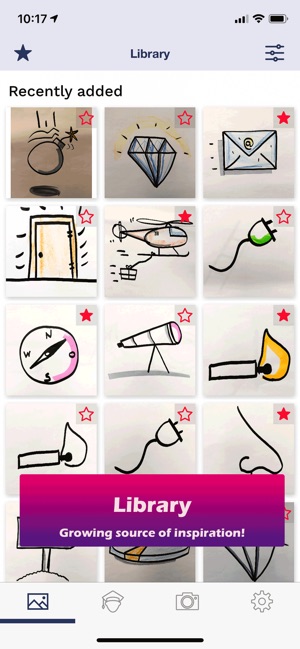
Swiss development firm, Absolutum Ltd today introduces Visualize it 1.0, its new productivity app for iOS. Effortlessly create professional looking visualizations in no time. Visualize it is a state-of-the-art companion on the smartphone for users to learn to visualize, find appropriate visualizations in a large library and expand it with their own visualizations for quick access. With access to a private library of icons and symbols, communicate better and more precisely with your team.
Bern, Switzerland - Absolutum Ltd today is proud to announce the release and immediate availability of Visualize it v. 1.0, the company's new productivity app developed exclusively for iPhone. First of its kind, Visualize it is a state-of-the-art companion on the smartphone for users to learn to visualize, find appropriate visualizations in a large library and expand it with their own visualizations for later quick access.
Usage of visual language makes thoughts more understandable. Visualizations highlight the essential, increase receptiveness and capacity of work-teams. Concentration and attention are considerably increased and memory strengthened. The key to master change.
* Ready to use visualizations - Constantly growing collection of visualizations (icons, images, flipchart layouts etc.) that can be directly copied by the user to the drawing medium. There are additional drawing instructions for easy desing.
* Search functionality translates Ideas to visualizations - The user enters the idea that should be visualized (e.g. idea) and "Visualize it" provides matching visualizations (e.g. light bulb)
* Favorites for quick access - An own library of visualizations for each user for quick access. Create your own visualizations from your own visualizations or from the free and pro community.
* Learn to visualize - exactly to the point - Short tutorial videos from zero to visualization pro. Find the right tutorials for an introduction or for individual techniques with the search function. Take a break at any time and try it out for yourself.
* Expand your library - Add successful visualization (own or from others) to your own collection with the camera or from the photo library. Cutting and editing directly in the APP. Add metadata for quick retrieval. If desired, share it with other users.
* Always & everywhere - state of the art medium - The tutorial videos, the library always with you on the smartphone for quick use. Synchronized on all devices. (requires Internet access). No need to attain a visualization training or aborious search for suitable visualizations in heavy books.
Device Requirements:
* iPhone, iPad, and iPod touch
* Requires iOS 11.0 or later
* Requires Internet Access
* 50.5 MB
Pricing and Availability:
Visualize it 1.0 is Free (With In-App Purchases for full functionality) and available worldwide through the App Store in the Productivity category. An Android version is planned to be released in autumn 2019.
Visualize it (v1.0): https://visualize-it.app
Download from the App Store: https://apps.apple.com/app/id1453356065
Screenshot: https://is5-ssl.mzstatic.com/image/thumb/Purple123/v4/2a/69/b3/2a69b3ab-f492-3af1-9111-9fddc1d7d329/pr_source.png/300x0w.jpg
App Icon: https://is5-ssl.mzstatic.com/image/thumb/Purple123/v4/9c/2e/46/9c2e46a4-da6e-db57-2b28-13399e61d5bc/AppIcon-0-1x_U007emarketing-0-0-GLES2_U002c0-512MB-sRGB-0-0-0-85-220-0-0-0-7.png/246x0w.jpg
Press Kit (zip): http://share.absolutum.net/5b1abbd6280f/download/Press%20Kit-ENG.zip
Absolutum Ltd was founded in March 2017 in Berne, Switzerland by two co-founders. One of which is Olivier Gut, todays managing partner. The other co-founder left the company in 2017. Absolutum ltd. supports companies in establishing value management. Business activites include consulting and provision of supporting ICT-Tools. All Material and Software (C) Copyright 2019 Absolutum Ltd. All Rights Reserved. Apple, the Apple logo, iPhone, iPod and iPad are registered trademarks of Apple Inc. in the U.S. and/or other countries. Other trademarks and registered trademarks may be the property of their respective owners.
*******
Link To Article: https://prmac.com/release-id-83521.htm
*******
---------------------------------------------------------------------------------
Note that you can alter delivered distributions at any time.
Login to your account on prMac to alter your channel selection, or to opt-out at any time.
A picture is worth a thousand words - visualize your message - Published on 07/02/19
Swiss development firm, Absolutum Ltd today introduces Visualize it 1.0, its new productivity app for iOS. Effortlessly create professional looking visualizations in no time. Visualize it is a state-of-the-art companion on the smartphone for users to learn to visualize, find appropriate visualizations in a large library and expand it with their own visualizations for quick access. With access to a private library of icons and symbols, communicate better and more precisely with your team.
Bern, Switzerland - Absolutum Ltd today is proud to announce the release and immediate availability of Visualize it v. 1.0, the company's new productivity app developed exclusively for iPhone. First of its kind, Visualize it is a state-of-the-art companion on the smartphone for users to learn to visualize, find appropriate visualizations in a large library and expand it with their own visualizations for later quick access.
Usage of visual language makes thoughts more understandable. Visualizations highlight the essential, increase receptiveness and capacity of work-teams. Concentration and attention are considerably increased and memory strengthened. The key to master change.
* Ready to use visualizations - Constantly growing collection of visualizations (icons, images, flipchart layouts etc.) that can be directly copied by the user to the drawing medium. There are additional drawing instructions for easy desing.
* Search functionality translates Ideas to visualizations - The user enters the idea that should be visualized (e.g. idea) and "Visualize it" provides matching visualizations (e.g. light bulb)
* Favorites for quick access - An own library of visualizations for each user for quick access. Create your own visualizations from your own visualizations or from the free and pro community.
* Learn to visualize - exactly to the point - Short tutorial videos from zero to visualization pro. Find the right tutorials for an introduction or for individual techniques with the search function. Take a break at any time and try it out for yourself.
* Expand your library - Add successful visualization (own or from others) to your own collection with the camera or from the photo library. Cutting and editing directly in the APP. Add metadata for quick retrieval. If desired, share it with other users.
* Always & everywhere - state of the art medium - The tutorial videos, the library always with you on the smartphone for quick use. Synchronized on all devices. (requires Internet access). No need to attain a visualization training or aborious search for suitable visualizations in heavy books.
Device Requirements:
* iPhone, iPad, and iPod touch
* Requires iOS 11.0 or later
* Requires Internet Access
* 50.5 MB
Pricing and Availability:
Visualize it 1.0 is Free (With In-App Purchases for full functionality) and available worldwide through the App Store in the Productivity category. An Android version is planned to be released in autumn 2019.
Visualize it (v1.0): https://visualize-it.app
Download from the App Store: https://apps.apple.com/app/id1453356065
Screenshot: https://is5-ssl.mzstatic.com/image/thumb/Purple123/v4/2a/69/b3/2a69b3ab-f492-3af1-9111-9fddc1d7d329/pr_source.png/300x0w.jpg
App Icon: https://is5-ssl.mzstatic.com/image/thumb/Purple123/v4/9c/2e/46/9c2e46a4-da6e-db57-2b28-13399e61d5bc/AppIcon-0-1x_U007emarketing-0-0-GLES2_U002c0-512MB-sRGB-0-0-0-85-220-0-0-0-7.png/246x0w.jpg
Press Kit (zip): http://share.absolutum.net/5b1abbd6280f/download/Press%20Kit-ENG.zip
Absolutum Ltd was founded in March 2017 in Berne, Switzerland by two co-founders. One of which is Olivier Gut, todays managing partner. The other co-founder left the company in 2017. Absolutum ltd. supports companies in establishing value management. Business activites include consulting and provision of supporting ICT-Tools. All Material and Software (C) Copyright 2019 Absolutum Ltd. All Rights Reserved. Apple, the Apple logo, iPhone, iPod and iPad are registered trademarks of Apple Inc. in the U.S. and/or other countries. Other trademarks and registered trademarks may be the property of their respective owners.
*******
Link To Article: https://prmac.com/release-id-83521.htm
*******
---------------------------------------------------------------------------------
Note that you can alter delivered distributions at any time.
Login to your account on prMac to alter your channel selection, or to opt-out at any time.
Subscribe to:
Posts (Atom)