A new article has been published at prMac.
Shopping Guru 1.1 Released - Published on 07/23/19
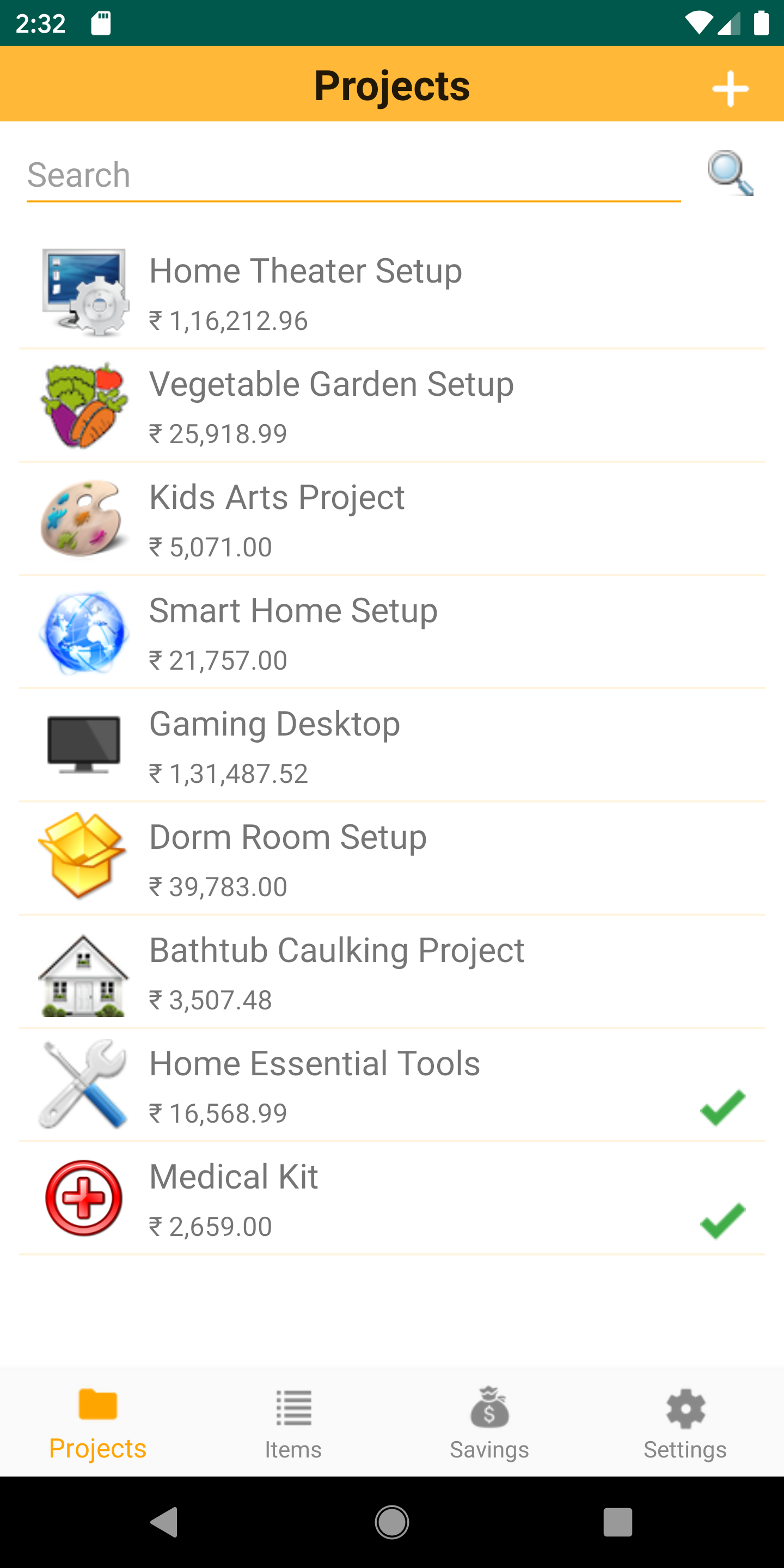
Cloud Nine Apps, LLC. announces Shopping Guru 1.1, a free mobile app to plan, shop and save with Amazon with a novel approach. Shopping Guru makes it easy to do goal-driven purchases by organizing these into projects. With several other useful features like price drop alerts, managing ad hoc items purchases, a savings dashboard, Shopping Guru is a perfect shopping companion. This release adds the much desired Android support and a few usability improvements.
Lexington, Massachusetts - Cloud Nine Apps, LLC. is proud to announce the release of Shopping Guru 1.1, a free mobile app to plan, shop and save with Amazon with a novel approach.
Online shopping has been popular for many years now. It is fast and convenient with lots of choices. But, did you ever wonder what all should you buy for a given goal? What would be the total budget? Let's say you are looking to set up a cool home theater. But, you just do not know what all would be needed? Or that vegetable garden you always wanted. How do you go about it?
Shopping Guru takes the guesswork out and makes it easy to plan your purchases as projects by choosing from several out-of-the-box templates. Think of a template as a guide for items you should buy. For example, if you are looking to set up a home theater, just choose the Home Theater Setup template. Likewise, if you were always wanting to set up a vegetable garden, but did not have the time to research what all would be needed, use the Vegetable Garden Setup template.
A template gives you a jump start and makes it easy to find the items. Of course, you can always add or remove items from the project. And, if you do not find a template that matches your needs directly, simply use the Blank Project template to create a project from scratch. Once you set up a project, the app will provide an estimated total so that you can plan your purchases. Shopping Guru will track price movements (up or down) and notify you when the price drops. This way you can time your purchases and save money.
"As a DIY homeowner, I have done several projects over the years and I do the majority of my shopping on Amazon because of the number of choices and their fast delivery. The challenge, however, was I just did not know what all I should buy and I wished there was something that gave me a jump start. Over the years as I helped other members in the community, I sensed this is a common problem and that's when I thought to have an app that provides a template-based approach will be helpful to many people. The template can guide on what all you should look for. Of course, the actual items bought may be different from person to person based on prices, aesthetics and other criteria. But, at least it will give a good starting point. Secondly, because Amazon's site has frequent price changes, it would be nice if there were a way to track price drops and save money. I put these ideas together and Shopping Guru was born!"
Got some ad hoc items to purchase? No problem. You can always add items and take advantage of the price drop notifications. Organize items into Item Groups for convenience. Be it wishlists, recurring items, gifts and so on, Item Groups are perfect for grouping items.
Disclaimer: The app does best effort to get the products data, generate the price drop alerts and perform its functions. Individual results may vary.
Personalize the app using Settings. Choose theme color, launch the Quick Guide, get help and more. You can also suggest a new template!
Device Requirements:
* iPhone, iPad and iPod touch (iOS 10 )
* Android 4.1
Pricing and Availability:
Shopping Guru is free and currently available in the United States, the United Kingdom, and India only in the Shopping category.
Cloud Nine Apps: https://cloudnineapps.com/
Shopping Guru 1.1: https://cloudnineapps.com/products/mobile/shopping-guru/
Download from the App Store: https://itunes.apple.com/app/id1447653025
Download from Google Play: https://play.google.com/store/apps/details?id=com.cloudnineapps.shoppingguru
Screenshot: https://cloudnineapps.com/wp-content/uploads/products/mobile/ShoppingGuru/screenshots/Pixel_2_XL/Projects.png
App Icon: https://cloudnineapps.com/wp-content/uploads/products/mobile/ShoppingGuru/ShoppingGuru_Logo_Circle-300x300.png
Located in Lexington, Massachusetts, Cloud Nine Apps, LLC was founded in 2014 by Nitin Patil. The company focuses on building solutions that simplify technology usage in the areas of Mobile, Cloud Computing, Word Press and Smart Home. All Material and Software (C) 2014-2019 Cloud Nine Apps, LLC. All Rights Reserved. Apple, the Apple logo, iPhone, iPod and iPad are registered trademarks of Apple Inc. in the U.S. and/or other countries. Other trademarks and registered trademarks may be the property of their respective owners.
*******
Link To Article: https://prmac.com/release-id-83555.htm
*******
---------------------------------------------------------------------------------
Note that you can alter delivered distributions at any time.
Login to your account on prMac to alter your channel selection, or to opt-out at any time.


LinkOptimizer for Adobe InDesign Is Now Notarized by Apple
A new article has been published at prMac.
LinkOptimizer for Adobe InDesign Is Now Notarized by Apple - Published on 07/22/19
Zevrix Solutions announces LinkOptimizer 5.2.25, a security update to company's workflow automation solution for Adobe InDesign. Awarded 4 out of 5 stars by Computer Arts magazine, LinkOptimizer allows users to reduce InDesign link size by eliminating excess image data. The app can also convert colors and file formats, merge layers and more. The new version was updated to satisfy forthcoming macOS security requirements and has now received the seal of approval issued by the Apple notary service.
Toronto (ON), Canada - Zevrix Solutions today announces LinkOptimizer 5.2.25, a security update to its image processing automation solution for Adobe InDesign. LinkOptimizer is designed to automate complex image manipulation tasks, which allows users to reduce the size of InDesign links, save production costs, and easily repurpose InDesign documents for web and mobile devices.
With the new version, LinkOptimizer was updated to satisfy new security requirements on macOS 10.15 and has now received the seal of approval issued by the Apple notary service. According to Apple, notarization gives users more confidence that the Developer ID-signed software developers distribute has been checked by Apple for malicious components. These claims have not been independently verified yet. Beginning in the forthcoming macOS 10.15 Catalina, notarization is required by default for all Mac software.
"Thank you for this fantastic plug-in", says Gopa Campbell of Gopa & Ted2, a design studio in Albuquerque, New Mexico. "What it just did for me in a book with 132 images is amazing. LinkOptimizer saved me what would have been three extremely tedious hours of Photoshop tweaking and InDesign reimporting."
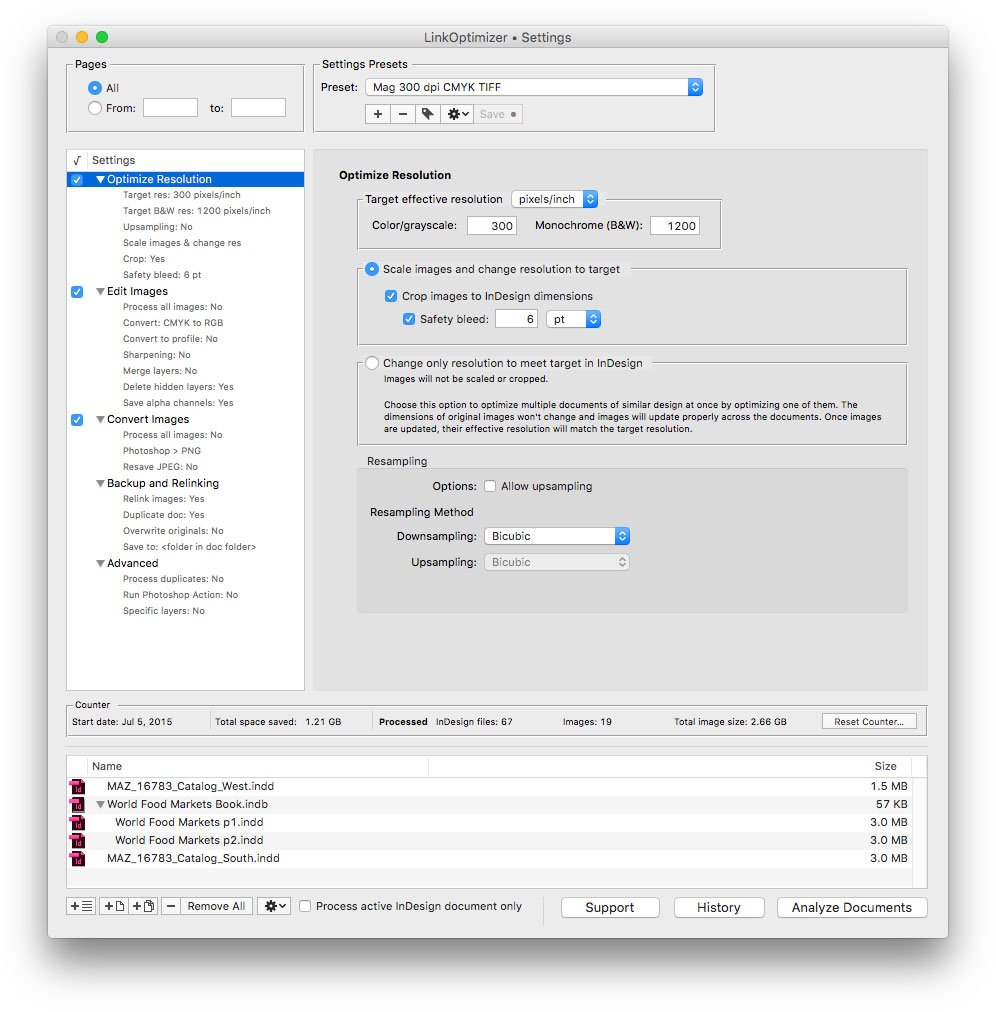
LinkOptimizer works automatically with Photoshop to eliminate the excess image data of InDesign links, convert image formats, and perform essential image adjustments. For example, with just a click of a button users can:
* Optimize multiple InDesign files and books
* Scale and crop images to match their dimensions in InDesign
* Change their resolution to 300 dpi
* Convert RGB images to specific CMYK profile
* Resave JPEGs as PSD
* Run a Photoshop action on each image
As a result users can save gigabytes of disk space and countless hours of optimizing images manually, accelerate document output, reduce job turnaround and cut costs through faster processing.
Pricing and Availability:
LinkOptimizer can be purchased from Zevrix website for $259.95 USD (Lite version: $179.95) as well as from Adobe Exchange and authorized resellers. Trial is also available for download. The update is free for LinkOptimizer 5.x users and $130 to upgrade from previous versions. LinkOptimizer requires macOS 10.7-10.14 and Adobe InDesign / Photoshop CS5-CC 2019.
Zevrix Solutions: http://zevrix.com
LinkOptimizer 5.2.25: http://zevrix.com/LinkOptimizer.php
Download LinkOptimizer: http://zevrix.com/LinkOptimizer.dmg
Purchase: http://zevrix.com/store.php
Screenshot: http://zevrix.com/screenshots/lo5/res-win.jpg
Located in Toronto, Canada, Zevrix Solutions provides automation and productivity solutions for Adobe Creative Cloud and Creative Suite software, PDF workflows, graphic file diagnostics and Microsoft Office output on Mac OS. Zevrix is dedicated to help professionals increase their profits through automating everyday tasks, producing error-free documents, saving disk space and cutting production costs. For more information, visit their website. Copyright (C) 2019 Zevrix Solutions. All Rights Reserved. Other trademarks and registered trademarks may be the property of their respective owners.
*******
Link To Article: https://prmac.com/release-id-83554.htm
*******
---------------------------------------------------------------------------------
Note that you can alter delivered distributions at any time.
Login to your account on prMac to alter your channel selection, or to opt-out at any time.
LinkOptimizer for Adobe InDesign Is Now Notarized by Apple - Published on 07/22/19
Zevrix Solutions announces LinkOptimizer 5.2.25, a security update to company's workflow automation solution for Adobe InDesign. Awarded 4 out of 5 stars by Computer Arts magazine, LinkOptimizer allows users to reduce InDesign link size by eliminating excess image data. The app can also convert colors and file formats, merge layers and more. The new version was updated to satisfy forthcoming macOS security requirements and has now received the seal of approval issued by the Apple notary service.
Toronto (ON), Canada - Zevrix Solutions today announces LinkOptimizer 5.2.25, a security update to its image processing automation solution for Adobe InDesign. LinkOptimizer is designed to automate complex image manipulation tasks, which allows users to reduce the size of InDesign links, save production costs, and easily repurpose InDesign documents for web and mobile devices.
With the new version, LinkOptimizer was updated to satisfy new security requirements on macOS 10.15 and has now received the seal of approval issued by the Apple notary service. According to Apple, notarization gives users more confidence that the Developer ID-signed software developers distribute has been checked by Apple for malicious components. These claims have not been independently verified yet. Beginning in the forthcoming macOS 10.15 Catalina, notarization is required by default for all Mac software.
"Thank you for this fantastic plug-in", says Gopa Campbell of Gopa & Ted2, a design studio in Albuquerque, New Mexico. "What it just did for me in a book with 132 images is amazing. LinkOptimizer saved me what would have been three extremely tedious hours of Photoshop tweaking and InDesign reimporting."
LinkOptimizer works automatically with Photoshop to eliminate the excess image data of InDesign links, convert image formats, and perform essential image adjustments. For example, with just a click of a button users can:
* Optimize multiple InDesign files and books
* Scale and crop images to match their dimensions in InDesign
* Change their resolution to 300 dpi
* Convert RGB images to specific CMYK profile
* Resave JPEGs as PSD
* Run a Photoshop action on each image
As a result users can save gigabytes of disk space and countless hours of optimizing images manually, accelerate document output, reduce job turnaround and cut costs through faster processing.
Pricing and Availability:
LinkOptimizer can be purchased from Zevrix website for $259.95 USD (Lite version: $179.95) as well as from Adobe Exchange and authorized resellers. Trial is also available for download. The update is free for LinkOptimizer 5.x users and $130 to upgrade from previous versions. LinkOptimizer requires macOS 10.7-10.14 and Adobe InDesign / Photoshop CS5-CC 2019.
Zevrix Solutions: http://zevrix.com
LinkOptimizer 5.2.25: http://zevrix.com/LinkOptimizer.php
Download LinkOptimizer: http://zevrix.com/LinkOptimizer.dmg
Purchase: http://zevrix.com/store.php
Screenshot: http://zevrix.com/screenshots/lo5/res-win.jpg
Located in Toronto, Canada, Zevrix Solutions provides automation and productivity solutions for Adobe Creative Cloud and Creative Suite software, PDF workflows, graphic file diagnostics and Microsoft Office output on Mac OS. Zevrix is dedicated to help professionals increase their profits through automating everyday tasks, producing error-free documents, saving disk space and cutting production costs. For more information, visit their website. Copyright (C) 2019 Zevrix Solutions. All Rights Reserved. Other trademarks and registered trademarks may be the property of their respective owners.
*******
Link To Article: https://prmac.com/release-id-83554.htm
*******
---------------------------------------------------------------------------------
Note that you can alter delivered distributions at any time.
Login to your account on prMac to alter your channel selection, or to opt-out at any time.
Amperes 4.0 for iOS is out - App for phone battery, chargers and wires
A new article has been published at prMac.
Amperes 4.0 for iOS is out - App for phone battery, chargers and wires - Published on 07/22/19
Albany based developer, CrioSoft LLC today releases Amperes 4.0, a major update to its popular information app for iOS. Amperes will display the remaining run times for different activities and the most critical information about a user's device, such as device space, memory, thermal status, network, screen and more. Version 4.0 adds a new user interface, more detailed system information, better ways to compare and test iPhone or iPad chargers, and wires.
Albany, New York - CrioSoft LLC today is pleased to announce the release and immediate availability of Amperes - battery charge info 4.0, a major update to the company's popular battery testing and information app for iPhone, iPad and iPod touch devices. With Amperes, users can check the battery charging rates of their chargers, quality of wires, get battery charge alerts, compare chargers and wires. It's an app that every iPhone or iPad owner should have on their devices.
"Amperes - battery charge info" will show you the remaining runtimes for different activities and the most critical info about your device, such as remaining space, free memory, and abnormal thermal status of your device - if it's in normal or overheated state, and if so - whether you should let your device to cool off to prevent hardware damages or not. Amperes can also let you run long tests on your chargers and export the test data for further analysis or visualization.
"Starting from September 13, 2016, when iOS 10 was officially launched by Apple, all battery information apps on the app store lost the access to all their battery functionality but the most basic one. Amperes found a way to overcome this issue, and now uses the only real available way to test the charging rates of your battery, explained Andrey Krasnov, CEO of Albany-based CrioSoft LLC. If you want information about your chargers and battery - look no more - check "Amperes - battery charge info"
Language Support:
Amperes supports English, Afrikaans, Arabic, Armenian, Catalan, Chinese, Croatian, Czech, Danish, Dutch, Finnish, French, Georgian, German, Greek, Hebrew, Hindi, Hungarian, Indonesian, Italian, Japanese, Korean, Malay, Mongolian, Norwegian Bokml, Polish, Portuguese, Romanian, Russian, Simplified Chinese, Slovak, Spanish, Swedish, Thai, Traditional Chinese, Turkish, Ukrainian, and Vietnamese languages.
Device Requirements:
* iPhone, iPad, and iPod touch
* Requires iOS 10.3 or later
* 36.1 MB
Pricing and Availability:
Amperes - battery charge info 4.0 is only $0.99 USD (or equivalent amount in other currencies) and available worldwide exclusively through the App Store in the Utilities category. Promo codes are available to members of the press. For more information, please contact Andrey Krasnov.
Amperes 4.0: https://criosoft.com/amperes/
Purchase and Download (iOS): https://itunes.apple.com/app/amperes-battery-charge-info/id1245475416
Screenshot: https://www.criosoft.com/amperes/img/pr/results.png
App Icon: https://www.criosoft.com/amperes/img/pr/app_icon_180.jpg
CrioSoft is a developer and publisher of business and entertainment software. After establishing CrioSoft in 2014, we developed popular and well-respected apps and games for mobile platforms. By focusing on creating well-designed, highly desirable software, CrioSoft has maintained a great reputation for quality since its creation. We do work for our users. We listen, we implement, and we change. No user is too small, and no opinion is unimportant. Thanks to our amazing user base, our products continue to grow and become the best in their class. Our development approach is simple. We love what we do and are always looking to improve, and as a result we develop top notch products. We use the latest technologies and frameworks. All Material and Software (C) Copyright 2019 CrioSoft LLC. All Rights Reserved. Apple, the Apple logo, iPhone, iPod and iPad are registered trademarks of Apple Inc. in the U.S. and/or other countries. Other trademarks and registered trademarks may be the
property of their respective owners.
*******
Link To Article: https://prmac.com/release-id-83553.htm
*******
---------------------------------------------------------------------------------
Note that you can alter delivered distributions at any time.
Login to your account on prMac to alter your channel selection, or to opt-out at any time.
Amperes 4.0 for iOS is out - App for phone battery, chargers and wires - Published on 07/22/19
Albany based developer, CrioSoft LLC today releases Amperes 4.0, a major update to its popular information app for iOS. Amperes will display the remaining run times for different activities and the most critical information about a user's device, such as device space, memory, thermal status, network, screen and more. Version 4.0 adds a new user interface, more detailed system information, better ways to compare and test iPhone or iPad chargers, and wires.
Albany, New York - CrioSoft LLC today is pleased to announce the release and immediate availability of Amperes - battery charge info 4.0, a major update to the company's popular battery testing and information app for iPhone, iPad and iPod touch devices. With Amperes, users can check the battery charging rates of their chargers, quality of wires, get battery charge alerts, compare chargers and wires. It's an app that every iPhone or iPad owner should have on their devices.
"Amperes - battery charge info" will show you the remaining runtimes for different activities and the most critical info about your device, such as remaining space, free memory, and abnormal thermal status of your device - if it's in normal or overheated state, and if so - whether you should let your device to cool off to prevent hardware damages or not. Amperes can also let you run long tests on your chargers and export the test data for further analysis or visualization.
"Starting from September 13, 2016, when iOS 10 was officially launched by Apple, all battery information apps on the app store lost the access to all their battery functionality but the most basic one. Amperes found a way to overcome this issue, and now uses the only real available way to test the charging rates of your battery, explained Andrey Krasnov, CEO of Albany-based CrioSoft LLC. If you want information about your chargers and battery - look no more - check "Amperes - battery charge info"
Language Support:
Amperes supports English, Afrikaans, Arabic, Armenian, Catalan, Chinese, Croatian, Czech, Danish, Dutch, Finnish, French, Georgian, German, Greek, Hebrew, Hindi, Hungarian, Indonesian, Italian, Japanese, Korean, Malay, Mongolian, Norwegian Bokml, Polish, Portuguese, Romanian, Russian, Simplified Chinese, Slovak, Spanish, Swedish, Thai, Traditional Chinese, Turkish, Ukrainian, and Vietnamese languages.
Device Requirements:
* iPhone, iPad, and iPod touch
* Requires iOS 10.3 or later
* 36.1 MB
Pricing and Availability:
Amperes - battery charge info 4.0 is only $0.99 USD (or equivalent amount in other currencies) and available worldwide exclusively through the App Store in the Utilities category. Promo codes are available to members of the press. For more information, please contact Andrey Krasnov.
Amperes 4.0: https://criosoft.com/amperes/
Purchase and Download (iOS): https://itunes.apple.com/app/amperes-battery-charge-info/id1245475416
Screenshot: https://www.criosoft.com/amperes/img/pr/results.png

App Icon: https://www.criosoft.com/amperes/img/pr/app_icon_180.jpg

CrioSoft is a developer and publisher of business and entertainment software. After establishing CrioSoft in 2014, we developed popular and well-respected apps and games for mobile platforms. By focusing on creating well-designed, highly desirable software, CrioSoft has maintained a great reputation for quality since its creation. We do work for our users. We listen, we implement, and we change. No user is too small, and no opinion is unimportant. Thanks to our amazing user base, our products continue to grow and become the best in their class. Our development approach is simple. We love what we do and are always looking to improve, and as a result we develop top notch products. We use the latest technologies and frameworks. All Material and Software (C) Copyright 2019 CrioSoft LLC. All Rights Reserved. Apple, the Apple logo, iPhone, iPod and iPad are registered trademarks of Apple Inc. in the U.S. and/or other countries. Other trademarks and registered trademarks may be the
property of their respective owners.
*******
Link To Article: https://prmac.com/release-id-83553.htm
*******
---------------------------------------------------------------------------------
Note that you can alter delivered distributions at any time.
Login to your account on prMac to alter your channel selection, or to opt-out at any time.
DEVONtechnologies releases DEVONthink 3 Beta 4
A new article has been published at prMac.
DEVONtechnologies releases DEVONthink 3 Beta 4 - Published on 07/18/19
DEVONtechnologies today releases the fourth beta of DEVONthink 3.0 for Mac. The update improves working with PDFs, sheets, and Markdown documents. Annotating documents becomes more powerful and so does converting scans with OCR and accessing them via the web interface. Especially users in education will like the completely overhauled templates. And new users are now welcomed with a tour of the main new features. Finally, beta 4 brings many additional improvements and performance enhancement.
Coeur d'Alene, Idaho - DEVONtechnologies today releases the fourth beta of DEVONthink 3.0 for Mac. The update improves working with PDFs, sheets, and Markdown documents. Annotating documents becomes more powerful and so does converting scans with OCR and accessing them via the web interface. Especially users in education will like the completely overhauled templates. And new users are now welcomed with a tour of the main new features. Finally, beta 4 brings many additional improvements, performance enhancements, and bug fixes again.
DEVONthink is DEVONtechnologies' document and information management solution. It supports a large variety of file formats and stores them in a database enhanced by artificial intelligence (AI). Many document formats can be directly viewed, edited, and annotated. A powerful search language finds documents in an instant, smart groups keep them always at hand.
Sophisticated organization tools, AI-based techniques that handle even the largest collections, and numerous integration options make DEVONthink the work environment of choice for researchers, lawyers, and educators. Smart rules, flexible reminders, and deep AppleScript support allow automating even complex repeating tasks. And with its fast, reliable, and secure synchronization users keep their data available on all their Macs. DEVONthink To Go for iPad and iPhone completes the DEVONthink ecosystem.
* Keep your data together in one place
* Scan your paper, archive your email
* Let artificial intelligence help you organize your data
* Automate tasks with smart rules and reminders
* Sync your data to all your devices, fast and secure
* Share your data with anyone, whether they use Mac or PC
New in DEVONthink 3.0 Beta 4:
The fourth public beta of DEVONthink 3 enhances many aspects of the application, from working with documents and annotations, to scripting, text recognition, and the DEVONthink Server web interface.
Working with PDFs becomes faster and more comfortable. The update adds undo/redo to highlighting, underlining, or striking through, and no longer changes the PDF tool mode after selecting another annotation. To make the application more responsive, beta 4 saves modified PDFs in the background and works around limitations in macOS Mojave. PDFs aside, DEVONthink 3 Beta 4 improves also converting sheets to other file formats and printing them as tables or forms. Markdown fans can now use the :colon: syntax for adding emojis.
Another set to improvements makes annotations more powerful. For example, a new submenu of the Annotations & Reminders inspector allows using custom annotation templates. Back links and quotes, that can now be inserted also by a keyboard shortcut, are available in plain and rich text documents (except Markdown), too. They make it easy to add a bookmark to a specific text passage in the document by linking to paragraphs inside the document.
A completely overhauled set of templates makes them more useful for, e.g., users in the education sector. In addition they demonstrate many of the features that customers can use for making their own templates.
In the office world the updated text recognition (OCR) introduces options for deskew and compression while fixing a new bugs and working around an issue with CJK languages. Teams relying on the DEVONthink Server web interface now find a new user menu and a logout option.
Other enhancements include the ability to show totals in the Custom Metadata inspector for multiple selected items and new AppleScript commands for, e.g., retrieving custom metadata. New users are now welcomed by DEVONthink 3 with a quick tour of the new features.
Of course, beta 4 comes with bug fixes and performance enhancements, too. It speeds up searching PDFs, working with EPUB books, saving formatted notes, viewing documents in the web interface, and overall responsiveness.
New in DEVONthink 3.0:
The long-awaited third DEVONthink generation debuts, quite literally, hundreds of new features and improvements.
As the most obvious change, DEVONthink 3.0 brings a completely overhauled user interface including support for macOS Mojave's dark mode. It follows a modern single-window design that integrates many elements that used to appear in separate windows.
An extended sidebar gives access to databases, favorites, smart groups, smart rules, and filters as well as to a new reading list, import options, and more. Inspectors present metadata about documents and groups, offer AI assistance, and let the user set reminders or search within the document.
DEVONthink 3 is the most feature-rich upgrade we have ever published. For the new DEVONthink generation we revisited every aspect of the app, from the user interface to search, from the office functionality to automation. And we added what we found missing.
Eric Bohnisch-Volkmann, President of DEVONtechnologies
Capturing text, audio, and voice notes, screenshots, or web clippings becomes much easier with the redesigned Sorter. It also allows finding groups in all open databases for adding files or data from other apps via drag-and-drop. The Sorter is available as a menu bar extension or a tab docked to the side of the screen.
More subtle are the numerous changes to the search engine which now better supports Asian languages, indexes also PDF and RTF attachments, and highlights search hits more precisely. Its enhanced search language allows prefixes for mouse-less specific searching, and filters quickly focus the displayed items on tags, dates, marks, or geolocation.
For the office environment DEVONthink 3 brings a new 64-bit optimized OCR engine that supports multiple CPU cores, Asian languages, barcode detection, and multiple output formats. It's now possible to add custom imprints to images and PDFs including placeholder text and Bates numbering.
The rewritten web interface gives coworkers or clients access to the document databases even when they're not using a Mac. User accounts and per-database permissions give fine-grained control over what web visitors see and can do. TLS support makes sure all connections are encrypted.
Other improvements include geolocation metadata, ratings, and custom, typed metadata that can be added to all documents and that is, of course, searchable. When importing documents metadata can be converted to tags, and images can be automatically tagged using machine learning.
Markdown and HTML documents can be edited side-by-side with a rendered preview, sheets with tabular data support specific data types and have a form view. Formatting and editing bars keep frequently used tools at hand and adding cross-references has become more versatile with improved WikiLinking and support for the square bracked syntax. DEVONthink 3 now also supports EPUB ebooks and, useful for research, collects highlighted search hits and metadata into summary documents.
Last but not least, DEVONthink 3 massively extends its automation options. Smart rules perform actions based on events and search queries, where events can be anything from a scheduled time to the arrival of a newly imported document. Users can also attach one-time or repeating reminders to any document. They support several alarm options including running scripts. Placeholders insert dynamic data in templates, imprints, or smart rules without requiring any programming skills.
We have always believed in enabling the computer to free up the user's time for what's really important. DEVONthink 3 holds true to this tradition with new powerful but easy to use automation tools for every workflow. If it can't be automated with DEVONthink 3 then it probably can't be automated.
Eric Bohnisch-Volkmann, President of DEVONtechnologies
Of course, DEVONthink 3 brings a large number of under-the-hood enhancements. To name just a few: better file system integration for indexed files, better background processing, e.g. for email archiving, indexing, or generating thumbnails, and an improved overall performance.
DEVONthink 3 is available in three editions for different needs and budgets: Standard, Pro, and Server.
System requirements:
* OS X El Capitan or later
Availability and Pricing:
DEVONthink 3 can be downloaded for free from the DEVONtechnologies website. The public beta does not require a valid license key but to use email archiving and text recognition beyond the trial limits it needs to be properly licensed. After the public beta phase DEVONthink 3 will require a license key for one of the three available editions which can be purchased starting today:
* DEVONthink 3: US $99
* DEVONthink Pro 3: US $199
* DEVONthink Server 3: US $499
DEVONthink 3 is currently not available in the App Store but will become so after the public beta phase. The former DEVONthink Personal and DEVONnote editions have been retired.
More information:
Customers find more information about our apps on the DEVONtechnologies website. Eric Boehnisch-Volkmann also posts news, opinions, previews, and public betas in the company blog Devonian Times.
DEVONthink 3.0 (Beta): https://www.devontechnologies.com/redirect/devonthink
What's new in DEVONthink 3: https://www.devontechnologies.com/redirect/devonthink-new
DEVONthink editions: https://www.devontechnologies.com/redirect/devonthink-editions
Company Blog: http://www.devontechnologies.com/redirect/blog
Screenshot (Dark Mode): https://www.devontechnologies.com/media/pages/press/archive/devonthink-30b4/3774960495-1563450800/exomars_concordance_dark.jpg
DEVONtechnologies LLC creates end-user and server applications for the Mac and iOS platforms that enhance productivity, organization, and user experience with unique artificial intelligence technology. All applications are focused on both ease of use and satisfying the needs of even the most savvy users. The underlying DEVONtechnology is a flexible and versatile foundation that can be used for a large range of purposes from databases, data mining, and information retrieval to human-computer interfaces. DEVONtechnologies LLC was founded 2002 and incorporated 2004, and is today headquartered in Coeur d'Alene, Idaho, USA. All Material and Software (C) Copyright 2019 DEVONtechnologies LLC. All Rights Reserved. Apple, the Apple logo, Macintosh and Mac OS X are registered trademarks of Apple Inc. in the U.S. and/or other countries. Other trademarks and registered trademarks may be the property of their respective owners.
*******
Link To Article: https://prmac.com/release-id-83552.htm
*******
---------------------------------------------------------------------------------
Note that you can alter delivered distributions at any time.
Login to your account on prMac to alter your channel selection, or to opt-out at any time.
DEVONtechnologies releases DEVONthink 3 Beta 4 - Published on 07/18/19
DEVONtechnologies today releases the fourth beta of DEVONthink 3.0 for Mac. The update improves working with PDFs, sheets, and Markdown documents. Annotating documents becomes more powerful and so does converting scans with OCR and accessing them via the web interface. Especially users in education will like the completely overhauled templates. And new users are now welcomed with a tour of the main new features. Finally, beta 4 brings many additional improvements and performance enhancement.
Coeur d'Alene, Idaho - DEVONtechnologies today releases the fourth beta of DEVONthink 3.0 for Mac. The update improves working with PDFs, sheets, and Markdown documents. Annotating documents becomes more powerful and so does converting scans with OCR and accessing them via the web interface. Especially users in education will like the completely overhauled templates. And new users are now welcomed with a tour of the main new features. Finally, beta 4 brings many additional improvements, performance enhancements, and bug fixes again.
DEVONthink is DEVONtechnologies' document and information management solution. It supports a large variety of file formats and stores them in a database enhanced by artificial intelligence (AI). Many document formats can be directly viewed, edited, and annotated. A powerful search language finds documents in an instant, smart groups keep them always at hand.
Sophisticated organization tools, AI-based techniques that handle even the largest collections, and numerous integration options make DEVONthink the work environment of choice for researchers, lawyers, and educators. Smart rules, flexible reminders, and deep AppleScript support allow automating even complex repeating tasks. And with its fast, reliable, and secure synchronization users keep their data available on all their Macs. DEVONthink To Go for iPad and iPhone completes the DEVONthink ecosystem.
* Keep your data together in one place
* Scan your paper, archive your email
* Let artificial intelligence help you organize your data
* Automate tasks with smart rules and reminders
* Sync your data to all your devices, fast and secure
* Share your data with anyone, whether they use Mac or PC
New in DEVONthink 3.0 Beta 4:
The fourth public beta of DEVONthink 3 enhances many aspects of the application, from working with documents and annotations, to scripting, text recognition, and the DEVONthink Server web interface.
Working with PDFs becomes faster and more comfortable. The update adds undo/redo to highlighting, underlining, or striking through, and no longer changes the PDF tool mode after selecting another annotation. To make the application more responsive, beta 4 saves modified PDFs in the background and works around limitations in macOS Mojave. PDFs aside, DEVONthink 3 Beta 4 improves also converting sheets to other file formats and printing them as tables or forms. Markdown fans can now use the :colon: syntax for adding emojis.
Another set to improvements makes annotations more powerful. For example, a new submenu of the Annotations & Reminders inspector allows using custom annotation templates. Back links and quotes, that can now be inserted also by a keyboard shortcut, are available in plain and rich text documents (except Markdown), too. They make it easy to add a bookmark to a specific text passage in the document by linking to paragraphs inside the document.
A completely overhauled set of templates makes them more useful for, e.g., users in the education sector. In addition they demonstrate many of the features that customers can use for making their own templates.
In the office world the updated text recognition (OCR) introduces options for deskew and compression while fixing a new bugs and working around an issue with CJK languages. Teams relying on the DEVONthink Server web interface now find a new user menu and a logout option.
Other enhancements include the ability to show totals in the Custom Metadata inspector for multiple selected items and new AppleScript commands for, e.g., retrieving custom metadata. New users are now welcomed by DEVONthink 3 with a quick tour of the new features.
Of course, beta 4 comes with bug fixes and performance enhancements, too. It speeds up searching PDFs, working with EPUB books, saving formatted notes, viewing documents in the web interface, and overall responsiveness.
New in DEVONthink 3.0:
The long-awaited third DEVONthink generation debuts, quite literally, hundreds of new features and improvements.
As the most obvious change, DEVONthink 3.0 brings a completely overhauled user interface including support for macOS Mojave's dark mode. It follows a modern single-window design that integrates many elements that used to appear in separate windows.
An extended sidebar gives access to databases, favorites, smart groups, smart rules, and filters as well as to a new reading list, import options, and more. Inspectors present metadata about documents and groups, offer AI assistance, and let the user set reminders or search within the document.
DEVONthink 3 is the most feature-rich upgrade we have ever published. For the new DEVONthink generation we revisited every aspect of the app, from the user interface to search, from the office functionality to automation. And we added what we found missing.
Eric Bohnisch-Volkmann, President of DEVONtechnologies
Capturing text, audio, and voice notes, screenshots, or web clippings becomes much easier with the redesigned Sorter. It also allows finding groups in all open databases for adding files or data from other apps via drag-and-drop. The Sorter is available as a menu bar extension or a tab docked to the side of the screen.
More subtle are the numerous changes to the search engine which now better supports Asian languages, indexes also PDF and RTF attachments, and highlights search hits more precisely. Its enhanced search language allows prefixes for mouse-less specific searching, and filters quickly focus the displayed items on tags, dates, marks, or geolocation.
For the office environment DEVONthink 3 brings a new 64-bit optimized OCR engine that supports multiple CPU cores, Asian languages, barcode detection, and multiple output formats. It's now possible to add custom imprints to images and PDFs including placeholder text and Bates numbering.
The rewritten web interface gives coworkers or clients access to the document databases even when they're not using a Mac. User accounts and per-database permissions give fine-grained control over what web visitors see and can do. TLS support makes sure all connections are encrypted.
Other improvements include geolocation metadata, ratings, and custom, typed metadata that can be added to all documents and that is, of course, searchable. When importing documents metadata can be converted to tags, and images can be automatically tagged using machine learning.
Markdown and HTML documents can be edited side-by-side with a rendered preview, sheets with tabular data support specific data types and have a form view. Formatting and editing bars keep frequently used tools at hand and adding cross-references has become more versatile with improved WikiLinking and support for the square bracked syntax. DEVONthink 3 now also supports EPUB ebooks and, useful for research, collects highlighted search hits and metadata into summary documents.
Last but not least, DEVONthink 3 massively extends its automation options. Smart rules perform actions based on events and search queries, where events can be anything from a scheduled time to the arrival of a newly imported document. Users can also attach one-time or repeating reminders to any document. They support several alarm options including running scripts. Placeholders insert dynamic data in templates, imprints, or smart rules without requiring any programming skills.
We have always believed in enabling the computer to free up the user's time for what's really important. DEVONthink 3 holds true to this tradition with new powerful but easy to use automation tools for every workflow. If it can't be automated with DEVONthink 3 then it probably can't be automated.
Eric Bohnisch-Volkmann, President of DEVONtechnologies
Of course, DEVONthink 3 brings a large number of under-the-hood enhancements. To name just a few: better file system integration for indexed files, better background processing, e.g. for email archiving, indexing, or generating thumbnails, and an improved overall performance.
DEVONthink 3 is available in three editions for different needs and budgets: Standard, Pro, and Server.
System requirements:
* OS X El Capitan or later
Availability and Pricing:
DEVONthink 3 can be downloaded for free from the DEVONtechnologies website. The public beta does not require a valid license key but to use email archiving and text recognition beyond the trial limits it needs to be properly licensed. After the public beta phase DEVONthink 3 will require a license key for one of the three available editions which can be purchased starting today:
* DEVONthink 3: US $99
* DEVONthink Pro 3: US $199
* DEVONthink Server 3: US $499
DEVONthink 3 is currently not available in the App Store but will become so after the public beta phase. The former DEVONthink Personal and DEVONnote editions have been retired.
More information:
Customers find more information about our apps on the DEVONtechnologies website. Eric Boehnisch-Volkmann also posts news, opinions, previews, and public betas in the company blog Devonian Times.
DEVONthink 3.0 (Beta): https://www.devontechnologies.com/redirect/devonthink
What's new in DEVONthink 3: https://www.devontechnologies.com/redirect/devonthink-new
DEVONthink editions: https://www.devontechnologies.com/redirect/devonthink-editions
Company Blog: http://www.devontechnologies.com/redirect/blog
Screenshot (Dark Mode): https://www.devontechnologies.com/media/pages/press/archive/devonthink-30b4/3774960495-1563450800/exomars_concordance_dark.jpg

DEVONtechnologies LLC creates end-user and server applications for the Mac and iOS platforms that enhance productivity, organization, and user experience with unique artificial intelligence technology. All applications are focused on both ease of use and satisfying the needs of even the most savvy users. The underlying DEVONtechnology is a flexible and versatile foundation that can be used for a large range of purposes from databases, data mining, and information retrieval to human-computer interfaces. DEVONtechnologies LLC was founded 2002 and incorporated 2004, and is today headquartered in Coeur d'Alene, Idaho, USA. All Material and Software (C) Copyright 2019 DEVONtechnologies LLC. All Rights Reserved. Apple, the Apple logo, Macintosh and Mac OS X are registered trademarks of Apple Inc. in the U.S. and/or other countries. Other trademarks and registered trademarks may be the property of their respective owners.
*******
Link To Article: https://prmac.com/release-id-83552.htm
*******
---------------------------------------------------------------------------------
Note that you can alter delivered distributions at any time.
Login to your account on prMac to alter your channel selection, or to opt-out at any time.
Spend Stack: Smarter Lists built on iCloud out Thursday, the 18th
A new article has been published at prMac.
Spend Stack: Smarter Lists built on iCloud out Thursday, the 18th - Published on 07/18/19
Missouri based Dreaming In Binary LLC today introduces Spend Stack, a first of its kind list app in all App Store territories Thursday, July 18th. Spend Stack can keep a to-the-penny running total of its item's cost. It accounts for sales tax in the area, and users can apply discounts by percentage or fixed amount, price produce by weight and more. Built on iCloud, users can also sync their data to any iOS device as well as collaborate in real time with other users they share their list with.
Ozark, Missouri - Today, Dreaming In Binary LLC is proud to announce the release and immediate availability of Spend Stack, a first of its kind list app in all App Store territories Thursday, July 18th. Spend Stack can keep a to-the-penny running total of its item's cost. It accounts for sales tax in the area, and users can apply discounts by percentage or fixed amount, price produce by weight and more. Built on iCloud, users can also sync their data to any iOS device as well as collaborate in real time with other users they share their list with.
Spend Stack is ideal for any list that people make to add up a total cost. Some uses include sharing a grocery list with others in your household, Christmas or birthday lists, or even "envelope" style budgeting lists. It has a strong emphasis on Apple's design language, and leverages iOS best-in-class technologies such as keyboard support, 3D Touch, accessibility and dynamic type support, iPad multitasking and more.
The developer, Jordan Morgan, has made award winning apps and has recently been awarded "Engineer of the Year". He has worked on Spend Stack for the last five years, and aims to release the app on every Apple platform, starting with iOS, such as tvOS, watchOS and macOS.
Device Requirements:
* iPhone, iPad, and iPod touch
* Requires iOS 11.0 or later
* Universal Application
* 4 MB
Pricing and Availability:
Spend Stack is $4.99 USD (or equivalent amount in other currencies) and available worldwide exclusively through the App Store in the Productivity category. Promo codes are available to members of the press. For more information, please contact Jordan Morgan.
Spend Stack: https://www.spendstack.com
The Human Connection Behind Spend Stack.: https://www.swiftjectivec.com/introducing-spend-stack/
Purchase and Download from the App Store: https://apps.apple.com/app/spend-stack-smarter-lists/id1329068268
YouTube Video (Release Trailer): https://www.youtube.com/watch?v=ZkfVdPoFp-A
Engineer of the Year: https://www.biz417.com/awards/excellence-in-technology/2019-winners/developer-of-the-year-jordan-morgan-springfield-mo/
Located in Ozark, Missouri, Dreaming In Binary is a small, family owned company focused on creating helpful iOS apps that make everyone's day-to-day a little smoother. All Material and Software (C) 2019 Dreaming In Binary LLC / All Rights Reserved. Apple, the Apple logo, iPhone, iPod and iPad are registered trademarks of Apple Inc. in the U.S. and/or other countries. Other trademarks and registered trademarks may be the property of their respective owners.
*******
Link To Article: https://prmac.com/release-id-83550.htm
*******
---------------------------------------------------------------------------------
Note that you can alter delivered distributions at any time.
Login to your account on prMac to alter your channel selection, or to opt-out at any time.
Spend Stack: Smarter Lists built on iCloud out Thursday, the 18th - Published on 07/18/19
Missouri based Dreaming In Binary LLC today introduces Spend Stack, a first of its kind list app in all App Store territories Thursday, July 18th. Spend Stack can keep a to-the-penny running total of its item's cost. It accounts for sales tax in the area, and users can apply discounts by percentage or fixed amount, price produce by weight and more. Built on iCloud, users can also sync their data to any iOS device as well as collaborate in real time with other users they share their list with.
Ozark, Missouri - Today, Dreaming In Binary LLC is proud to announce the release and immediate availability of Spend Stack, a first of its kind list app in all App Store territories Thursday, July 18th. Spend Stack can keep a to-the-penny running total of its item's cost. It accounts for sales tax in the area, and users can apply discounts by percentage or fixed amount, price produce by weight and more. Built on iCloud, users can also sync their data to any iOS device as well as collaborate in real time with other users they share their list with.
Spend Stack is ideal for any list that people make to add up a total cost. Some uses include sharing a grocery list with others in your household, Christmas or birthday lists, or even "envelope" style budgeting lists. It has a strong emphasis on Apple's design language, and leverages iOS best-in-class technologies such as keyboard support, 3D Touch, accessibility and dynamic type support, iPad multitasking and more.
The developer, Jordan Morgan, has made award winning apps and has recently been awarded "Engineer of the Year". He has worked on Spend Stack for the last five years, and aims to release the app on every Apple platform, starting with iOS, such as tvOS, watchOS and macOS.
Device Requirements:
* iPhone, iPad, and iPod touch
* Requires iOS 11.0 or later
* Universal Application
* 4 MB
Pricing and Availability:
Spend Stack is $4.99 USD (or equivalent amount in other currencies) and available worldwide exclusively through the App Store in the Productivity category. Promo codes are available to members of the press. For more information, please contact Jordan Morgan.
Spend Stack: https://www.spendstack.com
The Human Connection Behind Spend Stack.: https://www.swiftjectivec.com/introducing-spend-stack/
Purchase and Download from the App Store: https://apps.apple.com/app/spend-stack-smarter-lists/id1329068268
YouTube Video (Release Trailer): https://www.youtube.com/watch?v=ZkfVdPoFp-A
Engineer of the Year: https://www.biz417.com/awards/excellence-in-technology/2019-winners/developer-of-the-year-jordan-morgan-springfield-mo/
Located in Ozark, Missouri, Dreaming In Binary is a small, family owned company focused on creating helpful iOS apps that make everyone's day-to-day a little smoother. All Material and Software (C) 2019 Dreaming In Binary LLC / All Rights Reserved. Apple, the Apple logo, iPhone, iPod and iPad are registered trademarks of Apple Inc. in the U.S. and/or other countries. Other trademarks and registered trademarks may be the property of their respective owners.
*******
Link To Article: https://prmac.com/release-id-83550.htm
*******
---------------------------------------------------------------------------------
Note that you can alter delivered distributions at any time.
Login to your account on prMac to alter your channel selection, or to opt-out at any time.
Output Factory for Adobe InDesign Is Now Notarized by Apple
A new article has been published at prMac.
Output Factory for Adobe InDesign Is Now Notarized by Apple - Published on 07/17/19
Zevrix Solutions announces Output Factory 2.3.24, a security update to company's output automation solution for Adobe InDesign. Output Factory automates printing, exporting and preflighting from InDesign. The app offers batch processing, layer versioning, custom scripts integration, PDF security presets and other time-saving options. The new version was updated to satisfy forthcoming macOS security requirements and has now received the seal of approval issued by the Apple notary service.
Toronto (ON), Canada - Zevrix Solutions today announces the release of Output Factory 2.3.24, a security update to company's output automation tool for Adobe InDesign. Awarded 5 stars by InDesign Magazine, Output Factory automates and simplifies workflows of printers, publishers, prepress houses, and ad agencies worldwide. The software helps eradicate repetitive tasks and costly errors through batch processing with time-saving output options.
The new version was updated to satisfy new security requirements on macOS 10.15 and has now received the seal of approval issued by the Apple notary service. According to Apple, notarization gives users more confidence that the Developer ID-signed software developers distribute has been checked by Apple for malicious components. These claims have not been independently verified yet. Beginning in the forthcoming macOS 10.15 Catalina, notarization is required by default for all Mac software.
"Using Output Factory is straightforward... The time savings are huge," writes Jamie McKee in InDesign Magazine. "If you find yourself repeatedly exporting InDesign files in various formats, you owe it to yourself to install the free trial and see just how much time you'll save using Output Factory."
Output Factory supports printing as well as exporting to PDF, PostScript, EPS, Flash, IDML, EPUB and several image formats. It offers the following key features:
* Output multiple InDesign files automatically
* Output files to multiple formats with one click
* Export page groups as a single PDF files
* Variable output file names
* Create PDF security presets
* Layer versioning: output layer combinations as single files
* Eliminate errors with automatic preflight
* Preflight final PDFs using Acrobat droplets
Pricing and Availability:
Output Factory can be purchased from Zevrix website for $170 USD (Lite version $120), as well as from authorized resellers and Adobe Exchange. Trial is also available for download. The update is free for the users of Output Factory 2.x, and $85 to upgrade from Output Factory 1.x and BatchOutput. Output Factory requires macOS 10.7-10.14 and Adobe InDesign CS3-CC 2019.
Zevrix Solutions: http://zevrix.com
Output Factory 2.3.24: http://zevrix.com/OutputFactory.php
Download Output Factory: http://zevrix.com/OutputFactory.dmg
Purchase: http://zevrix.com/store.php
Screenshot: http://zevrix.com/screenshots/of2/of2-pdf.jpg
Located in Toronto, Canada, Zevrix Solutions provides automation and productivity solutions for Adobe Creative Cloud and Creative Suite software, PDF workflows, graphic file diagnostics and Microsoft Office output on Mac OS. Zevrix is dedicated to help professionals increase their profits through automating everyday tasks, producing error-free documents, saving disk space and cutting production costs. For more information, visit their website. Copyright (C) 2019 Zevrix Solutions. All Rights Reserved. Other trademarks and registered trademarks may be the property of their respective owners.
*******
Link To Article: https://prmac.com/release-id-83551.htm
*******
---------------------------------------------------------------------------------
Note that you can alter delivered distributions at any time.
Login to your account on prMac to alter your channel selection, or to opt-out at any time.
Output Factory for Adobe InDesign Is Now Notarized by Apple - Published on 07/17/19
Zevrix Solutions announces Output Factory 2.3.24, a security update to company's output automation solution for Adobe InDesign. Output Factory automates printing, exporting and preflighting from InDesign. The app offers batch processing, layer versioning, custom scripts integration, PDF security presets and other time-saving options. The new version was updated to satisfy forthcoming macOS security requirements and has now received the seal of approval issued by the Apple notary service.
Toronto (ON), Canada - Zevrix Solutions today announces the release of Output Factory 2.3.24, a security update to company's output automation tool for Adobe InDesign. Awarded 5 stars by InDesign Magazine, Output Factory automates and simplifies workflows of printers, publishers, prepress houses, and ad agencies worldwide. The software helps eradicate repetitive tasks and costly errors through batch processing with time-saving output options.
The new version was updated to satisfy new security requirements on macOS 10.15 and has now received the seal of approval issued by the Apple notary service. According to Apple, notarization gives users more confidence that the Developer ID-signed software developers distribute has been checked by Apple for malicious components. These claims have not been independently verified yet. Beginning in the forthcoming macOS 10.15 Catalina, notarization is required by default for all Mac software.
"Using Output Factory is straightforward... The time savings are huge," writes Jamie McKee in InDesign Magazine. "If you find yourself repeatedly exporting InDesign files in various formats, you owe it to yourself to install the free trial and see just how much time you'll save using Output Factory."
Output Factory supports printing as well as exporting to PDF, PostScript, EPS, Flash, IDML, EPUB and several image formats. It offers the following key features:
* Output multiple InDesign files automatically
* Output files to multiple formats with one click
* Export page groups as a single PDF files
* Variable output file names
* Create PDF security presets
* Layer versioning: output layer combinations as single files
* Eliminate errors with automatic preflight
* Preflight final PDFs using Acrobat droplets
Pricing and Availability:
Output Factory can be purchased from Zevrix website for $170 USD (Lite version $120), as well as from authorized resellers and Adobe Exchange. Trial is also available for download. The update is free for the users of Output Factory 2.x, and $85 to upgrade from Output Factory 1.x and BatchOutput. Output Factory requires macOS 10.7-10.14 and Adobe InDesign CS3-CC 2019.
Zevrix Solutions: http://zevrix.com
Output Factory 2.3.24: http://zevrix.com/OutputFactory.php
Download Output Factory: http://zevrix.com/OutputFactory.dmg
Purchase: http://zevrix.com/store.php
Screenshot: http://zevrix.com/screenshots/of2/of2-pdf.jpg

Located in Toronto, Canada, Zevrix Solutions provides automation and productivity solutions for Adobe Creative Cloud and Creative Suite software, PDF workflows, graphic file diagnostics and Microsoft Office output on Mac OS. Zevrix is dedicated to help professionals increase their profits through automating everyday tasks, producing error-free documents, saving disk space and cutting production costs. For more information, visit their website. Copyright (C) 2019 Zevrix Solutions. All Rights Reserved. Other trademarks and registered trademarks may be the property of their respective owners.
*******
Link To Article: https://prmac.com/release-id-83551.htm
*******
---------------------------------------------------------------------------------
Note that you can alter delivered distributions at any time.
Login to your account on prMac to alter your channel selection, or to opt-out at any time.
Digital Heaven makes all Final Cut Pro X plug-ins available for free
A new article has been published at prMac.
Digital Heaven makes all Final Cut Pro X plug-ins available for free - Published on 07/16/19
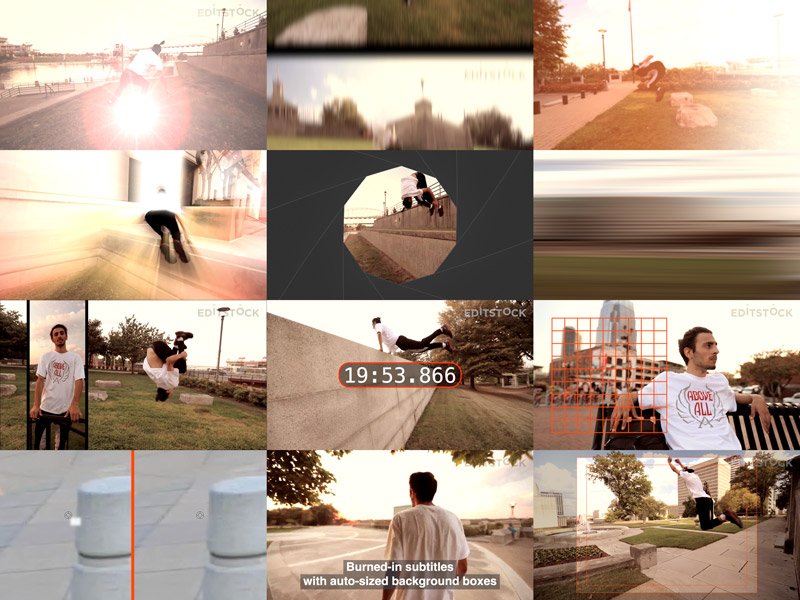
Digital Heaven today announced their freeware range for Final Cut Pro X has been significantly enhanced with the addition of 10 video plug-ins that were previously on sale for almost $180. These free plug-ins bring some powerful features to Final Cut Pro X including animated counters, split-screen effects, burned-in subtitles, fixing of dead pixels on footage and six dynamic transitions making them a must-have package for any video editor.
London, United Kingdom - Digital Heaven, the company behind the SpeedScriber automated transcription app for macOS, today announced the launch of a new version of Freeware for Final Cut Pro X and Motion. As one of the pioneering plug-in developers for Final Cut Pro over the past 16 years, Digital Heaven has a long track record of making some of their plug-ins available for free. Most recently that has included DH_GridX and DH_WideSafeX. Now six transitions plus two generators and two effects have been added to the freeware package.
In addition, some of these plug-ins have been improved for this freeware release:
* Up and Down directions have been added to DH_StretchPan
* Horizontal and vertical adjustment. of background box has been added to DH_SubtitleX
* Maximum dead pixel dimensions have been increased in DH_ReincarnationX
6 x Transitions (Previously on sale for $29.99)
* DH_Flare: The classic lens flare transition gets a makeover with controls for changing the color, angle and a little twist
* DH_FrameRoll: Retro bumpy film splice effect with motion blur
* DH_LightFlash: Replicates the organic imperfection of light leaking into an old film camera
* DH_LightRays: Eye-popping rays transition with three selectable color modes and customisable positioning
* DH_Shutter: Mimics the lens shutter of a camera with iris and vertical styles
* DH_StretchPan: Whoosh-style transition adds dynamic movement between two shots with adjustable direction
4 x Generators
* DH_CounterX: Creates animated timers with many configurable options (Previously on sale for $29.99)
* DH_GridX: Displays a grid with up to 30 divisions to help with lining up on-screen elements
* DH_SubtitleX: The easy way to create subtitles with auto-sized background boxes (Previously on sale for $29.99)
* DH_WideSafeX: Provides 4:3, 14:9 and 16:9 action and title safe areas whilst working in 16:9 aspect ratio projects
2 x Effects:
* DH_BoxX: Makes it easier than ever to create split-screen effects (Previously on sale for $29.99)
* DH_ReincarnationX: Fixes dead pixels on footage (Previously on sale for $59.99)
System Requirements:
* macOS 10.7 (or later).
* Final Cut Pro 10.1 (or later)
* Motion 5.1 (or later).
Availability:
Digital Heaven Freeware for Final Cut Pro X is available now on request at the Digital Heaven website.
Digital Heaven: https://www.digital-heaven.co.uk
Promo Video (embeddable): https://vimeo.com/347991902
Screenshot (large): http://download.digital-heaven.co.uk.s3.us-east-1.amazonaws.com/press/freeware-2000x1500.jpg
Screenshot (small): http://download.digital-heaven.co.uk.s3.us-east-1.amazonaws.com/press/freeware-800x600.jpg
Digital Heaven was founded in 2000 by ex-BBC video editor Martin Baker. For six years the company provided broadcast post production facilities for clients such as the BBC, Channel Four and many independent production companies. After the success of their first software products, the company shifted its focus in 2005 to exclusively concentrate on software development. Since then, the company has launched a total of 26 Final Cut Pro plug-ins, 6 macOS apps and 2 eBooks. Copyright (C) 2019 Digital Heaven. All Rights Reserved. Apple, the Apple logo, macOS, and Macintosh are registered trademarks of Apple Inc. in the U.S. and/or other countries. All other trademarks and trade names are the property of their respective owners.
*******
Link To Article: https://prmac.com/release-id-83548.htm
*******
---------------------------------------------------------------------------------
Note that you can alter delivered distributions at any time.
Login to your account on prMac to alter your channel selection, or to opt-out at any time.
Digital Heaven makes all Final Cut Pro X plug-ins available for free - Published on 07/16/19
Digital Heaven today announced their freeware range for Final Cut Pro X has been significantly enhanced with the addition of 10 video plug-ins that were previously on sale for almost $180. These free plug-ins bring some powerful features to Final Cut Pro X including animated counters, split-screen effects, burned-in subtitles, fixing of dead pixels on footage and six dynamic transitions making them a must-have package for any video editor.
London, United Kingdom - Digital Heaven, the company behind the SpeedScriber automated transcription app for macOS, today announced the launch of a new version of Freeware for Final Cut Pro X and Motion. As one of the pioneering plug-in developers for Final Cut Pro over the past 16 years, Digital Heaven has a long track record of making some of their plug-ins available for free. Most recently that has included DH_GridX and DH_WideSafeX. Now six transitions plus two generators and two effects have been added to the freeware package.
In addition, some of these plug-ins have been improved for this freeware release:
* Up and Down directions have been added to DH_StretchPan
* Horizontal and vertical adjustment. of background box has been added to DH_SubtitleX
* Maximum dead pixel dimensions have been increased in DH_ReincarnationX
6 x Transitions (Previously on sale for $29.99)
* DH_Flare: The classic lens flare transition gets a makeover with controls for changing the color, angle and a little twist
* DH_FrameRoll: Retro bumpy film splice effect with motion blur
* DH_LightFlash: Replicates the organic imperfection of light leaking into an old film camera
* DH_LightRays: Eye-popping rays transition with three selectable color modes and customisable positioning
* DH_Shutter: Mimics the lens shutter of a camera with iris and vertical styles
* DH_StretchPan: Whoosh-style transition adds dynamic movement between two shots with adjustable direction
4 x Generators
* DH_CounterX: Creates animated timers with many configurable options (Previously on sale for $29.99)
* DH_GridX: Displays a grid with up to 30 divisions to help with lining up on-screen elements
* DH_SubtitleX: The easy way to create subtitles with auto-sized background boxes (Previously on sale for $29.99)
* DH_WideSafeX: Provides 4:3, 14:9 and 16:9 action and title safe areas whilst working in 16:9 aspect ratio projects
2 x Effects:
* DH_BoxX: Makes it easier than ever to create split-screen effects (Previously on sale for $29.99)
* DH_ReincarnationX: Fixes dead pixels on footage (Previously on sale for $59.99)
System Requirements:
* macOS 10.7 (or later).
* Final Cut Pro 10.1 (or later)
* Motion 5.1 (or later).
Availability:
Digital Heaven Freeware for Final Cut Pro X is available now on request at the Digital Heaven website.
Digital Heaven: https://www.digital-heaven.co.uk
Promo Video (embeddable): https://vimeo.com/347991902
Screenshot (large): http://download.digital-heaven.co.uk.s3.us-east-1.amazonaws.com/press/freeware-2000x1500.jpg

Screenshot (small): http://download.digital-heaven.co.uk.s3.us-east-1.amazonaws.com/press/freeware-800x600.jpg
Digital Heaven was founded in 2000 by ex-BBC video editor Martin Baker. For six years the company provided broadcast post production facilities for clients such as the BBC, Channel Four and many independent production companies. After the success of their first software products, the company shifted its focus in 2005 to exclusively concentrate on software development. Since then, the company has launched a total of 26 Final Cut Pro plug-ins, 6 macOS apps and 2 eBooks. Copyright (C) 2019 Digital Heaven. All Rights Reserved. Apple, the Apple logo, macOS, and Macintosh are registered trademarks of Apple Inc. in the U.S. and/or other countries. All other trademarks and trade names are the property of their respective owners.
*******
Link To Article: https://prmac.com/release-id-83548.htm
*******
---------------------------------------------------------------------------------
Note that you can alter delivered distributions at any time.
Login to your account on prMac to alter your channel selection, or to opt-out at any time.
Subscribe to:
Posts (Atom)