A new article has been published at prMac.
64BitApps Releases Image Plus v.1.3 for macOS - Published on 08/29/19
64BitApps today announces Image Plus 1.3, a Mac app that allows users to edit, apply artistic effects, blur, crop, rotate, watermark, resize and convert their photos with ease. Image Plus also allows user to rotate their photo in 2D and even in 3D for some spectacular results, crop their photo using either pixels or percentage for a very precise edit, resize and convert their photo to various image formats including JPG, PNG, GIF, BMP, TIFF and even newer formats like HEIC or HEIF.
Craiova, Romania - 64BitApps, the software company that brought Mac users apps such as Icon Plus, PDF Plus and ImageSize, announces the release of Image Plus v.1.3, a Mac app that allows users to edit, apply artistic effects, blur, crop, rotate, watermark, resize and convert their photos with ease.
Users will be able to adjust the brightness, saturation, contrast or hue of their photo, apply artistic effects like Black&White, Sepia, Oil Painting or Halftone to make their photo stand out, apply various blur effects like Focus Blur or Zoom Blur to bring a certain area of their photo into focus or watermak their photo with both text and images in order to keep their work protected.
Image Plus also allows user to rotate their photo in 2D and even in 3D for some spectacular results, crop their photo using either pixels or percents for a very precise edit, resize and convert their photo to various image formats including JPG, PNG, GIF, BMP, TIFF and even newer formats like HEIC or HEIF.
Version 1.3 of Image Plus brings to the table a brand new user interface which now offers support for Dark Mode in macOS Mojave and later, a new set of artistic effects, the option to crop your photo and support for the HEIC and HEIF image formats.
Pricing and Availability:
Image Plus is priced at $4.99 (USD) and can be purchased from the Mac App Store and from 64BitApps online. More information about this app can be found at 64BitApps.
64BitApps: https://64bitapps.com
Image Plus 1.3: https://64bitapps.com/image-plus-powerful-photo-editor-and-converter/
Purchase and Download from Mac App Store: https://apps.apple.com/us/app/image-plus-powerful-photo/id1130206764
Purchase From 64BitApps: https://sites.fastspring.com/cezarpopescu/product/imageplus
Screenshot: https://64bitapps.com/wp-content/uploads/slider19/Screenshot11.png
Application Icon: https://64bitapps.com/wp-content/uploads/2015/05/image-plus.png
Since 2016, 64BitApps has been creating quality macOS apps such as Icon Plus, PDF Plus, ImageSize, Image Crop and Video Plus, apps which are used by thousands of Mac users from all around the world. All Material and Software (C) Copyright 2019 Day 1 Solutions SRL. All Rights Reserved. Apple, the Apple logo, and macOS are registered trademarks of Apple Inc. in the U.S. and/or other countries. Other trademarks and registered trademarks may be the property of their respective owners.
*******
Link To Article: https://prmac.com/release-id-83628.htm
*******
---------------------------------------------------------------------------------
Note that you can alter delivered distributions at any time.
Login to your account on prMac to alter your channel selection, or to opt-out at any time.


AssistiveWare shows off new app simPODD at AGOSCI Conference 2019
A new article has been published at prMac.
AssistiveWare shows off new app simPODD at AGOSCI Conference 2019 - Published on 08/29/19
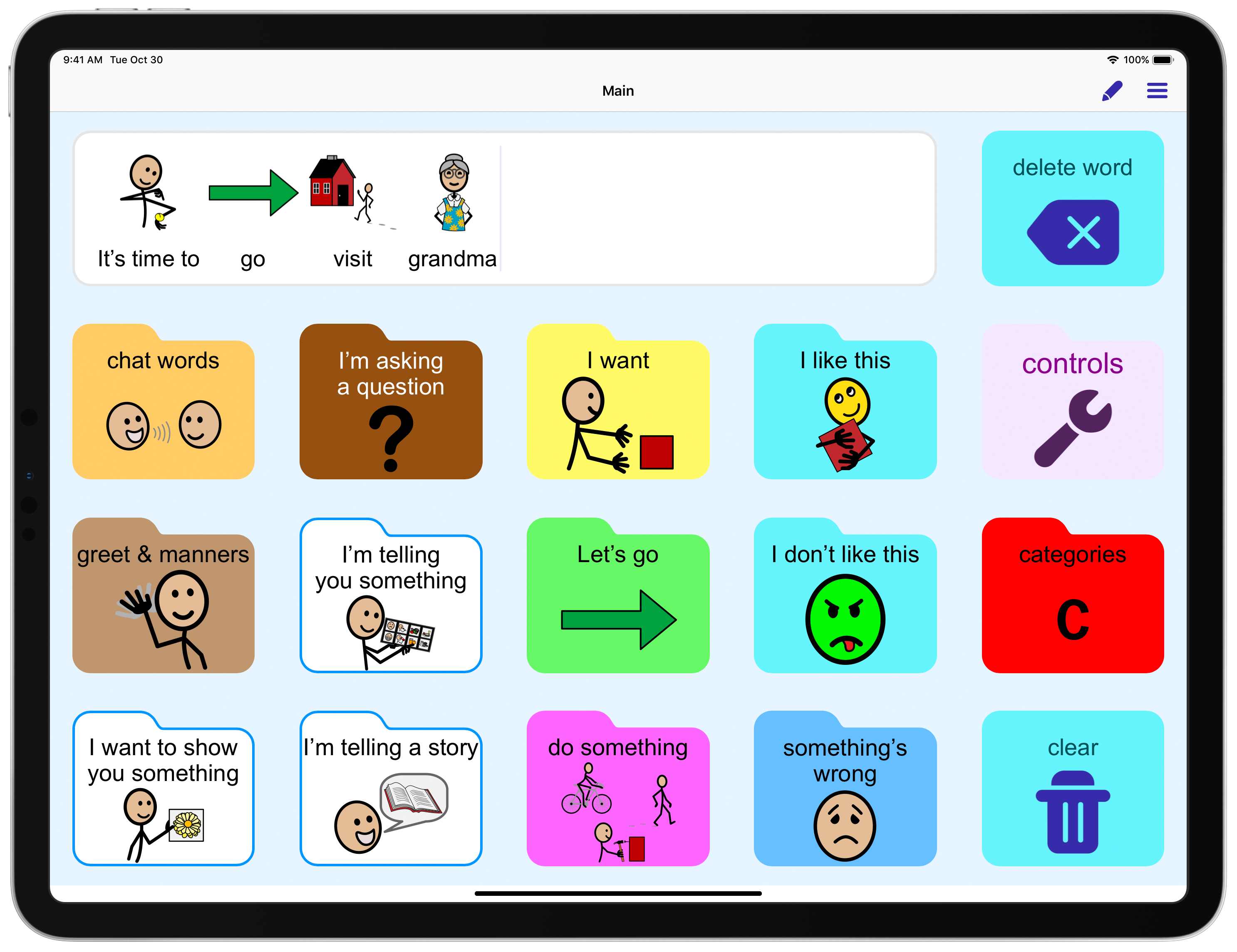
AssistiveWare has just released simPODD, a new iPad app to help people with complex communication needs communicate and develop language skills. PODD is one of the most well-known augmentative and alternative communication vocabularies. Designed from the ground up for PODD, simPODD is based on the popular PODD system, created by Australian speech pathologist Gayle Porter. This app is huge step forward in providing PODD users with a quality experience.
Perth, Australia - Today, AssistiveWare has released simPODD, a new iPad app to help people with complex communication needs to communicate and develop language skills. It's based on the popular PODD system, created by Australian speech pathologist Gayle Porter. This app is huge step forward in providing PODD users with a quality experience. AssistiveWare founder and CEO David Niemeijer and PODD inventor Gayle Porter will launch the app at the AGOSCI Conference in Perth, which takes place August 28-31.
Initially, the app will be available exclusively in Australia and New Zealand. Worldwide release will follow in October.
PODD is one of the most well-known augmentative and alternative communication (AAC) vocabularies, developed over the last 25 years by Gayle Porter. More than "just" a vocabulary, PODD is an approach to AAC intended to make AAC vocabulary for communication available at any time. With simPODD AssistiveWare is further expanding the options available for AAC users and their families. It complements AssistiveWare's well-known Proloquo2Go and Proloquo4Text communication apps as well as offering a new option for PODD users.
"Given our shared aim of supporting communication autonomy for people with complex communication needs, it has been great to work with AssistiveWare on simPODD ," said Speech Pathologist and PODD creator Gayle Porter. "With the inclusion of PODD communication books and electronic page sets in a single product, simPODD truly enables communicators to say what they want to say, to whoever they want to say it to, whenever they want to say it, however they choose to say it."
simPODD was designed from the ground up for PODD and makes using PODD much simpler. First, it brings the digital page sets and printing experience together into one app - the first English solution to offer that! PODD users will really love how much easier and faster printing will be with simPODD. Just choose a book and customize it - it only takes a few minutes. You can print it right from the app, all at once, instead of page by page as with other solutions.
"We are extremely excited about simPODD," said David Niemeijer, founder and CEO of AssistiveWare. "By collaborating closely with Gayle Porter, the Australian inventor of the PODD communication system, we are able to provide people with speech impairments access to a robust and flexible communication system in an easy to use iPad app designed specifically for PODD."
Starting today simPODD is available for iPad on the Australian and New Zealand App Stores. Monthly and yearly subscriptions are available, both including a one month free trial. Pricing starts at AU$ 21.99 for a monthly Digital-only subscription and AU$ 219.99 for a yearly Digital Print subscription.
AssistiveWare: https://www.assistiveware.com
simPODD 1.0.4: https://www.assistiveware.com/products/simpodd
Download from the App Store: https://apps.apple.com/au/app/simpodd/id1464489596?mt=8
Screenshot: https://download.assistiveware.com/simpodd/media/simPODD-landscape-EN-AU.png
App icon: https://download.assistiveware.com/simpodd/media/simPODD-logo-1024.png
AGOSCI Conference: https://www.assistiveware.com/events/agosci
Founded in 2000, AssistiveWare is a leading pioneer in the field of augmentative and alternative communication (AAC) and assistive technology software for iOS and macOS, with over 350,000 customers worldwide. All Material and Software (C) Copyright 2019 AssistiveWare B.V. / All Rights Reserved. Apple, the Apple logo, macOS, iPhone, iPod and iPad are registered trademarks of Apple Inc. in the U.S. and/or other countries. Other trademarks and registered trademarks may be the property of their respective owners.
*******
Link To Article: https://prmac.com/release-id-83627.htm
*******
---------------------------------------------------------------------------------
Note that you can alter delivered distributions at any time.
Login to your account on prMac to alter your channel selection, or to opt-out at any time.
AssistiveWare shows off new app simPODD at AGOSCI Conference 2019 - Published on 08/29/19
AssistiveWare has just released simPODD, a new iPad app to help people with complex communication needs communicate and develop language skills. PODD is one of the most well-known augmentative and alternative communication vocabularies. Designed from the ground up for PODD, simPODD is based on the popular PODD system, created by Australian speech pathologist Gayle Porter. This app is huge step forward in providing PODD users with a quality experience.
Perth, Australia - Today, AssistiveWare has released simPODD, a new iPad app to help people with complex communication needs to communicate and develop language skills. It's based on the popular PODD system, created by Australian speech pathologist Gayle Porter. This app is huge step forward in providing PODD users with a quality experience. AssistiveWare founder and CEO David Niemeijer and PODD inventor Gayle Porter will launch the app at the AGOSCI Conference in Perth, which takes place August 28-31.
Initially, the app will be available exclusively in Australia and New Zealand. Worldwide release will follow in October.
PODD is one of the most well-known augmentative and alternative communication (AAC) vocabularies, developed over the last 25 years by Gayle Porter. More than "just" a vocabulary, PODD is an approach to AAC intended to make AAC vocabulary for communication available at any time. With simPODD AssistiveWare is further expanding the options available for AAC users and their families. It complements AssistiveWare's well-known Proloquo2Go and Proloquo4Text communication apps as well as offering a new option for PODD users.
"Given our shared aim of supporting communication autonomy for people with complex communication needs, it has been great to work with AssistiveWare on simPODD ," said Speech Pathologist and PODD creator Gayle Porter. "With the inclusion of PODD communication books and electronic page sets in a single product, simPODD truly enables communicators to say what they want to say, to whoever they want to say it to, whenever they want to say it, however they choose to say it."
simPODD was designed from the ground up for PODD and makes using PODD much simpler. First, it brings the digital page sets and printing experience together into one app - the first English solution to offer that! PODD users will really love how much easier and faster printing will be with simPODD. Just choose a book and customize it - it only takes a few minutes. You can print it right from the app, all at once, instead of page by page as with other solutions.
"We are extremely excited about simPODD," said David Niemeijer, founder and CEO of AssistiveWare. "By collaborating closely with Gayle Porter, the Australian inventor of the PODD communication system, we are able to provide people with speech impairments access to a robust and flexible communication system in an easy to use iPad app designed specifically for PODD."
Starting today simPODD is available for iPad on the Australian and New Zealand App Stores. Monthly and yearly subscriptions are available, both including a one month free trial. Pricing starts at AU$ 21.99 for a monthly Digital-only subscription and AU$ 219.99 for a yearly Digital Print subscription.
AssistiveWare: https://www.assistiveware.com
simPODD 1.0.4: https://www.assistiveware.com/products/simpodd
Download from the App Store: https://apps.apple.com/au/app/simpodd/id1464489596?mt=8
Screenshot: https://download.assistiveware.com/simpodd/media/simPODD-landscape-EN-AU.png
App icon: https://download.assistiveware.com/simpodd/media/simPODD-logo-1024.png

AGOSCI Conference: https://www.assistiveware.com/events/agosci
Founded in 2000, AssistiveWare is a leading pioneer in the field of augmentative and alternative communication (AAC) and assistive technology software for iOS and macOS, with over 350,000 customers worldwide. All Material and Software (C) Copyright 2019 AssistiveWare B.V. / All Rights Reserved. Apple, the Apple logo, macOS, iPhone, iPod and iPad are registered trademarks of Apple Inc. in the U.S. and/or other countries. Other trademarks and registered trademarks may be the property of their respective owners.
*******
Link To Article: https://prmac.com/release-id-83627.htm
*******
---------------------------------------------------------------------------------
Note that you can alter delivered distributions at any time.
Login to your account on prMac to alter your channel selection, or to opt-out at any time.
LinkOptimizer for Adobe InDesign Now Can Convert Images to Photoshop PDF
A new article has been published at prMac.
LinkOptimizer for Adobe InDesign Now Can Convert Images to Photoshop PDF - Published on 08/28/19
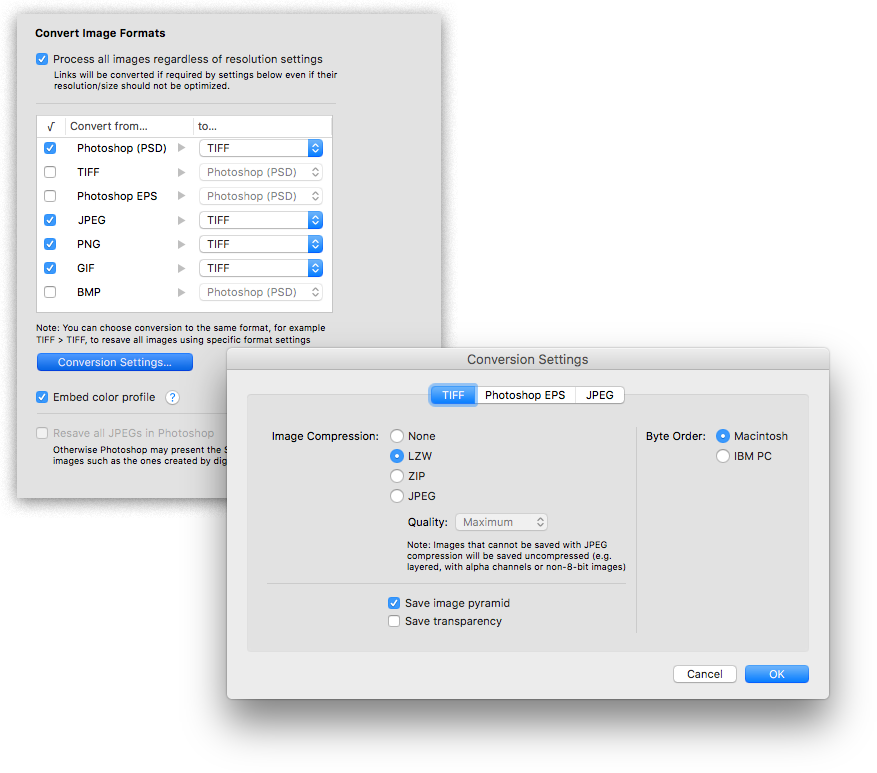
Zevrix Solutions announces LinkOptimizer 5.3, a feature update to company's workflow automation tool for Adobe InDesign. LinkOptimizer lets users automatically scale and crop images to their InDesign dimensions at specified target resolution, as well as convert image formats and colors, merge layers and more. The app helps designers reduce InDesign link size and save production costs. The new version adds an option to convert images to Photoshop PDF format using the selected Adobe PDF preset.
Toronto (ON), Canada - Zevrix Solutions today announces LinkOptimizer 5.3, a feature update to company's image processing automation solution for Adobe InDesign. LinkOptimizer solves the issue of excess image resolution of InDesign links and helps users save prepress costs and production time. The app also enables users to easily repurpose InDesign documents for web and mobile devices
The new version adds an option to convert InDesign links to Photoshop PDF in addition to existing conversion to TIFF, JPEG, EPS and other formats. Photoshop PDF files always contain only a single image and support all color modes (except Multichannel). The new feature is especially helpful for users who need to make their Photoshop documents comply with PDF/X standards for specialized output workflows.
"Today LinkOptimizer batched a huge book project and another magazine project in minutes vs. hours. Now I can take the afternoon off and drink beer," says Brian Donahue, owner of Bedesign studio in Minneapolis, Minnesota. "Thanks for freeing up my afternoon, rather than doing production work."
LinkOptimizer works automatically with Photoshop to reduce InDesign link size, convert image formats, and perform essential image adjustments. For example, with just a click of a button users can:
* Optimize batches of InDesign files and books.
* Convert RGB images to CMYK or Grayscale
* Scale and crop images to match their dimensions in InDesign
* Change their resolution to 300 dpi
* Resave PSD files as TIFF
* Run a Photoshop action on each image.
As a result users can save gigabytes of disk space and countless hours of optimizing images manually, accelerate document output, reduce job turnaround, and cut costs through faster processing.
Pricing and Availability:
LinkOptimizer can be purchased from Zevrix website for $259.95 USD (Lite version: $179.95) as well as from Adobe Exchange and authorized resellers. Trial is also available for download. The update is free for LinkOptimizer 5.x users and $130 to upgrade from previous versions. LinkOptimizer requires macOS 10.7-10.14 and Adobe InDesign / Photoshop CS5-CC 2019.
Zevrix Solutions: http://zevrix.com
LinkOptimizer 5.3: http://zevrix.com/LinkOptimizer.php
Download LinkOptimizer: http://zevrix.com/LinkOptimizer.dmg
Purchase: http://zevrix.com/store.php
Screenshot: http://zevrix.com/screenshots/lo5/convert.png
Located in Toronto, Canada, Zevrix Solutions provides automation and productivity solutions for Adobe Creative Cloud and Creative Suite software, PDF workflows, graphic file diagnostics and Microsoft Office output on Mac OS. Zevrix is dedicated to help professionals increase their profits through automating everyday tasks, producing error-free documents, saving disk space and cutting production costs. For more information, visit their website. Copyright (C) 2019 Zevrix Solutions. All Rights Reserved. Other trademarks and registered trademarks may be the property of their respective owners.
*******
Link To Article: https://prmac.com/release-id-83626.htm
*******
---------------------------------------------------------------------------------
Note that you can alter delivered distributions at any time.
Login to your account on prMac to alter your channel selection, or to opt-out at any time.
LinkOptimizer for Adobe InDesign Now Can Convert Images to Photoshop PDF - Published on 08/28/19
Zevrix Solutions announces LinkOptimizer 5.3, a feature update to company's workflow automation tool for Adobe InDesign. LinkOptimizer lets users automatically scale and crop images to their InDesign dimensions at specified target resolution, as well as convert image formats and colors, merge layers and more. The app helps designers reduce InDesign link size and save production costs. The new version adds an option to convert images to Photoshop PDF format using the selected Adobe PDF preset.
Toronto (ON), Canada - Zevrix Solutions today announces LinkOptimizer 5.3, a feature update to company's image processing automation solution for Adobe InDesign. LinkOptimizer solves the issue of excess image resolution of InDesign links and helps users save prepress costs and production time. The app also enables users to easily repurpose InDesign documents for web and mobile devices
The new version adds an option to convert InDesign links to Photoshop PDF in addition to existing conversion to TIFF, JPEG, EPS and other formats. Photoshop PDF files always contain only a single image and support all color modes (except Multichannel). The new feature is especially helpful for users who need to make their Photoshop documents comply with PDF/X standards for specialized output workflows.
"Today LinkOptimizer batched a huge book project and another magazine project in minutes vs. hours. Now I can take the afternoon off and drink beer," says Brian Donahue, owner of Bedesign studio in Minneapolis, Minnesota. "Thanks for freeing up my afternoon, rather than doing production work."
LinkOptimizer works automatically with Photoshop to reduce InDesign link size, convert image formats, and perform essential image adjustments. For example, with just a click of a button users can:
* Optimize batches of InDesign files and books.
* Convert RGB images to CMYK or Grayscale
* Scale and crop images to match their dimensions in InDesign
* Change their resolution to 300 dpi
* Resave PSD files as TIFF
* Run a Photoshop action on each image.
As a result users can save gigabytes of disk space and countless hours of optimizing images manually, accelerate document output, reduce job turnaround, and cut costs through faster processing.
Pricing and Availability:
LinkOptimizer can be purchased from Zevrix website for $259.95 USD (Lite version: $179.95) as well as from Adobe Exchange and authorized resellers. Trial is also available for download. The update is free for LinkOptimizer 5.x users and $130 to upgrade from previous versions. LinkOptimizer requires macOS 10.7-10.14 and Adobe InDesign / Photoshop CS5-CC 2019.
Zevrix Solutions: http://zevrix.com
LinkOptimizer 5.3: http://zevrix.com/LinkOptimizer.php
Download LinkOptimizer: http://zevrix.com/LinkOptimizer.dmg
Purchase: http://zevrix.com/store.php
Screenshot: http://zevrix.com/screenshots/lo5/convert.png
Located in Toronto, Canada, Zevrix Solutions provides automation and productivity solutions for Adobe Creative Cloud and Creative Suite software, PDF workflows, graphic file diagnostics and Microsoft Office output on Mac OS. Zevrix is dedicated to help professionals increase their profits through automating everyday tasks, producing error-free documents, saving disk space and cutting production costs. For more information, visit their website. Copyright (C) 2019 Zevrix Solutions. All Rights Reserved. Other trademarks and registered trademarks may be the property of their respective owners.
*******
Link To Article: https://prmac.com/release-id-83626.htm
*******
---------------------------------------------------------------------------------
Note that you can alter delivered distributions at any time.
Login to your account on prMac to alter your channel selection, or to opt-out at any time.
Apptorium releases SideNotes 1.0 for macOS - Note-Taking Solution
A new article has been published at prMac.
Apptorium releases SideNotes 1.0 for macOS - Note-Taking Solution - Published on 08/28/19
Apptorium today announces SideNotes 1.0, its new note-taking solution exclusively for macOS. Featuring a clean and minimalistic user interface, SideNotes allows anyone to take notes easily and also keep them out of the way by positioning notes on the side of the monitor. Notes can be shown or hidden with a single click, by simply pressing a keyboard shortcut or by moving mouse cursor. SideNotes provides text formatting that takes advantage of Markdown and regular text formatting and much more.
Zielona Gora, Poland - Apptorium today is proud to announce the release and immediate availability of SideNotes 1.0, the company's new note-taking solution developed exclusively for macOS. The application allows to take notes on the side of the monitor in a very comfortable manner " notes can be shown or hidden with a single click, by pressing a keyboard shortcut or by moving mouse cursor. The goal of the application is to work with handy notes, without getting distracted from one's main workflow. Application comes with very fine, clean and minimalistic User Interface.
SideNotes provides text formatting that takes advantage of Markdown and regular text formatting. With Markdown syntax, text can be formatted very quickly. And it's rendered on the fly. Users can format text without knowing the syntax. Application offers a Text Formatting button that displays a menu of various text formatting options. Markdown formatting can be disabled by choosing of 3 formatting modes: Standard (Markdown), Plain Text and Code. The last one allows to store short code snippets. Besides that SideNotes allows users to drop images on notes: from files or directly from a web browser. Their size is automatically adjusted to note width. Application also stores the original image, so if a user double clicks it, the original image is open.
Additionally, SideNotes provides an accessable task list. To add a task, the user can click the Text Formatting button or simply press CMD T. This adds a checkmark to the current line which can be marked as done with a single click. In order to provide clean and organised workflow, SideNotes can easily group notes into folders. Notes can each have one of 6 pre-set colors. SideNotes is also an answer to messy desktop. If users tend to make a short text files on the desktop, they can now simply Drag & Drop them on the application window. It will copy content of all these files to the application.
Application also offers Touch Bar integration, AppleScript support, supports dark and light interfaces, color rendering (e.g. when user types #aabb33, the application displays a circle filled with that color), folder and text files dropping (Drag & Drop), font size changing, side changing, showing and hiding behaviour and keyboard shortcut configuration. Each application comes with a Showcase folder that presents application features.
System Requirements:
* macOS 10.14 or later
* 64-bit processor
* 12.2 MB
Pricing and Availability:
During its launch, SideNotes 1.0 is only $9.99 USD (50% off) or equivalent amount in other currencies and available worldwide exclusively through the Mac App Store in the Productivity category. A trial version is available. Setapp subscribers also got access to SideNotes. Promo Codes are available to members of the press. For more info, please contact Marcin Krzywonos.
SideNotes 1.0: https://www.apptorium.com/sidenotes
Download Trial: https://apptorium.com/sidenotes/final
MacAppStore: https://apps.apple.com/app/sidenotes/id1441958036
YouTube Video: https://www.youtube.com/watch?v=5ZdmWuPGKqQ
Press Kit (zip): https://www.apptorium.com/sidenotes/presskit
Headquartered in Zielona Gora, Poland, Apptorium has been creating Mac and iOS software since 2016. All Material and Software (C) Copyright 2019 Apptorium. All Rights Reserved. Apple, the Apple logo, iPhone, iPod and iPad are registered trademarks of Apple Inc. in the U.S. and/or other countries. Other trademarks and registered trademarks may be the property of their respective owners.
*******
Link To Article: https://prmac.com/release-id-83621.htm
*******
---------------------------------------------------------------------------------
Note that you can alter delivered distributions at any time.
Login to your account on prMac to alter your channel selection, or to opt-out at any time.
Apptorium releases SideNotes 1.0 for macOS - Note-Taking Solution - Published on 08/28/19
Apptorium today announces SideNotes 1.0, its new note-taking solution exclusively for macOS. Featuring a clean and minimalistic user interface, SideNotes allows anyone to take notes easily and also keep them out of the way by positioning notes on the side of the monitor. Notes can be shown or hidden with a single click, by simply pressing a keyboard shortcut or by moving mouse cursor. SideNotes provides text formatting that takes advantage of Markdown and regular text formatting and much more.
Zielona Gora, Poland - Apptorium today is proud to announce the release and immediate availability of SideNotes 1.0, the company's new note-taking solution developed exclusively for macOS. The application allows to take notes on the side of the monitor in a very comfortable manner " notes can be shown or hidden with a single click, by pressing a keyboard shortcut or by moving mouse cursor. The goal of the application is to work with handy notes, without getting distracted from one's main workflow. Application comes with very fine, clean and minimalistic User Interface.
SideNotes provides text formatting that takes advantage of Markdown and regular text formatting. With Markdown syntax, text can be formatted very quickly. And it's rendered on the fly. Users can format text without knowing the syntax. Application offers a Text Formatting button that displays a menu of various text formatting options. Markdown formatting can be disabled by choosing of 3 formatting modes: Standard (Markdown), Plain Text and Code. The last one allows to store short code snippets. Besides that SideNotes allows users to drop images on notes: from files or directly from a web browser. Their size is automatically adjusted to note width. Application also stores the original image, so if a user double clicks it, the original image is open.
Additionally, SideNotes provides an accessable task list. To add a task, the user can click the Text Formatting button or simply press CMD T. This adds a checkmark to the current line which can be marked as done with a single click. In order to provide clean and organised workflow, SideNotes can easily group notes into folders. Notes can each have one of 6 pre-set colors. SideNotes is also an answer to messy desktop. If users tend to make a short text files on the desktop, they can now simply Drag & Drop them on the application window. It will copy content of all these files to the application.
Application also offers Touch Bar integration, AppleScript support, supports dark and light interfaces, color rendering (e.g. when user types #aabb33, the application displays a circle filled with that color), folder and text files dropping (Drag & Drop), font size changing, side changing, showing and hiding behaviour and keyboard shortcut configuration. Each application comes with a Showcase folder that presents application features.
System Requirements:
* macOS 10.14 or later
* 64-bit processor
* 12.2 MB
Pricing and Availability:
During its launch, SideNotes 1.0 is only $9.99 USD (50% off) or equivalent amount in other currencies and available worldwide exclusively through the Mac App Store in the Productivity category. A trial version is available. Setapp subscribers also got access to SideNotes. Promo Codes are available to members of the press. For more info, please contact Marcin Krzywonos.
SideNotes 1.0: https://www.apptorium.com/sidenotes
Download Trial: https://apptorium.com/sidenotes/final
MacAppStore: https://apps.apple.com/app/sidenotes/id1441958036
YouTube Video: https://www.youtube.com/watch?v=5ZdmWuPGKqQ
Press Kit (zip): https://www.apptorium.com/sidenotes/presskit
Headquartered in Zielona Gora, Poland, Apptorium has been creating Mac and iOS software since 2016. All Material and Software (C) Copyright 2019 Apptorium. All Rights Reserved. Apple, the Apple logo, iPhone, iPod and iPad are registered trademarks of Apple Inc. in the U.S. and/or other countries. Other trademarks and registered trademarks may be the property of their respective owners.
*******
Link To Article: https://prmac.com/release-id-83621.htm
*******
---------------------------------------------------------------------------------
Note that you can alter delivered distributions at any time.
Login to your account on prMac to alter your channel selection, or to opt-out at any time.
New Game Release: Ballz Maze 3D [iOS Version]
A new article has been published at prMac.
New Game Release: Ballz Maze 3D [iOS Version] - Published on 08/26/19
Hristo Zhelev announces an new game, Ballz Maze 3D for iOS devices. It's fun, addicting hyper-casual puzzle game. The game is based on current trends at the App Store: like Balls Rotate, Split Balls, and other top Maze Games out there. We made it look/feel like those top games, but we also merged different gameplay styles, so basically there's no other game like this anywhere.
Ruse, Ruse - Hristo Zhelev announces the release of a new game called, Ballz Maze 3D. It's fun, addicting hyper-casual puzzle game. The game is based on current trends on the App Store: like Balls Rotate, Split Balls 3D, and other top Maze Games out there.. This is our own twist. We made it look/feel like those top games, but we also merged different gameplay styles, so basically there's no other game like this on the App Store. We created something that people will love, something unique.
Merging gameplays from different games is not a new technique, but some of the top games out there follow this formula for success. We also applied this principle to our games as we are not interested in creating clones or copycats. We have been publishing and creating games for 10 years now.
Here's a breakdown of what this game is all about.
Benefits:
* Easy to play. My 5 year old daughter can play it and complete levels
* Help people relax, especially during an intense day at work, school
* Hyper-casual genre: everyone can play and have fun with it.
* Improves memory and reflexes
* Addicting in its own way and intuitive.
* Free to play
If you have any questions, do not hesitate to contact us! If needed, we have a press kit ready!
Device Requirements:
* iPhone, iPad, or iPod touch
* Requires iOS 8.0 or later
* Universal Application
* 48.8 MB
Pricing and Availability:
Ballz Maze 3D 1.0.1 is free and is available worldwide through the App Store in the Games category.
Ballz Maze 3D 1.0.1: https://apps.apple.com/us/app/ballz-maze-3d/id1473256804?mt=8&at=11l5Lx
Our other apps and games: https://apps.apple.com/us/developer/hristo-zhelev/id528949460
YouTube Tutorial: https://www.youtube.com/watch?v=MgyysmyHTnQ
Game Screenshots: https://www.dropbox.com/sh/ep32w3ihd2uxe5h/AAAr6tL00iArqM-HVhqyjlcha?dl=0
App Icon: https://www.dropbox.com/sh/qeci4098vduywp7/AAAediwwJOIFTzIkB3hcvXL4a?dl=0
Hristo Zhelev is an indie game studio located in the beautiful city of Ruse, Bulgaria. They have been creating games full-time in both iOS and Android. All Material and Software (C) Copyright 2019 Hristo Zhelev. All Rights Reserved. Apple, the Apple logo, iPhone, iPod and iPad are registered trademarks of Apple Inc. in the U.S. and/or other countries. Other trademarks and registered trademarks may be the property of their respective owners.
*******
Link To Article: https://prmac.com/release-id-83624.htm
*******
---------------------------------------------------------------------------------
Note that you can alter delivered distributions at any time.
Login to your account on prMac to alter your channel selection, or to opt-out at any time.
New Game Release: Ballz Maze 3D [iOS Version] - Published on 08/26/19
Hristo Zhelev announces an new game, Ballz Maze 3D for iOS devices. It's fun, addicting hyper-casual puzzle game. The game is based on current trends at the App Store: like Balls Rotate, Split Balls, and other top Maze Games out there. We made it look/feel like those top games, but we also merged different gameplay styles, so basically there's no other game like this anywhere.
Ruse, Ruse - Hristo Zhelev announces the release of a new game called, Ballz Maze 3D. It's fun, addicting hyper-casual puzzle game. The game is based on current trends on the App Store: like Balls Rotate, Split Balls 3D, and other top Maze Games out there.. This is our own twist. We made it look/feel like those top games, but we also merged different gameplay styles, so basically there's no other game like this on the App Store. We created something that people will love, something unique.
Merging gameplays from different games is not a new technique, but some of the top games out there follow this formula for success. We also applied this principle to our games as we are not interested in creating clones or copycats. We have been publishing and creating games for 10 years now.
Here's a breakdown of what this game is all about.
Benefits:
* Easy to play. My 5 year old daughter can play it and complete levels
* Help people relax, especially during an intense day at work, school
* Hyper-casual genre: everyone can play and have fun with it.
* Improves memory and reflexes
* Addicting in its own way and intuitive.
* Free to play
If you have any questions, do not hesitate to contact us! If needed, we have a press kit ready!
Device Requirements:
* iPhone, iPad, or iPod touch
* Requires iOS 8.0 or later
* Universal Application
* 48.8 MB
Pricing and Availability:
Ballz Maze 3D 1.0.1 is free and is available worldwide through the App Store in the Games category.
Ballz Maze 3D 1.0.1: https://apps.apple.com/us/app/ballz-maze-3d/id1473256804?mt=8&at=11l5Lx
Our other apps and games: https://apps.apple.com/us/developer/hristo-zhelev/id528949460
YouTube Tutorial: https://www.youtube.com/watch?v=MgyysmyHTnQ
Game Screenshots: https://www.dropbox.com/sh/ep32w3ihd2uxe5h/AAAr6tL00iArqM-HVhqyjlcha?dl=0
App Icon: https://www.dropbox.com/sh/qeci4098vduywp7/AAAediwwJOIFTzIkB3hcvXL4a?dl=0
Hristo Zhelev is an indie game studio located in the beautiful city of Ruse, Bulgaria. They have been creating games full-time in both iOS and Android. All Material and Software (C) Copyright 2019 Hristo Zhelev. All Rights Reserved. Apple, the Apple logo, iPhone, iPod and iPad are registered trademarks of Apple Inc. in the U.S. and/or other countries. Other trademarks and registered trademarks may be the property of their respective owners.
*******
Link To Article: https://prmac.com/release-id-83624.htm
*******
---------------------------------------------------------------------------------
Note that you can alter delivered distributions at any time.
Login to your account on prMac to alter your channel selection, or to opt-out at any time.
ILEXSOFT Releases HighDesign R5 for Mac and Windows
A new article has been published at prMac.
ILEXSOFT Releases HighDesign R5 for Mac and Windows - Published on 08/26/19
ILEXSOFT today announced the immediate availability of their fifth major release of their HighDesign drafting and architectural design software for macOS. HighDesign R5 marks a turning point: it now offers a flexible solution with more powerful tools for traditional CAD, as well as features and workflow found in Building Information Modeling (BIM) processes.
Perugia, Italy - ILEXSOFT today announced the immediate availability of release 5 of its HighDesign drafting and architectural design software. Thanks to an extensive internal redesign, HighDesign R5 Pro now offers a powerful and flexible solution that combines traditional CAD tools with the features and the model-document-publish-manage workflow typical of Building Information Modeling (BIM) processes.
Drawing tools are grouped into Sketch, Documentation and Design tools and project items are organized in a hierarchical structure that streamlines the design process and makes it easier for the designer to manage the complexity of a typical design project. Object Styles and Build Element Types allow the effective standardization of the project by reducing the use of custom elements.
In HighDesign Pro, the new Project Browser makes the structure of the project easily accessible and manageable. The new specialized sheet types, such as Drafting sheets, Callouts and Details, Layouts with viewports and parametric title-blocks encourage a streamlined and smart design process from sketching to documentation and presentation.
Information and other non-graphical data can be added to the project via the completely redesigned Project Info window and the new Object Info panel. Textual information can be entered for single element instances or for their type, and can be visualized by associative tags.
"HighDesign R5 has become dramatically more productive and aligned with the current workflows and usage patterns of the AEC industry," said Product Manager Giovanni Suraci. "Professional users will experience the improved consistency and the benefits of the new features."
In addition to the Mac, this version is also available for Windows 10 64-bit, and aims to offer on both platforms the same interface and user experience: the use of the same file format allows a transparent interoperability between Mac and Windows. Also new is the support for DWG(R) file format version 2019. The user interface has been overhauled and enhanced with more customizations and improvements. The Mac version fully supports macOS themes.
Pricing and Availability
The HighDesign product line includes HighDesign LT, priced at $99.99 USD; HighDesign Standard, priced at $229.00 USD; and HighDesign Pro at $360.00 USD. Licenses are perpetual and include one year of maintenance which gives access to any updates released during the year of validity. When the license expires, the user can freely choose to continue using the last version installed, or renew for another year and stay constantly updated. Renewals for HighDesign LT, Standard and Pro are priced at $69.00, $115.00 and $180 USD respectively.
ILEXSOFT: http://www.ilexsoft.com
HighDesign R5 Pro: http://www.ilexsoft.com/highdesign/
Direct Download Link: http://www.ilexsoft.com/downloads/
Purchase Link: http://www.ilexsoft.com/store/index.html
Screenshot: http://www.ilexsoft.com/assets/custom/img/highdesign/highdesign_tools.jpg
App Icon: http://www.ilexsoft.com/assets/custom/img/HighDesign_icon_256.png
Founded in 2003 and based in Italy, ILEXSOFT is committed to creating innovative solutions for the architecture, engineering and construction (AEC) design community by developing advanced software with a focus on user experience characterized by simplicity and elegance. ILEXSOFT's vision is to create modern software that is enjoyable to use and tailored to the actual needs of professionals, in which the user interface plays a central part by translating the complexity of building and product design into a smooth workflow. All Material and Software (C) Copyright 2019 ILEXSOFT. All Rights Reserved. Apple, the Apple logo, Macintosh Mac OS X and macOS are registered trademarks of Apple Inc. in the U.S. and/or other countries. Other trademarks and registered trademarks may be the property of their respective owners.
*******
Link To Article: https://prmac.com/release-id-83625.htm
*******
---------------------------------------------------------------------------------
Note that you can alter delivered distributions at any time.
Login to your account on prMac to alter your channel selection, or to opt-out at any time.
ILEXSOFT Releases HighDesign R5 for Mac and Windows - Published on 08/26/19
ILEXSOFT today announced the immediate availability of their fifth major release of their HighDesign drafting and architectural design software for macOS. HighDesign R5 marks a turning point: it now offers a flexible solution with more powerful tools for traditional CAD, as well as features and workflow found in Building Information Modeling (BIM) processes.
Perugia, Italy - ILEXSOFT today announced the immediate availability of release 5 of its HighDesign drafting and architectural design software. Thanks to an extensive internal redesign, HighDesign R5 Pro now offers a powerful and flexible solution that combines traditional CAD tools with the features and the model-document-publish-manage workflow typical of Building Information Modeling (BIM) processes.
Drawing tools are grouped into Sketch, Documentation and Design tools and project items are organized in a hierarchical structure that streamlines the design process and makes it easier for the designer to manage the complexity of a typical design project. Object Styles and Build Element Types allow the effective standardization of the project by reducing the use of custom elements.
In HighDesign Pro, the new Project Browser makes the structure of the project easily accessible and manageable. The new specialized sheet types, such as Drafting sheets, Callouts and Details, Layouts with viewports and parametric title-blocks encourage a streamlined and smart design process from sketching to documentation and presentation.
Information and other non-graphical data can be added to the project via the completely redesigned Project Info window and the new Object Info panel. Textual information can be entered for single element instances or for their type, and can be visualized by associative tags.
"HighDesign R5 has become dramatically more productive and aligned with the current workflows and usage patterns of the AEC industry," said Product Manager Giovanni Suraci. "Professional users will experience the improved consistency and the benefits of the new features."
In addition to the Mac, this version is also available for Windows 10 64-bit, and aims to offer on both platforms the same interface and user experience: the use of the same file format allows a transparent interoperability between Mac and Windows. Also new is the support for DWG(R) file format version 2019. The user interface has been overhauled and enhanced with more customizations and improvements. The Mac version fully supports macOS themes.
Pricing and Availability
The HighDesign product line includes HighDesign LT, priced at $99.99 USD; HighDesign Standard, priced at $229.00 USD; and HighDesign Pro at $360.00 USD. Licenses are perpetual and include one year of maintenance which gives access to any updates released during the year of validity. When the license expires, the user can freely choose to continue using the last version installed, or renew for another year and stay constantly updated. Renewals for HighDesign LT, Standard and Pro are priced at $69.00, $115.00 and $180 USD respectively.
ILEXSOFT: http://www.ilexsoft.com
HighDesign R5 Pro: http://www.ilexsoft.com/highdesign/
Direct Download Link: http://www.ilexsoft.com/downloads/
Purchase Link: http://www.ilexsoft.com/store/index.html
Screenshot: http://www.ilexsoft.com/assets/custom/img/highdesign/highdesign_tools.jpg

App Icon: http://www.ilexsoft.com/assets/custom/img/HighDesign_icon_256.png

Founded in 2003 and based in Italy, ILEXSOFT is committed to creating innovative solutions for the architecture, engineering and construction (AEC) design community by developing advanced software with a focus on user experience characterized by simplicity and elegance. ILEXSOFT's vision is to create modern software that is enjoyable to use and tailored to the actual needs of professionals, in which the user interface plays a central part by translating the complexity of building and product design into a smooth workflow. All Material and Software (C) Copyright 2019 ILEXSOFT. All Rights Reserved. Apple, the Apple logo, Macintosh Mac OS X and macOS are registered trademarks of Apple Inc. in the U.S. and/or other countries. Other trademarks and registered trademarks may be the property of their respective owners.
*******
Link To Article: https://prmac.com/release-id-83625.htm
*******
---------------------------------------------------------------------------------
Note that you can alter delivered distributions at any time.
Login to your account on prMac to alter your channel selection, or to opt-out at any time.
Joyoshare Offers Freebies and Big Discount at Back to School Promo 2019
A new article has been published at prMac.
Joyoshare Offers Freebies and Big Discount at Back to School Promo 2019 - Published on 08/26/19
Joyoshare announces its special deals this year, from August 22 to September 9, to welcome this happy back-to-school season. Now you can get free giveaways and up to 50% big discount for different products. All customers can get Joyoshare HEIC Converter and Joyoshare LivePhoto Converter at zero cost within the validity period of the activity. During this promotion, the 50% off discount is available to all multimedia products.
Hong Kong, China - Joyoshare Studio, one of the most professional and reputable multimedia software developers and providers, has recently started its two-week promotion for the upcoming back-to-school season. In this event, except for freebies, all participants can additionally get multimedia products at up to 50% off big discount and iOS utilities at 25% off discount.
100% Free Gifts for Photo Converters
All customers can get Joyoshare HEIC Converter and Joyoshare LivePhoto Converter at zero cost within the validity period of the activity. What requires to do is just share the sales page to personal social platform, like Facebook, Twitter or LinkedIn. Afterward, the activated free license code will be sent to a submitted email address, aiming at helping customers to convert either HEIC photos or live photos to JPG, GIF, BMP, TIFF, PNG, etc. in batch with high quality.
50% Off Discount for Multimedia Tools
During this promotion, the 50% off discount is available to all multimedia products. The one who gets it can cut, trim, crop, rotate and edit both videos and audios fast in lossless quality with Joyoshare Media Cutter. Else, Joyoshare Screen Recorder also facilitates to record video and grab audio from desktop screen in high quality while Joyoshare Video Converter assists to convert multiple video/audio files at a time and transfer to desired format or compatible device as users like.
25% Off Discount for iOS Utilities
What's better, this back to school deal makes it possible to offer all participants iOS solutions at 25% off discount. Specifically, Joyoshare iPhone Data Recovery can recover more than 20 kinds of data, like photos, videos, iMessages, calendars, etc. from iOS devices, iTunes and iCloud backups with high success rate. Joyoshare UltFix iOS System Recovery can repair as many as 30 types of system issues for iPhone, iPad, iPod touch and Apple TV with no data loss. Joyoshare iPasscode Unlocker can remove screen lock for all iDevices without using passcode in three simple steps.
To learn more info about this back to school event and get special coupons, please visit The Back to School website.
Joyoshare : http://www.joyoshare.com/
Back to School Event: http://www.joyoshare.com/special/2019-back-to-school/index.html
Joyoshare Studio is a world-leading software developer and provider who has engaged in the video field for many years. Its innovative products include video converter, media cutter, video editor, screen recorder, HEIC converter, etc. Now it has expanded its product line and starts to develop the best iOS solutions such as iPhone data recovery, iOS system recovery, iPhone passcode removal, etc. to customers worldwide. With professional and attentive service, Joyoshare has enjoyed high reputation from millions of customers over the past years. All Material and Software (C) Copyright 2019 Joyoshare Studio. All Rights Reserved. Apple, the Apple logo, iPhone, iPod and iPad are registered trademarks of Apple Inc. in the U.S. and/or other countries. Other trademarks and registered trademarks may be the property of their respective owners.
*******
Link To Article: https://prmac.com/release-id-83622.htm
*******
---------------------------------------------------------------------------------
Note that you can alter delivered distributions at any time.
Login to your account on prMac to alter your channel selection, or to opt-out at any time.
Joyoshare Offers Freebies and Big Discount at Back to School Promo 2019 - Published on 08/26/19
Joyoshare announces its special deals this year, from August 22 to September 9, to welcome this happy back-to-school season. Now you can get free giveaways and up to 50% big discount for different products. All customers can get Joyoshare HEIC Converter and Joyoshare LivePhoto Converter at zero cost within the validity period of the activity. During this promotion, the 50% off discount is available to all multimedia products.
Hong Kong, China - Joyoshare Studio, one of the most professional and reputable multimedia software developers and providers, has recently started its two-week promotion for the upcoming back-to-school season. In this event, except for freebies, all participants can additionally get multimedia products at up to 50% off big discount and iOS utilities at 25% off discount.
100% Free Gifts for Photo Converters
All customers can get Joyoshare HEIC Converter and Joyoshare LivePhoto Converter at zero cost within the validity period of the activity. What requires to do is just share the sales page to personal social platform, like Facebook, Twitter or LinkedIn. Afterward, the activated free license code will be sent to a submitted email address, aiming at helping customers to convert either HEIC photos or live photos to JPG, GIF, BMP, TIFF, PNG, etc. in batch with high quality.
50% Off Discount for Multimedia Tools
During this promotion, the 50% off discount is available to all multimedia products. The one who gets it can cut, trim, crop, rotate and edit both videos and audios fast in lossless quality with Joyoshare Media Cutter. Else, Joyoshare Screen Recorder also facilitates to record video and grab audio from desktop screen in high quality while Joyoshare Video Converter assists to convert multiple video/audio files at a time and transfer to desired format or compatible device as users like.
25% Off Discount for iOS Utilities
What's better, this back to school deal makes it possible to offer all participants iOS solutions at 25% off discount. Specifically, Joyoshare iPhone Data Recovery can recover more than 20 kinds of data, like photos, videos, iMessages, calendars, etc. from iOS devices, iTunes and iCloud backups with high success rate. Joyoshare UltFix iOS System Recovery can repair as many as 30 types of system issues for iPhone, iPad, iPod touch and Apple TV with no data loss. Joyoshare iPasscode Unlocker can remove screen lock for all iDevices without using passcode in three simple steps.
To learn more info about this back to school event and get special coupons, please visit The Back to School website.
Joyoshare : http://www.joyoshare.com/
Back to School Event: http://www.joyoshare.com/special/2019-back-to-school/index.html
Joyoshare Studio is a world-leading software developer and provider who has engaged in the video field for many years. Its innovative products include video converter, media cutter, video editor, screen recorder, HEIC converter, etc. Now it has expanded its product line and starts to develop the best iOS solutions such as iPhone data recovery, iOS system recovery, iPhone passcode removal, etc. to customers worldwide. With professional and attentive service, Joyoshare has enjoyed high reputation from millions of customers over the past years. All Material and Software (C) Copyright 2019 Joyoshare Studio. All Rights Reserved. Apple, the Apple logo, iPhone, iPod and iPad are registered trademarks of Apple Inc. in the U.S. and/or other countries. Other trademarks and registered trademarks may be the property of their respective owners.
*******
Link To Article: https://prmac.com/release-id-83622.htm
*******
---------------------------------------------------------------------------------
Note that you can alter delivered distributions at any time.
Login to your account on prMac to alter your channel selection, or to opt-out at any time.
Subscribe to:
Posts (Atom)