A new article has been published at prMac.
AR Translator for iOS Instantly Recognizes and Translates Text - Published on 09/18/19
Inverse Metric LLC announces AR Translator for iOS devices instantly recognizes and translates text from pictures or camera video stream. The app is a useful tool for those who work with foreign language documents, contracts, manuals and books. Besides, it facilitates foreign travels by translating airport signs, menus, road signs and food labels in a fraction of a second.
Россия - Inverse Metric LLC software company has announced the release of a new app for instant translation in Augmented Reality mode. AR Translator uses a proprietary technology of optical character recognition (OCR) based on AI algorithms, and therefore can recognize text without any connection to external servers. The app supports over 100 languages.
The competitive advantage of AR Translator lies in its value as a time-saver. There is no more need to select the source text and specify its language - the app does it automatically and instantly when processing the camera video stream. This feature facilitates interaction with a multi-language environment, as well as dealing with documents in several foreign languages.
If the user needs to translate a photographed text, the app switches to Augmented Reality mode and neatly replaces the source phrase with a similarly styled translation. Thus the user can quickly digitize and translate contracts, invoices, letters and other documents in foreign languages.
In addition to the aforesaid, AR Translator can be used for recognition of telephone numbers, emails and web addresses that are printed on paper (business cards, magazines, letters, etc.). The numbers and addresses are instantly presented on the device screen as a clickable text. Instead of manual input, the user can just tap the number to dial it, or a URL link to open it in a browser.
AR Translator at a glance:
* Offline text recognition;
* Automatic identification of the source text;
* Automatic identification of the source language;
* Translation from 100 languages (Internet access required);
* Extraction and translation of text from camera video stream;
* Translation of photographed text in AR mode;
* Text-to-Speech playback of translations;
* Ability to copy and share the translated text with other apps:
* Recognition and quick use of printed telephone numbers, emails, website addresses.
Device Requirements:
* iPhone, iPad, or iPod touch
* Requires iOS 11.3 or later
* Universal Application
* 155.5 MB
Price and Availability:
AR Translator requires iOS 11.3 or later. The free version offers limited functionality with a fixed number of instant translations, text recognition is unlimited. During the 7-day trial period the user is granted free access to all paid functions. Upon expiration of the trial period the subscription fee is $6.99/month.
AR Translator: Scan+ Translate 1.10: https://apps.apple.com/us/app/ar-translator-scan-translate/id1465903782
Inverse Metric LLC is an iOS software developer. All Material and Software (C) Copyright 2019 Inverse Metric LLC. All Rights Reserved. Apple, the Apple logo, iPhone, iPod and iPad are registered trademarks of Apple Inc. in the U.S. and/or other countries. Other trademarks and registered trademarks may be the property of their respective owners.
*******
Link To Article: https://prmac.com/release-id-83657.htm
*******
---------------------------------------------------------------------------------
Note that you can alter delivered distributions at any time.
Login to your account on prMac to alter your channel selection, or to opt-out at any time.

DriveDx 1.8.3 lands ready for macOS Catalina
A new article has been published at prMac.
DriveDx 1.8.3 lands ready for macOS Catalina - Published on 09/18/19
BinaryFruit today announces the immediate availability of DriveDx 1.8.3, its award-winning solution for SSD and HDD health diagnostics and monitoring. Now it's ready for macOS Catalina. As macOS does not have a comprehensive drive health indicator, DriveDx fills a critical role in measuring the overall health of both SSD and HDD drives. Because DriveDx tracks more indicators of impending failure than any other product on the market, users will get an advanced warning before their drives fail.
San Francisco, California - BinaryFruit today is pleased to announce the release and immediate availability of DriveDx 1.8.3, its award-winning solution for SSD and HDD health diagnostics and monitoring. New version is now fully compatible with macOS 10.15 Catalina. As macOS does not have a comprehensive drive health indicator, DriveDx fills a critical role in measuring the overall health of both SSD and HDD drives. Because DriveDx tracks more indicators of impending failure than any other product on the market, users will get an advanced warning before their drives fail. This will allow them to take action to avert the failure and save themselves from resulting data loss and downtime.
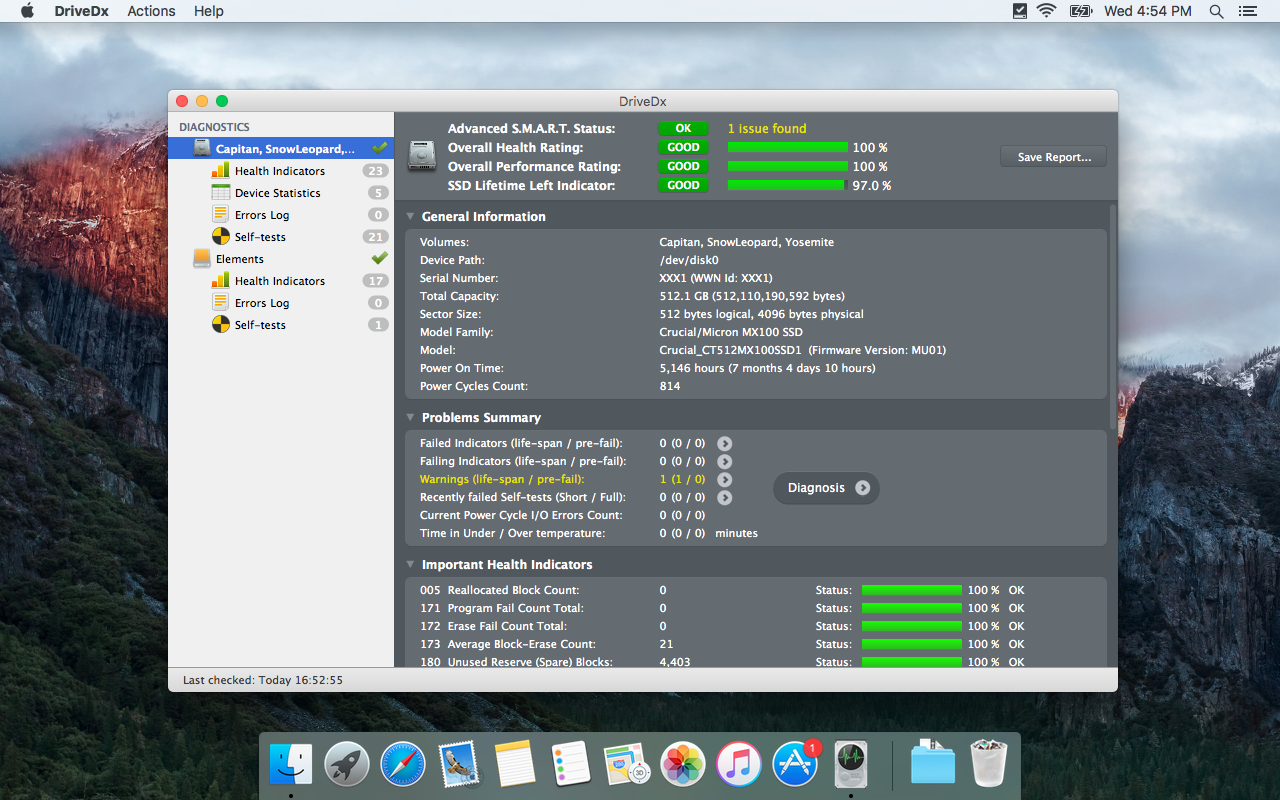
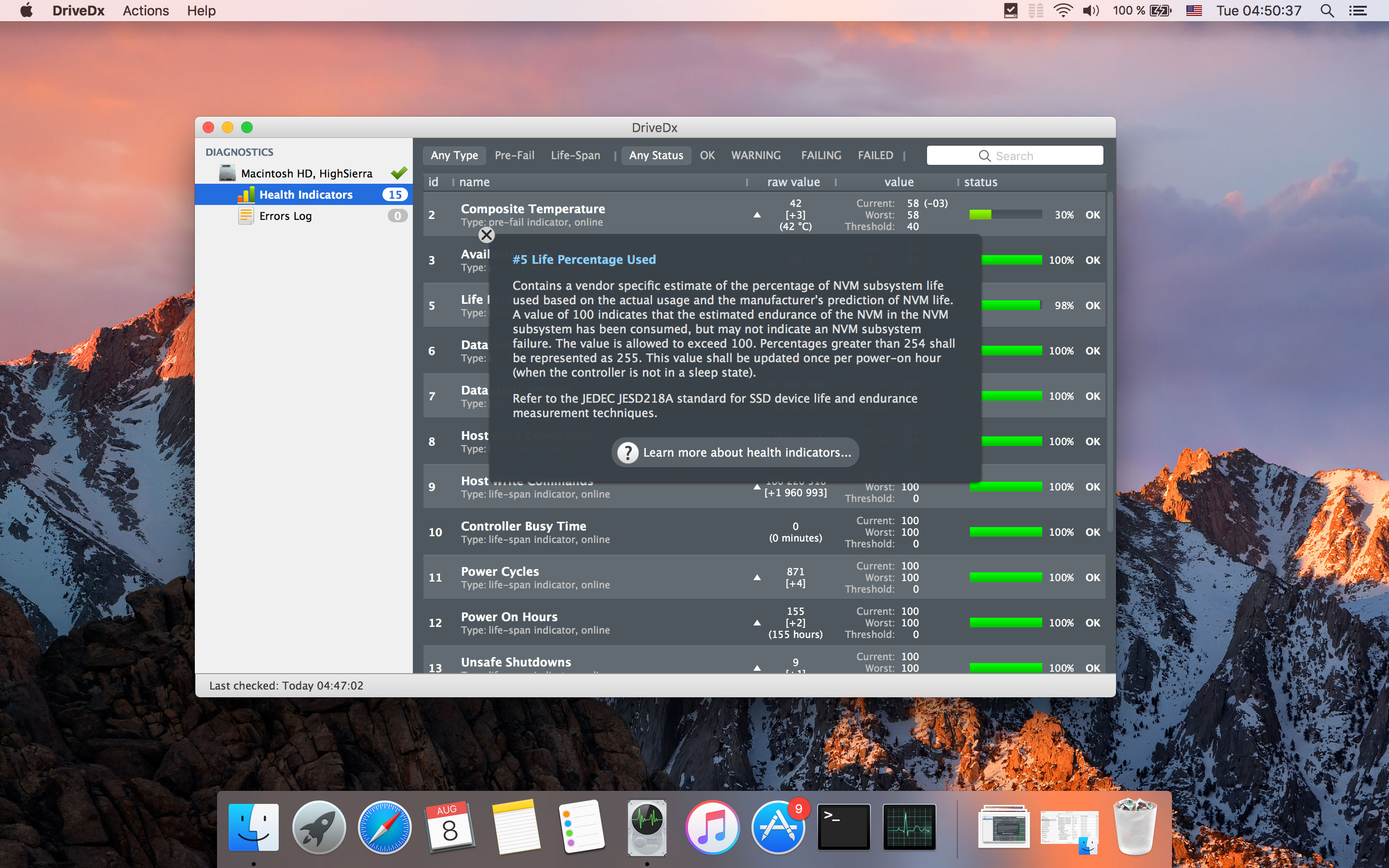
This year DriveDx received Macworld Editors' Choice Award, receiving the maximum possible 5 stars. The Macworld Editor's Choice Awards is one of the most prestigious awards in the industry. Unlike many other drive health diagnostics utilities that simply check built-in S.M.A.R.T. status, DriveDx performs overall drive health diagnostics using drive health indicators (like SSD wear out / endurance, reallocated bad sectors, offline bad sectors, pending sectors, I/O errors, and more) that most closely correlate with drive failures according to the statistics reported in the latest researches focused on identifying drive failure trends. This gives a user a comprehensive picture of a current drive health status and enables foreseeing potential problems with drive failure and loss of sensitive data. Moreover, DriveDx shows this information on a user-friendly Mac-style interface in an easy-to-understand format.
"Here's a DriveDx triumph. DriveDx showed my just out of AppleCare iMac with two pre-fail conditions for the hard drive. Made appointment and took it to Genius Bar yesterday. Tech looked at DriveDx and was very impressed. Even though out of warranty - they replaced the drive without question," said Michael Sidoric, CapMac User Group Treasurer, ex-Vice President of CapMac.org. "God knows how many dollars and troubles DriveDx saved me since I had several vital FinalCut projects on it."
DriveDx is a combined drive health analysis and forecasting tool. It monitors and analyzes changes to S.M.A.R.T. attributes in order to continuously evaluate drive health status and predict drive failures. In addition to "Failed" and "OK" drive statutes DriveDx supports "Warning" and "Failing" statuses indicating that a drive is in a pre-failure status and backup of sensitive data is highly recommended.
DriveDx performs both SSD and HDD health diagnostics. Moreover, it uses a separate set of indicators for SSD and HDD to monitor drive health status. This is particularly important as SSD works different from HDD, and requires a different algorithm to check its health status. Also, SSDs typically are more dependent on firmware than HDDs, and DriveDx has been programmed to support many versions of firmware (please see our website for a complete list of supported firmware).
DriveDx allows configuring the delivery of customized drive status and free space reports by email and therefore does not require user presence to inform about drive status changes. In addition, DriveDx can launch built-in drive diagnostics self-tests. Drive self-tests will help to quickly identify if the drive is faulty.
DriveDx is the first utility of its kind to have a real user-friendly Mac-style interface. It is organized in a way that allows a user to view and understand drive status and its performance at a glance. User can switch between different view modes to drill up or down data related to drive health, including S.M.A.R.T. indicators and attributes, drive statistics and errors.
What's New in DriveDx 1.8.3:
* App notarized for macOS 10.15 Catalina,
* SAT SMART Driver notarized and compatible with macOS 10.15 Catalina,
* Improved disk health diagnostic algorithms and heuristics
* Many stability improvements
* Many cosmetics tweaks and fixes
DriveDx feature highlights:
* Support of modern SSDs and HDDs
* SSD lifetime left indicator
* Different routines for SSD and HDD health evaluation and diagnostics
* Real-time SSD & HDD health status monitoring
* User-friendly and intuitive UI
* Multi-tier warning system that will inform the user about deviations from the normal state of drive attributes
* Diagnostic Knowledge Base online auto-updating
* Drive overall health rating
* Drive overall performance rating (if drive supports this subset of indicators)
* Device statistics
* I/O errors monitoring
* Drive free space monitoring
* Support of drive short and full (extended) self-tests
* Sending a warning whenever a problem with a drive firmware exists
* Saving detailed drive status reports to a file
* Warning a user with pop-up notifications about errors and failures
* Displaying drive status on a macOS status bar
* Runs natively on macOS
System Requirements:
* macOS 10.6.8 or newer
Pricing and Availability - DriveDx has 4 types of licenses that are currently being offered on promotion:
* Personal License - $19.99 (USD)
* Family License - $39.99
* Business License - starting from $99.99
* IT-Consultant License - starting from $49.99
DriveDx can be purchased from the BinaryFruit website. A fully functional 15-day trial version is available for download at our website. Review copies are available upon request.
DriveDx 1.8.3: https://binaryfruit.com/drivedx
Download DriveDx: https://binaryfruit.com/download/drivedx/mac/1?ref=pr
Purchase: https://binaryfruit.com/store
Screenshot 1: https://binaryfruit.com/permalink/press-release/drivedx/mac/1_8_3/DriveDx_screenshot_1.png
Screenshot 2: https://binaryfruit.com/permalink/press-release/drivedx/mac/1_8_3/DriveDx_screenshot_2.jpg
Application Icon: https://binaryfruit.com/permalink/press-release/drivedx/mac/1_8_3/DriveDxIcon512x512.png
BinaryFruit is a team of creative IT professionals developing the most comprehensive and user-friendly macOS tools and solutions. We make fruitful software! Copyright (C) 2012-2019 BinaryFruit. All Rights Reserved. Apple, the Apple logo, macOS are registered trademarks of Apple Inc. in the U.S. and/or other countries.
*******
Link To Article: https://prmac.com/release-id-83656.htm
*******
---------------------------------------------------------------------------------
Note that you can alter delivered distributions at any time.
Login to your account on prMac to alter your channel selection, or to opt-out at any time.
DriveDx 1.8.3 lands ready for macOS Catalina - Published on 09/18/19
BinaryFruit today announces the immediate availability of DriveDx 1.8.3, its award-winning solution for SSD and HDD health diagnostics and monitoring. Now it's ready for macOS Catalina. As macOS does not have a comprehensive drive health indicator, DriveDx fills a critical role in measuring the overall health of both SSD and HDD drives. Because DriveDx tracks more indicators of impending failure than any other product on the market, users will get an advanced warning before their drives fail.
San Francisco, California - BinaryFruit today is pleased to announce the release and immediate availability of DriveDx 1.8.3, its award-winning solution for SSD and HDD health diagnostics and monitoring. New version is now fully compatible with macOS 10.15 Catalina. As macOS does not have a comprehensive drive health indicator, DriveDx fills a critical role in measuring the overall health of both SSD and HDD drives. Because DriveDx tracks more indicators of impending failure than any other product on the market, users will get an advanced warning before their drives fail. This will allow them to take action to avert the failure and save themselves from resulting data loss and downtime.
This year DriveDx received Macworld Editors' Choice Award, receiving the maximum possible 5 stars. The Macworld Editor's Choice Awards is one of the most prestigious awards in the industry. Unlike many other drive health diagnostics utilities that simply check built-in S.M.A.R.T. status, DriveDx performs overall drive health diagnostics using drive health indicators (like SSD wear out / endurance, reallocated bad sectors, offline bad sectors, pending sectors, I/O errors, and more) that most closely correlate with drive failures according to the statistics reported in the latest researches focused on identifying drive failure trends. This gives a user a comprehensive picture of a current drive health status and enables foreseeing potential problems with drive failure and loss of sensitive data. Moreover, DriveDx shows this information on a user-friendly Mac-style interface in an easy-to-understand format.
"Here's a DriveDx triumph. DriveDx showed my just out of AppleCare iMac with two pre-fail conditions for the hard drive. Made appointment and took it to Genius Bar yesterday. Tech looked at DriveDx and was very impressed. Even though out of warranty - they replaced the drive without question," said Michael Sidoric, CapMac User Group Treasurer, ex-Vice President of CapMac.org. "God knows how many dollars and troubles DriveDx saved me since I had several vital FinalCut projects on it."
DriveDx is a combined drive health analysis and forecasting tool. It monitors and analyzes changes to S.M.A.R.T. attributes in order to continuously evaluate drive health status and predict drive failures. In addition to "Failed" and "OK" drive statutes DriveDx supports "Warning" and "Failing" statuses indicating that a drive is in a pre-failure status and backup of sensitive data is highly recommended.
DriveDx performs both SSD and HDD health diagnostics. Moreover, it uses a separate set of indicators for SSD and HDD to monitor drive health status. This is particularly important as SSD works different from HDD, and requires a different algorithm to check its health status. Also, SSDs typically are more dependent on firmware than HDDs, and DriveDx has been programmed to support many versions of firmware (please see our website for a complete list of supported firmware).
DriveDx allows configuring the delivery of customized drive status and free space reports by email and therefore does not require user presence to inform about drive status changes. In addition, DriveDx can launch built-in drive diagnostics self-tests. Drive self-tests will help to quickly identify if the drive is faulty.
DriveDx is the first utility of its kind to have a real user-friendly Mac-style interface. It is organized in a way that allows a user to view and understand drive status and its performance at a glance. User can switch between different view modes to drill up or down data related to drive health, including S.M.A.R.T. indicators and attributes, drive statistics and errors.
What's New in DriveDx 1.8.3:
* App notarized for macOS 10.15 Catalina,
* SAT SMART Driver notarized and compatible with macOS 10.15 Catalina,
* Improved disk health diagnostic algorithms and heuristics
* Many stability improvements
* Many cosmetics tweaks and fixes
DriveDx feature highlights:
* Support of modern SSDs and HDDs
* SSD lifetime left indicator
* Different routines for SSD and HDD health evaluation and diagnostics
* Real-time SSD & HDD health status monitoring
* User-friendly and intuitive UI
* Multi-tier warning system that will inform the user about deviations from the normal state of drive attributes
* Diagnostic Knowledge Base online auto-updating
* Drive overall health rating
* Drive overall performance rating (if drive supports this subset of indicators)
* Device statistics
* I/O errors monitoring
* Drive free space monitoring
* Support of drive short and full (extended) self-tests
* Sending a warning whenever a problem with a drive firmware exists
* Saving detailed drive status reports to a file
* Warning a user with pop-up notifications about errors and failures
* Displaying drive status on a macOS status bar
* Runs natively on macOS
System Requirements:
* macOS 10.6.8 or newer
Pricing and Availability - DriveDx has 4 types of licenses that are currently being offered on promotion:
* Personal License - $19.99 (USD)
* Family License - $39.99
* Business License - starting from $99.99
* IT-Consultant License - starting from $49.99
DriveDx can be purchased from the BinaryFruit website. A fully functional 15-day trial version is available for download at our website. Review copies are available upon request.
DriveDx 1.8.3: https://binaryfruit.com/drivedx
Download DriveDx: https://binaryfruit.com/download/drivedx/mac/1?ref=pr
Purchase: https://binaryfruit.com/store
Screenshot 1: https://binaryfruit.com/permalink/press-release/drivedx/mac/1_8_3/DriveDx_screenshot_1.png
Screenshot 2: https://binaryfruit.com/permalink/press-release/drivedx/mac/1_8_3/DriveDx_screenshot_2.jpg
Application Icon: https://binaryfruit.com/permalink/press-release/drivedx/mac/1_8_3/DriveDxIcon512x512.png
BinaryFruit is a team of creative IT professionals developing the most comprehensive and user-friendly macOS tools and solutions. We make fruitful software! Copyright (C) 2012-2019 BinaryFruit. All Rights Reserved. Apple, the Apple logo, macOS are registered trademarks of Apple Inc. in the U.S. and/or other countries.
*******
Link To Article: https://prmac.com/release-id-83656.htm
*******
---------------------------------------------------------------------------------
Note that you can alter delivered distributions at any time.
Login to your account on prMac to alter your channel selection, or to opt-out at any time.
Time Squad: Alpha Strike! introduced for iOS - New Space Shooter Game
A new article has been published at prMac.
Time Squad: Alpha Strike! introduced for iOS - New Space Shooter Game - Published on 09/16/19
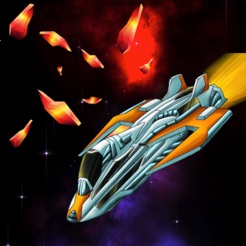
Biosoftworld Game Studios introduces Time Squad: Alpha Strike! 1.0.1, the company's new space shooting game developed exclusively for iOS devices. It's the 21st century and an elite squadron of advanced combat earth spaceships is coming back through space and time in order to rescue Earth from a catastrophic alien invasion. Players pilot one of the front-end spacecraft in three different vast settings: solar system, earth's orbit and finally in a ground attack against aliens.
Athens, Greece - Biosoftworld Game Studios is proud to announce the release of Time Squad: Alpha Strike! 1.0.1, the company's new space shooting game developed exclusively for iPhone, iPod touch and iPad. Offering unique gameplay, players must fight aliens in the solar system, the earth's orbit and even on theground. They will have to save occupied Earth and defeat alien ground forces.
An elite squadron of advanced combat earth spaceships is coming back in the 21st century through space and time in order to rescue Earth from a catastrophic alien invasion. This elite squadron will try to penetrate the alien defences in our solar system and on earth's orbit. If this happens an alpha strike against alien ground forces will be possible.
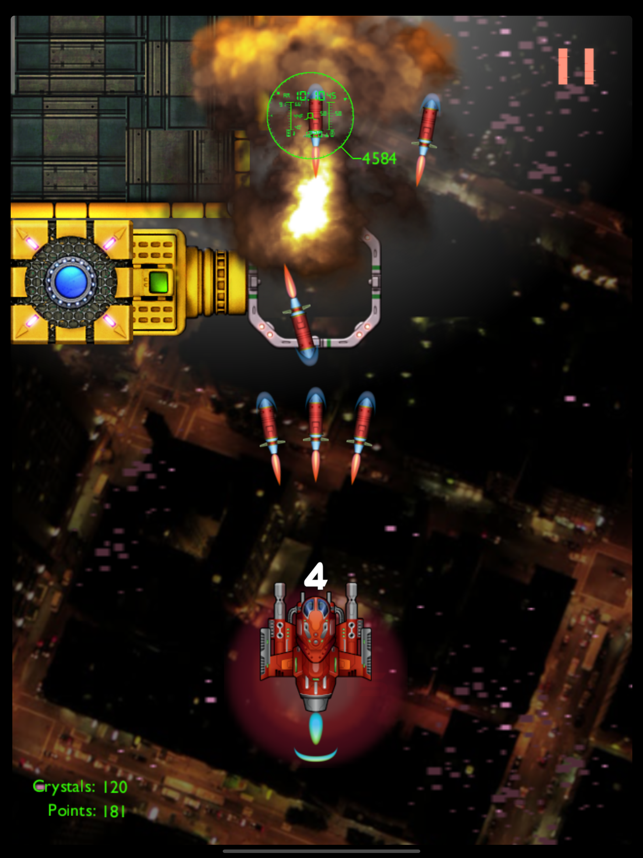
Players pilot one of the front-end spacecrafts in three different vast settings: solar system, earth's orbit and finally in a ground attack against aliens. They may encounter alien spaceships, mines, turrets in earth's orbit, missiles, and even earth military assets (like tanks, stealth jets or air-defences) all captured by aliens during invasion. Lastly In order for a player to proceed to an Orbit Attack they must first complete the Solar Attack. The ground assault is endless and everyone can try and reach top High Scores. Players will encounter stealth spacecraft and camouflaged ground forces. All players can share their success with friends on the Game Center leaderboard.
Device Requirements:
* iPhone, iPad, and iPod touch
* Requires iOS 8.0 or later
* 81.4 MB
Pricing and Availability:
Time Squad: Alpha Strike! 1.0.1 is Free (With In-App Purchases) and available worldwide exclusively through the App Store in the Games category. For more information, please contact Aikaterini Vlachantoni.
Time Squad: Alpha Strike! 1.0.1: https://www.biosoftworld.net/
Download from the App Store: https://apps.apple.com/app/time-squad-alpha-strike/id1452362611
Screenshot: https://is4-ssl.mzstatic.com/image/thumb/Purple113/v4/92/ae/16/92ae1678-763c-da97-a95a-aaf750cef21c/pr_source.png/643x0w.png
App Icon: https://is3-ssl.mzstatic.com/image/thumb/Purple123/v4/55/18/02/551802f8-e06f-003e-1925-2df28f99c214/AppIcon-1-0-1x_U007emarketing-0-85-220-7.png/246x0w.jpg
Founded from Biosoftworld Ltd, as an experiment in 2018, Biosoftworld Game Studios & Labs is an innovative technology studio operating in London and Athens. We explore artificial intelligence, virtual and augmented reality and we create mobile games and applications. Everything we do is based on the success of the software experiences we provide to our customers. All Material and Software (C) Copyright 2019 Biosoftworld Game Studios & Labs. All Rights Reserved. Apple, the Apple logo, iPhone, iPod and iPad are registered trademarks of Apple Inc. in the U.S. and/or other countries. Other trademarks and registered trademarks may be the property of their respective owners.
*******
Link To Article: https://prmac.com/release-id-83653.htm
*******
---------------------------------------------------------------------------------
Note that you can alter delivered distributions at any time.
Login to your account on prMac to alter your channel selection, or to opt-out at any time.
Time Squad: Alpha Strike! introduced for iOS - New Space Shooter Game - Published on 09/16/19
Biosoftworld Game Studios introduces Time Squad: Alpha Strike! 1.0.1, the company's new space shooting game developed exclusively for iOS devices. It's the 21st century and an elite squadron of advanced combat earth spaceships is coming back through space and time in order to rescue Earth from a catastrophic alien invasion. Players pilot one of the front-end spacecraft in three different vast settings: solar system, earth's orbit and finally in a ground attack against aliens.
Athens, Greece - Biosoftworld Game Studios is proud to announce the release of Time Squad: Alpha Strike! 1.0.1, the company's new space shooting game developed exclusively for iPhone, iPod touch and iPad. Offering unique gameplay, players must fight aliens in the solar system, the earth's orbit and even on theground. They will have to save occupied Earth and defeat alien ground forces.
An elite squadron of advanced combat earth spaceships is coming back in the 21st century through space and time in order to rescue Earth from a catastrophic alien invasion. This elite squadron will try to penetrate the alien defences in our solar system and on earth's orbit. If this happens an alpha strike against alien ground forces will be possible.
Players pilot one of the front-end spacecrafts in three different vast settings: solar system, earth's orbit and finally in a ground attack against aliens. They may encounter alien spaceships, mines, turrets in earth's orbit, missiles, and even earth military assets (like tanks, stealth jets or air-defences) all captured by aliens during invasion. Lastly In order for a player to proceed to an Orbit Attack they must first complete the Solar Attack. The ground assault is endless and everyone can try and reach top High Scores. Players will encounter stealth spacecraft and camouflaged ground forces. All players can share their success with friends on the Game Center leaderboard.
Device Requirements:
* iPhone, iPad, and iPod touch
* Requires iOS 8.0 or later
* 81.4 MB
Pricing and Availability:
Time Squad: Alpha Strike! 1.0.1 is Free (With In-App Purchases) and available worldwide exclusively through the App Store in the Games category. For more information, please contact Aikaterini Vlachantoni.
Time Squad: Alpha Strike! 1.0.1: https://www.biosoftworld.net/
Download from the App Store: https://apps.apple.com/app/time-squad-alpha-strike/id1452362611
Screenshot: https://is4-ssl.mzstatic.com/image/thumb/Purple113/v4/92/ae/16/92ae1678-763c-da97-a95a-aaf750cef21c/pr_source.png/643x0w.png
App Icon: https://is3-ssl.mzstatic.com/image/thumb/Purple123/v4/55/18/02/551802f8-e06f-003e-1925-2df28f99c214/AppIcon-1-0-1x_U007emarketing-0-85-220-7.png/246x0w.jpg
Founded from Biosoftworld Ltd, as an experiment in 2018, Biosoftworld Game Studios & Labs is an innovative technology studio operating in London and Athens. We explore artificial intelligence, virtual and augmented reality and we create mobile games and applications. Everything we do is based on the success of the software experiences we provide to our customers. All Material and Software (C) Copyright 2019 Biosoftworld Game Studios & Labs. All Rights Reserved. Apple, the Apple logo, iPhone, iPod and iPad are registered trademarks of Apple Inc. in the U.S. and/or other countries. Other trademarks and registered trademarks may be the property of their respective owners.
*******
Link To Article: https://prmac.com/release-id-83653.htm
*******
---------------------------------------------------------------------------------
Note that you can alter delivered distributions at any time.
Login to your account on prMac to alter your channel selection, or to opt-out at any time.
Sleep Music Expert's Science-Backed App to Fight Insomnia
A new article has been published at prMac.
Sleep Music Expert's Science-Backed App to Fight Insomnia - Published on 09/16/19
Indie developer, Thomas Dickson announces Can't Sleep 1.1.5, an important update to his sleep app on iOS and Android devices. Can't Sleep's real-time computer-generated soundscapes now have reduced musical activity to minimize cognitive arousal thereby reducing sleep-onset insomnia. The artificially intelligent music helps you sleep by distracting you from wakeful thoughts, calming your mood & relaxing your body. Increase your motivation and productivity, reduce stress & anxiety, and much more.
Sunshine Coast, Buddina - Author of "How Does Music Aid Sleep? Literature Review," Thomas Dickson is proud to announce the release of Can't Sleep 1.1.5, an important update to the soundscapes composed through his sleep app on iOS and Android devices. Can't Sleep's real-time computer-generated soundscapes now have reduced musical activity to minimize cognitive arousal thereby reducing sleep-onset insomnia.
Can't Sleep is informed by 100+ research articles on music and sleep psychology. According to Dickson, "studies have shown music to be one of the most effective non-drug therapies for sleep but not all use cases of music are equal". Regular music is often too distracting or engaging because it is so structured, Can't Sleep sounds like walking through a forest of instruments and sounds.
Can't Sleep composes soundscapes with 200+ instruments and sounds to provide a unique listening experience and further allows users to disable any part of the soundscape to decrease engagement and/or cognitive arousal.
One of the innovative features of Can't Sleep is that the soundscapes are composed in real-time and are never the same. "The problem with listening to the same music every night is that it becomes too familiar and then frustratingly repetitive" says Dickson. Using Can't Sleep regularly and only at bedtime, the soundscapes can become strongly associated with sleep but not repetitive.
Can't Sleep is the only sleep app that allows users to choose both the instrument timbre and sounds for sleep. The DIY soundscape builder includes realistic classical, ambient and ethnic instruments as well as relaxing sound effects and ambience. These include piano, cello, synthesizers, pan flutes, tabla, Tibetan bells, bird song, rain, waterfalls and much more. "Music is a very personal experience. Our favourite sounds can reduce stress through visualisation and reminding us of the past" says Dickson.
Available on Android, iPhone and iPad, the app is lightweight saving battery life, storage and device memory. For increased performance, after 45 minutes of playing soundscapes the app stops, by which time most individuals have fallen asleep.
Features:
* Effective: Built from research for a PhD on the psychology of music for sleep
* No Disruptions: Smooth continuous audio with no pops, clicks, silences or ads
* Unlimited Variety: Choose from 18 themes or build your own with 200 sounds
* Never Repeats: New soundscape created in real-time using our A.I. composer
* Personalized: Music speed based on your heartrate and disable any sounds you want
* Realistic Sounds: Real audio samples of instruments and ambient sound recordings
* Convenient: Sounds auto-stop after 45 minutes and no internet required
* Seamless Experience: Lightweight design with full screen high definition calming imagery
Can't Sleep has been involved with University of Melbourne, University of New South Wales, Queensland University of Technology and presented at the International Symposium on Performance Science and the Conference of the Australian Music & Psychology Society. Paralympian Rassa Martin says about using the app "I set it up, it took me 10 seconds and I can't remember falling asleep."
Language Support:
Can't Sleep supports Chinese (simplified & traditional), Dutch, English, French, German, Italian, Japanese, Korean, Portuguese, Russian and Spanish languages.
Device Requirements:
* iPhone: iOS 11.0 or later and compatible with iPhone, iPad, Apple Watch and iPod touch
* Android: Version 6.0.0 (Marshmallow) or later and compatible with Android mobile and tablet devices
Pricing and Availability:
* Free Version (Baroque theme only)
* Monthly Subscription: $4.99 USD
* Annual Subscription: $19.99 USD ($1.54 USD per month)
Can't Sleep 1.1.5: https://www.cantsleepapp.com
Download from the App Store: https://itunes.apple.com/us/app/cant-sleep/id1332698309
Download from Google Play: https://play.google.com/store/apps/details?id=com.gtdapps.cantsleep
Video Demo: https://drive.google.com/open?id=1Qgc3pKrRMw1bqz188krI_6efovCQlBFz
Screenshots: https://drive.google.com/open?id=1IDd_MOwFf766tZAMF0dYaBNFPEBK7mLA
App Icon: https://drive.google.com/open?id=1hga5vRoK38f0G45EuY-mdwojcyT7TLew
Can't Sleep was invented by Thomas Dickson, the Australian expert in music and sleep psychology. The artificially intelligent music helps you sleep by distracting you from wakeful thoughts, calming your mood and relaxing your body. Can't Sleep has been presented at the Australian Music Psychology Conference, TechSauce Global Summit, Bigsound, Creative2 and Collider Accelerator. It also received MIT App Inventor App of the Month for best design. All Material and Software (C) Copyright 2019 Thomas Dickson. All Rights Reserved. Apple, the Apple logo, iPhone, iPod and iPad are registered trademarks of Apple Inc. in the U.S. and/or other countries. Other trademarks and registered trademarks may be the property of their respective owners.
*******
Link To Article: https://prmac.com/release-id-83652.htm
*******
---------------------------------------------------------------------------------
Note that you can alter delivered distributions at any time.
Login to your account on prMac to alter your channel selection, or to opt-out at any time.
Sleep Music Expert's Science-Backed App to Fight Insomnia - Published on 09/16/19
Indie developer, Thomas Dickson announces Can't Sleep 1.1.5, an important update to his sleep app on iOS and Android devices. Can't Sleep's real-time computer-generated soundscapes now have reduced musical activity to minimize cognitive arousal thereby reducing sleep-onset insomnia. The artificially intelligent music helps you sleep by distracting you from wakeful thoughts, calming your mood & relaxing your body. Increase your motivation and productivity, reduce stress & anxiety, and much more.
Sunshine Coast, Buddina - Author of "How Does Music Aid Sleep? Literature Review," Thomas Dickson is proud to announce the release of Can't Sleep 1.1.5, an important update to the soundscapes composed through his sleep app on iOS and Android devices. Can't Sleep's real-time computer-generated soundscapes now have reduced musical activity to minimize cognitive arousal thereby reducing sleep-onset insomnia.
Can't Sleep is informed by 100+ research articles on music and sleep psychology. According to Dickson, "studies have shown music to be one of the most effective non-drug therapies for sleep but not all use cases of music are equal". Regular music is often too distracting or engaging because it is so structured, Can't Sleep sounds like walking through a forest of instruments and sounds.
Can't Sleep composes soundscapes with 200+ instruments and sounds to provide a unique listening experience and further allows users to disable any part of the soundscape to decrease engagement and/or cognitive arousal.
One of the innovative features of Can't Sleep is that the soundscapes are composed in real-time and are never the same. "The problem with listening to the same music every night is that it becomes too familiar and then frustratingly repetitive" says Dickson. Using Can't Sleep regularly and only at bedtime, the soundscapes can become strongly associated with sleep but not repetitive.
Can't Sleep is the only sleep app that allows users to choose both the instrument timbre and sounds for sleep. The DIY soundscape builder includes realistic classical, ambient and ethnic instruments as well as relaxing sound effects and ambience. These include piano, cello, synthesizers, pan flutes, tabla, Tibetan bells, bird song, rain, waterfalls and much more. "Music is a very personal experience. Our favourite sounds can reduce stress through visualisation and reminding us of the past" says Dickson.
Available on Android, iPhone and iPad, the app is lightweight saving battery life, storage and device memory. For increased performance, after 45 minutes of playing soundscapes the app stops, by which time most individuals have fallen asleep.
Features:
* Effective: Built from research for a PhD on the psychology of music for sleep
* No Disruptions: Smooth continuous audio with no pops, clicks, silences or ads
* Unlimited Variety: Choose from 18 themes or build your own with 200 sounds
* Never Repeats: New soundscape created in real-time using our A.I. composer
* Personalized: Music speed based on your heartrate and disable any sounds you want
* Realistic Sounds: Real audio samples of instruments and ambient sound recordings
* Convenient: Sounds auto-stop after 45 minutes and no internet required
* Seamless Experience: Lightweight design with full screen high definition calming imagery
Can't Sleep has been involved with University of Melbourne, University of New South Wales, Queensland University of Technology and presented at the International Symposium on Performance Science and the Conference of the Australian Music & Psychology Society. Paralympian Rassa Martin says about using the app "I set it up, it took me 10 seconds and I can't remember falling asleep."
Language Support:
Can't Sleep supports Chinese (simplified & traditional), Dutch, English, French, German, Italian, Japanese, Korean, Portuguese, Russian and Spanish languages.
Device Requirements:
* iPhone: iOS 11.0 or later and compatible with iPhone, iPad, Apple Watch and iPod touch
* Android: Version 6.0.0 (Marshmallow) or later and compatible with Android mobile and tablet devices
Pricing and Availability:
* Free Version (Baroque theme only)
* Monthly Subscription: $4.99 USD
* Annual Subscription: $19.99 USD ($1.54 USD per month)
Can't Sleep 1.1.5: https://www.cantsleepapp.com
Download from the App Store: https://itunes.apple.com/us/app/cant-sleep/id1332698309
Download from Google Play: https://play.google.com/store/apps/details?id=com.gtdapps.cantsleep
Video Demo: https://drive.google.com/open?id=1Qgc3pKrRMw1bqz188krI_6efovCQlBFz
Screenshots: https://drive.google.com/open?id=1IDd_MOwFf766tZAMF0dYaBNFPEBK7mLA
App Icon: https://drive.google.com/open?id=1hga5vRoK38f0G45EuY-mdwojcyT7TLew
Can't Sleep was invented by Thomas Dickson, the Australian expert in music and sleep psychology. The artificially intelligent music helps you sleep by distracting you from wakeful thoughts, calming your mood and relaxing your body. Can't Sleep has been presented at the Australian Music Psychology Conference, TechSauce Global Summit, Bigsound, Creative2 and Collider Accelerator. It also received MIT App Inventor App of the Month for best design. All Material and Software (C) Copyright 2019 Thomas Dickson. All Rights Reserved. Apple, the Apple logo, iPhone, iPod and iPad are registered trademarks of Apple Inc. in the U.S. and/or other countries. Other trademarks and registered trademarks may be the property of their respective owners.
*******
Link To Article: https://prmac.com/release-id-83652.htm
*******
---------------------------------------------------------------------------------
Note that you can alter delivered distributions at any time.
Login to your account on prMac to alter your channel selection, or to opt-out at any time.
DEVONtechnologies introduces DEVONthink 3.0 for macOS
A new article has been published at prMac.
DEVONtechnologies introduces DEVONthink 3.0 for macOS - Published on 09/13/19
DEVONtechnologies today releases DEVONthink 3.0 for Mac. The popular smart document and information manager receives a complete user interface overhaul. It also adds encrypted databases, an extended search language, custom metadata, and tables with typed data and form views. Office users can add imprints to PDFs and images, use the improved OCR engine, and share databases via the rewritten web interface. Smart rules and reminders make DEVONthink 3 easier to automate than ever before.
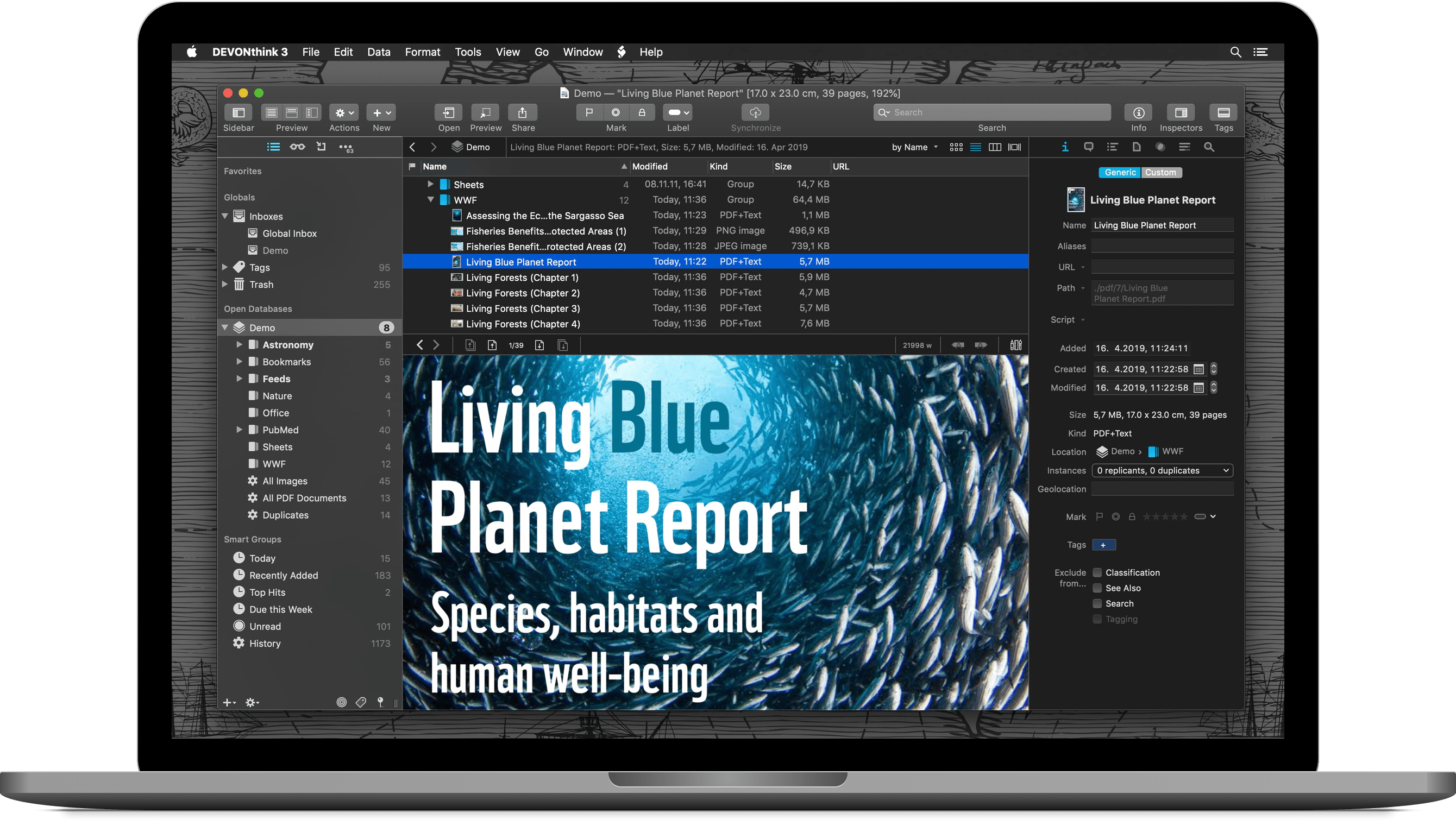
Coeur d'Alene, Idaho - DEVONtechnologies today releases DEVONthink 3.0 for maxOS. The popular smart document and information manager receives a complete user interface overhaul. It now comes with support for dark mode, an extended search language, and a new menu extra for capturing notes and more. Version 3.0 also adds custom metadata and tables with typed data and form views. Office users can add imprints to PDFs and images, use the improved OCR engine, and share databases via the rewritten web interface. Smart rules and reminders make DEVONthink 3 easier to automate than ever before.
DEVONthink is DEVONtechnologies' document and information management solution. It supports a large variety of file formats and stores them in a database enhanced by artificial intelligence (AI). Many document formats can be directly viewed, edited, and annotated. A powerful search language finds documents in an instant, smart groups keep them always at hand.
Sophisticated organization tools, AI-based techniques that handle even the largest collections, and numerous integration options make DEVONthink the work environment of choice for researchers, lawyers, and educators. Smart rules, flexible reminders, and deep AppleScript support allow automating even complex repeating tasks. And with its fast, reliable, and secure synchronization users keep their data available on all their Macs. DEVONthink To Go for iPad and iPhone completes the DEVONthink ecosystem.
* Keep your data together in one place
* Scan your paper, archive your email
* Let artificial intelligence help you organize your data
* Automate tasks with smart rules and reminders
* Sync your data to all your devices, fast and secure
* Share your data with anyone, whether they use Mac or PC
New in DEVONthink 3.0:
The long-awaited third DEVONthink generation debuts, quite literally, hundreds of new features and improvements.
As the most obvious change, DEVONthink 3.0 brings a completely overhauled user interface including support for macOS Mojave's dark mode. It follows a modern single-window design that integrates many elements that used to appear in separate windows.
An extended sidebar gives access to databases, favorites, smart groups, smart rules, and filters as well as to a new reading list, import options, and more. Inspectors present metadata about documents and groups, offer AI assistance, and let the user set reminders or search within the document.
"DEVONthink 3 is the most feature-rich upgrade we have ever published. For the new DEVONthink generation we revisited every aspect of the app, from the user interface to search, from the office functionality to automation. And we added what we found missing." - Eric Bohnisch-Volkmann, President of DEVONtechnologies
Capturing text, audio, and voice notes, screenshots, or web clippings becomes much easier with the redesigned Sorter. It also allows finding groups in all open databases for adding files or data from other apps via drag-and-drop. The Sorter is available as a menu bar extension or a tab docked to the side of the screen.
More subtle are the numerous changes to the search engine which now better supports Asian languages, indexes also PDF and RTF attachments, and highlights search hits more precisely. Its enhanced search language allows prefixes for mouse-less specific searching, and filters quickly focus the displayed items on tags, dates, marks, or geolocation.
For the office environment DEVONthink 3 brings a new 64-bit optimized OCR engine that supports multiple CPU cores, Asian languages, barcode detection, and multiple output formats. It's now possible to add custom imprints to images and PDFs including placeholder text and Bates numbering. Encrypted databases keep prying eyes away.
The rewritten web interface gives coworkers or clients access to the document databases even when they're not using a Mac. User accounts and per-database permissions give fine-grained control over what web visitors see and can do. TLS support makes sure all connections are encrypted.
Other improvements include geolocation metadata, ratings, and custom, typed metadata that can be added to all documents and that is, of course, searchable. When importing documents metadata can be converted to tags, and images can be automatically tagged using machine learning.
Markdown and HTML documents can be edited side-by-side with a rendered preview, sheets with tabular data support specific data types and have a form view. Formatting and editing bars keep frequently used tools at hand and adding cross-references has become more versatile with improved WikiLinking and support for the square bracked syntax. DEVONthink 3 now also supports EPUB ebooks and, useful for research, collects highlighted search hits and metadata into summary documents.
Last but not least, DEVONthink 3 massively extends its automation options. Smart rules perform actions based on events and search queries, where events can be anything from a scheduled time to the arrival of a newly imported document. Users can also attach one-time or repeating reminders to any document. They support several alarm options including running scripts. Placeholders insert dynamic data in templates, imprints, or smart rules without requiring any programming skills.
"We have always believed in enabling the computer to free up the user's time for what's really important. DEVONthink 3 holds true to this tradition with new powerful but easy to use automation tools for every workflow. If it can't be automated with DEVONthink 3 then it probably can't be automated." - Eric Bohnisch-Volkmann, President of DEVONtechnologies
Of course, DEVONthink 3 brings a large number of under-the-hood enhancements. To name just a few: better file system integration for indexed files, better background processing, e.g. for email archiving, indexing, or generating thumbnails, and an improved overall performance.
DEVONthink 3 is available in three editions for different needs and budgets: regular, Pro, and Server.
System requirements:
* OS X El Capitan or later
Availability and Pricing:
DEVONthink 3 can be downloaded for free from the DEVONtechnologies website. After the trial period of 30 days or 150 hours of runtime, whichever is later, it requires a license key for one of the three available editions:
* DEVONthink 3: US $99
* DEVONthink Pro 3: US $199
* DEVONthink Server 3: US $499
Every license includes the ability to install the software on two physical machines (seats). Additional seats and upgrades from the previous generation of DEVONthink are available for attractive upgrade prices. DEVONthink 3 is currently not available in the App Store but will become at a later point in time. The former DEVONthink Personal and DEVONnote editions have been retired.
More information:
Customers find more information about our apps on the DEVONtechnologies website. Eric Bohnisch-Volkmann also posts news, opinions, previews, and public betas in his blog Devonian Times.
DEVONthink 3.0: https://www.devontechnologies.com/redirect/devonthink
What's new in DEVONthink 3.0: https://www.devontechnologies.com/apps/devonthink/new
DEVONthink editions compared: https://www.devontechnologies.com/apps/devonthink/editions
Screenshot: https://www.devontechnologies.com/media/pages/press/archive/devonthink-30/1491622749-1568280456/packshot_devonthink_3_dark.png
Company blog: https://blog.devontechnologies.com/
DEVONtechnologies LLC creates end-user and server applications for the Mac and iOS platforms that enhance productivity, organization, and user experience with unique artificial intelligence technology. All applications are focused on both ease of use and satisfying the needs of even the most savvy users. The underlying DEVONtechnology is a flexible and versatile foundation that can be used for a large range of purposes from databases, data mining, and information retrieval to human-computer interfaces. DEVONtechnologies LLC was founded 2002 and incorporated 2004, and is today headquartered in Coeur d'Alene, Idaho, USA. All Material and Software (C) Copyright 2019 DEVONtechnologies LLC. All Rights Reserved. Apple, the Apple logo, Macintosh and macOS are registered trademarks of Apple Inc. in the U.S. and/or other countries. Other trademarks and registered trademarks may be the property of their respective owners.
*******
Link To Article: https://prmac.com/release-id-83649.htm
*******
---------------------------------------------------------------------------------
Note that you can alter delivered distributions at any time.
Login to your account on prMac to alter your channel selection, or to opt-out at any time.
DEVONtechnologies introduces DEVONthink 3.0 for macOS - Published on 09/13/19
DEVONtechnologies today releases DEVONthink 3.0 for Mac. The popular smart document and information manager receives a complete user interface overhaul. It also adds encrypted databases, an extended search language, custom metadata, and tables with typed data and form views. Office users can add imprints to PDFs and images, use the improved OCR engine, and share databases via the rewritten web interface. Smart rules and reminders make DEVONthink 3 easier to automate than ever before.
Coeur d'Alene, Idaho - DEVONtechnologies today releases DEVONthink 3.0 for maxOS. The popular smart document and information manager receives a complete user interface overhaul. It now comes with support for dark mode, an extended search language, and a new menu extra for capturing notes and more. Version 3.0 also adds custom metadata and tables with typed data and form views. Office users can add imprints to PDFs and images, use the improved OCR engine, and share databases via the rewritten web interface. Smart rules and reminders make DEVONthink 3 easier to automate than ever before.
DEVONthink is DEVONtechnologies' document and information management solution. It supports a large variety of file formats and stores them in a database enhanced by artificial intelligence (AI). Many document formats can be directly viewed, edited, and annotated. A powerful search language finds documents in an instant, smart groups keep them always at hand.
Sophisticated organization tools, AI-based techniques that handle even the largest collections, and numerous integration options make DEVONthink the work environment of choice for researchers, lawyers, and educators. Smart rules, flexible reminders, and deep AppleScript support allow automating even complex repeating tasks. And with its fast, reliable, and secure synchronization users keep their data available on all their Macs. DEVONthink To Go for iPad and iPhone completes the DEVONthink ecosystem.
* Keep your data together in one place
* Scan your paper, archive your email
* Let artificial intelligence help you organize your data
* Automate tasks with smart rules and reminders
* Sync your data to all your devices, fast and secure
* Share your data with anyone, whether they use Mac or PC
New in DEVONthink 3.0:
The long-awaited third DEVONthink generation debuts, quite literally, hundreds of new features and improvements.
As the most obvious change, DEVONthink 3.0 brings a completely overhauled user interface including support for macOS Mojave's dark mode. It follows a modern single-window design that integrates many elements that used to appear in separate windows.
An extended sidebar gives access to databases, favorites, smart groups, smart rules, and filters as well as to a new reading list, import options, and more. Inspectors present metadata about documents and groups, offer AI assistance, and let the user set reminders or search within the document.
"DEVONthink 3 is the most feature-rich upgrade we have ever published. For the new DEVONthink generation we revisited every aspect of the app, from the user interface to search, from the office functionality to automation. And we added what we found missing." - Eric Bohnisch-Volkmann, President of DEVONtechnologies
Capturing text, audio, and voice notes, screenshots, or web clippings becomes much easier with the redesigned Sorter. It also allows finding groups in all open databases for adding files or data from other apps via drag-and-drop. The Sorter is available as a menu bar extension or a tab docked to the side of the screen.
More subtle are the numerous changes to the search engine which now better supports Asian languages, indexes also PDF and RTF attachments, and highlights search hits more precisely. Its enhanced search language allows prefixes for mouse-less specific searching, and filters quickly focus the displayed items on tags, dates, marks, or geolocation.
For the office environment DEVONthink 3 brings a new 64-bit optimized OCR engine that supports multiple CPU cores, Asian languages, barcode detection, and multiple output formats. It's now possible to add custom imprints to images and PDFs including placeholder text and Bates numbering. Encrypted databases keep prying eyes away.
The rewritten web interface gives coworkers or clients access to the document databases even when they're not using a Mac. User accounts and per-database permissions give fine-grained control over what web visitors see and can do. TLS support makes sure all connections are encrypted.
Other improvements include geolocation metadata, ratings, and custom, typed metadata that can be added to all documents and that is, of course, searchable. When importing documents metadata can be converted to tags, and images can be automatically tagged using machine learning.
Markdown and HTML documents can be edited side-by-side with a rendered preview, sheets with tabular data support specific data types and have a form view. Formatting and editing bars keep frequently used tools at hand and adding cross-references has become more versatile with improved WikiLinking and support for the square bracked syntax. DEVONthink 3 now also supports EPUB ebooks and, useful for research, collects highlighted search hits and metadata into summary documents.
Last but not least, DEVONthink 3 massively extends its automation options. Smart rules perform actions based on events and search queries, where events can be anything from a scheduled time to the arrival of a newly imported document. Users can also attach one-time or repeating reminders to any document. They support several alarm options including running scripts. Placeholders insert dynamic data in templates, imprints, or smart rules without requiring any programming skills.
"We have always believed in enabling the computer to free up the user's time for what's really important. DEVONthink 3 holds true to this tradition with new powerful but easy to use automation tools for every workflow. If it can't be automated with DEVONthink 3 then it probably can't be automated." - Eric Bohnisch-Volkmann, President of DEVONtechnologies
Of course, DEVONthink 3 brings a large number of under-the-hood enhancements. To name just a few: better file system integration for indexed files, better background processing, e.g. for email archiving, indexing, or generating thumbnails, and an improved overall performance.
DEVONthink 3 is available in three editions for different needs and budgets: regular, Pro, and Server.
System requirements:
* OS X El Capitan or later
Availability and Pricing:
DEVONthink 3 can be downloaded for free from the DEVONtechnologies website. After the trial period of 30 days or 150 hours of runtime, whichever is later, it requires a license key for one of the three available editions:
* DEVONthink 3: US $99
* DEVONthink Pro 3: US $199
* DEVONthink Server 3: US $499
Every license includes the ability to install the software on two physical machines (seats). Additional seats and upgrades from the previous generation of DEVONthink are available for attractive upgrade prices. DEVONthink 3 is currently not available in the App Store but will become at a later point in time. The former DEVONthink Personal and DEVONnote editions have been retired.
More information:
Customers find more information about our apps on the DEVONtechnologies website. Eric Bohnisch-Volkmann also posts news, opinions, previews, and public betas in his blog Devonian Times.
DEVONthink 3.0: https://www.devontechnologies.com/redirect/devonthink
What's new in DEVONthink 3.0: https://www.devontechnologies.com/apps/devonthink/new
DEVONthink editions compared: https://www.devontechnologies.com/apps/devonthink/editions
Screenshot: https://www.devontechnologies.com/media/pages/press/archive/devonthink-30/1491622749-1568280456/packshot_devonthink_3_dark.png
Company blog: https://blog.devontechnologies.com/
DEVONtechnologies LLC creates end-user and server applications for the Mac and iOS platforms that enhance productivity, organization, and user experience with unique artificial intelligence technology. All applications are focused on both ease of use and satisfying the needs of even the most savvy users. The underlying DEVONtechnology is a flexible and versatile foundation that can be used for a large range of purposes from databases, data mining, and information retrieval to human-computer interfaces. DEVONtechnologies LLC was founded 2002 and incorporated 2004, and is today headquartered in Coeur d'Alene, Idaho, USA. All Material and Software (C) Copyright 2019 DEVONtechnologies LLC. All Rights Reserved. Apple, the Apple logo, Macintosh and macOS are registered trademarks of Apple Inc. in the U.S. and/or other countries. Other trademarks and registered trademarks may be the property of their respective owners.
*******
Link To Article: https://prmac.com/release-id-83649.htm
*******
---------------------------------------------------------------------------------
Note that you can alter delivered distributions at any time.
Login to your account on prMac to alter your channel selection, or to opt-out at any time.
Senso - The Smartest Temperature and Humidity Device Ever Made
A new article has been published at prMac.
Senso - The Smartest Temperature and Humidity Device Ever Made - Published on 09/12/19
California based Tahmo Inc. launches its new Kickstarter campaign for Senso. Using the latest in Bluetooth Low Energy, WiFi, and temperature sensing technologies, the power of Senso's design is that it's simple; with no buttons or connectors; you simply pair the Senso sensor to the free Android or iOS app and you're good to go. Senso gives you the power to monitor environmental conditions for the things you care about - locally or from anywhere in the world.
Irvine, California - Today, there are many wireless thermometers available on the market, but very few of them monitor temperature and humidity the smart way. That's why the team at Tahmo, Inc. developed Senso.
Using the latest in Bluetooth Low Energy (BLE), WiFi, and temperature sensing technologies the power of Senso's design is that it's simple; no buttons or connectors, you simply pair the Senso sensor to the free Android or iOS app and you're good to go. Plus, with the Senso WiFi Hub you can connect from anywhere, or extend the Bluetooth range in your home.
Senso's many features to include:
* Measure temperature and humidity with high/low notifications
* Displays temperature values in F and C
* Store temperature and humidity for up to a month on the device itself
* Tracking real time temperature changes on the app's multi location map
* Monitor up to 9 locations from one device
* The standard coin battery can be replaced and has a life of at least 9 months, plus Low battery indicator
* The WiFi Hub to monitor form anywhere in the world
Senso can be placed in its base within your home or office, or can be clipped to your clothing, belt, bag, shoe, or pet while you're on the go. It has many uses ranging from tracking surrounding temperature and humidity to monitoring the environment in your home, wine cellar, pet cage or aquarium, humidor, server room, or even grandma's house.
Health conscious consumers find Senso useful for tracking humidity levels. Humidity is linked to respiratory tract issues, seasonal colds and allergies. Monitoring and reacting to temperature and humidity changes can lead to better health.
Senso keeps track of changes and sends alerts right to your phone or tablet. Using it to monitor temperature and humidity is an excellent way to ensure your loved ones are comfortable and secure, i.e. in a baby or an elder's room.
"The demand for and interest in Senso confirms the market's need for such modern devices" said Mr. Arif Quronfleh, Tahmo Founder and CEO. Mr. Quronfleh continues, "Our team is passionate about creating products that are small, simple to use and improve people's lives. Senso's creation will pave the way for additional product development in other industries such as food & beverage and medical devices."
Tahmo launched a Kickstarter campaign on September 6th with Senso preorder discounts of up to 50% off MSRP. Shipping is estimated to start in December 2019. Click here to visit the Kickstarter campaign.
Senso : https://drive.google.com/open?id=1KQn9sc8V5-x7uKMLZau5d74pDCc4QDvy
Senso - How it works: https://drive.google.com/open?id=1q2DdVshmsUQ51cDsT_Dmale6VWd4YKXI
Senso - Track on the go: https://drive.google.com/open?id=1420CUY1-0mHoC4lF7N8PNxT_ekuT6HEV
Media Assets: http://bit.ly/senso_media_kit
Tahmo is Building Transformative Healthcare Products for the medical and consumer markets. Tahmo's vision is to become an innovative player in the connected health market segment by creating patented solutions that are functionally superior to other products. Our focus is on three core areas: Connected Medical Devices, Temperature & Humidity Monitoring Devices, and Cloud Based Services. Ultimately, at Tahmo, we are transforming the way people interact with their health and their environment and are bringing a unique capability in the form of smart monitoring. All Material and Software (C) Copyright 2019 Tahmo, Inc. All Rights Reserved. Apple, the Apple logo, iPhone, iPod and iPad are registered trademarks of Apple Inc. in the U.S. and/or other countries. Other trademarks and registered trademarks may be the property of their respective owners.
*******
Link To Article: https://prmac.com/release-id-83650.htm
*******
---------------------------------------------------------------------------------
Note that you can alter delivered distributions at any time.
Login to your account on prMac to alter your channel selection, or to opt-out at any time.
Senso - The Smartest Temperature and Humidity Device Ever Made - Published on 09/12/19
California based Tahmo Inc. launches its new Kickstarter campaign for Senso. Using the latest in Bluetooth Low Energy, WiFi, and temperature sensing technologies, the power of Senso's design is that it's simple; with no buttons or connectors; you simply pair the Senso sensor to the free Android or iOS app and you're good to go. Senso gives you the power to monitor environmental conditions for the things you care about - locally or from anywhere in the world.
Irvine, California - Today, there are many wireless thermometers available on the market, but very few of them monitor temperature and humidity the smart way. That's why the team at Tahmo, Inc. developed Senso.
Using the latest in Bluetooth Low Energy (BLE), WiFi, and temperature sensing technologies the power of Senso's design is that it's simple; no buttons or connectors, you simply pair the Senso sensor to the free Android or iOS app and you're good to go. Plus, with the Senso WiFi Hub you can connect from anywhere, or extend the Bluetooth range in your home.
Senso's many features to include:
* Measure temperature and humidity with high/low notifications
* Displays temperature values in F and C
* Store temperature and humidity for up to a month on the device itself
* Tracking real time temperature changes on the app's multi location map
* Monitor up to 9 locations from one device
* The standard coin battery can be replaced and has a life of at least 9 months, plus Low battery indicator
* The WiFi Hub to monitor form anywhere in the world
Senso can be placed in its base within your home or office, or can be clipped to your clothing, belt, bag, shoe, or pet while you're on the go. It has many uses ranging from tracking surrounding temperature and humidity to monitoring the environment in your home, wine cellar, pet cage or aquarium, humidor, server room, or even grandma's house.
Health conscious consumers find Senso useful for tracking humidity levels. Humidity is linked to respiratory tract issues, seasonal colds and allergies. Monitoring and reacting to temperature and humidity changes can lead to better health.
Senso keeps track of changes and sends alerts right to your phone or tablet. Using it to monitor temperature and humidity is an excellent way to ensure your loved ones are comfortable and secure, i.e. in a baby or an elder's room.
"The demand for and interest in Senso confirms the market's need for such modern devices" said Mr. Arif Quronfleh, Tahmo Founder and CEO. Mr. Quronfleh continues, "Our team is passionate about creating products that are small, simple to use and improve people's lives. Senso's creation will pave the way for additional product development in other industries such as food & beverage and medical devices."
Tahmo launched a Kickstarter campaign on September 6th with Senso preorder discounts of up to 50% off MSRP. Shipping is estimated to start in December 2019. Click here to visit the Kickstarter campaign.
Senso : https://drive.google.com/open?id=1KQn9sc8V5-x7uKMLZau5d74pDCc4QDvy
Senso - How it works: https://drive.google.com/open?id=1q2DdVshmsUQ51cDsT_Dmale6VWd4YKXI
Senso - Track on the go: https://drive.google.com/open?id=1420CUY1-0mHoC4lF7N8PNxT_ekuT6HEV
Media Assets: http://bit.ly/senso_media_kit
Tahmo is Building Transformative Healthcare Products for the medical and consumer markets. Tahmo's vision is to become an innovative player in the connected health market segment by creating patented solutions that are functionally superior to other products. Our focus is on three core areas: Connected Medical Devices, Temperature & Humidity Monitoring Devices, and Cloud Based Services. Ultimately, at Tahmo, we are transforming the way people interact with their health and their environment and are bringing a unique capability in the form of smart monitoring. All Material and Software (C) Copyright 2019 Tahmo, Inc. All Rights Reserved. Apple, the Apple logo, iPhone, iPod and iPad are registered trademarks of Apple Inc. in the U.S. and/or other countries. Other trademarks and registered trademarks may be the property of their respective owners.
*******
Link To Article: https://prmac.com/release-id-83650.htm
*******
---------------------------------------------------------------------------------
Note that you can alter delivered distributions at any time.
Login to your account on prMac to alter your channel selection, or to opt-out at any time.
Silly Memory for iOS Puts a New Spin on the match pair memory games
A new article has been published at prMac.
Silly Memory for iOS Puts a New Spin on the match pair memory games - Published on 09/12/19
French development team CDO Apps today announces Silly Memory 2.3, an important update to their entertaining game for iOS and Android devices. The game puts a different spin on the traditional match pair memory games that players of ages are so familiar with. Gorzbul, an alien fascinated by earthly mankind, needs to decode transmissions from Earth to discover more about humans. Version 2.3 brings 21 entertaining stickers featuring the wacky creatures from the game.
Paris, France - Independent developer, CDO Apps is today proud to announce the release and immediate availability of Silly Memory 2.3, an important update to their entertaining "match pair" memory game for iPhone, iPad, iPod touch and Android devices. The game puts a new spin on the familiar "match pair" memory games enjoyed by players of all ages.
Players take on the role of Gorzbul, an alien fascinated by the Earth's mankind and civilization. Gorzbul must decode transmissions from Earth to discover more about humans. The bad news is that he doesn't have much knowledge about the decoding technology he's using. The good news is he has the aid of a kind artificial intelligence named "AI" to aid him in his attempt to decode the transmissions. AI will help players match the files they receive, allowing them to decode the files.
"Players have long enjoyed the traditional "Concentration" style memory games where they must match a pair to move forward through the game," says CDO Apps co-founder and gerant Clement Choquereau. "We felt it was time to put an entertaining spin on the old way of playing the matching games. Players will be faced with a cosmic and challenging puzzle adventure that they'll never forget!"
Gorzbul and AI aren't the only peculiar characters players will encounter as they play. Other characters include Arebul, Thalweg, Laertal, Gerenul, and Stretal, unique characters all.
The version 2.3 update embeds 21 fun stickers featuring Gorzbul, AI, and all of the wacky characters they meet during their adventure. It's easy to use the stickers. Users simply open a message in iMessage and tap the App Button. Then they tap the Silly Memory Stickers and start sending silly stickers to their friends.
Silly Stickers are also available as a standalone animated sticker pack in the iMessage App Store. The animated stickers provide additional fun for users. They add more expression and emotion to the usual smileys than the 21 images embedded with the game, thanks to the great work done by CDO Apps' animators.
Features include:
* Exciting original gameplay, mixing memory, speed, and logic.
* Story Mode: Experience Gorzbul's silly adventure through 30 challenging levels.
* Endless Mode: Strive to reach the highest score in this infinite play mode.
* Challenge Mode: Climb to the top of the leaderboard and get rewarded every week!
* Develop 4 different technologies to become the best space decoder.
* Having a rough patch? Use Dedocools to gain a little support for the toughest missions.
* 7 characters to discover, all wackier than the last one!
* Humorous narration.
* 21 fun stickers featuring characters from the game.
Players can enjoy the game in one of two different modes. Available modes include Story Mode, Endless Mode, and Challenge Mode.
In Story Mode, Players will experience Gorbzul's strange adventures via 30 fully narrated and challenging levels! Along their journey, they will encounter peculiar characters, as they work to improve their technology in a quest to achieve Gorbzul's ultimate goal: To understand mankind.
If players opt for Endless Mode, they'll play to score the highest score, while facing a constantly increasing difficulty. Players looking to push their limits will face a huge challenge that will put their reflexes and your memory to the test.
Challenge Mode allows players to play and attempt to reach the top of the leaderboard and be rewarded every week. Players can reap rewards every week, keeping the challenge fresh.
Device Requirements:
* iPhone, iPad, and iPod touch
* Requires iOS 10.3 or later
* Universal Application
* 210.9 MB
Pricing and Availability:
Silly Memory 2.3 is free and is available worldwide through the App Store in the Games category. An Android version is also available in the Google Play Store. Convenient in-app purchases unlock game upgrades. Silly Stickers 1.0 is $0.99 and available worldwide through the App Store in the Stickers category.
CDO Apps: https://www.cdo-apps.com
Silly Memory 2.3: https://www.sillymemory.com
Silly Memory on the App Store: https://apps.apple.com/us/app/silly-memory/id1259266713?mt=8
Silly Stickers on the App Store: https://apps.apple.com/us/app/silly-stickers/id1477449433?mt=8
Silly Memory on Google Play: https://play.google.com/store/apps/details?id=com.cdoapps.memoryleak
Media Assets: https://www.cdo-apps.com/en/2019/07/17/silly-memory/
CDO Apps has been founded in 2017 by Clement Choquereau, former lead developer at Tayasui. The indie studio counts on an experienced team, dedicated to the development of innovative and entertaining apps. "Simple and Creative" are the values that best define the studio's inspiration, as they are driven by bringing ergonomic, original, and intuitive experiences to mobile users. All Material and Software (C) Copyright 2019 CDO Apps. All Rights Reserved. Apple, the Apple logo, iPhone, iPod and iPad are registered trademarks of Apple Inc. in the U.S. and/or other countries. Other trademarks and registered trademarks may be the property of their respective owners.
*******
Link To Article: https://prmac.com/release-id-83648.htm
*******
---------------------------------------------------------------------------------
Note that you can alter delivered distributions at any time.
Login to your account on prMac to alter your channel selection, or to opt-out at any time.
Silly Memory for iOS Puts a New Spin on the match pair memory games - Published on 09/12/19
French development team CDO Apps today announces Silly Memory 2.3, an important update to their entertaining game for iOS and Android devices. The game puts a different spin on the traditional match pair memory games that players of ages are so familiar with. Gorzbul, an alien fascinated by earthly mankind, needs to decode transmissions from Earth to discover more about humans. Version 2.3 brings 21 entertaining stickers featuring the wacky creatures from the game.
Paris, France - Independent developer, CDO Apps is today proud to announce the release and immediate availability of Silly Memory 2.3, an important update to their entertaining "match pair" memory game for iPhone, iPad, iPod touch and Android devices. The game puts a new spin on the familiar "match pair" memory games enjoyed by players of all ages.
Players take on the role of Gorzbul, an alien fascinated by the Earth's mankind and civilization. Gorzbul must decode transmissions from Earth to discover more about humans. The bad news is that he doesn't have much knowledge about the decoding technology he's using. The good news is he has the aid of a kind artificial intelligence named "AI" to aid him in his attempt to decode the transmissions. AI will help players match the files they receive, allowing them to decode the files.
"Players have long enjoyed the traditional "Concentration" style memory games where they must match a pair to move forward through the game," says CDO Apps co-founder and gerant Clement Choquereau. "We felt it was time to put an entertaining spin on the old way of playing the matching games. Players will be faced with a cosmic and challenging puzzle adventure that they'll never forget!"
Gorzbul and AI aren't the only peculiar characters players will encounter as they play. Other characters include Arebul, Thalweg, Laertal, Gerenul, and Stretal, unique characters all.
The version 2.3 update embeds 21 fun stickers featuring Gorzbul, AI, and all of the wacky characters they meet during their adventure. It's easy to use the stickers. Users simply open a message in iMessage and tap the App Button. Then they tap the Silly Memory Stickers and start sending silly stickers to their friends.
Silly Stickers are also available as a standalone animated sticker pack in the iMessage App Store. The animated stickers provide additional fun for users. They add more expression and emotion to the usual smileys than the 21 images embedded with the game, thanks to the great work done by CDO Apps' animators.
Features include:
* Exciting original gameplay, mixing memory, speed, and logic.
* Story Mode: Experience Gorzbul's silly adventure through 30 challenging levels.
* Endless Mode: Strive to reach the highest score in this infinite play mode.
* Challenge Mode: Climb to the top of the leaderboard and get rewarded every week!
* Develop 4 different technologies to become the best space decoder.
* Having a rough patch? Use Dedocools to gain a little support for the toughest missions.
* 7 characters to discover, all wackier than the last one!
* Humorous narration.
* 21 fun stickers featuring characters from the game.
Players can enjoy the game in one of two different modes. Available modes include Story Mode, Endless Mode, and Challenge Mode.
In Story Mode, Players will experience Gorbzul's strange adventures via 30 fully narrated and challenging levels! Along their journey, they will encounter peculiar characters, as they work to improve their technology in a quest to achieve Gorbzul's ultimate goal: To understand mankind.
If players opt for Endless Mode, they'll play to score the highest score, while facing a constantly increasing difficulty. Players looking to push their limits will face a huge challenge that will put their reflexes and your memory to the test.
Challenge Mode allows players to play and attempt to reach the top of the leaderboard and be rewarded every week. Players can reap rewards every week, keeping the challenge fresh.
Device Requirements:
* iPhone, iPad, and iPod touch
* Requires iOS 10.3 or later
* Universal Application
* 210.9 MB
Pricing and Availability:
Silly Memory 2.3 is free and is available worldwide through the App Store in the Games category. An Android version is also available in the Google Play Store. Convenient in-app purchases unlock game upgrades. Silly Stickers 1.0 is $0.99 and available worldwide through the App Store in the Stickers category.
CDO Apps: https://www.cdo-apps.com
Silly Memory 2.3: https://www.sillymemory.com
Silly Memory on the App Store: https://apps.apple.com/us/app/silly-memory/id1259266713?mt=8
Silly Stickers on the App Store: https://apps.apple.com/us/app/silly-stickers/id1477449433?mt=8
Silly Memory on Google Play: https://play.google.com/store/apps/details?id=com.cdoapps.memoryleak
Media Assets: https://www.cdo-apps.com/en/2019/07/17/silly-memory/
CDO Apps has been founded in 2017 by Clement Choquereau, former lead developer at Tayasui. The indie studio counts on an experienced team, dedicated to the development of innovative and entertaining apps. "Simple and Creative" are the values that best define the studio's inspiration, as they are driven by bringing ergonomic, original, and intuitive experiences to mobile users. All Material and Software (C) Copyright 2019 CDO Apps. All Rights Reserved. Apple, the Apple logo, iPhone, iPod and iPad are registered trademarks of Apple Inc. in the U.S. and/or other countries. Other trademarks and registered trademarks may be the property of their respective owners.
*******
Link To Article: https://prmac.com/release-id-83648.htm
*******
---------------------------------------------------------------------------------
Note that you can alter delivered distributions at any time.
Login to your account on prMac to alter your channel selection, or to opt-out at any time.
Subscribe to:
Posts (Atom)