A new article has been published at prMac.
HDRtist NX 2.1 release exclusively for macOS - The Power to Make Magic - Published on 09/23/19
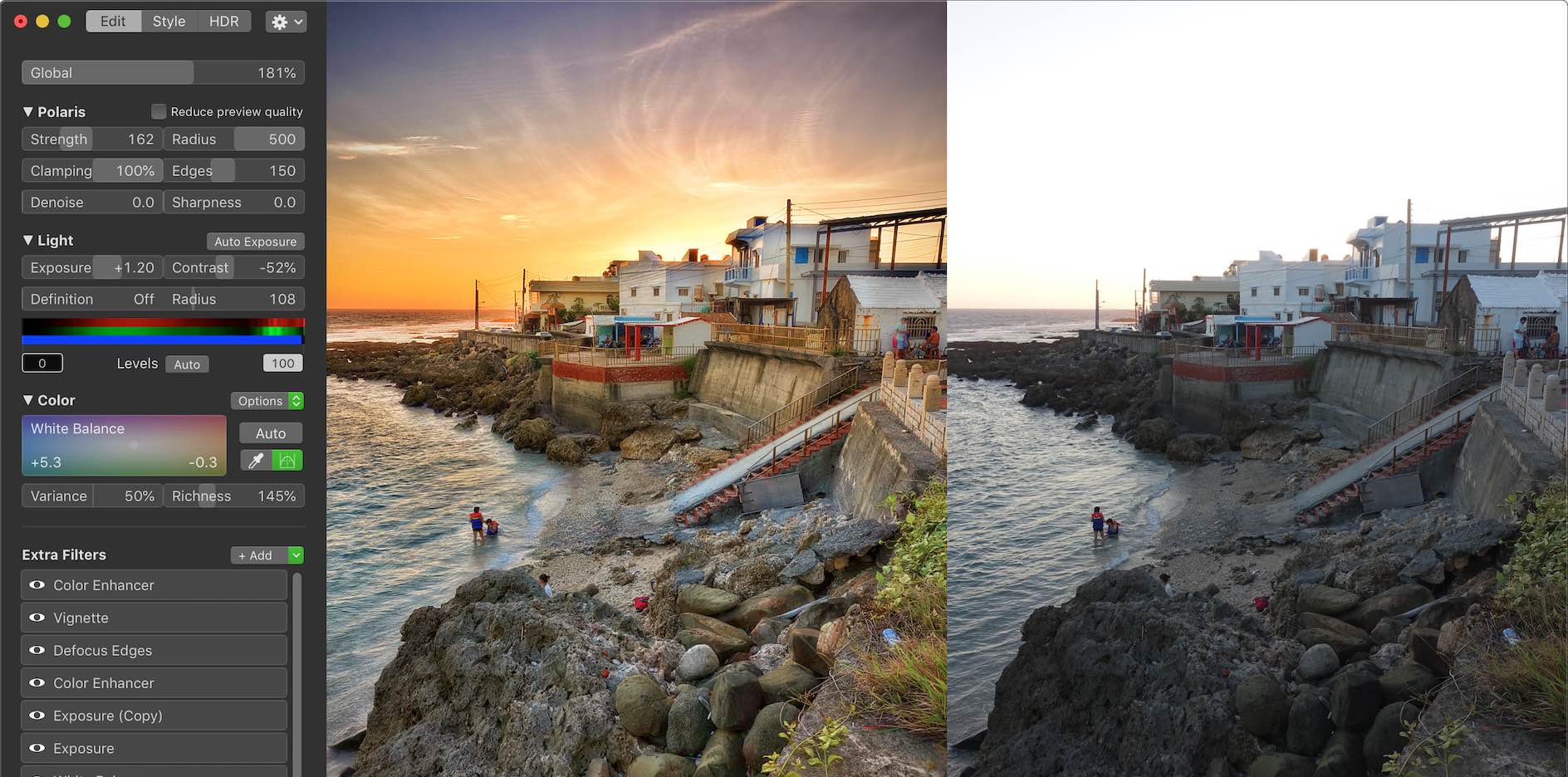
Ohanaware Co., Ltd. Announce the immediate release of HDRtist NX 2.1; a minor update to their flagship High Dynamic Range Imaging software product for the macOS operating system. Version 2.1 focuses on improving color rendering, single RAW support and integration with Apple's "Photos" organizing software. HDRtist NX2 is the fourth major revision of their HDR software, covering 10 years, allowing for a significantly improved engine, modern interface, and extendable functionality.
Hengchun, Taiwan - Ohanaware Co., Ltd. is very proud to announce the immediate release of HDRtist NX2.1; a minor update to their flagship High Dynamic Range Imaging software product for the macOS operating system. Version 2.1 focuses on improving color rendering, single RAW support and integration with Apple's "Photos" organizing software. HDRtist NX2 is the fourth major revision of their HDR software, covering 10 years, allowing for a significantly improved engine, modern interface, and extendable functionality.
Major changes in HDRtist NX 2.1:
* Improved color processing pipeline throughout the application
* New Booster & Richness color enhancing options
* Improved RAW expander, allows for more detail to be recovered from single RAW images
* Improved the support for getting photos from Apple's Photos into HDRtist NX 2
* Improved the ability to export Photos from HDRtist NX 2 into Apple's Photos
* Can now import older HDRtist Pro HDR files
* Improved the Magic Extra
* Various other bug fixes and additions
Key features of HDRtist NX 2.1:
* 8th Generation detail enhancing tone mapper, with Tone Mapping To The Edge
* Dehaze & "Highlights & Shadows Pro" to reveal hidden details in the highlights
* Over 30 1-Click styles to save time & create inspiration
* More than 20 built-in Extras; some expand on existing functions while others are used to add stylistic effects to HDRs
* Works with multiple exposures, single images and improved support for single RAW images
* Advanced cropping tool, with multiple aspect ratios, fixed sizes & free-form option
* Editable HDR format, with save history
* Optimized interface provides a gorgeous high resolution preview area
* Multiple views for comparing the processed HDR with original exposures
Compatibility:
* macOS 10.11 El Capitan, 10.12 Sierra, 10.13 High Sierra and 10.14 Mojave
* 16GB of RAM
* 50MB of disk space
* Graphics card with 1 GB of VRAM
### Pricing and Availability:
HDRtist NX 2.1 is available right now from the Ohanaware web site. HDRtist NX 2.1 offers a FREE no-obligation 30 day trail. The RRP is $59.99 (USD). For a limited time, Ohanaware are running a Launch Promotion whereby this new version is available for only $39.99 (USD). Ohanaware uses Paddle as their payment processor.
HDRtist NX 2.1: https://www.ohanaware.com/hdr/
Download HDRtist NX 2.1 (trial version): https://www.ohanaware.com/hdr/hdrtistnx.dmg
Direct purchase link (with time limited discount): https://pay.paddle.com/checkout/556813?coupon=C2C920FB
Screenshot: https://www.ohanaware.com/hdr/NX2/wanlitongScreenshot944@2x.jpg
High resolution icon (1024px): https://www.ohanaware.com/hdr/NX2/HDRtistNX2_1024.png
Since '06, Joy Sha & Sam Rowlands have been building top ten, award winning apps. Their most notable applications include Funtastic Photos, which set the benchmark for modern photo editing. HDRtist & HDRtist Pro which has over 100,000 users world wide. App Wrapper, which is the #1 third party product to help developers prepare their apps for the App Store. All Material and Software (C) Copyright 2006-2019 Ohanaware Co., Ltd. All Rights Reserved. Apple, the Apple logo, Mac OS X and Macintosh are registered trademarks of Apple Inc. in the U.S. and/or other countries. Other trademarks and registered trademarks may be the property of their respective owners.
*******
Link To Article: https://prmac.com/release-id-83669.htm
*******
---------------------------------------------------------------------------------
Note that you can alter delivered distributions at any time.
Login to your account on prMac to alter your channel selection, or to opt-out at any time.


ArtOptimizer 3 for Adobe Illustrator Is Released for Public Beta Testers
A new article has been published at prMac.
ArtOptimizer 3 for Adobe Illustrator Is Released for Public Beta Testers - Published on 09/23/19
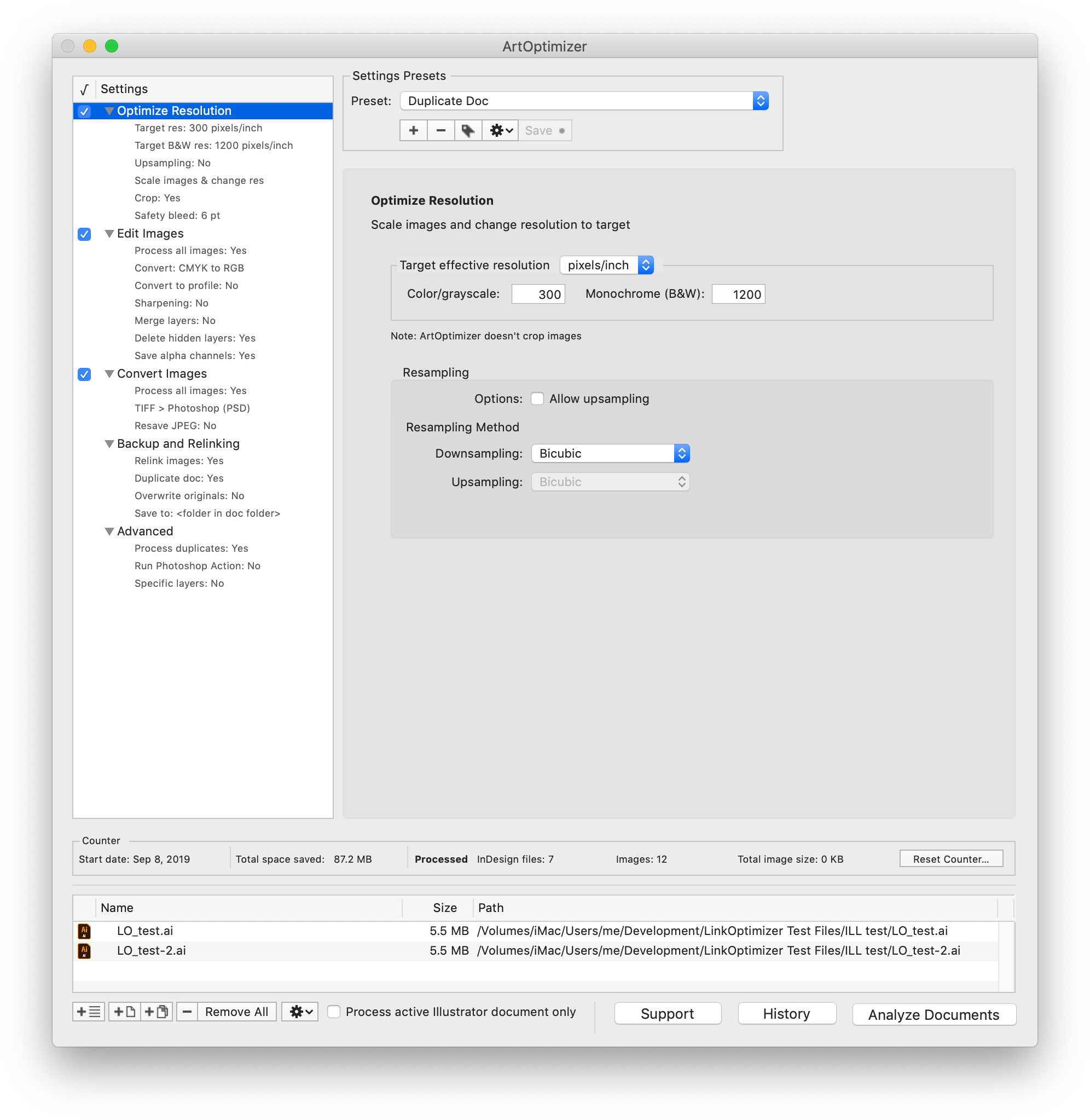
Zevrix Solutions announces the public beta release of ArtOptimizer 3 for Adobe Illustrator, a major upgrade to company's image workflow automation solution for Adobe's flagship vector design software. ArtOptimizer eliminates the excess image data of Illustrator picture links and performs essential image adjustments. The new version adds a long list of new features such as image format conversion, batch processing, settings presets, duplicate links processing, new user interface and much more.
Toronto (ON), Canada - Zevrix Solutions today announces the public beta release of ArtOptimizer 3, a major upgrade to company's workflow automation solution for Adobe Illustrator. The only tool of its kind on the market, ArtOptimizer eliminates the excess image data of Illustrator picture links and performs essential image adjustments, which helps users save disk space, accelerate document output, and cut overall production time dramatically.
The new version introduces a long list of new features and improvements, which take ArtOptimizer to a totally different level and help Illustrator users easily automate complex and time-consuming production tasks. A highlight of the new solutions and improvements include:
* New user interface
* Batch processing of Illustrator files
* Presets of the app's settings
* Process duplicate links
* Convert formats of Illustrator image links
* Specify Photoshop resampling methods for optimized resolution
* Process monochrome (bitmap) images
* Convert colors to specific profile
* Link previews
* Duplicate original Illustrator document before processing
* Many other new options for backup, relinking, image naming and other areas
* Improved performance and stability
The public beta of ArtOptimizer 3 is available for download from Zevrix website. Beta-testers who provide valuable feedback will receive a 50% discount to purchase an upgrade from earlier version of ArtOptimizer or a new license.
Pricing and Availability:
ArtOptimizer 3 public beta can be downloaded from Zevrix website. Qualified beta testers will receive a discount on the new license or upgrade to ArtOptimizer 3. Detailed info is included with the beta download. The current stable release, ArtOptimizer 2, can be purchased for US$119.95. Trial is also available for download. ArtOptimizer requires macOS 10.8-10.14 and Adobe Illustrator/Photoshop CS6-CC 2019.
Zevrix Solutions: http://zevrix.com
ArtOptimizer 3 Beta: http://zevrix.com/ArtOptimizer.php
Download ArtOptimizer 3 Beta: http://zevrix.com/ArtOptimizer.dmg
Purchase: http://zevrix.com/store.php
Screenshot: http://zevrix.com/screenshots/ao3/ao3-beta-res-win.png
Located in Toronto, Canada, Zevrix Solutions provides automation and productivity solutions for Adobe Creative Cloud and Creative Suite software, PDF workflows, graphic file diagnostics and Microsoft Office output on Mac OS. Zevrix is dedicated to help professionals increase their profits through automating everyday tasks, producing error-free documents, saving disk space and cutting production costs. For more information, visit their website. Copyright (C) 2019 Zevrix Solutions. All Rights Reserved. Other trademarks and registered trademarks may be the property of their respective owners.
*******
Link To Article: https://prmac.com/release-id-83668.htm
*******
---------------------------------------------------------------------------------
Note that you can alter delivered distributions at any time.
Login to your account on prMac to alter your channel selection, or to opt-out at any time.
ArtOptimizer 3 for Adobe Illustrator Is Released for Public Beta Testers - Published on 09/23/19
Zevrix Solutions announces the public beta release of ArtOptimizer 3 for Adobe Illustrator, a major upgrade to company's image workflow automation solution for Adobe's flagship vector design software. ArtOptimizer eliminates the excess image data of Illustrator picture links and performs essential image adjustments. The new version adds a long list of new features such as image format conversion, batch processing, settings presets, duplicate links processing, new user interface and much more.
Toronto (ON), Canada - Zevrix Solutions today announces the public beta release of ArtOptimizer 3, a major upgrade to company's workflow automation solution for Adobe Illustrator. The only tool of its kind on the market, ArtOptimizer eliminates the excess image data of Illustrator picture links and performs essential image adjustments, which helps users save disk space, accelerate document output, and cut overall production time dramatically.
The new version introduces a long list of new features and improvements, which take ArtOptimizer to a totally different level and help Illustrator users easily automate complex and time-consuming production tasks. A highlight of the new solutions and improvements include:
* New user interface
* Batch processing of Illustrator files
* Presets of the app's settings
* Process duplicate links
* Convert formats of Illustrator image links
* Specify Photoshop resampling methods for optimized resolution
* Process monochrome (bitmap) images
* Convert colors to specific profile
* Link previews
* Duplicate original Illustrator document before processing
* Many other new options for backup, relinking, image naming and other areas
* Improved performance and stability
The public beta of ArtOptimizer 3 is available for download from Zevrix website. Beta-testers who provide valuable feedback will receive a 50% discount to purchase an upgrade from earlier version of ArtOptimizer or a new license.
Pricing and Availability:
ArtOptimizer 3 public beta can be downloaded from Zevrix website. Qualified beta testers will receive a discount on the new license or upgrade to ArtOptimizer 3. Detailed info is included with the beta download. The current stable release, ArtOptimizer 2, can be purchased for US$119.95. Trial is also available for download. ArtOptimizer requires macOS 10.8-10.14 and Adobe Illustrator/Photoshop CS6-CC 2019.
Zevrix Solutions: http://zevrix.com
ArtOptimizer 3 Beta: http://zevrix.com/ArtOptimizer.php
Download ArtOptimizer 3 Beta: http://zevrix.com/ArtOptimizer.dmg
Purchase: http://zevrix.com/store.php
Screenshot: http://zevrix.com/screenshots/ao3/ao3-beta-res-win.png
Located in Toronto, Canada, Zevrix Solutions provides automation and productivity solutions for Adobe Creative Cloud and Creative Suite software, PDF workflows, graphic file diagnostics and Microsoft Office output on Mac OS. Zevrix is dedicated to help professionals increase their profits through automating everyday tasks, producing error-free documents, saving disk space and cutting production costs. For more information, visit their website. Copyright (C) 2019 Zevrix Solutions. All Rights Reserved. Other trademarks and registered trademarks may be the property of their respective owners.
*******
Link To Article: https://prmac.com/release-id-83668.htm
*******
---------------------------------------------------------------------------------
Note that you can alter delivered distributions at any time.
Login to your account on prMac to alter your channel selection, or to opt-out at any time.
WinX MediaTrans V6.6 Protects Data of Millions of iOS 13 Upgraders
A new article has been published at prMac.
WinX MediaTrans V6.6 Protects Data of Millions of iOS 13 Upgraders - Published on 09/20/19
Digiarty Software today releases WinX MediaTrans 6.6, an update to their next-generation media application. WinX MediaTrans offers the easiest way to transfer photos, videos and music between any iPhone, iPad with a Windows computer. Users can easily auto convert any video formats to any Apple device. Effortlessly import/export 4K or 1080p HD videos between PC and iDevice, in batch and much more. Version 6.6 is a complete upgrade on data transfer and full support for iOS 13.
Chengdu, China - Digiarty Software today proudly announces the mega launch of its iPhone management software, WinX MediaTrans, with full support for iOS 13, aimed at helping millions of iPhone users to backup data for safe iOS 13 updates. The improvement includes but is not confined to data transfer function independent of Apple iTunes and its components, faster processing speed, and new underlying and connection optimization.
When a huge amount of iPhone users rush to iOS 13 dark mode, many are messing up with issues like getting stuck in a boot loop, endless waiting, apps failing to open, not enough space, random crashes & freezes, slow iPhone, etc. But this is just the tip of the iceberg. To protect iPhone data in case of any iOS 13 updating problems, WinX MediaTrans V6.6 is released with comprehensive support for iOS 13.
The upgraded iPhone data backup solution not only seamlessly backs up contents from old gadgets to the computer, but also restores the backups safely to iOS 13-based iDevices. Its core data transfer function allows users to transfer photos, videos, music between iOS and Windows/macOS in a flash. For example, it backs up photos, live photos, edited photos and videos intact from old iPhone for iOS 13 update within clicks. Also, videos taken in High-Key Mono portrait, 4K UHD, time-lapse, or slo-mo mode on iOS 13 can be exported to the computer flawlessly without any distortion, frames dropping, color fading, etc.
The speed is further upgraded on WinX MediaTrans V6.6 for a faster way to protect and manage all kinds of data on iPhone. Users feel free to encrypt files with password, add, edit, delete personal contents, make customized ringtone from iPhone, YouTube, iTunes library, import non-iTunes music, convert and compress video files unsupported by iDevices, and so on, 40%-60% faster than many others.
This iTunes alternative is built with necessary components directly extracted from Apple software, making it possible to recognize mobiles and sync data without iTunes. In such a way, plenty of iOS update errors caused by iTunes like iPhone not recognized, iTunes couldn't backup iPhone, iTunes not syncing all music, data lost after syncing, etc. can be avoided, and users will never be overwhelmed by the disappearance of iTunes.
Pricing and Availability:
WinX MediaTrans V6.6 runs on 32 bit and 64 bit Windows 10 and macOS Catalina (and earlier). This alternative to iTunes currently supports iPhone iPad and iPod, ranging from iOS 7 to iOS 13 powered devices. It now costs only $29.95 for 1-PC 1-year license and $35.95 for 2-PC lifetime license on WinX MediaTrans Discount Coupon page, from $39.95 and $59.95 previously.
WinX MediaTrans V6.6: https://www.winxdvd.com/mediatrans/
With over 13 years of development, Digiarty has become a world-leading provider of personal and home-use multimedia software apps based on Windows and macOS. It offers easy and creative solutions of free DVD ripping, DVD copy, DVD burning, HD and 4K video conversion, video processing, online video download, recording, media playback, iPhone file management and more for movie/music addicts, handset owners, video game players, and more. All Material and Software (C) Copyright 2019 Digiarty Software, Inc. All Rights Reserved. Apple, the Apple logo, macOS, iPhone, iPod and iPad are registered trademarks of Apple Inc. in the U.S. and/or other countries. Other trademarks and registered trademarks may be the property of their respective owners.
*******
Link To Article: https://prmac.com/release-id-83667.htm
*******
---------------------------------------------------------------------------------
Note that you can alter delivered distributions at any time.
Login to your account on prMac to alter your channel selection, or to opt-out at any time.
WinX MediaTrans V6.6 Protects Data of Millions of iOS 13 Upgraders - Published on 09/20/19
Digiarty Software today releases WinX MediaTrans 6.6, an update to their next-generation media application. WinX MediaTrans offers the easiest way to transfer photos, videos and music between any iPhone, iPad with a Windows computer. Users can easily auto convert any video formats to any Apple device. Effortlessly import/export 4K or 1080p HD videos between PC and iDevice, in batch and much more. Version 6.6 is a complete upgrade on data transfer and full support for iOS 13.
Chengdu, China - Digiarty Software today proudly announces the mega launch of its iPhone management software, WinX MediaTrans, with full support for iOS 13, aimed at helping millions of iPhone users to backup data for safe iOS 13 updates. The improvement includes but is not confined to data transfer function independent of Apple iTunes and its components, faster processing speed, and new underlying and connection optimization.
When a huge amount of iPhone users rush to iOS 13 dark mode, many are messing up with issues like getting stuck in a boot loop, endless waiting, apps failing to open, not enough space, random crashes & freezes, slow iPhone, etc. But this is just the tip of the iceberg. To protect iPhone data in case of any iOS 13 updating problems, WinX MediaTrans V6.6 is released with comprehensive support for iOS 13.
The upgraded iPhone data backup solution not only seamlessly backs up contents from old gadgets to the computer, but also restores the backups safely to iOS 13-based iDevices. Its core data transfer function allows users to transfer photos, videos, music between iOS and Windows/macOS in a flash. For example, it backs up photos, live photos, edited photos and videos intact from old iPhone for iOS 13 update within clicks. Also, videos taken in High-Key Mono portrait, 4K UHD, time-lapse, or slo-mo mode on iOS 13 can be exported to the computer flawlessly without any distortion, frames dropping, color fading, etc.
The speed is further upgraded on WinX MediaTrans V6.6 for a faster way to protect and manage all kinds of data on iPhone. Users feel free to encrypt files with password, add, edit, delete personal contents, make customized ringtone from iPhone, YouTube, iTunes library, import non-iTunes music, convert and compress video files unsupported by iDevices, and so on, 40%-60% faster than many others.
This iTunes alternative is built with necessary components directly extracted from Apple software, making it possible to recognize mobiles and sync data without iTunes. In such a way, plenty of iOS update errors caused by iTunes like iPhone not recognized, iTunes couldn't backup iPhone, iTunes not syncing all music, data lost after syncing, etc. can be avoided, and users will never be overwhelmed by the disappearance of iTunes.
Pricing and Availability:
WinX MediaTrans V6.6 runs on 32 bit and 64 bit Windows 10 and macOS Catalina (and earlier). This alternative to iTunes currently supports iPhone iPad and iPod, ranging from iOS 7 to iOS 13 powered devices. It now costs only $29.95 for 1-PC 1-year license and $35.95 for 2-PC lifetime license on WinX MediaTrans Discount Coupon page, from $39.95 and $59.95 previously.
WinX MediaTrans V6.6: https://www.winxdvd.com/mediatrans/
With over 13 years of development, Digiarty has become a world-leading provider of personal and home-use multimedia software apps based on Windows and macOS. It offers easy and creative solutions of free DVD ripping, DVD copy, DVD burning, HD and 4K video conversion, video processing, online video download, recording, media playback, iPhone file management and more for movie/music addicts, handset owners, video game players, and more. All Material and Software (C) Copyright 2019 Digiarty Software, Inc. All Rights Reserved. Apple, the Apple logo, macOS, iPhone, iPod and iPad are registered trademarks of Apple Inc. in the U.S. and/or other countries. Other trademarks and registered trademarks may be the property of their respective owners.
*******
Link To Article: https://prmac.com/release-id-83667.htm
*******
---------------------------------------------------------------------------------
Note that you can alter delivered distributions at any time.
Login to your account on prMac to alter your channel selection, or to opt-out at any time.
Remote Control for Mac - now on iOS/watchOS
A new article has been published at prMac.
Remote Control for Mac - now on iOS/watchOS - Published on 09/20/19
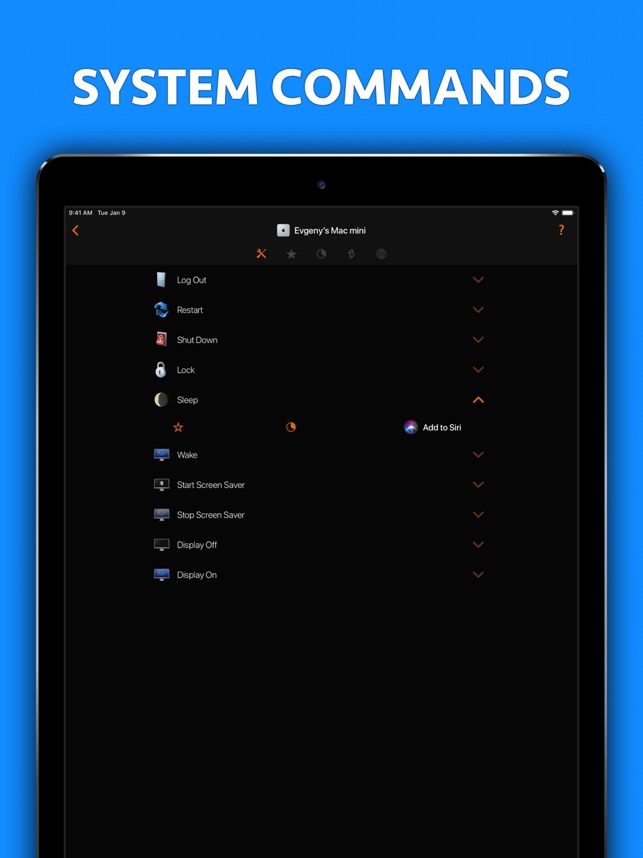
Indie developer, Evgeny Cherpak today announces Remote Control for Mac, an important update to his popular remote control app for iOS and watchOS devices. The app allows iOS device users to remotely control their Mac, using their iPhone or iPad as a keyboard and trackpad. Anyone can also launch any app on the Mac from anywhere in their home. The app can also put the Mac to sleep, wake it up, and even control volume, playback, and AirPlay mirroring on the computer.
Netanya, Israel - Independent developer, Evgeny Cherpak today is proud to announce the release and immediate availability of Remote Control for Mac, an important update to his remote control app for iPhone, iPad, iPod touch, and Apple Watch devices. Control your Mac with multimedia controls, keyboard, mouse, app and system actions and AirPlay controls. Take full control of your Mac from anywhere in your home or office.
Tired of sitting on the couch, having to handle keyboard and mouse on your lap to control your media center Mac? Use Remote Control on your iPhone as a trackpad and keyboard to comfortably browse on the big screen TV. Using AirPlay Mirroring and an Apple TV, your Mac could be located anywhere in your home. Simply select your Apple TV from the list of available AirPlay devices and control your Mac from the comfort of your couch or bed.
You can even start any app on your Mac, send your Mac to sleep, wake it up and perform many more useful actions to control your Mac remotely. All you need to do is download the Mac Helper application and connect your Mac and iOS device to the same WiFi. Remote Control will guide you through the simple setup process.
At A Glance:
* Control volume, playback and Airplay mirroring of your Mac
* Use your iOS device as a Mac trackpad and keyboard
* Launch and quit Apps on your Mac comfortably from your iOS device
* Control any app on your Mac using its menu
* Restart or shut down your Mac, change display brightness and many more useful actions
* Enjoy the ease of use in a slick user interface you will love
* Use the Personal Hotspot of your iOS device to control your Mac when you don't have access to other networks
* 3 steps, under 30 seconds super easy setup
Control:
* iTunes
* Amazon Prime Video
* Netflix
* YouTube
* Plex
* Kodi
* VLC
* SoundCloud
* Spotify
* Deezer
* Tidal
* IINA
System Requirements:
* Mac with macOS 10.10 or above and free helper app installed
* iPhone, iPad or iPod touch with iOS 10 or above
* Shared wireless network connection between your computer and iOS device
Pricing and Availability:
Remote Control for Mac [Pro] 2019.1 is $9.99 USD (or equivalent amount in other currencies) and available worldwide exclusively through the App Store in the Productivity category.
Remote Control for Mac [Pro] 2019.1: https://www.cherpake.com
Purchase and Download from the App Store: https://apps.apple.com/app/remote-control-for-mac-pro/id884153085
Download Helper App: https://cherpake.com/get
Screenshot: https://is3-ssl.mzstatic.com/image/thumb/Purple123/v4/73/1a/78/731a7871-ced5-8aa4-4995-01b46016094e/pr_source.jpg/643x0w.jpg
App Icon: https://is3-ssl.mzstatic.com/image/thumb/Purple113/v4/0d/c9/c2/0dc9c206-f840-f1ac-f30f-350543c9b83b/AppIcon-0-0-1x_U007emarketing-0-0-0-10-0-0-sRGB-0-0-0-GLES2_U002c0-512MB-85-220-0-0.png/246x0w.jpg
Located in Netanya, Israel, Evgeny Cherpak is an independent developer. His mission is to fill the gaps in the Apple eco-system integration. Evgeny's apps are designed to offer iOS and macOS users the ability to use the devices to improve their productivity, streamline tasks, and offer more time to enjoy life. All Material and Software (C) Copyright 2019 Evgeny Cherpak. All Rights Reserved. Apple, the Apple logo, iPhone, iPod and iPad are registered trademarks of Apple Inc. in the U.S. and/or other countries. Other trademarks and registered trademarks may be the property of their respective owners.
*******
Link To Article: https://prmac.com/release-id-83666.htm
*******
---------------------------------------------------------------------------------
Note that you can alter delivered distributions at any time.
Login to your account on prMac to alter your channel selection, or to opt-out at any time.
Remote Control for Mac - now on iOS/watchOS - Published on 09/20/19
Indie developer, Evgeny Cherpak today announces Remote Control for Mac, an important update to his popular remote control app for iOS and watchOS devices. The app allows iOS device users to remotely control their Mac, using their iPhone or iPad as a keyboard and trackpad. Anyone can also launch any app on the Mac from anywhere in their home. The app can also put the Mac to sleep, wake it up, and even control volume, playback, and AirPlay mirroring on the computer.
Netanya, Israel - Independent developer, Evgeny Cherpak today is proud to announce the release and immediate availability of Remote Control for Mac, an important update to his remote control app for iPhone, iPad, iPod touch, and Apple Watch devices. Control your Mac with multimedia controls, keyboard, mouse, app and system actions and AirPlay controls. Take full control of your Mac from anywhere in your home or office.
Tired of sitting on the couch, having to handle keyboard and mouse on your lap to control your media center Mac? Use Remote Control on your iPhone as a trackpad and keyboard to comfortably browse on the big screen TV. Using AirPlay Mirroring and an Apple TV, your Mac could be located anywhere in your home. Simply select your Apple TV from the list of available AirPlay devices and control your Mac from the comfort of your couch or bed.
You can even start any app on your Mac, send your Mac to sleep, wake it up and perform many more useful actions to control your Mac remotely. All you need to do is download the Mac Helper application and connect your Mac and iOS device to the same WiFi. Remote Control will guide you through the simple setup process.
At A Glance:
* Control volume, playback and Airplay mirroring of your Mac
* Use your iOS device as a Mac trackpad and keyboard
* Launch and quit Apps on your Mac comfortably from your iOS device
* Control any app on your Mac using its menu
* Restart or shut down your Mac, change display brightness and many more useful actions
* Enjoy the ease of use in a slick user interface you will love
* Use the Personal Hotspot of your iOS device to control your Mac when you don't have access to other networks
* 3 steps, under 30 seconds super easy setup
Control:
* iTunes
* Amazon Prime Video
* Netflix
* YouTube
* Plex
* Kodi
* VLC
* SoundCloud
* Spotify
* Deezer
* Tidal
* IINA
System Requirements:
* Mac with macOS 10.10 or above and free helper app installed
* iPhone, iPad or iPod touch with iOS 10 or above
* Shared wireless network connection between your computer and iOS device
Pricing and Availability:
Remote Control for Mac [Pro] 2019.1 is $9.99 USD (or equivalent amount in other currencies) and available worldwide exclusively through the App Store in the Productivity category.
Remote Control for Mac [Pro] 2019.1: https://www.cherpake.com
Purchase and Download from the App Store: https://apps.apple.com/app/remote-control-for-mac-pro/id884153085
Download Helper App: https://cherpake.com/get
Screenshot: https://is3-ssl.mzstatic.com/image/thumb/Purple123/v4/73/1a/78/731a7871-ced5-8aa4-4995-01b46016094e/pr_source.jpg/643x0w.jpg
App Icon: https://is3-ssl.mzstatic.com/image/thumb/Purple113/v4/0d/c9/c2/0dc9c206-f840-f1ac-f30f-350543c9b83b/AppIcon-0-0-1x_U007emarketing-0-0-0-10-0-0-sRGB-0-0-0-GLES2_U002c0-512MB-85-220-0-0.png/246x0w.jpg

Located in Netanya, Israel, Evgeny Cherpak is an independent developer. His mission is to fill the gaps in the Apple eco-system integration. Evgeny's apps are designed to offer iOS and macOS users the ability to use the devices to improve their productivity, streamline tasks, and offer more time to enjoy life. All Material and Software (C) Copyright 2019 Evgeny Cherpak. All Rights Reserved. Apple, the Apple logo, iPhone, iPod and iPad are registered trademarks of Apple Inc. in the U.S. and/or other countries. Other trademarks and registered trademarks may be the property of their respective owners.
*******
Link To Article: https://prmac.com/release-id-83666.htm
*******
---------------------------------------------------------------------------------
Note that you can alter delivered distributions at any time.
Login to your account on prMac to alter your channel selection, or to opt-out at any time.
Elmedia Player 7.4 the only Mac Flash Player with advanced features
A new article has been published at prMac.
Elmedia Player 7.4 the only Mac Flash Player with advanced features - Published on 09/19/19
The new version 7.4 of Elmedia Player developed by Eltima Software has been released, featuring an internal browser improvement. This option provides users with the opportunity to watch videos directly from the app. Along with it, popular features, including the support of Flash Video, have been preserved for better playback experience. Elmedia Player 7.4 is a reliable Flash player for macOS that supports both FLV and SWF formats and can run these types of files exceptionally smoothly.
Frankfurt, Germany - - Eltima Software today is pleased to announce the release of the new version of Elmedia Player , an update to the company's popular multiformat video player for macOS. Version 7.4 has several improvements with the internal browser enhancement being the most essential one. After the release of Elmedia Player 7.4 users will enjoy even better playback experience by watching videos directly from the application. This version combines both new features and existing ones that have proven themselves to be successful among users.
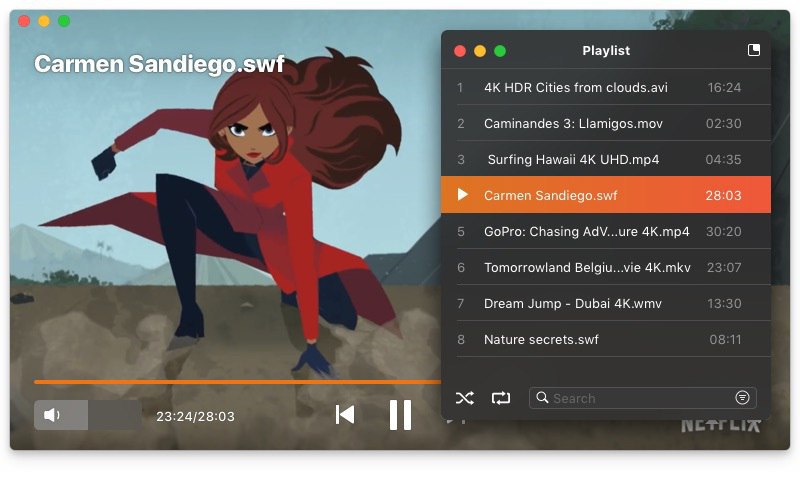
Along with functional updates, it was decided to keep one of the most demanded features. Elmedia Player is the only SWF & FLV Player for Mac in 2019 that can run Flash Video without delays and interruptions. Despite the fact that many other players are dropping Flash format, in the version 7.4 Elmedia has kept it among the supported file types and works with it extremely well.
Elmedia Flash Player gives you full control over SWF files on your computer and offers multiple options for SWF and FLV playback. Some of the parameters customers can choose in Elmedia include local Flash security and default playback quality for SWF files. Users can control the sending and receiving of Flash media with the help of the player app. Those who work with Flash files and videos on a regular basis will surely appreciate the following possibilities:
* Independent volume control - Users can regulate the sound in the Flash files without changing anything in the system.
* Interactivity - Great possibilities for the files with interactive elements (e.g. games).
* Playback Control - Users of Elmedia Player 7.4 have full control over their viewing experience, the app is just there to assist. Elmedia Flash Player features convenient controls that allow adjusting the volume, jumping to a specific frame in a video, pausing the Flash playback whenever it's needed.
* Download SWF files from the web - A SWF file that is played on a web page can be downloaded directly to the hard drive with Elmedia Player PRO. If there are external resources that a SWF file is loading, they can also be saved to the computer for offline use.
In fact, Elmedia Player has much more to offer than just Flash content playback and downloading. Without any need of additional codecs or third-party apps, it supports a huge variety of video and audio formats, including but not limited to FLV, MP4, MOV, AVI, MP3, M4A, WMA, AAC and AC3. That is the reason why this software is highly popular and has 2 million users and counting.
Elmedia Player PRO also features highly popular option to stream content to Chromecast, Apple TV, Smart TV and other DLNA-enabled devices. If you need to download video or audio files from the web, the supported type variety goes way beyond SWF and FLV formats. You can also make precise screenshots of any moment of a currently playing video and save them in different formats.
Elmedia Player is available in 2 versions: Free and PRO. Free version includes essential functionality for media files playback. Offering advanced downloading and streaming options, PRO version is priced at $19.95 (USD).
Elmedia Player 7.4: https://www.swf-flv-player.com/
Download Elmedia Player Free Edition: https://mac.eltima.com/download/elmediaplayer1.dmg
Purchase Elmedia Player PRO: https://www.swf-flv-player.com/pro-version.html
Screenshot: http://mac.eltima.com/images/upload/elmedia/splash/swf.jpg
Icon: https://mac.eltima.com/images/elmedia/elmedia_icon.png
Eltima Software is a global software Development Company, specializing primarily in serial communication, mobile and flash software for Mac OS and Windows. Eltima Software delivers top-notch solutions having a friendly team of 40 professionals. Copyright (C) 2019 Eltima Software. All Rights Reserved. Apple, the Apple logo and Macintosh are registered trademarks of Apple Inc. in the U.S. and/or other countries.
*******
Link To Article: https://prmac.com/release-id-83664.htm
*******
---------------------------------------------------------------------------------
Note that you can alter delivered distributions at any time.
Login to your account on prMac to alter your channel selection, or to opt-out at any time.
Elmedia Player 7.4 the only Mac Flash Player with advanced features - Published on 09/19/19
The new version 7.4 of Elmedia Player developed by Eltima Software has been released, featuring an internal browser improvement. This option provides users with the opportunity to watch videos directly from the app. Along with it, popular features, including the support of Flash Video, have been preserved for better playback experience. Elmedia Player 7.4 is a reliable Flash player for macOS that supports both FLV and SWF formats and can run these types of files exceptionally smoothly.
Frankfurt, Germany - - Eltima Software today is pleased to announce the release of the new version of Elmedia Player , an update to the company's popular multiformat video player for macOS. Version 7.4 has several improvements with the internal browser enhancement being the most essential one. After the release of Elmedia Player 7.4 users will enjoy even better playback experience by watching videos directly from the application. This version combines both new features and existing ones that have proven themselves to be successful among users.
Along with functional updates, it was decided to keep one of the most demanded features. Elmedia Player is the only SWF & FLV Player for Mac in 2019 that can run Flash Video without delays and interruptions. Despite the fact that many other players are dropping Flash format, in the version 7.4 Elmedia has kept it among the supported file types and works with it extremely well.
Elmedia Flash Player gives you full control over SWF files on your computer and offers multiple options for SWF and FLV playback. Some of the parameters customers can choose in Elmedia include local Flash security and default playback quality for SWF files. Users can control the sending and receiving of Flash media with the help of the player app. Those who work with Flash files and videos on a regular basis will surely appreciate the following possibilities:
* Independent volume control - Users can regulate the sound in the Flash files without changing anything in the system.
* Interactivity - Great possibilities for the files with interactive elements (e.g. games).
* Playback Control - Users of Elmedia Player 7.4 have full control over their viewing experience, the app is just there to assist. Elmedia Flash Player features convenient controls that allow adjusting the volume, jumping to a specific frame in a video, pausing the Flash playback whenever it's needed.
* Download SWF files from the web - A SWF file that is played on a web page can be downloaded directly to the hard drive with Elmedia Player PRO. If there are external resources that a SWF file is loading, they can also be saved to the computer for offline use.
In fact, Elmedia Player has much more to offer than just Flash content playback and downloading. Without any need of additional codecs or third-party apps, it supports a huge variety of video and audio formats, including but not limited to FLV, MP4, MOV, AVI, MP3, M4A, WMA, AAC and AC3. That is the reason why this software is highly popular and has 2 million users and counting.
Elmedia Player PRO also features highly popular option to stream content to Chromecast, Apple TV, Smart TV and other DLNA-enabled devices. If you need to download video or audio files from the web, the supported type variety goes way beyond SWF and FLV formats. You can also make precise screenshots of any moment of a currently playing video and save them in different formats.
Elmedia Player is available in 2 versions: Free and PRO. Free version includes essential functionality for media files playback. Offering advanced downloading and streaming options, PRO version is priced at $19.95 (USD).
Elmedia Player 7.4: https://www.swf-flv-player.com/
Download Elmedia Player Free Edition: https://mac.eltima.com/download/elmediaplayer1.dmg
Purchase Elmedia Player PRO: https://www.swf-flv-player.com/pro-version.html
Screenshot: http://mac.eltima.com/images/upload/elmedia/splash/swf.jpg
Icon: https://mac.eltima.com/images/elmedia/elmedia_icon.png

Eltima Software is a global software Development Company, specializing primarily in serial communication, mobile and flash software for Mac OS and Windows. Eltima Software delivers top-notch solutions having a friendly team of 40 professionals. Copyright (C) 2019 Eltima Software. All Rights Reserved. Apple, the Apple logo and Macintosh are registered trademarks of Apple Inc. in the U.S. and/or other countries.
*******
Link To Article: https://prmac.com/release-id-83664.htm
*******
---------------------------------------------------------------------------------
Note that you can alter delivered distributions at any time.
Login to your account on prMac to alter your channel selection, or to opt-out at any time.
Fairytrail Dating App Matches Singles Who Love Adventures
A new article has been published at prMac.
Fairytrail Dating App Matches Singles Who Love Adventures - Published on 09/19/19
LittleQuest LLC announces Fairytrail - Adventure Dates 2.1.1 for iOS and Android devices. This dating app breaks swipe addiction and promotes developing real-life relationships on short journeys. After users match and video chat, they meet on group trips hosted by Airbnb and Viator. Fairytrail dating app can increase diversity and dating pool size by 31 times or more. Early users have been remote workers, frequent travelers, digital nomads, freelancers, and people passionate about travel.
San Francisco, California - LittleQuest LLC announces Fairytrail - Adventure Dates 2.1.1 for iOS and Android devices. Heralded as a "revolutionary dating app" by its users, Fairytrail is a dating app for remote workers, digital nomads, and people passionate about travel. With 8 levels of safety, it provides a dating platform for single people to match with one another, then match on recommended tours. It allows people to date while on the road using video chat and provides a bridge to safely meeting in person.
"People are becoming hyper mobile," says Taige Zhang, the founder of Fairytrail, adding "more than one-third of U.S. workers are in the gig economy. 57 million Americans are freelancers. 5 million are digital nomads. But there isn't a dating app to serve highly mobile people."
Furthermore, most dating apps such as Tinder and Bumble want to keep users swiping and messaging, but users actually want to find someone, so they can get on with their lives - to start having amazing experiences together. And Fairytrail promises exactly that.
Determined to cultivate real-life experiences rather than locking people to their screens, Fairytrail is the only dating app that safely bridges people from online to offline through group adventures.
"[People] will have more fun dating. We'll actually get to explore the world, try new foods, and see new places and cultures - with people who intrigue us," says Taige Zhang.
In fact, its revenue primarily comes from getting matched users placed on Airbnb Experiences, Airbnb Adventures, and Viator tours. These are 2-3 day excursions led by a professional travel guide in small groups of 5-25 people.
Mariah from New York says, "Traveling is such a great way to get to know a person. You don't really know someone unless you've traveled with the person. And this is such a great way to do it in a safe way."
Designed to be non-invasive like Coffee Meets Bagel, Fairytrail sprinkles users with new people to meet and travel possibilities only a few times a day.
How does it work? Users create an account and match with one another on Fairytrail. A match unlocks recommended adventures. If there's mutual interest in any of the adventures, the parties are connected to chat. If there's attraction and chemistry, they have 30 days to book the adventure through a Fairytrail travel agent.
What are users saying?
"Choosing the experience within dating makes dating much more exciting." - Annet, Amsterdam
"I enjoy meeting people when I travel, so I see this as a more organized way of doing it." - Atef, Toronto
"It helps plant travel inspiration." - Mark, Sacramento
Device Requirements:
* iPhone, iPad, and iPod touch
* Requires iOS 9.0 or later
* Universal Application
* 40 MB
Pricing and Availability:
Fairytrail - Adventure Dates 2.1.1 is free and is available worldwide through the App Store in the Lifestyle category. An Android version is also available.
Fairytrail - Adventure Dates 2.1.1: https://www.fairytrail.app/
Download from App Store: https://apps.apple.com/app/fairytrail-dating-tours/id1442011999?ls=1
Download from Google Play: https://play.google.com/store/apps/details?id=app.fairytrail.release
Dating Pool Size Calculations: https://docs.google.com/spreadsheets/d/1TmZFt6GpOIMkA9qI-HBH9n_oVh5mWlB4eqk9E656jmw/edit#gid=891720905
Safety is our #1 Priority: https://www.fairytrail.app/safety
LittleQuest LLC is a San Francisco startup founded in 2018. Its mission is to connect people who are passionate about travel to new cultures, people, and places through fun and safe adventures. All Material and Software (C) Copyright 2019 LittleQuest LLC. All Rights Reserved. Apple, the Apple logo, iPhone, iPod and iPad are registered trademarks of Apple Inc. in the U.S. and/or other countries. Other trademarks and registered trademarks may be the property of their respective owners.
*******
Link To Article: https://prmac.com/release-id-83662.htm
*******
---------------------------------------------------------------------------------
Note that you can alter delivered distributions at any time.
Login to your account on prMac to alter your channel selection, or to opt-out at any time.
Fairytrail Dating App Matches Singles Who Love Adventures - Published on 09/19/19
LittleQuest LLC announces Fairytrail - Adventure Dates 2.1.1 for iOS and Android devices. This dating app breaks swipe addiction and promotes developing real-life relationships on short journeys. After users match and video chat, they meet on group trips hosted by Airbnb and Viator. Fairytrail dating app can increase diversity and dating pool size by 31 times or more. Early users have been remote workers, frequent travelers, digital nomads, freelancers, and people passionate about travel.
San Francisco, California - LittleQuest LLC announces Fairytrail - Adventure Dates 2.1.1 for iOS and Android devices. Heralded as a "revolutionary dating app" by its users, Fairytrail is a dating app for remote workers, digital nomads, and people passionate about travel. With 8 levels of safety, it provides a dating platform for single people to match with one another, then match on recommended tours. It allows people to date while on the road using video chat and provides a bridge to safely meeting in person.
"People are becoming hyper mobile," says Taige Zhang, the founder of Fairytrail, adding "more than one-third of U.S. workers are in the gig economy. 57 million Americans are freelancers. 5 million are digital nomads. But there isn't a dating app to serve highly mobile people."
Furthermore, most dating apps such as Tinder and Bumble want to keep users swiping and messaging, but users actually want to find someone, so they can get on with their lives - to start having amazing experiences together. And Fairytrail promises exactly that.
Determined to cultivate real-life experiences rather than locking people to their screens, Fairytrail is the only dating app that safely bridges people from online to offline through group adventures.
"[People] will have more fun dating. We'll actually get to explore the world, try new foods, and see new places and cultures - with people who intrigue us," says Taige Zhang.
In fact, its revenue primarily comes from getting matched users placed on Airbnb Experiences, Airbnb Adventures, and Viator tours. These are 2-3 day excursions led by a professional travel guide in small groups of 5-25 people.
Mariah from New York says, "Traveling is such a great way to get to know a person. You don't really know someone unless you've traveled with the person. And this is such a great way to do it in a safe way."
Designed to be non-invasive like Coffee Meets Bagel, Fairytrail sprinkles users with new people to meet and travel possibilities only a few times a day.
How does it work? Users create an account and match with one another on Fairytrail. A match unlocks recommended adventures. If there's mutual interest in any of the adventures, the parties are connected to chat. If there's attraction and chemistry, they have 30 days to book the adventure through a Fairytrail travel agent.
What are users saying?
"Choosing the experience within dating makes dating much more exciting." - Annet, Amsterdam
"I enjoy meeting people when I travel, so I see this as a more organized way of doing it." - Atef, Toronto
"It helps plant travel inspiration." - Mark, Sacramento
Device Requirements:
* iPhone, iPad, and iPod touch
* Requires iOS 9.0 or later
* Universal Application
* 40 MB
Pricing and Availability:
Fairytrail - Adventure Dates 2.1.1 is free and is available worldwide through the App Store in the Lifestyle category. An Android version is also available.
Fairytrail - Adventure Dates 2.1.1: https://www.fairytrail.app/
Download from App Store: https://apps.apple.com/app/fairytrail-dating-tours/id1442011999?ls=1
Download from Google Play: https://play.google.com/store/apps/details?id=app.fairytrail.release
Dating Pool Size Calculations: https://docs.google.com/spreadsheets/d/1TmZFt6GpOIMkA9qI-HBH9n_oVh5mWlB4eqk9E656jmw/edit#gid=891720905
Safety is our #1 Priority: https://www.fairytrail.app/safety
LittleQuest LLC is a San Francisco startup founded in 2018. Its mission is to connect people who are passionate about travel to new cultures, people, and places through fun and safe adventures. All Material and Software (C) Copyright 2019 LittleQuest LLC. All Rights Reserved. Apple, the Apple logo, iPhone, iPod and iPad are registered trademarks of Apple Inc. in the U.S. and/or other countries. Other trademarks and registered trademarks may be the property of their respective owners.
*******
Link To Article: https://prmac.com/release-id-83662.htm
*******
---------------------------------------------------------------------------------
Note that you can alter delivered distributions at any time.
Login to your account on prMac to alter your channel selection, or to opt-out at any time.
PDFpen 5.0 on iOS 13 Features Dark Mode and Paper Styles
A new article has been published at prMac.
PDFpen 5.0 on iOS 13 Features Dark Mode and Paper Styles - Published on 09/19/19
Smile, a developer of productivity applications for Mac and iOS, today releases PDFpen 5.0, an important feature update to their popular mobile PDF editor for iPad and iPhone. With PDFpen for iOS, users can add text, images, and signatures to PDFs, make corrections, resize and delete images, and fill out forms. PDFs can be annotated with comments and highlighting. Version 5.0 features support for dark mode on iOS 13 and adds a variety of stationery styles.
San Francisco, California - Smile, the developer of productivity applications for Mac(R), iPhone(R) and iPad(R), has released PDFpen 5.0, the mobile PDF editor for iPad & iPhone. PDFpen 5 for iPad & iPhone features support for dark mode on iOS 13 and adds a variety of stationery styles.
Support for dark mode offers users a popular viewing experience, which is easier on the eyes. A multitude of stationery styles to choose from allows for more effective note-taking, organization, and customization to suit a variety of PDF annotating needs. PDFpen for iPad & iPhone syncs documents with PDFpen and PDFpenPro 11 for Mac via iCloud, Google Drive, Microsoft OneNote, and other Files-compatible apps for seamless PDF editing.
New in PDFpen 5:
* Adds dark mode
* Adds stationery options
* Updates for OS compatibility
* Improves stability
* Various fixes and improvements
PDFpen 5 Features:
* Read and edit PDF documents on your iPad & iPhone
* Add highlights and freehand scribbles safely with wrist/palm protection
* Add text, images, and signatures to PDFs
* Correct text in original PDF with editable text blocks
* Fill out PDF forms, including specialized signature fields
* Email and Airdrop your documents, with an option to flatten documents for maximum compatibility
* Set a document password, which is required when opening your document, and even set the level of encryption
* Save documents in iCloud & Files-compatible apps such as Dropbox, Google Drive, Microsoft OneNote, for sharing between devices
* Insert note and comment annotations
* Draw shapes, including lines, arrows, rectangles, ellipses, and polygons
* Move, resize, copy and delete images in original PDF
* Import images from Photo Library
* Annotate with proofreading marks and stamps
* Save frequently-used images, signatures, objects, and text for reuse
* Automatic page numbering including Bates numbering
* Add watermarks
* Sidebar for thumbnail, annotation, & table of contents skimming
* Duplicate and rotate pages
* Combine documents
* Use the iOS Files interface to import/export and organize PDFs in folders
* Support for pressure-sensitive/Bluetooth styluses: Apple Pencil, FiftyThree Pencil, Adonit Bluetooth Stylus
Devce Requirements:
* iOS 13
Pricing:
PDFpen 5 is $4.99 (USD) for a limited time on the App Store. PDFpen for Mac is available for $74.95. PDFpenPro is $124.95. Both require macOS 10.12 (Sierra) or later. Demos of all Smile desktop products are available for free download from our website. For more information about PDFpen, please visit our website.
Smile: http://smilesoftware.com/
PDFpen for iPad & iPhone: http://smilesoftware.com/PDFpen-ios
Download on the App Store: https://apps.apple.com/us/app/id924203665?_ga=2.154196539.20334112.1568731214-1903873678.1492567734&ign-mpt=uo%3D4
Media Assets: https://smilesoftware.com/company/presskit/
Press Kit (zip): https://www.smilesoftware.com/assets/images/uploads/PDFpenforiOS_graphics.zip
Headquartered in San Francisco, California, Smile makes clever software for efficient people, including TextExpander, the typing shortcut tool for Mac, Windows, Chrome, iPhone and iPad; PDFpen, the all-purpose Mac PDF editor; and PDFpen for iPad and iPhone, the mobile PDF editor. Copyright (C) 2019 SmileOnMyMac, LLC dba Smile. All Rights Reserved. PDFpen, PDFpenPro, TextExpander, and the Smile logo are registered trademarks of SmileOnMyMac, LLC dba Smile. DiscLabel is a trademark of Smile. Apple, the Apple logo, Mac, iPad, iPhone, and iPod touch are trademarks of Apple Inc., registered in the U.S. and other countries. App Store is a service mark of Apple Inc.
*******
Link To Article: https://prmac.com/release-id-83663.htm
*******
---------------------------------------------------------------------------------
Note that you can alter delivered distributions at any time.
Login to your account on prMac to alter your channel selection, or to opt-out at any time.
PDFpen 5.0 on iOS 13 Features Dark Mode and Paper Styles - Published on 09/19/19
Smile, a developer of productivity applications for Mac and iOS, today releases PDFpen 5.0, an important feature update to their popular mobile PDF editor for iPad and iPhone. With PDFpen for iOS, users can add text, images, and signatures to PDFs, make corrections, resize and delete images, and fill out forms. PDFs can be annotated with comments and highlighting. Version 5.0 features support for dark mode on iOS 13 and adds a variety of stationery styles.
San Francisco, California - Smile, the developer of productivity applications for Mac(R), iPhone(R) and iPad(R), has released PDFpen 5.0, the mobile PDF editor for iPad & iPhone. PDFpen 5 for iPad & iPhone features support for dark mode on iOS 13 and adds a variety of stationery styles.
Support for dark mode offers users a popular viewing experience, which is easier on the eyes. A multitude of stationery styles to choose from allows for more effective note-taking, organization, and customization to suit a variety of PDF annotating needs. PDFpen for iPad & iPhone syncs documents with PDFpen and PDFpenPro 11 for Mac via iCloud, Google Drive, Microsoft OneNote, and other Files-compatible apps for seamless PDF editing.
New in PDFpen 5:
* Adds dark mode
* Adds stationery options
* Updates for OS compatibility
* Improves stability
* Various fixes and improvements
PDFpen 5 Features:
* Read and edit PDF documents on your iPad & iPhone
* Add highlights and freehand scribbles safely with wrist/palm protection
* Add text, images, and signatures to PDFs
* Correct text in original PDF with editable text blocks
* Fill out PDF forms, including specialized signature fields
* Email and Airdrop your documents, with an option to flatten documents for maximum compatibility
* Set a document password, which is required when opening your document, and even set the level of encryption
* Save documents in iCloud & Files-compatible apps such as Dropbox, Google Drive, Microsoft OneNote, for sharing between devices
* Insert note and comment annotations
* Draw shapes, including lines, arrows, rectangles, ellipses, and polygons
* Move, resize, copy and delete images in original PDF
* Import images from Photo Library
* Annotate with proofreading marks and stamps
* Save frequently-used images, signatures, objects, and text for reuse
* Automatic page numbering including Bates numbering
* Add watermarks
* Sidebar for thumbnail, annotation, & table of contents skimming
* Duplicate and rotate pages
* Combine documents
* Use the iOS Files interface to import/export and organize PDFs in folders
* Support for pressure-sensitive/Bluetooth styluses: Apple Pencil, FiftyThree Pencil, Adonit Bluetooth Stylus
Devce Requirements:
* iOS 13
Pricing:
PDFpen 5 is $4.99 (USD) for a limited time on the App Store. PDFpen for Mac is available for $74.95. PDFpenPro is $124.95. Both require macOS 10.12 (Sierra) or later. Demos of all Smile desktop products are available for free download from our website. For more information about PDFpen, please visit our website.
Smile: http://smilesoftware.com/
PDFpen for iPad & iPhone: http://smilesoftware.com/PDFpen-ios
Download on the App Store: https://apps.apple.com/us/app/id924203665?_ga=2.154196539.20334112.1568731214-1903873678.1492567734&ign-mpt=uo%3D4
Media Assets: https://smilesoftware.com/company/presskit/
Press Kit (zip): https://www.smilesoftware.com/assets/images/uploads/PDFpenforiOS_graphics.zip
Headquartered in San Francisco, California, Smile makes clever software for efficient people, including TextExpander, the typing shortcut tool for Mac, Windows, Chrome, iPhone and iPad; PDFpen, the all-purpose Mac PDF editor; and PDFpen for iPad and iPhone, the mobile PDF editor. Copyright (C) 2019 SmileOnMyMac, LLC dba Smile. All Rights Reserved. PDFpen, PDFpenPro, TextExpander, and the Smile logo are registered trademarks of SmileOnMyMac, LLC dba Smile. DiscLabel is a trademark of Smile. Apple, the Apple logo, Mac, iPad, iPhone, and iPod touch are trademarks of Apple Inc., registered in the U.S. and other countries. App Store is a service mark of Apple Inc.
*******
Link To Article: https://prmac.com/release-id-83663.htm
*******
---------------------------------------------------------------------------------
Note that you can alter delivered distributions at any time.
Login to your account on prMac to alter your channel selection, or to opt-out at any time.
Subscribe to:
Posts (Atom)