A new article has been published at prMac.
RationalPlan 5.3: Improved Web Interface and Support for MS Project 2019 - Published on 09/22/19
Stand By Soft announces RationalPlan 5.3, an important update for their project management software suite for macOS. RationalPlan 5.3 comes with new features for the web-based interface and adds support for opening Microsoft Project 2019 files. It adds more columns to Portfolio and Resources views, filters for tasks to Gantt view and more settings for the chart. It also adds calendars and special working days for tasks and resources.
Craiova, Romania - Stand By Soft is proud to announce the release of RationalPlan 5.3, an important update for their project management software suite for macOS. The update brings new features for the web-based interface and adds support for opening Microsoft Project 2019 files. It adds more columns to Portfolio and Resources views, filters for tasks to Gantt view and more settings for the chart. It also adds calendars and special working days for tasks and resources.
RationalPlan is a project management software suite that is available either as stand alone products or as a cloud service. It is used by individuals and by companies that need a solution to manage their work in an efficient way.
Features added for RationalPlan 5.3 version
* Calendars and special working days for resources and tasks
* The possibility for resources to use the assigned task calendar
* Filters for tasks on Gantt view
* More columns for Portfolio view
* Custom columns for Resources view
* More settings for Gantt chart
* Display the list of projects for the current project combo in alphabetical order
* Support for opening MS Project 2019 files
Current version puts the accent on the development of the web interface. The Resources view added custom columns. These are needed to enter data that is not available within the predefined columns. Users can define working calendars and even special working days for a resource. Plus, resources can be forced to use the working calendar of the task on which they are assigned. This feature is useful when the project is late and certain tasks get a higher priority.
Portfolio view added new columns: project status, custom data columns and Earned Value Analysis related columns (CV, SV, CPI, SPI, ACWP, BCWP, BCWS). The latter columns are used by experienced project managers when dealing with earned value management techniques. For those that are more interested on this subject, the team behind RationalPlan prepared some short articles on Earned Value Management.
Gantt chart just got new visual features. Users can now display orientation lines for the project start date, end date, estimated start date, reschedule date and current date. Depending on the preferences they can show or hide horizontal or vertical grid lines, the task selection from the table or even task dependencies.
As for resources, you can also define for tasks custom working calendars and even special working days. At users request RationalPlan also added filtering options. As a result, this eases the management of tasks because you can focus only on certain task categories.
The current project select item presents the list of projects from the company in alphabetical order. Hence, it offers an easier identification of projects when working with a large portfolio. Starting with version 5.3 RationalPlan is also capable to open Microsoft Project 2019 files.
RationalPlan is offered in two flavors:
RationalPlan Cloud - a monthly payment project management solution offering a centralized place to manage the company's projects while offering collaboration through concurrent access for multiple users; a Free tier is also available
RationalPlan On-Premise - a suite of products for those that prefer to have the software installed on their machines
RationalPlan Single Project - an alternative to Microsoft Project and the perfect solution for novice or accidental project managers
RationalPlan Multi Project - project management software for multiple projects, projects that are interconnected through dependencies and share common resource
RationalPlan Project Server - the On-Premise version of RationalPlan Cloud that can be installed on users hardware
RationalPlan Project Viewer - a free project viewer, the solution for anyone to view projects details
RationalPlan: https://www.rationalplan.com/
RationalPlan 5.3 Details: https://www.rationalplan.com/projectmanagementblog/rationalplan-5-3-improved-interface-ms-project-2019/
Direct Download Link: https://www.rationalplan.com/projectmanagementblog/
Stand By Soft was founded in 2003 as a software company specialized in building desktop applications and components. RationalPlan is a project management software that follows the general recommended guidelines from project management domain. It has been developed to help small and middle sized companies to plan and manage their projects. Our goal is to make the process of planning projects as short and as straightforward as possible, guiding novice project managers through each step but offering enough tools to those more experienced. All Material and Software (C) Copyright 2019 Stand By Soft. All Rights Reserved. Apple, the Apple logo, Macintosh Mac OS X and macOS are registered trademarks of Apple Inc. in the U.S. and/or other countries. Other trademarks and registered trademarks may be the property of their respective owners.
*******
Link To Article: https://prmac.com/release-id-83672.htm
*******
---------------------------------------------------------------------------------
Note that you can alter delivered distributions at any time.
Login to your account on prMac to alter your channel selection, or to opt-out at any time.

UniChar 7 Now Available for iOS 13
A new article has been published at prMac.
UniChar 7 Now Available for iOS 13 - Published on 09/21/19
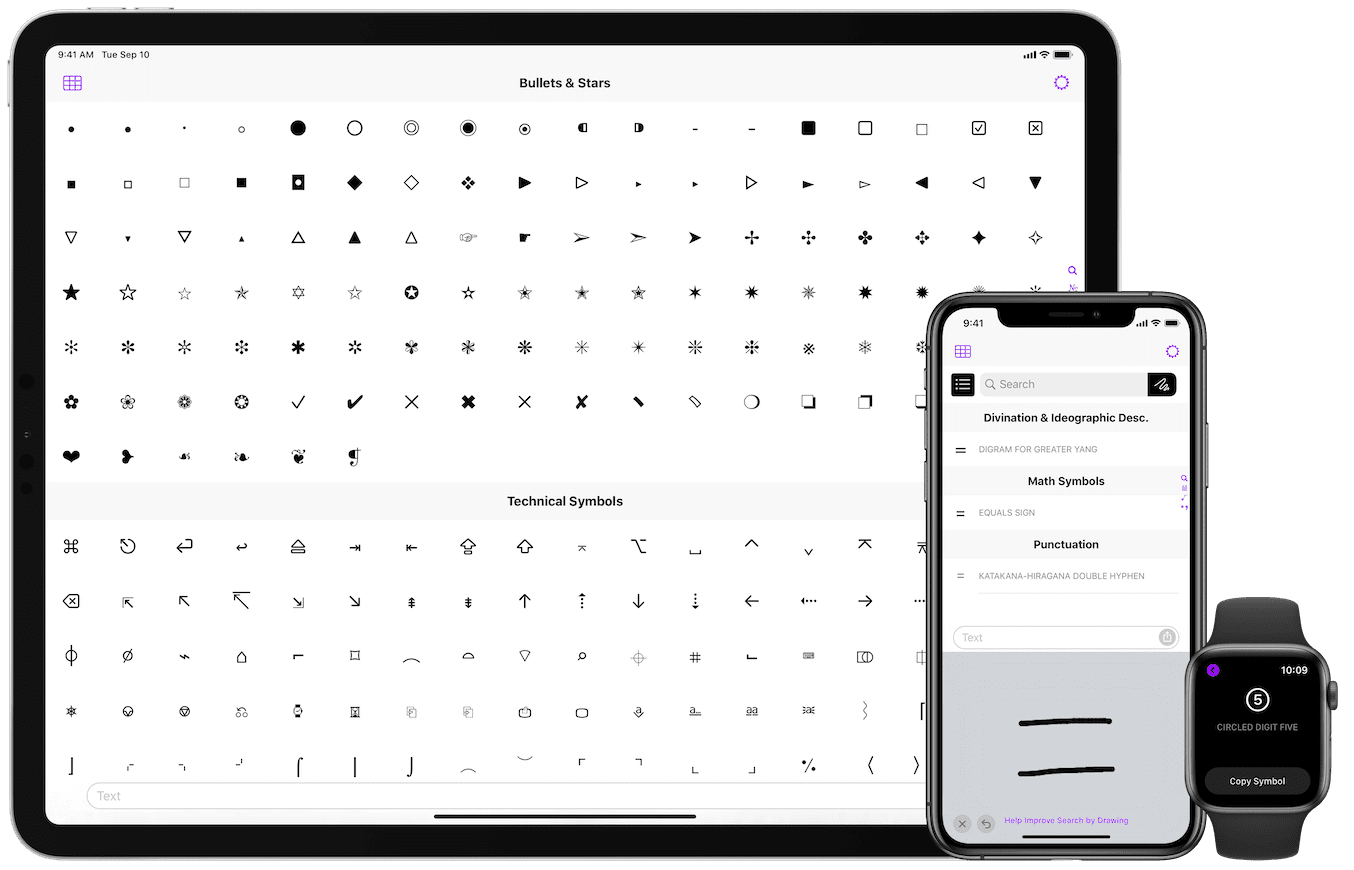
Jordan Hipwell announces UniChar 7 for iOS 13. The update introduces several new capabilities only available in iOS 13, including a complete Unicode table layout, context menus, dark mode, 500 new symbols, and more.
Ogden, Utah - Jordan Hipwell today released UniChar 7, a major update to the powerful Unicode app for iPhone, iPad, and iPod touch devices. The update introduces several new capabilities only available in iOS 13.
Powered by the new compositional collection view layout, a complete Unicode table enables people to browse symbols from the Unicode Standard by code point in their respective character blocks. A Jump To function is available to quickly navigate to a specific character block. Information about each character is easily viewable and can be utilized efficiently.
Context menus have been introduced to view and work with character information. Tap and hold a symbol to reveal the symbol name, code point entity, and HTML entity. Options are provided to quickly copy information to the clipboard or to insert information into the text field for further editing. The last used copy and insert options are conveniently located at the top for efficient reuse of common actions.
UniChar now automatically adapts its interface to match the system appearance of iOS 13. When Dark Mode is enabled, UniChar transitions into a stunning dark theme in the app, keyboard, widget, and iMessage app.
Additional updates include refined iconography from SF Symbols, inclusion of more than 500 symbols newly supported in iOS 13, a dedicated Musical Symbols category, and a Favorites category that enables quick access to saved symbols.
UniChar remains fully accessible with support for accessibility technologies including Dynamic Type and VoiceOver. Optimizations have been included for the new Voice Control feature, allowing people to fully utilize the app hands-free using just their voice.
Since UniChar's first release in 2014, the app has received steady updates that have made it easier to find and utilize Unicode symbols. UniChar Keyboard enabled the ability to type special characters in any app. The addition of code point and HTML entities made UniChar an efficient utility for developers. And Search by Drawing introduced a new and innovative way to look up Unicode symbols.
Device Requirements:
* iPhone, iPad, or iPod touch
* Requires iOS 13.0 or iPadOS 13.0 or later
* Universal Application
* 112.6 MB
Pricing and Availability:
UniChar 7 is available to download for free from the App Store in the Reference category. A $4.99 in-app purchase is available to unlock all categories of symbols.
UniChar — Unicode Keyboard 7.0: https://unichar.app
Download From App Store: https://apps.apple.com/us/app/id880811847?mt=8&at=1000l8Iy
Screenshots: https://unichar.app/images/deviceScreenshots.png
App Icon: https://unichar.app/images/appIcon.png
The UniChar - Unicode Keyboard app is developed by Jordan Hipwell, an independent developer from Utah. Copyright (C) 2019 Jordan Hipwell. All Rights Reserved. Apple, the Apple logo, iPhone, iPad and iPod are registered trademarks of Apple Inc. in the U.S. and/or other countries.
*******
Link To Article: https://prmac.com/release-id-83671.htm
*******
---------------------------------------------------------------------------------
Note that you can alter delivered distributions at any time.
Login to your account on prMac to alter your channel selection, or to opt-out at any time.
UniChar 7 Now Available for iOS 13 - Published on 09/21/19
Jordan Hipwell announces UniChar 7 for iOS 13. The update introduces several new capabilities only available in iOS 13, including a complete Unicode table layout, context menus, dark mode, 500 new symbols, and more.
Ogden, Utah - Jordan Hipwell today released UniChar 7, a major update to the powerful Unicode app for iPhone, iPad, and iPod touch devices. The update introduces several new capabilities only available in iOS 13.
Powered by the new compositional collection view layout, a complete Unicode table enables people to browse symbols from the Unicode Standard by code point in their respective character blocks. A Jump To function is available to quickly navigate to a specific character block. Information about each character is easily viewable and can be utilized efficiently.
Context menus have been introduced to view and work with character information. Tap and hold a symbol to reveal the symbol name, code point entity, and HTML entity. Options are provided to quickly copy information to the clipboard or to insert information into the text field for further editing. The last used copy and insert options are conveniently located at the top for efficient reuse of common actions.
UniChar now automatically adapts its interface to match the system appearance of iOS 13. When Dark Mode is enabled, UniChar transitions into a stunning dark theme in the app, keyboard, widget, and iMessage app.
Additional updates include refined iconography from SF Symbols, inclusion of more than 500 symbols newly supported in iOS 13, a dedicated Musical Symbols category, and a Favorites category that enables quick access to saved symbols.
UniChar remains fully accessible with support for accessibility technologies including Dynamic Type and VoiceOver. Optimizations have been included for the new Voice Control feature, allowing people to fully utilize the app hands-free using just their voice.
Since UniChar's first release in 2014, the app has received steady updates that have made it easier to find and utilize Unicode symbols. UniChar Keyboard enabled the ability to type special characters in any app. The addition of code point and HTML entities made UniChar an efficient utility for developers. And Search by Drawing introduced a new and innovative way to look up Unicode symbols.
Device Requirements:
* iPhone, iPad, or iPod touch
* Requires iOS 13.0 or iPadOS 13.0 or later
* Universal Application
* 112.6 MB
Pricing and Availability:
UniChar 7 is available to download for free from the App Store in the Reference category. A $4.99 in-app purchase is available to unlock all categories of symbols.
UniChar — Unicode Keyboard 7.0: https://unichar.app
Download From App Store: https://apps.apple.com/us/app/id880811847?mt=8&at=1000l8Iy
Screenshots: https://unichar.app/images/deviceScreenshots.png
App Icon: https://unichar.app/images/appIcon.png
The UniChar - Unicode Keyboard app is developed by Jordan Hipwell, an independent developer from Utah. Copyright (C) 2019 Jordan Hipwell. All Rights Reserved. Apple, the Apple logo, iPhone, iPad and iPod are registered trademarks of Apple Inc. in the U.S. and/or other countries.
*******
Link To Article: https://prmac.com/release-id-83671.htm
*******
---------------------------------------------------------------------------------
Note that you can alter delivered distributions at any time.
Login to your account on prMac to alter your channel selection, or to opt-out at any time.
TunesKit Unveils Screen Recorder to Capture Videos and Audios on Mac
A new article has been published at prMac.
TunesKit Unveils Screen Recorder to Capture Videos and Audios on Mac - Published on 09/19/19
TunesKit Software announces TunesKit Screen Recorder for Mac and Windows, an easy-to-use screen recording solution to help users to record any video and audio activity on the computer with high quality, including games, tutorials, webinars, streaming movies, music, etc. This easy recording program can not only record video, but also capture sound from either system audio or microphone or both simultaneously.
Shenzhen, Guangdong - As an innovative multimedia software developer, TunesKit Software has recently released a new member named TunesKit Screen Recorder to its multimedia product lines, aiming to help users grab any video and audio activity on the desktop of PC or Mac computer with ease.
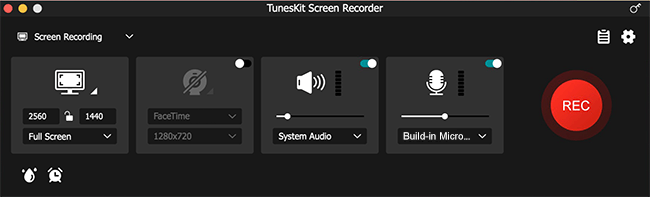
To be specific, users can use it to record video tutorials, online lectures, Skype conversations, webinars, streaming music, computer games, and many other videos or sounds playing within a program with almost 100% original quality preserved. This easy recording program can not only record video, but also capture sound from either system audio or microphone or both simultaneously. After that, users can also edit the recording to make it look better.
Besides, users are allowed to customize the recording options according to their needs. For instance, schedule the recording while staying away, set the keyboard shortcuts, add special effects to cursors and clicks and change the output folder, etc. Moreover, the application supports plenty of output media formats and devices, including MP4, M4V, AVI, MOV, WMV, MP3, FLAC, iPhones, Android phones, smart TVs, game consoles, etc., so users can save the recordings as any format or export to any device freely.
"We plan to offer users a quick easy solution to record videos and audios on computer, and here comes this software," said Andres, the R&D director of TunesKit. "The biggest distinction of our program is that it can capture your screen in a quite simple way due to its clear interface and neat button design, compared with those complicated similar products in the market."
Price and Availability
TunesKit Screen Recorder offers a trial version for users to use the program for free, but the recordings will be added with watermarks. To unlock the limit, users need to upgrade it to the full version, ranging from $29.95 for a single license, $59.95 for 2-5 PCs to $79.95 for unlimited use. All the packages are provided with free lifelong software update and tech support. As for the availability, it works well on all Windows and Mac platforms, including the latest Win 10 and macOS 10.13 High Sierra and 10.14 Mojave.
TunesKit: http://www.tuneskit.com/
TunesKit Screen Recorder: http://www.tuneskit.com/screen-recorder/
Download URL: http://www.tuneskit.com/download/ScreenRecorder.dmg
Screenshot: http://www.tuneskit.com/images/screen-recorder/interface-mac.png
TunesKit Studio is a professional multimedia software developer dedicated to providing the best multimedia solutions and services, including iTunes Video Converter, Audio Converter, Audiobook Converter, Video Cutter for Mac and Windows platforms to customers throughout the world based on the personal use only. As a reliable solution provider, the company also offers free and prompt online support for all users. Currently TunesKit Studio already have millions of active users who are speaking highly of their products. All Material and Software (C) Copyright 2019 TunesKit Studio. All Rights Reserved. Apple, the Apple logo, Mac OS X and Macintosh are registered trademarks of Apple Inc. in the U.S. and/or other countries. Other trademarks and registered trademarks may be the property of their respective owners.
*******
Link To Article: https://prmac.com/release-id-83670.htm
*******
---------------------------------------------------------------------------------
Note that you can alter delivered distributions at any time.
Login to your account on prMac to alter your channel selection, or to opt-out at any time.
TunesKit Unveils Screen Recorder to Capture Videos and Audios on Mac - Published on 09/19/19
TunesKit Software announces TunesKit Screen Recorder for Mac and Windows, an easy-to-use screen recording solution to help users to record any video and audio activity on the computer with high quality, including games, tutorials, webinars, streaming movies, music, etc. This easy recording program can not only record video, but also capture sound from either system audio or microphone or both simultaneously.
Shenzhen, Guangdong - As an innovative multimedia software developer, TunesKit Software has recently released a new member named TunesKit Screen Recorder to its multimedia product lines, aiming to help users grab any video and audio activity on the desktop of PC or Mac computer with ease.
To be specific, users can use it to record video tutorials, online lectures, Skype conversations, webinars, streaming music, computer games, and many other videos or sounds playing within a program with almost 100% original quality preserved. This easy recording program can not only record video, but also capture sound from either system audio or microphone or both simultaneously. After that, users can also edit the recording to make it look better.
Besides, users are allowed to customize the recording options according to their needs. For instance, schedule the recording while staying away, set the keyboard shortcuts, add special effects to cursors and clicks and change the output folder, etc. Moreover, the application supports plenty of output media formats and devices, including MP4, M4V, AVI, MOV, WMV, MP3, FLAC, iPhones, Android phones, smart TVs, game consoles, etc., so users can save the recordings as any format or export to any device freely.
"We plan to offer users a quick easy solution to record videos and audios on computer, and here comes this software," said Andres, the R&D director of TunesKit. "The biggest distinction of our program is that it can capture your screen in a quite simple way due to its clear interface and neat button design, compared with those complicated similar products in the market."
Price and Availability
TunesKit Screen Recorder offers a trial version for users to use the program for free, but the recordings will be added with watermarks. To unlock the limit, users need to upgrade it to the full version, ranging from $29.95 for a single license, $59.95 for 2-5 PCs to $79.95 for unlimited use. All the packages are provided with free lifelong software update and tech support. As for the availability, it works well on all Windows and Mac platforms, including the latest Win 10 and macOS 10.13 High Sierra and 10.14 Mojave.
TunesKit: http://www.tuneskit.com/
TunesKit Screen Recorder: http://www.tuneskit.com/screen-recorder/
Download URL: http://www.tuneskit.com/download/ScreenRecorder.dmg
Screenshot: http://www.tuneskit.com/images/screen-recorder/interface-mac.png
TunesKit Studio is a professional multimedia software developer dedicated to providing the best multimedia solutions and services, including iTunes Video Converter, Audio Converter, Audiobook Converter, Video Cutter for Mac and Windows platforms to customers throughout the world based on the personal use only. As a reliable solution provider, the company also offers free and prompt online support for all users. Currently TunesKit Studio already have millions of active users who are speaking highly of their products. All Material and Software (C) Copyright 2019 TunesKit Studio. All Rights Reserved. Apple, the Apple logo, Mac OS X and Macintosh are registered trademarks of Apple Inc. in the U.S. and/or other countries. Other trademarks and registered trademarks may be the property of their respective owners.
*******
Link To Article: https://prmac.com/release-id-83670.htm
*******
---------------------------------------------------------------------------------
Note that you can alter delivered distributions at any time.
Login to your account on prMac to alter your channel selection, or to opt-out at any time.
HDRtist NX 2.1 release exclusively for macOS - The Power to Make Magic
A new article has been published at prMac.
HDRtist NX 2.1 release exclusively for macOS - The Power to Make Magic - Published on 09/23/19
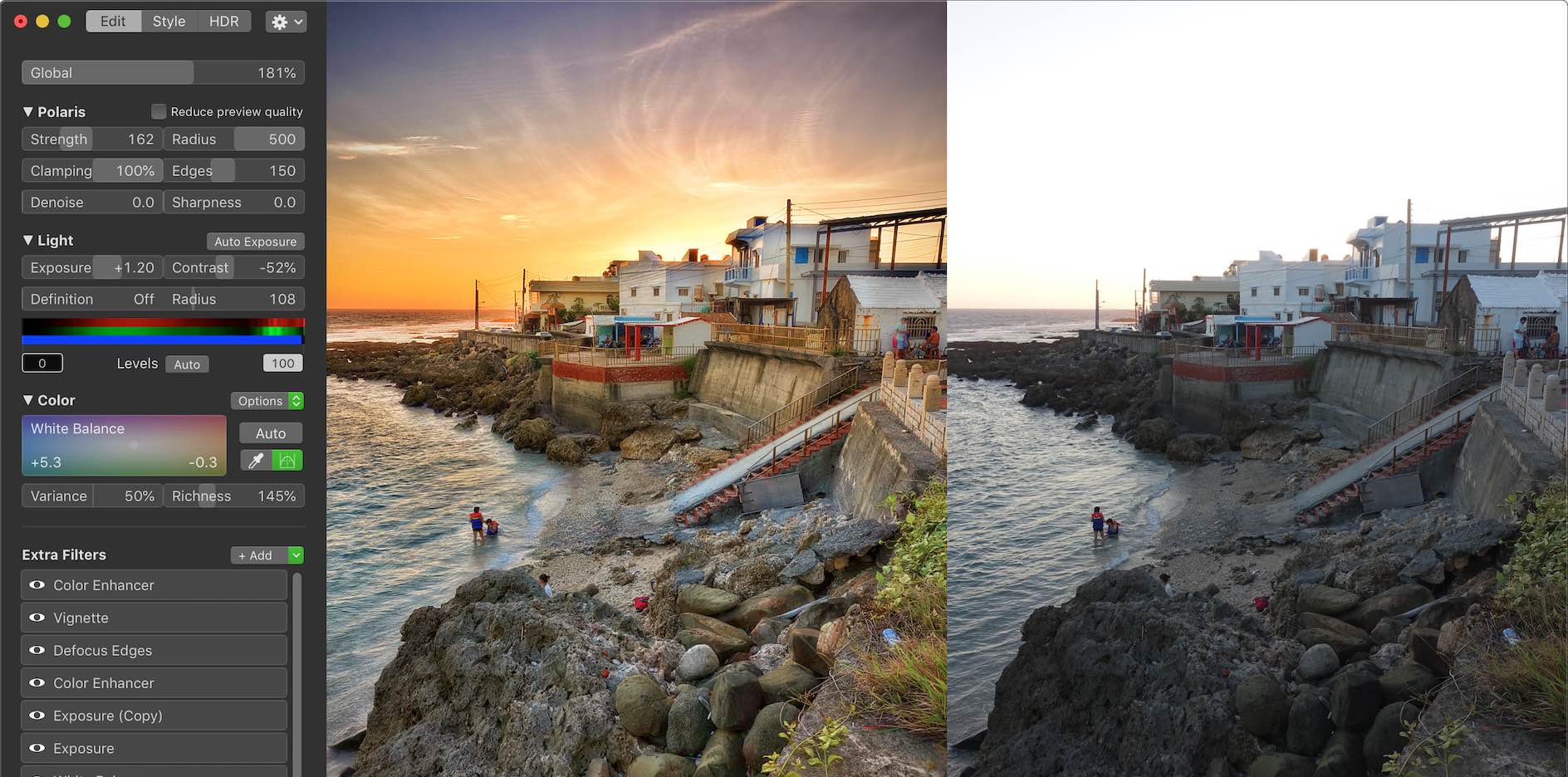
Ohanaware Co., Ltd. Announce the immediate release of HDRtist NX 2.1; a minor update to their flagship High Dynamic Range Imaging software product for the macOS operating system. Version 2.1 focuses on improving color rendering, single RAW support and integration with Apple's "Photos" organizing software. HDRtist NX2 is the fourth major revision of their HDR software, covering 10 years, allowing for a significantly improved engine, modern interface, and extendable functionality.
Hengchun, Taiwan - Ohanaware Co., Ltd. is very proud to announce the immediate release of HDRtist NX2.1; a minor update to their flagship High Dynamic Range Imaging software product for the macOS operating system. Version 2.1 focuses on improving color rendering, single RAW support and integration with Apple's "Photos" organizing software. HDRtist NX2 is the fourth major revision of their HDR software, covering 10 years, allowing for a significantly improved engine, modern interface, and extendable functionality.
Major changes in HDRtist NX 2.1:
* Improved color processing pipeline throughout the application
* New Booster & Richness color enhancing options
* Improved RAW expander, allows for more detail to be recovered from single RAW images
* Improved the support for getting photos from Apple's Photos into HDRtist NX 2
* Improved the ability to export Photos from HDRtist NX 2 into Apple's Photos
* Can now import older HDRtist Pro HDR files
* Improved the Magic Extra
* Various other bug fixes and additions
Key features of HDRtist NX 2.1:
* 8th Generation detail enhancing tone mapper, with Tone Mapping To The Edge
* Dehaze & "Highlights & Shadows Pro" to reveal hidden details in the highlights
* Over 30 1-Click styles to save time & create inspiration
* More than 20 built-in Extras; some expand on existing functions while others are used to add stylistic effects to HDRs
* Works with multiple exposures, single images and improved support for single RAW images
* Advanced cropping tool, with multiple aspect ratios, fixed sizes & free-form option
* Editable HDR format, with save history
* Optimized interface provides a gorgeous high resolution preview area
* Multiple views for comparing the processed HDR with original exposures
Compatibility:
* macOS 10.11 El Capitan, 10.12 Sierra, 10.13 High Sierra and 10.14 Mojave
* 16GB of RAM
* 50MB of disk space
* Graphics card with 1 GB of VRAM
### Pricing and Availability:
HDRtist NX 2.1 is available right now from the Ohanaware web site. HDRtist NX 2.1 offers a FREE no-obligation 30 day trail. The RRP is $59.99 (USD). For a limited time, Ohanaware are running a Launch Promotion whereby this new version is available for only $39.99 (USD). Ohanaware uses Paddle as their payment processor.
HDRtist NX 2.1: https://www.ohanaware.com/hdr/
Download HDRtist NX 2.1 (trial version): https://www.ohanaware.com/hdr/hdrtistnx.dmg
Direct purchase link (with time limited discount): https://pay.paddle.com/checkout/556813?coupon=C2C920FB
Screenshot: https://www.ohanaware.com/hdr/NX2/wanlitongScreenshot944@2x.jpg
High resolution icon (1024px): https://www.ohanaware.com/hdr/NX2/HDRtistNX2_1024.png
Since '06, Joy Sha & Sam Rowlands have been building top ten, award winning apps. Their most notable applications include Funtastic Photos, which set the benchmark for modern photo editing. HDRtist & HDRtist Pro which has over 100,000 users world wide. App Wrapper, which is the #1 third party product to help developers prepare their apps for the App Store. All Material and Software (C) Copyright 2006-2019 Ohanaware Co., Ltd. All Rights Reserved. Apple, the Apple logo, Mac OS X and Macintosh are registered trademarks of Apple Inc. in the U.S. and/or other countries. Other trademarks and registered trademarks may be the property of their respective owners.
*******
Link To Article: https://prmac.com/release-id-83669.htm
*******
---------------------------------------------------------------------------------
Note that you can alter delivered distributions at any time.
Login to your account on prMac to alter your channel selection, or to opt-out at any time.
HDRtist NX 2.1 release exclusively for macOS - The Power to Make Magic - Published on 09/23/19
Ohanaware Co., Ltd. Announce the immediate release of HDRtist NX 2.1; a minor update to their flagship High Dynamic Range Imaging software product for the macOS operating system. Version 2.1 focuses on improving color rendering, single RAW support and integration with Apple's "Photos" organizing software. HDRtist NX2 is the fourth major revision of their HDR software, covering 10 years, allowing for a significantly improved engine, modern interface, and extendable functionality.
Hengchun, Taiwan - Ohanaware Co., Ltd. is very proud to announce the immediate release of HDRtist NX2.1; a minor update to their flagship High Dynamic Range Imaging software product for the macOS operating system. Version 2.1 focuses on improving color rendering, single RAW support and integration with Apple's "Photos" organizing software. HDRtist NX2 is the fourth major revision of their HDR software, covering 10 years, allowing for a significantly improved engine, modern interface, and extendable functionality.
Major changes in HDRtist NX 2.1:
* Improved color processing pipeline throughout the application
* New Booster & Richness color enhancing options
* Improved RAW expander, allows for more detail to be recovered from single RAW images
* Improved the support for getting photos from Apple's Photos into HDRtist NX 2
* Improved the ability to export Photos from HDRtist NX 2 into Apple's Photos
* Can now import older HDRtist Pro HDR files
* Improved the Magic Extra
* Various other bug fixes and additions
Key features of HDRtist NX 2.1:
* 8th Generation detail enhancing tone mapper, with Tone Mapping To The Edge
* Dehaze & "Highlights & Shadows Pro" to reveal hidden details in the highlights
* Over 30 1-Click styles to save time & create inspiration
* More than 20 built-in Extras; some expand on existing functions while others are used to add stylistic effects to HDRs
* Works with multiple exposures, single images and improved support for single RAW images
* Advanced cropping tool, with multiple aspect ratios, fixed sizes & free-form option
* Editable HDR format, with save history
* Optimized interface provides a gorgeous high resolution preview area
* Multiple views for comparing the processed HDR with original exposures
Compatibility:
* macOS 10.11 El Capitan, 10.12 Sierra, 10.13 High Sierra and 10.14 Mojave
* 16GB of RAM
* 50MB of disk space
* Graphics card with 1 GB of VRAM
### Pricing and Availability:
HDRtist NX 2.1 is available right now from the Ohanaware web site. HDRtist NX 2.1 offers a FREE no-obligation 30 day trail. The RRP is $59.99 (USD). For a limited time, Ohanaware are running a Launch Promotion whereby this new version is available for only $39.99 (USD). Ohanaware uses Paddle as their payment processor.
HDRtist NX 2.1: https://www.ohanaware.com/hdr/
Download HDRtist NX 2.1 (trial version): https://www.ohanaware.com/hdr/hdrtistnx.dmg
Direct purchase link (with time limited discount): https://pay.paddle.com/checkout/556813?coupon=C2C920FB
Screenshot: https://www.ohanaware.com/hdr/NX2/wanlitongScreenshot944@2x.jpg
High resolution icon (1024px): https://www.ohanaware.com/hdr/NX2/HDRtistNX2_1024.png

Since '06, Joy Sha & Sam Rowlands have been building top ten, award winning apps. Their most notable applications include Funtastic Photos, which set the benchmark for modern photo editing. HDRtist & HDRtist Pro which has over 100,000 users world wide. App Wrapper, which is the #1 third party product to help developers prepare their apps for the App Store. All Material and Software (C) Copyright 2006-2019 Ohanaware Co., Ltd. All Rights Reserved. Apple, the Apple logo, Mac OS X and Macintosh are registered trademarks of Apple Inc. in the U.S. and/or other countries. Other trademarks and registered trademarks may be the property of their respective owners.
*******
Link To Article: https://prmac.com/release-id-83669.htm
*******
---------------------------------------------------------------------------------
Note that you can alter delivered distributions at any time.
Login to your account on prMac to alter your channel selection, or to opt-out at any time.
ArtOptimizer 3 for Adobe Illustrator Is Released for Public Beta Testers
A new article has been published at prMac.
ArtOptimizer 3 for Adobe Illustrator Is Released for Public Beta Testers - Published on 09/23/19
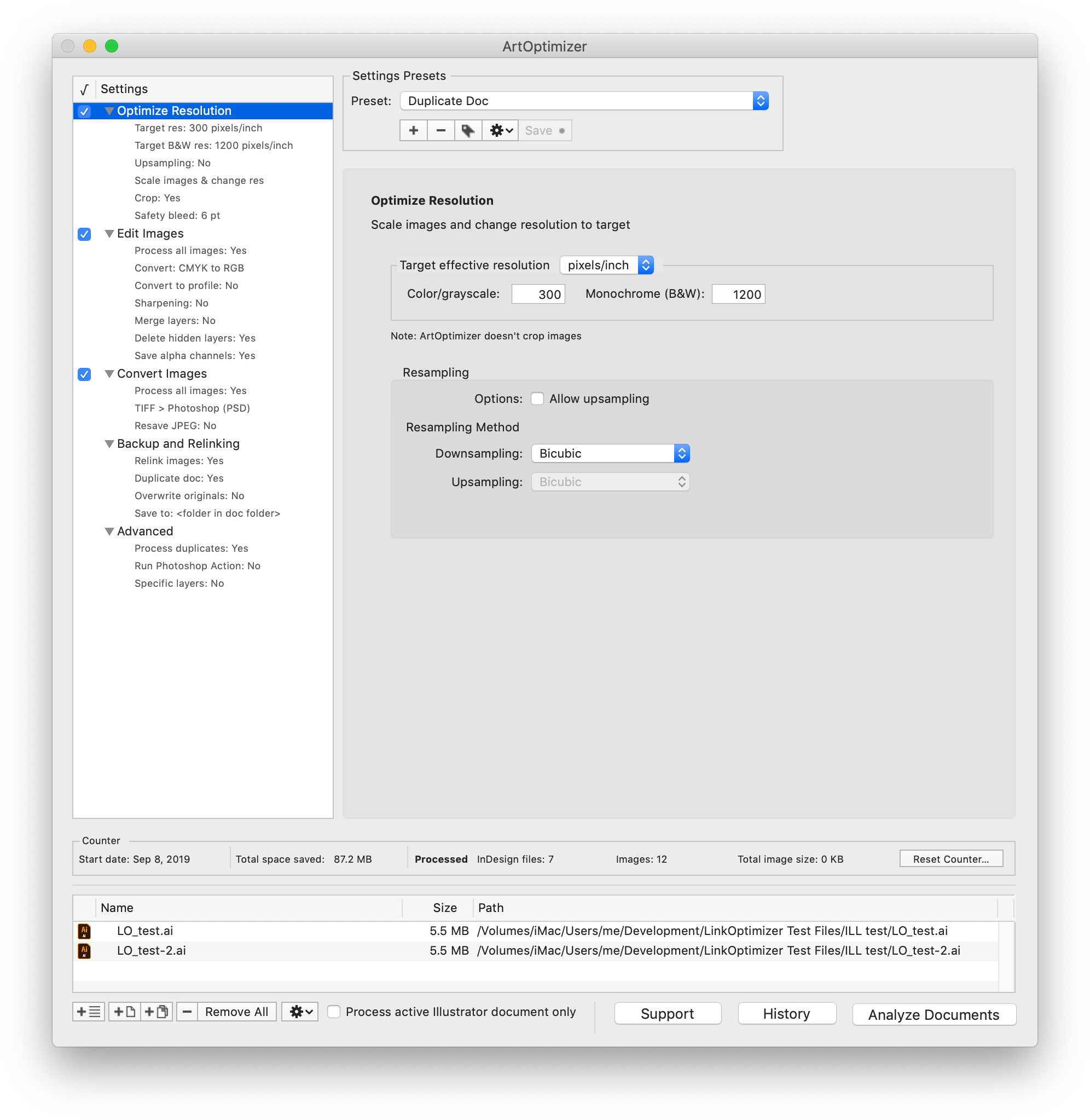
Zevrix Solutions announces the public beta release of ArtOptimizer 3 for Adobe Illustrator, a major upgrade to company's image workflow automation solution for Adobe's flagship vector design software. ArtOptimizer eliminates the excess image data of Illustrator picture links and performs essential image adjustments. The new version adds a long list of new features such as image format conversion, batch processing, settings presets, duplicate links processing, new user interface and much more.
Toronto (ON), Canada - Zevrix Solutions today announces the public beta release of ArtOptimizer 3, a major upgrade to company's workflow automation solution for Adobe Illustrator. The only tool of its kind on the market, ArtOptimizer eliminates the excess image data of Illustrator picture links and performs essential image adjustments, which helps users save disk space, accelerate document output, and cut overall production time dramatically.
The new version introduces a long list of new features and improvements, which take ArtOptimizer to a totally different level and help Illustrator users easily automate complex and time-consuming production tasks. A highlight of the new solutions and improvements include:
* New user interface
* Batch processing of Illustrator files
* Presets of the app's settings
* Process duplicate links
* Convert formats of Illustrator image links
* Specify Photoshop resampling methods for optimized resolution
* Process monochrome (bitmap) images
* Convert colors to specific profile
* Link previews
* Duplicate original Illustrator document before processing
* Many other new options for backup, relinking, image naming and other areas
* Improved performance and stability
The public beta of ArtOptimizer 3 is available for download from Zevrix website. Beta-testers who provide valuable feedback will receive a 50% discount to purchase an upgrade from earlier version of ArtOptimizer or a new license.
Pricing and Availability:
ArtOptimizer 3 public beta can be downloaded from Zevrix website. Qualified beta testers will receive a discount on the new license or upgrade to ArtOptimizer 3. Detailed info is included with the beta download. The current stable release, ArtOptimizer 2, can be purchased for US$119.95. Trial is also available for download. ArtOptimizer requires macOS 10.8-10.14 and Adobe Illustrator/Photoshop CS6-CC 2019.
Zevrix Solutions: http://zevrix.com
ArtOptimizer 3 Beta: http://zevrix.com/ArtOptimizer.php
Download ArtOptimizer 3 Beta: http://zevrix.com/ArtOptimizer.dmg
Purchase: http://zevrix.com/store.php
Screenshot: http://zevrix.com/screenshots/ao3/ao3-beta-res-win.png
Located in Toronto, Canada, Zevrix Solutions provides automation and productivity solutions for Adobe Creative Cloud and Creative Suite software, PDF workflows, graphic file diagnostics and Microsoft Office output on Mac OS. Zevrix is dedicated to help professionals increase their profits through automating everyday tasks, producing error-free documents, saving disk space and cutting production costs. For more information, visit their website. Copyright (C) 2019 Zevrix Solutions. All Rights Reserved. Other trademarks and registered trademarks may be the property of their respective owners.
*******
Link To Article: https://prmac.com/release-id-83668.htm
*******
---------------------------------------------------------------------------------
Note that you can alter delivered distributions at any time.
Login to your account on prMac to alter your channel selection, or to opt-out at any time.
ArtOptimizer 3 for Adobe Illustrator Is Released for Public Beta Testers - Published on 09/23/19
Zevrix Solutions announces the public beta release of ArtOptimizer 3 for Adobe Illustrator, a major upgrade to company's image workflow automation solution for Adobe's flagship vector design software. ArtOptimizer eliminates the excess image data of Illustrator picture links and performs essential image adjustments. The new version adds a long list of new features such as image format conversion, batch processing, settings presets, duplicate links processing, new user interface and much more.
Toronto (ON), Canada - Zevrix Solutions today announces the public beta release of ArtOptimizer 3, a major upgrade to company's workflow automation solution for Adobe Illustrator. The only tool of its kind on the market, ArtOptimizer eliminates the excess image data of Illustrator picture links and performs essential image adjustments, which helps users save disk space, accelerate document output, and cut overall production time dramatically.
The new version introduces a long list of new features and improvements, which take ArtOptimizer to a totally different level and help Illustrator users easily automate complex and time-consuming production tasks. A highlight of the new solutions and improvements include:
* New user interface
* Batch processing of Illustrator files
* Presets of the app's settings
* Process duplicate links
* Convert formats of Illustrator image links
* Specify Photoshop resampling methods for optimized resolution
* Process monochrome (bitmap) images
* Convert colors to specific profile
* Link previews
* Duplicate original Illustrator document before processing
* Many other new options for backup, relinking, image naming and other areas
* Improved performance and stability
The public beta of ArtOptimizer 3 is available for download from Zevrix website. Beta-testers who provide valuable feedback will receive a 50% discount to purchase an upgrade from earlier version of ArtOptimizer or a new license.
Pricing and Availability:
ArtOptimizer 3 public beta can be downloaded from Zevrix website. Qualified beta testers will receive a discount on the new license or upgrade to ArtOptimizer 3. Detailed info is included with the beta download. The current stable release, ArtOptimizer 2, can be purchased for US$119.95. Trial is also available for download. ArtOptimizer requires macOS 10.8-10.14 and Adobe Illustrator/Photoshop CS6-CC 2019.
Zevrix Solutions: http://zevrix.com
ArtOptimizer 3 Beta: http://zevrix.com/ArtOptimizer.php
Download ArtOptimizer 3 Beta: http://zevrix.com/ArtOptimizer.dmg
Purchase: http://zevrix.com/store.php
Screenshot: http://zevrix.com/screenshots/ao3/ao3-beta-res-win.png
Located in Toronto, Canada, Zevrix Solutions provides automation and productivity solutions for Adobe Creative Cloud and Creative Suite software, PDF workflows, graphic file diagnostics and Microsoft Office output on Mac OS. Zevrix is dedicated to help professionals increase their profits through automating everyday tasks, producing error-free documents, saving disk space and cutting production costs. For more information, visit their website. Copyright (C) 2019 Zevrix Solutions. All Rights Reserved. Other trademarks and registered trademarks may be the property of their respective owners.
*******
Link To Article: https://prmac.com/release-id-83668.htm
*******
---------------------------------------------------------------------------------
Note that you can alter delivered distributions at any time.
Login to your account on prMac to alter your channel selection, or to opt-out at any time.
WinX MediaTrans V6.6 Protects Data of Millions of iOS 13 Upgraders
A new article has been published at prMac.
WinX MediaTrans V6.6 Protects Data of Millions of iOS 13 Upgraders - Published on 09/20/19
Digiarty Software today releases WinX MediaTrans 6.6, an update to their next-generation media application. WinX MediaTrans offers the easiest way to transfer photos, videos and music between any iPhone, iPad with a Windows computer. Users can easily auto convert any video formats to any Apple device. Effortlessly import/export 4K or 1080p HD videos between PC and iDevice, in batch and much more. Version 6.6 is a complete upgrade on data transfer and full support for iOS 13.
Chengdu, China - Digiarty Software today proudly announces the mega launch of its iPhone management software, WinX MediaTrans, with full support for iOS 13, aimed at helping millions of iPhone users to backup data for safe iOS 13 updates. The improvement includes but is not confined to data transfer function independent of Apple iTunes and its components, faster processing speed, and new underlying and connection optimization.
When a huge amount of iPhone users rush to iOS 13 dark mode, many are messing up with issues like getting stuck in a boot loop, endless waiting, apps failing to open, not enough space, random crashes & freezes, slow iPhone, etc. But this is just the tip of the iceberg. To protect iPhone data in case of any iOS 13 updating problems, WinX MediaTrans V6.6 is released with comprehensive support for iOS 13.
The upgraded iPhone data backup solution not only seamlessly backs up contents from old gadgets to the computer, but also restores the backups safely to iOS 13-based iDevices. Its core data transfer function allows users to transfer photos, videos, music between iOS and Windows/macOS in a flash. For example, it backs up photos, live photos, edited photos and videos intact from old iPhone for iOS 13 update within clicks. Also, videos taken in High-Key Mono portrait, 4K UHD, time-lapse, or slo-mo mode on iOS 13 can be exported to the computer flawlessly without any distortion, frames dropping, color fading, etc.
The speed is further upgraded on WinX MediaTrans V6.6 for a faster way to protect and manage all kinds of data on iPhone. Users feel free to encrypt files with password, add, edit, delete personal contents, make customized ringtone from iPhone, YouTube, iTunes library, import non-iTunes music, convert and compress video files unsupported by iDevices, and so on, 40%-60% faster than many others.
This iTunes alternative is built with necessary components directly extracted from Apple software, making it possible to recognize mobiles and sync data without iTunes. In such a way, plenty of iOS update errors caused by iTunes like iPhone not recognized, iTunes couldn't backup iPhone, iTunes not syncing all music, data lost after syncing, etc. can be avoided, and users will never be overwhelmed by the disappearance of iTunes.
Pricing and Availability:
WinX MediaTrans V6.6 runs on 32 bit and 64 bit Windows 10 and macOS Catalina (and earlier). This alternative to iTunes currently supports iPhone iPad and iPod, ranging from iOS 7 to iOS 13 powered devices. It now costs only $29.95 for 1-PC 1-year license and $35.95 for 2-PC lifetime license on WinX MediaTrans Discount Coupon page, from $39.95 and $59.95 previously.
WinX MediaTrans V6.6: https://www.winxdvd.com/mediatrans/
With over 13 years of development, Digiarty has become a world-leading provider of personal and home-use multimedia software apps based on Windows and macOS. It offers easy and creative solutions of free DVD ripping, DVD copy, DVD burning, HD and 4K video conversion, video processing, online video download, recording, media playback, iPhone file management and more for movie/music addicts, handset owners, video game players, and more. All Material and Software (C) Copyright 2019 Digiarty Software, Inc. All Rights Reserved. Apple, the Apple logo, macOS, iPhone, iPod and iPad are registered trademarks of Apple Inc. in the U.S. and/or other countries. Other trademarks and registered trademarks may be the property of their respective owners.
*******
Link To Article: https://prmac.com/release-id-83667.htm
*******
---------------------------------------------------------------------------------
Note that you can alter delivered distributions at any time.
Login to your account on prMac to alter your channel selection, or to opt-out at any time.
WinX MediaTrans V6.6 Protects Data of Millions of iOS 13 Upgraders - Published on 09/20/19
Digiarty Software today releases WinX MediaTrans 6.6, an update to their next-generation media application. WinX MediaTrans offers the easiest way to transfer photos, videos and music between any iPhone, iPad with a Windows computer. Users can easily auto convert any video formats to any Apple device. Effortlessly import/export 4K or 1080p HD videos between PC and iDevice, in batch and much more. Version 6.6 is a complete upgrade on data transfer and full support for iOS 13.
Chengdu, China - Digiarty Software today proudly announces the mega launch of its iPhone management software, WinX MediaTrans, with full support for iOS 13, aimed at helping millions of iPhone users to backup data for safe iOS 13 updates. The improvement includes but is not confined to data transfer function independent of Apple iTunes and its components, faster processing speed, and new underlying and connection optimization.
When a huge amount of iPhone users rush to iOS 13 dark mode, many are messing up with issues like getting stuck in a boot loop, endless waiting, apps failing to open, not enough space, random crashes & freezes, slow iPhone, etc. But this is just the tip of the iceberg. To protect iPhone data in case of any iOS 13 updating problems, WinX MediaTrans V6.6 is released with comprehensive support for iOS 13.
The upgraded iPhone data backup solution not only seamlessly backs up contents from old gadgets to the computer, but also restores the backups safely to iOS 13-based iDevices. Its core data transfer function allows users to transfer photos, videos, music between iOS and Windows/macOS in a flash. For example, it backs up photos, live photos, edited photos and videos intact from old iPhone for iOS 13 update within clicks. Also, videos taken in High-Key Mono portrait, 4K UHD, time-lapse, or slo-mo mode on iOS 13 can be exported to the computer flawlessly without any distortion, frames dropping, color fading, etc.
The speed is further upgraded on WinX MediaTrans V6.6 for a faster way to protect and manage all kinds of data on iPhone. Users feel free to encrypt files with password, add, edit, delete personal contents, make customized ringtone from iPhone, YouTube, iTunes library, import non-iTunes music, convert and compress video files unsupported by iDevices, and so on, 40%-60% faster than many others.
This iTunes alternative is built with necessary components directly extracted from Apple software, making it possible to recognize mobiles and sync data without iTunes. In such a way, plenty of iOS update errors caused by iTunes like iPhone not recognized, iTunes couldn't backup iPhone, iTunes not syncing all music, data lost after syncing, etc. can be avoided, and users will never be overwhelmed by the disappearance of iTunes.
Pricing and Availability:
WinX MediaTrans V6.6 runs on 32 bit and 64 bit Windows 10 and macOS Catalina (and earlier). This alternative to iTunes currently supports iPhone iPad and iPod, ranging from iOS 7 to iOS 13 powered devices. It now costs only $29.95 for 1-PC 1-year license and $35.95 for 2-PC lifetime license on WinX MediaTrans Discount Coupon page, from $39.95 and $59.95 previously.
WinX MediaTrans V6.6: https://www.winxdvd.com/mediatrans/
With over 13 years of development, Digiarty has become a world-leading provider of personal and home-use multimedia software apps based on Windows and macOS. It offers easy and creative solutions of free DVD ripping, DVD copy, DVD burning, HD and 4K video conversion, video processing, online video download, recording, media playback, iPhone file management and more for movie/music addicts, handset owners, video game players, and more. All Material and Software (C) Copyright 2019 Digiarty Software, Inc. All Rights Reserved. Apple, the Apple logo, macOS, iPhone, iPod and iPad are registered trademarks of Apple Inc. in the U.S. and/or other countries. Other trademarks and registered trademarks may be the property of their respective owners.
*******
Link To Article: https://prmac.com/release-id-83667.htm
*******
---------------------------------------------------------------------------------
Note that you can alter delivered distributions at any time.
Login to your account on prMac to alter your channel selection, or to opt-out at any time.
Remote Control for Mac - now on iOS/watchOS
A new article has been published at prMac.
Remote Control for Mac - now on iOS/watchOS - Published on 09/20/19
Indie developer, Evgeny Cherpak today announces Remote Control for Mac, an important update to his popular remote control app for iOS and watchOS devices. The app allows iOS device users to remotely control their Mac, using their iPhone or iPad as a keyboard and trackpad. Anyone can also launch any app on the Mac from anywhere in their home. The app can also put the Mac to sleep, wake it up, and even control volume, playback, and AirPlay mirroring on the computer.
Netanya, Israel - Independent developer, Evgeny Cherpak today is proud to announce the release and immediate availability of Remote Control for Mac, an important update to his remote control app for iPhone, iPad, iPod touch, and Apple Watch devices. Control your Mac with multimedia controls, keyboard, mouse, app and system actions and AirPlay controls. Take full control of your Mac from anywhere in your home or office.
Tired of sitting on the couch, having to handle keyboard and mouse on your lap to control your media center Mac? Use Remote Control on your iPhone as a trackpad and keyboard to comfortably browse on the big screen TV. Using AirPlay Mirroring and an Apple TV, your Mac could be located anywhere in your home. Simply select your Apple TV from the list of available AirPlay devices and control your Mac from the comfort of your couch or bed.
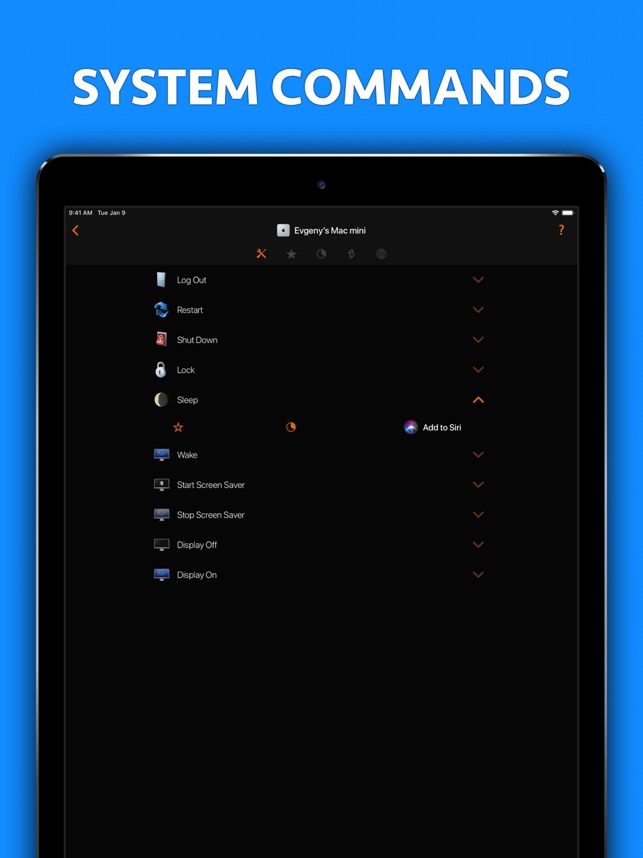
You can even start any app on your Mac, send your Mac to sleep, wake it up and perform many more useful actions to control your Mac remotely. All you need to do is download the Mac Helper application and connect your Mac and iOS device to the same WiFi. Remote Control will guide you through the simple setup process.
At A Glance:
* Control volume, playback and Airplay mirroring of your Mac
* Use your iOS device as a Mac trackpad and keyboard
* Launch and quit Apps on your Mac comfortably from your iOS device
* Control any app on your Mac using its menu
* Restart or shut down your Mac, change display brightness and many more useful actions
* Enjoy the ease of use in a slick user interface you will love
* Use the Personal Hotspot of your iOS device to control your Mac when you don't have access to other networks
* 3 steps, under 30 seconds super easy setup
Control:
* iTunes
* Amazon Prime Video
* Netflix
* YouTube
* Plex
* Kodi
* VLC
* SoundCloud
* Spotify
* Deezer
* Tidal
* IINA
System Requirements:
* Mac with macOS 10.10 or above and free helper app installed
* iPhone, iPad or iPod touch with iOS 10 or above
* Shared wireless network connection between your computer and iOS device
Pricing and Availability:
Remote Control for Mac [Pro] 2019.1 is $9.99 USD (or equivalent amount in other currencies) and available worldwide exclusively through the App Store in the Productivity category.
Remote Control for Mac [Pro] 2019.1: https://www.cherpake.com
Purchase and Download from the App Store: https://apps.apple.com/app/remote-control-for-mac-pro/id884153085
Download Helper App: https://cherpake.com/get
Screenshot: https://is3-ssl.mzstatic.com/image/thumb/Purple123/v4/73/1a/78/731a7871-ced5-8aa4-4995-01b46016094e/pr_source.jpg/643x0w.jpg
App Icon: https://is3-ssl.mzstatic.com/image/thumb/Purple113/v4/0d/c9/c2/0dc9c206-f840-f1ac-f30f-350543c9b83b/AppIcon-0-0-1x_U007emarketing-0-0-0-10-0-0-sRGB-0-0-0-GLES2_U002c0-512MB-85-220-0-0.png/246x0w.jpg
Located in Netanya, Israel, Evgeny Cherpak is an independent developer. His mission is to fill the gaps in the Apple eco-system integration. Evgeny's apps are designed to offer iOS and macOS users the ability to use the devices to improve their productivity, streamline tasks, and offer more time to enjoy life. All Material and Software (C) Copyright 2019 Evgeny Cherpak. All Rights Reserved. Apple, the Apple logo, iPhone, iPod and iPad are registered trademarks of Apple Inc. in the U.S. and/or other countries. Other trademarks and registered trademarks may be the property of their respective owners.
*******
Link To Article: https://prmac.com/release-id-83666.htm
*******
---------------------------------------------------------------------------------
Note that you can alter delivered distributions at any time.
Login to your account on prMac to alter your channel selection, or to opt-out at any time.
Remote Control for Mac - now on iOS/watchOS - Published on 09/20/19
Indie developer, Evgeny Cherpak today announces Remote Control for Mac, an important update to his popular remote control app for iOS and watchOS devices. The app allows iOS device users to remotely control their Mac, using their iPhone or iPad as a keyboard and trackpad. Anyone can also launch any app on the Mac from anywhere in their home. The app can also put the Mac to sleep, wake it up, and even control volume, playback, and AirPlay mirroring on the computer.
Netanya, Israel - Independent developer, Evgeny Cherpak today is proud to announce the release and immediate availability of Remote Control for Mac, an important update to his remote control app for iPhone, iPad, iPod touch, and Apple Watch devices. Control your Mac with multimedia controls, keyboard, mouse, app and system actions and AirPlay controls. Take full control of your Mac from anywhere in your home or office.
Tired of sitting on the couch, having to handle keyboard and mouse on your lap to control your media center Mac? Use Remote Control on your iPhone as a trackpad and keyboard to comfortably browse on the big screen TV. Using AirPlay Mirroring and an Apple TV, your Mac could be located anywhere in your home. Simply select your Apple TV from the list of available AirPlay devices and control your Mac from the comfort of your couch or bed.
You can even start any app on your Mac, send your Mac to sleep, wake it up and perform many more useful actions to control your Mac remotely. All you need to do is download the Mac Helper application and connect your Mac and iOS device to the same WiFi. Remote Control will guide you through the simple setup process.
At A Glance:
* Control volume, playback and Airplay mirroring of your Mac
* Use your iOS device as a Mac trackpad and keyboard
* Launch and quit Apps on your Mac comfortably from your iOS device
* Control any app on your Mac using its menu
* Restart or shut down your Mac, change display brightness and many more useful actions
* Enjoy the ease of use in a slick user interface you will love
* Use the Personal Hotspot of your iOS device to control your Mac when you don't have access to other networks
* 3 steps, under 30 seconds super easy setup
Control:
* iTunes
* Amazon Prime Video
* Netflix
* YouTube
* Plex
* Kodi
* VLC
* SoundCloud
* Spotify
* Deezer
* Tidal
* IINA
System Requirements:
* Mac with macOS 10.10 or above and free helper app installed
* iPhone, iPad or iPod touch with iOS 10 or above
* Shared wireless network connection between your computer and iOS device
Pricing and Availability:
Remote Control for Mac [Pro] 2019.1 is $9.99 USD (or equivalent amount in other currencies) and available worldwide exclusively through the App Store in the Productivity category.
Remote Control for Mac [Pro] 2019.1: https://www.cherpake.com
Purchase and Download from the App Store: https://apps.apple.com/app/remote-control-for-mac-pro/id884153085
Download Helper App: https://cherpake.com/get
Screenshot: https://is3-ssl.mzstatic.com/image/thumb/Purple123/v4/73/1a/78/731a7871-ced5-8aa4-4995-01b46016094e/pr_source.jpg/643x0w.jpg
App Icon: https://is3-ssl.mzstatic.com/image/thumb/Purple113/v4/0d/c9/c2/0dc9c206-f840-f1ac-f30f-350543c9b83b/AppIcon-0-0-1x_U007emarketing-0-0-0-10-0-0-sRGB-0-0-0-GLES2_U002c0-512MB-85-220-0-0.png/246x0w.jpg

Located in Netanya, Israel, Evgeny Cherpak is an independent developer. His mission is to fill the gaps in the Apple eco-system integration. Evgeny's apps are designed to offer iOS and macOS users the ability to use the devices to improve their productivity, streamline tasks, and offer more time to enjoy life. All Material and Software (C) Copyright 2019 Evgeny Cherpak. All Rights Reserved. Apple, the Apple logo, iPhone, iPod and iPad are registered trademarks of Apple Inc. in the U.S. and/or other countries. Other trademarks and registered trademarks may be the property of their respective owners.
*******
Link To Article: https://prmac.com/release-id-83666.htm
*******
---------------------------------------------------------------------------------
Note that you can alter delivered distributions at any time.
Login to your account on prMac to alter your channel selection, or to opt-out at any time.
Subscribe to:
Posts (Atom)