A new article has been published at prMac.
PopChar, Typinator, and KeyCue are ready for macOS Catalina - Published on 10/04/19
Ergonis Software today released PopChar X 8.7, Typinator 8.2, and KeyCue 9.5 and makes all their productivity utilities ready for macOS Catalina. PopChar X 8.7 adds support for Unicode 12.0, including the new Emoji 12 characters, KeyCue 9.5 enhances package detection in folder views, and Typinator 8.2 offers faster Quick Search results when many items match the search term. It is recommended to upgrade to these latest versions before switching to Catalina.
Perg, Austria - October 4, 2019: Ergonis Software today released PopChar X 8.7, Typinator 8.2, and KeyCue 9.5 and makes all their productivity utilities ready for macOS Catalina.
Since day one, Ergonis Software has been committed to providing high-quality macOS products that 'just work'. "To achieve this goal, we put a lot of effort into our products behind the scenes to make them do their job flawlessly, fast, and unobtrusively. It is, therefore, no surprise that we are ready to release updated versions of our products right in time before the official release of macOS Catalina." said Christoph Reichenberger, founder and CEO of Ergonis Software. "Said that I am also glad to mention that the newest versions of our products still run on older OS versions back to OS X 10.8 (Mountain Lion)."
Besides compatibility with Catalina, the new versions of the individual products also bring new features and improvements. PopChar X 8.7 adds support for Unicode 12.0, including the new Emoji 12 characters, KeyCue 9.5 enhances package detection in folder views, and Typinator 8.2 offers faster Quick Search results when many items match the search term.
Finally, all new versions also contain fixes and enhancements to improve compatibility and stability on all supported macOS versions and are therefore recommended upgrades for all users, independent from upgrades to Catalina. Visit Ergonis Software's website to learn more about the changes in this release and to download the new version.
Availability and Ordering:
Upgrades and new licenses can be purchased securely at the Ergonis Software online store. The upgrades to the newest versions are free for anyone who owns a valid license for the most recent major version (that is, Typinator 8, PopChar 8, and KeyCue 9). Upgrade paths are available for owners of older licenses. All purchases (new and upgrades alike) include all subsequent minor upgrades at no additional cost. For information about purchases, including enterprise licenses, volume discounts, and upgrade pricing offers, see the company's web site.
Instead of purchasing a license for a single product, customers can save money by ordering the Ergonis Productivity Bundle, which includes PopChar, Typinator, and KeyCue at a significant discount.
Ergonis Software: https://www.ergonis.com
Ergonis products are ready for macOS Catalina: https://www.ergonis.com/products/
Compatibility recommendations: https://www.ergonis.com/products/tips/macos-compatibility.php
Download: https://www.ergonis.com/downloads
Purchase: https://store.ergonis.com
Media Assets: https://www.ergonis.com/press
Headquartered in Perg, Austria, Ergonis Software Gmbh is a privately held software development company founded in 2002. With a focus on innovation, Ergonis develops ergonomic and intuitive software that boosts the productivity of Mac and PC users alike. Copyright 2002-2019 Ergonis Software Gmbh. All Rights Reserved. Ergonis products are either registered trademarks or trademarks of Ergonis Software GmbH. Other company and product names may be trademarks of their respective owners.
*******
Link To Article: https://prmac.com/release-id-83689.htm
*******
---------------------------------------------------------------------------------
Note that you can alter delivered distributions at any time.
Login to your account on prMac to alter your channel selection, or to opt-out at any time.

TokoToko is a premium AR game that brings your drawings to life
A new article has been published at prMac.
TokoToko is a premium AR game that brings your drawings to life - Published on 10/03/19
Independent developer, Kalank today announces TokoToko, the first episode of its augmented reality mobile title for iOS devices. Watch drawings leap off the page and onto phone screens with the first episode of this adorable augmented reality game. TokoToko is delivered in three episodic parts. Draw onto paper and watch your drawings appear as interactive objects on the screen for the characters of the game to use in order to solve puzzles.
Angoulme, France - Independent developer Kalank today launched the first episode of its augmented reality mobile title, TokoToko, for $2.99/GBP2.99/Euro3.49 on iOS devices (parts two and three to be released in the future as FREE updates). TokoToko combines the power of AR and imagination, with players drawing items in the real world on paper then seeing them spring to life on screen. Transporting players to an island, they must solve puzzles using their drawings to help the heartwarming TokoToko creatures on their journey.
TokoToko's cute narrative adventure is perfect for adults and children alike. Adding a modern technological twist to drawing, players watch in amazement as their real-life sketches come to life in order to complete tasks. Whether sketching a trapdoor to create an entrance for a character to emerge from or breathing life into a sailing boat, the results are delightful. This is made possible through the power of augmented reality and a little bit of magic from the game's namesakes - the Tokotokos.
TokoToko has a vibrant cast of art-loving Tokotoko creatures - including Hako the super-cute Cat, Azuko the Lion and Peko the Fish - in a charming tale that inspires creativity. Every moment is presented in the game's beautiful art style that draws inspiration from clay and stop-motion animation. The player's creations will help the Tokotoko overcome barriers, both physical and internal, to achieve all of their dreams. Each episode will further explore the story of Hako and her friends and bring new features to the TokoToko experience.
"As creative people ourselves, we imagined Tokotoko as a way to invite players and non-players in expressing themselves the way they want, with the joyous help of the love-sharing Tokotokos." - Kalank Team
Device Requirements:
* iPhone 6S or later
* 7th generation iPod touch or later
* iPad 7th generation or later
* Requires iOS 11.3 or later
* 529.1 MB
Pricing and Availability:
TokoToko 1.1 is $2.99 USD (or equivalent amount in other currencies) and available worldwide exclusively through the App Store in the Games category. The next two TokoToko episodes will be released as Free updates to players who have purchased the first episode. These promise to deliver even more charm and challenges in the form of a sandbox mode, new characters and new environments.
TokoToko 1.1: http://www.tokotoko.io
Purchase and Download from the App Store: https://apps.apple.com/app/tokotoko-augmented-reality/id1465697956
Media Assets: https://drive.google.com/drive/folders/1kfDQoNG_ArwhidRs0xxmfT5H9OsOxfO6
Kalank is a French independent game studio. Founded in 2017, it specialises in making creative AR experiences. Every day, they are meticulously crafting playful and interactive experiences, making reality an augmented playground. All Material and Software (C) Copyright 2019 Kalank. All Rights Reserved. Apple, the Apple logo, iPhone, iPod and iPad are registered trademarks of Apple Inc. in the U.S. and/or other countries. Other trademarks and registered trademarks may be the property of their respective owners.
*******
Link To Article: https://prmac.com/release-id-83687.htm
*******
---------------------------------------------------------------------------------
Note that you can alter delivered distributions at any time.
Login to your account on prMac to alter your channel selection, or to opt-out at any time.
TokoToko is a premium AR game that brings your drawings to life - Published on 10/03/19
Independent developer, Kalank today announces TokoToko, the first episode of its augmented reality mobile title for iOS devices. Watch drawings leap off the page and onto phone screens with the first episode of this adorable augmented reality game. TokoToko is delivered in three episodic parts. Draw onto paper and watch your drawings appear as interactive objects on the screen for the characters of the game to use in order to solve puzzles.
Angoulme, France - Independent developer Kalank today launched the first episode of its augmented reality mobile title, TokoToko, for $2.99/GBP2.99/Euro3.49 on iOS devices (parts two and three to be released in the future as FREE updates). TokoToko combines the power of AR and imagination, with players drawing items in the real world on paper then seeing them spring to life on screen. Transporting players to an island, they must solve puzzles using their drawings to help the heartwarming TokoToko creatures on their journey.
TokoToko's cute narrative adventure is perfect for adults and children alike. Adding a modern technological twist to drawing, players watch in amazement as their real-life sketches come to life in order to complete tasks. Whether sketching a trapdoor to create an entrance for a character to emerge from or breathing life into a sailing boat, the results are delightful. This is made possible through the power of augmented reality and a little bit of magic from the game's namesakes - the Tokotokos.
TokoToko has a vibrant cast of art-loving Tokotoko creatures - including Hako the super-cute Cat, Azuko the Lion and Peko the Fish - in a charming tale that inspires creativity. Every moment is presented in the game's beautiful art style that draws inspiration from clay and stop-motion animation. The player's creations will help the Tokotoko overcome barriers, both physical and internal, to achieve all of their dreams. Each episode will further explore the story of Hako and her friends and bring new features to the TokoToko experience.
"As creative people ourselves, we imagined Tokotoko as a way to invite players and non-players in expressing themselves the way they want, with the joyous help of the love-sharing Tokotokos." - Kalank Team
Device Requirements:
* iPhone 6S or later
* 7th generation iPod touch or later
* iPad 7th generation or later
* Requires iOS 11.3 or later
* 529.1 MB
Pricing and Availability:
TokoToko 1.1 is $2.99 USD (or equivalent amount in other currencies) and available worldwide exclusively through the App Store in the Games category. The next two TokoToko episodes will be released as Free updates to players who have purchased the first episode. These promise to deliver even more charm and challenges in the form of a sandbox mode, new characters and new environments.
TokoToko 1.1: http://www.tokotoko.io
Purchase and Download from the App Store: https://apps.apple.com/app/tokotoko-augmented-reality/id1465697956
Media Assets: https://drive.google.com/drive/folders/1kfDQoNG_ArwhidRs0xxmfT5H9OsOxfO6
Kalank is a French independent game studio. Founded in 2017, it specialises in making creative AR experiences. Every day, they are meticulously crafting playful and interactive experiences, making reality an augmented playground. All Material and Software (C) Copyright 2019 Kalank. All Rights Reserved. Apple, the Apple logo, iPhone, iPod and iPad are registered trademarks of Apple Inc. in the U.S. and/or other countries. Other trademarks and registered trademarks may be the property of their respective owners.
*******
Link To Article: https://prmac.com/release-id-83687.htm
*******
---------------------------------------------------------------------------------
Note that you can alter delivered distributions at any time.
Login to your account on prMac to alter your channel selection, or to opt-out at any time.
Cisdem Duplicate Finder 4.8.0 Refines the Interface for Retina Display
A new article has been published at prMac.
Cisdem Duplicate Finder 4.8.0 Refines the Interface for Retina Display - Published on 10/03/19
Cisdem Duplicate Finder has been upgraded to version 4.8.0, which brings the improved interface (for retina display) and great performance. The update offers a refined interface, capability improved, and bugs fixed. Cisdem Duplicate Finder for Mac looks up duplicate photos, audios, videos, documents, entire folders, etc. as well as similar images, and assists users to remove them at once.
Madelia, Minnesota - Cisdem releases an updated version of its flagship product - Duplicate Finder for Mac 4.8.0, with interface refined, capability improved, and bugs fixed. Cisdem Duplicate Finder for Mac is fairly straightforward in that it looks up duplicate photos, audios, videos, documents, entire folders, etc. as well as similar images, and assists users to remove them at once. It locates duplicates both on Mac and external drives, including Photos, iTunes library, SD card, USB drive and more. After scanning, users will get the accurate results ensued by the byte-by-byte comparison and SHA-1 checksum algorithm.
"The new version of Cisdem Duplicate Finder enables users to find & delete duplicates in iTunes and Photos with the minimum of hassle," said Edward Riley, the Cisdem project manager. "It has important functionality improvements and refines the interface for better display, making it work as effective as possible.
What's New in Version 4.8.0?
1. Refined the interface for retina display.
2. Improved the capability to remove duplicates in iTunes and Photos.
3. Solved the unable to set Photos library path issue.
4. Fixed some minor bugs.
Basic Functions
1. Scan and detect duplicates
It offers easy drag-n-drop option and button for adding specific folders. Based on the size and complexities of the imported folders, a general scanning process could be from 10 seconds to 15 minutes.
2. Find duplicates in iTunes and Photos.
It's able to scan most apps and folders, including iTunes, Photo, iPhoto, documents, videos, archives, and more.
3. Find similar images
It determines identical photos via the color, angle, exposure, etc., and allows users to adjust the "Image Similarity" from 0% to 100%.
4. Two scan method and three removal method
Users can choose to detect the duplicates by the content or file name. Also, users can specify to move the duplicates to trash or folder, or remove them permanently.
5. Include or exclude specific folders/files
The "Ignore List" tab helps users block the folder and files from scanning. For example, to prevent the software from scanning MP3 tracks, just add extension .mp3 to the Ignore List.
6. Preview duplicates
Users can review the scanning results via 3 preview modes before eliminating duplicates.
7. One-click to delete duplicates
It supports to automatically or manually select the duplicates, and clean all the selected options by one click.
Pricing and Availability
Cisdem Duplicate Finder for Mac 4.8.0 is sold at $29.99/lifetime license. It's available worldwide exclusively through the official website and Mac App Store. Users can access a free download and install it and give it a try.
Cisdem : https://www.cisdem.com/
Cisdem Duplicate Finder for Mac: https://www.cisdem.com/duplicate-finder-mac.html
Download Free Trial : https://www.cisdem.com/downloads/cisdem-duplicatefinder-4.dmg
Cisdem provides productivity and business software that helps Mac users to get their job done faster. Cisdem products include top rated software centered on PDF Conversion, PDF Management, Data Recovery, and File Management. The company is dedicated in building highly efficient Mac software that make life easier and processes simpler. All Material and Software (C) Copyright 2019 Cisdem. All Rights Reserved. Apple, the Apple logo, Mac OS X and Macintosh are registered trademarks of Apple Inc. in the U.S. and/or other countries. Other trademarks and registered trademarks may be the property of their respective owners.
*******
Link To Article: https://prmac.com/release-id-83686.htm
*******
---------------------------------------------------------------------------------
Note that you can alter delivered distributions at any time.
Login to your account on prMac to alter your channel selection, or to opt-out at any time.
Cisdem Duplicate Finder 4.8.0 Refines the Interface for Retina Display - Published on 10/03/19
Cisdem Duplicate Finder has been upgraded to version 4.8.0, which brings the improved interface (for retina display) and great performance. The update offers a refined interface, capability improved, and bugs fixed. Cisdem Duplicate Finder for Mac looks up duplicate photos, audios, videos, documents, entire folders, etc. as well as similar images, and assists users to remove them at once.
Madelia, Minnesota - Cisdem releases an updated version of its flagship product - Duplicate Finder for Mac 4.8.0, with interface refined, capability improved, and bugs fixed. Cisdem Duplicate Finder for Mac is fairly straightforward in that it looks up duplicate photos, audios, videos, documents, entire folders, etc. as well as similar images, and assists users to remove them at once. It locates duplicates both on Mac and external drives, including Photos, iTunes library, SD card, USB drive and more. After scanning, users will get the accurate results ensued by the byte-by-byte comparison and SHA-1 checksum algorithm.
"The new version of Cisdem Duplicate Finder enables users to find & delete duplicates in iTunes and Photos with the minimum of hassle," said Edward Riley, the Cisdem project manager. "It has important functionality improvements and refines the interface for better display, making it work as effective as possible.
What's New in Version 4.8.0?
1. Refined the interface for retina display.
2. Improved the capability to remove duplicates in iTunes and Photos.
3. Solved the unable to set Photos library path issue.
4. Fixed some minor bugs.
Basic Functions
1. Scan and detect duplicates
It offers easy drag-n-drop option and button for adding specific folders. Based on the size and complexities of the imported folders, a general scanning process could be from 10 seconds to 15 minutes.
2. Find duplicates in iTunes and Photos.
It's able to scan most apps and folders, including iTunes, Photo, iPhoto, documents, videos, archives, and more.
3. Find similar images
It determines identical photos via the color, angle, exposure, etc., and allows users to adjust the "Image Similarity" from 0% to 100%.
4. Two scan method and three removal method
Users can choose to detect the duplicates by the content or file name. Also, users can specify to move the duplicates to trash or folder, or remove them permanently.
5. Include or exclude specific folders/files
The "Ignore List" tab helps users block the folder and files from scanning. For example, to prevent the software from scanning MP3 tracks, just add extension .mp3 to the Ignore List.
6. Preview duplicates
Users can review the scanning results via 3 preview modes before eliminating duplicates.
7. One-click to delete duplicates
It supports to automatically or manually select the duplicates, and clean all the selected options by one click.
Pricing and Availability
Cisdem Duplicate Finder for Mac 4.8.0 is sold at $29.99/lifetime license. It's available worldwide exclusively through the official website and Mac App Store. Users can access a free download and install it and give it a try.
Cisdem : https://www.cisdem.com/
Cisdem Duplicate Finder for Mac: https://www.cisdem.com/duplicate-finder-mac.html
Download Free Trial : https://www.cisdem.com/downloads/cisdem-duplicatefinder-4.dmg
Cisdem provides productivity and business software that helps Mac users to get their job done faster. Cisdem products include top rated software centered on PDF Conversion, PDF Management, Data Recovery, and File Management. The company is dedicated in building highly efficient Mac software that make life easier and processes simpler. All Material and Software (C) Copyright 2019 Cisdem. All Rights Reserved. Apple, the Apple logo, Mac OS X and Macintosh are registered trademarks of Apple Inc. in the U.S. and/or other countries. Other trademarks and registered trademarks may be the property of their respective owners.
*******
Link To Article: https://prmac.com/release-id-83686.htm
*******
---------------------------------------------------------------------------------
Note that you can alter delivered distributions at any time.
Login to your account on prMac to alter your channel selection, or to opt-out at any time.
Pro Compass available for Apple Watch
A new article has been published at prMac.
Pro Compass available for Apple Watch - Published on 10/03/19
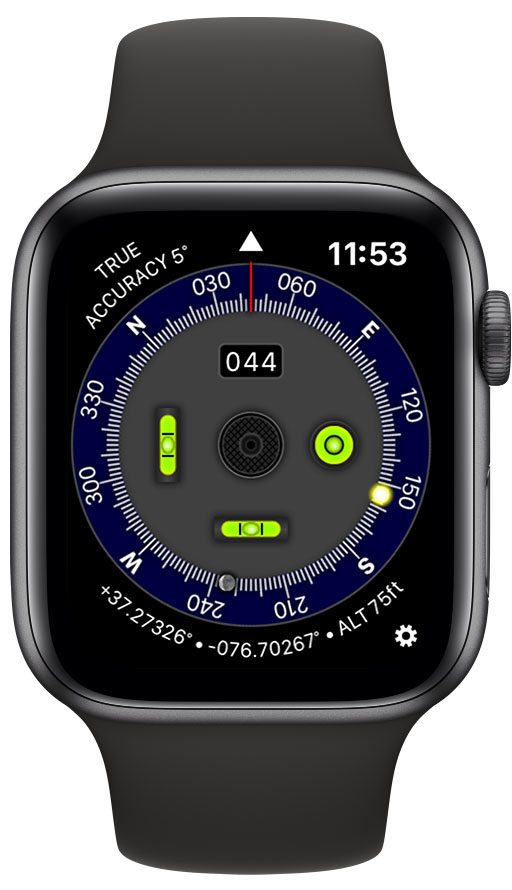
Virginia based Hunter Research and Technology's popular iOS app Pro Compass is now available as an independent watchOS app for Apple Watch. Pro Compass for Watch replicates the look and feel of classic pocket compass hardware in use since the 1800s. Pro Compass offers true and magnetic compass modes using a liquid-damped rosette-style compass ring. The app uses advanced graphics technologies to render 3D floating compass hardware for realistic operation.
Williamsburg, Virginia - Hunter Research and Technology's popular iOS app Pro Compass is now available as an independent watchOS app for Apple Watch. Pro Compass for Watch replicates the look and feel of classic pocket compass hardware in use since the 1800s. The app uses advanced graphics technologies (normally reserved for games) to render 3D floating compass hardware for realistic operation.
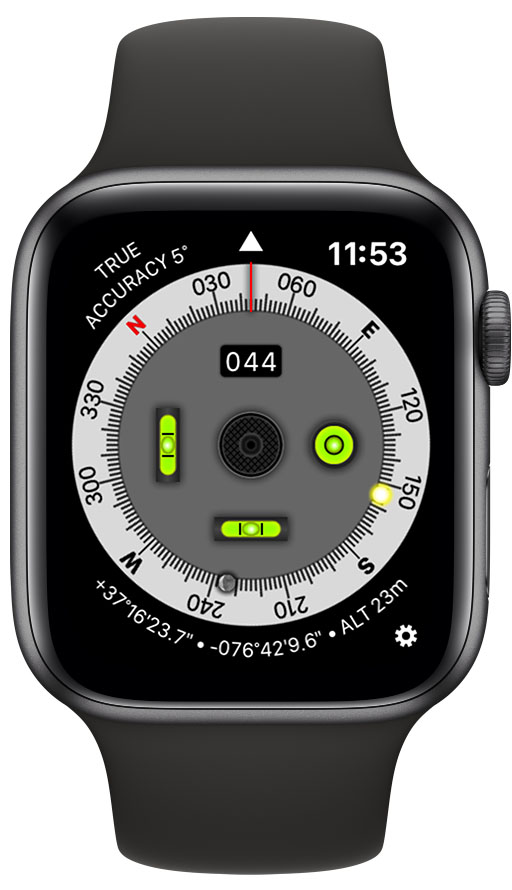
Pro Compass offers true and magnetic compass modes using a liquid-damped rosette-style compass ring. Local sun and moon position are shown on the compass ring and continually updated. Pro Compass also displays location and altitude, with decimal and degree-minute-second position formats. The app contains a built-in two-axis inclinometer that drives two independent bubble levels and a bullseye level. In addition to settings for compass mode and position format, users can choose to display altitude in meters or feet, and select a dark or light interface style.
While Pro Compass was developed for Apple Watch models with a built-in compass sensor (known as a magnetometer), it functions great on other watch models too, by using the device's gyro sensor to measure rotation. Users can twist the watch's digital crown to adjust and calibrate the gyro to the sun position, moon position, or a known bearing. Using these references, the "gyro compass" is then able to give bearing. The calibration is easy, and can be repeated as often as desired to give accurate results.
Pro Compass for Watch works on Series 1-5 Apple Watch models running watchOS 6. The app is available on the App Store, or customers can go to the App Store on their Apple Watch and search "Pro Compass for Watch" using dictation or scribble. Pro Compass for Watch is available for an introductory price of $0.99 (USD).
Pro Compass: http://hrtapps.com/procompasswatch/
Purchase and Download from the App Store: https://apps.apple.com/app/pro-compass-for-watch/id1480791726
Screenshot (Dark UI Style): http://hrtapps.com/procompasswatch/images/dark.jpg
Screenshot (Light UI Style): http://hrtapps.com/procompasswatch/images/light.jpg
Hunter Research and Technology is run by Dr. Craig Hunter, a practicing engineer with over 25 years of experience in engineering and software development. Dr. Hunter received the NASA Software of the Year Award and an Apple Design Award (Best Scientific Computing Solution on Mac OS X) for his work in software development. He founded Hunter Research and Technology in 2008 to create innovative apps that leverage the advanced hardware and software capabilities of iOS devices and Macs. The company has numerous apps available on the App Store, and develops apps for a range of clients worldwide. Copyright (C) 2019 Hunter Research and Technology. All Rights Reserved. Apple, Apple Watch, iPhone, iPad, watchOS, and iOS are registered trademarks of Apple Inc. in the U.S. and/or other countries.
*******
Link To Article: https://prmac.com/release-id-83685.htm
*******
---------------------------------------------------------------------------------
Note that you can alter delivered distributions at any time.
Login to your account on prMac to alter your channel selection, or to opt-out at any time.
Pro Compass available for Apple Watch - Published on 10/03/19
Virginia based Hunter Research and Technology's popular iOS app Pro Compass is now available as an independent watchOS app for Apple Watch. Pro Compass for Watch replicates the look and feel of classic pocket compass hardware in use since the 1800s. Pro Compass offers true and magnetic compass modes using a liquid-damped rosette-style compass ring. The app uses advanced graphics technologies to render 3D floating compass hardware for realistic operation.
Williamsburg, Virginia - Hunter Research and Technology's popular iOS app Pro Compass is now available as an independent watchOS app for Apple Watch. Pro Compass for Watch replicates the look and feel of classic pocket compass hardware in use since the 1800s. The app uses advanced graphics technologies (normally reserved for games) to render 3D floating compass hardware for realistic operation.
Pro Compass offers true and magnetic compass modes using a liquid-damped rosette-style compass ring. Local sun and moon position are shown on the compass ring and continually updated. Pro Compass also displays location and altitude, with decimal and degree-minute-second position formats. The app contains a built-in two-axis inclinometer that drives two independent bubble levels and a bullseye level. In addition to settings for compass mode and position format, users can choose to display altitude in meters or feet, and select a dark or light interface style.
While Pro Compass was developed for Apple Watch models with a built-in compass sensor (known as a magnetometer), it functions great on other watch models too, by using the device's gyro sensor to measure rotation. Users can twist the watch's digital crown to adjust and calibrate the gyro to the sun position, moon position, or a known bearing. Using these references, the "gyro compass" is then able to give bearing. The calibration is easy, and can be repeated as often as desired to give accurate results.
Pro Compass for Watch works on Series 1-5 Apple Watch models running watchOS 6. The app is available on the App Store, or customers can go to the App Store on their Apple Watch and search "Pro Compass for Watch" using dictation or scribble. Pro Compass for Watch is available for an introductory price of $0.99 (USD).
Pro Compass: http://hrtapps.com/procompasswatch/
Purchase and Download from the App Store: https://apps.apple.com/app/pro-compass-for-watch/id1480791726
Screenshot (Dark UI Style): http://hrtapps.com/procompasswatch/images/dark.jpg
Screenshot (Light UI Style): http://hrtapps.com/procompasswatch/images/light.jpg
Hunter Research and Technology is run by Dr. Craig Hunter, a practicing engineer with over 25 years of experience in engineering and software development. Dr. Hunter received the NASA Software of the Year Award and an Apple Design Award (Best Scientific Computing Solution on Mac OS X) for his work in software development. He founded Hunter Research and Technology in 2008 to create innovative apps that leverage the advanced hardware and software capabilities of iOS devices and Macs. The company has numerous apps available on the App Store, and develops apps for a range of clients worldwide. Copyright (C) 2019 Hunter Research and Technology. All Rights Reserved. Apple, Apple Watch, iPhone, iPad, watchOS, and iOS are registered trademarks of Apple Inc. in the U.S. and/or other countries.
*******
Link To Article: https://prmac.com/release-id-83685.htm
*******
---------------------------------------------------------------------------------
Note that you can alter delivered distributions at any time.
Login to your account on prMac to alter your channel selection, or to opt-out at any time.
PDFpen for iPad & iPhone v5.1 Features Multiple Windows on iPadOS
A new article has been published at prMac.
PDFpen for iPad & iPhone v5.1 Features Multiple Windows on iPadOS - Published on 10/03/19
Smile, developer of productivity applications for Mac and iOS, releases PDFpen for iPad & iPhone v5.1, an important update to their popular mobile PDF editor for iPad and iPhone today. With PDFpen for iPad & iPhone, users can add text, images, and signatures to PDFs, make corrections, resize and delete images, and fill out forms. PDFs can be annotated with comments and highlighting. Version 5.1 support for multiple windows on iPadOS as well as dark mode, and also adds stationery options.
San Francisco, California - Smile, the developer of productivity applications for Mac(R), iPhone(R) and iPad(R), has released PDFpen for iPad & iPhone v5.1, the mobile PDF editor for iPad & iPhone. Version 5.1 features support for multiple windows on iPadOS as well as dark mode. This version also adds a variety of stationery styles.
Multiple windows on iPad make reading and referencing two different documents, even two spots in the same document--"or accessing another app such as Mail while editing--"much easier. Support for dark mode offers users a popular viewing experience, which is easier on the eyes.
A multitude of stationery styles to choose from allows for more effective note-taking, organization, and customization to suit a variety of PDF annotating needs. PDFpen for iPad & iPhone syncs documents with PDFpen and PDFpenPro 11 for Mac via iCloud, Google Drive, Microsoft OneNote, and other Files-compatible apps for seamless PDF editing.
New in this version:
* Adds multiple windows (iPadOS)
* Adds dark mode
* Adds stationery options
* Updates for OS compatibility
* Improves stability
* Various fixes and improvements
PDFpen for iPad & iPhone Features:
* Read and edit PDF documents on your iPad & iPhone
* Add highlights and freehand scribbles safely with wrist/palm protection
* Add text, images, and signatures to PDFs
* Correct text in original PDF with editable text blocks
* Fill out PDF forms, including specialized signature fields
* Email and Airdrop your documents, with an option to flatten documents for maximum compatibility
* Set a document password, which is required when opening your document, and even set the level of encryption
* Save documents in iCloud & Files-compatible apps such as Dropbox, Google Drive, Microsoft OneNote, for sharing between devices
* Insert note and comment annotations
* Draw shapes, including lines, arrows, rectangles, ellipses, and polygons
* Move, resize, copy and delete images in original PDF
* Import images from Photo Library
* Annotate with proofreading marks and stamps
* Save frequently-used images, signatures, objects, and text for reuse
* Automatic page numbering including Bates numbering
* Add watermarks
* Sidebar for thumbnail, annotation, & table of contents skimming
* Duplicate and rotate pages
* Combine documents
* Use the iOS Files interface to import/export and organize PDFs in folders
* Support for pressure-sensitive/Bluetooth styluses: Apple Pencil, FiftyThree Pencil, Adonit Bluetooth Stylus
Device Requirements:
* iOS 13, iPadOS
Pricing:
PDFpen for iPad & iPhone v5 is $4.99 for a limited time on the App Store. PDFpen for Mac is available for $74.95. PDFpenPro is $124.95. Both require macOS 10.12 (Sierra) or later. Demos of all Smile desktop products are available for free download from our website. For more information about PDFpen, please visit our website.
Smile: http://smilesoftware.com/
PDFpen for iPad & iPhone: http://smilesoftware.com/PDFpen-ios
Download on the App Store: https://apps.apple.com/us/app/id924203665?_ga=2.154196539.20334112.1568731214-1903873678.1492567734&ign-mpt=uo%3D4
Media Assets: https://smilesoftware.com/company/presskit/
Press Kit (zip): https://www.smilesoftware.com/assets/images/uploads/PDFpenforiOS_graphics.zip
Headquartered in San Francisco, California, Smile makes clever software for efficient people, including TextExpander, the typing shortcut tool for Mac, Windows, Chrome, iPhone and iPad; PDFpen, the all-purpose Mac PDF editor; and PDFpen for iPad and iPhone, the mobile PDF editor. Copyright (C) 2019 SmileOnMyMac, LLC dba Smile. All Rights Reserved. PDFpen, PDFpenPro, TextExpander, and the Smile logo are registered trademarks of SmileOnMyMac, LLC dba Smile. DiscLabel is a trademark of Smile. Apple, the Apple logo, Mac, iPad, iPhone, and iPod touch are trademarks of Apple Inc., registered in the U.S. and other countries. App Store is a service mark of Apple Inc.
*******
Link To Article: https://prmac.com/release-id-83683.htm
*******
---------------------------------------------------------------------------------
Note that you can alter delivered distributions at any time.
Login to your account on prMac to alter your channel selection, or to opt-out at any time.
PDFpen for iPad & iPhone v5.1 Features Multiple Windows on iPadOS - Published on 10/03/19
Smile, developer of productivity applications for Mac and iOS, releases PDFpen for iPad & iPhone v5.1, an important update to their popular mobile PDF editor for iPad and iPhone today. With PDFpen for iPad & iPhone, users can add text, images, and signatures to PDFs, make corrections, resize and delete images, and fill out forms. PDFs can be annotated with comments and highlighting. Version 5.1 support for multiple windows on iPadOS as well as dark mode, and also adds stationery options.
San Francisco, California - Smile, the developer of productivity applications for Mac(R), iPhone(R) and iPad(R), has released PDFpen for iPad & iPhone v5.1, the mobile PDF editor for iPad & iPhone. Version 5.1 features support for multiple windows on iPadOS as well as dark mode. This version also adds a variety of stationery styles.
Multiple windows on iPad make reading and referencing two different documents, even two spots in the same document--"or accessing another app such as Mail while editing--"much easier. Support for dark mode offers users a popular viewing experience, which is easier on the eyes.
A multitude of stationery styles to choose from allows for more effective note-taking, organization, and customization to suit a variety of PDF annotating needs. PDFpen for iPad & iPhone syncs documents with PDFpen and PDFpenPro 11 for Mac via iCloud, Google Drive, Microsoft OneNote, and other Files-compatible apps for seamless PDF editing.
New in this version:
* Adds multiple windows (iPadOS)
* Adds dark mode
* Adds stationery options
* Updates for OS compatibility
* Improves stability
* Various fixes and improvements
PDFpen for iPad & iPhone Features:
* Read and edit PDF documents on your iPad & iPhone
* Add highlights and freehand scribbles safely with wrist/palm protection
* Add text, images, and signatures to PDFs
* Correct text in original PDF with editable text blocks
* Fill out PDF forms, including specialized signature fields
* Email and Airdrop your documents, with an option to flatten documents for maximum compatibility
* Set a document password, which is required when opening your document, and even set the level of encryption
* Save documents in iCloud & Files-compatible apps such as Dropbox, Google Drive, Microsoft OneNote, for sharing between devices
* Insert note and comment annotations
* Draw shapes, including lines, arrows, rectangles, ellipses, and polygons
* Move, resize, copy and delete images in original PDF
* Import images from Photo Library
* Annotate with proofreading marks and stamps
* Save frequently-used images, signatures, objects, and text for reuse
* Automatic page numbering including Bates numbering
* Add watermarks
* Sidebar for thumbnail, annotation, & table of contents skimming
* Duplicate and rotate pages
* Combine documents
* Use the iOS Files interface to import/export and organize PDFs in folders
* Support for pressure-sensitive/Bluetooth styluses: Apple Pencil, FiftyThree Pencil, Adonit Bluetooth Stylus
Device Requirements:
* iOS 13, iPadOS
Pricing:
PDFpen for iPad & iPhone v5 is $4.99 for a limited time on the App Store. PDFpen for Mac is available for $74.95. PDFpenPro is $124.95. Both require macOS 10.12 (Sierra) or later. Demos of all Smile desktop products are available for free download from our website. For more information about PDFpen, please visit our website.
Smile: http://smilesoftware.com/
PDFpen for iPad & iPhone: http://smilesoftware.com/PDFpen-ios
Download on the App Store: https://apps.apple.com/us/app/id924203665?_ga=2.154196539.20334112.1568731214-1903873678.1492567734&ign-mpt=uo%3D4
Media Assets: https://smilesoftware.com/company/presskit/
Press Kit (zip): https://www.smilesoftware.com/assets/images/uploads/PDFpenforiOS_graphics.zip
Headquartered in San Francisco, California, Smile makes clever software for efficient people, including TextExpander, the typing shortcut tool for Mac, Windows, Chrome, iPhone and iPad; PDFpen, the all-purpose Mac PDF editor; and PDFpen for iPad and iPhone, the mobile PDF editor. Copyright (C) 2019 SmileOnMyMac, LLC dba Smile. All Rights Reserved. PDFpen, PDFpenPro, TextExpander, and the Smile logo are registered trademarks of SmileOnMyMac, LLC dba Smile. DiscLabel is a trademark of Smile. Apple, the Apple logo, Mac, iPad, iPhone, and iPod touch are trademarks of Apple Inc., registered in the U.S. and other countries. App Store is a service mark of Apple Inc.
*******
Link To Article: https://prmac.com/release-id-83683.htm
*******
---------------------------------------------------------------------------------
Note that you can alter delivered distributions at any time.
Login to your account on prMac to alter your channel selection, or to opt-out at any time.
Nisus Software, Inc. Releases Nisus Writer Express 4
A new article has been published at prMac.
Nisus Software, Inc. Releases Nisus Writer Express 4 - Published on 10/02/19
California based Nisus Software, Inc. releases Nisus Writer Express 4, a flexible, affordable writing app for macOS. It can go from minimalist writing tool to full word processor in an instant. New features in version 4 include a significantly updated full screen view, focus mode for the active line and paragraph, typewriter scrolling, a redesigned UI and palette system, cloud sync for almost all settings, icons updated for Retina displays, and hundreds of features, fixes, and enhancements.
Solana Beach, California - Nisus Software, Inc. has announced the release of Nisus Writer Express 4, a significant upgrade to its flexible, affordable writing app for the Mac. New features in Nisus Writer Express 4 include a significantly updated full screen view, focus mode for the active line and paragraph, typewriter scrolling, a redesigned UI and palette system, cloud sync for almost all settings, icons updated for Retina displays, and hundreds of features, fixes, and enhancements.
"Nisus Writer Express represents the best of Nisus Software in a small, affordable package" said Nisus Software CEO Jerzy Lewak. "The new features will help enable our users' creativity in new and inspired ways. Even more features are available for those who need them, in our professional version, Nisus Writer Pro."
The new features add to an already rich feature set that includes an intuitive interface, multilingual text support, powerful find and replace, live word count, easy to use style system, numerous file formats (PDF, Word formats .doc and .docx), and a native file format (RTF) that almost any word processor can read.
System Requirements
Nisus Writer Express 4 requires macOS 10.11 and is Catalina compatible, pending the final release of Apple's latest operating system.
Pricing and Availability
Nisus Writer Express 4 is available now at the Nisus store and the Mac App Store for only $26.00 (USD). An upgrade version is available from our store for $20.00. An academic version is also available.
Nisus Software: http://www.nisus.com
Nisus Writer Express 4: http://nisus.com/express
Download Nisus Writer Express: http://nisus.com/express/download.php
Purchase: http://nisus.com/store
For over 30 years, Nisus Software, Inc. has developed award winning text and productivity tools for the Macintosh, such as Nisus Writer Pro, Nisus Writer Express, InfoClick, and Nisus Thesaurus. Copyright (C) 2019 Nisus Software, Inc. All Rights Reserved. Apple, the Apple logo, and Macintosh are registered trademarks of Apple Inc. in the U.S. and/or other countries.
*******
Link To Article: https://prmac.com/release-id-83682.htm
*******
---------------------------------------------------------------------------------
Note that you can alter delivered distributions at any time.
Login to your account on prMac to alter your channel selection, or to opt-out at any time.
Nisus Software, Inc. Releases Nisus Writer Express 4 - Published on 10/02/19
California based Nisus Software, Inc. releases Nisus Writer Express 4, a flexible, affordable writing app for macOS. It can go from minimalist writing tool to full word processor in an instant. New features in version 4 include a significantly updated full screen view, focus mode for the active line and paragraph, typewriter scrolling, a redesigned UI and palette system, cloud sync for almost all settings, icons updated for Retina displays, and hundreds of features, fixes, and enhancements.
Solana Beach, California - Nisus Software, Inc. has announced the release of Nisus Writer Express 4, a significant upgrade to its flexible, affordable writing app for the Mac. New features in Nisus Writer Express 4 include a significantly updated full screen view, focus mode for the active line and paragraph, typewriter scrolling, a redesigned UI and palette system, cloud sync for almost all settings, icons updated for Retina displays, and hundreds of features, fixes, and enhancements.
"Nisus Writer Express represents the best of Nisus Software in a small, affordable package" said Nisus Software CEO Jerzy Lewak. "The new features will help enable our users' creativity in new and inspired ways. Even more features are available for those who need them, in our professional version, Nisus Writer Pro."
The new features add to an already rich feature set that includes an intuitive interface, multilingual text support, powerful find and replace, live word count, easy to use style system, numerous file formats (PDF, Word formats .doc and .docx), and a native file format (RTF) that almost any word processor can read.
System Requirements
Nisus Writer Express 4 requires macOS 10.11 and is Catalina compatible, pending the final release of Apple's latest operating system.
Pricing and Availability
Nisus Writer Express 4 is available now at the Nisus store and the Mac App Store for only $26.00 (USD). An upgrade version is available from our store for $20.00. An academic version is also available.
Nisus Software: http://www.nisus.com
Nisus Writer Express 4: http://nisus.com/express
Download Nisus Writer Express: http://nisus.com/express/download.php
Purchase: http://nisus.com/store
For over 30 years, Nisus Software, Inc. has developed award winning text and productivity tools for the Macintosh, such as Nisus Writer Pro, Nisus Writer Express, InfoClick, and Nisus Thesaurus. Copyright (C) 2019 Nisus Software, Inc. All Rights Reserved. Apple, the Apple logo, and Macintosh are registered trademarks of Apple Inc. in the U.S. and/or other countries.
*******
Link To Article: https://prmac.com/release-id-83682.htm
*******
---------------------------------------------------------------------------------
Note that you can alter delivered distributions at any time.
Login to your account on prMac to alter your channel selection, or to opt-out at any time.
Pixelmator Photo updated with iPadOS 13 support, batch photo editing
A new article has been published at prMac.
Pixelmator Photo updated with iPadOS 13 support, batch photo editing - Published on 10/01/19
The Pixelmator Team today released Pixelmator Photo 1.1, a major update to the powerful photo editor designed exclusively for iPad. Pixelmator Photo gives photographers all the tools they need to edit photos on iPad. The latest update adds support for the magical new iPadOS 13 and takes full advantage of improvements to the Files app, brings machine learning-enhanced batch photo editing, includes deeper integration with iCloud Photos, and more.
Vilnius, Lithuania - The Pixelmator Team today released Pixelmator Photo 1.1, a major update to the powerful photo editor designed exclusively for iPad. The latest update adds support for the magical new iPadOS 13 and takes full advantage of improvements to the Files app, brings machine learning-enhanced batch photo editing, includes deeper integration with iCloud Photos, and more.
"The new iPadOS 13 makes iPad even more powerful and capable for creative pros and consumers alike," said Saulius Dailide, one of the founders of the Pixelmator Team. "And, inspired by this, we're adding powerful new capabilities to Pixelmator Photo with the new batch photo editing. So photographers - beginners and pros alike - can batch edit entire photoshoots using just their iPad."
Pixelmator Photo 1.1 brings full compatibility with iPadOS. And, thanks to a Files-based design and editing workflow, it also takes full advantage of improvements to the Files app. So you can now use Pixelmator Photo to edit images in external locations - whether that's an external drive, SD card, or USB drive - and even file servers.
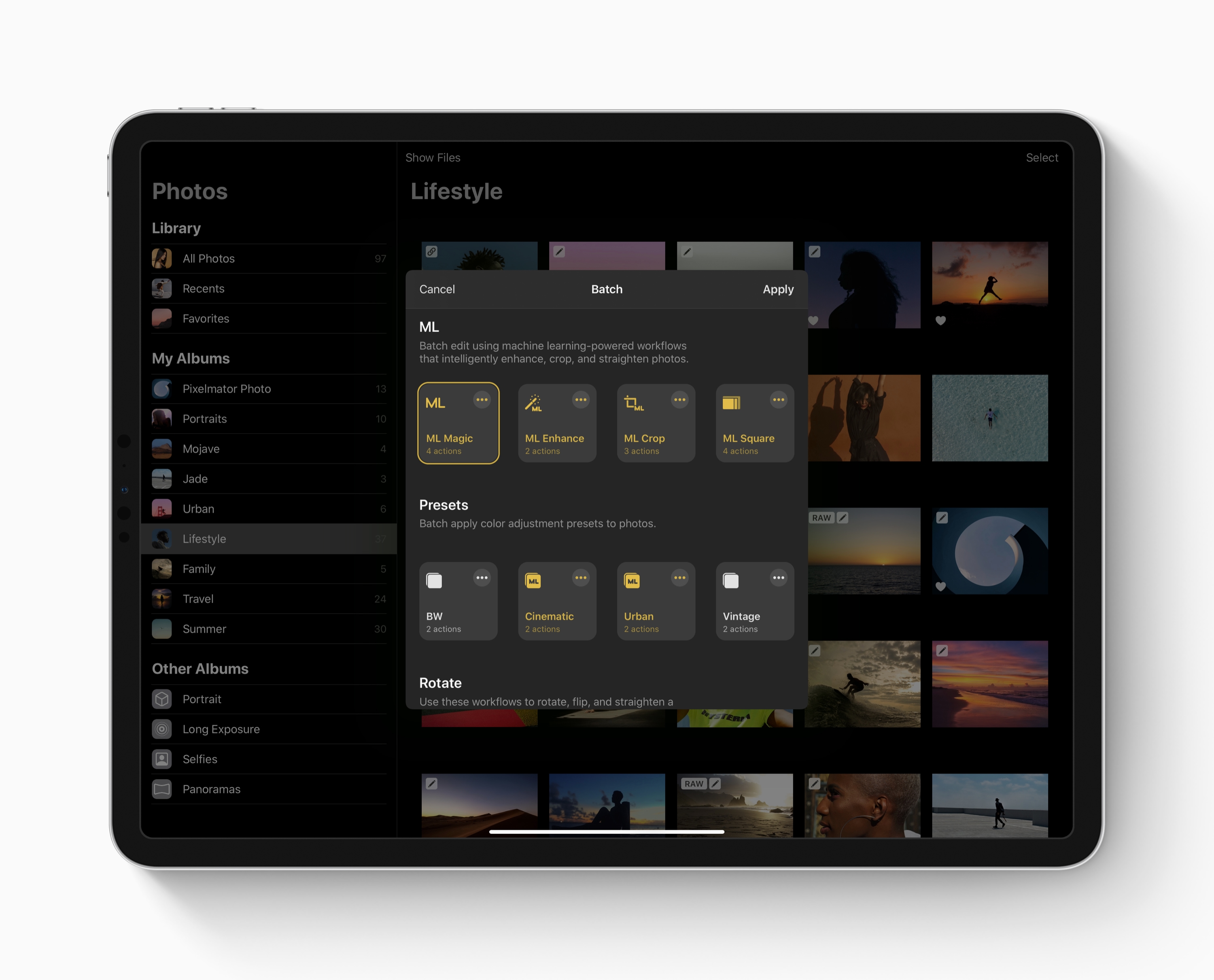
The update also features powerful batch photo editing enhanced by machine learning. So users can now batch edit hundreds of photos with just a few taps, improving shots using machine learning algorithms trained on millions of professional photos. With a collection of readymade batch editing workflows created by the Pixelmator Team, it's easy to jump in and start batch editing. What's more, users can easily create their own batch workflows using custom color adjustment presets, as well as actions for cropping, straightening, exporting, and even resizing photos for a full-featured batch editing experience.
Thanks to much more refined file management and direct iCloud Photos integration, using Pixelmator Photo to manage an ever-growing photo library becomes easier than ever. Pixelmator Photo now automatically manages edits and saves changes directly to your library without having to manually import photos or create duplicates. In addition, users can favorite, delete, and revert images in their Photos library without having to leave Pixelmator Photo.
Pixelmator Photo 1.1 includes a number of additional improvements, such as the ability to export photos at different sizes, and adds fixes to keep the app running smoothly.
Pixelmator Photo 1.1: https://www.pixelmator.com/photo/
Purchase and Download from the App Store: https://itunes.apple.com/app/pixelmator/id1444636541
Main Screenshot (Image): http://pixelmator-download.s3.amazonaws.com/press/Pixelmator-Photo-1.1-Lead-Image.jpg
Batch Editing (Image): http://pixelmator-download.s3.amazonaws.com/press/Pixelmator-Photo-1.1-Batch%20Editing.jpg
Press Kit (ZIP): http://pixelmator-download.s3.amazonaws.com/press/Pixelmator-Photo-1.1-Press-Kit.zip
Founded in 2007 by two brothers, Saulius Dailide and Aidas Dailide, the Pixelmator Team develops powerful image editing apps for Mac and iOS. The team's apps have been honored with multiple Mac App of the Year awards, an iPad App of the Year award, an Apple Design Award, and many others. Pixelmator for iPad was featured at the Apple Special Event in October 2014. All Material and Software (C) Copyright 2007-2019 Pixelmator. All Rights Reserved. Apple, the Apple logo, Macintosh, iPhone, iPad, and macOS are registered trademarks of Apple Inc. in the U.S. and/or other countries. Other trademarks and registered trademarks may be the property of their respective owners.
*******
Link To Article: https://prmac.com/release-id-83681.htm
*******
---------------------------------------------------------------------------------
Note that you can alter delivered distributions at any time.
Login to your account on prMac to alter your channel selection, or to opt-out at any time.
Pixelmator Photo updated with iPadOS 13 support, batch photo editing - Published on 10/01/19
The Pixelmator Team today released Pixelmator Photo 1.1, a major update to the powerful photo editor designed exclusively for iPad. Pixelmator Photo gives photographers all the tools they need to edit photos on iPad. The latest update adds support for the magical new iPadOS 13 and takes full advantage of improvements to the Files app, brings machine learning-enhanced batch photo editing, includes deeper integration with iCloud Photos, and more.
Vilnius, Lithuania - The Pixelmator Team today released Pixelmator Photo 1.1, a major update to the powerful photo editor designed exclusively for iPad. The latest update adds support for the magical new iPadOS 13 and takes full advantage of improvements to the Files app, brings machine learning-enhanced batch photo editing, includes deeper integration with iCloud Photos, and more.
"The new iPadOS 13 makes iPad even more powerful and capable for creative pros and consumers alike," said Saulius Dailide, one of the founders of the Pixelmator Team. "And, inspired by this, we're adding powerful new capabilities to Pixelmator Photo with the new batch photo editing. So photographers - beginners and pros alike - can batch edit entire photoshoots using just their iPad."
Pixelmator Photo 1.1 brings full compatibility with iPadOS. And, thanks to a Files-based design and editing workflow, it also takes full advantage of improvements to the Files app. So you can now use Pixelmator Photo to edit images in external locations - whether that's an external drive, SD card, or USB drive - and even file servers.
The update also features powerful batch photo editing enhanced by machine learning. So users can now batch edit hundreds of photos with just a few taps, improving shots using machine learning algorithms trained on millions of professional photos. With a collection of readymade batch editing workflows created by the Pixelmator Team, it's easy to jump in and start batch editing. What's more, users can easily create their own batch workflows using custom color adjustment presets, as well as actions for cropping, straightening, exporting, and even resizing photos for a full-featured batch editing experience.
Thanks to much more refined file management and direct iCloud Photos integration, using Pixelmator Photo to manage an ever-growing photo library becomes easier than ever. Pixelmator Photo now automatically manages edits and saves changes directly to your library without having to manually import photos or create duplicates. In addition, users can favorite, delete, and revert images in their Photos library without having to leave Pixelmator Photo.
Pixelmator Photo 1.1 includes a number of additional improvements, such as the ability to export photos at different sizes, and adds fixes to keep the app running smoothly.
Pixelmator Photo 1.1: https://www.pixelmator.com/photo/
Purchase and Download from the App Store: https://itunes.apple.com/app/pixelmator/id1444636541
Main Screenshot (Image): http://pixelmator-download.s3.amazonaws.com/press/Pixelmator-Photo-1.1-Lead-Image.jpg

Batch Editing (Image): http://pixelmator-download.s3.amazonaws.com/press/Pixelmator-Photo-1.1-Batch%20Editing.jpg
Press Kit (ZIP): http://pixelmator-download.s3.amazonaws.com/press/Pixelmator-Photo-1.1-Press-Kit.zip
Founded in 2007 by two brothers, Saulius Dailide and Aidas Dailide, the Pixelmator Team develops powerful image editing apps for Mac and iOS. The team's apps have been honored with multiple Mac App of the Year awards, an iPad App of the Year award, an Apple Design Award, and many others. Pixelmator for iPad was featured at the Apple Special Event in October 2014. All Material and Software (C) Copyright 2007-2019 Pixelmator. All Rights Reserved. Apple, the Apple logo, Macintosh, iPhone, iPad, and macOS are registered trademarks of Apple Inc. in the U.S. and/or other countries. Other trademarks and registered trademarks may be the property of their respective owners.
*******
Link To Article: https://prmac.com/release-id-83681.htm
*******
---------------------------------------------------------------------------------
Note that you can alter delivered distributions at any time.
Login to your account on prMac to alter your channel selection, or to opt-out at any time.
Subscribe to:
Posts (Atom)