A new article has been published at prMac.
Archivaldo 2.0 is Now Available - Published on 11/07/19
MarioGT Software announces Archivaldo (2.0) for macOS, their free (Donationware) file archiver and compressor for the rest of us, where users can add, compress, extract, delete, password protect & fast search all their files in a compact binary file system called ARA (Archivaldo Resource Archive). The ARA file is a 100% binary file, and because of that characteristic can be stored, modified, saved, readed and transmitted by any host system without data loss or its functionality in the process.
Santiago, Metropolitana - MarioGT Software is proud to announce the release and immediate availability of Archivaldo (2.0) for macOS, the free (Donationware) file archiver and compressor for the rest of us, where you can add, compress, extract, delete, password protect and fast search all your files in a compact binary file system called ARA (Archivaldo Resource Archive).
The ARA file is a file system with the capacity to accommodate theoretically unlimited numbers of files, of any size or type ( jpg, gif, avi, mpg, ogg, mov, txt, mp3, mp3, acc, doc, iso, etc) only limited by the free space available in your hard disk or storage device. Also you can add or remove files from your Archivaldo archive at any time, Archivaldo will contract or expand dynamically the archive depending on your needs.
The ARA file is a 100% binary file, and because of that characteristic can be stored, modified, saved, readed and transmitted by any host system without data loss or its functionality in the process.
Features:
* Fast and lightweight
* Archive and compress all kind of files of any type and size
* No limit for the size of the ARA archive
* Realtime ARA Archive resizing (when you add or delete files)
* Blazing fast search algorithm
* MacOS Dark Mode compatible
Language Support:
* English
System Requirements:
* macOS X 10.10 or higher (including macOS 10.15 Catalina)
* 64-bit processor
* 2 GB of RAM
* 10MB of free HD space
Pricing and Availability:
Archivaldo is Donationware and totally free to use. Please, with a donation the future development of Archivaldo can be possible, users can donate a little bit and become a happy user (and make a happy developer :) Users can donate at any time with any amount, select "Donate Here !!!" from the Archivaldo main menu.
MarioGT Software: https://www.mariogt.com/index.html
Archivaldo 2.0: https://www.mariogt.com/archivaldo.html
Direct Download Link: https://www.mariogt.com/appsChest/Archivaldo2-0.zip
Donationware Link: https://www.mariogt.com/archivaldodonate.html
Screenshot: https://www.mariogt.com/Media/ArchivaldoMedia/ver2_0/archi1_2_ver2_0.png
Application Icon: https://www.mariogt.com/Media/archivaldoBigWeb.png
MarioGT Software is a chilean developer of useful Apps (Donationware, Shareware & Commercial) for macOS, iPhone & iPad. Their mission is straightforward and simple, developing utilities that are small, not too resource hungry, and above all, enrich a user's digital life. All Material and Software (C) Copyright 2019 MarioGT Software. All Rights Reserved. Apple, the Apple logo, Macintosh Mac OS X and macOS are registered trademarks of Apple Inc. in the U.S. and/or other countries. Other trademarks and registered trademarks may be the property of their respective owners.
*******
Link To Article: https://prmac.com/release-id-83760.htm
*******
---------------------------------------------------------------------------------
Note that you can alter delivered distributions at any time.
Login to your account on prMac to alter your channel selection, or to opt-out at any time.


Deliver Now Supports macOS Catalina: File Transfer With Email Receipts
A new article has been published at prMac.
Deliver Now Supports macOS Catalina: File Transfer With Email Receipts - Published on 11/07/19
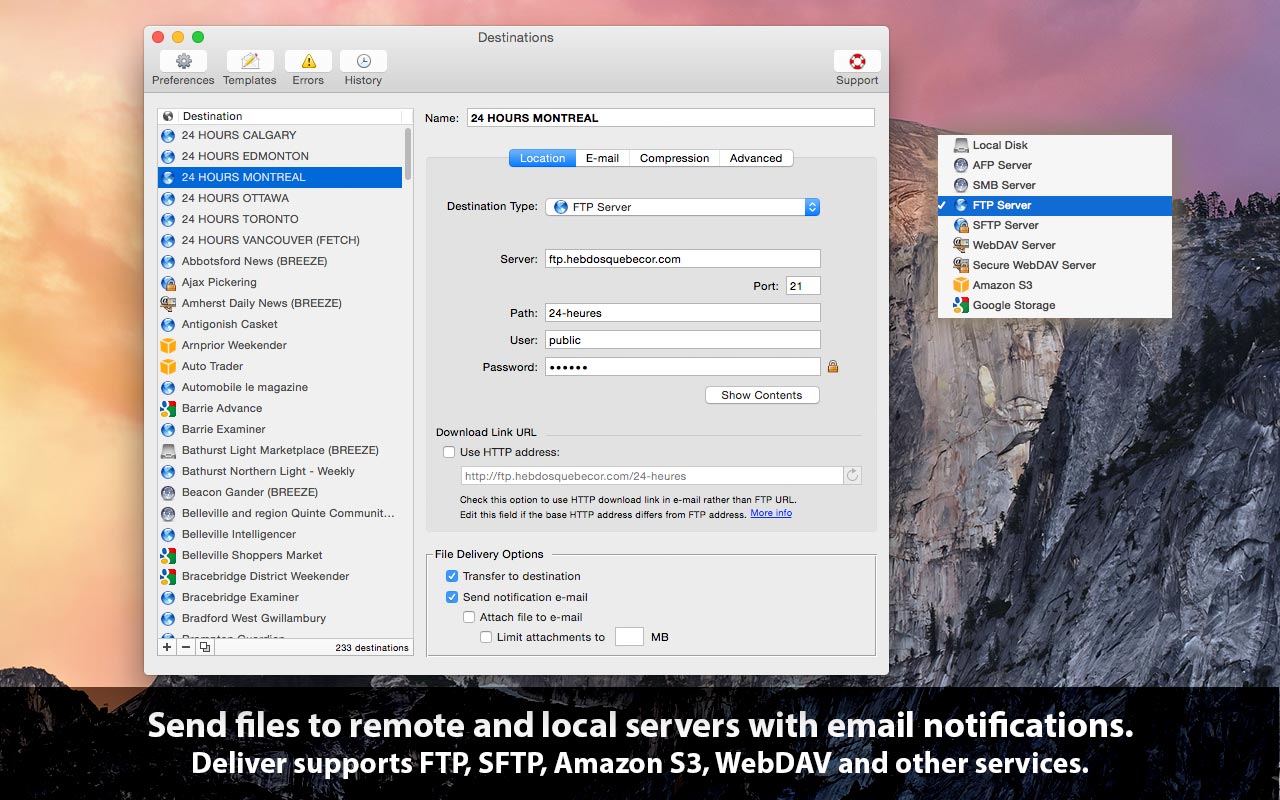
Zevrix Solutions announces Deliver 2.6.14, a compatibility update to company's file transfer solution with automatic email notifications. Deliver lets users send files to FTP, SFTP, Amazon S3, WebDAV and other remote and local servers. The app offers automatic email delivery notifications, file encryption and compression, multi-destination transfer, upload history, and other powerful capabilities. The new version introduces support for macOS 10.15 Catalina in a free update to licensed users.
Toronto (ON), Canada - Zevrix Solutions today announces Deliver 2.6.14, a compatibility update to the company's file transfer solution with automatic email notifications. Deliver lets users send files over the Internet and local networks and offers file compression, delivery history, automatic PDF creation and other powerful capabilities. It supports FTP, SFTP, Amazon S3, WebDAV and other remote and local services, and allows to send files to multiple destinations at once.
The new version introduces support for the recently released macOS 10.14 Catalina and is offered as a free update to licensed users. Deliver has been notarized by Apple, which is a mandatory requirement on Catalina as part of Apple's experimental security policy.
"Deliver is a Mac app that comes close to fulfilling the laundry list of requirements," writes Natalia Nowak on Mac360, a Mac app reviews site. "It gives you a methodology and work flow to send files safely and securely to many users over the internet or to local, secure servers."
Deliver automatically notifies recipients of file deliveries by email, which eliminates the need to compose and send confirmations for each transfer manually. Users only need to drop their files on the program's icon to upload the documents to the desired destination. A customizable email confirmation will be automatically issued upon delivery. Recipients can download the file using a link in the notification email.
Deliver offers the following key features:
* Transfer files to FTP, Google Storage, Amazon S3 and other servers
* Automatic email notifications based on variable templates
* Compress files automatically (zip/dmg)
* Hyperlink to file for instant download by recipients
* Encrypt disk images with passwords
* Create lo-res PDF on the fly and attach to e-mail
* Transfer history
Pricing and Availability:
Deliver can be purchased from Zevrix website for $19.95 (USD), as well as from Apple Mac App Store and authorized resellers. Trial is also available for download. The update is free for licensed users of Deliver 2.x. Deliver requires macOS 10.8-10.15.
Zevrix Solutions: http://zevrix.com
Deliver 2.6.14: http://zevrix.com/Deliver.php
Download Deliver: http://zevrix.com/Deliver.dmg
Purchase: http://zevrix.com/store.php
Screenshot: http://zevrix.com/screenshots/deliver-2/MAS/deliver-mas-location.jpg
Located in Toronto, Canada, Zevrix Solutions provides automation and productivity solutions for Adobe Creative Cloud and Creative Suite software, PDF workflows, graphic file diagnostics and Microsoft Office output on Mac OS. Zevrix is dedicated to help professionals increase their profits through automating everyday tasks, producing error-free documents, saving disk space and cutting production costs. For more information, visit their website. Copyright (C) 2019 Zevrix Solutions. All Rights Reserved. Other trademarks and registered trademarks may be the property of their respective owners.
*******
Link To Article: https://prmac.com/release-id-83759.htm
*******
---------------------------------------------------------------------------------
Note that you can alter delivered distributions at any time.
Login to your account on prMac to alter your channel selection, or to opt-out at any time.
Deliver Now Supports macOS Catalina: File Transfer With Email Receipts - Published on 11/07/19
Zevrix Solutions announces Deliver 2.6.14, a compatibility update to company's file transfer solution with automatic email notifications. Deliver lets users send files to FTP, SFTP, Amazon S3, WebDAV and other remote and local servers. The app offers automatic email delivery notifications, file encryption and compression, multi-destination transfer, upload history, and other powerful capabilities. The new version introduces support for macOS 10.15 Catalina in a free update to licensed users.
Toronto (ON), Canada - Zevrix Solutions today announces Deliver 2.6.14, a compatibility update to the company's file transfer solution with automatic email notifications. Deliver lets users send files over the Internet and local networks and offers file compression, delivery history, automatic PDF creation and other powerful capabilities. It supports FTP, SFTP, Amazon S3, WebDAV and other remote and local services, and allows to send files to multiple destinations at once.
The new version introduces support for the recently released macOS 10.14 Catalina and is offered as a free update to licensed users. Deliver has been notarized by Apple, which is a mandatory requirement on Catalina as part of Apple's experimental security policy.
"Deliver is a Mac app that comes close to fulfilling the laundry list of requirements," writes Natalia Nowak on Mac360, a Mac app reviews site. "It gives you a methodology and work flow to send files safely and securely to many users over the internet or to local, secure servers."
Deliver automatically notifies recipients of file deliveries by email, which eliminates the need to compose and send confirmations for each transfer manually. Users only need to drop their files on the program's icon to upload the documents to the desired destination. A customizable email confirmation will be automatically issued upon delivery. Recipients can download the file using a link in the notification email.
Deliver offers the following key features:
* Transfer files to FTP, Google Storage, Amazon S3 and other servers
* Automatic email notifications based on variable templates
* Compress files automatically (zip/dmg)
* Hyperlink to file for instant download by recipients
* Encrypt disk images with passwords
* Create lo-res PDF on the fly and attach to e-mail
* Transfer history
Pricing and Availability:
Deliver can be purchased from Zevrix website for $19.95 (USD), as well as from Apple Mac App Store and authorized resellers. Trial is also available for download. The update is free for licensed users of Deliver 2.x. Deliver requires macOS 10.8-10.15.
Zevrix Solutions: http://zevrix.com
Deliver 2.6.14: http://zevrix.com/Deliver.php
Download Deliver: http://zevrix.com/Deliver.dmg
Purchase: http://zevrix.com/store.php
Screenshot: http://zevrix.com/screenshots/deliver-2/MAS/deliver-mas-location.jpg
Located in Toronto, Canada, Zevrix Solutions provides automation and productivity solutions for Adobe Creative Cloud and Creative Suite software, PDF workflows, graphic file diagnostics and Microsoft Office output on Mac OS. Zevrix is dedicated to help professionals increase their profits through automating everyday tasks, producing error-free documents, saving disk space and cutting production costs. For more information, visit their website. Copyright (C) 2019 Zevrix Solutions. All Rights Reserved. Other trademarks and registered trademarks may be the property of their respective owners.
*******
Link To Article: https://prmac.com/release-id-83759.htm
*******
---------------------------------------------------------------------------------
Note that you can alter delivered distributions at any time.
Login to your account on prMac to alter your channel selection, or to opt-out at any time.
Coming Soon - Queen's Wish: The Conqueror, Fantasy Adventure for iOS
A new article has been published at prMac.
Coming Soon - Queen's Wish: The Conqueror, Fantasy Adventure for iOS - Published on 11/07/19
Spiderweb Software, Inc. announced today the December 4, 2019 release date of Queen's Wish: The Conqueror for iOS. In this epic, indie fantasy adventure, you are free to explore, fight for fame and power, and shape the world as you choose. At last, the Queen has given you power and freedom! The cost? You must rebuild her Empire. Will you? Escape into an unpredictable open-ended story and cunning tactical combat.
Seattle, Washington - Spiderweb Software, Inc., makers of fine indie adventures for 25 years, announces the release date for Queen's Wish: The Conqueror, our all-new fantasy role-playing epic for iOS. The iPhone and iPad versions will be available in the App Store on December 4th, 2019. Queen's Wish: The Conqueror had a successful Kickstarter, and our backers will receive their game on schedule.
You are royalty of the mighty empire of Haven! Your mother the Queen rules, while you enjoy a life of sheltered luxury. Then, one morning, you wake up to find yourself banished to your Empire's lost colony. You mother has declared your childhood at an end. Your mission? Prove yourself by reconquering Haven's rebellious vassals, or don't bother to come home.
At last, you have been given wealth, magic, soldiers. The Queen thinks you will submit and join the family business. Now that you have freedom and power, you might have other ideas ...
Explore an enormous outdoors and a multitude of towns and dungeons. Fight clever, carefully designed turn-based battles. Meet three different fierce nations and deal with them with bribery, diplomacy, or (if you choose) violence. Build new forts and customize them, choosing among upgrades that give your adventurers powerful bonuses.
To win the Queen's favor, you must rebuild your lost colony. Will you be a diplomat or a warrior of Empire? Obedient or rebellious child? It will be up to you. But beware ... Whatever path you try to take, the temptations to turn away from it will be cunning and constant.
The iOS edition of Queen's Wish: The Conqueror is planned for launch on December 4th, 2019 on Apple's App Store.
Spiderweb Software: http://www.spiderwebsoftware.com/
Queen's Wish: The Conqueror: http://www.spiderwebsoftware.com/queenswish/index.html
Kickstarter Project: https://www.kickstarter.com/projects/619141553/queens-wish-the-conqueror
Screenshots: http://www.spiderwebsoftware.com/queenswish/shots.html
Media Assets: http://www.spiderwebsoftware.com/presskit/queenswish/index.html
Spiderweb Software, Inc., an Indie game company based in Seattle, WA, is fanatically dedicated to creating fun, exciting fantasy role-playing games for Windows, Macintosh, and the iPad. Past titles include the award-winning Exile, Geneforge, Avernum and Avadon series. Copyright (C) 2019 Spiderweb Software, Inc. All Rights Reserved. Apple, the Apple logo and Macintosh are registered trademarks of Apple Inc. in the U.S. and/or other countries.
*******
Link To Article: https://prmac.com/release-id-83758.htm
*******
---------------------------------------------------------------------------------
Note that you can alter delivered distributions at any time.
Login to your account on prMac to alter your channel selection, or to opt-out at any time.
Coming Soon - Queen's Wish: The Conqueror, Fantasy Adventure for iOS - Published on 11/07/19
Spiderweb Software, Inc. announced today the December 4, 2019 release date of Queen's Wish: The Conqueror for iOS. In this epic, indie fantasy adventure, you are free to explore, fight for fame and power, and shape the world as you choose. At last, the Queen has given you power and freedom! The cost? You must rebuild her Empire. Will you? Escape into an unpredictable open-ended story and cunning tactical combat.
Seattle, Washington - Spiderweb Software, Inc., makers of fine indie adventures for 25 years, announces the release date for Queen's Wish: The Conqueror, our all-new fantasy role-playing epic for iOS. The iPhone and iPad versions will be available in the App Store on December 4th, 2019. Queen's Wish: The Conqueror had a successful Kickstarter, and our backers will receive their game on schedule.
You are royalty of the mighty empire of Haven! Your mother the Queen rules, while you enjoy a life of sheltered luxury. Then, one morning, you wake up to find yourself banished to your Empire's lost colony. You mother has declared your childhood at an end. Your mission? Prove yourself by reconquering Haven's rebellious vassals, or don't bother to come home.
At last, you have been given wealth, magic, soldiers. The Queen thinks you will submit and join the family business. Now that you have freedom and power, you might have other ideas ...
Explore an enormous outdoors and a multitude of towns and dungeons. Fight clever, carefully designed turn-based battles. Meet three different fierce nations and deal with them with bribery, diplomacy, or (if you choose) violence. Build new forts and customize them, choosing among upgrades that give your adventurers powerful bonuses.
To win the Queen's favor, you must rebuild your lost colony. Will you be a diplomat or a warrior of Empire? Obedient or rebellious child? It will be up to you. But beware ... Whatever path you try to take, the temptations to turn away from it will be cunning and constant.
The iOS edition of Queen's Wish: The Conqueror is planned for launch on December 4th, 2019 on Apple's App Store.
Spiderweb Software: http://www.spiderwebsoftware.com/
Queen's Wish: The Conqueror: http://www.spiderwebsoftware.com/queenswish/index.html
Kickstarter Project: https://www.kickstarter.com/projects/619141553/queens-wish-the-conqueror
Screenshots: http://www.spiderwebsoftware.com/queenswish/shots.html
Media Assets: http://www.spiderwebsoftware.com/presskit/queenswish/index.html
Spiderweb Software, Inc., an Indie game company based in Seattle, WA, is fanatically dedicated to creating fun, exciting fantasy role-playing games for Windows, Macintosh, and the iPad. Past titles include the award-winning Exile, Geneforge, Avernum and Avadon series. Copyright (C) 2019 Spiderweb Software, Inc. All Rights Reserved. Apple, the Apple logo and Macintosh are registered trademarks of Apple Inc. in the U.S. and/or other countries.
*******
Link To Article: https://prmac.com/release-id-83758.htm
*******
---------------------------------------------------------------------------------
Note that you can alter delivered distributions at any time.
Login to your account on prMac to alter your channel selection, or to opt-out at any time.
NeoFinder 7.5 - Annotations for Photos and Videos
A new article has been published at prMac.
NeoFinder 7.5 - Annotations for Photos and Videos - Published on 11/06/19
Norbert M. Doerner today released NeoFinder 7.5, an update to the disk cataloging software for macOS. NeoFinder 7.5 allows users to freely define and edit additional annotation fields for photos and film files. The Icon View can be instructed to show up to three of these additional fields or other metadata. The software is certified for macOS 10.15 and notarized by Apple. The search for faces and the improved navigation makes it easier to edit metadata efficiently for large amounts of data.
Bonn, Germany - Norbert M. Doerner today released NeoFinder 7.5, an important update to the disk cataloging software for macOS. The new version of NeoFinder allows users to freely define and edit additional annotation fields for photos and film files. The Icon View can be instructed to show up to three of these additional fields or other metadata.
The software is certified for macOS 10.15 and "notarized" by Apple. The search for faces and the improved navigation to the previous or next file directly in the Inspector makes it easier to edit metadata efficiently for large amounts of data. New AutoUpdater options allow catalogs to be updated at program startup, when a volume is mounted, or on specific weekdays.
The new version is free for NeoFinder 7.x customers.
Annotations for photos and videos
In addition to the normal metadata fields, users can define and edit their own custom annotation fields in the Inspector. This data is stored in the XMP standard, with NeoFinder using the Phase One MediaPro compatible format. This data can also be cataloged from existing files, or imported from iView XML import files. The Icon View displays up to three of these fields, in addition to other metadata the user wants to see.
Ready for macOS 10.15:
NeoFinder 7.5 is not only "notarized", but also supports the new folder protection cages introduced in macOS 10.15, and can better catalog the newly separated system partition. All functions were checked in macOS 10.15, and if necessary corrected or improved.
Find Faces:
To support very large image archives, NeoFinder can search for faces, and mark the found areas in images in the Inspector. In conjunction with the XMP person metadata, users can manually tag the found images with faces with the appropriate person names.
AutoUpdater:
In addition to the scheduled update of catalogs (with the NeoFinder Business license), catalogs can now be updated automatically when NeoFinder starts, or when the corresponding volume is mounted. In addition, you can decide for each day of the week whether the update should take place or not.
If you are interested in this amazing new technology, we can provide you a review license for NeoFinder Mac, and even a license code for NeoFinder iOS. And we are of course here for any questions you may have.
* New licenses start at 29 Euros for a NeoFinder Private License
NeoFinder Highlights:
* Cataloging - NeoFinder catalogs metadata of songs, movies, fonts, and photos, including the MP3-Tags of several audio file formats, EXIF, GPS, and IPTC data of photos. NeoFinder also edits Adobe XMP data, including keywords, persons, and ratings. All these are arranged clearly in the user interface, and can be extensively searched. For numerous photo and video formats, fonts, text files, and even audio files, NeoFinder generates thumbnails during cataloging, displaying them in all list and icon views.
* Managing Metadata - The built-in XMP metadata editor with presets can edit and add keywords, ratings, persons, descriptions, copyright information, and more to photos and videos.
* Networking - Store your catalog database on a server for access from all Macs in the network, and with the sidekick product abeMeda (was CDWinder for Windows) even from Microsoft Windows.
* Mobile - Keep your NeoFinder database with you on your iPhone or iPad with the separate NeoFinder for iOS app.
* Integration - Offering a tight connection to major productivity tools, such as Adobe Creative Suite, Microsoft Office, Roxio Toast, FileMaker Pro, Apples Spotlight and Finder, and the extensive support of drag&drop into other applications, NeoFinder can support many workflow scenarios. The AppleScript support in NeoFinder allows custom integrations of all kinds.
* Geotagging - Only NeoFinder offers the integrated GeoFinder, which searches for photos taken near a spot, or the KMZ export for coordinates and photo thumbnails as a way to give geolocated photos to friends. NeoFinder can even geotag photos itself, no other software needed. And only NeoFinder displays important facts about any geolocation in the truly unique Wikipedia Inspector.
Since the initial release of CDFinder 1.0 in 1996, more than 94,000 customers in 102 countries around the world are using CDFinder and now NeoFinder to organize their digital library, and manage their data archive and backups, including NASA, IKEA, BBC, Mattel, Rand McNally, Pfizer, Random House, Oracle, and Warner Bros.
Language Support:
* German, English, French, Swedish, Italian, Spanish, Dutch, and Japanese
System Requirements:
* Mac OS X v10.8 - macOS 10.15
* Previous CDFinder and NeoFinder versions for older Mac OS versions are still available
* Separate app for iOS (iPhone and iPad) is available
Pricing and Availability:
The price for new users starts at 29,00 (EUR). Multiple user packs are available for network users. Cross-grades for users of similar applications (Cinematica, DiskLibrary, FileFinder, CatFinder, Canto Cumulus, Disk Tracker, DiskCatalogMaker, Atomic View, iView Media Pro, Extensis Portfolio, and others) are available. A free NeoFinder demo version can be downloaded from the NeoFinder website.
NeoFinder 7.5: https://www.cdfinder.de/
Download NeoFinder for macOS: https://www.wfs-apps.de/updates/neofinder.7.5.zip
Purchase NeoFinder: https://www.cdfinder.de/en/order.html
Screenshot: https://www.cdfinder.de/Images/01.Gallery.view.light.jpeg
Application Icon: https://www.cdfinder.de/rw_common/images/NeoFinder%20Icon%20128%20px%20Alpha.png
Norbert M. Doerner is a computer scientist with a love for integration and cool products. He develops great Macintosh software since 1991. Popular products include the disk cataloger NeoFinder (was CDFinder), various plugins for the Finder, iPhoto and Aperture, and the audio transcription software F5.app. All Material and Software Copyright (C) 1991-2019 Norbert M. Doerner. Apple, the Apple logo, Mac and Macintosh are registered trademarks of Apple Inc. in the U.S. and/or other countries. Other trademarks and registered trademarks may be the property of their respective owners.
*******
Link To Article: https://prmac.com/release-id-83757.htm
*******
---------------------------------------------------------------------------------
Note that you can alter delivered distributions at any time.
Login to your account on prMac to alter your channel selection, or to opt-out at any time.
NeoFinder 7.5 - Annotations for Photos and Videos - Published on 11/06/19
Norbert M. Doerner today released NeoFinder 7.5, an update to the disk cataloging software for macOS. NeoFinder 7.5 allows users to freely define and edit additional annotation fields for photos and film files. The Icon View can be instructed to show up to three of these additional fields or other metadata. The software is certified for macOS 10.15 and notarized by Apple. The search for faces and the improved navigation makes it easier to edit metadata efficiently for large amounts of data.
Bonn, Germany - Norbert M. Doerner today released NeoFinder 7.5, an important update to the disk cataloging software for macOS. The new version of NeoFinder allows users to freely define and edit additional annotation fields for photos and film files. The Icon View can be instructed to show up to three of these additional fields or other metadata.
The software is certified for macOS 10.15 and "notarized" by Apple. The search for faces and the improved navigation to the previous or next file directly in the Inspector makes it easier to edit metadata efficiently for large amounts of data. New AutoUpdater options allow catalogs to be updated at program startup, when a volume is mounted, or on specific weekdays.
The new version is free for NeoFinder 7.x customers.
Annotations for photos and videos
In addition to the normal metadata fields, users can define and edit their own custom annotation fields in the Inspector. This data is stored in the XMP standard, with NeoFinder using the Phase One MediaPro compatible format. This data can also be cataloged from existing files, or imported from iView XML import files. The Icon View displays up to three of these fields, in addition to other metadata the user wants to see.
Ready for macOS 10.15:
NeoFinder 7.5 is not only "notarized", but also supports the new folder protection cages introduced in macOS 10.15, and can better catalog the newly separated system partition. All functions were checked in macOS 10.15, and if necessary corrected or improved.
Find Faces:
To support very large image archives, NeoFinder can search for faces, and mark the found areas in images in the Inspector. In conjunction with the XMP person metadata, users can manually tag the found images with faces with the appropriate person names.
AutoUpdater:
In addition to the scheduled update of catalogs (with the NeoFinder Business license), catalogs can now be updated automatically when NeoFinder starts, or when the corresponding volume is mounted. In addition, you can decide for each day of the week whether the update should take place or not.
If you are interested in this amazing new technology, we can provide you a review license for NeoFinder Mac, and even a license code for NeoFinder iOS. And we are of course here for any questions you may have.
* New licenses start at 29 Euros for a NeoFinder Private License
NeoFinder Highlights:
* Cataloging - NeoFinder catalogs metadata of songs, movies, fonts, and photos, including the MP3-Tags of several audio file formats, EXIF, GPS, and IPTC data of photos. NeoFinder also edits Adobe XMP data, including keywords, persons, and ratings. All these are arranged clearly in the user interface, and can be extensively searched. For numerous photo and video formats, fonts, text files, and even audio files, NeoFinder generates thumbnails during cataloging, displaying them in all list and icon views.
* Managing Metadata - The built-in XMP metadata editor with presets can edit and add keywords, ratings, persons, descriptions, copyright information, and more to photos and videos.
* Networking - Store your catalog database on a server for access from all Macs in the network, and with the sidekick product abeMeda (was CDWinder for Windows) even from Microsoft Windows.
* Mobile - Keep your NeoFinder database with you on your iPhone or iPad with the separate NeoFinder for iOS app.
* Integration - Offering a tight connection to major productivity tools, such as Adobe Creative Suite, Microsoft Office, Roxio Toast, FileMaker Pro, Apples Spotlight and Finder, and the extensive support of drag&drop into other applications, NeoFinder can support many workflow scenarios. The AppleScript support in NeoFinder allows custom integrations of all kinds.
* Geotagging - Only NeoFinder offers the integrated GeoFinder, which searches for photos taken near a spot, or the KMZ export for coordinates and photo thumbnails as a way to give geolocated photos to friends. NeoFinder can even geotag photos itself, no other software needed. And only NeoFinder displays important facts about any geolocation in the truly unique Wikipedia Inspector.
Since the initial release of CDFinder 1.0 in 1996, more than 94,000 customers in 102 countries around the world are using CDFinder and now NeoFinder to organize their digital library, and manage their data archive and backups, including NASA, IKEA, BBC, Mattel, Rand McNally, Pfizer, Random House, Oracle, and Warner Bros.
Language Support:
* German, English, French, Swedish, Italian, Spanish, Dutch, and Japanese
System Requirements:
* Mac OS X v10.8 - macOS 10.15
* Previous CDFinder and NeoFinder versions for older Mac OS versions are still available
* Separate app for iOS (iPhone and iPad) is available
Pricing and Availability:
The price for new users starts at 29,00 (EUR). Multiple user packs are available for network users. Cross-grades for users of similar applications (Cinematica, DiskLibrary, FileFinder, CatFinder, Canto Cumulus, Disk Tracker, DiskCatalogMaker, Atomic View, iView Media Pro, Extensis Portfolio, and others) are available. A free NeoFinder demo version can be downloaded from the NeoFinder website.
NeoFinder 7.5: https://www.cdfinder.de/
Download NeoFinder for macOS: https://www.wfs-apps.de/updates/neofinder.7.5.zip
Purchase NeoFinder: https://www.cdfinder.de/en/order.html
Screenshot: https://www.cdfinder.de/Images/01.Gallery.view.light.jpeg

Application Icon: https://www.cdfinder.de/rw_common/images/NeoFinder%20Icon%20128%20px%20Alpha.png

Norbert M. Doerner is a computer scientist with a love for integration and cool products. He develops great Macintosh software since 1991. Popular products include the disk cataloger NeoFinder (was CDFinder), various plugins for the Finder, iPhoto and Aperture, and the audio transcription software F5.app. All Material and Software Copyright (C) 1991-2019 Norbert M. Doerner. Apple, the Apple logo, Mac and Macintosh are registered trademarks of Apple Inc. in the U.S. and/or other countries. Other trademarks and registered trademarks may be the property of their respective owners.
*******
Link To Article: https://prmac.com/release-id-83757.htm
*******
---------------------------------------------------------------------------------
Note that you can alter delivered distributions at any time.
Login to your account on prMac to alter your channel selection, or to opt-out at any time.
Mailbutler - A New Assistant Introduced for Sidebar
A new article has been published at prMac.
Mailbutler - A New Assistant Introduced for Sidebar - Published on 11/06/19
Provider of the leading email extension and plug-in, Mailbutler has introduced a major revamp to its user interface by adding a Sidebar. Mailbutler brings missing functionalities of modern emailing back to the users inbox, with time-saving tools such as snooze, send later, templates, signatures, tracking, and more. Offering better arrangement and easier access, the new user interface provides users with even a better and more organised inbox.
Berlin, Germany - Mailbutler, provider of the leading email extension and plug-in, has made a major revamp to its user interface by introducing a sidebar. This is a direct response to seeing how one can easily misplace and forget about the Notes, Tasks and Follow-up Reminders. This improved update provides a better arrangement and easier access to the previously mentioned features. This overview helps users keep track of their conversations, improve their workflow and save time overall. By creating the Sidebar, old Notes, Tasks and Follow- up Reminders will now be relocated into a more organised and better place.
Tobias Knobl, CEO and co-founder of Mailbutler said: "Creating Notes, Tasks, and Follow-up Reminders are some of Mailbutler's most-used features. I also use them to communicate with my team and organise different tasks. Sometimes, it was a hassle to figure out, where a Note or Task is attached in the email thread. Therefore, we decided to come up with the Sidebar, which helps all Mailbutler users to seamlessly find and arrange those features."
Pricing and Availability:
Users can choose between three different types of subscriptions. Mailbutler Essential: Free, up to 30 actions for Professional and Business Features Mailbutler Professional: starting at 6.50 Euro per month, unlimited Professional features and up to 30 actions for Business features Mailbutler Business: starting at 24.95 Euro per month, unlimited access to all features
Mailbutler: https://www.mailbutler.io
Download Mailbutler for Apple Mail and Gmail: https://bowtie.mailbutler.io/downloads
Download Mailbutler for iOS: https://apps.apple.com/app/id1461320466
Download Mailbutler for Android: https://play.google.com/store/apps/details?id=io.mailbutler.mobileapp&hl=en
Mailbutler was founded with the vision to make the life of email users easier, and help them complete their daily tasks in the most convenient and elegant way. Their product Mailbutler is an extension for Gmail and Apple Mail which adds many powerful features like Tracking, Send Later, Signature, Message Templates, Snooze and much more to the Inbox. All Material and Software (C) Copyright 2019 Mailbutler GmbH. All Rights Reserved. Apple, the Apple logo, Macintosh, Mac OS X and macOS are registered trademarks of Apple Inc. in the U.S. and/or other countries.
*******
Link To Article: https://prmac.com/release-id-83756.htm
*******
---------------------------------------------------------------------------------
Note that you can alter delivered distributions at any time.
Login to your account on prMac to alter your channel selection, or to opt-out at any time.
Mailbutler - A New Assistant Introduced for Sidebar - Published on 11/06/19
Provider of the leading email extension and plug-in, Mailbutler has introduced a major revamp to its user interface by adding a Sidebar. Mailbutler brings missing functionalities of modern emailing back to the users inbox, with time-saving tools such as snooze, send later, templates, signatures, tracking, and more. Offering better arrangement and easier access, the new user interface provides users with even a better and more organised inbox.
Berlin, Germany - Mailbutler, provider of the leading email extension and plug-in, has made a major revamp to its user interface by introducing a sidebar. This is a direct response to seeing how one can easily misplace and forget about the Notes, Tasks and Follow-up Reminders. This improved update provides a better arrangement and easier access to the previously mentioned features. This overview helps users keep track of their conversations, improve their workflow and save time overall. By creating the Sidebar, old Notes, Tasks and Follow- up Reminders will now be relocated into a more organised and better place.
Tobias Knobl, CEO and co-founder of Mailbutler said: "Creating Notes, Tasks, and Follow-up Reminders are some of Mailbutler's most-used features. I also use them to communicate with my team and organise different tasks. Sometimes, it was a hassle to figure out, where a Note or Task is attached in the email thread. Therefore, we decided to come up with the Sidebar, which helps all Mailbutler users to seamlessly find and arrange those features."
Pricing and Availability:
Users can choose between three different types of subscriptions. Mailbutler Essential: Free, up to 30 actions for Professional and Business Features Mailbutler Professional: starting at 6.50 Euro per month, unlimited Professional features and up to 30 actions for Business features Mailbutler Business: starting at 24.95 Euro per month, unlimited access to all features
Mailbutler: https://www.mailbutler.io
Download Mailbutler for Apple Mail and Gmail: https://bowtie.mailbutler.io/downloads
Download Mailbutler for iOS: https://apps.apple.com/app/id1461320466
Download Mailbutler for Android: https://play.google.com/store/apps/details?id=io.mailbutler.mobileapp&hl=en
Mailbutler was founded with the vision to make the life of email users easier, and help them complete their daily tasks in the most convenient and elegant way. Their product Mailbutler is an extension for Gmail and Apple Mail which adds many powerful features like Tracking, Send Later, Signature, Message Templates, Snooze and much more to the Inbox. All Material and Software (C) Copyright 2019 Mailbutler GmbH. All Rights Reserved. Apple, the Apple logo, Macintosh, Mac OS X and macOS are registered trademarks of Apple Inc. in the U.S. and/or other countries.
*******
Link To Article: https://prmac.com/release-id-83756.htm
*******
---------------------------------------------------------------------------------
Note that you can alter delivered distributions at any time.
Login to your account on prMac to alter your channel selection, or to opt-out at any time.
Merlin Project 6 is here
A new article has been published at prMac.
Merlin Project 6 is here - Published on 11/06/19
Longtime Mac developer, ProjectWizards has released Merlin Project 6.0, the sixth generation of its professional project management software for productive use and sales. Merlin is intuitive, easy-to-use and offers a variety of options to help you plan, take control, collaborate and complete your project successfully. The new version comes with many graphical improvements. With the new version 6.0 Merlin Project supports the Dark Mode on Macs, iPads & iPhones.
Melle, Germany - Almost exactly 15 years to the day after the first version of Merlin, the sixth generation of the popular project management software for Mac, iPad and iPhone was released today. Merlin is intuitive, easy-to-use and offers a variety of options to help you plan, take control, collaborate and complete your project successfully. The new version comes with many graphical improvements.
The so called Dark Mode is a helpful setting when it comes to working in the evening or in dark surroundings - a fate that affects many project managers. With the new version 6.0 Merlin Project supports the Dark Mode on Macs, iPads & iPhones. In contrast, Merlin Project 6 also offers a Light Mode with a bright inspector for a consistently light appearance. There are four ways to combine the different displays: For example, the contents of a project can appear bright in Dark Mode.
Merlin Project 6 now supports the accent colors on the Mac, which is particularly impressive in the new start dialog. This provides direct access to all templates and previous documents. A new, practical view menu makes it easier to open the numerous views of a project.
On the iPad, Merlin Project 6 can now handle multiple windows - the so-called scenes. It is even supported to open one project in several scenes simultaneously.
Merlin Project 6 requires at least macOS 10.12 or iOS 12. Users will receive the new version as part of the regular updates. Interested parties can test all functions free of charge for 30 days. The demo version can be downloaded from the manufacturer's website.
ProjectWizards: https://www.projectwizards.net
Merlin Project 6.0: https://www.projectwizards.net/en/merlin-project
Download Merlin Project: https://www.projectwizards.net/en/merlin-project/download
In addition to their extremely successful Mac project management application, Merlin, ProjectWizards also offers professional project management and related services. ProjectWizards was founded in 2001/2002 by Frank Blome, whose professional project management experience spans more than 15 years and companies of all sizes, from small IT shops to worldwide groups such as Bertelsman. The current ProjectWizards team encompasses professional project managers, software experts, Macintosh enthusiasts, trainers and partners in both Europe and North America. ProjectWizards' global network means that professional and responsive project management solutions can be provided to help any project succeed. Copyright (C) 2019 ProjectWizards. All Rights Reserved. Apple, the Apple logo, Mac OS X, and Macintosh are registered trademarks of Apple Inc. in the U.S. and/or other countries.
*******
Link To Article: https://prmac.com/release-id-83755.htm
*******
---------------------------------------------------------------------------------
Note that you can alter delivered distributions at any time.
Login to your account on prMac to alter your channel selection, or to opt-out at any time.
Merlin Project 6 is here - Published on 11/06/19
Longtime Mac developer, ProjectWizards has released Merlin Project 6.0, the sixth generation of its professional project management software for productive use and sales. Merlin is intuitive, easy-to-use and offers a variety of options to help you plan, take control, collaborate and complete your project successfully. The new version comes with many graphical improvements. With the new version 6.0 Merlin Project supports the Dark Mode on Macs, iPads & iPhones.
Melle, Germany - Almost exactly 15 years to the day after the first version of Merlin, the sixth generation of the popular project management software for Mac, iPad and iPhone was released today. Merlin is intuitive, easy-to-use and offers a variety of options to help you plan, take control, collaborate and complete your project successfully. The new version comes with many graphical improvements.
The so called Dark Mode is a helpful setting when it comes to working in the evening or in dark surroundings - a fate that affects many project managers. With the new version 6.0 Merlin Project supports the Dark Mode on Macs, iPads & iPhones. In contrast, Merlin Project 6 also offers a Light Mode with a bright inspector for a consistently light appearance. There are four ways to combine the different displays: For example, the contents of a project can appear bright in Dark Mode.
Merlin Project 6 now supports the accent colors on the Mac, which is particularly impressive in the new start dialog. This provides direct access to all templates and previous documents. A new, practical view menu makes it easier to open the numerous views of a project.
On the iPad, Merlin Project 6 can now handle multiple windows - the so-called scenes. It is even supported to open one project in several scenes simultaneously.
Merlin Project 6 requires at least macOS 10.12 or iOS 12. Users will receive the new version as part of the regular updates. Interested parties can test all functions free of charge for 30 days. The demo version can be downloaded from the manufacturer's website.
ProjectWizards: https://www.projectwizards.net
Merlin Project 6.0: https://www.projectwizards.net/en/merlin-project
Download Merlin Project: https://www.projectwizards.net/en/merlin-project/download
In addition to their extremely successful Mac project management application, Merlin, ProjectWizards also offers professional project management and related services. ProjectWizards was founded in 2001/2002 by Frank Blome, whose professional project management experience spans more than 15 years and companies of all sizes, from small IT shops to worldwide groups such as Bertelsman. The current ProjectWizards team encompasses professional project managers, software experts, Macintosh enthusiasts, trainers and partners in both Europe and North America. ProjectWizards' global network means that professional and responsive project management solutions can be provided to help any project succeed. Copyright (C) 2019 ProjectWizards. All Rights Reserved. Apple, the Apple logo, Mac OS X, and Macintosh are registered trademarks of Apple Inc. in the U.S. and/or other countries.
*******
Link To Article: https://prmac.com/release-id-83755.htm
*******
---------------------------------------------------------------------------------
Note that you can alter delivered distributions at any time.
Login to your account on prMac to alter your channel selection, or to opt-out at any time.
CogSci Apps releases version 1.3 of Hook productivity app for macOS
A new article has been published at prMac.
CogSci Apps releases version 1.3 of Hook productivity app for macOS - Published on 11/06/19
Canadian indie development team, CogSci Apps Corp., today announces a major upgrade to their Hook productivity app for macOS. Hook enables users to instantly re-access the information needed to get the job done right, now. Hook 1.3 sports a minimalist, highly intuitive user interface. Users can now navigate pertinent, linked information directly in Hook. Hook's commands are now organized in three elegant menus with intuitive keyboard shortcuts. Hook links your digital life.
Metro - Vancouver. Canada - Independent development team, CogSci Apps Corp is today delighted to announce the release and immediate availability of Hook 1.3, a major upgrade to the handy CogSci Apps(R) invention for macOS. Hook's simple interface but powerful features have made it a must-have app for people who take productivity seriously. Hook is designed to help people work smarter, more efficiently, and more intuitively. It applies a key insight about cognitive productivity: deep work requires rapidly re-accessing pertinent information without searching. Hook's fast and efficient recall of task-related information allows users to stay in flow as they instantly access critical but scattered information.
Hook is an elegant, minimalist app that enables Mac users to link manifold information resources together - including web pages, files, documents, images, emails, contacts, tasks, notes, and much more. To see a document's related links and resources, the user simply needs to activate a keyboard shortcut or click a button. This saves users hours of possibly futile searching for information scattered on the web, in folders and in disparate apps. Hook is a crucial app for busy professionals who need to quickly access information with macOS.
The version released today, Hook 1.3, sports a user interface that is even clearer and more intuitive.
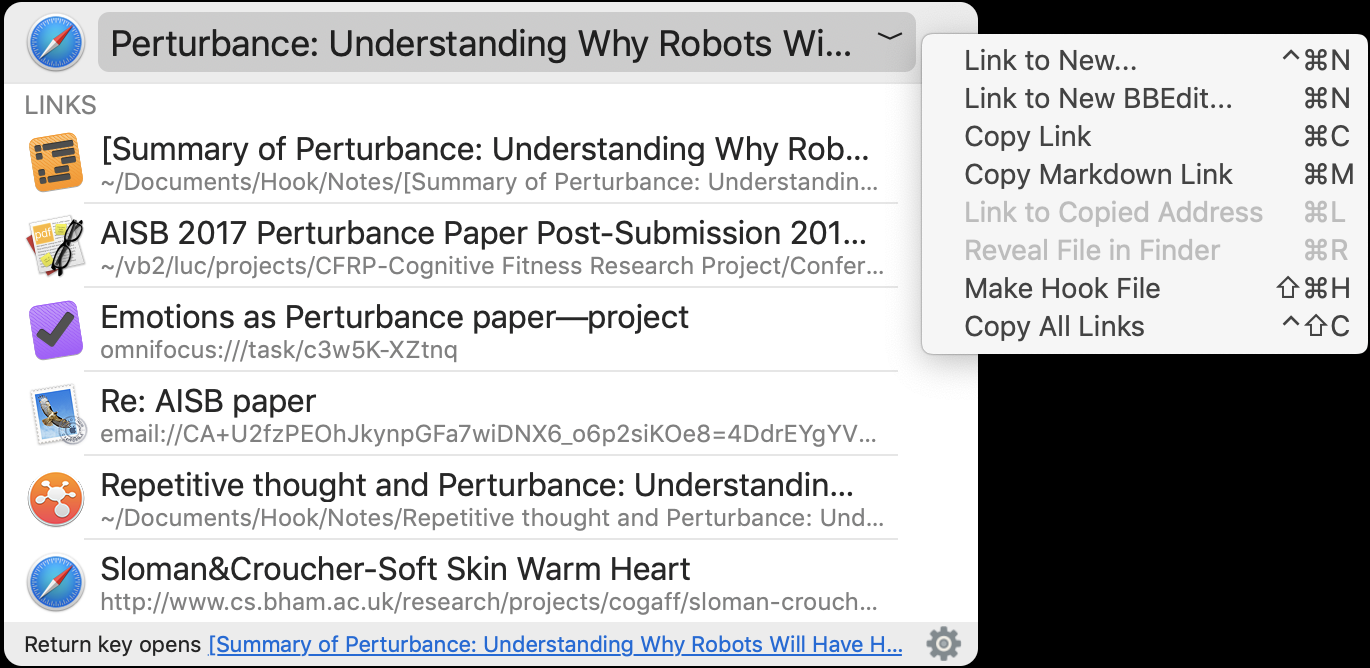
1. Hook's minimalist interface is now maximally compact
2. commands are now intuitively organized in the new Title bar menu and Link menus; and
3. links can now be navigated without leaving the Hook window
Hook intuitively supports your cognitive productivity, whether you use its keyboard shortcuts, popup window, or menu bar icon.
The benefits of linking brought to the desktop: "Users tacitly appreciate the revolutionary benefits of web links" shares CogSci Apps co-founder Luc P. Beaudoin. "However, before Hook, people were not able to link and navigate the information that matters most to their productivity: documents they are writing; documents they've received or downloaded into the Finder; files in the cloud, version control systems, and personal information managers; their emails, projects, actions and more. Without such links users could not, in a timely manner, consult the information they needed to get their work done right and fast. With Hook, users can link and access just about any key information, across apps. That changes everything."
Beaudoin specifies, "Hook does not replace your favorite apps, it makes them much more useful: Hook links their data so that you can use them together." For example, while writing in their favorite editor or word processor, users can invoke Hook, and click on a link to a related email, PDF or task list. Hook links are bidirectional, so users can quickly navigate back to the document. This means they can write better and faster. That's cognitive productivity. We all know how useful links are on the web" says Beaudoin. "Imagine how useful it is to access, at the click of a link, the information you need right now, even if it is in an app or a file on your Mac."
Collaborate productively: "Hook is not just for solo work" adds Beaudoin. "Hook is also a collaborative tool. With Hook, users can copy links to emails, shared files and of course web pages. They can then send the links." The recipient clicks on the link and the shared file is revealed on their desktop. "Obviously, recipients are much more likely to act on a prior email or document if they can instantly access it. Both colleagues win."
Elegant, minimalist, easy to use:
Hook provides a very simple, uniform gesture ("Copy Link") for obtaining the address of resources, whether they're in the Finder, the cloud, the web or an app. Users can paste links just about anywhere, including in the Hook window itself.
In a nutshell:
Hook enables users to instantly re-access the information they need to get the job done right, now. "Hook links your digital life."
System Requirements:
* macOS 10.12.6 or Higher
* macOS 10.15 Catalina Compatible
* 8.2 MB
## Pricing and Availability:
Hook Essentials is $14.99 USD (or an equivalent amount in other currencies). Hook Pro is priced at $19.99 USD until Nov 19, after which the price increases to $24.99. Hook Pro has all the features of Hook Essentials, but also enables users to generate Markdown links, make Hook files, edit integration scripts, generate search links, and install and use Hook on more Macs. Both versions include software updates for one year and are available worldwide exclusively at the Hook website. A 30-day Pro trial is available. Subsequent one-year software updates will be available at a discount of the original purchase price. See the Hook Productivity website for details.
Hook 1.3: https://hookproductivity.com
The Benefits of Hook : https://hookproductivity.com/benefits
Download Hook: https://hookproductivity.com/download
Purchase: https://hookproductivity.com/buy
Screenshot: https://hookproductivity.com/wp-content/uploads/2019/11/Hook-window-title-menu.png
Application Icon: https://hookproductivity.com/wp-content/uploads/2018/11/Asset-512.png
Headquartered in BC, Canada, CogSci Apps Corp. is a unique corporation, in that its products are novel inventions based on cognitive science including co-founder's, Dr Luc P. Beaudoin's, research at Simon Fraser University (Canada) where he is Adjunct Professor of Cognitive Science and of Education. CogSci Apps inventions address very specific pain points with innovative strategies tailored to the human mind. Beaudoin is the author of Cognitive Productivity books, on which Hook productivity is also based. He also developed the cognitive shuffle which led to mySleepButton(R). CogSci Apps' and Beaudoin's innovations have been described in Forbes Magazine, KK.org's Cool Tools, The New York Times, Cult of Mac, The International Business Times of London, Inc.com, Quartz, The Guardian, Lifehacker, Popular Science, CBC, and elsewhere. All Material and Software (C) Copyright 2019 CogSci Apps Corp. All Rights Reserved. Apple, the Apple logo, Macintosh Mac OS X and macOS are registered
trademarks of Apple Inc. in the U.S. and/or other countries. Other trademarks and registered trademarks may be the property of their respective owners.
*******
Link To Article: https://prmac.com/release-id-83754.htm
*******
---------------------------------------------------------------------------------
Note that you can alter delivered distributions at any time.
Login to your account on prMac to alter your channel selection, or to opt-out at any time.
CogSci Apps releases version 1.3 of Hook productivity app for macOS - Published on 11/06/19
Canadian indie development team, CogSci Apps Corp., today announces a major upgrade to their Hook productivity app for macOS. Hook enables users to instantly re-access the information needed to get the job done right, now. Hook 1.3 sports a minimalist, highly intuitive user interface. Users can now navigate pertinent, linked information directly in Hook. Hook's commands are now organized in three elegant menus with intuitive keyboard shortcuts. Hook links your digital life.
Metro - Vancouver. Canada - Independent development team, CogSci Apps Corp is today delighted to announce the release and immediate availability of Hook 1.3, a major upgrade to the handy CogSci Apps(R) invention for macOS. Hook's simple interface but powerful features have made it a must-have app for people who take productivity seriously. Hook is designed to help people work smarter, more efficiently, and more intuitively. It applies a key insight about cognitive productivity: deep work requires rapidly re-accessing pertinent information without searching. Hook's fast and efficient recall of task-related information allows users to stay in flow as they instantly access critical but scattered information.
Hook is an elegant, minimalist app that enables Mac users to link manifold information resources together - including web pages, files, documents, images, emails, contacts, tasks, notes, and much more. To see a document's related links and resources, the user simply needs to activate a keyboard shortcut or click a button. This saves users hours of possibly futile searching for information scattered on the web, in folders and in disparate apps. Hook is a crucial app for busy professionals who need to quickly access information with macOS.
The version released today, Hook 1.3, sports a user interface that is even clearer and more intuitive.
1. Hook's minimalist interface is now maximally compact
2. commands are now intuitively organized in the new Title bar menu and Link menus; and
3. links can now be navigated without leaving the Hook window
Hook intuitively supports your cognitive productivity, whether you use its keyboard shortcuts, popup window, or menu bar icon.
The benefits of linking brought to the desktop: "Users tacitly appreciate the revolutionary benefits of web links" shares CogSci Apps co-founder Luc P. Beaudoin. "However, before Hook, people were not able to link and navigate the information that matters most to their productivity: documents they are writing; documents they've received or downloaded into the Finder; files in the cloud, version control systems, and personal information managers; their emails, projects, actions and more. Without such links users could not, in a timely manner, consult the information they needed to get their work done right and fast. With Hook, users can link and access just about any key information, across apps. That changes everything."
Beaudoin specifies, "Hook does not replace your favorite apps, it makes them much more useful: Hook links their data so that you can use them together." For example, while writing in their favorite editor or word processor, users can invoke Hook, and click on a link to a related email, PDF or task list. Hook links are bidirectional, so users can quickly navigate back to the document. This means they can write better and faster. That's cognitive productivity. We all know how useful links are on the web" says Beaudoin. "Imagine how useful it is to access, at the click of a link, the information you need right now, even if it is in an app or a file on your Mac."
Collaborate productively: "Hook is not just for solo work" adds Beaudoin. "Hook is also a collaborative tool. With Hook, users can copy links to emails, shared files and of course web pages. They can then send the links." The recipient clicks on the link and the shared file is revealed on their desktop. "Obviously, recipients are much more likely to act on a prior email or document if they can instantly access it. Both colleagues win."
Elegant, minimalist, easy to use:
Hook provides a very simple, uniform gesture ("Copy Link") for obtaining the address of resources, whether they're in the Finder, the cloud, the web or an app. Users can paste links just about anywhere, including in the Hook window itself.
In a nutshell:
Hook enables users to instantly re-access the information they need to get the job done right, now. "Hook links your digital life."
System Requirements:
* macOS 10.12.6 or Higher
* macOS 10.15 Catalina Compatible
* 8.2 MB
## Pricing and Availability:
Hook Essentials is $14.99 USD (or an equivalent amount in other currencies). Hook Pro is priced at $19.99 USD until Nov 19, after which the price increases to $24.99. Hook Pro has all the features of Hook Essentials, but also enables users to generate Markdown links, make Hook files, edit integration scripts, generate search links, and install and use Hook on more Macs. Both versions include software updates for one year and are available worldwide exclusively at the Hook website. A 30-day Pro trial is available. Subsequent one-year software updates will be available at a discount of the original purchase price. See the Hook Productivity website for details.
Hook 1.3: https://hookproductivity.com
The Benefits of Hook : https://hookproductivity.com/benefits
Download Hook: https://hookproductivity.com/download
Purchase: https://hookproductivity.com/buy
Screenshot: https://hookproductivity.com/wp-content/uploads/2019/11/Hook-window-title-menu.png
Application Icon: https://hookproductivity.com/wp-content/uploads/2018/11/Asset-512.png

Headquartered in BC, Canada, CogSci Apps Corp. is a unique corporation, in that its products are novel inventions based on cognitive science including co-founder's, Dr Luc P. Beaudoin's, research at Simon Fraser University (Canada) where he is Adjunct Professor of Cognitive Science and of Education. CogSci Apps inventions address very specific pain points with innovative strategies tailored to the human mind. Beaudoin is the author of Cognitive Productivity books, on which Hook productivity is also based. He also developed the cognitive shuffle which led to mySleepButton(R). CogSci Apps' and Beaudoin's innovations have been described in Forbes Magazine, KK.org's Cool Tools, The New York Times, Cult of Mac, The International Business Times of London, Inc.com, Quartz, The Guardian, Lifehacker, Popular Science, CBC, and elsewhere. All Material and Software (C) Copyright 2019 CogSci Apps Corp. All Rights Reserved. Apple, the Apple logo, Macintosh Mac OS X and macOS are registered
trademarks of Apple Inc. in the U.S. and/or other countries. Other trademarks and registered trademarks may be the property of their respective owners.
*******
Link To Article: https://prmac.com/release-id-83754.htm
*******
---------------------------------------------------------------------------------
Note that you can alter delivered distributions at any time.
Login to your account on prMac to alter your channel selection, or to opt-out at any time.
Subscribe to:
Posts (Atom)